ignition ACURA RL KA9 1996 Service User Guide
[x] Cancel search | Manufacturer: ACURA, Model Year: 1996, Model line: RL KA9, Model: ACURA RL KA9 1996Pages: 1954, PDF Size: 61.44 MB
Page 157 of 1954
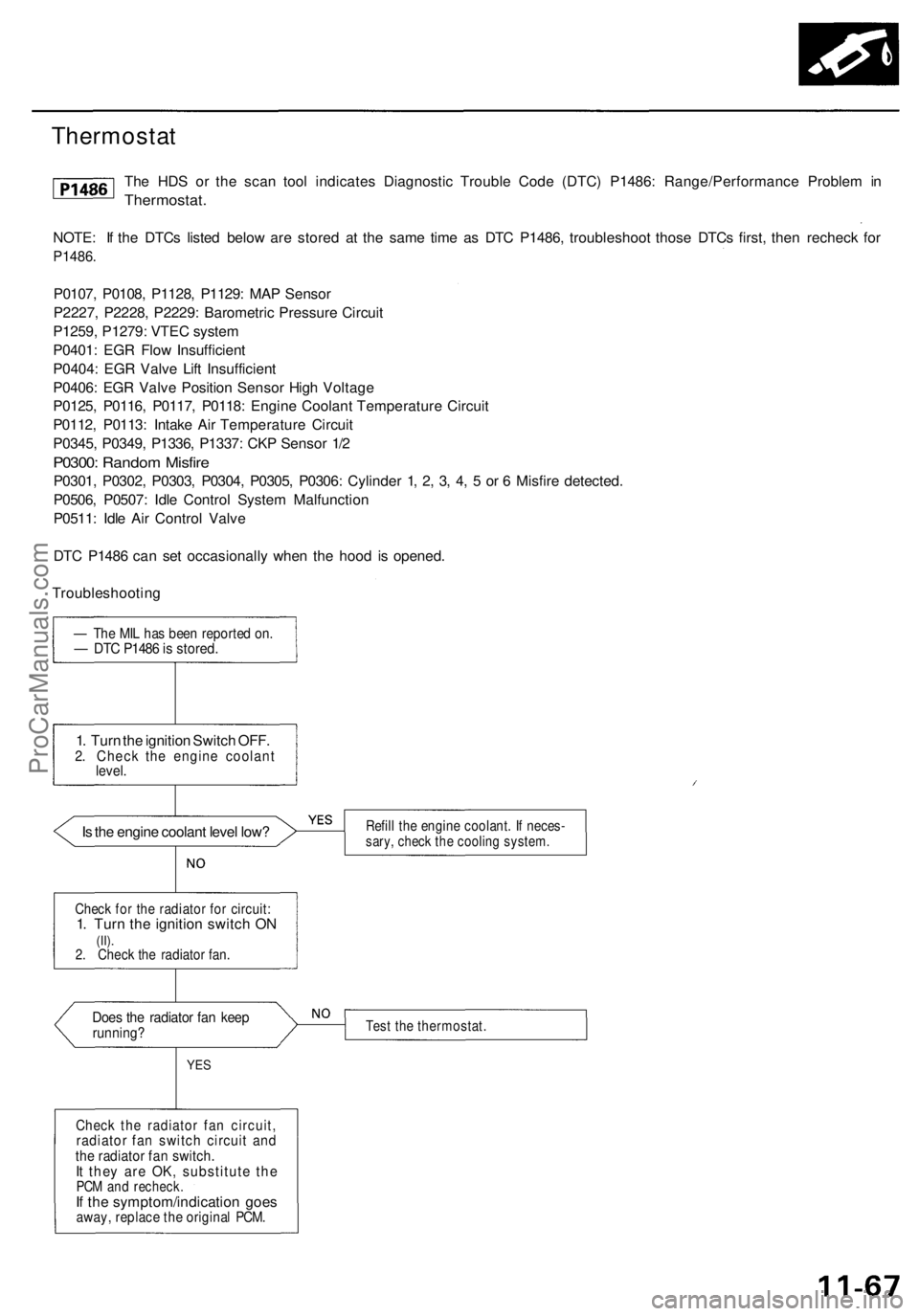
Thermostat
The HDS or the scan tool indicates Diagnostic Trouble Code (DTC) P1486: Range/Performance Problem in
Thermostat.
NOTE: If the DTCs listed below are stored at the same time as DTC P1486, troubleshoot those DTCs first, then recheck for
P1486.
P0107, P0108, P1128, P1129: MAP Sensor
P2227, P2228, P2229: Barometric Pressure Circuit
P1259, P1279: VTEC system
P0401: EGR Flow Insufficient
P0404: EGR Valve Lift Insufficient
P0406: EGR Valve Position Sensor High Voltage
P0125, P0116, P0117, P0118: Engine Coolant Temperature Circuit
P0112, P0113: Intake Air Temperature Circuit
P0345, P0349, P1336, P1337: CKP Sensor 1/2
P0300: Random Misfire
P0301, P0302, P0303, P0304, P0305, P0306: Cylinder 1, 2, 3, 4, 5 or 6 Misfire detected.
P0506, P0507: Idle Control System Malfunction
P0511: Idle Air Control Valve
DTC P1486 can set occasionally when the hood is opened.
Troubleshooting
— The MIL has been reported on.
— DTC P1486 is stored.
1. Turn the ignition Switch OFF.
2. Check the engine coolant
level.
Is the engine coolant level low?
Does the radiator fan keep
running?
YES
Check the radiator fan circuit,
radiator fan switch circuit and
the radiator fan switch.
It they are OK, substitute the
PCM and recheck.
If the symptom/indication goes
away, replace the original PCM.
Refill the engine coolant. If neces-
sary, check the cooling system.
Test the thermostat.
Check for the radiator for circuit:
1. Turn the ignition switch ON
(II).
2. Check the radiator fan.ProCarManuals.com
Page 159 of 1954
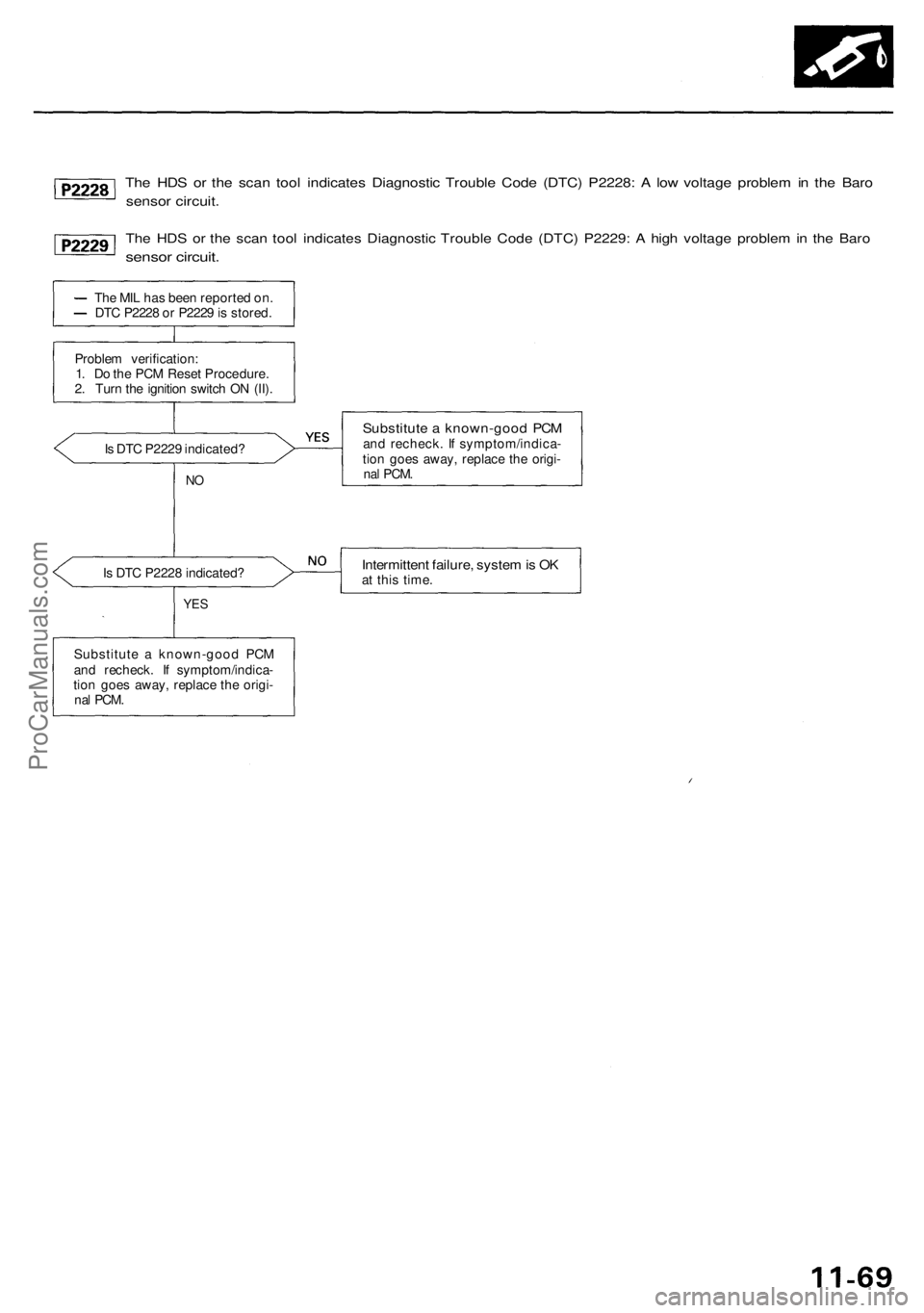
The HDS or the scan tool indicates Diagnostic Trouble Code (DTC) P2228: A low voltage problem in the Baro
sensor circuit.
The HDS or the scan tool indicates Diagnostic Trouble Code (DTC) P2229: A high voltage problem in the Baro
sensor circuit.
The MIL has been reported on.
DTC P2228 or P2229 is stored.
Problem verification:
1. Do the PCM Reset Procedure.
2. Turn the ignition switch ON (II).
Is DTC P2229 indicated?
NO
Is DTC P2228 indicated?
YES
Substitute a known-good PCM
and recheck. If symptom/indica-
tion goes away, replace the origi-
nal
PCM.
Substitute a known-good PCM
and recheck. If symptom/indica-
tion goes away, replace the origi-
nal
PCM.
Intermittent failure, system is OK
at this time.ProCarManuals.com
Page 177 of 1954
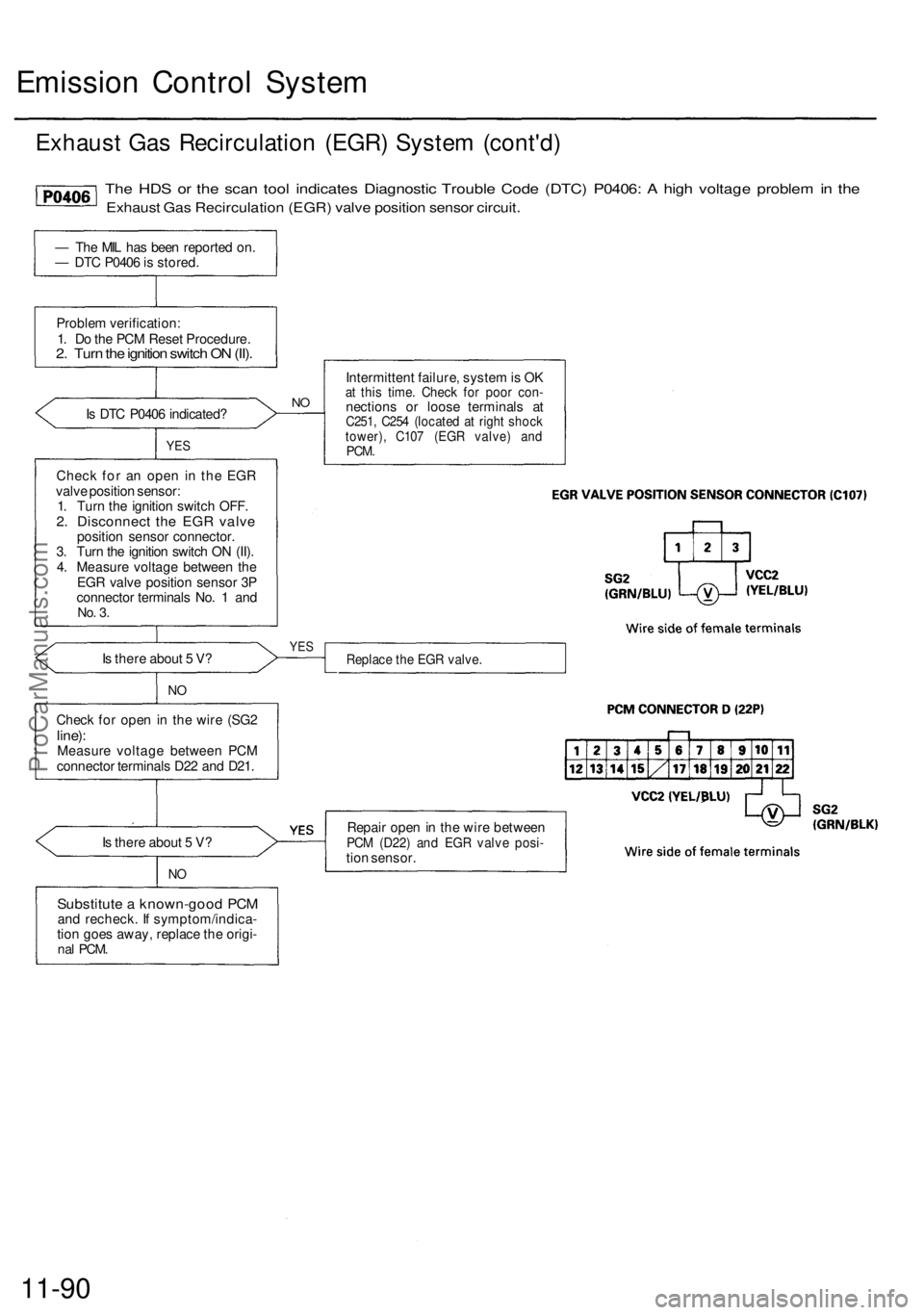
Emission Control System
Exhaust Gas Recirculation (EGR) System (cont'd)
The HDS or the scan tool indicates Diagnostic Trouble Code (DTC) P0406: A high voltage problem in the
Exhaust Gas Recirculation (EGR) valve position sensor circuit.
— The MIL has been reported on.
— DTC P0406 is stored.
Problem verification:
1. Do the PCM Reset Procedure.
2. Turn the ignition switch ON (II).
Is DTC P0406 indicated?
YES
Check for an open in the EGR
valve position sensor:
1. Turn the ignition switch OFF.
2. Disconnect the EGR valve
position sensor connector.
3. Turn the ignition switch ON (II).
4. Measure voltage between the
EGR valve position sensor 3P
connector terminals No. 1 and
No. 3.
Is there about 5 V?
NO
Check for open in the wire (SG2
line):
Measure voltage between PCM
connector terminals D22 and D21.
Is there about 5 V?
NO
Substitute a known-good PCM
and recheck. If symptom/indica-
tion goes away, replace the origi-
nal
PCM.
NO
Intermittent failure, system is OK
at this time. Check for poor con-
nections or loose terminals at
C251, C254 (located at right shock
tower), C107 (EGR valve) and
PCM.
YES
Replace the EGR valve.
Repair open in the wire between
PCM (D22) and EGR valve posi-
tion sensor.
11-90ProCarManuals.com
Page 204 of 1954
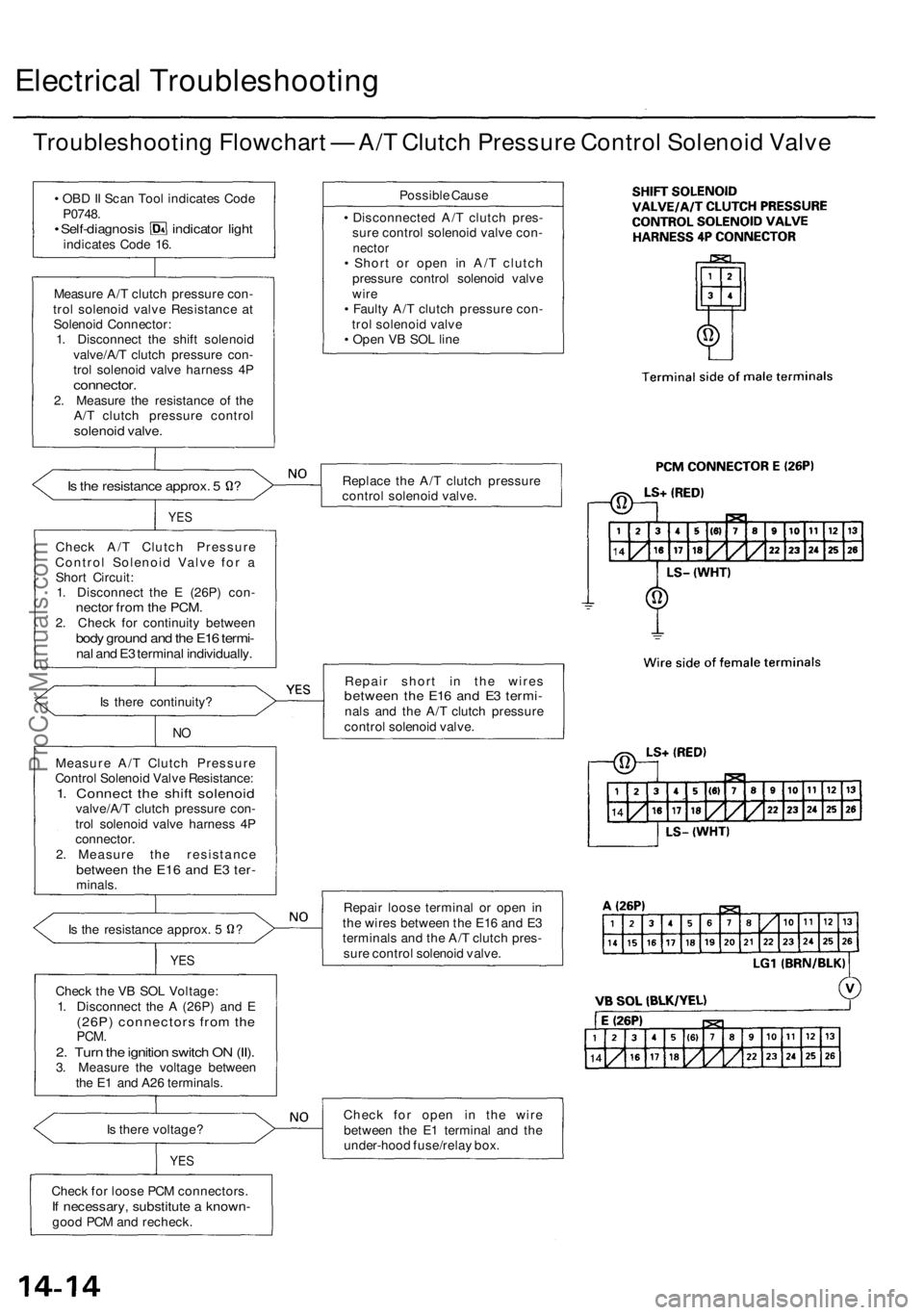
Electrical Troubleshooting
Troubleshooting Flowchart — A/T Clutch Pressure Control Solenoid Valve
• OBD II Scan Tool indicates Code
P0748.
• Self-diagnosis indicator light
indicates Code 16.
Measure A/T clutch pressure con-
trol solenoid valve Resistance at
Solenoid Connector:
1. Disconnect the shift solenoid
valve/A/T clutch pressure con-
trol solenoid valve harness 4P
connector.
2. Measure the resistance of the
A/T clutch pressure control
solenoid valve.
Is the resistance approx. 5 ?
YES
Check A/T Clutch Pressure
Control Solenoid Valve for a
Short Circuit:
1. Disconnect the E (26P) con-
nector from the PCM.
2. Check for continuity between
body ground and the E16 termi-
nal and E3 terminal individually.
Is there continuity?
NO
Measure A/T Clutch Pressure
Control Solenoid Valve Resistance:
1. Connect the shift solenoid
valve/A/T clutch pressure con-
trol solenoid valve harness 4P
connector.
2. Measure the resistance
between the E16 and E3 ter-
minals.
Is the resistance approx. 5 ?
YES
Check the VB SOL Voltage:
1. Disconnect the A (26P) and E
(26P) connectors from the
PCM.
2. Turn the ignition switch ON (II).
3. Measure the voltage between
the E1 and A26 terminals.
Is there voltage?
YES
Check for loose PCM connectors.
If necessary, substitute a known-
good PCM and recheck.
Possible Cause
• Disconnected A/T clutch pres-
sure control solenoid valve con-
nector
• Short or open in A/T clutch
pressure control solenoid valve
wire
• Faulty A/T clutch pressure con-
trol solenoid valve
• Open VB SOL line
Replace the A/T clutch pressure
control solenoid valve.
Repair short in the wires
between the E16 and E3 termi-
nals and the A/T clutch pressure
control solenoid valve.
Repair loose terminal or open in
the wires between the E16 and E3
terminals and the A/T clutch pres-
sure control solenoid valve.
Check for open in the wire
between the E1 terminal and the
under-hood fuse/relay box.ProCarManuals.com
Page 223 of 1954
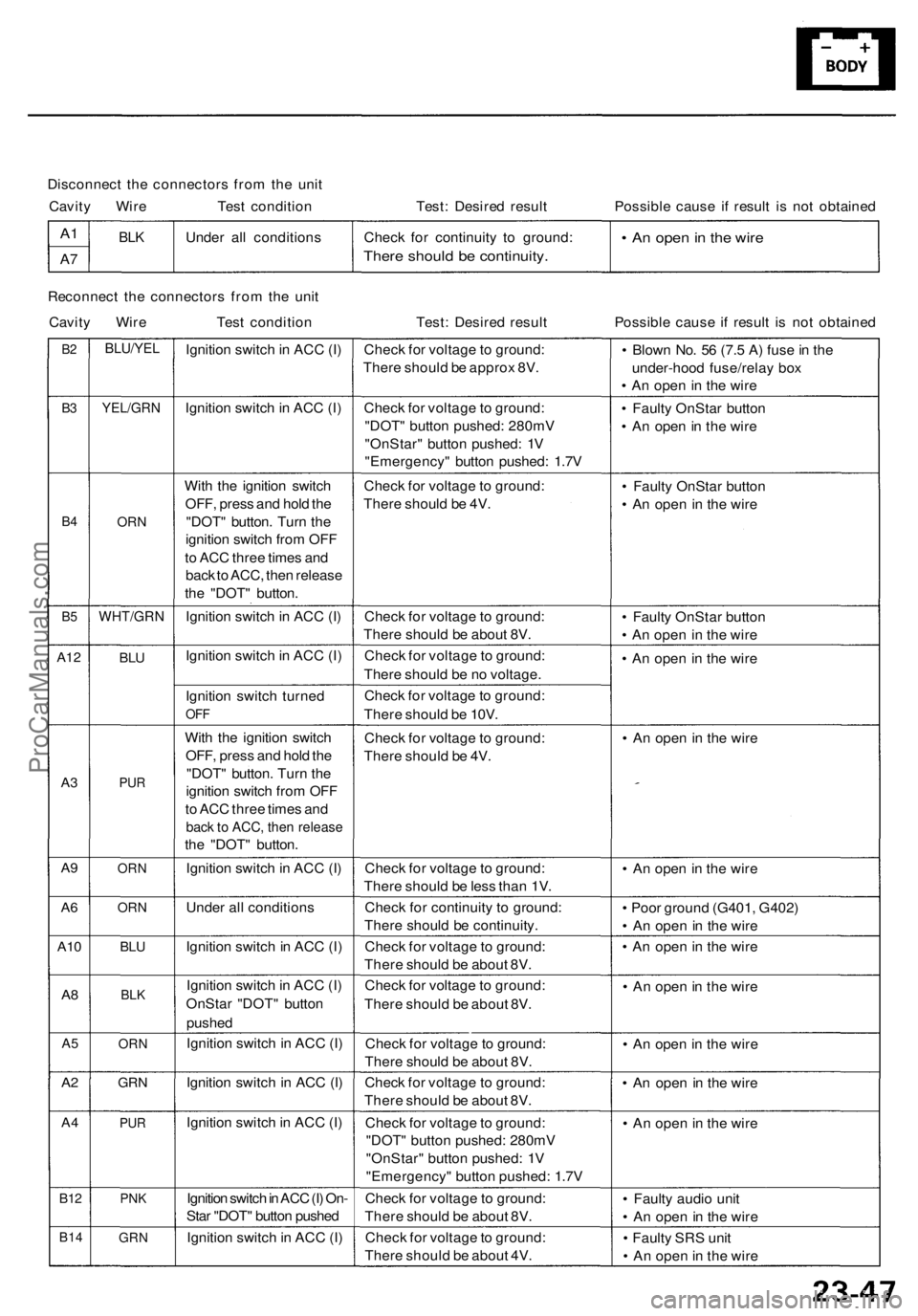
Disconnect the connectors from the unit
Cavity Wire Test condition
Test: Desired result
Possible cause if result is not obtained
A1
A7
BLK
Under all conditions
Check for continuity to ground:
There should be continuity.
• An open in the wire
Reconnect the connectors from the unit
Cavity Wire Test condition
Test: Desired result
Possible cause if result is not obtained
B2
B3
B4
B5
A12
A3
A9
A6
A10
A8
A5
A2
A4
B12
B14
BLU/YEL
YEL/GRN
ORN
WHT/GRN
BLU
PUR
ORN
ORN
BLU
BLK
ORN
GRN
PUR
PNK
GRN
Ignition switch in ACC (I)
Ignition switch in ACC (I)
With the ignition switch
OFF, press and hold the
"DOT" button. Turn the
ignition switch from OFF
to ACC three times and
back to ACC, then release
the "DOT" button.
Ignition switch in ACC (I)
Ignition switch in ACC (I)
Ignition switch turned
OFF
With the ignition switch
OFF, press and hold the
"DOT" button. Turn the
ignition switch from OFF
to ACC three times and
back to ACC, then release
the "DOT" button.
Ignition switch in ACC (I)
Under all conditions
Ignition switch in ACC (I)
Ignition switch in ACC (I)
OnStar "DOT" button
pushed
Ignition switch in ACC (I)
Ignition switch in ACC (I)
Ignition switch in ACC (I)
Ignition switch in ACC (I) On-
Star "DOT" button pushed
Ignition switch in ACC (I)
Check for voltage to ground:
There should be approx 8V.
Check for voltage to ground:
"DOT" button pushed: 280mV
"OnStar" button pushed: 1V
"Emergency" button pushed: 1.7V
Check for voltage to ground:
There should be 4V.
Check for voltage to ground:
There should be about 8V.
Check for voltage to ground:
There should be no voltage.
Check for voltage to ground:
There should be 10V.
Check for voltage to ground:
There should be 4V.
Check for voltage to ground:
There should be less than 1V.
Check for continuity to ground:
There should be continuity.
Check for voltage to ground:
There should be about 8V.
Check for voltage to ground:
There should be about 8V.
Check for voltage to ground:
There should be about 8V.
Check for voltage to ground:
There should be about 8V.
Check for voltage to ground:
"DOT" button pushed: 280mV
"OnStar" button pushed: 1V
"Emergency" button pushed: 1.7V
Check for voltage to ground:
There should be about 8V.
Check for voltage to ground:
There should be about 4V.
• Blown No. 56 (7.5 A) fuse in the
under-hood fuse/relay box
• An open in the wire
• Faulty OnStar button
• An open in the wire
• Faulty OnStar button
• An open in the wire
• Faulty OnStar button
• An open in the wire
• An open in the wire
• An open in the wire
• An open in the wire
• Poor ground (G401, G402)
• An open in the wire
• An open in the wire
• An open in the wire
• An open in the wire
• An open in the wire
• An open in the wire
• Faulty audio unit
• An open in the wire
• Faulty SRS unit
• An open in the wireProCarManuals.com
Page 224 of 1954
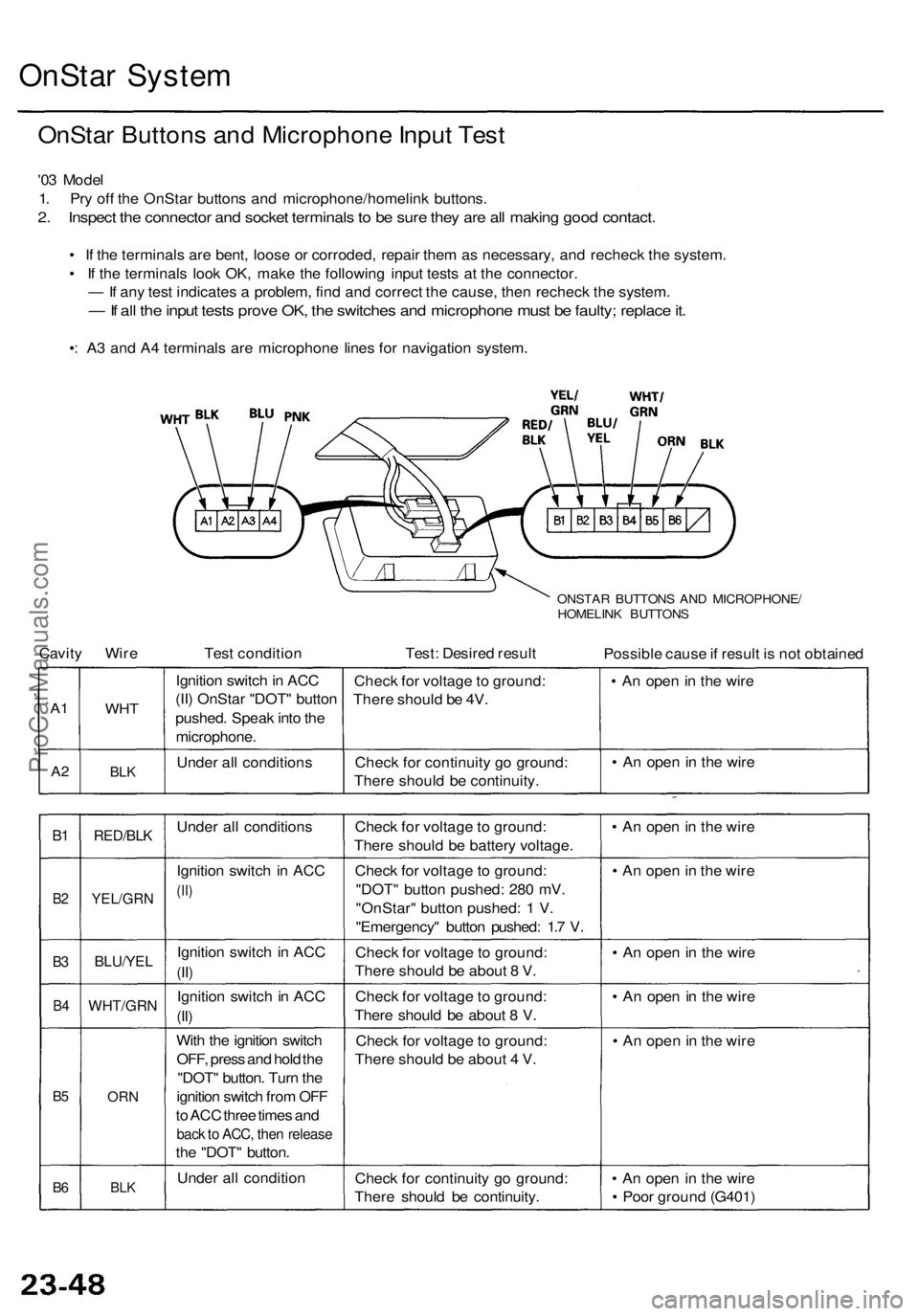
OnStar System
OnStar Buttons and Microphone Input Test
'03 Model
1. Pry off the OnStar buttons and microphone/homelink buttons.
2. Inspect the connector and socket terminals to be sure they are all making good contact.
• If the terminals are bent, loose or corroded, repair them as necessary, and recheck the system.
• If the terminals look OK, make the following input tests at the connector.
— If any test indicates a problem, find and correct the cause, then recheck the system.
— If all the input tests prove OK, the switches and microphone must be faulty; replace it.
•: A3 and A4 terminals are microphone lines for navigation system.
ONSTAR BUTTONS AND MICROPHONE/
HOMELINK BUTTONS
Cavity Wire
Test condition
Test: Desired result
Possible cause if result is not obtained
A1
A2
WHT
BLK
Ignition switch in ACC
(II) OnStar "DOT" button
pushed. Speak into the
microphone.
Under all conditions
Check for voltage to ground:
There should be 4V.
Check for continuity go ground:
There should be continuity.
• An open in the wire
• An open in the wire
B1
B2
B3
B4
B5
B6
RED/BLK
YEL/GRN
BLU/YEL
WHT/GRN
ORN
BLK
Under all conditions
Ignition switch in ACC
(II)
Ignition switch in ACC
(II)
Ignition switch in ACC
(II)
With the ignition switch
OFF, press and hold the
"DOT" button. Turn the
ignition switch from OFF
to ACC three times and
back to ACC, then release
the "DOT" button.
Under all condition
Check for voltage to ground:
There should be battery voltage.
Check for voltage to ground:
"DOT" button pushed: 280 mV.
"OnStar" button pushed: 1 V.
"Emergency" button pushed: 1.7 V.
Check for voltage to ground:
There should be about 8 V.
Check for voltage to ground:
There should be about 8 V.
Check for voltage to ground:
There should be about 4 V.
Check for continuity go ground:
There should be continuity.
• An open in the wire
• An open in the wire
• An open in the wire
• An open in the wire
• An open in the wire
• An open in the wire
• Poor ground (G401)ProCarManuals.com
Page 255 of 1954
- +
BODY
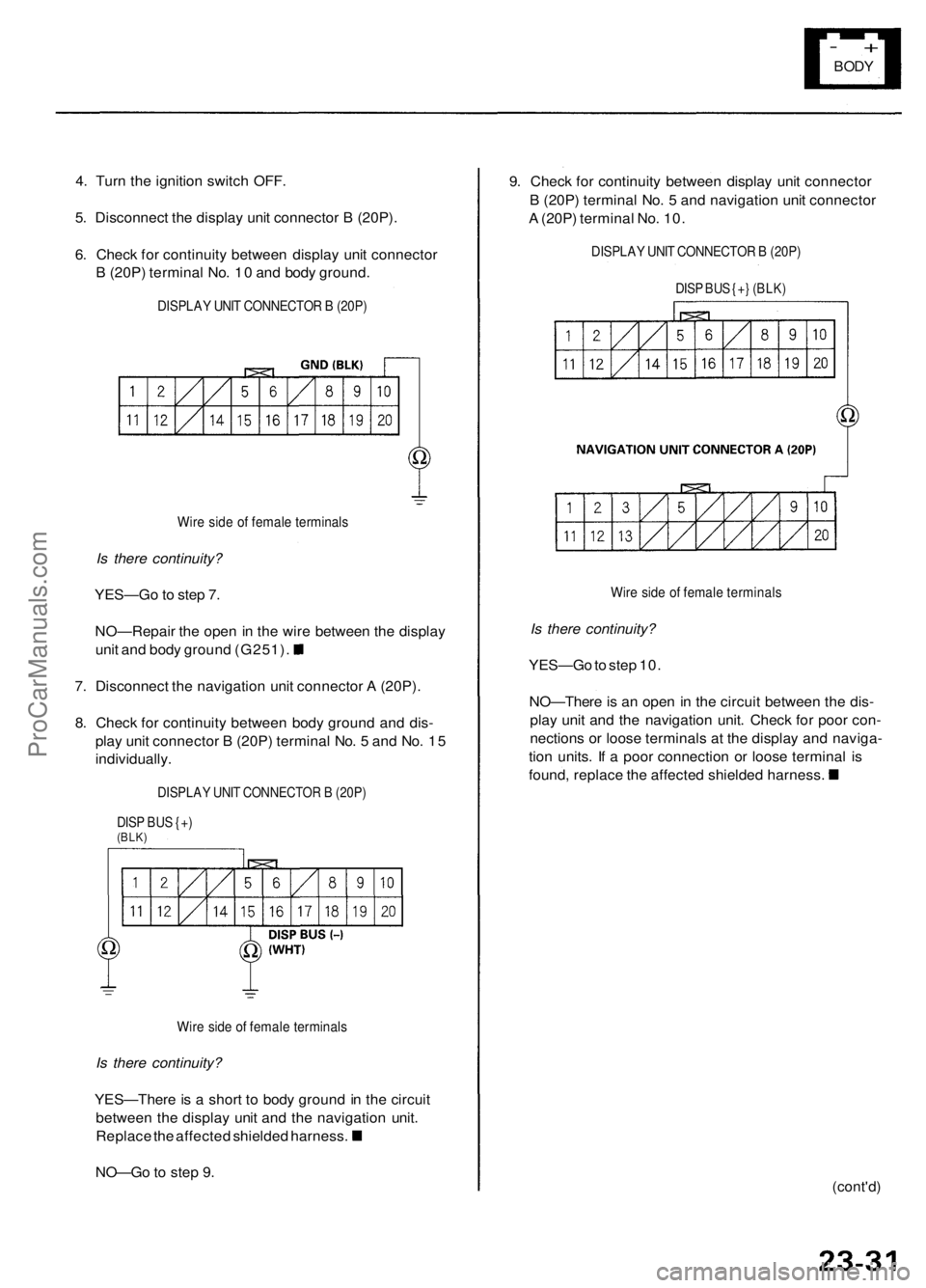
4. Turn the ignition switch OFF.
5. Disconnect the display unit connector B (20P).
6. Check for continuity between display unit connector
B (20P) terminal No. 10 and body ground.
DISPLAY UNIT CONNECTOR B (20P)
Wire side of female terminals
Is there continuity?
YES—Go to step 7.
NO—Repair the open in the wire between the display
unit and body ground (G251).
7. Disconnect the navigation unit connector A (20P).
8. Check for continuity between body ground and dis-
play unit connector B (20P) terminal No. 5 and No. 15
individually.
DISPLAY UNIT CONNECTOR B (20P)
DISP BUS {+)
(BLK)
Wire side of female terminals
Is there continuity?
YES—There is a short to body ground in the circuit
between the display unit and the navigation unit.
Replace the affected shielded harness.
NO—Go to step 9.
9. Check for continuity between display unit connector
B (20P) terminal No. 5 and navigation unit connector
A (20P) terminal No. 10.
DISPLAY UNIT CONNECTOR B (20P)
DISP BUS {+} (BLK)
Wire side of female terminals
Is there continuity?
YES—Go to step 10.
NO—There is an open in the circuit between the dis-
play unit and the navigation unit. Check for poor con-
nections or loose terminals at the display and naviga-
tion units. If a poor connection or loose terminal is
found, replace the affected shielded harness.
(cont'd)ProCarManuals.com
Page 264 of 1954
+
BODY
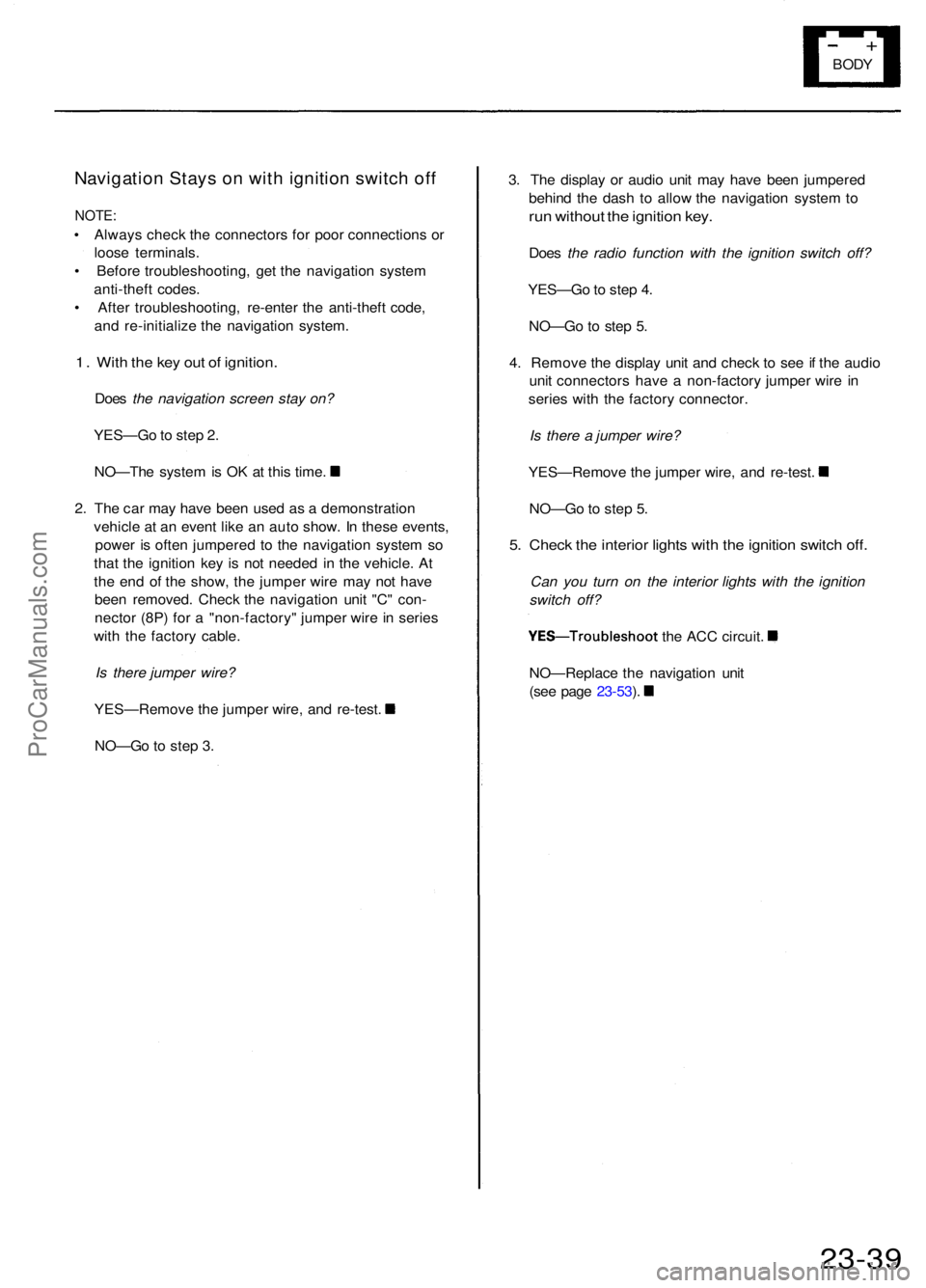
Navigatio n Stay s o n wit h ignitio n switc h of f
NOTE :
• Alway s chec k th e connector s fo r poo r connection s o r
loos e terminals .
• Befor e troubleshooting , ge t th e navigatio n syste m
anti-thef t codes .
• Afte r troubleshooting , re-ente r th e anti-thef t code ,
an d re-initializ e th e navigatio n system .
1. Wit h th e ke y ou t o f ignition .
Does the navigation screen stay on?
YES—G o to ste p 2 .
NO—Th e syste m is O K a t thi s time .
2 . Th e ca r ma y hav e bee n use d a s a demonstratio n
vehicl e a t a n even t lik e a n aut o show . I n thes e events ,
powe r i s ofte n jumpere d t o th e navigatio n syste m s o
tha t th e ignitio n ke y i s no t neede d i n th e vehicle . A t
th e en d o f th e show , th e jumpe r wir e ma y no t hav e
bee n removed . Chec k th e navigatio n uni t "C " con -
necto r (8P ) fo r a "non-factory " jumpe r wir e in serie s
wit h th e factor y cable .
Is there jumper wire?
YES—Remov e th e jumpe r wire , an d re-test .
NO—G o t o ste p 3 . 3
. Th e displa y o r audi o uni t ma y hav e bee n jumpere d
behin d th e das h t o allo w th e navigatio n syste m to
ru n withou t th e ignitio n key .
Doe s the radio function with the ignition switch off?
YES—G o to ste p 4 .
NO—G o t o ste p 5 .
4 . Remov e th e displa y uni t an d chec k t o se e if th e audi o
uni t connector s hav e a non-factor y jumpe r wir e i n
serie s wit h th e factor y connector .
Is there a jumper wire?
YES—Remov e th e jumpe r wire , an d re-test .
NO—G o to ste p 5 .
5. Chec k th e interio r light s wit h th e ignitio n switc h off .
Can you turn on the interior lights with the ignition
switch off?
YES—Troubleshoo t the AC C circuit .
NO—Replac e th e navigatio n uni t
(se e pag e 23-53 ).
23-3 9
ProCarManuals.com
Page 337 of 1954
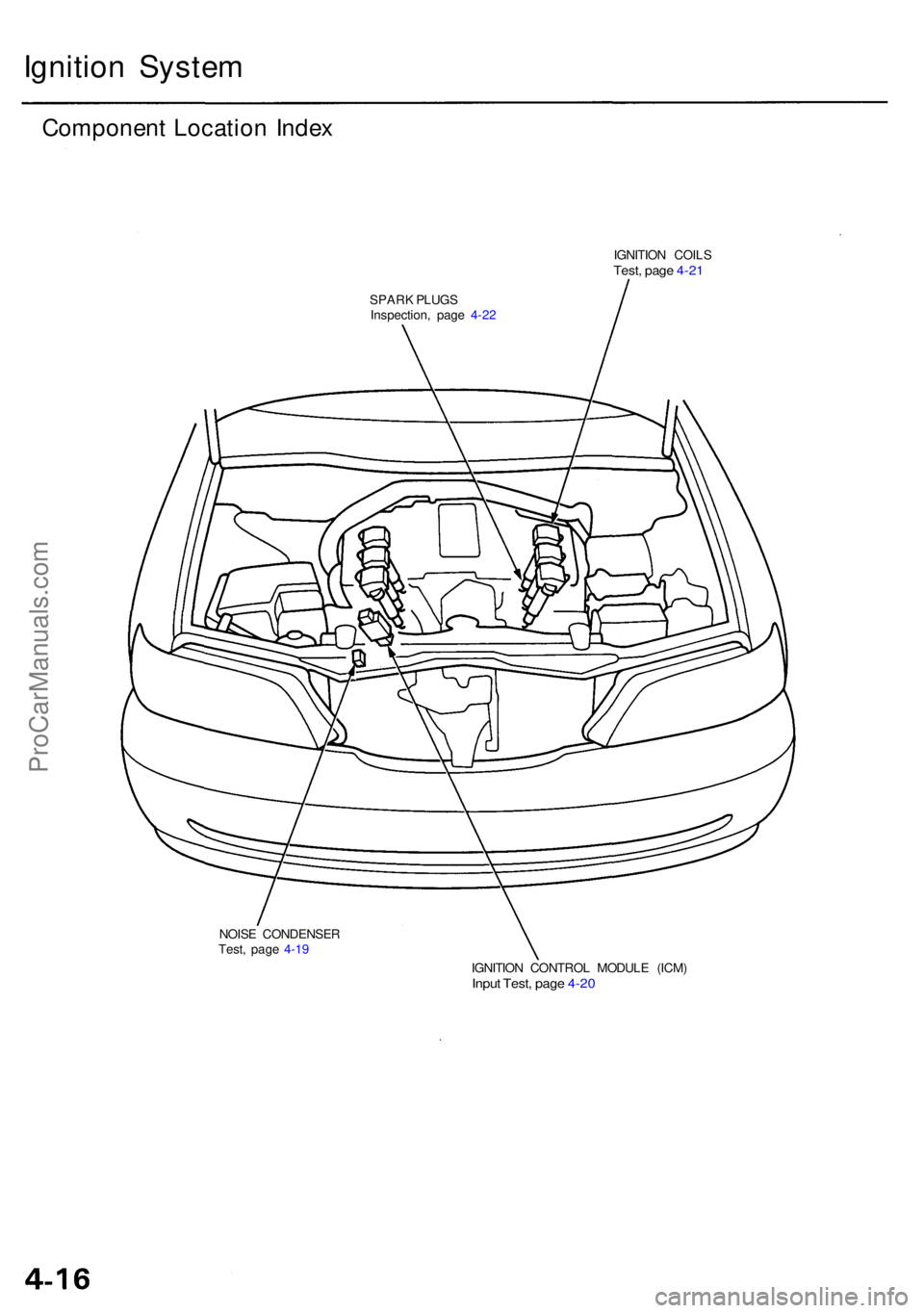
Ignition Syste m
Componen t Locatio n Inde x
IGNITIO N COIL STest, pag e 4-2 1
SPAR K PLUG S
Inspection , pag e 4-2 2
NOIS E CONDENSE R
Test , pag e 4-1 9
IGNITION CONTRO L MODUL E (ICM )
Input Test , pag e 4-2 0
ProCarManuals.com
Page 338 of 1954
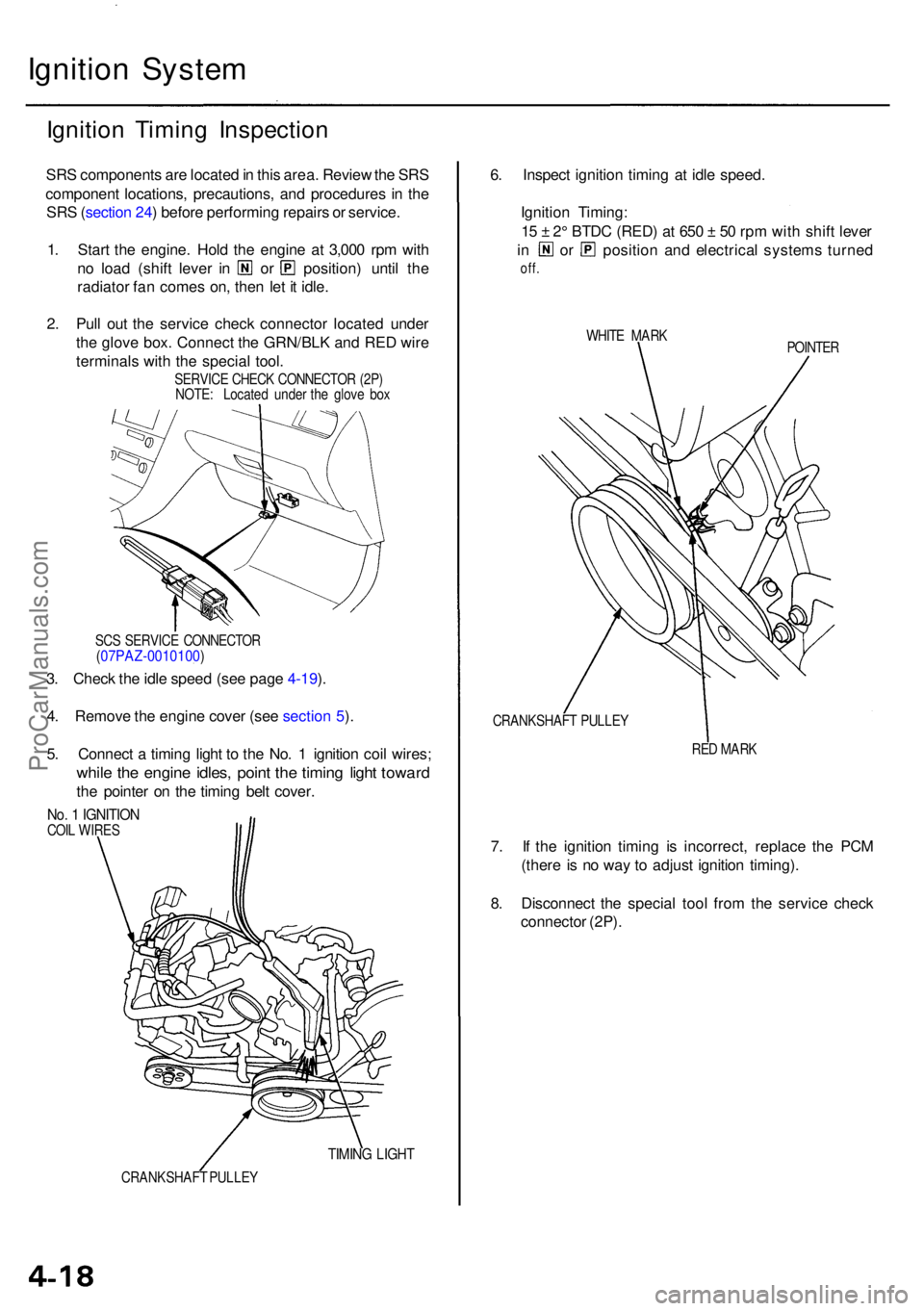
Ignition Syste m
Ignition Timin g Inspectio n
SRS component s ar e locate d in thi s area . Revie w th e SR S
componen t locations , precautions , an d procedure s i n th e
SR S (sectio n 24 ) befor e performin g repair s o r service .
1 . Star t th e engine . Hol d th e engin e a t 3,00 0 rp m wit h
no loa d (shif t leve r i n o r position ) unti l th e
radiato r fa n come s on , the n le t i t idle .
2 . Pul l ou t th e servic e chec k connecto r locate d unde r
th e glov e box . Connec t th e GRN/BL K an d RE D wir e
terminal s wit h th e specia l tool .
SERVIC E CHEC K CONNECTO R (2P )
NOTE : Locate d unde r th e glov e bo x
SC S SERVIC E CONNECTO R
(07PAZ-0010100 )
3. Chec k th e idl e spee d (se e pag e 4-19 ).
4 . Remov e th e engin e cove r (se e sectio n 5 ).
5 . Connec t a timin g ligh t t o th e No . 1 ignitio n coi l wires ;
while th e engin e idles , poin t th e timin g ligh t towar d
the pointe r o n th e timin g bel t cover .
No. 1 IGNITIO NCOIL WIRE S
TIMING LIGH T
CRANKSHAF T PULLE Y
6. Inspec t ignitio n timin g a t idl e speed .
Ignitio n Timing :
1 5 ± 2° BTD C (RED ) a t 65 0 ± 5 0 rp m wit h shif t leve r
in o r positio n an d electrica l system s turne d
off.
WHIT E MAR K
POINTER
CRANKSHAF T PULLE Y
RED MAR K
7. I f th e ignitio n timin g i s incorrect , replac e th e PC M
(ther e i s n o wa y t o adjus t ignitio n timing) .
8 . Disconnec t th e specia l too l fro m th e servic e chec k
connecto r (2P) .
ProCarManuals.com