check engine ACURA TL 1995 Service Manual Online
[x] Cancel search | Manufacturer: ACURA, Model Year: 1995, Model line: TL, Model: ACURA TL 1995Pages: 1771, PDF Size: 62.49 MB
Page 1299 of 1771
Troubleshooting Precautions
ABS Indicator Light:
The ABS indicator light comes on for three seconds and then goes off when the control unit detects no problem during the
initial diagnosis right after the engine starts. However, the ABS indicator light can stay on for up to 40 seconds when the
control unit starts to check for pump overrun, etc. during the initial diagnosis. The ABS indicator light comes on, and the
ABS control unit memorizes the diagnostic trouble code (DTC) under certain conditions.
The parking brake is applied for more than 30 seconds while the vehicle is being driven. (DTC 2-1)
The transmission downshifted excessively. (DTC 4-1, 4-2)
The vehicle loses traction, and the front wheels spin for more than one minute when starting from a stuck condition on
a muddy, snowy, or sandy road. (DTC 4-8)
Tire adhesion is lost due to excessive cornering speed. (DTC 5, 5-4, 5-8)
The vehicle is driven on an extremely rough road. (DTC 8-1)
The vehicle is interfered by strong radio waves (noise), for example, illegal radio, etc. (DTC 8-2)
NOTE: If there is any trouble in the system, the ABS indicator light comes on during driving.
Diagnostic Trouble Code (DTC):
When the control unit detects a problem and the ABS indicator light comes on, the control unit memorizes the DTC.
The control unit has three memory registers. When a problem occurs, the control unit stores the DTC in the first memory
register. If another problem occurs, or the same problem occurs again, the control unit moves the first DTC to the next
memory register, and stores the second DTC in the first register. If there's a third problem occurrence, the two existing
DTCs are moved up one register, and the third DTC is stored in the first register. If problems continue to occur, the oldest
problem is moved out of the last register and lost, and the most recent problem is stored in the first register. When the
same problem occurs three times, the same DTC is stored in all memory registers. (Refer to the Symptom-to-System
Chart for diagnostic period.)
The most recent DTC is indicated first, and the oldest DTC is indicated last.
The DTCs are erased from the control unit when the ABS control unit +B2 power supply or connector is disconnected.
The control unit's memory can be erased by disconnecting the ABS B2 fuse for more than three seconds.
Self-diagnosis:
There are three self-diagnosises described below.
Initial diagnosis: Performed right after the engine starts until the ABS indicator light goes off.
Regular diagnosis: Continuously performed (under some conditions) after the ABS indicator light goes off until the
engine stops.
Individual part/system diagnosis: Diagnosis about a specific part/system under its operating conditions.
The CPU (central processing unit) controls the following when it detects a problem during self-diagnosis:
Turns the ABS indicator light ON.
Turns the front and rear fail-safe relays off.
Stops the ABS control.
Stops the ABS pump. (The pump may work under some conditions.)
After the DTC is stored in the control unit, the CPU stops self-diagnosis.ProCarManuals.com
Page 1300 of 1771
Kickback and Pump Operation:
When the engine is started, the ABS control unit begins the initial diagnosis and operates the solenoid valve one time.
The kickback may be felt when the brake pedal is depressed.
When the ABS control unit detects the pressure switch OFF signal during the initial diagnosis, it operates the pump
motor, and performs the pump motor over-run diagnosis and pump motor diagnosis. Therefore, there are two cases
where the pump motor operates or does not operate after the engine is started.
Normally, after the initial diagnosis, the pump motor operates based on the pressure switch signal, regardless of the
vehicle speed.
Troubleshooting:
When two or three DTCs are stored in the control unit, perform troubleshooting for the DTC that appears first.
When a customer's reported problem cannot be verified on the car, ask the customer about the conditions when the
ABS indicator light came ON, and test-drive the car under those conditions, if possible. When the ABS indicator light
does not come ON during the test, check for loose terminals and check by shaking the harnesses and connectors while
following the flowchart.
The connector terminal numbers are viewed from the wire side for the female terminals, and from the terminal side for
the male terminals.
After the repair is completed, test-drive the car and check that the ABS indicator light does not come ON again during
the test. (Refer to the Symptom-to-System Chart for diagnostic period.)ProCarManuals.com
Page 1302 of 1771
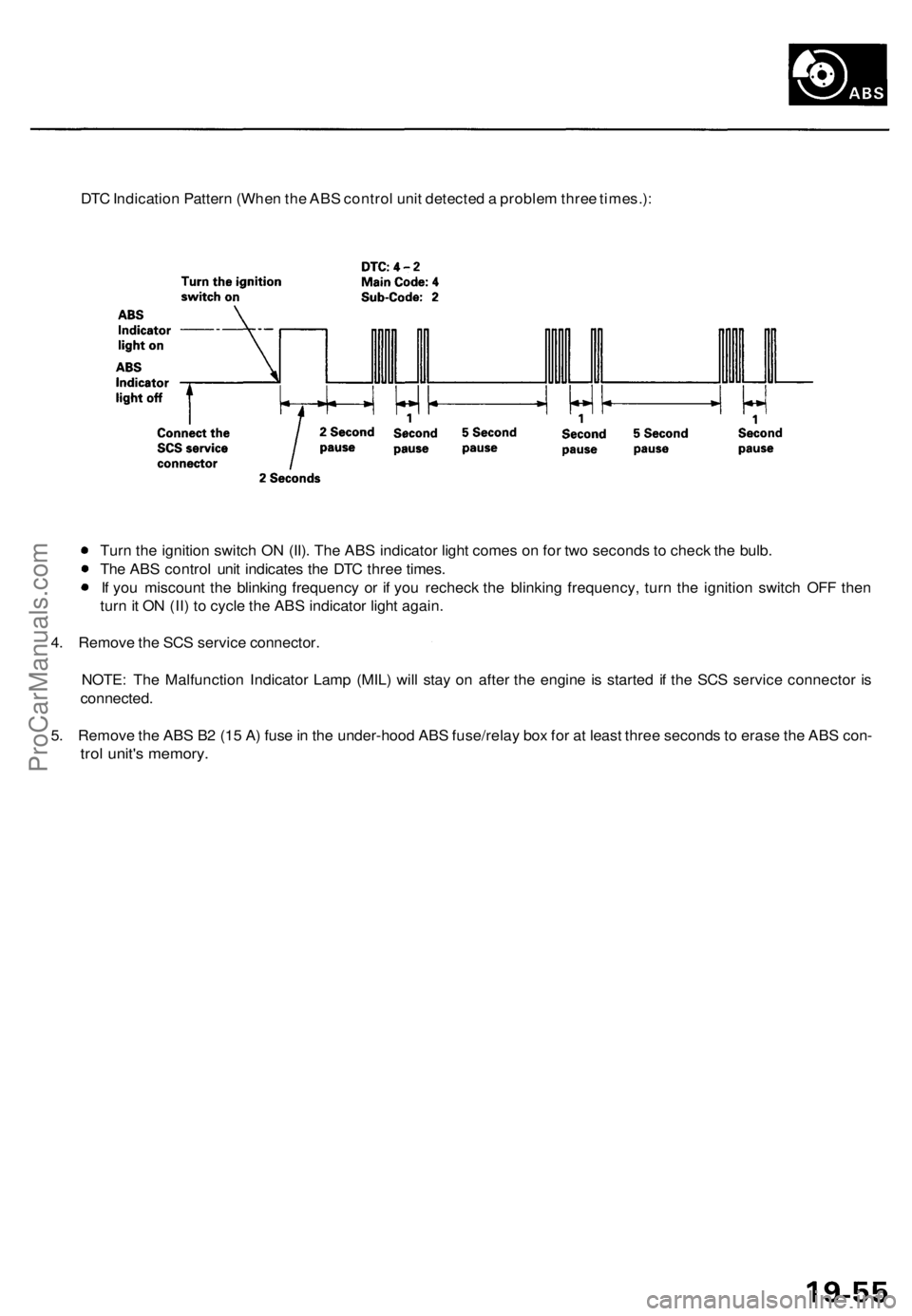
DTC Indication Pattern (When the ABS control unit detected a problem three times.):
Turn the ignition switch ON (II). The ABS indicator light comes on for two seconds to check the bulb.
The ABS control unit indicates the DTC three times.
If you miscount the blinking frequency or if you recheck the blinking frequency, turn the ignition switch OFF then
turn it ON (II) to cycle the ABS indicator light again.
4. Remove the SCS service connector.
NOTE: The Malfunction Indicator Lamp (MIL) will stay on after the engine is started if the SCS service connector is
connected.
5. Remove the ABS B2 (15 A) fuse in the under-hood ABS fuse/relay box for at least three seconds to erase the ABS con-
trol unit's memory.ProCarManuals.com
Page 1307 of 1771
ABS Functio n Tes t
Modulato r Functio n Chec k
NOTE : Thi s inspectio n determine s whethe r th e basi c
brake syste m continue s t o operat e normall y whe n th e
modulato r uni t flui d pressur e i s low .
CAUTION :
Thi s inspectio n i s mad e b y relievin g th e high-pres -
sur e flui d i n th e modulato r uni t an d checkin g fo r
brak e operation . Afte r inspection , b e sur e t o ad d
fres h brak e flui d t o th e specifie d leve l o f th e reser -
voir , an d star t th e engin e t o restor e th e AB S t o it s
norma l operatin g condition .
D o no t spil l brak e flui d o n th e car ; i t ma y damag e th e
paint ; i f brak e flui d doe s contac t th e paint , was h i t
of f immediatel y wit h water .
D o no t reus e th e draine d brak e fluid .
D o no t loose n th e relie f plu g o n th e accumulator .
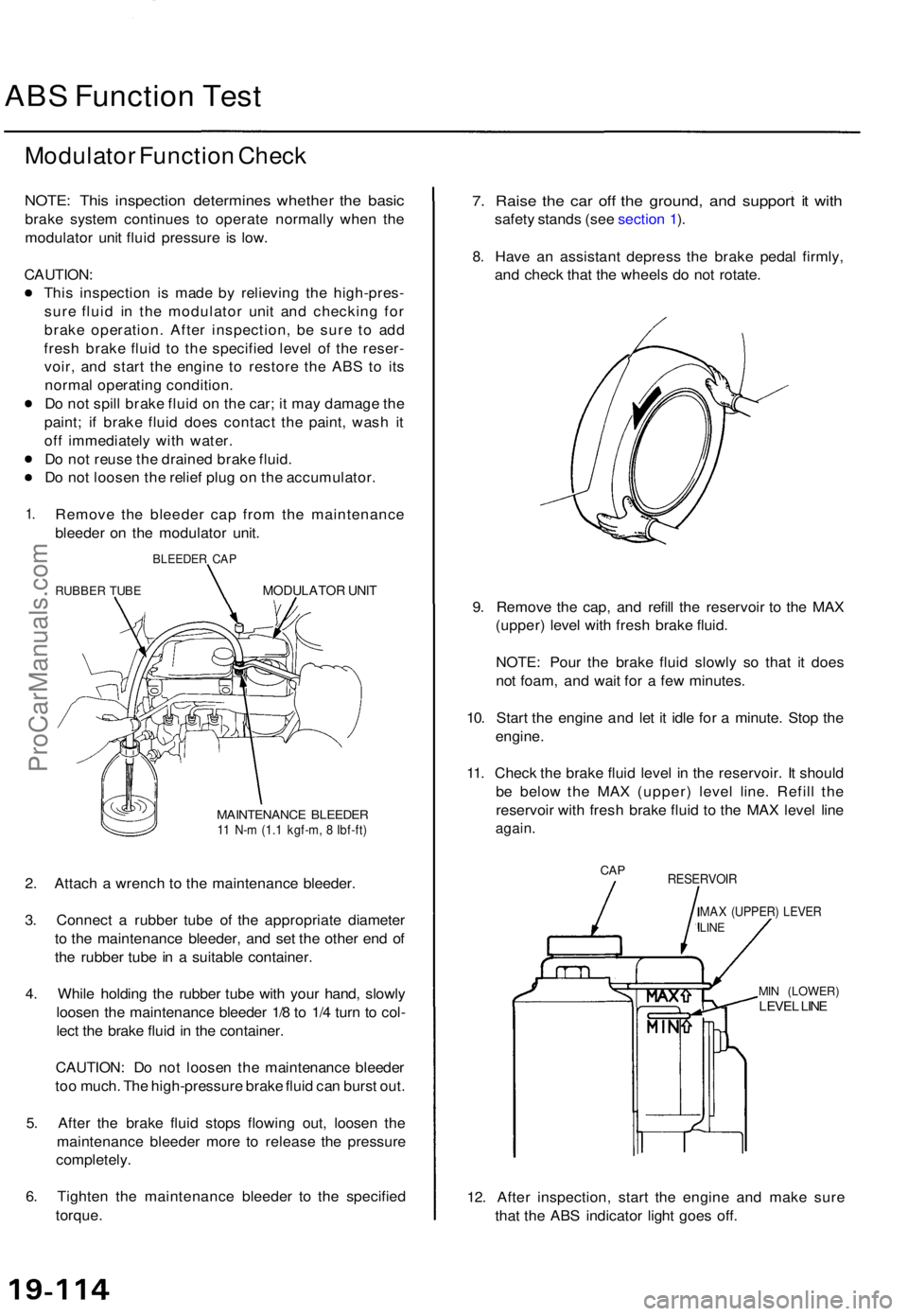
1.Remov e th e bleede r ca p fro m th e maintenanc e
bleede r o n th e modulato r unit .
BLEEDE R CA P
RUBBE R TUB EMODULATO R UNI T
MAINTENANC E BLEEDE R11 N- m (1. 1 kgf-m , 8 Ibf-ft )
2. Attac h a wrenc h t o th e maintenanc e bleeder .
3 . Connec t a rubbe r tub e o f th e appropriat e diamete r
t o th e maintenanc e bleeder , an d se t th e othe r en d o f
th e rubbe r tub e in a suitabl e container .
4 . Whil e holdin g th e rubbe r tub e wit h you r hand , slowl y
loose n th e maintenanc e bleede r 1/ 8 to 1/ 4 tur n t o col -
lec t th e brak e flui d in th e container .
CAUTION : D o no t loose n th e maintenanc e bleede r
to o much . Th e high-pressur e brak e flui d ca n burs t out .
5 . Afte r th e brak e flui d stop s flowin g out , loose n th e
maintenanc e bleede r mor e t o releas e th e pressur e
completely .
6 . Tighte n th e maintenanc e bleede r t o th e specifie d
torque .
7. Rais e th e ca r of f th e ground , an d suppor t i t wit h
safet y stand s (se e sectio n 1 ).
8 .Hav e a n assistan t depres s th e brak e peda l firmly ,
an d chec k tha t th e wheel s d o no t rotate .
9 . Remov e th e cap , an d refil l th e reservoi r t o th e MA X
(upper ) leve l wit h fres h brak e fluid .
NOTE : Pou r th e brak e flui d slowl y s o tha t i t doe s
no t foam , an d wai t fo r a fe w minutes .
10 . Star t th e engin e an d le t i t idl e fo r a minute . Sto p th e
engine .
11 . Chec k th e brak e flui d leve l i n th e reservoir . I t shoul d
b e belo w th e MA X (upper ) leve l line . Refil l th e
reservoi r wit h fres h brak e flui d t o th e MA X leve l lin e
again .
CAPRESERVOI R
MAX (UPPER ) LEVE RLINE
MIN (LOWER )LEVEL LIN E
12. Afte r inspection , star t th e engin e an d mak e sur e
tha t th e AB S indicato r ligh t goe s off .
ProCarManuals.com
Page 1312 of 1771
Modulator Uni t
Removal/Installatio n (cont'd )
Installation :
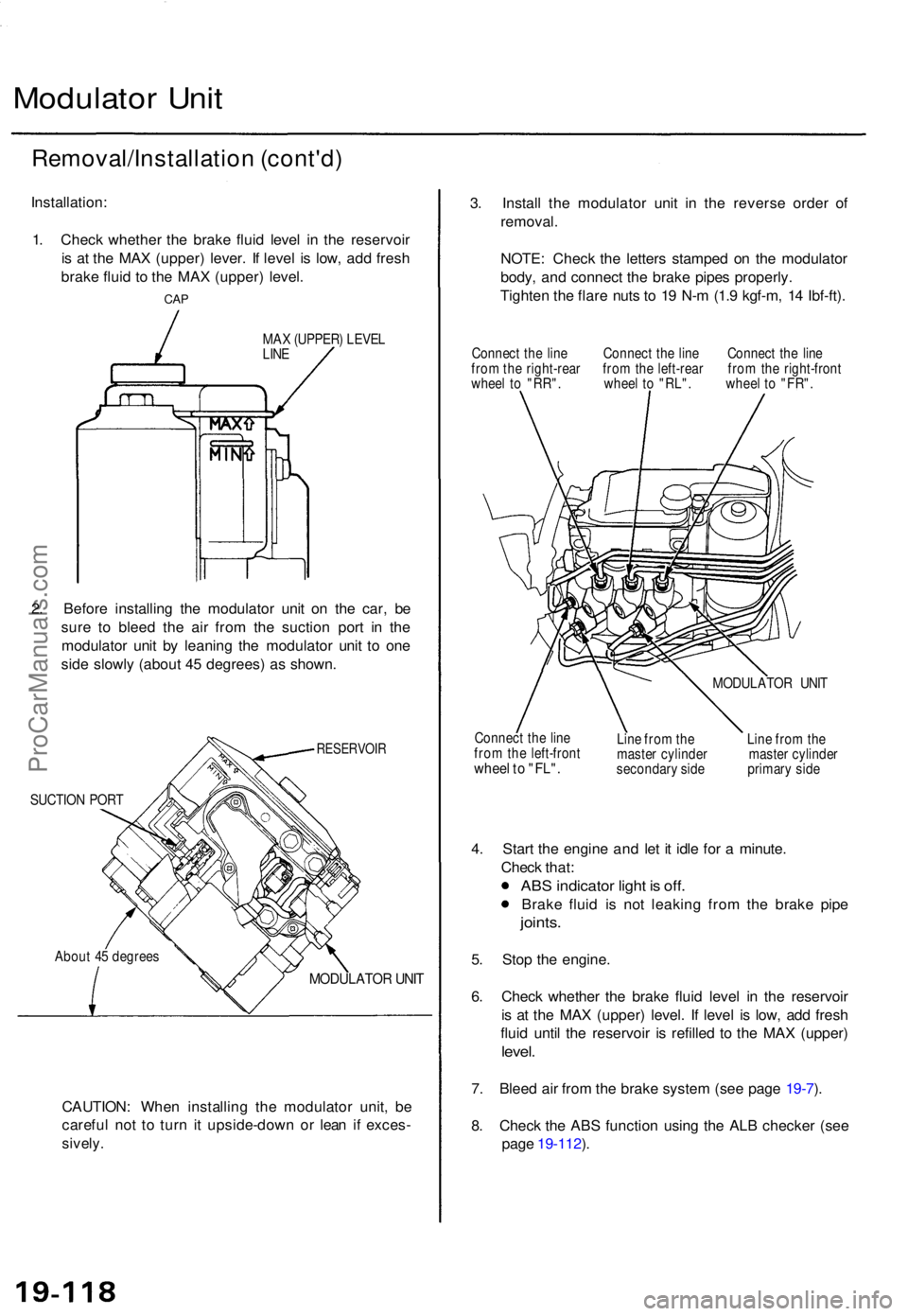
1 . Chec k whethe r th e brak e flui d leve l i n th e reservoi r
i s a t th e MA X (upper ) lever . I f leve l i s low , ad d fres h
brak e flui d t o th e MA X (upper ) level .
CAP
MA X (UPPER ) LEVE L
LIN E
2. Befor e installin g th e modulato r uni t o n th e car , b e
sur e t o blee d th e ai r fro m th e suctio n por t i n th e
modulato r uni t b y leanin g th e modulato r uni t t o on e
sid e slowl y (abou t 4 5 degrees ) a s shown .
RESERVOI R
SUCTION POR T
Abou t 4 5 degree s
MODULATO R UNI T
CAUTION : Whe n installin g th e modulato r unit , b e
carefu l no t t o tur n i t upside-dow n o r lea n i f exces -
sively.
3. Instal l th e modulato r uni t i n th e revers e orde r o f
removal .
NOTE : Chec k th e letter s stampe d o n th e modulato r
body , an d connec t th e brak e pipe s properly .
Tighte n th e flar e nut s t o 1 9 N- m (1. 9 kgf-m , 1 4 Ibf-ft) .
Connec t th e lin e Connec t th e lin e Connec t th e lin e
fro m th e right-rea r fro m th e left-rea r fro m th e right-fron t
whee l t o "RR" . whee l t o "RL" . whee l t o "FR" .
Connec t th e lin e
fro m th e left-fron t
wheel t o "FL" .
MODULATO R UNI T
Lin e fro m th e Lin e fro m th e
maste r cylinde r maste r cylinde r
secondar y sid e primar y sid e
4. Star t th e engine and le t i t idl e fo r a minute .
Chec k that :
ABS indicato r ligh t i s off .
Brak e flui d i s no t leakin g fro m th e brak e pip e
joints .
5. Sto p th e engine .
6 . Chec k whethe r th e brak e flui d leve l i n th e reservoi r
i s a t th e MA X (upper ) level . I f leve l i s low , ad d fres h
flui d unti l th e reservoi r i s refille d t o th e MA X (upper )
level.
7. Blee d ai r fro m th e brak e syste m (se e pag e 19-7 ).
8 . Chec k th e AB S functio n usin g th e AL B checke r (se e
pag e 19-112 ).
ProCarManuals.com
Page 1335 of 1771
Modulator Unit
Removal/Installation
CAUTION:
Do not spill brake fluid on the vehicle; it may damage the paint; if brake fluid does contact the paint, wash it off
immediately with water.
Take care not to damage or deform the brake lines during removal and installation.
To prevent the brake fluid from flowing, plug and cover the hose ends and joints with a shop towel or equivalent
material.
NOTE: Tighten the flare nuts to 15 N-m (1.5 kgf-m, 11 Ibf-ft).
Removal
1. Disconnect the modulator unit 10P and pump motor 2P connectors.
2. Remove the proportioning control valve.
3. Disconnect the brake lines, then remove the modulator unit.
Installation
1. Install the modulator unit, then connect the brake lines.
2. Install the proportioning control valve.
3. Connect the modulator unit 10P and pump motor 2P connectors.
4. Bleed the brake system, starting with the front wheels.
5. Start the engine, and check that the ABS indicator light goes off.
6. Test-drive the vehicle, and check that the ABS indicator light does not come on.
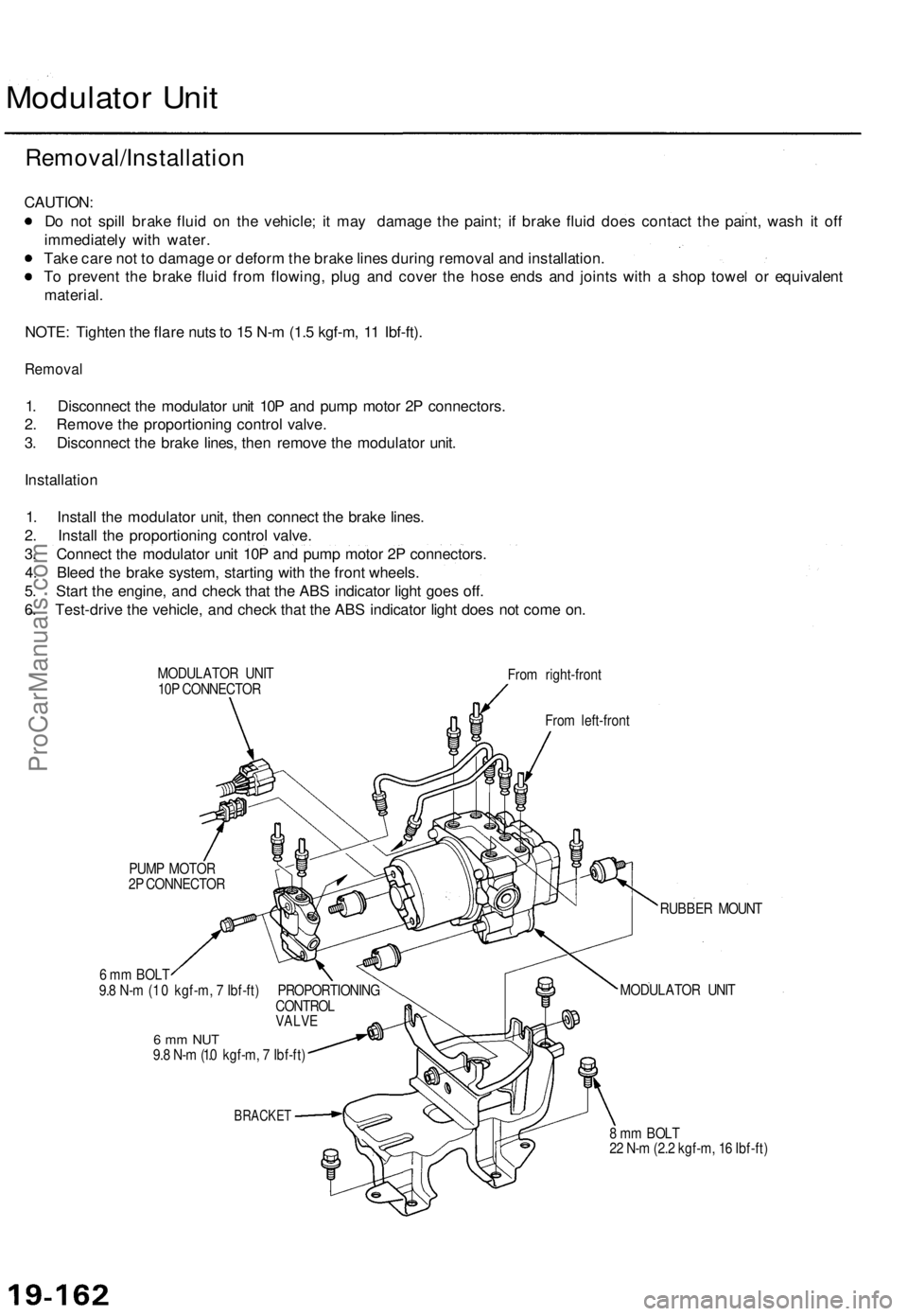
MODULATOR UNIT
10P CONNECTOR
From right-front
From left-front
PUMP MOTOR
2P CONNECTOR
6 mm BOLT
9.8 N-m (1 .0 kgf-m, 7 Ibf-ft) PROPORTIONING
CONTROL
VALVE
6 mm NUT
9.8 N-m (1.0 kgf-m, 7 Ibf-ft)
BRACKET
RUBBER MOUNT
MODULATOR UNIT
8 mm BOLT
22 N-m (2.2 kgf-m, 16 Ibf-ft)ProCarManuals.com
Page 1497 of 1771
Troubleshooting
Radiator Fan Control Module Input Tests
NOTE: Perform the following tests with the radiator fan control module 8P connector connected, the ignition switch ON (II),
and the A/C switch OFF. If you find the cause of a problem, correct it before you continue.
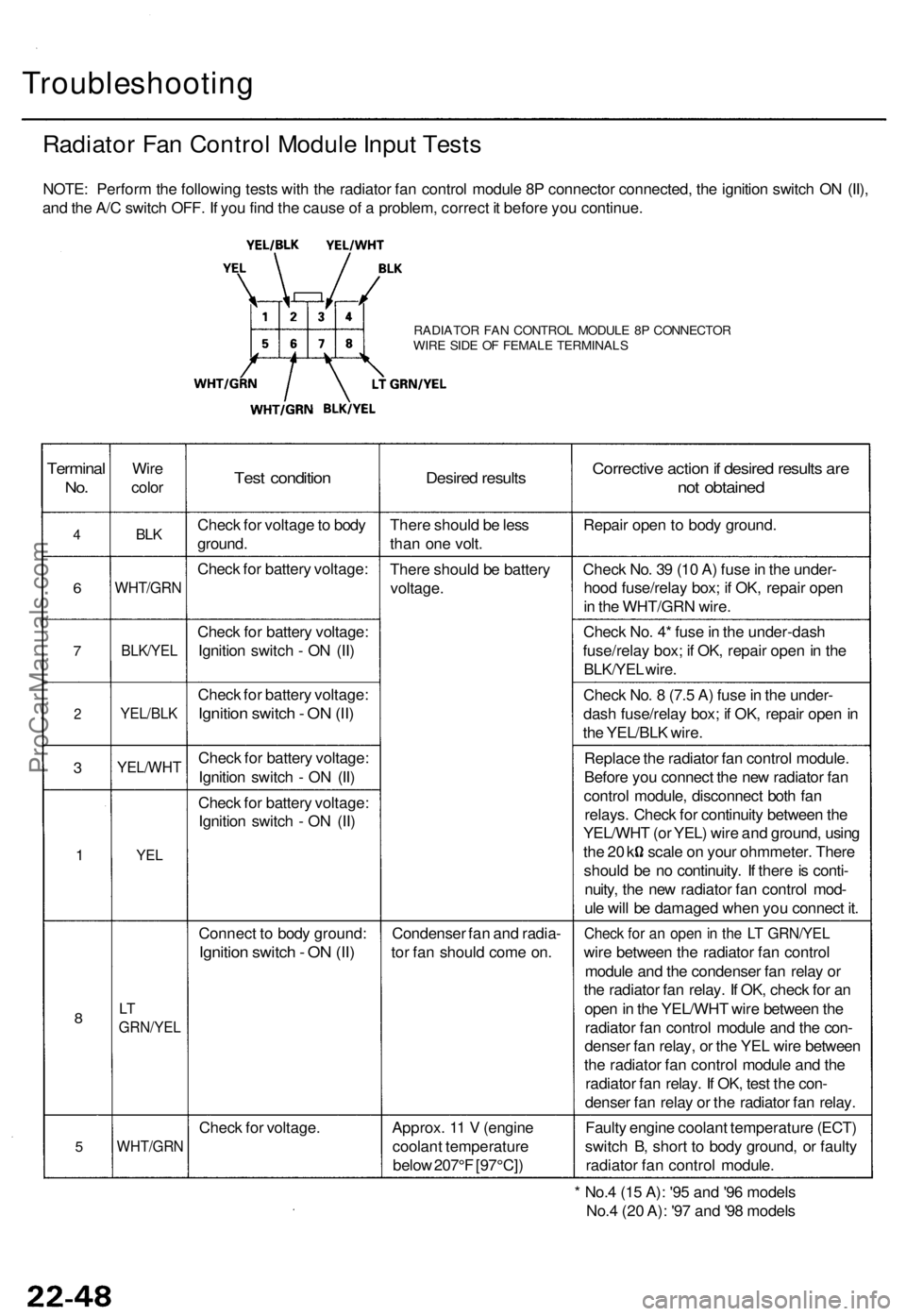
RADIATOR FAN CONTROL MODULE 8P CONNECTOR
WIRE SIDE OF FEMALE TERMINALS
Terminal
No.
4
6
7
2
3
1
8
5
Wire
color
BLK
WHT/GRN
BLK/YEL
YEL/BLK
YEL/WHT
YEL
LT
GRN/YEL
WHT/GRN
Test condition
Check for voltage to body
ground.
Check for battery voltage:
Check for battery voltage:
Ignition switch - ON (II)
Check for battery voltage:
Ignition switch - ON (II)
Check for battery voltage:
Ignition switch - ON (II)
Check for battery voltage:
Ignition switch - ON (II)
Connect to body ground:
Ignition switch - ON (II)
Check for voltage.
Desired results
There should be less
than one volt.
There should be battery
voltage.
Condenser fan and radia-
tor fan should come on.
Approx. 11 V (engine
coolant temperature
below 207°F [97°C])
Corrective action if desired results are
not obtained
Repair open to body ground.
Check No. 39 (10 A) fuse in the under-
hood fuse/relay box; if OK, repair open
in the WHT/GRN wire.
Check No. 4* fuse in the under-dash
fuse/relay box; if OK, repair open in the
BLK/YEL wire.
Check No. 8 (7.5 A) fuse in the under-
dash fuse/relay box; if OK, repair open in
the YEL/BLK wire.
Replace the radiator fan control module.
Before you connect the new radiator fan
control module, disconnect both fan
relays. Check for continuity between the
YEL/WHT (or YEL) wire and ground, using
the 20 k scale on your ohmmeter. There
should be no continuity. If there is conti-
nuity, the new radiator fan control mod-
ule will be damaged when you connect it.
Check for an open in the LT GRN/YEL
wire between the radiator fan control
module and the condenser fan relay or
the radiator fan relay. If OK, check for an
open in the YEL/WHT wire between the
radiator fan control module and the con-
denser fan relay, or the YEL wire between
the radiator fan control module and the
radiator fan relay. If OK, test the con-
denser fan relay or the radiator fan relay.
Faulty engine coolant temperature (ECT)
switch B, short to body ground, or faulty
radiator fan control module.
* No.4 (15 A): '95 and '96 models
No.4 (20 A): '97 and '98 modelsProCarManuals.com
Page 1536 of 1771
Troubleshooting
Tips and Precautions
Before Troubleshooting
Check applicable fuses in the appropriate fuse/relay
box.
Check the battery for damage, state of charge, and
clean and tight connections.
Check the alternator belt tension.
CAUTION:
Do not quick-charge a battery unless the battery
ground cable has been disconnected, otherwise you
will damage the alternator diodes.
Do not attempt to crank the engine with the battery
ground cable loosely connected or you will severely
damage the wiring.
Handling Connectors
Make sure the connectors are clean and have no loose
wire terminals.
Make sure multiple cavity connectors are packed with
grease (except waterproof connectors).
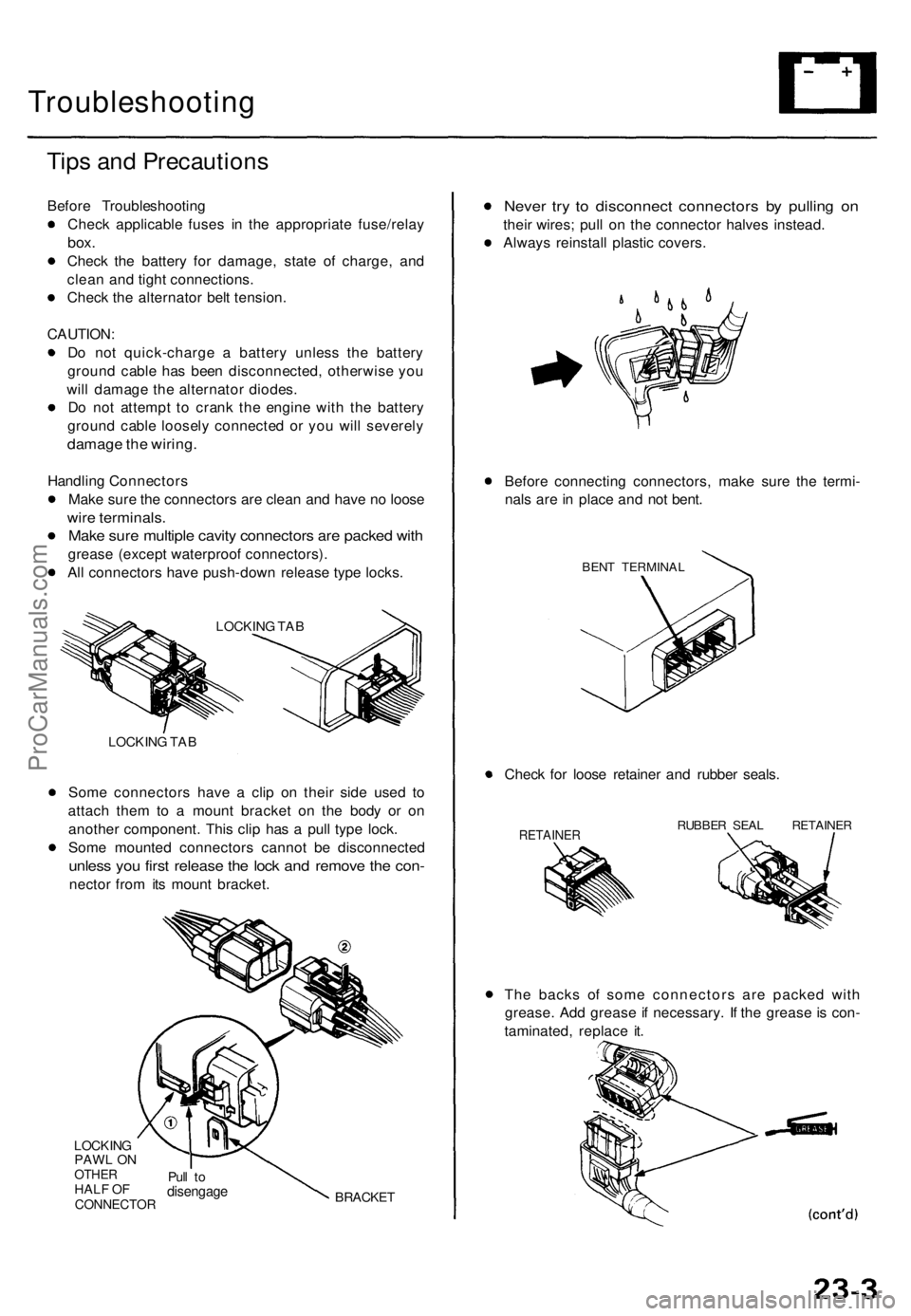
All connectors have push-down release type locks.
LOCKING TAB
Some connectors have a clip on their side used to
attach them to a mount bracket on the body or on
another component. This clip has a pull type lock.
Some mounted connectors cannot be disconnected
unless you first release the lock and remove the con-
nector from its mount bracket.
LOCKING
PAWL ON
OTHER
HALF OF
CONNECTOR
Pull to
disengage
BRACKET
Never try to disconnect connectors by pulling on
their wires; pull on the connector halves instead.
Always reinstall plastic covers.
Before connecting connectors, make sure the termi-
nals are in place and not bent.
BENT TERMINAL
Check for loose retainer and rubber seals.
RETAINER
RUBBER SEAL RETAINER
The backs of some connectors are packed with
grease. Add grease if necessary. If the grease is con-
taminated, replace it.
LOCKING TABProCarManuals.com
Page 1557 of 1771
Check for Wear and Damage
The starter should crank the engine smoothly and steadily.
If the starter engages, but cranks the engine erratically,
remove it, and inspect the starter drive gear and torque
converter ring gear for damage.
Check the drive gear overrunning clutch for binding or
slipping when the armature is rotated with the drive
gear held. If the clutch is damaged, replace the clutch
assembly.
Check Cranking Voltage and Current Draw
Cranking voltage should be no less than 8.5 volts.
Current draw should be no more than 380 amperes.
If cranking voltage is too low, or current draw too high,
check for:
Dead or low battery
Open circuit in starter armature commutator segments
Starter armature dragging
Shorted armature winding
Excessive drag in engine
Check Cranking rpm
Engine speed during cranking should be above 100 rpm.
If speed is too low, check for:
Loose battery or starter terminals
Excessively worn starter brushes
Open circuit in commutator segments
Dirty or damaged helical spline or drive gear
Defective drive gear overrunning clutch
Check Starter Disengagement
With the shift lever in turn the ignition switch to
"START (III)", and release to "ON (II)". The starter drive
gear should disengage from the drive plate/ring gear
when you release the key.
If the drive gear hangs up on the drive plate/ring gear,
check for:
• Solenoid plunger and switch malfunction
• Dirty drive gear assembly or damaged overrunning
clutchProCarManuals.com
Page 1571 of 1771
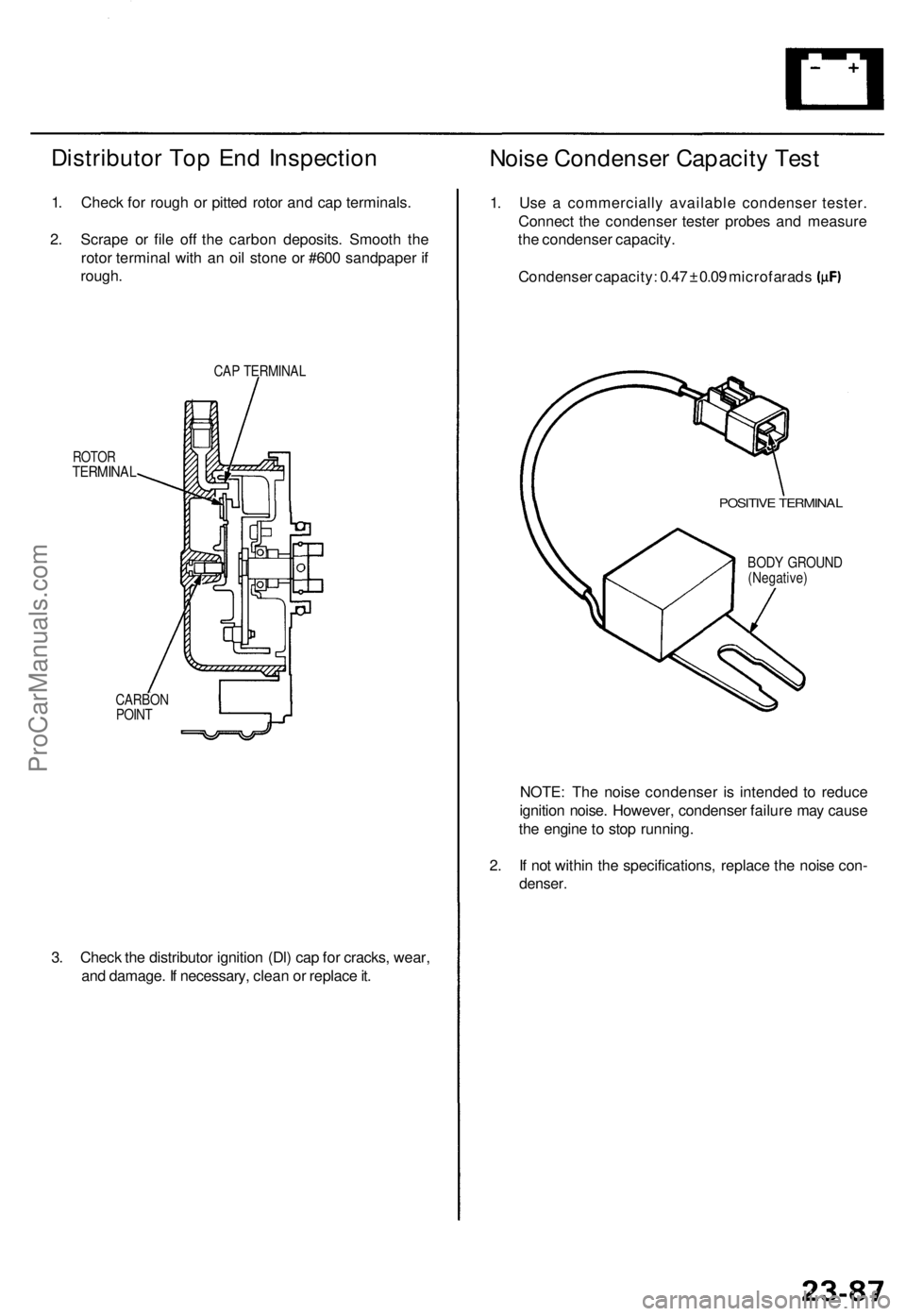
Distributor Top End Inspection
1. Check for rough or pitted rotor and cap terminals.
2. Scrape or file off the carbon deposits. Smooth the
rotor terminal with an oil stone or #600 sandpaper if
rough.
ROTOR
TERMINAL
CAP TERMINAL
CARBON
POINT
3. Check the distributor ignition (Dl) cap for cracks, wear,
and damage. If necessary, clean or replace it.
Noise Condenser Capacity Test
1. Use a commercially available condenser tester.
Connect the condenser tester probes and measure
the condenser capacity.
Condenser capacity: 0.47 ± 0.09 microfarads
POSITIVE TERMINAL
BODY GROUND
(Negative)
NOTE: The noise condenser is intended to reduce
ignition noise. However, condenser failure may cause
the engine to stop running.
2. If not within the specifications, replace the noise con-
denser.ProCarManuals.com