Gear AUDI Q2 2021 Owner´s Manual
[x] Cancel search | Manufacturer: AUDI, Model Year: 2021, Model line: Q2, Model: AUDI Q2 2021Pages: 364, PDF Size: 87.77 MB
Page 334 of 364

Mobility
the ignition is on and the vehicle is moving1'.
Otherwise you will need to press the brake
ped
al significantly harder and apply more force to
move the steering wheel.
• Please ensure that the steering wheel is un
locked and that it moves freely.
• Release the parking brake
*page
82.
• Applies to vehicles with manual gearbox: Put
the gear lever in neutral.
• Applies to vehicles with automatic gearbox:
Move the selector lever to position N.
• Ensure that the tow-rope remains taut at all
times when towing.
© CAUTION
A WARNING
If the vehicle has no electrical power, do NOT
use a tow-bar or tow-rope to tow the vehicle
© Note
You can use the turn signals to indicate a
change of direction (or lane) even when the
hazard warning lights are on. The hazard
warning lights will be interrupted temporari-
Ly.
Tow-starting
Please observe the important safety warnings on
*page
328.
Important: Your vehicle must be fitted with a
manual gearbox. If your vehicle has a petrol en
gine,
it must not be towed further than 50 me
tres
*(J).
• Attach the tow-rope or the tow-bar only to the
towing anchorages provided
for
this purpose
*page
330,
*
page 331.
• Engage second or third gear before moving off.
• Press the clutch and hold the pedal down.
• Switch on the ignition.
• Once both vehicles are moving, release the
clutch.
• As soon as the engine starts, press the clutch
pedal and put the gear lever in neutral.
When tow-starting the vehicle, do not tow it
further than 50 metres; otherwise the cata
lytic converter could be damaged.
Front towline anchorage
»
Fig.
271 Front bumper (right side): Removing cover cap
Fig.
272 Front bumper (right side): Towline anchorage
screwed in
The screw connection for the towline anchorage
is located behind a cover cap on the right side of
the front bumper.
• Take the towline anchorage out of the vehicle's
tool kit
*
page 319.
• Press the cover cap briefly but firmly inwards
-arrow-, detach it from the bumper and take it
out*Fig.
271.
• Screw the towline anchorage into the screw
connection as far as
it
will go
*Fig.
272 and
tighten it with the box spanner.
• Put the towline anchorage back in the tool kit
after use.
11
Important: The vehicle battery must be adequately charg
ed.
330
Page 337 of 364
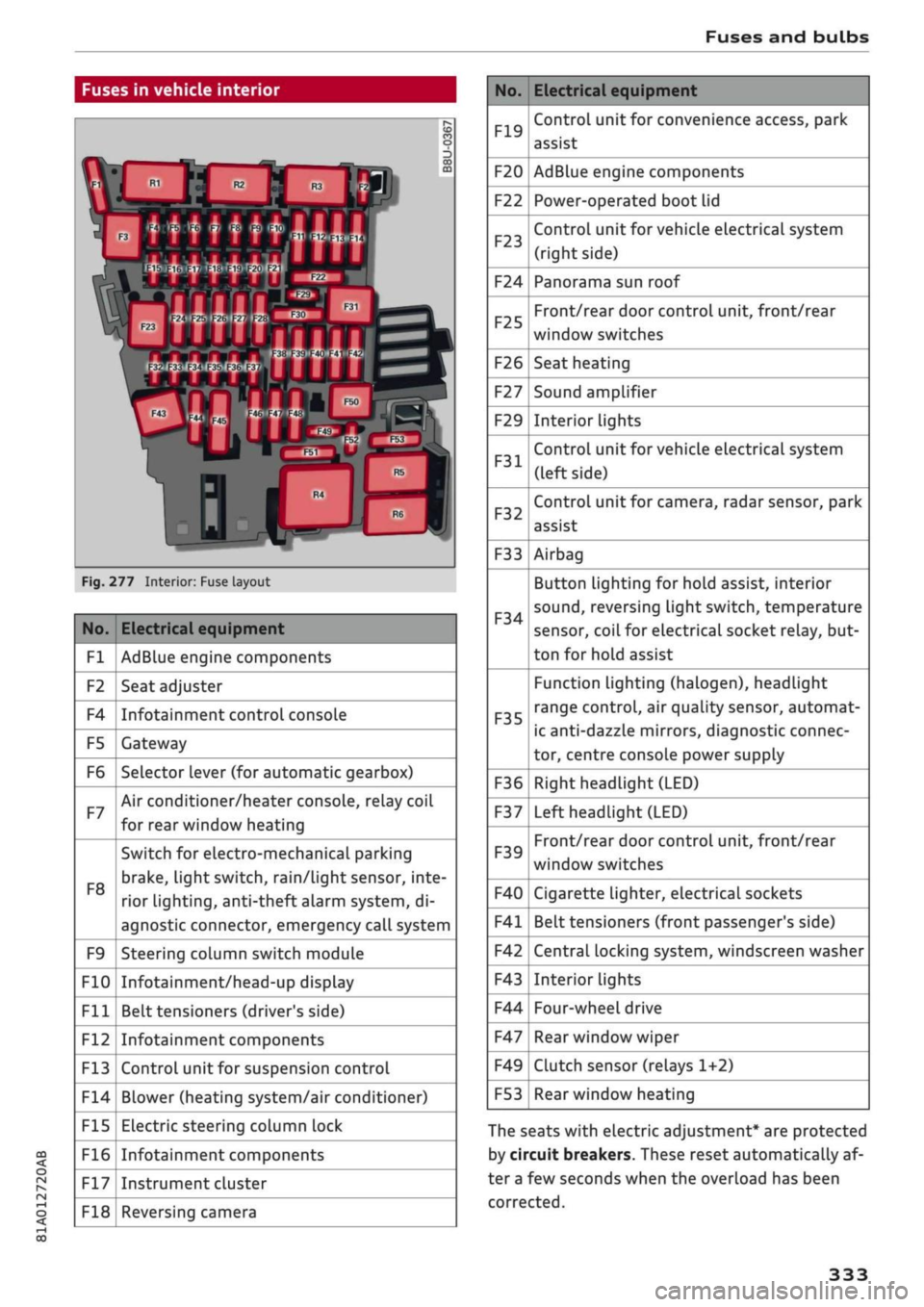
Fuses and bulbs
: -•.
-
i:i
m
R2 R3
F22
F-XII
F31
F30
:-:-.'
'.,
FM F43
F49
F!)3
F52
F51
R!,
a
R6
Fig.
277 Interior: Fuse layout
No.
Fl
F2
F4
F5
F6
F7
F8
F9
F10
Fll
F12
F13
F14
F15
F16
F17
F18
Electrical equipment
AdBlue engine components
Seat adjuster
Infotainment control console
Gateway
Selector lever (for automatic gearbox)
Air conditioner/heater console, relay coil
for rear window heating
Switch for electro-mechanical parking
brake,
light switch,
rain/Light
sensor, inte
rior lighting, anti-theft
aLarm
system, di
agnostic connector, emergency call system
Steering column switch module
Infotainment/head-up display
Belt tensioners (driver's side)
Infotainment components
Control unit for suspension control
Blower (heating system/air conditioner)
Electric steering column lock
Infotainment components
Instrument cluster
Reversing camera
No.
F19
F20
F22
F23
F24
F25
F26
F27
F29
F31
F32
F33
F34
F35
F36
F37
F39
F40
F41
F42
F43
F44
F47
F49
F53
Electrical equipment
Control unit for convenience access, park
assist
AdBlue engine components
Power-operated boot lid
Control unit for vehicle electrical system
(right side)
Panorama sun roof
Front/rear door control unit, front/rear
window switches
Seat heating
Sound amplifier
Interior lights
Control unit for vehicle electrical system
(left side)
Control unit for camera, radar sensor, park
assist
Airbag
Button Lighting for hold assist, interior
sound,
reversing light switch, temperature
sensor, coiL for electrical socket reLay, but
ton for hold assist
Function lighting (halogen), headlight
range control, air quality sensor, automat
ic anti-dazzle mirrors, diagnostic connec
tor, centre console power supply
Right headlight (LED)
Left headlight (LED)
Front/rear door control unit, front/rear
window switches
Cigarette lighter, electrical sockets
Belt tensioners (front passenger's side)
Central locking system, windscreen washer
Interior lights
Four-wheel drive
Rear window wiper
Clutch sensor (relays 1+2)
Rear window heating
The seats with electric adjustment* are protected
by circuit breakers. These reset automatically af
ter a few seconds when the overload has been
corrected.
333
Page 338 of 364
Fuses and bulbs
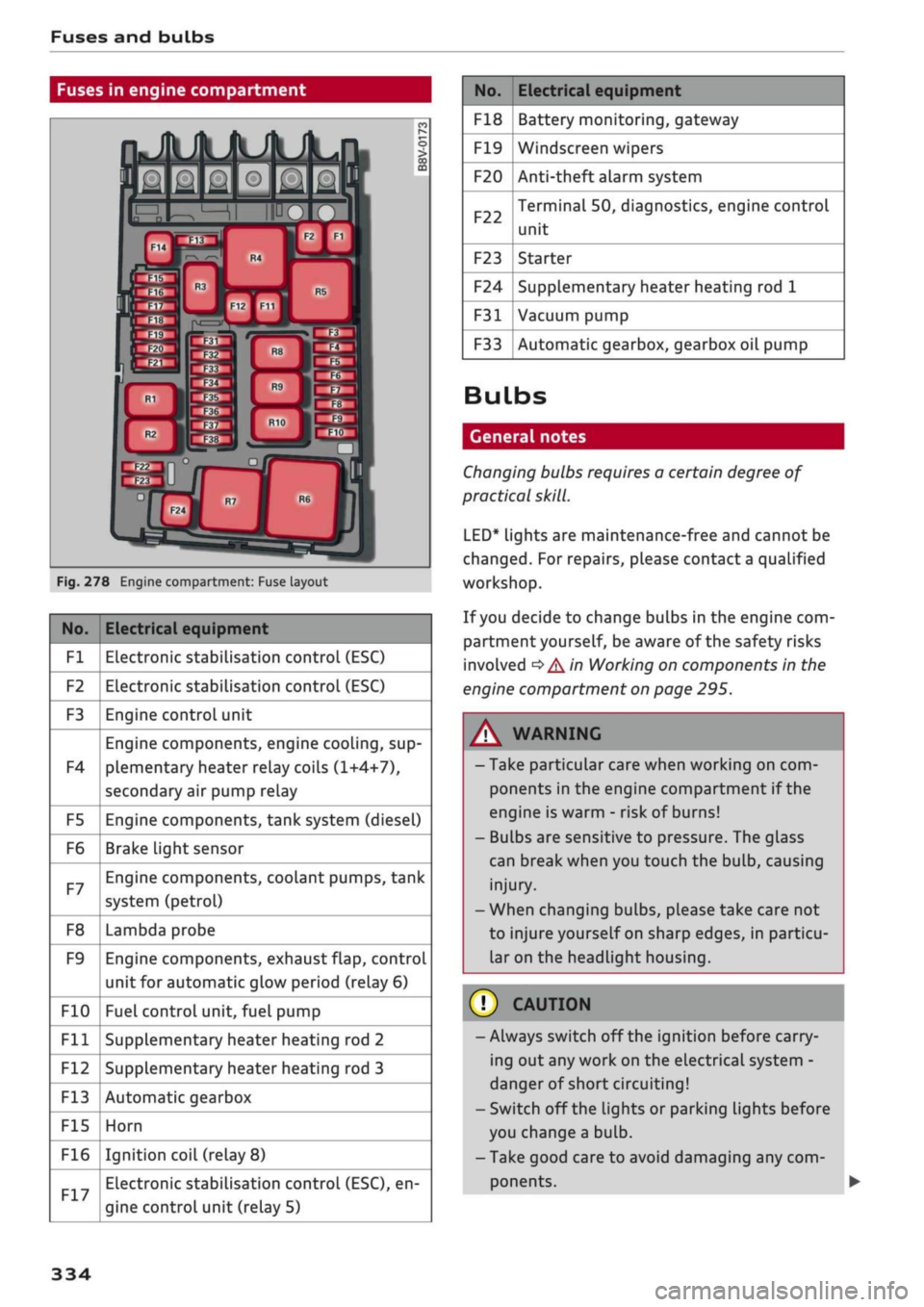
Fuses in engine compartment
Fig.
278 Engine compartment: Fuse layout
No.
Fl
F2
F3
F4
F5
F6
F7
F8
F9
F10
Fll
F12
F13
F15
F16
Electrical equipment
Electronic stabilisation control (ESC)
Electronic stabilisation control (ESC)
Engine control unit
Engine components, engine cooling, sup
plementary heater relay coils (1+4+7),
secondary air pump relay
Engine components, tank system (diesel)
Brake Light sensor
Engine components, coolant pumps, tank
system (petrol)
Lambda probe
Engine components, exhaust flap, control
unit for automatic glow period (relay 6)
Fuel control unit, fuel pump
Supplementary heater heating rod 2
Supplementary heater heating rod 3
Automatic gearbox
Horn
Ignition coil (relay
8)
Electronic stabilisation control (ESC), en
gine control unit (relay 5)
No.
F18
F19
F20
F22
F23
F24
F31
F33
Electrical equipment
Battery monitoring, gateway
Windscreen wipers
Anti-theft alarm system
Terminal 50, diagnostics, engine control
unit
Starter
Supplementary heater heating rod 1
Vacuum pump
Automatic gearbox, gearbox oil pump
Bulbs
General notes
Changing bulbs requires a certain degree of
practical
skill.
LED*
lights are maintenance-free and cannot be
changed.
For repairs, please contact a qualified
workshop.
If
you
decide to change bulbs in the engine com
partment yourself, be aware of the safety risks
involved
*
A in Working on components in the
engine compartment on page 295.
WARNING
- Take particular care when working on com
ponents in the engine compartment if the
engine is warm - risk of burns!
- Bulbs are sensitive to pressure. The glass
can break when you touch the bulb, causing
injury.
- When changing bulbs, please take care not
to injure yourself on sharp edges, in particu
lar on the headlight housing.
© CAUTION
-Always switch off the ignition before carry
ing out any work on the electrical system -
danger of short circuiting!
- Switch off the Lights or parking lights before
you change a bulb.
- Take good care to avoid damaging any com
ponents.
334
Page 346 of 364
Technical data
Technical data
Vehicle identification
data
®-
®-
(D-
®-
®-
XXXXX XX
X
XXXX
XXX
XX
"I
-K-S1
xxxxxxxx
XX
x
XXXXXXXX
XXX
XXX
XX
XXXXXXX
XX
XX XX
XXX
KW
XXX
-MOTORKB./GETB.KB.
VVYV
YYV YYV
ENG.C00E/TBANS.C0DE
AAAA
AAA AAA
'»""
XXXX/XXXX
XXX/XX
M.-AUSSI./OPTIONS
EOA
7D5 4UB 6XM 5SG 5RW
2EH
JOZ
ILB
IAS
IBA
3FC
5MU
7X1
FOA
9G3
OG7
OYH OJF
TL6
3KA 8EH UlA X9B
QZ7
IXW
8Q3
9Q8
8Z4 D2D
7T6
CV7
7KO
4X3
2K2
3L4
4KC
3YO
413
5D2
ISA
7GB
QIA 4GQ
XX.
X
XX
X
XX
X
XXXX
®
&
é é
5
o
CO
00
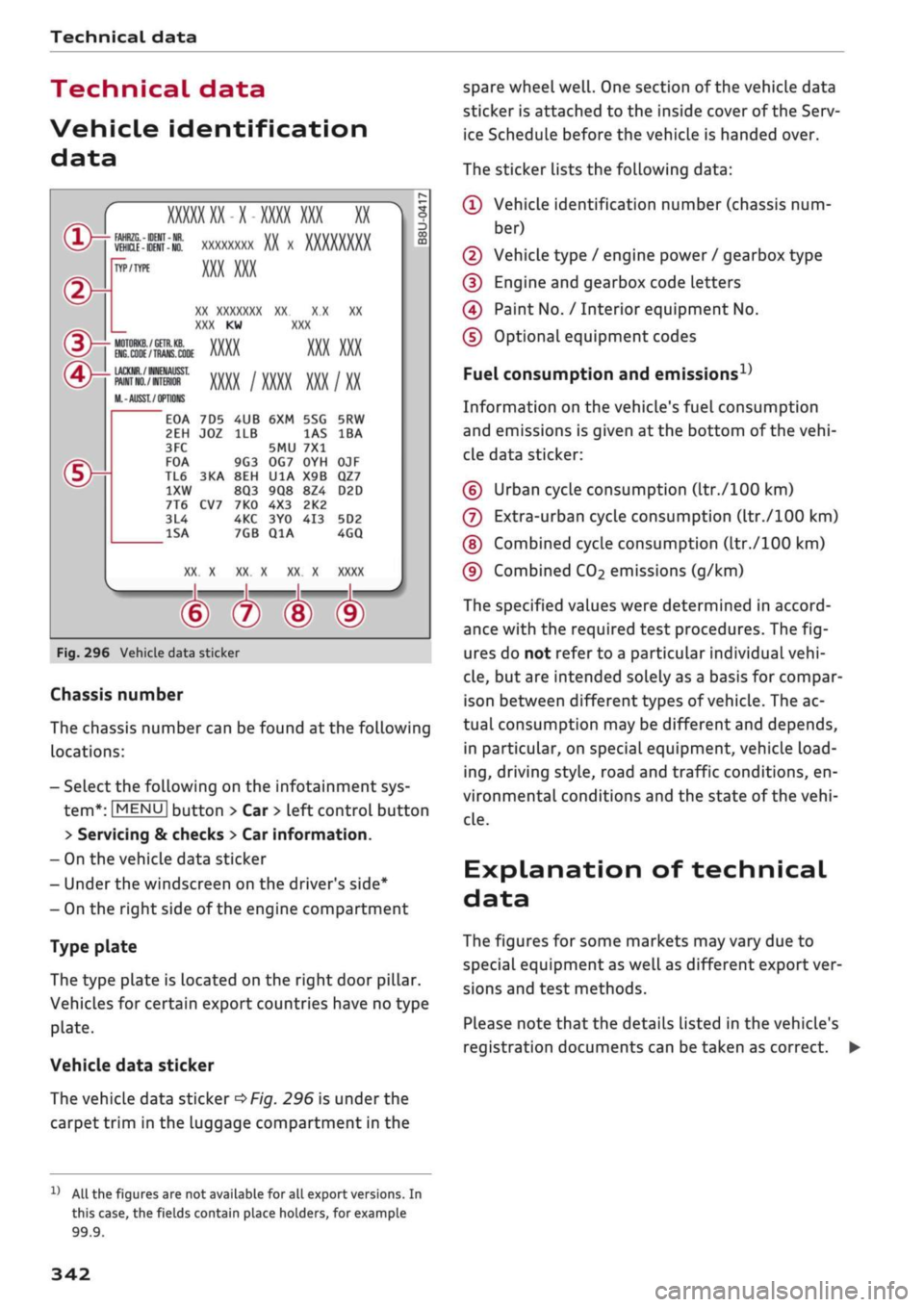
Fig.
296 Vehicle data sticker
Chassis number
The chassis number can be found at the following
locations:
- Select the following on the infotainment sys
tem*:
|MENU|
button > Car
>
left control button
> Servicing & checks > Car information.
- On the vehicle data sticker
- Under the windscreen on the driver's side*
- On the right side of the engine compartment
Type plate
The type plate is located on the right door pillar.
Vehicles for certain export countries have no type
plate.
Vehicle data sticker
The vehicLe data sticker
*Fig.
296 is under the
carpet trim in the luggage compartment in the
spare wheel
well.
One section of the vehicle data
sticker is attached to the inside cover of the Serv
ice Schedule before the vehicle is handed over.
The sticker lists the following data:
© Vehicle identification number (chassis num
ber)
© Vehicle type / engine power / gearbox type
© Engine and gearbox code letters
© Paint No. / Interior equipment No.
© Optional equipment codes
Fuel consumption and
emissions1'
Information on the vehicle's fuel consumption
and emissions is given at the bottom of the
vehi
cle data sticker:
© Urban cycle consumption (ltr./100 km)
© Extra-urban cycle consumption (ltr./100 km)
©
Combined cycle consumption (ltr./100 km)
© Combined
CO2
emissions (g/km)
The specified values were determined in accord
ance with the required test procedures. The
fig
ures do not refer to a particular individual
vehi
cle,
but are intended solely as a basis for compar
ison between different types of
vehicle.
The ac
tual consumption may be different and depends,
in particular, on special equipment, vehicle
load
ing,
driving style, road and traffic conditions, en
vironmental conditions and the state of the
vehi
cLe.
Explanation of technical
data
The figures for some markets may vary due to
special equipment as well as different export ver
sions and test methods.
PLease note that the details Listed in the vehicle's
registration documents can be taken as correct. •
11
All the figures are not available for all export versions. In
this case, the fields contain place holders, for example
99.9.
342
Page 347 of 364
Technical data
In cases where technical data are not listed,
the figures were not available at time of pub
lication.
CO
< o rN
iv
rN
t-H
o < 00
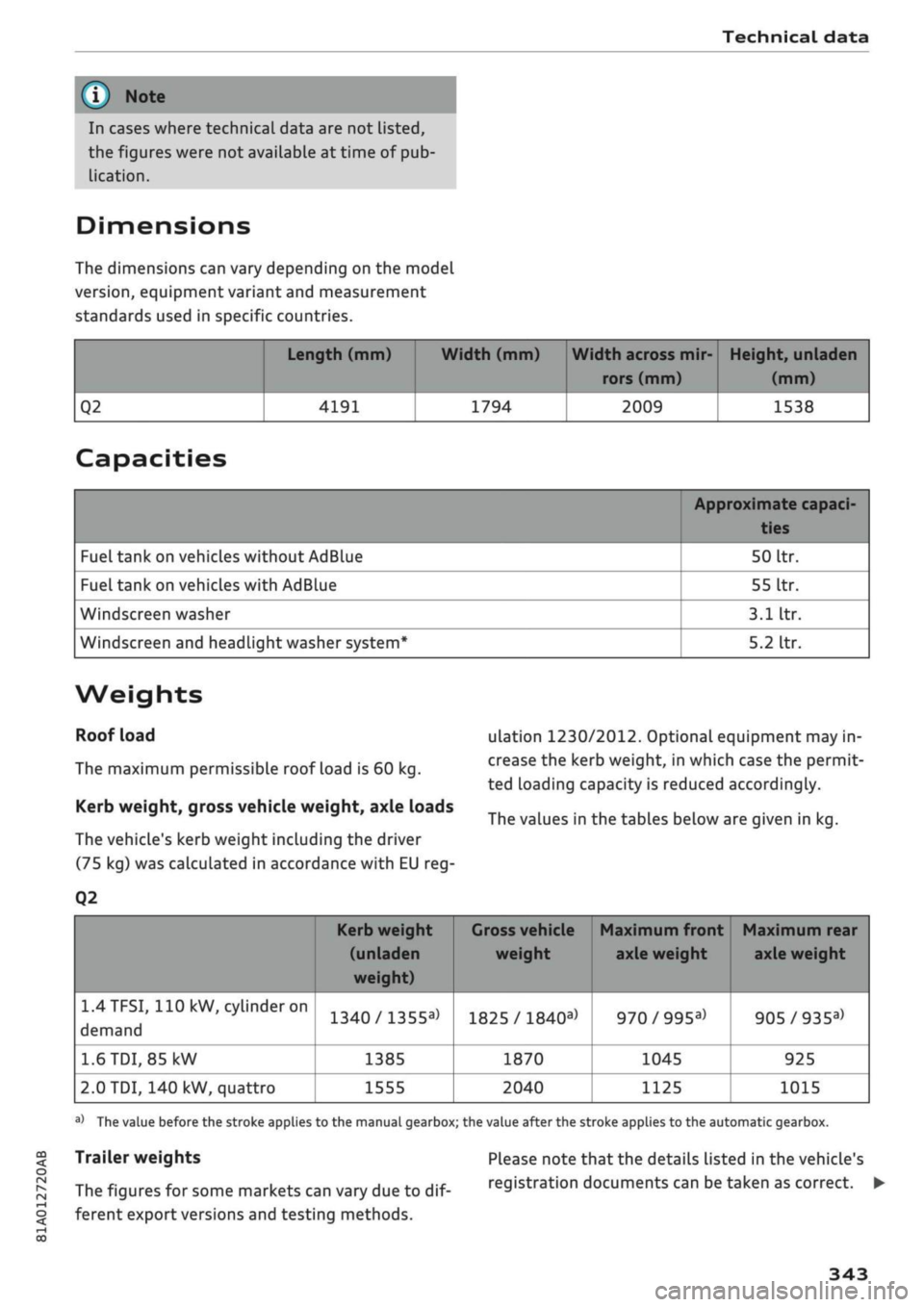
Dimensions
The dimensions can vary depending on the model
version,
equipment variant and measurement
standards used in specific countries.
Q2
Length (mm)
4191
Width (mm)
1794
Width across mir
rors (mm)
2009
Height, unladen
(mm)
1538
Capacities
Fuel tank on vehicles without AdBlue
Fuel tank on vehicles with AdBlue
Windscreen washer
Windscreen and headlight washer system*
Approximate capaci-
50
Itr.
55
Itr.
3.1
Itr.
5.2
Itr.
Weights
Roof load
The maximum permissible roof load is 60 kg.
Kerb weight, gross vehicle weight, axle loads
The vehicle's kerb weight including the driver
(75 kg) was calculated in accordance with EU reg-
Q2
ulation 1230/2012. Optional equipment may in
crease the kerb weight, in which case the permit
ted loading capacity is reduced accordingly.
The values in the tables below are given in kg.
1.4TFSI,
110 kW,
cylinder
on
demand
1.6
TDI,
85 kW
2.0 TDI, 140 kW, quattro
Kerb weight
(unladen
weight)
1340/1355a>
1385
1555
1
Gross vehicle Maximum front Maximum rear
weight axle weight axle weight
1825 /
1840a)
1870
2040
970/995a)
1045
1125
905/935a)
925
1015
a)
The value before the stroke applies to the manual gearbox; the value after the stroke applies to the automatic gearbox.
Trailer weights
The figures for some markets can vary due to
dif
ferent export versions and testing methods.
Please note that the details listed in the vehicle's
registration documents can be taken as correct. •
343
Page 348 of 364
Technical data
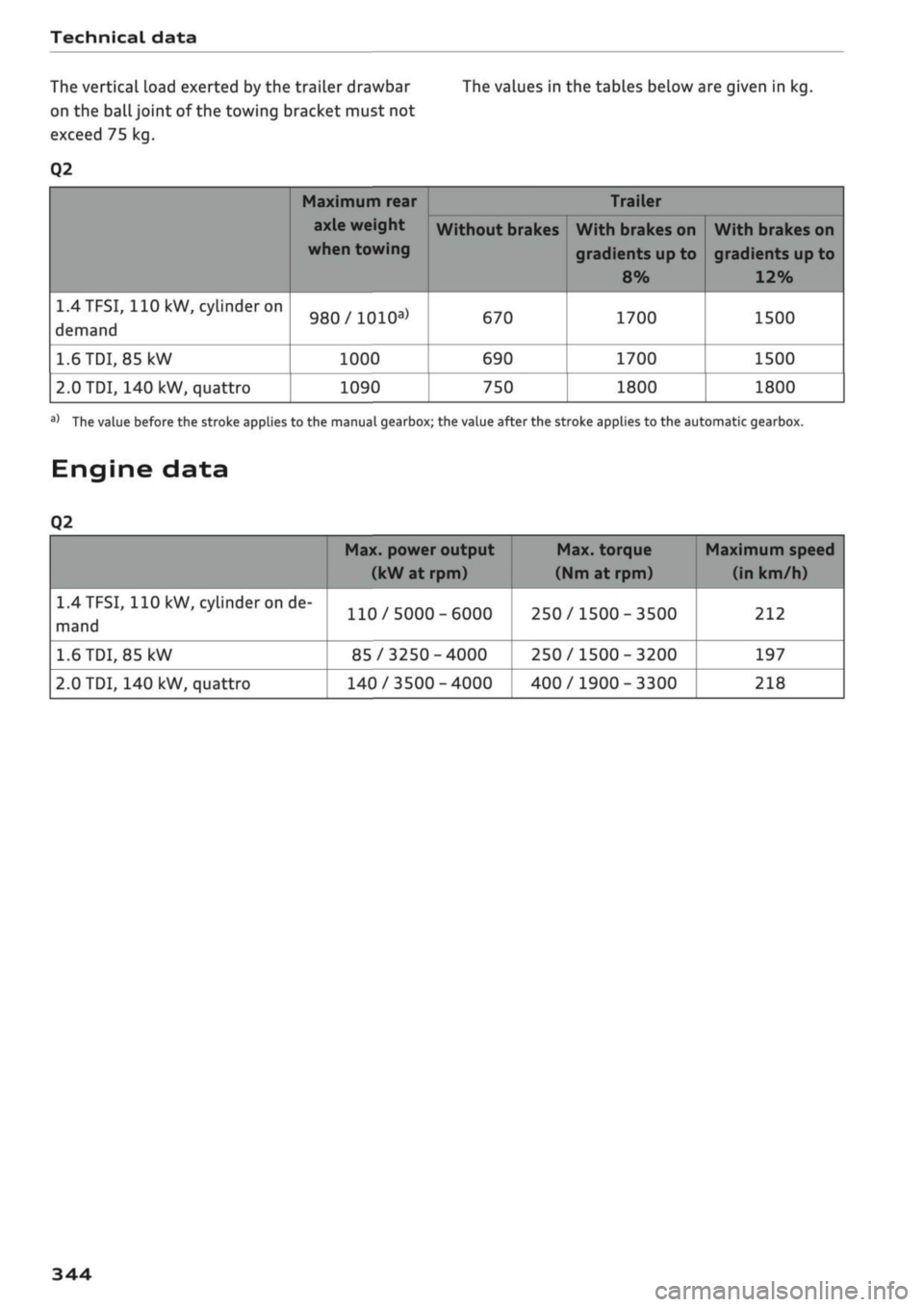
The vertical load exerted by the trailer drawbar The values in the tables below are given in kg.
on the
ball
joint of the towing bracket must not
exceed 75 kg.
Q2
1.4TFSI,
110
kW, cylinder on
demand
1.6
TDI,
85 kW
2.0
TDI, 140 kW, quattro
Maximum rear
axle weight
when towing
980/1010a)
1000
1090
Without brakes
670
690
750
Trailer
With brakes on
gradients up to
8%
1700
1700
1800
With brakes on
gradients
up
to
12%
1500
1500
1800
a)
The value before the stroke applies to the manual gearbox; the value after the stroke applies to the automatic gearbox.
Engine data
Q2
1.4
TFSI,
110 kW, cylinder on de
mand
1.6
TDI,
85
kW
2.0
TDI, 140 kW, quattro
Max. power output
(kW at rpm)
110/5000-6000
85/3250-4000
140/3500-4000
Max. torque
(Nm
at rpm)
250/1500-3500
250/1500-3200
400/1900-3300
Maximum speed
(in km/h)
212
197
218
344
Page 350 of 364
Index
Personal hotspot 195
Setting up 196
Setup 191
Topping up data plan 197
Audi drive select 131
Audi magnetic ride
see Suspension control
131
Audi music interface 240
Audi music stream
see Wi-Fi 238
Audio files 243
Audio players
Bluetooth audio players 237
Wi-Fi audio players 238
Audio track 246
Audi phone box 177
Audi pre sense 120
Driver messages 119, 122
Settings 122
Audi side assist 127
Cleaning sensors 313
Driver messages
131
Rear cross-traffic assist 130
Audi smartphone interface 253, 258
Audi virtual cockpit
see Instrument cluster 12
AUTO
Automatic air conditioner 69
Automatic headlights 49
Auto Lock (central locking system) 37
Automatic air conditioner
see Air conditioner (automatic) 66, 69
Automatic gearbox 85
Back-up programme 92
DownhilL
speed control 89
Driving tips 88
Kick-down 90
Launch control programme 91
Malfunction 86
Manual gear selection (tiptronic mode) ... 90
Manual release of selector Lever (left-hand
drive) 93
Manual release of selector Lever (right-hand
drive) 94
Paddle levers 90
Selector lever 88
Selector lever Lock 86
Selector lever positions 86
AUX input
241,
242
Average fuel consumption 19, 20
Average speed 19, 20
Axle loads 343
B
BACK button 152
Background lighting 53
Balance (sound) 260
Bandages
see First-aid kit 318
Bass box 325, 326
Bass (sound) 260
Battery 302
Charge 149
Charging 303
In key 38
Winter conditions 302
Battery, charging (mobile devices) 177
Belts
see Seat belts 275
Bicycle racks (rear carrier systems) 99
Biodiesel 289
Bioethanol (fuel) 289
Blower
Automatic air conditioner 70
Heating/ventilation system and manual air
conditioner 67
Bluetooth
Audio players 237
Connecting a mobiLe phone 173
Remote SIM Access Profile 193
Settings 258
Boot
see Luggage compartment 272
Boot lid
Close button 44
Opening/dosing
electrically 44
Brakes 147
Brake assist system 145
Brake fluid 301
Brake pedal 272
Electro-mechanical parking brake 82
346
Page 352 of 364
Index
Codant temperature
gauge 13
Topping up coolant 300
Cornering light 49
Crosshairs 209, 210
Cruise control system 104
Cup holders 61
Current fuel consumption 19,20
D
Data connection 203
Data protection 205
Date 255
Daytime running lights 49
Deactivating front passenger's airbag 288
DEF
see AdBlue 292
Defrosting (windows)
Automatic air conditioner 70
Heating/ventilation system and manual air
conditioner 67
DEF (instrument cluster) 14
Deluxe automatic air conditioner
see Air conditioner (automatic) 66, 69
Demo mode
see Presentation mode 217
Destination from map
Via
MMI touch 210
Via rotary pushbutton 209
Diagnostic connection 150
Dictating
E-mail
183
Text messages 182
Diesel
Diesel particulate filter 295
Fuel 289
Preheating (glow plugs) 74, 76
Diesel engine
Engine oil 297
Diesel Exhaust Fluid (DEF)
see AdBlue 292
Digital rights management 234
Dimensions
Vehicle dimensions 343
Dipped headlights 49
Directional tread (tyres) 324
Directory
see Contacts 185
Display 15
Cleaning 314
Infotainment display 153, 256
Instrument cluster 18
Multi-function steering wheel 15
Variants (MMI) 153
Distance covered 19, 20
Doors
Child lock 46
Courtesy lighting 52
Locking doors manually 41
see also Unlocking/locking 39, 40
Downhill speed control 89
Driver information system 19
Economy tips (analogue instrument cluster) 21
Economy tips (Audi virtual cockpit) 20
Efficiency program 21
Energy consumers (Audi virtual cockpit) .. 20
Gear-change indicator 14
On-board computer (analogue instrument
cluster) 20
On-board computer (Audi virtual cockpit) . 19
Outside temperature display 15
Service interval display 304
Switching between displays 15
View 17
Drives
see Media 234, 243
Drive select
see Audi drive select 131
Driving on right/left 52
Driving through water 72, 85
Driving time 19, 20
Dust filter
see Pollution filter 66
DVD drive (media drives) 235
Dynamic volume control
see System volume 261
E
E-mail
183
E10
see Ethanol (fuel) 289
eco mode (automatic air conditioner) 69
348
Page 354 of 364
Index
Folding down rear seats 63, 64
Four-wheel drive
see quattro (four-wheel drive) 148
Frequency band
see Waveband 228
Front seats 58
FueL 289
Consumption 342
Current fuel consumption 19,20
Ethanol 289
Fuel gauge 12, 14
Saving fuel 131
Tank capacity 343
FueL
economy
Coasting mode 91
Driving style 72
Recuperation 19
Fuel range 19, 20
Fuses 332
G
GALA
see Speed-dependent volume control ... 260
Gearbox malfunction 92
Glove box 61
Ground clearance 85
H
Halogen headlights
Changing bulbs 334
Handbrake
see Electro-mechanical parking brake .... 82
Handsfree 172
Hazard warning lights 52
Head-protection airbag 286
Head-up display 25
Adjusting brightness 53
Headlight range control 49
Headlights 49
Headlight range control 49
Washer system 55
Washing 313
Headlights (changing buLbs) 334
Head restraints
Adjusting 58,
59
Removing/installing 59
Head restraints, adjusting 266
Heated
Exterior mirrors 53
Rear window (automatic air conditioner) .. 70
Rear window (heating/ventilation system
and manual air conditioner) 68
Seats (automatic air conditioner) 70
Seats (heating/ventilation system and
man
ual air conditioner) 68
Washer
jets 55
Heater (supplementary heater for diesel en
gine) 66
Heating/ventilation system 66
Adjusting air outlets 71
Controls 67
Default settings 66
Description 66
Key-coded settings 66
Supplementary heater 66
Hill hold assist 83
Hill starting
see Hill hold assist 83
Hold assist 84
Hold assist (hill hold) 83
Home address 210, 215
Horn 10
Hubcaps, removing 321
I
i-Size
(securing child seats) 270
Ignition
Switching on/off (with button) 76
Switching on/off (with the key) 74
Immobiliser
see Electronic immobiliser 38
Importing/exporting contacts 187
Inflation pressure (tyres) 309
Input level (media) 246
Inspection intervals 304
Instrument cluster 12
Cleaning 314
Driver messages 26
350
Page 355 of 364
Index
CO
< o rN
iv
rN
t-H
o <
•H
00
Instruments
Adjusting brightness 53
Interior lights 52
Interior mirror 54
Interior monitor 42
Intermittent wipe (windscreen wipers) 55
Internet
see Audi connect (infotainment) 191
Internet radio 239
iPod
see Audi music interface 240, 241
ISOFIX (securing child seats) 270
iTunes tagging 228
]
Jack 319,322
Jacking points 322
Jack plug (3.5 mm)
see AUX input 241, 242
Jukebox 236
Jump-starting 326
K
Key-operated switch for front passenger's air-
bag 288
Keys 38
Driver messages 77
Key-coded settings 66
Key not recognised 79
Kick-down (automatic gearbox) 90
L
Lane assist
see Audi active lane assist 123
Lane change assist feature
see Audi side assist 127
Language, setting 255
Launch control programme 91
Left-hand traffic 52
Left control button 16
Letters, entering (using the speller) 159
Licence conditions (MMI) 262
Lights 49
Changing bulbs 334
Exterior 49
Interior 52
Interior/reading Lights 52
Right-hand traffic 52
Light sensor/rain sensor
Automatic headlights 49
Switching rain sensor on/off 55
Load-through hatch 64
Locking/unlocking
see Unlocking/locking 39, 40
Low-profile tyres 309
Luggage compartment 62
Boot Lid 43
Power sources 60
Stowing luggage safely 272
Lumbar support 58
M
Magnetic ride
see Suspension control 131
Mailbox 185
Main beam headlights 50
Main beam assist 50
Maintenance intervals 304
Make-up mirrors 54
Map
Display 225
How to use 219
Settings 221
Update 207
Map scale, changing 16
Map update 223
Matt paintwork, washing
312
Maximum speed 344
Media 234
Drives 235
Media centre 244
Media drives
Formats supported 249
Memory capacity
Directory 187
Jukebox 236
Memory card
Navigation 207
SD card readers (MMI) 235
Types/formats supported 249