ESP AUDI Q7 2010 Owner´s Manual
[x] Cancel search | Manufacturer: AUDI, Model Year: 2010, Model line: Q7, Model: AUDI Q7 2010Pages: 390, PDF Size: 93.04 MB
Page 172 of 390
lffl!IL-___;P:....:: a:.:.r..:.k .:.: i.:..n .:.:g:!....: s:.: y~ s..:t ..:e ..:.m .:..:... _______________________________________________ _
The closer you get to the obstacle, the shorter the interval between
t he audible s ignals. A contin uous tone sounds whe n the obstacle is
less than approximately 1 foot (0 .30 meters) away . Do not co ntin ue
driving farther.
If the distance to an obstacle remains constant, the volume of the
distance warning gradually drops after about four seconds (this does
no t a pply in the co nti nuous to ne range).
Rear view camer a coverage area
The MMI display shows the area covered by the rear v iew camera
=> page 169, fig . 168 (D. Objects that are not in the area covered@
are not shown on the M MI display.
We recommend that you practice parking with the rear v iew camera
in a traff ic -free location o r parki ng lo t to become fam iliar wi th t he
system, the orientation lines, and the ir funct ion . When do ing th is,
there should be good lig ht and weather cond itions.
In the MM I disp lay, objects o r vehicles appea r closer or fu rther away
if:
• you are dr iv ing in r everse gea r from a level surface onto an incline,
or a downwa rd slope,
• you a re driving i n reve rse gear toward p rot ruding objec ts,
• the vehicle is carry ing too much load in the rear.
T he accur acy of the or ien tat io n lines and blue su rf a ces dimin ishes if:
• the Adaptive Air Suspens ion* is faulty or the dynamic, offroad or
lift mode is on,
• the rear view camera does not prov ide a reliable image, for
example, in poor visib ility conditions or if the lens is dirty,
• the image on the screen is not visible due to sun g lare and ref lec
ti on .
Caring for the rear view camera lens
The rear view came ra is lo cated above the rea r license plate bracke t.
For the parking system to ope rate, the lens=>
page 169, fig. 169
must be kept clean: •
Dampen the lens with a househo ld alcoho l-based glass cleaner,
and then wipe the lens clean with a dry cloth =>
CD.
• Remove snow with a hand brush and ice preferably with a de-ic ing
spray =>
CD.
& WARNING
• The parking sy stem cannot replace the dri ver's attention . The
d river alone i s respo nsible for p arking and sim ila r dri ving maneu
ver s.
• Sensor s hav e blind spots in which objects cannot be detected.
Pa y s peci al att ention to small children and animal s beca u se the
sen so rs cannot al ways detect them.
• Alway s keep your e yes on the v ehicle's surr ound ing s, u sing the
r ear view mirror as well.
• Do not all ow your self to be distract ed from traffic by the r ear
v iew camera pictu res .
• If the position and the installation angle of th e camera has
changed , for e xample, after a rear end colli sion, do not continu e
to use th e system for safety r ea son s. Hav e it check ed by a qualified
deale rship.
0 Note
• Low obstacles a lready signaled by a warning can disappear from
the system's detection range as they are approached and will not
continue to be signaled . Objects such as barrier chains, trai ler draw
bars, th in pa inted vertical po les or fences may not be detec ted by the
system, posing risk of damage.
• Never use warm or hot water to remove snow or ice from the rear
view camera lens -this co uld cause the lens to crack!
• When cleaning the lens , never use products that are abrasive .•
Page 174 of 390
Ill Parking system
"---~--------------
& WARNING (continued)
• Use the rear view camera only with the rear lid completely
closed. Make sure any objects you may have mounted on the rear
lid do not block the rear view camera.
[ i ) Tips
• The sensors must be kept clean and free of snow and ice for the
park assist to operate.
• The visual display is shown in the illustration of the rear view
camera . This display shows where the sensors have detected an
obstacle.
• You can change the volume and pitch of the signals as well as the
display =>poge
174.
• Please follow the instructions for towing a trailer=> page 175 .
• What appears in the display is time-delayed. •
Applies to veh icles: wit h pa rking sy ste m adv anc ed
Reverse Parking
Parking mode 1 can be used when parking in a garage or
into a parking space.
Fig. 172 MMI display:
aiming at a parking
spot Fig. 173
MMI display:
aligning the vehicle
-Switch the MMI on and select reverse gear.
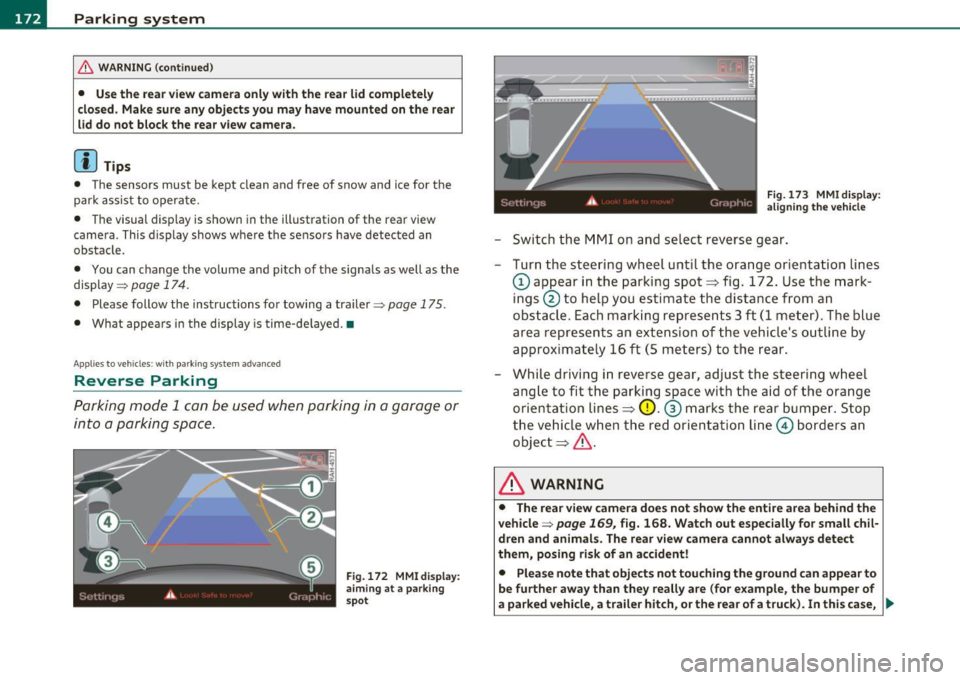
- Turn the steering wheel until the orange orientation lines
(D appear in the parking spot=> fig. 172. Use the mark
ings @to help you estimate the distance from an
obstacle. Each marking represents 3
ft (1 meter) . The blue
area represents an extension of the vehicle's outline by
approximately 16 ft (5 meters) to the rear.
- While driving in reverse gear, adjust the steering wheel
angle to fit the parking space with the aid of the orange
orientation lines=>
0. ® marks the rear bumper. Stop
the vehicle when the red orientation line© borders an
object=> &.
& WARNING
• The rear view camera does not show the entire area behind the
vehicle =>
page 169, fig. 168. Watch out especially for small chil·
dren and animals . The rear view camera cannot always detect
them, posing risk of an accident!
• Please note that objects not touching the ground can appear to
be further away than they really are (for example, the bumper of
a parked vehicle, a trailer hitch, or the rear of a truck). In this case, .,
Page 180 of 390
llffl..__A_ d_a_ p,__ t_iv _ e_ A_ i_r _ S_ u_s _, p'--- e_n _ s_ i_ o _ n ___________________________________________ _
• Automatic lowering: When a speed of about 75 mph ( 120 km/h)
is exceeded for more than 30 seconds, the vehicle is automatically
lowered by 0 .6 inch (15 mm) to
low level .
• Automatic raising: The vehicle is automatically raised to normal
level
again, if the speed falls below about 44 mph (70 km/h) for a
period of 2 minutes . The vehicle is raised immediately when speed
falls below about 22 mph (35 km/h) .
Offroad
Select the offroad mode when you have to travel over poor quality
sections of road (e.g. trails) . In this mode, the vehicle is raised to
high
level 1, and damping characteristics for poor road stretches are
selected. When switching to offroad mode, the Adaptive Air Suspen
sion indicator appears automatically in the instrument cluster display
=>page 179.
The offroad mode can only be activated at speeds below 37 mph
(60 km/h). Offroad mode ends automatically and the automatic
mode is activated when a speed of approximately 50 mph (80 km/h)
is exceeded.
Lift
Select the lift mode when exceptionally high ground clearance is
needed at a reduced speed. In this mode, the vehicle is raised to
high
level 2 . When switching to lift mode , the Adaptive Air Suspension
indicator appears automatically in the instrument cluster display
=:>page 179 .
The lift mode can be activated only at speeds below 12 mph (20
km/h) . When a speed of about 25 mph (40 km/h) is exceeded, the
system automatically leaves
lift mode and the offroad mode is acti
vated . The instrument cluster display automatically switches the
display to Adaptive Air Suspension to indicate reduced ground
clearance. •
Appli es to veh icles : with Adapt ive Air Su spens ion
MMI se ttings
Driving modes are adjusted in the MMI and the current
vehicle level is displayed.
Fig.176 MMI Display:
Settings
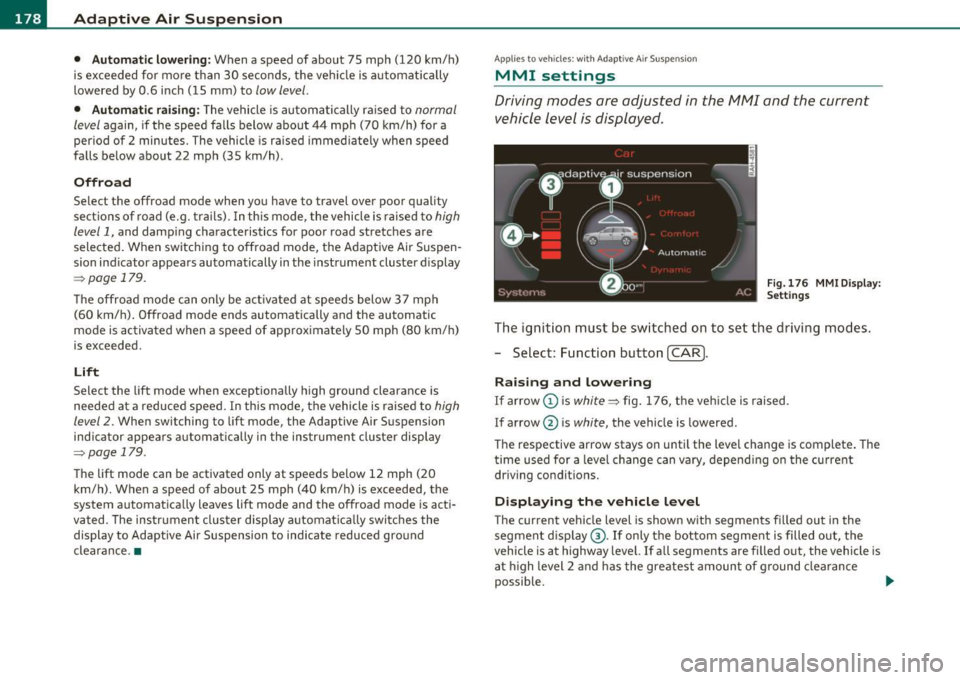
The ignition must be switched on to set the driving modes.
- Select: Function button
(CAR].
Raising and lowering
If arrow (Dis white => fig. 176, the vehicle is raised.
If arrow @ is
white, the vehicle is lowered .
The respective arrow stays on until the level change is complete. The
time used for a level change can vary, depending on the current
driving conditions.
Displaying the vehicle level
The current vehicle level is shown with segments filled out in the
segment display ®·
If only the bottom segment is filled out, the
vehicle is at highway level. If all segments are filled out, the vehicle is
at high level 2 and has the greatest amount of ground clearance
possible. .,_
Page 181 of 390
____________________________________________ A_ d_a ..... p,__ t_iv _ e_ A_ i_r _ S_ u_s__, p_ e_n _ s_ i_ o _ n _ __.ffl'I
While the vehicle is being raised or lowered, the target level is indi
cated by an arrow © next to the corresponding segment. The arrow
disappears again when the vehicle is at the target level.
Limitations to MMI settings
Please note that not every driving mode can be selected in every
dr iving s ituation . For example , it is not poss ible to switch to "lift"
mode at speeds above 12 mph (20 km/h) . This mode is then shown
greyed out in the MMI Display .
The vehicle can on ly be lowered when
all of the veh icle's doors are
closed.
If one doo r is open, all driving modes whose level setting is
below the current vehicle level appear greyed out in the MMI Display.
If a door is opened whi le the vehicle is being lowered , the lowering
process is interrupted until all doo rs are closed again.
I f the system is temporarily unavailable due to, for instance, an
empty compressed air tank, the driving modes that cannot be set
appear
greyed out in the MMI Display . As soon as the system is avail
able aga in, the driv ing modes can once more be selected in the
display .
(I] Tips
• For additional information on the driving modes=> page 177,
"Chassis controls".
• When the compressed air tank is empty , the compressor can be
switched on by starting the engine. The Adaptive Air Suspension is
once again available, after waiting a few minutes. •
Contro ls a nd e quip
m en t Vehicle
OP-eration
Applies to vehicles : w ith Adapt ive A ir Sus pens ion
Appearance in the instrument cluster
display
You can view the current vehicle level in the instrument
cluster display.
Fig. 177 Display:
Adaptive Air Suspen sion
Fig. 178 Display:
Adaptive Air Suspen
s ion
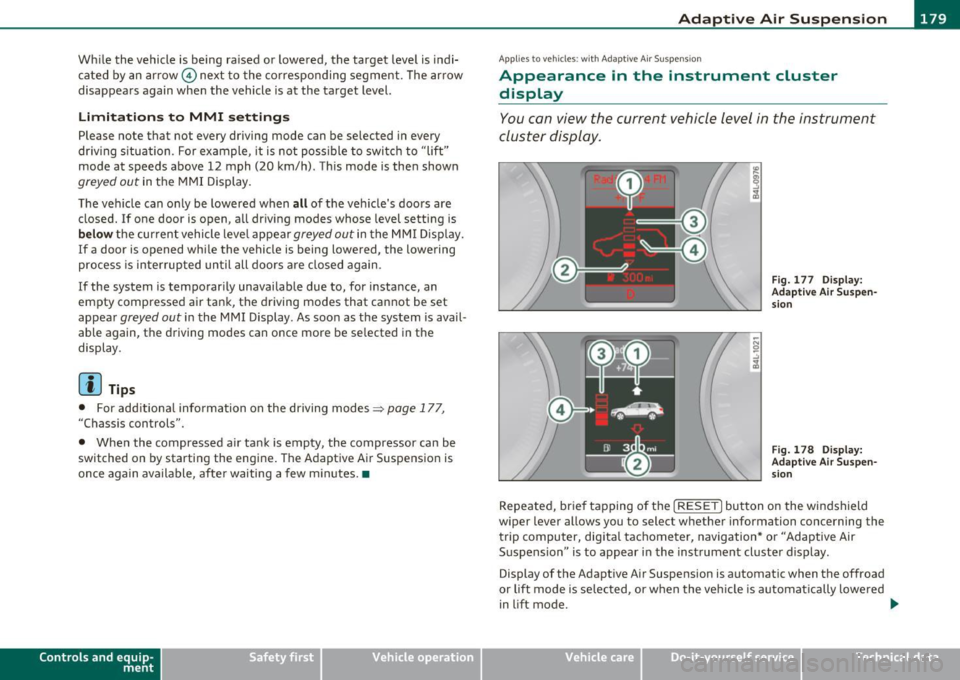
Repeated, br ief tapping of the [ RESET] button on the windshield
wiper lever allows you to selec t whether information concerning the
trip computer, digita l tachometer, navigation* or "Adaptive Air
Suspension " is to appear in the instrument cluster display .
Display of the Adaptive Air Suspension is automatic when the offroad
or lift mode is se lected, or when the vehicle is automat ically lowered
i n lift mode.
~
Vehicle care Do-it-yourselt service iTechnical data
Page 182 of 390
1111....__A_ d_ a_,_ p_t _i_ v _e _ A_i_ r_ S_ u_ s ... p,_ e_n_ s_ io_ n __________________________________________ _
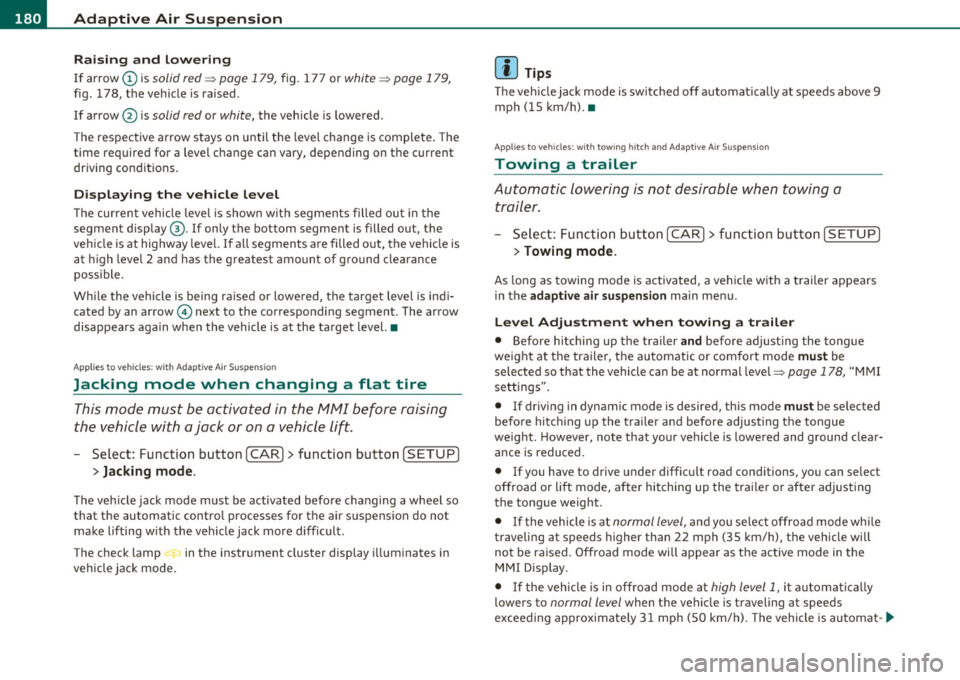
Raising and l owering
If a rrow (Dis solid re d => pag e 179 , fig. 177 or whit e=> pag e 179,
fig . 178, the veh icle is raised .
I f arrow
0 is solid red or white, the vehicle is lowered .
T he respective arrow stays on until the level change is complete . The
time required for a level change can vary, depending on the current
dr iving cond it ions .
Displ aying the vehicle le vel
The current vehicle leve l is show n wit h segments fi lled ou t in the
segment display@. If only the bot tom segment is filled out, the
vehicle is at highway leve l. If all segments a re filled o ut, the vehicle is
at high level 2 and has the greatest amount o f ground clearance
possible.
W hile the vehicle is being ra ised or lowe red, t he target leve l is ind i
cated by an arrow © next to the correspond ing segment . The arrow
disappe ars aga in whe n the vehicle is a t the target level. •
Applies to vehicles: w it h Ad ap tiv e Ai r Suspens ion
Jacking mode when changing a flat tire
This mod e must be activated in the MMI bef ore raising
the vehicle with a jack or on a vehicle
li~ .
-Select: Fu nction button [CAR)> function butto n [SETUP ]
> Jacking mode .
The veh icle jack mode must be activated before c hanging a whee l so
that the automatic contro l processes for t he air s uspensio n do not
make lifting w ith the vehicle jack more difficult .
The check lamp in the instr ument cluster display illuminates in
vehicle jac k mode.
W Tips
Th e veh icle ja ck mode is switc hed off automat ica lly at speeds above 9
mph (15 km/h). •
App lies to veh icles: with towing hitch and Adaptive Air Suspe nsion
Towing a trailer
Automatic lowering is not desirable when towing a
trailer.
- Selec t: Fu nct ion button [CARI > fun ction but ton [S ETUP I
> Towing mode .
As long as towing mode is activated, a ve hicl e w ith a t railer appears
in the
adaptive air suspension main menu .
Level Adjustment when towing a trailer
• Before h itching up the trailer and befo re adjust ing the tongue
we igh t at the trailer, the automatic or com fort mode mu st be
selected so that the vehicle can be at normal leve l=>
page 178, "MMI
se ttings" .
• If dr iv ing in dynamic mode is desired, this mode
must be selected
befo re hitc hing up the tra iler and before adjus ting the tongue
we ight. However, note that yo ur vehicle is lowered and ground clear
ance is reduced.
• If you have to drive under diff icu lt road conditions, you can selec t
offroad or li ft mode, aft er hitching up the trai le r or after adjust ing
the tongue weight .
• If the vehicle is at
normal level, an d you se lec t offro ad mode wh ile
traveling a t speeds higher than 22 mph (35 km/h), the vehicle will
no t b e raised. O ffroad mode will a ppear as t he active mode in the
MMI D isplay.
• If the veh icle is in o ffro ad mode at
high level 1, it automatic a lly
lowers to
normal level when the vehicle is traveling at speeds
exceeding approximate ly 31 mph ( SO km/h). The vehicle is automat -...
Page 190 of 390
• ....__D_ r_iv _i_ n_, g=-- S_ a _ f_e _,Ly _ ______________________________________________ _
Driving Safely
General notes
Safe driving habits
Please remember -safety first!
Th is chapter contains important information, t ips, instructions and
warnings that you need to read an d observe fo r you r own safe ty, the
safety of you r passengers and others . We have summarized here
w hat you need to know about sa fety belts, airbags, child restra ints as
we ll as child safety . You r safety is for us
priority number 1. Always
observe the information and warnings in this section -for your own
safety as well as t hat of your passengers.
The informat ion in this section applies to all mode l versions of yo ur
veh icle . Some of the fe atures des cribed in this se ctions m ay be st an
dard equ ipment on some models, or may be optional eq uipment on
others. If you a re not sure, ask your a uth o rized Audi dealer.
& WARNING
• Always make sure that you follow the instructions and heed
the WARNINGS in th is Manual. It is in your interest and in the
intere st of your passengers.
• Always keep the complete Owner's Literatu re in your Audi
when you lend or sell your vehicle so that this important informa
tion will always be available to the driver and passengers .
• Always keep the Owner's literature handy so that you can find
it easily if you have questions . •
Safety equipment
The safety features are part of the occupant restraint
s y stem and wor k together to he lp reduce the ris k of injury
in a wide variety of accident situations.
Your sa fety and t he safety o f yo ur passenge rs shou ld no t be left to
chance . Adva nces in technology have made a variety of features avai l
a b le to help re duce the risk of injury in an a cc ident . The fo llow ing is a
list of jus t a few of the safety features in your Audi:
• sophisticated safety belts for driver and a ll passenger seating
p osi tion s,
• belt tens ioners for the front seats and the outer seating positions
in the second row seating,
• belt heigh t adj ustmen t for the front seats and the oute r seating
posi tions i n the seco nd row seati ng,
• head restraint s fo r ea ch seating posi tion,
• optimized protect ion aga inst tho racic vertebrae in juries in all
se ats,
• front airbags,
• side airbags i n the fro nt s eats and th e out er seat ing pos itions in
the secon d row seating *,
• side cu rtain airbags,
• special LAT CH an chorage s for ch ild restra in ts,
• adjustable steering co lumn.
Th ese in dividual s afe ty fea tur es, ca n wo rk toge ther as a sys te m t o
he lp protect you and yo ur passengers in a wide range of accidents .
T hese feat ures cannot work as a system if they are not a lways
correct ly adjusted a nd correct ly used .
Safety is everybody's responsibility! •
Page 191 of 390
______________________________________________ D_ ri_v _ i_n _,,g ,c.._ S_a_ f_ e_ l..:: y __ _
Important things to do before driving
Safety is everybody's job! Vehicle and occupant safety always depends on the informed and careful driver.
For your safety and the safety of your passengers, before
driving always:
- Make sure that all lights and signals are operating
correctly.
- Make sure that the tire pressure is correct.
- Make sure that all windows are clean and afford good visi-
bility to the outside.
- Secure all luggage and other items carefully::::>
page 105.
-Make sure that nothing can interfere with the pedals.
- Adjust front seat, head restraint and mirrors correctly for your height .
- Instruct passengers to adjust the head restraints according to their height.
- Make sure to use the right child restraint correctly to
protect children ::::,
page 231, "Child Safety".
- Sit properly in your seat and make sure that your passen gers do the same::::,
page 83, "General recommenda
tions".
- Fasten your safety belt and wear it properly. Also instruct
your passengers to fasten their safety belts properly
=:> page 199. •
Controls and equip
ment Safety first Vehicle operation
What impairs driving safety?
Safe driving is directly related to the condition of the
vehicle, the driver as well as the driver's ability to concen
trate on the road without being distracted .
The driver is responsible for the safety of the vehicle and all
of its occupants. If your ability to drive is impaired, safety
risks for everybody in the vehicle increase and you also
become a hazard to everyone else on the road::::,,& . There
fore:
Do not let yourself be distracted by passengers or by using
a cellular telephone.
NEVER drive when your driving ability is impaired (by
medications, alcohol, drugs, etc.).
- Observe all traffic laws, rules of the road and speed limits
and plain common sense .
- ALWAYS adjust your speed to road, traffic and weather
conditions.
- Take frequent breaks on long trips. Do not drive for more than two hours at a stretch.
- Do NOT drive when you are tired, under pressure or when
you are stressed .
& WARNING
Impaired driving safety increases the risk of serious personal
injury and death whenever a vehicle is being used.•
Vehicle care Do-it-yourself service Technical data
Page 195 of 390
______________________________________________ D_ ri_v _ i_n _,,g ~ S_a_ f_ e_ l_,, y '--- __
Proper adjustment of head restraints
Correctly adjusted head restraints are an important part
of your vehicle 's occupant restraint system and can help
to reduce the risk of injuries in accident situations .
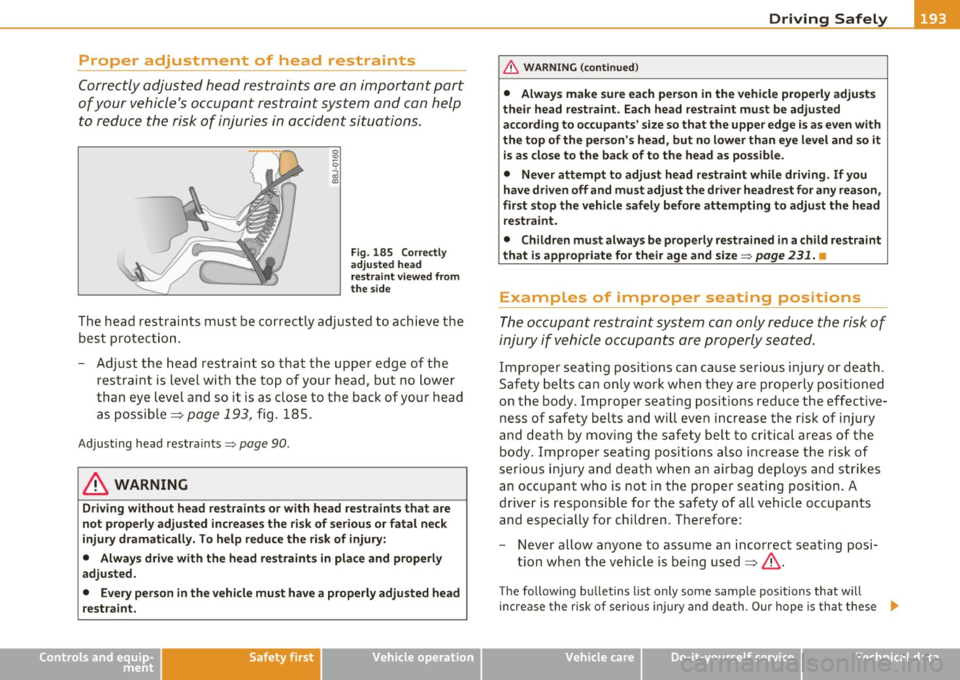
Fig. 185 Correctly
adjusted head
restraint viewed from
the side
The head restra ints must be correctly adjusted to achieve the
best protection.
- Adjust the head restraint so that the upper edge of the
restraint is level with the top of your head, but no lower
than eye level and so it is as close to the back of your head
as possible =>
page 193, fig. 185.
Adjusting head restraints=> page 90.
& WARNING
Driving without head restraints or with head restraints that are
not properly adjusted increases the risk of serious or fatal neck
injury dramatically. To help reduce the risk of injury:
• Always drive with the head restraints in place and properly
adjusted.
• Every person in the vehicle must have a properly adjusted head
restraint.
Controls and equip ment Safety first Vehicle operation
& WARNING (continued)
•
Always make sure each person in the vehicle properly adjusts
their head restraint. Each head restraint must be adjusted
according to occupants' size so that the upper edge is as even with
the top of the person's head, but no lower than eye level and so it
is as close to the back of to the head as possible.
• Never attempt to adjust head restraint while driving. If you
have driven off and must adjust the driver headrest for any reason,
first stop the vehicle safely before attempting to adjust the head
restraint.
• Children must always be properly restrained in a child restraint
that is appropriate for their age and size =>
page 231. •
Examples of improper seating positions
The occupant restraint system can only reduce the risk of
injury if vehicle occupants are properly seated.
Improper seat ing positions can cause serious injury or death.
Safety belts can only work when they are properly positioned
on the body . Improper seating positions reduce the effective
ness of safety belts and will even increase the risk of injury
and death by moving the safety belt to critical areas of the body. Improper seating positions also increase the risk of
serious injury and death when an airbag deploys and strikes
an occupant who is not in the proper seating position. A
driver is responsible for the safety of all vehicle occupants
and especially for children. Therefore:
- Never allow anyone to assume an incorrect seating posi
tion when the vehicle is being used:=>& .
The following bulletins list only some sample positions that will
i ncrease the risk of ser iou s injury and death . Our hope is that these .,_
Vehicle care Do-it-yourself service Technical data
Page 198 of 390
• ....__D_ r_iv _i_ n_, g=-- S_ a _ f_e _,Ly _ ______________________________________________ _
in. WARNING
Improperly stored luggage or other items can fly through the
vehicle causing serious personal injury in the event of hard braking
or an accident. To help reduce the risk of serious personal injury:
• Always put objects, for example, luggage or other heavy items
in the luggage compartment .
• Always secure objects in the luggage compartment using the
tie-down eyelets and suitable straps.
& WARNING
Heavy loads will influence the way your vehicle handles. To help
reduce the risk of a loss of control leading to serious personal
injury:
• Always keep in mind when transporting heavy objects, that a
change in the center of gravity can also cause changes in vehicle
handling:
-Always distribute the load as evenly as possible.
- Place heavy objects as far forward in the luggage compart-
ment as possible.
• Never exceed the Gross Axle Weight Rating or the Gross Vehicle
Weight Rating specified on the safety compliance sticker on the
left door jamb . Exceeding permissible weight standards can cause
the vehicle to slide and handle differently.
• Please observe information on safe driving
=> page 188 .
in. WARNING
To help prevent poisonous exhaust gas from being drawn into the
vehicle, always keep the rear lid closed while driving.
• Never transport objects larger than those fitting completely
into the luggage area because the rear lid cannot be fully closed.
& WARNING (continued)
• If you absolutely must drive with the rear lid open , observe the
following notes to reduce the risk of poisoning:
-Close all windows,
- Close the Panoramic sliding sunroof*,
- Open all air outlets in the instrument panel,
- Switch off the air recirculation,
- Set the fresh air fan to the highest speed.
in. WARNING
Always make sure that the doors, all windows, the Panoramic
sliding sunroof* and the rear lid are securely closed and locked to
reduce the risk of injury when the vehicle is not being used .
• After closing the rear lid, always make sure that it is properly
closed and locked.
• Never leave your vehicle unattended especially with the rear lid
left open. A child could crawl into the vehicle through the luggage
compartment and close the rear lid becoming trapped and unable
to get out. Being trapped in a vehicle can lead to serious personal
injury.
• Never let children play in or around the vehicle.
• Never let passengers ride in the luggage compartment. Vehicle
occupants must always be properly restrained in one of the
vehicle's seating positions .
(I) Tips
• Air circulation helps to re du ce win dow fogging. Stale air escap es
to the outside th rough vents in the trim panel. Be sure to keep t hese
slots free and open.
• Th e tire pressure must correspond to the load . The tire pressure is
shown on the tir e pressure label. The tire pressure label is located on .,_
Page 201 of 390
_____________________________________________ S_a _f _e _t _y _b_ e_lt _ s __ _
Safety belts
General notes
Always wear safety belts!
Wearing safety belts correctly saves lives!
This chapter explains why safety belts are necessary, how
they work and how to adjust and wear them correctly.
- Read all the information that follows and heed all of the
instructions and WARNINGS.
& WARNING
Not wearing safety belts or wearing them improperly increases
the risk of serious personal injury and death.
• Safety belts are the single most effective means available to
reduce the risk of serious injury and death in automobile acci
dents. For your protection and that of your passengers, always
correctly wear safety belts when the vehicle is moving.
• Pregnant women, injured, or physically impaired persons must
also use safety belts. Like all vehicle occupants, they are more
likely to be seriously injured if they do not wear safety belts. The
best way to protect a fetus is to protect the mother - throughout
the entire pregnancy. •
Number of seats
Vehicles with five seats: Your vehicle has two front seats and three
rear seats. Each seating position has a safety belt.
Vehicles with six seats:* Your vehicle has two front seats, two seats
in the second row and two seats in the third row. Each seating posi
tion has a safety belt.
Controls and equip ment Safety first Vehicle operation Vehicles with
seven seats:* Your vehicles has two front seats, three
seats in the second row and two seats in the third row . Each seating
position has a safety belt.
& WARNING
Not wearing safety belts or wearing them improperly increases
the risk of serious personal injury and death.
• Never strap more than one person, including small children,
into any belt. It is especially dangerous to place a safety belt over
a child sitting on your lap.
• Never let more people ride in the vehicle than there are safety
belts available.
• Be sure everyone riding in the vehicle is properly restrained
with a separate safety belt or child restraint. •
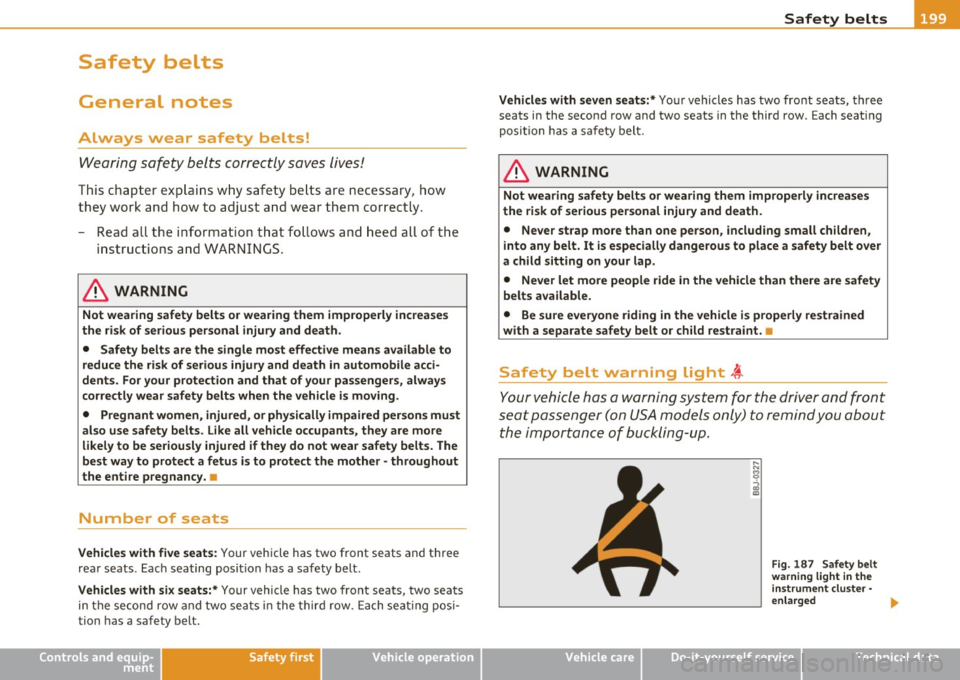
Safety belt warning light l
Your vehicle hos a warning system for the driver and front
seat passenger (on USA models only) to remind you about the importance of buckling-up.
Vehicle care
Fig. 187 Safety belt
warning light in the
instrument cluster·
enlarged ...
Do-it-yourself service Technical data