battery AUDI TT COUPE 2016 User Guide
[x] Cancel search | Manufacturer: AUDI, Model Year: 2016, Model line: TT COUPE, Model: AUDI TT COUPE 2016Pages: 322, PDF Size: 52.86 MB
Page 62 of 322
Downloaded from www.Manualslib.com manuals search engine Driving
Messages
Turn off ignition before leaving vehicle. Battery
is discharging
This message appears and a warning tone sounds
if you open the driver's door when the ignition is
switched on. Switch
the ignition off so that the
battery will not discharge.
Pressing start/stop b utton again will switch off
engine.
This
message appears when you press the
I START ENGINE STOPI button while driving .
Engine
start system: malfunction! Please con
tact Service
The engine automatic start system has a mal
function. Drive
to an authorized Audi dealer or
authorized Audi Service Facility immediately to
have the malfunction corrected. To start the en
gine,
press and hold the I START ENGINE STOPI
button.
II Remote control key : hold back of key
against the designated area. See owner's man
ual
This message appears if there is no convenience
key inside
the vehicle or ifthe system does not
recognize the key. The convenience key may not
be recognized, for example, if it is covered by an
object that disrupts the signal (such as a brief
case), or if
the key battery is weak. Electronic de
vices su ch as cell phones can also interfere with
the signal.
To still be able to start or stop the engine, refer
to "Correct ing a malfunction" Q page 60.
ml Remote control key : key not recognized . Is
the key still in the vehicle?
The
ml indicator light turns on and this message
appears if the convenience key was removed from
the vehicle when the engine was running. If the
convenience key is no longer in the vehicle, you
cannot switch the ignition on or start the engine
once you stop it. In addition, you cannot lock the
vehicle from the outside.
Please press brake pedal
60
This message appears if you do not press the
brake pedal when starting the engine.
Please select N or P
This
message appears when starting or stopping
the engine if the selector lever is not in the N or P
posi tion. The engine will not start/stop.
Shift to P, otherwise vehicle can roll away.
Doors
can be locked only in P
This
message appears for safety reasons along
with a warning
tone. It appears if the selector
lever for the automatic transmission is not in the
P position when switch ing the ignition off w ith
the I START ENGIN E STOPI button. Sh ift these
lector lever to the P pos ition. Otherwise, the vehi
cl e could roll.
You also cannot lock the ve hicl e us
ing
the loc kin g sensor on the door hand le or us
ing
the convenience key.
Starting the engine when there is a
malfunction
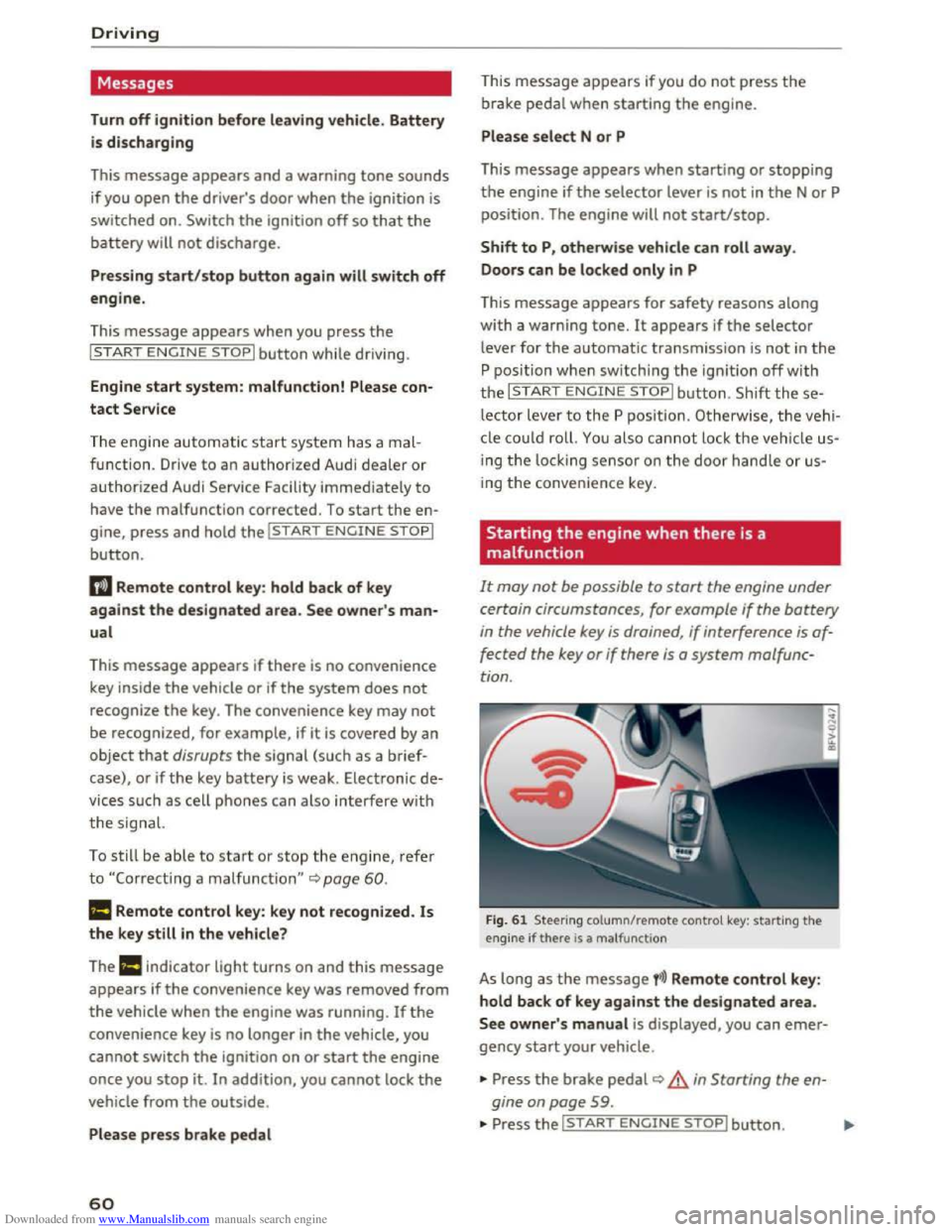
It may not be possible to start the engine under
certain circumstances, for example
if the battery
in the vehicle key is drained , if interference is af
fected
the key or if there is a system malfunc
tion .
Fig. 61 Steering column/remote control key: starting the
engine if there is a ma lfunction
As long as the message fi)) Remote control key:
hold back of key against the designated area.
See owner' s manual is displayed, you can emer
gency start your vehicle .
... Press the brake pedal~ A in Starting the en
gine on page
59 .
... Press the~, S~T~A~R~T~E_N _G ~l-N~E-S_T_ O_P~I button. ....
Page 73 of 322
Downloaded from www.Manualslib.com manuals search engine ..... N
G: CX)
.....
"' U"I
.....
"' .....
Selector lever emergency release
If the vehicle's power supply fails, the selector
lever can
be released in an emergency.
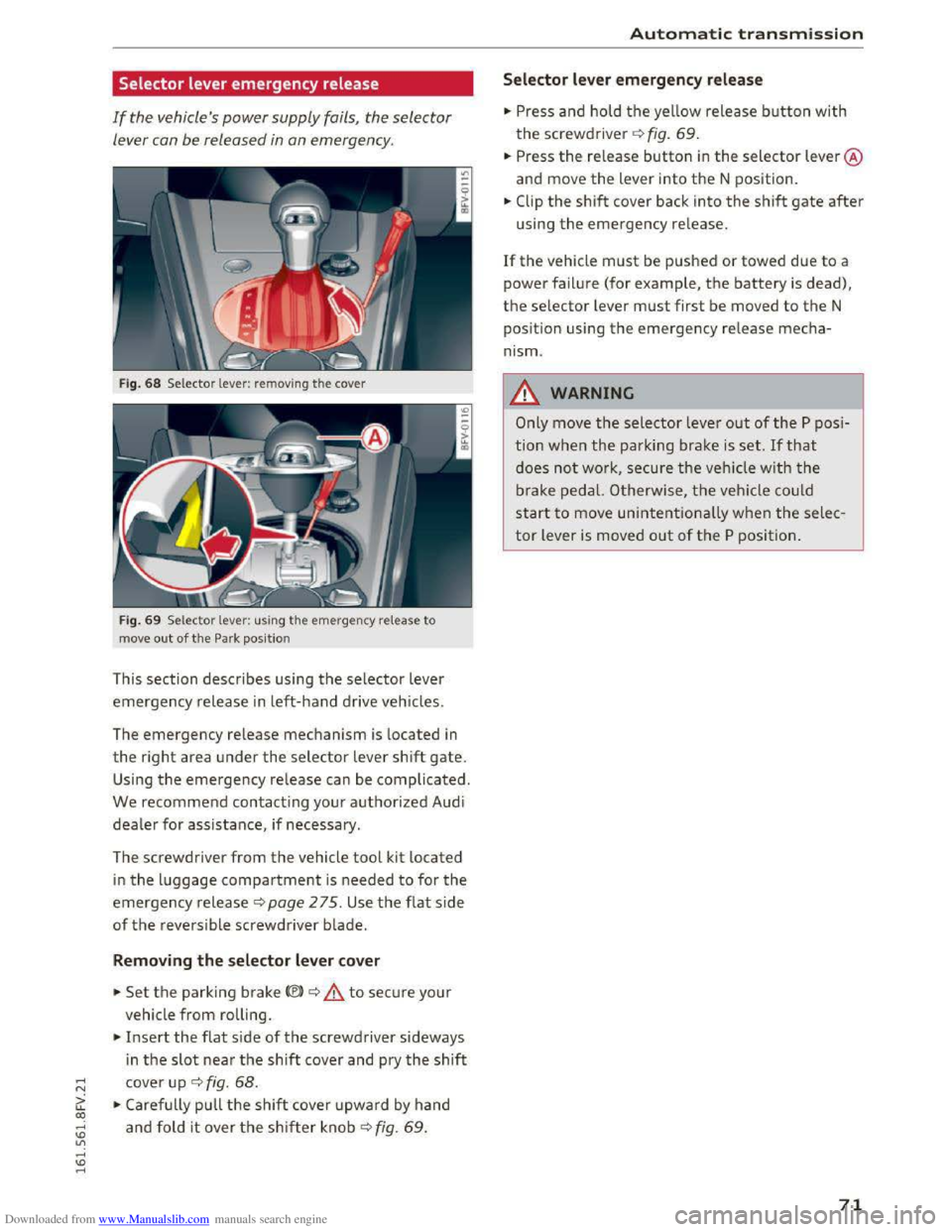
Fig. 68 Selector lever: removing the cover
Fig. 69 Selector lever: us ing the emergency release to
move
out of the Park position
This section describes using the selector lever
emergency release in left-hand drive vehicles.
The
emergency release mechanism is located in
the right area under the selector lever shift gate.
Using the emergency release can be complicated.
We recommend contacting your authorized Audi
dealer for assistance, if necessary.
The screwdriver
from the vehicle tool kit located
in the luggage compartment is needed to for the
emergency release c:> page 2 75. Use the flat side
of the reversible screwdriver blade.
Removing the selector lever cover
.. Set the parking brake<®> c:> A to secure your
vehicle
from rolling .
.. Insert the flat side of the screwdriver sideways
i n
the slot near the shift cover and pry the shift
cover up c:> fig. 68 .
.. Carefully pull the shift cover upward by hand
and fold it over the shifter knob c:> fig. 69 .
Automatic transmission
Selector lever emergency release
.. Press and hold the yellow release button with
the screwdriver c:> fig. 69.
.. Press the re lease button in the selector lever @
and move
the lever into the N position .
.. Clip the shift cover back into the shift gate after
using the emergency release.
If the vehicle must be pushed or towed due to a
power failure (for example, the battery is dead),
the selector lever must first be moved to the N
pos ition using
the emergency release mecha
nism.
_&WARNING
Only move the selector lever out of the P posi
tion
when the parking brake is set. If that
does not work, secure the veh icle w ith the
brake pedal. Otherwise,
the vehicle could
start to move unintentionally when the selec
tor lever is moved out of the P position.
71
Page 81 of 322
Downloaded from www.Manualslib.com manuals search engine Switching on and off
App lies to: vehicles with Audi side assist
The system can be switched on/off in the Info
tainment system.
"'Select in the Infotainment system: IM ENUI but
ton >Vehicle > left control button >Driver as
sistance >Audi side assist
An activated system will signal every time the ig
nition is switched on by turning the displays in
the exterior mirrors on briefly.
Adjusting the display brightness
Applies to: vehicles with Audi side assist
The display brightness can be adjusted in the In
fotainment system.
"'Select in the Infotainment system: IM ENUI but
ton >Vehicle > left control button >Driver as
sistance >Audi side assist
The display brightness adjusts automatically to
the brightness of the surroundings, both in the
information and in the warning stage. In very
dark or very bright surroundings, the display is
already set to the minimum or maximum level by
the automatic adjustment. In such cases, you
may notice no
change when adjusting the bright
ness, or the change may only be noticeable once
the surroundings change.
Adjust
the brightness to a level where the display
in the information stage will not disrupt your
view forward. If you change the brightness, the
display in the exterior mirror will briefly show the
brightness level in the information stage. The
brightness of the warning stage is linked to the
brightness in the information stage and is adjust
ed along with the information stage adjustment.
-Side assist is not active while you are mak
ing the adjustment.
- Your settings are automatically stored and
assigned to the remote control key being
used.
Assist
Driver messages
Applies to: vehicles with Audi side assist
If the side assist switches off automatically, a
message appears in the Infotainment system dis
play.
@i Audi side assist: currently unavailable.
Sensor vision restricted due to surroundings.
See owner's
manual
The radar sensors' vision is affected. Do not cover
the area in front of the sensors with bike wheels,
stickers, dirt or other objects. Clean the area in
front of the sensors, if necessary q page 77,
fig. 77.
@i Audi side assist: currently unavailable.
See owner's
manual
Side assist cannot be switched on temporarily be
cause there is a malfunction (for example, the
battery charge level may be too low).
@i Audi side assist: malfunction! Please
contact
Service
The system cannot guarantee that it will detect
vehicles correctly and it is switched off. The sen
sors have been displaced or are faulty. Have the
system checked by an authorized Audi dealer or
authorized Audi Service Facility soon.
Audi drive select (drive
settings)
Introduction
Applies to: vehicles with Audi drive select
Drive select makes it possible to experience dif
ferent types of vehicle settings in one vehicle.
The driver can
select from three modes, Comfort,
Auto and Dynamic, using the~.~;\,~ button in the
center console or by using the Infotainment sys
tem. This allows you to switch between a sporty
and a comfortable driving mode, for example. In
the Individual mode, the settings can be adjust
ed to your personal preferences. This makes it
possible to combine settings such as a sporty en-
gine
tuning with light steering. .,.
79
Page 94 of 322
Downloaded from www.Manualslib.com manuals search engine Intelligent Technology
Automatic mode (normal operation)
-Automatic extension: the rear spoiler will auto
matically extend when speeds exceed approxi
mately 75 mph (120 km/h)
-Automatic retraction: the rear spoiler will auto
matically retract when speeds decrease to un
der approximately 50 mph (80 km/h).
Manual mode
-Extending manually: briefly tap the~ fig. 89
button to fully extend the rear spoiler.
- Retracting manually:
when driving at speeds
below approximately 10 mph (20 km/h), press
and hold the button to retract the rear spoiler.
When at speeds between 10 mph (20 km/h)
and 75 mph (120 km/h), the rear spoiler will
completely retract when you tap the button.
Indicator lights
Ii) I. Rear spoiler: malfunction!
The
rear spoiler may not have extended due to a
malfunction.
This could change the veh icle's driv
ing characteristics
at high speeds. Do not drive
faster than 85 mph (140 km/h). Drive to an au
thorized Audi dealer or authorized Audi Service
Facility
immediately to have the malfunction cor
rected. The color
of the indicator light depends
on the vehicle speed.
..&. WARNING
-
Driving at higher speeds without the rear
spoiler deployed can impair handling charac
teristics, making
the vehicle harder to con
trol.
- Always
make sure that the spoiler is de
ployed when driving at
speeds ove r 85 mph
(140 km/h). If the rear spoiler warning/indi
cator light in the instrument cluster comes
on, the rear spoiler may not have deployed.
- Never drive
at speeds higher than 85 mph
(140 km/h) ifthe spoiler is not deployed.
Have
the spoiler inspected as soon as possi
ble by an
authorized Audi dealer or qualified
workshop.
- Always obey
speed limits and other traffic
laws.
92
..&. WARNING
Improper operation of the rear spoiler can
cause crushing injuries.
-Always make sure that nobody, especially
children, is
in the way when the rear spoiler
is deployed or retracted.
«J:) Note
-Never push on the vehicle on the rear spoil
er. This could
cause damage.
- To
prevent damage to the rear spoiler do
not lean or place anything on it.
-
-Only operate the rear spoiler manually when
the luggage compartment lid is close and
the rear spoiler moving parts are not
blocked. Otherwise, damage could occur.
(D Tips
Clean the rear spoiler compartment every 2 to
3 months. To function correctly, the rear
spoiler must be free of ice, snow and leaves.
Energy management
The starting ability is optimized
The energy management system manages the
electrical energy distribution
and optimizes the
availability
of electrical energy for starting the
engine.
When a vehicle with a conventiona l energy sys
tem is not driven for a long time, the battery is
drained by equipment (for example the immobil
izer). In
certain circumstances, there could may
not be enough energy to start the engine.
Your vehicle
is equipped with an intelligent ener
gy
management system for distributing electrici
ty. T his sign ificant
ly improves the starting ability
and increases the battery life.
The
energy management system Is made up of
battery diagnosis, Idling current management
and dynamic energy management.
Battery diagnosis
The battery diagnosis determines the battery
charge level. The sensors determine the battery Ill>
Page 95 of 322
Downloaded from www.Manualslib.com manuals search engine voltage, the battery current, and the battery
temperature. The current charge level and the
performance of the battery are determined based
on this.
Idling current management
The idling cur
rent management decreases the
energy used w hile parked. With the engine
switched off, it manages the energy distribution
to the different electrical components. Date from
battery diagnosis is taken into account for this.
Depending
on the battery charge level, electrical
equipment is switched off one item after the oth
er, to prevent the battery from draining and to
retain the starting ability.
Dynamic energy manage
ment
While driving, dynamic energy management dis
tributes the appropriate amount of energy to the
electrical equipment. It controls the battery
charge level so that more energy is not used then
is being generated in order to maintain an opti
mal battery charge level.
(!) Tips
-Energy management cannot overcome the
laws of physics. Note that the charge level
and
length of the battery life are limited.
-
When the starting ability is jeopardized, the
r-1 indicator light turns on ~page 13.
What you should know
Maintaining the starting ability is the highest
priority.
A lot of stress is placed on the battery when driv
ing
short distances, in traffic, and at cold times
of the year. A lot of energy is used but little is
generated. It is also critical when the engine is
not running but electrical equipment is switched
on . In this case, energy is used but none is gener
ated.
In situations like this, energy management will
actively regu l
ated the distribution of energy.
Intelligent T echnology
Long periods without use
If you do not drive your vehicle for several days or
weeks, electrical consumers are gradually scaled
back
or switched off. This reduces energy use and
ensures the vehicle will be able to start after long
periods
of time. Some convenience functions
such
as opening with the remote control key may
not be available. These convenience functions
will be available again once you switch
the igni
tion on and start the engine.
With the engine switched off
The battery will drain if you use Infotainment
functions such as listening to the radio while the
engine is switched off.
The vehicle's
ability to start may be impa ired by
the energy use, a message will appear in the In
fotainment system display. The message indi
cates that the system will switch off automatical
ly soon. If you would like to continue using the
functions, you must start the engine.
With the engine running
Although electrical
energy is generated while
driv ing,
the battery can drain. This can happen
when little energy is generated, and much is used
and the charge level of the battery is not optimal.
To
restore the balance of energy, components
that require large amounts of energy are tempo
rarily scaled back or switched off. Heating sys
tems in particular require a great deal of energy.
If you notice, for example, that the seat heating*
or rear window defroster is not working, then it
has been temporarily re d uced or sw itched off.
T
hese systems are availab le again as soon as the
energy balance has been restored.
In addition, you may notice that the idle speed
has slightly increased. That is normal and no
cause for concern. Due to the increased idling
speed, the additional required energy will be
generated and the battery will be charged.
93
Page 97 of 322
Downloaded from www.Manualslib.com manuals search engine Multi Media Interface
Traffic safety
information
Audi recommends only performing certain Info
tainment system functions, such as entering a
destination, when the vehicle is stationary. Al
ways be prepared to stop operating the Infotain
ment system in the interest of your safety a nd
the safety o f other road users.
A WARNING
Only use the Infotainment sy ste m whe n traf
fic cond itions pe rmi t an d alw ay s i n a way that
allow s you to m aintain complete control over
your ve hicl e.
Introduction
The Multi Media Interface, or MMI for short,
combines various
systems for communication,
navigation " and entertainment in your Audi. You
can operate the MMI using the MMI control pan
el, the multifunction steering wheel or the voice
recognition
system".
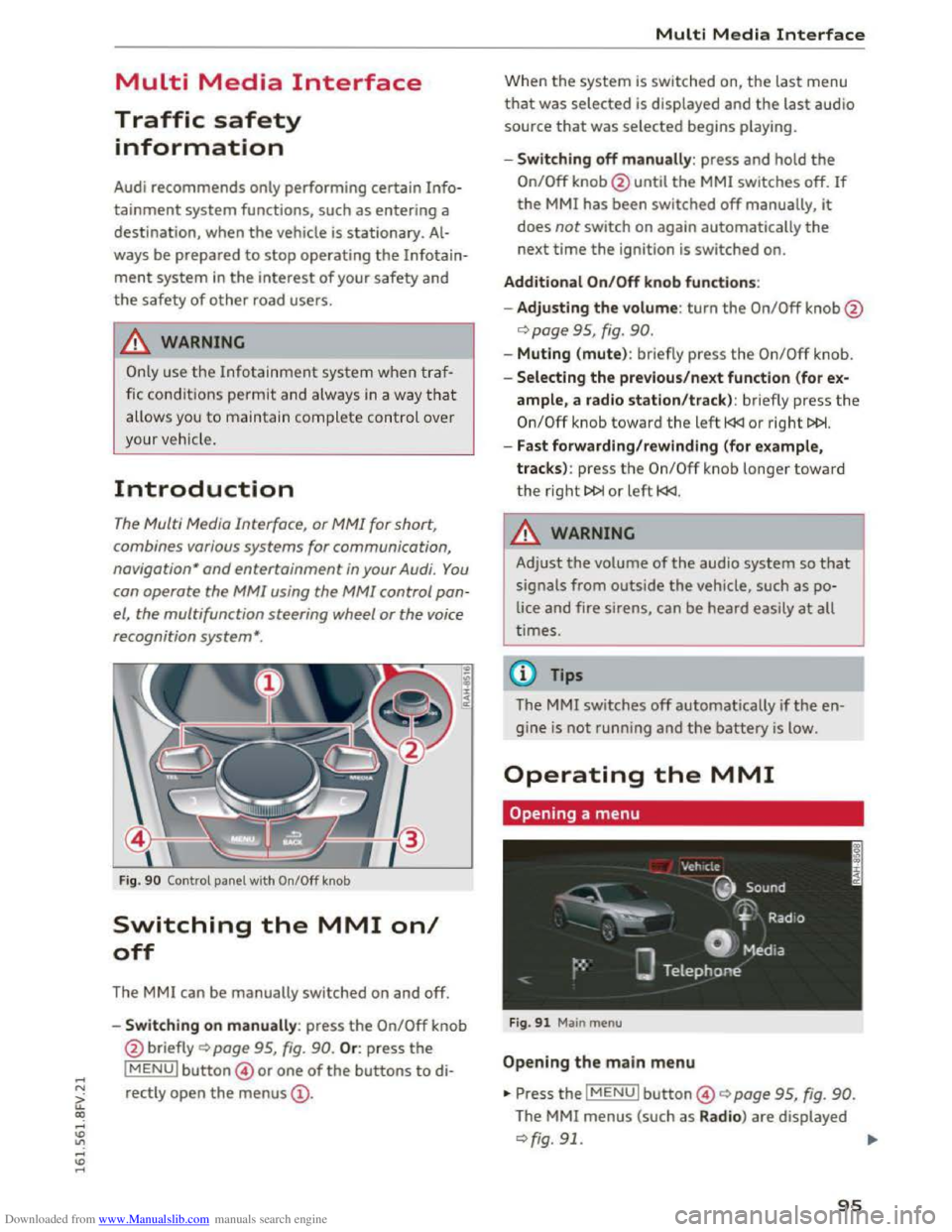
Fig. 90 Control panel with On/Off knob
Switching the MMI on/
off
The MMI can be manually switched on and off.
..
i
-Switching on manu ally: press the On/Off knob
@ briefly
Qpage 95, fig. 90. Or: press the
lMENUI button© or one of the buttons to di
rectly
open the menus@ .
Multi Media Interface
Wh en th e system is switched on, the last menu
that was selected is displayed and the last audio
source that was selected begins play ing.
-Swit ch ing off manually : press and hold the
On/Off knob@until the MMI switches off. If
the MMI has been switched off manually, it
does not switch on again automatically the
next time the ignition is switched on.
Additional On/Off knob functions:
- Adjusting the volum e:
turn the On/Off knob@
¢page 95, fig. 90.
-Muting (mute): br iefly press the On/Off knob.
-Selecting the previous/next function (for ex-
ample, a radio station/track ): br iefly press the
On/Off knob toward th e left l
-Fast forwarding/rewinding (for example,
tracks) :
press th e On/Off kno b longe r toward
the right t>l>I or left l
!-=-
Adjust the volume of th e a udio system so that
signals from outside the vehicle, such as po
lice
and fire sirens, can be heard easily at all
t imes.
Tips
The MMI switches off automatically if th e e n
gine
is not running and the battery is low.
Operating the MMI
Opening a menu
Fig . 91 Main menu
Open ing the main menu
•Press the IMENUI button© ~page 95, fig. 90.
The MMI menus (such as Radio ) are displayed
¢fig. 91. ....
95
Page 103 of 322
Downloaded from www.Manualslib.com manuals search engine ..... N
G: CX)
.....
"' U"I
.....
"' .....
Multi Media Interface
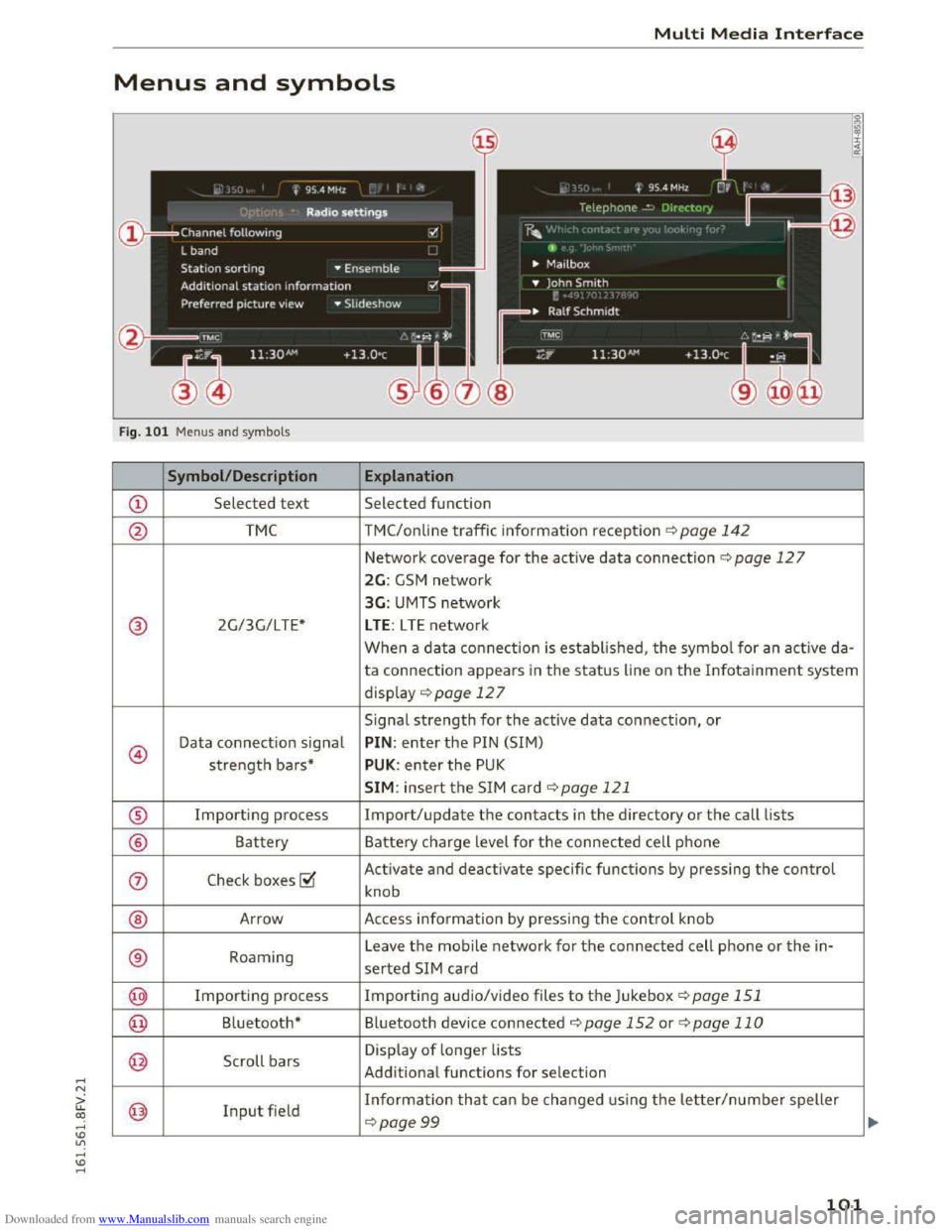
Menus and symbols
I~ :c
'~
Fig. 101 Menus and symbols
Symbol/Description Explanation
CD Selected text Selected function
@ TMC TMC/online traffic information reception ¢page 142
Network coverage for the active data connection¢ page 127
2G: GSM network
3G: UMTS network
® 2G/3G/LTE* LTE: LTE network
When a data connection is established, the symbol for an active da-
ta connection appears in the status line on the Infotainment system
display ¢ page 12 7
Signal
strength for the active data connection, or
@
Data connection signal PIN: enter the PIN (SIM)
strength bars* PUK: enter the PUK
SIM: insert the SIM card~ page 121
® Importing process Import/update the contacts in the directory or the call lists
® Battery Battery charge level for the connected cell phone
(j) Check boxes ~
Activate and deactivate specific functions by pressing the control
knob
® Arrow Access information by pressing the control knob
® Roaming Leave the mobile network for the connected cell phone or the in-
serted SIM card
@ Importing process Importing audio/video files to the Juk
ebox ¢page 151
@ Bluetooth* Bluetooth device connected¢ page 152 or¢ page 110
@ Scroll bars
Display of longer lists
Additional
functions for selection
@ Input field Information that can be changed using the letter/number speller
~page 99
101
Page 154 of 322
Downloaded from www.Manualslib.com manuals search engine Media
Requirement: the playlist must be open. See
¢page 161.
-Selecting a track: select the track that is cur
rently playing. Select: right control button>
Copy to Jukebox> This track or Entire album
or This artist.
Requirement: a video file must be playing .
- Select:
right control button > Copy to Jukebox.
The copying
process begins. The status of the
copying process is shown in the MM!.
-Hiding the importing process: select and con
firm
Continue copying in background. The im
porting process is hidden .
-
Canceling the importing process: select and
confirm Cancel copying: Or : remove the source
that is being imported. Files already copied re
main.
When importing, the audio files are automatical
ly sorted into the media center categories based
on the stored additional information
¢ page 160. The copie d video files are stored in
the media center under the Videos category.
CD Note
Do not import audio/video files when the en
gine is turned off because this will drain the
vehicle battery.
Tips
-Tracks from audio CDs cannot be impo rted
to the Jukebox for legal reasons.
- Files that have already been imported are
automatically recognized and cannot be
copied to the Jukebox again.
-
It is not possible to play audio/video* files
in
the CD/DVD* drive while importing them.
-The Jukebox does not provide an export
function due to legal reasons.
-Files or tracks without stored additional in
formation are listed as Unknown. Audi rec
ommends adding additional information
(such as ID3 tags) to audio files.
-
Reset the Jukebox to the factory default set
tings when selling your vehicle ¢ page 166.
152
Bluetooth audio player
Applies to: vehicles with Bluetooth
With the Bluetooth audio player, you can play
music wirelessly from your Bluetooth-capab/e
device (such as a cell phone) through the MM!.
Requirement: th e vehicle must be stationary and
the Bluetooth function on your Bluetooth device
and the Bluetooth audio player¢ page 168 in
the MM! must both be switched on.
-Connecting a Bluetooth device : press the
I MEDIAi button. Press the left control button
until the sources overview is displayed. Select
and confirm Bluetooth audio player@
<=;>page 159, fig. 135.
-If necessary, select and confirm, Not connected
>Connect Bluetooth audio player. The Blu e
tooth device search starts. Follow the instruc
tions in the MM!.
-Select and confirm the desired Bluetooth de
vice from the list. The MMI generates a PIN for
the connection.
-Select and confirm Yes .
-Enter the PI N for connecting on yo ur Bluetooth
devi ce. Or: if the PIN is already di splayed on
your Bluetooth device, confirm it in the Blue
tooth device and in the MMI. The time a llowed
for entering the PIN is limited to approximately
30 seconds.
The media is started and operated through the
mobile device or the MMI, depending on the de
vice being
used.
(!) Tips
-Check for any connection requests on your
Bluetooth device.
-
You only have to pair your device one time.
Bluetooth devices that are already paired
automatically connect to the MMI when
they are within range.
-Multiple Bluetooth audio players can be
connected to the MMI, but only one mobile
device can be acti ve.
-
Bluetooth protocols AVRCP (1.0/1.3/1.4)
and A20P are supported.
Page 157 of 322
Downloaded from www.Manualslib.com manuals search engine ..... N
G: CX)
.....
"' U"I
.....
"' .....
and does not take any responsi bility for the
contents of the online media services .
- Also
note the ins truc tion s in the chapter
c:> page 128, About Audi connect .
-Depending on the mobile device bei ng used ,
i
nter ruptio ns in the media p lay back can oc
cur.
To avoid interruptions when usin g a
mobile device, do not lock the screen on
your mobile device and keep the Audi MMI
connect app in the foreground.
-Contact your a uth o rized Audi dealer or au
thorized Audi Service Facility for additional
information about online media.
Multimedia connections
USB adapter for Audi music interface or
USB charging port
Depending on the vehicle equipment, you con
connect
your mobile devices (such as a smort
phone or MP3 player) to the Audi music interface
or a USB charging port using a special USB
adapter.
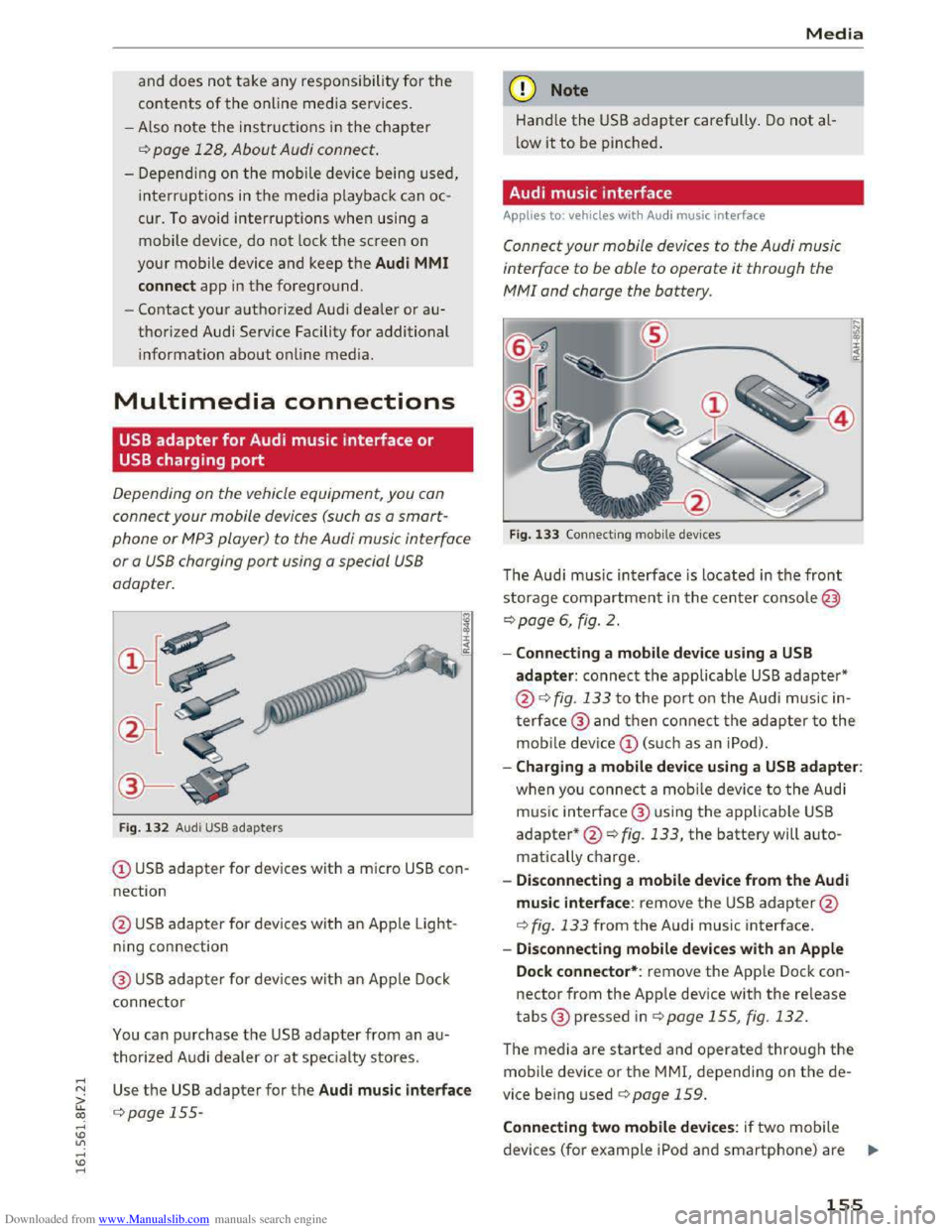
Fig. 1 3 2 Audi USB ada pters
(!) USB adapter for devices with a micro USB con
nection
@ US B adapter for devi ces with an Ap ple Light
ning con nection
@ USB adapter for devi ces wit h an Apple Dock
connector
You can p urchase the USB adapter from an a u
thorized A udi dealer or at specialty stores.
Use th e USB adapter for the Audi music interface
c:> page 155-
Media
Q) Note
Hand le the USB adapter carefully . Do not al
low it to be pinched.
Audi music interface
Applies to: vehicles with Aud i music interface
Connect your mobile devices to the Audi music
interface
to be able to operate it through the
MM! and charge the battery.
Fig. 133 Connecti ng mobile dev ices
The Aud i m us ic interface is loc ated in the front
storage compartment in the c enter c o nsole@
c:>page 6, fig. 2.
-Connecting a mobile device using a USB
adapter: connect the applicable USB adapter*
@c:> fig. 133 t o the port on the Audi music in
t
erface@ and then c o nne ct the ada p ter to the
mobile dev ice(!) (s uc h a s an iPod).
-Charging a mobile device using a USB adapter:
w h
en yo u co nnect a mobile device to the Audi
m us ic
interfac e @ using the applicable USB
adapter*@c:> fig. 133, the battery will auto
matically ch
arge.
-
Disconnecting a mobile device from the Audi
music interface: remove the USB adapter@
c:> fig. 133 from the Audi music interface.
-Disconnecting mobile devices with an Apple
Dock connector*: remove the App le Dock con
nector from the App le device with the release
tabs® pressed inc:> page 155, fig. 132.
The media are started and operated through the
mobile device or th e MMI, depending on t he de
vice being used c:>page 159.
Connecting two mobile devices: if two m obile
devices (for
example iPo d and smartphone) are ..,..
155
Page 166 of 322
Downloaded from www.Manualslib.com manuals search engine Media
-The security levels for the Parental control
are based on the US standards from the Mo
tion Picture Association of America (MPAA).
Note that the age levels for video DVDs in
European countries may differ. -
Password entry
for Parental control will be
locked for approximately one minute if you
enter the incorrect password three times in
a row. The password can only be reset by an
authorized
Audi dealer.
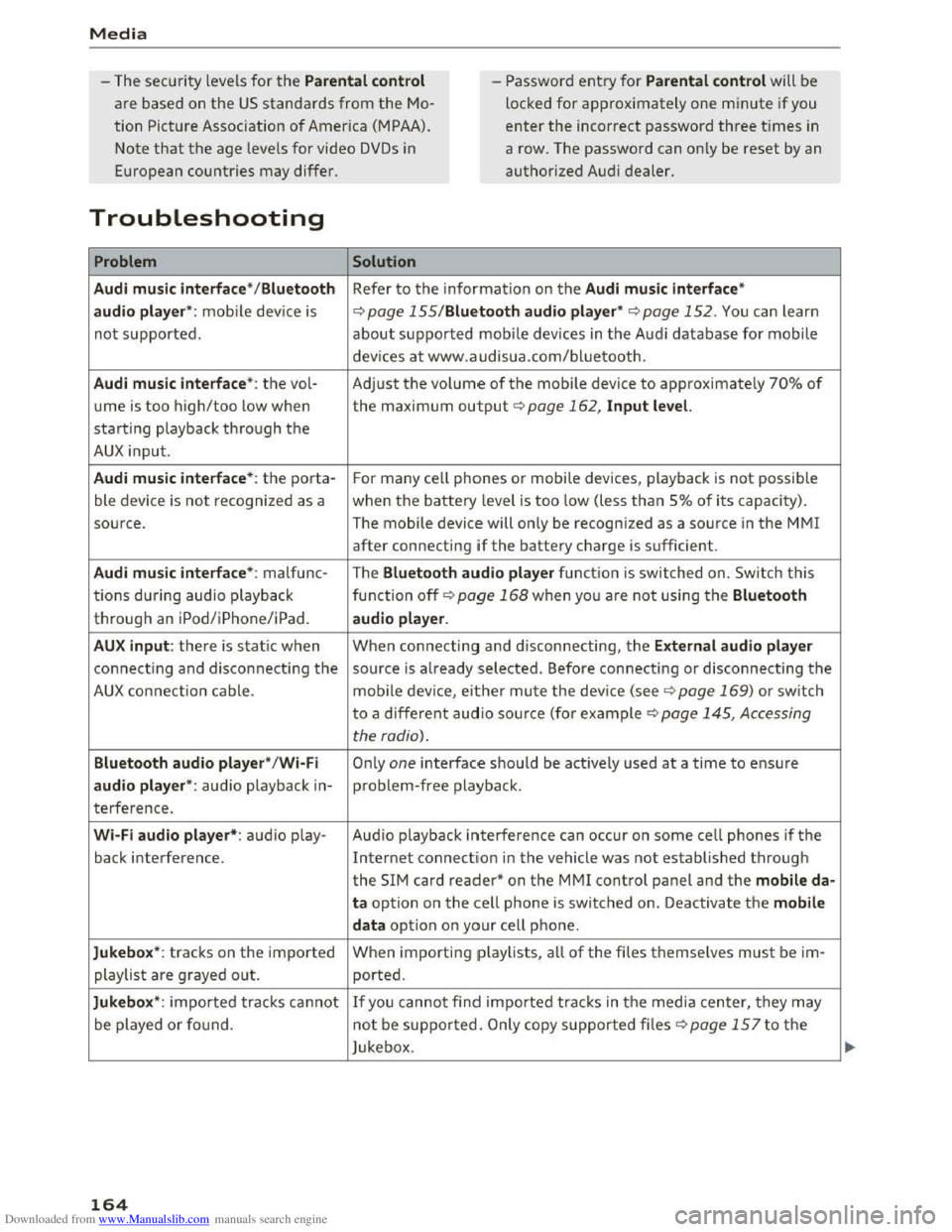
Troubleshooting
Problem Solution
Audi music interface* /Bluetooth
Refer to the information on the Audi music interface*
audio player*:
mobile device is c::.> page 155/Blue·tooth audio player* c::.> page 152. You can learn
not supported. about supported mobile devices in the Audi database for mobile
devices
at www.audisua.com/bluetooth.
Audi music interface* : the vol-Adjust the volume of the mobile device to approximately 70% of
ume is too high/too low when the maximum output c> page 162, Input level.
starting playback through the
AUX input.
Audi music interface* : the porta-For many cell phones or mobile devices, playback is not possible
ble device
is not recognized as a when the battery level is too low (less than So/o of its capacity).
source. The mobile device will only be recognized as a source
in the MM!
after connecting if the battery charge is sufficient.
Audi music interface* : malfunc- The Bluetooth audio player function is switched on. Switch this
tions during audio playback
function off
c> page 168 when you are not using the Bluetooth
through an iPod/iPhone/iPad. audio player.
AUX input: there is static when When connecting and disconnecting, the External audio player
connecting and disconnecting the source is already selected. Before connecting or disconnecting the
AUX connection cable. mobile device, either mute the device (see q page 169) or switch
to a different audio source (for example
c> page 145, Accessing
the radio).
Bluetooth audio player*/Wi-Fi Only one interface should be actively used at a time to ensure
audio player*: audio playback in-problem-free playback.
terference .
Wi-Fi audio player*: audio play- Audio playback interference can occur on some cell phones if the
back interference . Internet connectilon in the vehicle was not established through
the SIM card reader* on the MMI control panel and the mobile da-
ta option on the cell phone is switched on. Deactivate the mobile
data
option on your cell phone.
Jukebox*: tracks on the imported When
importing playlists , all of the files themselves must be im-
playlist are grayed out. ported.
Jukebox*: imported tracks cannot If you cannot find imported tracks in the media center, they may
be played or found . not be supported .
Only copy supported files q page 15 7 to the
Jukebox .
164