infotainment CADILLAC ESCALADE 2020 Owner's Guide
[x] Cancel search | Manufacturer: CADILLAC, Model Year: 2020, Model line: ESCALADE, Model: CADILLAC ESCALADE 2020Pages: 392, PDF Size: 6.39 MB
Page 221 of 392

Cadillac Escalade Owner Manual (GMNA-Localizing-U.S./Canada/Mexico-
13566588) - 2020 - CRC - 4/24/19
220 DRIVING AND OPERATING
Rear Vision Camera (RVC)
When the vehicle is shifted into
R (Reverse), the RVC displays an
image of the area behind the vehicle
in the infotainment display. The
previous screen displays when the
vehicle is shifted out of R (Reverse)
after a short delay. To return to the
previous screen sooner, press any
button on the infotainment system,
shift into P (Park), or reach a vehicle
speed of approximately 12 km/h
(8 mph). The rear vision camera is
above the license plate.
1. View Displayed by the RearVision Camera
1. View Displayed by the RearVision Camera
2. Corners of the Rear Bumper
Displayed images may be farther or
closer than they appear. The area
displayed is limited and objects that
are close to either corner of the
bumper or under the bumper do not
display.
A warning triangle may display to
show that Rear Park Assist (RPA) has
detected an object. This triangle
changes from amber to red and
increases in size the closer the object.
Surround Vision
If equipped, Surround Vision displays
an image of the area surrounding the
vehicle, along with the front or rear
camera views in the infotainment display. The front camera is in the
grille or near the front emblem, the
side cameras are on the bottom of the
outside rearview mirrors, and the rear
camera is above the license plate.
{Warning
The Surround Vision cameras have
blind spots and will not display all
objects near the corners of the
vehicle. Folding outside mirrors that
are out of position may not display
surround view correctly. Always
check around the vehicle when
parking or backing.
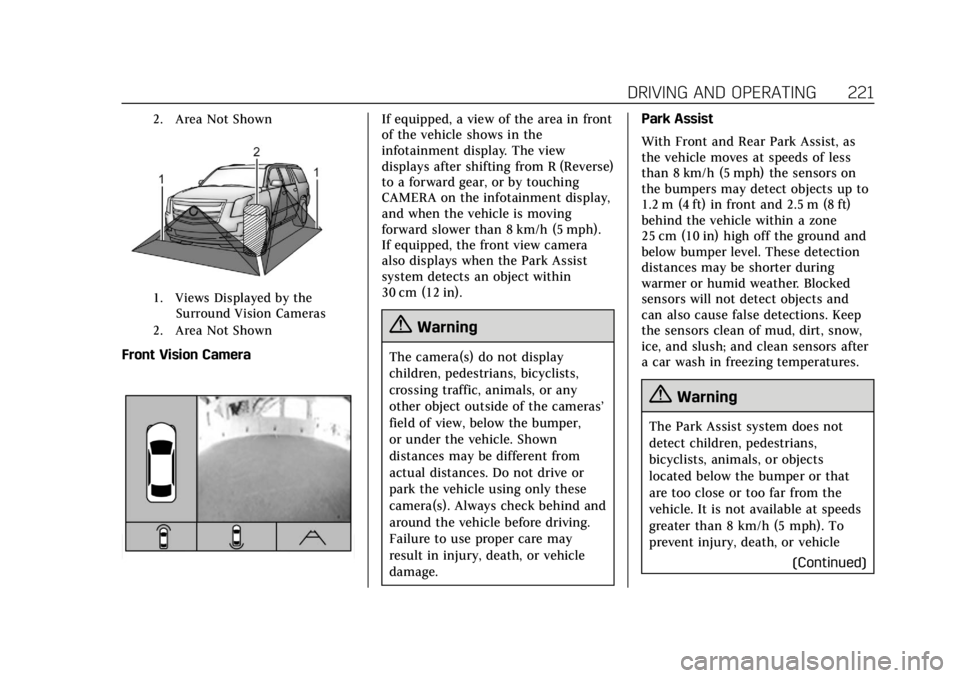
1. Views Displayed by the
Surround Vision Cameras
Page 222 of 392
Cadillac Escalade Owner Manual (GMNA-Localizing-U.S./Canada/Mexico-
13566588) - 2020 - CRC - 4/24/19
DRIVING AND OPERATING 221
2. Area Not Shown
1. Views Displayed by theSurround Vision Cameras
2. Area Not Shown
Front Vision Camera
If equipped, a view of the area in front
of the vehicle shows in the
infotainment display. The view
displays after shifting from R (Reverse)
to a forward gear, or by touching
CAMERA on the infotainment display,
and when the vehicle is moving
forward slower than 8 km/h (5 mph).
If equipped, the front view camera
also displays when the Park Assist
system detects an object within
30 cm (12 in).
{Warning
The camera(s) do not display
children, pedestrians, bicyclists,
crossing traffic, animals, or any
other object outside of the cameras’
field of view, below the bumper,
or under the vehicle. Shown
distances may be different from
actual distances. Do not drive or
park the vehicle using only these
camera(s). Always check behind and
around the vehicle before driving.
Failure to use proper care may
result in injury, death, or vehicle
damage. Park Assist
With Front and Rear Park Assist, as
the vehicle moves at speeds of less
than 8 km/h (5 mph) the sensors on
the bumpers may detect objects up to
1.2 m (4 ft) in front and 2.5 m (8 ft)
behind the vehicle within a zone
25 cm (10 in) high off the ground and
below bumper level. These detection
distances may be shorter during
warmer or humid weather. Blocked
sensors will not detect objects and
can also cause false detections. Keep
the sensors clean of mud, dirt, snow,
ice, and slush; and clean sensors after
a car wash in freezing temperatures.
{Warning
The Park Assist system does not
detect children, pedestrians,
bicyclists, animals, or objects
located below the bumper or that
are too close or too far from the
vehicle. It is not available at speeds
greater than 8 km/h (5 mph). To
prevent injury, death, or vehicle
(Continued)
Page 224 of 392
Cadillac Escalade Owner Manual (GMNA-Localizing-U.S./Canada/Mexico-
13566588) - 2020 - CRC - 4/24/19
DRIVING AND OPERATING 223
{Warning
RAB may not avoid many types of
backing crashes. Do not wait for the
automatic braking to apply. This
system is not designed to replace
driver braking and only works in
R (Reverse) when an object is
detected directly behind the vehicle.
It may not brake or stop in time to
avoid a crash. It will not brake for
objects when the vehicle is moving
at very low speeds. It does not
detect children, pedestrians,
bicyclists, animals, or objects below
the bumper or that are too close or
too far from the vehicle. To prevent
injury, death, or vehicle damage,
even with RAB, always check the
area around the vehicle before and
while backing.
Pressing the brake pedal after the
vehicle comes to a stop will release
RAB. If the brake pedal is not pressed
soon after the stop, the Electric Parking Brake may be set. When it is
safe, press the accelerator pedal firmly
at any time to override RAB.
{Warning
There may be instances where
unexpected or undesired automatic
braking occurs. If this happens,
either press the brake pedal or
firmly press the accelerator pedal to
release the brakes from the RAB
system. Before releasing the brakes,
check the RVC and check the area
around the vehicle to make sure it
is safe to proceed.
Rear Cross Traffic Alert (RCTA)
If equipped, when the vehicle is
shifted into R (Reverse), RCTA shows a
red warning triangle with a left or
right pointing arrow on the
infotainment display to warn of traffic
coming from the left or right. This
system detects objects coming from
up to 20 m (65 ft) from the left or
right side of the vehicle. When an
object is detected, either three beeps
sound from the left or right or three Safety Alert Seat pulses occur on the
left or right side, depending on the
direction of the detected vehicle.
Use caution while backing up when
towing a trailer, as the RCTA
detection zones that extend out from
the back of the vehicle do not move
further back when a trailer is towed.
Turning the Features On or Off
PressXon the center stack to turn
on or off the Front and Rear Park
Assist, Rear Cross Traffic Alert,
Reverse Automatic Braking, and
Backing Warning System at the same
time. The indicator light next to the
button comes on when the features
are on and turns off when the features
have been disabled.
Front and Rear Park Assist can be set
to Off, On, or On with Towbar through
vehicle personalization. See “Park
Assist ”under Vehicle Personalization
0 136. If Park Assist is turned off
through vehicle personalization, the
Park Assist button will be disabled. To
turn Park Assist on again, select On in
the vehicle personalization menu. The
Page 225 of 392

Cadillac Escalade Owner Manual (GMNA-Localizing-U.S./Canada/Mexico-
13566588) - 2020 - CRC - 4/24/19
224 DRIVING AND OPERATING
On with Towbar setting allows for
Park Assist to work properly with the
trailer hitch.
Turn off Park Assist and Reverse
Automatic Braking when towing a
trailer.
To turn the RPA symbols, guidance
lines (on some models), or Rear Cross
Traffic Alert on or off, see“Rear
Camera ”and “Collision/Detection
Systems” underVehicle Personalization
0 136. On some models, select the
guidance lines button on the
infotainment display to turn them on
or off.
On some vehicles the RCTA setting
can be turned off through “Collision/
Detection Systems” underVehicle
Personalization 0136.
Automatic Parking Assist (APA)
If equipped, APA searches for and
steers the vehicle into parallel and
perpendicular parking spots. When
using APA, you must still shift gears,
and control the brakes and
accelerator. A display and audible
beeps help to guide parking
maneuvers.
{Warning
APA does not apply the brakes. APA
may not detect objects in the
parking space, objects that are soft
or narrow, objects high off the
ground such as flatbed trucks,
or objects below ground level such
as large potholes. Always verify that
the parking space is appropriate for
parking a vehicle. APA does not
respond to changes in the parking
space, such as movement of an
adjacent vehicle, or a person or
object entering the parking space.
APA does not detect or avoid traffic
that is behind or alongside of the
vehicle. Always be prepared to stop
the vehicle during the parking
maneuver.
Press
Oon the center stack to
enable the system to search for a
parking space that is large enough and
within 1.5 m (5 ft) of the vehicle. The
vehicle speed must be below
30 km/h (18 mph). APA does not work
in 4
mor 4n. The system cannot:
.
Detect whether it is a legal parking
space.
. Park exactly lined up with the
vehicle next to it if the spot is
approached at an angle or if the
parking space is angled.
. Park exactly centered in a spot
that is marked too large.
. Always detect short curbs.
When enabled, APA searches for
parallel parking spaces to the right of
the vehicle. To search for a parking
space to the left, turn on the left turn
signal or, if available, change the side
selection in the infotainment display.
To switch the parking mode between
parallel and perpendicular, press and
hold
Oduring the search process or,
if available, change the parking mode
in the infotainment display.
Page 288 of 392

Cadillac Escalade Owner Manual (GMNA-Localizing-U.S./Canada/Mexico-
13566588) - 2020 - CRC - 4/24/19
VEHICLE CARE 287
FusesUsage
20 Rear seat entertainment
21 Sunroof
22 –
23 –
24 –
25 –
26 Infotainment/Airbag
27 –/RF window switch/
Rain sensor
28 Obstacle detection/USB
29 Radio
30 –
31 –
32 –
33 –
34 –
35 –
36 Special equipment option B2 Fuses
Usage
37 Special equipment option
38 Body control module 2
39 DC to AC inverter
40 –
41 –
42 –
43 –
44 Right door window motor
45 Front blower
46 Body control module 6
47 Body control module 7
48 Amplifier
49 Right front seat
50 Accessory power outlet 3
51 –
53 –
54 –
55 – Fuses
Usage
56 –
Relays Usage
52 Retained accessory power
Instrument Panel Fuse
Block (Left)
The left instrument panel fuse block
access door is on the driver side edge
of the instrument panel.
Pull off the cover to access the fuse
block.
Page 357 of 392

Cadillac Escalade Owner Manual (GMNA-Localizing-U.S./Canada/Mexico-
13566588) - 2020 - CRC - 4/24/19
356 CUSTOMER INFORMATION
Customer
Information
Customer Information
Customer SatisfactionProcedure . . . . . . . . . . . . . . . . . . . . . . . 356
Customer Assistance Offices . . . . 358
Customer Assistance for Text Telephone (TTY) Users . . . . . . . . . 358
Online Owner Center . . . . . . . . . . . . . 359
GM Mobility Reimbursement Program . . . . . . . . . . . . . . . . . . . . . . . . . 359
Roadside Service . . . . . . . . . . . . . . . . . 360
Scheduling Service Appointments . . . . . . . . . . . . . . . . . . . 361
Courtesy Transportation Program . . . . . . . . . . . . . . . . . . . . . . . . . 362
Collision Damage Repair . . . . . . . . . 363
Publication Ordering Information . . . . . . . . . . . . . . . . . . . . . 365
Radio Frequency Statement . . . . . 366
Reporting Safety Defects
Reporting Safety Defects to the United States Government . . . . . 366
Reporting Safety Defects to the Canadian Government . . . . . . . . . 367 Reporting Safety Defects to
General Motors . . . . . . . . . . . . . . . . . 367
Vehicle Data Recording and
Privacy
Vehicle Data Recording andPrivacy . . . . . . . . . . . . . . . . . . . . . . . . . . . 367
Cybersecurity . . . . . . . . . . . . . . . . . . . . . 367
Event Data Recorders . . . . . . . . . . . . 368
OnStar . . . . . . . . . . . . . . . . . . . . . . . . . . . . . 369
Infotainment System . . . . . . . . . . . . . 369
Customer Information
Customer Satisfaction
Procedure
Your satisfaction and goodwill are
important to your dealer and to
Cadillac. Normally, any concerns with
the sales transaction or the operation
of the vehicle will be resolved by your
dealer's sales or service departments.
Sometimes, however, despite the best
intentions of all concerned,
misunderstandings can occur. If your
concern has not been resolved to your
satisfaction, the following steps
should be taken:
STEP ONE : Discuss your concern
with a member of dealership
management. Normally, concerns can
be quickly resolved at that level. If the
matter has already been reviewed with
the sales, service or parts manager,
contact the owner of your dealership
or the general manager.
STEP TWO : If after contacting a
member of dealership management, it
appears your concern cannot be
resolved by your dealership without
Page 366 of 392
Cadillac Escalade Owner Manual (GMNA-Localizing-U.S./Canada/Mexico-
13566588) - 2020 - CRC - 4/24/19
CUSTOMER INFORMATION 365
Insurance pays the bill for the repair,
but you must live with the repair.
Depending on your policy limits, your
insurance company may initially value
the repair using aftermarket parts.
Discuss this with the repair
professional, and insist on Genuine
GM parts. Remember, if the vehicle is
leased, you may be obligated to have
the vehicle repaired with Genuine GM
parts, even if your insurance coverage
does not pay the full cost.
If another party's insurance company
is paying for the repairs, you are not
obligated to accept a repair valuation
based on that insurance company's
collision policy repair limits, as you
have no contractual limits with that
company. In such cases, you can have
control of the repair and parts choices
as long as the cost stays within
reasonable limits.Publication Ordering
Information
Service Manuals
Service manuals have the diagnosis
and repair information on the engine,
transmission, axle, suspension, brakes,
electrical system, steering system,
body, etc.
Customer Literature
Owner’s manuals are written
specifically for owners and are
intended to provide basic operational
information about the vehicle. The
owner’s manual includes the
Maintenance Schedule for all models.
Customer literature publications
available for purchase include owner’s
manuals, warranty manuals,
infotainment manuals, and portfolios.
Portfolios include an owner’s manual,
warranty manual, infotainment
manual, if applicable, and zip lock bag
or pouch.
Current and Past Models
Service manuals and customer
literature are available for many
current and past model year GM
vehicles.
To order, call 1-800-551-4123
Monday–Friday, 8:00 a.m.–6:00 p.m.
eastern time
For credit card orders only (VISA,
MasterCard, or Discover), see Helm,
Inc. at: www.helminc.com.
To order by mail, write to:
Helm, Incorporated
Attention: Customer Service
47911 Halyard Drive
Plymouth, MI 48170
Make checks payable in U.S. funds.
Page 370 of 392
Cadillac Escalade Owner Manual (GMNA-Localizing-U.S./Canada/Mexico-
13566588) - 2020 - CRC - 4/24/19
CUSTOMER INFORMATION 369
request by police or similar
government office; as part of GM's
defense of litigation through the
discovery process; or, as required by
law. Data that GM collects or receives
may also be used for GM research
needs or may be made available to
others for research purposes, where a
need is shown and the data is not tied
to a specific vehicle or vehicle owner.
OnStar
If the vehicle is equipped with OnStar
and has an active service plan,
additional data may be collected and
transmitted through the OnStar
system. This includes information
about the vehicle’s operation;
collisions involving the vehicle; the
use of the vehicle and its features,
including infotainment; and the
location and approximate GPS speed
of the vehicle. Refer to the OnStar
Terms and Conditions and Privacy
Statement on the OnStar website.
SeeOnStar Additional Information
0 372.
Infotainment System
Using the navigation system may
result in the storage of destinations,
addresses, telephone numbers, and
other trip information. See the
infotainment manual for information
on stored data and for deletion
instructions.
Page 371 of 392
Cadillac Escalade Owner Manual (GMNA-Localizing-U.S./Canada/Mexico-
13566588) - 2020 - CRC - 4/24/19
370 ONSTAR
OnStar
OnStar Overview
OnStar Overview . . . . . . . . . . . . . . . . . . 370
OnStar Services
Emergency . . . . . . . . . . . . . . . . . . . . . . . . 371
Security . . . . . . . . . . . . . . . . . . . . . . . . . . . 371
OnStar Additional Information
OnStar AdditionalInformation . . . . . . . . . . . . . . . . . . . . . 372
OnStar Overview
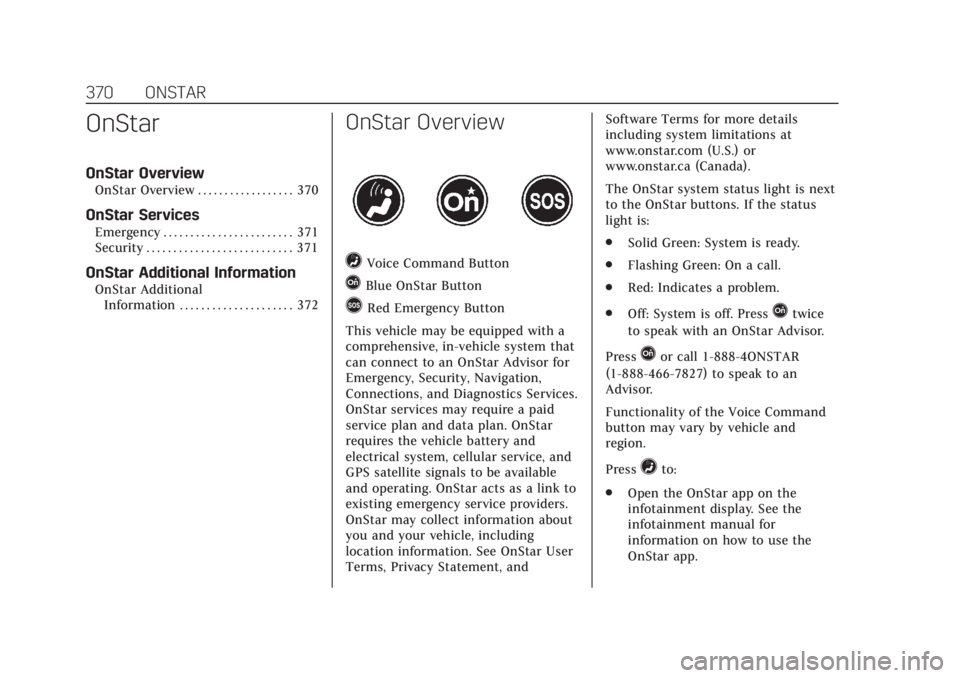
=Voice Command Button
QBlue OnStar Button
>Red Emergency Button
This vehicle may be equipped with a
comprehensive, in-vehicle system that
can connect to an OnStar Advisor for
Emergency, Security, Navigation,
Connections, and Diagnostics Services.
OnStar services may require a paid
service plan and data plan. OnStar
requires the vehicle battery and
electrical system, cellular service, and
GPS satellite signals to be available
and operating. OnStar acts as a link to
existing emergency service providers.
OnStar may collect information about
you and your vehicle, including
location information. See OnStar User
Terms, Privacy Statement, and Software Terms for more details
including system limitations at
www.onstar.com (U.S.) or
www.onstar.ca (Canada).
The OnStar system status light is next
to the OnStar buttons. If the status
light is:
.
Solid Green: System is ready.
. Flashing Green: On a call.
. Red: Indicates a problem.
. Off: System is off. PressQtwice
to speak with an OnStar Advisor.
Press
Qor call 1-888-4ONSTAR
(1-888-466-7827) to speak to an
Advisor.
Functionality of the Voice Command
button may vary by vehicle and
region.
Press
=to:
. Open the OnStar app on the
infotainment display. See the
infotainment manual for
information on how to use the
OnStar app.
Page 374 of 392
Cadillac Escalade Owner Manual (GMNA-Localizing-U.S./Canada/Mexico-
13566588) - 2020 - CRC - 4/24/19
ONSTAR 373
Services for People with
Disabilities
Advisors provide services to help with
physical disabilities and medical
conditions.
Press
Qto help:
. Locate a gas station with an
attendant to pump gas.
. Find a hotel, restaurant, etc., that
meets accessibility needs.
. Provide directions to the closest
hospital or pharmacy in urgent
situations.
TTY Users
OnStar has the ability to communicate
to deaf, hard-of-hearing,
or speech-impaired customers while in
the vehicle. The available
dealer-installed TTY system can
provide in-vehicle access to all OnStar
services, except Virtual Advisor and
OnStar Turn-by-Turn Navigation.
If equipped, TTY mode can be turned
on or off by touching Settings, then
Apps, and then Phone. When TTY mode is on, phone calls can be made
or received with OnStar using the
infotainment display.
OnStar Personal Identification
Number (PIN)
A PIN is needed to access some
OnStar services. The PIN will need to
be changed the first time when
speaking with an Advisor. To change
the OnStar PIN, contact an OnStar
Advisor by pressing
Qor calling
1-888-4ONSTAR.
Warranty
OnStar equipment may be warranted
as part of the vehicle warranty.
Languages
The vehicle can be programmed to
respond in multiple languages.
Press
Qand ask for an Advisor.
Advisors are available in English,
Spanish, and French. Available
languages may vary by country.
Potential Issues
OnStar cannot perform Remote Door
Unlock or Stolen Vehicle Assistance
after the vehicle has been off
continuously for 10 days without an
ignition cycle. If the vehicle has not
been started for 10 days, OnStar can
contact Roadside Assistance or a
locksmith to help gain access to the
vehicle.
Global Positioning System (GPS)
. Obstruction of the GPS can occur
in a large city with tall buildings;
in parking garages; around
airports; in tunnels and
underpasses; or in an area with
very dense trees. If GPS signals are
not available, the OnStar system
should still operate to call OnStar.
However, OnStar could have
difficulty identifying the exact
location.
. In emergency situations, OnStar
can use the last stored GPS
location to send to emergency
responders.