ad blue CITROEN C-ELYSÉE 2017 Owner's Guide
[x] Cancel search | Manufacturer: CITROEN, Model Year: 2017, Model line: C-ELYSÉE, Model: CITROEN C-ELYSÉE 2017Pages: 260, PDF Size: 7.11 MB
Page 212 of 260

05
210
C-elysee_en_Chap12a_RD5(RD45)_ed01-2016
USING THE TELEPHONE
A virtual keypad is displayed on the screen:
enter a code of at least 4 digits
then
press the control knob to confirm.
A
message
is displayed on the screen of the
telephone:
enter the same code and confirm. A
message appears in the screen to confirm the result of the
connection.
Pairing
can also be initiated from the telephone by searching for
detected
Bluetooth devices.
Accept
the connection to the telephone.
If
pairing
fails, try again; the number of attempts is not limited.The
directory and the calls list can be accessed after the
synchronisation
period (if the telephone is compatible).
Automatic
connection must be configured in the telephone to allow
the
connection each time the vehicle is started.
In
some
cases, the reference number of the telephone or the
Bluetooth
address may appear instead of the name of the telephone.
Pair/connect the telephone then listen: see the
AUDIO
section.
Streaming - Playing audio files via
Bluetooth
Page 213 of 260

05
2 11
C-elysee_en_Chap12a_RD5(RD45)_ed01-2016
USING THE TELEPHONE
To see the telephone status,
press MENU.
Select "Telephone"
and confirm.
Select "Telephone management"
and
confirm. Select "Telephone status"
and confirm.
Telephone status
The screen displays: the name of the telephone, the name of the network, network signal strength, confirmation of the Bluetooth
connection
and the streaming connection.
Page 214 of 260

05
212
C-elysee_en_Chap12a_RD5(RD45)_ed01-2016
USING THE TELEPHONE
The telephone connection automatically includes hands free operation and audio streaming.
The
ability of the system to connect to just one profile depends on the
telephone.
Both profiles may connect by default.
Press MENU.
Select "Bluetooth connection "
and
confirm. Indicates
connection of the audio steaming profile.
Managing connections
Select "Connections management"
and confirm. The list of paired
telephones
is displayed. Select
a telephone and confirm.
Indicates connection of the hands-free profile.
Then select and confirm:
-
"
Connect telephone
" / "
Disconnect
telephone": to connect / disconnect
the
telephone or the hands-free
connection
only.
-
"
Connect media player" /
"
Disconnect media player": to
connect
/ disconnect only streaming.
-
"
Connect telephone + media
player" / "Disconnect telephone +
media player": to connect / disconnect
the telephone (hands-free
and
streaming).
-
"
Delete connection": to delete the
pairing.
Indicates
that a device is connected.
Page 218 of 260

05
216
C-elysee_en_Chap12a_RD5(RD45)_ed01-2016
USING THE TELEPHONE
From the contextual menu, select "DTMF tones" and confirm to use
the
digital keypad to navigate in the
interactive
voice response menu.
From
the contextual menu, select
"
Switch" and confirm to return to a call
left
on hold.
Interactive voice response
Call on hold
In
the
contextual
menu:
-
select
"Telephone mode " to
transfer
the
call
to
the
telephone.
-
deselect
"Telephone mode" to
transfer
the
call
to
the
vehicle.
In
certain
cases,
the
combined
mode
has
to
activated
from
the
telephone.
If
the
contact
has
been
cut
off,
when
you
reconnect
on
returning
to
the
vehicle,
the
Bluetooth
connection
will
be
restored
automatically
(depending
on
the
compatibility
of
the
telephone).
Combined mode
(to
leave
the
vehicle
without
ending
the
call)
Page 219 of 260
05
217
C-elysee_en_Chap12a_RD5(RD45)_ed01-2016
USING THE TELEPHONE
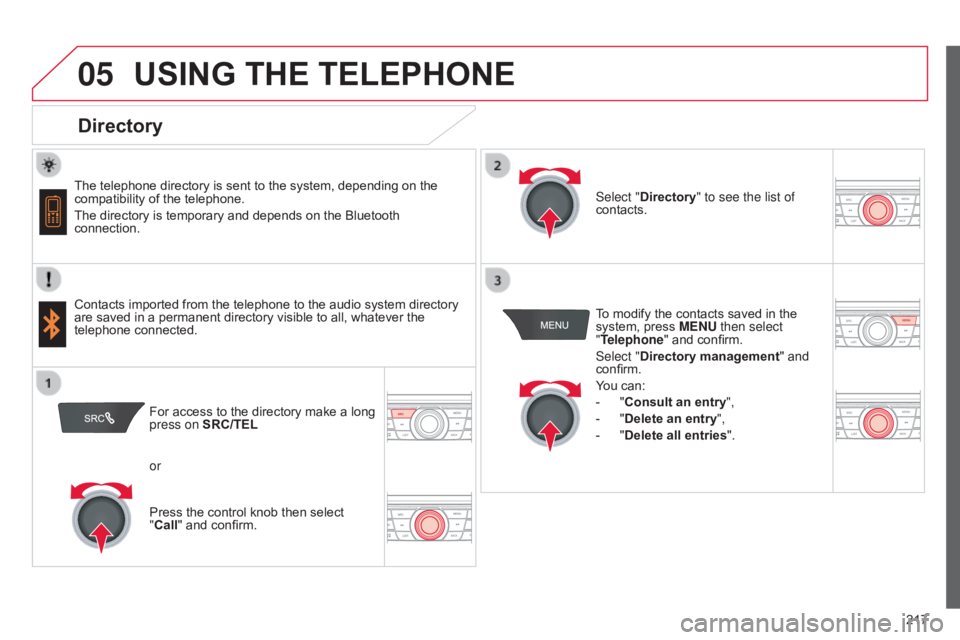
Directory
The telephone directory is sent to the system, depending on the compatibility of the telephone.
The
directory is temporary and depends on the Bluetooth
connection.
Contacts
imported from the telephone to the audio system directory
are
saved in a permanent directory visible to all, whatever the
telephone
connected. To
modify the contacts saved in the
system,
press MENU then select
"Telephone"
and confirm.
Select "Directory management "
and
confirm.
Y
ou can:
-
"
Consult an entry",
-
"
Delete an entry",
-
"
Delete all entries".
Select "Directory
" to see the list of
contacts.
For
access to the directory make a long
press on
SRC/TEL
or
Press
the control knob then select
"
Call" and confirm.
Page 221 of 260

07
219
C-elysee_en_Chap12a_RD5(RD45)_ed01-2016
SCREEN MENU MAP(S)
S
CREEN C
MEDIAMedia parameters
Choice of playback mode
Choice of track listing
TELEPHONE
Call
Dial
Directory
Calls list
Voice mail box
Directory management
Consult an entry
Delete an entry
Delete all entries
Telephone management
Telephone status
Hang up
BLUETOOTH CONNECTION
Normal
Random
Random
all
Repeat By
folders
By artists
By genres
By playlists
Radio parameters
1
2
2
1
2
2
2
2
1
2
2
2
1
2
1
1
1
3
3
3
3
3
3
3
3
1
Connections management
Search for a device
MAIN FUNCTION
Option A1
Option
A1
1
Option A
Option B...1
2
3
1
Page 225 of 260

223
C-elysee_en_Chap12a_RD5(RD45)_ed01-2016
FREqUENTLY ASKED q UESTIONS
qUESTION ANSWER SOLUTION
The
CD is ejected
automatically
or is not
played
by the player. The
CD is inserted upside down, is unplayable, does not contain any
audio
data or contains an audio format which the player cannot play.
The
CD is protected by an anti-pirating protection system which is not
recognised
by the audio equipment. -
Check
that the CD is inserted in the player the
right
way up.
-
Check
the condition of the CD: the CD cannot
be
played if it is too damaged.
-
Check
the content in the case of a recorded
CD:
consult the advice in the "Audio" section.
-
The
audio equipment's CD player does not
play
DVDs.
-
Due
to their quality level, certain writeable
CDs
will not be played by the audio system.
The
CD player sound is
poor
. The
CD used is scratched or of poor quality.Insert
good quality CDs and store them in suitable
conditions.
The
audio settings (bass, treble, ambience) are unsuitable.Set
the treble or bass level to 0, without selecting
an
ambience.
I
am
unable to connect
my
Bluetooth telephone. It
is possible that Bluetooth is switched off on the telephone or that the
telephone
has not been made not visible.-
Check
that your telephone has Bluetooth
switched
on.
-
Check
in the telephone's settings that it is
"V
isible to all".
The
Bluetooth telephone is not compatible with the system.You
can check the compatibility of your telephone
on
www.citroen.co.uk (services).
The
Bluetooth connection
is
cut. The
battery of the peripheral may not be sufficiently charged.Recharge
the battery of the peripheral device.
Page 245 of 260

243
C-elysee_en_Chap13_recherche-visuelle_ed01-2016
Interior
Boot fittings 61- 62
- b oot lamp
-
s
torage box
AdBlue
® tank 13 7-13 9Front seats
4
3 - 44
Child
seats
1
14-122
ISOFIX
child seats
1
23 -127
Manual
child lock
1
28 A i r b a g s
11
0 -113
Interior
fittings
5
8 - 60
-
s
un visor
-
g
love box
-
f
ront armrest
-
U
SB port / Auxiliary socket
-
1
2 V accessory socket /
c
igarette lighter
Deactivating
t
he
p
assenger's
f
ront airbag
1
11
Seat
belts
1
07-109
Rear
seats
4
5
.
Visual search
Page 246 of 260

244
C-elysee_en_Chap13_recherche-visuelle_ed01-2016
Instruments and controls
Opening the bonnet 180
Manual
g
earbox
6
8
Electronic
gearbox
6
9 -72
Automatic
gearbox
7
3 -76
Automatic
gearbox (EAT6)
7
7- 80
Gear
shift indicator
8
1
USB
port / Jack socket
6
0
12
V accessory socket /
C
igarette lighter
6
0
Dashboard
fuses
1
59 -162
Electric windows, deactivating
4
2 Heating,
v
entilation
4
9-51
Manual a ir c onditioning
( without display screen) 5 1-52
Electronic
air conditioning
(with
display screen)
5
3 -55
Front
demist /defrost
5
6
Rear
screen demist /defrost
5
7
Heated
lower windscreen
5
7
Audio
system / Bluetooth
1
95 -225
Audio system
2
27-241
Setting the date/time
2
6
Monochrome screen C
(Audio system / Bluetooth)
2
9 -32
Courtesy lamps
9
9
Interior rear view mirror
4
7
Parking brake
6
7 Hazard
warning lamps
1
00
Locking/unlocking from inside
4
1
Visual search
Page 248 of 260

246
C-elysee_en_Chap13_recherche-visuelle_ed01-2016
Maintenance - Technical data
Petrol weights 189
Diesel weights 1 91
Changing
bu
lbs
1
53-158
-
f
ront
-
r
ear Running
out
of
fuel,
Diesel
1
32
AdBlue
® additive and SCR system (
BlueHDi Diesel) 1 33 -139
Opening
the bonnet
1
80
Under
the bonnet, petrol
1
81
Under
the bonnet, Diesel
1
82
Petrol
engines
1
88
Diesel
engines
1
90Batter y
16
4 -167
Load
reduction, economy mode
1
68
Engine
c
ompartment
f
uses
1
59 -160, 163
Checking
levels
1
83 -185
-
o
il
-
b
rake
fluid
-
c
oolant
-
s
creenwash
fluid
-
a
dditive
(Diesel
with
particle
filter)
Checking
components
1
86 -187
-
b
attery
-
a
ir
/
passenger
compartment
filter
-
o
il
filter
-
p
article
filter
(Diesel)
-
b
rake
pads
/
discs
Identification
ma
rkings
1
93
Dimensions
1
92
Visual search