ignition Citroen C4 2014.5 2.G Owner's Guide
[x] Cancel search | Manufacturer: CITROEN, Model Year: 2014.5, Model line: C4, Model: Citroen C4 2014.5 2.GPages: 494, PDF Size: 21.47 MB
Page 100 of 494
98
Automatic tilting in reverse gear
System which provides a view of the ground during parking manoeuvres in reverse gear.
Programming
F With the engine running, engage reverse g
e a r.
F
S
elect and adjust the left-hand and right-
hand
mirrors in succession.
The
adjustment is stored immediately.
Switching on
F With the engine running, engage reverse g
e a r.
F
M
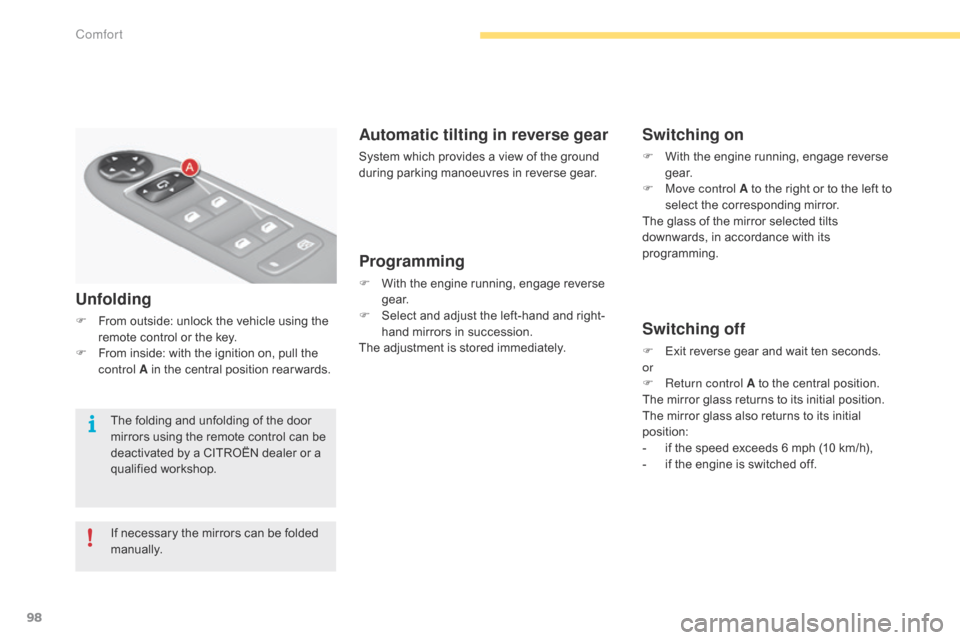
ove control A to the right or to the left to
s
elect the corresponding mirror.
The
glass of the mirror selected tilts
d
ownwards, in accordance with its
p
rogramming.
Switching off
F Exit reverse gear and wait ten seconds.
or
F
R
eturn control A to the central position.
The
mirror glass returns to its initial position.
The
mirror glass also returns to its initial
p
osition:
-
i
f the speed exceeds 6 mph (10 km/h),
-
i
f the engine is switched off.
Unfolding
F From outside: unlock the vehicle using the r
emote control or the key.
F
F
rom inside: with the ignition on, pull the
c
ontrol A in the central position rear wards.
If
necessary the mirrors can be folded
m
anually.
The
folding and unfolding of the door
m
irrors using the remote control can be
d
eactivated by a CITROËN dealer or a
q
ualified
w
orkshop.
Comfort
Page 103 of 494
101
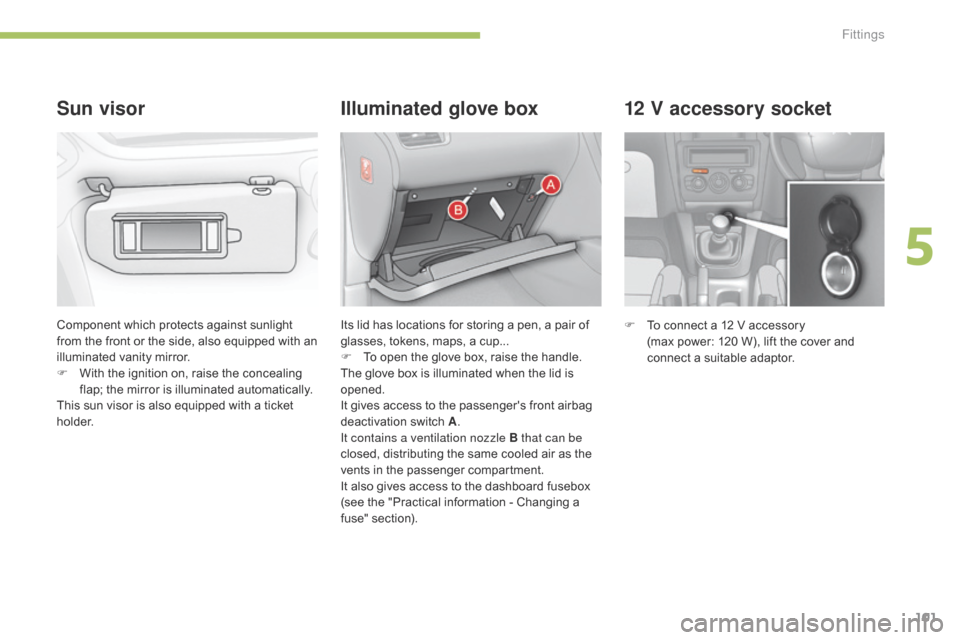
12 V accessory socket
F To connect a 12 V accessory
(max power: 120 W), lift the cover and
c
onnect a suitable adaptor.
Component
which
protects
against
sunlight
f
rom
the
front
or
the
side,
also
equipped
with
an
i
lluminated
v
anity
m
irror.
F
W
ith
the
ignition
on,
raise
the
concealing
f
lap;
the
mirror
is
illuminated
automatically.
This
sun
visor
is
also
equipped
with
a
ticket
h
o l d e r.
Sun visor Illuminated glove box
Its lid has locations for storing a pen, a pair of g
lasses, tokens, maps, a cup...
F
T
o open the glove box, raise the handle.
The
glove box is illuminated when the lid is
ope
ned.
It
gives access to the passenger's front airbag
d
eactivation
s
witch
A.
I
t contains a ventilation nozzle B that can be
closed,
distributing the same cooled air as the
v
ents in the passenger compartment.
It
also gives access to the dashboard fusebox
(
see the "Practical information - Changing a
f
use" section).
5
Fittings
Page 115 of 494
113
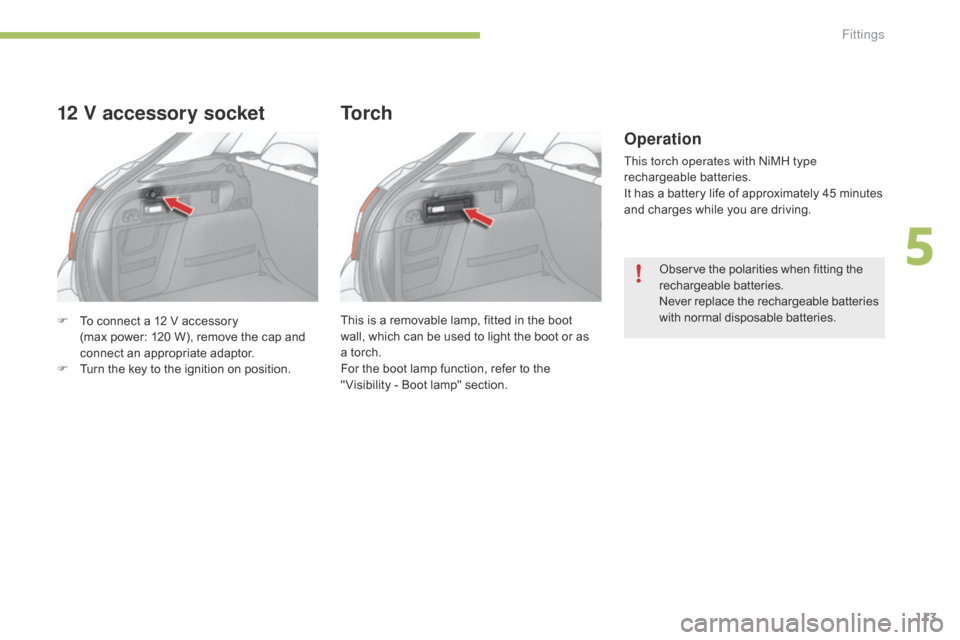
F To connect a 12 V accessory
(max power: 120 W), remove the cap and
c
onnect an appropriate adaptor.
F
T
urn the key to the ignition on position.
12 V accessory socket
This is a removable lamp, fitted in the boot wall, which can be used to light the boot or as
a
torch.
For
the boot lamp function, refer to the
"
Visibility - Boot lamp" section.
To r c h
Operation
This torch operates with ni MH type
rechargeable b atteries.
It
has a battery life of approximately 45 minutes
a
nd charges while you are driving.
Observe
the polarities when fitting the
r
echargeable
b
atteries.
Never
r
eplace
t
he
r
echargeable
b
atteries
w
ith normal disposable batteries.
5
Fittings
Page 120 of 494
118
In good or rainy weather, by both day and night, the front foglamps and the
r
ear foglamps are prohibited. In these
s
ituations, the power of their beams
m
ay dazzle other drivers. They should
o
nly be used in fog or falling snow.
In
these weather conditions, you should
s
witch on the foglamps and dipped
b
eam headlamps manually, as the
s
unshine sensor may detect sufficient
l
ight.
Do
not forget to switch off the front and
r
ear foglamps when they are no longer
n
ecessary.Switching off the lighting when
switching off the ignition
When the ignition is switched off, all of the lamps switch off immediately, except for t
he dipped beam headlamps if automatic
g
uide-me-home lighting is activated.
Switching on the lighting when
switching on the ignition
To reactivate the lighting control stalk, turn the ring A to position "0"
- lighting off, then to t
he position of your choice.
If
the lighting is switched on manually after
s
witching off the ignition, there is an audible
s
ignal when a front door is opened to warn
t
he driver that they have forgotten to switch
o
ff the vehicle's lighting, with the ignition off.
They
switch off automatically after a period
w
hich depends on the state of charge of the
b
attery (entry to energy economy mode).
Visibility
Page 121 of 494
119
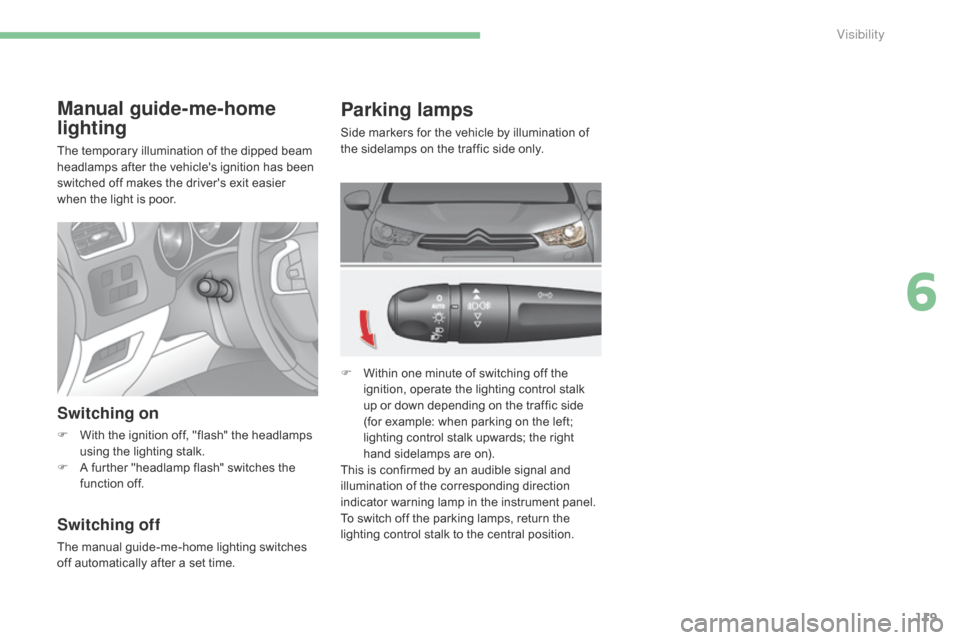
Parking lamps
Side markers for the vehicle by illumination of the sidelamps on the traffic side only.
F
W
ithin one minute of switching off the
i
gnition, operate the lighting control stalk
u
p or down depending on the traffic side
(
for example: when parking on the left;
l
ighting control stalk upwards; the right
h
and sidelamps are on).
This
is confirmed by an audible signal and
i
llumination of the corresponding direction
i
ndicator warning lamp in the instrument panel.
To
switch off the parking lamps, return the
l
ighting control stalk to the central position.
Manual guide-me-home
lighting
The temporary illumination of the dipped beam headlamps after the vehicle's ignition has been
s
witched off makes the driver's exit easier
w
hen the light is poor.
Switching on
F With the ignition off, "flash" the headlamps u
sing the lighting stalk.
F
A
further "headlamp flash" switches the
f
unction off.
Switching off
The manual guide-me-home lighting switches off automatically after a set time.
6
Visibility
Page 123 of 494
121
Switching off
The welcome lighting switches off automatically after a programmed time, when the ignition is
s
witched on or on locking the vehicle.
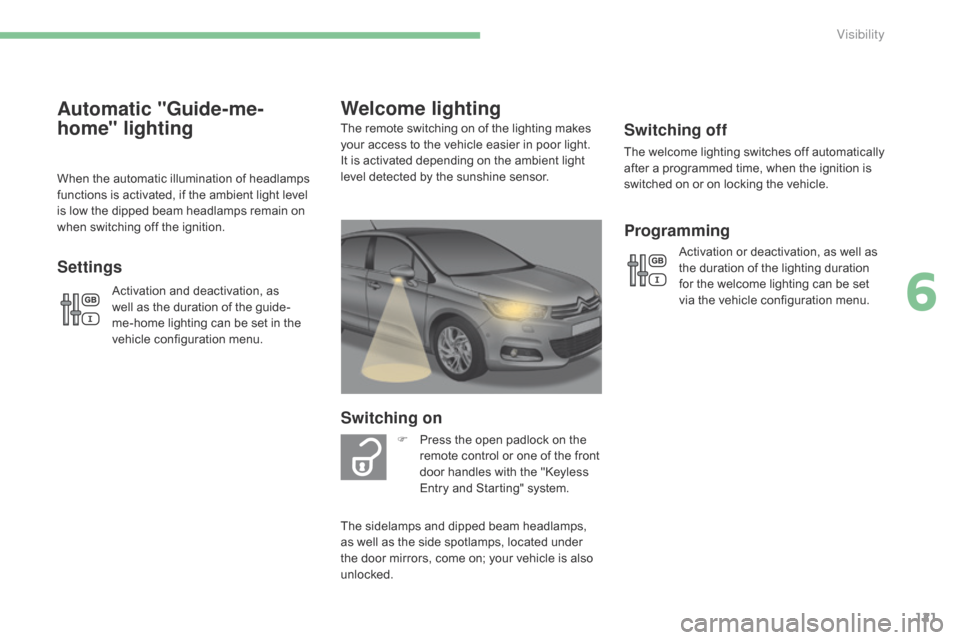
Welcome lighting
Switching on
F Press the open padlock on the r
emote control or one of the front
d
oor handles with the "Keyless
E
ntry and Starting" system.
The
remote switching on of the lighting makes
y
our
access to the vehicle easier in poor light.
I
t
is
activated depending on the ambient light
l
evel
detected by the sunshine sensor.
The
sidelamps and dipped beam headlamps,
a
s
well
as
the side spotlamps, located under
t
he
door
mirrors, come on; your vehicle is also
u
nlocked.
Programming
Activation or deactivation, as well as t he duration of the lighting duration
f
or the welcome lighting can be set
v
ia the vehicle configuration menu.
Automatic "Guide-me-
home" lighting
When the automatic illumination of headlamps functions is activated, if the ambient light level
i
s low the dipped beam headlamps remain on
w
hen switching off the ignition.
Settings
Activation and deactivation, as well as the duration of the guide-
me-home
lighting can be set in the
v
ehicle configuration menu.
6
Visibility
Page 125 of 494
123
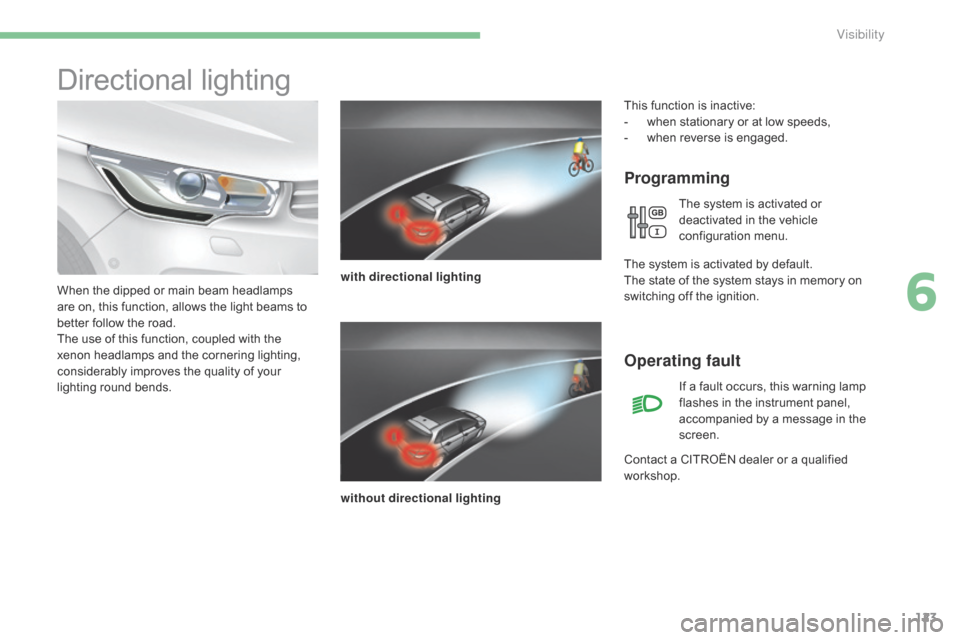
Directional lighting
Programming
with directional lighting
without directional lighting
When
the
dipped
or
main
beam
headlamps
a
re
on,
this
function,
allows
the
light
beams
to
b
etter
follow
the
road.
The
use
of
this
function,
coupled
with
the
x
enon
headlamps
and
the
cornering
lighting,
c
onsiderably
improves
the
quality
of
your
l
ighting
r
ound
b
ends.
Operating fault
If a fault occurs, this warning lamp f lashes in the instrument panel,
a
ccompanied by a message in the
sc
reen.
Contact
a
CITROËN dealer or a qualified
w
orkshop.
This
function is inactive:
-
w
hen
stationary or at low speeds,
-
w
hen
r
everse
i
s
enga
ged.
The system is activated or
d
eactivated in the vehicle
c
onfiguration
m
enu.
T
he
system is activated by default.
The
state
of the system stays in memory on
s
witching
off the ignition.
6
Visibility
Page 128 of 494
126
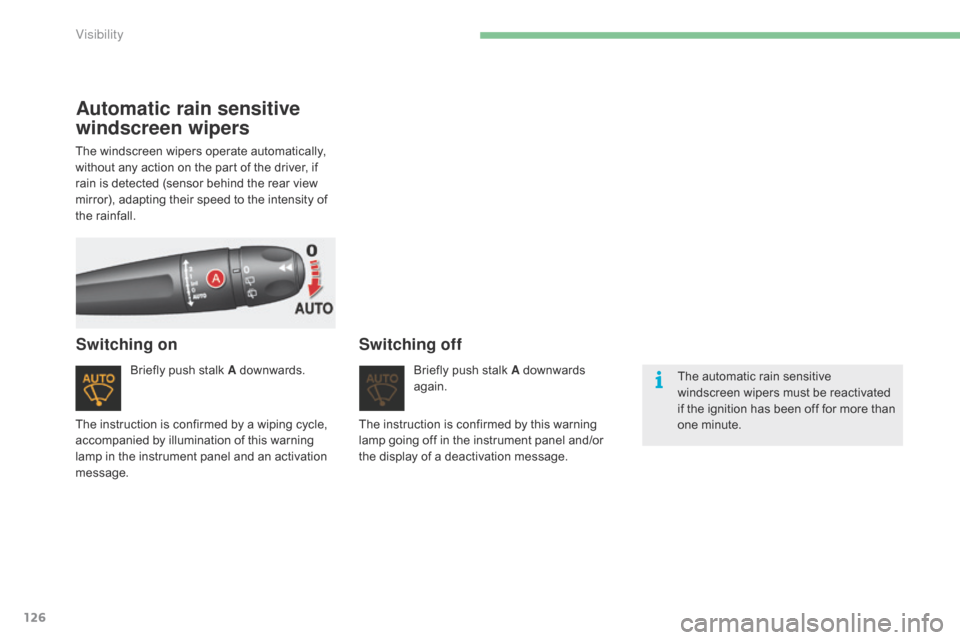
Automatic rain sensitive
windscreen wipers
Briefly push stalk A downwards.
Switching onSwitching off
Briefly push stalk A downwards ag
ain. The
automatic rain sensitive
w
indscreen wipers must be reactivated
i
f the ignition has been off for more than
o
ne minute.
The
instruction
is
confirmed
by
a
wiping
cycle,
a
ccompanied
by
illumination
of
this
warning
l
amp
in
the
instrument
panel
and
an
activation
m
essage. The
instruction is confirmed by this warning
l
amp
going off in the instrument panel and/or
t
he
display of a deactivation message.
The
windscreen
wipers
operate
automatically,
w
ithout
any
action
on
the
part
of
the
driver,
if
r
ain
is
detected
(sensor
behind
the
rear
view
m
irror),
adapting
their
speed
to
the
intensity
of
t
he
rainfall.
Visibility
Page 130 of 494
128
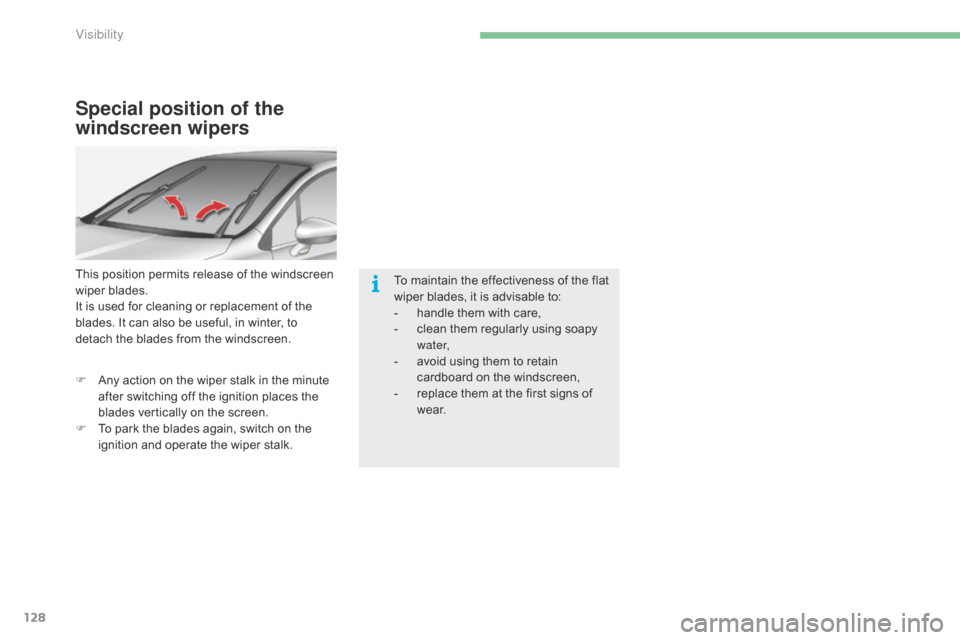
Special position of the
windscreen wipers
This position permits release of the windscreen wiper blades.
It
is used for cleaning or replacement of the
b
lades. It can also be useful, in winter, to
d
etach the blades from the windscreen.
F
A
ny action on the wiper stalk in the minute
a
fter switching off the ignition places the
b
lades vertically on the screen.
F
T
o park the blades again, switch on the
i
gnition and operate the wiper stalk.To
maintain the effectiveness of the flat
w
iper blades, it is advisable to:
-
h
andle them with care,
-
c
lean them regularly using soapy
w
ater,
-
a
void using them to retain
c
ardboard on the windscreen,
-
r
eplace them at the first signs of
w
e a r.
Visibility
Page 132 of 494
130
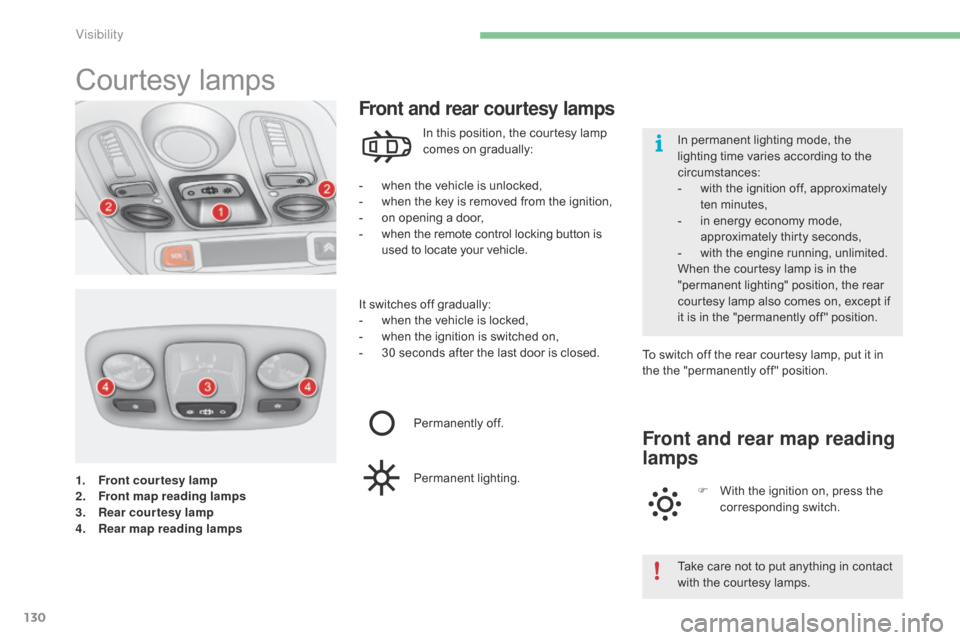
1. Front courtesy lamp
2. Front map reading lamps
3.
R
ear courtesy lamp
4.
R
ear map reading lamps
Courtesy lam ps
- when the vehicle is unlocked,
- w hen the key is removed from the ignition,
-
o
n opening a door,
-
w
hen the remote control locking button is
u
sed to locate your vehicle.
Front and rear courtesy lamps
In this position, the courtesy lamp comes on gradually:
It
switches
off gradually:
-
w
hen
the vehicle is locked,
-
w
hen
the ignition is switched on,
-
3
0
seconds after the last door is closed.To
switch off the rear courtesy lamp, put it in
t
he the "permanently off " position.
Permanently
off.
Permanent
l
ighting.
Front and rear map reading
lamps
F With the ignition on, press the c
orresponding s witch.
Take
care not to put anything in contact
w
ith the courtesy lamps.
In
permanent lighting mode, the
l
ighting time varies according to the
c
ircumstances:
-
w
ith the ignition off, approximately
t
en
m
inutes,
-
i
n energy economy mode,
a
pproximately thirty seconds,
-
w
ith the engine running, unlimited.
When the courtesy lamp is in the
"
permanent lighting" position, the rear
c
ourtesy lamp also comes on, except if
i
t
is
in the "permanently off " position.
Visibility