Off DACIA DUSTER 2010 1.G Owner's Manual
[x] Cancel search | Manufacturer: DACIA, Model Year: 2010, Model line: DUSTER, Model: DACIA DUSTER 2010 1.GPages: 200, PDF Size: 7.12 MB
Page 80 of 200
2.12
ENG_UD20643_3
Transmission : 4 roues motrices (4WD) (H79 - Dacia)
ENG_NU_898-5_H79_Dacia_2
Jaune NoirNoir texte
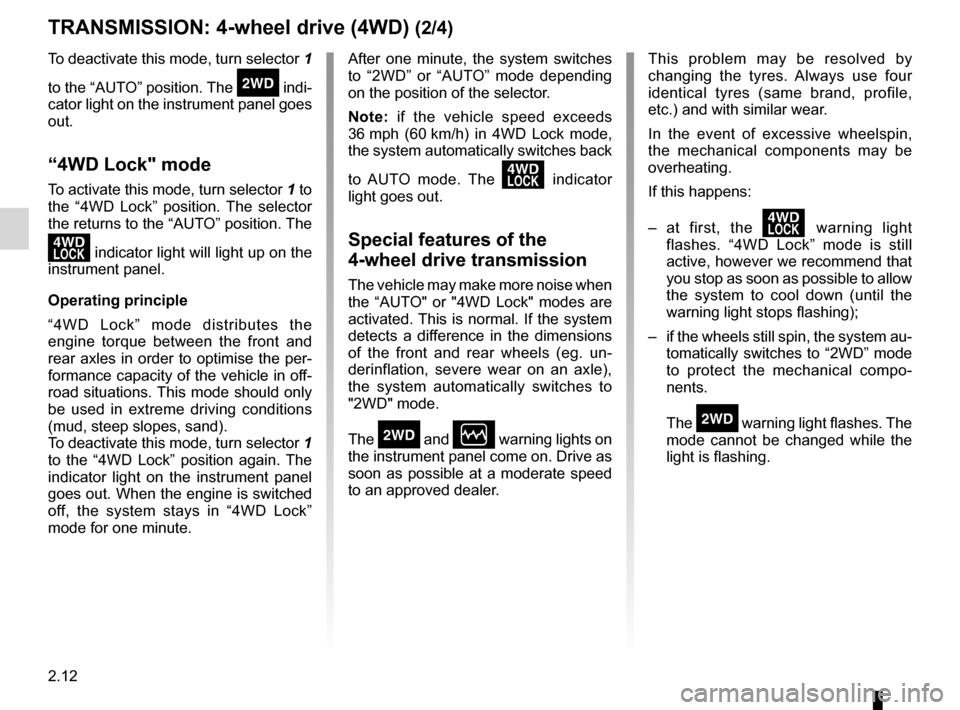
TRANSMISSION: 4-wheel drive (4WD) (2/4)
This problem may be resolved by
changing the tyres. Always use four
identical tyres (same brand, profile,
etc.) and with similar wear.
In the event of excessive wheelspin,
the mechanical components may be
overheating.
If this happens:
– at first, the
’ warning light
flashes. “4WD Lock” mode is still
active, however we recommend that
you stop as soon as possible to allow
the system to cool down (until the
warning light stops flashing);
– if the wheels still spin, the system au-
tomatically switches to “2WD” mode
to protect the mechanical compo -
nents.
The
‘ warning light flashes. The
mode cannot be changed while the
light is flashing.
After one minute, the system switches
to “2WD” or “AUTO” mode depending
on the position of the selector.
Note:
if the vehicle speed exceeds
36 mph (60 km/h) in 4WD Lock mode,
the system automatically switches back
to AUTO mode. The
’ indicator
light goes out.
Special features of the
4-wheel drive transmission
The vehicle may make more noise when
the “AUTO" or "4WD Lock" modes are
activated. This is normal. If the system
detects a difference in the dimensions
of the front and rear wheels (eg. un -
derinflation, severe wear on an axle),
the system automatically switches to
"2WD" mode.
The
‘ and Ò warning lights on
the instrument panel come on. Drive as
soon as possible at a moderate speed
to an approved dealer.
To deactivate this mode, turn selector 1
to the “AUTO” position. The
‘ indi -
cator light on the instrument panel goes
out.
“4WD Lock" mode
To activate this mode, turn selector 1 to
the “4WD Lock” position. The selector
the returns to the “AUTO” position. The
’ indicator light will light up on the
instrument panel.
Operating principle
“4WD Lock” mode distributes the
engine torque between the front and
rear axles in order to optimise the per-
formance capacity of the vehicle in off-
road situations. This mode should only
be used in extreme driving conditions
(mud, steep slopes, sand).
To deactivate this mode, turn selector 1
to the “4WD Lock” position again. The
indicator light on the instrument panel
goes out. When the engine is switched
off, the system stays in “4WD Lock”
mode for one minute.
Page 81 of 200
JauneNoirNoir texte
2.13
ENG_UD20643_3
Transmission : 4 roues motrices (4WD) (H79 - Dacia)
ENG_NU_898-5_H79_Dacia_2
TRANSMISSION: 4-wheel drive (4WD) (3/4)
Electronic stability program and
traction control when driving off -
road
(vehicles equipped with ESP)
When driving on soft ground (sand,
mud, deep snow), we recommend that
you deactivate the ESP function by
pressing the “ESP” switch.
In this case, only individual wheel brak-
ing remains active. This function ap -
plies the brake to any wheel that is slip-
ping, allowing the engine torque to be
transferred to the wheels with the most
grip. This is particularly useful when
crossing a bridge.
All the ESP functions will be reactivated
when the vehicle speed reaches ap -
proximately 30 mph (50 km/h), (36 mph
(60 km/h) in “4WD Lock” mode), or
when the engine is restarted, or when
the “ESP” button is pressed again.Operating faults
If the system detects an operating
fault, it automatically switches to “2WD”
mode, and the
‘ and Ò warn-
ing lights come on.
Drive as soon as possible at a moder-
ate speed to an approved dealer.
For certain operating faults, the system
may not be able to switch to “2WD" or
"4WD Lock" mode. "AUTO" mode re -
mains active.
Contact an approved dealer as soon as
possible.
In this case, we recommend that you
stop as soon as possible to allow the
system to cool down (until the warning
light stops flashing).
Cooling may take up to five minutes.
If the system detects excessive wheel
-
spin on the front wheels, it adapts the
engine to run in a way that reduces
wheelspin.
Anti-lock braking in “ LOCK” mode
(vehicles equipped with ABS)
When “4WD Lock" mode is active, the
ABS switches to off-road mode. In this
case, the wheels may lock intermit -
tently to achieve better grip, thus reduc-
ing braking distances on soft ground.
When this mode is active:
– the vehicle’s manoeuvrability is lim -
ited during braking. This operating
mode is therefore not recommended
in very low-grip conditions (eg. ice).
– there may be some noise. This is
normal, and does not indicate an op-
erating fault.
Page 82 of 200
2.14
ENG_UD20643_3
Transmission : 4 roues motrices (4WD) (H79 - Dacia)
ENG_NU_898-5_H79_Dacia_2
TRANSMISSION: 4-wheel drive (4WD) (4/4)
All-wheel drive system
– Irrespective of the mode selected, do not start the engine if one or more wheels are not in contact with the ground
(eg. when the vehicle is on a jack or roller bench).
– Do not turn the mode selector when cornering, reversing or if the wheels are spinning excessively. Only select the
“2WD”, “AUTO” or “4WD Lock” mode when the vehicle is being driven in a str\
aight line.
– Only use tyres which meet the required specifications.
– “4WD Lock” mode is reserved solely for use off-road. The use of this mode in any other conditions may adversely affect the
vehicle’s manoeuvrability and damage its mechanical components.
– Always ensure tyres with identical specifications are fitted to all four wheels (brand, size, structure, wear etc.). Fitting tyres
of different sizes to the front and rear wheels and/or left and right wheels may have serious consequences for the tyres,
gearbox, transfer gearbox and the rear differential pinions.
Page 85 of 200

ENG_NU_898-5_H79_Dacia_2
DRIVER CORRECTION DEVICES/AIDS (3/4)
Electronic stability pro")
JauneNoirNoir texte
2.17
ENG_UD22494_3
Dispositifs de correction et d’assistance à la conduite (H79 - Da\
cia)
ENG_NU_898-5_H79_Dacia_2
DRIVER CORRECTION DEVICES/AIDS (3/4)
Electronic stability program
ESP with understeer control
and traction control ASR
Electronic Stability Program ESP
(depending on the vehicle)
This system helps you to keep control
of the vehicle in critical driving condi -
tions (avoiding an obstacle, loss of grip
on a bend, etc.). Understeer control
This system optimises the action of the
ESP in the case of pronounced unders-
teering (loss of front axle road holding).
Traction control ASR
This system helps to limit wheelspin of
the drive wheels and to control the ve-
hicle when pulling away accelerating or
decelerating.
Deactivating the function
Deactivating the ASR traction control
function also deactivates the ESP func-
tion (refer to the following page).
1
Special feature of 4-wheel
drive and 2-wheel drive
vehicles (depending on the
vehicle)
Disabling the ESP function
In some situations (driving on very wet
ground: snow, mud, etc. or driving with
snow chains fitted), the system may
reduce the engine output to limit wheel
-
spin. If this is not required, it is possible
to deactivate the function by pressing
switch 1.
The
ù warning light on the instru-
ment panel comes on to warn you of
this.
If you deactivate this function, the ASR
traction control function will also be de-
activated.
As the ’ESP and ASR provide en -
hanced safety, it is not advisable to
drive with the function switched off.
Correct this as soon as possible by
pressing switch 1 again.
Page 86 of 200

ENG_NU_898-5_H79_Dacia_2
DRIVER CORRECTION DEVICES/AIDS (4/4)
Operating faults
When the system detects")
2.18
ENG_UD22494_3
Dispositifs de correction et d’assistance à la conduite (H79 - Da\
cia)
ENG_NU_898-5_H79_Dacia_2
DRIVER CORRECTION DEVICES/AIDS (4/4)
Operating faults
When the system detects an operating
fault, warning lights
Ò and ù
light up on the instrument panel. In this
case, the ESP and ASR are deacti -
vated.
Please consult an authorised dealer if
these warning lights remain displayed
on the instrument panel after the igni -
tion is switched off and on again.
Note:
the function is automatically re -
activated when the ignition is switched
on, or when the speed exceeds 30 mph
(50 km/h) in AUTO and 2WD modes,
and approximately 36 mph (60 km/h) in
4WD Lock mode.
Operating principle
A sensor in the steering wheel detects
the direction selected by the driver.
Other sensors throughout the vehicle
measure the actual direction.
The system compares driver input to
the actual trajectory of the vehicle and
corrects the trajectory if necessary by
controlling the braking of certain wheels
and/or engine power. In the event that
the system is engaged, indicator light
ù flashes on the instrument panel.
Page 87 of 200
automatic gearbox (use) ....................... (up to the end of the DU)
changing gear ....................................... (up to the end of the DU)
driving ................................................... (up to the end of the DU)
automatic gearbox selector lever ..........(up to the end of the DU)
2.19
ENG_UD24327_2
Boîte de vitesses automatique (H79 - Dacia)
ENG_NU_898-5_H79_Dacia_2
Automatic gearbox
AUTOMATIC TRANSMISSION (1/3)
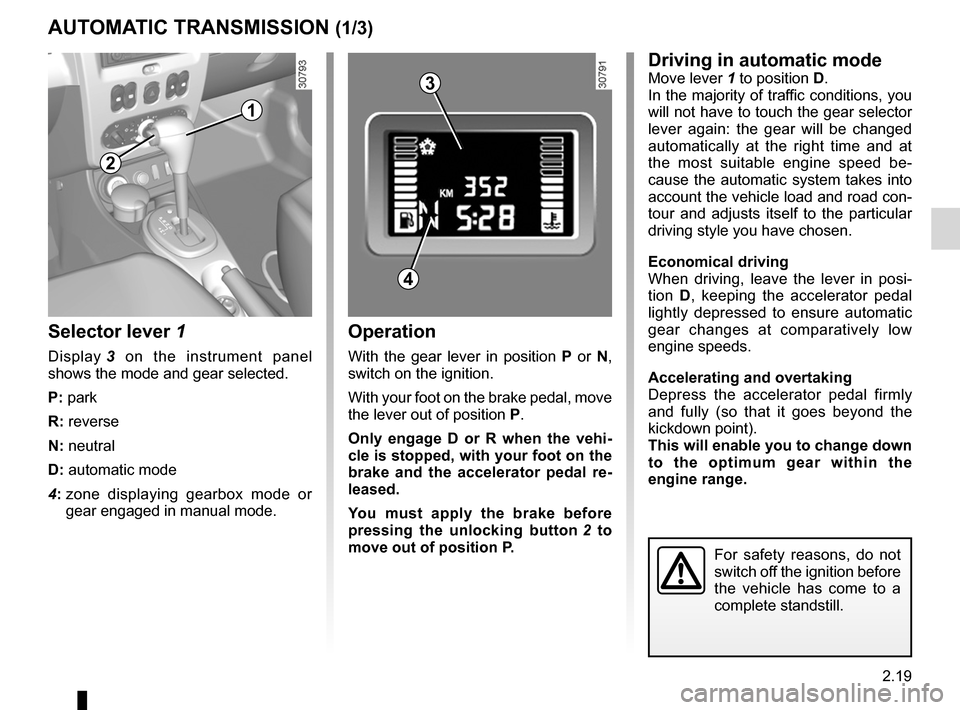
Selector lever 1
Display 3 on the instrument panel
shows the mode and gear selected.
P: park
R: reverse
N: neutral
D: automatic mode
4: zone displaying gearbox mode or
gear engaged in manual mode.
Operation
With the gear lever in position P or N,
switch on the ignition.
With your foot on the brake pedal, move
the lever out of position P.
Only engage D or R when the vehi -
cle is stopped, with your foot on the
brake and the accelerator pedal re -
leased.
You must apply the brake before
pressing the unlocking button 2 to
move out of position P.
Driving in automatic modeMove lever 1 to position D.
In the majority of traffic conditions, you
will not have to touch the gear selector
lever again: the gear will be changed
automatically at the right time and at
the most suitable engine speed be -
cause the automatic system takes into
account the vehicle load and road con-
tour and adjusts itself to the particular
driving style you have chosen.
Economical driving
When driving, leave the lever in posi -
tion D, keeping the accelerator pedal
lightly depressed to ensure automatic
gear changes at comparatively low
engine speeds.
Accelerating and overtaking
Depress the accelerator pedal firmly
and fully (so that it goes beyond the
kickdown point).
This will enable you to change down
to the optimum gear within the
engine range.
For safety reasons, do not
switch off the ignition before
the vehicle has come to a
complete standstill.
1
2
4
3
Page 89 of 200
JauneNoirNoir texte
2.21
ENG_UD24327_2
Boîte de vitesses automatique (H79 - Dacia)
ENG_NU_898-5_H79_Dacia_2
AUTOMATIC TRANSMISSION (3/3)
– If the road contour and bends in
the road do not allow you to stay in
automatic mode (e.g.: in mountain -
ous areas), it is recommended that
you switch to manual mode.
This will prevent the automatic gear-
box from changing gears repeatedly
when climbing, and permit engine
braking on long descents.
– In cold weather , start the engine
and wait a few seconds before
moving the selector lever from posi-
tion P or N and engaging it in D or R
to prevent the engine stalling.
– Vehicles not fitted with traction
control: on a slippery surface or
surface with a low level of adhesion,
change to manual mode and select
second gear (or even third) before
starting the engine to avoid wheel -
spin when accelerating.Parking the vehicleWhen the vehicle is stopped, move the
lever to position P while keeping your
foot on the brake pedal: the gearbox is
in neutral and the drive wheels are me-
chanically locked by the driveshaft.
Apply the handbrake.
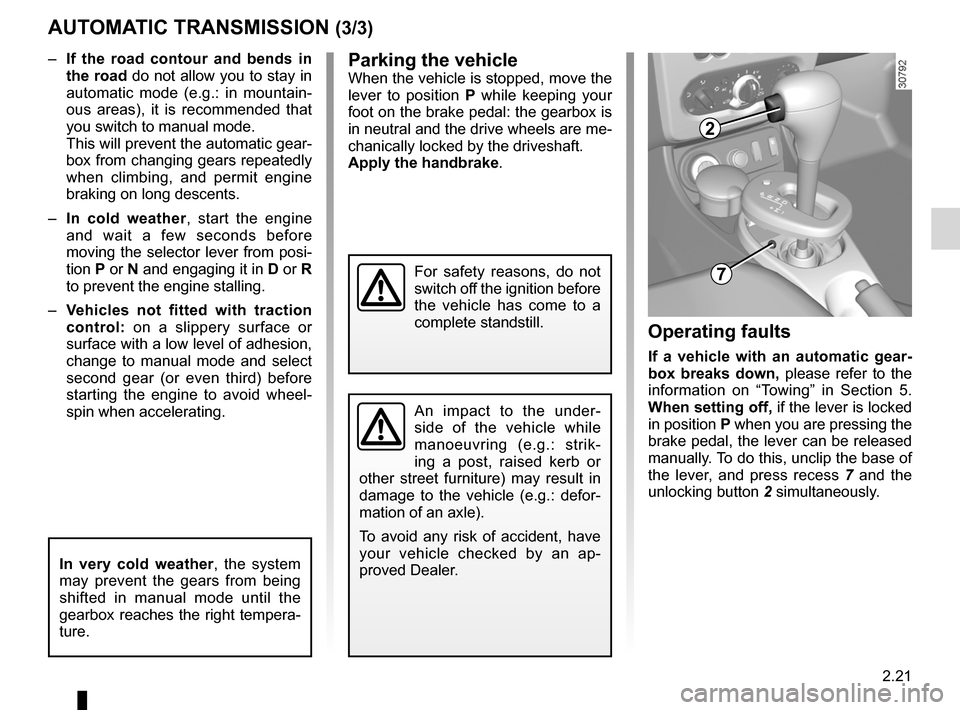
Operating faults
If a vehicle with an automatic gear -
box breaks down, please refer to the
information on “Towing” in Section 5.
When setting off, if the lever is locked
in position P when you are pressing the
brake pedal, the lever can be released
manually. To do this, unclip the base of
the lever, and press recess 7 and the
unlocking button 2 simultaneously.
In very cold weather , the system
may prevent the gears from being
shifted in manual mode until the
gearbox reaches the right tempera-
ture.
An impact to the under -
side of the vehicle while
manoeuvring (e.g.: strik -
ing a post, raised kerb or
other street furniture) may result in
damage to the vehicle (e.g.: defor -
mation of an axle).
To avoid any risk of accident, have
your vehicle checked by an ap -
proved Dealer.
For safety reasons, do not
switch off the ignition before
the vehicle has come to a
complete standstill.
2
7
Page 94 of 200
air conditioning ..................................... (up to the end of the DU)
heating and air conditioning system ..... (up to the end of the DU)
heating system ..................................... (up to the end of the DU)
air conditioning ..................................... (up to the end of the DU)
rear screen de-icing/demisting ............. (up to the end of the DU)
ventilation heating and air conditioning system (up to the end of the DU)
3.4
ENG_UD25124_1
Chauffage - Ventilation - Air conditionné (H79 - Dacia)
ENG_NU_898-5_H79_Dacia_3
Jaune NoirNoir texte
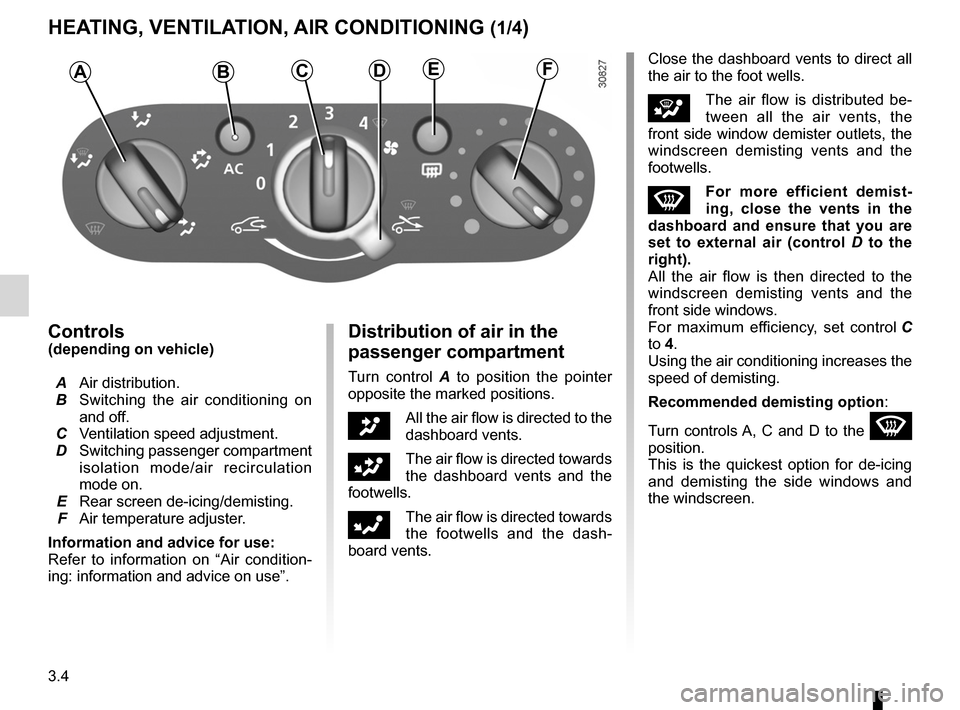
Controls(depending on vehicle)
A Air distribution.
B Switching the air conditioning on
and off.
C Ventilation speed adjustment.
D Switching passenger compartment
isolation mode/air recirculation
mode on.
E Rear screen de-icing/demisting.
F Air temperature adjuster.
Information and advice for use:
Refer to information on “Air condition -
ing: information and advice on use”.Distribution of air in the
passenger compartment
Turn control A to position the pointer
opposite the marked positions.
JAll the air flow is directed to the
dashboard vents.
GThe air flow is directed towards
the dashboard vents and the
footwells.
FThe air flow is directed towards
the footwells and the dash -
board vents. Close the dashboard vents to direct all
the air to the foot wells.
iThe air flow is distributed be
-
tween all the air vents, the
front side window demister outlets, the
windscreen demisting vents and the
footwells.
WFor more efficient demist -
ing, close the vents in the
dashboard and ensure that you are
set to external air (control D to the
right).
All the air flow is then directed to the
windscreen demisting vents and the
front side windows.
For maximum efficiency, set control C
to 4.
Using the air conditioning increases the
speed of demisting.
Recommended demisting option :
Turn controls A, C and D to the
W
position.
This is the quickest option for de-icing
and demisting the side windows and
the windscreen.
HEATING, VENTILATION, AIR CONDITIONING (1/4)
ABCDEF
Page 95 of 200
JauneNoirNoir texte
3.5
ENG_UD25124_1
Chauffage - Ventilation - Air conditionné (H79 - Dacia)
ENG_NU_898-5_H79_Dacia_3
HEATING, VENTILATION, AIR CONDITIONING (2/4)
Switching air conditioning on
or off
(depending on vehicle)
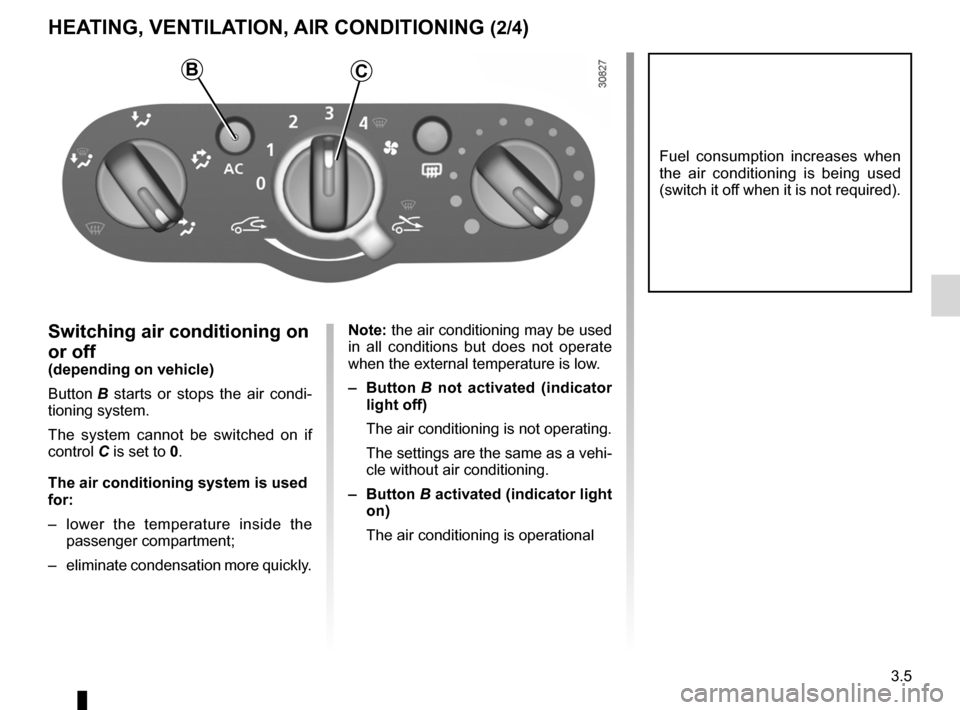
Button B starts or stops the air condi -
tioning system.
The system cannot be switched on if
control C is set to 0.
The air conditioning system is used
for:
– lower the temperature inside the
passenger compartment;
– eliminate condensation more quickly. Note: the air conditioning may be used
in all conditions but does not operate
when the external temperature is low.
–
Button B not activated (indicator
light off)
The air conditioning is not operating.
The settings are the same as a vehi-
cle without air conditioning.
– Button B activated (indicator light
on)
The air conditioning is operational
Fuel consumption increases when
the air conditioning is being used
(switch it off when it is not required).
BC
Page 97 of 200
JauneNoirNoir texte
3.7
ENG_UD25124_1
Chauffage - Ventilation - Air conditionné (H79 - Dacia)
ENG_NU_898-5_H79_Dacia_3
HEATING, VENTILATION, AIR CONDITIONING (4/4)
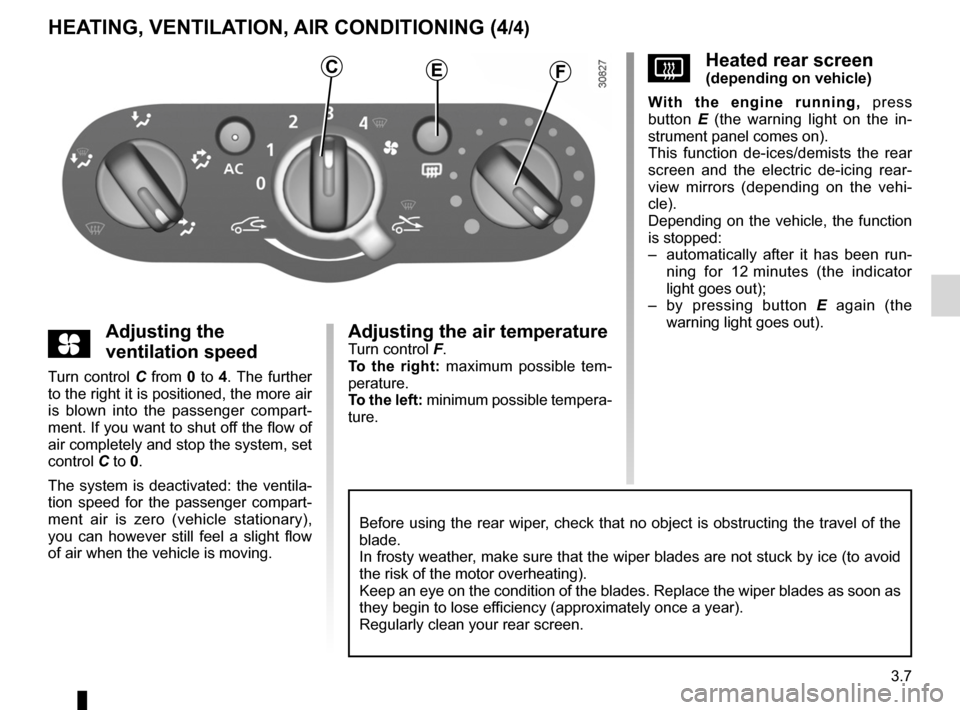
yAdjusting the
ventilation speed
Turn control C from 0 to 4. The further
to the right it is positioned, the more air
is blown into the passenger compart -
ment. If you want to shut off the flow of
air completely and stop the system, set
control C to 0.
The system is deactivated: the ventila -
tion speed for the passenger compart-
ment air is zero (vehicle stationary),
you can however still feel a slight flow
of air when the vehicle is moving.
Adjusting the air temperatureTurn control F.
To the right: maximum possible tem -
perature.
To the left: minimum possible tempera-
ture.
VHeated rear screen(depending on vehicle)
With the engine running, press
button E (the warning light on the in -
strument panel comes on).
This function de-ices/demists the rear
screen and the electric de-icing rear -
view mirrors (depending on the vehi -
cle).
Depending on the vehicle, the function
is stopped:
– automatically after it has been run -
ning for 12 minutes (the indicator
light goes out);
– by pressing button E again (the
warning light goes out).CEF
Before using the rear wiper, check that no object is obstructing the travel of the
blade.
In frosty weather, make sure that the wiper blades are not stuck by ice (to avoid
the risk of the motor overheating).
Keep an eye on the condition of the blades. Replace the wiper blades as soon as
they begin to lose efficiency (approximately once a year).
Regularly clean your rear screen.