battery DATSUN 210 1979 Manual PDF
[x] Cancel search | Manufacturer: DATSUN, Model Year: 1979, Model line: 210, Model: DATSUN 210 1979Pages: 548, PDF Size: 28.66 MB
Page 495 of 548

m
ii
lil
cIo
00
tl
i
3
Cl
0
m
0
g
fB
Jo
0
0
Ef1
CALIFORNIA
ANO
FU
MOOELS
t
f
G
W
g
dG
I
WR
FUSIBLE
LINK
8
G
uQ
t
WR
NON
cALIFORNIA
AND
CANAOA
MOOELS
J
TORQUE
CONVERTER
C
ao
GY
INOICATOR
LAMP
5
l
1
00
GW
I
BATTERY
CCOHST7
i
lOCK
Off
A
B
OO
C
I
ti
II
v
u
1
WITCH
IGNITION
S
2ND
Oil
lS1
B
C
C
AI8
C
I
5
A
8
I
QIQ
Q
Q
J1
0
0
I
0
6
B
6
0
7
Q
QIQIQ
8
0
0
0
9
O
I
LIGHTING
SWITCH
Z
1
D
Z
m
en
WR
LB
1lRG
GW
INSTRUMENT
HARNESS
j
lO
GW
I
oGW
GY
00
GY
LW
LW
I@o
00
og
B
0
u
B
LW
LB
I
I
0
0
J8
RG
w
1
0
r
O
FUSE
BLOCK
LW
ClO
LW
W
t
WB
1
r
GY
GW
RAOIO
ffi
i
n
In
U
L
J
UJ
J
U
WB
O
W
SPEAKER
OJ
o
Cl
m
CD
C
e
CIl
en
3
Page 496 of 548

m
ii
Co
0
i
tl
c
Cl
0
c
o
E
0
Cl
l
l
n
m
iO
t
B
i
BATTERY
A
G
FUSIBLE
LINK
I
I
lOCK
OfF
ACC
ON
S17
o
O
6
16
0
s
l
O
J
IA
IGN
ITION
SWITCH
FUSE
BLOCK
0
3
C
rT
l
WR
Q
BW
WR
I
BL
Z
J
Z
m
en
en
LG
l
LG
BOOY
HARNESS
6
J
1
nUl
I
OEFOGGER
l
C
ISEOAN
M
1R2
106
00
n
03
INSTRUMENT
B
I
II
8
HARNESS
f
i
G
0rF
to
LB
1
2
6
0
3
0
0
0
gg
REAR
WINOOW
OEFOGGER
SWITCH
l
0
II
11
1
Jo
II
E
z
a
11
1
II
o
8
11
1
II
OJ
o
Cl
m
CD
c
Ql
CIl
en
l
3
Page 497 of 548
Body
Electrical
System
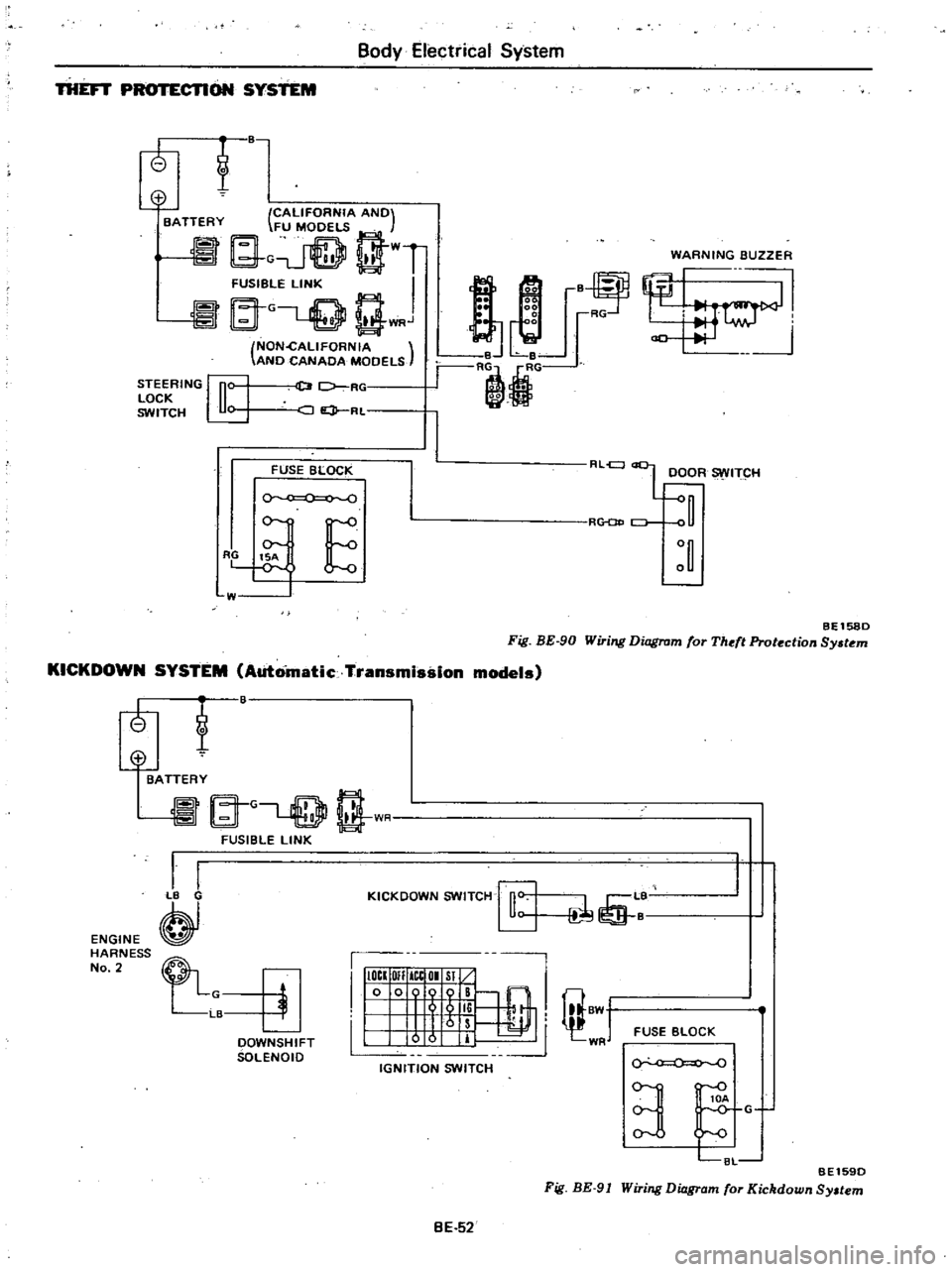
THEFT
CTlON
SYSTEM
t
o
CALIFORNIA
ANO
BATTERY
FU
MOOELS
G
t
WT
FUSIBGLE
LINK
I
at
L
Q
Q
WRJ
NON
cALlFORNIA
ANO
CANAOA
MOOELS
WARNING
BUZZER
STEERING
n
LOCK
u
SWITCH
U
D
7
RC
JQ
RL
2
2
00
i
r
B
Le
r
RljG
8
RG
FUSE
BLOCK
0
RLel
L
OOOR
ITCH
R
CJ
E
W
BEl580
Fig
BE
90
Wiring
Diagram
for
Theft
Protection
Sy
tem
KICKDOWN
SYSTEM
Automatic
Transmission
models
tf
ENGINE
HARNESS
No
2
@
BATTERY
A
G
rT
l
t
1
I
FUSIBLE
LINK
I
I
B
KICKOOWN
SWITCH
rfi
L
1
I
IIIOCI
OIl
ICtOI
Sl
10
009
B
@
I
I
5
li
I
8W
1
Irs
I
0
0
IT
WR
IGNITION
SWITCH
FUSE
BLOCK
OOWNSHIFT
SOLENOIO
0
0
BE1590
Fig
BE
91
Wiring
Diagram
for
Kickdown
Sy
tem
3
C8L
G
BE
52
Page 500 of 548

m
ii
I
ll
ic
i
tl
Cl
Ul
0
is
B
w
ii
W
oa
LW
L
CALIFORNIA
ANO
I
d
S
R
FUSIBLE
LINK
o
BATTERY
S
JSt
wGLQ
gWR
NON
GALIFORNIA
ANO
CANAOA
MOOELS
LOC
Off
Ace
ON
Sf
o
0
i
IGNITION
SWITCH
L
B
LN
I
15A
0
0
0
0
o
v
E
FUSE
BLOCK
M
F
i
L
11L1
u
R
1
i
ri
1
w
RESISTOR
BW
Il
BLj
L
lljlj
U6
1
BWY
W
B
8
HEAVY
OUTY
TYPE
Standard
for
Canada
and
option
for
U
S
A
LW
HEATER
MOtOR
IOffl
I
2
3
Kro
lli
H
FAN
SWITCH
ST
ANOARO
TYPE
Z
II
II
a
OJ
o
Cl
m
CD
n
n
Ql
CIl
CJ
l
3
Page 509 of 548

Air
Conditioning
Ale
position
Main
relay
Blower
motor
Fan
switch
Fusible
r
link
o
c
Fuse
This
fuse
is
built
into
air
con
harnes
s
I
L
RW
B
5
d
2nd
I
I
olst
Resistor
1
Battery
Ignition
Fuse
1
switch
Micro
switch
Low
pressure
switch
0
Thermost
T
I
CompreSsor
clutch
roo
h
Magnet
valve
AC269A
VENT
8
L
HEAT
DEF
and
REC
HEAT
position
Main
relay
Blower
motor
Fusible
1
link
0
O
C
Fuse
This
fuse
is
built
into
air
coil
harness
RW
o
Fan
switch
Ignition
switch
r
o
Fuse
5
d
2nd
olsl
I
Resistor
0
1
Micro
switch
j
Battery
Low
pressure
switch
0
J
The
most
T
tr
r
I
Compressor
clutch
Magnet
valve
AC270A
Fig
AC
IO
Electrical
Circuit
Ac
a
Page 520 of 548

Air
Conditioning
IDLER
PULLEY
AND
COMPRESSOR
DRIVE
BELT
ADJ
USTMENT
OF
BELT
TENSION
Idler
pulley
Alternator
Crankshaft
pulley
Unit
mm
in
Idler
pulley
Fig
AC
25
Belt
Tension
Specified
compressor
belt
tension
is
8
to
12
mm
0
31
to
0
47
in
when
thumb
pressure
of
10
kg
22
Ib
is
applied
midway
between
idler
pulley
and
compressor
pulley
1
Loosen
idler
pulley
lock
nut
and
then
adjust
pulley
by
turning
adjusting
bolt
2
After
adjustment
tighten
idler
pulley
lock
nut
bolt
3
Remove
idler
pulley
4
Install
pulley
in
the
reverse
order
of
removal
5
Adjust
compressor
belt
tension
REMOVAL
AND
INSTALLATION
1
Jack
up
front
of
car
and
remove
under
cover
2
Remove
idler
pulley
lock
nut
and
loosen
belt
tension
adjusting
Fig
AC26
AC382A
Idler
Pulley
TIghtening
torque
@
3
7
to
5
1
kg
m
27
to
37
ft
lb
AC383A
Fig
AC
27
Compressor
and
Bracket
AC
19
REMOVAL
I
Operate
compressor
if
possible
at
engine
idling
speed
with
air
condi
tioner
controls
set
for
maximum
cool
ing
and
high
blower
speed
for20
to
30
minutes
with
all
windows
open
to
return
oil
into
compressor
2
Disconnect
battery
ground
cables
and
compressor
lead
wire
at
con
nector
3
Discharge
refrigerant
from
cool
ing
system
Refer
to
Discharging
Sys
tem
4
Jack
up
front
of
car
and
remove
under
cover
5
Loosen
idler
pulley
lock
nut
and
loosen
tension
adjusting
bolt
fully
Remove
compressor
drive
belt
See
Fig
AC
26
6
Remove
high
and
low
flexible
hoses
from
compressor
WARNING
Gradually
loosen
discharge
side
hose
fitting
and
remove
it
after
remaining
pressure
has
been
re
leased
CAUTION
Be
sure
to
immediately
put
plug
in
flexible
hose
and
compressor
open
ings
7
Remove
bolts
securing
lower
part
of
compressor
8
Remove
bolts
securing
upper
part
of
compressor
Hold
compressor
with
one
hand
when
removing
bolts
and
then
remove
compressor
With
compressor
clutch
up
lift
compressor
out
with
both
hands
CAUTION
00
not
attempt
to
leave
the
com
pressor
on
its
side
or
upside
down
for
more
than
10
minutes
as
the
compressor
oil
will
enter
the
low
pressure
chambers
If
under
that
condition
compressor
should
be
oper
ated
suddenly
internal
damage
would
result
To
expel
oil
from
chambers
hand
crank
compressor
several
times
in
its
installed
condition
Page 521 of 548
INSTA
L1ATION
InstaU
in
the
reverse
order
of
removal
observing
the
following
I
When
installing
add
required
amount
Of
compressor
oil
Refer
to
Compressor
Oil
Level
Check
2
Apply
a
coat
of
fresh
compressor
oil
to
sealing
surfaces
of
pipe
joints
3
Check
tightening
torque
of
com
pressor
mounting
bolts
compressor
mounting
bracket
mounting
bolts
and
refrigerant
line
See
Figs
AC
27
and
AC
29
4
DO
not
remove
plugs
from
com
pressor
and
flexible
hose
before
connecting
hoses
S
Turn
compressor
several
times
before
installing
6
Adjust
compressor
drive
belt
tension
See
Fig
AC
2S
7
Evacuate
and
recharge
system
Refer
to
General
Service
for
evacuating
system
and
charging
re
frigerant
8
Conduct
leak
test
and
make
sure
that
there
is
no
leak
from
connections
CONDE
NSER
REMOVAL
Disconnect
battery
ground
cable
2
Discharge
system
Refer
to
Gen
eral
Service
for
discharging
system
3
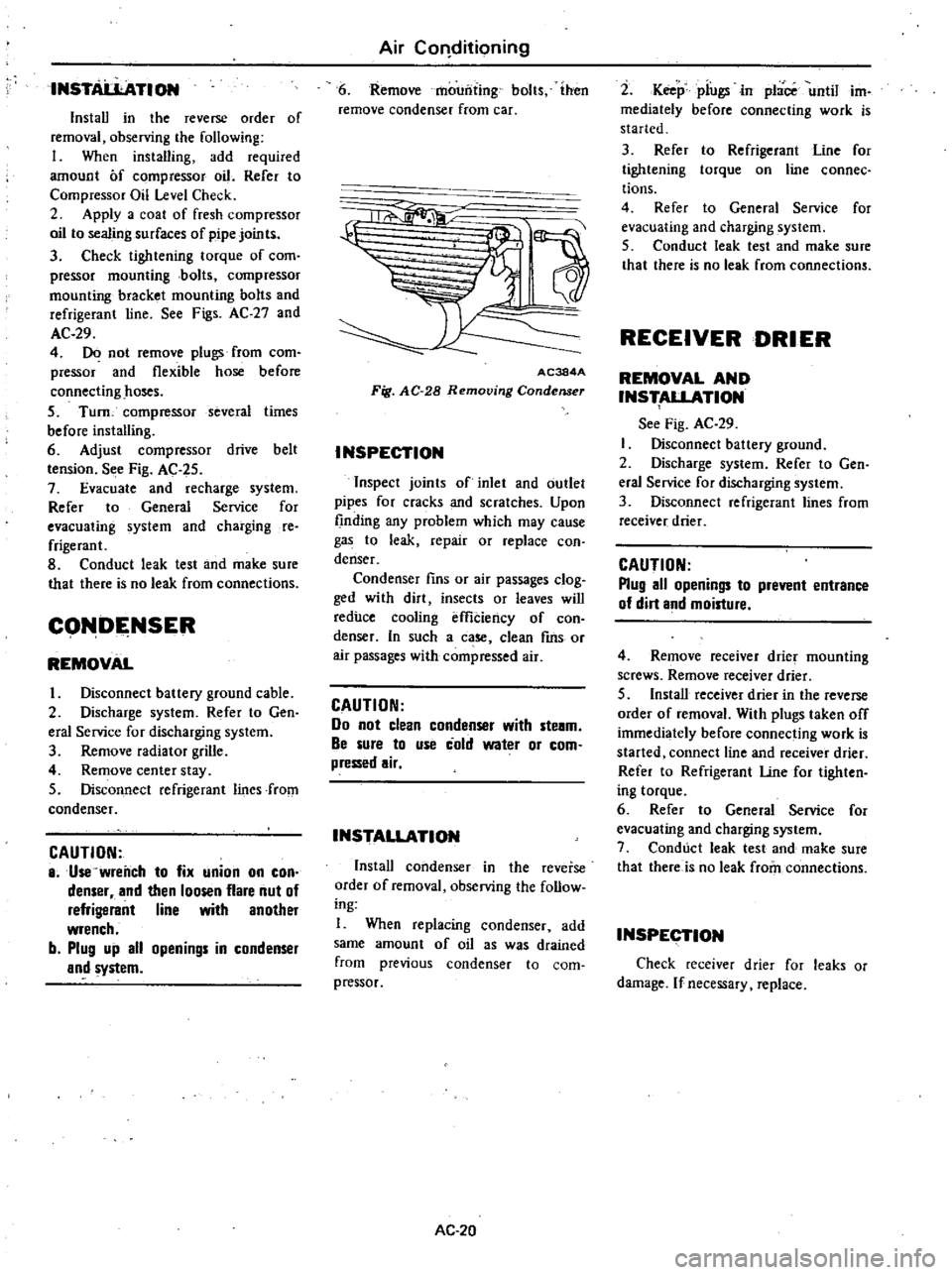
Remove
radiator
grille
4
Remove
center
stay
5
Disconnect
refrigerant
lines
from
condenser
CAUTION
8
Use
wrench
to
fix
union
on
con
denser
and
then
loosen
flare
nut
of
refrigerant
line
with
another
wrench
b
Plug
up
all
openings
in
condenser
and
system
Air
COl1ditioning
6
Remove
mounting
bolts
ihen
remove
condenser
from
car
1a
11
AC384A
Fig
AC
28
Removing
Condenser
INSPECTION
Inspect
joints
of
inlet
and
outlet
pipes
for
cracks
and
scratches
Upon
finding
any
problem
which
may
cause
gas
to
leak
repair
or
replace
con
denser
Condenser
fins
or
air
passages
clog
ged
with
dirt
insects
or
leaves
will
reduce
cooling
effiCiency
of
con
denser
In
such
a
case
clean
fms
or
air
passages
with
compressed
air
CAUTION
Do
not
clean
condenser
with
ste8m
Be
sure
to
use
cold
water
or
com
pressed
air
INSTALLATION
Install
condenser
in
the
reverse
order
of
removal
observing
Ihe
follow
ing
I
When
replacing
condenser
add
same
amount
of
oil
as
was
drained
from
previous
condenser
to
com
pressor
AC
20
2
Keep
piugsin
place
until
im
mediately
before
connecting
work
is
started
3
Refer
to
Refrigerant
Line
for
tightening
torque
on
line
connec
tions
4
Refer
to
General
Service
for
evacuating
and
charging
system
5
Conduct
leak
test
and
make
sure
that
there
is
no
leak
from
connections
RECEIVER
DRIER
REMOVAL
AND
INS
ALLATION
See
Fig
AC
29
Disconnect
battery
ground
2
Discharge
system
Refer
to
Gen
eral
Service
for
discharging
system
3
Disconnect
refrigerant
lines
from
receiver
drier
CAUTION
Plug
all
openings
to
prevent
entrance
of
dirt
and
moisture
4
Remove
receiver
drier
mounting
screws
Remove
receiver
drier
5
Install
receiver
drier
in
the
reverse
order
of
removal
With
plugs
taken
off
immediately
before
connecting
work
is
started
connect
line
and
receiver
drier
Refer
to
Refrigerant
Une
for
tighten
ing
torque
6
Refer
to
General
Service
for
evacuating
and
charging
system
7
Conduct
leak
test
and
make
sure
that
there
is
no
leak
from
connections
INSPECTION
Check
receiver
drier
for
leaks
or
damage
If
necessary
replace
Page 522 of 548
REFRIGERANT
LINES
Air
Conditioning
@
I
J
L
S
r
Z
S
t
@
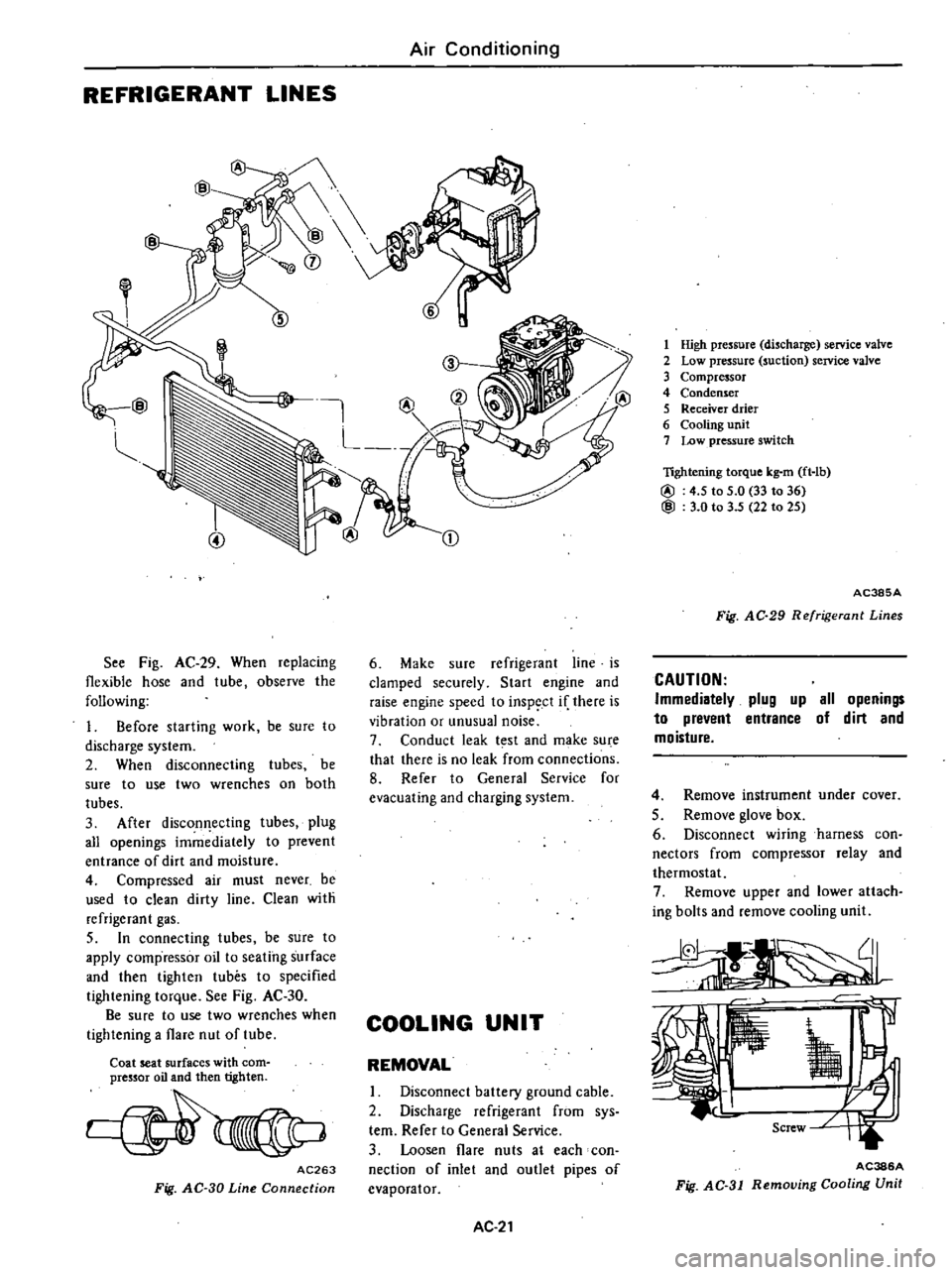
See
Fig
AC
29
When
replacing
flexible
hose
and
tube
observe
the
following
1
Before
starting
work
be
sure
to
discharge
system
2
When
disconnecting
tubes
be
sure
to
use
two
wrenches
on
both
tubes
3
After
discon
ecting
tubes
plug
all
openings
immediately
to
prevent
entrance
of
dirt
and
moisture
4
Compressed
air
must
never
be
used
to
clean
dirty
line
Clean
with
refrigerant
gas
5
In
connecting
tubes
be
sure
to
apply
compressor
oil
to
seating
surface
and
then
tighten
tubes
to
specified
tightening
torque
See
Fig
AC
30
Be
sure
to
use
two
wrenches
when
tightening
a
flare
nut
of
tube
Coat
seat
surfaces
with
com
pressor
oil
and
then
tighten
AC263
Fig
AC
30
Line
Connection
CD
6
Make
sure
refrigerant
line
is
clamped
securely
Start
engine
and
raise
engine
speed
to
inspect
if
there
is
vibration
or
unusual
noise
7
Conduct
leak
t
st
and
make
su
e
that
there
is
no
leak
from
connections
8
Refer
to
General
Service
for
evacuating
and
charging
system
COOLING
UNIT
REMOVAL
I
Disconnect
battery
ground
cable
2
Discharge
refrigerant
from
sys
tern
Refer
to
General
Service
3
Loosen
flare
nuts
at
each
con
nection
of
inlet
and
outlet
pipes
of
evaporator
AC
21
1
High
pressure
discharge
service
valve
2
Low
pressure
suction
service
valve
3
Compressor
4
Condenser
5
Receiver
drier
6
Cooling
unit
7
Low
pressure
switch
lightening
torque
kg
m
ft
lb
@
4
5
to
5
0
33
to
36
@
3
0
to
3
5
22
to
25
AC385A
Fig
AC
29
Refrigerant
Lines
CAUTION
Immediatelv
plug
up
all
openings
to
prevent
entrance
of
dirt
and
moisture
4
Remove
instrument
under
cover
5
Remove
glove
box
6
Disconnect
wiring
harness
con
nectors
from
compressor
relay
and
thermostat
7
Remove
upper
and
lower
attach
ing
bolts
and
remove
cooling
unit
AC386A
Fig
AC
31
Removing
Cooling
Unit
Page 524 of 548
Note
When
installing
thermostat
in
sert
capillary
tube
in
same
place
as
it
was
before
removal
Be
sure
to
insert
capillary
tube
end
about
SO
em
19
7
in
from
evaporator
core
INSPECTION
1
Test
continuity
between
two
switch
terminals
with
test
lamp
or
ohmmerter
Continuity
should
exist
2
With
capillary
tube
end
dipped
into
ice
salt
water
maintained
to
I
oc
300
F
test
continuity
between
two
switch
terminals
Continuity
should
not
exist
3
If
switch
is
found
damaged
re
place
MAIN
RELAY
REMOVAL
AND
INSTALLATION
I
Disconnect
battery
ground
cable
2
Remove
glove
box
3
Disconnect
connector
from
main
relay
4
Remove
screw
retaining
main
relay
to
cooling
unit
then
remove
main
relay
5
Installation
is
in
the
reverse
order
of
removal
INSPECTION
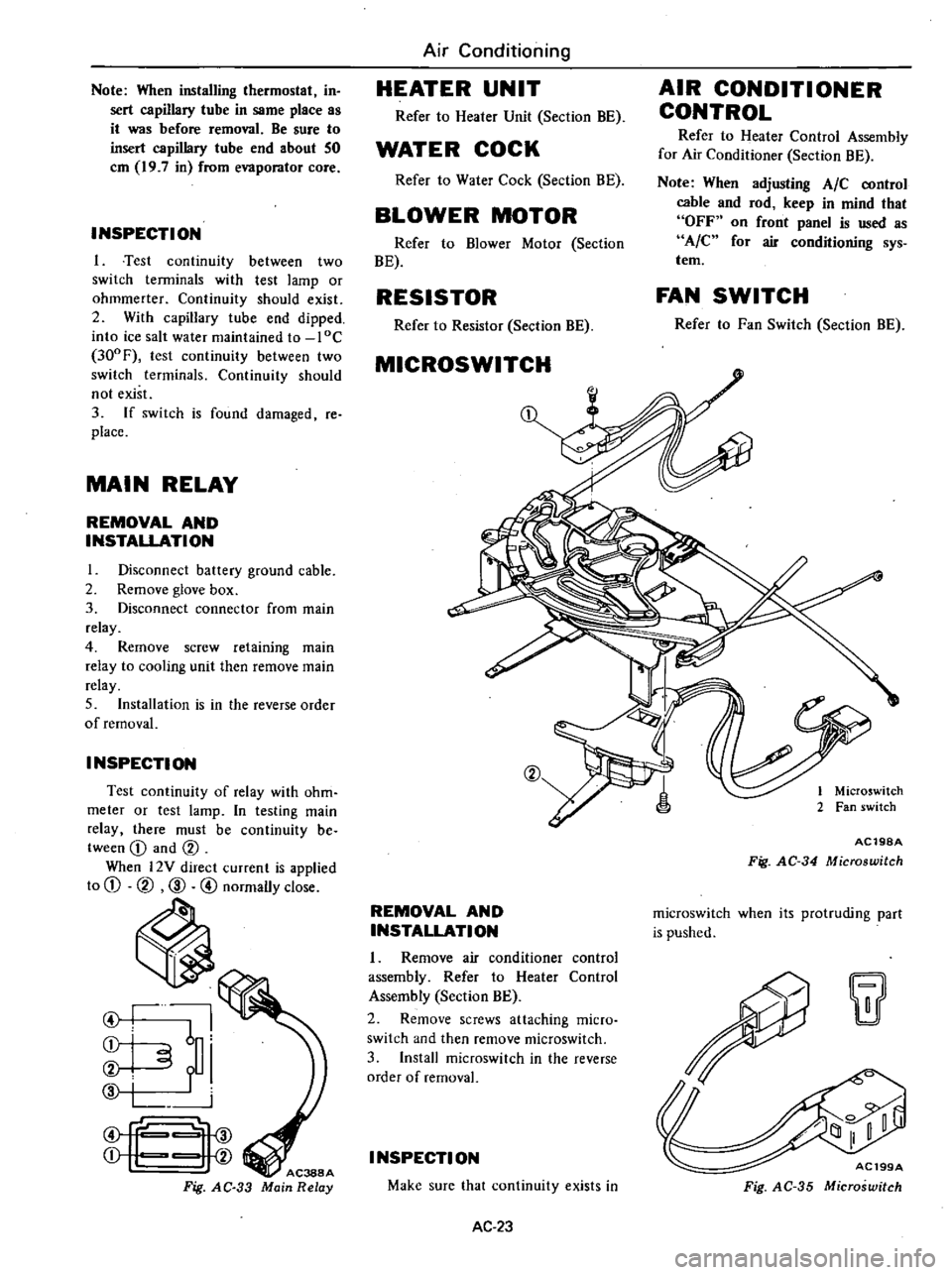
Test
continuity
of
relay
with
ohm
meter
or
test
lamp
In
testing
main
relay
there
must
be
continuity
be
tween
CD
and
CV
When
l2Y
direct
current
is
applied
to
CD
CV
CID
@
normally
close
ti
I
I
6
i
i
f
i
f
Fig
AC
33
Air
Conditioning
HEATER
UNIT
Refer
to
Heater
Unit
Section
BE
WATER
COCK
Refer
to
Water
Cock
Section
BE
BLOWER
MOTOR
Refer
to
Blower
Motor
Section
BE
RESISTOR
Refer
to
Resistor
Section
BE
MICROSWITCH
CV
REMOVAL
AND
INSTALLATION
1
Remove
air
conditioner
control
assembly
Refer
to
Heater
Control
Assembly
Section
BE
2
Remove
screws
attaching
micro
switch
and
then
remove
rnicroswitch
3
Install
rnicroswitch
in
the
reverse
order
of
removal
I
NSPECTI
ON
Make
sure
that
continuity
exists
in
AC
23
AIR
CONDITIONER
CONTROL
Refer
to
Heater
Control
Assembly
for
Air
Conditioner
Section
BE
Note
When
adjusting
AIC
control
cable
and
rod
keep
in
mind
that
OFF
on
front
panel
is
used
as
A
C
for
air
conditioning
sys
tem
FAN
SWITCH
Refer
to
Fan
Switch
Section
BE
1
Microswitch
2
Fan
switch
AC19SA
Fig
AC
34
Microswitch
rnicroswitch
when
its
protruding
part
is
pushed
w
AC199A
Fig
AC
35
Microswitch
Page 525 of 548
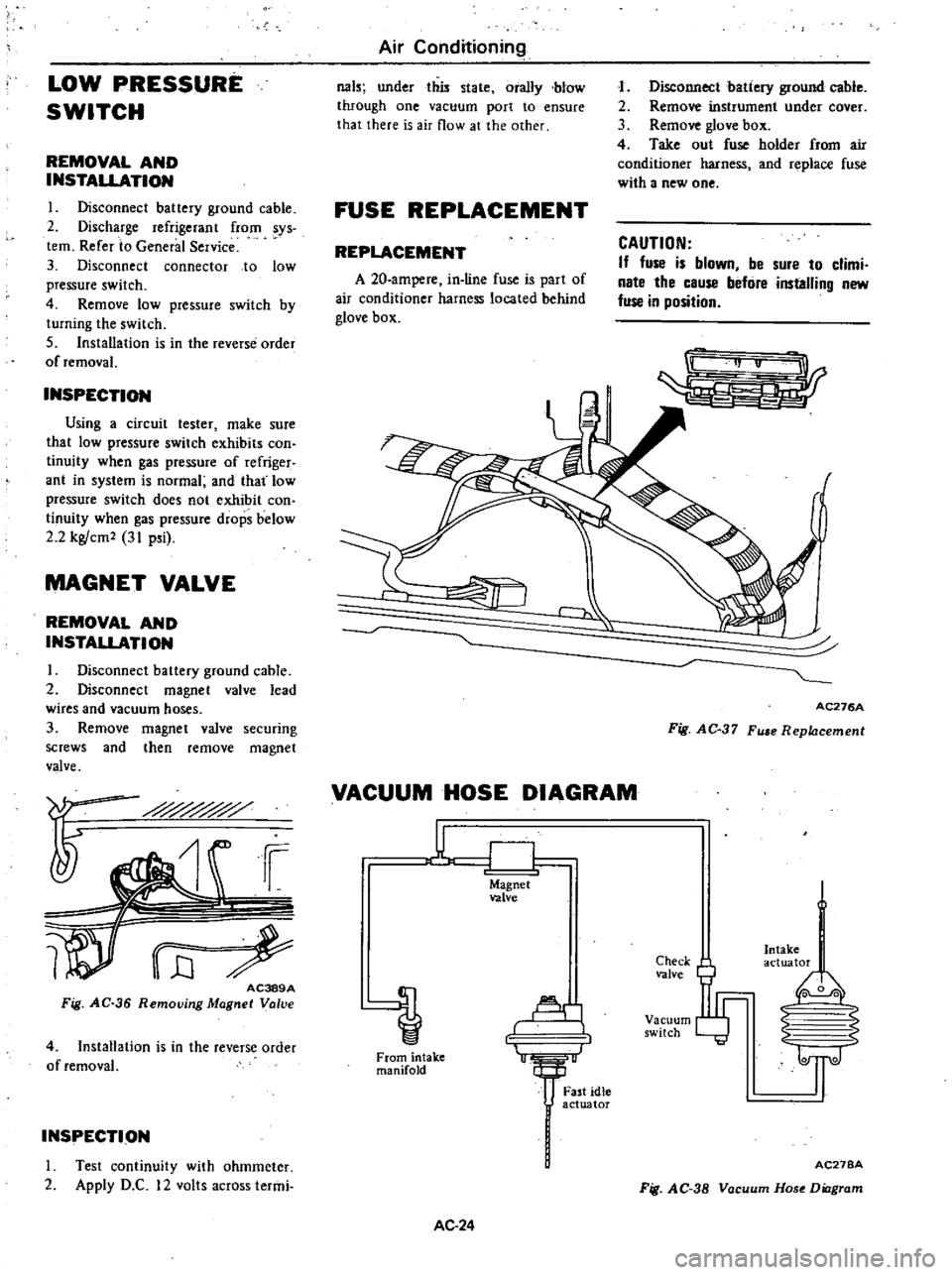
LOW
PRESSURE
SWITCH
REMOVAL
AND
INSTALLATION
I
Disconnect
battery
ground
cable
2
Discharge
refrigerant
from
sys
tem
Refer
to
General
Service
3
Disconnect
connector
to
low
pressure
switch
4
Remove
low
pressure
switch
by
turning
the
switch
5
Installation
is
in
the
reverse
order
of
removal
INSPECTION
Using
a
circuit
tester
make
sure
that
low
pressure
switch
exhibits
con
tinuity
when
gas
pressure
of
refriger
ant
in
system
is
normal
and
that
low
pressure
switch
does
not
exhibit
con
tinuity
when
gas
pressure
drops
below
2
2
kg
cm2
31
p
i
MAGNET
VALVE
REMOVAL
AND
INSTALLATION
I
Disconnect
battery
ground
cable
2
Disconnect
magnet
valve
lead
wires
and
vacuum
hoses
3
Remove
magnet
valve
securing
screws
and
then
remove
magnet
valve
i
i
WrE
AC389A
Fig
AC
36
Removjng
Magnet
Valve
4
Installation
is
in
the
reverse
order
of
removal
INSPECTION
I
rest
continuity
with
ohmmeter
2
Apply
D
C
12
volts
across
termi
Air
Conditioning
031
under
this
state
orally
blow
through
one
vacuum
port
to
ensure
that
there
is
air
flow
at
the
other
FUSE
REPLACEMENT
REPLACEMENT
A
20
ampere
in
line
fuse
is
part
of
air
conditioner
harness
located
behind
glove
box
J
Disconnect
batiery
ground
cable
2
Remove
instrument
under
cover
3
Remove
glove
box
4
Take
out
fuse
holder
from
air
conditioner
harness
and
replace
fuse
with
a
new
one
CAUTION
If
fuse
is
blown
be
sure
to
climi
nate
the
cause
befure
installing
new
fuse
in
position
r
AC276A
Fig
AC
37
Fu
e
Replacement
VACUUM
HOSE
DIAGRAM
u
CJ
Magnet
valve
Al
1
From
intake
manifold
AC
24
Fast
idle
actuator
Check
valve
Vacuum
switch
Intake
actuator
I
0
0
2
S
1l
AC27BA
Fig
AC
38
Vacuum
Hose
Diagram