display DODGE CHARGER SRT 2015 7.G Uconnect 8.4A
[x] Cancel search | Manufacturer: DODGE, Model Year: 2015, Model line: CHARGER SRT, Model: DODGE CHARGER SRT 2015 7.GPages: 429, PDF Size: 4.01 MB
Page 178 of 429
Undo
You can backspace an entry by pressing the “Undo”
button on touchscreen.
GO
When pressed, the green GO button on touchscreen
allows the you to commit an entry, at which time the
radio will tune to the entered station or channel and close
the Direct Tune Screen.
The selected Station or Channel number is displayed in
the Direct Tune text box.
Setting Presets
The Presets are available for all Radio Modes, and are
activated by pressing any of the six “Preset” buttons on
the touchscreen, located at the top of the screen.
When you are receiving a station that you wish to
commit into memory, press and hold the desired num-
bered button on the touchscreen for more that two
seconds or until you hear a confirmation beep.
The Radio stores up to 12 presets in each of the Radio
modes. A set of 6 presets are visible at the top of the radio
screen.
You can switch between the two radio presets by pressing
the “arrow button” located in the upper right of the radio
touchscreen.
Browse In AM/FM
When in either AM or FM, the Browse Screen provides a
means to edit the Presets List and is entered by pushing
the ENTER/BROWSE button.
3
Uconnect® 8.4A — If Equipped 177
Page 181 of 429
Acquiring SiriusXM Subscription
To activate the SiriusXM Satellite Radio subscription, call
1-800-643-2112 for U.S. residents and 1-877-438-9677 for
Canadian residents. You will need to provide the Sirius
ID (RID) located at the bottom of the Channel 0 screen.
The Satellite Mode is activated by a press of the “SXM”
button on the touchscreen.
When in Satellite mode:
•The SXM button on the touchscreen is highlighted.
•The SiriusXM Presets are displayed at the top of the
screen.
•The Genre is displayed below the Presets Bar.
•The SiriusXM Channel Number is displayed in the
center.
•The Program Information is displayed at the bottom of
the Channel Number.
•The SiriusXM function buttons on the touchscreens are
displayed below the Program Information.
Tuning is done by operating the TUNE/SCROLL knob or
by Direct Tune, similar to other Radio Bands, see Presets,
Browse, TUNE/SCROLL knob and Direct Tune.
In addition to the tuning Operation functions common to
all Radio modes, the replay, Traffic/Weather Jump, and
fav button functions are available in SiriusXM Mode.
Replay
The replay function provides a means to store and replay
up to 22 minutes of music audio and 48 minutes of talk
radio. Once the channel is switched, content in replay
memory is lost.
Press the “Replay” button on the touchscreen. The play/
pause, rewind/forward and live buttons will display at
the top of the screen, along with the replay time.
180 Uconnect® 8.4A — If Equipped
Page 183 of 429
The favorites feature enables you to set a favorite artist,
or song that is currently playing. The Radio then uses this
information to alert you when either the favorite song, or
favorite artist are being played at any time by any of the
SiriusXM Channels.
The maximum number of favorites that can be stored in
the Radio is 50.
Fav. Artist:While the song is playing to set a Favorite
Artist, press the “fav.” button on the touchscreen and
then the Fav. Artist button on the touchscreen.
Fav. Song:While the song is playing to set a Favorite
Song, press the “fav.” button on the touchscreen and then
the Fav Song button on the touchscreen.
Browse In SXM
Press the “Browse” button on the touchscreen to edit
Presets, Favorites, Game Zone, and Jump settings, along
with providing the SiriusXM Channel List.
This Screen contains many sub menus. You can exit a sub
menu to return to a parent menu by pressing the “Back
Arrow.”
All
Press the “All” button at the left of the Browse Screen.
Channel List
Press the Channel List, or Genre, to display all the
SiriusXM Channel Numbers. You can scroll the Channel
list by pressing the “Up and Down arrows”, located on
the right side of the screen. Scrolling can also be done by
operating the TUNE/SCROLL knob.
Genre
Press the “Genre” button on the touchscreen to display a
list of Genres. You can select any desired Genre by
pressing the “Genre” list, the Radio tunes to a channel
with the content in the selected Genre.
182 Uconnect® 8.4A — If Equipped
Page 187 of 429
Equalizer
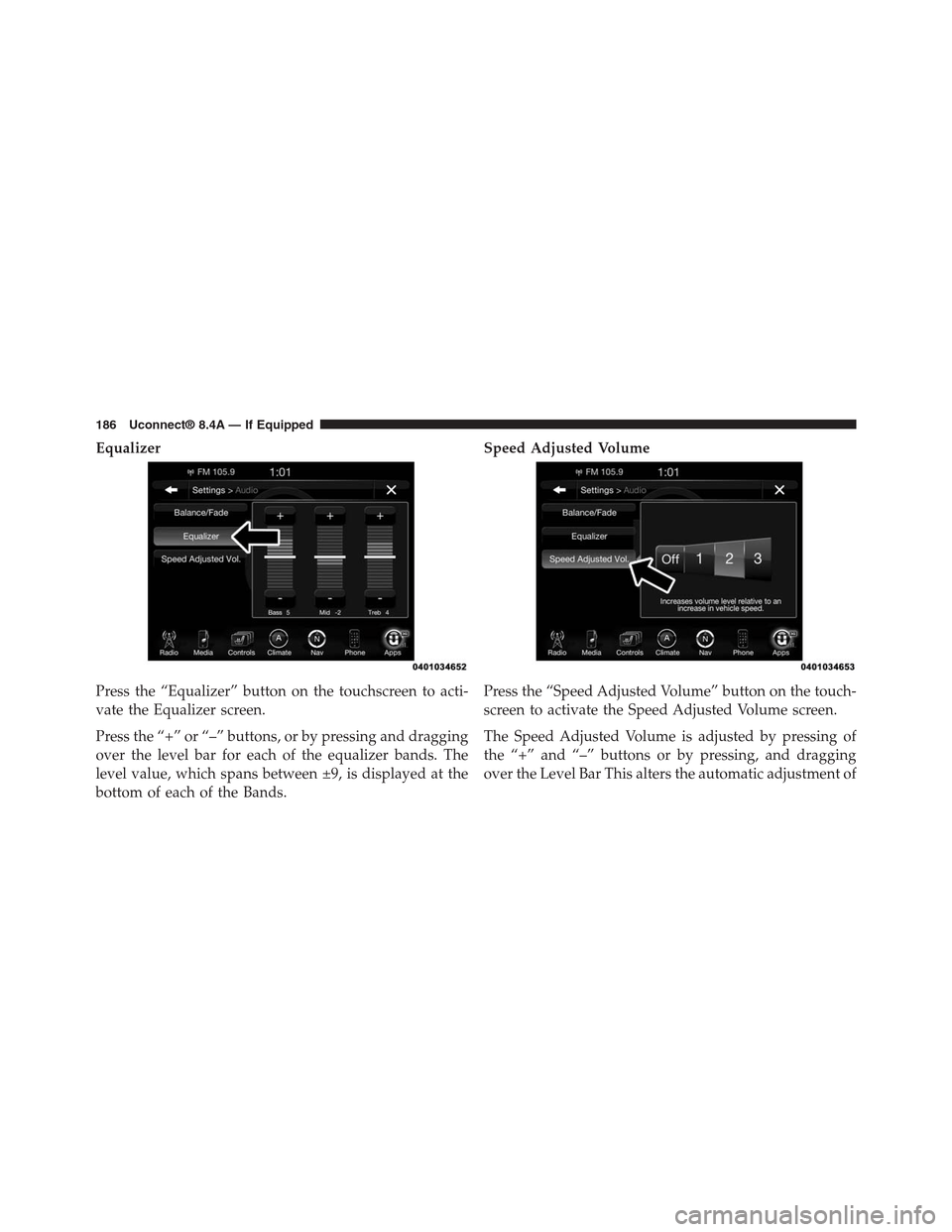
Press the “Equalizer” button on the touchscreen to acti-
vate the Equalizer screen.
Press the “+” or “–” buttons, or by pressing and dragging
over the level bar for each of the equalizer bands. The
level value, which spans between ±9, is displayed at the
bottom of each of the Bands.
Speed Adjusted Volume
Press the “Speed Adjusted Volume” button on the touch-
screen to activate the Speed Adjusted Volume screen.
The Speed Adjusted Volume is adjusted by pressing of
the “+” and “–” buttons or by pressing, and dragging
over the Level Bar This alters the automatic adjustment of
186 Uconnect® 8.4A — If Equipped
Page 188 of 429
the audio volume with variation to vehicle speed. Vol-
ume increases automatically as speed increase to com-
pensate for normal road noise.
Surround Sound (If Equipped)
Press the “On” button on the touchscreen to activate
Surround Sound. Press “Off” to deactivate this feature.
When Surround Sound is On, you can hear audio coming
from every direction as in a movie theatre or home
theatre system.
MEDIA MODE
Disc Mode — If Equipped
Overview
Disc Mode is entered by either inserting a Disc or
pressing the “Disc” button on the left side of the display.
Once in Media Mode, press the “Source” button on the
touchscreen and select “Disc.”
A “Insert Disc” message will be displayed on the screen
in the Disc mode when a Disc is not present in the Radio.
Seek Up/Seek Down
Press and release the Seek Upbutton on the touch-
screen for the next selection on the Disc. Press and
release the Seek Downbutton on the touchscreen to
return to the beginning of the current selection, or to
return to the beginning of the previous selection if the
Disc is within the first three seconds of the current
selection.
Browse
Press the “Browse” button on the touchscreen to display
the browse window. The left side of the browse window
displays a list of ways you can browse through the
contents of the Disc. If supported by the device, you can
browse by Folders, Artists, Playlists, Albums, Songs, etc.
Press the desired button on the touchscreen on the left
side of the screen. The center of the browse window
3
Uconnect® 8.4A — If Equipped 187
Page 189 of 429
shows items and it’s sub-functions, which can be scrolled
by pressing the “Up” and “Down” buttons to the right.
The TUNE/SCROLL knob can also be used to scroll.
Media Mode
Press the “Media” button on the touchscreen to select the
desired audio source: Disc.
Repeat
Press the “Repeat” button on the touchscreen to toggle
the repeat functionality. The Repeat button on the touch-
screen is highlighted when active. The Radio will con-
tinue to play the current track, repeatedly, as long as the
repeat is active.
Shuffle
Press the “Shuffle” button on the touchscreen to play the
selections on the compact disc in random order to
provide an interesting change of pace. Press the button
on the touchscreen a second time to turn this feature off.
Info
Press the “Info” button on the touchscreen to display the
current track information. Press the “Info” button on the
touchscreen a second time to cancel this feature.
Tracks
Press the “trks” button on the touchscreen to display a
pop up with the Song List. The currently playing song is
indicated by an arrow and lines above and below the
song title. When in the Tracks List screen you can rotate
the TUNE/SCROLL knob to highlight a track (indicated
by the line above and below the track name) and then
push the ENTER/BROWSE knob to start playing that
track.
Pressing the “trks” button on the touchscreen while the
pop up is displayed will close the pop up.
188 Uconnect® 8.4A — If Equipped
Page 190 of 429
USB/iPod® Mode
Overview
USB/iPod® Mode is entered by either inserting a USB
device or iPod® and cable into the USB Port or press the
“iPod®” button on the left side of the display.
Seek Up/Seek Down
Press and release the Seek Upbutton on the touch-
screen for the next selection on the USB device/iPod®.
Press and release the Seek Downbutton on the
touchscreen to return to the beginning of the current
selection, or to return to the beginning of the previous
selection if the USB device/iPod® is within the first
three seconds of the current selection.
Browse
Press the “Browse” button on the touchscreen to display
the browse window. The left side of the browse window
displays a list of ways you can browse through the
contents of the USB device/iPod®. If supported by the
device, you can browse by Folders, Artists, Playlists,
Albums, Songs, etc. Press the desired button on the left
side of the screen. The center of the browse window
shows items and it’s sub-functions, which can be scrolled
by pressing the “Up” and “Down” buttons to the right.
The TUNE/SCROLL knob can also be used to scroll.
Media Mode
Press the “Media” button on the touchscreen to select the
desired audio source: USB.
Repeat
Press the “Repeat” button on the touchscreen to toggle
the repeat functionality. The Repeat button on the touch-
screen is highlighted when active. The Radio will con-
tinue to play the current track, repeatedly, as long as the
repeat is active.
3
Uconnect® 8.4A — If Equipped 189
Page 191 of 429
Shuffle
Press the “Shuffle” button on the touchscreen to play the
selections on the USB/iPod® device in random order to
provide an interesting change of pace. Press the “Shuffle”
button on the touchscreen a second time to turn this
feature off.
Info
Press the “Info” button on the touchscreen to display the
current track information. Press the “Info” button on the
touchscreen a second time to cancel this feature.
Tracks
Press the “trks” button on the touchscreen to display a
pop up with the Song List. The currently playing song is
indicated by an arrow and lines above and below the
song title. When in the trks List screen you can rotate the
TUNE/SCROLL knob to highlight a track (indicated by
the line above and below the track name) and then push
the ENTER/BROWSE knob to start playing that track.
Pressing the “trks” button on the touchscreen while the
pop up is displayed will close the pop up.
Audio
Refer to Radio Mode for adjusting the audio settings.
AUX Mode
Overview
AUX (Auxiliary Mode) is entered by inserting an AUX
device using a cable with a 3.5 mm audio jack into the
AUX port or by pressing the AUX button on the left side
of the display.
Inserting Auxiliary Device
Gently insert the Auxiliary device cable into the AUX
Port. If you insert an Auxiliary device with the ignition
190 Uconnect® 8.4A — If Equipped
Page 192 of 429
ON and the radio ON, the unit will switch to AUX mode
and begin to play when you insert the device cable.
Controlling The Auxiliary Device
The control of the auxiliary device (e.g., selecting play-
lists, play, fast forward, etc.) cannot be provided by the
radio; use the device controls instead. Adjust the volume
with the VOLUME/MUTE rotary knob, or with the
volume of the attached device.
NOTE:The vehicle radio unit is acting as the amplifier
for audio output from the Auxiliary device. Therefore if
the volume control on the Auxiliary device is set too low,
there will be insufficient audio signal for the radio unit to
play the music on the device.
Media Mode
Press the “Media” button on the touchscreen to select the
desired audio source: AUX
Audio
Refer to Radio Mode for adjusting the audio settings.
SD Card Mode — If Equipped
Overview
SD Card Mode is entered by either inserting a SD Card
into the SD Card slot or press the “SD Card” button on
the left side of the display.
Seek Up/Seek Down
Press and release the Seek Upbutton on the touch-
screen for the next selection on the SD Card. Press and
release the Seek Downbutton on the touchscreen to
return to the beginning of the current selection, or to
return to the beginning of the previous selection if the
SD Card is within the first three seconds of the current
selection.
3
Uconnect® 8.4A — If Equipped 191
Page 193 of 429
Browse
Press the “Browse” button on the touchscreen to display
the browse window. The left side of the browse window
displays a list of ways you can browse through the
contents of the SD Card. If supported by the device, you
can browse by Folders, Artists, Playlists, Albums, Songs,
etc. Press the desired button on the left side of the screen.
The center of the browse window shows items and it’s
sub-functions, which can be scrolled by pressing the
“Up” and “Down” buttons to the right. The TUNE/
SCROLL knob can also be used to scroll.
Media Mode
Press the “Media” button on the touchscreen to select the
desired audio source: SD Card
Repeat
Press the “Repeat” button on the touchscreen to toggle
the repeat functionality. The Repeat button on the touch-
screen is highlighted when active. The Radio will con-
tinue to play the current track, repeatedly, as long as the
repeat is active.
Shuffle
Press the “Shuffle” button on the touchscreen to play the
selections on the SD Card device in random order to
provide an interesting change of pace. Press the “Shuffle”
button on the touchscreen a second time to turn this
feature off.
Info
Press the “Info” button on the touchscreen to display the
current track information. Press the “Info” button on the
touchscreen a second time to cancel this feature.
192 Uconnect® 8.4A — If Equipped