phone DODGE CHARGER SRT 2015 7.G Uconnect 8.4A
[x] Cancel search | Manufacturer: DODGE, Model Year: 2015, Model line: CHARGER SRT, Model: DODGE CHARGER SRT 2015 7.GPages: 429, PDF Size: 4.01 MB
Page 98 of 429
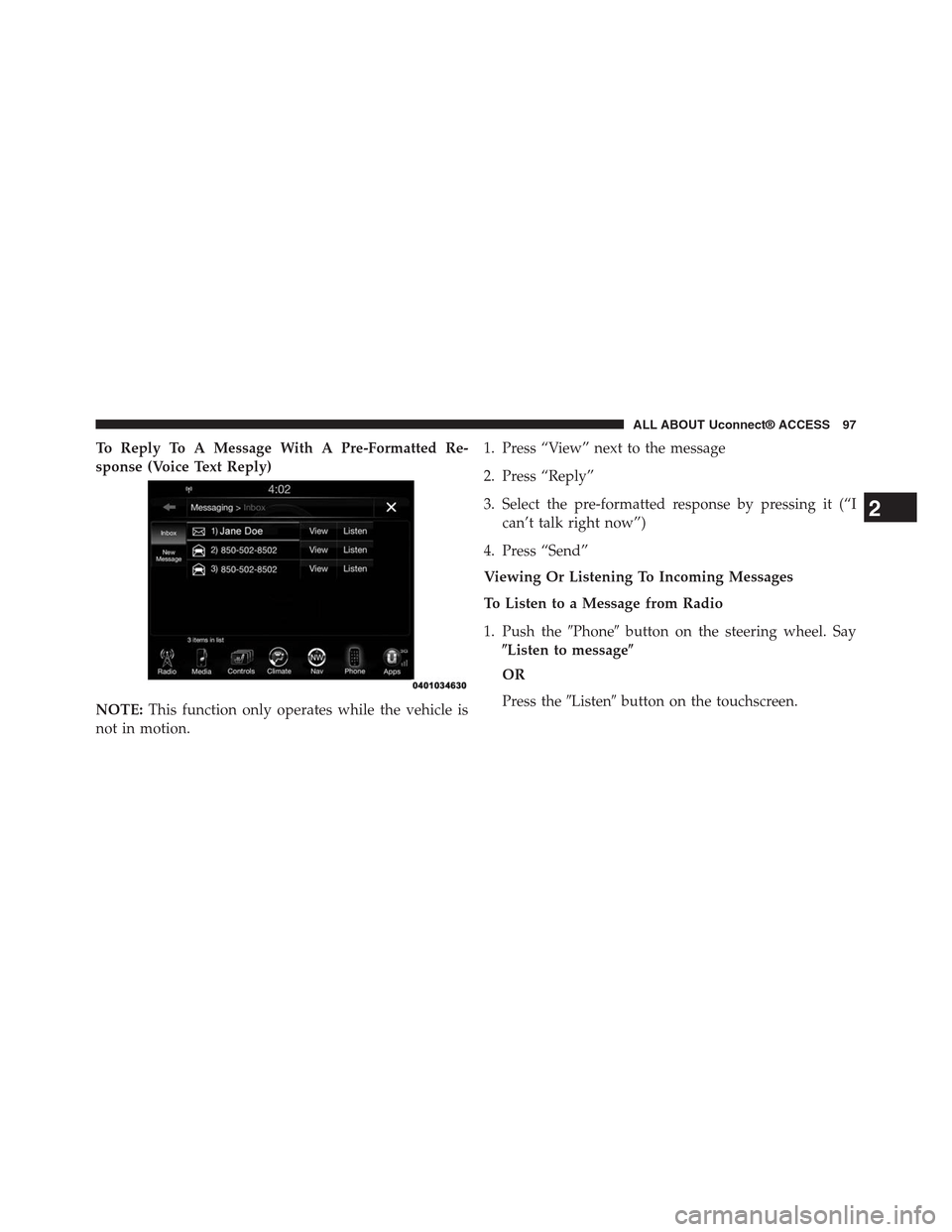
To Reply To A Message With A Pre-Formatted Re-
sponse (Voice Text Reply)
NOTE:This function only operates while the vehicle is
not in motion.
1. Press “View” next to the message
2. Press “Reply”
3. Select the pre-formatted response by pressing it (“I
can’t talk right now”)
4. Press “Send”
Viewing Or Listening To Incoming Messages
To Listen to a Message from Radio
1. Push the#Phone#button on the steering wheel. Say
$Listen to message$
OR
Press the#Listen#button on the touchscreen.
2
ALL ABOUT Uconnect® ACCESS 97
Page 99 of 429
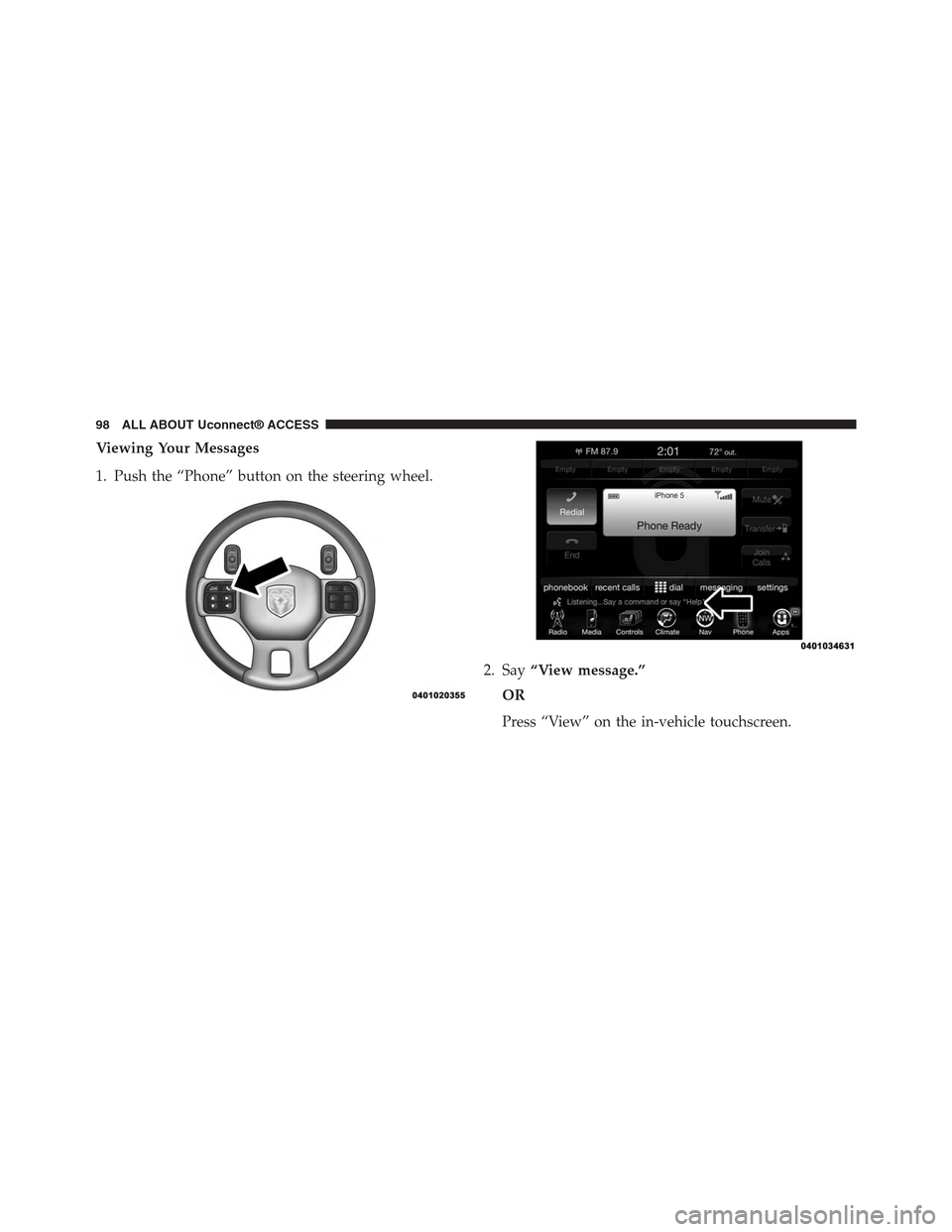
Viewing Your Messages
1. Push the “Phone” button on the steering wheel.
2. Say“View message.”
OR
Press “View” on the in-vehicle touchscreen.
98 ALL ABOUT Uconnect® ACCESS
Page 100 of 429
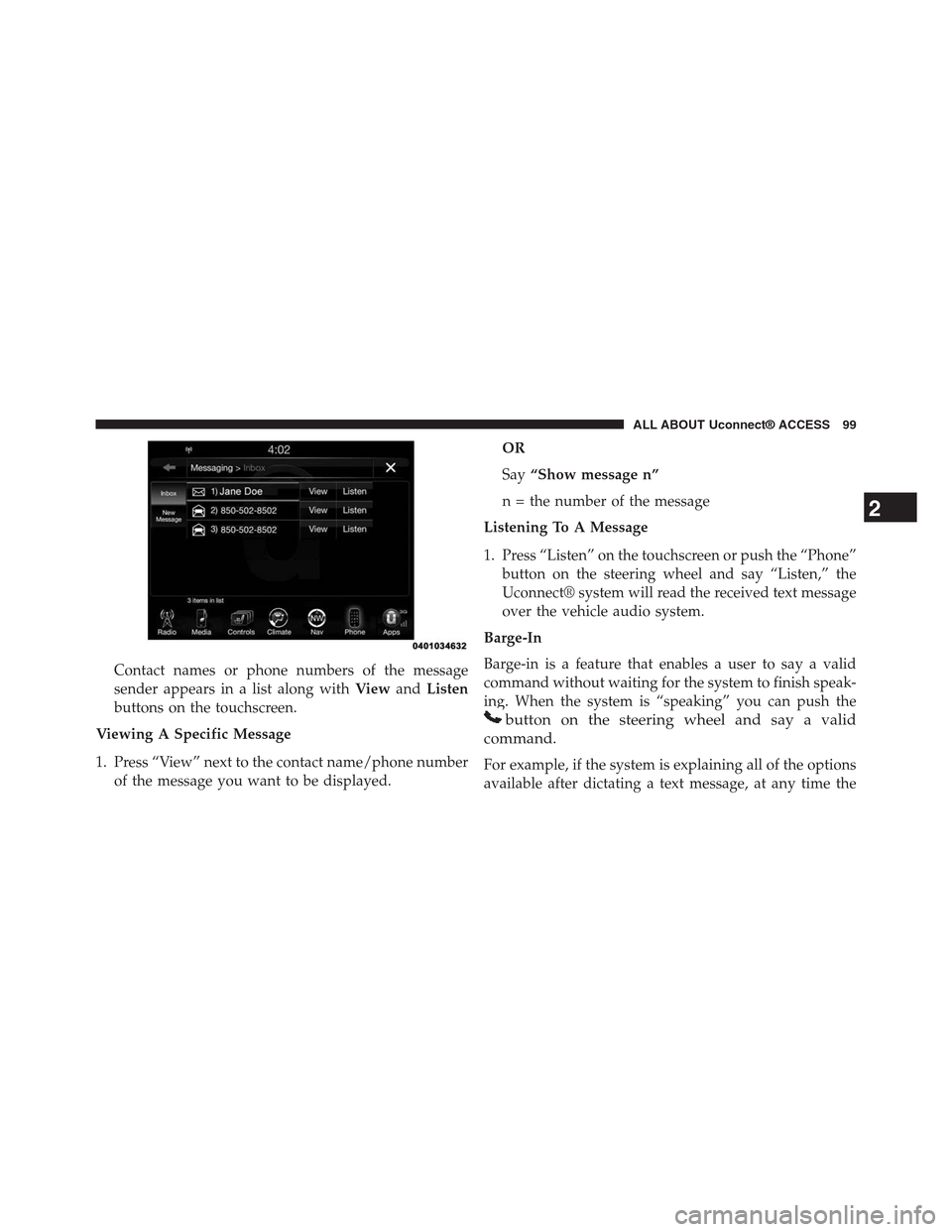
Contact names or phone numbers of the message
sender appears in a list along withViewandListen
buttons on the touchscreen.
Viewing A Specific Message
1. Press “View” next to the contact name/phone number
of the message you want to be displayed.
OR
Say“Show message n”
n = the number of the message
Listening To A Message
1. Press “Listen” on the touchscreen or push the “Phone”
button on the steering wheel and say “Listen,” the
Uconnect® system will read the received text message
over the vehicle audio system.
Barge-In
Barge-in is a feature that enables a user to say a valid
command without waiting for the system to finish speak-
ing. When the system is “speaking” you can push the
button on the steering wheel and say a valid
command.
For example, if the system is explaining all of the options
available after dictating a text message, at any time the
2
ALL ABOUT Uconnect® ACCESS 99
Page 101 of 429
user can press#Listen#on touchscreen or push the
#Phone#button on the steering wheel and say#Listen.#
Requirements
•(MAP may not be compatible with Apple iPhones®
(pre iOS 6). Apple iOS 6 supports receiving text
messages, but does not support sending text mes-
sages).
•Available on vehicles sold in the United States with a
Uconnect® 8.4A (sales code RA3) or Uconnect® 8.4AN
(sales code RA4) radio equipped with Uconnect®
Access.
•Vehicle must be registered with an active Uconnect®
Access Advantage trial or paid subscription for free
form text response to work.
•Vehicle and phone must be in range of the cellular
network.
•Customer must have a properly paired and connected
cellular device with Bluetooth® Message Access Pro-
file (MAP) enabled. Voice Texting is compatible with
many newer BlackBerry and Android mobile devices.
Apple iOS 5 and earlier does not support MAP so
iPhones will not send free form text messages. Apple
iOS 6 supports receiving, not sending text messages.
To check if your device has been tested to be compat-
ible please visitUconnectPhone.com.
Disclaimers
•Not all Voice Texting features may be available on your
phone.
•Your MAP supported phone must be paired and
connected to a compatible Uconnect® radio.
•You must have an active cellular connection and be
within cellular range to voice text.
100 ALL ABOUT Uconnect® ACCESS
Page 102 of 429
•Chrysler Uconnect® and its affiliates are not respon-
sible for errant text messages.
•Vehicle must be registered with an active Uconnect®
Access trial or paid subscription.
WARNING!
ALWAYS drive safely with your hands on the
steering wheel. You have full responsibility and
assume all risks related to the use of the
Uconnect® features and applications in this ve-
hicle. Only use Uconnect® when it is safe to do so.
Failure to do so may result in an accident involv-
ing serious injury or death.
FAQs
1.Can I still voice text if my phone is not listed?We are
constantly testing phones and updating our compat-
ibility database. If your phone is not listed, you may
still be able to pair and connect your MAP supported
phone to a compatible Uconnect® radio to see if all or
most voice texting functions work. Check your phone
manufacturer if MAP is supported on your phone.
2.Can I use voice texting while in my other Chrysler
vehicle?The Voice Texting free text response feature is
available only on Uconnect® 8.4A (sales code RA3) or
Uconnect® 8.4AN (sales code RA4) radios. Other
Chrysler vehicles do support hands free texting, but
only with fixed responses.
2
ALL ABOUT Uconnect® ACCESS 101
Page 103 of 429
3.My “Messaging” button on the touchscreen is White,
but I can only use pre-formatted responses.The Voice
Texting free-form voice response requires a subscrip-
tion to the Uconnect® Access Advantage package.
(Some phones will support pre-formatted responses,
but not free-form. Refer toUconnectPhone.comfor
further details.)
4.Do I have to “train” my Uconnect® radio to my
voice?Chrysler uses the latest voice recognition en-
gine that provides good recognition without required
training. This makes it easier for a passenger to also
use the system.
5.Can a passenger voice text?Yes, however, voice
recognition microphones are optimized for the driver,
so the system may have difficulty hearing the passen-
ger; also, the system will use the currently connected
phone, so be sure your passenger isn’t sending texts to
the wrong recipient.
6.Does Voice Texting work with accents?Speech isn’t
perfect. Technology isn’t perfect. While Chrysler
strives to use the latest voice recognition engine, the
technology may have difficulty with strong accents.
7.Can I voice text my car?The Voice Texting feature
allows you to listen to, and reply to text messages
(SMS) sent to your portable cellular mobile phone by
voice while in your vehicle.
8.How many pre-formatted replies are there?You can
respond with a set of up to 18 preset outgoing
messages such as#I’ll call you later.” Refer to “Voice
Texting” section of this supplement.
9.Can I use abbreviations and emoticons?Of course!
Just say the name of the most popular emoticon or
abbreviation, e.g. smiley, frown, wink, & LOL.
102 ALL ABOUT Uconnect® ACCESS
Page 104 of 429
10.Can I use Text Messaging if the “messaging” button
doesn’t turn white?Only MAP compatible phones
will work with Text Messaging. If your phone is
compatible, the “messaging” light will turn white,
after the phone is Bluetooth® connected, and you
will then be able to do hands free Text Messaging.
The system will respond with “Sorry, I didn’t under-
stand you” if you push the steering wheel “Phone”
button and say a voice command for Text Messaging,
when the button isn’t active (“white”).
Remote Door Lock/Unlock
Lock Or Unlock Your Vehicle From Virtually Anywhere
Using Your Computer Or Smartphone App.
Description
The Remote Door Lock/Unlock feature provides you the
ability to lock or unlock the door on your vehicle,
without the keys and from virtually any distance. You
can send a request to your vehicle in one of three ways:
•Using the Uconnect® Access App from a compatible
smartphone
•From the Mopar® Owner Connect website
(moparownerconnect.com)
•Contacting Uconnect® Care
If you want, you can set up notifications for your account
to receive an email or text (SMS) message every time a
command is sent to lock or unlock your doors.
How It Works
Uconnect® Access App:
1. Download the Uconnect® Access App to a compatible
smartphone and login using your username and pass-
word.
2. To lock the doors, push the button with the closed lock
icon; to unlock the driver ’s door push the button with
the open lock icon.
2
ALL ABOUT Uconnect® ACCESS 103
Page 107 of 429
Uconnect® Care:
1. If you need to unlock the doors of your vehicle,
contact Uconnect® Care by calling 855-792-4241.
NOTE:The Uconnect® Care agents are trained to help
you with unlocking of your door (for example, in an
accidental lock-out). All other Remote Services should be
performed via the Mopar® Owner Connect website
(moparownerconnect.com) or through the Uconnect®
Access App on your compatible smartphone.
CAUTION!
Must be registered with Uconnect® access and
have a current subscription.
2. For security purposes, the Uconnect® Care agent will
verify your identity by asking for your 4-digit
Uconnect® Security PIN.
3. After providing your Uconnect® Security PIN, you
can ask them to lock or unlock your vehicle. The agent
will send a command to your vehicle to get the task
done.
Give It A Try!
•Download the Uconnect® Access App to your smart-
phone.
•Enter the username and password that you established
for the Mopar® Owner Connect website
(moparownerconnect.com) during registration of
your new vehicle.
•If logging in for the first time, you will be asked to
agree to the Terms of Service.
•Push the button to unlock your vehicle’s door, you will
then be asked to enter your Uconnect® Security PIN.
106 ALL ABOUT Uconnect® ACCESS
Page 108 of 429
•Your request will typically take about to 3 minutes to
process. If your vehicle has been parked for a while it
can take up to 30 minutes for the request to reach your
vehicle and perform the task.
Requirements
•Vehicle must be properly equipped with the
Uconnect® Access System.
•Vehicle must be in range of a usable and authorized
cellular signal.
•Vehicle must be registered with Uconnect® Access and
have an active subscription that includes the appli-
cable feature or App.
•If using the Uconnect® Access App to command your
vehicle, your smartphone must be compatible and in
range of a cellular signal.
•An ignition cycle is required for some remote com-
mands such as Remote Vehicle Start and Remote Door
Lock/Unlock if following a Remote Horn and Lights
activation.
FAQs
1.How long does it take to unlock or lock the door?
Depending on various conditions, it can take three
minutes or more for the request to get through to your
vehicle, although Uconnect® is always striving to
improve performance.
2.Which is faster, my Key Fob or the Uconnect® Access
App?Your Key Fob will lock/unlock the door quicker,
however its range is limited and it can sometimes get
misplaced or locked in the vehicle. Your Uconnect®
Access App comes in handy for these and other
situations.
2
ALL ABOUT Uconnect® ACCESS 107
Page 109 of 429
3.Will my vehicle be safe if I lose my smartphone?
People sometimes lose their phone, which is why
security measures have been engineered into the
Uconnect® Access App. Asking for your username,
password and Uconnect® Security PIN help to ensure
that nobody can get into your vehicle if they happen to
find your smartphone.
4.Why can’t all phones use the Uconnect® Access
App?The Uconnect® Access App has been designed
to work on most smartphones with the Apple and
Android operating systems. The capabilities of these
smartphone allows us to remotely command your
vehicle. Other operating systems may be supported in
the future.
5.Why is the Uconnect® Access App running slow?
The Uconnect® Access App relies on the cellular
connection from your smartphone to send commands
to your vehicle. If your smartphone is in an area with
below average coverage, it will take longer to log in
and send commands.
Remote Vehicle Start
Use Your Computer Or Smartphone App To Start The
Engine And Warm-Up Or Cool-Down The Vehicle
From Almost Anywhere.
108 ALL ABOUT Uconnect® ACCESS