ABS DODGE RAM 2001 Service Repair Manual
[x] Cancel search | Manufacturer: DODGE, Model Year: 2001, Model line: RAM, Model: DODGE RAM 2001Pages: 2889, PDF Size: 68.07 MB
Page 1580 of 2889
(1) Disconnect both negative battery cables at both
batteries.
(2) Remove cable cover (Fig. 6). Cable cover is
attached with 2 Phillips screws, 2 plastic retention
clips and 2 push tabs (Fig. 6). Remove 2 Phillips
screws and carefully pry out 2 retention clips. After
clip removal, push rearward on front tab, and
upward on lower tab for cover removal.
(3) Using finger pressure only, disconnect end of
speed control servo cable from throttle lever pin by
pulling forward on connector while holding lever
rearward (Fig. 7).DO NOT try to pull connector
off perpendicular to lever pin. Connector will
be broken.
(4) Using two small screwdrivers, pry throttle
cable connector socket from throttle lever ball (Fig.
7).Be very careful not to bend throttle lever
arm.
(5) Disconnect transmission control cable at lever
arm (if equipped). Refer to 21, Transmission.
(6) Squeeze pinch tabs on speed control cable (Fig.
7) and pull cable rearward to remove from cable
mounting bracket.
(7) Squeeze pinch tabs on throttle cable (Fig. 7)
and pull cable rearward to remove from cable mount-
ing bracket.
(8) If equipped with an automatic transmission,
refer to 21, Transmission for transmission control
cable removal procedures.
(9) Disconnect wiring harness clip (Fig. 8) at bot-
tom of bracket.
(10) Remove 6 mounting bolts (Fig. 8) and par-
tially remove APPS assembly from engine. After
assembly is partially removed, disconnect electrical
connector from bottom of sensor by pushing on con-
nector tab (Fig. 9).
(11) Remove APPS assembly from engine.
INSTALLATION
The APPS is serviced (replaced) as one assembly
including the lever, brackets and sensor. The APPS is
calibrated to its mounting bracket. The APPS assem-
bly is located at left-front of engine below plastic
cable/lever/linkage cover (Fig. 6).
(1) Snap electrical connector into bottom of sensor.
(2) Position APPS assembly to engine and install 6
bolts. Tighten bolts to 12 N´m (105 in. lbs.) torque.
(3) Connect wiring harness clip (Fig. 8) at bottom
of bracket.
(4) If equipped with an automatic transmission,
refer to Group 21, Transmission for transmission con-
trol cable installation procedures.
(5) Install speed control cable into mounting
bracket. Be sure pinch tabs (Fig. 7) have secured
cable.(6) Install throttle cable into mounting bracket. Be
sure pinch tabs (Fig. 7) have secured cable.
(7) Connect throttle cable at lever (snaps on).
(8) Connect speed control cable to lever by pushing
cable connector rearward onto lever pin while hold-
ing lever forward.
(9) Install cable cover.
(10) Connect both negative battery cables to both
batteries.
(11)ECM Calibration:Turn key to ON position.
Without starting engine, slowly press throttle pedal
to floor and then slowly release. This step must be
done (one time) to ensure accelerator pedal position
sensor calibration has been learned by ECM. If not
done, possible DTC's may be set.
(12) Use DRB scan tool to erase any DTC's from
ECM/PCM.
FUEL INJECTOR
DESCRIPTION
Six individual, high-pressure fuel injectors are
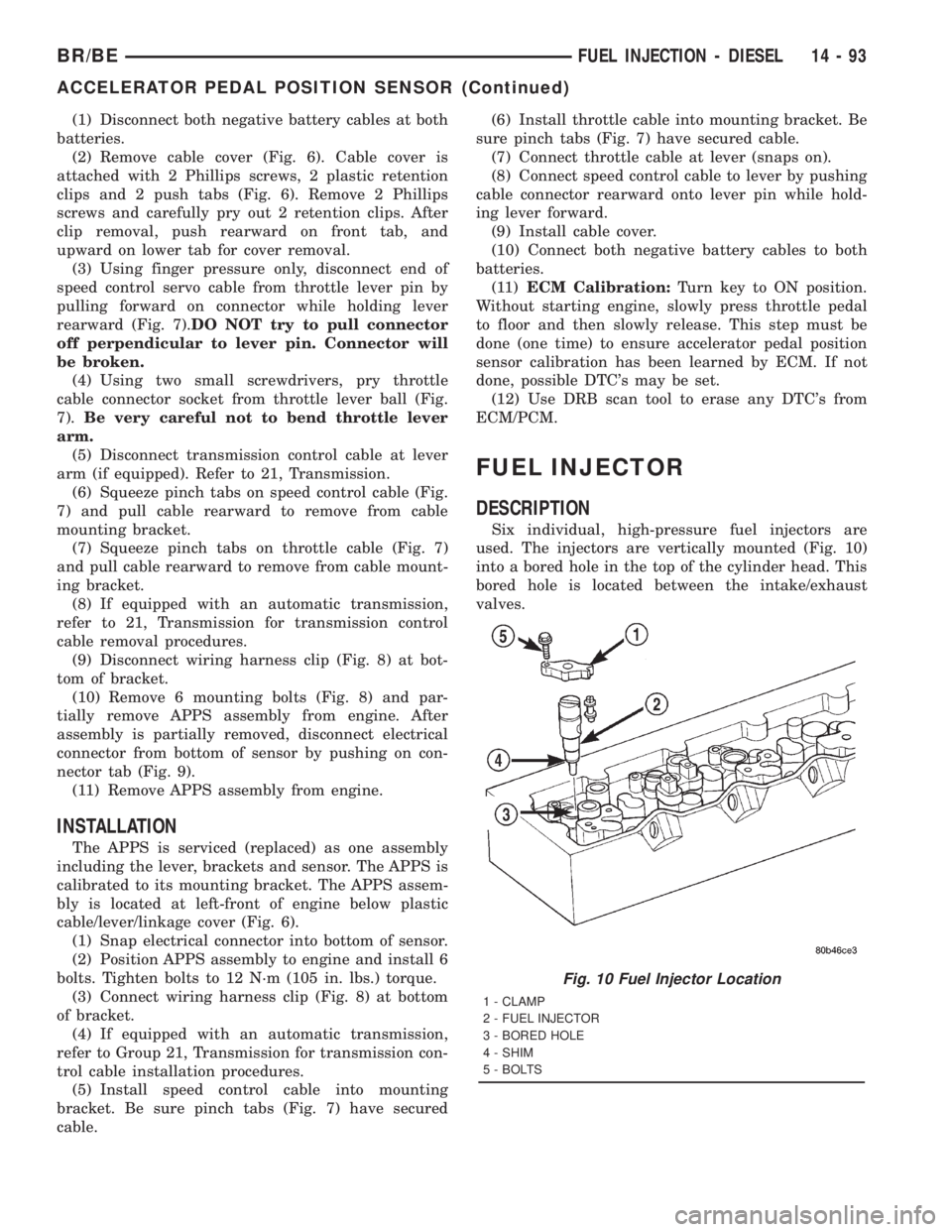
used. The injectors are vertically mounted (Fig. 10)
into a bored hole in the top of the cylinder head. This
bored hole is located between the intake/exhaust
valves.
Fig. 10 Fuel Injector Location
1 - CLAMP
2 - FUEL INJECTOR
3 - BORED HOLE
4 - SHIM
5 - BOLTS
BR/BEFUEL INJECTION - DIESEL 14 - 93
ACCELERATOR PEDAL POSITION SENSOR (Continued)
Page 1591 of 2889
REMOVAL - DIESEL
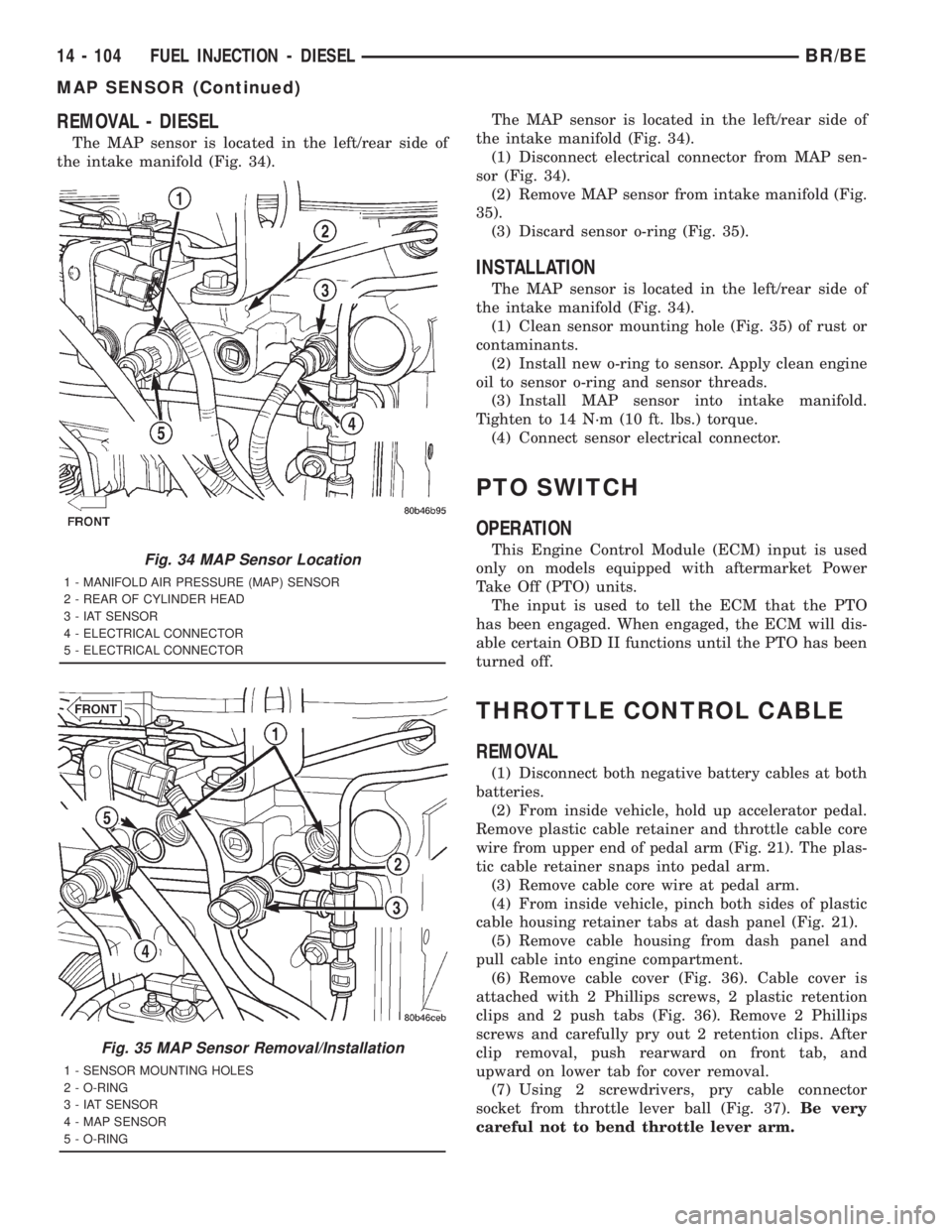
The MAP sensor is located in the left/rear side of
the intake manifold (Fig. 34).The MAP sensor is located in the left/rear side of
the intake manifold (Fig. 34).
(1) Disconnect electrical connector from MAP sen-
sor (Fig. 34).
(2) Remove MAP sensor from intake manifold (Fig.
35).
(3) Discard sensor o-ring (Fig. 35).
INSTALLATION
The MAP sensor is located in the left/rear side of
the intake manifold (Fig. 34).
(1) Clean sensor mounting hole (Fig. 35) of rust or
contaminants.
(2) Install new o-ring to sensor. Apply clean engine
oil to sensor o-ring and sensor threads.
(3) Install MAP sensor into intake manifold.
Tighten to 14 N´m (10 ft. lbs.) torque.
(4) Connect sensor electrical connector.
PTO SWITCH
OPERATION
This Engine Control Module (ECM) input is used
only on models equipped with aftermarket Power
Take Off (PTO) units.
The input is used to tell the ECM that the PTO
has been engaged. When engaged, the ECM will dis-
able certain OBD II functions until the PTO has been
turned off.
THROTTLE CONTROL CABLE
REMOVAL
(1) Disconnect both negative battery cables at both
batteries.
(2) From inside vehicle, hold up accelerator pedal.
Remove plastic cable retainer and throttle cable core
wire from upper end of pedal arm (Fig. 21). The plas-
tic cable retainer snaps into pedal arm.
(3) Remove cable core wire at pedal arm.
(4) From inside vehicle, pinch both sides of plastic
cable housing retainer tabs at dash panel (Fig. 21).
(5) Remove cable housing from dash panel and
pull cable into engine compartment.
(6) Remove cable cover (Fig. 36). Cable cover is
attached with 2 Phillips screws, 2 plastic retention
clips and 2 push tabs (Fig. 36). Remove 2 Phillips
screws and carefully pry out 2 retention clips. After
clip removal, push rearward on front tab, and
upward on lower tab for cover removal.
(7) Using 2 screwdrivers, pry cable connector
socket from throttle lever ball (Fig. 37).Be very
careful not to bend throttle lever arm.
Fig. 34 MAP Sensor Location
1 - MANIFOLD AIR PRESSURE (MAP) SENSOR
2 - REAR OF CYLINDER HEAD
3 - IAT SENSOR
4 - ELECTRICAL CONNECTOR
5 - ELECTRICAL CONNECTOR
Fig. 35 MAP Sensor Removal/Installation
1 - SENSOR MOUNTING HOLES
2 - O-RING
3 - IAT SENSOR
4 - MAP SENSOR
5 - O-RING
14 - 104 FUEL INJECTION - DIESELBR/BE
MAP SENSOR (Continued)
Page 1592 of 2889
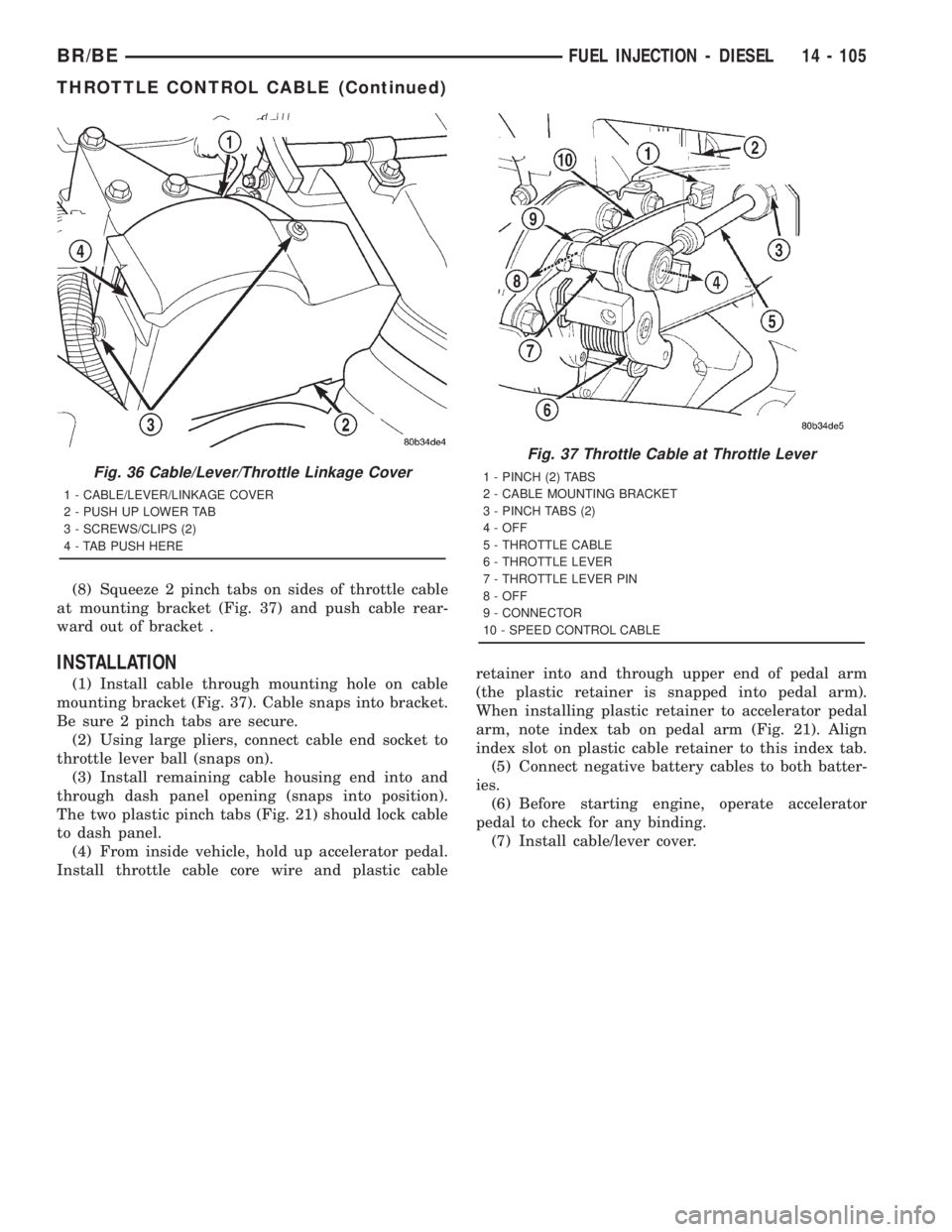
(8) Squeeze 2 pinch tabs on sides of throttle cable
at mounting bracket (Fig. 37) and push cable rear-
ward out of bracket .
INSTALLATION
(1) Install cable through mounting hole on cable
mounting bracket (Fig. 37). Cable snaps into bracket.
Be sure 2 pinch tabs are secure.
(2) Using large pliers, connect cable end socket to
throttle lever ball (snaps on).
(3) Install remaining cable housing end into and
through dash panel opening (snaps into position).
The two plastic pinch tabs (Fig. 21) should lock cable
to dash panel.
(4) From inside vehicle, hold up accelerator pedal.
Install throttle cable core wire and plastic cableretainer into and through upper end of pedal arm
(the plastic retainer is snapped into pedal arm).
When installing plastic retainer to accelerator pedal
arm, note index tab on pedal arm (Fig. 21). Align
index slot on plastic cable retainer to this index tab.
(5) Connect negative battery cables to both batter-
ies.
(6) Before starting engine, operate accelerator
pedal to check for any binding.
(7) Install cable/lever cover.
Fig. 36 Cable/Lever/Throttle Linkage Cover
1 - CABLE/LEVER/LINKAGE COVER
2 - PUSH UP LOWER TAB
3 - SCREWS/CLIPS (2)
4 - TAB PUSH HERE
Fig. 37 Throttle Cable at Throttle Lever
1 - PINCH (2) TABS
2 - CABLE MOUNTING BRACKET
3 - PINCH TABS (2)
4 - OFF
5 - THROTTLE CABLE
6 - THROTTLE LEVER
7 - THROTTLE LEVER PIN
8 - OFF
9 - CONNECTOR
10 - SPEED CONTROL CABLE
BR/BEFUEL INJECTION - DIESEL 14 - 105
THROTTLE CONTROL CABLE (Continued)
Page 1605 of 2889
ignition key cylinder operates properly look for the
following conditions.
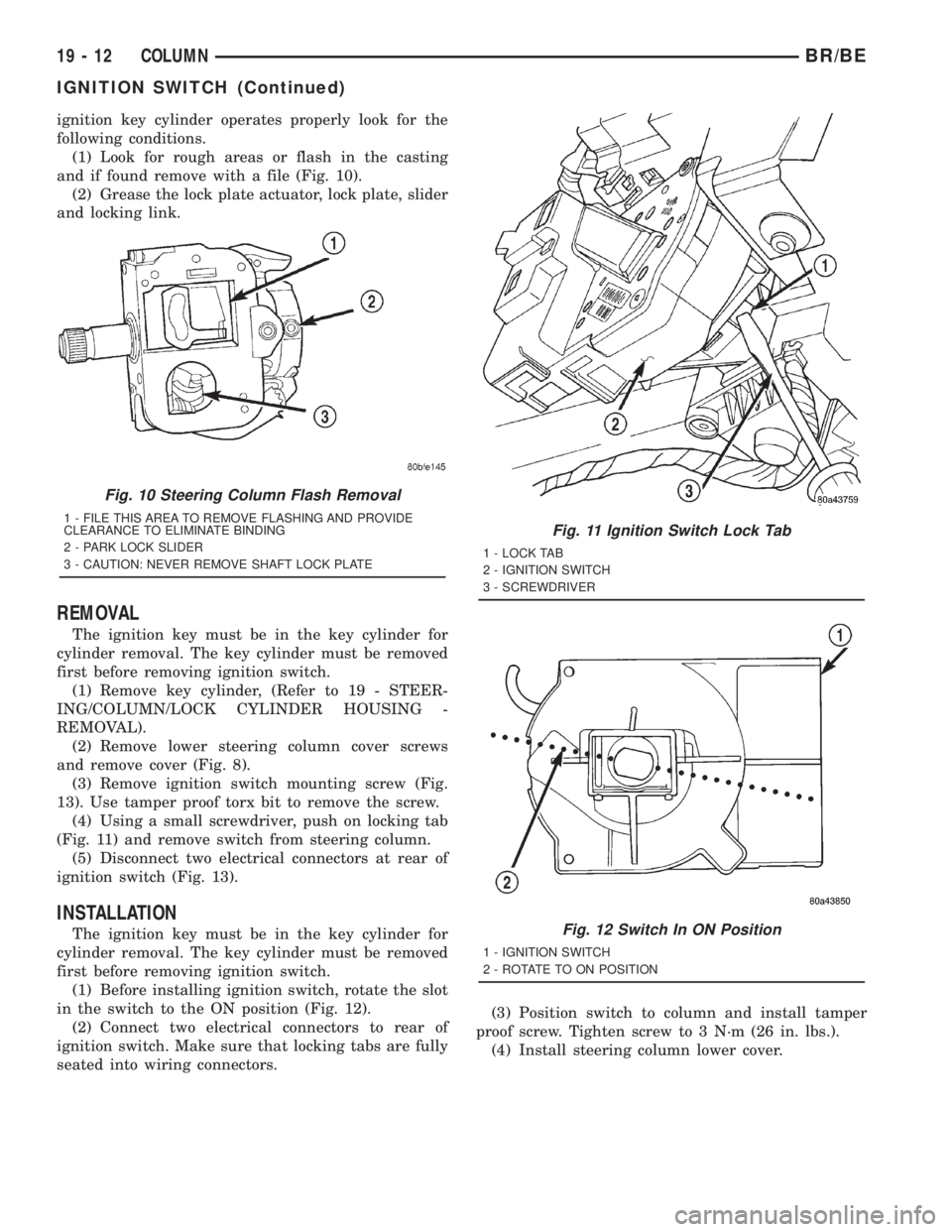
(1) Look for rough areas or flash in the casting
and if found remove with a file (Fig. 10).
(2) Grease the lock plate actuator, lock plate, slider
and locking link.
REMOVAL
The ignition key must be in the key cylinder for
cylinder removal. The key cylinder must be removed
first before removing ignition switch.
(1) Remove key cylinder, (Refer to 19 - STEER-
ING/COLUMN/LOCK CYLINDER HOUSING -
REMOVAL).
(2) Remove lower steering column cover screws
and remove cover (Fig. 8).
(3) Remove ignition switch mounting screw (Fig.
13). Use tamper proof torx bit to remove the screw.
(4) Using a small screwdriver, push on locking tab
(Fig. 11) and remove switch from steering column.
(5) Disconnect two electrical connectors at rear of
ignition switch (Fig. 13).
INSTALLATION
The ignition key must be in the key cylinder for
cylinder removal. The key cylinder must be removed
first before removing ignition switch.
(1) Before installing ignition switch, rotate the slot
in the switch to the ON position (Fig. 12).
(2) Connect two electrical connectors to rear of
ignition switch. Make sure that locking tabs are fully
seated into wiring connectors.(3) Position switch to column and install tamper
proof screw. Tighten screw to 3 N´m (26 in. lbs.).
(4) Install steering column lower cover.
Fig. 10 Steering Column Flash Removal
1 - FILE THIS AREA TO REMOVE FLASHING AND PROVIDE
CLEARANCE TO ELIMINATE BINDING
2 - PARK LOCK SLIDER
3 - CAUTION: NEVER REMOVE SHAFT LOCK PLATEFig. 11 Ignition Switch Lock Tab
1 - LOCK TAB
2 - IGNITION SWITCH
3 - SCREWDRIVER
Fig. 12 Switch In ON Position
1 - IGNITION SWITCH
2 - ROTATE TO ON POSITION
19 - 12 COLUMNBR/BE
IGNITION SWITCH (Continued)
Page 1616 of 2889
INSTALLATION
(1) Install pitman shaft bearing into housing with
a bearing driver and handle.
(2) Coat the oil seal and washer withspecial
greasesupplied with the new seal.
(3) Install the oil seal with a driver and handle.
(4) Install backup washer.
(5) Install the retainer ring with snap ring pliers.
(6) Coat the dust seal withspecial greasesup-
plied with the new seal.
(7) Install dust seal with a driver and handle.
(8) Install pitman shaft to side cover by screwing
shaft in until it fully seats to side cover.
(9) Install preload adjuster nut.Do not tighten
nut until after Over-Center Rotation Torque
adjustment has been made.
(10) Install gasket to side cover and bend tabs
around edges of side cover (Fig. 11).
(11) Install pitman shaft assembly and side cover
to housing.
(12) Install side cover bolts and tighten to 60 N´m
(44 ft. lbs.).
(13) Perform over-center rotation torque adjust-
ment, (Refer to 19 - STEERING/GEAR - ADJUST-
MENTS).
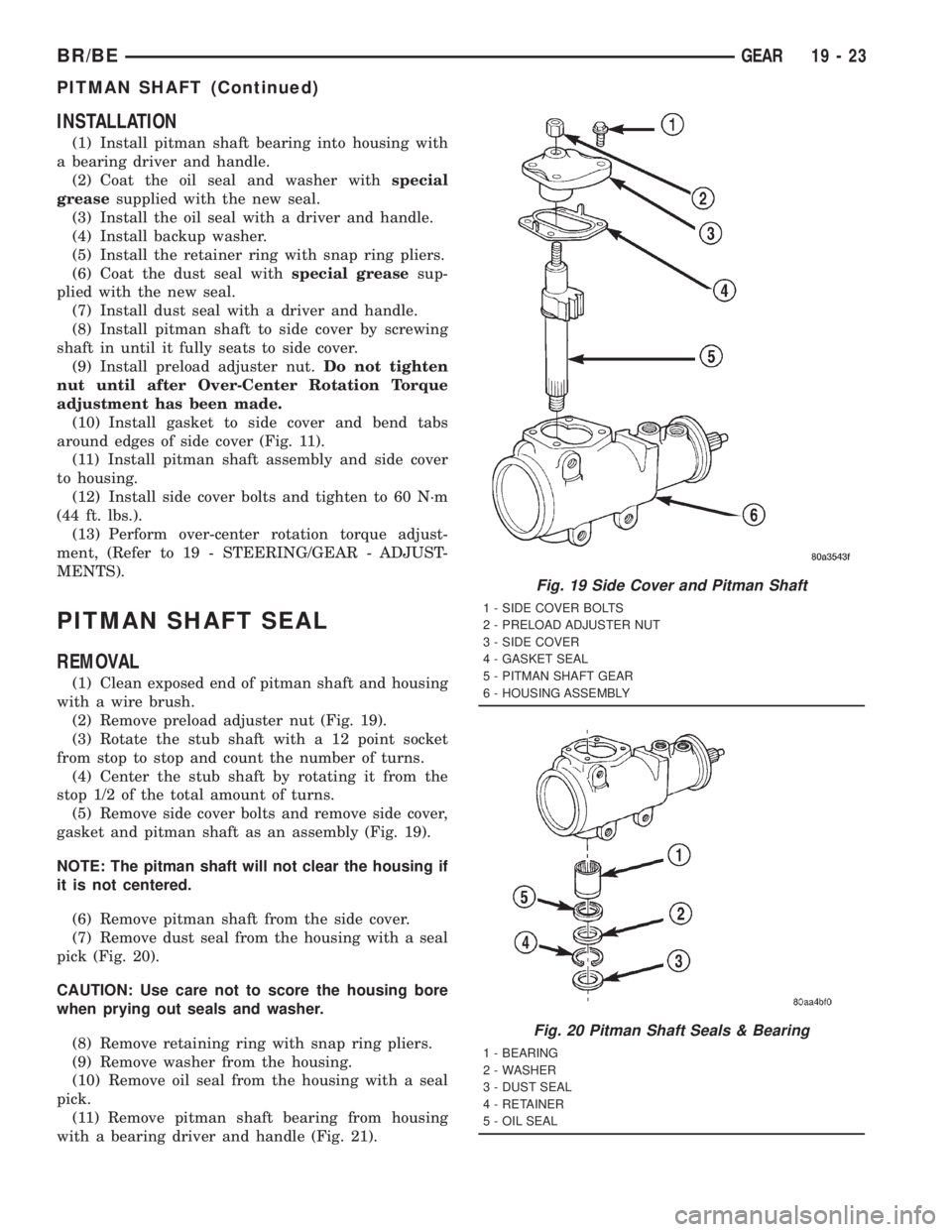
PITMAN SHAFT SEAL
REMOVAL
(1) Clean exposed end of pitman shaft and housing
with a wire brush.
(2) Remove preload adjuster nut (Fig. 19).
(3) Rotate the stub shaft with a 12 point socket
from stop to stop and count the number of turns.
(4) Center the stub shaft by rotating it from the
stop 1/2 of the total amount of turns.
(5) Remove side cover bolts and remove side cover,
gasket and pitman shaft as an assembly (Fig. 19).
NOTE: The pitman shaft will not clear the housing if
it is not centered.
(6) Remove pitman shaft from the side cover.
(7) Remove dust seal from the housing with a seal
pick (Fig. 20).
CAUTION: Use care not to score the housing bore
when prying out seals and washer.
(8) Remove retaining ring with snap ring pliers.
(9) Remove washer from the housing.
(10) Remove oil seal from the housing with a seal
pick.
(11) Remove pitman shaft bearing from housing
with a bearing driver and handle (Fig. 21).
Fig. 19 Side Cover and Pitman Shaft
1 - SIDE COVER BOLTS
2 - PRELOAD ADJUSTER NUT
3 - SIDE COVER
4 - GASKET SEAL
5 - PITMAN SHAFT GEAR
6 - HOUSING ASSEMBLY
Fig. 20 Pitman Shaft Seals & Bearing
1 - BEARING
2 - WASHER
3 - DUST SEAL
4 - RETAINER
5 - OIL SEAL
BR/BEGEAR 19 - 23
PITMAN SHAFT (Continued)
Page 1707 of 2889
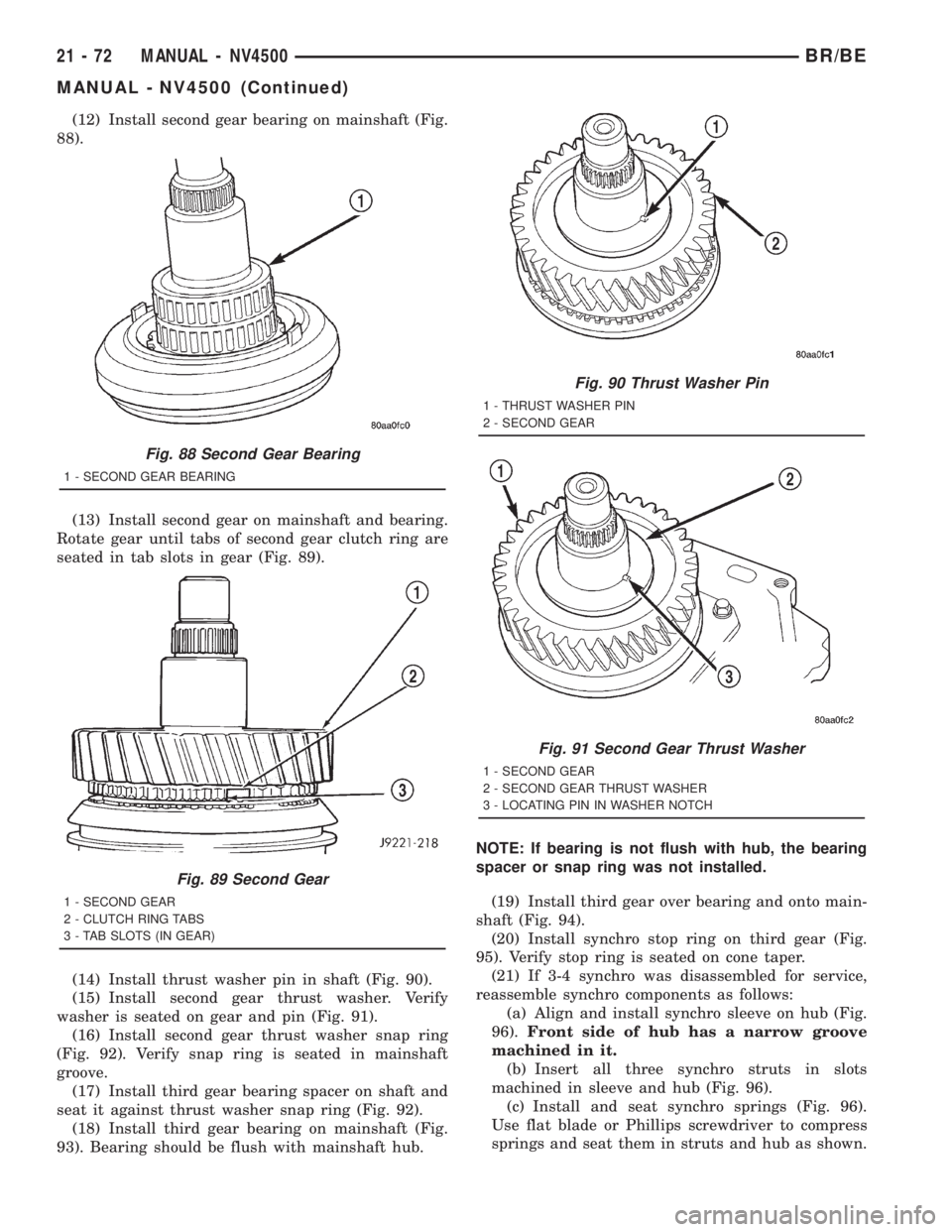
(12) Install second gear bearing on mainshaft (Fig.
88).
(13) Install second gear on mainshaft and bearing.
Rotate gear until tabs of second gear clutch ring are
seated in tab slots in gear (Fig. 89).
(14) Install thrust washer pin in shaft (Fig. 90).
(15) Install second gear thrust washer. Verify
washer is seated on gear and pin (Fig. 91).
(16) Install second gear thrust washer snap ring
(Fig. 92). Verify snap ring is seated in mainshaft
groove.
(17) Install third gear bearing spacer on shaft and
seat it against thrust washer snap ring (Fig. 92).
(18) Install third gear bearing on mainshaft (Fig.
93). Bearing should be flush with mainshaft hub.NOTE: If bearing is not flush with hub, the bearing
spacer or snap ring was not installed.
(19) Install third gear over bearing and onto main-
shaft (Fig. 94).
(20) Install synchro stop ring on third gear (Fig.
95). Verify stop ring is seated on cone taper.
(21) If 3-4 synchro was disassembled for service,
reassemble synchro components as follows:
(a) Align and install synchro sleeve on hub (Fig.
96).Front side of hub has a narrow groove
machined in it.
(b) Insert all three synchro struts in slots
machined in sleeve and hub (Fig. 96).
(c) Install and seat synchro springs (Fig. 96).
Use flat blade or Phillips screwdriver to compress
springs and seat them in struts and hub as shown.
Fig. 88 Second Gear Bearing
1 - SECOND GEAR BEARING
Fig. 89 Second Gear
1 - SECOND GEAR
2 - CLUTCH RING TABS
3 - TAB SLOTS (IN GEAR)
Fig. 90 Thrust Washer Pin
1 - THRUST WASHER PIN
2 - SECOND GEAR
Fig. 91 Second Gear Thrust Washer
1 - SECOND GEAR
2 - SECOND GEAR THRUST WASHER
3 - LOCATING PIN IN WASHER NOTCH
21 - 72 MANUAL - NV4500BR/BE
MANUAL - NV4500 (Continued)
Page 1709 of 2889
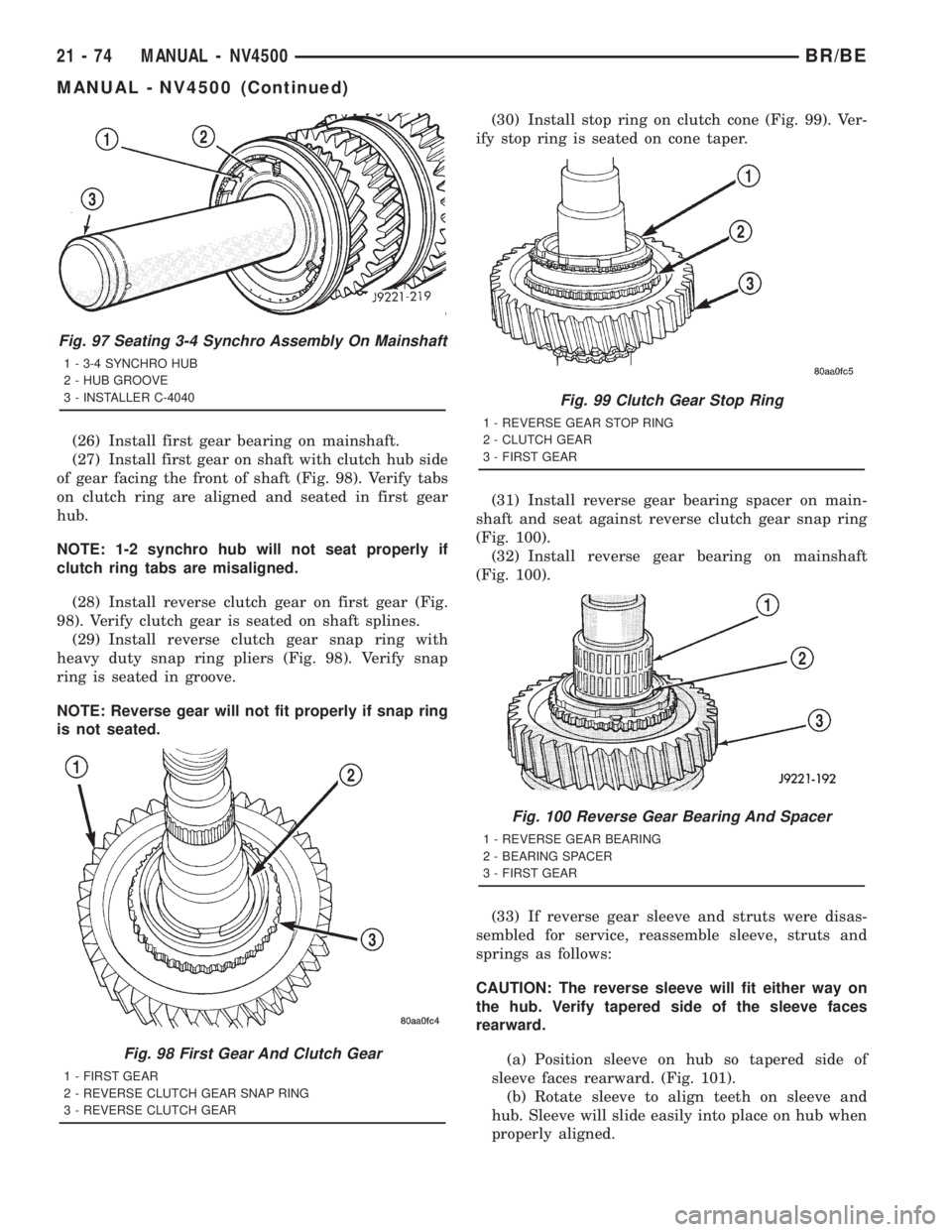
(26) Install first gear bearing on mainshaft.
(27) Install first gear on shaft with clutch hub side
of gear facing the front of shaft (Fig. 98). Verify tabs
on clutch ring are aligned and seated in first gear
hub.
NOTE: 1-2 synchro hub will not seat properly if
clutch ring tabs are misaligned.
(28) Install reverse clutch gear on first gear (Fig.
98). Verify clutch gear is seated on shaft splines.
(29) Install reverse clutch gear snap ring with
heavy duty snap ring pliers (Fig. 98). Verify snap
ring is seated in groove.
NOTE: Reverse gear will not fit properly if snap ring
is not seated.(30) Install stop ring on clutch cone (Fig. 99). Ver-
ify stop ring is seated on cone taper.
(31) Install reverse gear bearing spacer on main-
shaft and seat against reverse clutch gear snap ring
(Fig. 100).
(32) Install reverse gear bearing on mainshaft
(Fig. 100).
(33) If reverse gear sleeve and struts were disas-
sembled for service, reassemble sleeve, struts and
springs as follows:
CAUTION: The reverse sleeve will fit either way on
the hub. Verify tapered side of the sleeve faces
rearward.
(a) Position sleeve on hub so tapered side of
sleeve faces rearward. (Fig. 101).
(b) Rotate sleeve to align teeth on sleeve and
hub. Sleeve will slide easily into place on hub when
properly aligned.
Fig. 97 Seating 3-4 Synchro Assembly On Mainshaft
1 - 3-4 SYNCHRO HUB
2 - HUB GROOVE
3 - INSTALLER C-4040
Fig. 98 First Gear And Clutch Gear
1 - FIRST GEAR
2 - REVERSE CLUTCH GEAR SNAP RING
3 - REVERSE CLUTCH GEAR
Fig. 99 Clutch Gear Stop Ring
1 - REVERSE GEAR STOP RING
2 - CLUTCH GEAR
3 - FIRST GEAR
Fig. 100 Reverse Gear Bearing And Spacer
1 - REVERSE GEAR BEARING
2 - BEARING SPACER
3 - FIRST GEAR
21 - 74 MANUAL - NV4500BR/BE
MANUAL - NV4500 (Continued)
Page 1724 of 2889
EXPANSION PLUG
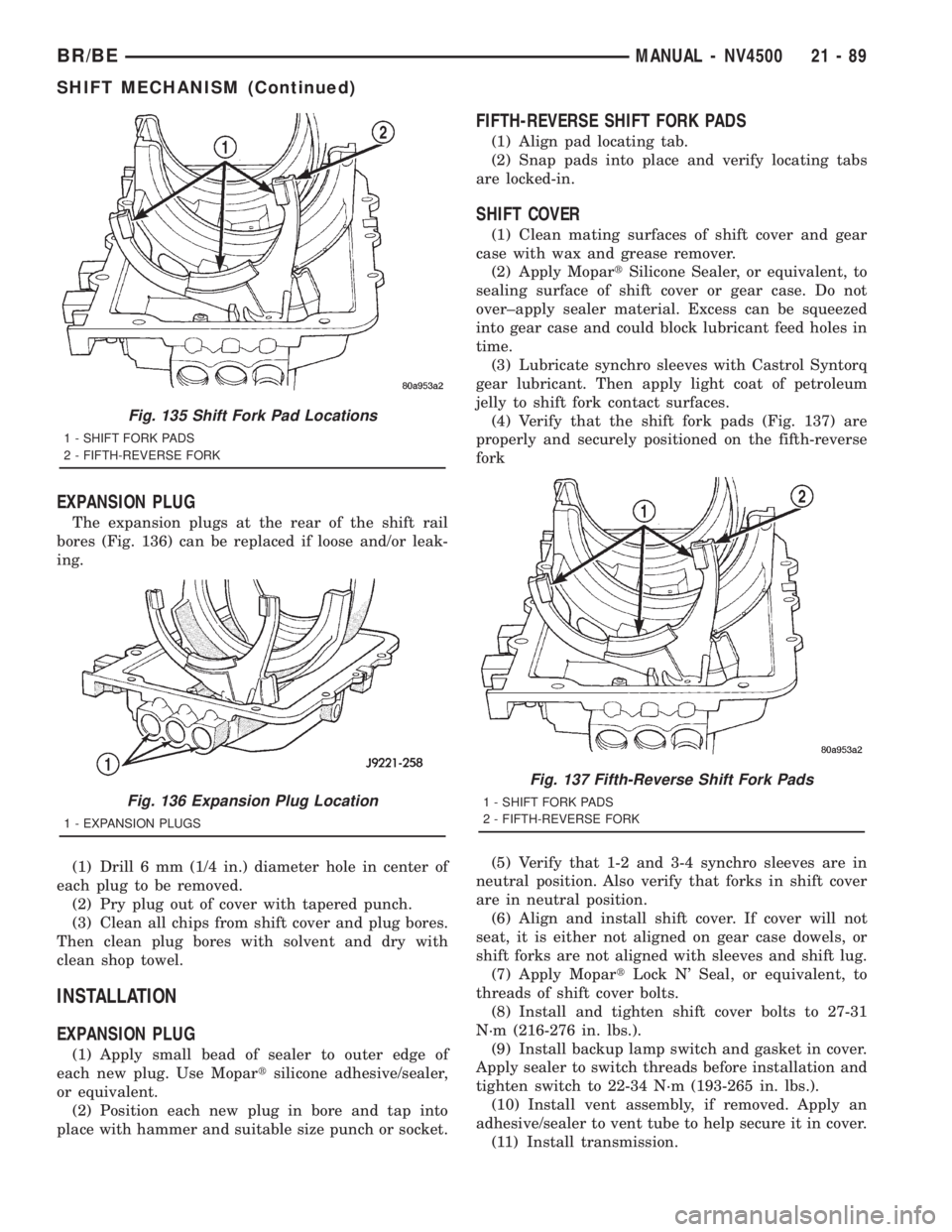
The expansion plugs at the rear of the shift rail
bores (Fig. 136) can be replaced if loose and/or leak-
ing.
(1) Drill 6 mm (1/4 in.) diameter hole in center of
each plug to be removed.
(2) Pry plug out of cover with tapered punch.
(3) Clean all chips from shift cover and plug bores.
Then clean plug bores with solvent and dry with
clean shop towel.
INSTALLATION
EXPANSION PLUG
(1) Apply small bead of sealer to outer edge of
each new plug. Use Mopartsilicone adhesive/sealer,
or equivalent.
(2) Position each new plug in bore and tap into
place with hammer and suitable size punch or socket.
FIFTH-REVERSE SHIFT FORK PADS
(1) Align pad locating tab.
(2) Snap pads into place and verify locating tabs
are locked-in.
SHIFT COVER
(1) Clean mating surfaces of shift cover and gear
case with wax and grease remover.
(2) Apply MopartSilicone Sealer, or equivalent, to
sealing surface of shift cover or gear case. Do not
over±apply sealer material. Excess can be squeezed
into gear case and could block lubricant feed holes in
time.
(3) Lubricate synchro sleeves with Castrol Syntorq
gear lubricant. Then apply light coat of petroleum
jelly to shift fork contact surfaces.
(4) Verify that the shift fork pads (Fig. 137) are
properly and securely positioned on the fifth-reverse
fork
(5) Verify that 1-2 and 3-4 synchro sleeves are in
neutral position. Also verify that forks in shift cover
are in neutral position.
(6) Align and install shift cover. If cover will not
seat, it is either not aligned on gear case dowels, or
shift forks are not aligned with sleeves and shift lug.
(7) Apply MopartLock N' Seal, or equivalent, to
threads of shift cover bolts.
(8) Install and tighten shift cover bolts to 27-31
N´m (216-276 in. lbs.).
(9) Install backup lamp switch and gasket in cover.
Apply sealer to switch threads before installation and
tighten switch to 22-34 N´m (193-265 in. lbs.).
(10) Install vent assembly, if removed. Apply an
adhesive/sealer to vent tube to help secure it in cover.
(11) Install transmission.
Fig. 135 Shift Fork Pad Locations
1 - SHIFT FORK PADS
2 - FIFTH-REVERSE FORK
Fig. 136 Expansion Plug Location
1 - EXPANSION PLUGS
Fig. 137 Fifth-Reverse Shift Fork Pads
1 - SHIFT FORK PADS
2 - FIFTH-REVERSE FORK
BR/BEMANUAL - NV4500 21 - 89
SHIFT MECHANISM (Continued)
Page 1829 of 2889
(7) Position new gasket on oil pan and install pan
on transmission. Tighten pan bolts to 17 N´m (13 ft.
lbs.) torque.
(8) Lower vehicle and refill transmission with
MopartATF +4, type 9602, fluid.
ELECTRONIC GOVERNOR
DESCRIPTION
Governor pressure is controlled electronically. Com-
ponents used for governor pressure control include:
²Governor body
²Valve body transfer plate
²Governor pressure solenoid valve
²Governor pressure sensor
²Fluid temperature thermistor
²Throttle position sensor (TPS)
²Transmission speed sensor
²Powertrain control module (PCM)
GOVERNOR PRESSURE SOLENOID VALVE
The solenoid valve is a duty-cycle solenoid which
regulates the governor pressure needed for upshifts
and downshifts. It is an electro-hydraulic device
located in the governor body on the valve body trans-
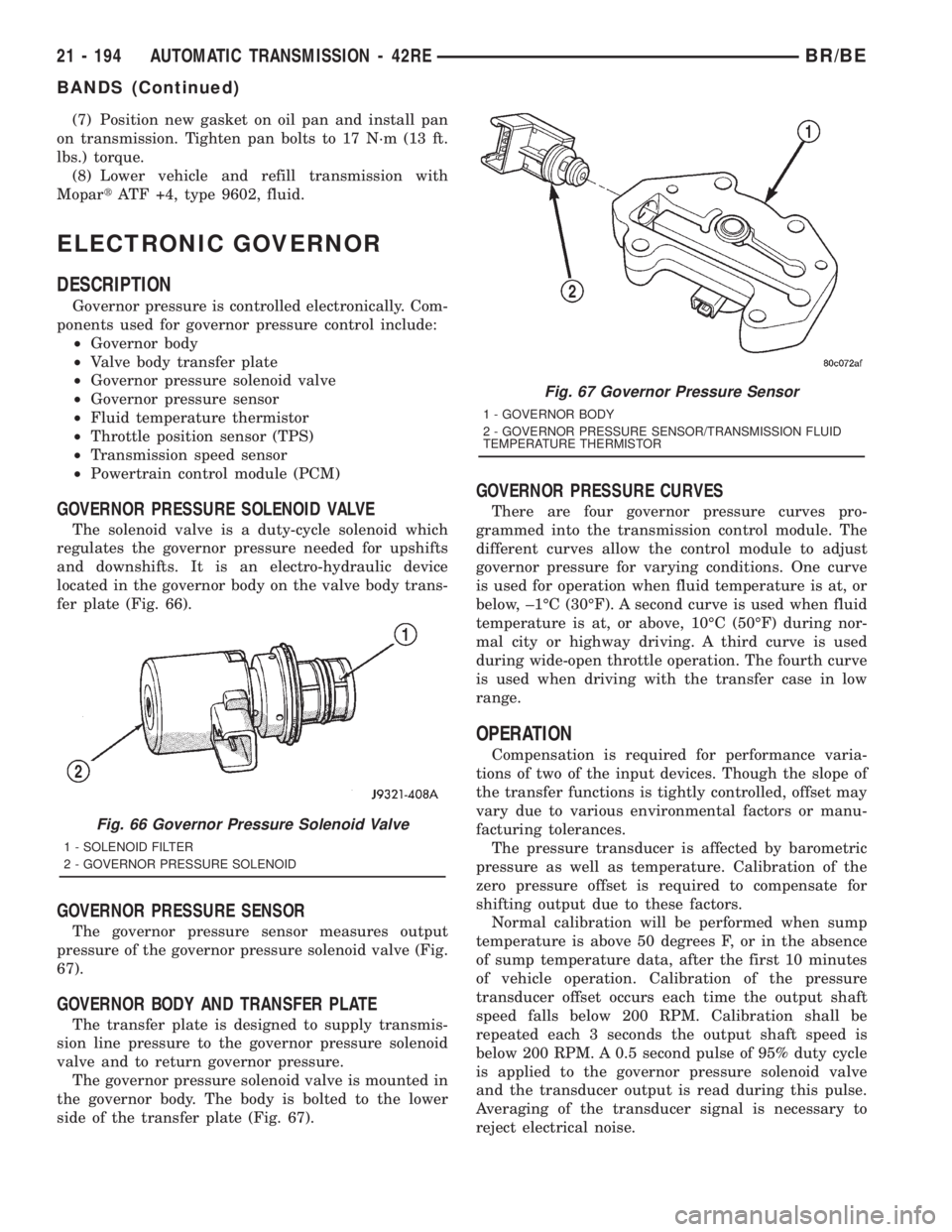
fer plate (Fig. 66).
GOVERNOR PRESSURE SENSOR
The governor pressure sensor measures output
pressure of the governor pressure solenoid valve (Fig.
67).
GOVERNOR BODY AND TRANSFER PLATE
The transfer plate is designed to supply transmis-
sion line pressure to the governor pressure solenoid
valve and to return governor pressure.
The governor pressure solenoid valve is mounted in
the governor body. The body is bolted to the lower
side of the transfer plate (Fig. 67).
GOVERNOR PRESSURE CURVES
There are four governor pressure curves pro-
grammed into the transmission control module. The
different curves allow the control module to adjust
governor pressure for varying conditions. One curve
is used for operation when fluid temperature is at, or
below, ±1ÉC (30ÉF). A second curve is used when fluid
temperature is at, or above, 10ÉC (50ÉF) during nor-
mal city or highway driving. A third curve is used
during wide-open throttle operation. The fourth curve
is used when driving with the transfer case in low
range.
OPERATION
Compensation is required for performance varia-
tions of two of the input devices. Though the slope of
the transfer functions is tightly controlled, offset may
vary due to various environmental factors or manu-
facturing tolerances.
The pressure transducer is affected by barometric
pressure as well as temperature. Calibration of the
zero pressure offset is required to compensate for
shifting output due to these factors.
Normal calibration will be performed when sump
temperature is above 50 degrees F, or in the absence
of sump temperature data, after the first 10 minutes
of vehicle operation. Calibration of the pressure
transducer offset occurs each time the output shaft
speed falls below 200 RPM. Calibration shall be
repeated each 3 seconds the output shaft speed is
below 200 RPM. A 0.5 second pulse of 95% duty cycle
is applied to the governor pressure solenoid valve
and the transducer output is read during this pulse.
Averaging of the transducer signal is necessary to
reject electrical noise.
Fig. 66 Governor Pressure Solenoid Valve
1 - SOLENOID FILTER
2 - GOVERNOR PRESSURE SOLENOID
Fig. 67 Governor Pressure Sensor
1 - GOVERNOR BODY
2 - GOVERNOR PRESSURE SENSOR/TRANSMISSION FLUID
TEMPERATURE THERMISTOR
21 - 194 AUTOMATIC TRANSMISSION - 42REBR/BE
BANDS (Continued)
Page 1876 of 2889
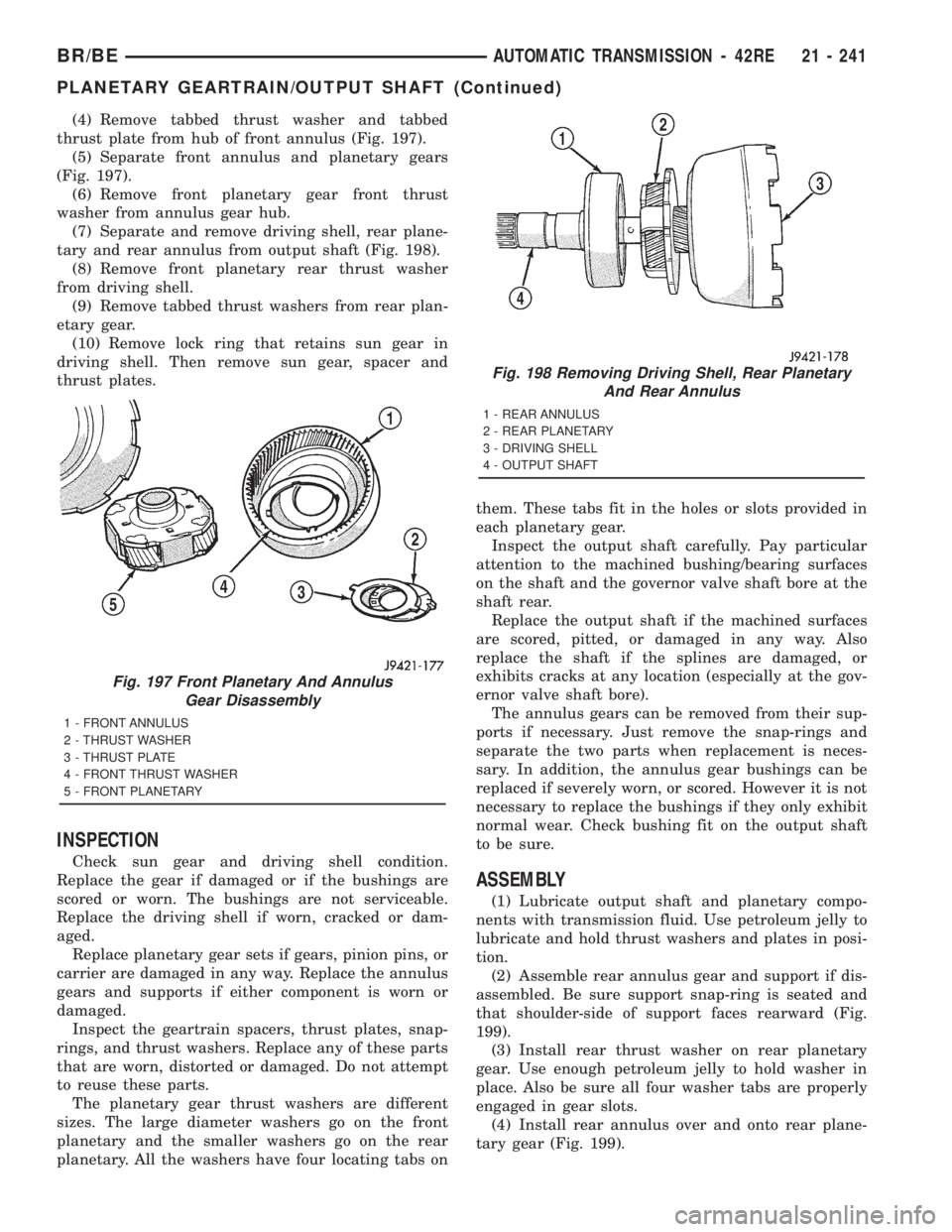
(4) Remove tabbed thrust washer and tabbed
thrust plate from hub of front annulus (Fig. 197).
(5) Separate front annulus and planetary gears
(Fig. 197).
(6) Remove front planetary gear front thrust
washer from annulus gear hub.
(7) Separate and remove driving shell, rear plane-
tary and rear annulus from output shaft (Fig. 198).
(8) Remove front planetary rear thrust washer
from driving shell.
(9) Remove tabbed thrust washers from rear plan-
etary gear.
(10) Remove lock ring that retains sun gear in
driving shell. Then remove sun gear, spacer and
thrust plates.
INSPECTION
Check sun gear and driving shell condition.
Replace the gear if damaged or if the bushings are
scored or worn. The bushings are not serviceable.
Replace the driving shell if worn, cracked or dam-
aged.
Replace planetary gear sets if gears, pinion pins, or
carrier are damaged in any way. Replace the annulus
gears and supports if either component is worn or
damaged.
Inspect the geartrain spacers, thrust plates, snap-
rings, and thrust washers. Replace any of these parts
that are worn, distorted or damaged. Do not attempt
to reuse these parts.
The planetary gear thrust washers are different
sizes. The large diameter washers go on the front
planetary and the smaller washers go on the rear
planetary. All the washers have four locating tabs onthem. These tabs fit in the holes or slots provided in
each planetary gear.
Inspect the output shaft carefully. Pay particular
attention to the machined bushing/bearing surfaces
on the shaft and the governor valve shaft bore at the
shaft rear.
Replace the output shaft if the machined surfaces
are scored, pitted, or damaged in any way. Also
replace the shaft if the splines are damaged, or
exhibits cracks at any location (especially at the gov-
ernor valve shaft bore).
The annulus gears can be removed from their sup-
ports if necessary. Just remove the snap-rings and
separate the two parts when replacement is neces-
sary. In addition, the annulus gear bushings can be
replaced if severely worn, or scored. However it is not
necessary to replace the bushings if they only exhibit
normal wear. Check bushing fit on the output shaft
to be sure.
ASSEMBLY
(1) Lubricate output shaft and planetary compo-
nents with transmission fluid. Use petroleum jelly to
lubricate and hold thrust washers and plates in posi-
tion.
(2) Assemble rear annulus gear and support if dis-
assembled. Be sure support snap-ring is seated and
that shoulder-side of support faces rearward (Fig.
199).
(3) Install rear thrust washer on rear planetary
gear. Use enough petroleum jelly to hold washer in
place. Also be sure all four washer tabs are properly
engaged in gear slots.
(4) Install rear annulus over and onto rear plane-
tary gear (Fig. 199).
Fig. 197 Front Planetary And Annulus
Gear Disassembly
1 - FRONT ANNULUS
2 - THRUST WASHER
3 - THRUST PLATE
4 - FRONT THRUST WASHER
5 - FRONT PLANETARY
Fig. 198 Removing Driving Shell, Rear Planetary
And Rear Annulus
1 - REAR ANNULUS
2 - REAR PLANETARY
3 - DRIVING SHELL
4 - OUTPUT SHAFT
BR/BEAUTOMATIC TRANSMISSION - 42RE 21 - 241
PLANETARY GEARTRAIN/OUTPUT SHAFT (Continued)