ABS DODGE RAM 2003 Service Manual PDF
[x] Cancel search | Manufacturer: DODGE, Model Year: 2003, Model line: RAM, Model: DODGE RAM 2003Pages: 2895, PDF Size: 83.15 MB
Page 502 of 2895
ajar indicator, high beam indicator, and turn signal
indicators operate based upon hard wired inputs to
the EMIC. The brake indicator is controlled by PCI
data bus messages from the Controller Antilock
Brake (CAB) as well as by hard wired park brake
switch inputs to the EMIC. The seatbelt indicator is
controlled by the EMIC programming, PCI data bus
messages from the Airbag Control Module (ACM),
and a hard wired seat belt switch input to the EMIC.
The Malfunction Indicator Lamp (MIL) is normally
controlled by PCI data bus messages from the Pow-
ertrain Control Module (PCM); however, if the EMIC
loses PCI data bus communication, the EMIC cir-
cuitry will automatically turn the MIL on until PCI
data bus communication is restored. The EMIC uses
PCI data bus messages from the Front Control Mod-
ule (FCM), the PCM, the diesel engine only Engine
Control Module (ECM), the ACM, the CAB, and the
Sentry Key Immobilizer Module (SKIM) to control all
of the remaining indicators.
The various EMIC indicators are controlled by dif-
ferent strategies; some receive fused ignition switch
output from the EMIC circuitry and have a switched
ground, while others are grounded through the EMIC
circuitry and have a switched battery feed. However,
all indicators are completely controlled by the EMIC
microprocessor based upon various hard wired and
electronic message inputs. All indicators are illumi-
nated at a fixed intensity, which is not affected by
the selected illumination intensity of the EMIC gen-
eral illumination lamps.
In addition, certain indicators in this instrument
cluster are automatically configured or self-config-
ured. This feature allows the configurable indicators
to be enabled by the EMIC circuitry for compatibility
with certain optional equipment. The EMIC defaults
for the ABS indicator and airbag indicator are
enabled, and these configuration settings must be
programmatically disabled in the EMIC using a
DRBIIItscan tool for vehicles that do not have this
equipment. The automatically configured or self-con-
figured indicators remain latent in each EMIC at all
times and will be active only when the EMIC
receives the appropriate PCI message inputs for that
optional system or equipment.
The hard wired indicator inputs may be diagnosed
using conventional diagnostic methods. However, the
EMIC circuitry and PCI bus message controlled indi-
cators are diagnosed using the EMIC self-diagnostic
actuator test. (Refer to 8 - ELECTRICAL/INSTRU-
MENT CLUSTER - DIAGNOSIS AND TESTING).
Proper testing of the PCI data bus and the electronic
message inputs to the EMIC that control an indicator
requires the use of a DRBIIItscan tool. Refer to the
appropriate diagnostic information. Specific details ofthe operation for each indicator may be found else-
where in this service information.
CLUSTER ILLUMINATION
The EMIC has several illumination lamps that are
illuminated when the exterior lighting is turned on
with the headlamp switch. The illumination intensity
of these lamps is adjusted when the interior lighting
thumbwheel on the headlamp switch is rotated (down
to dim, up to brighten) to one of six available minor
detent positions. The EMIC monitors a resistor mul-
tiplexed input from the headlamp switch on a dim-
mer input circuit. In response to that input, the
EMIC electronic circuitry converts a 12-volt input it
receives from a fuse in the Integrated Power Module
(IPM) on a hard wired panel lamps dimmer switch
signal circuit into a 12-volt Pulse Width Modulated
(PWM) output. The EMIC uses this PWM output to
power the cluster illumination lamps and the VFD
units on the EMIC circuit board, then provides a syn-
chronized PWM output on the various hard wired
fused panel lamps dimmer switch signal circuits to
control and synchronize the illumination intensity of
other incandescent illumination lamps in the vehicle.
The cluster illumination lamps are grounded at all
times.
The EMIC also sends electronic dimming level
messages over the PCI data bus to other electronic
modules in the vehicle to control and synchronize the
illumination intensity of their VFD units to that of
the EMIC VFD units. In addition, the thumbwheel
on the headlamp switch has a Parade Mode position
to provide a parade mode. The EMIC monitors the
request for this mode from the headlamp switch,
then sends an electronic dimming level message over
the PCI data bus to illuminate all VFD units in the
vehicle at full (daytime) intensity for easier visibility
when driving in daylight with the exterior lighting
turned on.
The hard wired headlamp switch and EMIC panel
lamps dimmer inputs and outputs may be diagnosed
using conventional diagnostic methods. However,
proper testing of the PWM output of the EMIC and
the electronic dimming level messages sent by the
EMIC over the PCI data bus requires the use of a
DRBIIItscan tool. Refer to the appropriate diagnos-
tic information.
INPUT AND OUTPUT CIRCUITS
HARD WIRED INPUTS
The hard wired inputs to the EMIC include the fol-
lowing:
²Brake Lamp Switch Output
²Driver Cylinder Lock Switch Sense
²Driver Door Ajar Switch Sense
DRINSTRUMENT CLUSTER 8J - 9
INSTRUMENT CLUSTER (Continued)
Page 505 of 2895
ACTUATOR TEST
WARNING: ON VEHICLES EQUIPPED WITH AIR-
BAGS, DISABLE THE SUPPLEMENTAL RESTRAINT
SYSTEM BEFORE ATTEMPTING ANY STEERING
WHEEL, STEERING COLUMN, DRIVER AIRBAG,
PASSENGER AIRBAG, SEAT BELT TENSIONER,
SIDE CURTAIN AIRBAG, OR INSTRUMENT PANEL
COMPONENT DIAGNOSIS OR SERVICE. DISCON-
NECT AND ISOLATE THE BATTERY NEGATIVE
(GROUND) CABLE, THEN WAIT TWO MINUTES FOR
THE SYSTEM CAPACITOR TO DISCHARGE BEFORE
PERFORMING FURTHER DIAGNOSIS OR SERVICE.
THIS IS THE ONLY SURE WAY TO DISABLE THE
SUPPLEMENTAL RESTRAINT SYSTEM. FAILURE TO
TAKE THE PROPER PRECAUTIONS COULD
RESULT IN ACCIDENTAL AIRBAG DEPLOYMENT
AND POSSIBLE PERSONAL INJURY.
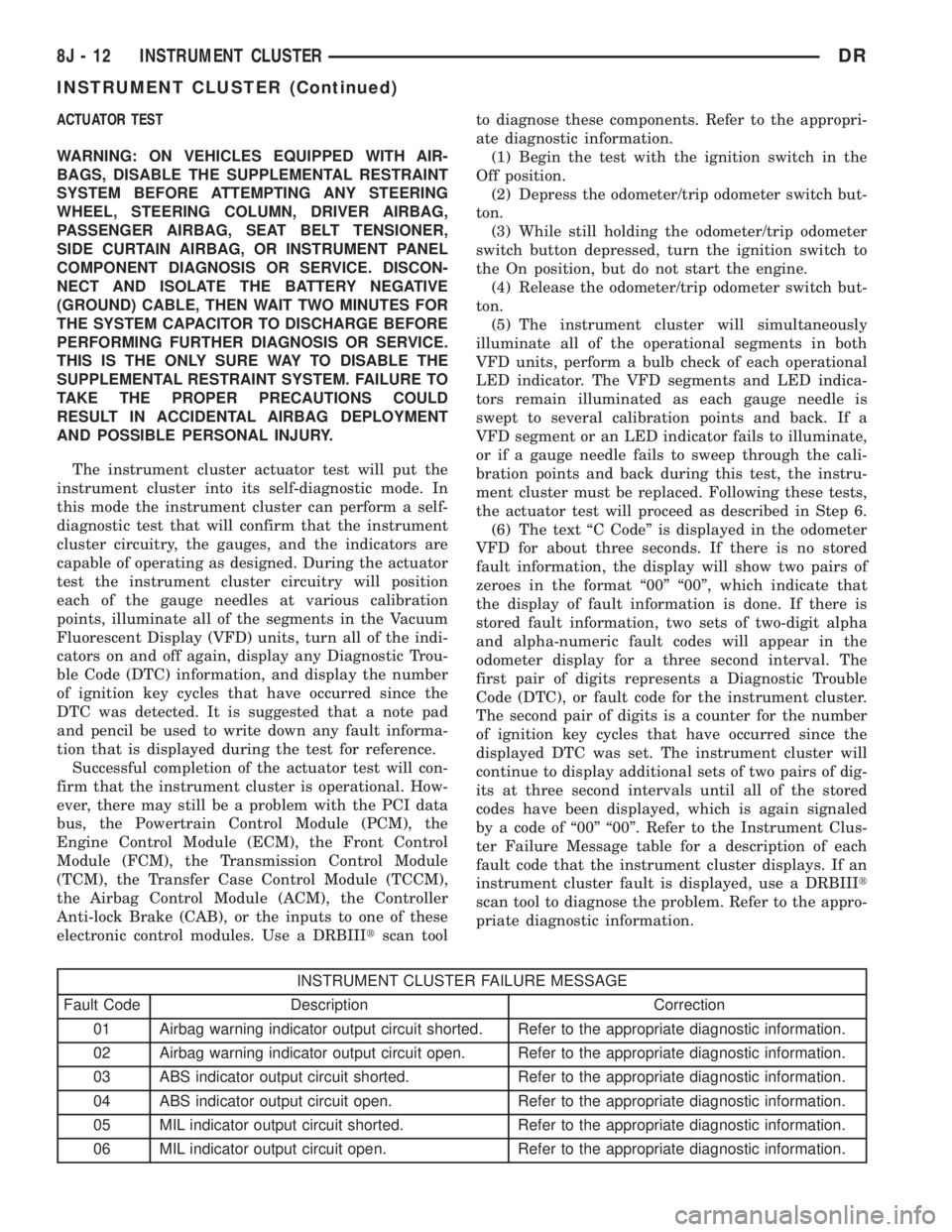
The instrument cluster actuator test will put the
instrument cluster into its self-diagnostic mode. In
this mode the instrument cluster can perform a self-
diagnostic test that will confirm that the instrument
cluster circuitry, the gauges, and the indicators are
capable of operating as designed. During the actuator
test the instrument cluster circuitry will position
each of the gauge needles at various calibration
points, illuminate all of the segments in the Vacuum
Fluorescent Display (VFD) units, turn all of the indi-
cators on and off again, display any Diagnostic Trou-
ble Code (DTC) information, and display the number
of ignition key cycles that have occurred since the
DTC was detected. It is suggested that a note pad
and pencil be used to write down any fault informa-
tion that is displayed during the test for reference.
Successful completion of the actuator test will con-
firm that the instrument cluster is operational. How-
ever, there may still be a problem with the PCI data
bus, the Powertrain Control Module (PCM), the
Engine Control Module (ECM), the Front Control
Module (FCM), the Transmission Control Module
(TCM), the Transfer Case Control Module (TCCM),
the Airbag Control Module (ACM), the Controller
Anti-lock Brake (CAB), or the inputs to one of these
electronic control modules. Use a DRBIIItscan toolto diagnose these components. Refer to the appropri-
ate diagnostic information.
(1) Begin the test with the ignition switch in the
Off position.
(2) Depress the odometer/trip odometer switch but-
ton.
(3) While still holding the odometer/trip odometer
switch button depressed, turn the ignition switch to
the On position, but do not start the engine.
(4) Release the odometer/trip odometer switch but-
ton.
(5) The instrument cluster will simultaneously
illuminate all of the operational segments in both
VFD units, perform a bulb check of each operational
LED indicator. The VFD segments and LED indica-
tors remain illuminated as each gauge needle is
swept to several calibration points and back. If a
VFD segment or an LED indicator fails to illuminate,
or if a gauge needle fails to sweep through the cali-
bration points and back during this test, the instru-
ment cluster must be replaced. Following these tests,
the actuator test will proceed as described in Step 6.
(6) The text ªC Codeº is displayed in the odometer
VFD for about three seconds. If there is no stored
fault information, the display will show two pairs of
zeroes in the format ª00º ª00º, which indicate that
the display of fault information is done. If there is
stored fault information, two sets of two-digit alpha
and alpha-numeric fault codes will appear in the
odometer display for a three second interval. The
first pair of digits represents a Diagnostic Trouble
Code (DTC), or fault code for the instrument cluster.
The second pair of digits is a counter for the number
of ignition key cycles that have occurred since the
displayed DTC was set. The instrument cluster will
continue to display additional sets of two pairs of dig-
its at three second intervals until all of the stored
codes have been displayed, which is again signaled
by a code of ª00º ª00º. Refer to the Instrument Clus-
ter Failure Message table for a description of each
fault code that the instrument cluster displays. If an
instrument cluster fault is displayed, use a DRBIIIt
scan tool to diagnose the problem. Refer to the appro-
priate diagnostic information.
INSTRUMENT CLUSTER FAILURE MESSAGE
Fault Code Description Correction
01 Airbag warning indicator output circuit shorted. Refer to the appropriate diagnostic information.
02 Airbag warning indicator output circuit open. Refer to the appropriate diagnostic information.
03 ABS indicator output circuit shorted. Refer to the appropriate diagnostic information.
04 ABS indicator output circuit open. Refer to the appropriate diagnostic information.
05 MIL indicator output circuit shorted. Refer to the appropriate diagnostic information.
06 MIL indicator output circuit open. Refer to the appropriate diagnostic information.
8J - 12 INSTRUMENT CLUSTERDR
INSTRUMENT CLUSTER (Continued)
Page 506 of 2895
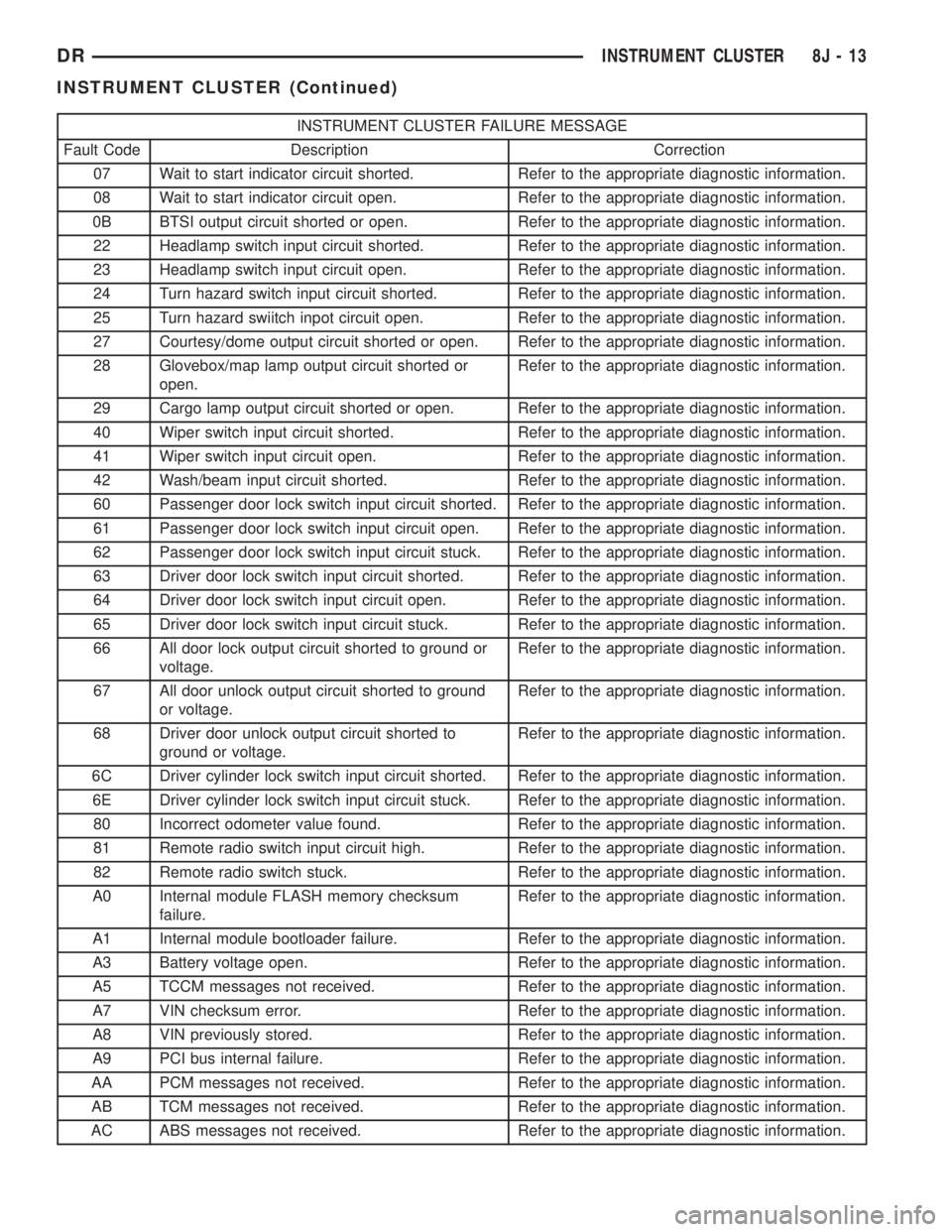
INSTRUMENT CLUSTER FAILURE MESSAGE
Fault Code Description Correction
07 Wait to start indicator circuit shorted. Refer to the appropriate diagnostic information.
08 Wait to start indicator circuit open. Refer to the appropriate diagnostic information.
0B BTSI output circuit shorted or open. Refer to the appropriate diagnostic information.
22 Headlamp switch input circuit shorted. Refer to the appropriate diagnostic information.
23 Headlamp switch input circuit open. Refer to the appropriate diagnostic information.
24 Turn hazard switch input circuit shorted. Refer to the appropriate diagnostic information.
25 Turn hazard swiitch inpot circuit open. Refer to the appropriate diagnostic information.
27 Courtesy/dome output circuit shorted or open. Refer to the appropriate diagnostic information.
28 Glovebox/map lamp output circuit shorted or
open.Refer to the appropriate diagnostic information.
29 Cargo lamp output circuit shorted or open. Refer to the appropriate diagnostic information.
40 Wiper switch input circuit shorted. Refer to the appropriate diagnostic information.
41 Wiper switch input circuit open. Refer to the appropriate diagnostic information.
42 Wash/beam input circuit shorted. Refer to the appropriate diagnostic information.
60 Passenger door lock switch input circuit shorted. Refer to the appropriate diagnostic information.
61 Passenger door lock switch input circuit open. Refer to the appropriate diagnostic information.
62 Passenger door lock switch input circuit stuck. Refer to the appropriate diagnostic information.
63 Driver door lock switch input circuit shorted. Refer to the appropriate diagnostic information.
64 Driver door lock switch input circuit open. Refer to the appropriate diagnostic information.
65 Driver door lock switch input circuit stuck. Refer to the appropriate diagnostic information.
66 All door lock output circuit shorted to ground or
voltage.Refer to the appropriate diagnostic information.
67 All door unlock output circuit shorted to ground
or voltage.Refer to the appropriate diagnostic information.
68 Driver door unlock output circuit shorted to
ground or voltage.Refer to the appropriate diagnostic information.
6C Driver cylinder lock switch input circuit shorted. Refer to the appropriate diagnostic information.
6E Driver cylinder lock switch input circuit stuck. Refer to the appropriate diagnostic information.
80 Incorrect odometer value found. Refer to the appropriate diagnostic information.
81 Remote radio switch input circuit high. Refer to the appropriate diagnostic information.
82 Remote radio switch stuck. Refer to the appropriate diagnostic information.
A0 Internal module FLASH memory checksum
failure.Refer to the appropriate diagnostic information.
A1 Internal module bootloader failure. Refer to the appropriate diagnostic information.
A3 Battery voltage open. Refer to the appropriate diagnostic information.
A5 TCCM messages not received. Refer to the appropriate diagnostic information.
A7 VIN checksum error. Refer to the appropriate diagnostic information.
A8 VIN previously stored. Refer to the appropriate diagnostic information.
A9 PCI bus internal failure. Refer to the appropriate diagnostic information.
AA PCM messages not received. Refer to the appropriate diagnostic information.
AB TCM messages not received. Refer to the appropriate diagnostic information.
AC ABS messages not received. Refer to the appropriate diagnostic information.
DRINSTRUMENT CLUSTER 8J - 13
INSTRUMENT CLUSTER (Continued)
Page 510 of 2895
NOTE: Certain indicators in this instrument cluster
are automatically configured. This feature allows
those indicators to be activated or deactivated for
compatibility with certain optional equipment. If the
problem being diagnosed involves improper illumi-
nation of the cruise indicator, the electronic throttle
control indicator, the overdrive-off indicator, the
service four-wheel drive indicator, the transmission
overtemp indicator, the upshift indicator, the secu-
rity indicator or the gear selector indicator, discon-
nect and isolate the battery negative cable. After
about five minutes, reconnect the battery negative
cable and turn the ignition switch to the On posi-
tion. The instrument cluster should automatically
relearn the equipment in the vehicle and properly
configure the configurable indicators accordingly.
ABS INDICATOR
DESCRIPTION
An Antilock Brake System (ABS) indicator is stan-
dard equipment on all instrument clusters. However,
the instrument cluster can be programmed to disable
this indicator on vehicles that are not equipped with
the ABS or Rear Wheel Anti-Lock (RWAL) brake sys-
tems, which are not available in some markets. On
vehicles equipped with a gasoline engine, the ABS
indicator is located near the lower edge of the instru-
ment cluster, between the tachometer and the speed-
ometer. On vehicles equipped with a diesel engine,
the ABS indicator is located on the right side of the
instrument cluster, to the right of the engine temper-
ature gauge. The ABS indicator consists of a stencil-
like cutout of the International Control and Display
Symbol icon for ªFailure of Anti-lock Braking Sys-
temº in the opaque layer of the instrument cluster
overlay. The dark outer layer of the overlay prevents
the indicator from being clearly visible when it is not
illuminated. An amber Light Emitting Diode (LED)
behind the cutout in the opaque layer of the overlay
causes the icon to appear in amber through the
translucent outer layer of the overlay when the indi-
cator is illuminated from behind by the LED, which
is soldered onto the instrument cluster electronic cir-
cuit board. The ABS indicator is serviced as a unit
with the instrument cluster.
OPERATION
The ABS indicator gives an indication to the vehi-
cle operator when the ABS system is faulty or inop-
erative. This indicator is controlled by a transistor on
the instrument cluster circuit board based upon clus-
ter programming and electronic messages received by
the cluster from the Controller Antilock Brake (CAB)over the Programmable Communications Interface
(PCI) data bus. The ABS indicator Light Emitting
Diode (LED) is completely controlled by the instru-
ment cluster logic circuit, and that logic will only
allow this indicator to operate when the instrument
cluster receives a battery current input on the fused
ignition switch output (run-start) circuit. Therefore,
the LED will always be off when the ignition switch
is in any position except On or Start. The LED only
illuminates when it is provided a path to ground by
the instrument cluster transistor. The instrument
cluster will turn on the ABS indicator for the follow-
ing reasons:
²Bulb Test- Each time the ignition switch is
turned to the On position the ABS indicator is illu-
minated by the cluster for about two seconds as a
bulb test.
²ABS Lamp-On Message- Each time the clus-
ter receives a lamp-on message from the CAB, the
ABS indicator will be illuminated. The indicator
remains illuminated until the cluster receives a
lamp-off message from the CAB, or until the ignition
switch is turned to the Off position, whichever occurs
first.
²Communication Error- If the cluster receives
no lamp-on or lamp-off messages from the CAB for
three consecutive seconds, the ABS indicator is illu-
minated. The indicator remains illuminated until the
cluster receives a valid message from the CAB, or
until the ignition switch is turned to the Off position,
whichever occurs first.
²Actuator Test- Each time the instrument clus-
ter is put through the actuator test, the ABS indica-
tor will be turned on, then off again during the bulb
check portion of the test to confirm the functionality
of the LED and the cluster control circuitry.
²ABS Diagnostic Test- The ABS indicator is
blinked on and off by lamp-on and lamp-off messages
from the CAB during the performance of the ABS
diagnostic tests.
The CAB continually monitors the ABS circuits
and sensors to decide whether the system is in good
operating condition. The CAB then sends the proper
lamp-on or lamp-off messages to the instrument clus-
ter. If the CAB sends a lamp-on message after the
bulb test, it indicates that the CAB has detected a
system malfunction and/or that the ABS system has
become inoperative. The CAB will store a Diagnostic
Trouble Code (DTC) for any malfunction it detects.
Each time the ABS indicator fails to light due to an
open or short in the cluster ABS indicator circuit, the
cluster sends a message notifying the CAB of the
condition, then the instrument cluster and the CAB
will each store a DTC. For proper diagnosis of the
antilock brake system, the CAB, the PCI data bus, or
the electronic message inputs to the instrument clus-
DRINSTRUMENT CLUSTER 8J - 17
INSTRUMENT CLUSTER (Continued)
Page 511 of 2895
ter that control the ABS indicator, a DRBIIItscan
tool is required. Refer to the appropriate diagnostic
information.
AIRBAG INDICATOR
DESCRIPTION
An airbag indicator is standard equipment on all
instrument clusters. However, the instrument cluster
can be programmed to disable this indicator on vehi-
cles that are not equipped with the airbag system,
which is not available in some markets. The airbag
indicator is located near the upper edge of the instru-
ment cluster, between the tachometer and the speed-
ometer. The airbag indicator consists of a stencil-like
cutout of the words ªAIR BAGº in the opaque layer of
the instrument cluster overlay. The dark outer layer
of the overlay prevents the indicator from being
clearly visible when it is not illuminated. A red Light
Emitting Diode (LED) behind the cutout in the
opaque layer of the overlay causes the ªAIR BAGº
text to appear in red through the translucent outer
layer of the overlay when the indicator is illuminated
from behind by the LED, which is soldered onto the
instrument cluster electronic circuit board. The air-
bag indicator is serviced as a unit with the instru-
ment cluster.
OPERATION
The airbag indicator gives an indication to the
vehicle operator when the airbag system is faulty or
inoperative. The airbag indicator is controlled by a
transistor on the instrument cluster circuit board
based upon cluster programming and electronic mes-
sages received by the cluster from the Airbag Control
Module (ACM) over the Programmable Communica-
tions Interface (PCI) data bus. The airbag indicator
Light Emitting Diode (LED) is completely controlled
by the instrument cluster logic circuit, and that logic
will only allow this indicator to operate when the
instrument cluster receives a battery current input
on the fused ignition switch output (run-start) cir-
cuit. Therefore, the LED will always be off when the
ignition switch is in any position except On or Start.
The LED only illuminates when it is provided a path
to ground by the instrument cluster transistor. The
instrument cluster will turn on the airbag indicator
for the following reasons:
²Bulb Test- Each time the ignition switch is
turned to the On position the airbag indicator is illu-
minated for about six seconds. The entire six second
bulb test is a function of the ACM.
²ACM Lamp-On Message- Each time the clus-
ter receives a lamp-on message from the ACM, the
airbag indicator will be illuminated. The indicatorremains illuminated for about twelve seconds or until
the cluster receives a lamp-off message from the
ACM, whichever is longer.
²Communication Error- If the cluster receives
no airbag messages for three consecutive seconds, the
airbag indicator is illuminated. The indicator
remains illuminated until the cluster receives a sin-
gle lamp-off message from the ACM.
²Actuator Test- Each time the cluster is put
through the actuator test, the airbag indicator will be
turned on, then off again during the bulb check por-
tion of the test to confirm the functionality of the
LED and the cluster control circuitry. The actuator
test illumination of the airbag indicator is a function
of the instrument cluster.
The ACM continually monitors the airbag system
circuits and sensors to decide whether the system is
in good operating condition. The ACM then sends the
proper lamp-on or lamp-off messages to the instru-
ment cluster. If the ACM sends a lamp-on message
after the bulb test, it indicates that the ACM has
detected a system malfunction and/or that the air-
bags and seat belt tensioners may not deploy when
required, or may deploy when not required. The ACM
will store a Diagnostic Trouble Code (DTC) for any
malfunction it detects. Each time the airbag indicator
fails to illuminate due to an open or short in the
cluster airbag indicator circuit, the cluster sends a
message notifying the ACM of the condition, the
instrument cluster and the ACM will each store a
DTC, and the cluster will flash the seatbelt indicator
on and off as a backup to notify the vehicle operator.
For proper diagnosis of the airbag system, the ACM,
the PCI data bus, or the electronic message inputs to
the instrument cluster that control the airbag indica-
tor, a DRBIIItscan tool is required. Refer to the
appropriate diagnostic information.
BRAKE/PARK BRAKE
INDICATOR
DESCRIPTION
A brake indicator is standard equipment on all
instrument clusters. The brake indicator is located
near the lower edge of the instrument cluster,
between the tachometer and the speedometer. The
brake indicator consists of stencil-like cutouts of the
word ªBRAKEº and the International Control and
Display Symbol icon for ªBrake Failureº in the
opaque layer of the instrument cluster overlay. The
dark outer layer of the overlay prevents the indicator
from being clearly visible when it is not illuminated.
A red Light Emitting Diode (LED) behind the cutout
in the opaque layer of the overlay causes the
ªBRAKEº text and the icon to appear in red through
8J - 18 INSTRUMENT CLUSTERDR
ABS INDICATOR (Continued)
Page 512 of 2895
the translucent outer layer of the overlay when the
indicator is illuminated from behind by the LED,
which is soldered onto the instrument cluster elec-
tronic circuit board. The brake indicator is serviced
as a unit with the instrument cluster.
OPERATION
The brake indicator gives an indication to the vehi-
cle operator when the parking brake is applied, when
there are certain brake hydraulic system malfunc-
tions as indicated by a low brake hydraulic fluid level
condition, or when the brake fluid level switch is dis-
connected. The brake indicator can also give an indi-
cation when certain faults are detected in the
Antilock Brake System (ABS). This indicator is con-
trolled by a transistor on the instrument cluster cir-
cuit board based upon cluster programming,
electronic messages received by the cluster from the
Controller Antilock Brake (CAB) over the Program-
mable Communications Interface (PCI) data bus, and
a hard wired input from the park brake switch. The
brake indicator Light Emitting Diode (LED) is com-
pletely controlled by the instrument cluster logic cir-
cuit, and that logic will only allow this indicator to
operate when the instrument cluster receives a bat-
tery current input on the fused ignition switch out-
put (run-start) circuit. Therefore, the LED will
always be off when the ignition switch is in any posi-
tion except On or Start. The LED only illuminates
when it is provided a path to ground by the instru-
ment cluster transistor. The instrument cluster will
turn on the brake indicator for the following reasons:
²Bulb Test- Each time the ignition switch is
turned to the On position the brake indicator is illu-
minated by the instrument cluster for about two sec-
onds as a bulb test.
²Brake Lamp-On Message- Each time the
cluster receives a lamp-on message from the CAB,
the brake indicator will be illuminated. The CAB can
also send brake lamp-on messages as feedback dur-
ing ABS diagnostic procedures. The indicator
remains illuminated until the cluster receives a
lamp-off message from the CAB, or until the ignition
switch is turned to the Off position, whichever occurs
first.
²Park Brake Switch Input- Each time the
cluster detects ground on the park brake switch
sense circuit (park brake switch closed = park brake
applied or not fully released) while the ignition
switch is in the On position, the brake indicator
flashes on and off. The indicator continues to flash
until the park brake switch sense input to the cluster
is an open circuit (park brake switch open = park
brake fully released), or until the ignition switch is
turned to the Off position, whichever occurs first.²Actuator Test- Each time the instrument clus-
ter is put through the actuator test, the brake indi-
cator will be turned on, then off again during the
bulb check portion of the test to confirm the function-
ality of the LED and the cluster control circuitry.
The park brake switch on the park brake pedal
mechanism provides a hard wired ground input to
the instrument cluster circuitry through the park
brake switch sense circuit whenever the park brake
is applied or not fully released. The CAB continually
monitors the ABS system circuits and sensors,
including the brake fluid level switch on the brake
master cylinder reservoir, to decide whether the sys-
tem is in good operating condition. The CAB then
sends the proper lamp-on or lamp-off messages to the
instrument cluster. If the CAB sends a lamp-on mes-
sage after the bulb test, it indicates that the CAB
has detected a brake hydraulic system malfunction
and/or that the ABS system has become inoperative.
The CAB will store a Diagnostic Trouble Code (DTC)
for any malfunction it detects.
For further diagnosis of the brake indicator or the
instrument cluster circuitry that controls the LED,
(Refer to 8 - ELECTRICAL/INSTRUMENT CLUS-
TER - DIAGNOSIS AND TESTING). The park brake
switch input to the instrument cluster can be diag-
nosed using conventional diagnostic tools and meth-
ods. For proper diagnosis of the brake fluid level
switch, the ABS, the CAB, the PCI data bus, or the
electronic message inputs to the instrument cluster
that control the brake indicator, a DRBIIItscan tool
is required. Refer to the appropriate diagnostic infor-
mation.
DIAGNOSIS AND TESTING - BRAKE INDICATOR
The diagnosis found here addresses an inoperative
brake indicator condition. If there are problems with
several indicators in the instrument cluster, (Refer to
8 - ELECTRICAL/INSTRUMENT CLUSTER - DIAG-
NOSIS AND TESTING). If the brake indicator stays
on with the ignition switch in the On position and
the park brake released, or comes on while driving,
the brake system must be diagnosed and repaired
prior to performing the following tests. (Refer to 5 -
BRAKES - DIAGNOSIS AND TESTING). If no brake
system problem is found, the following procedures
will help to locate a shorted or open circuit, or a
faulty park brake switch input. Refer to the appropri-
ate wiring information. The wiring information
includes wiring diagrams, proper wire and connector
repair procedures, details of wire harness routing
and retention, connector pin-out information and
location views for the various wire harness connec-
tors, splices and grounds.
DRINSTRUMENT CLUSTER 8J - 19
BRAKE/PARK BRAKE INDICATOR (Continued)
Page 546 of 2895
Vehicles equipped with the speed control option use
a dual function brake lamp switch. The PCM moni-
tors the state of the dual function brake lamp switch.
The brake switch is equipped with three sets of
contacts, one normally open and the other two nor-
mally closed (brakes disengaged). The PCM sends a
12 volt signal to one of the normally closed contacts
in the brake switch, which is returned to the PCM as
a brake switch state signal. With the contacts closed,
the 12 volt signal is pulled to ground causing the sig-
nal to go low. The low voltage signal, monitored by
the PCM, indicates that the brakes are not applied.
When the brakes are applied, the contacts open,
causing the PCM's output brake signal to go high,
disengaging the speed control, cutting off PCM power
to the speed control solenoids.
The second set of normally closed contacts supplies
12 volts from the PCM any time speed control is
turned on. Through the brake switch, voltage is
routed to the speed control servo solenoids. The
speed control solenoids (vacuum, vent and dump) are
provided this voltage any time the speed control is
ON and the brakes are disengaged.
When the driver applies the brakes, the contacts
open and voltage is interrupted to the solenoids. The
normally open contacts are fed battery voltage. When
the brakes are applied, battery voltage is supplied to
the brake lamps.
The brake lamp switch can only be adjusted once.
That is at the initial installation of the switch. If the
switch is not adjusted properly or has been removed,
a new switch must be installed and adjusted.
DIAGNOSIS AND TESTING - BRAKE LAMP
SWITCH
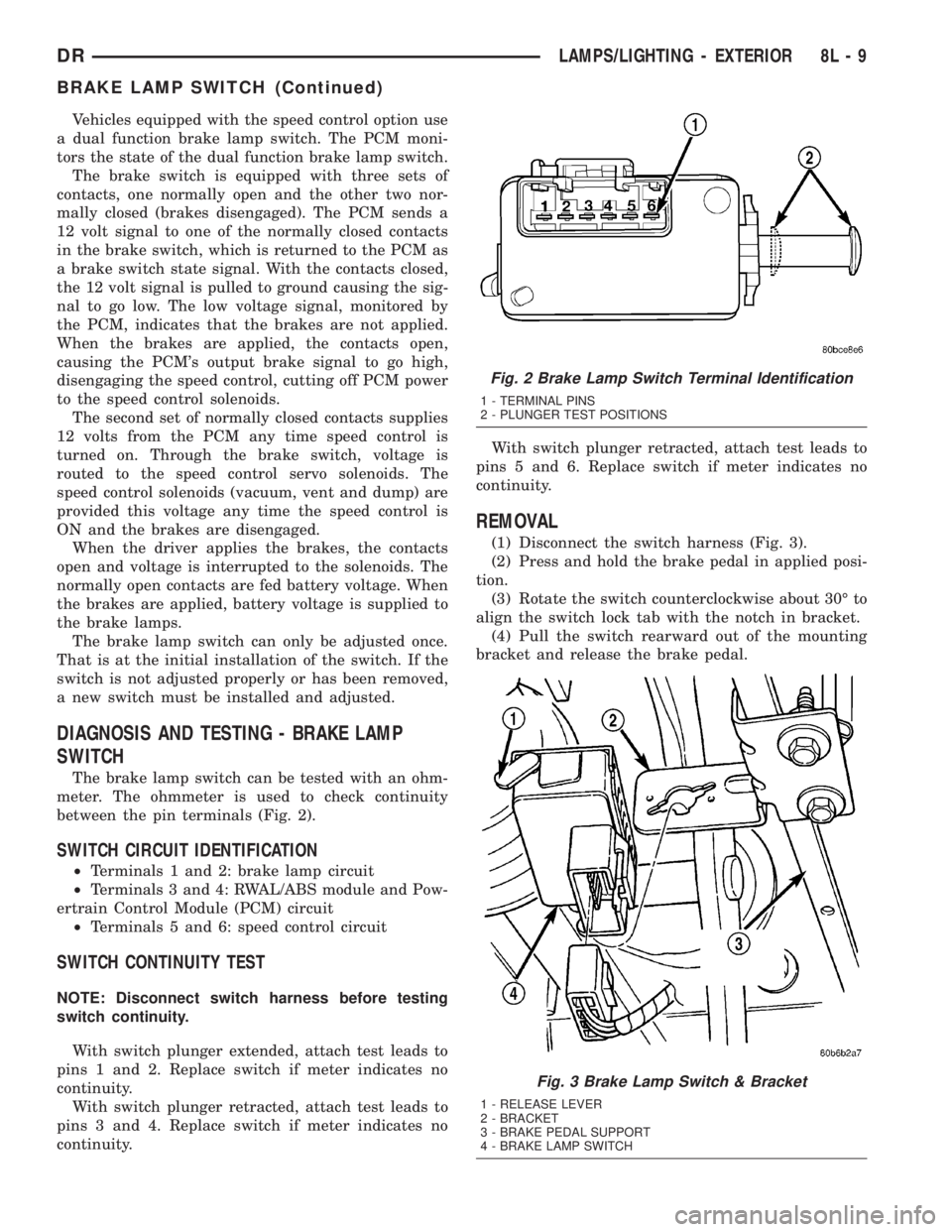
The brake lamp switch can be tested with an ohm-
meter. The ohmmeter is used to check continuity
between the pin terminals (Fig. 2).
SWITCH CIRCUIT IDENTIFICATION
²Terminals 1 and 2: brake lamp circuit
²Terminals 3 and 4: RWAL/ABS module and Pow-
ertrain Control Module (PCM) circuit
²Terminals 5 and 6: speed control circuit
SWITCH CONTINUITY TEST
NOTE: Disconnect switch harness before testing
switch continuity.
With switch plunger extended, attach test leads to
pins 1 and 2. Replace switch if meter indicates no
continuity.
With switch plunger retracted, attach test leads to
pins 3 and 4. Replace switch if meter indicates no
continuity.With switch plunger retracted, attach test leads to
pins 5 and 6. Replace switch if meter indicates no
continuity.
REMOVAL
(1) Disconnect the switch harness (Fig. 3).
(2) Press and hold the brake pedal in applied posi-
tion.
(3) Rotate the switch counterclockwise about 30É to
align the switch lock tab with the notch in bracket.
(4) Pull the switch rearward out of the mounting
bracket and release the brake pedal.
Fig. 2 Brake Lamp Switch Terminal Identification
1 - TERMINAL PINS
2 - PLUNGER TEST POSITIONS
Fig. 3 Brake Lamp Switch & Bracket
1 - RELEASE LEVER
2 - BRACKET
3 - BRAKE PEDAL SUPPORT
4 - BRAKE LAMP SWITCH
DRLAMPS/LIGHTING - EXTERIOR 8L - 9
BRAKE LAMP SWITCH (Continued)
Page 558 of 2895
INSTALLATION
WARNING: ON VEHICLES EQUIPPED WITH AIR-
BAGS, DISABLE THE SUPPLEMENTAL RESTRAINT
SYSTEM BEFORE ATTEMPTING ANY STEERING
WHEEL, STEERING COLUMN, DRIVER AIRBAG,
PASSENGER AIRBAG, SEAT BELT TENSIONER,
FRONT IMPACT SENSORS, SIDE CURTAIN AIRBAG,
OR INSTRUMENT PANEL COMPONENT DIAGNOSIS
OR SERVICE. DISCONNECT AND ISOLATE THE
BATTERY NEGATIVE (GROUND) CABLE, THEN
WAIT TWO MINUTES FOR THE SYSTEM CAPACI-
TOR TO DISCHARGE BEFORE PERFORMING FUR-
THER DIAGNOSIS OR SERVICE. THIS IS THE ONLY
SURE WAY TO DISABLE THE SUPPLEMENTAL
RESTRAINT SYSTEM. FAILURE TO TAKE THE
PROPER PRECAUTIONS COULD RESULT IN ACCI-
DENTAL AIRBAG DEPLOYMENT AND POSSIBLE
PERSONAL INJURY.
(1) Position the park lamp relay to the proper
receptacle in the Power Distribution Center (PDC).
(2) Align the park lamp relay terminals with the
terminal cavities in the PDC.
(3) Press firmly and evenly on the top of the park
lamp relay until the terminals are fully seated in the
PDC.
(4) Install the PDC cover.
(5) Reconnect the battery negative cable.
PARK/TURN SIGNAL LAMP
REMOVAL
(1) Disconnect and isolate the negative battery
cable.
(2) Remove the headlamp unit.(Refer to 8 - ELEC-
TRICAL/LAMPS/LIGHTING - EXTERIOR/HEAD-
LAMP UNIT - REMOVAL).
(3) Seperate the socket from the headlamp unit.
(4) Release the bulb socket locking tabs and seper-
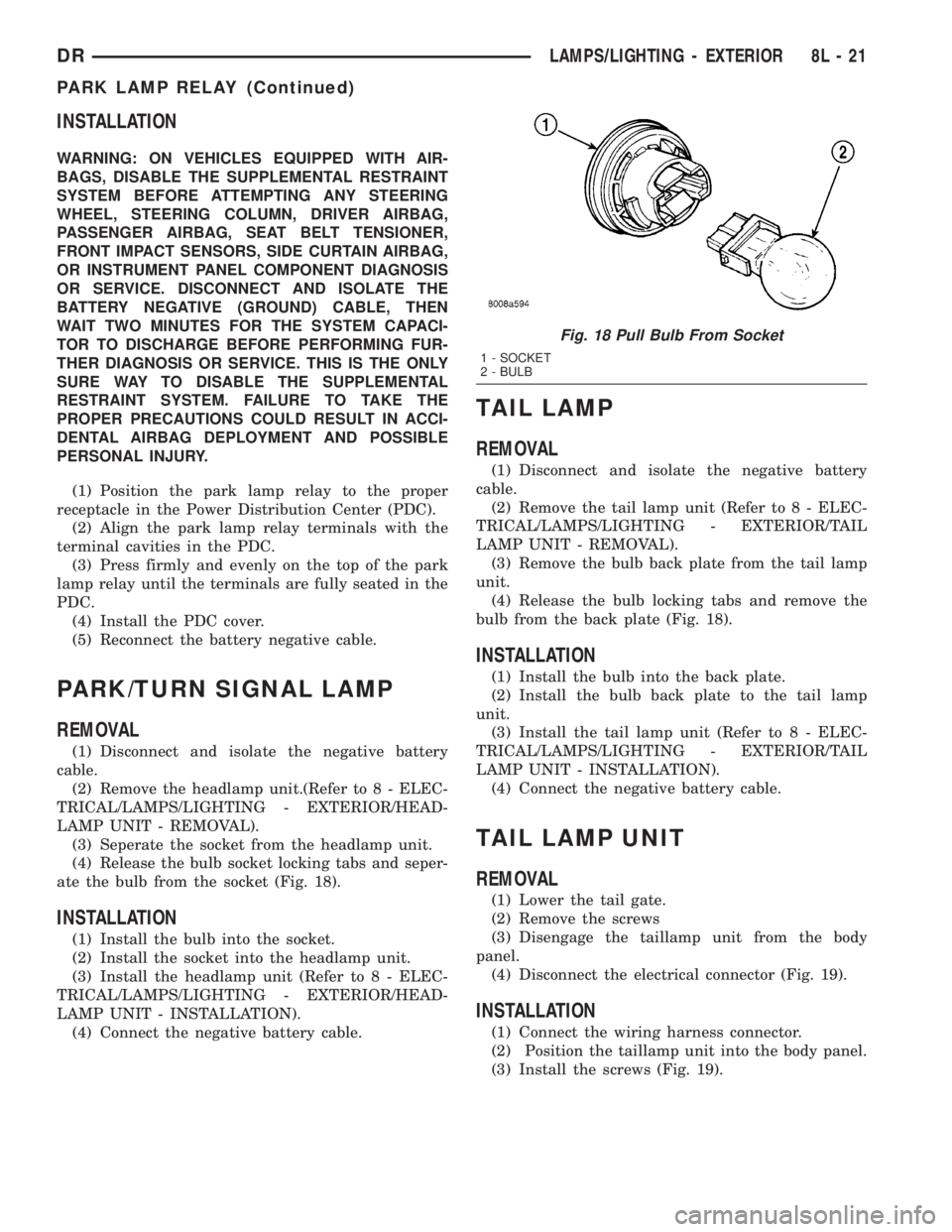
ate the bulb from the socket (Fig. 18).
INSTALLATION
(1) Install the bulb into the socket.
(2) Install the socket into the headlamp unit.
(3) Install the headlamp unit (Refer to 8 - ELEC-
TRICAL/LAMPS/LIGHTING - EXTERIOR/HEAD-
LAMP UNIT - INSTALLATION).
(4) Connect the negative battery cable.
TAIL LAMP
REMOVAL
(1) Disconnect and isolate the negative battery
cable.
(2) Remove the tail lamp unit (Refer to 8 - ELEC-
TRICAL/LAMPS/LIGHTING - EXTERIOR/TAIL
LAMP UNIT - REMOVAL).
(3) Remove the bulb back plate from the tail lamp
unit.
(4) Release the bulb locking tabs and remove the
bulb from the back plate (Fig. 18).
INSTALLATION
(1) Install the bulb into the back plate.
(2) Install the bulb back plate to the tail lamp
unit.
(3) Install the tail lamp unit (Refer to 8 - ELEC-
TRICAL/LAMPS/LIGHTING - EXTERIOR/TAIL
LAMP UNIT - INSTALLATION).
(4) Connect the negative battery cable.
TAIL LAMP UNIT
REMOVAL
(1) Lower the tail gate.
(2) Remove the screws
(3) Disengage the taillamp unit from the body
panel.
(4) Disconnect the electrical connector (Fig. 19).
INSTALLATION
(1) Connect the wiring harness connector.
(2) Position the taillamp unit into the body panel.
(3) Install the screws (Fig. 19).
Fig. 18 Pull Bulb From Socket
1 - SOCKET
2 - BULB
DRLAMPS/LIGHTING - EXTERIOR 8L - 21
PARK LAMP RELAY (Continued)
Page 562 of 2895
DOOR AJAR SWITCH
DESCRIPTION
The door ajar switches are integral to the door
latches on each door. The switches close a path to
ground for the Instrument Cluster when a door is
opened.
The door ajar switches cannot be repaired and, if
faulty or damaged, the door latch unit must be
replaced. Refer to the Body section under Doors for
the removal and installation procedure.
OPERATION
The door ajar switches close a path to ground for
the Instrument Cluster when a door is opened. The
passenger front door is connected in a parallel-series
circuit between ground and the Instrument Cluster,
while the driver side front door ajar switch is con-
nected in series between ground and the Instrument
Cluster to provide a unique input. The Instrument
Cluster reads the switch status, then sends the
proper switch status messages to other electronic
modules over the Programmable Communications
Interface (PCI) data bus network. The door ajar
switches can be diagnosed using conventional diag-
nostic tools and methods. Refer to the Body section
under Doors for the Removal and Installation proce-
dures.
GLOVE BOX LAMP/SWITCH
REMOVAL
(1) Disconnect and isolate the battery negative
cable.
(2) Remove the glove box from the instrument
panel. (Refer to 23 - BODY/INSTRUMENT PANEL/
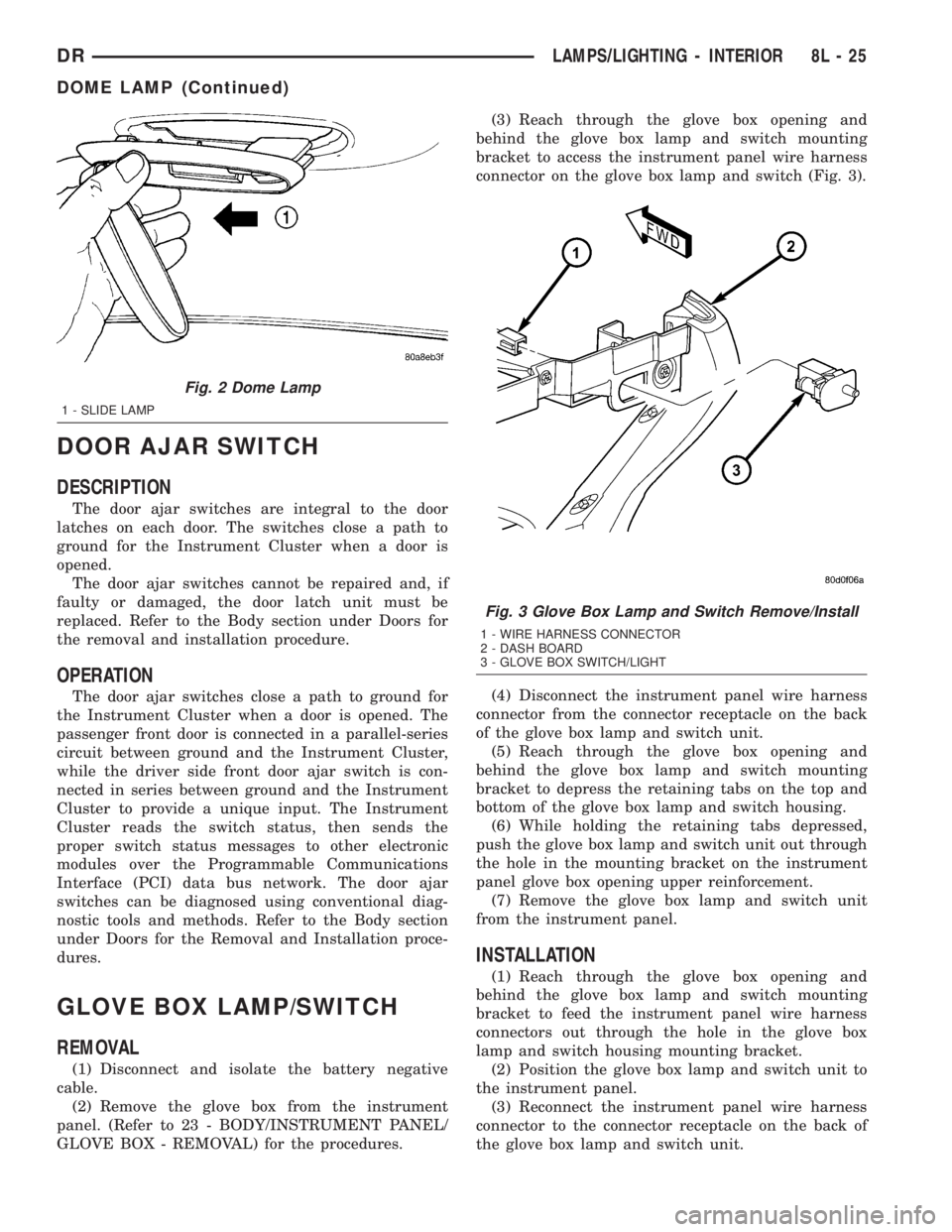
GLOVE BOX - REMOVAL) for the procedures.(3) Reach through the glove box opening and
behind the glove box lamp and switch mounting
bracket to access the instrument panel wire harness
connector on the glove box lamp and switch (Fig. 3).
(4) Disconnect the instrument panel wire harness
connector from the connector receptacle on the back
of the glove box lamp and switch unit.
(5) Reach through the glove box opening and
behind the glove box lamp and switch mounting
bracket to depress the retaining tabs on the top and
bottom of the glove box lamp and switch housing.
(6) While holding the retaining tabs depressed,
push the glove box lamp and switch unit out through
the hole in the mounting bracket on the instrument
panel glove box opening upper reinforcement.
(7) Remove the glove box lamp and switch unit
from the instrument panel.
INSTALLATION
(1) Reach through the glove box opening and
behind the glove box lamp and switch mounting
bracket to feed the instrument panel wire harness
connectors out through the hole in the glove box
lamp and switch housing mounting bracket.
(2) Position the glove box lamp and switch unit to
the instrument panel.
(3) Reconnect the instrument panel wire harness
connector to the connector receptacle on the back of
the glove box lamp and switch unit.
Fig. 2 Dome Lamp
1 - SLIDE LAMP
Fig. 3 Glove Box Lamp and Switch Remove/Install
1 - WIRE HARNESS CONNECTOR
2 - DASH BOARD
3 - GLOVE BOX SWITCH/LIGHT
DRLAMPS/LIGHTING - INTERIOR 8L - 25
DOME LAMP (Continued)
Page 563 of 2895
(4) Push the glove box lamp and switch unit into
the hole in the mounting bracket on the instrument
panel glove box opening upper reinforcement.
(5) Install the glove box onto the instrument panel.
(Refer to 23 - BODY/INSTRUMENT PANEL/GLOVE
BOX - INSTALLATION) for the procedures.
(6) Close the glove box.
(7) Reconnect the battery negative cable.
READING LAMP
DESCRIPTION
The overhead console in this vehicle is equipped
with two individual reading and courtesy lamps. The
lamp lenses are the only visible components of these
lamps. Each lamp has its own switch, bulb, reflector
and lens within the overhead console.
The overhead console reading and courtesy lamps
are controlled by the instrument cluster which pro-
vides power at all times, regardless of the ignition
switch position. The ground circuit for the lamps is
switched through the integral reading and courtesy
lamp switches or through the door ajar switches.
Each lamp is designed and aimed to provide illumi-
nation that will be directed only to that side of the
vehicle on which the lamp is located.
The reading and courtesy lamp lenses and bulbs
are available for service replacement. The reading
and courtesy lamp switches, bulb holders and wiring
are only available as part of the overhead console
wire harness. If either of the lamp switches or bulb
holders is faulty or damaged, the entire overhead
console wire harness assembly must be replaced.
For service of the reading and courtesy lamp bulbs,
refer to the appropriate wiring information.
OPERATION
All reading and courtesy lamps located in the over-
head console are activated by the door ajar switches
via the instrument cluster. When all of the doors are
closed, these lamps can be individually activated by
depressing the corresponding lens. When any door is
open, depressing the lamp lenses to activate the lamp
switches will not turn the lamps off.
The instrument cluster monitors the door ajar
switches. When a door is open the instrument cluster
grounds the low side drivers to turn on the lamps.
Upon closing all doors, the instrument cluster ini-
tiates a 30 second timer. If any of the doors are
opened during the ªtime outº cycle, the instrument
cluster will reset the timer until all doors are closed.
The instrument cluster will faid to off when the doors
are closed and the ignition is turned ON, the time
out expires or the power locks are activated.
REMOVAL
(1) Disconnect and isolate the battery negative
cable.
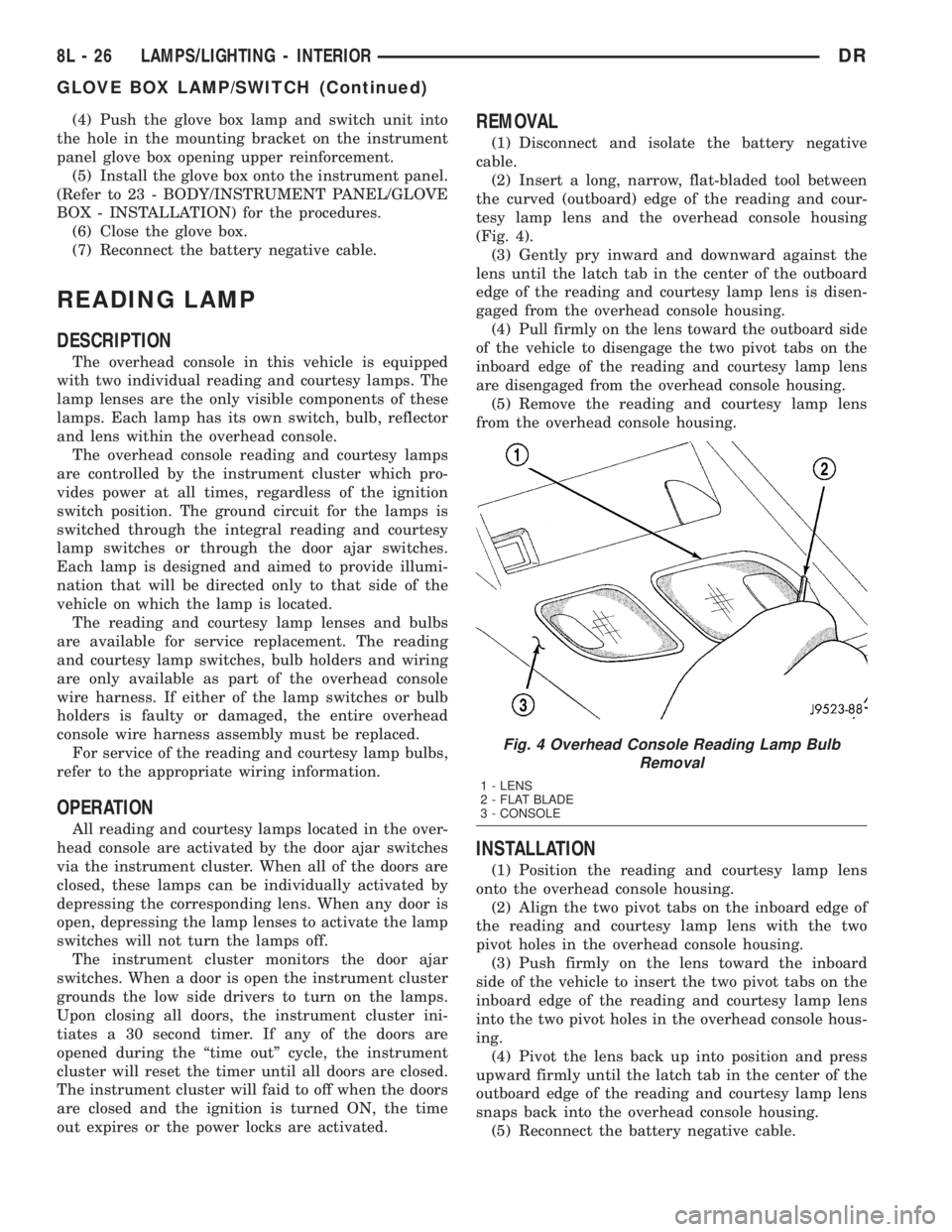
(2) Insert a long, narrow, flat-bladed tool between
the curved (outboard) edge of the reading and cour-
tesy lamp lens and the overhead console housing
(Fig. 4).
(3) Gently pry inward and downward against the
lens until the latch tab in the center of the outboard
edge of the reading and courtesy lamp lens is disen-
gaged from the overhead console housing.
(4)
Pull firmly on the lens toward the outboard side
of the vehicle to disengage the two pivot tabs on the
inboard edge of the reading and courtesy lamp lens
are disengaged from the overhead console housing.
(5) Remove the reading and courtesy lamp lens
from the overhead console housing.
INSTALLATION
(1) Position the reading and courtesy lamp lens
onto the overhead console housing.
(2) Align the two pivot tabs on the inboard edge of
the reading and courtesy lamp lens with the two
pivot holes in the overhead console housing.
(3) Push firmly on the lens toward the inboard
side of the vehicle to insert the two pivot tabs on the
inboard edge of the reading and courtesy lamp lens
into the two pivot holes in the overhead console hous-
ing.
(4) Pivot the lens back up into position and press
upward firmly until the latch tab in the center of the
outboard edge of the reading and courtesy lamp lens
snaps back into the overhead console housing.
(5) Reconnect the battery negative cable.
Fig. 4 Overhead Console Reading Lamp Bulb
Removal
1 - LENS
2 - FLAT BLADE
3 - CONSOLE
8L - 26 LAMPS/LIGHTING - INTERIORDR
GLOVE BOX LAMP/SWITCH (Continued)