heating DODGE SPRINTER 2007 2.G User Guide
[x] Cancel search | Manufacturer: DODGE, Model Year: 2007, Model line: SPRINTER, Model: DODGE SPRINTER 2007 2.GPages: 393, PDF Size: 7.61 MB
Page 135 of 393
134 Controls in detailTempmatic
3
\1To switch off: press theÄ switch
again.
The indicator lamp in the switch goes
out.
The engine stores residual heat after long
periods of driving. You can use the residual
heat of the engine to heat the stationary
vehicle for a further 30 minutes.\1To switch on: turn key to position 0 in
the ignition lock (\2page 67) or re-
move it.
\1Set as required:
\4temperature (\2page 132)
\4air distribution (\2page 133)
\4the air vents (\2page 129)
\1Press the° switch (\2page 131).
The indicator lamp in the switch comes
on.
\1To switch off: press ° switch
again (\2page 131).
The indicator lamp in the switch goes
out.The reheat function quickly ensures de-
frosted windows and dehumidification in
the vehicle interior.
\1To switch on: press theÅ switch
(\2page 131).
The indicator lamp in the switch comes
on.
\1To switch on: press theÅ switch
(\2page 131).
\1The indicator lamp in the switch goes
out.
Fogged-up windows
\1If necessary, switch off air-recirculation
mode by pressing theÄ switch
(\2page 131).
The indicator lamp in the switch goes
out. Fresh air is supplied to the interior.
\1Switch on the reheat function using
theÅ switch (\2page 131).
iAir-recirculation mode is automatically
switched off after about 10 to 30 min-
utes, depending on the outside temper-
ature.Residual heat mode iThe heating period depends on:
\4the coolant temperature
\4the interior temperature selected
\4the on-board voltage
The blower runs at speed1 regardless
of the position of the airflow control.
iResidual heat switches off automati-
cally:
\4after about 30 minutes
\4when you switch on the ignition
\4if the battery’s voltage drops
Reheat function (dehumidification)Special settingsiOnly use special settings briefly.
\2\2
Page 138 of 393
137 Controls in detail
Tempmatic
3
\1To reduce: turn the temperature selec-
tor control counterclockwise.
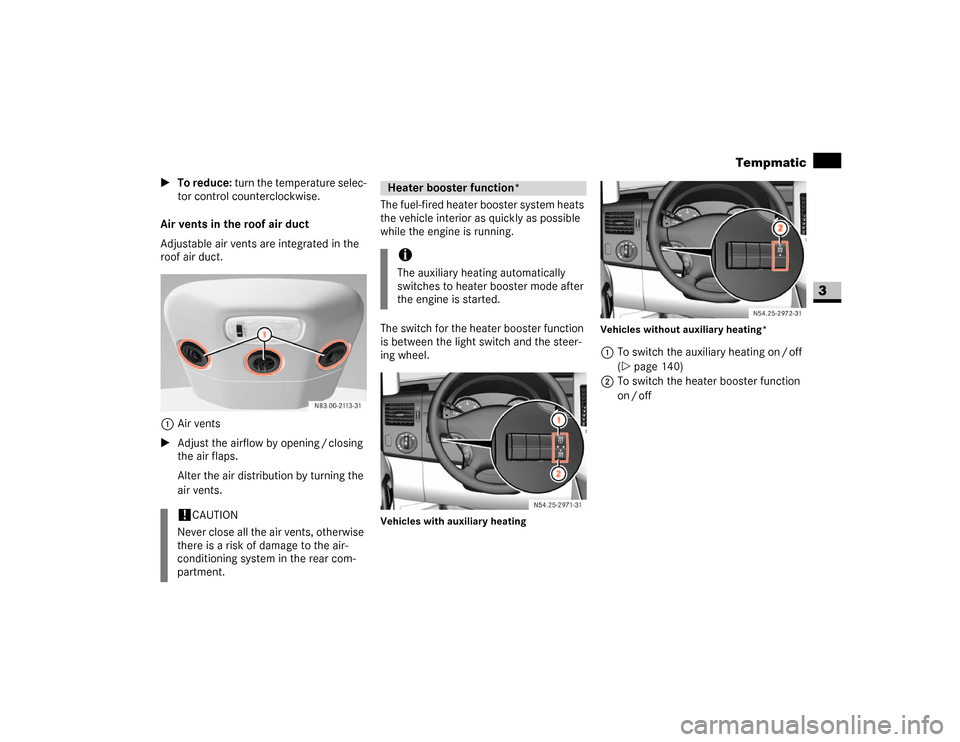
Air vents in the roof air duct
Adjustable air vents are integrated in the
roof air duct.
1Air vents
\1Adjust the airflow by opening / closing
the air flaps.
Alter the air distribution by turning the
air vents.The fuel-fired heater booster system heats
the vehicle interior as quickly as possible
while the engine is running.
The switch for the heater booster function
is between the light switch and the steer-
ing wheel.
Vehicles with auxiliary heatingVehicles without auxiliary heating*
1To switch the auxiliary heating on / off
(\2page 140)
2To switch the heater booster function
on / off
!
CAUTION
Never close all the air vents, otherwise
there is a risk of damage to the air-
conditioning system in the rear com-
partment.
Heater booster function*iThe auxiliary heating automatically
switches to heater booster mode after
the engine is started.
N54.25-2926-31
N54.25-2927-31
Page 140 of 393
139 Controls in detail
Auxiliary heating/ventilation*
3
\3 Auxiliary heating/ventilation*The auxiliary heating heats or ventilates
the interior to a temperature that you have
set. The auxiliary heating can be operated
with the engine switched on or off.
The auxiliary heating is equipped with a
water heater.
The auxiliary heating heats the coolant and
the vehicle interior and is therefore more
favorable to the engine and consumes less
fuel. The fuel tank must be at least a quar-
ter full to ensure that the auxiliary heating/
ventilation operates correctly.
The maximum heating period is
60 minutes.You can use the auxiliary heating / ventila-
tion to:
\4ventilate or preheat the vehicle interior
and to de-ice the windows
\4start the engine better in cold weather
\4support the vehicle’s heating system
while the engine is running and outside
temperatures are low (heater booster
function) (\2page 137)
You can use the operating system to define
up to three switch-on times, one of which
can be selected to switch on the auxiliary
heating / ventilation (\2page 142). Warning
G
Exhaust fumes are produced while the auxilia-
ry heating is in operation. For this reason,
switch off the auxiliary heating in enclosed
spaces without an extraction system, e.g. a
garage.
Operation of the auxiliary heating system is
prohibited at gas stations or when refueling
your vehicle. The auxiliary heating must there-
fore be switched off at refueling stations.
Warning
G
Observe the relevant safety regulations in the
case of vehicles used for the transport of haz-
ardous goods.
Aerosols, gas cartridges and other pressur-
ized containers transported in the vehicle may
be highly flammable and could explode when
heated.
Make sure that the containers described are
kept away from the flow of hot air from the
auxiliary heating.
Otherwise, you could endanger yourself and
others.
iThe auxiliary heating automatically
switches to heater booster mode after
the engine is started.
Page 141 of 393
140 Controls in detailAuxiliary heating/ventilation*
3
You can switch the auxiliary heating / ven-
tilation on and off immediately using:
\4the auxiliary heating / heater booster
switch (\2page 140)
\4the auxiliary heating remote control*
(\2page 141)
Before switching on
\1Adjust the heat output to the desired
temperature using the temperature
control (\2page 131).
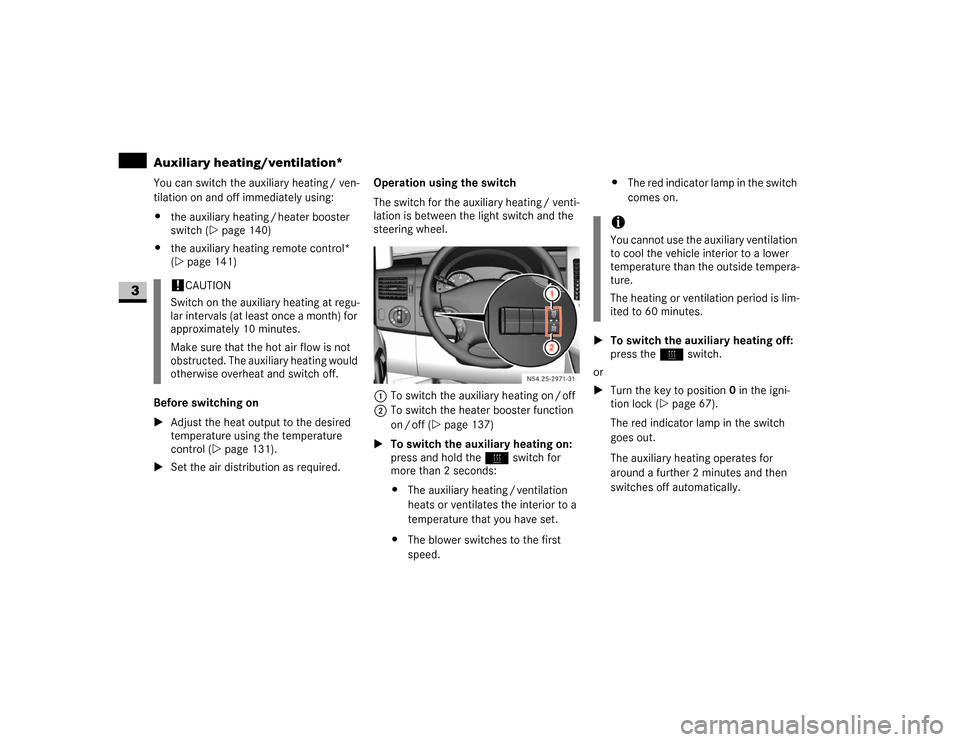
\1Set the air distribution as required.Operation using the switch
The switch for the auxiliary heating / venti-
lation is between the light switch and the
steering wheel.
1To switch the auxiliary heating on / off
2To switch the heater booster function
on / off (\2page 137)
\1To switch the auxiliary heating on:
press and hold theö switch for
more than 2 seconds:
\4The auxiliary heating / ventilation
heats or ventilates the interior to a
temperature that you have set.
\4The blower switches to the first
speed.\4The red indicator lamp in the switch
comes on.
\1To switch the auxiliary heating off:
press theö switch.
or
\1Turn the key to position0 in the igni-
tion lock (\2page 67).
The red indicator lamp in the switch
goes out.
The auxiliary heating operates for
around a further 2 minutes and then
switches off automatically.
!
CAUTION
Switch on the auxiliary heating at regu-
lar intervals (at least once a month) for
approximately 10 minutes.
Make sure that the hot air flow is not
obstructed. The auxiliary heating would
otherwise overheat and switch off.
N54.25-2928-31
iYou cannot use the auxiliary ventilation
to cool the vehicle interior to a lower
temperature than the outside tempera-
ture.
The heating or ventilation period is lim-
ited to 60 minutes.
Page 142 of 393
141 Controls in detail
Auxiliary heating/ventilation*
3
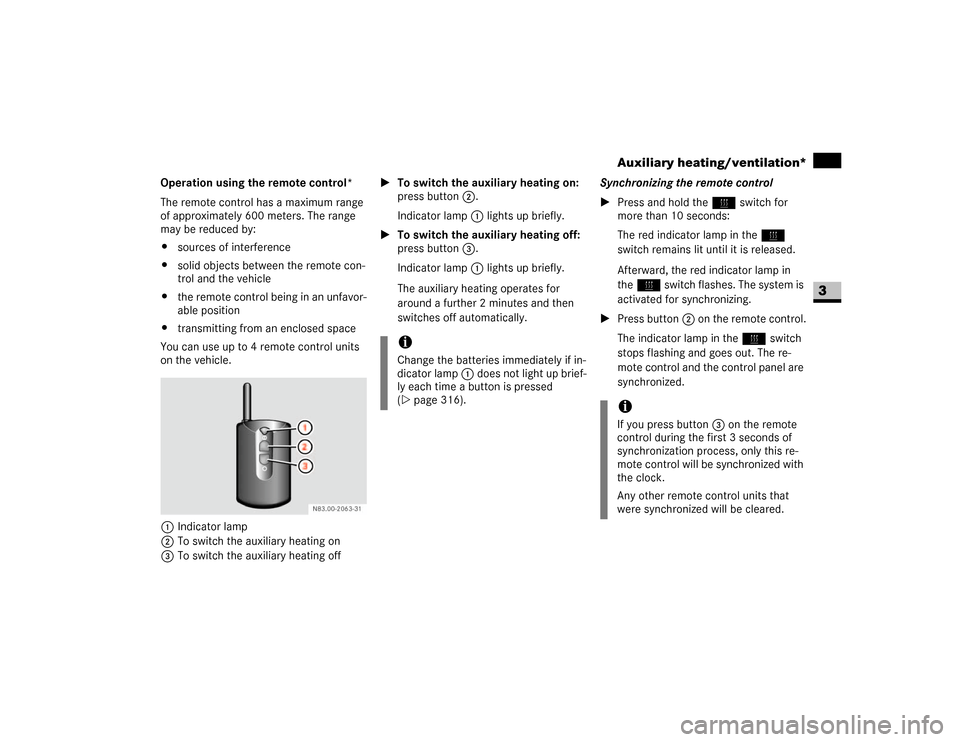
Operation using the remote control*
The remote control has a maximum range
of approximately 600 meters. The range
may be reduced by:
\4sources of interference
\4solid objects between the remote con-
trol and the vehicle
\4the remote control being in an unfavor-
able position
\4transmitting from an enclosed space
You can use up to 4 remote control units
on the vehicle.
1Indicator lamp
2To switch the auxiliary heating on
3To switch the auxiliary heating off\1To switch the auxiliary heating on:
press button2.
Indicator lamp1 lights up briefly.
\1To switch the auxiliary heating off:
press button3.
Indicator lamp1 lights up briefly.
The auxiliary heating operates for
around a further 2 minutes and then
switches off automatically.Synchronizing the remote control
\1Press and hold theö switch for
more than 10 seconds:
The red indicator lamp in theö
switch remains lit until it is released.
Afterward, the red indicator lamp in
theö switch flashes. The system is
activated for synchronizing.
\1Press button2 on the remote control.
The indicator lamp in theö switch
stops flashing and goes out. The re-
mote control and the control panel are
synchronized.
iChange the batteries immediately if in-
dicator lamp 1 does not light up brief-
ly each time a button is pressed
(\2page 316).
iIf you press button3 on the remote
control during the first 3 seconds of
synchronization process, only this re-
mote control will be synchronized with
the clock.
Any other remote control units that
were synchronized will be cleared.
Page 143 of 393
142 Controls in detailAuxiliary heating/ventilation*
3
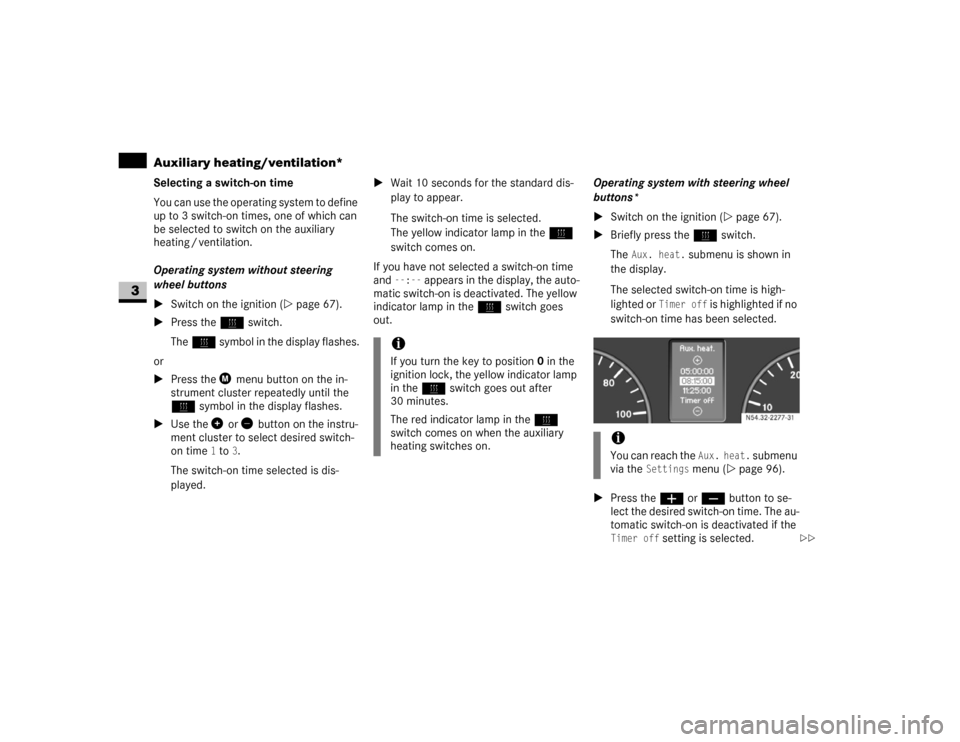
Selecting a switch-on time
You can use the operating system to define
up to 3 switch-on times, one of which can
be selected to switch on the auxiliary
heating / ventilation.
Operating system without steering
wheel buttons
\1Switch on the ignition (\2page 67).
\1Press theö switch.
Theö symbol in the display flashes.
or
\1Press the menu button on the in-
strument cluster repeatedly until the
ö symbol in the display flashes.
\1Use the or button on the instru-
ment cluster to select desired switch-
on time
1 to
3.
The switch-on time selected is dis-
played.\1Wait 10 seconds for the standard dis-
play to appear.
The switch-on time is selected.
The yellow indicator lamp in theö
switch comes on.
If you have not selected a switch-on time
and
--:--
appears in the display, the auto-
matic switch-on is deactivated. The yellow
indicator lamp in theö switch goes
out.Operating system with steering wheel
buttons*
\1Switch on the ignition (\2page 67).
\1Briefly press theö switch.
The
Aux. heat.
submenu is shown in
the display.
The selected switch-on time is high-
lighted or
Timer off
is highlighted if no
switch-on time has been selected.
\1Press theæ orç button to se-
lect the desired switch-on time. The au-
tomatic switch-on is deactivated if the
Timer off
setting is selected.
iIf you turn the key to position0 in the
ignition lock, the yellow indicator lamp
in theö switch goes out after
30 minutes.
The red indicator lamp in theö
switch comes on when the auxiliary
heating switches on.
iYou can reach the
Aux. heat.
submenu
via the
Settings
menu (\2page 96).
N54.32-2277-31
\2\2
Page 144 of 393
143 Controls in detail
Auxiliary heating/ventilation*
3
\1Press the è button.
The switch-on time is selected.
The yellow indicator lamp in theö
switch comes on.
Setting the switch-on time
Operating system without steering
wheel buttons
\1Select a switch-on time as described
under “Selecting a switch-on time”
(\2page 142).\1Press the reset button on the instru-
ment cluster to set the selected switch-
on time.
The hours figure flashes and the”
symbol appears in the display.
\1Set the hours using the or am
button on the instrument cluster.
\1Press the reset button.
The minute display flashes.
\1Set the minutes using the or
button.Operating system with steering wheel
buttons
\1Select a switch-on time as described
under “Selecting a switch-on time”
(\2page 142).
\1Press thej button.
The
Hours
menu appears in the display.
\1Set the hours using theæ orç
button.
\1Press thej button.
The
Minutes
menu appears in the dis-
play.
\1Set the minutes using theæ
orç button.
\1Press the è button.
The switch-on time is set and selected.
iIf you turn the key to position0 in the
ignition lock, the yellow indicator lamp
in theö switch goes out after
30 minutes.
The red indicator lamp in theö
switch comes on when the auxiliary
heating switches on.
iIf you keep the button pressed, the val-
ues will change continuously.
To return to the standard display:
\4press and hold the button on
the instrument cluster for more
than 1 second
\4do not press a button for
10 seconds
iTo return to the standard display, press
theè or ÿ button repeatedly
until the standard display appears.
Page 170 of 393
169 Controls in detail
Features
3
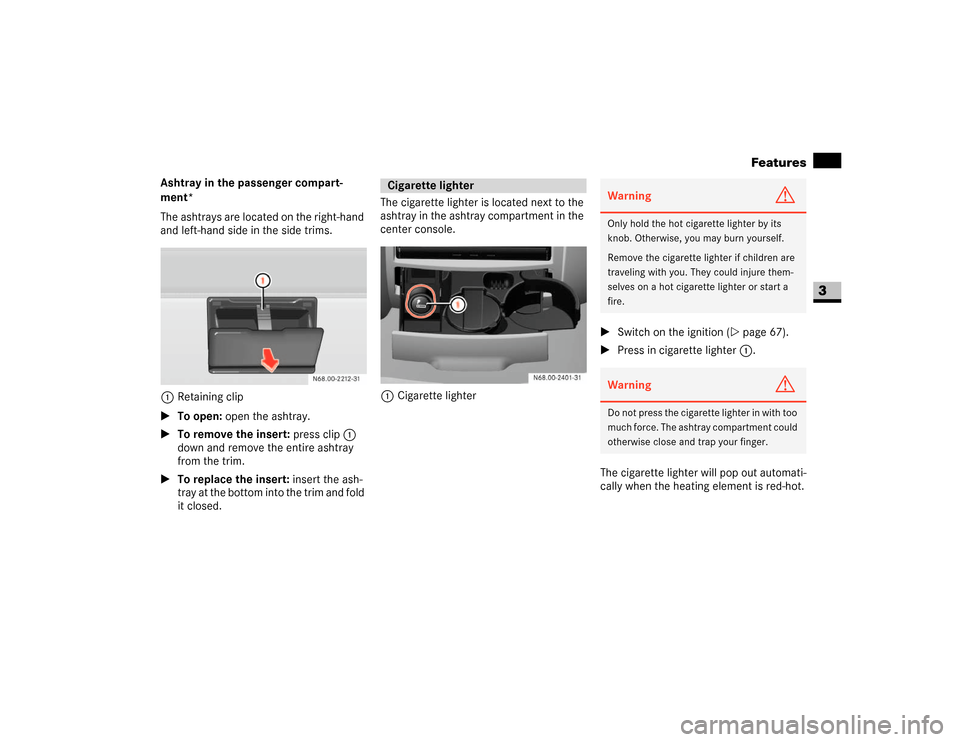
Ashtray in the passenger compart-
ment*
The ashtrays are located on the right-hand
and left-hand side in the side trims.
1Retaining clip
\1To open: open the ashtray.
\1To remove the insert: press clip1
down and remove the entire ashtray
from the trim.
\1To replace the insert: insert the ash-
tray at the bottom into the trim and fold
it closed.The cigarette lighter is located next to the
ashtray in the ashtray compartment in the
center console.
1Cigarette lighter\1Switch on the ignition (\2page 67).
\1Press in cigarette lighter 1.
The cigarette lighter will pop out automati-
cally when the heating element is red-hot.
Cigarette lighter
Warning
G
Only hold the hot cigarette lighter by its
knob. Otherwise, you may burn yourself.
Remove the cigarette lighter if children are
traveling with you. They could injure them-
selves on a hot cigarette lighter or start a
fire.Warning
G
Do not press the cigarette lighter in with too
much force. The ashtray compartment could
otherwise close and trap your finger.
Page 180 of 393
179 Operation
Driving tips
4
Always secure items in the trailer to pre-
vent load shifts while driving.
Take into consideration that when towing a
trailer, the handling characteristics are dif-
ferent and less stable from those when op-
erating the vehicle without a trailer. It is
important to avoid sudden maneuvers.
The vehicle and trailer combination is
heavier, and therefore is limited in acceler-
ation and climbing ability, and requires
longer stopping distances. It is more prone
to reacting to side wind gusts, and requires
more sensitive steering input.
In order to gain skill and an understanding
of the vehicle’s behavior, you should prac-
tice turning , st opping and backing up in a n
area which is free from traffic.
If possible, do not brake abruptly, but rath-
er engage the brake slightly at first to per-
mit the trailer to activate its brake. Then
increase the braking force.
Warning
G
Take into consideration that when towing a
trailer, the handling characteristics are dif-
ferent and less stable from those when op-
erating the vehicle without a trailer.
It is important to avoid sudden maneuvers.
Sudden maneuvers may lead to loss of con-
trol over the vehicle-trailer combination.
This could cause an accident resulting in
property damage or injury to you or others.!
CAUTION
If the transmission hunts between
gears on inclines, manually shift to a
lower gear (select
"4", "3", "2" or
"1").
A lower gear and reduction of speed re-
duces the chance of the engine over-
loading and / or overheating.
When going down a long hill, shift into
a lower gear and use the engine’s brak-
ing effect. Avoid riding the brakes, thus
overheating the vehicle and trailer
brakes.
If the engine coolant rises to an ex-
tremely high temperature (coolant tem-
perature needle approaching the red
zone) when the air conditioner is on,
turn off the air conditioner. Engine
coolant heat can be additionally vented
by opening the windows, switching the
climate control fan speed to high and
setting the temperature control to the
maximum hot position.
Extreme care must be exercised since
your vehicle with a trailer will require
additional passing distance ahead than
when driving without a trailer. Because
your vehicle and trailer is longer than
your vehicle alone, you will also need to
go much farther ahead of the passed
vehicle before you can return to your
lane.
Page 185 of 393
184 OperationRefueling
4
\3 Refueling
The fuel filler flap is next to the driver’s
door. You can only open the fuel filler flap
when the driver’s door is open.
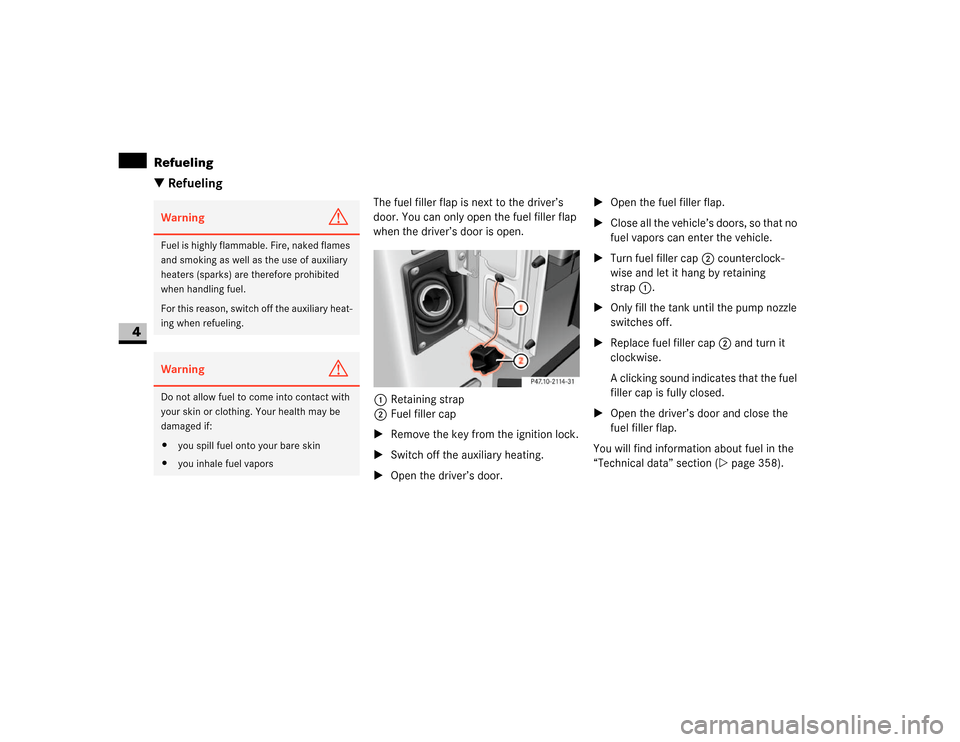
1Retaining strap
2Fuel filler cap
\1Remove the key from the ignition lock.
\1Switch off the auxiliary heating.
\1Open the driver’s door.\1Open the fuel filler flap.
\1Close all the vehicle’s doors, so that no
fuel vapors can enter the vehicle.
\1Turn fuel filler cap2 counterclock-
wise and let it hang by retaining
strap1.
\1Only fill the tank until the pump nozzle
switches off.
\1Replace fuel filler cap2 and turn it
clockwise.
A clicking sound indicates that the fuel
filler cap is fully closed.
\1Open the driver’s door and close the
fuel filler flap.
You will find information about fuel in the
“Technical data” section (\2page 358).
Warning
G
Fuel is highly flammable. Fire, naked flames
and smoking as well as the use of auxiliary
heaters (sparks) are therefore prohibited
when handling fuel.
For this reason, switch off the auxiliary heat-
ing when refueling.Warning
G
Do not allow fuel to come into contact with
your skin or clothing. Your health may be
damaged if:
\4you spill fuel onto your bare skin
\4you inhale fuel vapors