wheel bolt torque DODGE TRUCK 1993 Service Owner's Manual
[x] Cancel search | Manufacturer: DODGE, Model Year: 1993, Model line: TRUCK, Model: DODGE TRUCK 1993Pages: 1502, PDF Size: 80.97 MB
Page 221 of 1502
5
- 34
BRAKES
•
boot
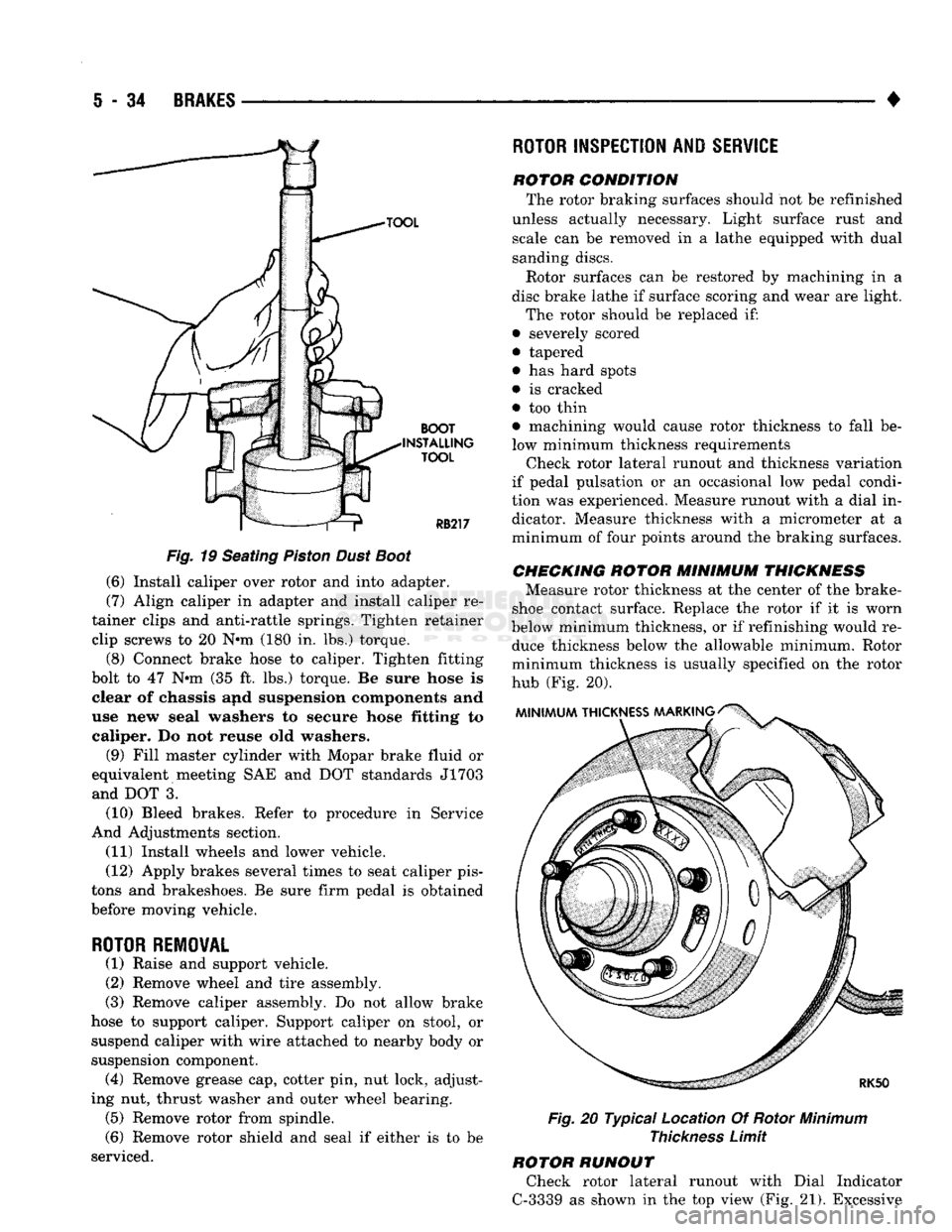
>TALLir TOOL
Fig.
19 Seating
Piston
Dust
Boot
(6) Install caliper over rotor and into adapter.
(7) Align caliper in adapter and install caliper re
tainer clips and anti-rattle springs. Tighten retainer clip screws to 20 N*m (180 in. lbs.) torque.
(8) Connect brake hose to caliper. Tighten fitting
bolt to 47 N»m (35 ft. lbs.) torque. Be sure hose is clear of chassis and suspension components and
use new seal washers to secure hose fitting to caliper. Do not reuse old washers.
(9) Fill master cylinder with Mopar brake fluid or
equivalent meeting SAE and DOT standards J1703 and DOT 3.
(10) Bleed brakes. Refer to procedure in Service
And Adjustments section.
(11) Install wheels and lower vehicle.
(12) Apply brakes several times to seat caliper pis
tons and brakeshoes. Be sure firm pedal is obtained
before moving vehicle.
ROTOR REMOVAL
(1) Raise and support vehicle.
(2) Remove wheel and tire assembly.
(3) Remove caliper assembly. Do not allow brake
hose to support caliper. Support caliper on stool, or suspend caliper with wire attached to nearby body or
suspension component. (4) Remove grease cap, cotter pin, nut lock, adjust
ing nut, thrust washer and outer wheel bearing. (5) Remove rotor from spindle.
(6) Remove rotor shield and seal if either is to be
serviced.
ROTOR
INSPECTION AND
SERVICE
rotor condition The rotor braking surfaces should not be refinished
unless actually necessary. Light surface rust and scale can be removed in a lathe equipped with dual
sanding discs.
Rotor surfaces can be restored by machining in a
disc brake lathe if surface scoring and wear are light.
The rotor should be replaced if:
• severely scored
• tapered
• has hard spots
• is cracked
• too thin • machining would cause rotor thickness to fall be
low minimum thickness requirements Check rotor lateral runout and thickness variation
if pedal pulsation or an occasional low pedal condi
tion was experienced. Measure runout with a dial in dicator. Measure thickness with a micrometer at a
minimum of four points around the braking surfaces.
CHECKING
ROTOR
MINIMUM
THICKNESS
Measure rotor thickness at the center of the brake-
shoe contact surface. Replace the rotor if it is worn
below minimum thickness, or if refinishing would re duce thickness below the allowable minimum. Rotor
minimum thickness is usually specified on the rotor
hub (Fig. 20).
Fig.
20 Typical Location Of Rotor
Minimum
Thickness
Limit
ROTOR RUNOUT Check rotor lateral runout with Dial Indicator
C-3339 as shown in the top view (Fig. 21). Excessive
Page 226 of 1502
BRAKES
5 - 39
DISC BRAKE LINING WEAR COMPENSATION
Normal lining wear is compensated for by exten
sion of the caliper piston and by lateral movement of
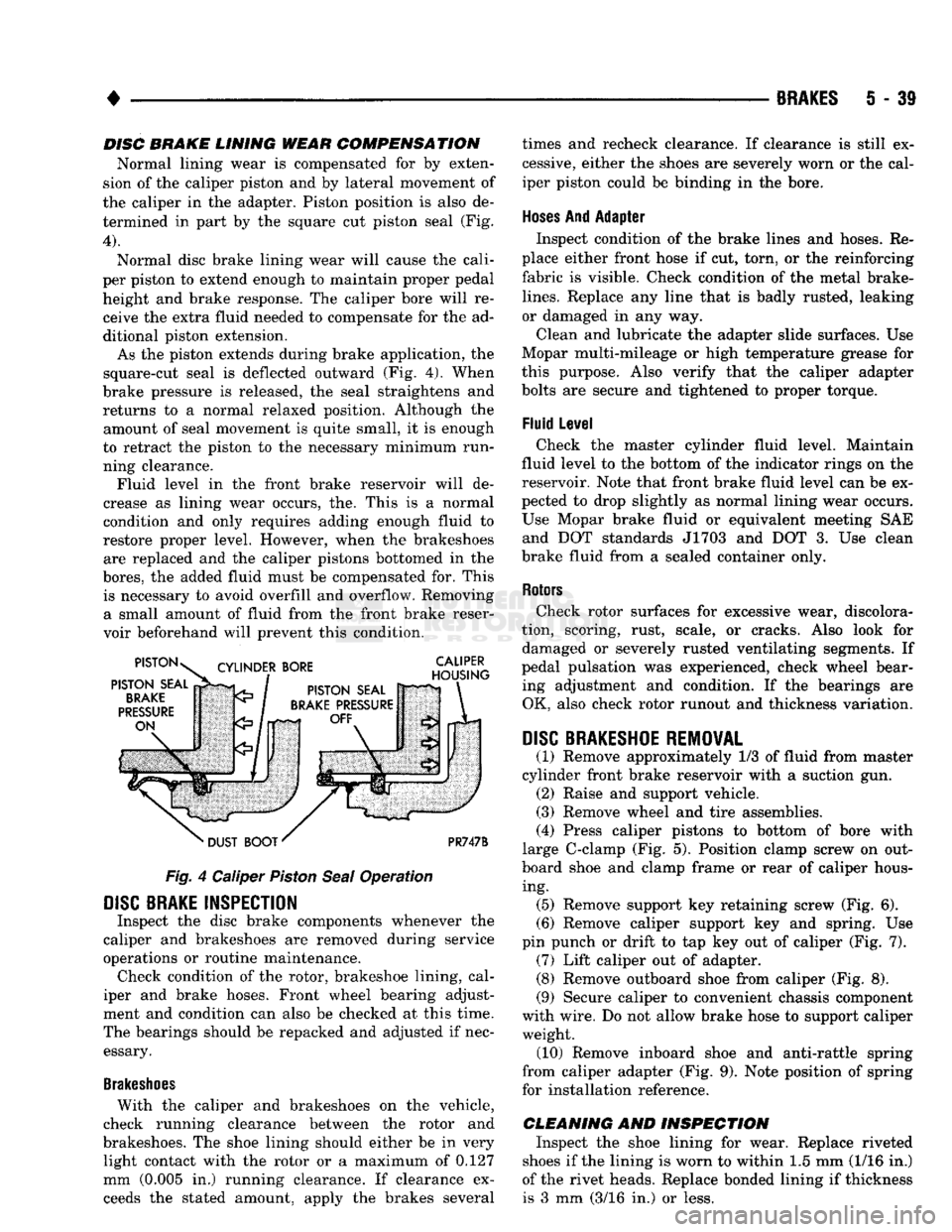
the caliper in the adapter. Piston position is also de termined in part by the square cut piston seal (Fig.
4).
Normal disc brake lining wear will cause the cali
per piston to extend enough to maintain proper pedal height and brake response. The caliper bore will receive the extra fluid needed to compensate for the ad
ditional piston extension.
As the piston extends during brake application, the
square-cut seal is deflected outward (Fig. 4). When
brake pressure is released, the seal straightens and returns to a normal relaxed position. Although the amount of seal movement is quite small, it is enough
to retract the piston to the necessary minimum run ning clearance. Fluid level in the front brake reservoir will de
crease as lining wear occurs, the. This is a normal
condition and only requires adding enough fluid to
restore proper level. However, when the brakeshoes are replaced and the caliper pistons bottomed in the
bores,
the added fluid must be compensated for. This is necessary to avoid overfill and overflow. Removing a small amount of fluid from the front brake reser
voir beforehand will prevent this condition.
Fig.
4 Caliper
Piston
Seal
Operation
DISC
BRAKE INSPECTION
Inspect the disc brake components whenever the
caliper and brakeshoes are removed during service
operations or routine maintenance. Check condition of the rotor, brakeshoe lining, cal
iper and brake hoses. Front wheel bearing adjust
ment and condition can also be checked at this time.
The bearings should be repacked and adjusted if nec essary.
Brakeshoes
With the caliper and brakeshoes on the vehicle,
check running clearance between the rotor and
brakeshoes. The shoe lining should either be in very light contact with the rotor or a maximum of 0.127
mm (0.005 in.) running clearance. If clearance exceeds the stated amount, apply the brakes several times and recheck clearance. If clearance is still ex
cessive, either the shoes are severely worn or the cal
iper piston could be binding in the bore.
Hoses
And Adapter Inspect condition of the brake lines and hoses. Re
place either front hose if cut, torn, or the reinforcing
fabric is visible. Check condition of the metal brake-
lines.
Replace any line that is badly rusted, leaking
or damaged in any way.
Clean and lubricate the adapter slide surfaces. Use
Mopar multi-mileage or high temperature grease for
this purpose. Also verify that the caliper adapter
bolts are secure and tightened to proper torque.
Fluid Level Check the master cylinder fluid level. Maintain
fluid level to the bottom of the indicator rings on the
reservoir. Note that front brake fluid level can be ex
pected to drop slightly as normal lining wear occurs.
Use Mopar brake fluid or equivalent meeting SAE and DOT standards J1703 and DOT 3. Use clean
brake fluid from a sealed container only.
Rotors
Check rotor surfaces for excessive wear, discolora
tion, scoring, rust, scale, or cracks. Also look for damaged or severely rusted ventilating segments. If
pedal pulsation was experienced, check wheel bear ing adjustment and condition. If the bearings are OK, also check rotor runout and thickness variation.
DISC
BRAKESHOE REMOVAL
(1) Remove approximately 1/3 of fluid from master
cylinder front brake reservoir with a suction gun. (2) Raise and support vehicle.
(3) Remove wheel and tire assemblies.
(4) Press caliper pistons to bottom of bore with
large C-clamp (Fig. 5). Position clamp screw on out
board shoe and clamp frame or rear of caliper hous ing. (5) Remove support key retaining screw (Fig. 6).
(6) Remove caliper support key and spring. Use
pin punch or drift to tap key out of caliper (Fig. 7). (7) Lift caliper out of adapter. (8) Remove outboard shoe from caliper (Fig. 8).
(9) Secure caliper to convenient chassis component
with wire. Do not allow brake hose to support caliper weight. (10) Remove inboard shoe and anti-rattle spring
from caliper adapter (Fig. 9). Note position of spring
for installation reference.
CLEANING AND INSPECTION Inspect the shoe lining for wear. Replace riveted
shoes if the lining is worn to within 1.5 mm (1/16 in.)
of the rivet heads. Replace bonded lining if thickness is 3 mm (3/16 in.) or less.
Page 251 of 1502
5
- 64
BRAKES
•
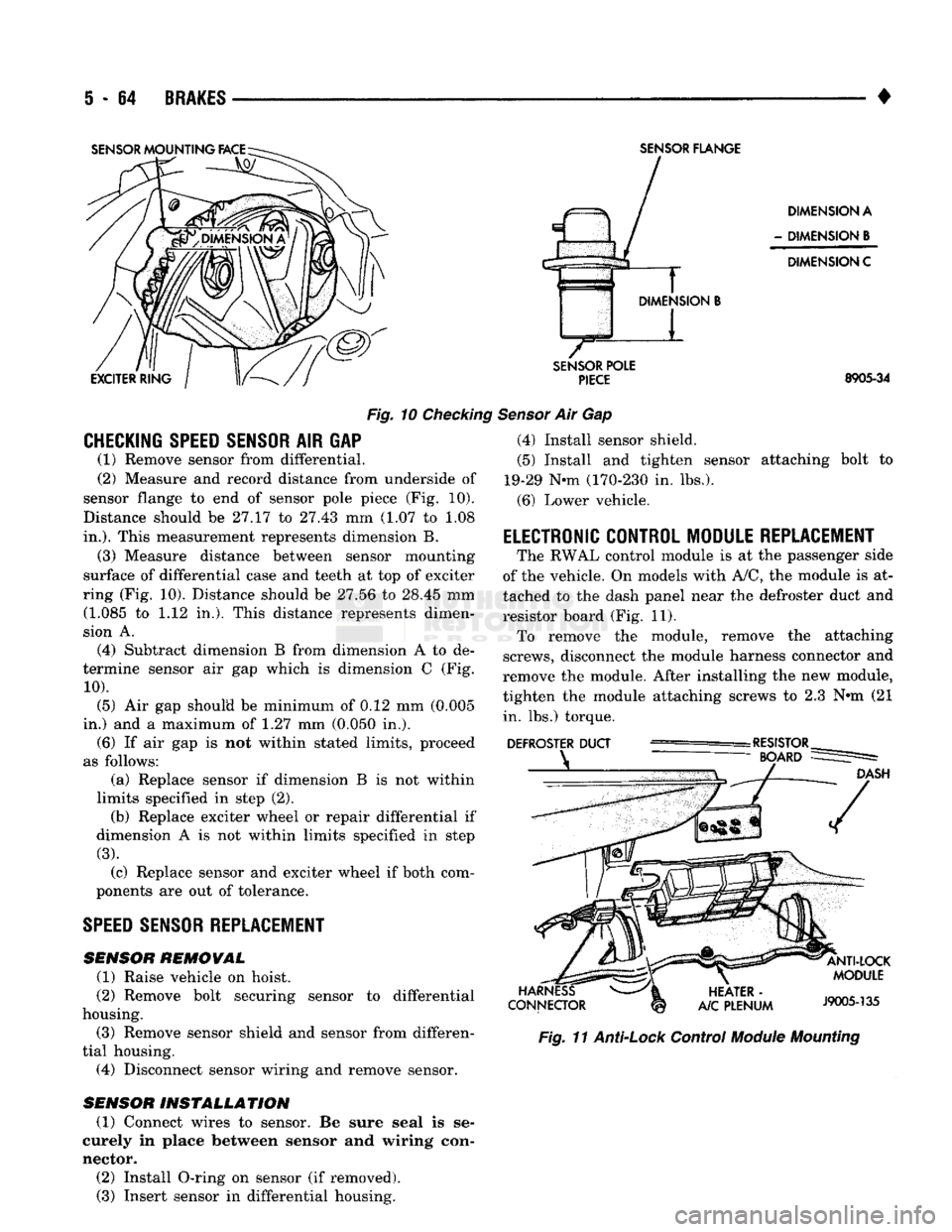
Fig.
10
Checking
CHECKING SPEED SENSOR
AIR GAP (1) Remove sensor from differential.
(2) Measure and record distance from underside of
sensor flange to end of sensor pole piece (Fig. 10).
Distance should be 27.17 to 27.43 mm (1.07 to 1.08
in.).
This measurement represents dimension B.
(3) Measure distance between sensor mounting
surface of differential case and teeth at top of exciter
ring (Fig. 10). Distance should be 27.56 to 28.45 mm (1.085 to 1.12 in,). This distance represents dimen
sion A.
(4) Subtract dimension B from dimension A to de
termine sensor air gap which is dimension C (Fig.
10).
(5) Air gap should be minimum of 0.12 mm (0.005
in.) and a maximum of 1.27 mm (0.050 in.). (6) If air gap is not within stated limits, proceed
as follows: (a) Replace sensor if dimension B is not within
limits specified in step (2). (b) Replace exciter wheel or repair differential if
dimension A is not within limits specified in step
(3).
(c) Replace sensor and exciter wheel if both com
ponents are out of tolerance.
SPEED
SENSOR REPLACEMENT
SENSOR
REMOVAL
(1) Raise vehicle on hoist.
(2) Remove bolt securing sensor to differential
housing.
(3) Remove sensor shield and sensor from differen
tial housing. (4) Disconnect sensor wiring and remove sensor.
SENSOR
INSTALLATION
(1) Connect wires to sensor. Be sure seal is se
curely in place between sensor and wiring con
nector. (2) Install O-ring on sensor (if removed). (3) Insert sensor in differential housing.
SENSOR
FLANGE
DIMENSION A
-
DIMENSION
B
DIMENSION C
SENSOR
POLE
PIECE
8905-34
Sensor
Air Gap (4) Install sensor shield.
(5) Install and tighten sensor attaching bolt to
19-29 Nnn (170-230 in. lbs.).
(6) Lower vehicle.
ELECTRONIC CONTROL MODULE REPLACEMENT
The RWAL control module is at the passenger side
of the vehicle. On models with A/C, the module is at
tached to the dash panel near the defroster duct and
resistor board (Fig. 11). To remove the module, remove the attaching
screws, disconnect the module harness connector and
remove the module. After installing the new module,
tighten the module attaching screws to 2.3 N»m (21 in. lbs.) torque.
Fig.
11
Anti-Lock
Control
Module
Mounting
Page 252 of 1502
•
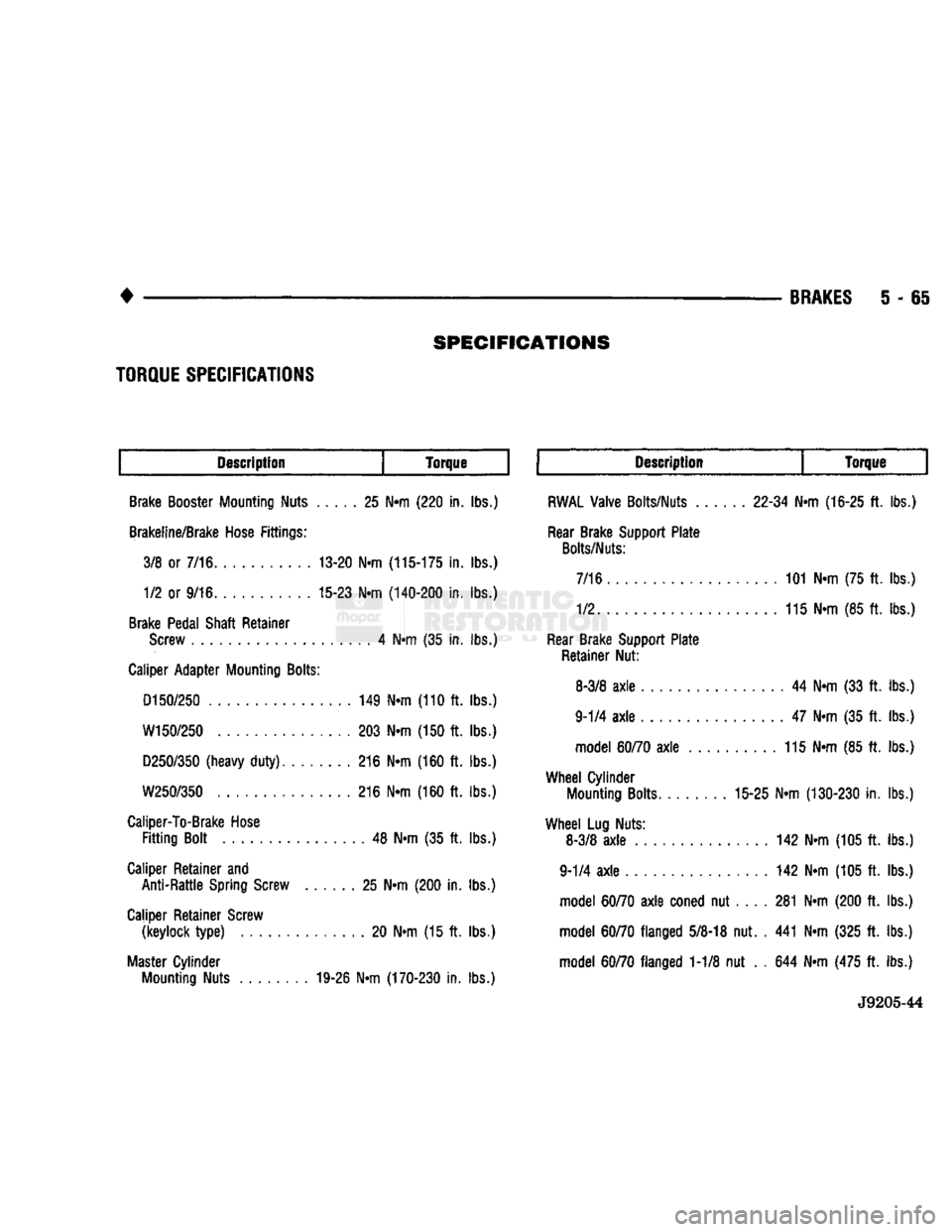
SPECIFICATIONS
BRAKES
5 - 65
Description
Torque Description
Torque
Brake Booster Mounting Nuts 25 N«m (220 in. lbs.)
Brakeline/Brake Hose Fittings: 3/8 or 7/16 13-20 Nrn
(115-175
in. lbs.) 1/2 or 9/16 15-23 N«m
(140-200
in. lbs.)
Brake Pedal Shaft Retainer Screw 4 Ntn (35 in. lbs.)
Caliper Adapter Mounting
Bolts:
D150/250
149 N«m (110 ft. lbs.)
W150/250
203 N«m (150 ft. lbs.)
D250/350
(heavy
duty)
216 Nrn (160 ft. lbs.)
W250/350
216 N»m (160 ft. lbs.)
Caliper-To-Brake Hose
Fitting
Bolt 48 N«m (35 ft. lbs.)
Caliper Retainer and Anti-Rattle Spring Screw 25 N«m (200 in. lbs.)
Caliper Retainer Screw (keylock
type)
20 N«m (15 ft. lbs.)
Master Cylinder Mounting Nuts 19-26 N«m
(170-230
in. lbs.)
RWAL
Valve Bolts/Nuts
22-34
Nrn
(16-25
ft. lbs.)
Rear Brake Support Plate
Bolts/Nuts:
7/16 101 N»m (75 ft. lbs.)
1/2 115 N«m (85 ft. lbs.)
Rear Brake Support Plate Retainer Nut:
8-3/8
axle
44 N«m (33 ft. lbs.)
9-1/4
axle
47 N-m (35 ft. lbs.) model
60/70
axle
115 N-m (85 ft. lbs.)
Wheel
Cylinder Mounting Bolts 15-25 N«m
(130-230
in. lbs.)
Wheel
Lug Nuts: 8-3/8
axle
142 N»m (105 ft. lbs.)
9-1/4
axle
142 Nrn (105 ft. lbs.) model
60/70
axle
coned nut 281 N«m (200 ft. lbs.)
model
60/70
flanged
5/8-18
nut. . 441 Nrn (325 ft. lbs.)
model
60/70
flanged 1-1/8 nut . . 644 Nrn (475 ft. lbs.)
J9205-44
TORQUE
SPECIFICATIONS
Page 255 of 1502
6
- 2
CLUTCH
•
CLUTCH DIAGNOSIS
INDEX
page
Clutch Problem
Causes
, 2
General
Diagnosis
Information
2
GENERAL
DIAGNOSIS INFORMATION
Unless the cause of a clutch problem is obvious, a
road test and component inspection will be required
for accurate diagnosis. A road test will help determine the type of fault
while component inspection will identify the problem component. During a road test, drive the vehicle at normal
speeds. Shift the transmission through all gear
ranges and observe clutch action. If chatter, grab, slip, or improper release is experi
enced, remove and inspect the clutch components.
However, if the problem is noise or hard shifting,
further diagnosis is needed. The transmission or an
other driveline component may actually be at fault. Careful observation during a road test will help
narrow the problem area.
CLUTCH PROBLEM
CAUSES
CONTAMINATION Fluid contamination is one of the more common
causes of clutch malfunctions. Oil, water, or clutch
fluid on the clutch contact surfaces will result in
faulty operation. The usual result is chatter, slip, or
grab.
During inspection, note if any components are con
taminated with oil, hydraulic fluid, or water/road splash.
Oil contamination indicates a leak at either the
rear main seal or transmission input shaft.
Oil leakage produces a residue of oil on the hous
ing interior and on the clutch cover and flywheel.
Heat buildup caused by slippage between the cover,
disc and flywheel, can sometimes bake the oil residue
onto the components. The glaze-like residue ranges
in color from amber to black.
Road splash contamination means dirt and water
are entering the clutch housing due to loose bolts,
housing cracks, vent openings, or through the slave
cylinder opening. Driving through deep water pud
dles can force water/road splash into the housing
through such openings.
An additional problem caused by water contamina
tion and especially by steam cleaning, involves
clutch disc sticking and poor release. Water and steam vapors can be absorbed by the
clutch facing material. If the vehicle sits idle for long
page
Inspection
and
Diagnosis
Charts 5
periods after water contamination, the force exerted
by the pressure plate may cause the disc to bond it self to the flywheel or pressure plate.
Frequently, the only remedy for the above condi
tion is component replacement. To avoid this prob
lem, a vehicle should be driven as soon as possible to
heat and dry the clutch components.
Clutch fluid leaks are from a loose or damaged
slave cylinder line or connection. However, clutch
fluid leaks will usually be noted and corrected before severe contamination occurs.
CLUTCH MISALIGNMENT
Clutch components must be in proper alignment
with the crankshaft and transmission input shaft.
Misalignment caused by excessive runout or warpage of any clutch component will cause grab, chatter and improper clutch release.
Flywheel
Runout
Common causes of runout are heat warping, im
proper machining, mounting the flywheel on a dirty crankshaft flange, incorrect bolt tightening, or im
proper seating on the crankshaft flange shoulder.
Very light scratches or surface roughness on the
flywheel face can be cleaned up by scuff sanding with 180 grit emery cloth. However, if the surface is
warped or severely scored, replace the flywheel.
Do not machine the flywheel. The flywheel
face is manufactured with a unique surface con
tour. Machining would negate this feature and could result in unsatisfactory operation.
Clean the crankshaft flange before mounting the
flywheel. Dirt and grease on the flange surface may cock the flywheel causing runout.
Use new bolts when remounting a flywheel and se
cure the bolts with Mopar Lock And Seal, or Loctite
242.
Tighten flywheel bolts to specified torque only.
Overtightening could distort the flywheel hub caus
ing runout.
Clutch
Cover
And Disc
Runout
Check the clutch disc before installation. Axial
(face) runout of a new disc should not exceed 0.5 mm
(0.020 in.). Measure runout about 6 mm (1/4 in.)
from the outer edge of the disc facing. Obtain an other disc if runout is excessive.
Page 256 of 1502
•
CLUTCH
6 - 3 Check condition of the clutch before installation. A
warped cover or diaphragm spring will cause grab and incomplete release or engagement.
Be careful when handling the cover and disc. Im
pact can distort the cover, diaphragm spring, release
fingers and the hub of the clutch disc.
Use an alignment tool when positioning the disc on
the flywheel. The tool prevents accidental misalign ment which could result in cover distortion and disc
damage.
A frequent cause of clutch cover distortion (and
consequent misalignment) is improper bolt tighten
ing. To avoid warping the cover, tighten the bolts al
ternately (in a diagonal pattern) and evenly (2-3
threads at a time) to specified torque.
Clutch
Housing
Misalignment And Runout Clutch housing alignment is important to proper
operation. The housing bore maintains alignment be
tween the crankshaft and transmission input shaft.
Misalignment can cause noise, incomplete clutch
release and chatter. It can also result in premature
wear of the pilot bearing, cover release fingers and
clutch disc. In severe cases, misalignment can also cause premature wear of the transmission input
shaft and bearing.
Housing face misalignment is generally caused by
incorrect seating on the engine or transmission, loose
housing bolts, missing alignment dowels or housing damage. Infrequently, misalignment may also be
caused by housing mounting surfaces that are not
parallel. If housing misalignment is suspected, housing bore
and face runout can be checked with a dial indicator
as described in the following two procedures:
MEASURING
CLUTCH HOUSING BORE
RUNOUT
(1) Remove the clutch housing and strut.
(2) Remove the clutch cover and disc.
(3) Replace one of the flywheel bolts with a 7/16-20
threaded rod that is 10 in. (25.4 cm) long (Fig. 1).
The rod will be used to mount the dial indicator.
(4) Remove the release fork from the clutch hous
ing. (5) Reinstall the clutch housing. Tighten the hous
ing bolts nearest the alignment dowels first. (6) Mount the dial indicator on the threaded rod
and position the indicator plunger on the surface of
the clutch housing bore (Fig. 2).
(7) Rotate the crankshaft until the indicator
plunger is at the top center of the housing bore. Zero the indicator at this point.
(8) Rotate the crankshaft and record the indicator
readings at eight points (45° apart) around the bore (Fig. 3). Repeat the measurement at least twice for
accuracy. (9) Subtract each reading from the one 180° oppo
site to determine magnitude and direction of runout.
Refer to Figure 3 and following example.
Bore runout example: 0.000 - (-0.007) = 0.007 in. + 0.002 - (-0.010) = 0.012 in.
+ 0.004 - (-0.005) = 0.009 in.
-0.001 -
(
+ 0.001) = -0.002 in. (= 0.002 inch)
In the above example, the largest difference is
0.012 in. and is called the total indicator reading
(TIR).
This means that the housing bore is offset
from the crankshaft centerline by 0.006 in. (which is 1/2 of 0.012 in.).
On gas engines, the acceptable maximum TIR for
housing bore runout is 0.010 inch. If measured TIR is more than 0.010 in. (as in the example), bore runout
will have to be corrected with offset dowels. Offset dowels are available in 0.007, 0.014 and 0.021 in.
sizes for this purpose (Fig. 4). Refer to Correcting
Housing Bore Runout for dowel installation.
On diesel engines, the acceptable maximum
TIR for housing bore runout is 0.015 inch. How
ever, unlike gas engines, offset dowels are not available to correct runout on diesel engines. If
bore runout exceeds the stated maximum on a diesel engine, it may be necessary to replace ei
ther the clutch housing, or transmission adapter
plate.
CORRECTING CLUTCH HOUSING BORE
RUNOUT
(GAS
ENGINE
ONLY)
On gas engine vehicles, clutch housing bore runout
is corrected with offset dowels. However, if bore
runout exceeds 0.015 in. TIR on a diesel equipped model, the clutch housing, or transmission adapter
plate may have to be replaced. Offset dowels are not available for diesel models.
The dial indicator reads positive when the plunger
moves inward (toward indicator) and negative when it moves outward (away from indicator). As a result,
the lowest or most negative reading determines the
direction of housing bore offset (runout).
In the sample readings shown in Figure 3 and in
step (7) above, the bore is offset toward the 0.010
inch reading. To correct this, remove the housing and
original dowels. Then install the new offset dowels in
the direction needed to center the bore with the crankshaft centerline.
In the example, TIR was 0.012 inch. The dowels
needed for correction would have an offset of 0.007
in. (Fig. 4).
Install the dowels with the slotted side facing out
so they can be turned with a screwdriver. Then in
stall the housing, remount the dial indicator and
check bore runout again. Rotate the dowels until the
TIR is less than 0.010 in. if necessary.
If a TIR of 0.053 in. or greater is encountered, it
may be necessary to replace the clutch housing.
Page 258 of 1502
•
CLUTCH
6 - 5
INDICATOR
PLUNGER
DIAL INDICATOR
CLUTCH
HOUSING
FACE
INDICATOR MOUNTING
„
STUD OR ROD
J9006-29
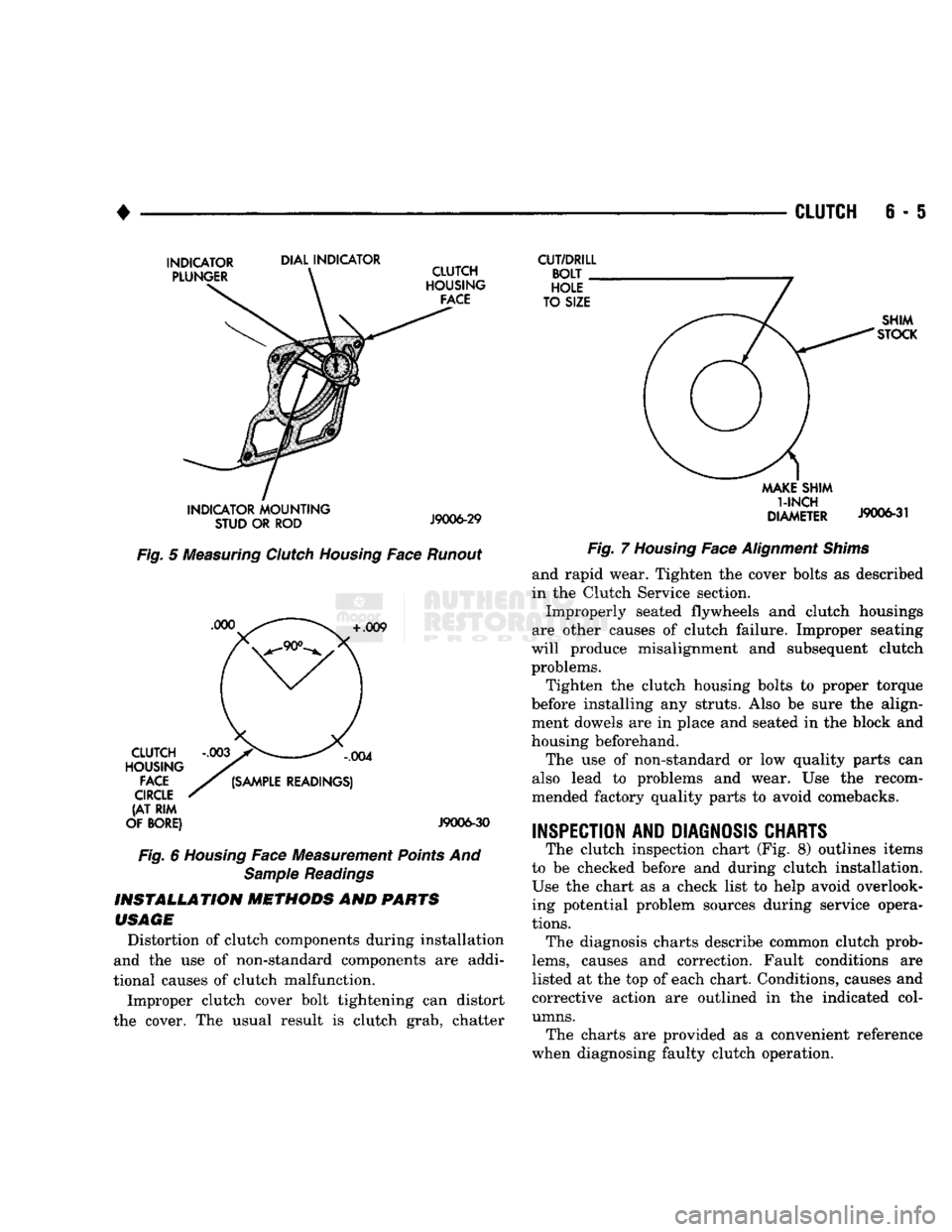
Fig.
5
Measuring
Clutch
Housing
Face
Runout
+
.009 CLUTCH
HOUSING
FACE
CIRCLE
(AT RIM
OF BORE)
,004
(SAMPLE
READINGS)
J9006-30
Fig.
6
Housing
Face Measurement
Points
And
Sample
Readings
INSTALLATION
METHODS
AND
PARTS
USAGE
Distortion of clutch components during installation
and the use of non-standard components are addi
tional causes of clutch malfunction.
Improper clutch cover bolt tightening can distort
the cover. The usual result is clutch grab, chatter
CUT/DRILL
BOLT
HOLE
TO SIZE SHIM
STOCK
MAKE
SHIM
1-INCH
DIAMETER
J9006-31
Fig.
7
Housing
Face
Alignment
Shims
and rapid wear. Tighten the cover bolts as described
in the Clutch Service section.
Improperly seated flywheels and clutch housings
are other causes of clutch failure. Improper seating
will produce misalignment and subsequent clutch problems.
Tighten the clutch housing bolts to proper torque
before installing any struts. Also be sure the align ment dowels are in place and seated in the block and
housing beforehand.
The use of non-standard or low quality parts can
also lead to problems and wear. Use the recom
mended factory quality parts to avoid comebacks.
INSPECTION AND DIAGNOSIS CHARTS
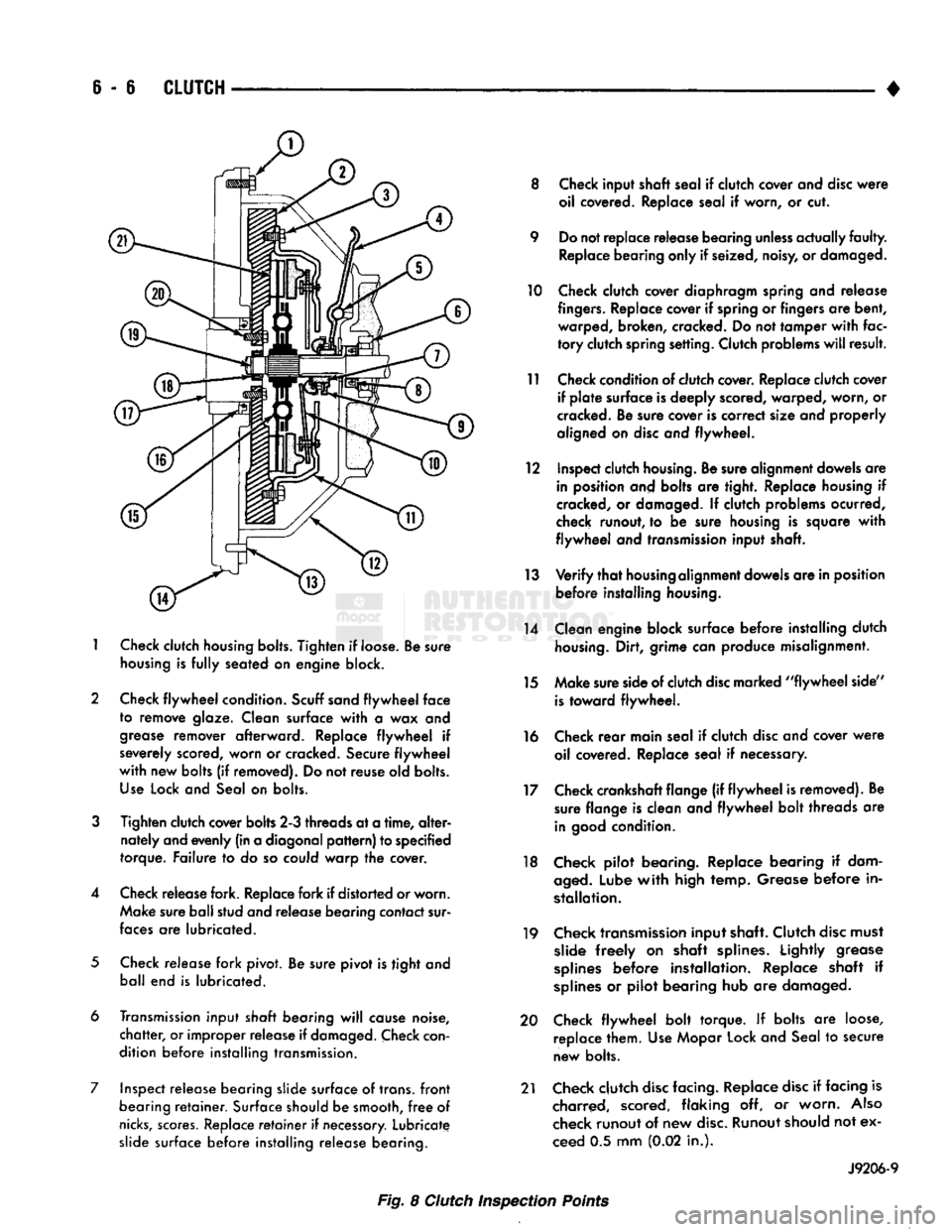
The clutch inspection chart (Fig. 8) outlines items
to be checked before and during clutch installation. Use the chart as a check list to help avoid overlooking potential problem sources during service opera
tions.
The diagnosis charts describe common clutch prob
lems,
causes and correction. Fault conditions are
listed at the top of each chart. Conditions, causes and
corrective action are outlined in the indicated col
umns.
The charts are provided as a convenient reference
when diagnosing faulty clutch operation.
Page 259 of 1502
6 - 6
CLUTCH
1
Check
clutch
housing bolts.
Tighten
if loose. Be sure
housing
is
fully
seated on engine block.
2 Check
flywheel
condition.
Scuff sand
flywheel
face
to remove glaze. Clean surface
with
a wax and
grease
remover afterward. Replace
flywheel
if
severely scored, worn or cracked. Secure
flywheel
with
new bolts (if removed). Do not reuse old bolts.
Use
Lock and Seal on bolts.
3
Tighten clutch cover bolts 2-3 threads at a
time,
alter
nately and evenly (in a diagonal
pattern)
to specified
torque. Failure to do so could warp the cover.
4 Check release fork. Replace fork if distorted or worn. Make sure ball stud and release bearing contact sur
faces
are lubricated.
5
Check release fork pivot. Be sure pivot is tight and ball end is lubricated.
6 Transmission input
shaft
bearing
will
cause noise,
chatter,
or improper release if
damaged.
Check
con
dition before installing transmission.
7 Inspect release bearing slide surface of trans,
front
bearing
retainer.
Surface should be smooth,
free
of
nicks,
scores.
Replace
retainer
if
necessary.
Lubricate slide surface before installing release bearing. 8 Check input shaft seal if clutch cover and
disc
were
oil covered. Replace seal if worn, or cut.
9 Do not replace release bearing
unless
actually
faulty.
Replace bearing only if seized, noisy, or damaged.
10 Check clutch cover diaphragm spring and release
fingers.
Replace cover if spring or fingers are bent, warped, broken, cracked. Do not tamper
with
fac
tory
clutch spring setting. Clutch problems
will
result.
11 Check condition of clutch cover. Replace clutch cover if
plate
surface is deeply scored, warped, worn, or
cracked. Be sure cover is correct size and properly
aligned on
disc
and flywheel.
12 Inspect clutch
housing.
Be sure alignment dowels are in position and bolts are tight. Replace housing if
cracked, or damaged. If clutch problems ocurred,
check runout, to be sure housing is square
with
flywheel
and transmission input shaft.
13
Verify
that
housing
alignment dowels are in position before installing
housing.
14 Clean engine block surface before installing clutch
housing.
Dirt, grime can produce misalignment.
15 Make sure side of clutch
disc
marked
"flywheel
side"
is
toward flywheel.
16 Check
rear
main seal if clutch
disc
and cover
were
oil covered. Replace seal if necessary.
17 Check crankshaft flange (if
flywheel
is removed). Be sure flange is clean and
flywheel
bolt threads are
in
good
condition.
18 Check pilot bearing. Replace bearing if dam
aged.
Lube
with
high temp. Grease before in
stallation.
19 Check transmission input shaft. Clutch
disc
must slide
freely
on shaft splines. Lightly grease
splines
before installation. Replace shaft if
splines
or pilot bearing hub are damaged.
20 Check
flywheel
bolt torque. If bolts are loose, replace them. Use Mopar Lock and Seal to secure
new bolts.
21 Check clutch
disc
facing. Replace
disc
if facing is charred, scored, flaking off, or worn.
Also
check runout of new
disc.
Runout should not ex
ceed 0.5 mm (0.02 in.).
J9206-9
Fig. 8 Clutch Inspection Points
Page 263 of 1502
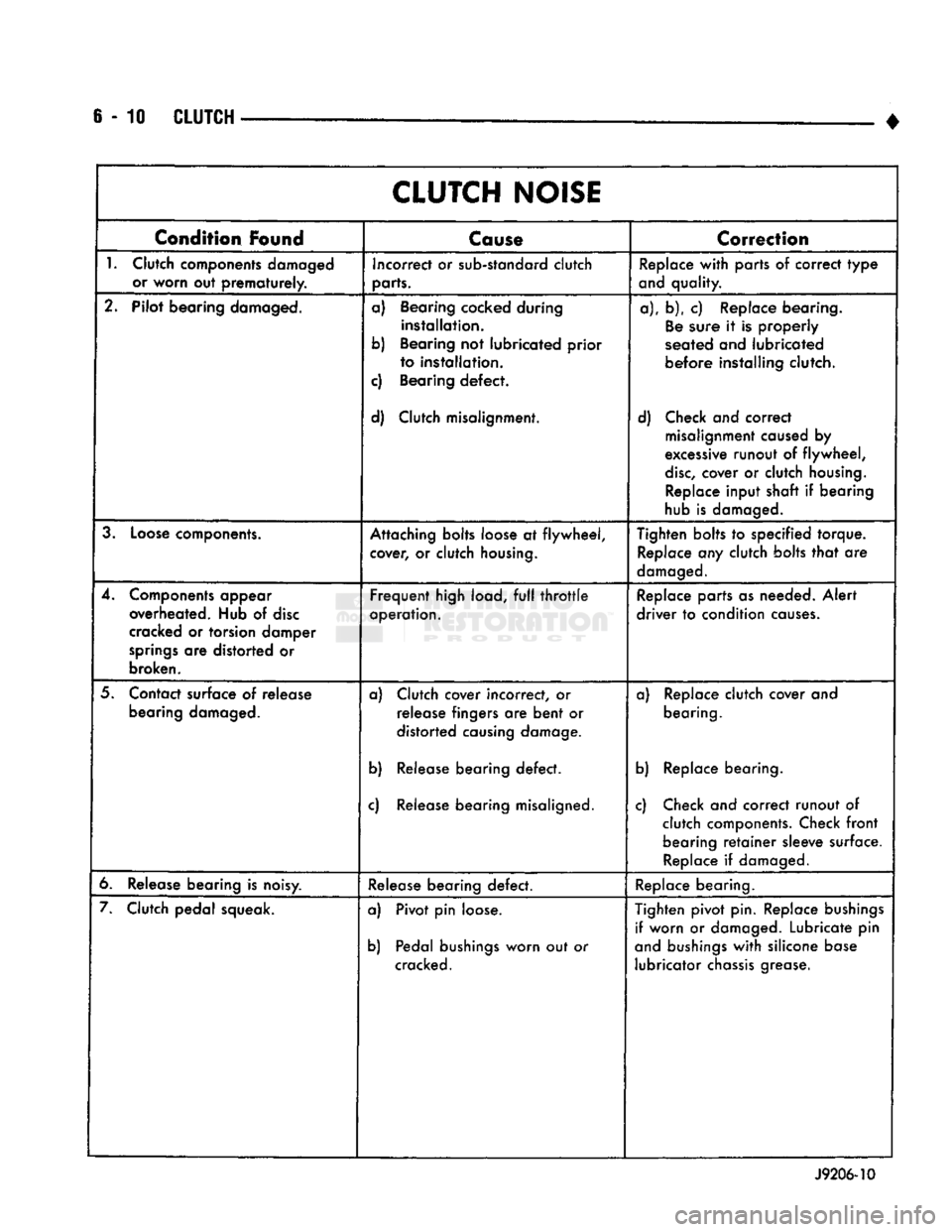
6-10
CLUTCH
•
CLUTCH
NOISE
Condition
Found
Cause
Correction
1.
Clutch components damaged or worn out
prematurely.
Incorrect or sub-standard clutch
parts. Replace
with
parts of correct
type
and quality.
2. Pilot bearing damaged. a) Bearing cocked during
installation.
b) Bearing not lubricated prior to installation.
c) Bearing
defect.
d) Clutch misalignment. a), b), c) Replace bearing.
Be
sure it is properly
seated and lubricated
before
installing clutch.
d) Check and correct misalignment caused by
excessive runout of
flywheel,
disc,
cover or clutch
housing.
Replace input shaft if bearing
hub is damaged.
3.
Loose
components. Attaching bolts loose at
flywheel,
cover, or clutch
housing.
Tighten bolts to specified torque.
Replace any clutch bolts
that
are
damaged.
4. Components appear overheated. Hub of
disc
cracked or torsion damper
springs
are distorted or
broken.
Frequent
high load,
full
throttle
operation. Replace parts as needed.
Alert
driver
to condition
causes.
5. Contact surface of release bearing damaged. a) Clutch cover incorrect, or
release fingers are
bent
or
distorted causing damage.
b) Release bearing
defect.
c) Release bearing misaligned. a) Replace clutch cover and
bearing.
b) Replace bearing.
c) Check and correct runout of clutch components. Check
front
bearing
retainer
sleeve surface. Replace if damaged.
6. Release bearing is noisy. Release bearing
defect.
Replace bearing.
7. Clutch pedal squeak. a) Pivot pin loose.
b) Pedal
bushings
worn out or
cracked. Tighten pivot pin. Replace
bushings
if worn or damaged. Lubricate pin
and
bushings
with
silicone base lubricator
chassis
grease.
J9206-10
Page 265 of 1502
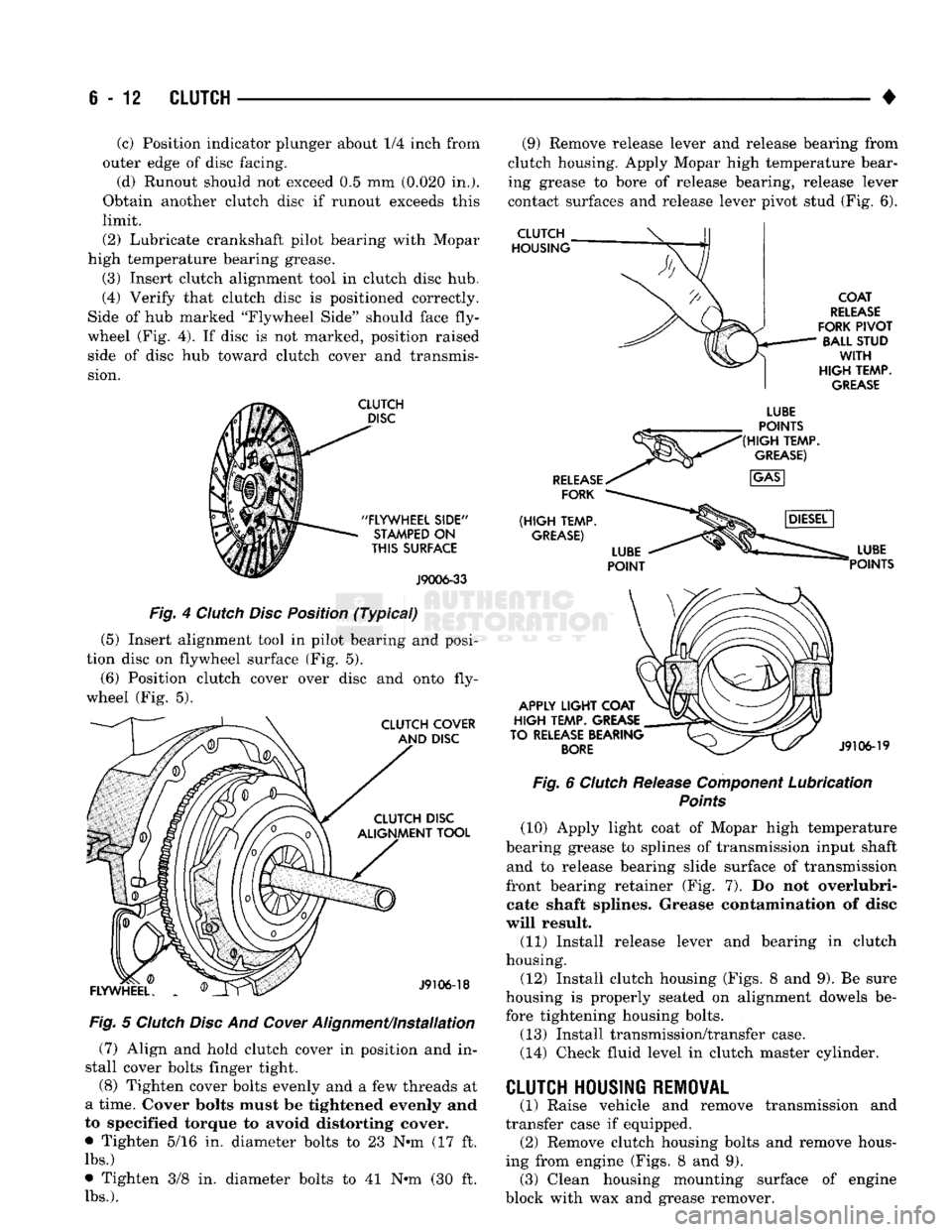
6-12
CLUTCH
(c) Position indicator plunger about 1/4 inch from
outer edge of disc facing.
(d) Runout should not exceed 0.5 mm (0.020 in.).
Obtain another clutch disc if runout exceeds this
limit.
(2) Lubricate crankshaft pilot bearing with Mopar
high temperature bearing grease.
(3) Insert clutch alignment tool in clutch disc hub,
(4) Verify that clutch disc is positioned correctly.
Side of hub marked "Flywheel Side" should face fly
wheel (Fig. 4). If disc is not marked, position raised side of disc hub toward clutch cover and transmis
sion.
CLUTCH
DISC
"FLYWHEEL
SIDE"
STAMPED
ON
THIS
SURFACE
J9006-33
Fig. 4 Clutch Disc Position (Typical)
(5) Insert alignment tool in pilot bearing and posi
tion disc on flywheel surface (Fig. 5).
(6) Position clutch cover over disc and onto fly
wheel (Fig. 5).
CLUTCH COVER AND DISC CLUTCH DISC
ALIGNMENT TOOL
FLYWHEEL.
J9106-18
Fig. 5 Clutch Disc And
Cower
Alignment/installation (7) Align and hold clutch cover in position and in
stall cover bolts finger tight.
(8) Tighten cover bolts evenly and a few threads at
a time. Cover bolts must be tightened evenly and
to specified torque to avoid distorting cover.
• Tighten 5/16 in. diameter bolts to 23 N-m (17 ft.
lbs.)
• Tighten 3/8 in. diameter bolts to 41 N-m (30 ft.
lbs.).
(9) Remove release lever and release bearing from
clutch housing. Apply Mopar high temperature bear
ing grease to bore of release bearing, release lever
contact surfaces and release lever pivot stud (Fig. 6).
CLUTCH
HOUSING
COAT
RELEASE
FORK
PIVOT
BALL STUD
WITH
HIGH
TEMP.
GREASE
RELEASE
FORK
(HIGH
TEMP.
GREASE)
LUBE
POINTS
(HIGH
TEMP.
GREASE)
APPLY
LIGHT
COAT
HIGH
TEMP. GREASE
TO RELEASE BEARING
BORE
LUBE
POINTS
J9106-19
Fig. 6 Clutch Release Component Lubrication
Points
(10) Apply light coat of Mopar high temperature
bearing grease to splines of transmission input shaft and to release bearing slide surface of transmission
front bearing retainer (Fig. 7). Do not overlubri- cate shaft splines. Grease contamination of disc
will result. (11) Install release lever and bearing in clutch
housing.
(12) Install clutch housing (Figs. 8 and 9). Be sure
housing is properly seated on alignment dowels be fore tightening housing bolts.
(13) Install transmission/transfer case.
(14) Check fluid level in clutch master cylinder. transmission and
CLUTCH HOUSING REMOVAL
(1) Raise vehicle and remove
transfer case if equipped. (2) Remove clutch housing bolts and remove hous
ing from engine (Figs. 8 and 9). (3) Clean housing mounting surface of engine
block with wax and grease remover.