engine FIAT 500 2018 Owner handbook (in English)
[x] Cancel search | Manufacturer: FIAT, Model Year: 2018, Model line: 500, Model: FIAT 500 2018Pages: 224, PDF Size: 3.89 MB
Page 53 of 224
51
FUEL CUT-OFF
SYSTEM 8)
This intervenes in the case of an
impact causing:
❒ the fuel supply cut-off with the
engine consequently switching off
❒ automatically unlocking the doors
❒ switching on of all interior lights.
The intervention of the system is
indicated by a message shown on the
display.
IMPORTANT Carefully check the car
for fuel leaks, for instance in the engine
compartment, under the car or near
the tank area.
After a collision, turn the ignition key to
the STOP position to avoid draining the
battery.
To reset car operation, follow this
procedure:
❒ turn the ignition key to MAR
❒ activate the right direction indicator
❒ deactivate the right direction
indicator
❒ activate the left direction indicator
❒ deactivate the left direction indicator
❒ activate the right direction indicator
❒ deactivate the right direction
indicator
❒ activate the left direction indicator
❒ deactivate the left direction indicator
❒ ignition key turned to the OFF
position
❒ turn the ignition key to MAR.PARKING SENSORS
18) 25
(for versions/markets, where provided)
Located in the rear bumper fig. 51
these detect and inform the driver,
through an intermittent acoustic signal,
of the presence of obstacles at the rear
of the car.
As the distance from the obstacle
behind the car decreases, the acoustic
alarm becomes more frequent. The
buzzer becomes continuous when the
distance separating the vehicle from
the obstacle is less than about 30 cm.
It remains constant if the distance
between the vehicle and the obstacle
is unchanged.
If this situation concerns the side
sensors, the signal will stop after
approximately 3 seconds to avoid, for
example, indications in the event of
manoeuvres along a wall.
If several obstacles are detected by the
sensors, only the nearest one is
considered.
Page 55 of 224
53
START&STOP
SYSTEM 19)
The Start&Stop device automatically
stops the engine each time the vehicle
is stationary and starts it again when
the driver wants to move off.
In this way, the vehicle efficiency is
increased, by reducing consumption,
dangerous gas emissions and sound
pollution.
OPERATING MODE
Stopping the engine
❒ With manual gearbox:with the
car stationary, the engine stops with
the gearbox in neutral and the
clutch pedal released.
❒ With Dualogic gearbox:the
engine stops if the vehicle is at a
standstill and the brake pedal is
pressed. This condition can be
maintained even if the brake pedal
is not depressed, if the gear lever is
in position N.
NOTE: The engine can only be
stopped automatically after exceeding
about 10 km/h, to prevent the engine
from being repeatedly stopped when
driving at walking pace.
❒ The warning light
Uon the
instrument panel indicates that the
engine has stopped, on some
versions this indication is given by
the display.
Restarting the engine
❒ with manual gearbox:press the
clutch pedal.
❒ With Dualogic gearbox:if the gear
lever is in position N, place it in any
other gear, otherwise release the
brake pedal or move the gear lever
to +, – or R.
MANUAL ACTIVATION
AND DEACTIVATION
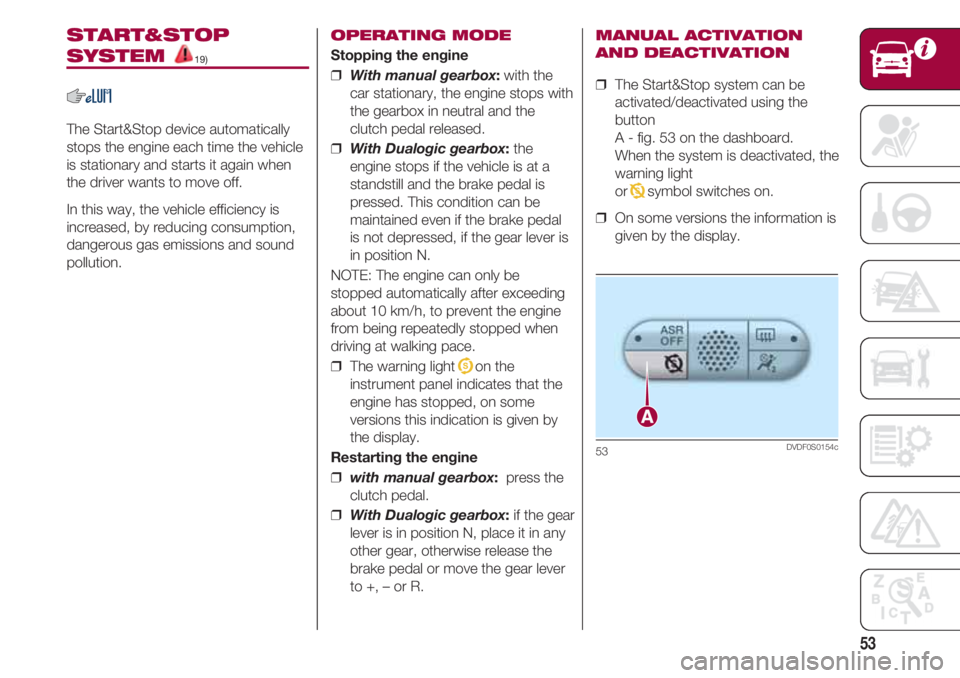
❒ The Start&Stop system can be
activated/deactivated using the
button
A - fig. 53 on the dashboard.
When the system is deactivated, the
warning light
or
Tsymbol switches on.
❒ On some versions the information is
given by the display.
53DVDF0S0154c
Page 56 of 224
KNOWING YOUR CAR
54
REFUELLING THE
VEHICLE
21) 29)
PETROL AND DIESEL
VERSIONS
fig. 54
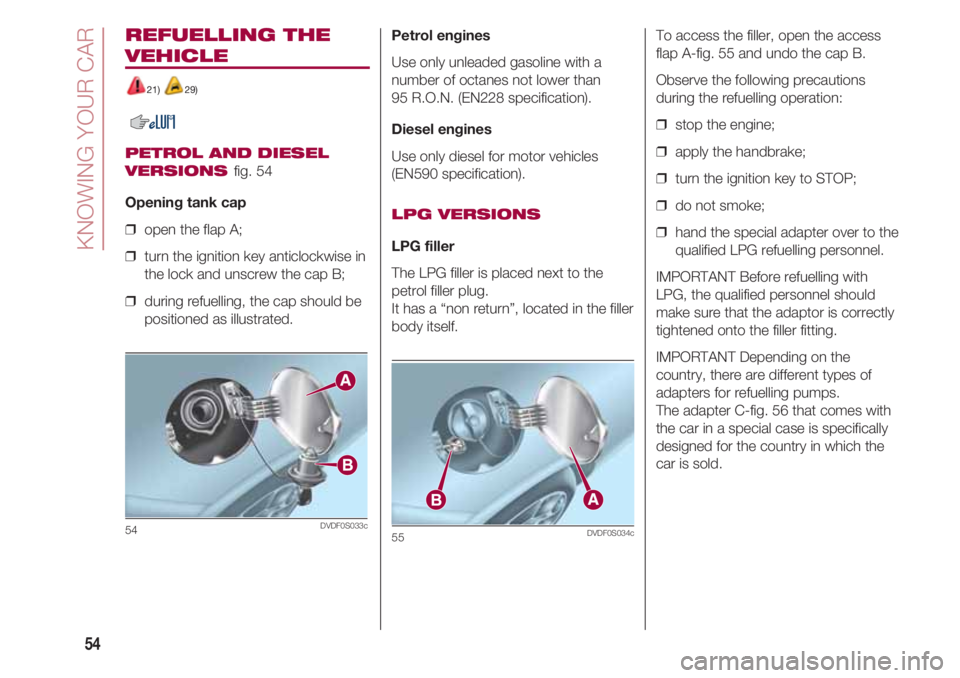
Opening tank cap
❒ open the flap A;
❒ turn the ignition key anticlockwise in
the lock and unscrew the cap B;
❒ during refuelling, the cap should be
positioned as illustrated.
54DVDF0S033c
Petrol engines
Use only unleaded gasoline with a
number of octanes not lower than
95 R.O.N. (EN228 specification).
Diesel engines
Use only diesel for motor vehicles
(EN590 specification).
LPG VERSIONS
LPG filler
The LPG filler is placed next to the
petrol filler plug.
It has a “non return”, located in the filler
body itself.
55DVDF0S034c
To access the filler, open the access
flap A-fig. 55 and undo the cap B.
Observe the following precautions
during the refuelling operation:
❒ stop the engine;
❒ apply the handbrake;
❒ turn the ignition key to STOP;
❒ do not smoke;
❒ hand the special adapter over to the
qualified LPG refuelling personnel.
IMPORTANT Before refuelling with
LPG, the qualified personnel should
make sure that the adaptor is correctly
tightened onto the filler fitting.
IMPORTANT Depending on the
country, there are different types of
adapters for refuelling pumps.
The adapter C-fig. 56 that comes with
the car in a special case is specifically
designed for the country in which the
car is sold.
Page 59 of 224
57
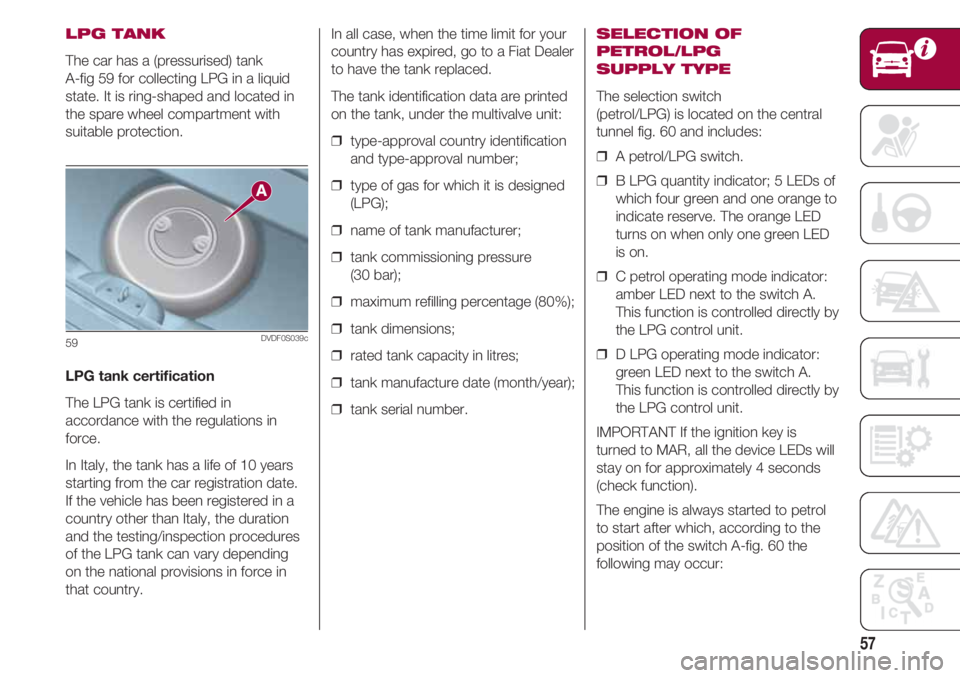
LPG TANK
The car has a (pressurised) tank
A-fig 59 for collecting LPG in a liquid
state. It is ring-shaped and located in
the spare wheel compartment with
suitable protection.
LPG tank certification
The LPG tank is certified in
accordance with the regulations in
force.
In Italy, the tank has a life of 10 years
starting from the car registration date.
If the vehicle has been registered in a
country other than Italy, the duration
and the testing/inspection procedures
of the LPG tank can vary depending
on the national provisions in force in
that country.
59DVDF0S039c
In all case, when the time limit for your
country has expired, go to a Fiat Dealer
to have the tank replaced.
The tank identification data are printed
on the tank, under the multivalve unit:
❒ type-approval country identification
and type-approval number;
❒ type of gas for which it is designed
(LPG);
❒ name of tank manufacturer;
❒ tank commissioning pressure
(30 bar);
❒ maximum refilling percentage (80%);
❒ tank dimensions;
❒ rated tank capacity in litres;
❒ tank manufacture date (month/year);
❒ tank serial number.SELECTION OF
PETROL/LPG
SUPPLY TYPE
The selection switch
(petrol/LPG) is located on the central
tunnel fig. 60 and includes:
❒ A petrol/LPG switch.
❒ B LPG quantity indicator; 5 LEDs of
which four green and one orange to
indicate reserve. The orange LED
turns on when only one green LED
is on.
❒ C petrol operating mode indicator:
amber LED next to the switch A.
This function is controlled directly by
the LPG control unit.
❒ D LPG operating mode indicator:
green LED next to the switch A.
This function is controlled directly by
the LPG control unit.
IMPORTANT If the ignition key is
turned to MAR, all the device LEDs will
stay on for approximately 4 seconds
(check function).
The engine is always started to petrol
to start after which, according to the
position of the switch A-fig. 60 the
following may occur:
Page 80 of 224
KNOWING YOUR CAR
78
Recording and transferring
trip data
The trip data can be stored in the
system memory and transferred using
a suitably configured USB memory
stick or by Uconnect™ LIVE app.
This allows you to display the history of
the collected data, showing the
complete analysis of the trip data and
of your driving style.
Further information is available at
www.driveuconnect.eu.
IMPORTANT Do not remove the USB
memory stick nor unpair the
smartphone and the Uconnect™ LIVE
App before the system has
downloaded the data, otherwise it
could be lost.
During the transfer of data to the
devices, messages may appear on the
radio display to guide the user
correctly through the operation; follow
these instructions. These messages
are only displayed with the ignition key
at STOP and when a delay in the
system switching off is set.
The data are automatically transferred
to the devices when the engine is
switched off. Transferred data will be
deleted from the system memory in
this manner. You can choose to store the trip data
or not, by pressing the “Settings”
button and by setting the storage
activation and the USB or Cloud
transfer mode.
REMARKS
When the USB memory stick is full, the
warning messages are shown on the
radio display.
When the eco:Drive™ data are not
transferred to USB memory stick for a
long time, the internal memory of the
Uconnect™ LIVE system may be
exhausted. Follow the instructions
given by the messages on the radio
display.
my:Car
my:Car allows you to keep the “health”
of your vehicle always under control.
my:Car can detect malfunction in real
time and inform the user about the
expiry of the servicing interval. Press
the “my:Car” button to interact with the
application.
The display will show a screen with the
“care:Index” section, which provides all
the detailed information about the
status of the vehicle. Press the “Active
warnings” button (if present) to showthe details of the vehicle’s faults which
caused a warning light to switch on.
The vehicle status can be seen both
on www.driveuconnect.eu or through
the Uconnect™ LIVE app.
Settings
Press the button on the front
panel to display the main “Settings”
menu.
NOTE The menu items displayed vary
according to the versions.
Indicatively, the menu is composed of
the following items:
❒ Display;
❒ Units;
❒ Voice commands;
❒ Clock & Date;
❒ Safety;
❒ Lights (for versions/markets, where
provided);
❒ Doors & Locks;
❒ Vehicle Off Options;
❒ Audio;
❒ Phone/ Bluetooth;
Page 83 of 224
81
NOTE Don’t disconnect the USB
device from the computer while map
downloading and copying is in
progress.
The map can now be installed on the
system.
Installing the map
After downloading a map to your USB
device, it can be installed on your
system.
IMPORTANT The map update MUST
be made with the vehicle engine
running and may require more than 30
minutes.
IMPORTANT Do not disconnect the
USB device during the map installation
process, otherwise installation will be
interrupted.
❒ Insert the USB device containing
the new map in the Uconnect™
system. The system detects a new
map on the USB device.
❒ Select “Start”.
Keep the device inserted.
Before updating the map, the system
indicates that this process may take
several minutes. Select “OK”.NOTE Do not remove the USB device
and do not disconnect the system’s
power supply before the update is
complete. The system cannot be used
until the update is completed correctly.
Start the system update again if it is
interrupted.
Once the map has been updated, the
following message is displayed.
❒ Click on “Close”.
The new map is now available on the
system.Troubleshooting
The following problems may occur
during the update:
❒ The map on the USB device is not
valid. In this case, download the
map to the USB device again, using
TomTom HOME.
It may be necessary to prepare the
USB device again.
❒ The version of the map on the USB
device is the same as or is a
previous version of the one already
on the system. In this case,
download the map to the USB
device again, using
TomTom HOME.
It may be necessary to prepare the
USB device again.
Page 98 of 224
KNOWING YOUR CAR
96
Exiting from the Apple CarPlay and
Android Auto apps
You can still access the contents of the
Uconnect™system with the CarPlay
app enabled by using the controls
available and viewable on its display.
To return to the Uconnect™system
contents with the Android Auto app
enabled, select the last item on the
Android Auto system bar and select
"Go back to Uconnect".
To end the Apple CarPlay or Android
Auto session, physically disconnect the
smartphone from the USB port.
SETTINGS
Press the “Settings” button on the
display to show the main “Settings”
menu.
NOTE The menu items displayed vary
according to the versions.
Indicatively, the menu is composed of
the following items:
❒ Language;
❒ Display;
❒ Units;
❒ Voice commands;
❒ Clock & Date;❒ Safety & Driving Assistance (for
versions/markets, where provided);
❒ Lights;
❒ Doors & Locks;
❒ Engine Off Options;
❒ Audio;
❒ Phone/Bluetooth®;
❒ Radio Setup;
❒ Restore default settings;
❒ Clear personal data.
NAVIGATION
(Uconnect™ 7” HD Nav
LIVE only)
Press the “Nav” button to show the
navigation map on the display.
NOTE: The navigation system volume
can only be adjusted during navigation
when the system provides voice
indications.
Main navigation menu
In the navigation view, tap the “Main
menu” button to open the menu:
❒ Select the “Search” graphic button
to search for an address, a place or
a point of interest, then plan a route
to the location.❒ Select the “Current route” to delete
or edit the planned route.
❒ You can use
“My places” to create a collection of
useful or preferred addresses. The
following items are always available
in “My locations”:
“Home” and “Recent destinations”.
❒ Select the “Parking” graphic button
to find car parks.
❒ Select the “Weather” or “Speed
Camera Warnings” graphic button
to receive information on the
weather to see the position of
speed cameras.
NOTE The “Weather” and “Speed
Camera Warnings” functions are only
active if TomTom Services are
activated. Otherwise, the button will
appear greyed out (and the function will
not be available).
❒ Select “Petrol Station” to find petrol
stations.
❒ Select the
“TomTom Services” graphic button
to view the activation state of the
following services (subscription
needed): “Traffic”, “Speed
cameras”, “Weather”, “Online
search”.
Page 101 of 224
99
MOPAR®CONNECT
(where provided)
These services let you keep your
vehicle under control at all times and
receive assistance in the event of
accident, theft or breakdown.
To have these services, install the
Mopar
®Connect Device on your
vehicle from the country (list available
on the www.driveuconnect.eu website)
and request activation by following the
instructions received at the email
address given when you picked up the
vehicle.
To use the connected services, you
must download the Uconnect™ LIVE
App or access the
www.driveuconnect.eu portal.
You can find all the details about the
services in the Mopar
®Connect
section of the www.driveuconnect.eu
portal.
PRIVACY MODE
Privacy mode lets you disable the
“Find car”, “Notify Area” and “Notify
Speed” services, which allow
registered customers to locate their
cars, for a fixed time.
IMPORTANT NOTE Vehicle position
tracing remains active for the
assistance services, where provided,
in the event of accident or vehicle
theft, but is not visible to the customer.
PRIVACY MODE
activation procedure
Proceed as follows:
❒ note down the current total mileage
(in km);
❒ make sure that the instrument
panel is off;
❒ Send the following text message to
+393424112613: “PRIVACY
(e.g.: PRIVACY
ZFA3340000P123456 12532).You can find the chassis number in the
registration document;
❒ before starting the engine, wait to
receive the text message
confirming that Privacy mode has
been activated and indicating when
it expires.
When you have received the
confirmation, you can start your trip in
the knowledge that the vehicle will not
be traced until the indicated expiry
time.
If it expires while you are still travelling,
Privacy mode will be extended until
you turn off the engine (instrument
panel off).
If you receive a text message
indicating that your request was not
successful, you must be aware that
the vehicle will continue to be visible to
the registered customer.
If you have any doubts or problems
during activation, consult the FAQ on
the www.driveuconnect.eu portal,
contact the Fiat Dealership or contact
Customer Care.
Page 121 of 224
119
ENGINE STARTING
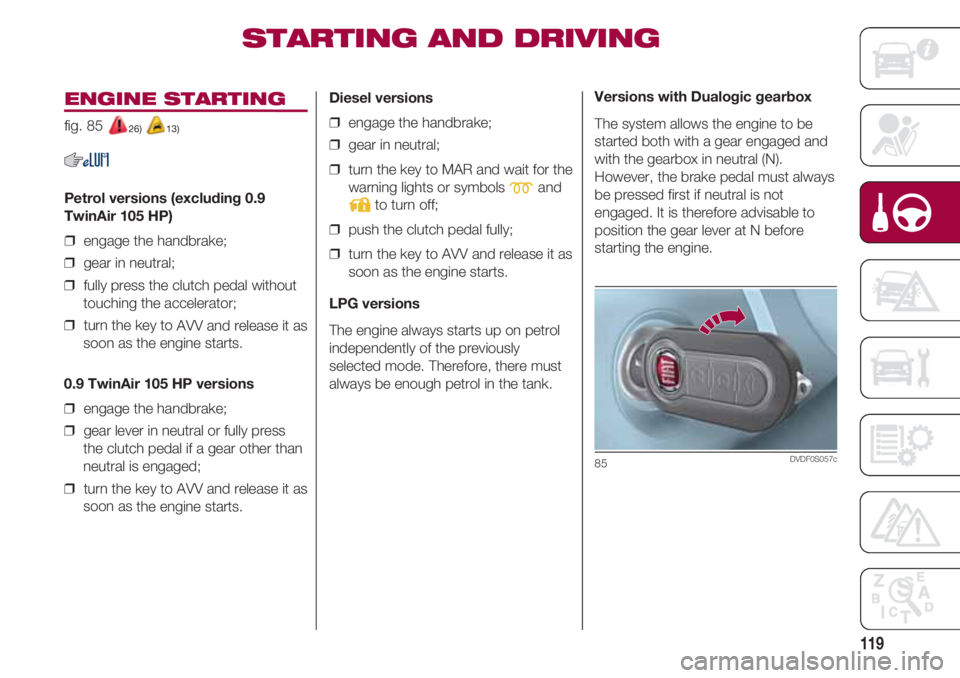
fig. 85 26) 13)
Petrol versions (excluding 0.9
TwinAir 105 HP)
❒ engage the handbrake;
❒ gear in neutral;
❒ fully press the clutch pedal without
touching the accelerator;
❒ turn the key to AVV and release it as
soon as the engine starts.
0.9 TwinAir 105 HP versions
❒ engage the handbrake;
❒ gear lever in neutral or fully press
the clutch pedal if a gear other than
neutral is engaged;
❒ turn the key to AVV and release it as
soon as the engine starts.
Diesel versions
❒ engage the handbrake;
❒ gear in neutral;
❒ turn the key to MAR and wait for the
warning lights or symbols
mand
to turn off;
❒ push the clutch pedal fully;
❒ turn the key to AVV and release it as
soon as the engine starts.
LPG versions
The engine always starts up on petrol
independently of the previously
selected mode. Therefore, there must
always be enough petrol in the tank.
STARTING AND DRIVING
Versions with Dualogic gearbox
The system allows the engine to be
started both with a gear engaged and
with the gearbox in neutral (N).
However, the brake pedal must always
be pressed first if neutral is not
engaged. It is therefore advisable to
position the gear lever at N before
starting the engine.
85DVDF0S057c
Page 122 of 224
STARTING AND DRIVING
120
PARKING THE
VEHICLE
When parking and leaving the car,
proceed as follows:
❒ engage a gear (1st gear if facing
uphill or reverse if facing downhill)
and leave the wheels turned;
❒ stop the engine and engage the
handbrake;
❒ always remove the key from the
starter switch.
Block the wheels with a wedge or a
stone if the car is parked on a steep
slope.
On versions equipped with automatic
transmission, wait for the letter P to be
displayed before releasing the brake
pedal.
IMPORTANT NEVER leave the car with
the gearbox in neutral (or, on versions
equipped with automatic transmission,
before putting the shift lever at P).
HANDBRAKE 27)
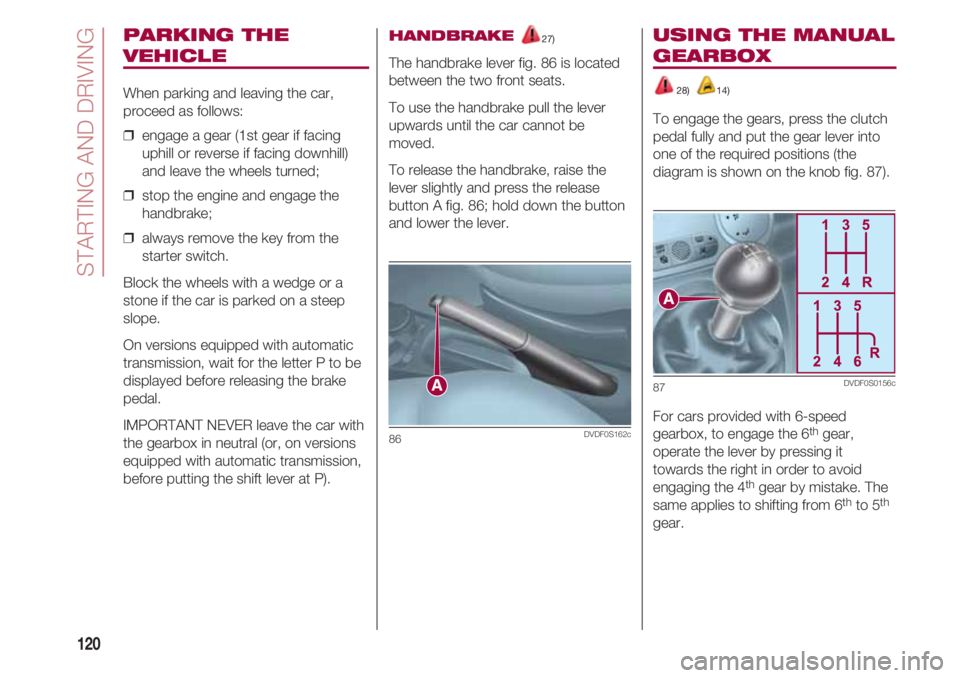
The handbrake lever fig. 86 is located
between the two front seats.
To use the handbrake pull the lever
upwards until the car cannot be
moved.
To release the handbrake, raise the
lever slightly and press the release
button A fig. 86; hold down the button
and lower the lever.
86DVDF0S162c
USING THE MANUAL
GEARBOX
28) 14)
To engage the gears, press the clutch
pedal fully and put the gear lever into
one of the required positions (the
diagram is shown on the knob fig. 87).
For cars provided with 6-speed
gearbox, to engage the 6
thgear,
operate the lever by pressing it
towards the right in order to avoid
engaging the 4
thgear by mistake. The
same applies to shifting from 6thto 5th
gear.
87DVDF0S0156c