versions FIAT PANDA 2009 169 / 2.G User Guide
[x] Cancel search | Manufacturer: FIAT, Model Year: 2009, Model line: PANDA, Model: FIAT PANDA 2009 169 / 2.GPages: 226, PDF Size: 5.29 MB
Page 19 of 226
18
KNOW YOUR
VEHICLE
SAFETY
CORRECT USE
OF THE CAR
WARNING LIGHTS
AND MESSAGES
IN
AN EMERGENCY
CAR
MAINTENANCE
TECHNICAL
SPECIFICATIONS
INDEX
F0I0142m
fig. 24
F0Z0152m
fig. 25
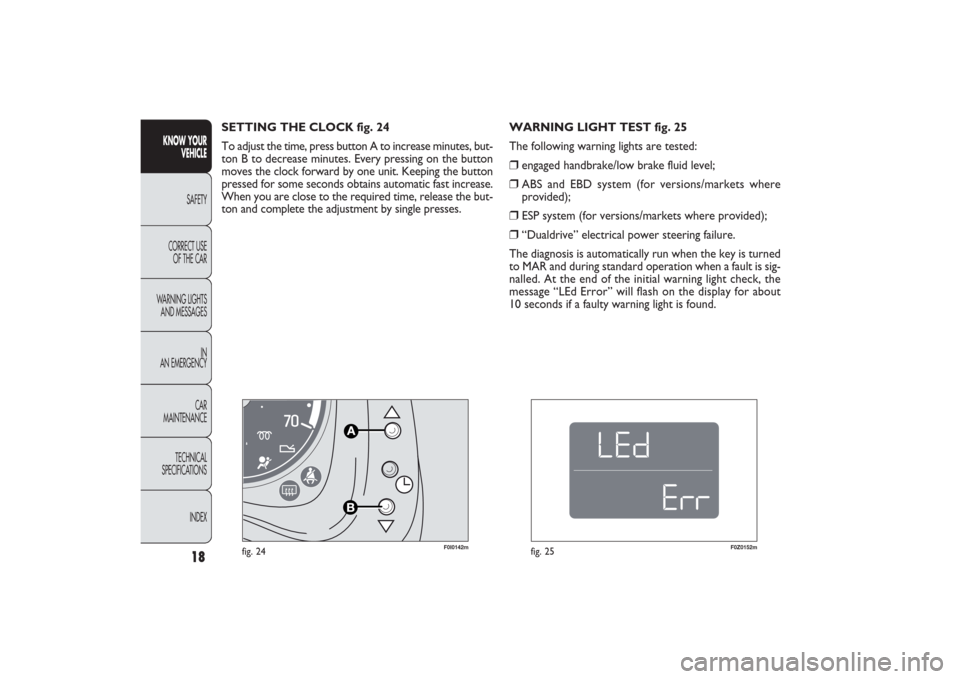
WARNING LIGHT TEST fig. 25
The following warning lights are tested:❒
engaged handbrake/low brake fluid level;
❒
ABS and EBD system (for versions/markets where
provided);
❒
ESP system (for versions/markets where provided);
❒
“Dualdrive” electrical power steering failure.
The diagnosis is automatically run when the key is turned
to MAR and during standard operation when a fault is sig-
nalled. At the end of the initial warning light check, the
message “LEd Error” will flash on the display for about
10 seconds if a faulty warning light is found. SETTING THE CLOCK fig. 24
To adjust the time, press button A to increase minutes, but-
ton B to decrease minutes. Every pressing on the button
moves the clock forward by one unit. Keeping the button
pressed for some seconds obtains automatic fast increase.
When you are close to the required time, release the but-
ton and complete the adjustment by single presses.
001-030 PANDA EN 7-10-2009 13:39 Pagina 18
Page 20 of 226
19KNOW YOUR
VEHICLESAFETY
CORRECT USE
OF THE CAR
WARNING LIGHTS
AND MESSAGES
IN
AN EMERGENCY
CAR
MAINTENANCE
TECHNICAL
SPECIFICATIONS
INDEX
F0Z0017m
fig. 26
F0Z0630m
fig. 27
NOTE When opening one of the front doors, the display
will turn on and show for a few seconds the clock and
the kilometres or miles covered.
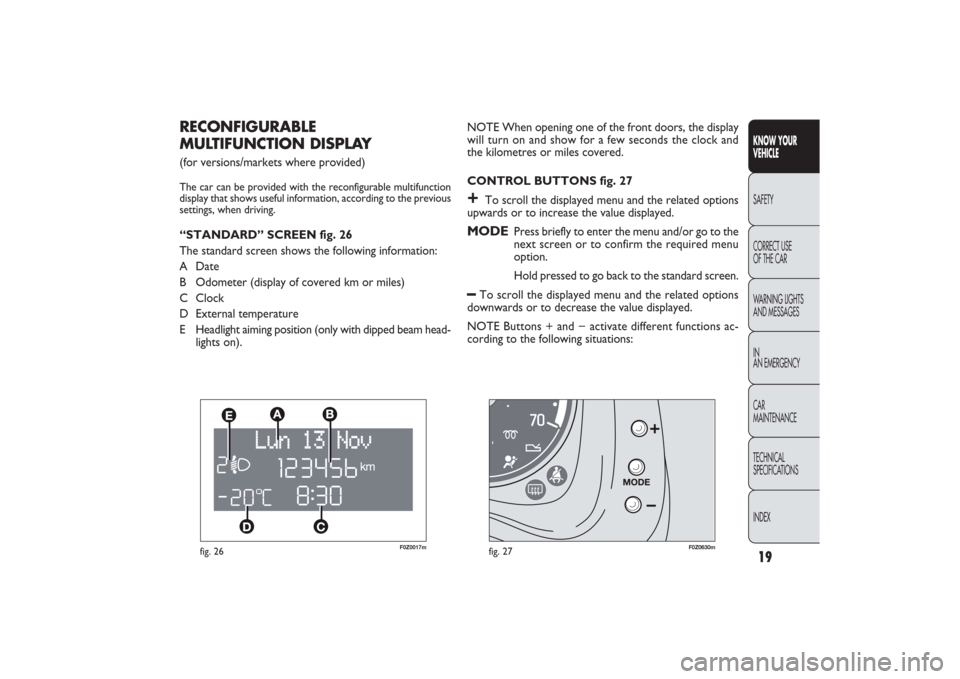
CONTROL BUTTONS fig. 27+
To scroll the displayed menu and the related options
upwards or to increase the value displayed.
MODE
Press briefly to enter the menu and/or go to the
next screen or to confirm the required menu
option.
Hold pressed to go back to the standard screen.
–
To scroll the displayed menu and the related options
downwards or to decrease the value displayed.
NOTE Buttons + and − activate different functions ac-
cording to the following situations:
RECONFIGURABLE
MULTIFUNCTION DISPLAY (for versions/markets where provided)The car can be provided with the reconfigurable multifunction
display that shows useful information, according to the previous
settings, when driving.“STANDARD” SCREEN fig. 26
The standard screen shows the following information:
A Date
B Odometer (display of covered km or miles)
C Clock
D External temperature
E Headlight aiming position (only with dipped beam head-
lights on).
001-030 PANDA EN 7-10-2009 13:39 Pagina 19
Page 27 of 226
26
KNOW YOUR
VEHICLE
SAFETY
CORRECT USE
OF THE CAR
WARNING LIGHTS
AND MESSAGES
IN
AN EMERGENCY
CAR
MAINTENANCE
TECHNICAL
SPECIFICATIONS
INDEX
Selecting the language (Language)
After setting, display messages can be shown in different
languages: Italian, German, English, Spanish, French, Por-
tuguese, Polish and Dutch.
To set the desired language, proceed as follows:
– briefly press the button MODE: the previously set “lan-
guage” will flash on the display;
– press the button + or − to select;
– briefly press the button MODE to go back to the menu
screen or press the button for a prolonged time to go back
to the standard screen without storing the settings.
Adjust the failure/warning buzzer volume
(Buzzer Volume)
With this function the volume of the buzzer which ac-
companies the display of any failure/warning can be ad-
justed according to 8 levels.
To set the desired volume, proceed as follows:
– briefly press the button MODE: the previously set
volume “level” will flash on the display;
– press the button + or − for setting;
– briefly press the button MODE to go back to the menu
screen or press the button for a prolonged time to go back
to the standard screen without storing the settings. – when accessing the “Consumption” submenu (for versions/
markets where provided): briefly press the button
MODE and the display will show “km/l”, “l/100km” or “mpg”
(depending on the previous setting);”
If the set distance unit is “km”, the fuel consumption unit
will be displayed in km/l or l/100km.
If the distance unit set is “mi” the fuel consumption unit
will be displayed in “mpg”.
– Press the button
+or − to select;
– When accessing the “Temperature” submenu: briefly press
the button MODE and the display will show “°C” or “°F”
(depending on the previous setting);
– Press the button +or − to select.
After setting, briefly press the button MODE to go back
to the submenu screen or press the button for a longer
time to go back to the main menu screen without stor-
ing settings.
– Press the button MODE again for a longer time to go
back to the standard screen or to the main menu according
to the current menu level displayed.
001-030 PANDA EN 7-10-2009 13:40 Pagina 26
Page 29 of 226
28
KNOW YOUR
VEHICLE
SAFETY
CORRECT USE
OF THE CAR
WARNING LIGHTS
AND MESSAGES
IN
AN EMERGENCY
CAR
MAINTENANCE
TECHNICAL
SPECIFICATIONS
INDEX
– Average consumption B (for versions/markets where
provided)
– Average speed B
– Trip time B (driving time).
NOTE “Trip B” function can be excluded (see paragraph
“Trip B on”). “‘Range to empty” cannot be reset.
Values displayed
Range (for versions/markets where provided)
This value shows the distance that the car can still cover
before needing fuel, assuming that driving conditions are
kept unvaried. The display will show the reading “----”
when the following events take place:
– range value lower than 50 km (or 30 mi)
– car parked with engine running for long.
Trip distance
This value shows the distance covered from the start of
the new mission.Average consumption (for versions/markets where provided)This value shows the average consumption from the start
of the new mission.Instant consumption (for versions/markets where provided)This indicates instant fuel consumption and it is constant-
ly updated. The display will show “----” if the car is parked
with the engine running.
TRIP COMPUTER (for versions/markets, where provided)
General features
The “Trip computer” is provided on cars fitted with mul-
tifunction display or reconfigurable multifunction display.
With ignition key at MAR, the “Trip computer” displays
information about the operating status of the car. This
function comprises the “General trip” concerning the
“complete mission” of the car (journey) and “Trip B”, (on-
ly available on reconfigurable multifunction display), con-
cerning the partial mission of the car; this function is in-
cluded in the general trip information (as shown in fig. 30).
Both functions can be reset (reset means start of a new
journey).
“General Trip” displays the figures relating to:
– Range to empty (for versions/markets, where provided)
– Trip distance
– Average consumption (for versions/markets where pro-
vided)
– Instant consumption (for versions/markets where pro-
vided)
– Average speed
– Trip time (driving time).
“Trip B”, available on the reconfigurable multifunction dis-
play only, shows only the figures relating to:
– Trip distance B
001-030 PANDA EN 7-10-2009 13:40 Pagina 28
Page 33 of 226
F0Z0031m
fig. 33
REAR SEATSTo tilt rear seats, refer to chapter “Extending the boot”.
32
KNOW YOUR
VEHICLE
SAFETY
CORRECT USE
OF THE CAR
WARNING LIGHTS
AND MESSAGES
IN
AN EMERGENCY
CAR
MAINTENANCE
TECHNICAL
SPECIFICATIONS
INDEX
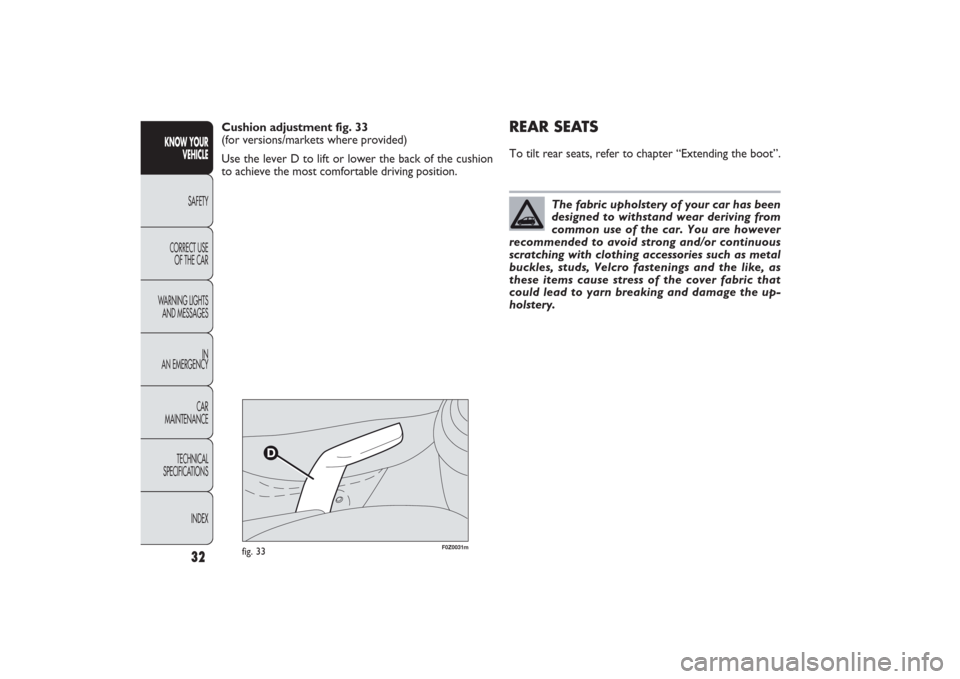
Cushion adjustment fig. 33
(for versions/markets where provided)
Use the lever D to lift or lower the back of the cushion
to achieve the most comfortable driving position.
The fabric upholstery of your car has been
designed to withstand wear deriving from
common use of the car. You are however
recommended to avoid strong and/or continuous
scratching with clothing accessories such as metal
buckles, studs, Velcro fastenings and the like, as
these items cause stress of the cover fabric that
could lead to yarn breaking and damage the up-
holstery.
031-064 PANDA EN 7-10-2009 13:43 Pagina 32
Page 34 of 226
33KNOW YOUR
VEHICLESAFETY
CORRECT USE
OF THE CAR
WARNING LIGHTS
AND MESSAGES
IN
AN EMERGENCY
CAR
MAINTENANCE
TECHNICAL
SPECIFICATIONS
INDEX
F0Z0033m
fig. 34
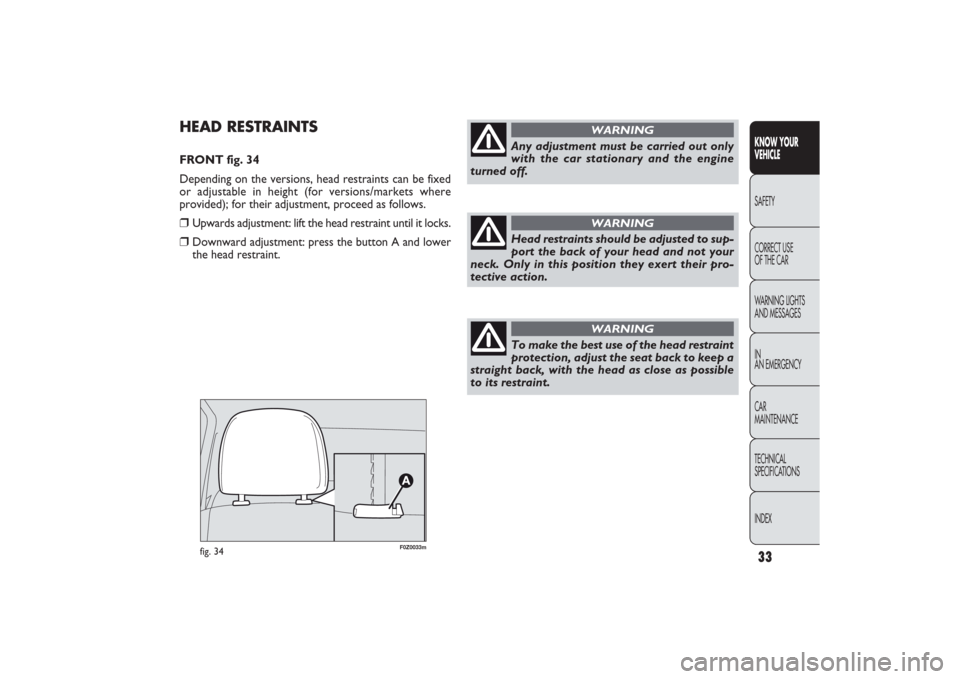
HEAD RESTRAINTSFRONT fig. 34
Depending on the versions, head restraints can be fixed
or adjustable in height (for versions/markets where
provided); for their adjustment, proceed as follows.❒
Upwards adjustment: lift the head restraint until it locks.
❒
Downward adjustment: press the button A and lower
the head restraint.
Any adjustment must be carried out only
with the car stationary and the engine
turned off.
WARNING
Head restraints should be adjusted to sup-
port the back of your head and not your
neck. Only in this position they exert their pro-
tective action.
WARNING
To make the best use of the head restraint
protection, adjust the seat back to keep a
straight back, with the head as close as possible
to its restraint.
WARNING
031-064 PANDA EN 7-10-2009 13:43 Pagina 33
Page 35 of 226
F0Z0034m
fig. 35
F0Z0061m
fig. 36
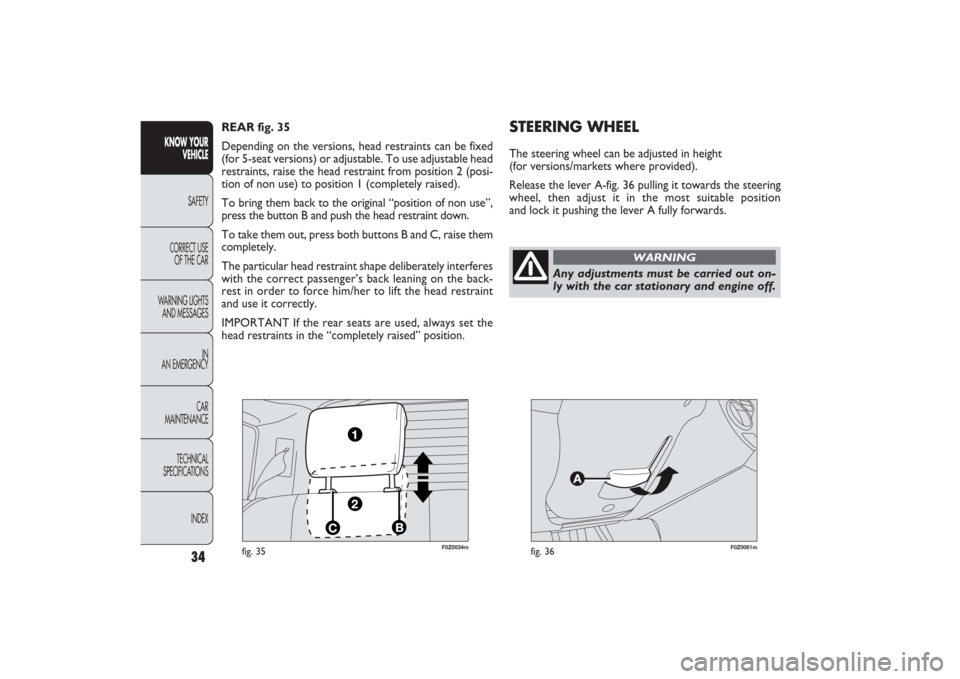
STEERING WHEELThe steering wheel can be adjusted in height
(for versions/markets where provided).
Release the lever A-fig. 36 pulling it towards the steering
wheel, then adjust it in the most suitable position
and lock it pushing the lever A fully forwards. REAR fig. 35
Depending on the versions, head restraints can be fixed
(for 5-seat versions) or adjustable. To use adjustable head
restraints, raise the head restraint from position 2 (posi-
tion of non use) to position 1 (completely raised).
To bring them back to the original “position of non use”,
press the button B and push the head restraint down.
To take them out, press both buttons B and C, raise them
completely.
The particular head restraint shape deliberately interferes
with the correct passenger’s back leaning on the back-
rest in order to force him/her to lift the head restraint
and use it correctly.
IMPORTANT If the rear seats are used, always set the
head restraints in the “completely raised” position.
34
KNOW YOUR
VEHICLE
SAFETY
CORRECT USE
OF THE CAR
WARNING LIGHTS
AND MESSAGES
IN
AN EMERGENCY
CAR
MAINTENANCE
TECHNICAL
SPECIFICATIONS
INDEX
Any adjustments must be carried out on-
ly with the car stationary and engine off.
WARNING
031-064 PANDA EN 7-10-2009 13:43 Pagina 34
Page 36 of 226
35KNOW YOUR
VEHICLESAFETY
CORRECT USE
OF THE CAR
WARNING LIGHTS
AND MESSAGES
IN
AN EMERGENCY
CAR
MAINTENANCE
TECHNICAL
SPECIFICATIONS
INDEX
F0Z0036m
fig. 37
F0Z0744m
fig. 38
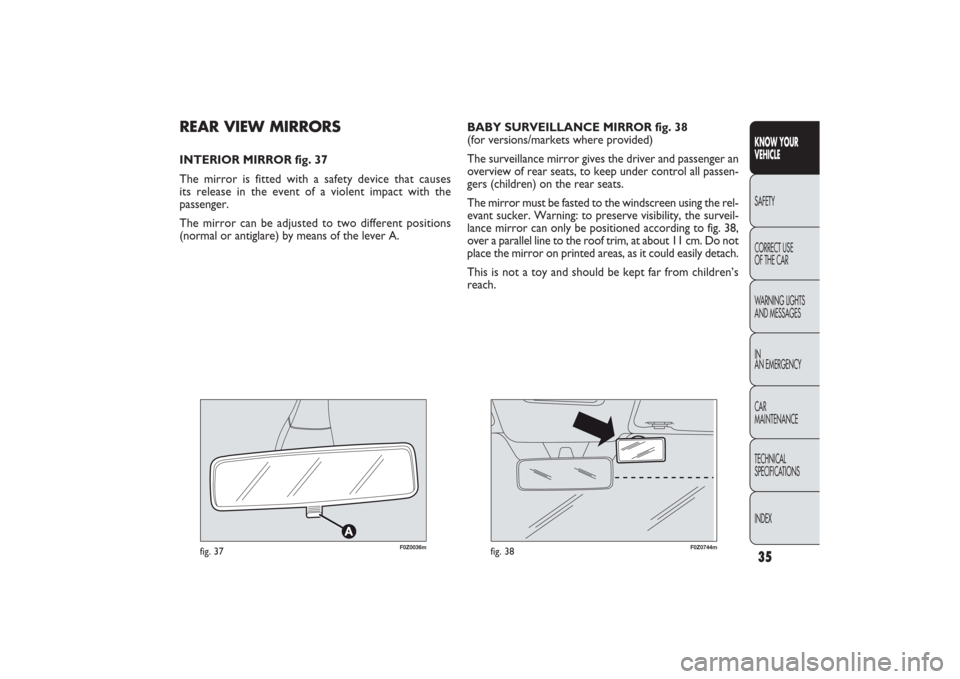
REAR VIEW MIRRORSINTERIOR MIRROR fig. 37
The mirror is fitted with a safety device that causes
its release in the event of a violent impact with the
passenger.
The mirror can be adjusted to two different positions
(normal or antiglare) by means of the lever A.BABY SURVEILLANCE MIRROR fig. 38
(for versions/markets where provided)
The surveillance mirror gives the driver and passenger an
overview of rear seats, to keep under control all passen-
gers (children) on the rear seats.
The mirror must be fasted to the windscreen using the rel-
evant sucker. Warning: to preserve visibility, the surveil-
lance mirror can only be positioned according to fig. 38,
over a parallel line to the roof trim, at about 11 cm. Do not
place the mirror on printed areas, as it could easily detach.
This is not a toy and should be kept far from children’s
reach.
031-064 PANDA EN 7-10-2009 13:43 Pagina 35
Page 37 of 226
F0Z0039m
fig. 40
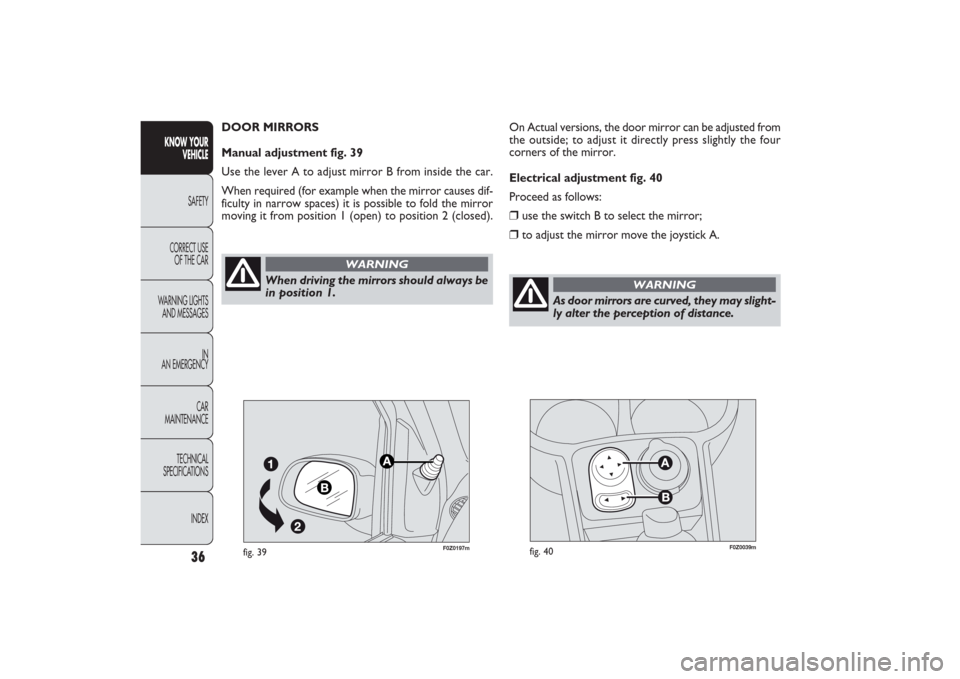
On Actual versions, the door mirror can be adjusted from
the outside; to adjust it directly press slightly the four
corners of the mirror.
Electrical adjustment fig. 40
Proceed as follows:❒
use the switch B to select the mirror;
❒
to adjust the mirror move the joystick A.
36
KNOW YOUR
VEHICLE
SAFETY
CORRECT USE
OF THE CAR
WARNING LIGHTS
AND MESSAGES
IN
AN EMERGENCY
CAR
MAINTENANCE
TECHNICAL
SPECIFICATIONS
INDEX
As door mirrors are curved, they may slight-
ly alter the perception of distance.
WARNING
F0Z0197m
fig. 39
When driving the mirrors should always be
in position 1.
WARNING
DOOR MIRRORS
Manual adjustment fig. 39
Use the lever A to adjust mirror B from inside the car.
When required (for example when the mirror causes dif-
ficulty in narrow spaces) it is possible to fold the mirror
moving it from position 1 (open) to position 2 (closed).
031-064 PANDA EN 7-10-2009 13:43 Pagina 36
Page 42 of 226
41KNOW YOUR
VEHICLESAFETY
CORRECT USE
OF THE CAR
WARNING LIGHTS
AND MESSAGES
IN
AN EMERGENCY
CAR
MAINTENANCE
TECHNICAL
SPECIFICATIONS
INDEX
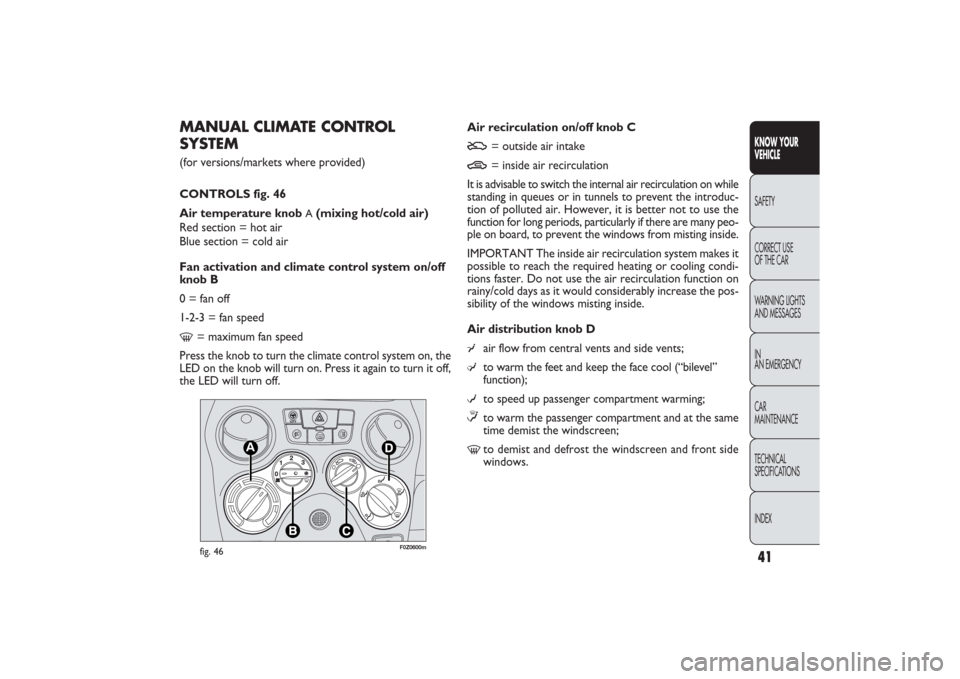
Air recirculation on/off knob CU
= outside air intake
T
= inside air recirculation
It is advisable to switch the internal air recirculation on while
standing in queues or in tunnels to prevent the introduc-
tion of polluted air. However, it is better not to use the
function for long periods, particularly if there are many peo-
ple on board, to prevent the windows from misting inside.
IMPORTANT The inside air recirculation system makes it
possible to reach the required heating or cooling condi-
tions faster. Do not use the air recirculation function on
rainy/cold days as it would considerably increase the pos-
sibility of the windows misting inside.
Air distribution knob D
¥
air flow from central vents and side vents;
μ
to warm the feet and keep the face cool (“bilevel”
function);
w
to speed up passenger compartment warming;
≤to warm the passenger compartment and at the same
time demist the windscreen;
-
to demist and defrost the windscreen and front side
windows.
MANUAL CLIMATE CONTROL
SYSTEM(for versions/markets where provided)
CONTROLS fig. 46
Air temperature knob
A(mixing hot/cold air)
Red section = hot air
Blue section = cold air
Fan activation and climate control system on/off
knob B
0 = fan off
1-2-3 = fan speed
-
= maximum fan speed
Press the knob to turn the climate control system on, the
LED on the knob will turn on. Press it again to turn it off,
the LED will turn off.
F0Z0600m
fig. 46
031-064 PANDA EN 7-10-2009 13:43 Pagina 41