brake FORD FESTIVA 1991 Workshop Manual
[x] Cancel search | Manufacturer: FORD, Model Year: 1991, Model line: FESTIVA, Model: FORD FESTIVA 1991Pages: 454, PDF Size: 9.53 MB
Page 243 of 454
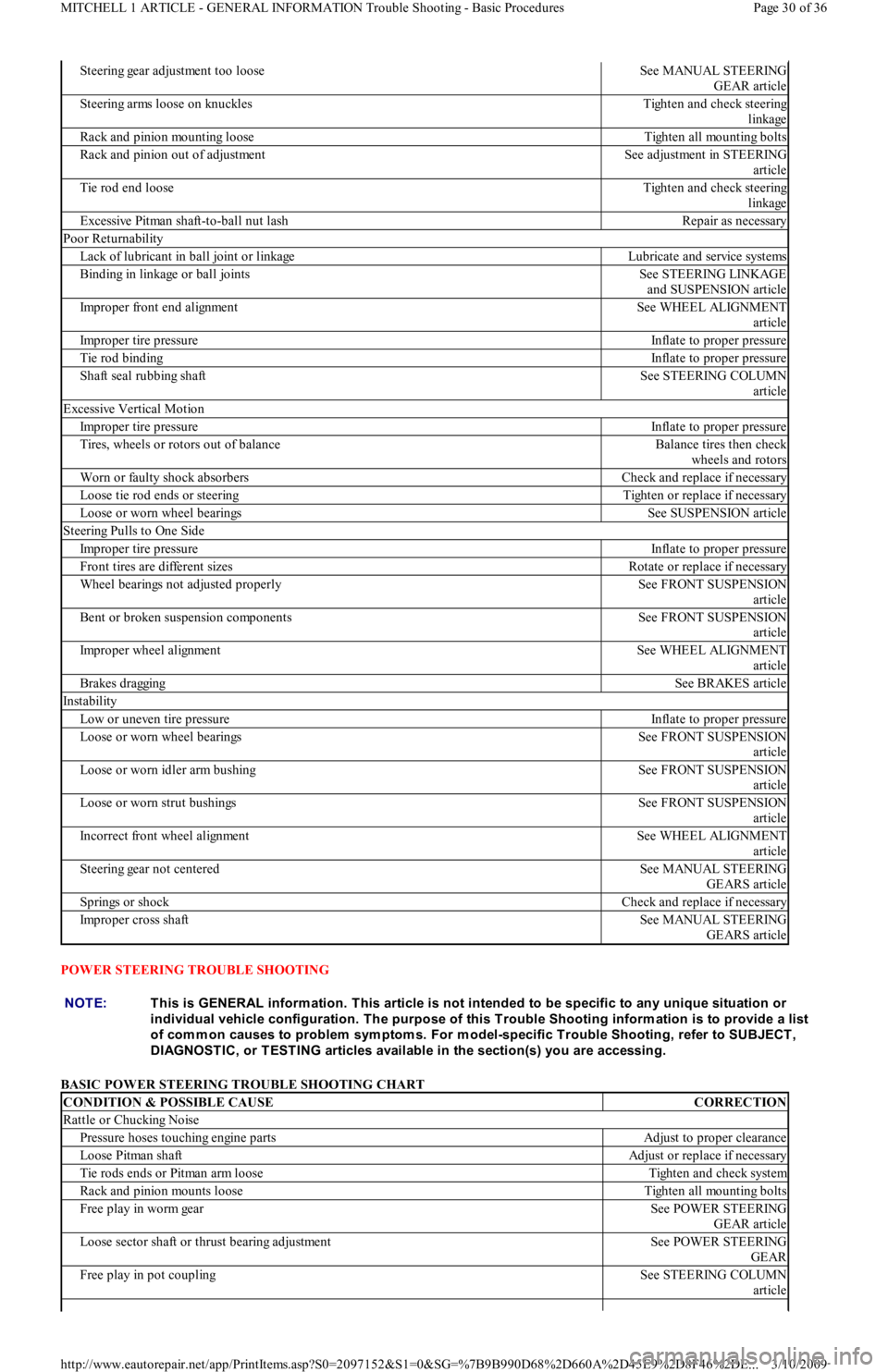
POWER STEERING TROUBLE SHOOTING
BASIC POWER STEERING TROUBLE SHOOTING CHART
Steering gear adjustment too looseSee MANUAL STEERING
GEAR article
Steering arms loose on knucklesTighten and check steering
linkage
Rack and pinion mounting looseTighten all mounting bolts
Rack and pinion out of adjustmentSee adjustment in STEERING
article
Tie rod end looseTighten and check steering
linkage
Excessive Pitman shaft-to-ball nut lashRepair as necessary
Poor Returnability
Lack of lubricant in ball joint or linkageLubricate and service systems
Binding in linkage or ball jointsSee STEERING LINKAGE
and SUSPENSION article
Improper front end alignmentSee WHEEL ALIGNMENT
article
Improper tire pressureInflate to proper pressure
Tie rod bindingInflate to proper pressure
Shaft seal rubbing shaftSee STEERING COLUMN
article
Excessive Vertical Motion
Improper tire pressureInflate to proper pressure
Tires, wheels or rotors out of balanceBalance tires then check
wheels and rotors
Worn or faulty shock absorbersCheck and replace if necessary
Loose tie rod ends or steeringTighten or replace if necessary
Loose or worn wheel bearingsSee SUSPENSION article
Steering Pulls to One Side
Improper tire pressureInflate to proper pressure
Front tires are different sizesRotate or replace if necessary
Wheel bearings not adjusted properlySee FRONT SUSPENSION
article
Bent or broken suspension componentsSee FRONT SUSPENSION
article
Improper wheel alignmentSee WHEEL ALIGNMENT
article
Brakes draggingSee BRAKES article
Instability
Low or uneven tire pressureInflate to proper pressure
Loose or worn wheel bearingsSee FRONT SUSPENSION
article
Loose or worn idler arm bushingSee FRONT SUSPENSION
article
Loose or worn strut bushingsSee FRONT SUSPENSION
article
Incorrect front wheel alignmentSee WHEEL ALIGNMENT
article
Steering gear not centeredSee MANUAL STEERING
GEARS article
Springs or shockCheck and replace if necessary
Improper cross shaftSee MANUAL STEERING
GEARS article
NOTE:This is GENERAL inform ation. This article is not intended to be specific to any unique situation or
individual vehicle configuration. T he purpose of this T rouble Shooting inform ation is to provide a list
of com m on causes to problem sym ptom s. For m odel-specific T rouble Shooting, refer to SUBJECT ,
DIAGNOST IC, or T EST ING articles available in the section(s) you are accessing.
CONDITION & POSSIBLE CAUSECORRECTION
Rattle or Chucking Noise
Pressure hoses touching engine partsAdjust to proper clearance
Loose Pitman shaftAdjust or replace if necessary
Tie rods ends or Pitman arm looseTighten and check system
Rack and pinion mounts looseTighten all mounting bolts
Free play in worm gearSee POWER STEERING
GEAR article
Loose sector shaft or thrust bearing adjustmentSee POWER STEERING
GEAR
Free play in pot couplingSee STEERING COLUMN
article
Page 30 of 36 MITCHELL 1 ARTICLE - GENERAL INFORMATION Trouble Shooting - Basic Procedures
3/10/2009 http://www.eautorepair.net/app/PrintItems.asp?S0=2097152&S1=0&SG=%7B9B990D68%2D660A%2D45E9%2D8F46%2DE
...
Page 248 of 454
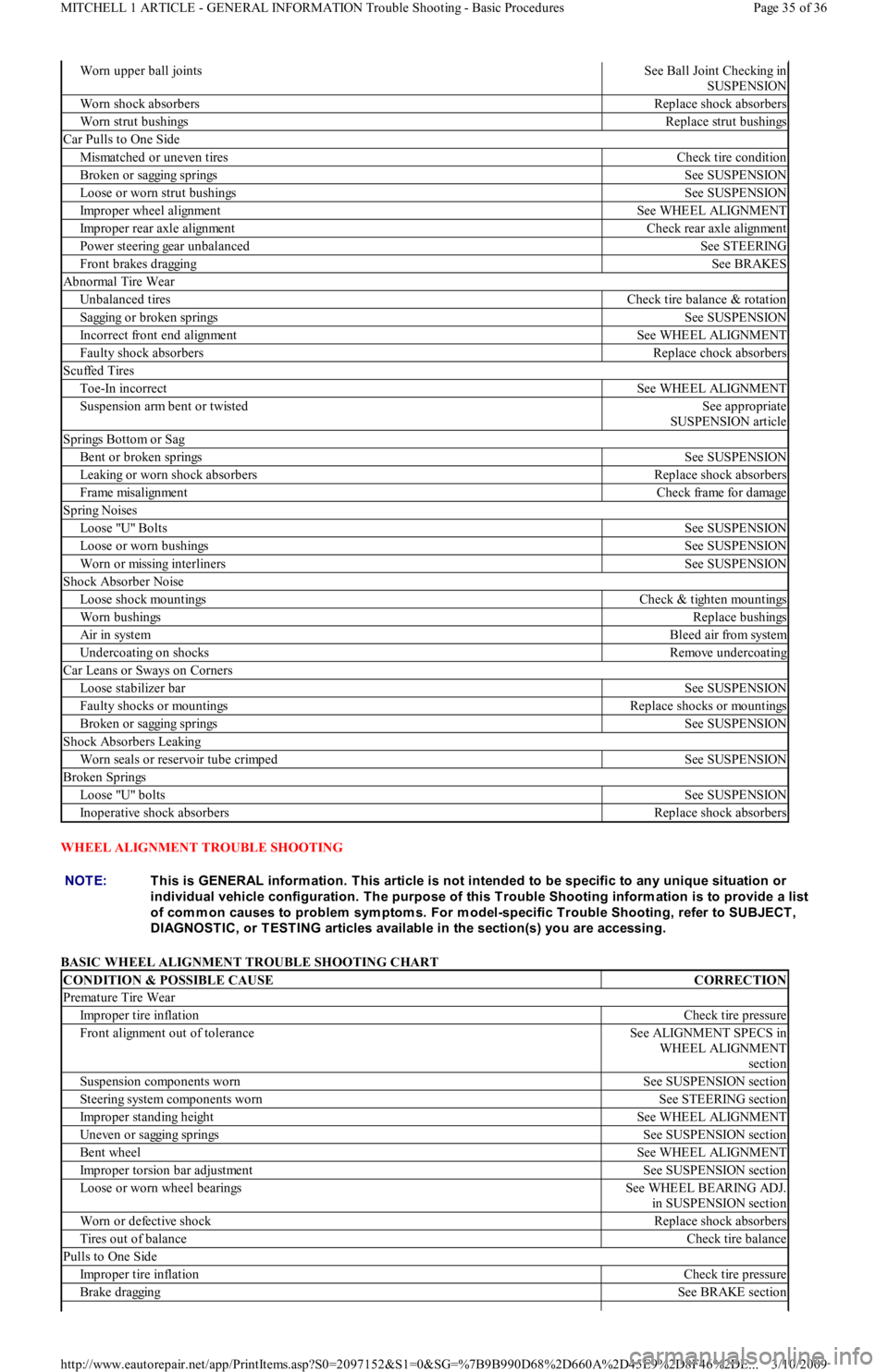
WHEEL ALIGNMENT TROUBLE SHOOTING
BASIC WHEEL ALIGNMENT TROUBLE SHOOTING CHART
Worn upper ball jointsSee Ball Joint Checking in
SUSPENSION
Worn shock absorbersReplace shock absorbers
Worn strut bushingsReplace strut bushings
Car Pulls to One Side
Mismatched or uneven tiresCheck tire condition
Broken or sagging springsSee SUSPENSION
Loose or worn strut bushingsSee SUSPENSION
Improper wheel alignmentSee WHEEL ALIGNMENT
Improper rear axle alignmentCheck rear axle alignment
Power steering gear unbalancedSee STEERING
Front brakes draggingSee BRAKES
Abnormal Tire Wear
Unbalanced tiresCheck tire balance & rotation
Sagging or broken springsSee SUSPENSION
Incorrect front end alignmentSee WHEEL ALIGNMENT
Faulty shock absorbersReplace chock absorbers
Scuffed Tires
Toe-In incorrectSee WHEEL ALIGNMENT
Suspension arm bent or twistedSee appropriate
SUSPENSION article
Springs Bottom or Sag
Bent or broken springsSee SUSPENSION
Leaking or worn shock absorbersReplace shock absorbers
Frame misalignmentCheck frame for damage
Spring Noises
Lo o se "U" Bo l t sSee SUSPENSION
Loose or worn bushingsSee SUSPENSION
Worn or missing interlinersSee SUSPENSION
Shock Absorber Noise
Loose shock mountingsCheck & tighten mountings
Worn bushingsReplace bushings
Air in systemBleed air from system
Undercoating on shocksRemove undercoating
Car Leans or Sways on Corners
Loose stabilizer barSee SUSPENSION
Faulty shocks or mountingsReplace shocks or mountings
Broken or sagging springsSee SUSPENSION
Shock Absorbers Leaking
Worn seals or reservoir tube crimpedSee SUSPENSION
Broken Springs
Lo o se "U" b o l t sSee SUSPENSION
Inoperative shock absorbersReplace shock absorbers
NOTE:This is GENERAL inform ation. This article is not intended to be specific to any unique situation or
individual vehicle configuration. T he purpose of this T rouble Shooting inform ation is to provide a list
of com m on causes to problem sym ptom s. For m odel-specific T rouble Shooting, refer to SUBJECT ,
DIAGNOST IC, or T EST ING articles available in the section(s) you are accessing.
CONDITION & POSSIBLE CAUSECORRECTION
Premature Tire Wear
Improper tire inflationCheck tire pressure
Front alignment out of toleranceSee ALIGNMENT SPECS in
WHEEL ALIGNMENT
section
Suspension components wornSee SUSPENSION section
Steering system components wornSee STEERING section
Improper standing heightSee WHEEL ALIGNMENT
Uneven or sagging springsSee SUSPENSION section
Bent wheelSee WHEEL ALIGNMENT
Improper torsion bar adjustmentSee SUSPENSION section
Loose or worn wheel bearingsSee WHEEL BEARING ADJ.
in SUSPENSION section
Worn or defective shockReplace shock absorbers
Tires out of balanceCheck tire balance
Pulls to One Side
Improper tire inflationCheck tire pressure
Brake draggingSee BRAKE section
Page 35 of 36 MITCHELL 1 ARTICLE - GENERAL INFORMATION Trouble Shooting - Basic Procedures
3/10/2009 http://www.eautorepair.net/app/PrintItems.asp?S0=2097152&S1=0&SG=%7B9B990D68%2D660A%2D45E9%2D8F46%2DE
...
Page 252 of 454
Back To Article
GENERAL INFORMATION
Com puter Relearn Procedures
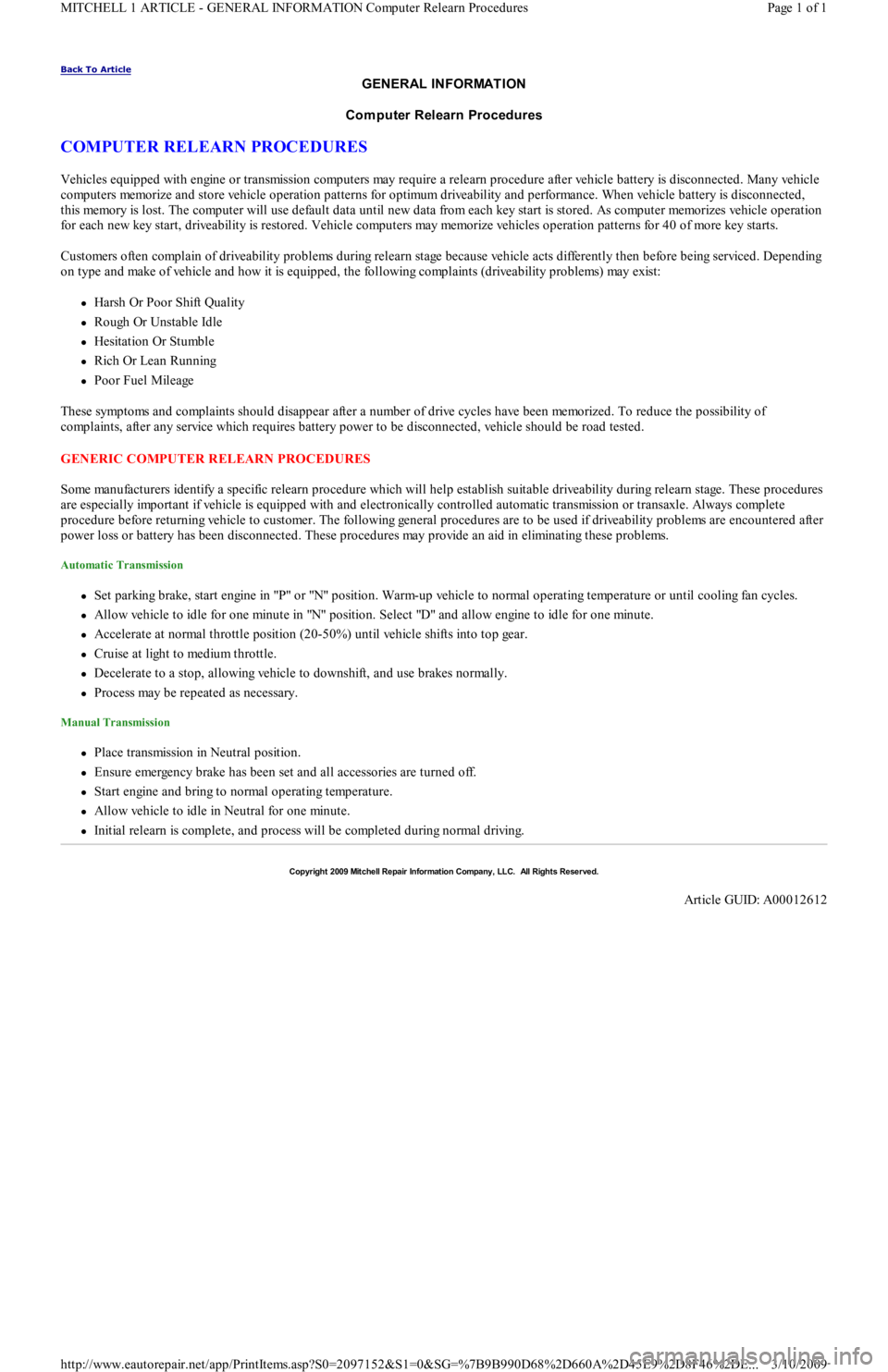
COMPUTER RELEARN PROCEDURES
Vehicles equipped with engine or transmission computers may require a relearn procedure after vehicle battery is disconnected. Many vehicle
computers memorize and store vehicle operation patterns for optimum driveability and performance. When vehicle battery is disconnected,
this memory is lost. The computer will use default data until new data from each key start is stored. As computer memorizes vehicle operation
for each new key start, driveability is restored. Vehicle computers may memorize vehicles operation patterns for 40 of more key starts.
Customers often complain of driveability problems during relearn stage because vehicle acts differently then before being serviced. Depending
on type and make of vehicle and how it is equipped, the following complaints (driveability problems) may exist:
Harsh Or Poor Shift Quality
Rough Or Unstable Idle
Hesitation Or Stumble
Rich Or Lean Running
Poor Fuel Mileage
These symptoms and complaints should disappear after a number of drive cycles have been memorized. To reduce the possibility of
complaints, after any service which requires battery power to be disconnected, vehicle should be road tested.
GENERIC COMPUTER RELEARN PROCEDURES
Some manufacturers identify a specific relearn procedure which will help establish suitable driveability during relearn stage. These procedures
are especially important if vehicle is equipped with and electronically controlled automatic transmission or transaxle. Always complete
procedure before returning vehicle to customer. The following general procedures are to be used if driveability problems are encountered after
power loss or battery has been disconnected. These procedures may provide an aid in eliminating these problems.
Automatic Transmission
Set parking brake, start engine in "P" or "N" position. Warm-up vehicle to normal operating temperature or until cooling fan cycles.
Allow vehicle to idle for one minute in "N" position. Select "D" and allow engine to idle for one minute.
Accelerate at normal throttle position (20-50%) until vehicle shifts into top gear.
Cruise at light to medium throttle.
Decelerate to a stop, allowing vehicle to downshift, and use brakes normally.
Process may be repeated as necessary.
Manual Transmission
Place transmission in Neutral position.
Ensure emergency brake has been set and all accessories are turned off.
Start engine and bring to normal operating temperature.
Allow vehicle to idle in Neutral for one minute.
Initial relearn is complete, and process will be completed during normal driving.
Copyr ight 2009 Mitchell Repair Information Company, LLC. All Rights Reserved.
Article GUID: A00012612
Page 1 of 1 MITCHELL 1 ARTICLE - GENERAL INFORMATION Computer Relearn Procedures
3/10/2009 http://www.eautorepair.net/app/PrintItems.asp?S0=2097152&S1=0&SG=%7B9B990D68%2D660A%2D45E9%2D8F46%2DE
...
Page 255 of 454
Back To Article
GENERAL INFORMATION
Gear T ooth Contact Patterns
* PLEASE READ THIS FIRST *
INSPECTION
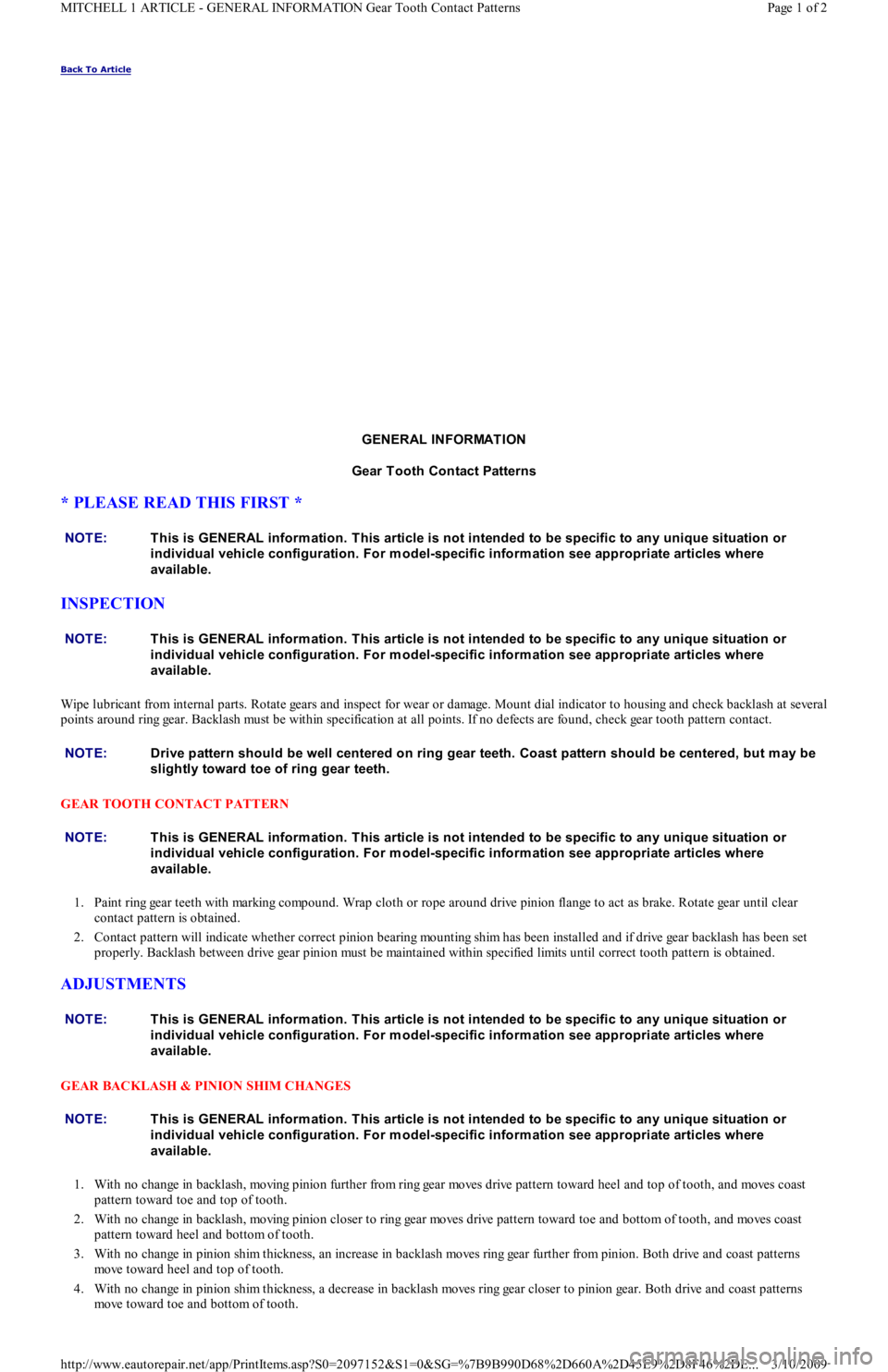
Wipe lubricant from internal parts. Rotate gears and inspect for wear or damage. Mount dial indicator to housing and check backlash at several
points around ring gear. Backlash must be within specification at all points. If no defects are found, check gear tooth pattern contact.
GEAR TOOTH CONTACT PATTERN
1. Paint ring gear teeth with marking compound. Wrap cloth or rope around drive pinion flange to act as brake. Rotate gear until clear
contact pattern is obtained.
2. Contact pattern will indicate whether correct pinion bearing mounting shim has been installed and if drive gear backlash has been set
properly. Backlash between drive gear pinion must be maintained within specified limits until correct tooth pattern is obtained.
ADJUSTMENTS
GEAR BACKLASH & PINION SHIM CHANGES
1. With no change in backlash, moving pinion further from ring gear moves drive pattern toward heel and top of tooth, and moves coast
pattern toward toe and top of tooth.
2. With no change in backlash, moving pinion closer to ring gear moves drive pattern toward toe and bottom of tooth, and moves coast
pattern toward heel and bottom of tooth.
3. With no change in pinion shim thickness, an increase in backlash moves ring gear further from pinion. Both drive and coast patterns
move toward heel and top of tooth.
4. With no change in pinion shim thickness, a decrease in backlash moves ring gear closer to pinion gear. Both drive and coast patterns
move toward toe and bottom of tooth. NOTE:This is GENERAL inform ation. This article is not intended to be specific to any unique situation or
individual vehicle configuration. For m odel-specific inform ation see appropriate articles where
available.
NOTE:This is GENERAL inform ation. This article is not intended to be specific to any unique situation or
individual vehicle configuration. For m odel-specific inform ation see appropriate articles where
available.
NOTE:Drive pattern should be well centered on ring gear teeth. Coast pattern should be centered, but m ay be
slightly toward toe of ring gear teeth.
NOTE:This is GENERAL inform ation. This article is not intended to be specific to any unique situation or
individual vehicle configuration. For m odel-specific inform ation see appropriate articles where
available.
NOTE:This is GENERAL inform ation. This article is not intended to be specific to any unique situation or
individual vehicle configuration. For m odel-specific inform ation see appropriate articles where
available.
NOTE:This is GENERAL inform ation. This article is not intended to be specific to any unique situation or
individual vehicle configuration. For m odel-specific inform ation see appropriate articles where
available.
Page 1 of 2 MITCHELL 1 ARTICLE - GENERAL INFORMATION Gear Tooth Contact Patterns
3/10/2009 http://www.eautorepair.net/app/PrintItems.asp?S0=2097152&S1=0&SG=%7B9B990D68%2D660A%2D45E9%2D8F46%2DE
...
Page 346 of 454
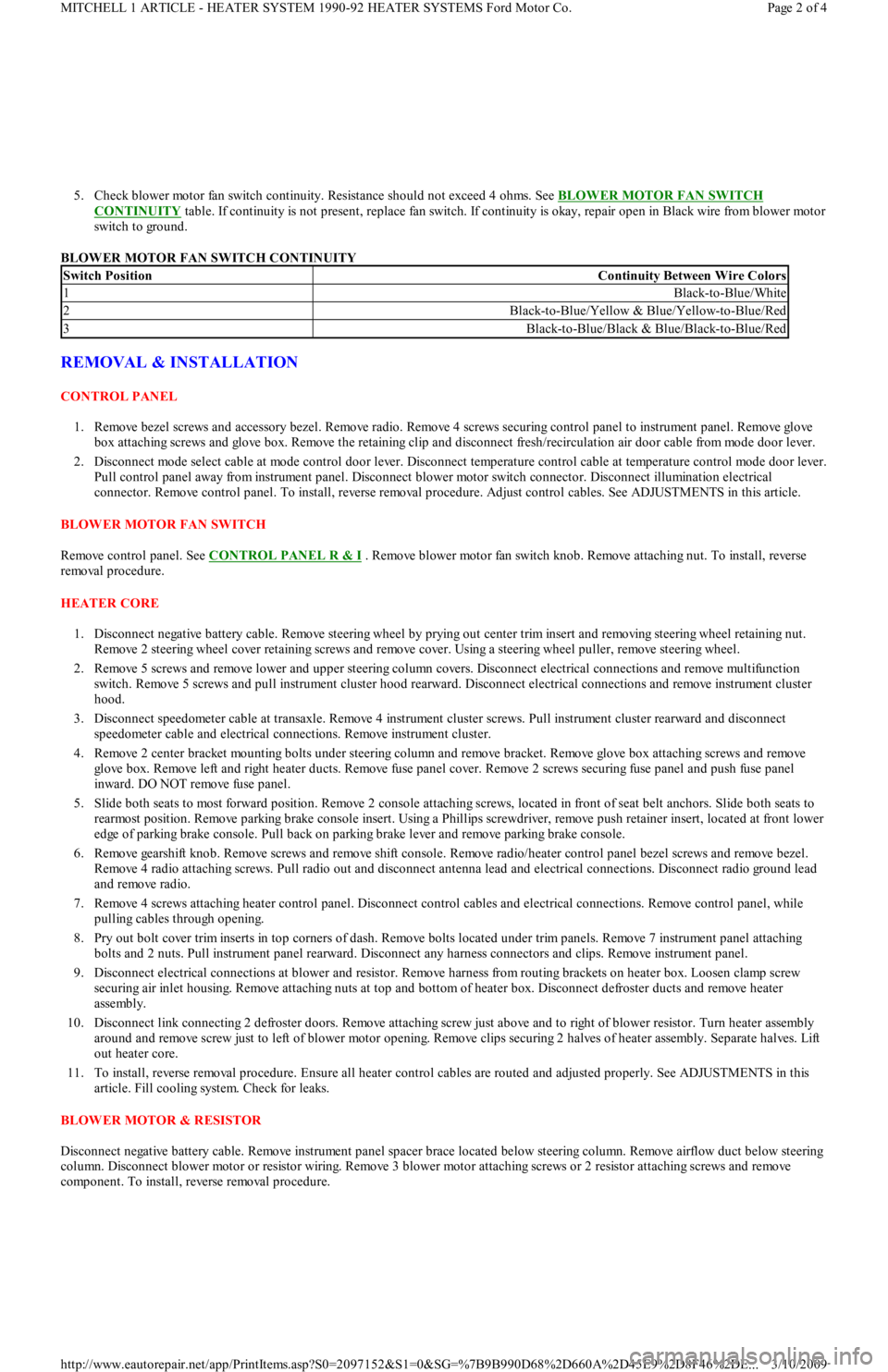
5. Check blower motor fan switch continuity. Resistance should not exceed 4 ohms. See BLOWER MOTOR FAN SWITCH
CONTINUITY table. If continuity is not present, replace fan switch. If continuity is okay, repair open in Black wire from blower motor
switch to ground.
BLOWER MOTOR FAN SWITCH CONTINUITY
REMOVAL & INSTALLATION
CONTROL PANEL
1. Remove bezel screws and accessory bezel. Remove radio. Remove 4 screws securing control panel to instrument panel. Remove glove
box attaching screws and glove box. Remove the retaining clip and disconnect fresh/recirculation air door cable from mode door lever.
2. Disconnect mode select cable at mode control door lever. Disconnect temperature control cable at temperature control mode door lever.
Pull control panel away from instrument panel. Disconnect blower motor switch connector. Disconnect illumination electrical
connector. Remove control panel. To install, reverse removal procedure. Adjust control cables. See ADJUSTMENTS in this article.
BLOWER MOTOR FAN SWITCH
Remove control panel. See CONTROL PANEL R & I
. Remove blower motor fan switch knob. Remove attaching nut. To install, reverse
removal procedure.
HEATER CORE
1. Disconnect negative battery cable. Remove steering wheel by prying out center trim insert and removing steering wheel retaining nut.
Remove 2 steering wheel cover retaining screws and remove cover. Using a steering wheel puller, remove steering wheel.
2. Remove 5 screws and remove lower and upper steering column covers. Disconnect electrical connections and remove multifunction
switch. Remove 5 screws and pull instrument cluster hood rearward. Disconnect electrical connections and remove instrument cluster
hood.
3. Disconnect speedometer cable at transaxle. Remove 4 instrument cluster screws. Pull instrument cluster rearward and disconnect
speedometer cable and electrical connections. Remove instrument cluster.
4. Remove 2 center bracket mounting bolts under steering column and remove bracket. Remove glove box attaching screws and remove
glove box. Remove left and right heater ducts. Remove fuse panel cover. Remove 2 screws securing fuse panel and push fuse panel
inward. DO NOT remove fuse panel.
5. Slide both seats to most forward position. Remove 2 console attaching screws, located in front of seat belt anchors. Slide both seats to
rearmost position. Remove parking brake console insert. Using a Phillips screwdriver, remove push retainer insert, located at front lower
edge of parking brake console. Pull back on parking brake lever and remove parking brake console.
6. Remove gearshift knob. Remove screws and remove shift console. Remove radio/heater control panel bezel screws and remove bezel.
Remove 4 radio attaching screws. Pull radio out and disconnect antenna lead and electrical connections. Disconnect radio ground lead
and remove radio.
7. Remove 4 screws attaching heater control panel. Disconnect control cables and electrical connections. Remove control panel, while
pulling cables through opening.
8. Pry out bolt cover trim inserts in top corners of dash. Remove bolts located under trim panels. Remove 7 instrument panel attaching
bolts and 2 nuts. Pull instrument panel rearward. Disconnect any harness connectors and clips. Remove instrument panel.
9. Disconnect electrical connections at blower and resistor. Remove harness from routing brackets on heater box. Loosen clamp screw
securing air inlet housing. Remove attaching nuts at top and bottom of heater box. Disconnect defroster ducts and remove heater
assembly.
10. Disconnect link connecting 2 defroster doors. Remove attaching screw just above and to right of blower resistor. Turn heater assembly
around and remove screw just to left of blower motor opening. Remove clips securing 2 halves of heater assembly. Separate halves. Lift
out heater core.
11. To install, reverse removal procedure. Ensure all heater control cables are routed and adjusted properly. See ADJUSTMENTS in this
article. Fill cooling system. Check for leaks.
BLOWER MOTOR & RESISTOR
Disconnect negative battery cable. Remove instrument panel spacer brace located below steering column. Remove airflow duct below steering
column. Disconnect blower motor or resistor wiring. Remove 3 blower motor attaching screws or 2 resistor attaching screws and remove
component. To install, reverse removal procedure.
Switch PositionContinuity Between Wire Colors
1Black-to-Blue/White
2Black-to-Blue/Yellow & Blue/Yellow-to-Blue/Red
3Black-to-Blue/Black & Blue/Black-to-Blue/Red
Page 2 of 4 MITCHELL 1 ARTICLE - HEATER SYSTEM 1990-92 HEATER SYSTEMS Ford Motor Co.
3/10/2009 http://www.eautorepair.net/app/PrintItems.asp?S0=2097152&S1=0&SG=%7B9B990D68%2D660A%2D45E9%2D8F46%2DE
...
Page 370 of 454
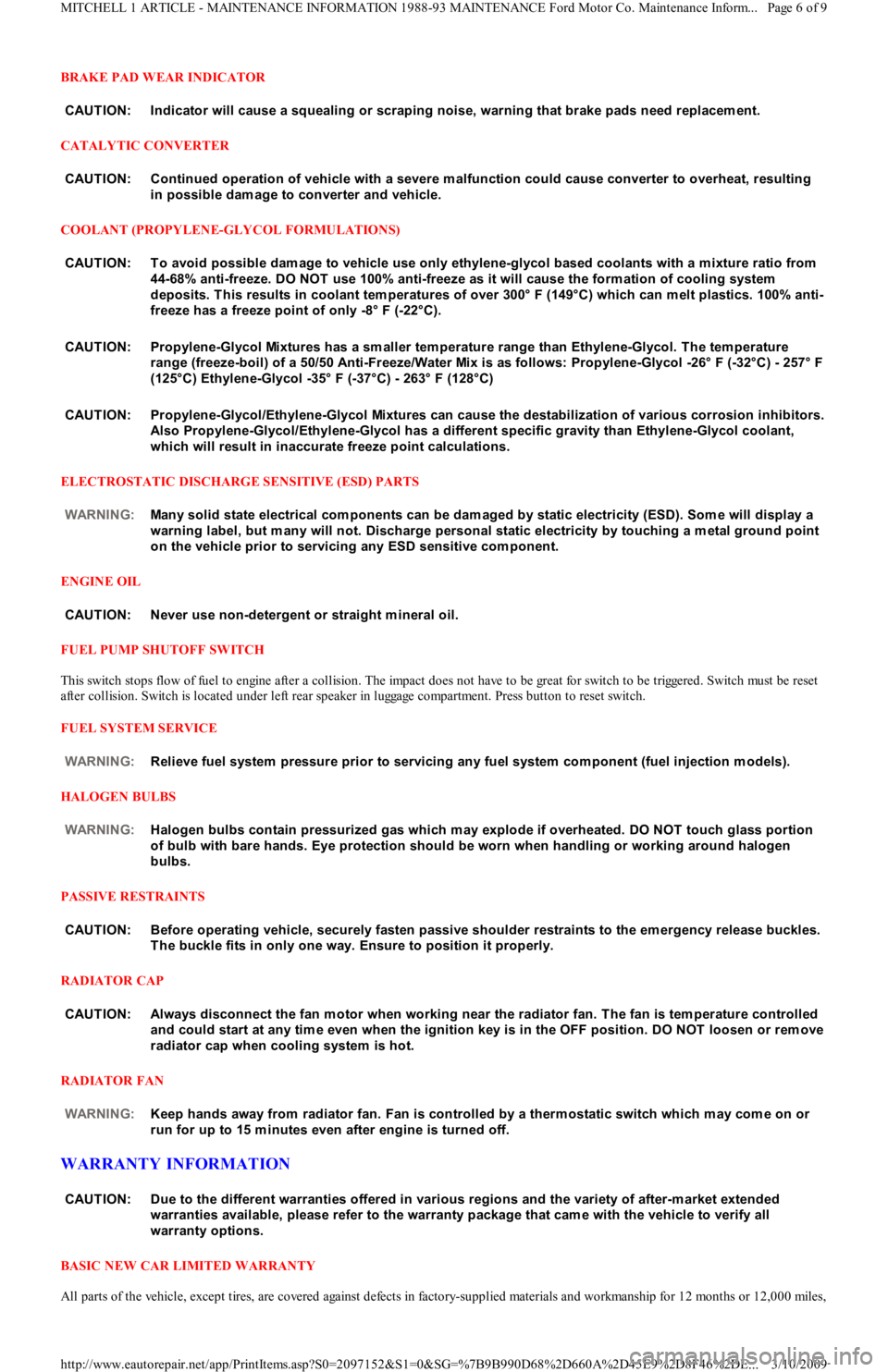
BRAKE PAD WEAR INDICATOR
CATALYTIC CONVERTER
COOLANT (PROPYLENE-GLYCOL FORMULATIONS)
ELECTROSTATIC DISCHARGE SENSITIVE (ESD) PARTS
ENGINE OIL
FUEL PUMP SHUTOFF SWITCH
This switch stops flow of fuel to engine after a collision. The impact does not have to be great for switch to be triggered. Switch must be reset
after collision. Switch is located under left rear speaker in luggage compartment. Press button to reset switch.
FUEL SYSTEM SERVICE
HALOGEN BULBS
PASSIVE RESTRAINTS
RADIATOR CAP
RADIATOR FAN
WARRANTY INFORMATION
BASIC NEW CAR LIMITED WARRANTY
All parts of the vehicle, except tires, are covered against defects in factory-supplied materials and workmanship for 12 months or 12,000 miles, CAUT ION: Indicator will cause a squealing or scraping noise, warning that brake pads need replacem ent.
CAUT ION: Continued operation of vehicle with a severe m alfunction could cause converter to overheat, resulting
in possible dam age to converter and vehicle.
CAUT ION: T o avoid possible dam age to vehicle use only ethylene-glycol based coolants with a m ixture ratio from
44-68% anti-freeze. DO NOT use 100% anti-freeze as it will cause the form ation of cooling system
deposits. T his results in coolant tem peratures of over 300° F (149°C) which can m elt plastics. 100% anti-
freeze has a freeze point of only -8° F (-22°C).
CAUT ION: Propylene-Glycol Mixtures has a sm aller tem perature range than Ethylene-Glycol. T he tem perature
range (freeze-boil) of a 50/50 Anti-Freeze/Water Mix is as follows: Propylene-Glycol -26° F (-32°C) - 257° F
(125°C) Ethylene-Glycol -35° F (-37°C) - 263° F (128°C)
CAUT ION: Propylene-Glycol/Ethylene-Glycol Mixtures can cause the destabilization of various corrosion inhibitors.
Also Propylene-Glycol/Ethylene-Glycol has a different specific gravity than Ethylene-Glycol coolant,
which will result in inaccurate freeze point calculations.
WARNING:Many solid state electrical com ponents can be dam aged by static electricity (ESD). Som e will display a
warning label, but m any will not. Discharge personal static electricity by touching a m etal ground point
on the vehicle prior to servicing any ESD sensitive com ponent.
CAUT ION: Never use non-detergent or straight m ineral oil.
WARNING:Relieve fuel system pressure prior to servicing any fuel system com ponent (fuel injection m odels).
WARNING:Halogen bulbs contain pressurized gas which m ay explode if overheated. DO NOT touch glass portion
of bulb with bare hands. Eye protection should be worn when handling or working around halogen
bulbs.
CAUT ION: Before operating vehicle, securely fasten passive shoulder restraints to the em ergency release buckles.
T he buckle fits in only one way. Ensure to position it properly.
CAUT ION: Always disconnect the fan m otor when working near the radiator fan. T he fan is tem perature controlled
and could start at any tim e even when the ignition key is in the OFF position. DO NOT loosen or rem ove
radiator cap when cooling system is hot.
WARNING:Keep hands away from radiator fan. Fan is controlled by a therm ostatic switch which m ay com e on or
run for up to 15 m inutes even after engine is turned off.
CAUT ION: Due to the different warranties offered in various regions and the variety of after-m arket extended
warranties available, please refer to the warranty package that cam e with the vehicle to verify all
warranty options.
Page 6 of 9 MITCHELL 1 ARTICLE - MAINTENANCE INFORMATION 1988-93 MAINTENANCE Ford Motor Co. Maintenance Inform...
3/10/2009 http://www.eautorepair.net/app/PrintItems.asp?S0=2097152&S1=0&SG=%7B9B990D68%2D660A%2D45E9%2D8F46%2DE
...
Page 371 of 454
whichever occurs first.
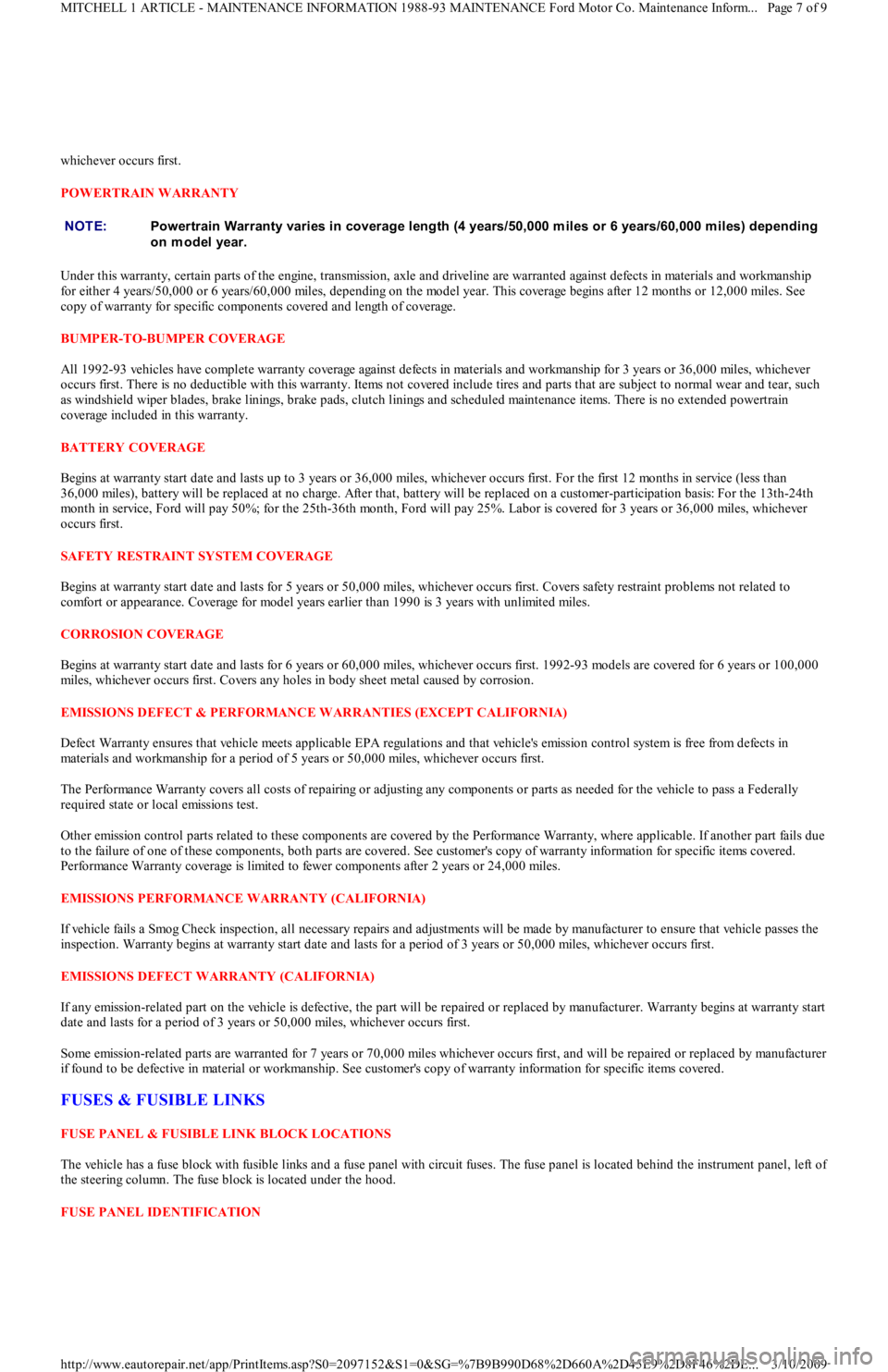
POWERTRAIN WARRANTY
Under this warranty, certain parts of the engine, transmission, axle and driveline are warranted against defects in materials and workmanship
for either 4 years/50,000 or 6 years/60,000 miles, depending on the model year. This coverage begins after 12 months or 12,000 miles. See
copy of warranty for specific components covered and length of coverage.
BUMPER-TO-BUMPER COVERAGE
All 1992-93 vehicles have complete warranty coverage against defects in materials and workmanship for 3 years or 36,000 miles, whichever
occurs first. There is no deductible with this warranty. Items not covered include tires and parts that are subject to normal wear and tear, such
as windshield wiper blades, brake linings, brake pads, clutch linings and scheduled maintenance items. There is no extended powertrain
coverage included in this warranty.
BATTERY COVERAGE
Begins at warranty start date and lasts up to 3 years or 36,000 miles, whichever occurs first. For the first 12 months in service (less than
36,000 miles), battery will be replaced at no charge. After that, battery will be replaced on a customer-participation basis: For the 13th-24th
month in service, Ford will pay 50%; for the 25th-36th month, Ford will pay 25%. Labor is covered for 3 years or 36,000 miles, whichever
occurs first.
SAFETY RESTRAINT SYSTEM COVERAGE
Begins at warranty start date and lasts for 5 years or 50,000 miles, whichever occurs first. Covers safety restraint problems not related to
comfort or appearance. Coverage for model years earlier than 1990 is 3 years with unlimited miles.
CORROSION COVERAGE
Begins at warranty start date and lasts for 6 years or 60,000 miles, whichever occurs first. 1992-93 models are covered for 6 years or 100,000
miles, whichever occurs first. Covers any holes in body sheet metal caused by corrosion.
EMISSIONS DEFECT & PERFORMANCE WARRANTIES (EXCEPT CALIFORNIA)
Defect Warranty ensures that vehicle meets applicable EPA regulations and that vehicle's emission control system is free from defects in
materials and workmanship for a period of 5 years or 50,000 miles, whichever occurs first.
The Performance Warranty covers all costs of repairing or adjusting any components or parts as needed for the vehicle to pass a Federally
required state or local emissions test.
Other emission control parts related to these components are covered by the Performance Warranty, where applicable. If another part fails due
to the failure of one of these components, both parts are covered. See customer's copy of warranty information for specific items co vered .
Performance Warranty coverage is limited to fewer components after 2 years or 24,000 miles.
EMISSIONS PERFORMANCE WARRANTY (CALIFORNIA)
If vehicle fails a Smog Check inspection, all necessary repairs and adjustments will be made by manufacturer to ensure that vehicle passes the
inspection. Warranty begins at warranty start date and lasts for a period of 3 years or 50,000 miles, whichever occurs first.
EMISSIONS DEFECT WARRANTY (CALIFORNIA)
If any emission-related part on the vehicle is defective, the part will be repaired or replaced by manufacturer. Warranty begins at warranty start
date and lasts for a period of 3 years or 50,000 miles, whichever occurs first.
Some emission-related parts are warranted for 7 years or 70,000 miles whichever occurs first, and will be repaired or replaced by manufacturer
if found to be defective in material or workmanship. See customer's copy of warranty information for specific items covered.
FUSES & FUSIBLE LINKS
FUSE PANEL & FUSIBLE LINK BLOCK LOCATIONS
The vehicle has a fuse block with fusible links and a fuse panel with circuit fuses. The fuse panel is located behind the instrument panel, left o
f
the steering column. The fuse block is located under the hood.
FUSE PANEL IDENTIFICATION NOTE:Powertrain Warranty varies in coverage length (4 years/50,000 m iles or 6 years/60,000 m iles) depending
on model year.
Page 7 of 9 MITCHELL 1 ARTICLE - MAINTENANCE INFORMATION 1988-93 MAINTENANCE Ford Motor Co. Maintenance Inform...
3/10/2009 http://www.eautorepair.net/app/PrintItems.asp?S0=2097152&S1=0&SG=%7B9B990D68%2D660A%2D45E9%2D8F46%2DE
...
Page 372 of 454
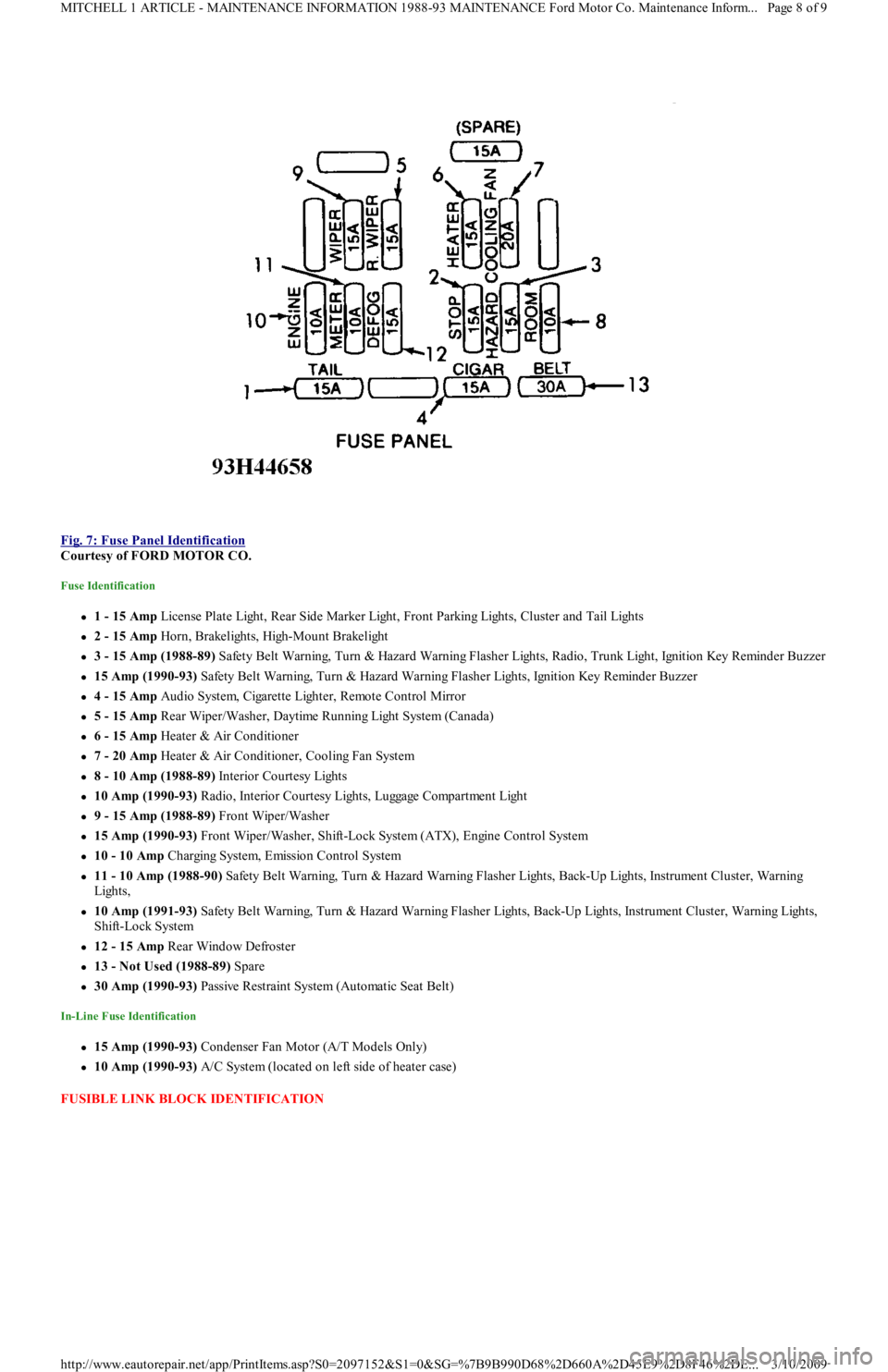
Fig. 7: Fuse Panel Identification
Courtesy of FORD MOTOR CO.
Fuse Identification
1 - 15 Amp License Plate Light, Rear Side Marker Light, Front Parking Lights, Cluster and Tail Lights
2 - 15 Amp Horn, Brakelights, High-Mount Brakelight
3 - 15 Amp (1988-89) Safety Belt Warning, Turn & Hazard Warning Flasher Lights, Radio, Trunk Light, Ignition Key Reminder Buzzer
15 Amp (1990-93) Safety Belt Warning, Turn & Hazard Warning Flasher Lights, Ignition Key Reminder Buzzer
4 - 15 Amp Audio System, Cigarette Lighter, Remote Control Mirror
5 - 15 Amp Rear Wiper/Washer, Daytime Running Light System (Canada)
6 - 15 Amp Heater & Air Conditioner
7 - 20 Amp Heater & Air Conditioner, Cooling Fan System
8 - 10 Amp (1988-89) Interior Courtesy Lights
10 Amp (1990-93) R a d io , In t e r io r C o u r t e sy Ligh t s, Lu gga ge C o mp a r t me n t Ligh t
9 - 15 Amp (1988-89) Front Wiper/Washer
15 Amp (1990-93) Front Wiper/Washer, Shift-Lock System (ATX), Engine Control System
10 - 10 Amp Charging System, Emission Control System
11 - 10 Amp (1988-90) Safety Belt Warning, Turn & Hazard Warning Flasher Lights, Back-Up Lights, Instrument Cluster, Warning
Lights,
10 Amp (1991-93) Safety Belt Warning, Turn & Hazard Warning Flasher Lights, Back-Up Lights, Instrument Cluster, Warning Lights,
Shift-Lock System
12 - 15 Amp Rear Window Defroster
13 - Not Used (1988-89) Spare
30 Amp (1990-93) Passive Restraint System (Automatic Seat Belt)
In-Line Fuse Identification
15 Amp (1990-93) Condenser Fan Motor (A/T Models Only)
10 Amp (1990-93) A/C System (located on left side of heater case)
FUSIBLE LINK BLOCK IDENTIFICATION
Page 8 of 9 MITCHELL 1 ARTICLE - MAINTENANCE INFORMATION 1988-93 MAINTENANCE Ford Motor Co. Maintenance Inform...
3/10/2009 http://www.eautorepair.net/app/PrintItems.asp?S0=2097152&S1=0&SG=%7B9B990D68%2D660A%2D45E9%2D8F46%2DE
...
Page 373 of 454
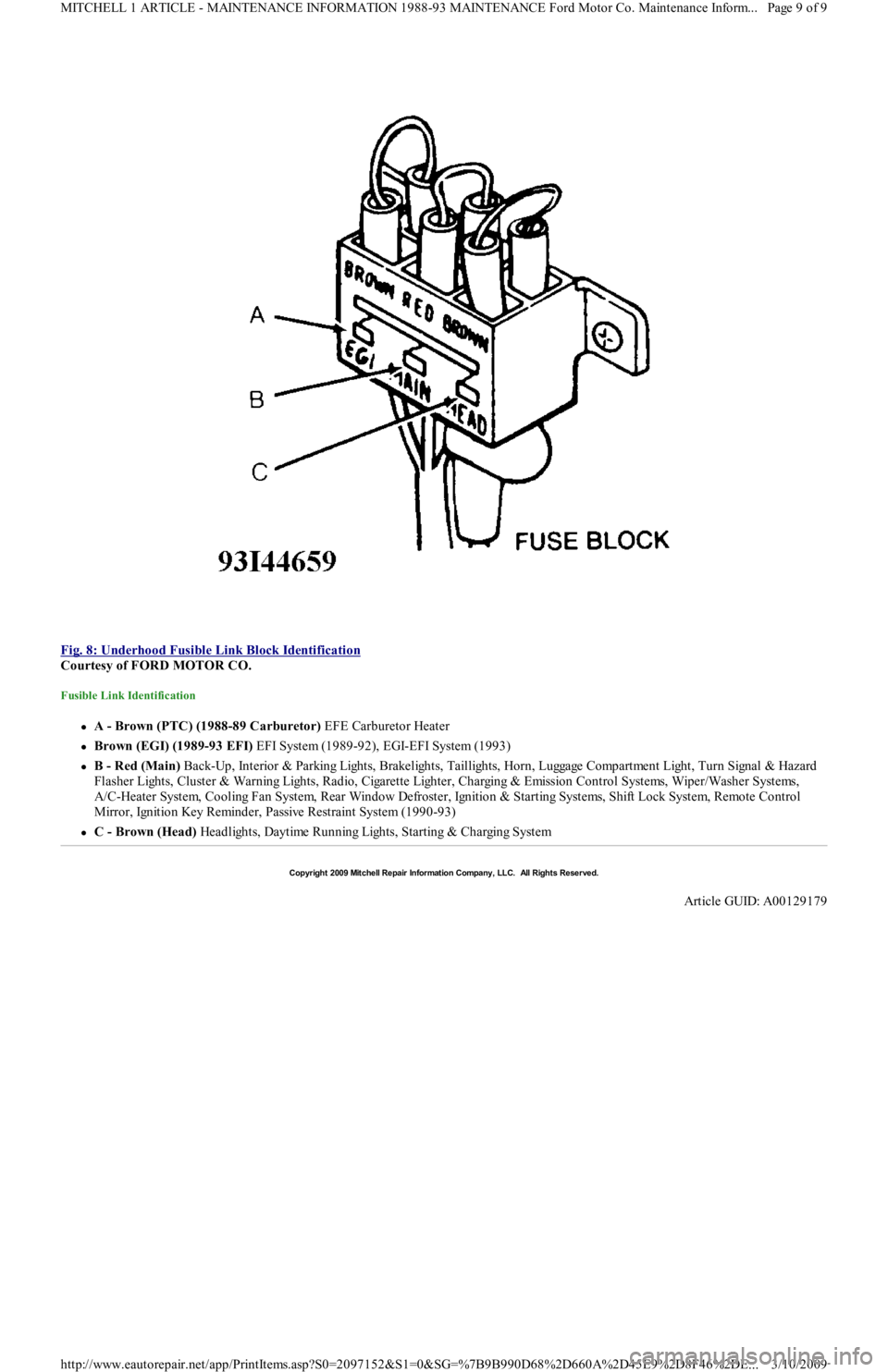
Fig. 8: Underhood Fusible Link Block Identification
Courtesy of FORD MOTOR CO.
Fusible Link Identification
A - Brown (PTC) (1988-89 Carburetor) EFE Carburetor Heater
Brown (EGI) (1989-93 EFI) EFI System (1989-92), EGI-EFI System (1993)
B - Red (Main) Back-Up, Interior & Parking Lights, Brakelights, Taillights, Horn, Luggage Compartment Light, Turn Signal & Hazard
F l a sh e r Ligh t s, C l u st e r & Wa r n in g Ligh t s, R a d io , C iga r e t t e Ligh t e r , C h a r gin g & E missio n C o n t r o l S yst e ms, Wip e r / Wa sh e r S yst e ms,
A/C-Heater System, Cooling Fan System, Rear Window Defroster, Ignition & Starting Systems, Shift Lock System, Remote Control
Mirror, Ignition Key Reminder, Passive Restraint System (1990-93)
C - Brown (Head) Headlights, Daytime Running Lights, Starting & Charging System
Copyr ight 2009 Mitchell Repair Information Company, LLC. All Rights Reserved.
Article GUID: A00129179
Page 9 of 9 MITCHELL 1 ARTICLE - MAINTENANCE INFORMATION 1988-93 MAINTENANCE Ford Motor Co. Maintenance Inform...
3/10/2009 http://www.eautorepair.net/app/PrintItems.asp?S0=2097152&S1=0&SG=%7B9B990D68%2D660A%2D45E9%2D8F46%2DE
...
Page 374 of 454
Back To Article
SERVICE INDICATOR & WARNING LIGHTS
1988-92 MAINT ENANCE Ford Motor Co. Service Indicator & Warning Lights
SERVICE INDICATOR & WARNING LIGHTS
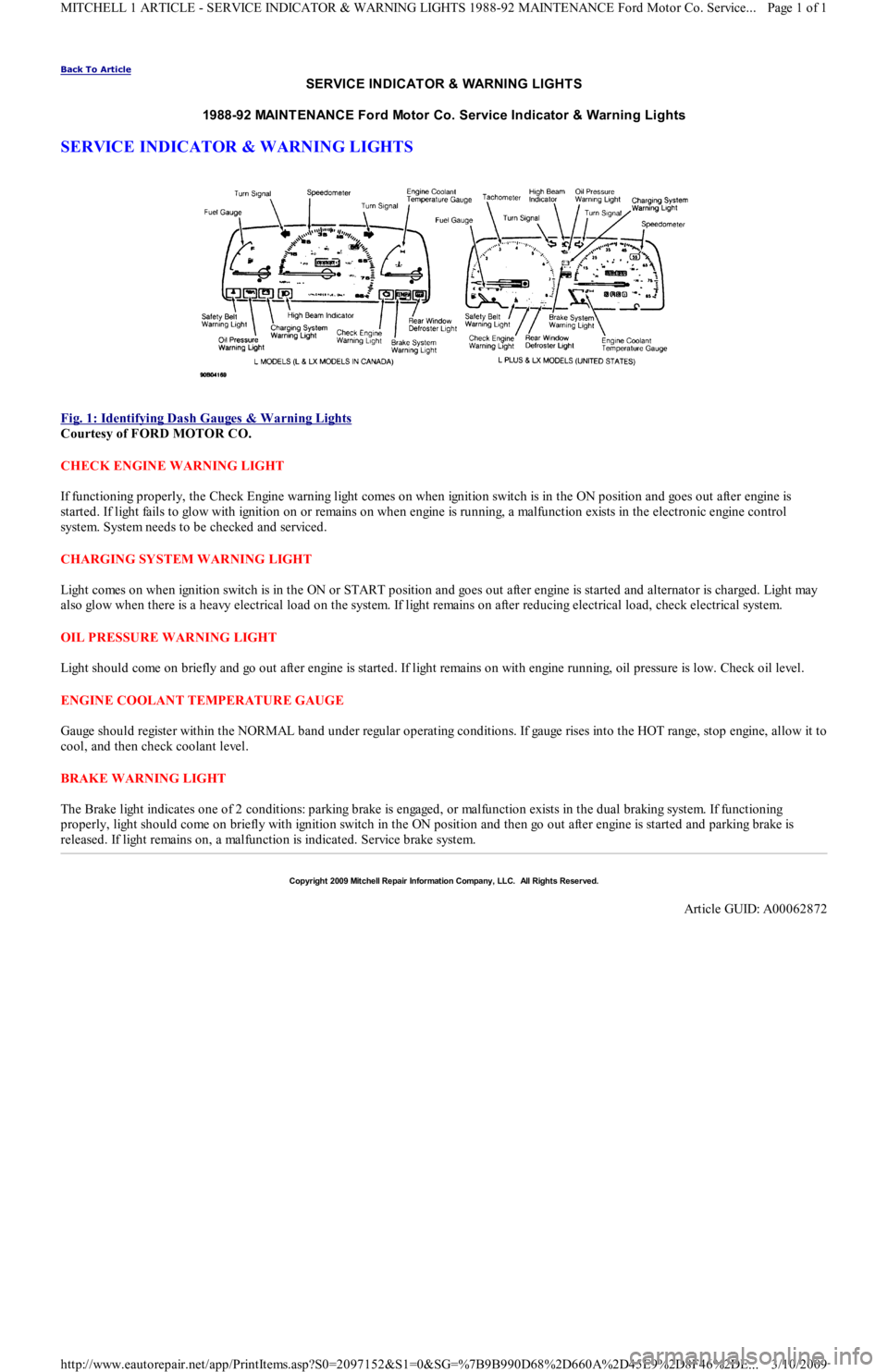
Fig. 1: Identifying Dash Gauges & W arning Lights
Courtesy of FORD MOTOR CO.
CHECK ENGINE WARNING LIGHT
If functioning properly, the Check Engine warning light comes on when ignition switch is in the ON position and goes out after engine is
started. If light fails to glow with ignition on or remains on when engine is running, a malfunction exists in the electronic engine control
system. System needs to be checked and serviced.
CHARGING SYSTEM WARNING LIGHT
Light comes on when ignition switch is in the ON or START position and goes out after engine is started and alternator is charged. Light may
also glow when there is a heavy electrical load on the system. If light remains on after reducing electrical load, check electrical system.
OIL PRESSURE WARNING LIGHT
Light should come on briefly and go out after engine is started. If light remains on with engine running, oil pressure is low. Check oil level.
ENGINE COOLANT TEMPERATURE GAUGE
Gauge should register within the NORMAL band under regular operating conditions. If gauge rises into the HOT range, stop engine, allow it to
cool, and then check coolant level.
BRAKE WARNING LIGHT
The Brake light indicates one of 2 conditions: parking brake is engaged, or malfunction exists in the dual braking system. If functioning
properly, light should come on briefly with ignition switch in the ON position and then go out after engine is started and parking brake is
released. If light remains on, a malfunction is indicated. Service brake system.
Copyr ight 2009 Mitchell Repair Information Company, LLC. All Rights Reserved.
Article GUID: A00062872
Page 1 of 1 MITCHELL 1 ARTICLE - SERVICE INDICATOR & WARNING LIGHTS 1988-92 MAINTENANCE Ford Motor Co. Service
...
3/10/2009 http://www.eautorepair.net/app/PrintItems.asp?S0=2097152&S1=0&SG=%7B9B990D68%2D660A%2D45E9%2D8F46%2DE
...