steering FORD MUSTANG 1969 Volume One Chassis
[x] Cancel search | Manufacturer: FORD, Model Year: 1969, Model line: MUSTANG, Model: FORD MUSTANG 1969Pages: 413, PDF Size: 75.81 MB
Page 123 of 413
03-05-10
Steering Columns And Linkage
03-05-10
9. Connect the battery cable to the
negative post.
10.
Check the operation of the
switches.
COUGAR, MUSTANG
Removal
cable
1.
Disconnect the battery
from the negative post.
2.
Disconnect the turn signal switch
wires at the connector.
3.
On tilt-away columns, disconnect
the tilt-control cable from the vacuum
motor and mounting bracket.
4.
Remove the bolt that secures the
flex coupling to the steering gear.
5.
Remove the nuts and bolts that
secure the column retainer and seal at
the toe plate.
6. Remove the nuts that secure the
column lower bracket to the brake
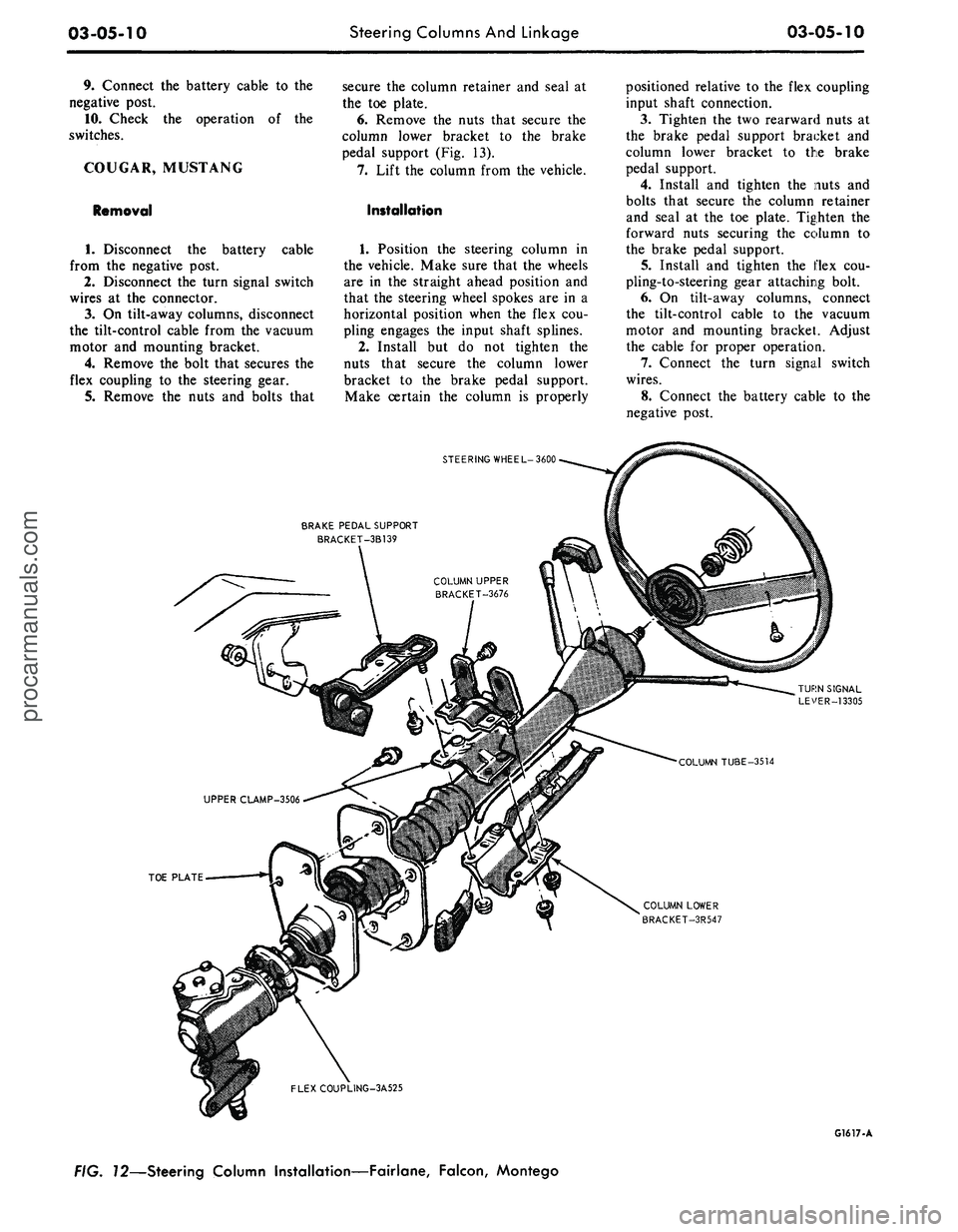
pedal support (Fig. 13).
7.
Lift the column from the vehicle.
Installation
1.
Position the steering column in
the vehicle. Make sure that the wheels
are in the straight ahead position and
that the steering wheel spokes are in a
horizontal position when the flex cou-
pling engages the input shaft splines.
2.
Install but do not tighten the
nuts that secure the column lower
bracket to the brake pedal support.
Make certain the column is properly
positioned relative to the flex coupling
input shaft connection.
3.
Tighten the two rearward nuts at
the brake pedal support bracket and
column lower bracket to the brake
pedal support.
4.
Install and tighten the nuts and
bolts that secure the column retainer
and seal at the toe plate. Tighten the
forward nuts securing the column to
the brake pedal support.
5.
Install and tighten the flex cou-
pling-to-steering gear attaching bolt.
6. On tilt-away columns, connect
the tilt-control cable to the vacuum
motor and mounting bracket. Adjust
the cable for proper operation.
7.
Connect the turn signal switch
wires.
8. Connect the battery cable to the
negative post.
STEERING WHEEL-3600
BRAKE PEDAL SUPPORT
BRACKET-3B139
TOE PLATE
COLUMN LOWER
BRACKET-3R547
FLEXCOUPLING-3A525
G1617-A
FIG. 72—Steering Column Installation—Fairlane, Falcon, Montegoprocarmanuals.com
Page 124 of 413
03-05-11
Steering Columns
And
Linkage
03-05-11
9. Check
the
operation
of the
steer-
ing tilt mechanism
(if so
equipped)
and
the
switches.
THUNDERBIRD
AND
CONTINENTAL MARK
III
Removal
1.
Remove
the
instrument panel
lower outer finish panel, instrument
panel steering column plate
and
cover.
2.
Disconnect
the
negative cable
from
the
battery.
3.
Remove
the
bolt that attaches
the flexible coupling
to the
steering
shaft.
4.
Disconnect
the
shift
rod
from
the
lever
at the
lower
end of the
column.
5.
Remove
the
four screws that
at-
tach
the
column retainer
to the
dash
panel.
6. Working from
the
underside
of
the instrument panel disconnect
the
steering column tilt-control cable from
the vacuum motor
and
mounting
bracket
(if so
equipped)
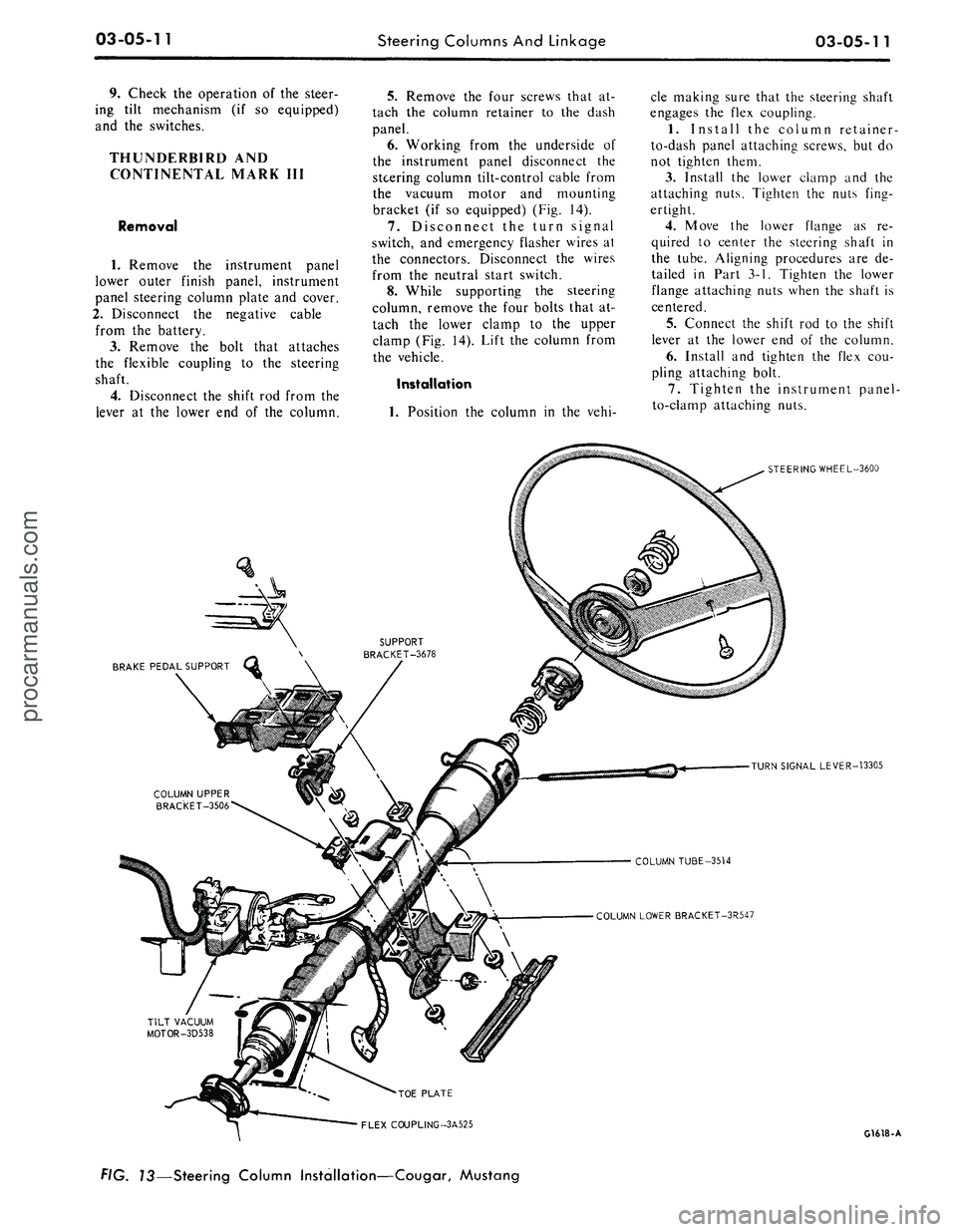
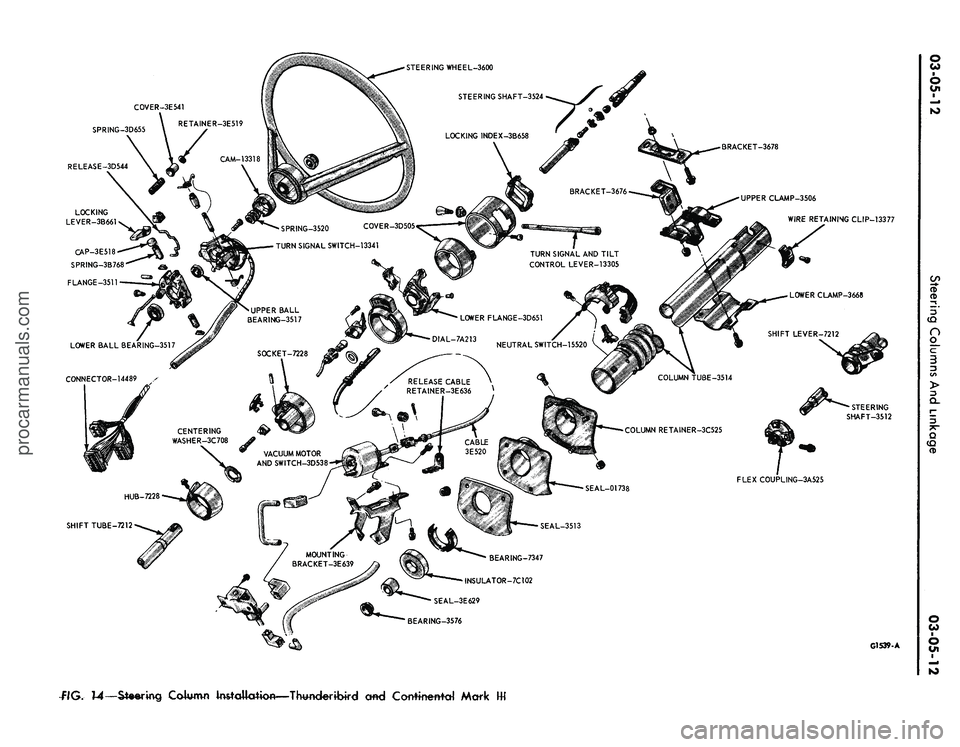
(Fig. 14).
7.
Disconnect
the
turn signal
switch,
and
emergency flasher wires
at
the connectors. Disconnect
the
wires
from
the
neutral start switch.
8. While supporting
the
steering
column, remove
the
four bolts that
at-
tach
the
lower clamp
to the
upper
clamp
(Fig. 14).
Lift
the
column from
the vehicle.
Installation
1.
Position
the
column
in the
vehi-
cle making sure that
the
steering shaft
engages
the
flex coupling.
1.
Install
the
column retainer-
to-dash panel attaching screws,
but do
not tighten them.
3.
Install
the
lower clamp
and the
attaching nuts. Tighten
the
nuts fing-
ertight.
4.
Move
the
lower flange
as re-
quired
to
center
the
steering shaft
in
the tube. Aligning procedures
are de-
tailed
in
Part
3-1.
Tighten
the
lower
flange attaching nuts when
the
shaft
is
centered.
5.
Connect
the
shift
rod to the
shift
lever
at the
lower
end of the
column.
6. Install
and
tighten
the
flex
cou-
pling attaching bolt.
7.
Tighten
the
instrument panel-
to-clamp attaching nuts.
BRAKE PEDAL SUPPORT
STEERING WHEEL-3600
TURN SIGNAL LEVER-13305
COLUMN TUBE-3514
COLUMN LOWER BRACKET-3R547
•TOE PLATE
FLEX COUPLING-3A525
G1618-A
f/G.
73—Steering Column Installation—Cougar, Mustangprocarmanuals.com
Page 125 of 413
SPRING-3D655
RELEASE-3D544
BRACKET-3678
UPPER CLAMP-3506
WIRE RETAINING CLIP-13377
SPRING-3520 COVER-3D505
TURN SIGNAL SWITCH-13341
TURN SIGNAL AND TILT
CONTROL LEVER-13305
FLEX COUPLING-3A525
BEARING-7347
INSULATOR-7C102
SEAL-3E629
BEARING-3576
G1539-A
flG.
14—Steering
Column Installation—Thwderibird cmd Corrttnettfd Markprocarmanuals.com
Page 126 of 413
STEERING WHEEL-3600
STEERING SHAFT-3525
LOWER CLAMP
3668
CENTERING WASHER-3C708
G1542-A
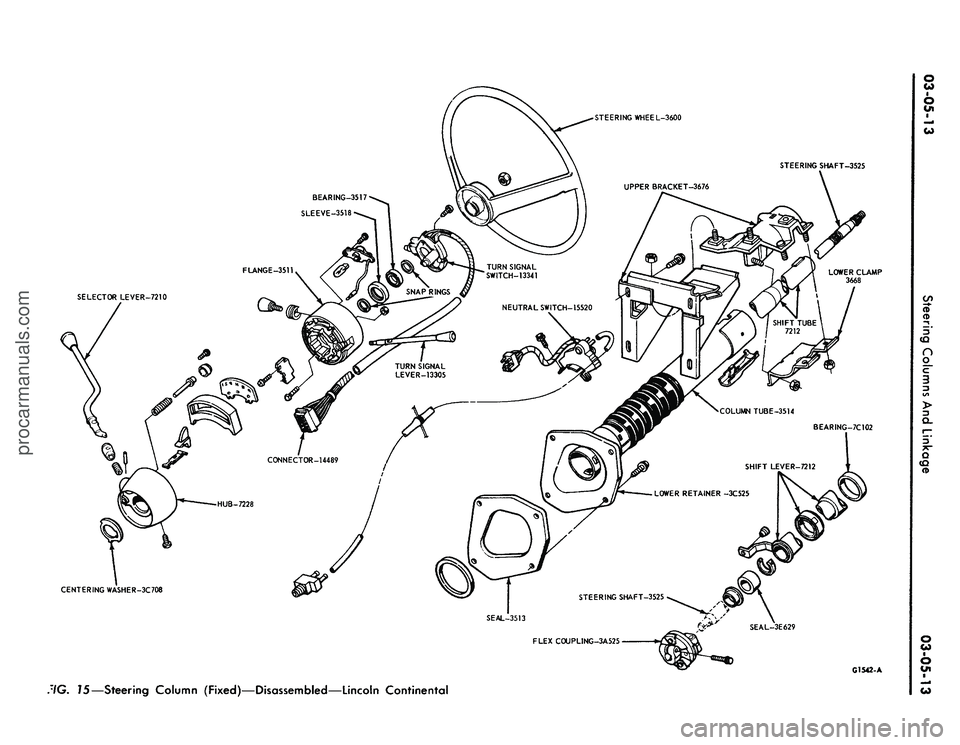
:/G.
15—Steering Column (Fixed)—Disassembled—Lincoln Continentalprocarmanuals.com
Page 127 of 413
03-05-14
Steering Columns And Linkage
03-05-14
8. Connect the turn signal and
emergency flasher switch wires at the
multiple connectors. Connect the wires
to the neutral start switch. Adjust-
ments for the neutral start switch are
detailed in Group 7 of this manual.
9. Connect the tilt-column control
cable to the release cable retainer and
vacuum motor (if so equipped). To re-
move cable slack, loosen the bracket
attaching screw and pull it slightly
toward the column, then tighten the
screw. If difficulty in adjusting this
control is experienced, the retainer
slot may be filed to gain additional
travel.
10.
Install the instrument panel
steering column plate and cover and
the instrument panel lower outer fin-
ish panel.
11.
Connect the negative cable to
the battery.
12.
Start the engine and check the
operation of the steering column and
switches.
LINCOLN CONTINENTAL
Removal
1.
Disconnect the battery.
2.
Disconnect the rod from the
lever at the lower end of the selector
tube.
Loosen the clamp bolt that locks
the flexible coupling to the steering
shaft.
3.
Working from the underside of
the steering wheel spoke, remove the
two screws that secure the crash pad.
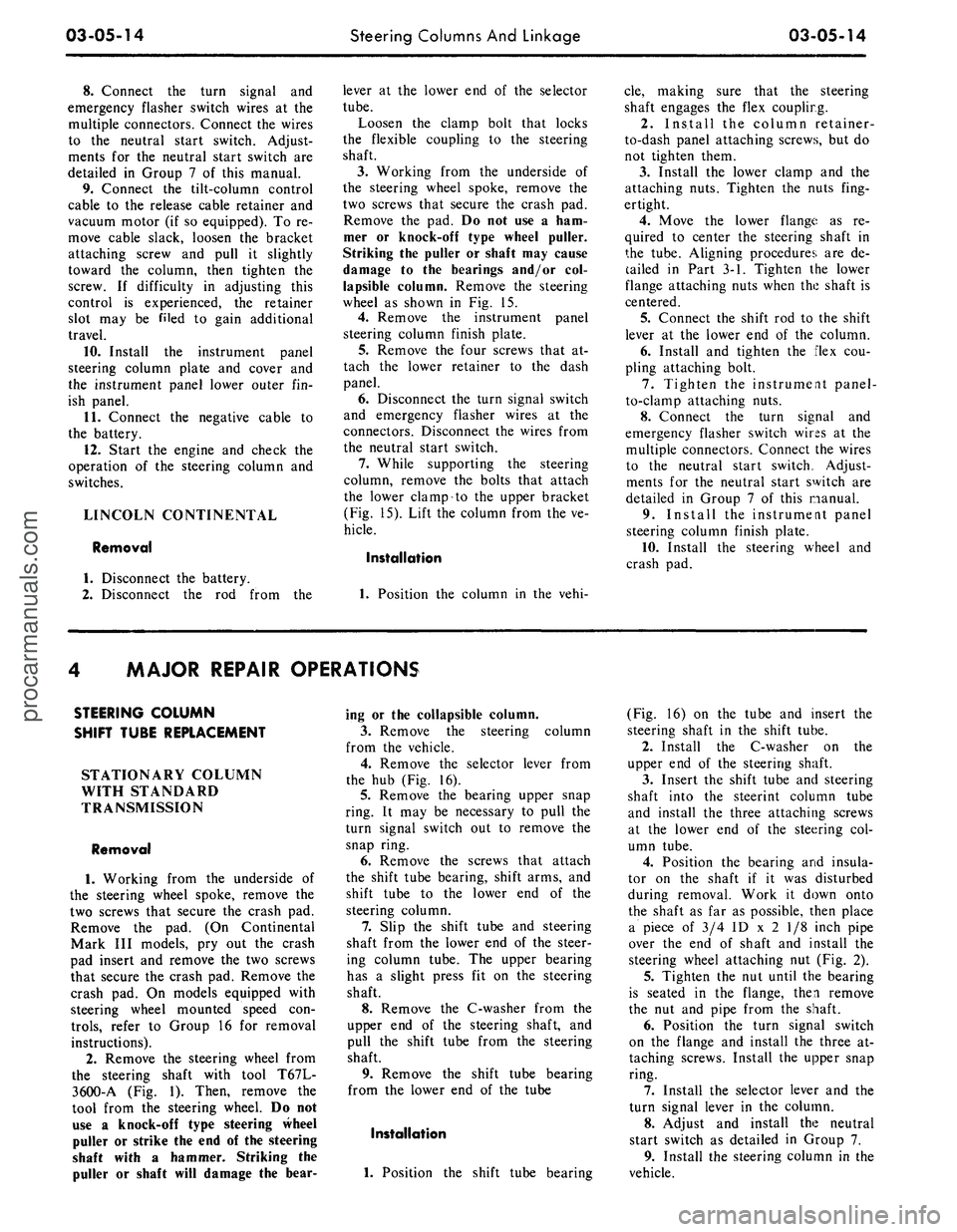
Remove the pad. Do not use a ham-
mer or knock-off type wheel puller.
Striking the puller or shaft may cause
damage to the bearings and/or col-
lapsible column. Remove the steering
wheel as shown in Fig. 15.
4.
Remove the instrument panel
steering column finish plate.
5.
Remove the four screws that at-
tach the lower retainer to the dash
panel.
6. Disconnect the turn signal switch
and emergency flasher wires at the
connectors. Disconnect the wires from
the neutral start switch.
7.
While supporting the steering
column, remove the bolts that attach
the lower clamp to the upper bracket
(Fig. 15). Lift the column from the ve-
hicle.
Installation
1.
Position the column in the vehi-
cle,
making sure that the steering
shaft engages the flex coupling.
2.
Install the column retainer-
to-dash panel attaching screws, but do
not tighten them.
3.
Install the lower clamp and the
attaching nuts. Tighten the nuts fing-
ertight.
4.
Move the lower flange as re-
quired to center the steering shaft in
the tube. Aligning procedures are de-
tailed in Part 3-1. Tighten the lower
flange attaching nuts when the shaft is
centered.
5.
Connect the shift rod to the shift
lever at the lower end of the column.
6. Install and tighten the flex cou-
pling attaching bolt.
7.
Tighten the instrument panel-
to-clamp attaching nuts.
8. Connect the turn signal and
emergency flasher switch wirss at the
multiple connectors. Connect the wires
to the neutral start switch. Adjust-
ments for the neutral start switch are
detailed in Group 7 of this manual.
9. Install the instrument panel
steering column finish plate.
10.
Install the steering wheel and
crash pad.
MAJOR REPAIR OPERATIONS
STEERING COLUMN
SHIFT TUBE REPLACEMENT
STATIONARY COLUMN
WITH STANDARD
TRANSMISSION
Removal
1.
Working from the underside of
the steering wheel spoke, remove the
two screws that secure the crash pad.
Remove the pad. (On Continental
Mark III models, pry out the crash
pad insert and remove the two screws
that secure the crash pad. Remove the
crash pad. On models equipped with
steering wheel mounted speed con-
trols,
refer to Group 16 for removal
instructions).
2.
Remove the steering wheel from
the steering shaft with tool T67L-
3600-A (Fig. 1). Then, remove the
tool from the steering wheel. Do not
use a knock-off type steering Wheel
puller or strike the end of the steering
shaft with a hammer. Striking the
puller or shaft will damage the bear-
ing or the collapsible column.
3.
Remove the steering column
from the vehicle.
4.
Remove the selector lever from
the hub (Fig. 16).
5.
Remove the bearing upper snap
ring. It may be necessary to pull the
turn signal switch out to remove the
snap ring.
6. Remove the screws that attach
the shift tube bearing, shift arms, and
shift tube to the lower end of the
steering column.
7.
Slip the shift tube and steering
shaft from the lower end of the steer-
ing column tube. The upper bearing
has a slight press fit on the steering
shaft.
8. Remove the C-washer from the
upper end of the steering shaft, and
pull the shift tube from the steering
shaft.
9. Remove the shift tube bearing
from the lower end of the tube
Installation
1.
Position the shift tube bearing
(Fig. 16) on the tube and insert the
steering shaft in the shift tube.
2.
Install the C-washer on the
upper end of the steering shaft.
3.
Insert the shift tube and steering
shaft into the steerint column tube
and install the three attaching screws
at the lower end of the steering col-
umn tube.
4.
Position the bearing and insula-
tor on the shaft if it was disturbed
during removal. Work it down onto
the shaft as far as possible, then place
a piece of 3/4 ID x 2 1/8 inch pipe
over the end of shaft and install the
steering wheel attaching nut (Fig. 2).
5.
Tighten the nut until the bearing
is seated in the flange, then remove
the nut and pipe from the shaft.
6. Position the turn signal switch
on the flange and install the three at-
taching screws. Install the upper snap
ring.
7.
Install the selector lever and the
turn signal lever in the column.
8. Adjust and install the neutral
start switch as detailed in Group 7.
9. Install the steering column in the
vehicle.procarmanuals.com
Page 128 of 413

03-05-15
Steering Columns And Linkage
03-05-15
SHIFT
TUBE
STEERING
COLUMN
TUBE
SELECTOR
I
LEVER
HUB
\
CENTERING
I
WASHER
QUADRANT
BEARING
UPPER
SNAP RING
TURN SIGNAL AND
EMERGENCY FLASHER
SWITCH
PLASTIC
CONDUIT
STEERING
SHAFT
CONNECTOR
FIG. 16—Typical Stationary Steering Column Disassembled—Standard Transmission
G 1494-A
SNAP RING
STEERING WHEEL-3600
SEAL - 7C102
BEARING -3517
SNAP RING
FLANGE -3511
SELECTOR BEZEL-
LEVER- 7210 ZtL
GEAR SHIFT LEVER
(FIRST
&
REVERSE)
/
7303
/ 9
WASHER - 7242
BUSHING - 733
- 7347
UPPER CLAMP-01698
GEARSHIFT LEVER
(SECOND & THIRD) - 7302
SEAL-
LOWER CLAMP - 01699
^^r**——
FLEX JOINT - 3A525
FIG. 17—Typical Stationary Steering Column Disassembled—Automatic Transmission
G1501-Aprocarmanuals.com
Page 133 of 413
03-05-20
Steering Columns And Linkage
03-05-20
placed if it becomes worn or damaged
(Figs.
18 through 21). Do not attempt
to straighten the sleeve if damaged.
1.
Remove the spindle connecting
rod end assemblies as described in the
previous sub-section.
2.
Screw the spindle rod end assem-
blies into the new sleeve the same
number of turns as the ends that were
removed. Do not tighten the clamp
bolts at this time.
3.
Position the sleeve and end as-
sembly on the center link and the
spindle arm. Install the attaching nut,
torque it to specification, and install
the cotter pin.
4.
Check and, if necessary, adjust
toe-in (Part 3-1). After toe-in is
checked and adjusted, oil the sleeve
clamp bolts then torque them to speci-
fication. The sleeve clamp must be in-
stalled as shown in Figs. 18 through
21.
CENTER LINK
REPLACEMENT
The center link connecting the Pit-
man arm and the idler arm is non-
adjustable and is provided with ta-
pered holes to accommodate the ball
studs (Figs. 18 through 21). The link
should be replaced when damaged or
when worn at the ball studs. On Lin-
coln Continental models, the link
should be replaced if excessive loose-
ness is noticed in either ball stud sock-
et.
REMOVAL
1.
Raise the vehicle on a hoist and
position safety stands.
2.
Remove the cotter pins and nuts
that attach both inner connecting rod
ends to the center link (Figs. 18
through 21).
3.
Disconnect the inner connecting
rod ends from the center link using
Tool 3290-C (Fig. 22).
4.
Remove the cotter pin and nut
attaching the idler arm to the center
link. Disconnect the idler arm from
the center link using Tool 3290-C for
Lincoln Continental models only.
5.
Remove the cotter pin and nut
attaching the Pitman arm to the cen-
ter link. Disconnect the Pitman arm
from the center link (use Tool 3290-C)
and remove the center link. On ve-
hicles equipped with the non-integral
power steering system, remove the
center link from the control valve as
detailed in Part 3-7.
INSTALLATION
1.
Replace the rubber seals on the
spindle connecting rod ends, if re-
quired.
2.
Position the center link to the
Pitman arm and idler arm and install
the attaching nuts loosely. On all ve-
hicles except Lincoln Continental
models, place the idler arm and the
front wheels in the straight ahead po-
sition to insure keeping the steering
wheel aligned and to prevent bushing
damage after the attaching nuts have
been torqued. On Lincoln Continental
models, insure that the seal is properly
installed on the center link. Torque
the nuts to the low end of the specifi-
cation. Continue to tighten each nut
until the slots in the nut align with the
hole in the stud. Then install a new
cotter pin.
3.
Position the spindle connecting
rod ends to the center link and install
the attaching nuts. Torque the nuts to
the low end of the specification. Con-
tinue to tighten each nut until the
slots in the nut align with the hole in
the stud. Then, install a new cotter
pin.
4.
Remove the safety stands, lower
the vehicle, check and adjust toe-in to
specification (Part 3-1).
STEERING IDLER ARM
AND BRACKET ASSEMBLY
REPLACEMENT
REMOVAL
If the idler arm bushings are worn
the complete idler arm assembly must
be replaced. In Lincoln Continental
models, if the socket at the idler
bracket is excessively loose, replace
the complet assembly.
1.
Remove the cotter pin and nut
attaching the steering center link at
the idler arm (Figs. 18 through 21).
2.
Disconnect the center link from
the idler arm (on Lincoln Continental
models, use Tool 3290-C).
3.
Remove the two bolts that attach
the idler arm and bracket assembly to
the frame.
INSTALLATION
1.
Secure the new idler arm and
bracket assembly to the frame with
the two attaching bolts (nuts and flat
washers as shown in Figs. 18, 19 and
21).
2.
On all vehicles except Lincoln
Continental models, place the idler
arm and the front wheels in the
straight ahead position to insure keep-
ing the steering wheel aligned and to
prevent bushing damage after the at-
taching nut has been torqued. Insert
the center link stud through the hole
in the end of the idler arm and install
the nut and washer.
On Lincoln Continental models, in-
sert the center link stud through the
hole in the end of the idler arm insur-
ing that the seal is properly installed
on the center link.
3.
Torque the idler arm rod nut to
specification and install a new cotter
pin.
PITMAN ARM
REPLACEMENT
REMOVAL
1.
Remove the cotter pin from the
castellated nut that attaches the steer-
ing center link to the Pitman arm.
Remove the castellated nut.
2.
Disconnect the steering center
link from the Pitman arm with tool
3290-C.
3.
Remove the Pitman arm attaching
nut and lock washer.
4.
Position the front wheels in the
straight ahead position. Remove the
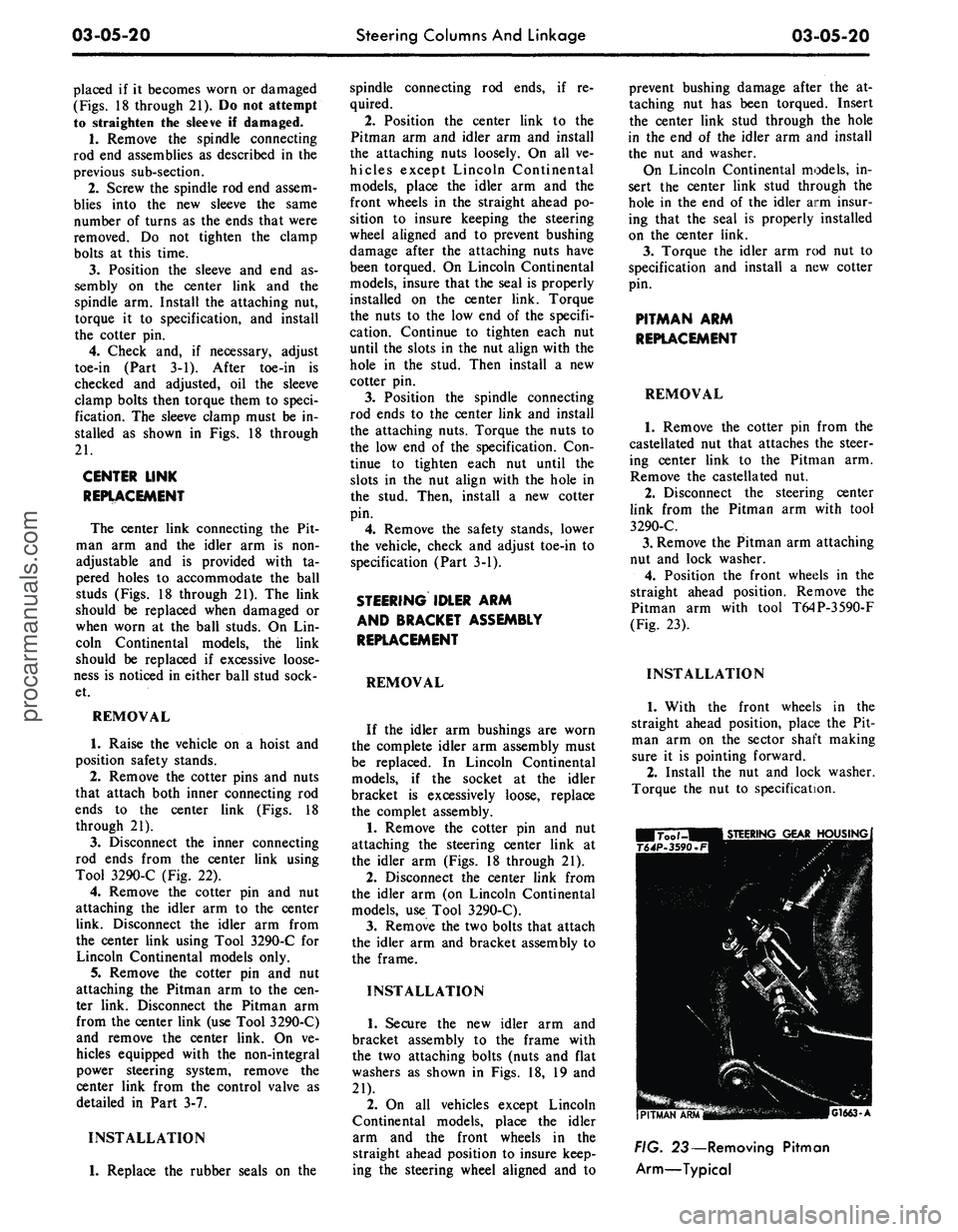
Pitman arm with tool T64P-3590-F
(Fig. 23).
INSTALLATION
1.
With the front wheels in the
straight ahead position, place the Pit-
man arm on the sector shaft making
sure it is pointing forward.
2.
Install the nut and lock washer.
Torque the nut to specification.
G1663-A
FIG. 23— Removing Pitman
Arm—Typicalprocarmanuals.com
Page 134 of 413
03-05-21 Steering Columns And Linkage 03-05-21
3.
Secure
the
steering center link
to
insure that
the
seal
is
properly
in-
tighten
the nut to the
next castellation
the Pitman
arm
with
the
castellated stalled. Torque
the nut to
specification
if
necessary
to
install
the
cotter
pin.
nut.
On
Lincoln Continental models,
and
install
the
cotter
pin.
Alwaysprocarmanuals.com
Page 135 of 413
03-06-01
Manual Steering
03 06-01
PART
3-6
Manual Steering
COMPONENT INDEX
STEERING GEAR
Cleaning
and
Inspection
(See Part 03-01)
Description
Disassembly
and
Overhaul
Removal
and
Installation
STEERING WORM
AND
SECTOR
Adjustment
and
Repair
MODEL APPLICATION
All
Models
Ford
06-01
06-03
06-02
06-02
Mercury
06-01
06-03
06-02
06-02
Meteor
06-01
06-03
06-02
06-02
Cougar
06-01
06-03
06-02
06-02
Fairlane
06-01
06-03
06-02
06-02
Falcon
06-01
06-03
06-02
06-02
Montego
06-01
06-03
06-02
06-02
Mustang
06-01
06-03
06-02
06-02
Lincoln-
Continental
N/A
N/A
N/A
N/A
Thunderbird
N/A
N/A
N/A
N/A
Continental-
Mark
III
N/A
N/A
N/A
N/A
A page number indicates that the item
is for
the vehicle listed
at
the head
of
the column.
N/A indicates that the item
is not
applicable
to
the vehicle listed.
DESCRIPTION
STEERING GEAR
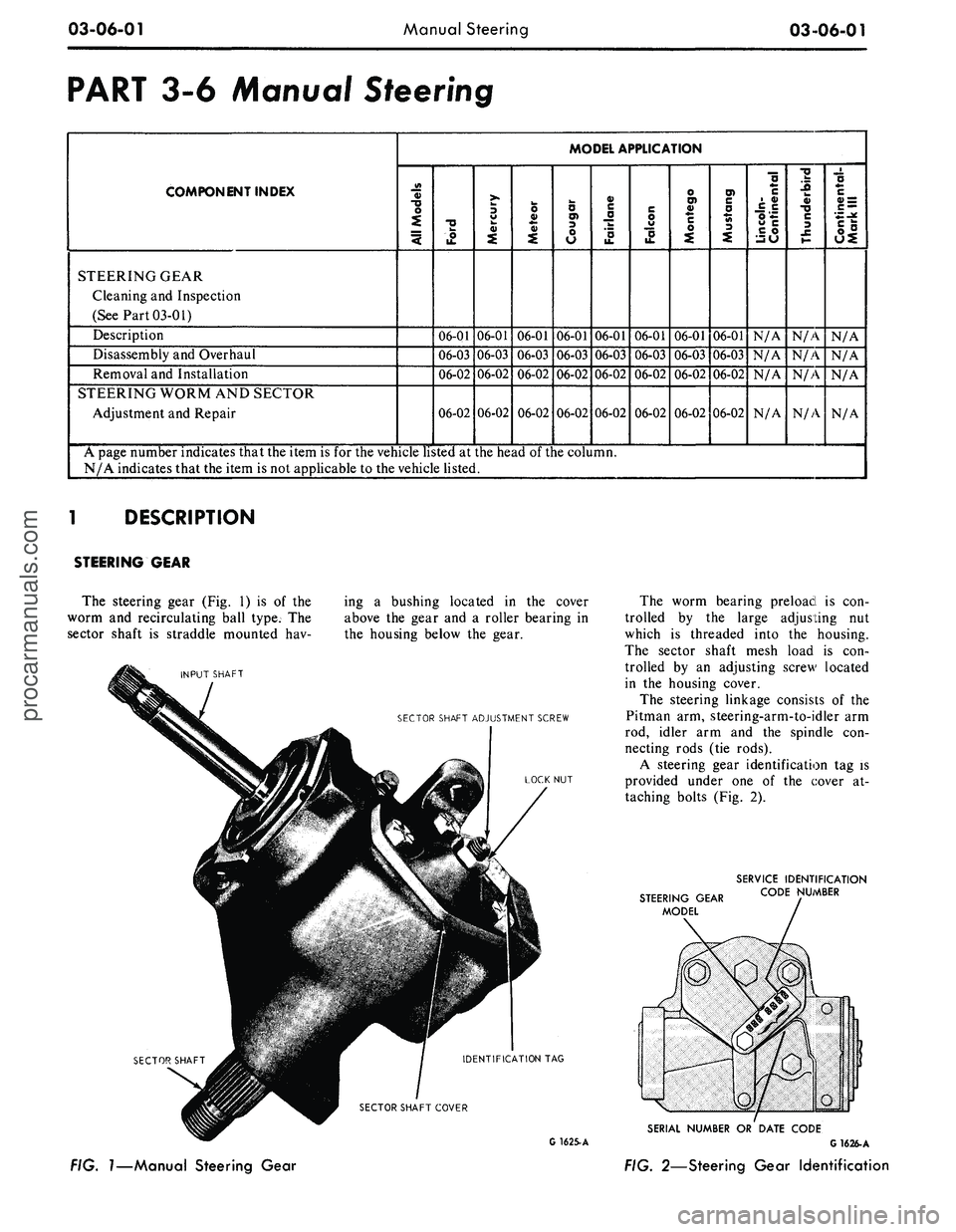
The steering gear
(Fig.
1) is of the
worm
and
recirculating ball type.
The
sector shaft
is
straddle mounted
hav-
INPUT SHAFT
ing
a
bushing located
in the
cover
above
the
gear
and a
roller bearing
in
the housing below
the
gear.
SECTOR SHAFT ADJUSTMENT SCREW
LOCK
NUT
IDENTIFICATION
TAG
SECTOR SHAFT COVER
The worm bearing preload
is con-
trolled
by the
large adjusting
nut
which
is
threaded into
the
housing.
The sector shaft mesh load
is con-
trolled
by an
adjusting screw located
in
the
housing cover.
The steering linkage consists
of the
Pitman
arm,
steering-arm-to-idler
arm
rod, idler
arm and the
spindle
con-
necting rods
(tie
rods).
A steering gear identification
tag is
provided under
one of the
cover
at-
taching bolts
(Fig.
2).
STEERING GEAR
MODEL
SERVICE IDENTIFICATION
CODE NUMBER
FIG.
1—Manual
Steering Gear
SERIAL NUMBER
OR
DATE CODE
G 1625-A
G
1626-A
FIG. 2—Steering Gear Identification
procarmanuals.com
Page 136 of 413
03-06-02
Manual Steering
03-06-02
IN-VEHICLE ADJUSTMENTS AND REPAIRS
STEERING WORM AND
SECTOR
GEAR ADJUSTMENTS
The ball nut assembly and the sec-
tor gear must be adjusted properly to
maintain minimum steering shaft end
play (a factor of preload adjustment)
and minimum backlash between sector
gear and ball nut. There are only two
possible adjustments within the recir-
culating ball-type steering gear, and
these should be made in the following
order to avoid damage or gear failure.
1.
Disconnect the Pitman arm from
the steering Pitman-to-idler arm rod.
2.
Loosen the nut which locks the
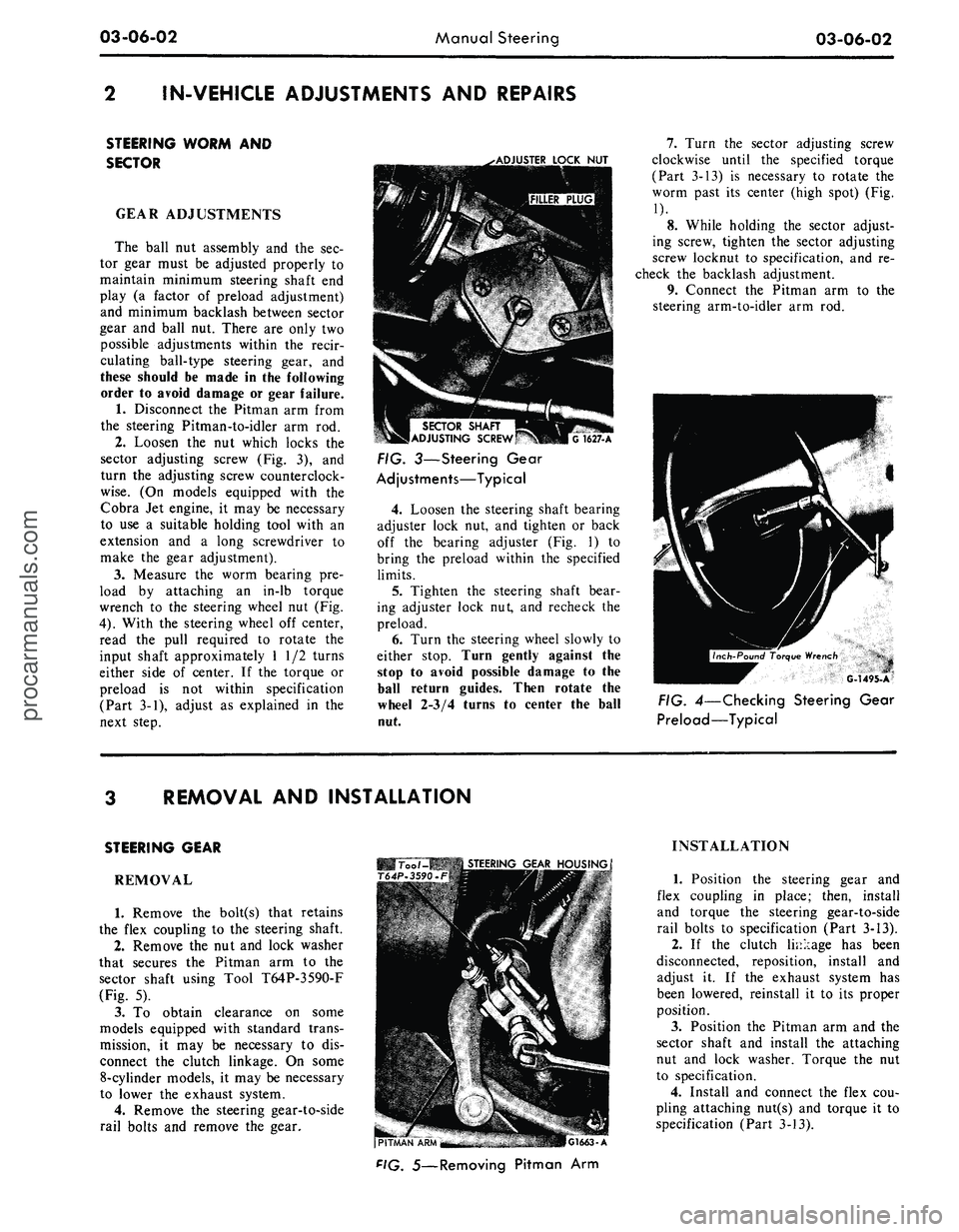
sector adjusting screw (Fig. 3), and
turn the adjusting screw counterclock-
wise.
(On models equipped with the
Cobra Jet engine, it may be necessary
to use a suitable holding tool with an
extension and a long screwdriver to
make the gear adjustment).
3.
Measure the worm bearing pre-
load by attaching an in-lb torque
wrench to the steering wheel nut (Fig.
4).
With the steering wheel off center,
read the pull required to rotate the
input shaft approximately 1 1/2 turns
either side of center. If the torque or
preload is not within specification
(Part 3-1), adjust as explained in the
next step.
.•ADJUSTER
LOCK
NUT
SECTOR
SHAFT
ADJUSTING
SCREW
G
1627-A
FIG. 3—Steering Gear
Adjustments—Typical
4.
Loosen the steering shaft bearing
adjuster lock nut, and tighten or back
off the bearing adjuster (Fig. 1) to
bring the preload within the specified
limits.
5.
Tighten the steering shaft bear-
ing adjuster lock nut, and recheck the
preload.
6. Turn the steering wheel slowly to
either stop. Turn gently against the
stop to avoid possible damage to the
ball return guides. Then rotate the
wheel 2-3/4 turns to center the ball
nut.
7.
Turn the sector adjusting screw
clockwise until the specified torque
(Part 3-13) is necessary to rotate the
worm past its center (high spot) (Fig.
1).
8. While holding the sector adjust-
ing screw, tighten the sector adjusting
screw locknut to specification, and re-
check the backlash adjustment.
9. Connect the Pitman arm to the
steering arm-to-idler arm rod.
G-1495-A
FIG. 4—Checking Steering Gear
Preload—Typical
REMOVAL AND INSTALLATION
STEERING GEAR
REMOVAL
1.
Remove the bolt(s) that retains
the flex coupling to the steering shaft.
2.
Remove the nut and lock washer
that secures the Pitman arm to the
sector shaft using Tool T64P-3590-F
(Fig. 5).
3.
To obtain clearance on some
models equipped with standard trans-
mission, it may be necessary to dis-
connect the clutch linkage. On some
8-cylinder models, it may be necessary
to lower the exhaust system.
4.
Remove the steering gear-to-side
rail bolts and remove the gear.
Too /-MB
STEERING
GEAR
HOUSING
T64P-3590.F
(PITMAN
"APU'^M
-
.-. •
-"
•.:,.17''i.a—
r.iMI.
A
F'G.
5—Removing Pitman Arm
INSTALLATION
1.
Position the steering gear and
flex coupling in place; then, install
and torque the steering gear-to-side
rail bolts to specification (Part 3-13).
2.
If the clutch linkage has been
disconnected, reposition, install and
adjust it. If the exhaust system has
been lowered, reinstall it to its proper
position.
3.
Position the Pitman arm and the
sector shaft and install the attaching
nut and lock washer. Torque the nut
to specification.
4.
Install and connect the flex cou-
pling attaching nut(s) and torque it to
specification (Part 3-13).procarmanuals.com