ignition HYUNDAI I800 2016 Service Manual
[x] Cancel search | Manufacturer: HYUNDAI, Model Year: 2016, Model line: I800, Model: HYUNDAI I800 2016Pages: 419, PDF Size: 9.23 MB
Page 138 of 419
Features of your vehicle
64 4
Battery saver function
• The purpose of this feature is to pre-
vent the battery from being dis-
charged. The system automatically
turns off the parking lights when the
driver removes the ignition key and
opens the driver-side door.
• With this feature, the parking lights will
be turned off automatically if the driver
parks on the side of road at night.
If necessary, to keep the lights on
when the ignition key is removed, per-
form the following:
1) Open the driver-side door.
2) Turn the parking lights OFF and ON
again using the light switch on the
steering column.
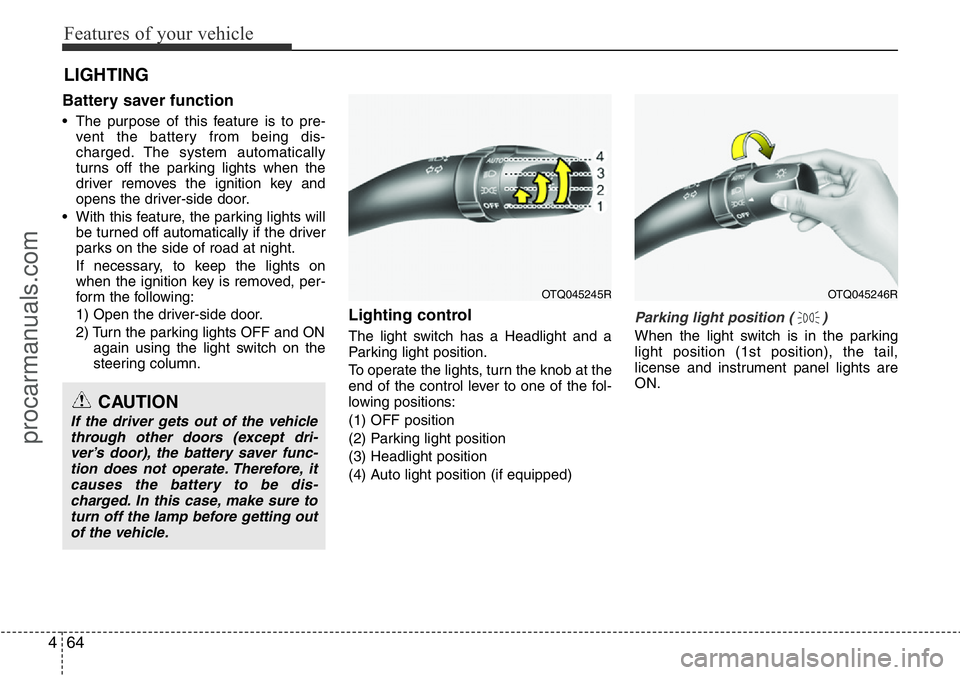
Lighting control
The light switch has a Headlight and a
Parking light position.
To operate the lights, turn the knob at the
end of the control lever to one of the fol-
lowing positions:
(1) OFF position
(2) Parking light position
(3) Headlight position
(4) Auto light position (if equipped)
Parking light position ( )
When the light switch is in the parking
light position (1st position), the tail,
license and instrument panel lights are
ON.
LIGHTING
CAUTION
If the driver gets out of the vehicle
through other doors (except dri-
ver’s door), the battery saver func-
tion does not operate. Therefore, it
causes the battery to be dis-
charged. In this case, make sure to
turn off the lamp before getting out
of the vehicle.
OTQ045245ROTQ045246R
procarmanuals.com
Page 139 of 419
465
Features of your vehicle
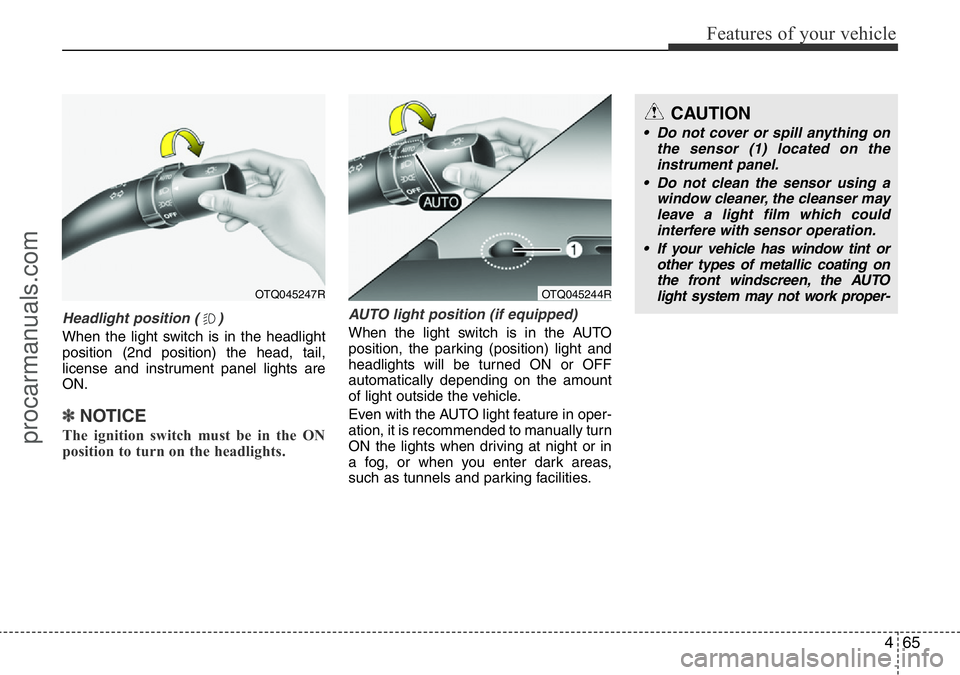
Headlight position ( )
When the light switch is in the headlight
position (2nd position) the head, tail,
license and instrument panel lights are
ON.
✽NOTICE
The ignition switch must be in the ON
position to turn on the headlights.
AUTO light position (if equipped)
When the light switch is in the AUTO
position, the parking (position) light and
headlights will be turned ON or OFF
automatically depending on the amount
of light outside the vehicle.
Even with the AUTO light feature in oper-
ation, it is recommended to manually turn
ON the lights when driving at night or in
a fog, or when you enter dark areas,
such as tunnels and parking facilities.
OTQ045247R
CAUTION
• Do not cover or spill anything on
the sensor (1) located on the
instrument panel.
• Do not clean the sensor using a
window cleaner, the cleanser may
leave a light film which could
interfere with sensor operation.
• If your vehicle has window tint or
other types of metallic coating on
the front windscreen, the AUTO
light system may not work proper-
OTQ045244R
procarmanuals.com
Page 140 of 419
Features of your vehicle
66 4
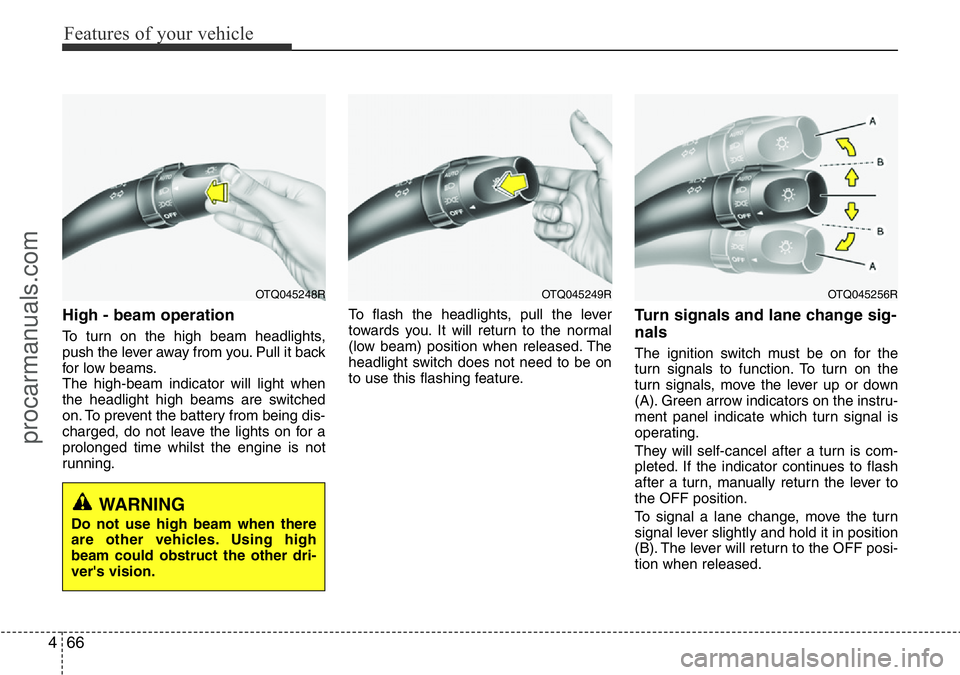
High - beam operation
To turn on the high beam headlights,
push the lever away from you. Pull it back
for low beams.
The high-beam indicator will light when
the headlight high beams are switched
on. To prevent the battery from being dis-
charged, do not leave the lights on for a
prolonged time whilst the engine is not
running.To flash the headlights, pull the lever
towards you. It will return to the normal
(low beam) position when released. The
headlight switch does not need to be on
to use this flashing feature.
Turn signals and lane change sig-
nals
The ignition switch must be on for the
turn signals to function. To turn on the
turn signals, move the lever up or down
(A). Green arrow indicators on the instru-
ment panel indicate which turn signal is
operating.
They will self-cancel after a turn is com-
pleted. If the indicator continues to flash
after a turn, manually return the lever to
the OFF position.
To signal a lane change, move the turn
signal lever slightly and hold it in position
(B). The lever will return to the OFF posi-
tion when released.
OTQ045249ROTQ045256ROTQ045248R
WARNING
Do not use high beam when there
are other vehicles. Using high
beam could obstruct the other dri-
ver's vision.
procarmanuals.com
Page 144 of 419
Features of your vehicle
70 4
Windscreen wipers
Operates as follows when the ignition
switch is turned ON.
: For a single wiping cycle, push the
lever upward and release it with the
lever in the 0 position. The wipers
will operate continuously if the lever
is pushed upward and held.
0 : Wiper is not in operation.
--- : Wiper operates intermittently at the
same wiping intervals. Use this
mode in a light rain or mist. To vary
the speed setting, turn the speed
control knob.
1 : Normal wiper speed
2 : Fast wiper speed
✽NOTICE
If there is heavy accumulation of snow
or ice on the windscreen, defrost the
windscreen for about 10 minutes, or
until the snow and/or ice is removed
before using the windscreen wipers to
ensure proper operation.
If you do not remove the snow and/or ice
before using the wiper and washer, it
may damage the wiper and washer sys-
tem.
✽NOTICE
• When you operate the wipers, if your
vehicle has a problem in any part of
the wiper operation system, the wiper
may operate in the 1 mode regardless
of the wiper switch position. In this
case, we recommend that the system
be checked by a HYUNDAI autho-
rised repairer.
• When the ignition key is removed, the
wiper blade sometimes may move to
properly position slightly for reducing
the deterioration of the windscreen
wipers.
Windscreen washers
In the 0 position, pull the lever gently
toward you to spray washer fluid on the
windscreen and to run the wipers 1-3
cycles.
Use this function when the windscreen is
dirty.
The spray and wiper operation will con-
tinue until you release the lever.
If the washer does not work, check the
washer fluid level. If the fluid level is not
sufficient, you will need to add appropri-
ate non-abrasive windscreen washer
fluid to the washer reservoir.
The reservoir filler neck is located in the
front of the engine compartment on the
driver side.
CAUTION
To prevent possible damage to the
washer pump, do not operate the
washer when the fluid reservoir is
empty.
procarmanuals.com
Page 146 of 419
Features of your vehicle
72 4
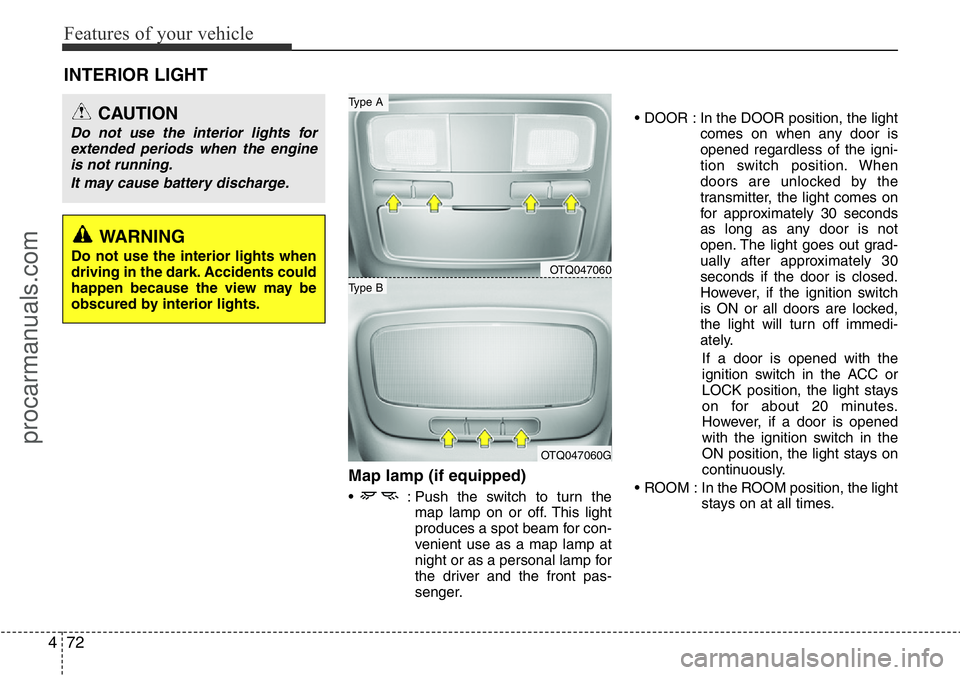
Map lamp (if equipped)
• : Push the switch to turn the
map lamp on or off. This light
produces a spot beam for con-
venient use as a map lamp at
night or as a personal lamp for
the driver and the front pas-
senger.• DOOR : In the DOOR position, the light
comes on when any door is
opened regardless of the igni-
tion switch position. When
doors are unlocked by the
transmitter, the light comes on
for approximately 30 seconds
as long as any door is not
open. The light goes out grad-
ually after approximately 30
seconds if the door is closed.
However, if the ignition switch
is ON or all doors are locked,
the light will turn off immedi-
ately.
If a door is opened with the
ignition switch in the ACC or
LOCK position, the light stays
on for about 20 minutes.
However, if a door is opened
with the ignition switch in the
ON position, the light stays on
continuously.
• ROOM : In the ROOM position, the light
stays on at all times.
INTERIOR LIGHT
CAUTION
Do not use the interior lights for
extended periods when the engine
is not running.
It may cause battery discharge.
OTQ047060
OTQ047060G
Type B
Type A
WARNING
Do not use the interior lights when
driving in the dark. Accidents could
happen because the view may be
obscured by interior lights.
procarmanuals.com
Page 147 of 419
473
Features of your vehicle
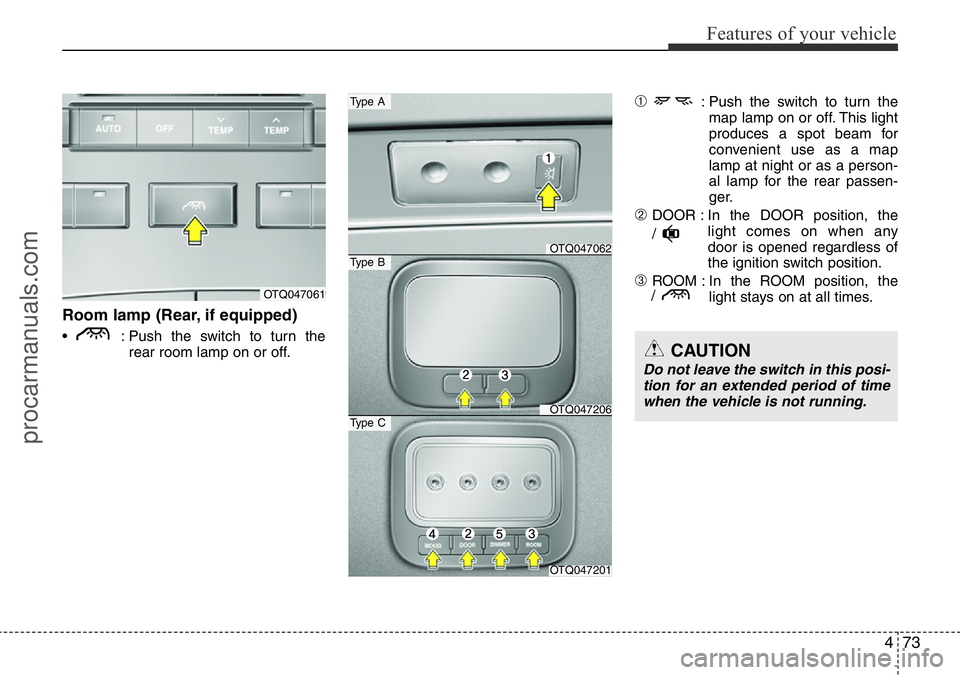
Room lamp (Rear, if equipped)
• : Push the switch to turn the
rear room lamp on or off.
➀: Push the switch to turn the
map lamp on or off. This light
produces a spot beam for
convenient use as a map
lamp at night or as a person-
al lamp for the rear passen-
ger.
➁DOOR : In the DOOR position, the
light comes on when any
door is opened regardless of
the ignition switch position.
➂ROOM : In the ROOM position, the
light stays on at all times.OTQ047061
OTQ047201
Type C
OTQ047062
Type A
Type B
OTQ047206
/
/
CAUTION
Do not leave the switch in this posi-
tion for an extended period of time
when the vehicle is not running.
procarmanuals.com
Page 148 of 419
Features of your vehicle
74 4
➃MOOD : Push the switch to turn the
mood lamp on when the
room lamp is off. Once the
mood lamp is on, each time
you press the button the
colour of the light will change.
The mood lamp will turn off
when the button is pressed
again after the last colour or
when the mood lamp button
is pressed for approximately
4 seconds or when the
ROOM, DOOR or DIMMER
button is pressed.
➄DIMMER : Whenever you push this
button when the room lamp
is turned on, the brightness
of the room lamp will
change within 3 level.
✽NOTICE
If you want to defrost and defog on the
front windscreen, refer to “Windscreen
Defrosting and Defogging” in this sec-
tion.
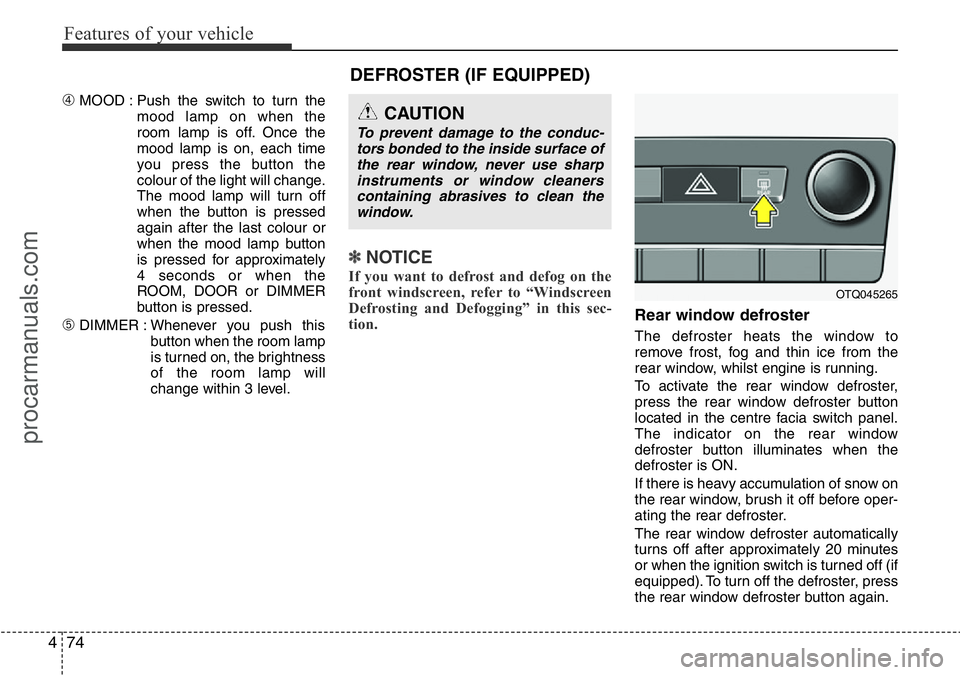
Rear window defroster
The defroster heats the window to
remove frost, fog and thin ice from the
rear window, whilst engine is running.
To activate the rear window defroster,
press the rear window defroster button
located in the centre facia switch panel.
The indicator on the rear window
defroster button illuminates when the
defroster is ON.
If there is heavy accumulation of snow on
the rear window, brush it off before oper-
ating the rear defroster.
The rear window defroster automatically
turns off after approximately 20 minutes
or when the ignition switch is turned off (if
equipped). To turn off the defroster, press
the rear window defroster button again.
CAUTION
To prevent damage to the conduc-
tors bonded to the inside surface of
the rear window, never use sharp
instruments or window cleaners
containing abrasives to clean the
window.
DEFROSTER (IF EQUIPPED)
OTQ045265
procarmanuals.com
Page 149 of 419
475
Features of your vehicle
MANUAL CLIMATE CONTROL SYSTEM (IF EQUIPPED)
OTQ045250/OTQ045251
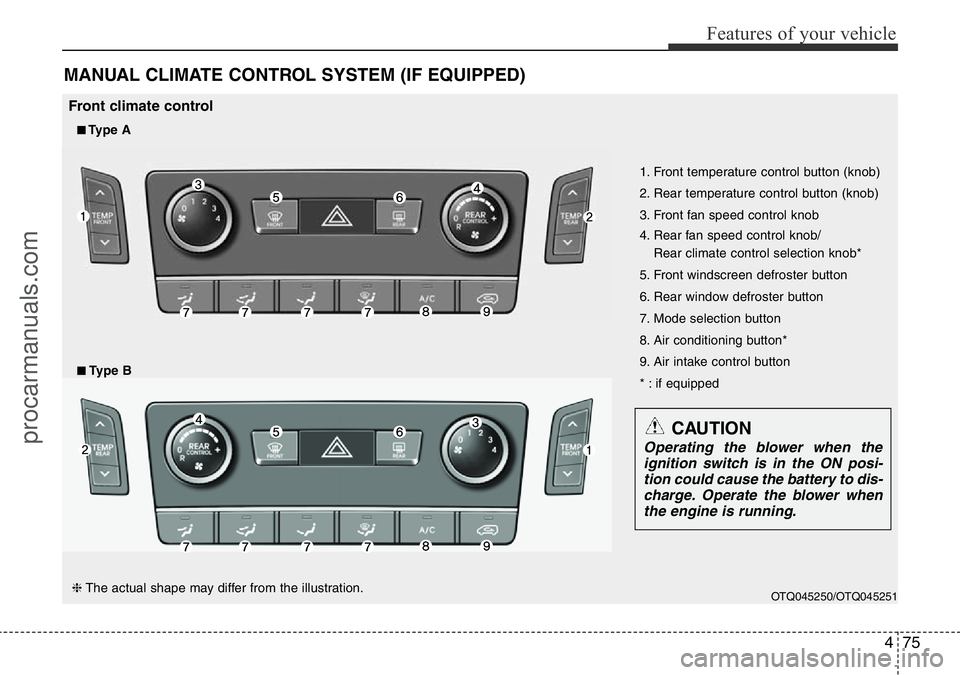
1. Front temperature control button (knob)
2. Rear temperature control button (knob)
3. Front fan speed control knob
4. Rear fan speed control knob/
Rear climate control selection knob*
5. Front windscreen defroster button
6. Rear window defroster button
7. Mode selection button
8. Air conditioning button*
9. Air intake control button
* : if equipped
■Type A
Front climate control
■Type B
CAUTION
Operating the blower when the
ignition switch is in the ON posi-
tion could cause the battery to dis-
charge. Operate the blower when
the engine is running.
❈The actual shape may differ from the illustration.
procarmanuals.com
Page 150 of 419
Features of your vehicle
76 4
OTQ045252/OTQ045253/OTQ047067
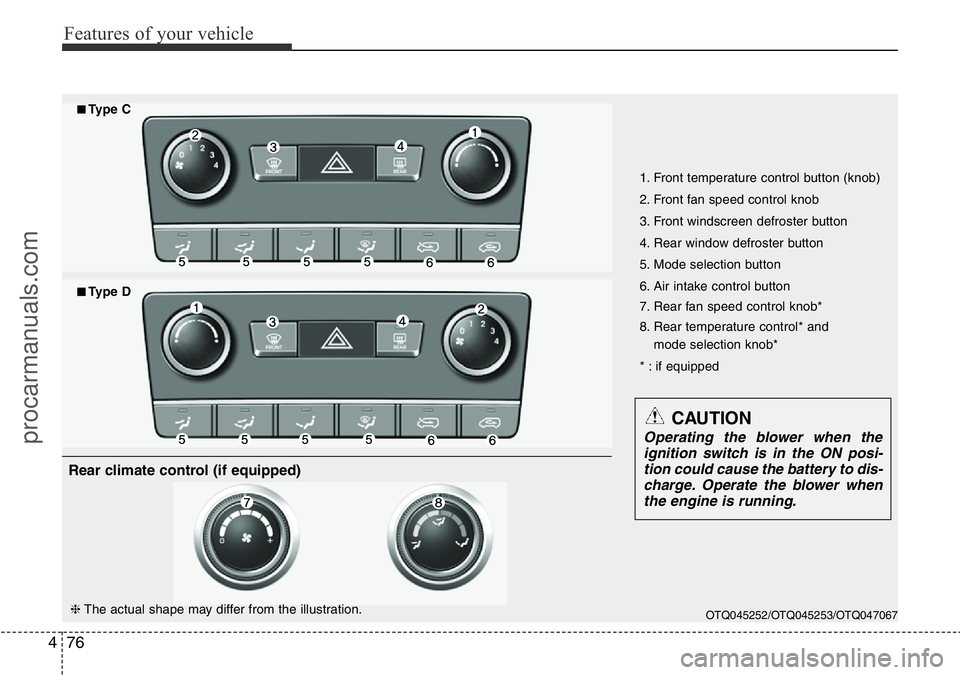
1. Front temperature control button (knob)
2. Front fan speed control knob
3. Front windscreen defroster button
4. Rear window defroster button
5. Mode selection button
6. Air intake control button
7. Rear fan speed control knob*
8. Rear temperature control* and
mode selection knob*
* : if equipped
■Type C
■Type D
CAUTION
Operating the blower when the
ignition switch is in the ON posi-
tion could cause the battery to dis-
charge. Operate the blower when
the engine is running.
❈The actual shape may differ from the illustration.
Rear climate control (if equipped)
procarmanuals.com
Page 155 of 419
481
Features of your vehicle
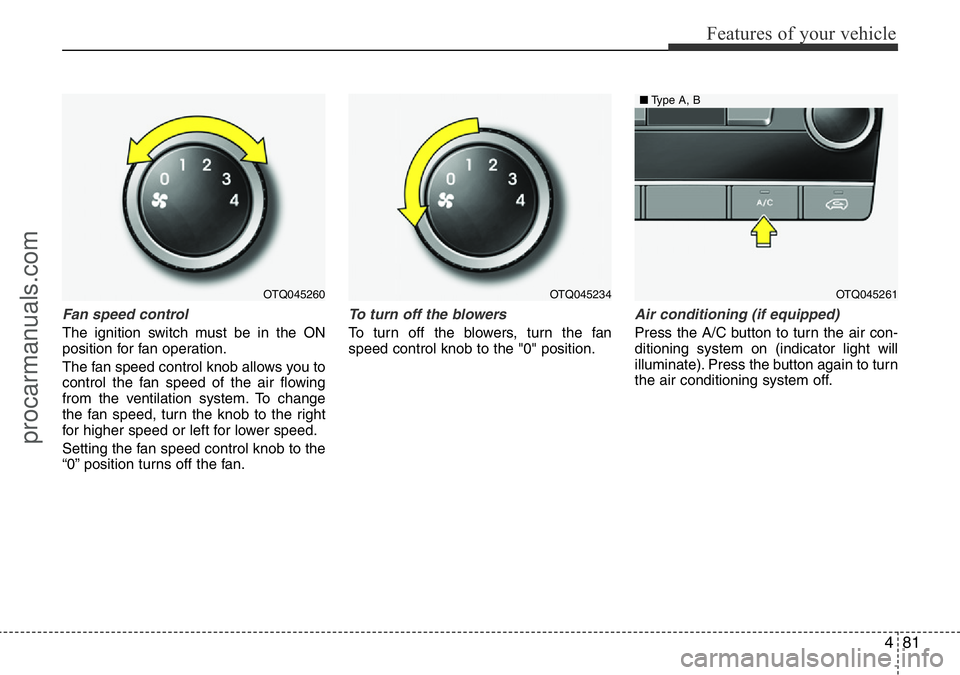
Fan speed control
The ignition switch must be in the ON
position for fan operation.
The fan speed control knob allows you to
control the fan speed of the air flowing
from the ventilation system. To change
the fan speed, turn the knob to the right
for higher speed or left for lower speed.
Setting the fan speed control knob to the
“0” position turns off the fan.
To turn off the blowers
To turn off the blowers, turn the fan
speed control knob to the "0" position.
Air conditioning (if equipped)
Press the A/C button to turn the air con-
ditioning system on (indicator light will
illuminate). Press the button again to turn
the air conditioning system off.
OTQ045260OTQ045234OTQ045261
■Type A, B
procarmanuals.com