bluetooth Hyundai Ioniq Electric 2017 Owner's Guide
[x] Cancel search | Manufacturer: HYUNDAI, Model Year: 2017, Model line: Ioniq Electric, Model: Hyundai Ioniq Electric 2017Pages: 582, PDF Size: 37.73 MB
Page 333 of 582
4-37
Multimedia System
4
Information
When the incoming call screen is displayed, audio mode and the set-
tings screen cannot be shown. Only
call volume control is supported.
Some Bluetooth ®
devices may not
support the call reject function.
Some Bluetooth ®
devices may not
support the phone number display
function.Operation during calls
Incoming call with Bluetooth®
con-
nected ➟Select [Accept].
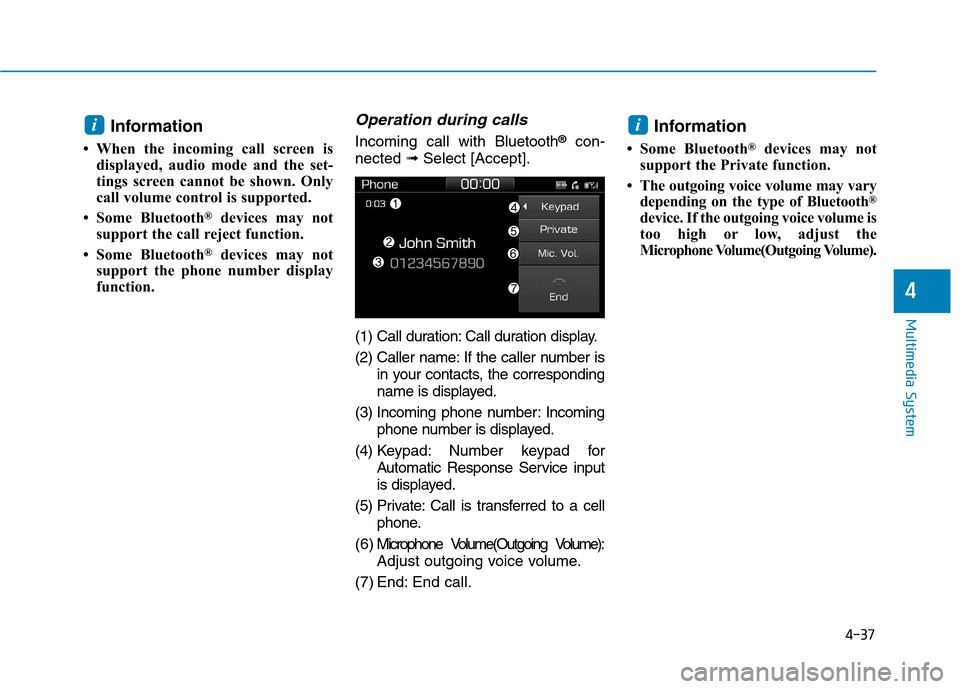
(1) Call duration: Call duration display.
(2) Caller name: If the caller number is in your contacts, the corresponding
name is displayed.
(3) Incoming phone number: Incoming phone number is displayed.
(4) Keypad: Number keypad for Automatic Response Service input
is displayed.
(5) Private: Call is transferred to a cell phone.
( 6 ) Microphone Volume(Outgoing Volume): Adjust outgoing voice volume.
(7) End: End call. Information
Some Bluetooth ®
devices may not
support the Private function.
The outgoing voice volume may vary depending on the type of Bluetooth ®
device. If the outgoing voice volume is
too high or low, adjust the
Microphone Volume(Outgoing Volume).
ii
Page 334 of 582
![Hyundai Ioniq Electric 2017 Owners Guide 4-38
Multimedia System
Favourites
Select the [PHONE]button on the
audio system ➟Select
[Favourites(Favorites)] ➟
Favourites(Favorites) list displayed.
(1) Favourites(Favorites) list: A list of](/img/35/14909/w960_14909-333.png "Hyundai Ioniq Electric 2017 Owners Guide 4-38
Multimedia System
Favourites
Select the [PHONE]button on the
audio system ➟Select
[Favourites(Favorites)] ➟
Favourites(Favorites) list displayed.
(1) Favourites(Favorites) list: A list of")
4-38
Multimedia System
Favourites
Select the [PHONE]button on the
audio system ➟Select
[Favourites(Favorites)] ➟
Favourites(Favorites) list displayed.
(1) Favourites(Favorites) list: A list of paired favourites(favor ites) is dis-
played. Connect a call when selected.
(2) Add to favourites(Favorites): Add a downloaded phone number to
favourites(favor ites).
(3) Delete: Delete a saved Favourites(Favorites). Information
Up to 20 favourites can be paired for each paired Bluetooth ®
device.
Favourites can be accessed when the Bluetooth ®
device they were paired
from is connected.
The audio system does not down- load favourites from Bluetooth ®
devices. Favourites must be newly
saved before use.
To add to favourites, contacts must be downloaded first.
Saved favourites are not updated even if the contacts of the connected
Bluetooth ®
device are changed. In
this case, favourites need to be delet-
ed and added again.
Call history
Select the [PHONE]button on the
audio system ➟Select [Call history]
➟ Call history is displayed.
(1) Call history: Display the down- loaded call history list. Connect a call when selected.
(2) Sort by: Sort by all calls, dialed calls, received calls or missed
calls.
(3) Download: Download call history from connected Bluetooth ®
devices.
Information
Up to 50 dialed, received and missed calls are saved.
When the latest call history is received, the existing call history is
deleted.
i
i
Page 335 of 582
![Hyundai Ioniq Electric 2017 Owners Guide 4-39
Multimedia System
4
Contacts
Select the [PHONE]button on the
audio system ➟Select [Contacts] ➟
Select letter (ABC) ➟Contacts dis-
played.
(1) Contacts: Display downloaded contacts. Conn](/img/35/14909/w960_14909-334.png "Hyundai Ioniq Electric 2017 Owners Guide 4-39
Multimedia System
4
Contacts
Select the [PHONE]button on the
audio system ➟Select [Contacts] ➟
Select letter (ABC) ➟Contacts dis-
played.
(1) Contacts: Display downloaded contacts. Conn")
4-39
Multimedia System
4
Contacts
Select the [PHONE]button on the
audio system ➟Select [Contacts] ➟
Select letter (ABC) ➟Contacts dis-
played.
(1) Contacts: Display downloaded contacts. Connect a call when selected.
(2) Download: Download contacts from connected Bluetooth ®
devices. Information
Up to 2,000 contacts can be saved.
In some cases, additional confirmation from your Bluetooth ®
device is neces-
sary when downloading contacts. If
downloading of contacts unsuccessful,
consult your Bluetooth ®
device’s set-
tings or the audio screen to approve
the download.
Contacts without phone numbers are not displayed.
Dial
Select the [PHONE]button on the
audio ➟Select [Dial].
(1) Phone number entry window: The phone number entered using the
keypad is displayed.
(2) Clear - Press to delete individual digits.
- Press and hold to delete theentire phone number.
(3) Keypad: Enter phone number.
(4) Bluetooth ®
Phone name
- The name of the connected Bluetooth ®
device is displayed.
- Contacts matching the keypad number/letter input are displayed.
i
Page 336 of 582
![Hyundai Ioniq Electric 2017 Owners Guide 4-40
Multimedia System
(5) Call- Enter and select a phone num-ber to call.
- Select without entering a phone number to see the most recent dialed call.
Settings
Select the [PHONE]button on the
audio](/img/35/14909/w960_14909-335.png "Hyundai Ioniq Electric 2017 Owners Guide 4-40
Multimedia System
(5) Call- Enter and select a phone num-ber to call.
- Select without entering a phone number to see the most recent dialed call.
Settings
Select the [PHONE]button on the
audio")
4-40
Multimedia System
(5) Call- Enter and select a phone num-ber to call.
- Select without entering a phone number to see the most recent dialed call.
Settings
Select the [PHONE]button on the
audio ➟Select [Settings].
- For phone settings, refer to Setup page.
Setup
Access Display, Sound, Date/Time,
Bluetooth, System, Screensaver and
Display Off settings. Select the [SETUP]button on the
audio system.
Display
Select the [SETUP]button on the
audio system ➟Select [Display].
Dimming mode(Mode): Audio screen brightness can be adjusted to the
time of day.
Brightness(Illumination): The bright- ness of the audio screen can bechanged.
Text scroll*: If text is too long to be displayed on the screen, enable
the text scroll function.
* if equipped
Sound
Select the [SETUP]button on the
audio system ➟Select [Sound].
Position: Sound balance and pan- ning can be adjusted.
Equaliser(Tone): Sound tone color can be adjusted.
Speed dependent volume control: Automatically adjust volume based
on vehicle speed.
Beep: Select whether to play a beep sound when the screen is touched.
Page 337 of 582
![Hyundai Ioniq Electric 2017 Owners Guide 4-41
Multimedia System
4
Date/Time
Select the [SETUP]button on the
audio system ➟Select [Date/Time].
Set time: Set the time displayed on the audio screen.
Time format: Choose between 12- hour and](/img/35/14909/w960_14909-336.png "Hyundai Ioniq Electric 2017 Owners Guide 4-41
Multimedia System
4
Date/Time
Select the [SETUP]button on the
audio system ➟Select [Date/Time].
Set time: Set the time displayed on the audio screen.
Time format: Choose between 12- hour and")
4-41
Multimedia System
4
Date/Time
Select the [SETUP]button on the
audio system ➟Select [Date/Time].
Set time: Set the time displayed on the audio screen.
Time format: Choose between 12- hour and 24-hour time formats.
Set date: Set the date displayed on the audio screen.
Bluetooth
Select the [SETUP]button on the
audio system ➟Select [Bluetooth].
Connections: Control pairing, dele- tion, connection and disconnection of Bluetooth ®
devices.
Auto connection priority: Set the connection priority of Bluetooth ®
devices when the vehicle is started.
Update contacts: Contacts can be downloaded from connectedBluetooth ®
devices.
Bluetooth voice guidance*: Play or mute voice prompts for Bluetooth ®
device pairing, connection and
errors. * if equipped Information
When paired devices are deleted, the call history and contacts of the
device saved to the audio system are
deleted.
For Bluetooth ®
connections with
low connection priority, some time
may be required for the connection
to be established.
Contacts can be downloaded only from the currently connected
Bluetooth ®
device.
If no Bluetooth ®
device is connected,
the Download Contacts button is
disabled.
If the language setting is Slovakian, Hungarian or Korean, Bluetooth
voice guidance* is not supported.
* if equipped
System
Select the [SETUP]button on the
audio system ➟Select [System].
Memory information: View My Music memory usage.
Language: Change the user lan- guage.
Default: Reset the audio system.
Information
The system resets to the default val-
ues, and all saved data and settings
are lost.
i
i
Page 572 of 582
I-3
Battery (12 volt) ...........................................................7-27
Battery recharging......................................................7-29
Battery cooling duct .....................................................2-24
Battery saver function...................................................3-81
Before driving .................................................................5-3
Blind spot detection (BSD) system ..............................5-40
Bluetooth ®
Wireless Technology hands-free..................4-4
Bottle holder ...............................................................3-119
Brake fluid ....................................................................7-21
Brake system.................................................................5-19
Anti-lock brake system (ABS) ..................................5-29
Auto hold ...................................................................5-25
Disc brakes wear indicator ........................................5-20
Electronic parking brake (EPB).................................5-20
Electronic stability control (ESC) .............................5-31
Good braking practices ..............................................5-37
Hill-start assist control (HAC)...................................5-36
Power brakes..............................................................5-19
Vehicle stability management (VSM) .......................5-35
Bulb replacement ..........................................................7-57
Daytime running lamp ...............................................7-66
Front position lamp....................................................7-58
Front turn signal lamp ...............................................7-58
Headlamp ...................................................................7-58
Headlamp aiming .......................................................7-62
High mounted stop lamp ...........................................7-69 Interior light bulb .......................................................7-69
License plate light bulb .............................................7-69
Rear combination light bulb ......................................7-66
Rear fog lamp ............................................................7-69
Side repeater lamp ....................................................7-66
Bulb wattage ...................................................................8-3
Camera (Rear view)......................................................3-90
Capacities (Lubricants) ...................................................3-6
Care Exterior care...............................................................7-71
Interior care................................................................7-76
Tire care .....................................................................7-31
Cargo security screen .................................................3-126
Cellular phone holder .................................................3-122
Center console storage ................................................3-116
Central door lock switch...............................................3-10
Certification label ...........................................................8-7
Chains Tire chains..................................................................5-97
Checking tire inflation pressure ...................................7-33
Child restraint system (CRS)........................................2-37 Booster seats ..............................................................2-39
Forward-facing child restraint system .......................2-39
Installing a child restraint system (CRS)...................2-40
ISOFIX anchorage and top-tether anchorage for children....................................................................2-41
I
Index
B
C
Page 578 of 582
I-9
Maintenance
Explanation of scheduled maintenance items............7-16
Maintenance services ...................................................7-4
Maintenance under severe usage conditions .......7-10, 14
Normal maintenance service .................................7-8, 12
Owner maintenance .....................................................7-5
Scheduled maintenance services .................................7-7
Tire maintenance........................................................7-36
Maintenance schedule Except Europe............................................................7-12
For Europe ...................................................................7-8
Maintenance services......................................................7-4
Mirrors ..........................................................................3-17 Adjusting the outside rearview mirrors .....................3-20
Day/night rearview mirror .........................................3-18
Electric chromic mirror (ECM) .................................3-18
Folding/Unfolding the outside rearview mirror ........3-21
Inside rearview mirror ...............................................3-17
Outside rearview mirror.............................................3-19
Moonroof, see sunroof..................................................3-28
Motor compartment...............................................1-10, 7-3
Motor compartment panel fuse replacement ................7-44
Motor number .................................................................8-7
Multi box ....................................................................3-118
Multi fuse......................................................................7-45 Multimedia system .........................................................4-2
Antenna ........................................................................4-2
Audio / Video / Navigation system .............................4-5
AUX, USB and iPod ®
port ..........................................4-2
Bluetooth ®
Wireless Technology hands-free ...............4-4
Steering wheel audio control .......................................4-3
Odometer ......................................................................3-39
Outside rearview mirror ...............................................3-19
Outside temperature gauge ...........................................3-39
Owner maintenance ........................................................7-5
Paddle shifter (Regenerative braking control) .............5-18
Parking assist system ....................................................3-94
Passenger's front air bag ON/OFF switch ....................2-54
Passenger's front air bag ...............................................2-53
Position lamp position ..................................................3-78
Power brakes.................................................................5-19
Power button ...................................................................5-4 Starting the vehicle ......................................................5-8
Turing off the vehicle ................................................5-10
Power outlet ................................................................3-121
Power steering ..............................................................3-15
Power window lock button ...........................................3-26
Pre-tensioner seat belt...................................................2-31
Puddle lamp ..................................................................3-86
I
Index
O
P
M