USB Hyundai Ioniq Electric 2017 Owner's Manual
[x] Cancel search | Manufacturer: HYUNDAI, Model Year: 2017, Model line: Ioniq Electric, Model: Hyundai Ioniq Electric 2017Pages: 582, PDF Size: 37.73 MB
Page 96 of 582
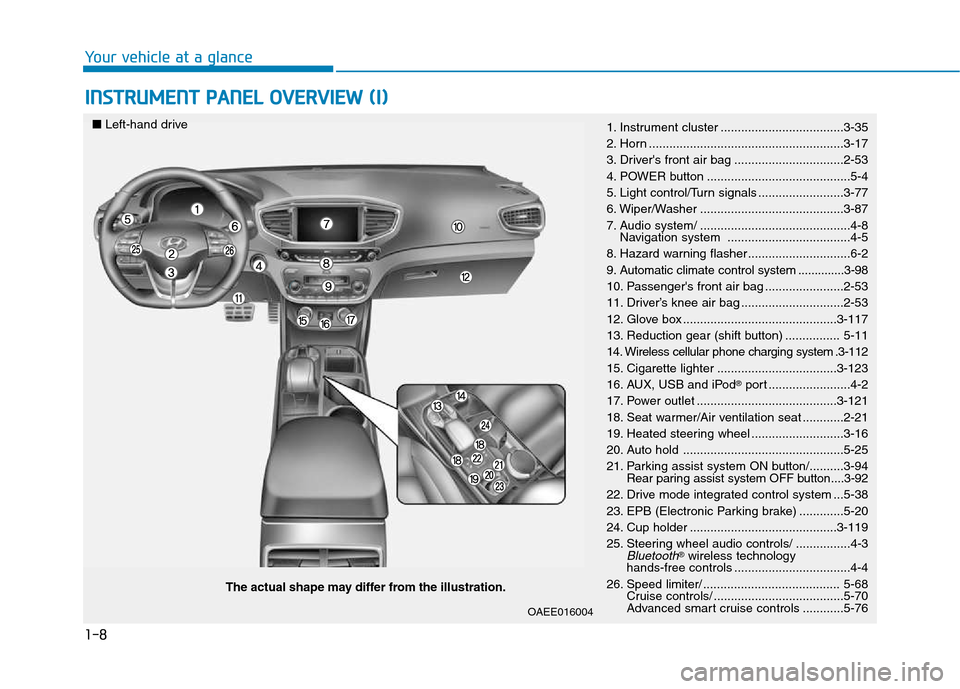
1-8
INSTRUMENT PANEL OVERVIEW (I)
Your vehicle at a glance
The actual shape may differ from the illustration.
■
Left-hand drive
1. Instrument cluster ....................................3-35
2. Horn .........................................................3-17
3. Driver's front air bag ................................2-53
4. POWER button ..........................................5-4
5. Light control/Turn signals .........................3-77
6. Wiper/Washer ..........................................3-87
7. Audio system/ ............................................4-8
Navigation system ....................................4-5
8. Hazard warning flasher ..............................6-2
9. Automatic climate control system ..............3-98
10. Passenger's front air bag .......................2-53
11. Driver’s knee air bag ..............................2-53
12. Glove box .............................................3-117
13. Reduction gear (shift button) ................ 5-11
14. Wireless cellular phone charging system .3-112
15. Cigarette lighter ...................................3-123
16. AUX, USB and iPod
Page 97 of 582
1-9
Your vehicle at a glance
1
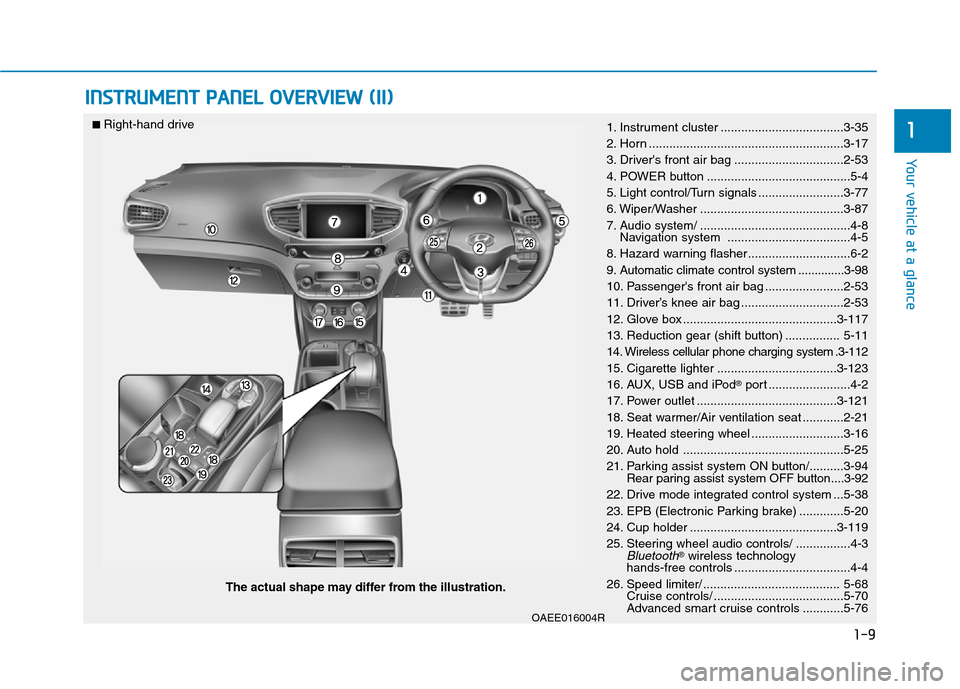
INSTRUMENT PANEL OVERVIEW (II)
OAEE016004R
The actual shape may differ from the illustration.
■
Right-hand drive
1. Instrument cluster ....................................3-35
2. Horn .........................................................3-17
3. Driver's front air bag ................................2-53
4. POWER button ..........................................5-4
5. Light control/Turn signals .........................3-77
6. Wiper/Washer ..........................................3-87
7. Audio system/ ............................................4-8
Navigation system ....................................4-5
8. Hazard warning flasher ..............................6-2
9. Automatic climate control system ..............3-98
10. Passenger's front air bag .......................2-53
11. Driver’s knee air bag ..............................2-53
12. Glove box .............................................3-117
13. Reduction gear (shift button) ................ 5-11
14. Wireless cellular phone charging system .3-112
15. Cigarette lighter ...................................3-123
16. AUX, USB and iPod
Page 297 of 582
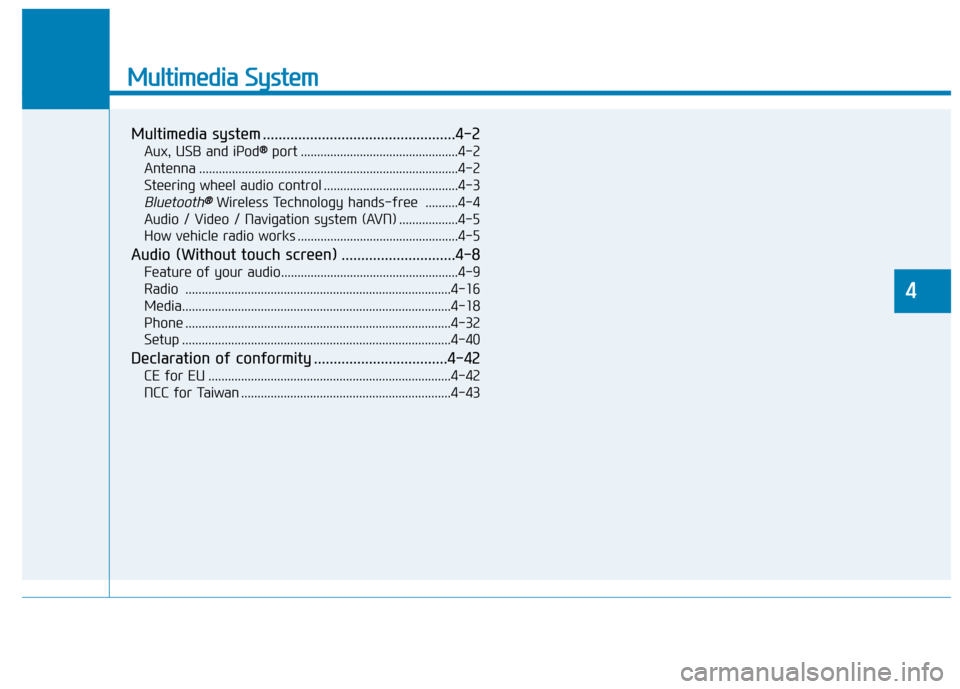
Multimedia System
Multimedia system .................................................4-2Aux, USB and iPod ®®
port ................................................4-2
Antenna ...............................................................................4-2
Steering wheel audio control .........................................4-3
Bluetooth®®Wireless Technology hands-free ..........4-4
Audio / Video / Navigation system (AVN) ..................4-5
How vehicle radio works .................................................4-5
Audio (Without touch screen) .............................4-8 Feature of your audio......................................................4-9Radio .................................................................................4-16
Media..................................................................................4-18
Phone .................................................................................4-32
Setup ..................................................................................4-40
Declaration of conformity ..................................4-42 CE for EU ..........................................................................4-42
NCC for Taiwan ................................................................4-43
4
Page 298 of 582
4-2
Multimedia System
Information
If you install an aftermarket HID headlamp, your vehicle’s audio and
electronic device may malfunction.
Prevent chemicals such as perfume, cosmetic oil, sun cream, hand clean-
er, and air freshener from contacting
the interior parts because they may
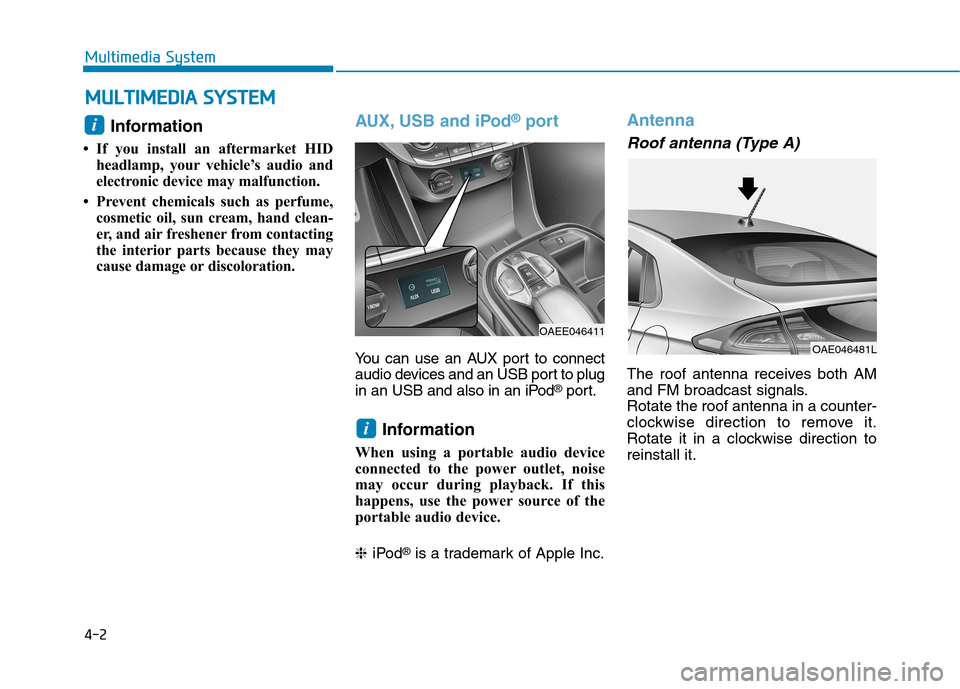
cause damage or discoloration.AUX, USB and iPod ®
port
You can use an AUX port to connect
audio devices and an USB port to plug
in an USB and also in an iPod ®
port.
Information
When using a portable audio device
connected to the power outlet, noise
may occur during playback. If this
happens, use the power source of the
portable audio device. ❈ iPod ®
is a trademark of Apple Inc.
Antenna
Roof antenna (Type A)
The roof antenna receives both AM
and FM broadcast signals.Rotate the roof antenna in a counter-
clockwise direction to remove it.
Rotate it in a clockwise direction toreinstall it.
i
OAEE046411
i
MM UULLTT IIMM EEDD IIAA SS YY SSTT EEMM
OAE046481L
Page 305 of 582
4-9
Multimedia System
4
Feature of Your Audio
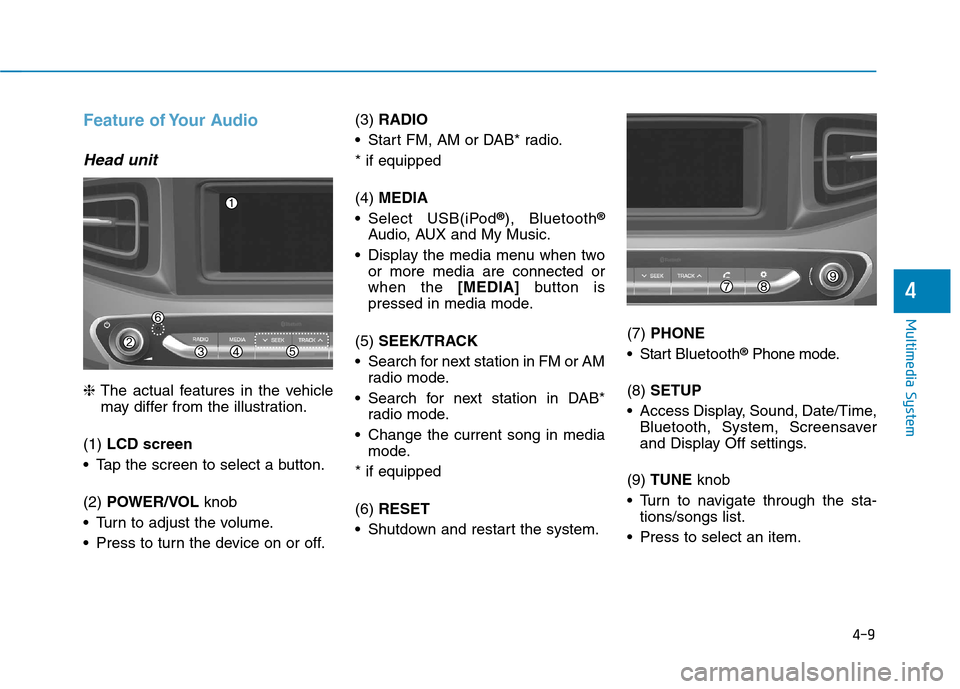
Head unit
❈The actual features in the vehicle
may differ from the illustration.
(1) LCD screen
Tap the screen to select a button. (2) POWER/VOL knob
Turn to adjust the volume.
Press to turn the device on or off. (3)
RADIO
Start FM, AM or DAB* radio.* if equipped (4) MEDIA
Select USB(iPod ®
), Bluetooth ®
Audio, AUX and My Music.
Display the media menu when two or more media are connected or when the [MEDIA]button is
pressed in media mode.
(5) SEEK/TRACK
Search for next station in FM or AM radio mode.
Search for next station in DAB* radio mode.
Change the current song in media mode.
* if equipped (6) RESET
Shutdown and restart the system. (7)
PHONE
Start Bluetooth ®
Phone mode.
(8) SETUP
Access Display, Sound, Date/Time, Bluetooth, System, Screensaver
and Display Off settings.
(9) TUNE knob
Turn to navigate through the sta- tions/songs list.
Press to select an item.
Page 307 of 582
4-11
Multimedia System
4
Feature of Your Audio
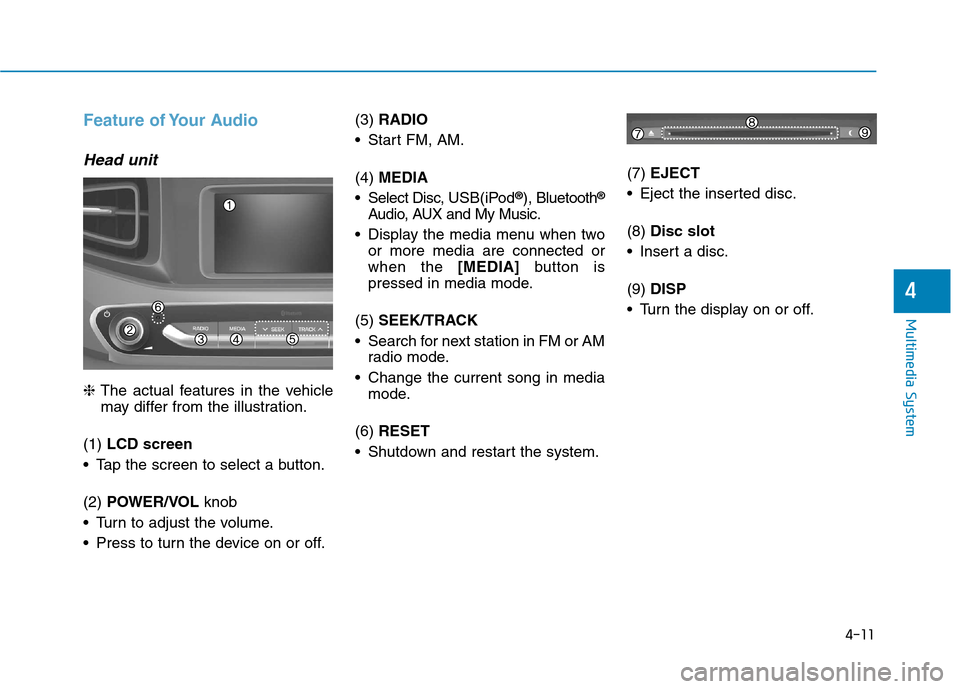
Head unit
❈The actual features in the vehicle
may differ from the illustration.
(1) LCD screen
Tap the screen to select a button. (2) POWER/VOL knob
Turn to adjust the volume.
Press to turn the device on or off. (3)
RADIO
Start FM, AM. (4) MEDIA
Select Disc, USB(iPod®
), Bluetooth ®
Audio, AUX and My Music.
Display the media menu when two or more media are connected or when the [MEDIA]button is
pressed in media mode.
(5) SEEK/TRACK
Search for next station in FM or AM radio mode.
Change the current song in media mode.
(6) RESET
Shutdown and restart the system. (7)
EJECT
Eject the inserted disc. (8) Disc slot
Insert a disc.(9) DISP
Turn the display on or off.
Page 317 of 582
4-21
Multimedia System
4
2. Sampling frequency (Hz)
The sound quality of MP3/WMAcompressed files may vary depend-
ing on the bitrate. (A higher bitrate
can have better sound quality.)
The product only recognizes files with the MP3 or WMA extension.
Files without one of these exten-
sions are not recognized.
3. Number of recognizable folders and files
Folders: 2,000 for USB
Files: 6,000 for USB
No recognition limit for folder hier- archies 4. Character display range (Unicode)
Filenames: Up to 64 English char-
acters (64 Korean characters)
Foldername: Up to 32 English characters (32 Korean characters)
The scroll feature can be used to
display file and folder names that
are too long to display on the screen. (if equipped)
Languages supported (Unicode sup-
port)
Korean: 2,604 characters
English: 94 characters
Common Chinese characters: 4,888 characters
Special symbols: 986 characters
Japanese/Simplified Chinese char-
acters are not supported.
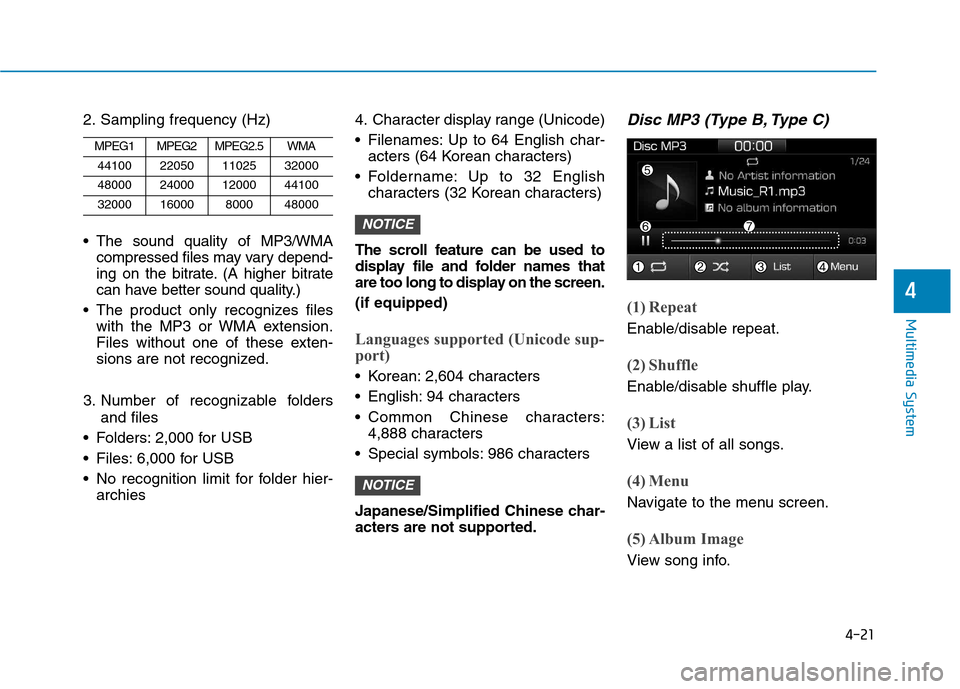
Disc MP3 (Type B, Type C)
(1) Repeat
Enable/disable repeat.
(2) Shuffle
Enable/disable shuffle play.
(3) List
View a list of all songs.
(4) Menu
Navigate to the menu screen.
(5) Album Image
View song info.
NOTICE
NOTICE
MPEG1MPEG2MPEG2.5WMA
44100220501102532000
48000240001200044100
3200016000800048000
Page 318 of 582
![Hyundai Ioniq Electric 2017 Owners Manual 4-22
Multimedia System
(6) Pause
Pause or play music.
(7) Playback progress
Press to skip to the desired location.
Playback
Press the [MEDIA]button and
select [Disc MP3].
When a disc is inserted in](/img/35/14909/w960_14909-317.png "Hyundai Ioniq Electric 2017 Owners Manual 4-22
Multimedia System
(6) Pause
Pause or play music.
(7) Playback progress
Press to skip to the desired location.
Playback
Press the [MEDIA]button and
select [Disc MP3].
When a disc is inserted in")
4-22
Multimedia System
(6) Pause
Pause or play music.
(7) Playback progress
Press to skip to the desired location.
Playback
Press the [MEDIA]button and
select [Disc MP3].
When a disc is inserted in the audio system, disc playback
begins automatically.
Changing songs
Press the [SEEK/TRACK] button
to play the previous or next song.
Press and hold the [SEEK/TRACK]
button to rewind or fast-forward the
song that is currently playing.
Search songs by turning the TUNE
knob, and press the knob to play.
Selecting songs from a list
Press the [List] to view a list of songs
available to play.
Select and play the desired song.
Repeat play
Press the [Repeat] to enable or dis-
able ‘Repeat all’, ‘Repeat current
song’ or ‘Repeat folder’.
Repeat all: Repeat all songs in the playlist.
Repeat current song: The song that is currently playing is repeated.
Repeat folder: All songs in the current folder are repeated.
Shuffle play
Press the [Shuffle] to enable/disable
‘Shuffle’, ‘Shuffle folder’ play.
Shuffle: Songs are played in arandom order.
Shuffle folder: Songs within the current folder are played in ran-
dom order.
Menu
Press the [Menu] and select the desired function.
Information: Detailed informationon the song that is currently play-
ing is displayed.
Sound Settings: Audio sound set- tings can be changed. Information
- Using the USB Devices
Starting the vehicle while a USB device is connected can damage the
device. Please disconnect USB
devices before starting the vehicle.
Starting the vehicle or stopping the engine while an external USB device
is connected can result in failure of
the external USB device to operate.
Be cautious of static electricity when connecting/disconnecting external
USB devices.
An encrypted MP3 player is not rec- ognized when connected as an exter-
nal device.
External USB devices may not be recognized, depending on the state
of the external USB device.
Only products with byte/sectors for- matted at 4 KB or lower are recog-
nized.
Only USB devices in FAT12/16/32 format are recognized; NTFS and
ExFAT file systems are not recog-
nized.
(Continued)
i
Page 319 of 582
4-23
Multimedia System
4
(Continued)
Some USB devices are not recog-nized due to compatibility issues.
Do not touch the USB connections.
Connecting and disconnecting USB devices rapidly over a short period
of time can cause equipment failure.
Abnormal sounds may be audible when the USB device is disconnected.
Turn the audio off before connecting or disconnecting external USB
devices.
Recognition may take longer depending on the type, capacity or
file format of the external USB
device. This is not a product mal-
function.
Use of USB devices for purposes other than playing music files is pro-
hibited.
Image display and video playback are not supported.
(Continued)(Continued)
Use of USB accessories, including
charge and heat though the USB I/F,
can lead to reduced product per-
formance or malfunctions. Do not
use USB devices or accessories for
these purposes.
Use of aftermarket USB hubs and extension cables can result in the
vehicle’s audio system failing to rec-
ognize your USB device. Connect
the USB device directly to the multi-
media port of your vehicle.
When using high-capacity USB devices with logical drive divisions,
only files saved on the highest level
logical drive can be played.
If applications are loaded on a USB
drive, file playback may fail.
Some MP3 players, cell phones, dig- ital cameras, etc. (USB devices that
are not recognized as mobile stor-
age) may not operate normally
when connected.
USB charging may not be supported by some mobile devices.
(Continued)(Continued)
Operation is guaranteed only for
standard (Metal Cover Type) USB
Memory drives.
Operation of HDD, CF, SD and memory stick devices is not guaran-
teed.
DRM (Digital Rights Management) files cannot be played.
SD-type USB memory, CF-type USB memory, and other USB mem-
ory devices that require adapters
for connection are not supported.
Proper operation of USB HDDs or USB drives with connectors that
loosen due to vehicle vibrations is
not guaranteed. (iStick, etc.)
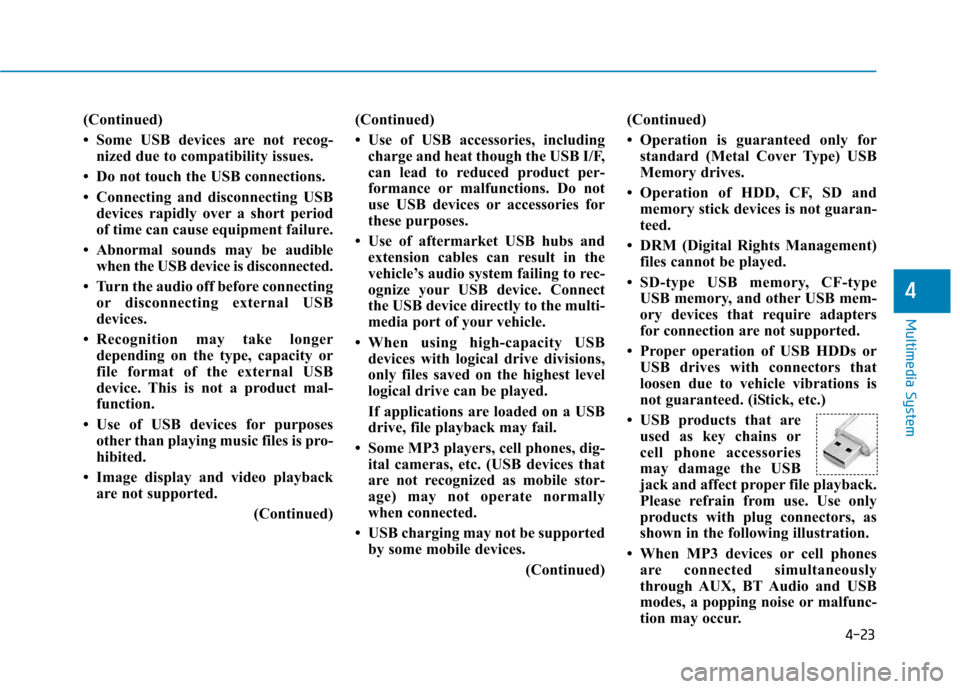
USB products that are used as key chains or
cell phone accessories
may damage the USB
jack and affect proper file playback.
Please refrain from use. Use only
products with plug connectors, as
shown in the following illustration.
When MP3 devices or cell phones are connected simultaneously
through AUX, BT Audio and USB
modes, a popping noise or malfunc-
tion may occur.
Page 320 of 582
4-24
Multimedia System
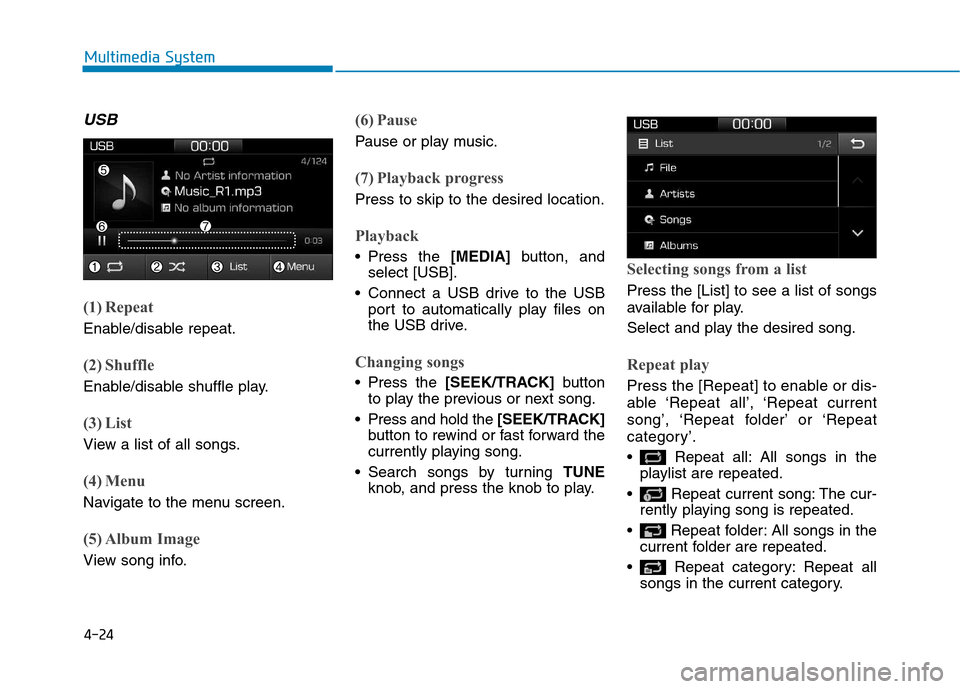
USB
(1) Repeat
Enable/disable repeat.
(2) Shuffle
Enable/disable shuffle play.
(3) List
View a list of all songs.
(4) Menu
Navigate to the menu screen.
(5) Album Image
View song info.
(6) Pause
Pause or play music.
(7) Playback progress
Press to skip to the desired location.
Playback
Press the [MEDIA]button, and
select [USB].
Connect a USB drive to the USB port to automatically play files on
the USB drive.
Changing songs
Press the [SEEK/TRACK] button
to play the previous or next song.
Press and hold the [SEEK/TRACK]
button to rewind or fast forward the
currently playing song.
Search songs by turning TUNE
knob, and press the knob to play.
Selecting songs from a list
Press the [List] to see a list of songs
available for play.
Select and play the desired song.
Repeat play
Press the [Repeat] to enable or dis-
able ‘Repeat all’, ‘Repeat current
song’, ‘Repeat folder’ or ‘Repeat
category’.
Repeat all: All songs in the playlist are repeated.
Repeat current song: The cur- rently playing song is repeated.
Repeat folder: All songs in the current folder are repeated.
Repeat category: Repeat all songs in the current category.