light Hyundai Ioniq Electric 2017 Quick Reference Guide
[x] Cancel search | Manufacturer: HYUNDAI, Model Year: 2017, Model line: Ioniq Electric, Model: Hyundai Ioniq Electric 2017Pages: 26, PDF Size: 9.24 MB
Page 2 of 26
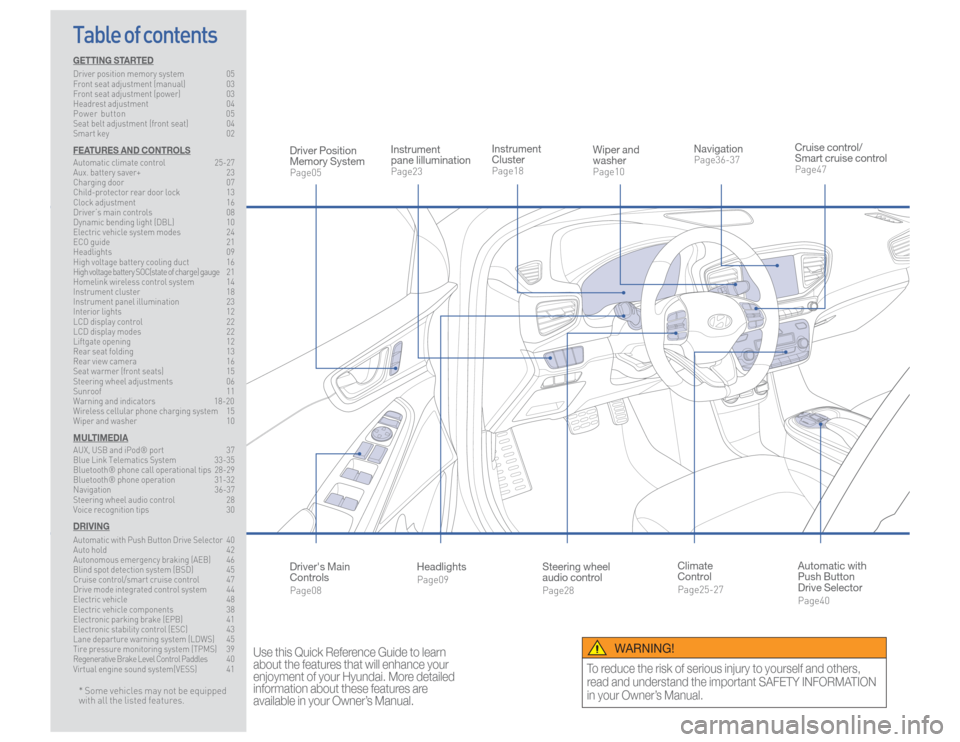
Steering wheel
audio controlPage28
Instrument
ClusterPage18
NavigationPage36-37
Instrument
pane lillumination Page23
Climate
ControlPage25-27
HeadlightsPage09
Table of contents
Cruise control/
Smart cruise controlPage47
Wiper and
washerPage10
Automatic with
Push Button
Drive SelectorPage40
Driver Position
Memory SystemPage05
WARNING!
To reduce the risk of serious injury to yourself and others,
read and understand the important SAFETY INFORMATION
in your Owner’s Manual.
* Some vehicles may not be equipped
with all the listed features.
Use this Quick Reference Guide to learn
about the features that will enhance your
enjoyment of your Hyundai. More detailed
information about these features are
available in your Owner’s Manual.
Driver's Main
ControlsPage08
GETTING STARTEDDriver position memory system 05
Front seat adjustment (manual) 03
Front seat adjustment (power) 03
Headrest adjustment 04
Power button 05
Seat belt adjustment (front seat) 04
Smart key 02FEATURES AND CONTROLSAutomatic climate control 25-27
Aux. battery saver+ 23
Charging door 07
Child-protector rear door lock 13
Clock adjustment 16
Driver’s main controls 08
Dynamic bending light (DBL) 10
Electric vehicle system modes 24
ECO guide 21
Headlights 09
High voltage battery cooling duct 16
High voltage battery SOC(state of charge) gauge 2 1
Homelink wireless control system 14
Instrument cluster 18
Instrument panel illumination 23
Interior lights 12
LCD display control 22
LCD display modes 22
Liftgate opening 12
Rear seat folding 13
Rear view camera 16
Seat warmer (front seats) 15
Steering wheel adjustments 06
Sunroof 11
Warning and indicators 18-20
Wireless cellular phone charging system 15
Wiper and washer 10MULTIMEDIAAUX, USB and iPod® port 37
Blue Link Telematics System 33-35
Bluetooth® phone call operational tips 28-29
Bluetooth® phone operation 31-32
Navigation 36-37
Steering wheel audio control 28
Voice recognition tips 30DRIVINGAutomatic with Push Button Drive Selector
40
Auto hold 42
Autonomous emergency braking (AEB) 46
Blind spot detection system (BSD) 45
Cruise control/smart cruise control 47
Drive mode integrated control system 44
Electric vehicle 48
Electric vehicle components 38
Electronic parking brake (EPB) 41
Electronic stability control (ESC) 43
Lane departure warning system (LDWS) 45
Tire pressure monitoring system (TPMS) 39
Regenerative Brake Level Control Paddles 40
Virtual engine sound system(VESS) 41
Page 5 of 26
Quick Reference Guide I 07
06 I Quick Reference Guide
IONIQ ELECTRIC HYUNDAI
FEATURES AND CONTROLS
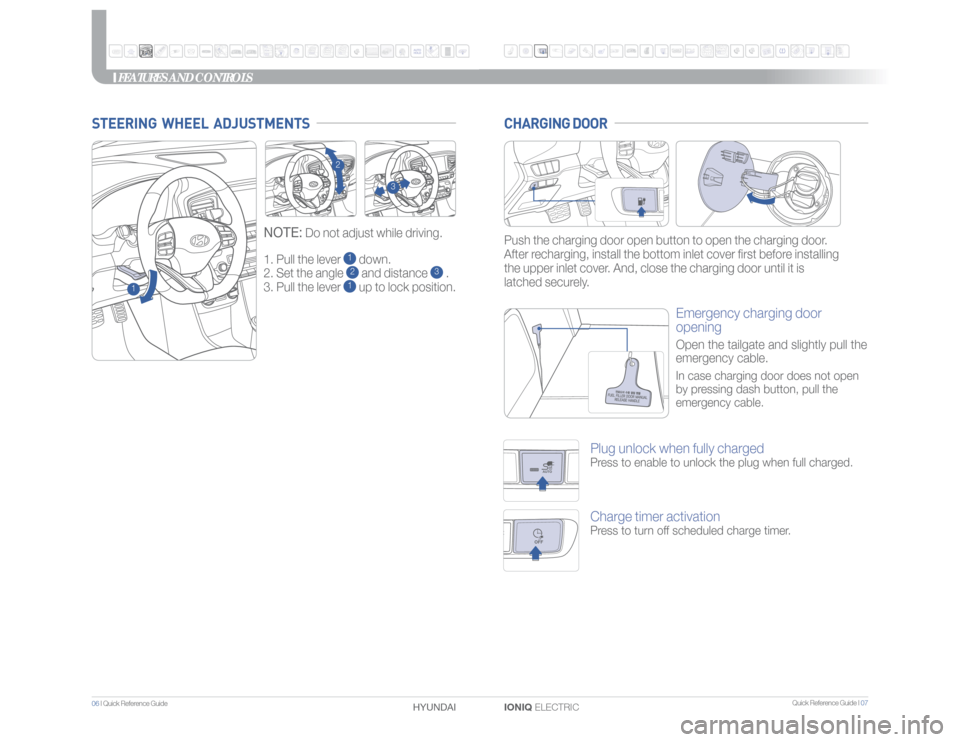
1. Pull the lever
1 down.
2. Set the angle 2 and distance
3 .
3. Pull the lever
1 up to lock position.
NOTE:
Do not adjust while driving.
STEERING WHEEL ADJUSTMENTS
1
2
3
Push the charging door open button to open the charging door.
After recharging, install the bottom inlet cover first before installing
the upper inlet cover. And, close the charging door until it is
latched securely.CHARGING DOOR
Emergency charging door
openingOpen the tailgate and slightly pull the
emergency cable.In case charging door does not open
by pressing dash button, pull the
emergency cable.
AUTOOFF
Plug unlock when fully chargedPress to enable to unlock the plug when full charged.Charge timer activationPress to turn off scheduled charge timer.
Page 6 of 26
Quick Reference Guide I 09
08 I Quick Reference Guide
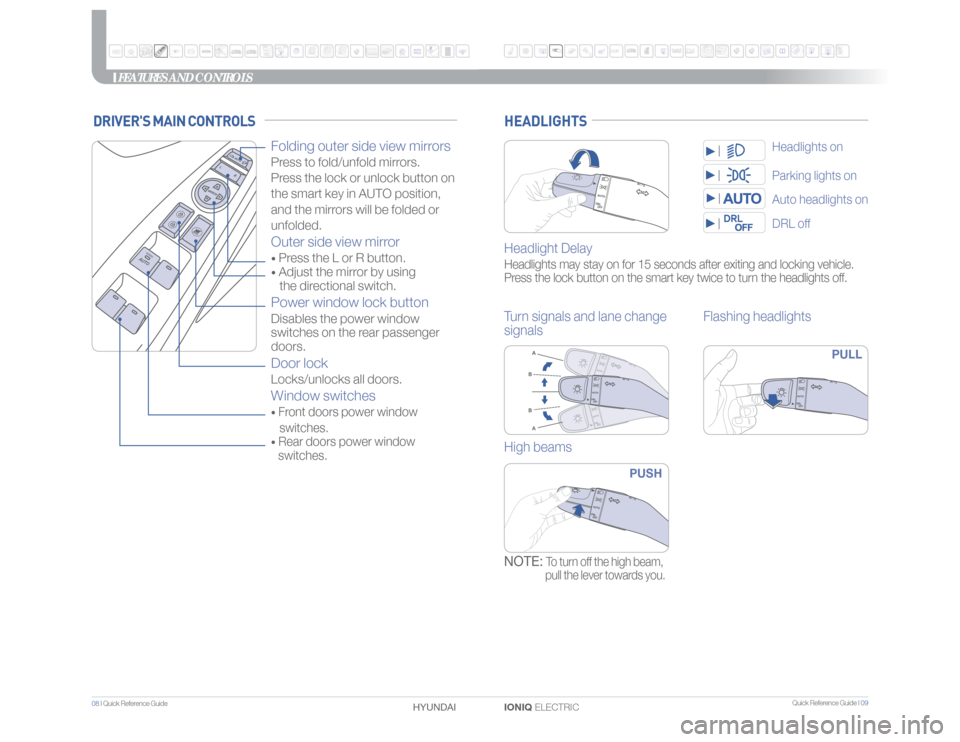
IONIQ ELECTRIC HYUNDAI HEADLIGHTSHeadlight DelayHeadlights may stay on for 15 seconds after exiting and locking vehicle.
Press the lock button on the smart key twice to turn the headlights off.Turn signals and lane change
signalsFlashing headlights
PULL
High beams
PUSH
NOTE:
To turn off the high beam,
pull the lever towards you.
Parking lights onDRL offAuto headlights onHeadlights on
FEATURES AND CONTROLS
DRIVER'S MAIN CONTROLS
Folding outer side view mirrors Press to fold/unfold mirrors.
Press the lock or unlock button on
the smart key in AUTO position,
and the mirrors will be folded or
unfolded.Outer side view mirror • Press the L or R button. • Adjust the mirror by using
the directional switch.Power window lock buttonDisables the power window
switches on the rear passenger
doors. Door lockLocks/unlocks all doors.Window switches• Front doors power window
switches.• Rear doors power window
switches.
Page 7 of 26
Quick Reference Guide I 11
10 I Quick Reference Guide
IONIQ ELECTRIC HYUNDAI
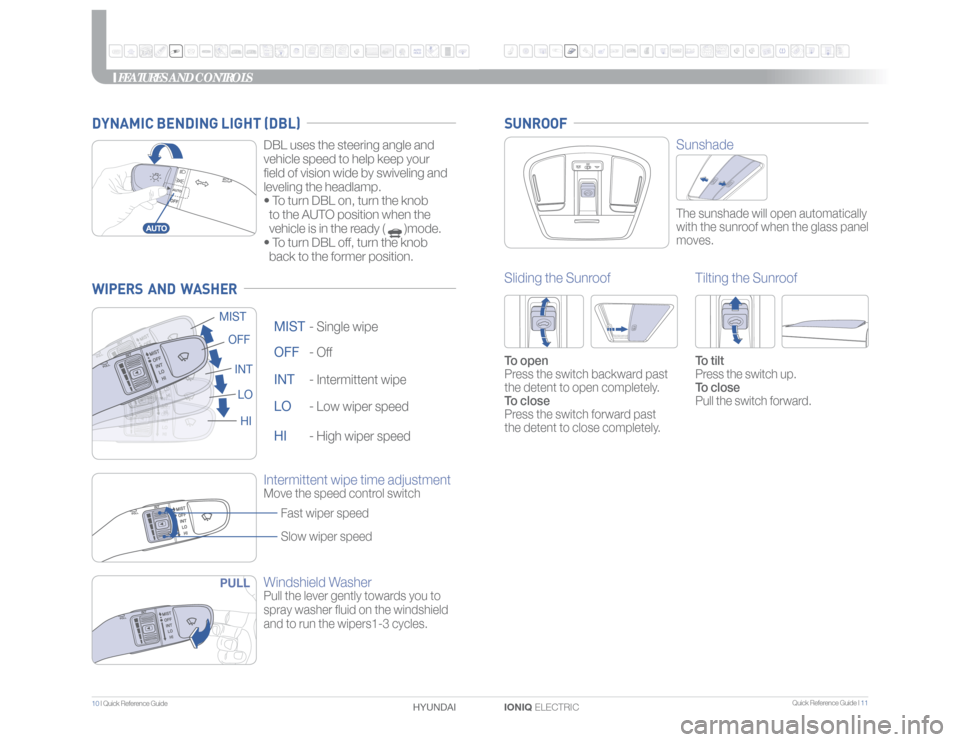
Windshield WasherPull the lever gently towards you to
spray washer fluid on the windshield
and to run the wipers1-3 cycles.OFF -
Off
OFF
MIST -
Single wipe
MIST
INT -
Intermittent wipe
INT
LO -
Low wiper speed
LO
HI -
High wiper speed
HI
Intermittent wipe time adjustmentMove the speed control switch
Fast wiper speed
Slow wiper speed
PULL
FEATURES AND CONTROLS
SunshadeThe sunshade will open automatically
with the sunroof when the glass panel
moves.
Sliding the SunroofTo open
Press the switch backward past
the detent to open completely.
To close
Press the switch forward past
the detent to close completely.
Tilting the SunroofTo tilt
Press the switch up.
To close
Pull the switch forward.
SUNROOF
WIPERS AND WASHER
DBL uses the steering angle and
vehicle speed to help keep your
field of vision wide by swiveling and
leveling the headlamp.
• To turn DBL on, turn the knob
to the AUTO position when the
vehicle is in the ready ( )mode.
• To turn DBL off, turn the knob
back to the former position.
DYNAMIC BENDING LIGHT (DBL)
Page 8 of 26
Quick Reference Guide I 13
12 I Quick Reference Guide
IONIQ ELECTRIC HYUNDAI
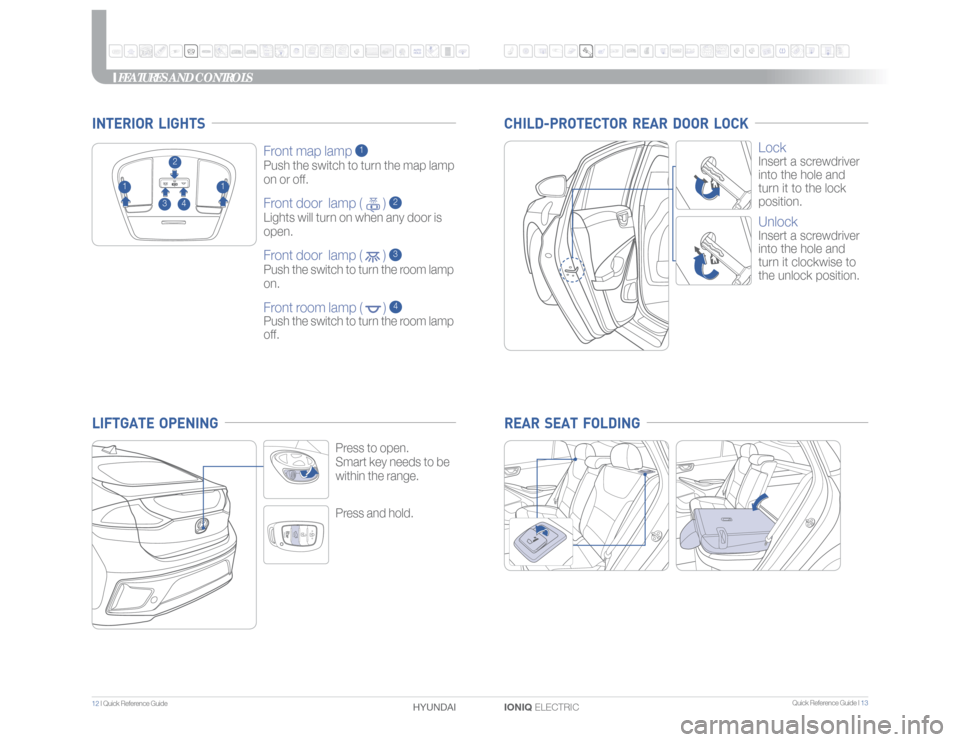
Press and hold.Press to open.
Smart key needs to be
within the range.
Front map lamp
1
Push the switch to turn the map lamp
on or off.Front door lamp ( )
2
Lights will turn on when any door is
open.Front door lamp ( )
3
Push the switch to turn the room lamp
on.Front room lamp ( )
4
Push the switch to turn the room lamp
off.
2
1
1
3
4
INTERIOR LIGHTS
FEATURES AND CONTROLS
Lock Insert a screwdriver
into the hole and
turn it to the lock
position.UnlockInsert a screwdriver
into the hole and
turn it clockwise to
the unlock position.
CHILD-PROTECTOR REAR DOOR LOCK REAR SEAT FOLDING
LIFTGATE OPENING
Page 9 of 26
Quick Reference Guide I 15
14 I Quick Reference Guide
IONIQ ELECTRIC HYUNDAI
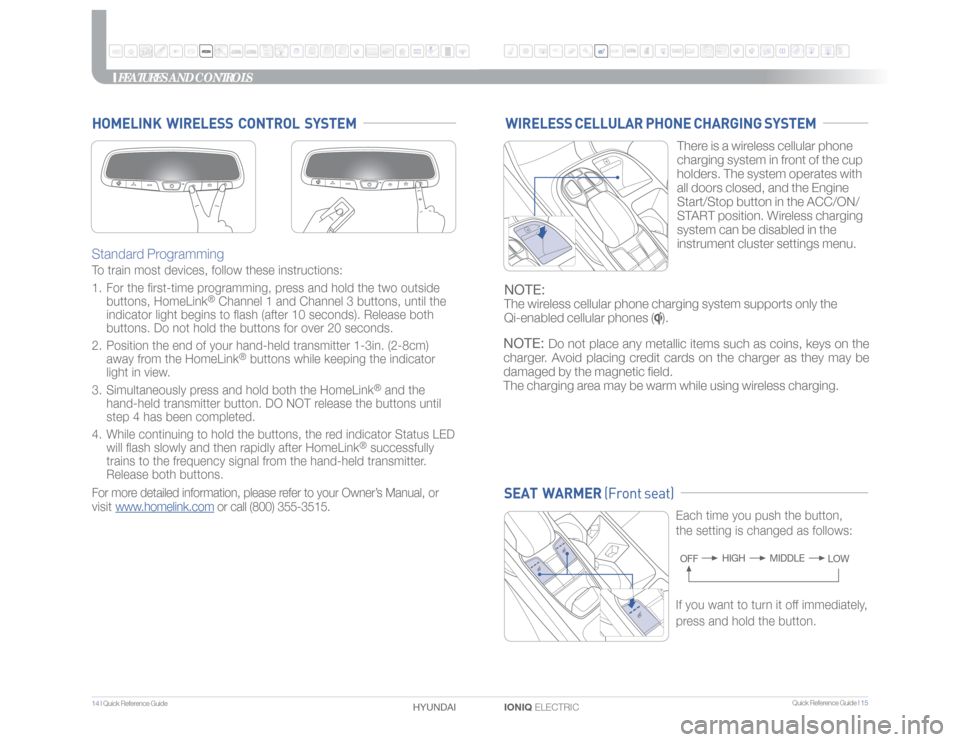
Standard Programming To train most devices, follow these instructions:
1. For the first-time programming, press and hold the two outside
buttons, HomeLink
® Channel 1 and Channel 3 buttons, until the
indicator light begins to flash (after 10 seconds). Release both
buttons. Do not hold the buttons for over 20 seconds.
2. Position the end of your hand-held transmitter 1-3in. (2-8cm)
away from the HomeLink
® buttons while keeping the indicator
light in view.
3. Simultaneously press and hold both the HomeLink
® and the
hand-held transmitter button. DO NOT release the buttons until
step 4 has been completed.
4. While continuing to hold the buttons, the red indicator Status LED
will flash slowly and then rapidly after HomeLink
® successfully
trains to the frequency signal from the hand-held transmitter.
Release both buttons.
For more detailed information, please refer to your Owner’s Manual, or
visit www.homelink.com or call (800) 355-3515.
HOMELINK WIRELESS CONTROL SYSTEM
SEAT WARMER (Front seat)
Each time you push the button,
the setting is changed as follows:OFFMIDDLE HIGH
LOW
FEATURES AND CONTROLS
WIRELESS CELLULAR PHONE CHARGING SYSTEM
If you want to turn it off immediately,
press and hold the button.There is a wireless cellular phone
charging system in front of the cup
holders. The system operates with
all doors closed, and the Engine
Start/Stop button in the ACC/ON/
START position. Wireless charging
system can be disabled in the
instrument cluster settings menu.
NOTE:The wireless cellular phone charging system supports only the
Qi-enabled cellular phones (
).
NOTE:
Do not place any metallic items such as coins, keys on the
charger. Avoid placing credit cards on the charger as they may be
damaged by the magnetic field.
The charging area may be warm while using wireless charging.
Page 10 of 26
Quick Reference Guide I 17
16 I Quick Reference Guide
IONIQ ELECTRIC HYUNDAI
REAR VIEW CAMERA
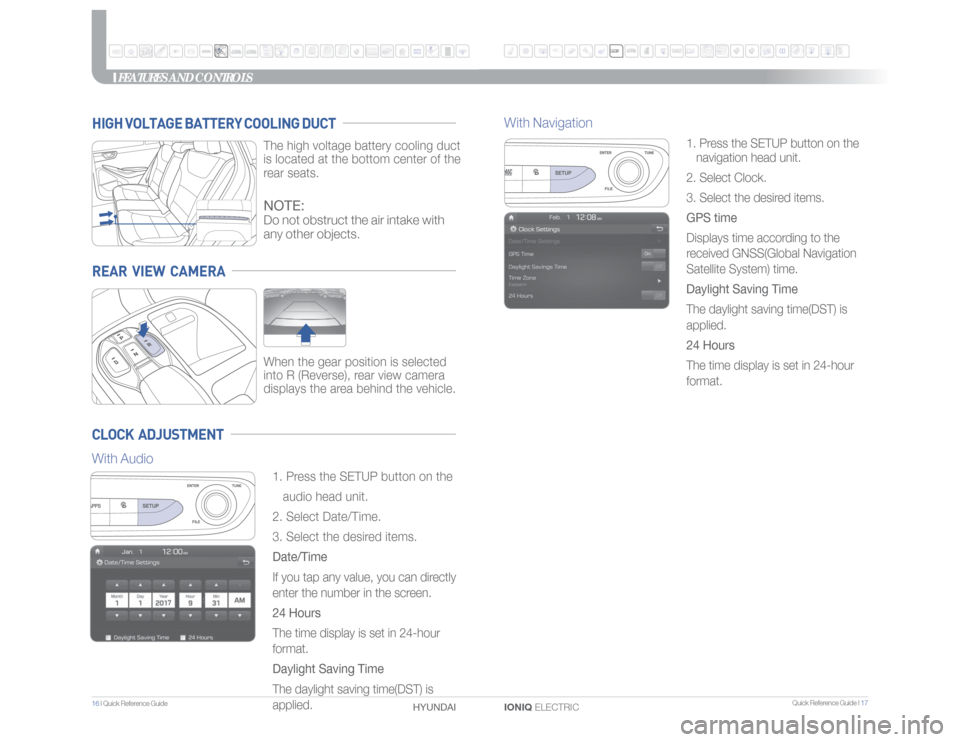
When the gear position is selected
into R (Reverse), rear view camera
displays the area behind the vehicle.
HIGH VOLTAGE BATTERY COOLING DUCT
The high voltage battery cooling duct
is located at the bottom center of the
rear seats.
CLOCK ADJUSTMENT
1. Press the SETUP button on the
audio head unit.
2. Select Date/Time.
3. Select the desired items.
Date/Time
If you tap any value, you can directly
enter the number in the screen.
24 Hours
The time display is set in 24-hour
format.
Daylight Saving Time
The daylight saving time(DST) is
applied.1. Press the SETUP button on the
navigation head unit.
2. Select Clock.
3. Select the desired items.
GPS time
Displays time according to the
received GNSS(Global Navigation
Satellite System) time.
Daylight Saving Time
The daylight saving time(DST) is
applied.
24 Hours
The time display is set in 24-hour
format.
FEATURES AND CONTROLS
NOTE:Do not obstruct the air intake with
any other objects.
With AudioWith Navigation
Page 11 of 26
Quick Reference Guide I 19
18 I Quick Reference Guide
IONIQ ELECTRIC HYUNDAI
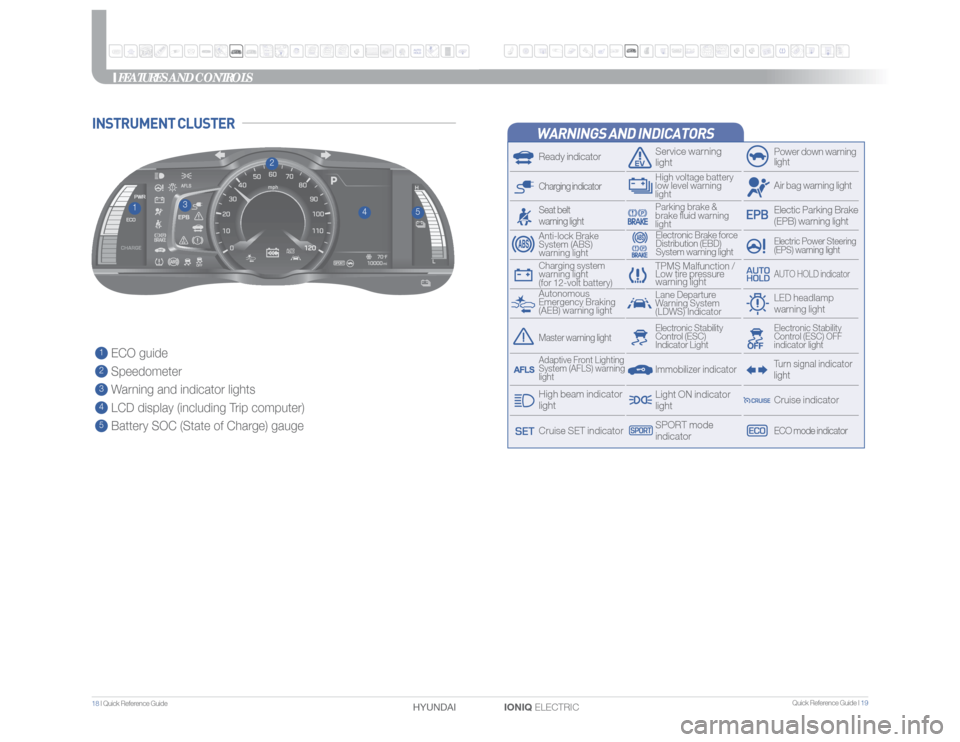
1 ECO guide2 Speedometer3 Warning and indicator lights4 LCD display (including Trip computer)5 Battery SOC (State of Charge) gauge
3
4
1
2
5
FEATURES AND CONTROLS
WARNINGS AND INDICATORSReady indicator
Service warning
light
Power down warning
lightAir bag warning lightElectric Power Steering
(EPS) warning light
Electronic Brake force
Distribution (EBD)
System warning light
Charging indicator
TPMS Malfunction /
Low tire pressure
warning light
AUTO HOLD indicator
Autonomous
Emergency Braking
(AEB) warning lightLane Departure
Warning System
(LDWS) Indicator
LED headlamp
warning light
Charging system
warning light
(for 12-volt battery)Anti-lock Brake
System (ABS)
warning light
Electic Parking Brake
(EPB) warning light
Parking brake &
brake fluid warning
light
Seat belt
warning light
Turn signal indicator
light
Immobilizer indicator
Master warning light
Electronic Stability
Control (ESC) OFF
indicator light
Electronic Stability
Control (ESC)
Indicator LightLight ON indicator
light
ECO mode indicatorCruise indicator
Adaptive Front Lighting
System (AFLS) warning
lightHigh beam indicator
lightCruise SET indicator
SPORT mode
indicator
INSTRUMENT CLUSTER
High voltage battery
low level warning
light
Page 12 of 26
Quick Reference Guide I 21
20 I Quick Reference Guide
IONIQ ELECTRIC HYUNDAI
FEATURES AND CONTROLS
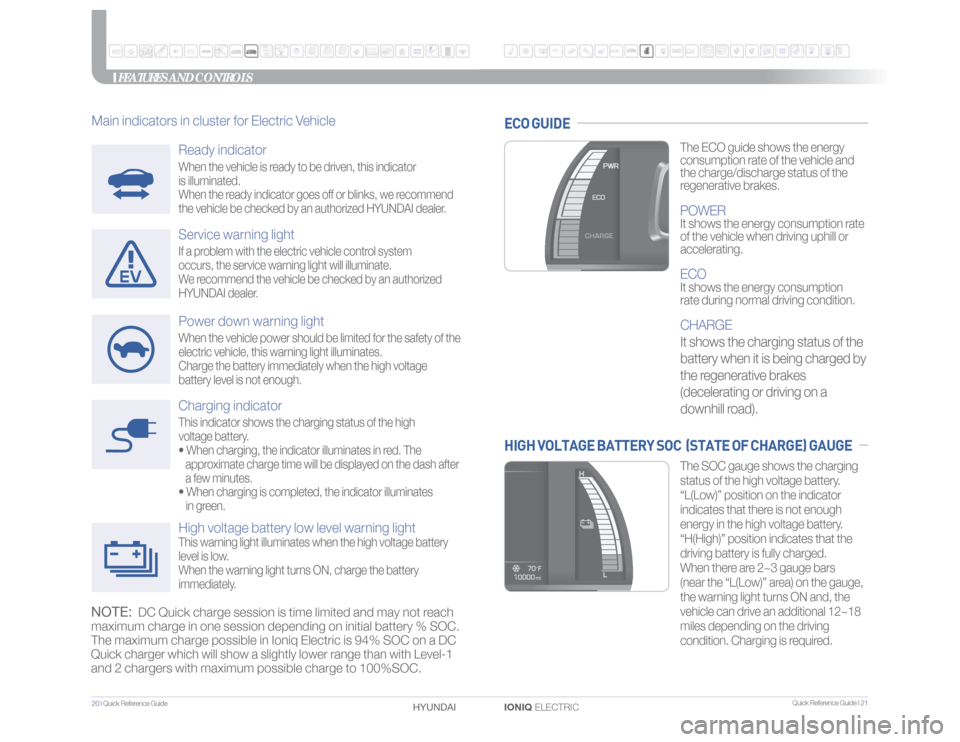
Charging indicatorThis indicator shows the charging status of the high
voltage battery.
• When charging, the indicator illuminates in red. The
approximate charge time will be displayed on the dash after
a few minutes.
• When charging is completed, the indicator illuminates
in green.High voltage battery low level warning lightThis warning light illuminates when the high voltage battery
level is low.
When the warning light turns ON, charge the battery
immediately.
The ECO guide shows the energy
consumption rate of the vehicle and
the charge/discharge status of the
regenerative brakes.POWERIt shows the energy consumption rate
of the vehicle when driving uphill or
accelerating.ECOIt shows the energy consumption
rate during normal driving condition.CHARGE
It shows the charging status of the
battery when it is being charged by
the regenerative brakes
(decelerating or driving on a
downhill road).The SOC gauge shows the charging
status of the high voltage battery.
“L(Low)” position on the indicator
indicates that there is not enough
energy in the high voltage battery.
“H(High)” position indicates that the
driving battery is fully charged.
When there are 2~3 gauge bars
(near the “L(Low)” area) on the gauge,
the warning light turns ON and, the
vehicle can drive an additional 12~18
miles depending on the driving
condition. Charging is required.
ECO GUIDEHIGH VOLTAGE BATTERY SOC (STATE OF CHARGE) GAUGE
Ready indicatorWhen the vehicle is ready to be driven, this indicator
is illuminated.
When the ready indicator goes off or blinks, we recommend
the vehicle be checked by an authorized HYUNDAI dealer.Service warning lightIf a problem with the electric vehicle control system
occurs, the service warning light will illuminate.
We recommend the vehicle be checked by an authorized
HYUNDAI dealer.Power down warning lightWhen the vehicle power should be limited for the safety of the
electric vehicle, this warning light illuminates.
Charge the battery immediately when the high voltage
battery level is not enough.
Main indicators in cluster for Electric VehicleNOTE:
DC Quick charge session is time limited and may not reach
maximum charge in one session depending on initial battery % SOC.
The maximum charge possible in Ioniq Electric is 94% SOC on a DC
Quick charger which will show a slightly lower range than with Level-1
and 2 chargers with maximum possible charge to 100%SOC.
Page 21 of 26
Quick Reference Guide I 39
38 I Quick Reference Guide
IONIQ ELECTRIC HYUNDAI
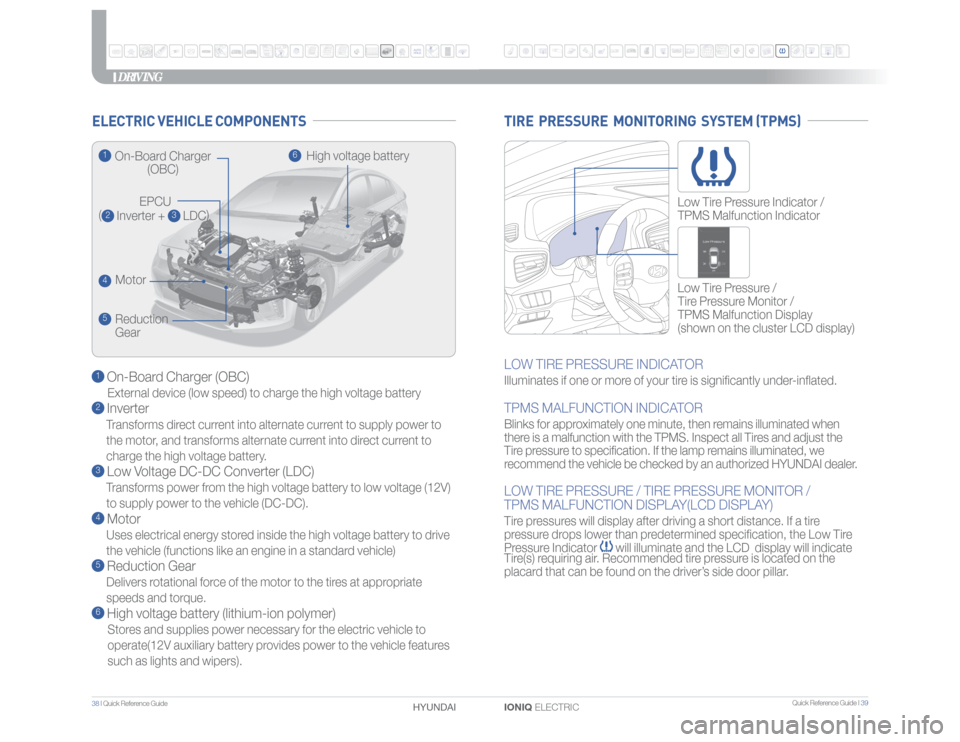
1 On-Board Charger (OBC)External device (low speed) to charge the high voltage battery2 InverterTransforms direct current into alternate current to supply power to
the motor, and transforms alternate current into direct current to
charge the high voltage battery.3 Low Voltage DC-DC Converter (LDC)Transforms power from the high voltage battery to low voltage (12V)
to supply power to the vehicle (DC-DC).4 MotorUses electrical energy stored inside the high voltage battery to drive
the vehicle (functions like an engine in a standard vehicle)5 Reduction GearDelivers rotational force of the motor to the tires at appropriate
speeds and torque.6 High voltage battery (lithium-ion polymer)Stores and supplies power necessary for the electric vehicle to
operate(12V auxiliary battery provides power to the vehicle features
such as lights and wipers).
ELECTRIC VEHICLE COMPONENTS
DRIVING
LOW TIRE PRESSURE INDICATORIlluminates if one or more of your tire is significantly under-inflated.TPMS MALFUNCTION INDICATORBlinks for approximately one minute, then remains illuminated when
there is a malfunction with the TPMS. Inspect all Tires and adjust the
Tire pressure to specification. If the lamp remains illuminated, we
recommend the vehicle be checked by an authorized HYUNDAI dealer.LOW TIRE PRESSURE / TIRE PRESSURE MONITOR /
TPMS MALFUNCTION DISPLAY(LCD DISPLAY)Tire pressures will display after driving a short distance. If a tire
pressure drops lower than predetermined specification, the Low Tire
Pressure Indicator
will illuminate and the LCD display will indicate
Tire(s) requiring air. Recommended tire pressure is located on the
placard that can be found on the driver’s side door pillar.Low Tire Pressure /
Tire Pressure Monitor /
TPMS Malfunction Display
(shown on the cluster LCD display) Low Tire Pressure Indicator /
TPMS Malfunction Indicator
TIRE PRESSURE MONITORING SYSTEM (TPMS)
1
On-Board Charger
(OBC)
EPCU
(2 Inverter +
3 LDC)
4
Motor
5
Reduction
Gear
6
High voltage battery