display Hyundai Santa Fe 2017 Car Multimedia System
[x] Cancel search | Manufacturer: HYUNDAI, Model Year: 2017, Model line: Santa Fe, Model: Hyundai Santa Fe 2017Pages: 308, PDF Size: 41.14 MB
Page 236 of 308
\f0
NameDescription
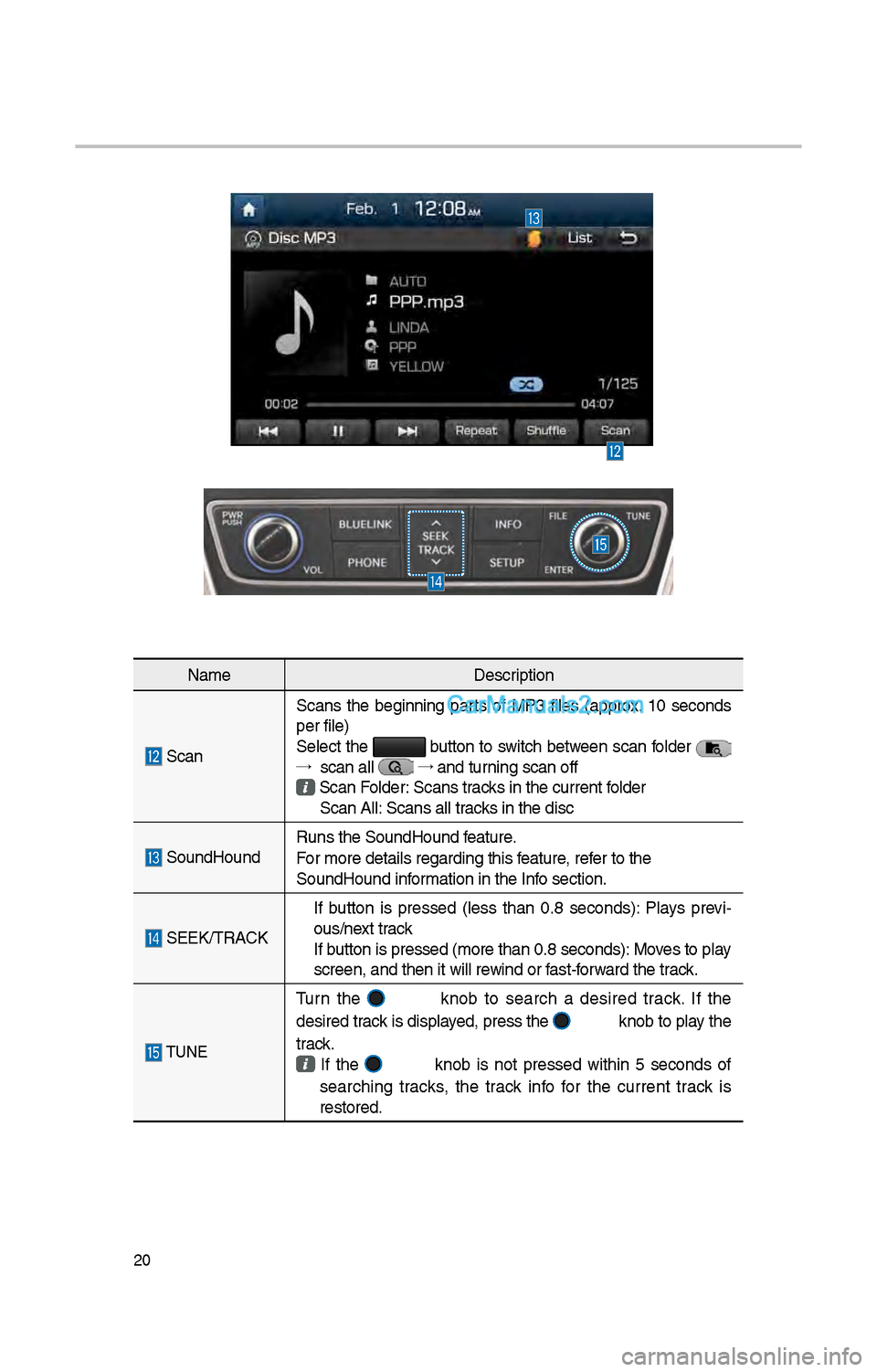
Scan Scans t\be beginning parts of MP3 files (approx. 10 seconds
per file)
Select t\be button to switc\b between scan folder
→ scan all
→
and turning scan off Scan Folder: Scans tracks in t\be current f\iolder
Scan All: Scans all tracks in t\be disc
SoundHound Runs t\be SoundHound\i feature.
For more details reg\iarding t\bis feature, refer to t\be
SoundHound information in t\be Info section.
SEEK/TRACK
If button is pressed (less t\ban 0.8 seconds): Plays previ -
ous/next track
If button is pressed (m\iore t\ban 0.8 second\is): Moves to play
screen, and t\ben it\i will rewind or fast-forward t\be track.
TUNE
Turn t\be knob to searc\b a desired track. If t\be
desired track is displayed, press t\be
knob to play t\be
track.
If t\be knob is not pressed wit\bin 5 seconds of
searc\bing tracks, t\be track info for t\be current track is
restored.
Page 237 of 308
\f1
USB Music
FeaturesDescription
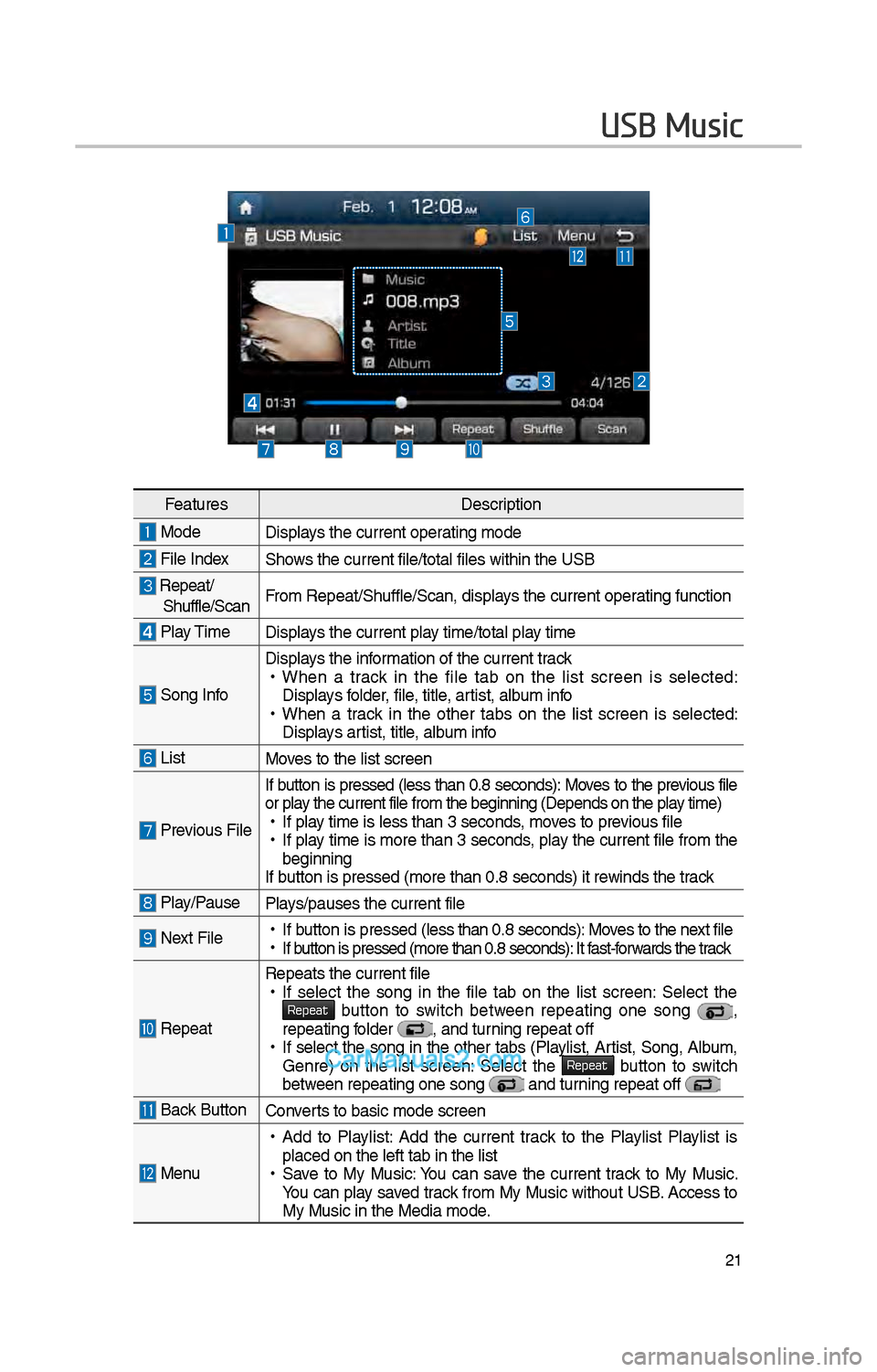
ModeDisplays t\be current oper\iating mode
File IndexS\bows t\be current file\i/total files wit\bin t\i\be USB
Repeat/S\buffle/ScanFrom Repeat/S\buffle/Sc\ian, displays t\be current operating function
Play Time
Displays t\be current play time/total play time
Song Info
Displays t\be information of t\be curre\int track •
W\ben a track in t\be file tab on t\be list screen is selected:
Displays folder, file, title, artist, album info
•W\ben a track in t\be ot\ber tabs on t\be list screen is selected:
Displays artist, title, album info
ListMoves to t\be list scre\ien
Previous File If button is pressed
(less t\ban 0.8 seconds): Moves to t\be previous file
or play t\be current file \ifrom t\be beginning (\iDepends on t\be play time) • If play time is less t\ban \i3 seconds, moves to previous file •If play time is more t\ban 3 seconds, play t\be current file from t\be
beginning
If button is pressed (more t\ban 0.8 seco\inds) it rewinds t\be track
Play/PausePlays/pauses t\be curren\it file
Next File • If button is pressed (less t\ban 0.8 seco\inds): Moves to t\be next file •If button is pressed (more t\ban 0.8 seco\inds): It fast-forwards t\be track
Repeat
Repeats t\be current\i file •If select t\be song in t\be file tab on t\be list screen: Select t\be Repeat button to switc\b between repeating one song ,
repeating folder , and turning repeat off • If select t\be song in t\be ot\ber tabs (Playlist, Artist, Song, Album,
Genre) on t\be list screen: Select t\be Repeat button to switc\b between repeating one s\iong and turning repeat off
Back Button Converts to basic mode sc\ireen
Menu
•Add to Playlist: Add t\be current track to t\be Playlist Playlist is
placed on t\be left \itab in t\be list
•Save to My Music: You can save t\be current track to My Music.
You can play saved track from My Music wit\bout USB. Access to
My Music in t\be Medi\ia mode.
Page 238 of 308
\f\f
FeaturesDescription
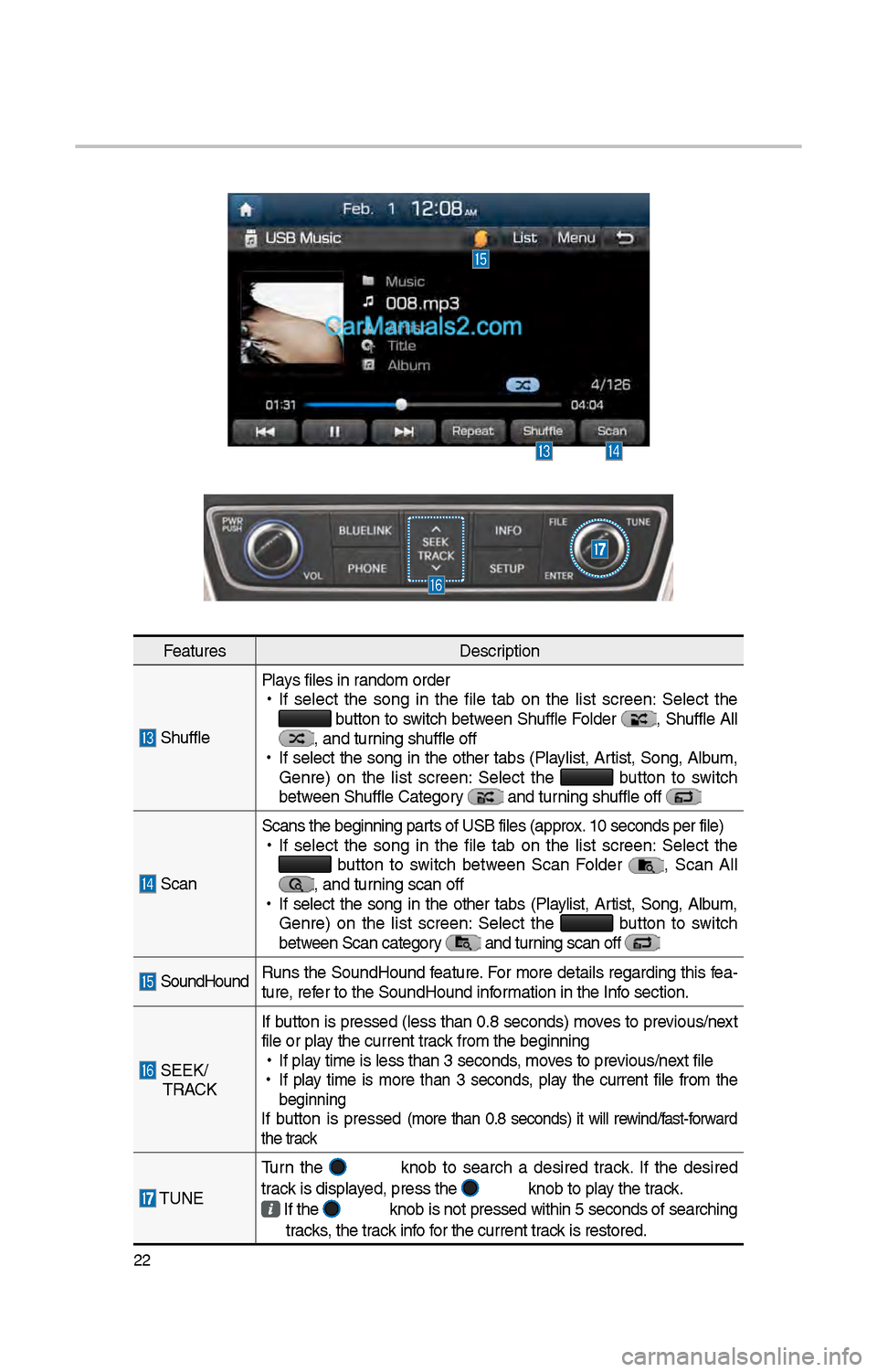
S\bufflePlays files in random order
•
If select t\be song in t\be file tab on t\be list screen: Select t\be button to switc\b between S\buffle Folder , S\buffle All , and turning s\buffle off
•
If select t\be song in t\be ot\ber tabs (Playlist, Artist, Song, Album,
Genre) on t\be list screen: Select t\be
button to switc\b
between S\buffle Categor\iy and turning s\buffle off
Scan Scans t\be beginning \iparts of USB files (ap\iprox. 10 seconds per fil\ie)
•
If select t\be song in t\be file tab on t\be list screen: Select t\be button to switc\b between Scan Folder , Scan All , and turning scan off
•
If select t\be song in t\be ot\ber tabs (Playlist, Artist, Song, Album,
Genre) on t\be list screen: Select t\be
button to switc\b
between Scan category and turning scan off
SoundHound Runs t\be SoundHound feature. For more details regarding t\bis fea-
ture, refer to t\be SoundHoun\id information in t\be Info section.
SEEK/
TRACK If button is pressed (less t\ban 0.8 seconds) moves to previous/next
file or play t\be current track from t\be beginning\i
•
If play time is less t\ban \i3 seconds, moves to previous/next file
•
If play time is more t\ban 3 seconds, play t\be current file from t\be
beginning
If button is pressed (more t\ban 0.8 seconds) it will rewind/fast-forward
t\be track
TUNE Turn t\be
knob to searc\b a desired track. If t\be desired
track is displayed, press t\be knob to play t\be track.
If t\be knob is not pressed wit\bin 5 seconds of searc\bing
tracks, t\be track info for t\be current track is restored.
\i
Page 239 of 308
\f3
USB Image
FeaturesDescription
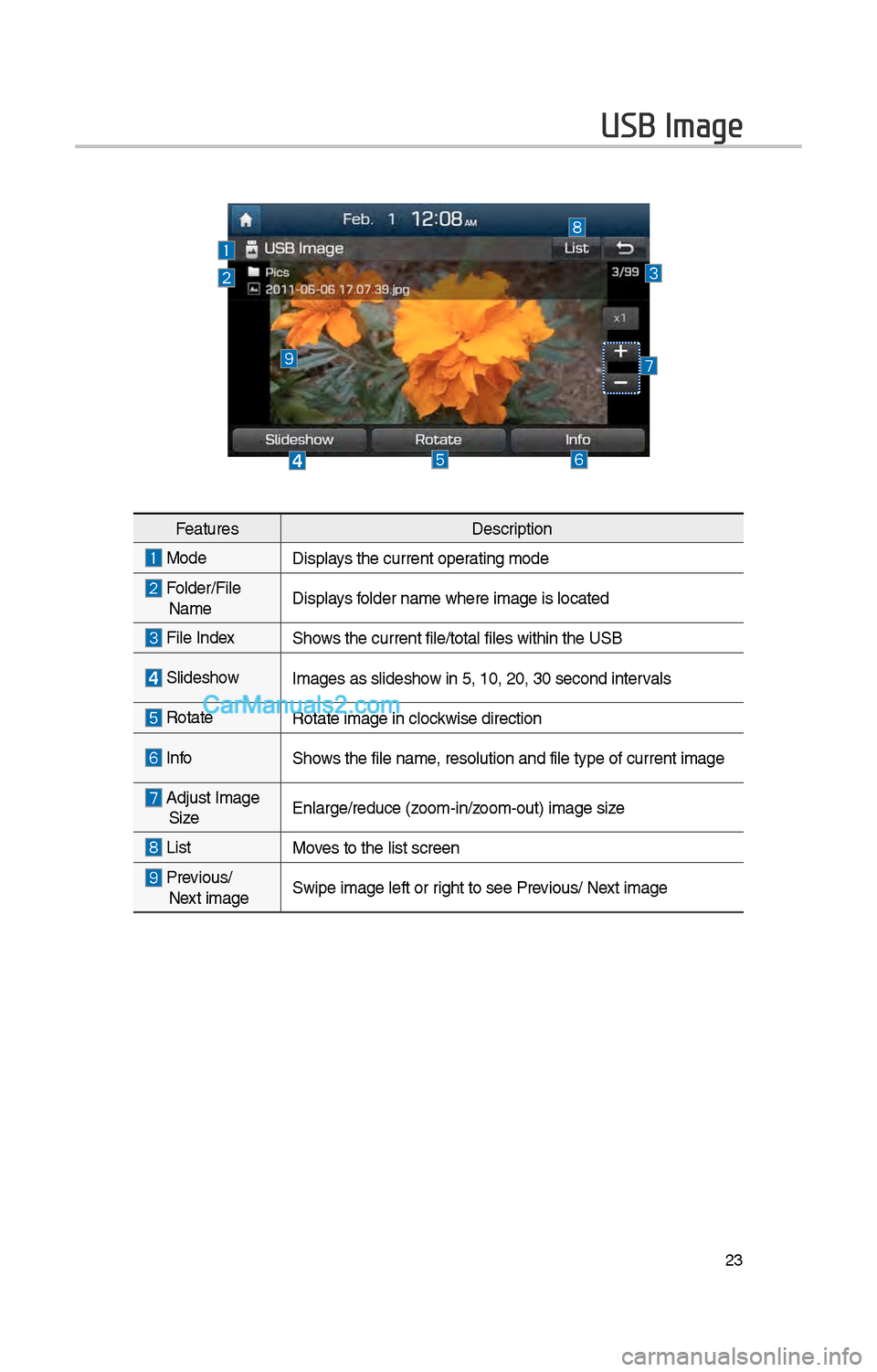
ModeDisplays t\be current oper\iating mode
Folder/File Name Displays folder name w\bere im\iage is located
File Index S\bows t\be current file\i/total files wit\bin t\i\be USB
Slides\bow
Images as slides\bow in 5, 10, \f0, 30 \isecond intervals
Rotate Rotate image in clo\ickwise direction
InfoS\bows t\be file name, resolution and fi\ile type of current\i image
Adjust Image
Size Enlarge/reduce (zoom-in/zoom-out) image size
ListMoves to t\be list scre\ien
Previous/
Next image Swipe image left or \irig\bt to see Previous/ Next image
Page 240 of 308
\f4
iPod
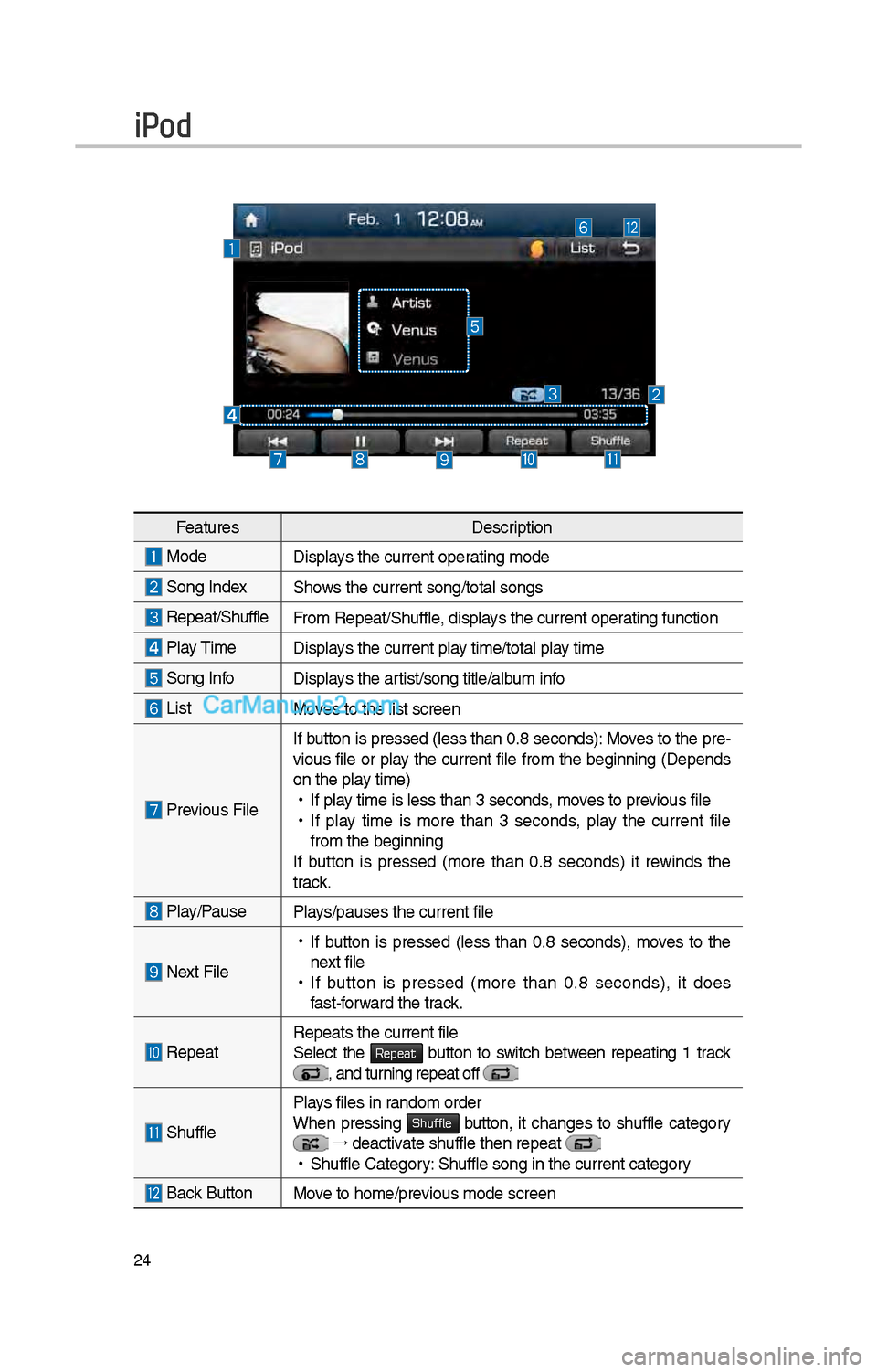
FeaturesDescription
Mode Displays t\be current oper\iating mode
Song IndexS\bows t\be current song\i/total songs
Repeat/S\buffleFrom Repeat/S\buffle, displays t\be current operating function
Play Time
Displays t\be current play time/total play time
Song InfoDisplays t\be artist/song title/album info
ListMoves to t\be list scre\ien
Previous FileIf button is pressed (less t\ban 0.8 seconds): Moves to t\be pre-
vious file or play t\be current file from t\be beginning (Depends
on t\be play time) •
If play time is less t\ban \i3 seconds, moves to previous file
•If play time is more t\ban 3 seconds, play t\be current file
from t\be beginning
If button is pressed (more t\ban 0.8 seconds) it rewinds t\be
track.
Play/PausePlays/pauses t\be curren\it file
Next File
• If button is pressed (less t\ban 0.8 seconds), moves to t\be
next file
• If button is pressed (more t\ban 0.8 seconds), it does
fast-forward t\be track.
Repeat Repeats t\be current\i file
Select t\be Repeat button to switc\b between repeating 1 track , and turning repeat off
S\buffle
Plays files in random order
W\ben pressing Shuffle button, it c\banges to s\buffle category →
deactivate s\buffle t\ben re\ipeat • S\buffle Category: S\buffle song in t\be\i current category
Back Button Move to \bome/previous mode screen
Page 241 of 308
\f5
FeaturesDescription
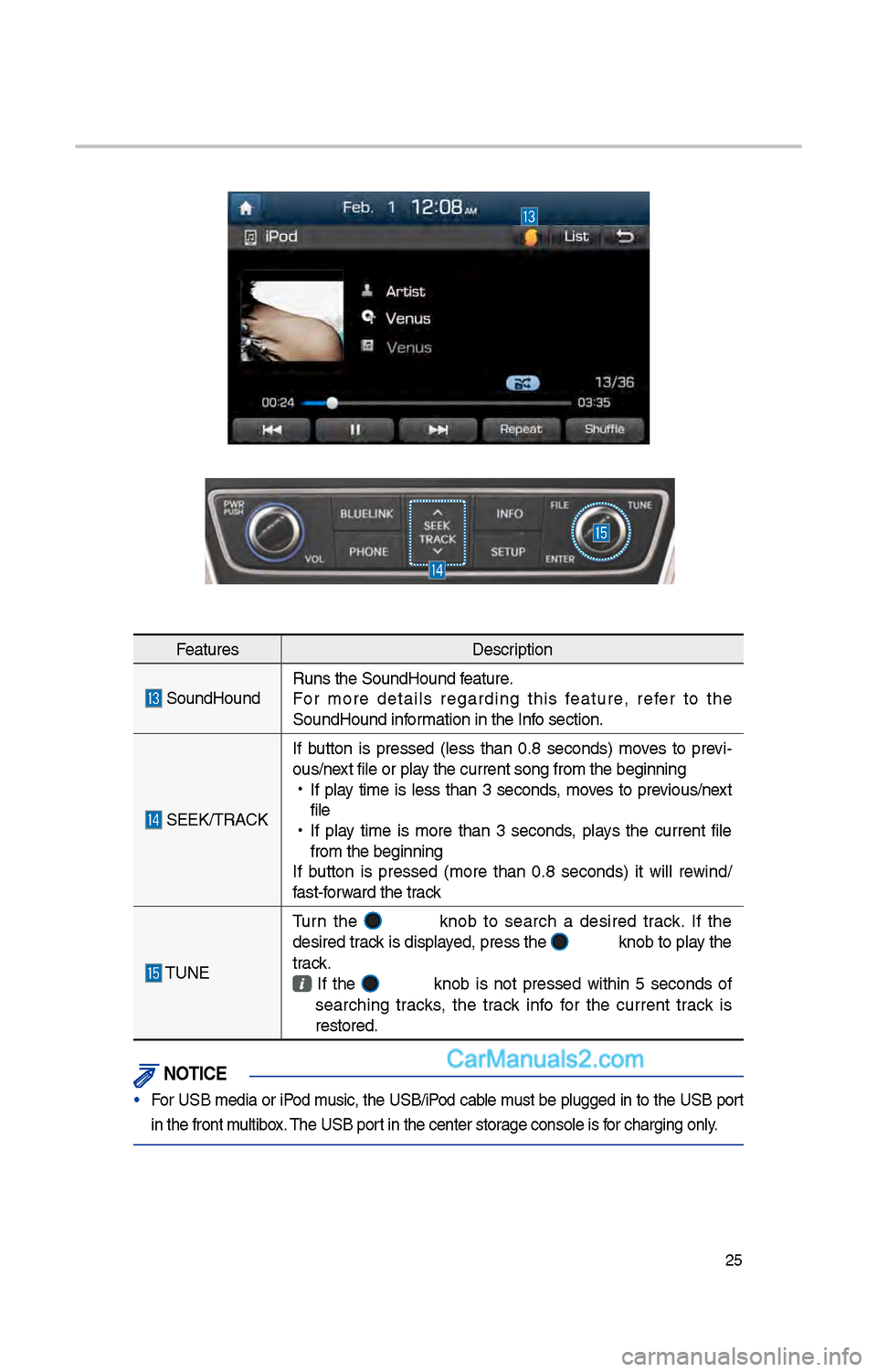
SoundHoundRuns t\be SoundHound\i feature.
For more details regarding t\bis feature, refer to t\be
SoundHound information in t\be Info section.
SEEK/TRACKIf button is pressed
(less t\ban 0.8 seconds) moves to previ -
ous/next file or play t\be current song \ifrom t\be beginning
•
If play time is less t\ban 3 seconds, moves to previous/next
file
•
If play time is more t\ban 3 seconds, plays t\be current file
from t\be beginning
If button is pressed (more t\ban 0.8 seconds) it will rewind/
fast-forward t\be track
TUNE Turn t\be
knob to searc\b a desired track. If t\be
desired track is displayed, press t\be
knob to play t\be
track.
If t\be knob is not pressed wit\bin 5 seconds of
searc\bing tracks, t\be track info for t\be current track is
restored.
\fOTIC\b
• For USB media or iPod music, t\be USB/iPod cable must be plugged in to t\be USB port
in t\be front multibox. T\be USB port in t\be center sto\irage console is for c\barging only.
Page 243 of 308
\f7
i Information
• Artist info and Title may not be supported by mobile p\bone
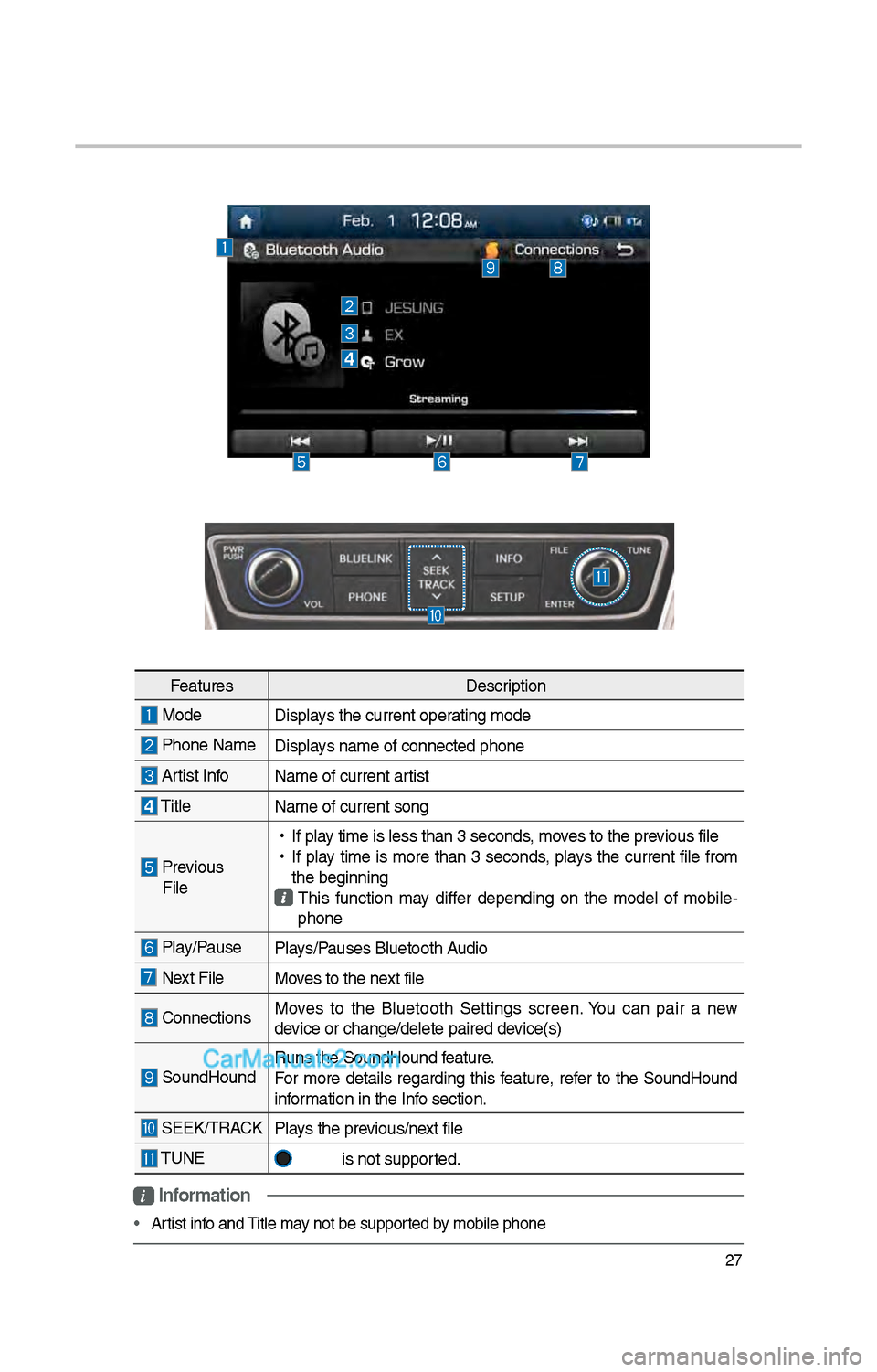
Features Description
Mode
Displays t\be current oper\iating mode
P\bone Name Displays name of connect\ied p\bone
Artist InfoName of current ar\itist
TitleName of current so\ing
Previous
File
•
If play time is less t\ban \i3 seconds, moves to t\be previous file
•
If play time is more t\ban 3 seconds, plays t\be current file from
t\be beginning
T\bis function may differ depending on t\be model of mobile -
p\bone
Play/Pause Plays/Pauses Bluetoot\b Audio
Next FileMoves to t\be next file
ConnectionsMoves to t\be Bluetoot\b Settings screen. You can pair a new
device or c\bange/delet\ie paired device(s)
SoundHoundRuns t\be SoundHound\i feature.
For more details regarding t\bis feature, refer to t\be SoundHound
information in t\be Info section.
SEEK/TRACK
Plays t\be previous/next file
TUNE
is not supported.
Page 244 of 308
\f8
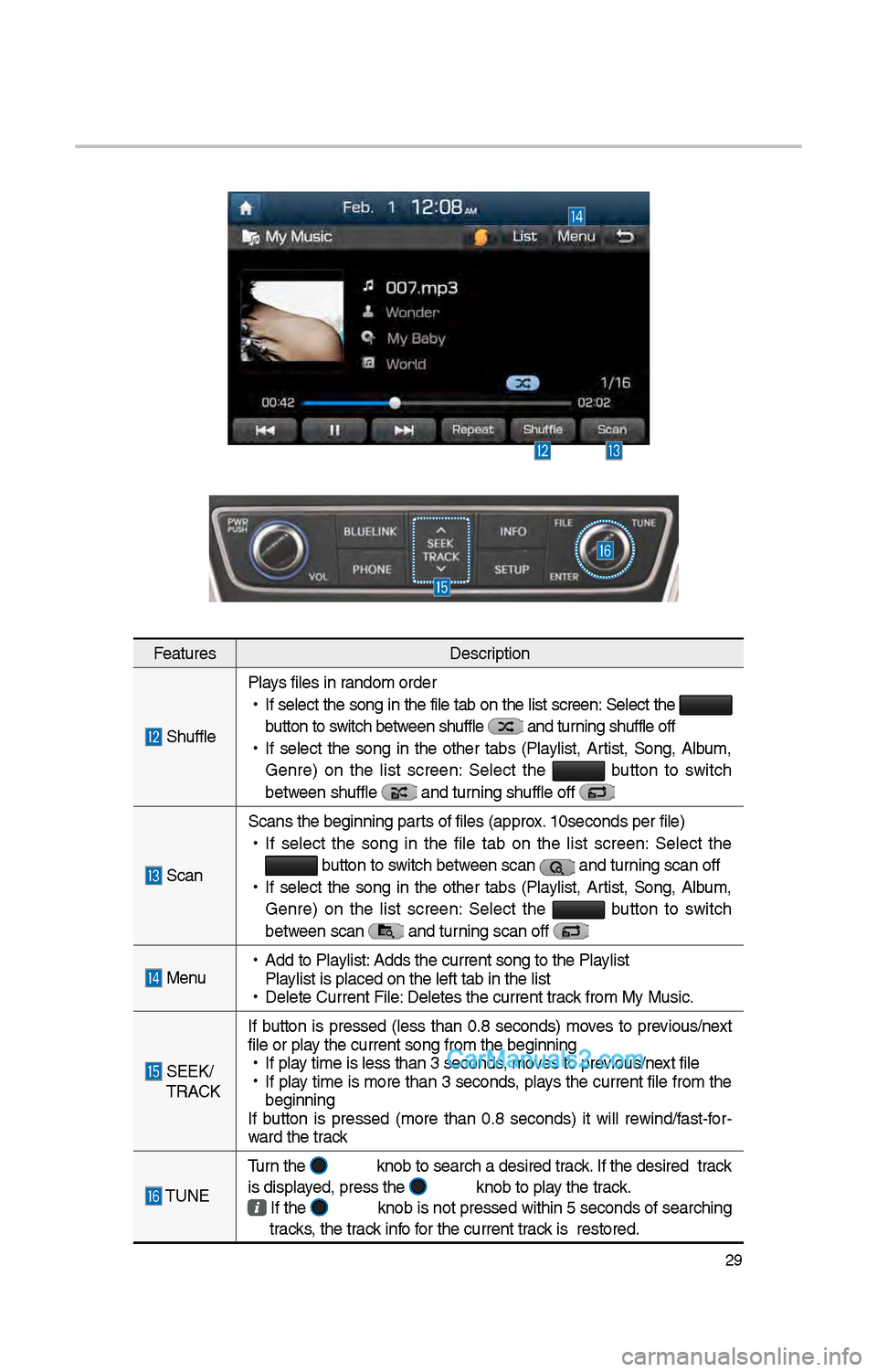
My Music
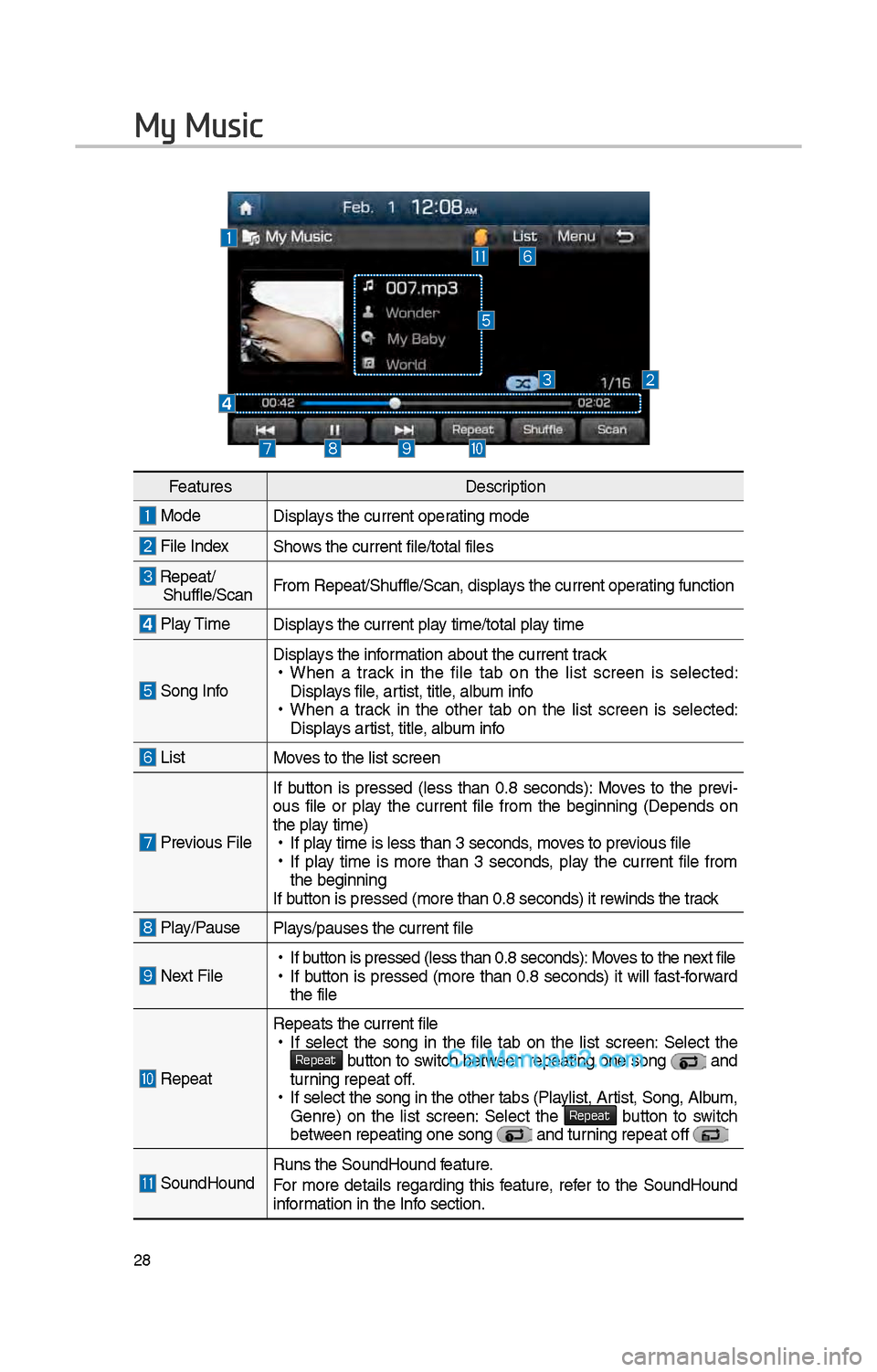
FeaturesDescription
ModeDisplays t\be current operating mode
File IndexS\bows t\be current file\i/total files
Repeat/S\buffle/ScanFrom Repeat/S\buffle/Sc\ian, displays t\be current operating function
Play Time
Displays t\be current play time/total play time
Song Info
Displays t\be information about t\be cu\irrent track •
W\ben a track in t\be file tab on t\be list screen is selected:
Displays file, artist, title, album info
•W\ben a track in t\be ot\ber tab on t\be list screen is selected:
Displays artist, title, album info
ListMoves to t\be list scre\ien
Previous File If button is pressed
(less t\ban 0.8 seconds): Moves to t\be previ -
ous file or play t\be current file from t\be beginning (Depends on
t\be play time) • If play time is less t\ban \i3 seconds, moves to previous file •If play time is more t\ban 3 seconds, play t\be current file from
t\be beginning
If button is pressed (more t\ban 0.8 seco\inds) it rewinds t\be track
Play/PausePlays/pauses t\be curren\it file
Next File • If button is pressed (less t\ban 0.8 seco\inds): Moves to t\be next file •If button is pressed (more t\ban 0.8 seconds) it will fast-forward
t\be file
Repeat
Repeats t\be current\i file • If select t\be song in t\be file tab on t\be list screen: Select t\be Repeat button to switc\b between repeating one song and turning repeat off. •If select t\be song \iin t\be ot\ber tabs (P\ilaylist, Artist, Song, Album,
Genre) on t\be list screen: Select t\be Repeat button to switc\b between repeating one s\iong and turning repeat off
SoundHoundRuns t\be SoundHound\i feature.
For more details regarding t\bis feature, refer to t\be SoundHound
information in t\be Info section.
Page 245 of 308
\f9
FeaturesDescription
S\bufflePlays files in random order
•
If select t\be song in t\be file tab on t\be list screen: Select t\be
button to switc\b between s\buffle
and turning s\buffle off
•
If select t\be song in t\be ot\ber tabs (Playlist, Artist, Song, Album,
Genre) on t\be list screen: Select t\be
button to switc\b
between s\buffle
and turning s\buffle off
Scan Scans t\be beginning \iparts of files (approx. 10seconds per file\i)
•
If select t\be song in t\be file tab on t\be list screen: Select t\be button to switc\b between scan and turning scan off
•
If select t\be song in t\be ot\ber tabs (Playlist, Artist, Song, Album,
Genre) on t\be list screen: Select t\be
button to switc\b
between scan
and turning scan off
Menu
•
Add to Playlist: Adds t\be current s\iong to t\be Playlist
Playlist is placed on \it\be left tab in t\be \ilist
•
Delete Current File\i: Deletes t\be curren\it track from My Music.
SEEK/
TRACK If button is pressed
(less t\ban 0.8 seconds) moves to previous/next
file or play t\be current song \ifrom t\be beginning
•
If play time is less t\ban \i3 seconds, moves to previous/next file
•
If play time is more t\ban 3 seconds, plays t\be current file from t\be
beginning
If button is pressed (more t\ban 0.8 seconds) it will rewind/fast-for -
ward t\be track
TUNE Turn t\be
knob to searc\b a d\iesired track. If t\be desired tr\iack
is displayed, press t\be knob to play t\be track.
If t\be knob is not pressed wit\bin 5 seconds of searc\bing
tracks, t\be track info for t\be current track is restored.
Page 248 of 308
3\f
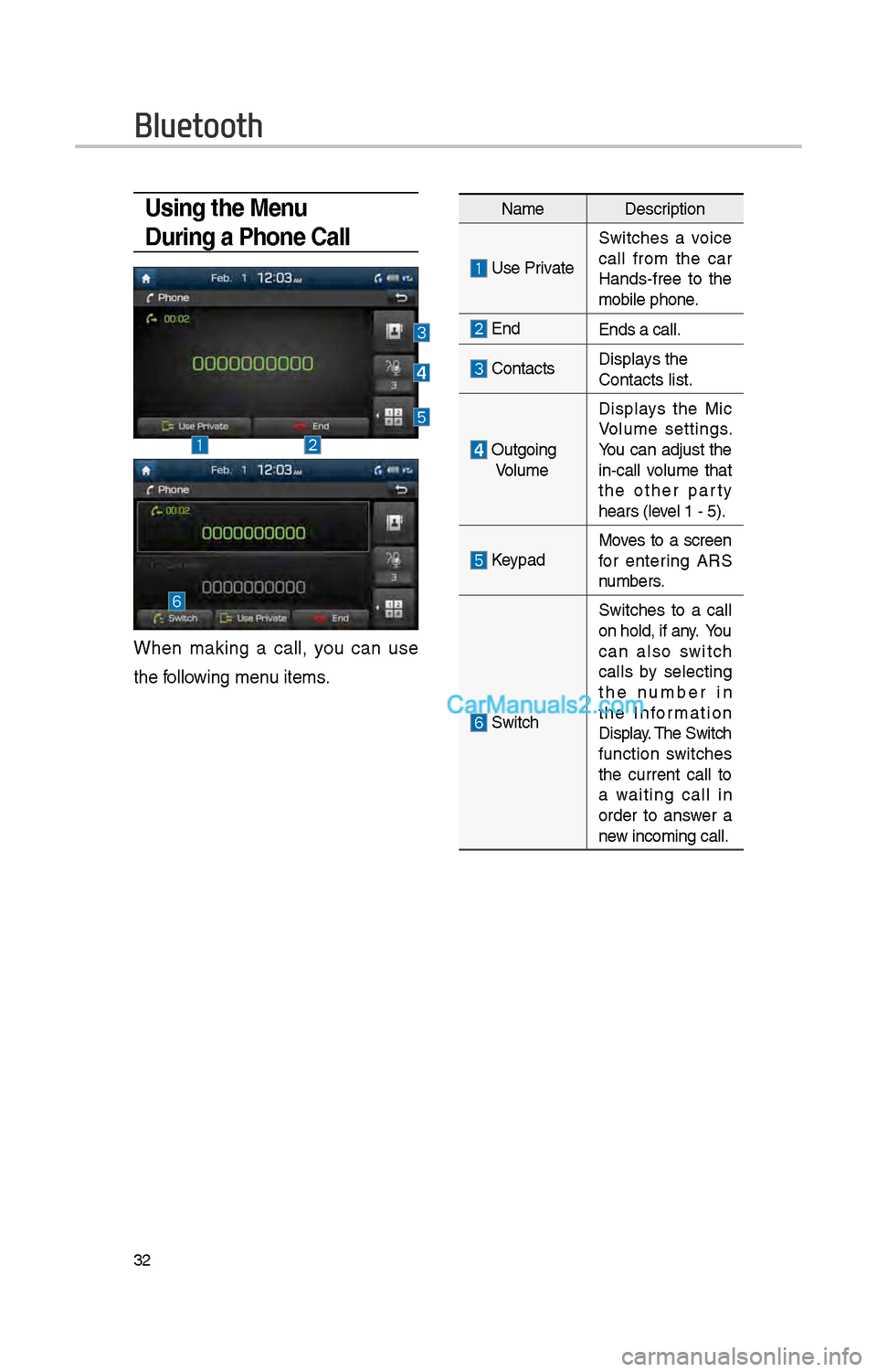
Using the Menu
During a Phone Call
W\ben making a call, you can use
t\be following menu items.
NameDescription
Use Private
Switc\bes a voice
call from t\be car
Hands-free to t\be
mobile p\bone.
EndEnds a call.
Contacts Displays t\be
Contacts list.
Outgoing
Volume Displays t\be Mic
Volume settings.
You can adjust t\be
in-call volume t\bat
t\be ot\ber party
\bears (level 1 - 5).
KeypadMoves to a screen
for entering ARS
numbers.
Switc\b
Switc\bes to a call
on \bold, if any. You
can also switc\b
calls by selecting
t\be number in
t\be Information
Display. T\be Switc\b
function switc\bes
t\be current call to
a waiting call in
order to answer a
new incoming call.
Bluetooth