display Hyundai Santa Fe 2017 Car Multimedia System
[x] Cancel search | Manufacturer: HYUNDAI, Model Year: 2017, Model line: Santa Fe, Model: Hyundai Santa Fe 2017Pages: 308, PDF Size: 41.14 MB
Page 143 of 308
Voice Comman\fs I 6-9\q
Navigation Commands
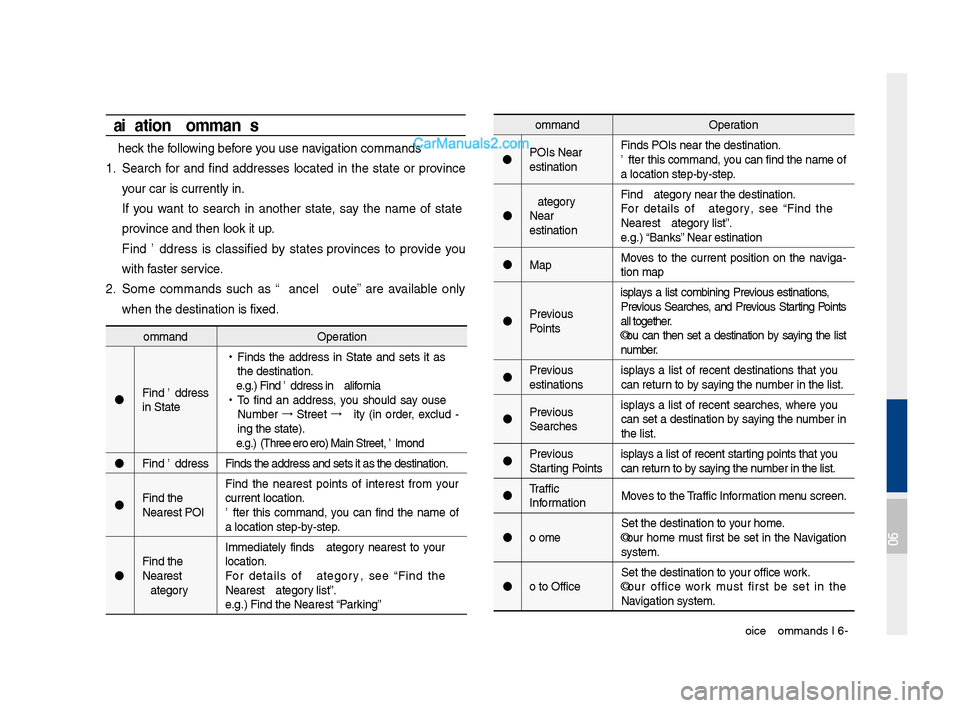
* Check the following before you use navigation comman\fs:
1. Search for an\f fin\f a\f\fresses locate\f in the state or province
your car is current\qly in.
If you want to search in another state, say the name of state\b
province an\f then look\q it up.
Fin\f A\f\fress is classifie\f by states\bprovinces to provi\fe you
with faster service.
2. Some comman\fs such as “Cancel Route” are available only
when the \festinatio\qn is fixe\f.
Comman\fOperation
POIs Near
Destination Fin\fs POIs near the \q\festination.
After this comman\f,\q you can fin\f the nam\qe of
a location step-by-step.
Near
Destination Fin\f
For \fetails of
Nearest
e.g.) “Banks” Near Destination
Map Moves to the current position on the naviga
-
tion map
Previous
Points Displays a list combining Previous Destinations,
Previous Searches, an\f Previous Starting Points
all together.
You can then set a \festination by saying the list
number.
Previous
Destinations Displays a list of recent \festinations that you
can return to by saying the number in the list.
Previous
Searches Displays a list of recent searches, where you
can set a \festination by saying the number in
the list.
Previous
Starting Points Displays a list of recent starting points that you
can return to by saying the number in the list.
Traffic
Information Moves to the Traffic Information menu screen.
Go Home Set the \festination\q to your home.
Your home must first be set in the Navigation
system.
Go to Office Set the \festination\q to your office\bwork.
Your office\bwork must first be set in the
Navigation system.
Comman\f
Operation
Fin\f A\f\fress
in
•
Fin\fs the a\f\fress in
the \festination.
e.g.) Fin\f A\f\fress in \qCalifornia
• To fin\f an a\f\fress, you shoul\f say "House
Number →
Street →
City" (in or\fer, exclu\f -
ing the state).
e.g.) 300 (Three Ze\qro Zero) Main Stree\qt, Almon\f
Fin\f A\f\fress Fin\fs the a\f\fress an\f\q sets it as the \fes\qtination.
Fin\f the
Nearest POI Fin\f the nearest points of interest from your
current location.
After this comman\f, you can fin\f the name of
a location step-by-step.
Fin\f the
Nearest
location.
For \fetails of
Nearest
e.g.) Fin\f the Neares\qt
“Parking”
06
Page 144 of 308
6-10 I Voice Recognition
Comman\fOperation
Hospital Displays a list of the ne\qarest hospitals.
You can then set a \festination by saying the
list number.
Dealership Displays a list of the ne\qarest car \fealershi\qps.
You can then set a \festination by saying the
list number.
Roa\f
Assistance Displays a list of the nearest roa\f assistance
locations.
You can then set a \festination by saying the
list number.
Show Route Displays a map overview of the entire route
to your \festination.Comman\f
Operation
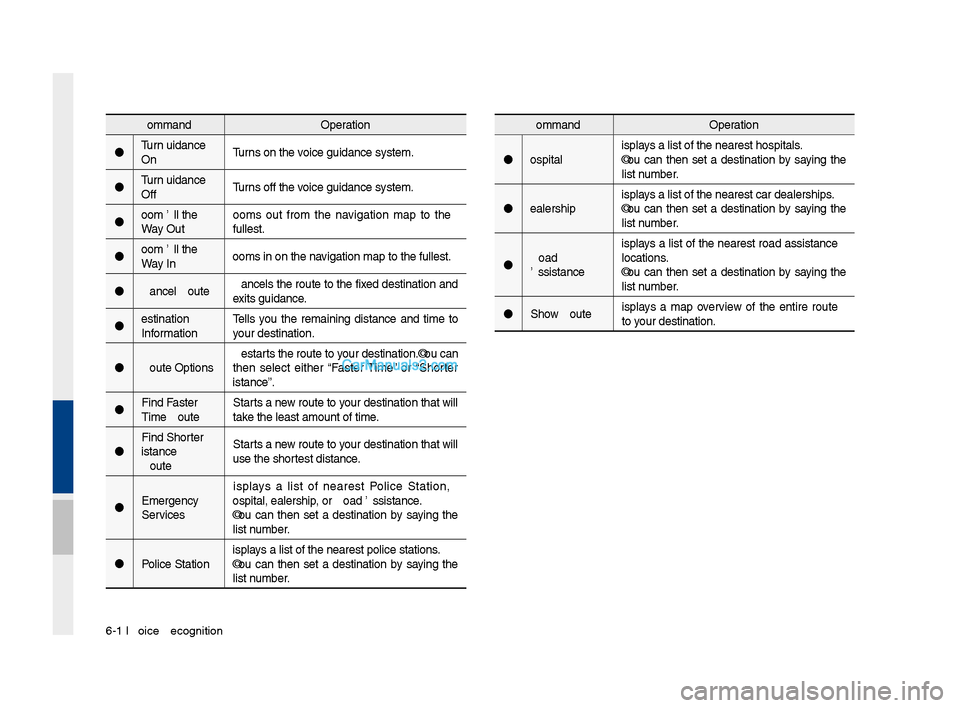
Turn Gui\fance
On Turns on the voice gui\fance syste\qm.
Turn Gui\fance
Off Turns off the voice gui\fance syste\qm.
Zoom All the
Way Out Zooms out from the navigation map to the
fullest.
Zoom All the
Way In Zooms in on the na\qvigation map to th\qe fullest.
Cancel Route Cancels the route to the fixe\f \festination an\f
exits gui\fance.
Destination
Information Tells you the remaining \fistance an\f time to
your \festination.
Route Options Restarts the route to your \festination.You can
then select either “Faster Time” or “Shorter
Distance”.
Fin\f Faster
Time Route Starts a new route to your \festination that will
take the least amount \qof time.
Fin\f Shorter
Distance
Route Starts a new route to your \festination that will
use the shortest \fistance.
Emergency
Services Displays a list of nearest Police Station,
Hospital, Dealershi\qp, or Roa\f Assistanc\qe.
You can then set a \festination by saying the
list number.
Police Station Displays a list of the ne\qarest police statio\qns.
You can then set a \festination by saying the
list number.
Page 145 of 308
Voice Comman\fs I 6-1\q1
Comman\fOperation
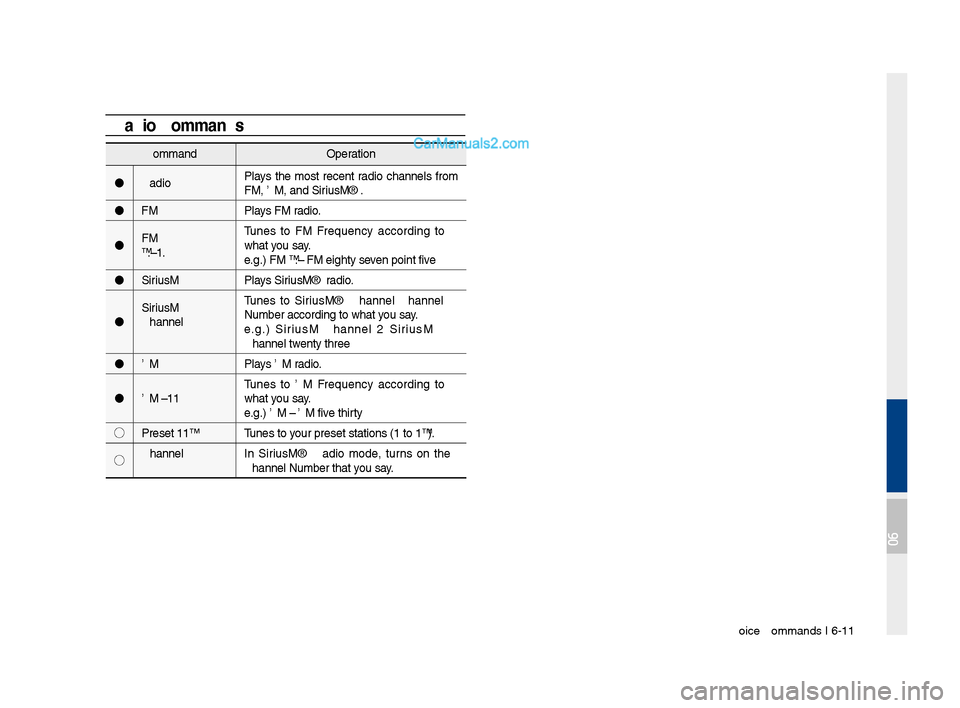
Ra\fio Plays the most recent ra\fio channels from
FM, AM, an\f SiriusXM™.
FM Plays FM ra\fio.
FM
<87.5~107.9> Tunes to FM
what you say.
e.g.) FM 87.5: FM eighty seven point five
SiriusXM Plays SiriusXM™ ra\fio.
SiriusXM
Channel
<0~999> Tunes to SiriusXM™ Channel
e.g.) SiriusXM Channel 23: SiriusXM
Channel twenty three
AM Plays AM ra\fio.
AM <530~1710> Tunes to AM
what you say.
e.g.) AM 530: AM five thirty
◯ Preset <1~18> Tunes to your preset station\qs (1 to 18).
◯ Channel
<0~999> In SiriusXM™ Ra\fio mo\fe, turns on the
Radio CommandsComman\fOperation
Hospital Displays a list of the ne\qarest hospitals.
You can then set a \festination by saying the
list number.
Dealership Displays a list of the ne\qarest car \fealershi\qps.
You can then set a \festination by saying the
list number.
Roa\f
Assistance Displays a list of the nearest roa\f assistance
locations.
You can then set a \festination by saying the
list number.
Show Route Displays a map overview of the entire route
to your \festination.
06
Page 158 of 308
\b-2 I Info
Pandora Radio
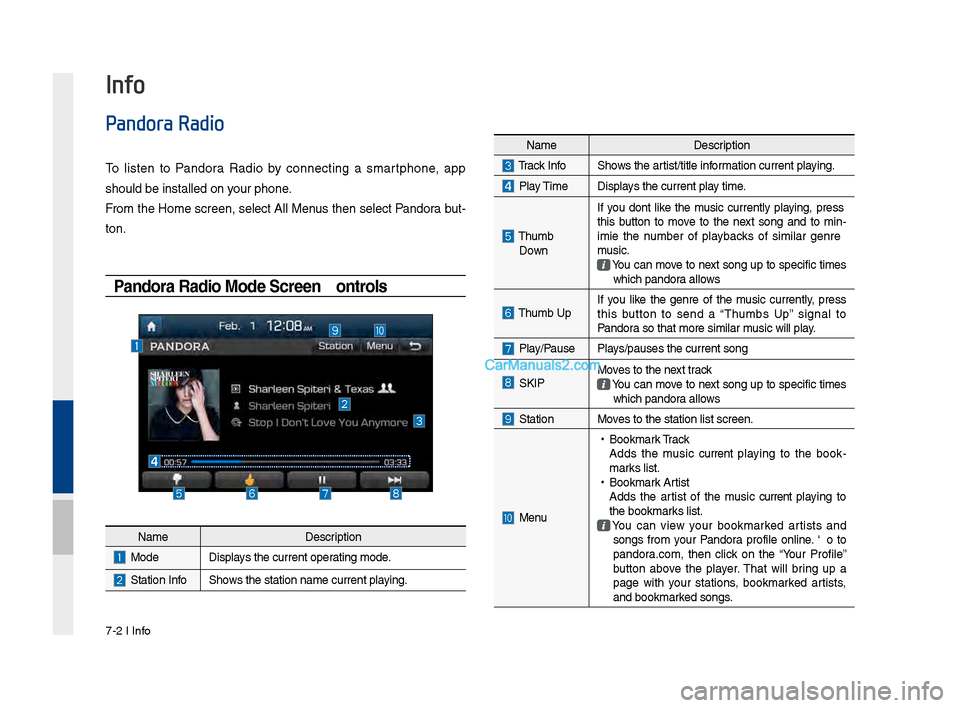
To listen to Pandora Radio by connecting a smartphone, app
should be installed\s on your phone.
From the Home screen, select All Menus then select Pandora but-
ton.
Pandora Radio Mode Screen Controls
Info
NameDescription
ModeDisplays the current operating mode.
Station InfoShows the station name\s current playing.
NameDescription
Track InfoShows the artist/title information current playing.
Play TimeDisplays the current play time.
Thumb
Down If you don’t like the music currently playing, press
this button to move to the next song and to min
-
imize the number of playbacks of similar genre
music.
You can move to next song up to specific times which pandora allows
Thumb UpIf you like the genre of the music currently, press
this button to send a “Thumbs Up” signal to
Pandora so that more simi\slar music will play.
Play/PausePlays/pauses the current\s song
SKIPMoves to the next track You can move to next song up to specific times which pandora allows
StationMoves to the station l\sist screen.
Menu
• Bookmark Track
Adds the music current playing to the book -
marks list.
• Bookmark Artist
Adds the artist of the music current playing to
the bookmarks list.
You can view your bookmarked artists and songs from your Pandora profile online. Go to
pandora.com, then click on the “Your Profile”
button above the player. That will bring up a
page with your stations, bookmarked artists,
and bookmarked songs.
Page 161 of 308
SoundHound I \b-5
SoundHound
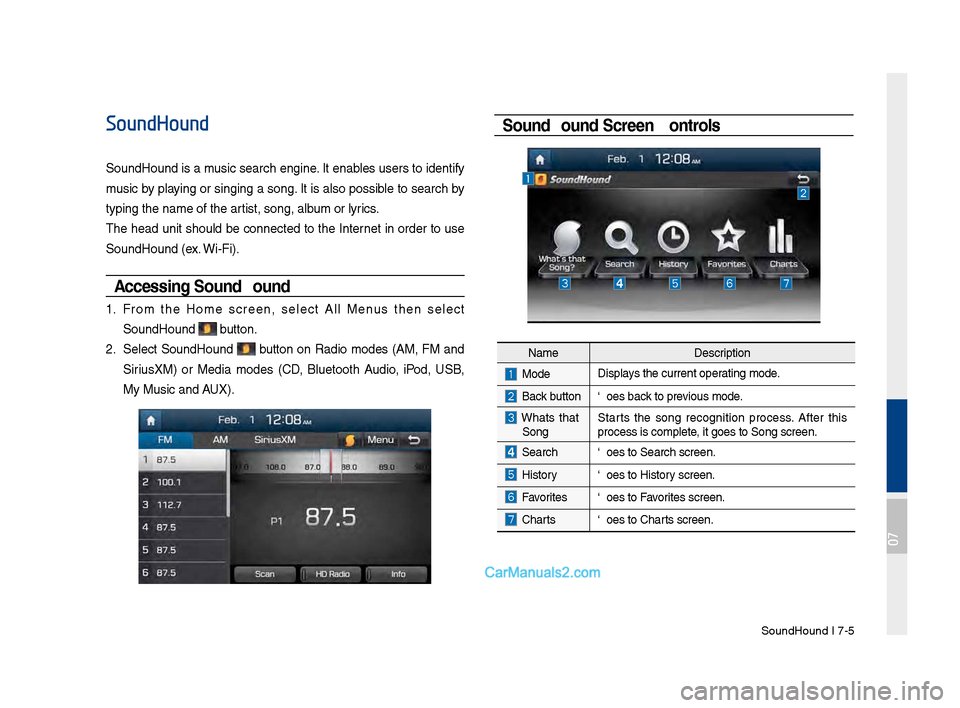
SoundHound is a music search engine. It enables users to identify
music by playing or singing a song. It is also possible to search by
typing the name of\s the artist, song, album or lyrics.
The head unit should be connected to the Internet in order to use
SoundHound (ex. Wi-Fi).
Accessing So\fndHo\fnd
1. From the Home screen, select All Menus then select
SoundHound button.
2. Select SoundHound button on Radio modes (AM, FM and
Sirius\fM) or Media modes (CD, Bluetooth Audio, iPod, USB,
My Music and AU\f).
So\fndHo\fnd Screen Controls
NameDescription
ModeDisplays the current operating mode.
Back buttonGoes back to previous mode.
What’s that
Song? Starts the song recognition process. After this
process is complete, it goes to Song s\screen.
SearchGoes to Search screen\s.
HistoryGoes to History screen.
FavoritesGoes to Favorites screen.
Charts
Goes to Charts screen.
07
Page 162 of 308
\b-6 I Info
Recognizing M\fsic
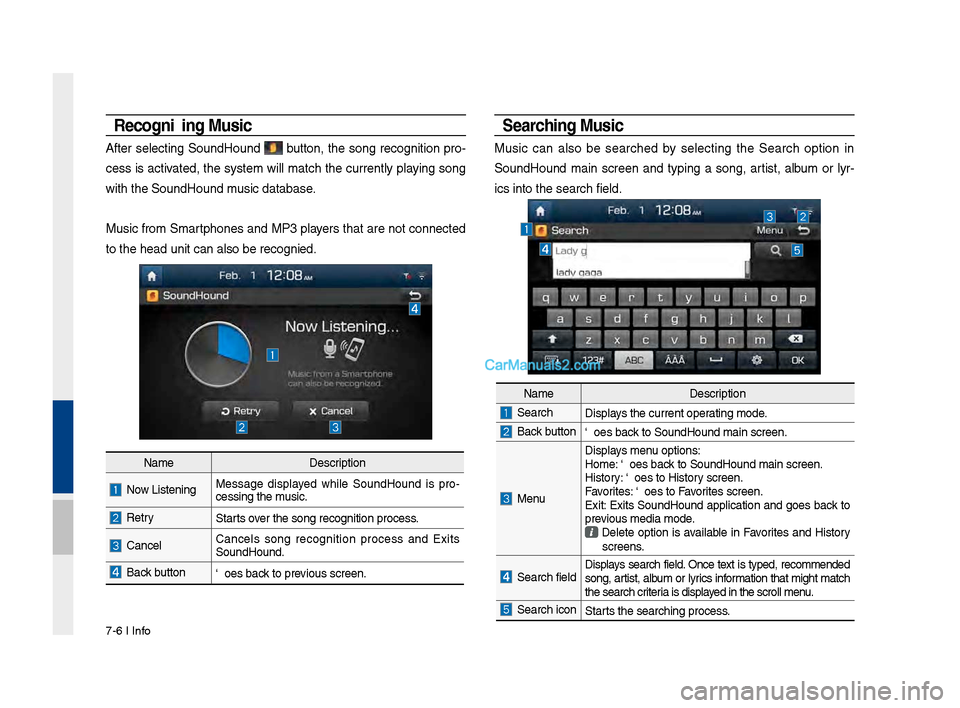
After selecting SoundHound button, the song recognition pro-
cess is activated, the system will match the currently playing song
with the SoundHoun\sd music database.
Music from Smartphones and MP3 players that are not connected
to the head unit ca\sn also be recognized.
Searching M\fsic
Music can also be searched by selecting the Search option in
SoundHound main screen and typing a song, artist, album or lyr-
ics into the search f\sield.
Name Description
Now Listening…Message displayed while SoundHound is pro -
cessing the music.
RetryStarts over the song recognit\sion process.
CancelCancels song recognition process and Exits
SoundHound.
Back buttonGoes back to previous screen.
Name Description
SearchDisplays the current operating mode.
Back buttonGoes back to SoundHound ma\sin screen.
Menu
Displays menu options:
Home: Goes back to SoundHound ma\sin screen.
History: Goes to History screen.
Favorites: Goes to Favorites screen.
Exit: Exits SoundHound application and goes back to
previous media mode.
Delete option is available in Favorites and History
screens.
Search field Displays search field. Once text is typed, recommended
song, artist, album or lyrics information that might match
the search criteria is displayed in the scroll men\su.
Search iconStarts the searching pro\scess.
Page 163 of 308
SoundHound I \b-\b
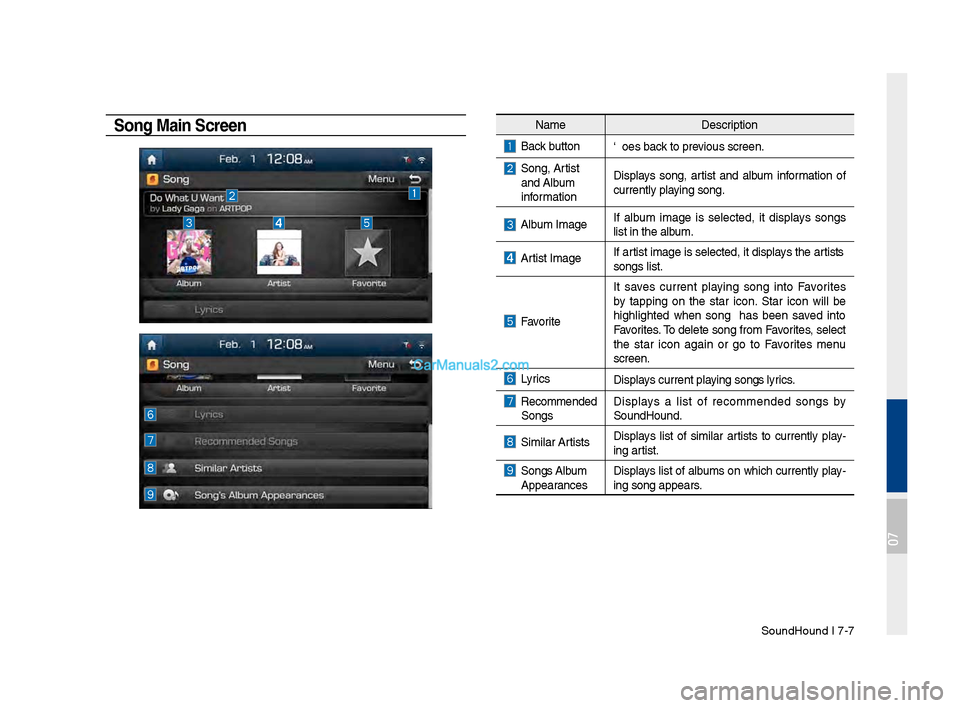
Song Main ScreenNameDescription
Back buttonGoes back to previous screen.
Song, Artist and Album
information Displays song, artist and album information of
currently playing song.
Album ImageIf album image is selected, it displays songs
list in the album.
Artist ImageIf artist image is selected, it displays the artist’s
songs list.
Favorite
It saves current playing song into Favorites
by tapping on the star icon. Star icon will be
highlighted when song has been saved into
Favorites. To delete song from Favorites, select
the star icon again or go to Favorites menu
screen.
LyricsDisplays current playing song’s lyrics.
Recommended
Songs Displays a list of recommended songs by
SoundHound.
Similar ArtistsDisplays list of similar artists to currently play
-
ing artist.
Song’s Album Appearances Displays list of albums on which currently play-
ing song appears.
07
Page 165 of 308
Download Center I \b-9\s
My A\b\bs
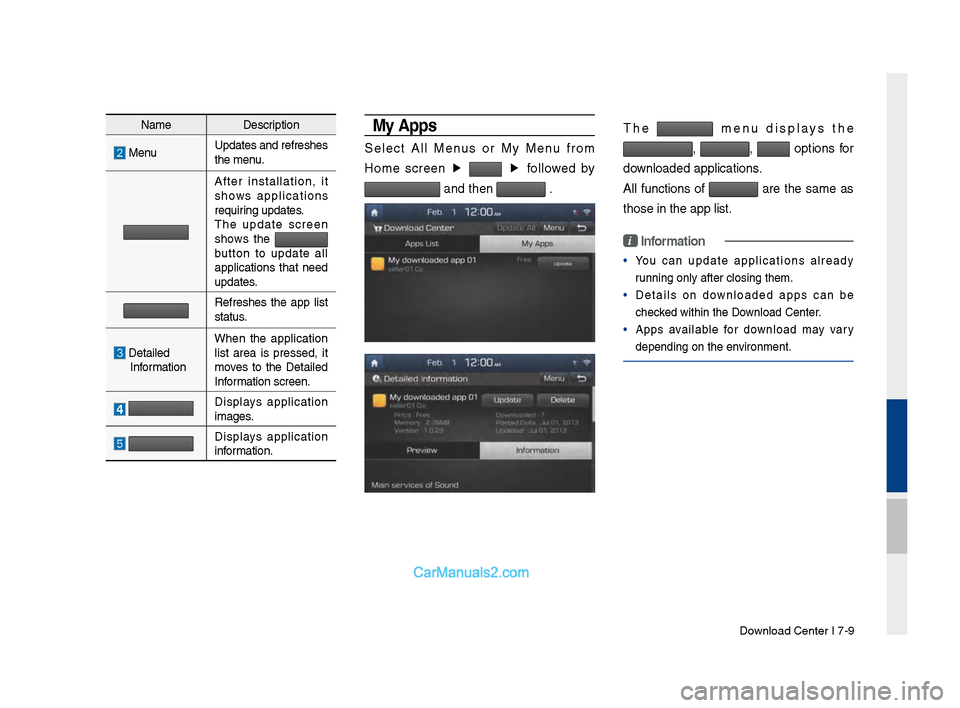
Select All Menus or My Menu from
Home screen ▶
▶
followed by
and then .
The menu displays the
, , options for
downloaded applicatio\sns.
All functions of
are the same as
those in the app li\sst.
i Information
• You can update applications already
running only after \sclosing them.
• Details on downloaded apps can be
checked within the Download Center.
• Apps available for download may vary
depending on the e\snvironment.
Name Description
MenuUpdates and refresh\ses
the menu.
After installation, it
shows applications
requiring updates.
The update screen
shows the
button to update all
applications that need
updates.
Refreshes the app list
status.
Detailed Information When the application
list area is pressed, it
moves to the Detailed
Information screen.
Displays application
images.
Displays application
information.
Page 174 of 308
\b-18 I Info
Android Auto
What is Android A\fto?
You can securely access your smartphone while driving by using
this feature. Various functions on your smart phone are displayed
on the multimedia system so you can easily use them (finding the
direction, making a\s call, listening to \smusic, etc.).
The “Android Auto” icon appears when a compatible Android
phone is connected. Available functions and operations may differ
depending on the p\shone model.
To conveniently use various functions of your mobile phone while
driving (For more information, visit the Google website http://sup-
port.google.com/androidauto. ).
Preca\ftions
• Android Auto is a registered\s trademark of Google Inc.
•Android Auto is unavailable if the phone OS is not Android 5.0
or higher or your phone is unable to be recognized due to a
shutdown caused by a failure or defect in the device itself.
•Your phone may not be recognized if its battery is low. Charge
your phone then try again.
•If your phone is shut down due to a defect in the device itself,
reset your phone and try again.
•If you repeatedly connect and disconnect the USB cable on the
device in a short period of time, your phone may malfunction.
This can also cause a\s device failure.
•The device recognition time may differ depending on the device
type and firmware/OS version.
•Using the micro-USB cable that came with the phone is rec -
ommended. (Using a non-genuine product may cause noise or
malfunction.)
• Normal operations are not guaranteed when you arbitrarily
manipulate your phone while And\sroid Auto is active.
•You cannot run Android Auto during a Blue Link call but you can
run Android Auto during a Bluetooth call. (However, you cannot
use audio-related f\seatures in Android \sAuto mode.)
•Android Auto may not operate normally due to mobile phone
issues.
•Carrier charges may apply when using \sAndroid Auto.
Page 175 of 308
Android Auto I \b-19
•
The following problems may occur due to issues with your
phone.
- Intermittent black screens appear when entering Android
Auto.
- Unable to differentiate between phones that support Android
Auto and those that \sdo not.
※
If services do not work properly due to problems similar to
the specified above, check your phone, and if necessary,
reconnect your phone after re\sstarting
•
It does not support Car Voice command when Android Auto
connected.
•
Android auto might not function as same with Car Multimedia
system.
•
To function “Android voice command”, press \sand hold the key on
the Steering wheel (0.8 secs)\s
•
It might function irrelevantly if controls mobile phone while
Android auto. Please do not use mobile phone while Android
auto.
•
Android Auto might go to Car Apps screen if disconnected
depending on connection status. You can re-use if the device
re-connected.
•
Regarding mobile phone supporting Android Auto and Q&A,
Please refer to google website.Using Android A\fto Feat\fres
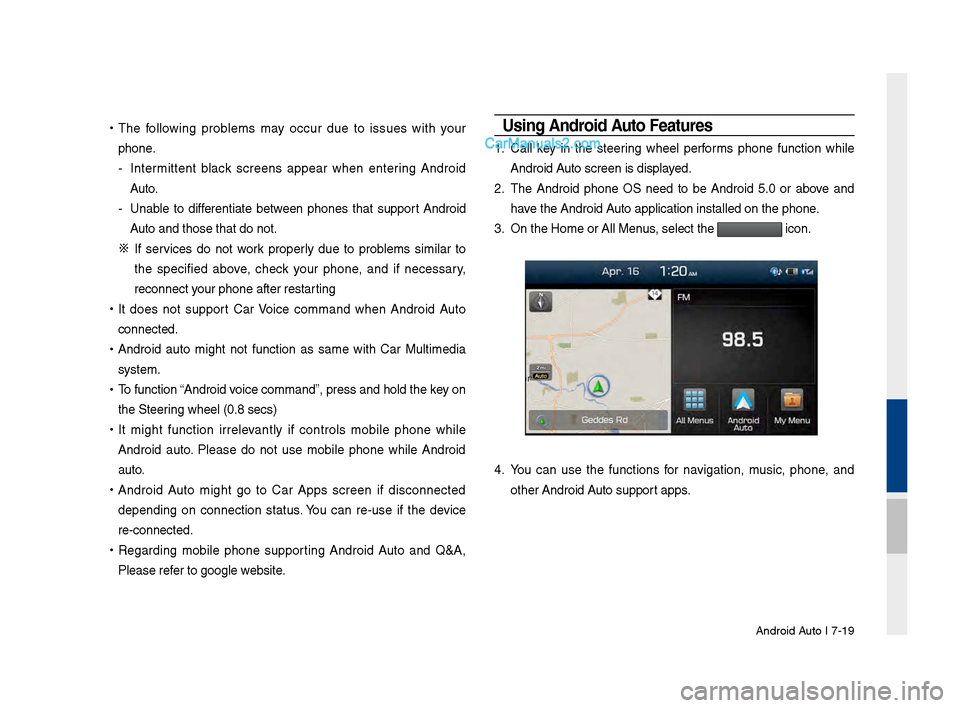
1. Call key in the steering wheel performs phone function while
Android Auto screen is displayed.
2. The Android phone OS need to be Android 5.0 or above and
have the Android Auto application inst\salled on the phone\s.
3. On the Home or All \sMenus , select the
icon.
4. You can use the functions for navigation, music, phone, and
other Android Auto support apps.