check engine INFINITI QX56 2007 Factory Service Manual
[x] Cancel search | Manufacturer: INFINITI, Model Year: 2007, Model line: QX56, Model: INFINITI QX56 2007Pages: 3061, PDF Size: 64.56 MB
Page 837 of 3061

BL-126
< SERVICE INFORMATION >
IVIS (INFINITI VEHICLE IMMOBILIZER SYSTEM-NATS)
OK or NG
OK >> GO TO 3.
NG >> Check the following:
• 50A fusible link (letter f , located in fuse and fusible
link box)
• Harness for open or short between fuse and BCM
connector. Ref. Part No. C1
3.CHECK IGN SW. ON SIGNAL
1. Turn ignition switch ON.
2. Check voltage between BCM connector M18 terminal 38 and ground.
OK or NG
OK >> GO TO 4.
NG >> Check the following:
• 10A fuse [No. 59, located in the fuse and relay box]
• Harness for open or short between fuse and BCM
connector. Ref. part No. C2
4.CHECK GROUND CIRCUIT FOR BCM
1. Turn ignition switch OFF.
2. Check continuity between BCM connector M18 terminal 67 and ground.
OK or NG
OK >> GO TO 5.
NG >> Repair or replace harness. Ref. part No. C3
5.REPLACE BCM
1. Replace BCM. Ref. part No. A
2. Perform initialization with CONSULT-II.
For initialization, refer to “CONSULT-II Operation Manual NATS-IVIS/NVIS”.
Does the engine start?
YES >> BCM is malfunctioning.
NO >> ECM is malfunctioning.
• Replace ECM. Ref. part No. B
• Perform initialization or re-communicating function.
• For initialization, refer to “CONSULT-II Operation Manual NATS-IVIS/NVIS”.
• For re-communicating function, refer to BL-117, "
ECM Re-communicating Function".
Diagnosis Procedure 2INFOID:0000000003532996
Self-diagnostic results:
“DIFFERENCE OF KEY” displayed on CONSULT-II screen
1.CONFIRM SELF-DIAGNOSTIC RESULTS70 - Ground :Battery voltage
LIIA1279E
38 - Ground :Battery voltage
LIIA0527E
67 - Ground :Continuity should exist.
LIIA1040E
Page 840 of 3061

IVIS (INFINITI VEHICLE IMMOBILIZER SYSTEM-NATS)
BL-129
< SERVICE INFORMATION >
C
D
E
F
G
H
J
K
L
MA
B
BL
N
O
P
For initialization, refer to “CONSULT-II Operation Manual NATS-
IVIS/NVIS”.
NOTE:
If the initialization is not completed or malfunctions, CONSULT-II
shows the message on the screen.
Can the system be initialized?
YES >> System is OK. BCM is malfunctioning. Ref. part No. A
NO >> ECM is malfunctioning.
• Replace ECM. Ref. part No. B
• Perform initialization with CONSULT-II.
For initialization, refer to “CONSULT-II Operation Man-
ual NATS-IVIS/NVIS”.
Diagnosis Procedure 5INFOID:0000000003532999
Self-diagnostic results:
“CHAIN OF IMMU-KEY” displayed on CONSULT-II screen
1.CONFIRM SELF-DIAGNOSTIC RESULTS
Confirm SELF-DIAGNOSTIC RESULTS “CHAIN OF IMMU-KEY”
displayed on CONSULT-II screen.
Is CONSULT-II screen displayed as above?
YES >> GO TO 2.
NO >> GO TO BL-123, "
Trouble Diagnosis".
2.CHECK NATS ANTENNA AMP. INSTALLATION
Check NATS antenna amp. installation. Refer to BL-132, "
How to Replace NATS Antenna Amp".
OK or NG
OK >> GO TO 3.
NG >> Reinstall NATS antenna amp. correctly.
3.CHECK IVIS (NATS) IGNITION KEY ID CHIP
Start engine with another registered NATS ignition key.
Does the engine start?
YES >> Ignition key ID chip is malfunctioning.
• Replace the ignition key. Ref. part No. E5
• Perform initialization with CONSULT-II.
For initialization, refer to “CONSULT-II Operation Manual NATS-IVIS/NVIS”.
NO >> GO TO 4.
4.CHECK POWER SUPPLY FOR NATS ANTENNA AMP.
1. Turn ignition switch ON.
2. Check voltage between NATS antenna amp. connector M21 terminal 1 and ground.
SEL297W
PIIA1263E
Page 842 of 3061

IVIS (INFINITI VEHICLE IMMOBILIZER SYSTEM-NATS)
BL-131
< SERVICE INFORMATION >
C
D
E
F
G
H
J
K
L
MA
B
BL
N
O
P
OK or NG
OK >> GO TO 7.
NG >> • Repair or replace harness.
NOTE:
If harness is OK, replace BCM, perform initialization with CONSULT-II. For initialization, refer to
“CONSULT-II Operation Manual NATS-IVIS/NVIS”.
7.CHECK NATS ANTENNA AMP. GROUND LINE CIRCUIT
1. Turn ignition switch OFF.
2. Disconnect NATS antenna amp. connector.
3. Check continuity between NATS antenna amp. connector M21 terminal 3 and ground.
OK or NG
OK >> NATS antenna amp. is malfunctioning. Ref. part No. E6
NG >> • Repair or replace harness.
NOTE:
If harness is OK, replace BCM, perform initialization
with CONSULT-II. For initialization, refer to “CON-
SULT-II Operation Manual NATS-IVIS/NVIS”.
Diagnosis Procedure 6INFOID:0000000003533000
“SECURITY INDICATOR LAMP DOES NOT LIGHT UP”
1.CHECK FUSE
Check 10A fuse [No.19, located in the fuse block (J/B)]
OK or NG
OK >> GO TO 2.
NG >> If fuse is blown, be sure to eliminate cause of malfunction before installing new fuse.
2.CHECK SECURITY INDICATOR LAMP
1. Start engine and turn ignition switch OFF.
2. Check the security indicator lamp lights up.
OK or NG
OK >> Inspection End.
NG >> GO TO 3.
3.CHECK SECURITY INDICATOR LAMP POWER SUPPLY CIRCUIT
1. Disconnect security indicator lamp.
Connector terminals
(wire colors)
Position of ignition key cylinderVoltage (V)
(Approx.)
( + ) ( - )
4GroundBefore inserting ignition key Battery voltage
After inserting ignition keyPointer of tester should move for approx. 30 seconds,
then return to battery voltage
Just after turning ignition switch
ONPointer of tester should move for approx. 1 second, then
return to battery voltage
3 - Ground :Continuity should exist.
LIIA1283E
Security indicator lamp should light up.
Page 904 of 3061

BR-6
< SERVICE INFORMATION >
BRAKE PEDAL
2. Loosen lock nut on the input rod, then turn input rod to adjust the
pedal to specified height. When finished adjusting, tighten lock
nut.
CAUTION:
Make sure that the screw portion of the end of input rod is
located inside the clevis.
3. With the pedal pulled up and held by hand, press the stop lamp
switch and the ASCD switch in until threaded ends contact pedal
arm.
4. With the threaded ends of the stop lamp switch and ASCD
switch contacting the pedal arm, turn the switches 45° clockwise
to lock in place.
CAUTION:
Make sure that the gap (C) between the rubber stops and
switch ends are within specification.
5. Check the pedal play.
CAUTION:
Make sure that the stop lamp goes off when the pedal is
released.
6. Start the engine and check the height of the brake pedal when
depressing it.
Removal and InstallationINFOID:0000000003532723
Lock nut : 18.6 N·m (1.9 kg-m, 14 ft-lb)
PFIA0436E
1. Brake pedal assembly 2. Snap pin 3. Clip
WFIA0232E
Page 910 of 3061

BR-12
< SERVICE INFORMATION >
BRAKE PIPING AND HOSE
Inspection After Installation
INFOID:0000000003532730
CAUTION:
If a leak is detected at the connections, retighten it or, if necessary, replace the damaged part.
1. Check brake tubes and hose connections for fluid leaks, damage, twist, deformation, contact with other
parts, and loose connections. Replace any damage parts.
2. While depressing brake pedal under a force of 785 N (80 kg-f, 177 lb-f) with engine running for approxi-
mately 5 seconds, check for fluid leakage from each part.
Page 913 of 3061
BRAKE BOOSTER
BR-15
< SERVICE INFORMATION >
C
D
E
G
H
I
J
K
L
MA
B
BR
N
O
P
BRAKE BOOSTER
On-Vehicle ServiceINFOID:0000000003532734
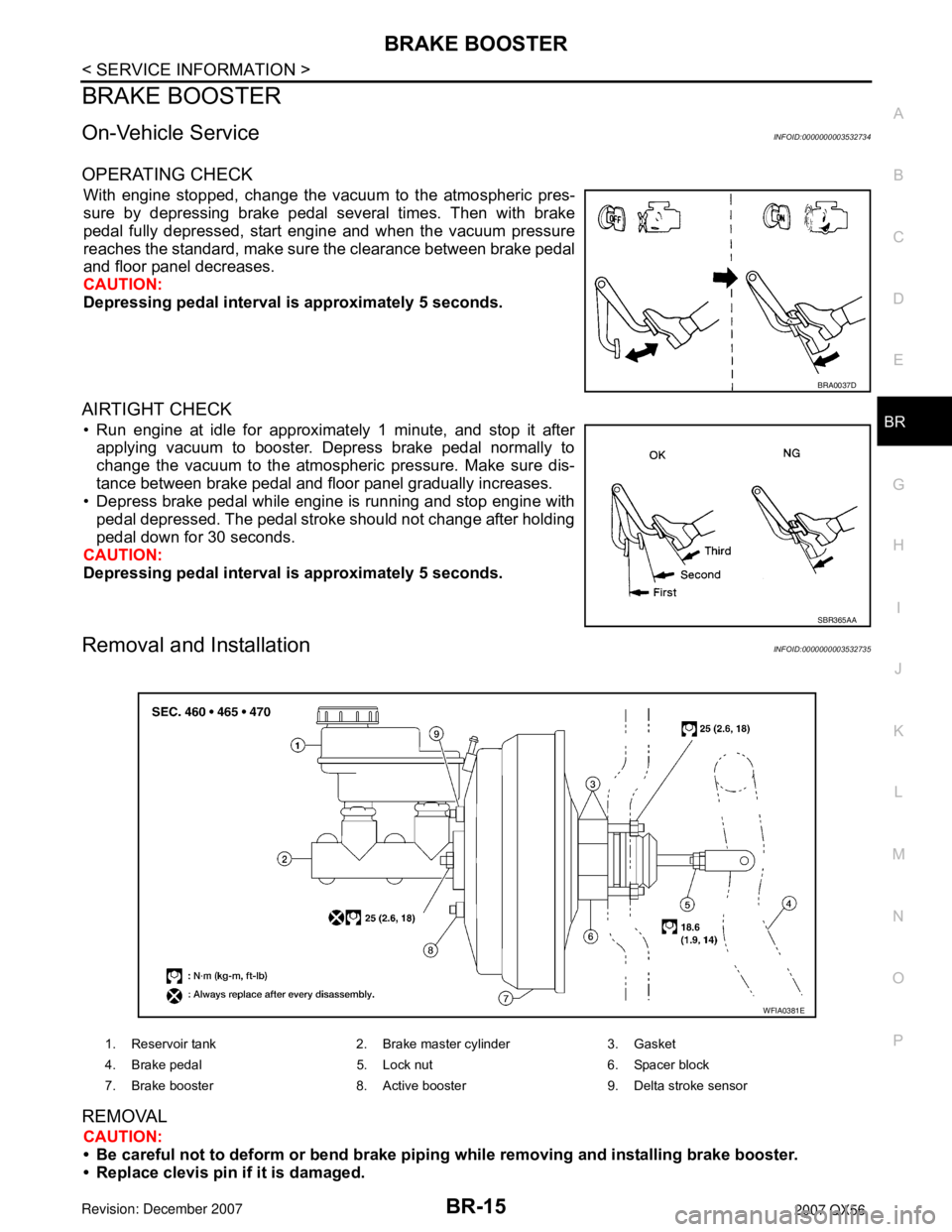
OPERATING CHECK
With engine stopped, change the vacuum to the atmospheric pres-
sure by depressing brake pedal several times. Then with brake
pedal fully depressed, start engine and when the vacuum pressure
reaches the standard, make sure the clearance between brake pedal
and floor panel decreases.
CAUTION:
Depressing pedal interval is approximately 5 seconds.
AIRTIGHT CHECK
• Run engine at idle for approximately 1 minute, and stop it after
applying vacuum to booster. Depress brake pedal normally to
change the vacuum to the atmospheric pressure. Make sure dis-
tance between brake pedal and floor panel gradually increases.
• Depress brake pedal while engine is running and stop engine with
pedal depressed. The pedal stroke should not change after holding
pedal down for 30 seconds.
CAUTION:
Depressing pedal interval is approximately 5 seconds.
Removal and InstallationINFOID:0000000003532735
REMOVAL
CAUTION:
• Be careful not to deform or bend brake piping while removing and installing brake booster.
• Replace clevis pin if it is damaged.
BRA0037D
SBR365AA
1. Reservoir tank 2. Brake master cylinder 3. Gasket
4. Brake pedal 5. Lock nut 6. Spacer block
7. Brake booster 8. Active booster 9. Delta stroke sensor
WFIA0381E
Page 914 of 3061

BR-16
< SERVICE INFORMATION >
BRAKE BOOSTER
• Be careful not to damage brake booster stud bolt threads. If brake booster is tilted or inclined during
installation, dash panel may damage the threads.
• Attach the check valve in the correct direction.
1. Remove engine room cover with power tool. Refer to EM-12, "
Removal and Installation" .
2. Remove engine air duct assembly. Refer to EM-15, "
Removal and Installation" .
3. Remove brake piping from brake master cylinder.
4. Remove brake master cylinder. Refer to BR-13, "
Removal and Installation" .
5. Remove vacuum hose from brake booster. Refer to BR-17
.
6. Disconnect active boost and delta stroke sensor harness connectors from brake booster assembly.
7. Remove brake pedal attachment snap pin and clevis pin from inside the vehicle.
8. Remove nuts on brake booster and brake pedal assembly.
9. Remove brake booster assembly from dash panel.
INSPECTION AFTER REMOVAL
Output Rod Length Inspection
1. Using a handy vacuum pump, apply a vacuum of – 66.7 kPa (–
500 mmHg, –19.69 inHg) to brake booster.
2. Check output rod length.
INSTALLATION
1. Loosen lock nut to adjust input rod length so that the length B (in
the figure) satisfies the specified value.
2. After adjusting “B”, temporarily tighten lock nut and install
booster assembly to the vehicle.
• Install a gaskets and spacer block between booster assembly
and the dash panel.
3. Connect brake pedal with clevis of input rod.
4. Install pedal bracket mounting nuts and tighten them to the
specified torque.
5. Install brake piping from brake master cylinder to ABS actuator. Refer to BR-10, "
Hydraulic Circuit".
6. Connect active boost and delta stroke sensor harness connectors to brake booster assembly.
7. Connect vacuum hose to brake booster.
8. Install master cylinder to booster assembly. Refer to BR-13, "
Removal and Installation" .
9. Adjust the height and play of brake pedal.
10. Tighten lock nut of input rod to specification.
11. Install engine air duct assembly. Refer to EM-15, "
Removal and Installation" .
12. Install engine room cover with power tool. Refer to EM-12, "
Removal and Installation" .
13. Refill with new brake fluid and bleed air. Refer to BR-8, "
Bleeding Brake System" .
SBR208E
Standard dimension : 15.6 − 15.9 mm (0.614 − 0.626 in)
[when vacuum is – 66.7 kPa (– 500 mmHg, – 19.69 inHg)]
Length “B” : 151 mm (5.94 in)
WFIA0382E
Page 932 of 3061
![INFINITI QX56 2007 Factory Service Manual BRC-4
< SERVICE INFORMATION >[VDC/TCS/ABS]
PRECAUTIONS
• If YES, GO TO 2.
• If NO, GO TO 5.
2. Is there any indication other than indications relating to CAN communication system in the self-diagn](/img/42/57029/w960_57029-931.png "INFINITI QX56 2007 Factory Service Manual BRC-4
< SERVICE INFORMATION >[VDC/TCS/ABS]
PRECAUTIONS
• If YES, GO TO 2.
• If NO, GO TO 5.
2. Is there any indication other than indications relating to CAN communication system in the self-diagn")
BRC-4
< SERVICE INFORMATION >[VDC/TCS/ABS]
PRECAUTIONS
• If YES, GO TO 2.
• If NO, GO TO 5.
2. Is there any indication other than indications relating to CAN communication system in the self-diagnosis
results?
• If YES, GO TO 3.
• If NO, GO TO 4.
3. Based on self-diagnosis results unrelated to CAN communication, carry out the inspection.
4. Malfunctions may be detected in self-diagnosis depending on control units carrying out CAN communica-
tion. Therefor, erase the self-diagnosis results.
5. Diagnose CAN communication system. Refer to LAN-7
.
Precaution for Brake ControlINFOID:0000000003532764
• During ABS operation, the brake pedal may vibrate lightly and a mechanical noise may be heard. This is
normal.
• Just after starting vehicle, the brake pedal may vibrate or a motor operating noise may be heard from engine
compartment. This is a normal status of operation check.
• Stopping distance may be longer than that of vehicles without ABS when vehicle drives on rough, gravel, or
snow-covered (fresh, deep snow) roads.
• When an error is indicated by ABS or another warning lamp, collect all necessary information from customer
(what symptoms are present under what conditions) and check for simple causes before starting diagnosis.
Besides electrical system inspection, check booster operation, brake fluid level, and fluid leaks.
• If incorrect tire sizes or types are installed on the vehicle or brake pads are not Genuine NISSAN parts, stop-
ping distance or steering stability may deteriorate.
• If there is a radio, antenna or related wiring near control module, ABS function may have a malfunction or
error.
• If aftermarket parts (car stereo, CD player, etc.) have been installed, check for incidents such as harness
pinches, open circuits or improper wiring.
• If the following components are replaced with non-genuine components or modified, the VDC OFF indicator
lamp and SLIP indicator lamp may turn on or the VDC system may not operate properly. Components
related to suspension (shock absorbers, struts, springs, bushings, etc.), tires, wheels (exclude specified
size), components related to brake system (pads, rotors, calipers, etc.), components related to engine (muf-
fler, ECM, etc.), components related to body reinforcement (roll bar, tower bar, etc.).
• Driving with broken or excessively worn suspension components, tires or brake system components may
cause the VDC OFF indicator lamp and the SLIP indicator lamp to turn on, and the VDC system may not
operate properly.
• When the TCS or VDC is activated by sudden acceleration or sudden turn, some noise may occur. The
noise is a result of the normal operation of the TCS and VDC.
• When driving on roads which have extreme slopes (such as mountainous roads) or high banks (such as
sharp curves on a freeway), the VDC may not operate normally, or the VDC warning lamp and the SLIP indi-
cator lamp may turn on. This is not a problem if normal operation can be resumed after restarting the engine.
• Sudden turns (such as spin turns, acceleration turns), drifting, etc. with VDC turned off may cause the yaw
rate/side/decel G sensor to indicate a problem. This is not a problem if normal operation can be resumed
after restarting the engine.
Precaution for CAN SystemINFOID:0000000003532765
• Do not apply voltage of 7.0V or higher to terminal to be measured.
• Maximum open terminal voltage of tester in use must be less than 7.0V.
• Before checking harnesses, turn ignition switch OFF and disconnect battery negative cable.
Page 936 of 3061
![INFINITI QX56 2007 Factory Service Manual BRC-8
< SERVICE INFORMATION >[VDC/TCS/ABS]
SYSTEM DESCRIPTION
ABS Function
INFOID:0000000003532769
• The Anti-Lock Brake System detects wheel revolution while braking and improves handling stability](/img/42/57029/w960_57029-935.png "INFINITI QX56 2007 Factory Service Manual BRC-8
< SERVICE INFORMATION >[VDC/TCS/ABS]
SYSTEM DESCRIPTION
ABS Function
INFOID:0000000003532769
• The Anti-Lock Brake System detects wheel revolution while braking and improves handling stability")
BRC-8
< SERVICE INFORMATION >[VDC/TCS/ABS]
SYSTEM DESCRIPTION
ABS Function
INFOID:0000000003532769
• The Anti-Lock Brake System detects wheel revolution while braking and improves handling stability during
sudden braking by electrically preventing wheel lockup. Maneuverability is also improved for avoiding obsta-
cles.
• If the electrical system malfunctions, the Fail-Safe function is activated, the ABS becomes inoperative and
the ABS warning lamp turns on.
• The electrical system can be diagnosed using CONSULT-II.
• During ABS operation, the brake pedal may vibrate lightly and a mechanical noise may be heard. This is
normal.
• Just after starting the vehicle, the brake pedal may vibrate or a motor operating noise may be heard from
engine compartment. This is a normal status of operation check.
• Stopping distance may be longer than that of vehicles without ABS when vehicle drives on rough, gravel, or
snow-covered (fresh, deep snow) roads.
EBD FunctionINFOID:0000000003532770
• Electronic Brake Distribution is a function that detects subtle slippages between the front and rear wheels
during braking, and it improves handling stability by electronically controlling the brake fluid pressure which
results in reduced rear wheel slippage.
• If the electrical system malfunctions, the Fail-Safe function is activated, the EBD and ABS become inopera-
tive, and the ABS warning lamp and BRAKE warning lamp are turned on.
• The electrical system can be diagnosed using CONSULT-II.
• During EBD operation, the brake pedal may vibrate lightly and a mechanical noise may be heard. This is
normal.
• Just after starting the vehicle, the brake pedal may vibrate or a motor operating noise may be heard from
engine compartment. This is a normal status of operation check.
TCS FunctionINFOID:0000000003532771
• Spinning of the drive wheels is detected by the ABS actuator and electric unit (control unit) using inputs from
the wheel speed sensors. If wheel spin occurs, the drive wheel right and left brake fluid pressure control and
engine fuel cut are activated while the throttle value is restricted to reduce the engine torque and decrease
the amount of wheel spin. In addition, the throttle opening is controlled to achieve the optimum engine
torque.
• Depending on road condition, the vehicle may have a sluggish feel. This is normal, because optimum trac-
tion has the highest priority during TCS operation.
• TCS may be activated during sudden vehicle acceleration, wide open throttle acceleration, sudden transmis-
sion shifts or when the vehicle is driven on a road with a varying surface friction coefficient.
• The SLIP indicator lamp flashes to inform the driver of TCS operation.
VDC FunctionINFOID:0000000003532772
• In addition to the ABS/TCS function, the driver steering amount and brake operation amount are detected
from the steering angle sensor and front and rear pressure sensors, and the vehicle's driving status (amount
of under steering/over steering) is determined using inputs from the yaw rate sensor/side G sensor, wheel
speed sensors, etc. and this information is used to improve vehicle stability by controlling the braking and
engine torque application to the wheels.
• The SLIP indicator lamp flashes to inform the driver of VDC operation.
• During VDC operation, the vehicle body and brake pedal may vibrate lightly and a mechanical noise may be
heard. This is normal.
• The ABS warning lamp, VDC OFF indicator lamp and SLIP indicator lamp may turn on when the vehicle is
subject to strong shaking or large vibration, such as when the vehicle is on a turn table or a ship while the
engine is running or on a steep slope. In this case, restart the engine on a normal road and if the ABS warn-
ing lamp, VDC OFF indicator lamp and SLIP indicator lamp turn off, there is no problem.
Fail-Safe FunctionINFOID:0000000003532773
CAUTION:
If the Fail-Safe function is activated, perform the Self Diagnosis for ABS/TCS/VDC system.
ABS/EBD SYSTEM
Page 951 of 3061
![INFINITI QX56 2007 Factory Service Manual TROUBLE DIAGNOSIS
BRC-23
< SERVICE INFORMATION >[VDC/TCS/ABS]
C
D
E
G
H
I
J
K
L
MA
B
BRC
N
O
P
• If there is damage to the connection flare nut or ABS actuator and electric unit (control unit) threa](/img/42/57029/w960_57029-950.png "INFINITI QX56 2007 Factory Service Manual TROUBLE DIAGNOSIS
BRC-23
< SERVICE INFORMATION >[VDC/TCS/ABS]
C
D
E
G
H
I
J
K
L
MA
B
BRC
N
O
P
• If there is damage to the connection flare nut or ABS actuator and electric unit (control unit) threa")
TROUBLE DIAGNOSIS
BRC-23
< SERVICE INFORMATION >[VDC/TCS/ABS]
C
D
E
G
H
I
J
K
L
MA
B
BRC
N
O
P
• If there is damage to the connection flare nut or ABS actuator and electric unit (control unit) threads,
replace the damaged part and recheck for leaks.
• When there is fluid leaking or seeping from a fluid connection, use a clean cloth to wipe off the fluid and
recheck for leaks. If fluid is still seeping out, replace the damaged part. If the fluid is leaking at the ABS
actuator and electric unit (control unit), replace the ABS actuator and electric unit (control unit) assem-
bly.
CAUTION:
The ABS actuator and electric unit (control unit) cannot be disassembled and must be replaced
as an assembly.
3. Check the brake pads for excessive wear.
POWER SYSTEM TERMINAL LOOSENESS AND BATTERY INSPECTION
Make sure the battery positive cable, negative cable and ground connection are not loose. In addition, make
sure the battery is sufficiently charged.
ABS WARNING LAMP, SLIP INDICATOR LAMP AND VDC OFF INDICATOR LAMP INSPECTION
1. Make sure ABS warning lamp, SLIP indicator lamp and VDC OFF indicator lamp (when VDC OFF switch
is off), turn on for approximately 2 seconds when the ignition switch is turned ON. If they do not, check the
VDC OFF indicator lamp and the VDC OFF switch. Refer to BRC-53, "
Component Inspection". Check
CAN communications. If there are no errors with the VDC OFF switch or CAN communication system,
replace combination meter. Refer to DI-5
.
2. Make sure the lamps turn off approximately 2 seconds after the ignition switch is turned ON. If the lamp
does not turn off, conduct self-diagnosis of ABS actuator and electric unit (control unit). If no malfunctions
are detected in self-diagnosis, replace combination meter. Refer to DI-5
.
3. With the engine running, make sure the VDC OFF indicator lamp turns on and off when the VDC OFF
switch is turned on and off. If the indicator lamp status does not correspond to switch operation, check the
VDC OFF switch. Refer to BRC-53, "
Component Inspection".
4. After conducting the self-diagnosis, be sure to erase the error memory. Refer to BRC-26, "
CONSULT-II
Function (ABS)".
Warning Lamp and Indicator TimingINFOID:0000000003532781
×: ON
—: OFF
Control Unit Input/Output Signal StandardINFOID:0000000003532782
REFERENCE VALUE FROM CONSULT-II
CAUTION:
The display shows the control unit calculation data, so a normal value might be displayed even in the
event the output circuit (harness) is open or short circuited.
ConditionABS
warning lampVDC OFF
indicator lampSLIP
indicator lampRemarks
When the ignition switch is OFF — — — —
After the ignition switch is turned ON
for approx. 1 second×××—
After the ignition switch is turned ON
for approx. 2 seconds——— —
When the VDC OFF switch is
pressed (VDC function OFF)—×——
ABS/TCS/VDC malfunction×××—
××—When the ABS actuator and elec-
tric unit (control unit) is malfunc-
tioning (power supply or ground
malfunction).
When the VDC is malfunctioning —××—