navigation system INFINITI QX56 2011 Factory User Guide
[x] Cancel search | Manufacturer: INFINITI, Model Year: 2011, Model line: QX56, Model: INFINITI QX56 2011Pages: 5598, PDF Size: 94.53 MB
Page 347 of 5598
AV
MULTI AV SYSTEM SYMPTOMSAV-199
< SYMPTOM DIAGNOSIS >
C
DE
F
G H
I
J
K L
M B A
O P
SYMPTOM DIAGNOSIS
MULTI AV SYSTEM SYMPTOMS
Symptom TableINFOID:0000000006216375
RELATED TO NAVIGATION
RELATED TO HANDS-FREE PHONE
Simple Check for Bluetooth™ Communication
If cellular phone and AV control unit cannot be connected with Bluetooth™ communication, following proce-
dure allows the technician to judge which device has malfunction.
1. Turn ON cellular phone, not connecting Bluetooth
™ communication.
2. Start CONSULT-III, then start Windows
®.
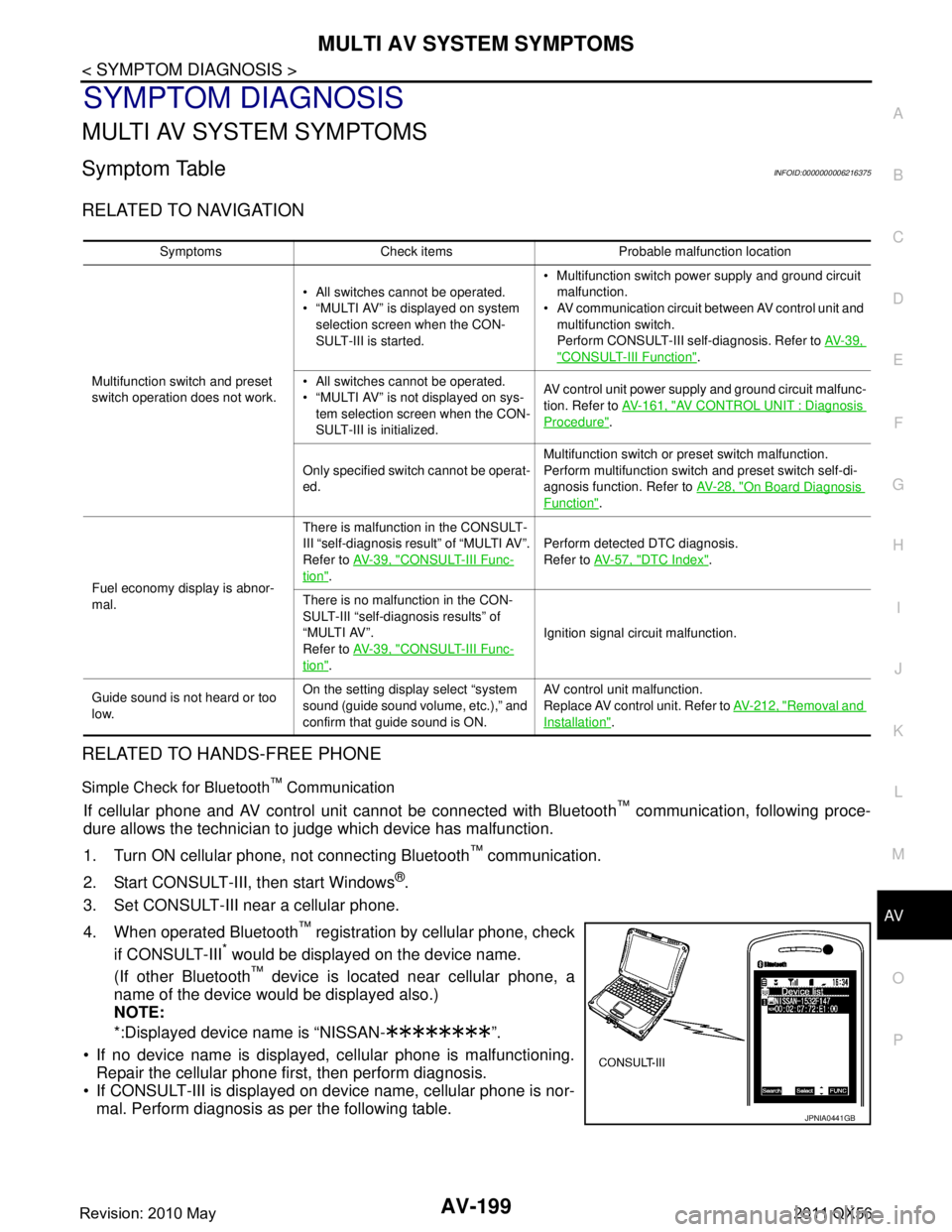
3. Set CONSULT-III near a cellular phone.
4. When operated Bluetooth
™ registration by cellular phone, check
if CONSULT-III
* would be displayed on the device name.
(If other Bluetooth
™ device is located near cellular phone, a
name of the device would be displayed also.)
NOTE:
*:Displayed device name is “NISSAN- ”.
If no device name is displayed, cellular phone is malfunctioning. Repair the cellular phone first, then perform diagnosis.
If CONSULT-III is displayed on device name, cellular phone is nor- mal. Perform diagnosis as per the following table.
Symptoms Check items Probable malfunction location
Multifunction switch and preset
switch operation does not work. All switches cannot be operated.
“MULTI AV” is displayed on system
selection screen when the CON-
SULT-III is started. Multifunction switch power supply and ground circuit
malfunction.
AV communication circuit between AV control unit and
multifunction switch.
Perform CONSULT-III self-diagnosis. Refer to AV- 3 9 ,
"CONSULT-III Function".
All switches cannot be operated.
“MULTI AV” is not displayed on sys- tem selection screen when the CON-
SULT-III is initialized. AV control unit power supply and ground circuit malfunc-
tion. Refer to
AV- 1 6 1 , "
AV CONTROL UNIT : Diagnosis
Procedure".
Only specified switch cannot be operat-
ed. Multifunction switch or preset switch malfunction.
Perform multifunction switch and preset switch self-di-
agnosis function. Refer to
AV- 2 8 , "
On Board Diagnosis
Function".
Fuel economy display is abnor-
mal. There is malfunction in the CONSULT-
III “self-diagnosis result” of “MULTI AV”.
Refer to
AV- 3 9 , "
CONSULT-III Func-
tion". Perform detected DTC diagnosis.
Refer to
AV- 5 7 , "
DTC Index".
There is no malfunction in the CON-
SULT-III “self-diagnosis results” of
“MULTI AV”.
Refer to AV- 3 9 , "
CONSULT-III Func-
tion". Ignition signal circuit malfunction.
Guide sound is not heard or too
low. On the setting display select “system
sound (guide sound volume, etc.),” and
confirm that guide sound is ON. AV control unit malfunction.
Replace AV control unit. Refer to
AV- 2 1 2 , "
Removal and
Installation".
JPNIA0441GB
Revision: 2010 May2011 QX56
Page 354 of 5598

AV-206
< SYMPTOM DIAGNOSIS >
NORMAL OPERATING CONDITION
NORMAL OPERATING CONDITION
DescriptionINFOID:0000000006216376
NOTE:
For Navigation system operation information, refer to Navigation system Owner's Manual.
BASIC OPERATIONS
NOTE:
Locations stored in the Address Book and other memory f unctions may be lost if the vehicle's battery is dis-
connected or becomes discharged. If this occurs, servic e the vehicle's battery as necessary and re-enter the
information in the Address Book.
RELATED TO VOICE RECOGNITION
Related to Basic Operation
Symptom Possible cause Possible solution
No image is displayed on front dis-
play unit. The display is turned off.
Press “ -” to turn on the display.
The interior of the vehicle becomes the a little less
than 80 °C (176 °F) or high temperature, and the pro-
tection of the display acts, and a display is turned off. Wait until the interior of the vehicle has
cooled down.
No image is displayed on front
(rear) display unit The brightness is at the lowest setting. Adjust the brightness of the display.
The systems in the video mode. Press “DISC-AUX” to change the mode.
Screen not clear. Contrast setting is not appropriate. Adjust the contrast of the display.
No voice guidance is available. Or
The volume is too high or too low. The volume is not set correctly, or it is turned off. Adjust the volume of voice guidance.
Voice guidance is not provided for certain streets
(roads displayed in gray).
This is not a malfunction.
No map is displayed on the screen. A screen other than map screen is displayed. Press “MAP”.
The screen is too dim. The move-
ment is slow. The temperature in the interior of the vehicle is low. Wait until the interior of the vehicle has
warmed up.
Some pixels in the display are dark-
er or brighter than others. This condition is an inherent characteristic of liquid
crystal displays.
This is not a malfunction.
Some menu items cannot be se-
lected on front display unit. Some menu items become unavailable while the ve-
hicle is driven. Park the vehicle in a safe location, and
then operate the navigation system.
A displayed screen cannot be
switched to the “Display Setup”
screen of the headrest display unit
LH (RH). “Display Setup” screen is shown on the headrest
display unit on the other side.
Press “DISP (L)” or “DISP (R)” to switch to
a screen other than “Display Setup”
screen.
The set value can not be initialized
on the “Display Setup” screen of
the headrest display unit LH (RH). No change in each default value before. This is not a malfunction.
Revision: 2010 May2011 QX56
Page 358 of 5598

AV-210
< SYMPTOM DIAGNOSIS >
NORMAL OPERATING CONDITION
RELATED TO ROUTE CALCULATION AND VISUAL GUIDANCE
The vehicle icon is not displayed in
the correct position.The vehicle was transported after the ignition
switch was pressed off, for example, by a ferry
or car transporter.
Drive the vehicle for a while on a road where
GPS signals can be received.
The position and direction of the vehicle icon
may be incorrect depending on the driving en-
vironments and the levels of positioning accu-
racy of the navigation system. This is not a malfunction. Drive the vehicle for
a while to automatically correct the position
and direction of the vehicle icon.
When the vehicle is traveling on a
new road, the vehicle icon is located
on another road nearby. Because the new road is not stored in the map
data, the system automatically places the vehi-
cle icon on the nearest road available.
Updated road information will be included in
the next version of the map data.
The screen does not switch to the
night screen even after turning on
the headlights. The daytime screen was set the last time the
headlights were turned on.
Set the screen to the night screen mode using
The map does not scroll even when
the vehicle is moving. The current location map screen is not dis-
played.
Press “MAP”.
The vehicle icon is not displayed. The current location map screen is not dis-
played.
Press “MAP”.
The location of the vehicle icon is
misaligned from the actual position. When using tire chains or replacing the tires,
speed calculations based on the speed sensor
may be incorrect. Drive the vehicle for a while [at approximately
30 km/h (19 MPH) for about 30 minutes] to
automatically correct the vehicle icon posi-
tion.
If this does not correct the vehicle icon posi-
tion, contact an INFINITI dealer.
The map data has a mistake or is incomplete
(the vehicle icon position is always misaligned
in the same area). Updated road information will be included in
the next version of the map data.
Symptom Possible cause Possible solution
Symptom Possible cause Possible solution
Waypoints are not included in
the auto reroute calculation. Waypoints that you have already passed are not included in
the auto reroute calculation. If you want to go to that waypoint
again, you need to edit the route.
Route information is not dis-
played. Route calculation has not yet been performed.
Set the destination and perform route
calculation.
You are not driving on the suggested route. Drive on the suggested route.
Route guidance is set to off. Turn on route guidance.
Route information is not provided for certain types of roads
(roads displayed in gray). This is not a malfunction.
The auto reroute calculation (or
detour calculation) suggests
the same route as the one pre-
viously suggested. Route calculations took priority conditions into consider-
ation, but the same route was calculated.
This is not a malfunction.
A waypoint cannot be added. Five waypoints are already set on the route, including ones
that you have already passed. A maximum of 5 waypoints can be set
on the route. If you want to go to 6 or
more waypoints, perform route calcu-
lations multiple times as necessary.
The suggested route is not dis-
played. Roads near the destination cannot be calculated.
Reset the destination to a main or or-
dinary road, and recalculate the route.
The starting point and destination are too close. Set a more distant destination.
The starting point and destination are too far away. Divide your trip by selecting one or two
intermediate destinations, and per-
form route calculations multiple times.
There are time restricted roads (by the day of the week, by
time) near the current vehicle location or destination. Set [Use Time Restricted Roads] to
off.
Revision: 2010 May2011 QX56
Page 359 of 5598

AV
NORMAL OPERATING CONDITIONAV-211
< SYMPTOM DIAGNOSIS >
C
DE
F
G H
I
J
K L
M B A
O P
RELATED TO VOICE GUIDANCE
RELATED TO TRAFFIC INFORMATION
The part of the route that you
have already passed is deleted. A route is managed by sections between waypoints. If you
passed the first waypoint, the section between the starting
point and the waypoint is deleted. (It may not be deleted de-
pending on the area.)
This is not a malfunction.
An indirect route is suggested. If there are restrictions (such as one-way streets) on roads
close to the starting point or destination, the system may
suggest an indirect route.
Adjust the location of the starting of
the starting point or destination.
The system may suggest an indirect route because route
calculation does not take into consideration some areas
such as narrow stre ets (gray roads.) Reset the destination to a main or or-
dinary road, and recalculate the route.
The landmark information does
not correspond to the actual in-
formation. This may be caused by insufficient or incorrect map data.
Updated information will be included
in the next version of the data.
The suggested route does not
exactly connect to the starting
point, waypoints, or destina-
tion. There is no data for route calculation closes to these loca-
tions.
Set the starting point, waypoints and
destination on a main road, and per-
form route calculation.
Symptom Possible cause Possible solution
Symptom Possible cause Possible solution
Voice guidance is not available Voice guidance is only available at certain intersections
marked with? In some case, voice guidance is not avail-
able even when the vehicle should make a turn.
This is not a malfunction.
The vehicle has deviated from the suggested route. Go back to the suggested route or request
route calculation again
Voice guide is set to off. Turn on voice guidance.
Route guidance is set to off. Turn on voice guidance.
The guidance contact does not
correspond to the actual condi-
tion. The contact of voice guidance may vary, depending on
the types of intersections at which turn are made.
Follow all traffic rules and regulations.
Symptom Possible cause Possible solution
The traffic information is
not displayed The traffic information is not set to on. Set the traffic information to on.
You are in an area where traffic information is not avail-
able
Scroll to an area where traffic information is avail-
able
You have not subscribed to XM NavTraffic or, your sub-
scription to XM NavTraffic has expired. Check your subscription status of XM NavTraffic.
The map scale is set at a level where the display of icons
is impossible. Check that the map scale is set at a level in which
the display of icons is possible.
With the automatic de-
tour route search ON,
no detour route is set to
avoid congested areas. There is no faster route compared to the current route,
based on the road network and traffic information. The automatic detour search is not intended for
avoiding traffic jams. It searches for the fasted
rote taking into consideration such things as traffic
jams.
The route does not
avoid road section with
traffic information stat-
ing it is closed due to
road construction. The navigation system is designed not to avoid this
event because the actual period of closure may differ
from the declared roadwork period. Observe the actual road condition and follow the
instructions on road for detour when necessary. If
the road closure is for certain, use detour function
and set the detour distance to avoid the closed
road section.
Traffic information dis-
played differs from in-
formation from other
media (e.g. radio). Other media may use different information sources.
Observe the actual road conditions and regula-
tions. Always observe safe driving practices and
follow all traffic regulations.
Revision: 2010 May2011 QX56
Page 771 of 5598
![INFINITI QX56 2011 Factory User Guide
CCS-36
< SYSTEM DESCRIPTION >[ICC]
DIAGNOSIS SYSTEM (ADAS CONTROL UNIT)
LDP SYSTEM ON
[On/Off]×
Indicates [On/Off] status of LDP system
WARN REQ
[On/Off] ×
Indicates an ADAS control unit judged war](/img/42/57033/w960_57033-770.png "INFINITI QX56 2011 Factory User Guide
CCS-36
< SYSTEM DESCRIPTION >[ICC]
DIAGNOSIS SYSTEM (ADAS CONTROL UNIT)
LDP SYSTEM ON
[On/Off]×
Indicates [On/Off] status of LDP system
WARN REQ
[On/Off] ×
Indicates an ADAS control unit judged war")
CCS-36
< SYSTEM DESCRIPTION >[ICC]
DIAGNOSIS SYSTEM (ADAS CONTROL UNIT)
LDP SYSTEM ON
[On/Off]×
Indicates [On/Off] status of LDP system
WARN REQ
[On/Off] ×
Indicates an ADAS control unit judged warning state (ON/OFF) of LDP system
READY signal
[On/Off] ×
Indicates LDP system settings
Camera lost
[Detect/Deviate/Both] ××Indicates a lane marker detection state judged from a lane marker detection signal
read by the ADAS control unit via ITS communication
(Lane camera unit transmits a lane marker signal via ITS communication)
Shift position
[Off, P, R, N, D, M/T1 -
7] ××
Indicates shift position read from ADAS control unit through CAN communication
(TCM transmits shift position signal through CAN communication)
Turn signal
[OFF/LH/RH/LH&RH] ××Indicates turn signal operation status read from ADAS control unit through CAN
communication (BCM transmits turn indicator signal through CAN communica-
tion)
SIDE G
[G] ××Indicates lateral G acting on the vehicle. This lateral G is judged from a side G
sensor signal read by ADAS control unit via CAN communication
(The ABS actuator and electric unit (control unit) transmits a side G sensor signal
via CAN communication)
STATUS signal
[Stnby/Warn/Cancl/
Off] ×
Indicates a control state of LDP system
Lane unclear
[On/Off] ××Indicates an ON/OFF state of the lane marker. The ON/OFF state is judged from
a detected lane condition signal read by the ADAS control unit via ITS communi-
cation
(The lane camera unit transmits a detected lane condition signal via ITS commu-
nication)
FUNC ITEM
[FUNC1] ×× × × Indicates systems which can be set to ON/OFF by selecting “Driver Assistance”
⇒
“Dynamic Assistance Settings” of the navigation system
FUNC1: Distance Control Assist (DCA), Lane Departure Prevention (LDP)
FUNC ITEM (NV-ICC)
[Off] ×× × × NOTE:
The item is displayed, but it is not monitored
FUNC ITEM (NV-
DCA)
[Off] ×× × ×
NOTE:
The item is displayed, but it is not monitored
DCA SELECT
[On/Off] ×× × × Indicates an ON/OFF state of the DCA system. The DCA system can be set to
ON/OFF by selecting
“Driver Assistance” ⇒ “Dynamic Assistance Settings” of the
navigation system
LDP SELECT
[On/Off] ×× × × Indicates an ON/OFF state of LDP system. LDP system can be set to ON/OFF by
selecting “Driver Assistance”
⇒ “Dynamic Assistance Settings” of the navigation
system
BSI SELECT
[On/Off] ×× × × NOTE:
The item is displayed, but it is not monitored
NAVI ICC SELECT
[Off] ×× × × NOTE:
The item is displayed, but it is not monitored
NAVI DCA SELECT
[Off] ×× × ×
NOTE:
The item is displayed, but it is not monitored
SYS SELECTABILITY
[On/Off] ×× × × Indicates the availability of ON/OFF switching for “Driver Assistance” items re-
ceived from the AV control unit via CAN communication
WARN SYS SW
[On/Off] ×× × ×
Indicates [On/Off] status of warning systems switch
BSW/BSI WARN LMP
[On/Off] ×
Indicates [On/Off] status of BSW warning lamp output
Monitored item
[Unit]
ALL SIG
(ICC)
MAIN SIG (ICC)
MAIN SIG
(LDW/LDP)
MAIN SIG
(BSW/BSI)
Description
Revision: 2010 May2011 QX56
Page 781 of 5598
![INFINITI QX56 2011 Factory User Guide
CCS-46
< ECU DIAGNOSIS INFORMATION >[ICC]
ADAS CONTROL UNIT
LDP ON INDStart the engine and press dy-
namic driver assistance switch
(When LDP system setting is
ON) LDP ON indicator lamp ON On
LDP ON](/img/42/57033/w960_57033-780.png "INFINITI QX56 2011 Factory User Guide
CCS-46
< ECU DIAGNOSIS INFORMATION >[ICC]
ADAS CONTROL UNIT
LDP ON INDStart the engine and press dy-
namic driver assistance switch
(When LDP system setting is
ON) LDP ON indicator lamp ON On
LDP ON")
CCS-46
< ECU DIAGNOSIS INFORMATION >[ICC]
ADAS CONTROL UNIT
LDP ON INDStart the engine and press dy-
namic driver assistance switch
(When LDP system setting is
ON) LDP ON indicator lamp ON On
LDP ON indicator lamp OFF Off
LANE DPRT W/L Drive the vehicle and activate
the LDW system or LDP sys-
tem Lane departure warning lamp ON On
Lane departure warning lamp OFF Off
LDW BUZER OUT-
PUT Drive the vehicle and activate
the LDW/LDP system or BSW
system When the buzzer of the following system operates
LDW/LDP system
BSW system
On
When the buzzer of the following system does not oper-
ate
LDW/LDP system
BSW system Off
LDP SYSTEM ON Start the engine and press dy-
namic driver assistance switch
(When LDP system setting is
ON) When the LDP system is ON On
When the LDP system is OFF Off
READY signal Start the engine and press dy-
namic driver assistance switch
(When LDP system setting is
ON) When the LDP system is ON On
When the LDP system is OFF Off
Camera lost Drive the vehicle and activate
the LDW system, LDP system Both side lane markers are detected Detect
Deviate side lane marker is lost Deviate
Both side lane markers are lost Both
Shift position Engine running
While driving Displays the
shift position
Turn signal Turn signal lamps OFF
Off
Turn signal lamp LH blinking LH
Turn signal lamp RH blinking RH
Turn signal lamp LH and RH blinking LH&RH
SIDE G While driving Vehicle turning right Negative value
Vehicle turning left Positive value
WARN REQ Drive the vehicle and activate
the LDP system Lane departure warning is operating On
Lane departure warning is not operating Off
STATUS signal Drive the vehicle and activate
the LDP system When the LDP system is ON Stnby
When the LDP system is operating Warn
When the LDP system is canceled Cancl
When the LDP system is OFF Off
Lane unclear While driving Lane marker is unclear On
Lane marker is clear Off
FUNC ITEM Ignition switch ON FUNC1
FUNC ITEM (NV-ICC) Ignition switch ON Off
FUNC ITEM (NV-
DCA) Ignition switch ON
Off
DCA SELECT Ignition switch ON “Distance Control Assist” set with the navigation system
is ON
On
“Distance Control Assist” set with the navigation system
is OFF Off
Monitor item Condition Value/Status
Revision: 2010 May2011 QX56
Page 782 of 5598
![INFINITI QX56 2011 Factory User Guide
CCS
ADAS CONTROL UNITCCS-47
< ECU DIAGNOSIS INFORMATION > [ICC]
C
D
E
F
G H
I
J
K L
M B
N P A
TERMINAL LAYOUT
PHYSICAL VALUES
LDP SELECT Ignition switch ON “Lane Departure Prevention” set with th](/img/42/57033/w960_57033-781.png "INFINITI QX56 2011 Factory User Guide
CCS
ADAS CONTROL UNITCCS-47
< ECU DIAGNOSIS INFORMATION > [ICC]
C
D
E
F
G H
I
J
K L
M B
N P A
TERMINAL LAYOUT
PHYSICAL VALUES
LDP SELECT Ignition switch ON “Lane Departure Prevention” set with th")
CCS
ADAS CONTROL UNITCCS-47
< ECU DIAGNOSIS INFORMATION > [ICC]
C
D
E
F
G H
I
J
K L
M B
N P A
TERMINAL LAYOUT
PHYSICAL VALUES
LDP SELECT Ignition switch ON “Lane Departure Prevention” set with the navigation
system is ON
On
“Lane Departure Prevention” set with the navigation
system is OFF Off
BSI SELECT NOTE:
The item is indicated, but not monitored Off
NAVI ICC SELECT NOTE:
The item is indicated, but not monitored Off
NAVI DCA SELECT NOTE:
The item is indicated, but not monitored
Off
SYS SELECTABILITY Ignition switch ON Items set with the navigation system can be switched
normally
On
Items set with the navigation system cannot be
switched normally Off
WARN SYS SW Ignition switch ON When warning systems switch is pressed On
When warning systems switch is not pressed Off
BSW/BSI WARN LMP Ignition switch ON BSW warning lamp ON On
BSW warning lamp OFF Off
BSW SYSTEM ON Ignition switch ON When the BSW system is ON
(Warning systems ON indicator ON)
On
When the BSW system is OFF
(Warning systems ON indicator OFF) Off
4WD SW Engine running 4WD shift switch position is in AUTO AUTO
4WD shift switch position is in 4H 4H
4WD shift switch position is in 4L 4L
Monitor item Condition Value/Status
JSOIA0213ZZ
Revision: 2010 May2011 QX56
Page 969 of 5598

DAS-4
DTC Logic ..............................................................180
Diagnosis Procedure .............................................180
U0428 STRG SEN CAN 2 ................................181
DTC Logic ............................................................ ..181
Diagnosis Procedure .............................................181
U1000 CAN COMM CIRCUIT ..........................182
ADAS CONTROL UNIT ......................................... ..182
ADAS CONTROL UNIT : Description ....................182
ADAS CONTROL UNIT : DTC Logic .....................182
ADAS CONTROL UNIT : Diagnosis Procedure .....182
ACCELERATOR PEDAL ACTUATOR .................. ..182
ACCELERATOR PEDAL ACTUATOR : Descrip-
tion .........................................................................
182
ACCELERATOR PEDAL ACTUATOR : DTC Log-
ic ............................................................................
182
ACCELERATOR PEDAL ACTUATOR : Diagnosis
Procedure ..............................................................
183
U1010 CONTROL UNIT (CAN) .......................184
ADAS CONTROL UNIT ......................................... ..184
ADAS CONTROL UNIT : Description ....................184
ADAS CONTROL UNIT : DTC Logic .....................184
ADAS CONTROL UNIT : Diagnosis Procedure .....184
ACCELERATOR PEDAL ACTUATOR .................. ..184
ACCELERATOR PEDAL ACTUATOR : Descrip-
tion .........................................................................
184
ACCELERATOR PEDAL ACTUATOR : DTC Log-
ic ............................................................................
184
ACCELERATOR PEDAL ACTUATOR : Diagnosis
Procedure ..............................................................
184
U150B ECM CAN 3 .........................................185
DTC Logic ............................................................ ..185
Diagnosis Procedure .............................................185
U150C VDC CAN 3 ..........................................186
DTC Logic ............................................................ ..186
Diagnosis Procedure .............................................186
U150D TCM CAN 3 ..........................................187
DTC Logic ............................................................ ..187
Diagnosis Procedure .............................................187
U150E BCM CAN 3 .........................................188
DTC Logic ............................................................ ..188
Diagnosis Procedure .............................................188
U1502 ICC SENSOR CAN COMM CIRC ........189
DTC Logic ............................................................ ..189
Diagnosis Procedure .............................................189
U1513 METER CAN 3 .....................................190
DTC Logic ............................................................ ..190
Diagnosis Procedure .............................................190
U1514 STRG SEN CAN 3 ................................191
DTC Logic ............................................................ ..191
Diagnosis Procedure ............................................ .191
U1515 ICC SENSOR CAN 3 ............................192
DTC Logic ............................................................ .192
Diagnosis Procedure .............................................192
U1517 ACCELERATOR PEDAL ACTUATOR
CAN 3 ...............................................................
193
DTC Logic ............................................................ .193
Diagnosis Procedure .............................................193
U1520 4WD CAN 3 ...........................................194
DTC Logic ............................................................ .194
Diagnosis Procedure .............................................194
POWER SUPPLY AND GROUND CIRCUIT ....195
ADAS CONTROL UNIT .......................................... .195
ADAS CONTROL UNIT : Diagnosis Procedure ....195
ACCELERATOR PEDAL ACTUATOR .................. .195
ACCELERATOR PEDAL ACTUATOR : Diagnosis
Procedure .............................................................
195
SYMPTOM DIAGNOSIS ...........................197
DISTANCE CONTROL ASSIST SYSTEM
SYMPTOMS .................................................... ..
197
Symptom Table .................................................... .197
SWITCH DOES NOT TURN ON / SWITCH
DOES NOT TURN OFF .................................. ..
198
Description ........................................................... .198
Diagnosis Procedure .............................................198
DCA SYSTEM SETTINGS CANNOT BE
TURNED ON/OFF ON THE NAVIGATION
SCREEN ...........................................................
200
Description ........................................................... .200
Diagnosis Procedure .............................................200
DCA SYSTEM NOT ACTIVATED (SWITCH IS
ON) ....................................................................
201
Description ........................................................... .201
Diagnosis Procedure .............................................201
CHIME DOES NOT SOUND .............................203
Description ........................................................... .203
Diagnosis Procedure .............................................203
NO FORCE GENERATED FOR PUTTING
BACK THE ACCELERATOR PEDAL ..............
205
Description ........................................................... .205
Diagnosis Procedure .............................................205
FREQUENTLY CANNOT DETECT THE VEHI-
CLE AHEAD / DETECTION ZONE IS SHORT ..
206
Description ........................................................... .206
Diagnosis Procedure .............................................206
THE SYSTEM DOES NOT DETECT THE VE-
HICLE AHEAD AT ALL ....................................
208
Revision: 2010 May2011 QX56
Page 973 of 5598

DAS-8
U1516 CAM CAN 3 ..........................................385
DTC Logic ............................................................ ..385
Diagnosis Procedure .............................................385
U1520 4WD CAN 3 ..........................................386
DTC Logic ............................................................ ..386
Diagnosis Procedure .............................................386
POWER SUPPLY AND GROUND CIRCUIT ...387
ADAS CONTROL UNIT ......................................... ..387
ADAS CONTROL UNIT : Diagnosis Procedure .....387
LANE CAMERA UNIT ............................................ ..387
LANE CAMERA UNIT : Diagnosis Procedure .......387
WARNING SYSTEMS SWITCH CIRCUIT .......389
Component Function Check ................................ ..389
Diagnosis Procedure .............................................389
Component Inspection ...........................................390
WARNING SYSTEMS ON INDICATOR CIR-
CUIT .................................................................
391
Component Function Check ................................ ..391
Diagnosis Procedure .............................................391
Component Inspection ...........................................392
WARNING BUZZER CIRCUIT .........................393
Component Function Check ................................ ..393
Diagnosis Procedure .............................................393
SYMPTOM DIAGNOSIS ............................395
LDW & LDP SYSTEM SYMPTOMS ............... .395
Symptom Table ................................................... ..395
LANE DEPARTURE WARNING LAMP DOES
NOT TURNED ON ...........................................
397
Description ........................................................... ..397
Diagnosis Procedure .............................................397
LDP ON INDICATOR LAMP DOES NOT
TURNED ON ....................................................
398
Description ........................................................... ..398
Diagnosis Procedure .............................................398
THE SYSTEM OPERATES EVEN WHEN US-
ING TURN SIGNAL .........................................
399
Description ........................................................... ..399
Diagnosis Procedure .............................................399
LDP SYSTEM SETTINGS CANNOT BE
TURNED ON/OFF ON THE NAVIGATION
SCREEN ..........................................................
400
Description ........................................................... ..400
Diagnosis Procedure .............................................400
NORMAL OPERATING CONDITION ..............401
Description ........................................................... ..401
REMOVAL AND INSTALLATION ..............403
LANE CAMERA UNIT .................................... ..403
Removal and Installation ...................................... .403
WARNING SYSTEMS SWITCH .......................404
Removal and Installation ...................................... .404
DYNAMIC DRIVER ASSISTANCE SWITCH ...405
Exploded View ..................................................... .405
WARNING BUZZER .........................................406
Removal and Installation ...................................... .406
BSW
PRECAUTION ............... ............................
407
PRECAUTIONS .............................................. ..407
Precaution for Supplemental Restraint System
(SRS) "AIR BAG" and "SEAT BELT PRE-TEN-
SIONER" .............................................................. .
407
Precaution for BSW System Service ....................407
SYSTEM DESCRIPTION ..........................408
COMPONENT PARTS .................................... ..408
Component Parts Location .................................. .408
Component Description ........................................409
SYSTEM ...........................................................410
System Description .............................................. .410
Fail-safe (ADAS Control Unit) ...............................413
Fail-safe (Side Radar) ...........................................414
OPERATION .....................................................415
Switch Name and Function .................................. .415
System Display and Warning ................................415
HANDLING PRECAUTION ............................ ..417
Precautions for Blind Spot Warning ..................... .417
DIAGNOSIS SYSTEM (ADAS CONTROL
UNIT) .................................................................
418
On Board Diagnosis Function .............................. .418
CONSULT-III Function (ICC/ADAS) .....................419
DIAGNOSIS SYSTEM (SIDE RADAR LH) .......429
CONSULT-III Function (SIDE RADAR LEFT) ...... .429
DIAGNOSIS SYSTEM (SIDE RADAR RH) ......431
CONSULT-III Function (SIDE RADAR RIGHT) ... .431
ECU DIAGNOSIS INFORMATION ............433
ADAS CONTROL UNIT .................................. ..433
Reference Value .................................................. .433
Fail-safe ................................................................438
DTC Inspection Priority Chart ...............................439
DTC Index .............................................................440
SIDE RADAR LH ............................................ ..444
Reference Value .................................................. .444
Fail-safe ................................................................444
DTC Inspection Priority Chart ...............................445
Revision: 2010 May2011 QX56
Page 981 of 5598
![INFINITI QX56 2011 Factory User Guide
DAS-16
< SYSTEM DESCRIPTION >[ADAS CONTROL UNIT]
SYSTEM
Output Signal Item
AV control unitCAN com-
munica-
tionSystem selection signal
Receives a selection state of each item in “Driver Assis-
tanc](/img/42/57033/w960_57033-980.png "INFINITI QX56 2011 Factory User Guide
DAS-16
< SYSTEM DESCRIPTION >[ADAS CONTROL UNIT]
SYSTEM
Output Signal Item
AV control unitCAN com-
munica-
tionSystem selection signal
Receives a selection state of each item in “Driver Assis-
tanc")
DAS-16
< SYSTEM DESCRIPTION >[ADAS CONTROL UNIT]
SYSTEM
Output Signal Item
AV control unitCAN com-
munica-
tionSystem selection signal
Receives a selection state of each item in “Driver Assis-
tance” selected with the navigation system
A/C auto amp. CAN com-
munica-
tion
Ambient temperature signal Receives ambient temperature signal
Transfer control
unit CAN com-
munica-
tion
Current 4WD mode signal Receives a mode selection state of the 4WD shift switch
ICC sensor ITS com-
munica-
tionICC sensor signal
Receives detection results, such as the presence or ab-
sence of a vehicle ahead and distance from the vehicle
Lane camera
unit ITS com-
munica-
tion
Detected lane condition signal Receives detection results of lane marker
Accelerator
pedal actuator ITS com-
munica-
tionAccelerator pedal actuator operation status
signal
Receives an operational state of accelerator pedal ac-
tuator
Side radar LH,
RH ITS com-
munica-
tion
Vehicle detection signal Receives vehicle detection condition of detection zone
IBA OFF switch IBA OFF switch signal Receives an ON/OFF state of the IBA OFF switch
Warning sys-
tems switch Warning systems switch signal
Receives an ON/OFF state of the warning systems
switch
Transmit unit Signal name Description
Reception unit Signal name Description
ECM CAN commu-
nicationICC operation signal Transmits an ICC operation signal necessary for intel-
ligent cruise control
TCM CAN commu-
nication
ICC operation signal Transmits an ICC operation signal necessary for intel-
ligent cruise control via ECM
ABS actuator
and electric
unit (control
unit) CAN commu-
nication
Brake fluid pressure control signal
Transmits a brake fluid pressure control signal to acti-
vates the brake
Target yaw moment signal Transmits a target yaw moment signal to generate
yaw moment to the vehicle
Revision: 2010 May2011 QX56