reset ISUZU KB P190 2007 Workshop Repair Manual
[x] Cancel search | Manufacturer: ISUZU, Model Year: 2007, Model line: KB P190, Model: ISUZU KB P190 2007Pages: 6020, PDF Size: 70.23 MB
Page 5885 of 6020

11A-34 IMMOBILIZER CONTROL SYSTEM (4JK1/4JJ1/HFV6)
DTC B0014
Description
When the transponder key authentication is completed,
the ICU begins authentication of the ECM. The ECM
transmits a specific request signal to the ICU and the
ICU sends back a response signal to the ECM. Both
communication signals are carried out via a controller
area network (CAN) communication bus. If the ICU
receives a wrong request signal from the ECM, this
DTC will set.
Condition for Running the DTC • The ignition switch is ON.
Condition for Setting the DTC • The ICU detects a wrong request signal from the ECM. Action Taken When the DTC Sets
• The engine will fail to run if the fault occurs before starting the engine.
Condition for Clearing the DTC • A current DTC clears once ignition cycle has occurred without the fault recurring.
• A history DTC will clear after 50 consecutive ignition cycles, if the condition for malfunction is no
longer present.
• Use a scan tool to clear the DTC.
Diagnostic Aids • Non-programmed ECM may set this DTC.
• If the ECM is transferred (swapped) from another vehicle, this DTC will set.
Circuit/ System Testing DTC B0014
Step Action Value(s)Yes No
1 Did you perform the Diagnostic System Check -
Immobilizer Controls? —
Go to Step 2 Go to Diagnostic
System Check - Immobilizer
Controls
2 1. Install a scan tool.
2. Turn OFF the ignition for 30 seconds.
3. Turn ON the ignition, with the engine OFF.
4. Monitor the DTC Information with a scan tool.
Does the DTC fail this ignition? —
Go to Step 3 Go to Diagnostic
Aids
3 Program immobilizer security information into the
ECM. Refer to Resetting and Programming
Guidelines in this section.
Did you complete the programming? —
Go to Step 4
—
41. Clear the DTCs with a scan tool.
2. Turn OFF the ignition for 30 seconds.
3. Turn ON the ignition.
Did the DTC fail this ignition? —
Go to Step 3 Go to Step 5
5 Observe the DTC Information with a scan tool.
Are there any DTCs that you have not diagnosed? —
Go to DTC List System OK
BACK TO CHAPTER INDEX
TO MODEL INDEX
ISUZU KB P190 2007
Page 5887 of 6020
11A-36 IMMOBILIZER CONTROL SYSTEM (4JK1/4JJ1/HFV6)
Resetting and Programming
Resetting and Programming Guidelines
Notice:The security information must be programmed
when the ICU, ECM, PIM or transponder key(s) is
replaced, or transponder key(s) is added.
Vehicle Security Information Card (If issued)
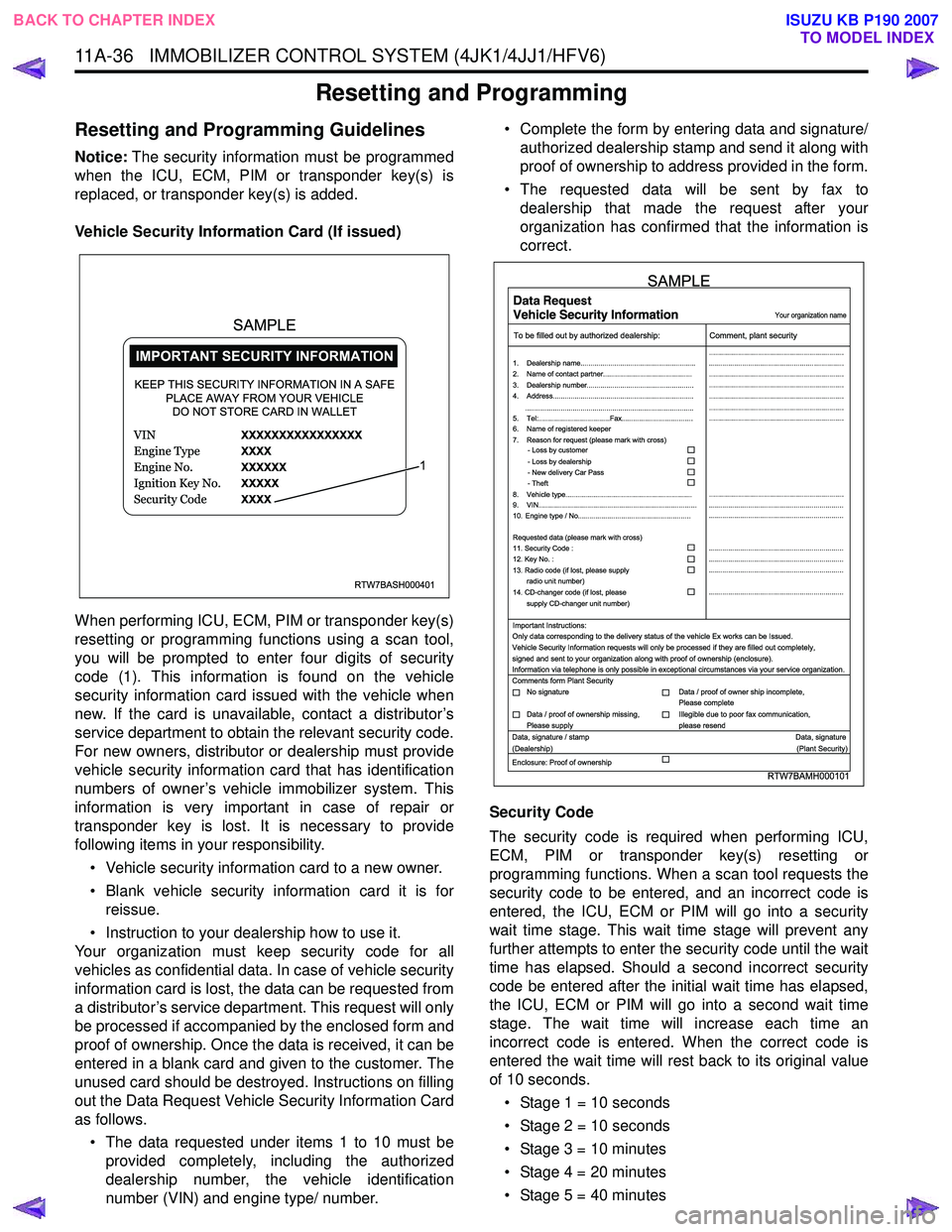
When performing ICU, ECM, PIM or transponder key(s)
resetting or programming functions using a scan tool,
you will be prompted to enter four digits of security
code (1). This information is found on the vehicle
security information card issued with the vehicle when
new. If the card is unavailable, contact a distributor’s
service department to obtain the relevant security code.
For new owners, distributor or dealership must provide
vehicle security information card that has identification
numbers of owner’s vehicle immobilizer system. This
information is very important in case of repair or
transponder key is lost. It is necessary to provide
following items in your responsibility.
• Vehicle security information card to a new owner.
• Blank vehicle security information card it is for reissue.
• Instruction to your dealership how to use it.
Your organization must keep security code for all
vehicles as confidential data. In case of vehicle security
information card is lost, the data can be requested from
a distributor’s service department. This request will only
be processed if accompanied by the enclosed form and
proof of ownership. Once the data is received, it can be
entered in a blank card and given to the customer. The
unused card should be destroyed. Instructions on filling
out the Data Request Vehicle Security Information Card
as follows.
• The data requested under items 1 to 10 must be provided completely, including the authorized
dealership number, the vehicle identification
number (VIN) and engine type/ number. • Complete the form by entering data and signature/
authorized dealership stamp and send it along with
proof of ownership to address provided in the form.
• The requested data will be sent by fax to dealership that made the request after your
organization has confirmed that the information is
correct.
Security Code
The security code is required when performing ICU,
ECM, PIM or transponder key(s) resetting or
programming functions. When a scan tool requests the
security code to be entered, and an incorrect code is
entered, the ICU, ECM or PIM will go into a security
wait time stage. This wait time stage will prevent any
further attempts to enter the security code until the wait
time has elapsed. Should a second incorrect security
code be entered after the initial wait time has elapsed,
the ICU, ECM or PIM will go into a second wait time
stage. The wait time will increase each time an
incorrect code is entered. When the correct code is
entered the wait time will rest back to its original value
of 10 seconds.
• Stage 1 = 10 seconds
• Stage 2 = 10 seconds
• Stage 3 = 10 minutes
• Stage 4 = 20 minutes
• Stage 5 = 40 minutes
RTW7BASH000401
KEEP THIS SECURITY INFORMATION IN A SAFE PLACE AWAY FROM YOUR VEHICLEDO NOT STORE CARD IN WALLET
1
SAMPLE
RTW7BAMH000101
Your organization name
To be filled out by authorized dealership: Comment, plant security
1. Dealership name.......................................................... ....................................................................
....................................................................
....................................................................
....................................................................
....................................................................
....................................................................
....................................................................
....................................................................
.................................................................... ....................................................................
....................................................................
....................................................................
....................................................................
....................................................................
2. Name of contact partner.............................................
6. Name of registered keeper
7. Reason for request (please mark with cross)
3. Dealership number......................................................
4. Address.......................................................................
8. Vehicle type................................................................
9. VIN................................................................................
10. Engine type / No.........................................................
11. Security Code :
12. Key No. :
13. Radio code (if lost, please supply radio unit number)
14. CD-changer code (if lost, please
supply CD-changer unit number)
Requested data (please mark with cross)
5. Tel:....................................Fax....................................
.....................................................................................
- Loss by customer
- Loss by dealership
- New delivery Car Pass
- Theft
Important Instructions:
Comments form Plant Security
Data, signature / stamp Data, signature
(Dealership) (Plant Security)
Enclosure: Proof of ownership Only data corresponding to the delivery status of the vehicle Ex works can be Issued.
Vehicle Security Information requests will only be processed if they are filled out completely,
signed and sent to your organization along with proof of ownership (enclosure).
Information via telephone is only possible in exceptional circumstances via your service organization.
No signature Data / proof of owner ship incomplete,
Please complete
Data / proof of ownership missing,
Please supply Illegible due to poor fax communication,
please resend
SAMPLE
BACK TO CHAPTER INDEX TO MODEL INDEX
ISUZU KB P190 2007
Page 5888 of 6020
IMMOBILIZER CONTROL SYSTEM (4JK1/4JJ1/HFV6) 11A-37
• Stage 6 = 80 minutes (1 hour 20 minutes)
• Stage 7 = 160 minutes (2 hours 40 minutes)
• Stage 8 = 320 minutes (5 hours 20 minutes)
• Stage 9 = 640 minutes (10 hours 40 minutes)
• Stage 10 = 1280 minutes (21 hours 20 minutes)
Notice: The ignition switch must be kept at ON position
during the wait time period.
Transponder Key
Normally two or three transponder keys are provided
with a vehicle when new. Maximum five transponder
key can be provided by additional programming if
owner requests additional key(s).
Notice: During programming of the new transponder
key(s), an authentication code is programmed into the
transponder chip and it cannot be reprogrammed
again. Once this programming has been performed, the
transponder keys cannot be installed in any other
vehicle.
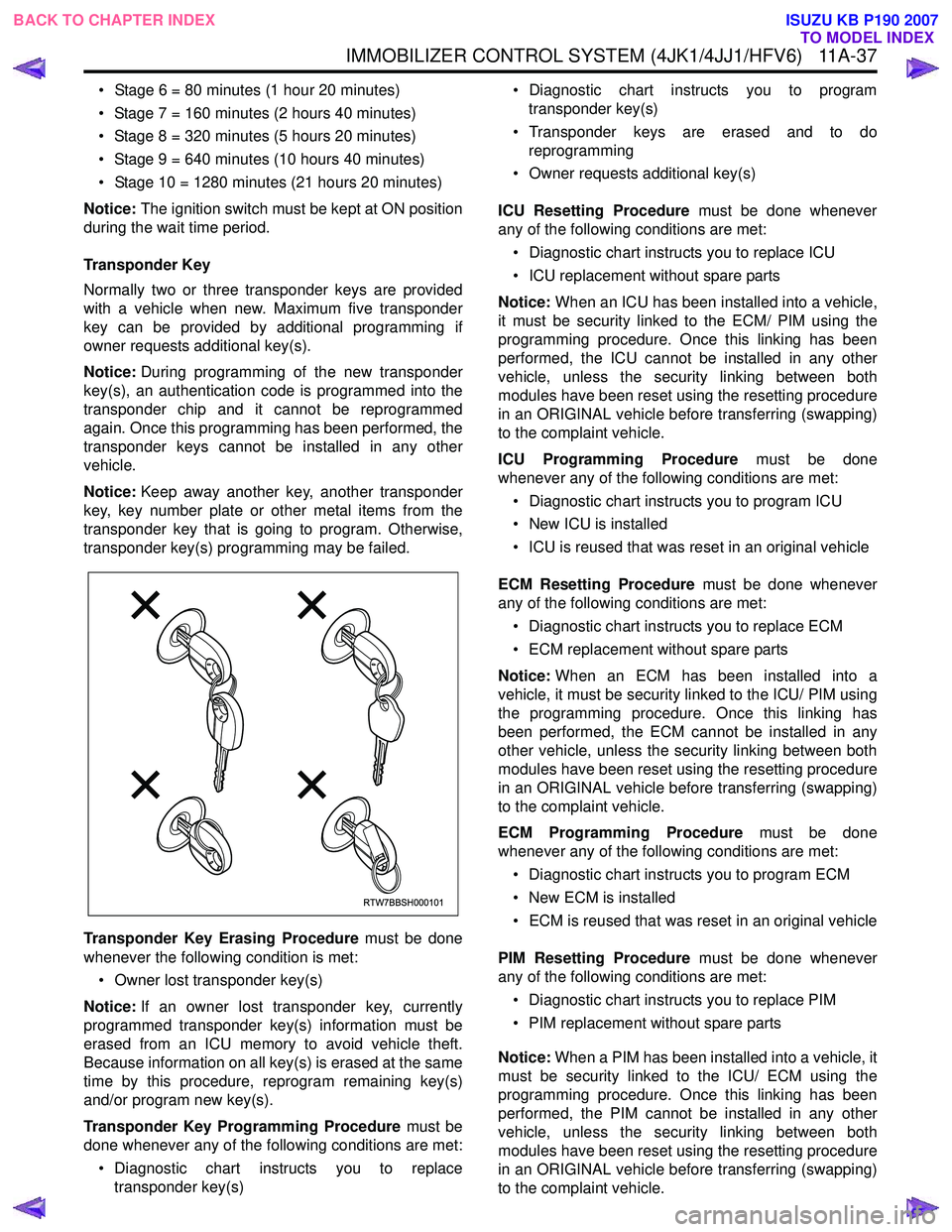
Notice: Keep away another key, another transponder
key, key number plate or other metal items from the
transponder key that is going to program. Otherwise,
transponder key(s) programming may be failed.
Transponder Key Erasing Procedure must be done
whenever the following condition is met:
• Owner lost transponder key(s)
Notice: If an owner lost transponder key, currently
programmed transponder key(s) information must be
erased from an ICU memory to avoid vehicle theft.
Because information on all key(s) is erased at the same
time by this procedure, reprogram remaining key(s)
and/or program new key(s).
Transponder Key Programming Procedure must be
done whenever any of the following conditions are met:
• Diagnostic chart instructs you to replace transponder key(s) • Diagnostic chart instructs you to program
transponder key(s)
• Transponder keys are erased and to do reprogramming
• Owner requests additional key(s)
ICU Resetting Procedure must be done whenever
any of the following conditions are met:
• Diagnostic chart instructs you to replace ICU
• ICU replacement without spare parts
Notice: When an ICU has been installed into a vehicle,
it must be security linked to the ECM/ PIM using the
programming procedure. Once this linking has been
performed, the ICU cannot be installed in any other
vehicle, unless the security linking between both
modules have been reset using the resetting procedure
in an ORIGINAL vehicle before transferring (swapping)
to the complaint vehicle.
ICU Programming Procedure must be done
whenever any of the following conditions are met:
• Diagnostic chart instructs you to program ICU
• New ICU is installed
• ICU is reused that was reset in an original vehicle
ECM Resetting Procedure must be done whenever
any of the following conditions are met:
• Diagnostic chart instructs you to replace ECM
• ECM replacement without spare parts
Notice: When an ECM has been installed into a
vehicle, it must be security linked to the ICU/ PIM using
the programming procedure. Once this linking has
been performed, the ECM cannot be installed in any
other vehicle, unless the security linking between both
modules have been reset using the resetting procedure
in an ORIGINAL vehicle before transferring (swapping)
to the complaint vehicle.
ECM Programming Procedure must be done
whenever any of the following conditions are met:
• Diagnostic chart instructs you to program ECM
• New ECM is installed
• ECM is reused that was reset in an original vehicle
PIM Resetting Procedure must be done whenever
any of the following conditions are met:
• Diagnostic chart instructs you to replace PIM
• PIM replacement without spare parts
Notice: When a PIM has been installed into a vehicle, it
must be security linked to the ICU/ ECM using the
programming procedure. Once this linking has been
performed, the PIM cannot be installed in any other
vehicle, unless the security linking between both
modules have been reset using the resetting procedure
in an ORIGINAL vehicle before transferring (swapping)
to the complaint vehicle.
RTW7BBSH000101
BACK TO CHAPTER INDEX TO MODEL INDEX
ISUZU KB P190 2007
Page 5890 of 6020

IMMOBILIZER CONTROL SYSTEM (4JK1/4JJ1/HFV6) 11A-39
Notice:Keep away another key, another transponder
key, key number plate or other metal items from the
transponder key that is going to program.
11. The on-screen displays a message "Program more Transponder Keys?" If all transponder key(s) has
been programmed, press No and go to next step. If
more transponder key(s) need to be programmed,
press Yes and repeat from previous step.
12. The on-screen displays a message "Program Transponder Keys Programming Completed
Successfully!" if all transponder key(s)
programming has been completed, then press
Confirm.
13. Turn OFF the ignition for 30 seconds.
14. Verify the engine starts using all programmed transponder key(s).
ICU Resetting Procedure
1. Install a scan tool.
2. Turn ON the ignition, with the engine OFF.
3. Select Diagnostics > Appropriate vehicle identification > Body > Immobilizer > Additional
Functions > Reset Immobilizer.
4. The on-screen displays a message "See Checking Procedure Before Programming!", then press
Confirm.
5. Input four digits of correct security code that belongs to this vehicle and follow the on-screen
instructions.
Notice: An incorrect security code input causes a
security wait time.
6. The on-screen displays a message "Warning Engine will not start after Reset!", then press
Confirm.
7. The on-screen displays a message "Reset Immobilizer Reset Completed Successfully!" if ICU
resetting has been completed, then press Confirm.
8. Turn OFF the ignition for 30 seconds.
9. Verify the engine fails to run using all transponder key(s).
ICU Programming Procedure
1. Install a scan tool.
2. Turn ON the ignition, with the engine OFF.
3. Select Diagnostics > Appropriate vehicle identification > Body > Immobilizer > Programming
> Program Immobilizer Function or Immobilizer
Link To ECM/ PIM.
4. In order to get a programming approval, the on- screen displays a message to user. Get
programming approval from the TIS 2000 using
the following procedure: a. Connect a scan tool to the terminal that
installed TIS 2000 with the latest software and
the hardware key is plugged into port.
b. Turn ON the scan tool and keep at title screen.
c. Launch the TIS application.
d. Select the Security Access at the main screen.
e. Highlight "Tech 2" on the Diagnostic Tool Selection screen and click "Next".
f. Click "Close" on the Security Access Enabled screen.
g. Turn OFF the scan tool.
h. Disconnect the scan tool from the terminal.
5. Reinstall a scan tool to the vehicle.
6. Turn ON the ignition, with the engine OFF.
7. Select Diagnostics > Appropriate vehicle identification > Body > Immobilizer > Programming
> Program Immobilizer Function or Immobilizer
Link To ECM/ PIM.
8. The on-screen displays a message "See Checking Procedure Before Programming!", then press
Confirm.
9. Select "Immobilizer Installed" or select "Imoobilizer Replaced" Yes.
10. Select "PIM or ECM Replaced" No, if displayed.
11. Input four digits of correct security code that belongs to this vehicle and follow the on-screen
instructions. The on-screen instruction may repeat
twice.
Notice: An incorrect security code input causes a
security wait time.
12. Input 17 digits of correct VIN that is based on stamped VIN or affixed VIN plate on this vehicle.
13. Operate the ignition switch by following the on- screen instructions.
Notice: Keep away another key, another transponder
key, key number plate or other metal items from the
transponder key that is going to program.
14. The on-screen displays a message "Program more Transponder Keys?" If all transponder key(s) has
been programmed, press No and go to next step. If
more transponder key(s) need to be programmed,
press Yes and repeat from previous step.
15. The on-screen displays a message "Programming Successfully!" if ICU and all transponder key(s)
programming has been completed, then press
Confirm.
16. Turn OFF the ignition for 30 seconds.
17. Verify the engine starts using all programmed transponder key(s).
ECM Resetting Procedure
1. Install a scan tool.
2. Turn ON the ignition, with the engine OFF.
BACK TO CHAPTER INDEX TO MODEL INDEX
ISUZU KB P190 2007
Page 5891 of 6020

11A-40 IMMOBILIZER CONTROL SYSTEM (4JK1/4JJ1/HFV6)
3. Select Diagnostics > Appropriate vehicleidentification > Body > Immobilizer > Additional
Functions > Reset Engine Control Module. (4JK1/
4JJ1)
Select Diagnostics > Appropriate vehicle
identification > Engine > V6 Engine >
Programming > Reset ECU. (HFV6)
4. The on-screen may display a message "See Checking Procedure Before Programming!", then
press Confirm.
5. Input four digits of correct security code that belongs to this vehicle and follow the on-screen
instructions.
Notice: An incorrect security code input causes a
security wait time.
6. The on-screen displays a message "Warning! Engine will not start after Reset!", then press
Reset.
7. The on-screen displays a message "Reset Successfully!" if ECM resetting has been
completed, then press Confirm.
8. Turn OFF the ignition for 30 seconds.
9. Verify the engine fails to run using all transponder key(s).
ECM Programming Procedure
1. Install a scan tool.
2. Turn ON the ignition, with the engine OFF.
3. Select Diagnostics > Appropriate vehicle identification > Body > Immobilizer > Programming
> Program Immobilizer Function or Immobilizer
Link To ECM/ PIM.
4. In order to get a programming approval, the on- screen displays a message to user. Get
programming approval from the TIS 2000 using
the following procedure:
a. Connect a scan tool to the terminal that installed TIS 2000 with the latest software and
the hardware key is plugged into port.
b. Turn ON the scan tool and keep at title screen.
c. Launch the TIS application.
d. Select the Security Access at the main screen.
e. Highlight "Tech 2" on the Diagnostic Tool Selection screen and click "Next".
f. Click "Close" on the Security Access Enabled screen.
g. Turn OFF the scan tool.
h. Disconnect the scan tool from the terminal.
5. Reinstall a scan tool to the vehicle.
6. Turn ON the ignition, with the engine OFF.
7. Select Diagnostics > Appropriate vehicle identification > Body > Immobilizer > Programming
> Program Immobilizer Function or Immobilizer
Link To ECM/ PIM. 8. The on-screen may display a message "See
Checking Procedure Before Programming!", then
press Confirm.
9. Select "Imoobilizer Replaced" No and select "PIM or ECM Replaced" Yes, if displayed.
10. Input four digits of correct security code that belongs to this vehicle and follow the on-screen
instructions. The on-screen instruction may repeat
twice.
Notice: An incorrect security code input causes a
security wait time.
11. Select "Engine Controller Installed" or select "ECM Replaced".
12. Operate the ignition switch by following the on- screen instructions.
13. The on-screen displays a message "Programming Successfully!" if ECM programming has been
completed, then press Confirm.
14. Turn OFF the ignition for 30 seconds.
15. Verify the engine starts using all transponder key(s).
PIM Resetting Procedure
1. Install a scan tool.
2. Turn ON the ignition, with the engine OFF.
3. Select Diagnostics > Appropriate vehicle identification > Body > Powertrain Interface
Module > Security > Reset PIM.
4. Input four digits of correct security code that belongs to this vehicle and follow the on-screen
instructions.
Notice: An incorrect security code input causes a
security wait time.
5. The on-screen displays a message "Warning! Engine will not start after Reset!", then press
Reset.
6. The on-screen displays a message "Reset Completed Successfully!" if PIM resetting has
been completed, then press Confirm.
7. Turn OFF the ignition for 30 seconds.
PIM Programming Procedure
1. Install a scan tool.
2. Turn ON the ignition, with the engine OFF.
3. Select Diagnostics > Appropriate vehicle identification > Body > Immobilizer > Programming
> Immobilizer Link To ECM/ PIM.
4. In order to get a programming approval, the onscreen displays a message to user. Get
programming approval from the TIS 2000 using
the following procedure:
BACK TO CHAPTER INDEX TO MODEL INDEX
ISUZU KB P190 2007
Page 5895 of 6020
11A-44 IMMOBILIZER CONTROL SYSTEM (4JK1/4JJ1/HFV6)
Repair Instructions
Immobilizer Control Unit (ICU)
Replacement
Resetting ICU
Reset immobilizer security information in the old ICU.
Refer to Resetting and Programming Guidelines in this
section. If the old ICU cannot be communicated with a
scan tool, go to the next procedure.
Removal Procedure 1. Disconnect the negative battery cable.
2. Remove the steering column cover.
3. Disconnect the ICU harness connector.
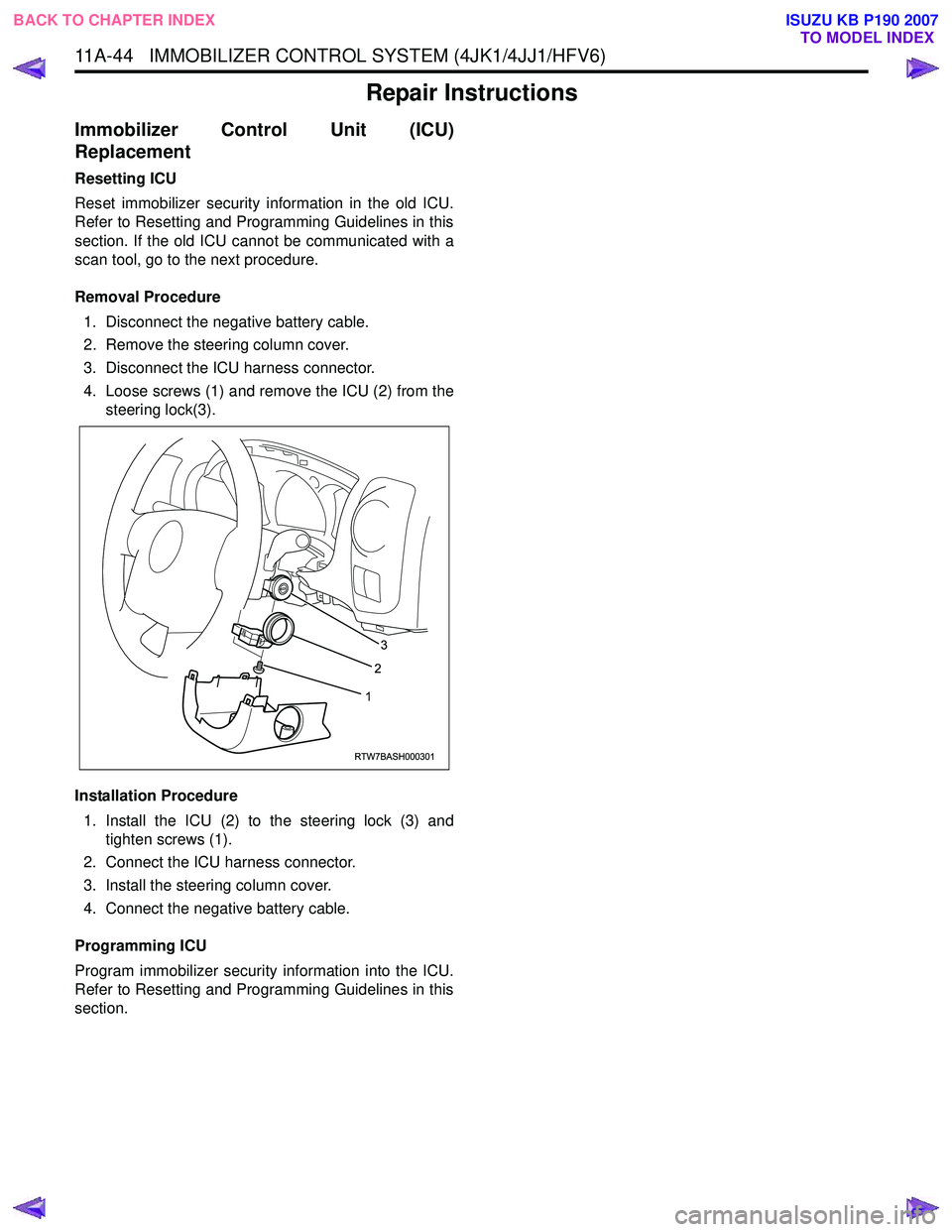
4. Loose screws (1) and remove the ICU (2) from the steering lock(3).
Installation Procedure 1. Install the ICU (2) to the steering lock (3) and tighten screws (1).
2. Connect the ICU harness connector.
3. Install the steering column cover.
4. Connect the negative battery cable.
Programming ICU
Program immobilizer security information into the ICU.
Refer to Resetting and Programming Guidelines in this
section.
RTW7BASH000301
3
2
1
BACK TO CHAPTER INDEX TO MODEL INDEX
ISUZU KB P190 2007
Page 5899 of 6020

IMMOBILIZER SYSTEM (C24SE, 4JA1-T) 11A-1
IMMOBILIZER SYSTEM
(C24SE, 4JA1-T)
CONTENTS
Service Precaution .................................................. 11A-2
General Description ................................................ 11A-3
W hat happens without proper transponder
operation? ........................................................... 11A-5
No proper transponder is available, what
should be done for the system? ...................... 11A-5
Caution to the operation ..................................... 11A-5
Summary of operation ......................................... 11A-5
W hat your organization should provide for
your customer .................................................... 11A-5
Car Pass .............................................................. 11A-5
Security code management .............................. 11A-5
Essential tool (Scan tool : Tech-2) .................. 11A-5
Circuit Diagram .................................................. 11A-6
Parts Location .......................................................... 11A-8
Immobilizer control unit (ICU); For Electronic
Control Engine (C24SE) .................................... 11A-9
Pin-outs; For Electronic Control Engine
(C24SE) ............................................................... 11A-10
Immobilizer control unit (ICU); Mechanical
Control Engine (4JA1-T) ...................................11A-11
Immobilizer coil (Antenna) ....................................11A-13
Transponder (Key) ............................................11A-13
Check engine lamp ...........................................11A-13
Engine control module (ECM) ...........................11A-13
Car Pass Card ...................................................11A-14 Loss of car pass card .......................................... 11A-14
Instructions on Filling Out the form "Data
request, car pass" ............................................. 11A-14
Important Instructions ........................................ 11A-15
lmportant information on Programming ..............11A-17
Security code ....................................................... 11A-17
Entering a code ................................................... 11A-17
Transponder (Key) ............................................. 11A-17
Tech-2 Scan Tool .................................................. 11A-18
Operating Procedure .......................................... 11A-18
Menu .................................................................... 11A-19
DTC ...................................................................... 11A-19
Clear DTC Information ......................................11A-19
Tech-2 Data Display .......................................... 11A-19
Check Vehicle Identification Number (VIN) ....11A-19
Reset Immobilizer (Reset Immobilizer
Control Unit) ....................................................... 11A-19
Reset Engine Control Module (Reset ECM) ..11A-20
Erase transponder key ......................................11A-20
Programming Immobilizer Function ................11A-21
Programming ICU .............................................. 11A-22
Programming ECM ............................................ 11A-23
Programming ICU and ECM .............................11A-24
Transponder program ........................................ 11A-24
Data List .............................................................. 11A-26
Diagnostic procedure ............................................ 11A-27
Clearing Diagnostic Trouble Codes ....................11A-27
Verifying Vehicle Repair .......................................11A-27
Diagnostic Aids ...................................................... 11A-27
Check the condition for system parts ..............11A-27
Check the Electro-Magnetic Interference
(EMI) ................................................................... 11A-27
Check the other items .......................................11A-27
Check the operation ........................................... 11A-27
Diagnostic Trouble Code (DTC) list ....................11A-28
IMMOBILIZER SYSTEM CHECK .......................11A-30
NO IMMOBILIZER W ARNING LAMP ................11A-32
CHECK IMMOBILIZER W ARNING LAMP O
STEADY ................................................................ 11A-33
B0001 REPLACE ELECTRONIC CONTROL
UNIT (ECU) (IMMOBILIZER FAULT) ................11A-34
B0002 IMMOBILIZER NOT PROGRAMMED ...11A-35
B0003 TRANSPONDER KEY PROBLEM .........11A-36
B0004 IMMOBILIZER COIL CIRCUIT
(ANTENNA COIL FAULT) ...................................11A-38
B0005 COMMUNICATION LINE W VOLTAGE
LOW ....................................................................... 11A-39
B0006 COMMUNICATION LINE W VOLTAGE
HIGH ...................................................................... 11A-40
BACK TO CHAPTER INDEX
TO MODEL INDEX
ISUZU KB P190 2007
Page 5917 of 6020

IMMOBILIZER SYSTEM (C24SE, 4JA1-T) 11A-19
Menu
The following table shows which functions are used for
the available equipment versions.
F0: Diagnostic Trouble Codes
F0: Read DTC Info Ordered By Priority
F1: Read DTC Info As Stored By ECU
F2: Clear DTC Information F1: Data Display
F2: Snap Shot
F3: Additional Function
F0: Read ECU Identification
F1: Reset Immobilizer
F2: Reset Engine Control Module
F3: Erase Transponder-Keys F4: Programming
F0: Program Immobilizer Function
F1: Program Transponder-Keys
NOTE: Before going to programming process, Tech-2
indicates instruction as follows.
060R200289
DTC
On OBD has two options available in the Tech 2 DTC
mode to display the enhanced information available.
• Read DTC Info Ordered By Priority
• Read DTC Info As Stored By ECU
Clear DTC Information
To clear Diagnostic Trouble Codes (DTCs), use the
diagnostic scan tool "clear DTC information" function.
Tech-2 Data Display
Use the Tech 2 Data Values only after the On-Board
Diagnostic System Check has been completed, no
DTC(s) were noted, and you have determined that the
on-board diagnostics are functioning properly.
The Tech 2 data values represent values that would be
seen on a normally-immobilizer system.
Check Vehicle Identification Number (VIN)
1. Select "Body" and "Immobilizer".
2. Select "Additional Function" and "Read ECU
Identification".
3. Shows up VIN on tech-2 display.
Reset Immobilizer (Reset Immobilizer
Control Unit)
1. Select "Body" and "Immobilizer".
2. Select "Additional Function" and "Reset
Immobilizer".
3. Enter the security code and press Confirm.
4. Reset Immobilizer screen shows up with warning.
See the following screen.
060R200279
BACK TO CHAPTER INDEX TO MODEL INDEX
ISUZU KB P190 2007
Page 5918 of 6020
11A-20 IMMOBILIZER SYSTEM (C24SE, 4JA1-T)
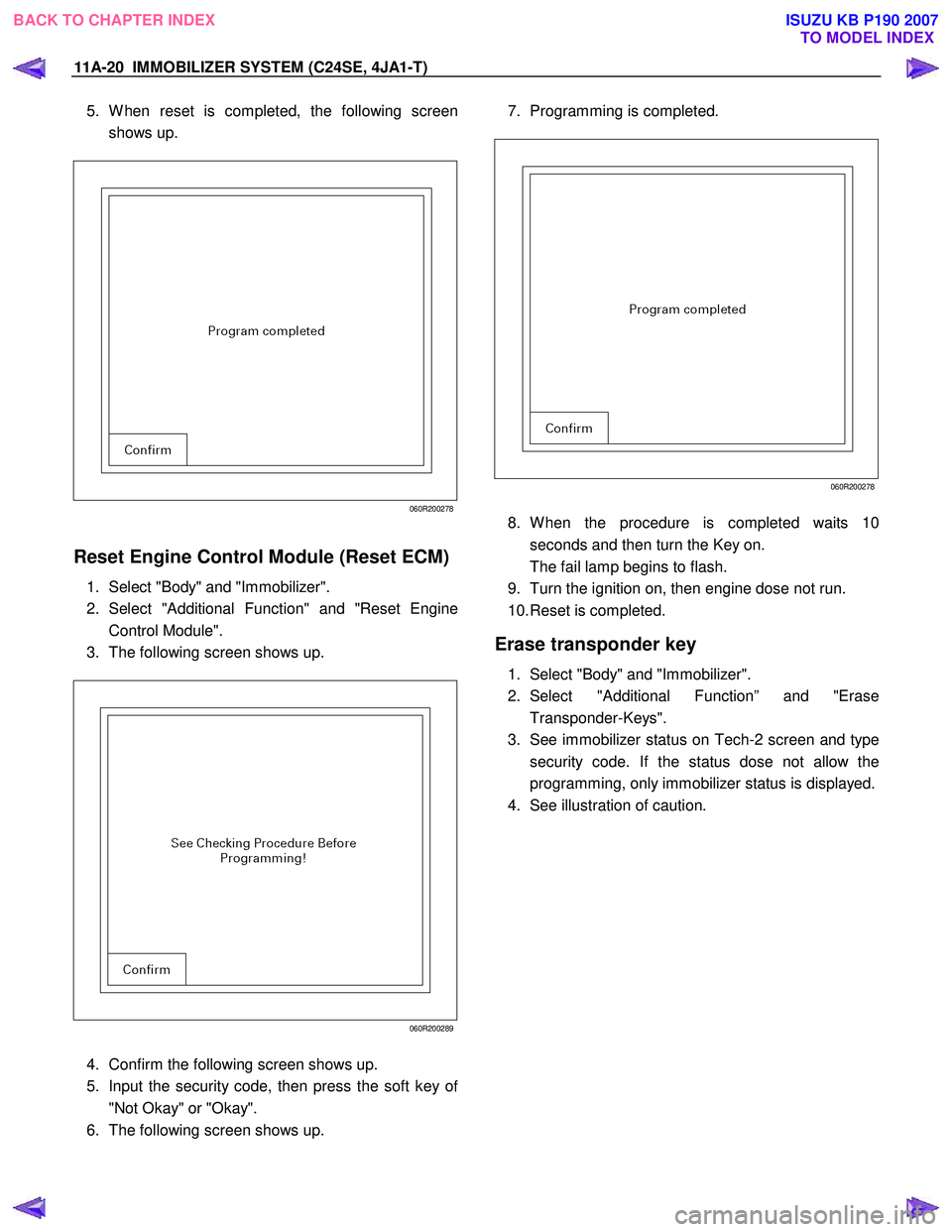
5. W hen reset is completed, the following screen
shows up.
060R200278
Reset Engine Control Module (Reset ECM)
1. Select "Body" and "Immobilizer".
2. Select "Additional Function" and "Reset Engine
Control Module".
3. The following screen shows up.
060R200289
4. Confirm the following screen shows up.
5. Input the security code, then press the soft key o
f
"Not Okay" or "Okay".
6. The following screen shows up.
7. Programming is completed.
060R200278
8. W hen the procedure is completed waits 10
seconds and then turn the Key on.
The fail lamp begins to flash.
9. Turn the ignition on, then engine dose not run.
10. Reset is completed.
Erase transponder key
1. Select "Body" and "Immobilizer".
2. Select "Additional Function” and "Erase Transponder-Keys".
3. See immobilizer status on Tech-2 screen and type security code. If the status dose not allow the
programming, only immobilizer status is displayed.
4. See illustration of caution.
BACK TO CHAPTER INDEX TO MODEL INDEX
ISUZU KB P190 2007