automatic transmission ISUZU KB P190 2007 Workshop User Guide
[x] Cancel search | Manufacturer: ISUZU, Model Year: 2007, Model line: KB P190, Model: ISUZU KB P190 2007Pages: 6020, PDF Size: 70.23 MB
Page 1096 of 6020
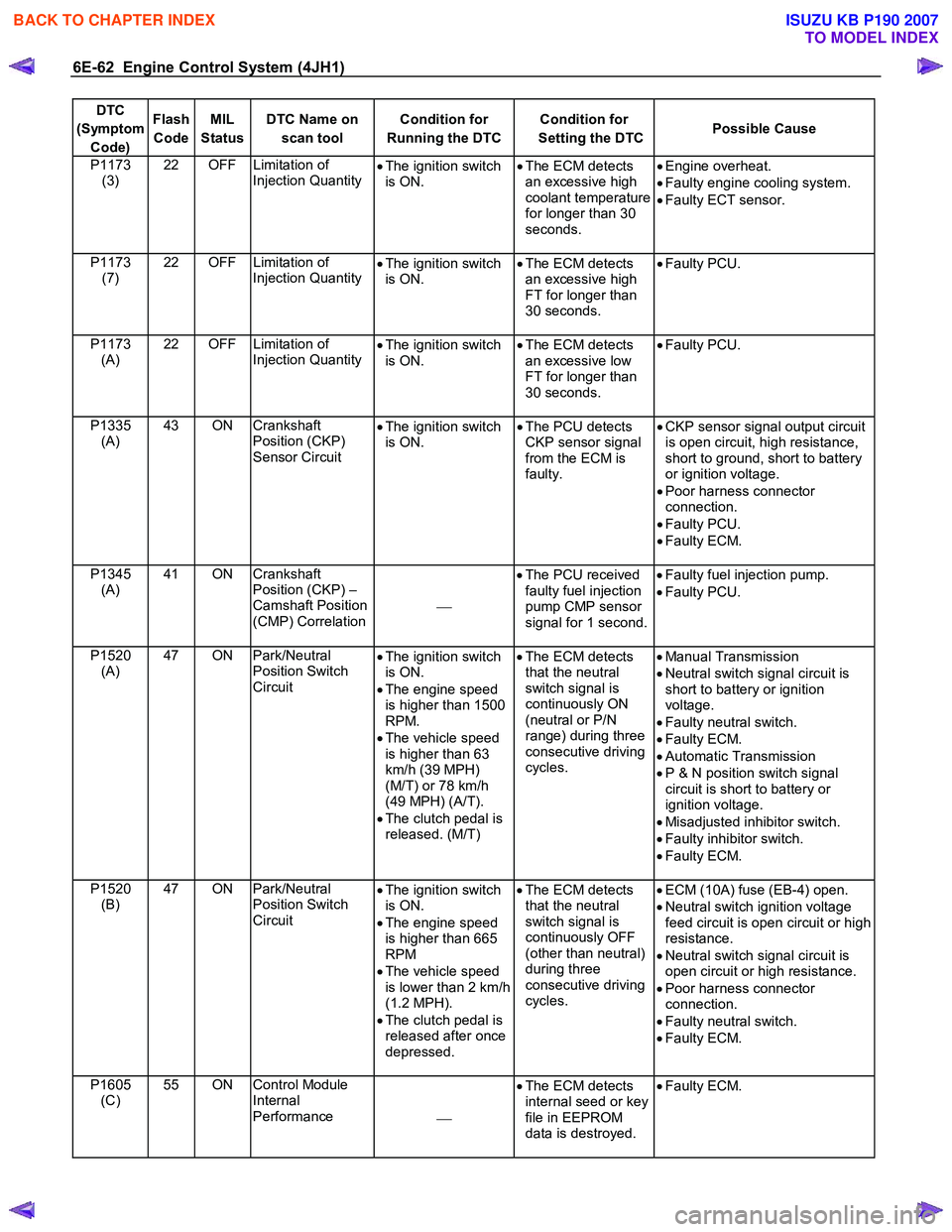
6E-62 Engine Control System (4JH1)
DTC
(Symptom Code) Flash
Code MIL
Status DTC Name on
scan tool Condition for
Running the DTC Condition for
Setting the DTC Possible Cause
P1173
(3) 22 OFF Limitation of
Injection Quantity •
The ignition switch
is ON. •
The ECM detects
an excessive high
coolant temperature
for longer than 30
seconds.
•
Engine overheat.
• Faulty engine cooling system.
• Faulty ECT sensor.
P1173 (7) 22 OFF Limitation of
Injection Quantity
•
The ignition switch
is ON. •
The ECM detects
an excessive high
FT for longer than
30 seconds.
•
Faulty PCU.
P1173 (A) 22 OFF Limitation of
Injection Quantity
•
The ignition switch
is ON. •
The ECM detects
an excessive low
FT for longer than
30 seconds.
•
Faulty PCU.
P1335 (A) 43 ON Crankshaft
Position (CKP)
Sensor Circuit •
The ignition switch
is ON. •
The PCU detects
CKP sensor signal
from the ECM is
faulty.
•
CKP sensor signal output circuit
is open circuit, high resistance,
short to ground, short to battery
or ignition voltage.
• Poor harness connector
connection.
• Faulty PCU.
• Faulty ECM.
P1345 (A) 41 ON Crankshaft
Position (CKP) –
Camshaft Position
(CMP) Correlation
•
The PCU received
faulty fuel injection
pump CMP sensor
signal for 1 second.
•
Faulty fuel injection pump.
• Faulty PCU.
P1520 (A) 47 ON Park/Neutral
Position Switch
Circuit •
The ignition switch
is ON.
• The engine speed
is higher than 1500
RPM.
• The vehicle speed
is higher than 63
km/h (39 MPH)
(M/T) or 78 km/h
(49 MPH) (A/T).
• The clutch pedal is
released. (M/T)
•
The ECM detects
that the neutral
switch signal is
continuously ON
(neutral or P/N
range) during three
consecutive driving
cycles.
•
Manual Transmission
• Neutral switch signal circuit is
short to battery or ignition
voltage.
• Faulty neutral switch.
• Faulty ECM.
• Automatic Transmission
• P & N position switch signal
circuit is short to battery or
ignition voltage.
• Misadjusted inhibitor switch.
• Faulty inhibitor switch.
• Faulty ECM.
P1520 (B) 47 ON Park/Neutral
Position Switch
Circuit •
The ignition switch
is ON.
• The engine speed
is higher than 665
RPM
• The vehicle speed
is lower than 2 km/h
(1.2 MPH).
• The clutch pedal is
released after once
depressed.
•
The ECM detects
that the neutral
switch signal is
continuously OFF
(other than neutral)
during three
consecutive driving
cycles.
•
ECM (10A) fuse (EB-4) open.
• Neutral switch ignition voltage
feed circuit is open circuit or high
resistance.
• Neutral switch signal circuit is
open circuit or high resistance.
• Poor harness connector
connection.
• Faulty neutral switch.
• Faulty ECM.
P1605 (C) 55 ON Control Module
Internal
Performance •
The ECM detects
internal seed or key
file in EEPROM
data is destroyed.
•
Faulty ECM.
BACK TO CHAPTER INDEX
TO MODEL INDEX
ISUZU KB P190 2007
Page 1191 of 6020

Engine Control System (4JH1) 6E-157
DTC P0500 (Symptom Code 1, A) (Flash Code 24)
Circuit Description
The vehicle speed sensor (VSS) is used by the engine
control module (ECM) and speedometer, which
generates a speed signal from the transmission output
shaft. The VSS has the following circuits.
• Ignition voltage feed circuit
• VSS signal circuit
• VSS low reference circuit
The VSS uses a hall effect element. It interacts with the
magnetic field created by the rotating magnet and
outputs square wave pulse signal. The 12 volts
operating supply from the Meter fuse (except 2W D with
A/T) or Back Up fuse (2W D with A/T). The ECM
calculates the vehicle speed by the VSS. If the vehicle
is 2W D with automatic transmission, VSS signals are
sent from the transmission control module (TCM). If the
ECM detects VSS signals are generated with high
frequencies, this DTC will set.
Condition for Running the DTC
• The ignition switch is ON.
Condition for Setting the DTC
• The ECM detects that the vehicle speed is highe
r
than 200 km/h (125 MPH) for 5 seconds.
(Symptom Code 1)
•
The ECM detects that the vehicle speed senso
r
signal frequency is too high for 0.6 seconds.
(Symptom Code A)
Action Taken When the DTC Sets
• The ECM illuminates the malfunction indicato
r
lamp (MIL) when the diagnostic runs and fails.
• The ECM uses a vehicle speed substitution of 5
km/h (3 MPH) for engine control.
Condition for Clearing the MIL/DTC
• The ECM turns OFF the MIL when the diagnostic
runs and does not fail.
• A history DTC clears after 40 consecutive driving
cycles without a fault. Or clear with the scan tool.
Diagnostic Aids
• Electrical or magnetic interference may affect
intermittent condition.
• If an intermittent condition is suspected, refer to
Intermittent Conditions in this section.
DTC P0500 (Symptom Code 1, A) (Flash Code 24)
Schematic Reference: Engine Controls Schematics
Connector End View Reference: Engine Controls
Connector End Views or Engine Control Module (ECM)
Connector End Views
Chart for 2WD with A/T
Step Action Value(s) Yes No
1 Did you perform the Diagnostic System Check-
Engine Controls?
Go to Step 2 Go to Diagnostic
System Check-
Engine Controls
2 1. Inspect all of the circuits going to the automatic transmission (A/T) vehicle speed sensor (VSS)
for the following: • Routed too closely to fuel injection solenoid
wiring or components
• Routed too closely to after-market add-on
electrical equipment
• Routed too closely to solenoids, relays, and
motors
2. If you find incorrect routing, correct the harness routing.
Did you find and correct the condition?
Go to Step 7 Go to Step 3
3 1. Turn OFF the ignition. 2. Disconnect the A/T VSS harness connector.
3. Inspect for an intermittent and for poor connections at the harness connector of the A/T
VSS (pins 1, 2 and 3 of E-30 connector).
4. Repair the connection(s) as necessary.
Did you find and correct the condition?
Go to Step 7 Go to Step 4
BACK TO CHAPTER INDEX
TO MODEL INDEX
ISUZU KB P190 2007
Page 1192 of 6020

6E-158 Engine Control System (4JH1)
Step Action Value(s) Yes No
4 1. Turn OFF the ignition.
2. Disconnect the engine control module (ECM) harness connector.
3. Inspect for an intermittent and for a poor connection on A/T VSS circuit at the harness
connector of the ECM (pin 68 of C-56 connector).
4. Repair the connection(s) as necessary.
Did you find and correct the condition?
Go to Step 7 Go to Step 5
5 1. Remove the A/T VSS. Refer to A/T Speed Sensor Replacement in automatic transmission
section.
2. Visually inspect the A/T VSS for the following conditions: • Physical damage
• Being loose
• Improper installation
3. The following conditions may cause this DTC to set: • Electromagnetic interference in the A/T
VSS circuits
4. Repair or replace as necessary.
Did you find and correct the condition?
Go to Step 7 Go to Step 6
6 Replace the A/T VSS. Refer to A/T Speed Sensor Replacement in automatic transmission section
Did you complete the replacement?
Go to Step 7
7 1. Reconnect all previously disconnected harness
connector(s).
2. Clear the DTCs with the scan tool.
3. Turn OFF the ignition for 30 seconds.
4. Drive the vehicle.
5. Observe the Vehicle Speed parameter with the scan tool.
Does the Vehicle Speed parameter indicate correct
vehicle speed?
Go to Step 8 Go to Step 2
8 Observe the DTC Information with the scan tool. Are there any DTCs that you have not diagnosed? Go to Diagnostic
Trouble Code (DTC) List System OK
Chart for except 2WD with A/T
Step Action Value(s) Yes No
1 Did you perform the Diagnostic System Check-
Engine Controls?
Go to Step 2 Go to Diagnostic
System Check-
Engine Controls
2 1. Inspect all of the circuits going to the vehicle speed sensor (VSS) for the following: • Routed too closely to fuel injection solenoid
wiring or components
• Routed too closely to after-market add-on
electrical equipment
• Routed too closely to solenoids, relays, and
motors
2. If you find incorrect routing, correct the harness routing.
Did you find and correct the condition?
Go to Step 7 Go to Step 3
BACK TO CHAPTER INDEX
TO MODEL INDEX
ISUZU KB P190 2007
Page 1194 of 6020
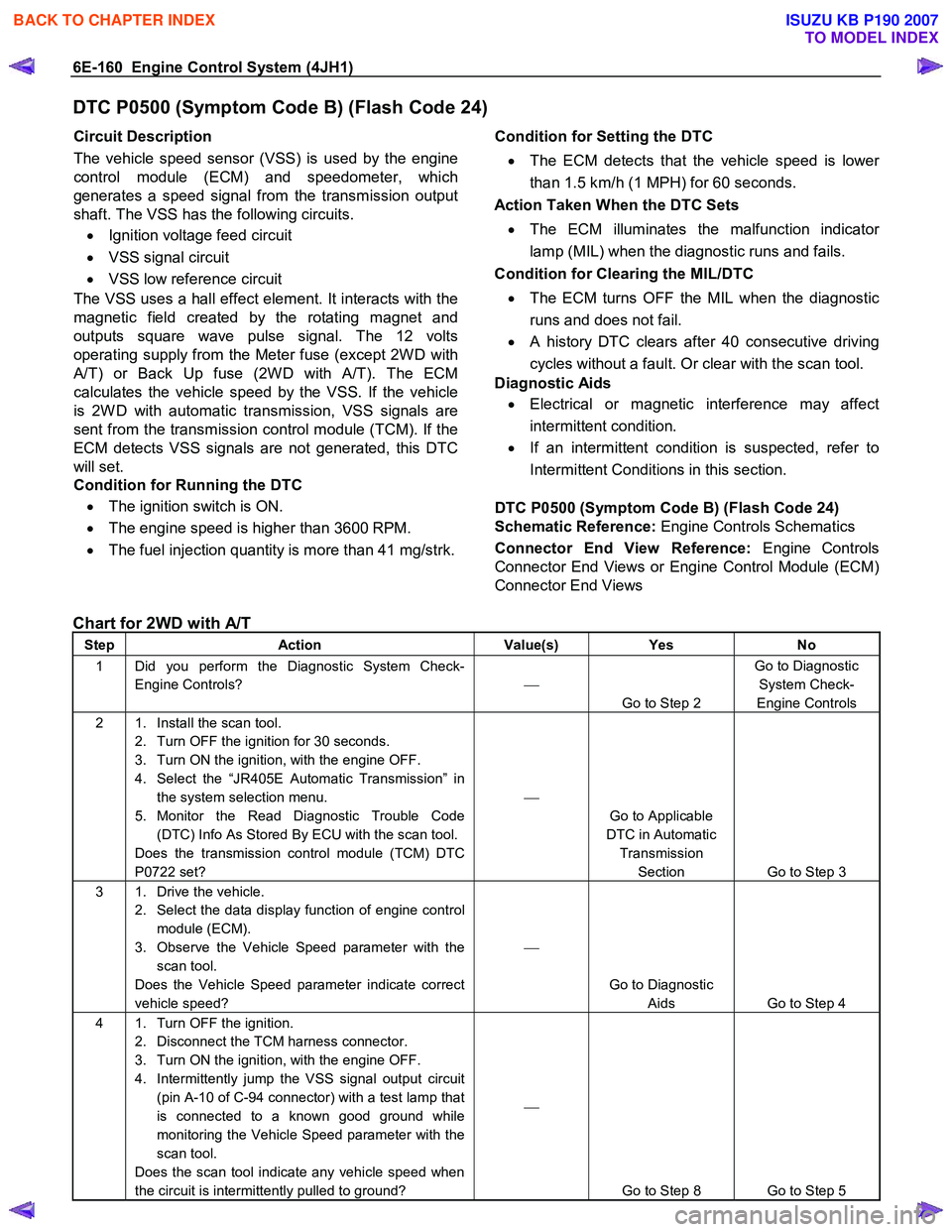
6E-160 Engine Control System (4JH1)
DTC P0500 (Symptom Code B) (Flash Code 24)
Circuit Description
The vehicle speed sensor (VSS) is used by the engine
control module (ECM) and speedometer, which
generates a speed signal from the transmission output
shaft. The VSS has the following circuits.
• Ignition voltage feed circuit
• VSS signal circuit
• VSS low reference circuit
The VSS uses a hall effect element. It interacts with the
magnetic field created by the rotating magnet and
outputs square wave pulse signal. The 12 volts
operating supply from the Meter fuse (except 2W D with
A/T) or Back Up fuse (2W D with A/T). The ECM
calculates the vehicle speed by the VSS. If the vehicle
is 2W D with automatic transmission, VSS signals are
sent from the transmission control module (TCM). If the
ECM detects VSS signals are not generated, this DTC
will set.
Condition for Running the DTC
• The ignition switch is ON.
• The engine speed is higher than 3600 RPM.
• The fuel injection quantity is more than 41 mg/strk.
Condition for Setting the DTC
• The ECM detects that the vehicle speed is lowe
r
than 1.5 km/h (1 MPH) for 60 seconds.
Action Taken When the DTC Sets
• The ECM illuminates the malfunction indicato
r
lamp (MIL) when the diagnostic runs and fails.
Condition for Clearing the MIL/DTC
• The ECM turns OFF the MIL when the diagnostic
runs and does not fail.
• A history DTC clears after 40 consecutive driving
cycles without a fault. Or clear with the scan tool.
Diagnostic Aids
• Electrical or magnetic interference may affect
intermittent condition.
• If an intermittent condition is suspected, refer to
Intermittent Conditions in this section.
DTC P0500 (Symptom Code B) (Flash Code 24)
Schematic Reference: Engine Controls Schematics
Connector End View Reference: Engine Controls
Connector End Views or Engine Control Module (ECM)
Connector End Views
Chart for 2WD with A/T
Step Action Value(s) Yes No
1 Did you perform the Diagnostic System Check-
Engine Controls?
Go to Step 2 Go to Diagnostic
System Check-
Engine Controls
2 1. Install the scan tool. 2. Turn OFF the ignition for 30 seconds.
3. Turn ON the ignition, with the engine OFF.
4. Select the “JR405E Automatic Transmission” in the system selection menu.
5. Monitor the Read Diagnostic Trouble Code (DTC) Info As Stored By ECU with the scan tool.
Does the transmission control module (TCM) DTC
P0722 set?
Go to Applicable
DTC in Automatic Transmission Section Go to Step 3
3 1. Drive the vehicle. 2. Select the data display function of engine control module (ECM).
3. Observe the Vehicle Speed parameter with the scan tool.
Does the Vehicle Speed parameter indicate correct
vehicle speed?
Go to Diagnostic Aids Go to Step 4
4 1. Turn OFF the ignition. 2. Disconnect the TCM harness connector.
3. Turn ON the ignition, with the engine OFF.
4. Intermittently jump the VSS signal output circuit (pin A-10 of C-94 connector) with a test lamp that
is connected to a known good ground while
monitoring the Vehicle Speed parameter with the
scan tool.
Does the scan tool indicate any vehicle speed when
the circuit is intermittently pulled to ground?
Go to Step 8 Go to Step 5
BACK TO CHAPTER INDEX
TO MODEL INDEX
ISUZU KB P190 2007
Page 1244 of 6020

6E-210 Engine Control System (4JH1)
DTC P1520 (Symptom Code A) (Flash Code 47)
Circuit Description
(Manual Transmission)
The neutral switch is installed on the transmission gea
r
control box. W hen the gear position is neutral, the
switch is closed and the switch signal is provided to the
engine control module (ECM). If the ECM detects the
neutral switch signal is not changed from neutral during
the predetermined engine speed and vehicle speed
range, this DTC will set.
(Automatic Transmission)
The inhibitor switch is installed to the transmission case.
W hen the selector position is P or N range, the switch is
closed and the switch signal is provided to the Emir the
ECM detects the neutral switch signal is not changed
from P or N during the predetermined engine speed and
vehicle speed range, this DTC will set.
Condition for Running the DTC • The ignition switch is ON.
• The engine speed is higher than 1500 RPM.
• The vehicle speed is higher than 63 km/h (39
MPH) (M/T) or 78 km/h (49 MPH) (A/T).
• The clutch pedal is released. (M/T).
Condition for Setting the DTC
• The ECM detects that the neutral switch signal is
continuously ON (neutral or P/N range) during
three consecutive driving cycles.
Action Taken When the DTC Sets
• The ECM illuminates the malfunction indicato
r
lamp (MIL) when the diagnostic runs and fails.
Condition for Clearing the MIL/DTC
Important: • Following conditions must be met two consecutive
driving cycles. (One driving cycle: Ignition switch
ON > Engine run > Vehicle run > Ignition switch
OFF for 10 seconds)
- The engine speed is higher than 1500 RPM
- The vehicle speed is higher than 63 km/h (39 MPH) (M/T) or 78 km/h (49 MPH) (A/T)
- The clutch pedal is released (M/T)
- Other than neutral or P/N range
- After the above procedure is done, a history
DTC clears after 40 consecutive driving cycles
without a fault. Or clear with the scan tool.
Diagnostic Aids
• If an intermittent condition is suspected, refer to
Intermittent Conditions in this section.
DTC P1520 (Symptom Code A) (Flash Code 47)
Schematic Reference: Engine Controls Schematics
Connector End View Reference: Engine Controls
Connector End Views or Engine Control Module (ECM)
Connector End Views
Chart for M/T
Step Action Value(s) Yes No
1 Did you perform the Diagnostic System Check-
Engine Controls?
Go to Step 2 Go to Diagnostic
System Check-
Engine Controls
2 1. Install the scan tool. 2. Turn ON the ignition, with the engine OFF.
3. Observe the Neutral Switch parameter with the scan tool while shift to neutral and other
positions.
Does the scan tool indicate ON when the position is
neutral and OFF when other than the neutral?
Go to Diagnostic Aids Go to Step 3
3 1. Turn OFF the ignition. 2. Disconnect the neutral switch harness connector.
3. Turn ON the ignition, with the engine OFF.
4. Observe the Neutral Switch parameter with the scan tool.
Does the scan tool indicate ON?
Go to Step 4 Go to Step 5
4 1. Test the neutral switch input signal circuit between the engine control module (ECM) (pin
87 of C-57 connector) and the neutral switch (pin
1 of E-11 connector) for a short to battery or
ignition voltage.
2. Repair the circuit(s) as necessary.
Did you find and correct the condition?
Go to Step 7 Go to Step 6
BACK TO CHAPTER INDEX
TO MODEL INDEX
ISUZU KB P190 2007
Page 1245 of 6020

Engine Control System (4JH1) 6E-211
Step Action Value(s) Yes No
5 Replace the neutral switch. Refer to Neutral Switch
Replacement in Transmission Section.
Did you complete the replacement?
Go to Step 7
6 Important: Replacement ECM must be
programmed.
Replace the ECM. Refer to Engine Control Module
(ECM) Replacement in this section.
Did you complete the replacement?
Go to Step 7
7 1. Reconnect all previously disconnected harness
connector(s).
2. Clear the DTCs with the scan tool.
Important: Following conditions must be met two
consecutive driving cycles before clear with the scan
tool. (One driving cycle: Ignition switch ON > Engine
run > Vehicle run > Ignition switch OFF for 10
seconds) • The engine speed is higher than 1500 RPM
• The vehicle speed is higher than 63 km/h
(39 MPH)
• The clutch pedal is released
• Other than neutral
3. Turn ON the ignition, with the engine OFF.
4. Observe the Neutral Switch parameter with the scan tool while shift to neutral and other
positions.
Does the scan tool indicate ON when the position is
neutral and OFF when other than the neutral?
Go to Step 8 Go to Step 3
8 Observe the DTC Information with the scan tool. Are there any DTCs that you have not diagnosed? Go to Diagnostic
Trouble Code (DTC) List System OK
Chart for A/T
Step Action Value(s) Yes No
1 Did you perform the Diagnostic System Check-
Engine Controls?
Go to Step 2 Go to Diagnostic
System Check-
Engine Controls
2 1. Install the scan tool. 2. Turn OFF the ignition for 30 seconds.
3. Turn ON the ignition, with the engine OFF.
4. Select the “JR405E Automatic Transmission” in the system selection menu.
5. Monitor the Read Diagnostic Trouble Code (DTC) Info As Stored By ECU with the scan tool.
Does the transmission control module (TCM) DTC
P0705 set?
Go to Applicable
DTC in Automatic Transmission Section Go to Step 3
3 1. Install the scan tool. 2. Turn ON the ignition, with the engine OFF.
3. Observe the Neutral Switch parameter with the scan tool while shift to P or N and other
positions.
Does the scan tool indicate ON when the position is
P or N and OFF when other than the P or N?
Go to Diagnostic Aids Go to Step 4
BACK TO CHAPTER INDEX
TO MODEL INDEX
ISUZU KB P190 2007
Page 1246 of 6020

6E-212 Engine Control System (4JH1)
Step Action Value(s) Yes No
4 1. Check to ensure the inhibitor switch is adjusted
correctly.
2. Adjust the inhibitor switch as necessary. Refer to Inhibitor Switch Adjustment in Automatic
Transmission Section.
Did you find and correct the condition?
Go to Step 7 Go to Step 5
5 1. Test the P & N position switch signal circuit between the engine control module (ECM) (pin
87 of C-57 connector) and the diode (pin 2 of X-
16 connector) for a short to battery or ignition
voltage.
2. Repair the circuit(s) as necessary.
Did you find and correct the condition?
Go to Step 7 Go to Step 6
6 Important: Replacement ECM must be
programmed.
Replace the ECM. Refer to Engine Control Module
(ECM) Replacement in this section.
Did you complete the replacement?
Go to Step 7
7 1. Reconnect all previously disconnected harness
connector(s).
2. Clear the DTCs with the scan tool.
Important: Following conditions must be met two
consecutive driving cycles before clear with the scan
tool. (One driving cycle: Ignition switch ON > Engine
run > Vehicle run > Ignition switch OFF for 10
seconds) • The engine speed is higher than 1500 RPM
• The vehicle speed is higher than 78 km/h
(49 MPH)
• Other than P/N range
3. Turn ON the ignition, with the engine OFF.
4. Observe the Neutral Switch parameter with the scan tool while shift to P or N and other
positions.
Does the scan tool indicate ON when the position is
P or N and OFF when other than the P or N?
Go to Step 8 Go to Step 2
8 Observe the DTC Information with the scan tool. Are there any DTCs that you have not diagnosed? Go to Diagnostic
Trouble Code (DTC) List System OK
BACK TO CHAPTER INDEX
TO MODEL INDEX
ISUZU KB P190 2007
Page 1312 of 6020
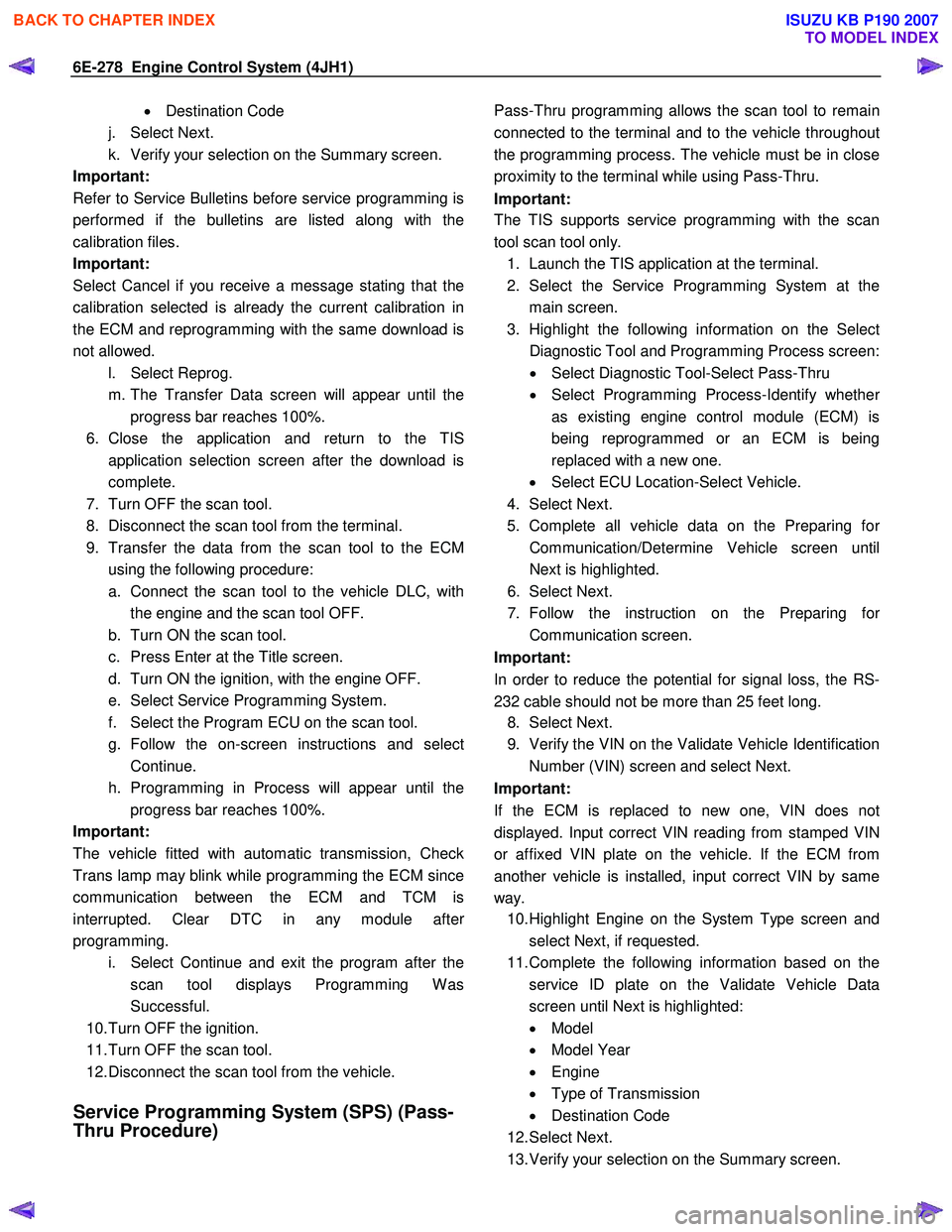
6E-278 Engine Control System (4JH1)
• Destination Code
j. Select Next.
k. Verify your selection on the Summary screen.
Important:
Refer to Service Bulletins before service programming is
performed if the bulletins are listed along with the
calibration files.
Important:
Select Cancel if you receive a message stating that the
calibration selected is already the current calibration in
the ECM and reprogramming with the same download is
not allowed.
l. Select Reprog.
m. The Transfer Data screen will appear until the progress bar reaches 100%.
6. Close the application and return to the TIS application selection screen after the download is
complete.
7. Turn OFF the scan tool.
8. Disconnect the scan tool from the terminal.
9. Transfer the data from the scan tool to the ECM using the following procedure:
a. Connect the scan tool to the vehicle DLC, with the engine and the scan tool OFF.
b. Turn ON the scan tool.
c. Press Enter at the Title screen.
d. Turn ON the ignition, with the engine OFF.
e. Select Service Programming System.
f. Select the Program ECU on the scan tool.
g. Follow the on-screen instructions and select Continue.
h. Programming in Process will appear until the progress bar reaches 100%.
Important:
The vehicle fitted with automatic transmission, Check
Trans lamp may blink while programming the ECM since
communication between the ECM and TCM is
interrupted. Clear DTC in any module afte
r
programming.
i. Select Continue and exit the program after the scan tool displays Programming W as
Successful.
10. Turn OFF the ignition.
11. Turn OFF the scan tool.
12. Disconnect the scan tool from the vehicle.
Service Programming System (SPS) (Pass-
Thru Procedure)
Pass-Thru programming allows the scan tool to remain
connected to the terminal and to the vehicle throughou
t
the programming process. The vehicle must be in close
proximity to the terminal while using Pass-Thru.
Important:
The TIS supports service programming with the scan
tool scan tool only.
1. Launch the TIS application at the terminal.
2. Select the Service Programming System at the main screen.
3. Highlight the following information on the Selec
t
Diagnostic Tool and Programming Process screen:
• Select Diagnostic Tool-Select Pass-Thru
• Select Programming Process-Identify whethe
r
as existing engine control module (ECM) is
being reprogrammed or an ECM is being
replaced with a new one.
• Select ECU Location-Select Vehicle.
4. Select Next.
5. Complete all vehicle data on the Preparing fo
r
Communication/Determine Vehicle screen until
Next is highlighted.
6. Select Next.
7. Follow the instruction on the Preparing fo
r
Communication screen.
Important:
In order to reduce the potential for signal loss, the RS-
232 cable should not be more than 25 feet long.
8. Select Next.
9. Verify the VIN on the Validate Vehicle Identification Number (VIN) screen and select Next.
Important:
If the ECM is replaced to new one, VIN does no
t
displayed. Input correct VIN reading from stamped VIN
or affixed VIN plate on the vehicle. If the ECM from
another vehicle is installed, input correct VIN by same
way. 10. Highlight Engine on the System Type screen and
select Next, if requested.
11. Complete the following information based on the service ID plate on the Validate Vehicle Data
screen until Next is highlighted:
• Model
• Model Year
• Engine
• Type of Transmission
• Destination Code
12. Select Next.
13. Verify your selection on the Summary screen.
BACK TO CHAPTER INDEX
TO MODEL INDEX
ISUZU KB P190 2007
Page 1313 of 6020
Engine Control System (4JH1) 6E-279
Important:
Refer to Service Bulletins before service programming is
performed if the bulletins are listed along with the
calibration files.
Important:
Select Cancel if you receive a message stating that the
calibration selected is already the current calibration in
the scan tool and reprogramming with the same
download is not allowed.
14. Select Reprog.
15. The Transfer Data screen will appear until the progress bar reaches 100%.
Important:
The vehicle fitted with automatic transmission, Check
Trans lamp may blink while programming the ECM since
communication between the ECM and TCM is
interrupted. Clear DTC in any module afte
r
programming. 16. Select Close on the Programming Complete
screen.
17. Turn OFF the scan tool.
18. Disconnect the scan tool from the vehicle.
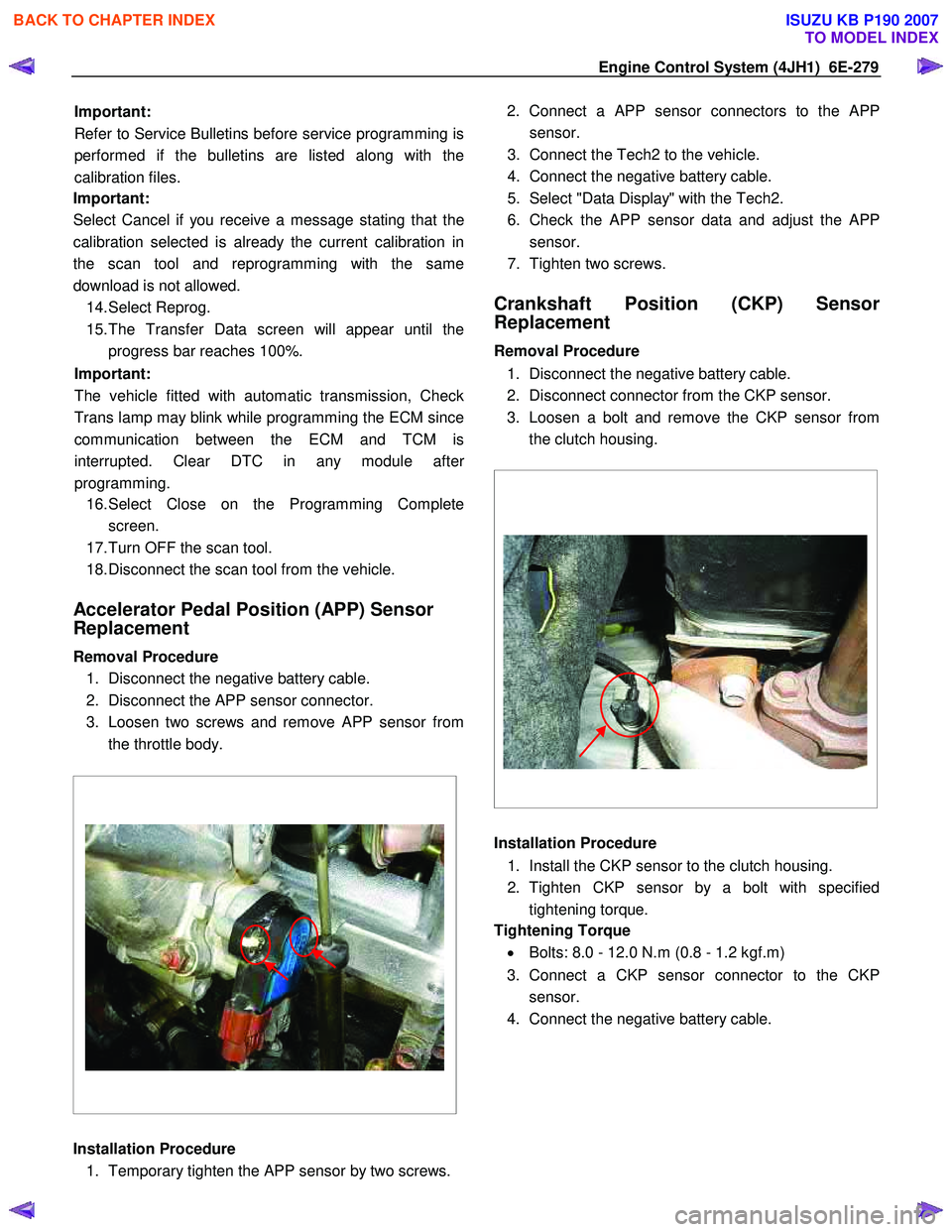
Accelerator Pedal Position (APP) Sensor
Replacement
Removal Procedure 1. Disconnect the negative battery cable.
2. Disconnect the APP sensor connector.
3. Loosen two screws and remove APP sensor from the throttle body.
Installation Procedure 1. Temporary tighten the APP sensor by two screws. 2. Connect a APP sensor connectors to the
APP
sensor.
3. Connect the Tech2 to the vehicle.
4. Connect the negative battery cable.
5. Select "Data Display" with the Tech2.
6. Check the APP sensor data and adjust the
APP
sensor.
7. Tighten two screws.
Crankshaft Position (CKP) Sensor
Replacement
Removal Procedure
1. Disconnect the negative battery cable.
2. Disconnect connector from the CKP sensor.
3. Loosen a bolt and remove the CKP sensor from the clutch housing.
Installation Procedure
1. Install the CKP sensor to the clutch housing.
2. Tighten CKP sensor by a bolt with specified tightening torque.
Tightening Torque
• Bolts: 8.0 - 12.0 N.m (0.8 - 1.2 kgf.m)
3. Connect a CKP sensor connector to the CKP sensor.
4. Connect the negative battery cable.
BACK TO CHAPTER INDEX
TO MODEL INDEX
ISUZU KB P190 2007
Page 1458 of 6020
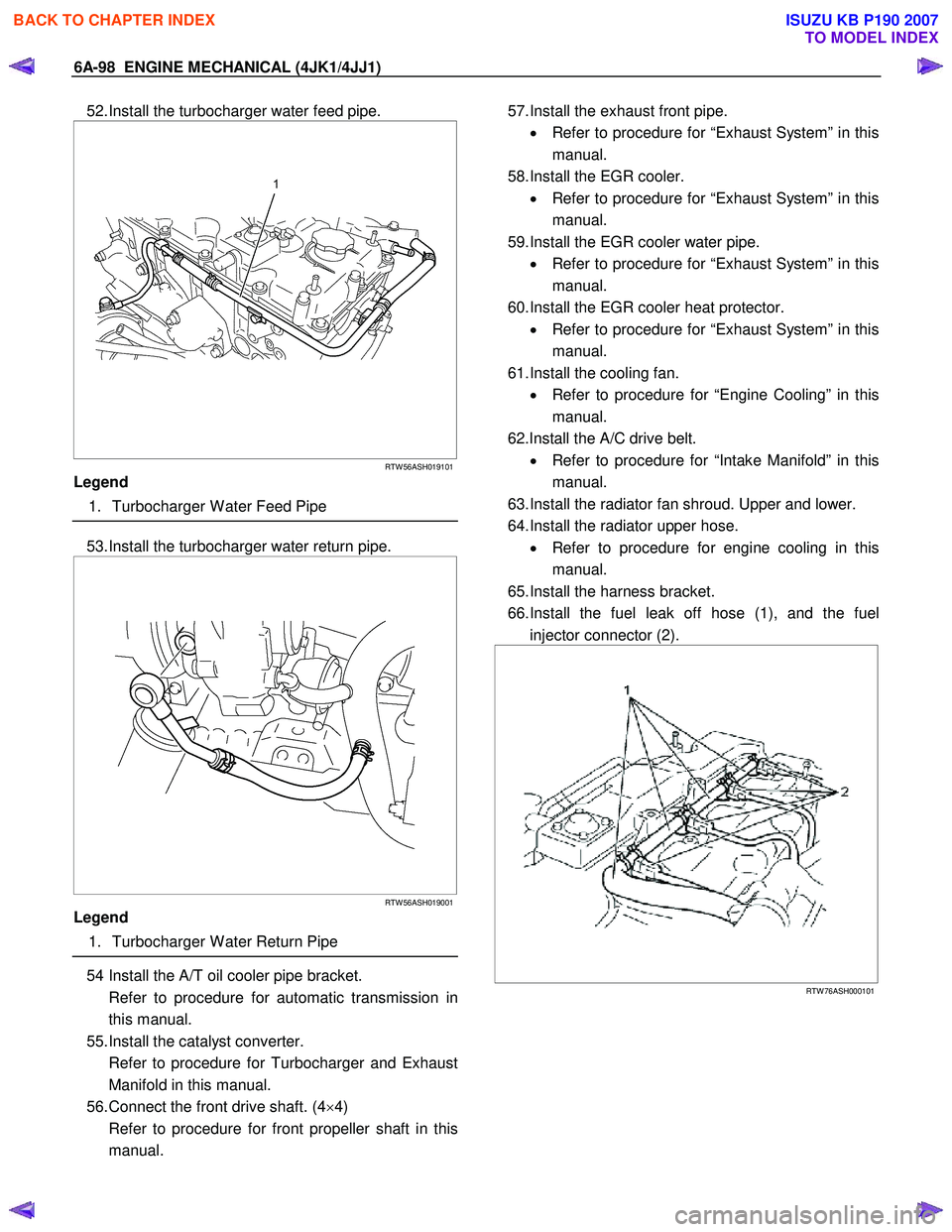
6A-98 ENGINE MECHANICAL (4JK1/4JJ1)
52. Install the turbocharger water feed pipe.
RTW 56ASH019101
Legend
1. Turbocharger W ater Feed Pipe
53. Install the turbocharger water return pipe.
RTW 56ASH019001
Legend
1. Turbocharger W ater Return Pipe
54 Install the A/T oil cooler pipe bracket.
Refer to procedure for automatic transmission in this manual.
55. Install the catalyst converter.
Refer to procedure for Turbocharger and Exhaust Manifold in this manual.
56. Connect the front drive shaft. (4 ×4)
Refer to procedure for front propeller shaft in this manual.
57. Install the exhaust front pipe.
• Refer to procedure for “Exhaust System” in this
manual.
58. Install the EGR cooler. • Refer to procedure for “Exhaust System” in this
manual.
59. Install the EGR cooler water pipe. • Refer to procedure for “Exhaust System” in this
manual.
60. Install the EGR cooler heat protector. • Refer to procedure for “Exhaust System” in this
manual.
61. Install the cooling fan. • Refer to procedure for “Engine Cooling” in this
manual.
62.Install the A/C drive belt. • Refer to procedure for “Intake Manifold” in this
manual.
63. Install the radiator fan shroud. Upper and lower.
64. Install the radiator upper hose. • Refer to procedure for engine cooling in this
manual.
65. Install the harness bracket.
66. Install the fuel leak off hose (1), and the fuel injector connector (2).
RTW 76ASH000101
BACK TO CHAPTER INDEX
TO MODEL INDEX
ISUZU KB P190 2007