ABS ISUZU KB P190 2007 Workshop Repair Manual
[x] Cancel search | Manufacturer: ISUZU, Model Year: 2007, Model line: KB P190, Model: ISUZU KB P190 2007Pages: 6020, PDF Size: 70.23 MB
Page 5111 of 6020
ELECTRICAL-BODY AND CHASSIS 8A-173
RTW 780SH000901
RTW 780SH001001
HEADLIGHT BEAM SWITCH
(COMBINATION SWITCH)
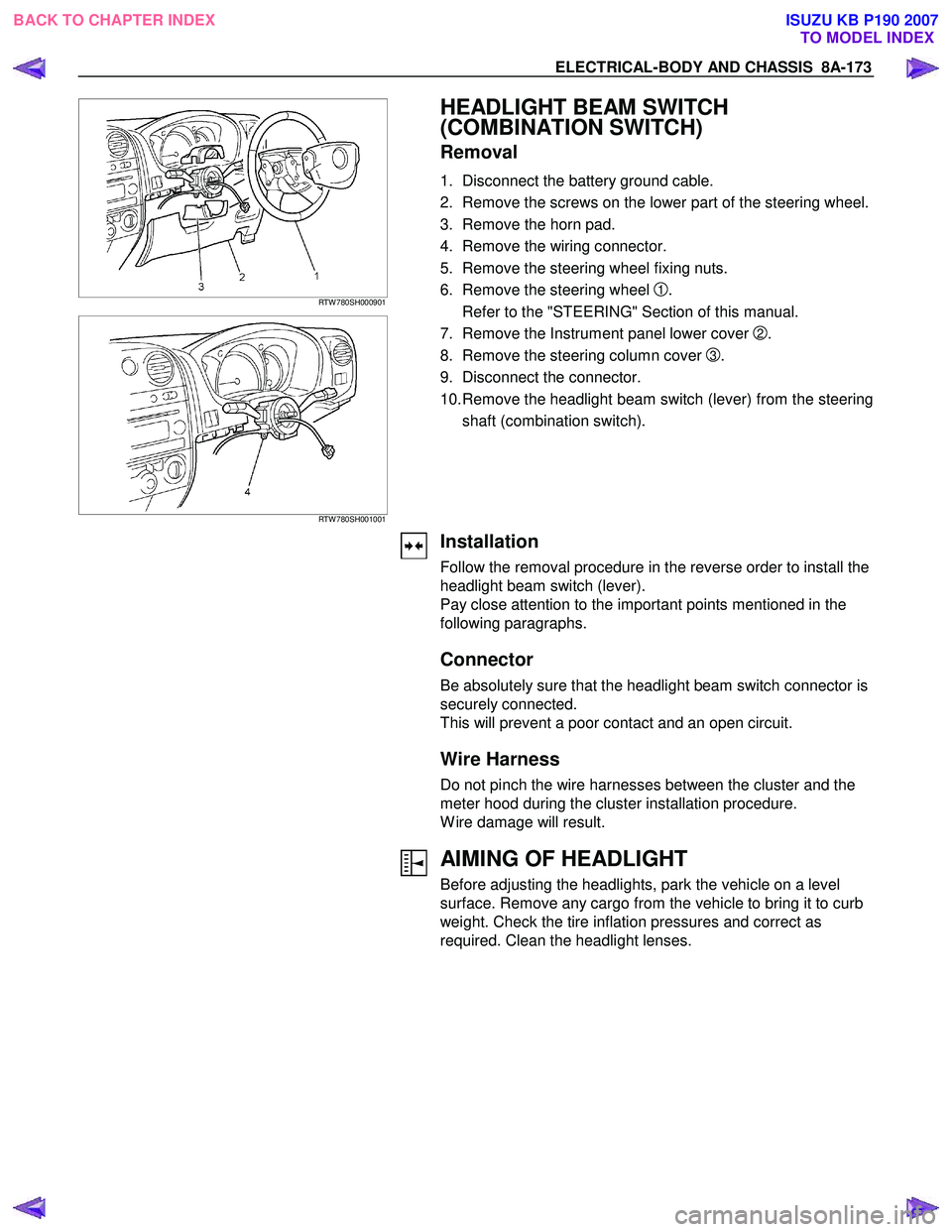
Removal
1. Disconnect the battery ground cable.
2. Remove the screws on the lower part of the steering wheel.
3. Remove the horn pad.
4. Remove the wiring connector.
5. Remove the steering wheel fixing nuts.
6. Remove the steering wheel
1.
Refer to the "STEERING" Section of this manual.
7. Remove the Instrument panel lower cover
2.
8. Remove the steering column cover
3.
9. Disconnect the connector.
10. Remove the headlight beam switch (lever) from the steering shaft (combination switch).
Installation
Follow the removal procedure in the reverse order to install the
headlight beam switch (lever).
Pay close attention to the important points mentioned in the
following paragraphs.
Connector
Be absolutely sure that the headlight beam switch connector is
securely connected.
This will prevent a poor contact and an open circuit.
Wire Harness
Do not pinch the wire harnesses between the cluster and the
meter hood during the cluster installation procedure.
W ire damage will result.
AIMING OF HEADLIGHT
Before adjusting the headlights, park the vehicle on a level
surface. Remove any cargo from the vehicle to bring it to curb
weight. Check the tire inflation pressures and correct as
required. Clean the headlight lenses.
BACK TO CHAPTER INDEX TO MODEL INDEXISUZU KB P190 2007
Page 5125 of 6020
ELECTRICAL-BODY AND CHASSIS 8A-187
RTW 780SH000601
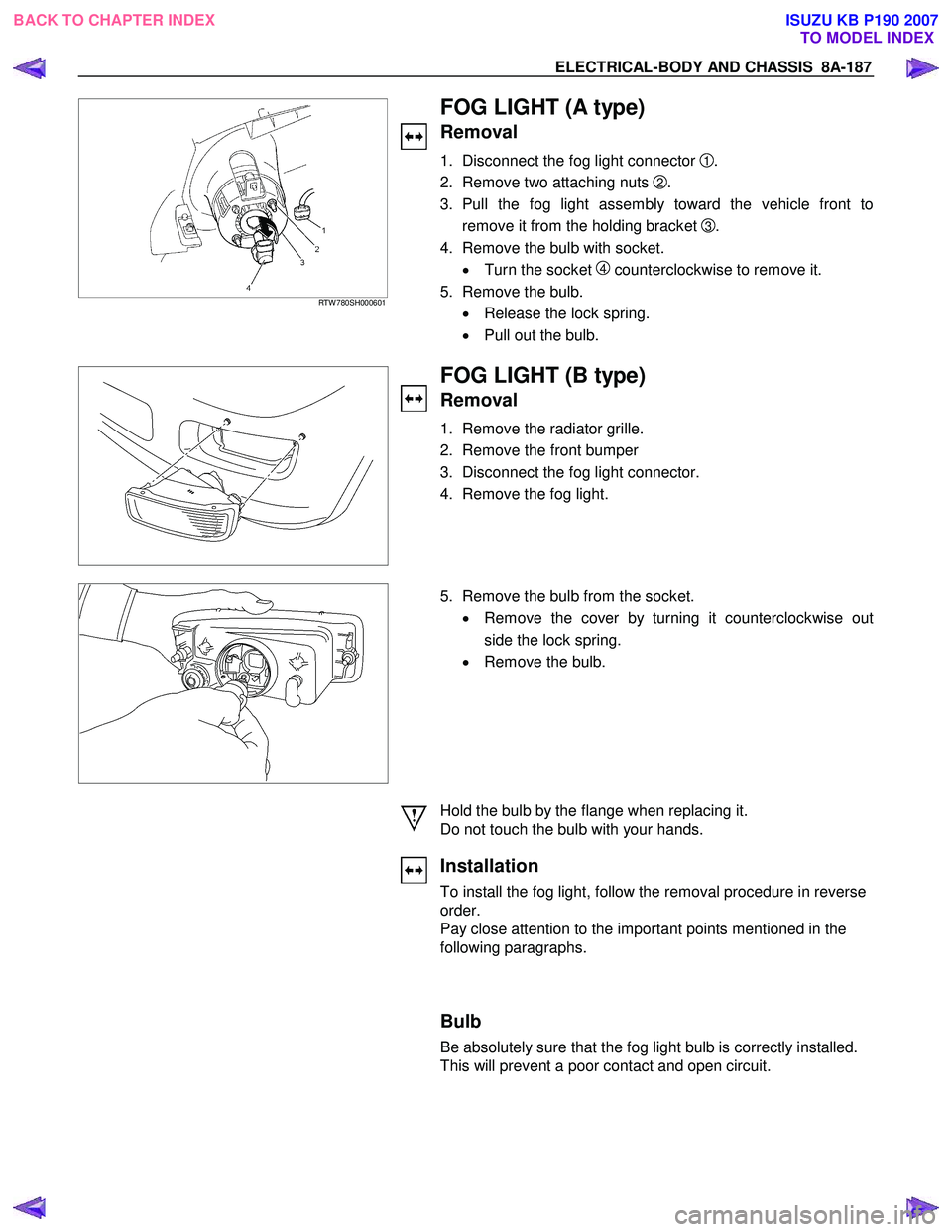
FOG LIGHT (A type)
Removal
1. Disconnect the fog light connector 1 .
2. Remove two attaching nuts
2.
3. Pull the fog light assembly toward the vehicle front to remove it from the holding bracket
3 .
4. Remove the bulb with socket. • Turn the socket
4 counterclockwise to remove it.
5. Remove the bulb. • Release the lock spring.
• Pull out the bulb.
FOG LIGHT (B type)
Removal
1. Remove the radiator grille.
2. Remove the front bumper
3. Disconnect the fog light connector.
4. Remove the fog light.
5. Remove the bulb from the socket.
• Remove the cover by turning it counterclockwise out
side the lock spring.
• Remove the bulb.
Hold the bulb by the flange when replacing it.
Do not touch the bulb with your hands.
Installation
To install the fog light, follow the removal procedure in reverse
order.
Pay close attention to the important points mentioned in the
following paragraphs.
Bulb
Be absolutely sure that the fog light bulb is correctly installed.
This will prevent a poor contact and open circuit.
BACK TO CHAPTER INDEX TO MODEL INDEXISUZU KB P190 2007
Page 5131 of 6020
ELECTRICAL-BODY AND CHASSIS 8A-193
RTW 48ASH000701
REAR FOG LIGHT
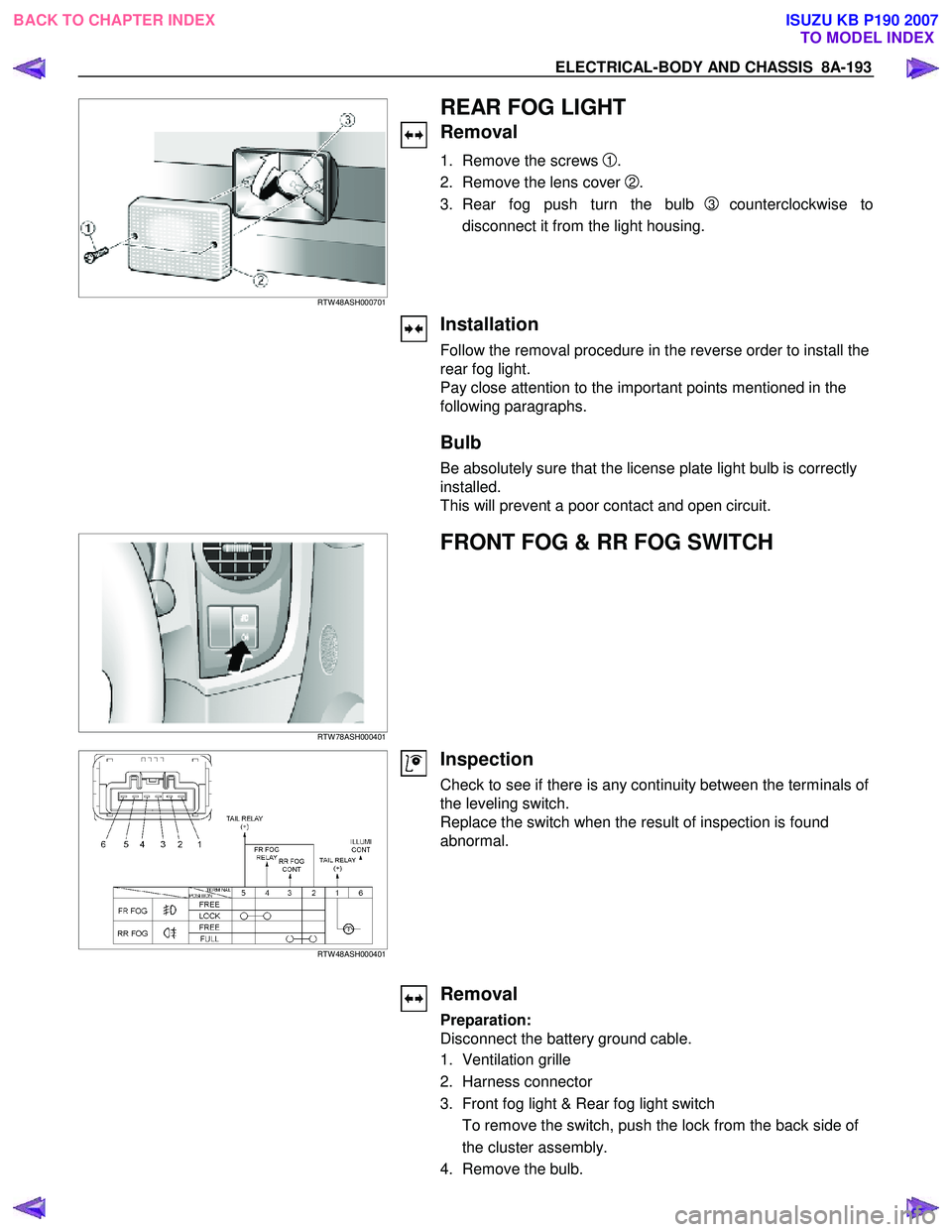
Removal
1. Remove the screws 1.
2. Remove the lens cover
2.
3. Rear fog push turn the bulb
3 counterclockwise to
disconnect it from the light housing.
Installation
Follow the removal procedure in the reverse order to install the
rear fog light.
Pay close attention to the important points mentioned in the
following paragraphs.
Bulb
Be absolutely sure that the license plate light bulb is correctly
installed.
This will prevent a poor contact and open circuit.
RTW 78ASH000401
FRONT FOG & RR FOG SWITCH
RTW 48ASH000401
Inspection
Check to see if there is any continuity between the terminals of
the leveling switch.
Replace the switch when the result of inspection is found
abnormal.
Removal
Preparation:
Disconnect the battery ground cable.
1. Ventilation grille
2. Harness connector
3. Front fog light & Rear fog light switch To remove the switch, push the lock from the back side of
the cluster assembly.
4. Remove the bulb.
BACK TO CHAPTER INDEX TO MODEL INDEXISUZU KB P190 2007
Page 5173 of 6020

ELECTRICAL-BODY AND CHASSIS 8A-235
REMOVAL AND INSTALLATION
A Type
RTW 780SH002101
REAR COMBINATION LIGHT
Stoplight
Removal
1. Open the tail gate.
2. Remove the screws of rear combination light.
3. Remove the rear combination light assembly.
B Type
RTW 580SH000401
A Type
RTW 780SH001201
4. Turn the bulb (1) counterclockwise to remove it.
B Type
RTW 580SH000501
Installation
Follow the removal procedure in the reverse order to install the
rear combination light.
Pay close attention to the important points mentioned in the
following paragraphs.
Bulb
Be absolutely sure that each bulb is correctly installed.
This will prevent a poor contact and an open circuit.
BACK TO CHAPTER INDEX TO MODEL INDEXISUZU KB P190 2007
Page 5174 of 6020
8A-236 ELECTRICAL-BODY AND CHASSIS
HIGH MOUNTED STOPLIGHT
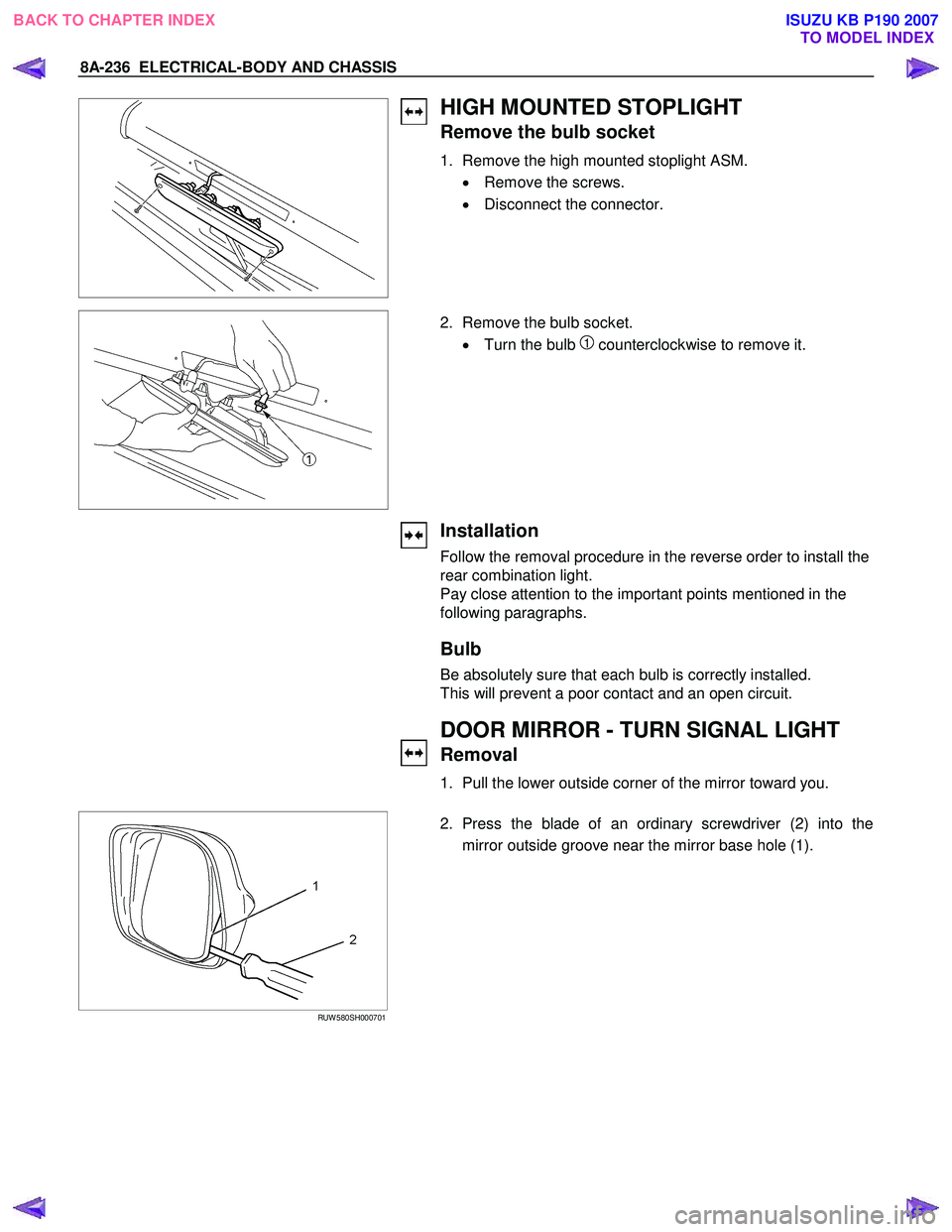
Remove the bulb socket
1. Remove the high mounted stoplight ASM. • Remove the screws.
• Disconnect the connector.
2. Remove the bulb socket.
• Turn the bulb
1 counterclockwise to remove it.
Installation
Follow the removal procedure in the reverse order to install the
rear combination light.
Pay close attention to the important points mentioned in the
following paragraphs.
Bulb
Be absolutely sure that each bulb is correctly installed.
This will prevent a poor contact and an open circuit.
DOOR MIRROR - TURN SIGNAL LIGHT
Removal
1. Pull the lower outside corner of the mirror toward you.
RUW 580SH000701
2. Press the blade of an ordinary screwdriver (2) into the
mirror outside groove near the mirror base hole (1).
BACK TO CHAPTER INDEX TO MODEL INDEXISUZU KB P190 2007
Page 5176 of 6020

8A-238 ELECTRICAL-BODY AND CHASSIS
Bulb
Be absolutely sure that the side turn light bulb is correctly
installed.
This will prevent a poor contact and an open circuit.
A Type
RTW 780SH002101
REAR COMBINATION LIGHT
Turn Signal Light
Removal
1. Open the tail gate.
2. Remove the screws.
3. Remove the rear combination light assembly.
B Type
RTW 580SH000401
A Type
RTW 780SH001301
4. Turn the bulb 1 counterclockwise to remove it.
B Type
RTW 78ASH002501
Installation
Follow the removal procedure in the reverse order to install the
rear combination light.
Pay close attention to the important points mentioned in the
following paragraphs.
BACK TO CHAPTER INDEX TO MODEL INDEXISUZU KB P190 2007
Page 5177 of 6020

ELECTRICAL-BODY AND CHASSIS 8A-239
Bulb
Be absolutely sure that the rear combination light bulb is
correctly installed.
This will prevent a poor contact and an open circuit.
RTW 780SH000901
This illustration is based on RHD model
TURN SIGNAL LIGHT SWITCH
Removal
1. Disconnect the battery ground cable.
2. Remove the steering wheel
1.
Refer to the “STEERING” Section of this Manual.
3. Remove the instruments panel lower cover
2.
4. Remove the steering column cover
3.
RTW 780SH001001
This illustration is based on RHD model
5. Disconnect the connector.
6. Remove the turn signal switch from the steering shaft.
Installation
Follow the removal procedure in the reverse order to install the
turn signal switch (lever).
Pay close attention to the important points mentioned in the
following paragraphs.
Connector
Be absolutely sure that the turn signal switch connector is
securely connected.
This will prevent a poor contact and at an open circuit.
A Type
RTW 780SH002101
REAR COMBINATION LIGHT
Backup Light
Removal
1. Open the rear gate.
2. Remove the screws.
3. Remove the rear combination light assembly.
BACK TO CHAPTER INDEX TO MODEL INDEXISUZU KB P190 2007
Page 5178 of 6020

8A-240 ELECTRICAL-BODY AND CHASSIS
B Type
RTW 580SH000401
A Type
RTW 780SH001401
4. Turn the bulb 1 counterclockwise to remove it.
B Type
RTW 78ASH002601
Installation
Follow the removal procedure in the reverse order to install the
rear combination light.
Pay close attention to the important points mentioned in the
following paragraphs.
Bulbs
Be absolutely sure that each bulb is correctly installed.
This will prevent a poor contact and an open circuit.
RTW 780SH001501
This illustration is based on RHD model
HAZARD WARNING FLASHER SWITCH
Removal
1. Disconnect the battery ground cable.
2. Instrument Panel Cluster Assembly • Refer to Section 10 “BODY” for instrument panel cluste
r
assembly removal steps.
3. Hazard W arning Switch • Disconnect the switch connector.
• To remove the switch, push the lock from the back side
of the cluster assembly.
BACK TO CHAPTER INDEX TO MODEL INDEXISUZU KB P190 2007
Page 5179 of 6020

ELECTRICAL-BODY AND CHASSIS 8A-241
Installation
To install, follow the removal procedure in the reverse order.
Connector
Be absolutely sure that the hazard warning flasher switch
connector is securely connected.
This will prevent a poor contact and an open circuit.
BACKUP LIGHT SWITCH
Removal
1. Disconnect the battery ground cable.
2. Disconnect the connector
1.
3. Remove the backup light switch from the transmission
2.
Installation
Follow the removal procedure in the reverse order to install the
backup light switch.
Pay close attention to the important points mentioned in the
following paragraphs.
Backup Light Switch Threads
Apply liquid gasket to the threaded portion and install the
backup light switch.
Connector
Be absolutely sure that the backup light connector is securely
connected.
This will prevent a poor contact and an open circuit.
HORN
Removal
1. Remove the radiator grille.
Refer to the “HEADLIGHT” removal procedure.
2. Loosen the horn bolt.
3. Disconnect the horn connector.
Installation
Follow the removal procedure in the reverse order to install the
horn.
Pay close attention to the important point mentioned in the
following paragraphs.
Connector
Be absolutely sure the horn connector is securely connected.
This will prevent a poor contact and open circuit.
BACK TO CHAPTER INDEX TO MODEL INDEXISUZU KB P190 2007
Page 5198 of 6020

8A-260 ELECTRICAL-BODY AND CHASSIS
REMOVAL AND INSTALLATION
DOME LIGHT
Removal
1. Remove the dome light lens 1 free.
2. Remove two dome light fixing screws.
3. Remove the wiring connector.
4. Remove the dome light.
5. Pull the bulb
2 to remove it.
Installation
Follow the removal procedure in the reverse order to install the
dome light.
Pay close attention to the important points mentioned in the
following paragraphs.
Bulb
Be absolutely sure that the dome light bulb is correctly
installed.
This will prevent a poor contact and an open circuit.
BACK TO CHAPTER INDEX TO MODEL INDEXISUZU KB P190 2007