engine ISUZU KB P190 2007 Workshop Repair Manual
[x] Cancel search | Manufacturer: ISUZU, Model Year: 2007, Model line: KB P190, Model: ISUZU KB P190 2007Pages: 6020, PDF Size: 70.23 MB
Page 2835 of 6020
Engine Mechanical – V6 Page 6A1–58
Page 6A1–58
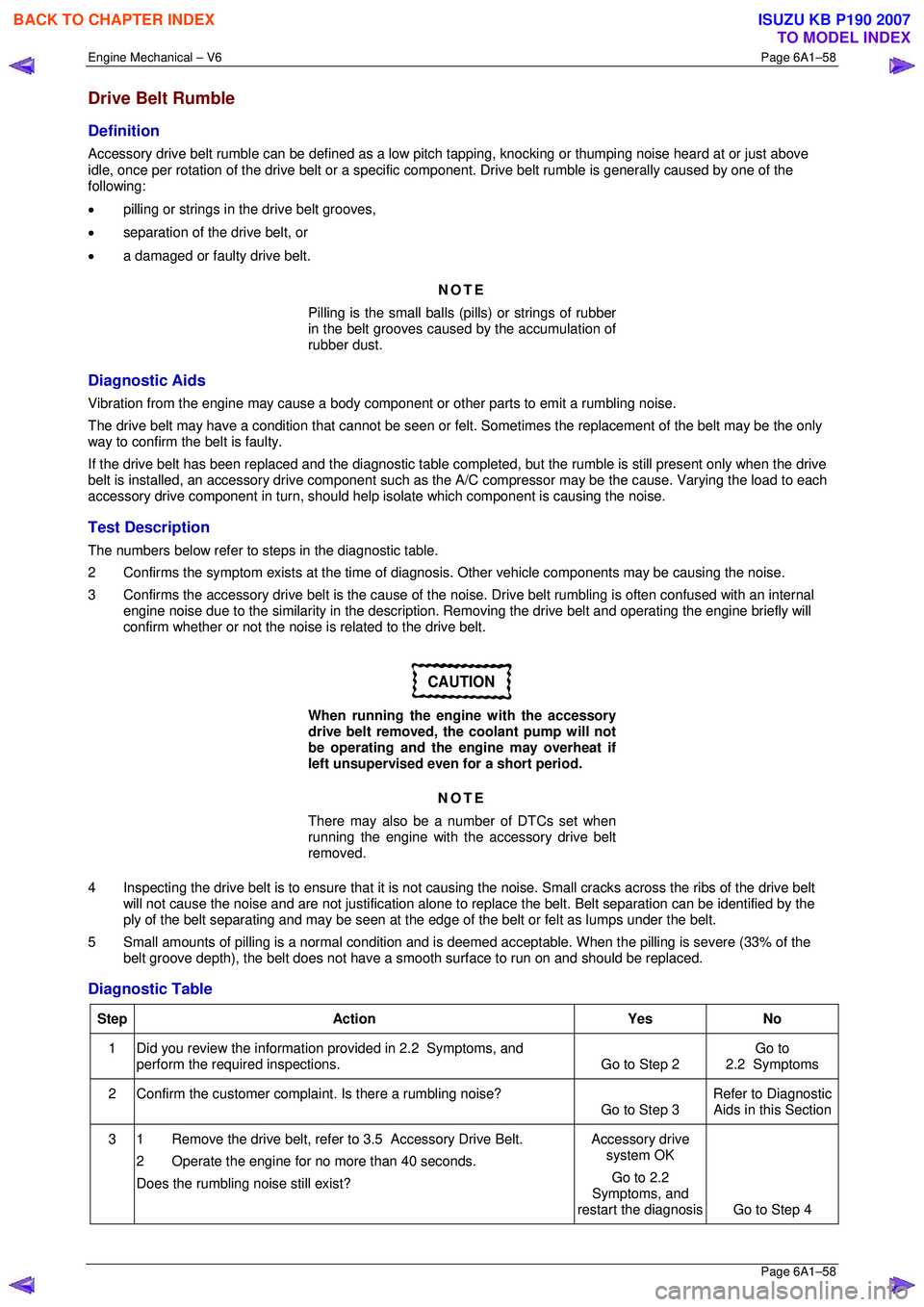
Drive Belt Rumble
Definition
Accessory drive belt rumble can be defined as a low pitch tapping, knocking or thumping noise heard at or just above
idle, once per rotation of the drive belt or a specific co mponent. Drive belt rumble is generally caused by one of the
following:
• pilling or strings in the drive belt grooves,
• separation of the drive belt, or
• a damaged or faulty drive belt.
NOTE
Pilling is the small balls (p ills) or strings of rubber
in the belt grooves caused by the accumulation of
rubber dust.
Diagnostic Aids
Vibration from the engine may cause a body component or other parts to emit a rumbling noise.
The drive belt may have a condition that cannot be seen or felt. Sometimes the replacement of the belt may be the only
way to confirm the belt is faulty.
If the drive belt has been replaced and the di agnostic table completed, but the rumble is still present only when the drive
belt is installed, an accessory drive component such as t he A/C compressor may be the cause. Varying the load to each
accessory drive component in turn, should help isolate which component is causing the noise.
Test Description
The numbers below refer to steps in the diagnostic table.
2 Confirms the symptom exists at the time of di agnosis. Other vehicle components may be causing the noise.
3 Confirms the accessory drive belt is the cause of the noise. Drive belt rumbling is often confused with an internal
engine noise due to the similarity in the description. Removing the drive belt and operating the engine briefly will
confirm whether or not the noise is related to the drive belt.
CAUTION
When running the engine with the accessory
drive belt removed, the coolant pump will not
be operating and the engine may overheat if
left unsupervised even for a short period.
NOTE
There may also be a number of DTCs set when
running the engine with the accessory drive belt
removed.
4 Inspecting the drive belt is to ensure t hat it is not causing the noise. Small cracks across the ribs of the drive belt
will not cause the noise and are not just ification alone to replace the belt. Belt separation can be identified by the
ply of the belt separating and may be seen at the edge of the belt or felt as lumps under the belt.
5 Small amounts of pilling is a normal condition and is deemed acceptable. When the pilling is severe (33% of the
belt groove depth), the belt does not have a smoot h surface to run on and should be replaced.
Diagnostic Table
Step Action Yes No
1
Did you review the information provided in 2.2 Symptoms, and
perform the required inspections. Go to Step 2 Go to
2.2 Symptoms
2 Confirm the customer compla int. Is there a rumbling noise?
Go to Step 3 Refer to Diagnostic
Aids in this Section
3 1 Remove the drive belt, refer to 3.5 Accessory Drive Belt.
2 Operate the engine for no more than 40 seconds.
Does the rumbling noise still exist? Accessory drive
system OK
Go to 2.2
Symptoms, and
restart the diagnosis Go to Step 4
BACK TO CHAPTER INDEX
TO MODEL INDEX
ISUZU KB P190 2007
Page 2836 of 6020
Engine Mechanical – V6 Page 6A1–59
Page 6A1–59
Step Action Yes No
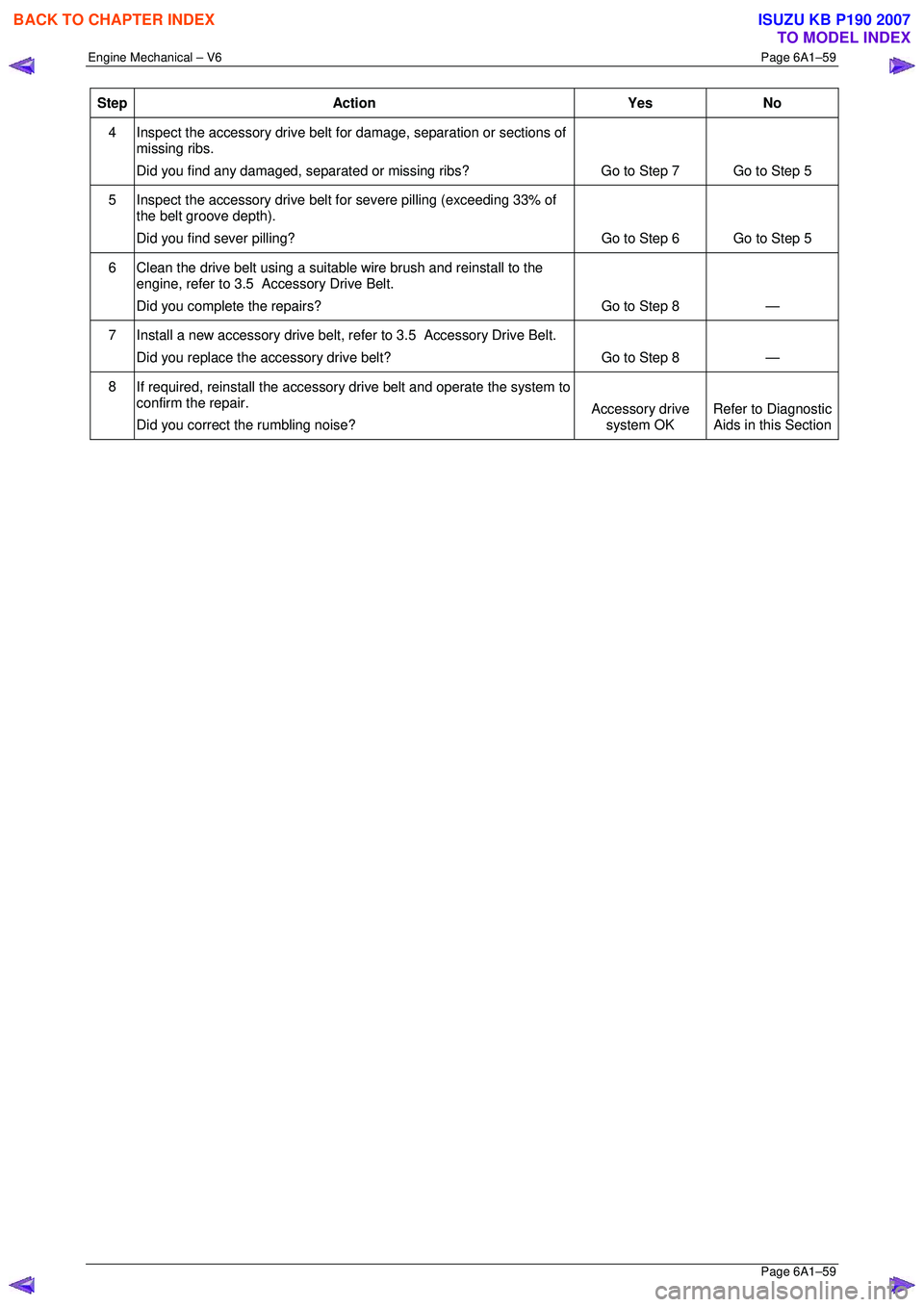
4
Inspect the accessory drive belt for damage, separation or sections of
missing ribs.
Did you find any damaged, separated or missi ng ribs? Go to Step 7 Go to Step 5
5
Inspect the accessory drive belt for severe pilling (exceeding 33% of
the belt groove depth).
Did you find sever pilling? Go to Step 6 Go to Step 5
6 Clean the drive belt using a suitable wire brush and reinstall to the
engine, refer to 3.5 Accessory Drive Belt.
Did you complete the repairs? Go to Step 8 —
7 Install a new accessory drive belt, re fer to 3.5 Accessory Drive Belt.
Did you replace the accessory drive belt? Go to Step 8 —
8 If required, reinstall the accessory drive belt and operate the system to
confirm the repair.
Did you correct the rumbling noise? Accessory drive
system OK Refer to Diagnostic
Aids in this Section
BACK TO CHAPTER INDEX
TO MODEL INDEX
ISUZU KB P190 2007
Page 2837 of 6020
Engine Mechanical – V6 Page 6A1–60
Page 6A1–60
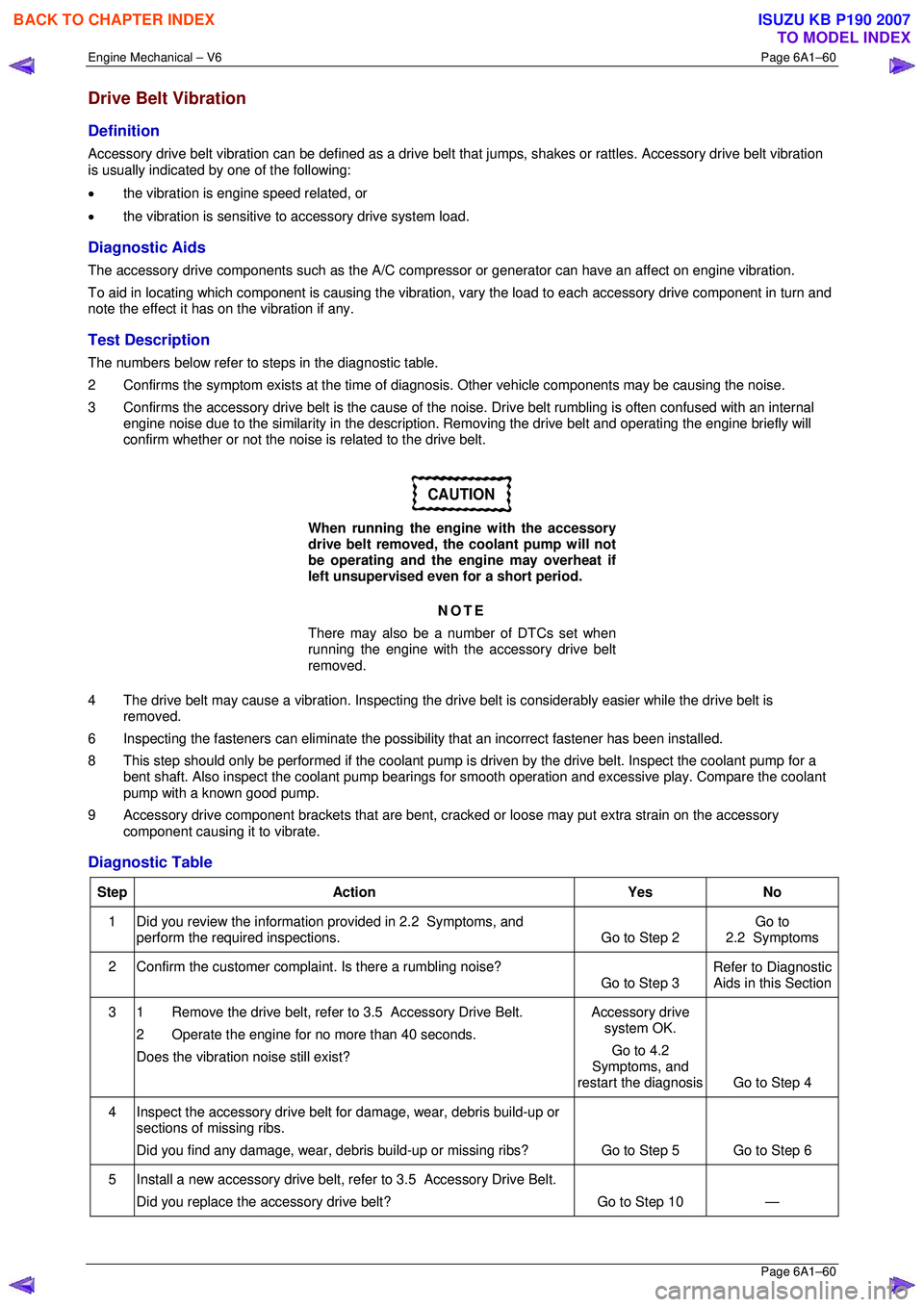
Drive Belt Vibration
Definition
Accessory drive belt vibration can be defined as a drive belt that jumps, shakes or rattles. Accessory drive belt vibration
is usually indicated by one of the following:
• the vibration is engine speed related, or
• the vibration is sensitive to accessory drive system load.
Diagnostic Aids
The accessory drive components such as the A/C compre ssor or generator can have an affect on engine vibration.
To aid in locating which component is causing the vibration, vary the load to each accessory drive component in turn and
note the effect it has on the vibration if any.
Test Description
The numbers below refer to steps in the diagnostic table.
2 Confirms the symptom exists at the time of di agnosis. Other vehicle components may be causing the noise.
3 Confirms the accessory drive belt is the cause of the noise. Drive belt rumbling is often confused with an internal
engine noise due to the similarity in the description. Removing the drive belt and operating the engine briefly will
confirm whether or not the noise is related to the drive belt.
CAUTION
When running the engine with the accessory
drive belt removed, the coolant pump will not
be operating and the engine may overheat if
left unsupervised even for a short period.
NOTE
There may also be a number of DTCs set when
running the engine with the accessory drive belt
removed.
4 The drive belt may cause a vibration. Inspecting the drive belt is considerably easier while the drive belt is
removed.
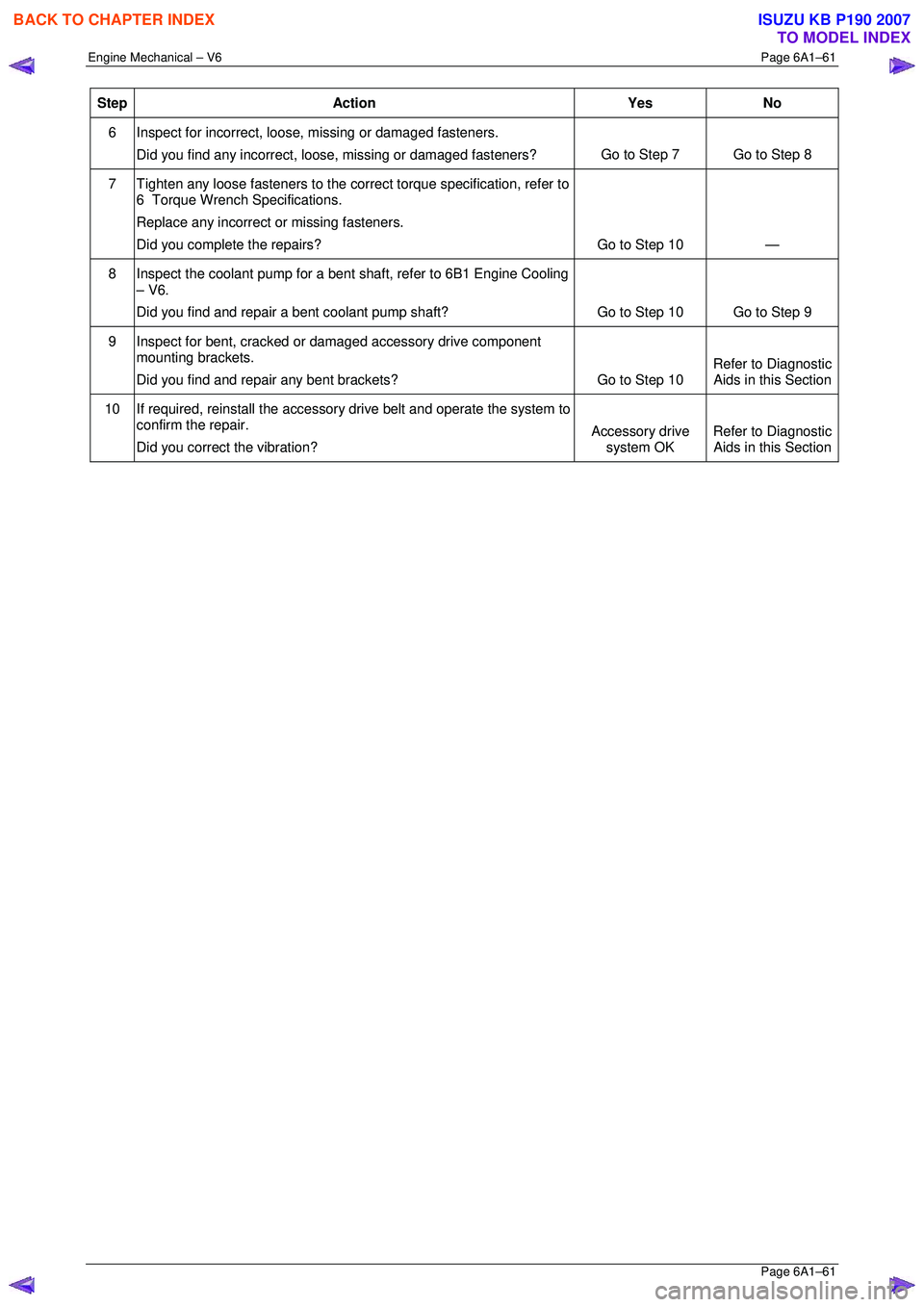
6 Inspecting the fasteners can eliminate the possibility that an inco rrect fastener has been installed.
8 This step should only be performed if t he coolant pump is driven by the drive belt. Inspect the coolant pump for a
bent shaft. Also inspect the coolant pump bearings for smooth operation and excessive play. Compare the coolant
pump with a known good pump.
9 Accessory drive component brackets that are bent, cra cked or loose may put extra strain on the accessory
component causing it to vibrate.
Diagnostic Table
Step Action Yes No
1
Did you review the information provided in 2.2 Symptoms, and
perform the required inspections. Go to Step 2 Go to
2.2 Symptoms
2 Confirm the customer compla int. Is there a rumbling noise?
Go to Step 3 Refer to Diagnostic
Aids in this Section
3 1 Remove the drive belt, refer to 3.5 Accessory Drive Belt.
2 Operate the engine for no more than 40 seconds.
Does the vibration noise still exist? Accessory drive
system OK.
Go to 4.2
Symptoms, and
restart the diagnosis Go to Step 4
4 Inspect the accessory drive belt for damage, wear, debris build-up or
sections of missing ribs.
Did you find any damage, wear, debris build-up or missing ribs? Go to Step 5 Go to Step 6
5 Install a new accessory drive belt, refer to 3.5 Accessory Drive Belt.
Did you replace the accessory drive belt? Go to Step 10 —
BACK TO CHAPTER INDEX
TO MODEL INDEX
ISUZU KB P190 2007
Page 2838 of 6020
Engine Mechanical – V6 Page 6A1–61
Page 6A1–61
Step Action Yes No
6 Inspect for incorrect, loose, missing or damaged fasteners.
Did you find any incorrect, loose, missing or damaged fasteners? Go to Step 7 Go to Step 8
7
Tighten any loose fasteners to the corre ct torque specification, refer to
6 Torque Wrench Specifications.
Replace any incorrect or missing fasteners.
Did you complete the repairs? Go to Step 10 —
8
Inspect the coolant pump for a bent shaft, refer to 6B1 Engine Cooling
– V6.
Did you find and repair a bent coolant pump shaft? Go to Step 10 Go to Step 9
9
Inspect for bent, cracked or damaged accessory drive component
mounting brackets.
Did you find and repair any bent brackets? Go to Step 10 Refer to Diagnostic
Aids in this Section
10 If required, reinstall the accessory drive belt and operate the system to
confirm the repair.
Did you correct the vibration? Accessory drive
system OK Refer to Diagnostic
Aids in this Section
BACK TO CHAPTER INDEX
TO MODEL INDEX
ISUZU KB P190 2007
Page 2839 of 6020
Engine Mechanical – V6 Page 6A1–62
Page 6A1–62
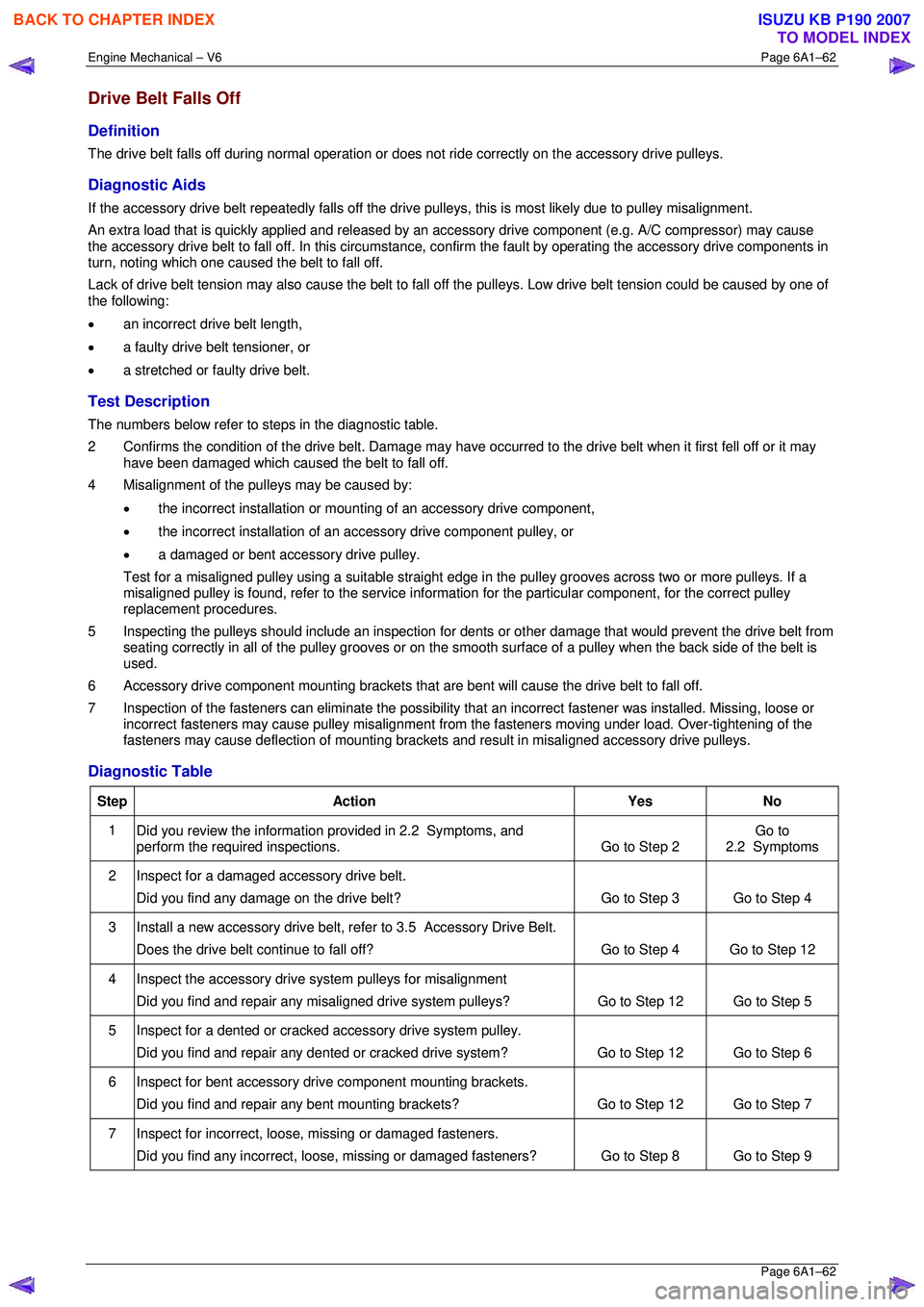
Drive Belt Falls Off
Definition
The drive belt falls off during normal operation or does not ride correctly on the accessory drive pulleys.
Diagnostic Aids
If the accessory drive belt repeatedly falls off the drive pulleys, this is most likely due to pulley misalignment.
An extra load that is quickly applied and released by an a ccessory drive component (e.g. A/C compressor) may cause
the accessory drive belt to fall off. In th is circumstance, confirm the fault by operating the accessory drive components in
turn, noting which one caused the belt to fall off.
Lack of drive belt tension may also cause the belt to fall o ff the pulleys. Low drive belt tension could be caused by one of
the following:
• an incorrect drive belt length,
• a faulty drive belt tensioner, or
• a stretched or faulty drive belt.
Test Description
The numbers below refer to steps in the diagnostic table.
2 Confirms the condition of t he drive belt. Damage may have occurred to the dr ive belt when it first fell off or it may
have been damaged which caused the belt to fall off.
4 Misalignment of the pulleys may be caused by:
• the incorrect installation or mount ing of an accessory drive component,
• the incorrect installation of an a ccessory drive component pulley, or
• a damaged or bent accessory drive pulley.
Test for a misaligned pulley using a suitable straight edge in the pulley grooves across two or more pulleys. If a
misaligned pulley is found, refer to the service informa tion for the particular component, for the correct pulley
replacement procedures.
5 Inspecting the pulleys should include an inspection for dents or other damage that would prevent the drive belt from
seating correctly in all of the pulley grooves or on the smooth surface of a pulley when the back side of the belt is
used.
6 Accessory drive component mounting brackets that are bent will cause the drive belt to fall off.
7 Inspection of the fasteners can eliminat e the possibility that an incorrect fastener was installed. Missing, loose or
incorrect fasteners may cause pulley misalignment from the fasteners moving under load. Over-tightening of the
fasteners may cause deflection of mounting brackets and result in misaligned accessory drive pulleys.
Diagnostic Table
Step Action Yes No
1
Did you review the information provided in 2.2 Symptoms, and
perform the required inspections. Go to Step 2 Go to
2.2 Symptoms
2 Inspect for a damaged accessory drive belt.
Did you find any damage on the drive belt? Go to Step 3 Go to Step 4
3 Install a new accessory drive belt, re
fer to 3.5 Accessory Drive Belt.
Does the drive belt continue to fall off? Go to Step 4 Go to Step 12
4 Inspect the accessory drive system pulleys for misalignment
Did you find and repair any misaligned drive system pulleys? Go to Step 12 Go to Step 5
5 Inspect for a dented or cracked accessory drive system pulley.
Did you find and repair any dented or cracked drive system? Go to Step 12 Go to Step 6
6 Inspect for bent accessory drive component mounting brackets.
Did you find and repair any bent mounting brackets? Go to Step 12 Go to Step 7
7 Inspect for incorrect, loose, missing or damaged fasteners.
Did you find any incorrect, loose, missing or damaged fasteners? Go to Step 8 Go to Step 9
BACK TO CHAPTER INDEX
TO MODEL INDEX
ISUZU KB P190 2007
Page 2840 of 6020
Engine Mechanical – V6 Page 6A1–63
Page 6A1–63
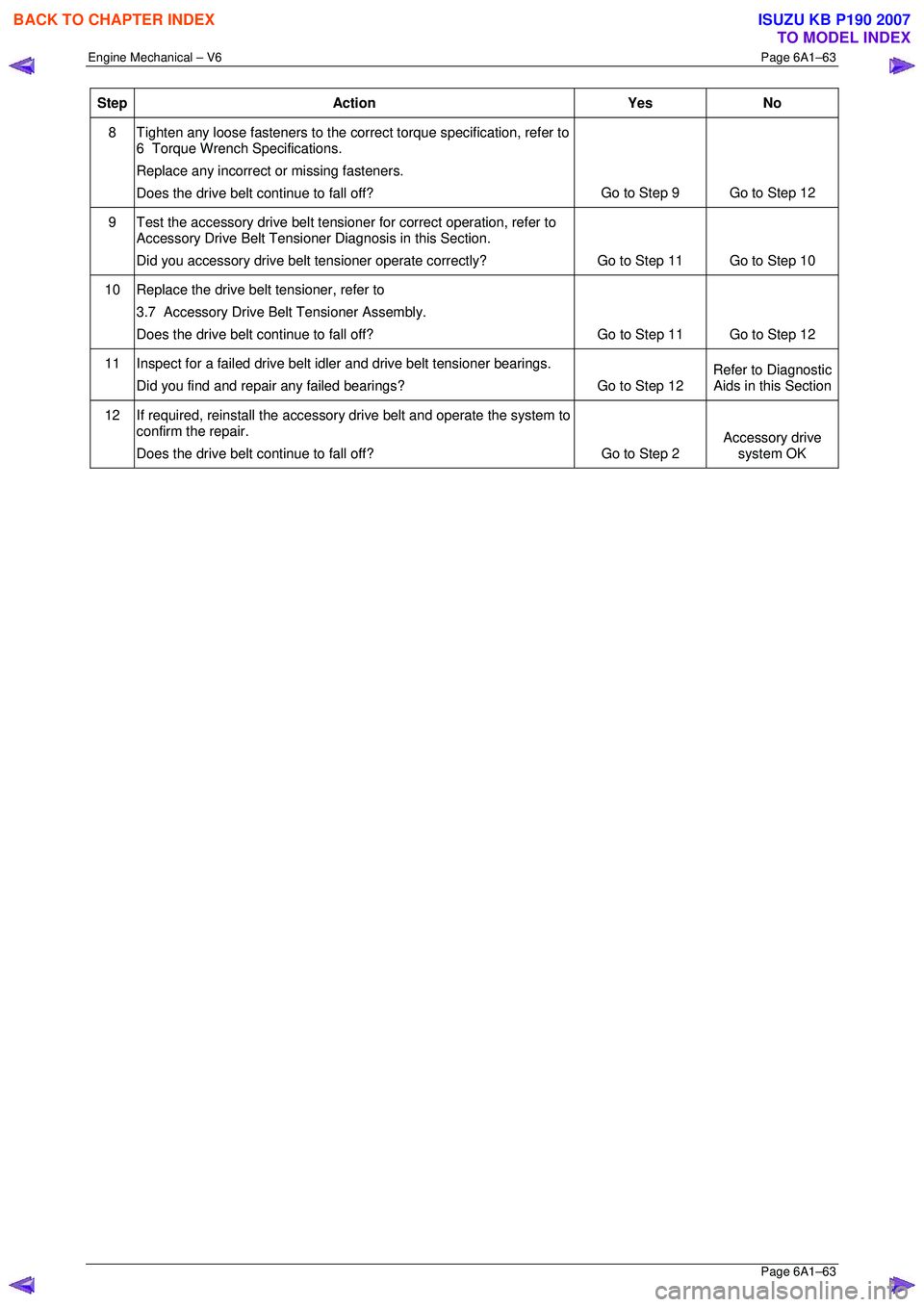
Step Action Yes No
8
Tighten any loose fasteners to the corre ct torque specification, refer to
6 Torque Wrench Specifications.
Replace any incorrect or missing fasteners.
Does the drive belt continue to fall off? Go to Step 9 Go to Step 12
9
Test the accessory drive belt tensi oner for correct operation, refer to
Accessory Drive Belt Tensioner Diagnosis in this Section.
Did you accessory drive belt tensioner operat e correctly? Go to Step 11 Go to Step 10
10 Replace the drive belt tensioner, refer to
3.7 Accessory Drive Belt Tensioner Assembly.
Does the drive belt continue to fall off? Go to Step 11 Go to Step 12
11 Inspect for a failed drive belt idler and drive belt tensioner bearings.
Did you find and repair any failed bearings? Go to Step 12 Refer to Diagnostic
Aids in this Section
12 If required, reinstall the accessory drive belt and operate the system to
confirm the repair.
Does the drive belt continue to fall off? Go to Step 2 Accessory drive
system OK
BACK TO CHAPTER INDEX
TO MODEL INDEX
ISUZU KB P190 2007
Page 2841 of 6020
Engine Mechanical – V6 Page 6A1–64
Page 6A1–64
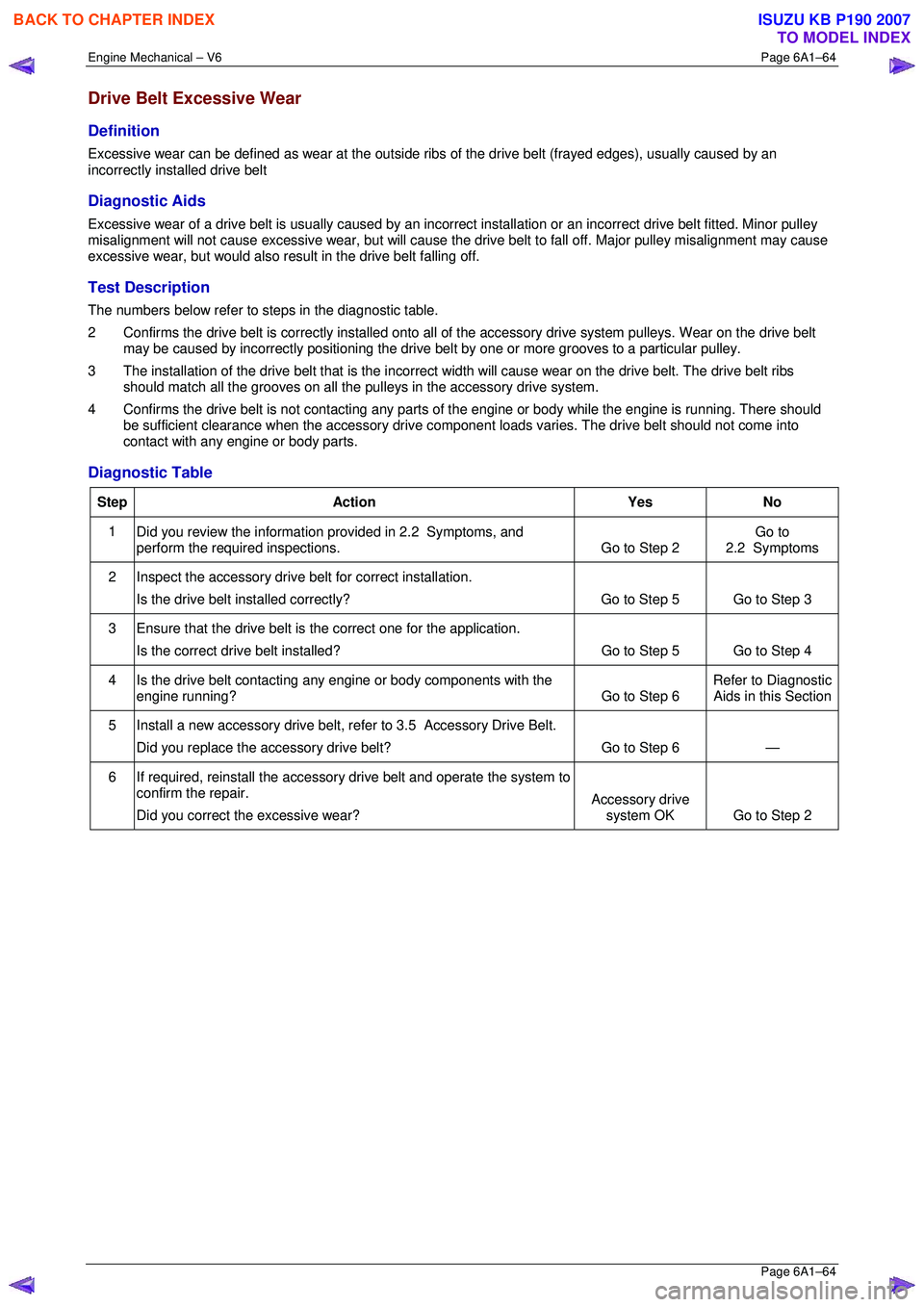
Drive Belt Excessive Wear
Definition
Excessive wear can be defined as wear at the outside ribs of the drive belt (frayed edges), usually caused by an
incorrectly installed drive belt
Diagnostic Aids
Excessive wear of a drive belt is usually caused by an incorre ct installation or an incorrect drive belt fitted. Minor pulley
misalignment will not cause excessive wear, but will cause the drive belt to fall off. Major pulley misalignment may cause
excessive wear, but would also re sult in the drive belt falling off.
Test Description
The numbers below refer to steps in the diagnostic table.
2 Confirms the drive belt is correctly installed onto all of the accessory drive system pulleys. Wear on the drive belt
may be caused by incorrectly positioning the drive belt by one or more grooves to a particular pulley.
3 The installation of the drive belt that is the incorrect width will cause wear on the drive belt. The drive belt ribs
should match all the grooves on all the pu lleys in the accessory drive system.
4 Confirms the drive belt is not cont acting any parts of the engine or body wh ile the engine is running. There should
be sufficient clearance when the accessory drive component loads varies. The drive belt should not come into
contact with any engine or body parts.
Diagnostic Table
Step Action Yes No
1
Did you review the information provided in 2.2 Symptoms, and
perform the required inspections. Go to Step 2 Go to
2.2 Symptoms
2 Inspect the accessory drive belt for correct installation.
Is the drive belt installed correctly? Go to Step 5 Go to Step 3
3 Ensure that the drive belt is
the correct one for the application.
Is the correct drive belt installed? Go to Step 5 Go to Step 4
4 Is the drive belt contacting any engine or body components with the
engine running? Go to Step 6 Refer to Diagnostic
Aids in this Section
5 Install a new accessory drive belt, re fer to 3.5 Accessory Drive Belt.
Did you replace the accessory drive belt? Go to Step 6 —
6 If required, reinstall the accessory drive belt and operate the system to
confirm the repair.
Did you correct the excessive wear? Accessory drive
system OK Go to Step 2
BACK TO CHAPTER INDEX
TO MODEL INDEX
ISUZU KB P190 2007
Page 2842 of 6020
Engine Mechanical – V6 Page 6A1–65
Page 6A1–65
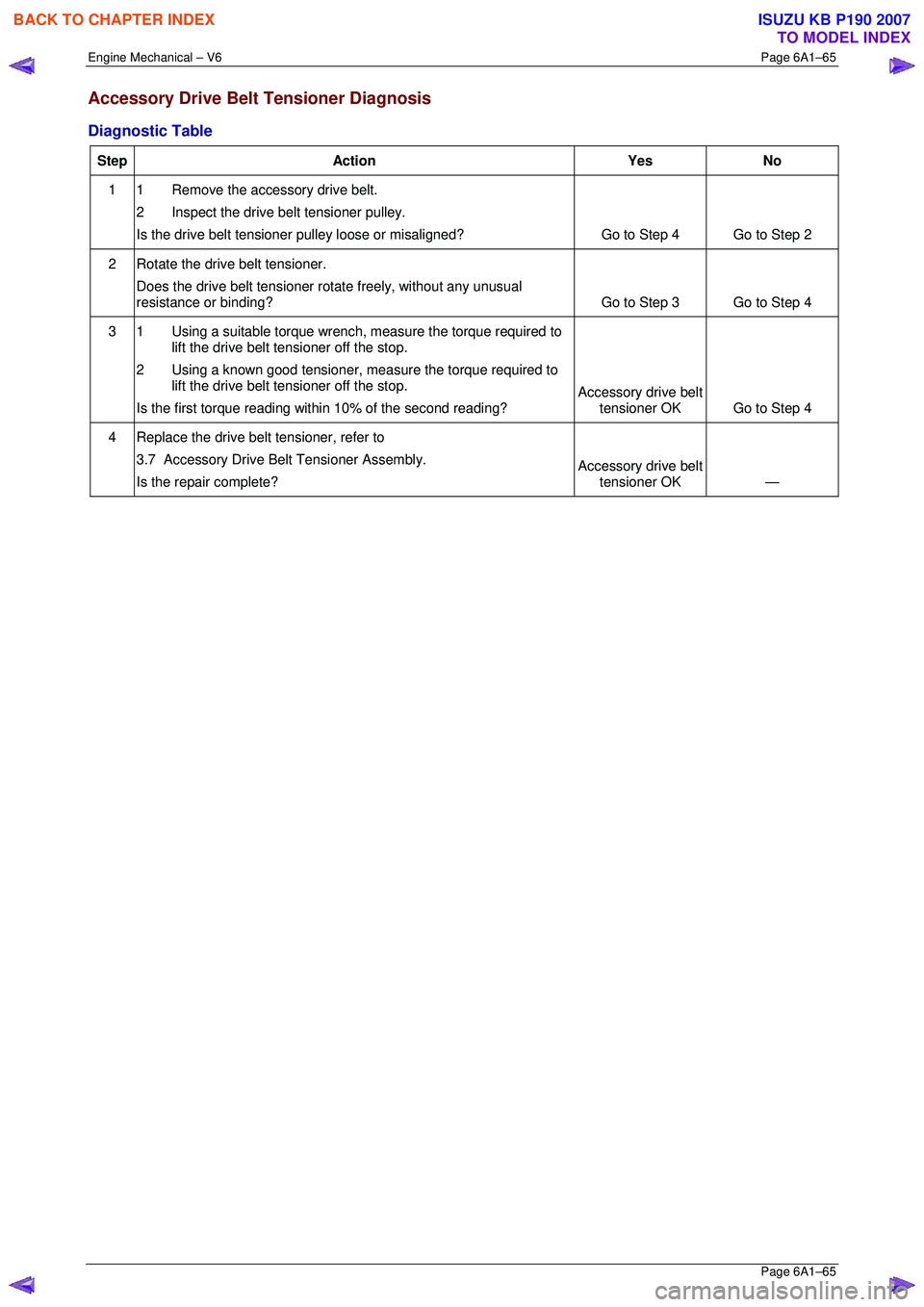
Accessory Drive Belt Tensioner Diagnosis
Diagnostic Table
Step Action Yes No
1 1 Remove the accessory drive belt.
2 Inspect the drive belt tensioner pulley.
Is the drive belt tensioner pulley loose or misaligned? Go to Step 4 Go to Step 2
2 Rotate the drive belt tensioner.
Does the drive belt tensioner ro tate freely, without any unusual
resistance or binding? Go to Step 3 Go to Step 4
3 1 Using a suitable torque wrench, measure the torque required to
lift the drive belt tensioner off the stop.
2 Using a known good tensioner, m easure the torque required to
lift the drive belt tensioner off the stop.
Is the first torque reading within 10% of the second reading? Accessory drive belt
tensioner OK Go to Step 4
4 Replace the drive belt tensioner, refer to
3.7 Accessory Drive Belt Tensioner Assembly.
Is the repair complete? Accessory drive belt
tensioner OK —
BACK TO CHAPTER INDEX
TO MODEL INDEX
ISUZU KB P190 2007
Page 2843 of 6020
Engine Mechanical – V6 Page 6A1–66
Page 6A1–66
3 Minor Service Operations
ATTENTION
The V6 engine is a combination of numerous components, containing machined, honed, polished and lapped
surfaces manufactured on the latest, high technology production equipment. Many of the components
contain tolerances measured in thousa ndths of a millimetre. Consequently, when any e ngine component is to
be serviced, care and cleanliness are extremely important.
Prior to re-assembly of the engine, all components mu st be cleaned and inspected in accordance with the
relevant clean and inspect procedur es throughout this Section, and repl aced or repaired where required.
In addition to cleaning and inspecting components, a liberal coating of engine oil should be applied to friction
surfaces during assembly to protect and lubr icate the surfaces on initial operation.
When performing any service operation, it should be understood that correct cleaning and protection of
machined surfaces and friction areas is part of the repair procedure. This is considered standard workshop
practice, even if not specifically stated. Torque va lues must be used as specified during reassembly to
ensure correct retention of all components.
Through out this section, fastener torque wrench sp ecifications may be accompanied with the following
identification marks:
■ Fasteners must be replaced after loosening.
Fasteners either have micro encapsulated sealant a pplied or incorporate a mechanical thread lock and
should only be re-used once. If in doubt, replacement is recommended.
If one of these identification marks is present alongs ide a fastener torque wrench specification, the
recommendation regarding that fastener must be adhered to.
3.1 Engine Oil
The procedure outlined below is typically the same for both rear wheel drive and all wheel drive vehicles.
Check
The following procedure is applicable to both rear wheel and all wheel drive vehicles
1 Run the engine to bring it to normal operating temperature.
2 Park the vehicle on a level surface. A vehicle that is not level will affect the accuracy of the level reading.
3 Stop the engine and wait 5 to 10 minutes to a llow the oil to drain back into the oil pan.
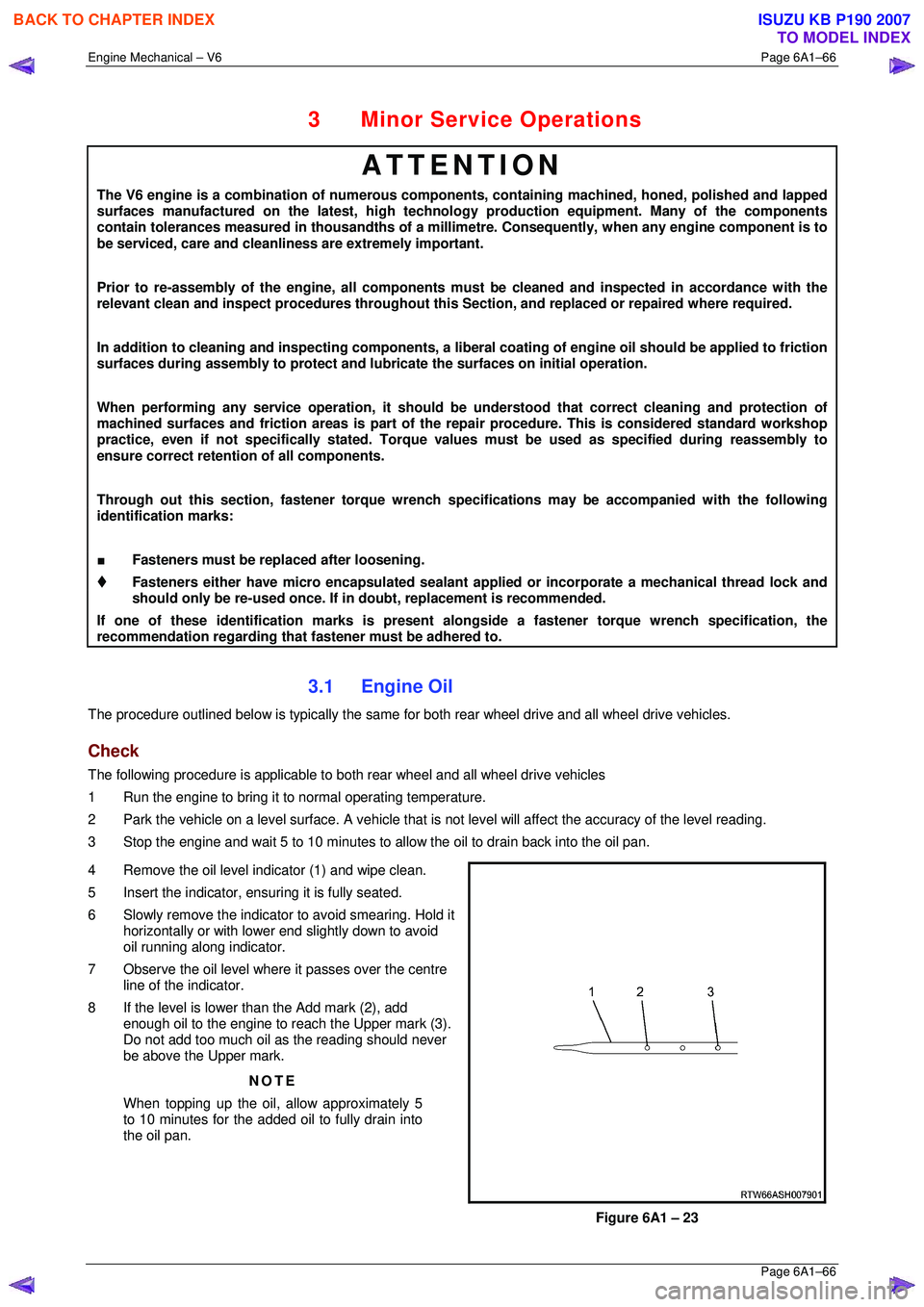
4 Remove the oil level indicator (1) and wipe clean.
5 Insert the indicator, ens uring it is fully seated.
6 Slowly remove the indicator to avoid smearing. Hold it horizontally or with lower end slightly down to avoid
oil running along indicator.
7 Observe the oil level where it passes over the centre
line of the indicator.
8 If the level is lower than the Add mark (2), add enough oil to the engine to reach the Upper mark (3).
Do not add too much oil as the reading should never
be above the Upper mark.
NOTE
When topping up the oil, allow approximately 5
to 10 minutes for the added oil to fully drain into
the oil pan.
Figure 6A1 – 23
BACK TO CHAPTER INDEX
TO MODEL INDEX
ISUZU KB P190 2007
Page 2844 of 6020

Engine Mechanical – V6 Page 6A1–67
Page 6A1–67
Replace
NOTE
• Quicker and more complete draining will
occur if the engine oil is at normal operating
temperature. However, care must be taken to
avoid scalding from the hot oil.
• It recommended the oil filter be changed at
each engine oil change, refer to 3.2 Oil Filter.
1 Remove the oil fill cap.
2 To ensure complete draining of the oil pan, raise the front and rear of the vehicle to maintain a level attitude. If not
using a hoist, support the vehicle with safety stands, refer to Section 0A General Information.
3 Clean any foreign material from around the oil drain pl ug and place a suitable, clean drain tray under the engine.
The oil may be hot. Avoid contact with the oil.
Ensure that eyes and skin are protected.
4 Remove the drain plug (1), taking care to avoid sca lding from the hot oil. Allow the oil to drain.
5 Clean and inspect the drain plug threads . If damaged, replace the drain plug.
Figure 6A1 – 24
6 Once the oil has completely drained, reinstall the dr ain plug and tighten to the correct torque specification.
Oil pan drain plug
torque specificat ion ............................................ 25.0 Nm
7 Replace the oil filter, refer to 3.2 Oil Filter.
8 Lower the vehicle to the ground and fill with the specified amount of SAE 5W30 lubricant.
Engine Oil Capacity:
With Oil Filter Change........................................6.5 litres
9 Install the oil fill cap.
10 Start the engine and check for leaks.
BACK TO CHAPTER INDEX
TO MODEL INDEX
ISUZU KB P190 2007