ECU ISUZU KB P190 2007 Workshop Repair Manual
[x] Cancel search | Manufacturer: ISUZU, Model Year: 2007, Model line: KB P190, Model: ISUZU KB P190 2007Pages: 6020, PDF Size: 70.23 MB
Page 5664 of 6020
SUPPLEMENTAL RESTRAINT SYSTEM 9A-29
5. Strip 13 mm (1/2 inch) of insulation from the yellow
– green and yellow – black wire lead of the
connector.
6. Cut two 900 cm (30 feet) deployment wires from 0.8 mm
2 (18 gauge) or thicker multi–strand wire.
These wires will be used to fabricate the drive
r
deployment harness.
7. Strip 13 mm (1/2 inch) of insulation from both ends of the wires cut in the previous step.
8. Short the wires by twisting together one end from each. Deployment wires shall remain shorted and
not be connected to a power source until the ai
r
bag is to be deployed.
WARNING: FAILURE TO FOLLOW PROCEDURES
IN THE ORDER LISTED COULD RESULT IN
PERSONAL INJURY. NEVER CONNECT
DEPLOYMENT WIRES TO ANY POWER SOURCE
BEFORE CONNECTING DEPLOYMENT WIRES TO
THE AIR BAG ASSEMBLY LEADS. DEPLOYMENT
WIRES SHALL REMAIN SHORTED AND NOT BE
CONNECTED TO A POWER SOURCE UNTIL THE
AIR BAG IS TO BE DEPLOYED. THE AIR BAG
ASSEMBLY WILL IMMEDIATELY DEPLOY THE AIR
BAG WHEN A POWER SOURCE IS CONNECTED
TO IT. WEAR SAFETY GLASSES THROUGHOUT
THIS ENTIRE DEPLOYMENT AND DISPOSAL
PROCEDURE.
9. Twist together one connector wire lead to one deployment wire. The connection should be
mechanically secure.
10. Bend the twisted connection made in the previous step flat and wrap it tightly with electrical tape to
insulate and secure.
11. Twist together, bend and tape the remaining connector wire lead to the remaining deployment
wire.
12. Connect the deployment harness to the driver ai
r
bag assembly yellow connector at the base of the
steering column. Route the deployment harness
out through the driver’s side of the vehicle.
WARNING: DEPLOYMENT WIRES SHALL REMAIN
SHORTED AND NOT BE CONNECTED TO
A
POWER SOURCE UNTIL THE AIR BAG IS TO BE
DEPLOYED.
THE AIR BAG ASSEMBLY WILL IMMEDIATELY
DEPLOY THE AIR BAG WHEN A POWER SOURCE
IS CONNECTED TO IT.
Connecting the deployment wires to the powe
r
source should always be the final step in the ai
r
bag assembly deployment procedure.
Failure to follow procedures in the order listed
could result in personal injury.
13. Disconnect the passenger air bag assembly yello
w
connector located behind the glove box assembly.
14. Cut the passenger air bag assembly harness
connector from the vehicle leaving at least 15 cm
(six inches) of wire at the connector.
15. Strip 13 mm (1/2 inch) of insulation from the blue– white and pink–blue wire lead of the connector.
16. Cut two 900 cm (30 feet) deployment wires from 0.8 mm
2 (18 gauge) or thicker multi–strand wire.
These wires will be used to fabricate the
passenger deployment harness.
17. Strip 13 mm (1/2 inch) of insulation from both ends of the wires cut in the previous step.
18. Short the wires by twisting together one end from each. The deployment wires shall remain shorted
and not be connected to a power source until the
air bag is to be deployed.
WARNING: FAILURE TO FOLLOW PROCEDURES
IN THE ORDER LISTED COULD RESULT IN
PERSONAL INJURY. NEVER CONNECT
DEPLOYMENT WIRES TO ANY POWER SOURCE
BEFORE CONNECTING DEPLOYMENT WIRES TO
THE AIR BAG ASSEMBLY LEADS. DEPLOYMENT
WIRES SHALL REMAIN SHORTED AND NOT BE
CONNECTED TO A POWER SOURCE UNTIL THE
AIR BAG IS TO BE DEPLOYED. THE AIR BAG
ASSEMBLY WILL IMMEDIATELY DEPLOY THE AIR
BAG WHEN A POWER SOURCE IS CONNECTED
TO IT. WEAR SAFETY GLASSES THROUGHOUT
THIS ENTIRE DEPLOYMENT AND DISPOSAL
PROCEDURE.
19. Twist together one connector wire lead to one deployment wire. The connection should be
mechanically secure.
20. Bend the twisted connection made in the previous step flat and wrap it tightly with electrical tape to
insulate and secure.
21. Twist together, bend and tape the remaining connector wire lead to the remaining deployment
wire.
22. Connect the deployment harness to the passenge
r
air bag assembly yellow connector located behind
the glove box assembly. Route the deployment
harness out through the passenger side of the
vehicle.
WARNING: DEPLOYMENT WIRES SHALL REMAIN
SHORTED AND NOT BE CONNECTED TO
A
POWER SOURCE UNTIL THE AIR BAG IS TO BE
DEPLOYED. THE AIR BAG ASSEMBLY WILL
IMMEDIATELY DEPLOY THE AIR BAG WHEN
A
POWER SOURCE IS CONNECTED TO IT.
CONNECTING THE DEPLOYMENT WIRES
SHOULD ALWAYS BE THE FINAL STEP IN THE
AIR BAG ASSEMBLY DEPLOYMENT PROCEDURE.
FAILURE TO FOLLOW PROCEDURES IN THE
ORDER LISTED COULD RESULT IN PERSONAL
INJURY.
BACK TO CHAPTER INDEX TO MODEL INDEXISUZU KB P190 2007
Page 5695 of 6020

RESTRAINT CONTROL SYSTEM 9A1-13
Chart B “SRS” warning lamp comes “ON” Steady
Step Action Yes No
1
1. W hen measurements are requested in this chart use a 5-
8840-0366-0DMM with correct terminal adapter from 5-8840-
0385-0.
2. Ignition switch is at “LOCK”.
3. Connect the scan tool to the data link connector, following
directions as given in the scan tool instruction MANUAL.
4. Ignition switch is “ON”.
5. Request the SRS diagnostic trouble code display.
Does the scan tool indicate “No Data Received”? Go to Step 2 Go to Step 3
2
1. Ignition switch is at “LOCK”.
2. Inspect the SRS control unit harness connector connection to
the SRS control unit.
Is it securely connected to the SRS control unit? Ignition switch
“LOCK”.
Replace SRS control unit.
Go to Step 5 Connect SRS
control unit
securely to de–
activate shorting
clip in SRS control unit harness connector.
Go to Step 5
3 Using scan tool, request the SRS data list.
Is “ignition” more than 9 volts? Go to Step 4 Ignition switch
“LOCK”.
Replace SRS control unit.
Go to Step 5
4
1. Ignition switch is at “LOCK”.
2. Disconnect the SRS coil and the passenger air bag assembly
yellow connector located at the base of the steering column
and behind the glove box assembly.
Disconnect the SRS control unit.
3. Disconnect the connector of the “SRS W arning Lamp” on the
instrument cluster.
4. Measure the resistance on the SRS control unit harness connector as follow.
z From terminals "3" and "23" to ground (ground) (without
the pretensioner)
z From terminals "3" and "15" to ground (ground) (with the
pretensioner and the passenger air bag)
z From terminals "3", "12" and "15" to ground (with the
pretensioner and without the passenger air bag)
Does 5-8840-0366-0DMM display “OL” (Infinite)? Go to Chart A Replace SRS
harness.
Go to Step 5
5 Reconnect all SRS components and ensure all components are
properly mounted.
Is this step finished? Repeat the “SRS
Diagnostic System Check” —
BACK TO CHAPTER INDEX
TO MODEL INDEX
ISUZU KB P190 2007
Page 5761 of 6020
CAB 10-3
RUW 5A0SH002901
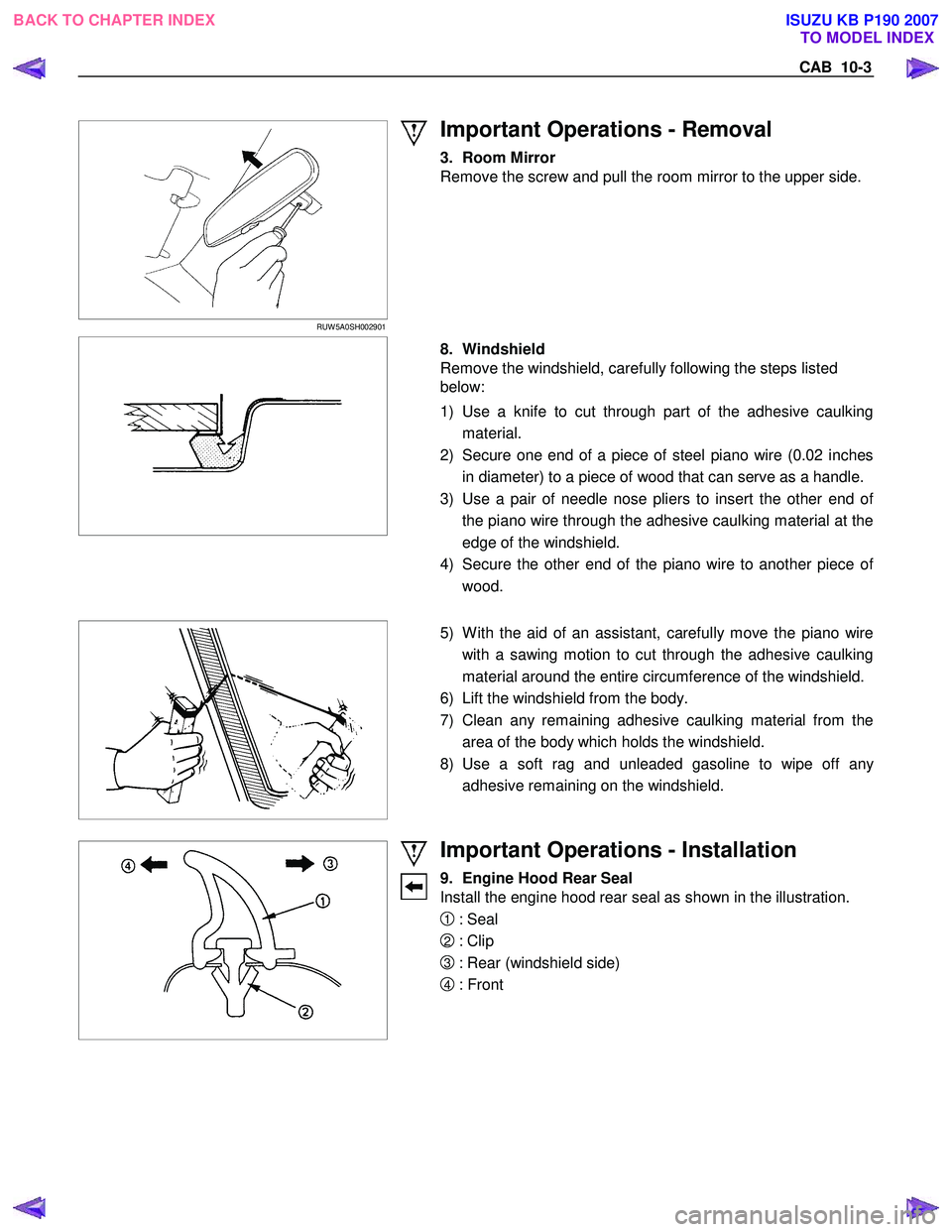
Important Operations - Removal
3. Room Mirror
Remove the screw and pull the room mirror to the upper side.
8. Windshield
Remove the windshield, carefully following the steps listed
below:
1) Use a knife to cut through part of the adhesive caulking material.
2) Secure one end of a piece of steel piano wire (0.02 inches in diameter) to a piece of wood that can serve as a handle.
3) Use a pair of needle nose pliers to insert the other end o
f
the piano wire through the adhesive caulking material at the
edge of the windshield.
4) Secure the other end of the piano wire to another piece o
f
wood.
5) W ith the aid of an assistant, carefully move the piano wire
with a sawing motion to cut through the adhesive caulking
material around the entire circumference of the windshield.
6) Lift the windshield from the body.
7) Clean any remaining adhesive caulking material from the area of the body which holds the windshield.
8) Use a soft rag and unleaded gasoline to wipe off an
y
adhesive remaining on the windshield.
Important Operations - Installation
9. Engine Hood Rear Seal
Install the engine hood rear seal as shown in the illustration.
1 : Seal
2 : Clip
3 : Rear (windshield side)
4 : Front
BACK TO CHAPTER INDEX TO MODEL INDEX
ISUZU KB P190 2007
Page 5765 of 6020
CAB 10-7
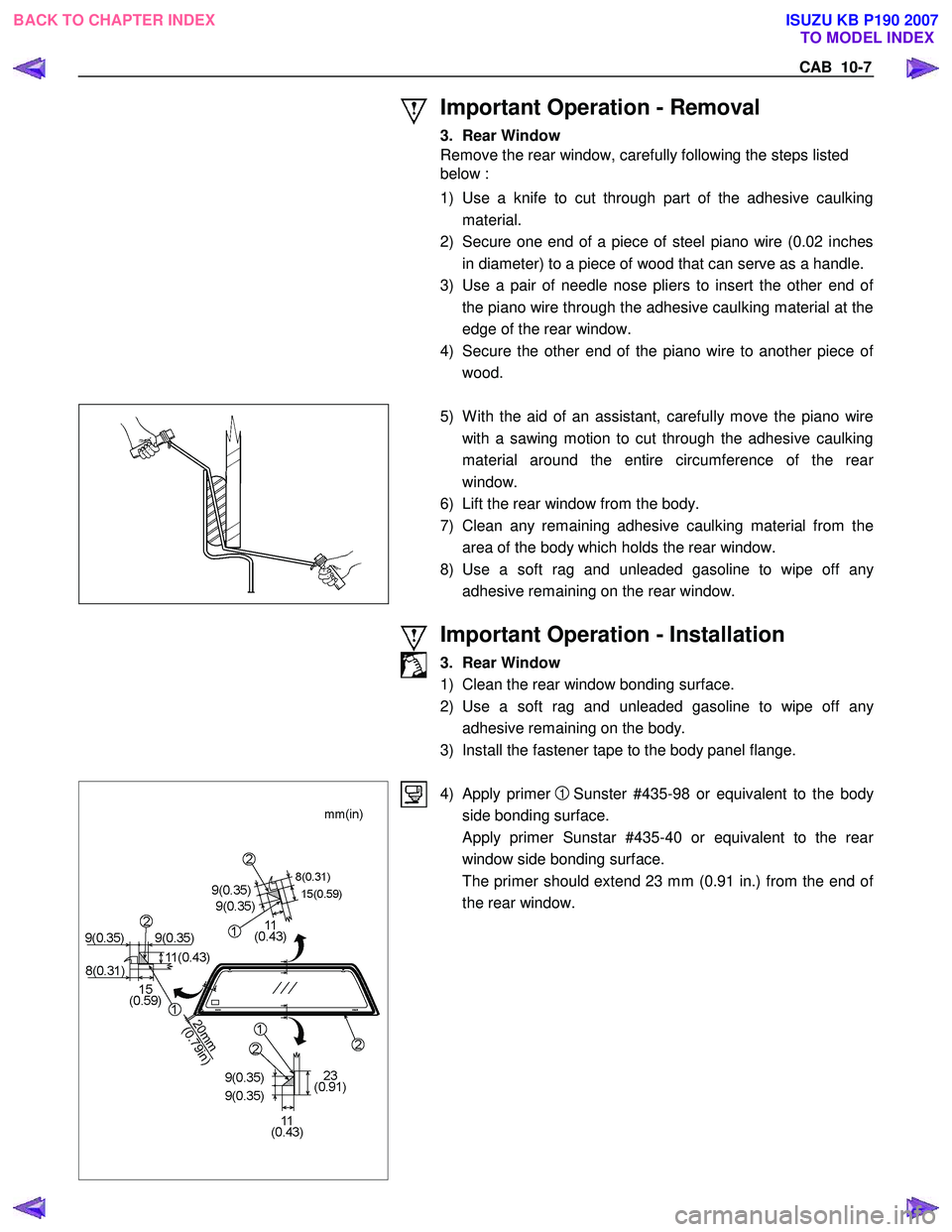
Important Operation - Removal
3. Rear Window
Remove the rear window, carefully following the steps listed
below :
1) Use a knife to cut through part of the adhesive caulking material.
2) Secure one end of a piece of steel piano wire (0.02 inches in diameter) to a piece of wood that can serve as a handle.
3) Use a pair of needle nose pliers to insert the other end o
f
the piano wire through the adhesive caulking material at the
edge of the rear window.
4) Secure the other end of the piano wire to another piece o
f
wood.
5) W ith the aid of an assistant, carefully move the piano wire
with a sawing motion to cut through the adhesive caulking
material around the entire circumference of the rea
r
window.
6) Lift the rear window from the body.
7) Clean any remaining adhesive caulking material from the area of the body which holds the rear window.
8) Use a soft rag and unleaded gasoline to wipe off an
y
adhesive remaining on the rear window.
Important Operation - Installation
3. Rear Window
1) Clean the rear window bonding surface.
2) Use a soft rag and unleaded gasoline to wipe off an
y
adhesive remaining on the body.
3) Install the fastener tape to the body panel flange.
4) Apply primer 1 Sunster #435-98 or equivalent to the body
side bonding surface.
Apply primer Sunstar #435-40 or equivalent to the rea
r
window side bonding surface.
The primer should extend 23 mm (0.91 in.) from the end o
f
the rear window.
BACK TO CHAPTER INDEX TO MODEL INDEX
ISUZU KB P190 2007
Page 5851 of 6020
Immobilizer Control System(4jk1/4jj1/hfv6)...................................................................5962 PAGE
Immobilizer System(C24se,4ja1-t)..................................................................................6010
S ection 11B Antitheft System.........................................................................................6066
SECTION 11
TA BLE OF CONTENTS
SECURITY
SECURITY 11-1
TO MODEL INDEX
BACK TO MAIN INDEX
ISUZU KB P190 2007
Page 5859 of 6020
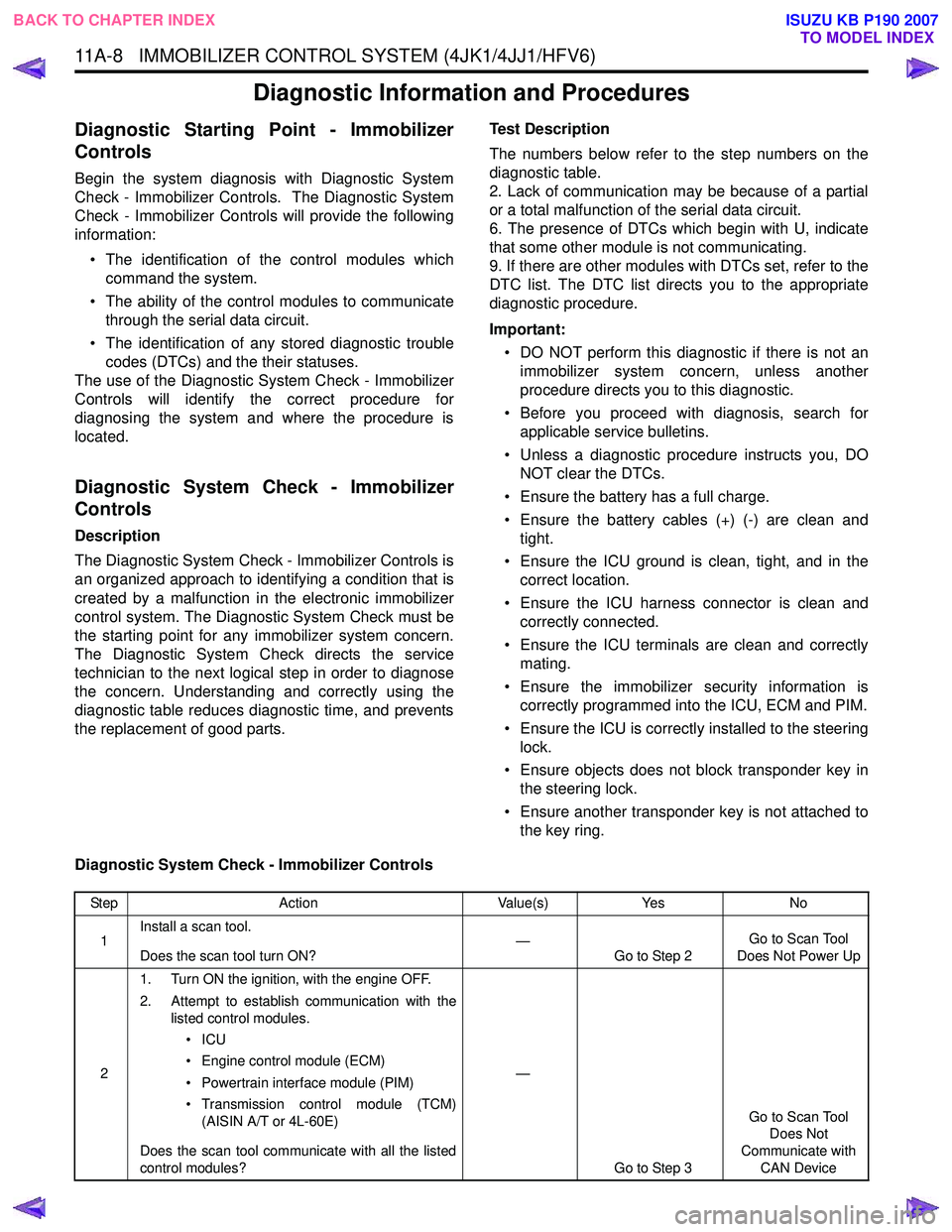
11A-8 IMMOBILIZER CONTROL SYSTEM (4JK1/4JJ1/HFV6)
Diagnostic Information and Procedures
Diagnostic Starting Point - Immobilizer
Controls
Begin the system diagnosis with Diagnostic System
Check - Immobilizer Controls. The Diagnostic System
Check - Immobilizer Controls will provide the following
information:
• The identification of the control modules which command the system.
• The ability of the control modules to communicate through the serial data circuit.
• The identification of any stored diagnostic trouble codes (DTCs) and the their statuses.
The use of the Diagnostic System Check - Immobilizer
Controls will identify the correct procedure for
diagnosing the system and where the procedure is
located.
Diagnostic System Check - Immobilizer
Controls
Description
The Diagnostic System Check - Immobilizer Controls is
an organized approach to identifying a condition that is
created by a malfunction in the electronic immobilizer
control system. The Diagnostic System Check must be
the starting point for any immobilizer system concern.
The Diagnostic System Check directs the service
technician to the next logical step in order to diagnose
the concern. Understanding and correctly using the
diagnostic table reduces diagnostic time, and prevents
the replacement of good parts. Test Description
The numbers below refer to the step numbers on the
diagnostic table.
2. Lack of communication may be because of a partial
or a total malfunction of the serial data circuit.
6. The presence of DTCs which begin with U, indicate
that some other module is not communicating.
9. If there are other modules with DTCs set, refer to the
DTC list. The DTC list directs you to the appropriate
diagnostic procedure.
Important: • DO NOT perform this diagnostic if there is not an immobilizer system concern, unless another
procedure directs you to this diagnostic.
• Before you proceed with diagnosis, search for applicable service bulletins.
• Unless a diagnostic procedure instructs you, DO NOT clear the DTCs.
• Ensure the battery has a full charge.
• Ensure the battery cables (+) (-) are clean and tight.
• Ensure the ICU ground is clean, tight, and in the correct location.
• Ensure the ICU harness connector is clean and correctly connected.
• Ensure the ICU terminals are clean and correctly mating.
• Ensure the immobilizer security information is correctly programmed into the ICU, ECM and PIM.
• Ensure the ICU is correctly installed to the steering lock.
• Ensure objects does not block transponder key in the steering lock.
• Ensure another transponder key is not attached to the key ring.
Diagnostic System Check - Immobilizer Controls
Step Action Value(s)Yes No
1 Install a scan tool.
Does the scan tool turn ON? —
Go to Step 2 Go to Scan Tool
Does Not Power Up
2 1. Turn ON the ignition, with the engine OFF.
2. Attempt to establish communication with the listed control modules.
•ICU
• Engine control module (ECM)
• Powertrain interface module (PIM)
• Transmission control module (TCM) (AISIN A/T or 4L-60E)
Does the scan tool communicate with all the listed
control modules? —
Go to Step 3 Go to Scan Tool
Does Not
Communicate with CAN Device
BACK TO CHAPTER INDEX TO MODEL INDEX
ISUZU KB P190 2007
Page 5861 of 6020

11A-10 IMMOBILIZER CONTROL SYSTEM (4JK1/4JJ1/HFV6)
Scan Tool Data List
The Immobilizer Scan Tool Data List contains all
immobilizer related parameters that are available on
the scan tool. Use the Immobilizer Scan Tool Data List
only after the following is determined:
• The Immobilizer Controls - Diagnostic System Check is completed. • On-board diagnostics are functioning properly.
A scan tool that displays faulty data should not be used.
Use of a faulty scan tool can result in misdiagnosis and
unnecessary parts replacement.
Only the parameters listed below are referenced in this
service manual for use in diagnosis.
Scan Tool Data Definitions
This information will assist in immobilizer problems.
Always perform the Diagnostic System Check -
Immobilizer Controls first. The Diagnostic System
Check will confirm proper system operation.
Ignition Status
This parameter displays the state of the ignition switch
input to the ICU. On indicates the ignition switch is
turned ON position.
Transponder Key
This parameter displays the state of the transponder
key in the steering lock. Transponder Key 1 to 5
indicates a correctly programmed transponder key is
used. The number 1 to 5 indicates which transponder
key is used. Invalid indicates an incorrect key is in
used. Not Programmed Key indicates a non-
programmed new transponder key is used. No
Transponder Key indicates ICU does not recognize a
transponder key. Transponder Status
This parameter displays the state of the transponder
key in the steering lock. Correct Transponder-Key
indicates a correctly programmed transponder key is
used. Wrong Transponder-Key indicates an incorrect
key is in used. New Transponder-Key indicates a non-
programmed new transponder key is used. No
Transponder Detected indicates ICU does not
recognize a transponder key.
Transponder-Key 1 to 5 Status
This parameter displays the state of number of
programmed transponder key(s). Programmed
indicates transponder key 1 to 5 is correctly
programmed. The number 1 to 5 indicates programmed
order.
Security Code Programmed
This parameter displays the state of the security code
programming. Yes indicates a security code is correctly
programmed. No indicates a security code is not
programmed.
Scan Tool Parameter Units DisplayedTypical Data Value
Operating Conditions: Ignition switch ON/ Two transponder keys programmed
Ignition Status On/ OffOn
Transponder Key Transponder Key 1 to 5/ Invalid/ Not
Programmed Key/ No Transponder Key Transponder Key 1 or 2
Transponder Status Correct Transponder-Key/ Wrong
Transponder-Key/ New Transponder- Key/ No Transponder Detected Correct Transponder-Key
Transponder-Key 1 Status Programmed/ Not Programmed Programmed
Transponder-Key 2 Status Programmed/ Not Programmed Programmed
Transponder-Key 3 Status Programmed/ Not Programmed Not Programmed
Transponder-Key 4 Status Programmed/ Not Programmed Not Programmed
Transponder-Key 5 Status Programmed/ Not Programmed Not Programmed
Security Code Programmed Yes/ NoYes
Security Wait Time Inactive/ Time (hour: minute: second) Inactive
While Security Lock Inactive/ Active Inactive
BACK TO CHAPTER INDEX
TO MODEL INDEX
ISUZU KB P190 2007
Page 5862 of 6020

IMMOBILIZER CONTROL SYSTEM (4JK1/4JJ1/HFV6) 11A-11
Security Wait Time
This parameter displays the security wait time length in
the ICU. Inactive indicates not in security wait time.
Time indicates under security wait time. This wait time
stage will prevent any further attempts to enter the
security code until the wait time has elapsed. The wait
time will increase each time an incorrect security code
is entered. Note that this parameter is not count
downed. It keeps displaying the same time until that
wait time has elapsed. The ignition switch must be kept
at ON position during the wait time period.
While Security Lock
This parameter displays the state of the security wait
time. Inactive indicates not in security wait time. Active
indicates under security wait time.
BACK TO CHAPTER INDEX TO MODEL INDEX
ISUZU KB P190 2007
Page 5872 of 6020

IMMOBILIZER CONTROL SYSTEM (4JK1/4JJ1/HFV6) 11A-21
Diagnostic Trouble Code (DTC) List
DTCDTC Descriptor
B0001 Replace Electronic Control Unit (ECU)
B0002 Immobilizer Not Programmed
B0003 Transponder Key Problem
B0004 Immobilizer Coil Circuit
B0007 No Engine Request Received
B0008 Wrong Transponder Key
B0009 No Transponder Key Programmed
B0010 Unknown Transponder Key
B0012 Default Transponder Detected
B0013 Previously Erased Transponder
B0014 Secret Key Error
U0100 Lost Communication With ECM
BACK TO CHAPTER INDEX TO MODEL INDEX
ISUZU KB P190 2007
Page 5873 of 6020

11A-22 IMMOBILIZER CONTROL SYSTEM (4JK1/4JJ1/HFV6)
DTC B0001
Description
This diagnostic applies to internal microprocessor
integrity conditions within the ICU.
Condition for Setting the DTC • The ECM detects a faulty writing in its internal electrically erasable & programmable read only
memory (EEPROM). Action Taken When the DTC Sets
• The engine will fail to run if the fault occurs before starting the engine.
Condition for Clearing the DTC • A current DTC clears once ignition cycle has occurred without the fault recurring.
• A history DTC will clear after 50 consecutive ignition cycles, if the condition for malfunction is no
longer present.
• Use a scan tool to clear the DTC.
Circuit/ System Testing DTC B0001
Step Action Value(s)Yes No
1 Did you perform the Diagnostic System Check -
Immobilizer Controls? —
Go to Step 2 Go to Diagnostic
System Check - Immobilizer
Controls
2 1. Install a scan tool.
2. Turn OFF the ignition for 30 seconds.
3. Turn ON the ignition, with the engine OFF.
4. Monitor the DTC Information with a scan tool.
Does the DTC fail this ignition? —
Go to Step 3 Go to Step 4
3 Important
: Replacement ICU must be
programmed.
Replace the ICU. Refer to ICU Replacement.
Did you complete the replacement? —
Go to Step 4
—
41. Clear the DTCs with a scan tool.
2. Turn OFF the ignition for 30 seconds.
3. Turn ON the ignition.
Did the DTC fail this ignition? —
Go to Step 3 Go to Step 5
5 Observe the DTC Information with a scan tool.
Are there any DTCs that you have not diagnosed? —
Go to DTC List System OK
BACK TO CHAPTER INDEX
TO MODEL INDEX
ISUZU KB P190 2007