charging ISUZU KB P190 2007 Workshop Manual PDF
[x] Cancel search | Manufacturer: ISUZU, Model Year: 2007, Model line: KB P190, Model: ISUZU KB P190 2007Pages: 6020, PDF Size: 70.23 MB
Page 2162 of 6020

6D3-14 STARTING AND CHARGING SYSTEM
7. To remove the pulley, mount an 8mm Allen key in the vice
with the short end upwards, place a 24mm ring spanner on
the puley nut, position the internal hexagon of the roto
r
shaft onto the Allen ken, loosen the nut and remove the
pulley.
Note: the pulley has an integral boss which locks up against
the bearing,
therefore no thrust collar is provided.
8. Removing the rotor assembly. Remove the four retaining screws from the drive end housing, withdraw the roto
r
complete with the bearing.
Note: the rotor must not be pressed from the drive end housing
using a press as the bearing retaining plate and drive end
housing will be damaged or distorted. Parts removed in this
way must be replaced if the integrity of the generator is to be
maintained.
9. Remove the drive end bearing from the rotor shaft using a
chuck type puler, take care not to distort the fan assembl
y
during this process.
10. Remove the slipring end bearing using the same meghod as in 9.
Clean
Thoroughly clean all components except the rotor and stator
with an approved cleaning agent. Ensure that all traced of oil
and dirt are removed. If an abrasive cleaner is used to remove
scale and paint from the housings take care not to abrade the
bearing and mounting spigot surfaces. The rotor and stator
must be cleaned with compressed air only, the use of solvents
could cause damage to the insulating materials.
Inspection
1. Rectifier assembly
The following test equipment is required.
The recitifier assembly is not repairable and must be replaced
if a faulty diode is detected during inspection.
(a)
Adiode tester where the DC output at the test probes does
not exceed 14 volts or in the case of AC testers 12 volts
RMS. This is to ensue that when inspection rectifiers fitted
with zener power diodes the forward and reverse checks
are completer and are not masked by the diode turning on
due to the zener breakdown voltage.
(b) A zenere diode tester with a DC output in excess of 30 volts, the tester should also incorporate internal current
limiting set to 5 Ma. to prevent high currents during
inspection.
(c) Diodes can be destroyed during service due to high temperature and overload, open circuits are usually a result
of excessive voltage.
BACK TO CHAPTER INDEX
TO MODEL INDEX
ISUZU KB P190 2007
Page 2163 of 6020
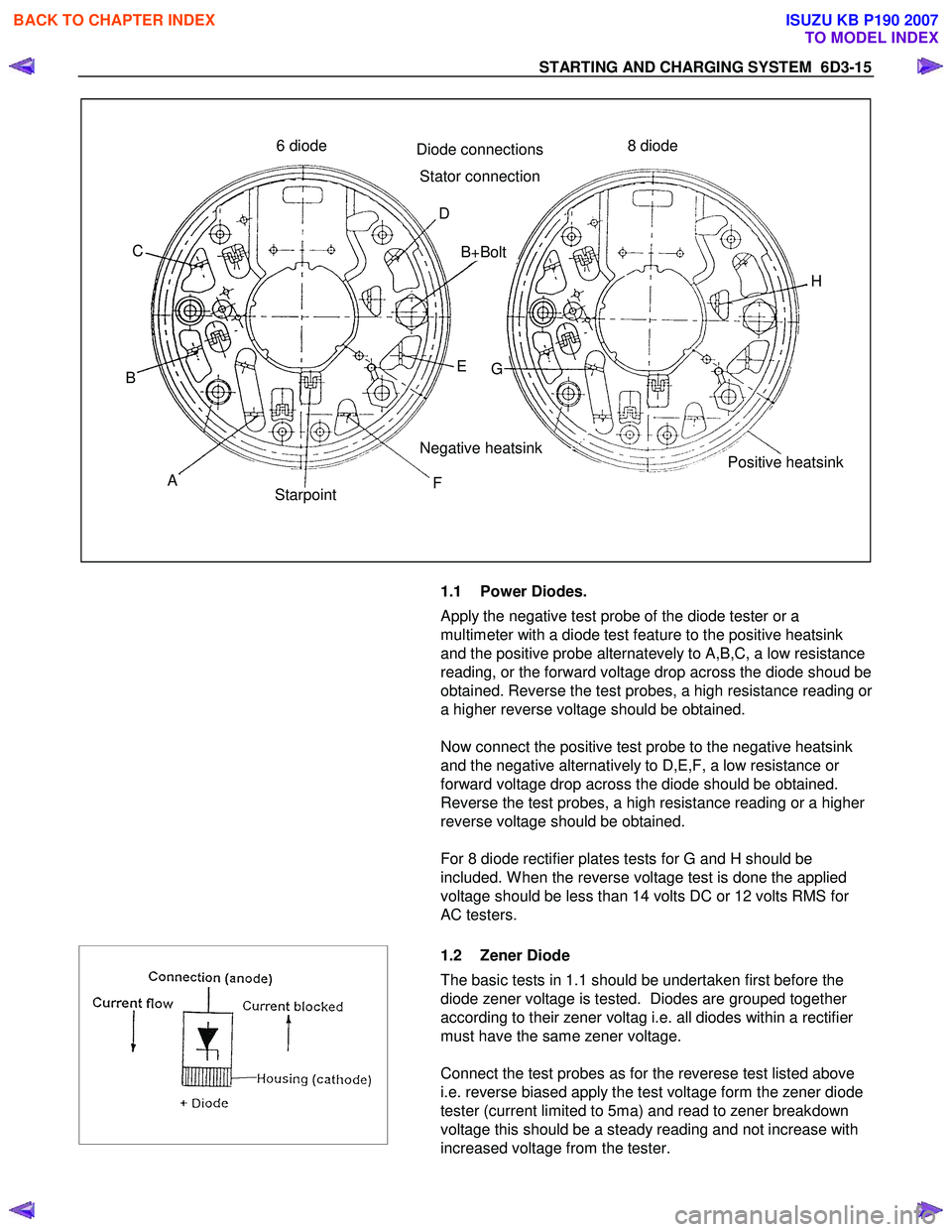
STARTING AND CHARGING SYSTEM 6D3-15
Positive heatsink
8 diode
6 diode
H
G
Negative heatsink
C
B A Starpoint FE
B+Bolt
D
Diode connections
Stator connection
1.1 Power Diodes.
Apply the negative test probe of the diode tester or a
multimeter with a diode test feature to the positive heatsink
and the positive probe alternatevely to A,B,C, a low resistance
reading, or the forward voltage drop across the diode shoud be
obtained. Reverse the test probes, a high resistance reading or
a higher reverse voltage should be obtained.
Now connect the positive test probe to the negative heatsink
and the negative alternatively to D,E,F, a low resistance or
forward voltage drop across the diode should be obtained.
Reverse the test probes, a high resistance reading or a higher
reverse voltage should be obtained.
For 8 diode rectifier plates tests for G and H should be
included. W hen the reverse voltage test is done the applied
voltage should be less than 14 volts DC or 12 volts RMS for
AC testers.
1.2 Zener Diode
The basic tests in 1.1 should be undertaken first before the
diode zener voltage is tested. Diodes are grouped together
according to their zener voltag i.e. all diodes within a rectifier
must have the same zener voltage.
Connect the test probes as for the reverese test listed above
i.e. reverse biased apply the test voltage form the zener diode
tester (current limited to 5ma) and read to zener breakdown
voltage this should be a steady reading and not increase with
increased voltage from the tester.
BACK TO CHAPTER INDEX
TO MODEL INDEX
ISUZU KB P190 2007
Page 2164 of 6020
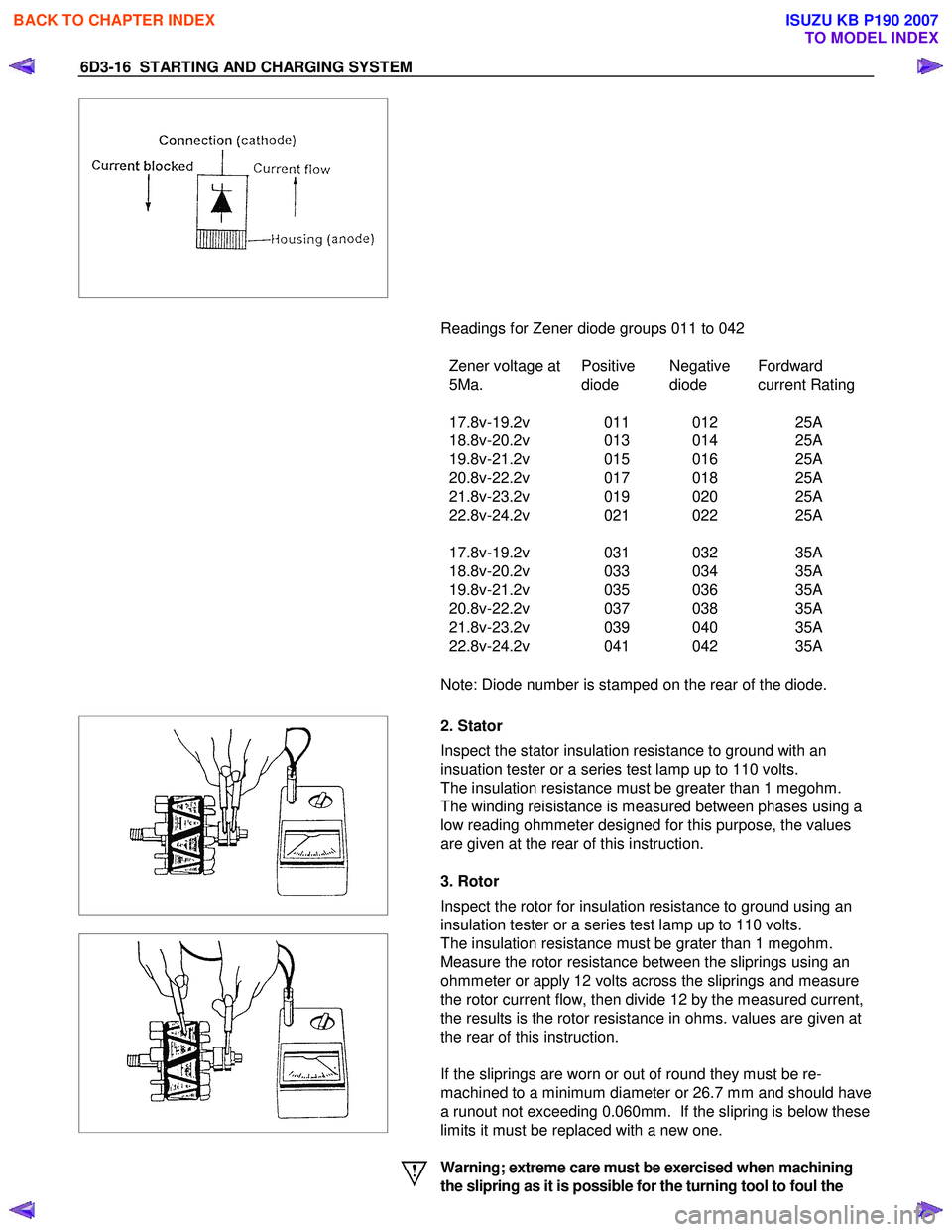
6D3-16 STARTING AND CHARGING SYSTEM
Readings for Zener diode groups 011 to 042
Zener voltage at
5Ma. Positive
diode Negative
diode Fordward
current Rating
17.8v-19.2v 011 012 25A
18.8v-20.2v 013 014 25A
19.8v-21.2v 015 016 25A
20.8v-22.2v 017 018 25A
21.8v-23.2v 019 020 25A
22.8v-24.2v 021 022 25A
17.8v-19.2v 031 032 35A
18.8v-20.2v 033 034 35A
19.8v-21.2v 035 036 35A
20.8v-22.2v 037 038 35A
21.8v-23.2v 039 040 35A
22.8v-24.2v 041 042 35A
Note: Diode number is stamped on the rear of the diode.
2. Stator
Inspect the stator insulation resistance to ground with an
insuation tester or a series test lamp up to 110 volts.
The insulation resistance must be greater than 1 megohm.
The winding reisistance is measured between phases using a
low reading ohmmeter designed for this purpose, the values
are given at the rear of this instruction.
3. Rotor
Inspect the rotor for insulation resistance to ground using an
insulation tester or a series test lamp up to 110 volts.
The insulation resistance must be grater than 1 megohm.
Measure the rotor resistance between the sliprings using an
ohmmeter or apply 12 volts across the sliprings and measure
the rotor current flow, then divide 12 by the measured current,
the results is the rotor resistance in ohms. values are given at
the rear of this instruction.
If the sliprings are worn or out of round they must be re-
machined to a minimum diameter or 26.7 mm and should have
a runout not exceeding 0.060mm. If the slipring is below these
limits it must be replaced with a new one.
Warning; extreme care must be exercised when machining
the slipring as it is possible for the turning tool to foul the
BACK TO CHAPTER INDEX
TO MODEL INDEX
ISUZU KB P190 2007
Page 2165 of 6020

STARTING AND CHARGING SYSTEM 6D3-17
fan.
4. Replacing the brushes (inbuilt regulator)
Check the brushes for length, this is measured from the brush
holder to the end of the brush along it's centre line. Also
inspect for any sideways wear. If worn replace both brushes.
The minimum length is 3.8mm. Inspect the brush springs for
signs of corrosion or loss of tension or uneven tension.
Replacing the brushes, using a soldering iron apply heat to the
soldered joints on the rear of the brush holder of the regulator,
using a small lever prise up the retaining tabs to release the
brush lead and spring. Thread the new brush lead up the
brush holder along with the spring, pull the lead through the
tabs until the brush is protruding 12mm from the holder.
Bend down the tabs and solder the brush lead taking care not
to allow the solder to run up the lead which will reduce
flexibility. Use 60/40 resin cored solder.
5. Ball bearing
Please note the bearings used in this KCA generator are a
high
tolerance type, only fully sealed bearings of the same
specification are to be used as replacements. It is
recommended that the bearings be replaced during the
reconditioning process to restore the unit to original
specification.
6. Regulator
The regulator can only be tested when fitted into an altenator.
Warning: do not reverse"S" and "L" connections or put 12
volt supply to "L" terminal, this connection must not be
used as a supply source other than to supply the
requirements of the warning lamp 2(watts).
Such action will destroy the regulator warning lamp
circuit.
For test voltages refer to Generator output testing section.
See also additional information on regulator function earlier in
this instruction.
BACK TO CHAPTER INDEX
TO MODEL INDEX
ISUZU KB P190 2007
Page 2166 of 6020
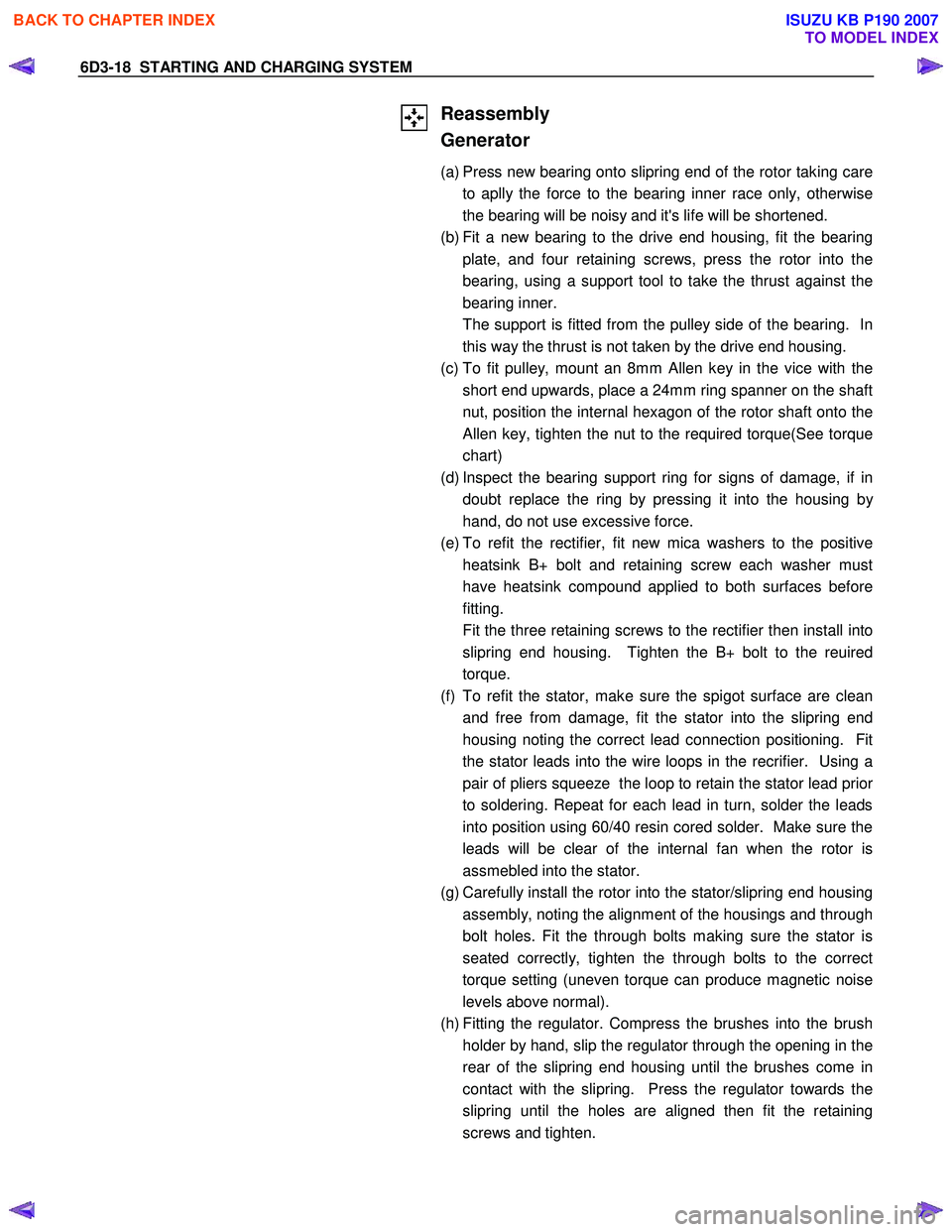
6D3-18 STARTING AND CHARGING SYSTEM
Reassembly
Generator
(a) Press new bearing onto slipring end of the rotor taking care to aplly the force to the bearing inner race only, otherwise
the bearing will be noisy and it's life will be shortened.
(b) Fit a new bearing to the drive end housing, fit the bearing plate, and four retaining screws, press the rotor into the
bearing, using a support tool to take the thrust against the
bearing inner.
The support is fitted from the pulley side of the bearing. In this way the thrust is not taken by the drive end housing.
(c) To fit pulley, mount an 8mm Allen key in the vice with the short end upwards, place a 24mm ring spanner on the shaft
nut, position the internal hexagon of the rotor shaft onto the
Allen key, tighten the nut to the required torque(See torque
chart)
(d) Inspect the bearing support ring for signs of damage, if in doubt replace the ring by pressing it into the housing b
y
hand, do not use excessive force.
(e) To refit the rectifier, fit new mica washers to the positive heatsink B+ bolt and retaining screw each washer must
have heatsink compound applied to both surfaces before
fitting.
Fit the three retaining screws to the rectifier then install into slipring end housing. Tighten the B+ bolt to the reuired
torque.
(f) To refit the stator, make sure the spigot surface are clean and free from damage, fit the stator into the slipring end
housing noting the correct lead connection positioning. Fit
the stator leads into the wire loops in the recrifier. Using a
pair of pliers squeeze the loop to retain the stator lead prior
to soldering. Repeat for each lead in turn, solder the leads
into position using 60/40 resin cored solder. Make sure the
leads will be clear of the internal fan when the rotor is
assmebled into the stator.
(g) Carefully install the rotor into the stator/slipring end housing assembly, noting the alignment of the housings and through
bolt holes. Fit the through bolts making sure the stator is
seated correctly, tighten the through bolts to the correct
torque setting (uneven torque can produce magnetic noise
levels above normal).
(h) Fitting the regulator. Compress the brushes into the brush holder by hand, slip the regulator through the opening in the
rear of the slipring end housing until the brushes come in
contact with the slipring. Press the regulator towards the
slipring until the holes are aligned then fit the retaining
screws and tighten.
BACK TO CHAPTER INDEX
TO MODEL INDEX
ISUZU KB P190 2007
Page 2167 of 6020

STARTING AND CHARGING SYSTEM 6D3-19
Inspection
Generator
Before any in field testing can be undertaken it is important
that the battery's conditions is established and the terminals
are clean and tight.
Check the condition of the generator drive belt and ensure that
it is adjusted in accordance with the engine manufacturer's
recommnedations.
Battery conditions:
Note: This assessment may be difficult with maintenance free
assemblies.
Test the specific gravity of the individual cells the readings
should be within 10 points of each other, it is recommended
that the average SG should be 1.260 or higher.
A load test should be carried out to determine the ability of the
battery to supply and accept current. This is a good indicator
as to the general condition of the battery.
A load equal to the normal starting current should be placed
across the battery, the duration of this load test should not
exceed 10 seconds, during this time the terminal voltage
across the battery should not drop below 9.6 volts. Observe
each cell for signs of excessive gas liberation, usuall an
indication of cell failure.
If the battery test is clear proceed with the Generator tests as
follows.
Care should be taken when making the following connections.
It is recommended that the battery negative terminal be
disconnected before the test meters are connected, and
reconnecting the negative terminal when the meters are
inserted into the circuit under test. The warning lamp in the D+
circuit should not exceed 2 watts.
Regulating voltage test on the vehicle.
Connect a voltmeter to the generator, the positive lead to the
B+ terminal and the nagative lead to the generator casing.
Select the voltage range to suit the system, i.e. 20v for 12 volt
sysytems or 40v for 24 volt systems. Connect an ammeter in
series with the main output cable from the B+ terminal on the
generator, the range selected must be capable of reading the
maximum output from the generator.
Note the voltmeter reading before starting the engine. This
reading should increase when the engine is running indicating
generator output, start the engine and increase the engine
speed until the generator is running at 4000 rpm, switch on
vehicle loads of 5-10 A is indcated on the ammeter, the
voltmeter shoud read 14.0-14.2 v for a 12 volt system, for a 24
volt system the readings should be 5-10 A and 27.7-28.5 volts.
BACK TO CHAPTER INDEX
TO MODEL INDEX
ISUZU KB P190 2007
Page 2168 of 6020
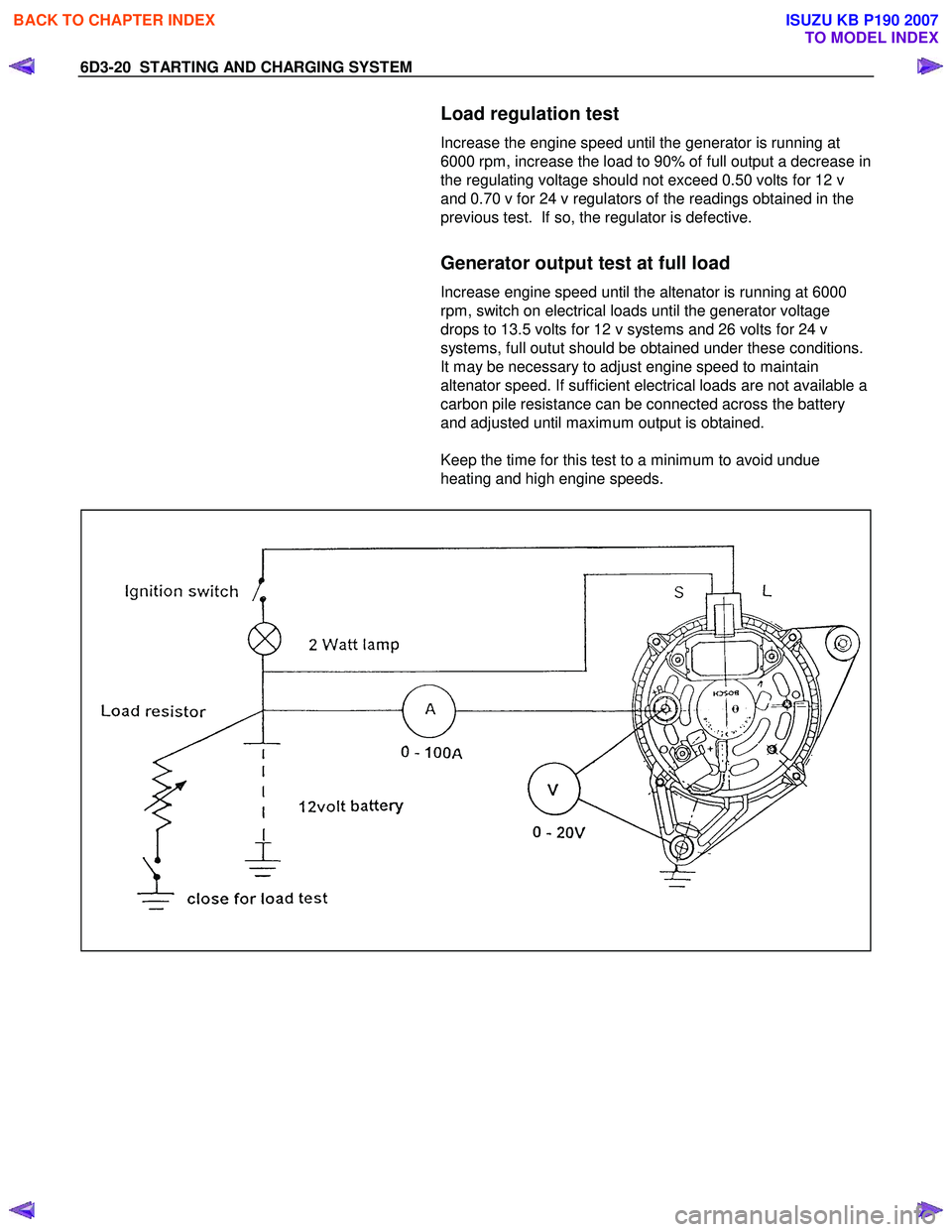
6D3-20 STARTING AND CHARGING SYSTEM
Load regulation test
Increase the engine speed until the generator is running at
6000 rpm, increase the load to 90% of full output a decrease in
the regulating voltage should not exceed 0.50 volts for 12 v
and 0.70 v for 24 v regulators of the readings obtained in the
previous test. If so, the regulator is defective.
Generator output test at full load
Increase engine speed until the altenator is running at 6000
rpm, switch on electrical loads until the generator voltage
drops to 13.5 volts for 12 v systems and 26 volts for 24 v
systems, full outut should be obtained under these conditions.
It may be necessary to adjust engine speed to maintain
altenator speed. If sufficient electrical loads are not available a
carbon pile resistance can be connected across the battery
and adjusted until maximum output is obtained.
Keep the time for this test to a minimum to avoid undue
heating and high engine speeds.
BACK TO CHAPTER INDEX
TO MODEL INDEX
ISUZU KB P190 2007
Page 2169 of 6020

STARTING AND CHARGING SYSTEM 6D3-21
Technical Data
(mm)
Brush wear - Minimum Length 3.8
Sliprings - Minimum Diameter 26.7
Sliprings - Trueness <0.06
Pole claws - Trueness <0.05(93.25 ±0.05)
Torque N.m(kgf⋅m)
Pulley retaining nut 54-68(5.5-6.9)
Capacitor retaining screw 2.7-3.8(0.3-0.4)
Capacitor whiz nut 1.5-2.2(0.1-0.2)
B+ terminal nut M8 7.5-8.5(0.8-0.9)
B+ terminal rectifier nut 6.0-7.5(0.6-0.8)
Regulator retaining screw 1.6-2.3(0.1-0.2)
Rectifier retaining screw 1.6-2.3(0.1-0.2)
Bearing retaining plate screw 2.1-3.0(0.2-0.3)
Through bolt 3.8-5.5(0.4-0.6)
W inding resistance(between phases) (Ω )
Stator Rotor
70 Amp generator 0.086+10% 2.6 ±0.13
85 Amp generator 0.058+10% 2.6 ±0.13
90 Amp generator 0.056+10% 2.6 ±0.13
W arning lamp fault indication
Fault running Generator not
running Ignition ON Generator
Iginiton ON
Generator out cable
O/C ON
ON
Battery "S" cable O/C ONON
Battery overcharged ONON
Positive diode short OFFON
Negative diode short ONON
Positive diode open ONOFF
Negative diode open ONOFF
Phase voltage sensing ONON
cable open circuit
Power transistor
shorted ON
ON
W arnign lamp driver
O/C OFF
OFF
BACK TO CHAPTER INDEX
TO MODEL INDEX
ISUZU KB P190 2007
Page 2170 of 6020
6D3-22 STARTING AND CHARGING SYSTEM
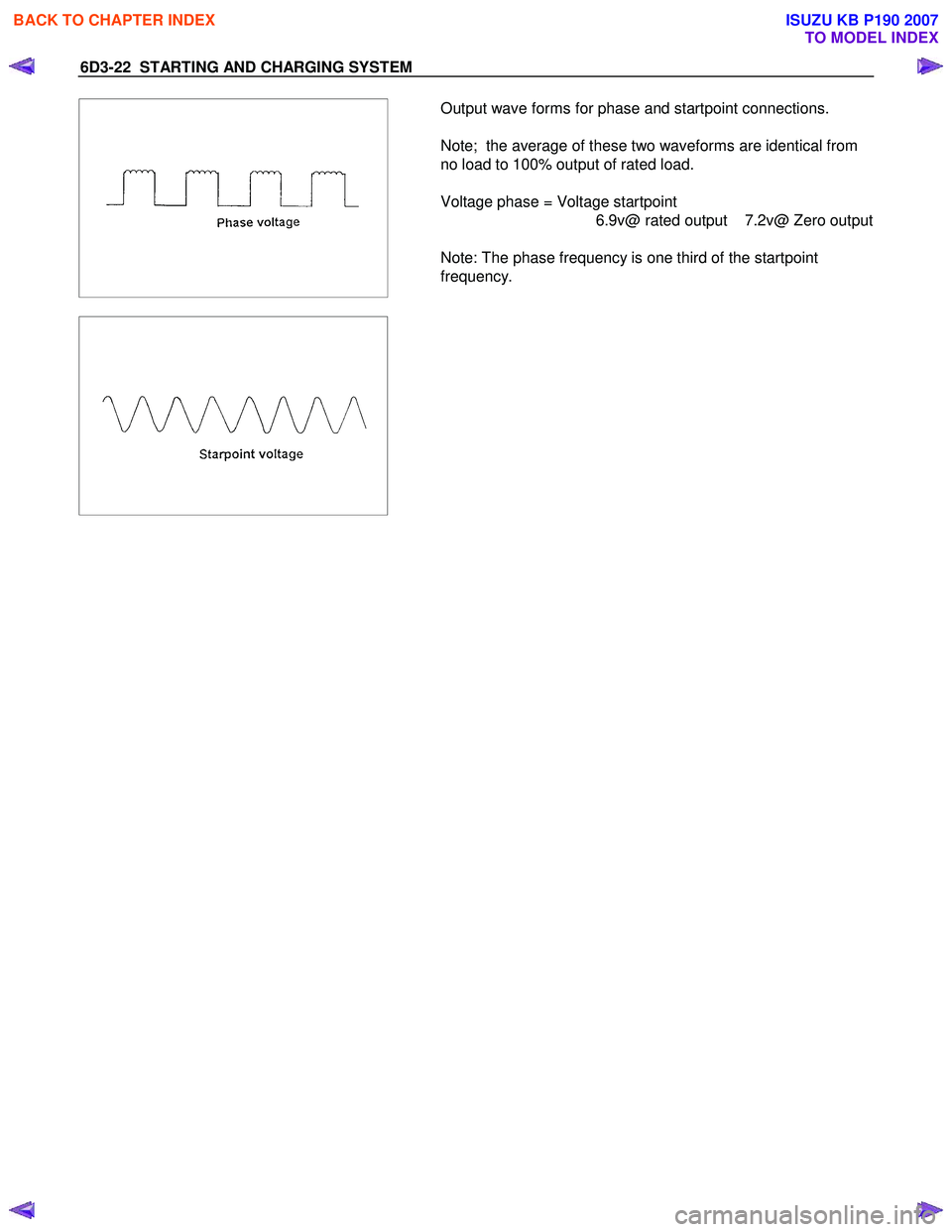
Output wave forms for phase and startpoint connections.
Note; the average of these two waveforms are identical from
no load to 100% output of rated load.
Voltage phase = Voltage startpoint 6.9v@ rated output 7.2v@ Zero output
Note: The phase frequency is one third of the startpoint
frequency.
BACK TO CHAPTER INDEX
TO MODEL INDEX
ISUZU KB P190 2007
Page 2237 of 6020
ENGINE DRIVEABILITY AND EMISSIONS 6E–67
GENERAL SERVICE INFORMATION
Aftermarket Electrical and Vacuum
Equipment
Aftermarket (add-on) electrical and vacuum equipment
is defined as any equipment which connects to the
vehicle's electrical or vacuum systems that is installed
on a vehicle after it leaves the factory. No allowances
have been made in the vehicle design for this type of
equipment.
NOTE: No add-on vacuum equipment should be added
to this vehicle.
NOTE: Add-on electrical equipment must only be
connected to the vehicle's electrical system at the
battery (power and ground).
Add-on electrical equipment, even when installed to
these guidelines, may still cause the electric system to
malfunction. This may also include equipment not
connected to the vehicle electrical system such as
portable telephones and radios. Therefore, the first step
in diagnosing any electric problem is to eliminate all
aftermarket electrical equipment from the vehicle. After
this is done, if the problem still exists, it may be
diagnosed in the normal manner.
Electrostatic Discharge Damage
Electronic components used in the ECM are often
designed to carry very low voltage. Electronic
components are susceptible to damage caused by
electrostatic discharge. Less than 100 volts of static
electricity can cause damage to some electronic
components. By comparison, it takes as much as 4000
volts for a person to feel even the zap of a static
discharge.
There are several ways for a person to become
statically charged. The most common methods of
charging are by friction and induction.
• An example of charging by friction is a person sliding across a vehicle seat.
• Charge by induction occurs when a person with well- insulated shoes stands near a highly charged object
and momentarily touches ground. Charges of the
same polarity are drained off leaving the person
highly charged with the opposite polarity. Static
charges can cause damage, therefore it is important
to use care when handling and testing electronic
components. Non-OEM Parts
All of the OBD diagnostics have been calibrated to run
with OEM parts. Accordingly, if commercially sold
sensor or switch is installed, it makes a wrong diagnosis
and turns on the check engine lamp.
Aftermarket electronics, such as cellular phones,
stereos, and anti-theft devices, may radiate EMI into the
control system if they are improperly installed. This may
cause a false sensor reading and turn on the check
engine lamp.
Poor Vehicle Maintenance
The sensitivity of OBD diagnostics will cause the check
engine lamp to turn on if the vehicle is not maintained
properly. Restricted oil filters, fuel filters, and crankcase
deposits due to lack of oil changes or improper oil
viscosity can trigger actual vehicle faults that were not
previously monitored prior to OBD. Poor vehicle
maintenance can not be classified as a “non-vehicle
fault”, but with the sensitivity of OBD diagnostics,
vehicle maintenance schedules must be more closely
followed.
Related System Faults
Many of the OBD system diagnostics will not run if the
ECM detects a fault on a related system or component.
Visual/Physical Engine Compartment
Inspection
Perform a careful visual and physical engine
compartment inspection when performing any
diagnostic procedure or diagnosing the cause of an
emission test failure. This can often lead to repairing a
problem without further steps. Use the following
guidelines when performing a visual/physical
inspection:
• Inspect all vacuum hoses for punches, cuts, disconnects, and correct routing.
• Inspect hoses that are difficult to see behind other components.
• Inspect all wires in the engine compartment for proper connections, burned or chafed spots, pinched
wires, contact with sharp edges or contact with hot
exhaust manifolds or pipes.
Basic Knowledge of Tools Required
NOTE: Lack of basic knowledge of this powertrain
when performing diagnostic procedures could result in
an incorrect diagnosis or damage to powertrain
components. Do not attempt to diagnose a powertrain
problem without this basic knowledge.
A basic understanding of hand tools is necessary to
effectively use this section of the Service Manual.
BACK TO CHAPTER INDEX
TO MODEL INDEX
ISUZU KB P190 2007