start ISUZU KB P190 2007 Workshop Repair Manual
[x] Cancel search | Manufacturer: ISUZU, Model Year: 2007, Model line: KB P190, Model: ISUZU KB P190 2007Pages: 6020, PDF Size: 70.23 MB
Page 3696 of 6020
Powertrain Interface Module – V6 Page 6E1–35
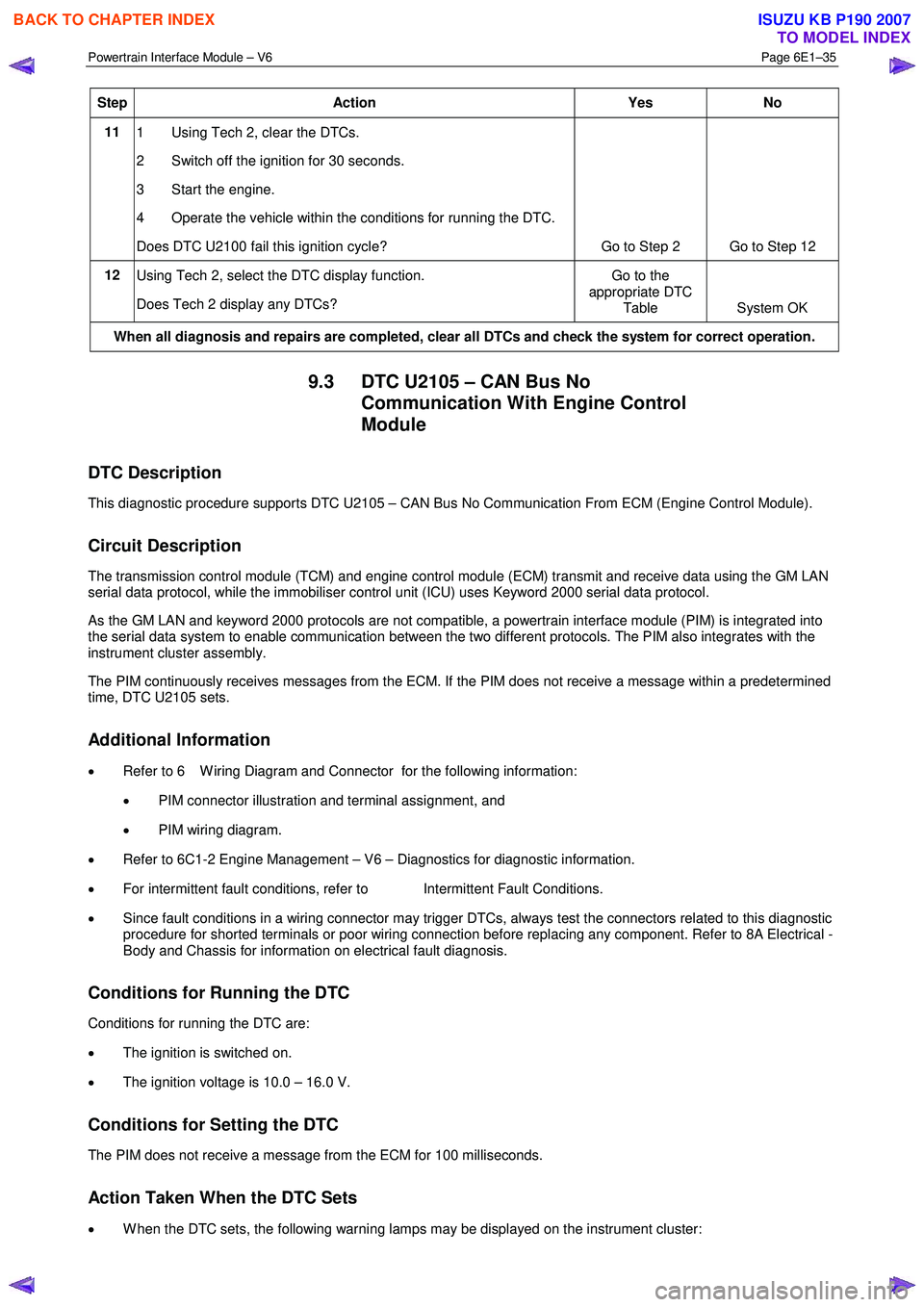
Step Action Yes No
11
1 Using Tech 2, clear the DTCs.
2 Switch off the ignition for 30 seconds.
3 Start the engine.
4 Operate the vehicle within the conditions for running the DTC.
Does DTC U2100 fail this ignition cycle? Go to Step 2 Go to Step 12
12
Using Tech 2, select the DTC display function.
Does Tech 2 display any DTCs? Go to the
appropriate DTC Table System OK
When all diagnosis and repairs are completed, clear all DTCs and check the system for correct operation.
9.3 DTC U2105 – CAN Bus No
Communication With Engine Control
Module
DTC Description
This diagnostic procedure supports DTC U2105 – CAN Bus No Communication From ECM (Engine Control Module).
Circuit Description
The transmission control module (TCM) and engine control module (ECM) transmit and receive data using the GM LAN
serial data protocol, while the immobiliser control unit (ICU) uses Keyword 2000 serial data protocol.
As the GM LAN and keyword 2000 protocols are not compatible, a powertrain interface module (PIM) is integrated into
the serial data system to enable communication between the two different protocols. The PIM also integrates with the
instrument cluster assembly.
The PIM continuously receives messages from the ECM. If the PIM does not receive a message within a predetermined
time, DTC U2105 sets.
Additional Information
• Refer to 6 W iring Diagram and Connector for the following information:
• PIM connector illustration and terminal assignment, and
• PIM wiring diagram.
• Refer to 6C1-2 Engine Management – V6 – Diagnostics for diagnostic information.
• For intermittent fault conditions, refer to Intermittent Fault Conditions.
• Since fault conditions in a wiring connector may trigger DTCs, always test the connectors related to this diagnostic
procedure for shorted terminals or poor wiring connection before replacing any component. Refer to 8A Electrical -
Body and Chassis for information on electrical fault diagnosis.
Conditions for Running the DTC
Conditions for running the DTC are:
• The ignition is switched on.
• The ignition voltage is 10.0 – 16.0 V.
Conditions for Setting the DTC
The PIM does not receive a message from the ECM for 100 milliseconds.
Action Taken When the DTC Sets
• W hen the DTC sets, the following warning lamps may be displayed on the instrument cluster:
BACK TO CHAPTER INDEX
TO MODEL INDEX
ISUZU KB P190 2007
Page 3698 of 6020

Powertrain Interface Module – V6 Page 6E1–37
Step Action Yes No
6
1 Disconnect the PIM harness connector (vehicles with manual
transmission), or TCM harness connector (vehicles with
automatic transmission).
2 Using a digital multimeter, measure the resistance between the two CAN_LO terminals of either the PIM or TCM.
NOTE
Refer to 5 GM LAN Serial Communication Circuit and
6 Wiring Diagram and Connector for the appropriate GM
LAN component terminal identification.
Does the digital multimeter display infinity? Go to Step 8 Go to Step 7
7
Using a digital multimeter, measure the resistance between the two
CAN_HI terminals of either the PIM (vehicles with manual
transmission) or TCM (vehicles with automatic transmission).
Does the digital multimeter display infinity? Go to Step 8 Go to Step 9
8
Replace the PIM (vehicles with manual transmission) or TCM
(vehicles with automatic transmission). Refer to one of the following
for the component replacement procedure:
• 7C4 Automatic Transmission – 4L60E – On-vehicle Servicing, or
• 11.2 Powertrain Interface Module.
Has the repair been completed? Go to Step 11 —
9 Replace the ECM. Refer to 6C1-3 Engine Management – V6 –
Service Operations.
Has the repair been completed? Go to Step 11
—
10
Replace the PIM. Refer to 11.2 Powertrain Interface Module.
Has the repair been completed? Go to Step 11 —
11 1 Using Tech 2, clear the DTCs.
2 Switch off the ignition for 30 seconds.
3 Start the engine.
4 Operate the vehicle within the conditions for running the DTC.
Does DTC U2105 fail this ignition cycle? Go to Step 2 Go to Step 12
12
Using Tech 2, select the DTC display function.
Does Tech 2 display any DTCs? Go to the
appropriate DTC Table System OK
When all diagnosis and repairs are completed, clear all DTCs and check the system for correct operation.
BACK TO CHAPTER INDEX
TO MODEL INDEX
ISUZU KB P190 2007
Page 3701 of 6020

Powertrain Interface Module – V6 Page 6E1–40
Step Action Yes No
10
1 Using Tech 2, clear the DTCs.
2 Switch off the ignition for 30 seconds.
3 Start the engine.
4 Operate the vehicle within the conditions for running the DTC.
Does DTC U2106 fail this ignition cycle? Go to Step 2 Go to Step 11
11
Using Tech 2, select the DTC display function.
Does Tech 2 display any DTCs? Go to the
appropriate DTC Table System OK
When all diagnosis and repairs are completed, clear all DTCs and check the system for correct operation.
9.5 DTC B0565 – Coolant Temperature
Gauge Circuit High Current
Information not available at time of publication
9.6 DTC B0575 – Fuel Gauge Circuit High Current
Information not available at time of publication
BACK TO CHAPTER INDEX
TO MODEL INDEX
ISUZU KB P190 2007
Page 3703 of 6020

Powertrain Interface Module – V6 Page 6E1–42
Test Description
The following numbers refer to the step numbers in the diagnostic table:
2 This step tests the cruise control cancel switch using Tech 2.
6 This step tests the cruise control cancel switch signal circuit.
DTC B3628 Diagnostic Table
Step Action Yes No
1
Has the Diagnostic System Check been performed?
Go to Step 2 Refer to
7.2 Diagnostic
System Check
2 Using Tech 2, view the cruise control cancel switch status parameter
in the PIM data list.
Does Tech 2 display Active?
Go to Step 4 Go to Step 3
3
1 Switch off the ignition for 10 seconds.
2 Operate the vehicle within the conditions for setting DTC B3628.
3 Using Tech 2, select the DTC display function.
Does DTC B3628 fail this ignition cycle? Go to Step 4 Refer to
Additional
Information in this
Section
4 1 Disconnect connector B-59 from the cruise control switch
assembly.
2 Using Tech 2, view the cruise control cancel switch status parameter in the PIM data list.
Does Tech 2 display Active?
Go to Step 6 Go to Step 5
5
Replace the cruise control switch assembly, refer to 8C Cruise Control
– HFV6.
Has the repair been completed? Go to Step 8 —
6 Test the cruise control cancel switch signal circuit for a short to
voltage. Refer to 8A Electrical - Body and Chassis for information on
electrical fault diagnosis.
Has any fault been found and rectified? Go to Step 8 Go to Step 7
7 Replace the PIM. Refer to 11.2 Powertrain Interface Module.
Has the repair been completed? Go to Step 8 —
8 1 Using Tech 2, clear the DTCs.
2 Switch off the ignition for 30 seconds.
3 Start the engine.
4 Operate the vehicle within the conditions for running the DTC.
Does DTC B3628 fail this ignition cycle? Go to Step 2 Go to Step 9
9
Using Tech 2, select the DTC display function.
Does Tech 2 display any DTCs? Go to the
appropriate DTC Table System OK
When all diagnosis and repairs are completed, clear all DTCs and check the system for correct operation.
BACK TO CHAPTER INDEX
TO MODEL INDEX
ISUZU KB P190 2007
Page 3705 of 6020

Powertrain Interface Module – V6 Page 6E1–44
NOTE
If the fault is not evident for greater than 120
seconds, the DTC will become a history DTC and
cruise control can be resumed.
Test Description
The following numbers refer to the step numbers in the diagnostic table:
2 This step tests the cruise control resume switch using Tech 2.
6 This step tests the cruise control resume switch signal circuit.
DTC B3627 Diagnostic Table
Step Action Yes No
1
Has the Diagnostic System Check been performed?
Go to Step 2 Refer to
7.2 Diagnostic System Check
2 Using Tech 2, view the cruise control resume switch status parameter
in the PIM data list.
Does Tech 2 display Res / Accel?
Go to Step 4 Go to Step 3
3
1 Switch off the ignition for 10 seconds.
2 Operate the vehicle within the conditions for setting DTC B3627.
3 Using Tech 2, select the DTC display function.
Does DTC B3627 fail this ignition cycle? Go to Step 4 Refer to
Additional
Information in this Section
4 1 Disconnect connector B-59 from the cruise control switch
assembly.
2 Using Tech 2, view the cruise control resume switch status parameter in the PIM data list.
Does Tech 2 display Res / Accel?
Go to Step 6 Go to Step 5
5 Replace the cruise control switch assembly, refer to 8C Cruise Control
– HFV6.
Has the repair been completed? Go to Step 8 —
6 Test the cruise control resume switch signal circuit for a short to
voltage. 8A Electrical - Body and Chassis for information on electrical
fault diagnosis.
Has any fault been found and rectified? Go to Step 8 Go to Step 7
7 Replace the PIM. Refer to 11.2 Powertrain Interface Module.
Has the repair been completed? Go to Step 8 —
8 1 Using Tech 2, clear the DTCs.
2 Switch off the ignition for 30 seconds.
3 Start the engine.
4 Operate the vehicle within the conditions for running the DTC.
Does DTC B3627 fail this ignition cycle? Go to Step 2 Go to Step 9
9 Using Tech 2, select the DTC display function.
Does Tech 2 display any DTCs? Go to the
appropriate DTC
Table System OK
When all diagnosis and repairs are completed, clear all DTCs and check the system for correct operation.
BACK TO CHAPTER INDEX
TO MODEL INDEX
ISUZU KB P190 2007
Page 3707 of 6020

Powertrain Interface Module – V6 Page 6E1–46
6 This step tests the cruise control set switch signal circuit.
DTC 3598 Diagnostic Table
Step Action Yes No
1
Has the Diagnostic System Check been performed?
Go to Step 2 Refer to
7.2 Diagnostic
System Check
2 Using Tech 2, view the cruise control set switch status parameter in
the PIM data list.
Does Tech 2 display Active?
Go to Step 4 Go to Step 3
3
1 Switch off the ignition for 10 seconds.
2 Operate the vehicle within the conditions for setting DTC 3598.
3 Using Tech 2, select the DTC display function.
Does DTC 3598 fail this ignition cycle? Go to Step 4 Refer to
Additional
Information in this Section
4 1 Disconnect connector B-59 from the cruise control switch
assembly.
2 Using Tech 2, view the cruise control set switch status parameter in the PIM data list.
Does Tech 2 display Active?
Go to Step 6 Go to Step 5
5 Replace the cruise control switch assembly, refer to 8C Cruise Control
– HFV6.
Has the repair been completed? Go to Step 8 —
6 Test the cruise control set switch signal circuit for a short to voltage.
Refer to 8A Electrical - Body and Chassis for information on electrical
fault diagnosis.
Has any fault been found and rectified? Go to Step 8 Go to Step 7
7 Replace the PIM. Refer to 11.2 Powertrain Interface Module.
Has the repair been completed? Go to Step 8 —
8 1 Using Tech 2, clear the DTCs.
2 Switch off the ignition for 30 seconds.
3 Start the engine.
4 Operate the vehicle within the conditions for running the DTC.
Does DTC 3598 fail this ignition cycle? Go to Step 2 Go to Step 9
9
Using Tech 2, select the DTC display function.
Does Tech 2 display any DTCs? Go to the
appropriate DTC Table System OK
When all diagnosis and repairs are completed, clear all DTCs and check the system for correct operation.
9.10 DTC B3794 – Cruise Control On/Off
Signal Malfunction
DTC Description
This diagnostic procedure supports DTC B3794 – Cruise Control On/Off Switch Stuck.
Circuit Description
The cruise control on / off switch is a normally open switch that closes when the switch is activated. W hen activated, the
switch supplies signal voltage to the cruise control on signal circuit. The powertrain interface module (PIM) converts the
BACK TO CHAPTER INDEX
TO MODEL INDEX
ISUZU KB P190 2007
Page 3709 of 6020

Powertrain Interface Module – V6 Page 6E1–48
DTC B3794 Diagnostic Table
Step Action Yes No
1
Has the Diagnostic System Check been performed?
Go to Step 2 Refer to
7.2 Diagnostic System Check
2 Using Tech 2, view the cruise control on / off switch status parameter
in the PIM data list.
Does Tech 2 display Active?
Go to Step 4 Go to Step 3
3
1 Switch off the ignition for 10 seconds.
2 Operate the vehicle within the conditions for setting DTC B3794.
3 Using Tech 2, select the DTC display function.
Does DTC B3794 fail this ignition cycle? Go to Step 4 Refer to
Additional
Information in this Section
4 1 Disconnect connector B-67 from the cruise control on/off switch.
2 Using Tech 2, view the cruise control on / off switch status parameter in the PIM data list.
Does Tech 2 display Active?
Go to Step 6 Go to Step 5
5 Replace the cruise control on/off switch, refer to 8C Cruise Control –
HFV6.
Has the repair been completed? Go to Step 8 —
6 Test the cruise control on / off switch signal circuit for a short to
voltage. Refer to 8A Electrical - Body and Chassis for information on
electrical fault diagnosis.
Has any fault been found and rectified? Go to Step 8 Go to Step 7
7 Replace the PIM. Refer to 11.2 Powertrain Interface Module.
Has the repair been completed? Go to Step 8 —
8 1 Using Tech 2, clear the DTCs.
2 Switch off the ignition for 30 seconds.
3 Start the engine.
4 Operate the vehicle within the conditions for running the DTC.
Does DTC B3794 fail this ignition cycle? Go to Step 2 Go to Step 9
9 Using Tech 2, select the DTC display function.
Does Tech 2 display any DTCs? Go to the
appropriate DTC Table System OK
When all diagnosis and repairs are completed, clear all DTCs and check the system for correct operation.
BACK TO CHAPTER INDEX
TO MODEL INDEX
ISUZU KB P190 2007
Page 3710 of 6020

Powertrain Interface Module – V6 Page 6E1–49
9.11 DTC B3902 – Immobiliser Malfunction
DTC Descriptors
This diagnostic procedure supports DTC B3902 – Immobiliser Malfunction.
Circuit Description
The engine control module (ECM), the powertrain interface module (PIM) and the immobiliser control unit (ICU) are
integral parts of the vehicle immobiliser system. The immobiliser system authenticates the security code programmed
into each of these modules to prevent unauthorised vehicle operation. This authentication process includes the following
steps:
1 At predetermined situations, the ICU sends a security code to the PIM.
2 W hen the ignition is switched ON, the PIM receives and compares this security code from the ICU against the security code programmed into the PIM.
3 Once the PIM receives the correct security code from the ICU, it sends a security code to the ECM.
4 The ECM receives and compares this security code from the PIM against the security code programmed into the ECM.
5 The authentication process is complete once the ECM receives the correct security code from the PIM within the specified time frame.
6 The ECM allows normal vehicle operation.
NOTE
If any of these authentication processes fail, the
vehicle will not start and DTCs will set. For further
information on the immobiliser system, refer to
11A Immobiliser.
Conditions for Running the DTC
Conditions for running the DTC are:
• The ignition is switched on.
• The ignition voltage is 10.0 – 16.0 V.
Conditions for Setting the DTC
B3902
Ignition set to the ON position.
Conditions for Clearing the DTC
Refer to 4.1 Diagnostic General Descriptions for information on the conditions for clearing DTCs.
Additional Information
• Refer to 6C1-1 Engine Management –V6 – General Information for details of the ECM operation.
• Refer to 11A Immobiliser for immobiliser system information:
• Refer to 12.4 Immobiliser Link to ECM / PIM for immobiliser link to ECM / PIM.
• Since a fault condition in a wiring connector may trigger DTCs, always test the connectors related to this diagnostic
procedure for shorted terminals or poor wiring connection before replacing any component. Refer to 8A Electrical -
Body and Chassis for information on electrical fault diagnosis.
• For an intermittent fault condition, refer to Intermittent Fault Conditions in this section.
BACK TO CHAPTER INDEX
TO MODEL INDEX
ISUZU KB P190 2007
Page 3711 of 6020

Powertrain Interface Module – V6 Page 6E1–50
• To assist diagnosis, refer to 6 W iring Diagram and Connector Chart for the system wiring diagram and
connector charts in this section.
DTC B3902 Diagnostic Table
Step Action Yes No
1
Has the Diagnostic System Check been performed?
Go to Step 2 Refer to
7.2 Diagnostic System Check
2 Using Tech 2, perform the ICU ID check procedure.
Is the ID number displayed by Tech 2? Go to Step 3
Go to Step 5
3 1 Switch off the ignition for 30 seconds.
2 Operate the vehicle within the conditions for setting the DTC.
3 Using Tech 2, select the DTC display function.
Does DTC B3902 fail this ignition cycle? Go to Step 4 Refer to
Additional
Information in this Section
4 Test the Immobiliser system. Refer to 11A Immobiliser.
Has any fault been found and rectified? Go to Step 8 Go to Step 7
5 1 Test all ground circuits of the ICU for a high resistance or an
open circuit fault condition. Refer to 8A Electrical - Body and
Chassis for information on electrical fault diagnosis.
2 Test the ICU ignition supply voltage circuit for a high resistance, open circuit or short to ground fault condition. Refer to 8A
Electrical - Body and Chassis for information on electrical fault
diagnosis.
Has any fault been found and rectified? Go to Step 8 Go to Step 6
6 Replace the ICU. Refer to 11A Immobiliser.
W as the repair completed? Go to Step 8 —
7 Replace the PIM. Refer to 11.2 Powertrain Interface Module.
W as the repair completed? Go to Step 8 —
8 1 Using Tech 2, clear the DTCs.
2 Switch off the ignition for 30 seconds.
3 Start the engine.
4 Operate the vehicle within the conditions for running the DTC.
Do any of the immobiliser DTCs fail this ignition cycle? Go to Step 2 Go to Step 9
9
Using Tech 2, select the DTC display function.
Does Tech 2 display any DTCs? Go to the
appropriate DTC Table System OK
When all diagnosis and repairs are completed, clear all DTCs and check the system for correct operation.
9.12 DTC P0318 – Vertical Acceleration
Sensor
DTC Description
This diagnostic procedure supports the Vertical Acceleration Sensor (VAS).
Circuit Description
The vertical acceleration sensor monitors vertical movement of the vehicle. The powertrain interface module (PIM)
converts the signal voltage input into serial data, which is used by.
BACK TO CHAPTER INDEX
TO MODEL INDEX
ISUZU KB P190 2007
Page 3712 of 6020

Powertrain Interface Module – V6 Page 6E1–51
Additional Information
• Refer to 6 W iring Diagram and Connector Chart for the following information:
• PIM connector illustration and terminal assignment, and
• PIM wiring diagram.
• For intermittent fault conditions, refer to Intermittent Fault Conditions.
• Since fault conditions in a wiring connector may trigger DTCs, always test the connectors related to this diagnostic
procedure for shorted terminals or poor wiring connection before replacing any component. Refer to
8A Electrical - Body and Chassis for information on electrical fault diagnosis.
Conditions for Running the DTC
Conditions for running the DTC are:
• The ignition is switched on.
• The ignition voltage is 10.0 – 16.0 V.
Conditions for Setting the DTC
The DTC will set when the PIM detects a low voltage of <0.41 volts for one second.
The DTC will set when the PIM detects a high voltage of >4.59 volts for one second.
Action Taken When the DTC Sets
W hen the DTC sets, there is no warning lamp displayed on the instrument cluster.
Conditions for Clearing the DTC
The DTC is cleared at the next ignition cycle.
Refer to 4.1 Diagnostic General Descriptions for information on the conditions for clearing DTCs.
Test Description
The following numbers refer to the step numbers in the diagnostic table:
2 This step tests the vertical acceleration sensor using Tech 2.
6 This step tests the ground circuit.
Vertical Acceleration Sensor Diagnostic Table
Step Action Yes No
1
Has the Diagnostic System Check been performed?
Go to Step 2 Refer to additional
information
2 1 Switch off the ignition for 30 seconds.
2 Start the engine.
3 Using Tech 2, select the DTC display function.
Does DTC P0318 fail this ignition cycle? Go to Step 3 Refer to
Additional
Information in this DTC
3 1 Switch on the ignition with the engine not running.
2 Using a digital multimeter, measure the voltage between the VAS reference circuit and a good ground. Refer to 6 W iring
Diagram and Connector Chart.
Does the multimeter display approximately 5.0 V? Go to Step 4 Go to Step 7
BACK TO CHAPTER INDEX
TO MODEL INDEX
ISUZU KB P190 2007