clutch ISUZU TROOPER 1995 Owner's Manual
[x] Cancel search | Manufacturer: ISUZU, Model Year: 1995, Model line: TROOPER, Model: ISUZU TROOPER 1995Pages: 1928
Page 93 of 1928
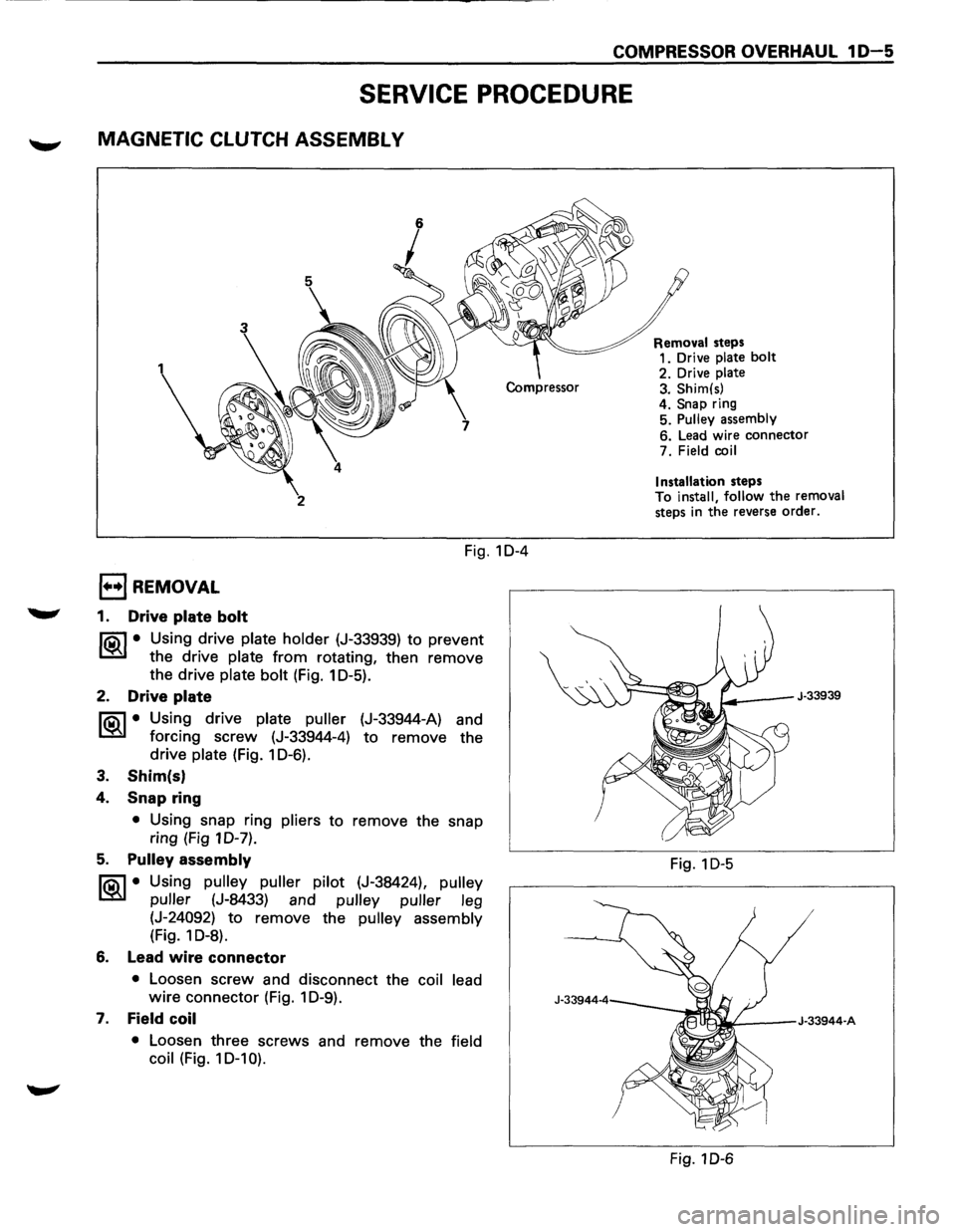
COMPRESSOR OVERHAUL 1 D-5
SERVICE PROCEDURE
MAGNETIC CLUTCH ASSEMBL V
2
Fig. 10-4
1••1 REMOVAL
1. Drive plate bolt
liC\1 • Using drive plate holder (J-33939) to prevent
~ the drive plate from rotating, then remove
the drive
plate bolt (Fig. 1 0-5).
2. Drive plate
liC\1 • Using drive plate puller (J-33944-A) and
~ forcing screw (J-33944-4) to remove the
drive
plate (Fig. 1 0-6).
3. Shim(s)
4. Snap ring
• Using snap ring pliers to remove the snap
ring (Fig 10-7).
5. Pulley assembly
liC\1 • Using pulley puller pilot (J-38424), pulley
~ puller (J-8433) and pulley puller leg
(J-24092) to remove the pulley assembly
(Fig. 1 0-8).
6. Lead wire connector
• Loosen screw and disconnect the coil lead
wire connector (Fig. 1 0-9).
7. Field coil
• Loosen three screws and remove the field
coil
(Fig. 10-1 0). Removal
steps
1. Drive
plate bolt
2. Drive plate 3. Shim(s)
4. Snap ring
5. Pulley assembly
6. Lead wire connector
7. Field
coil
Installation
steps
To install, follow the removal
steps in the reverse order.
J-33939
Fig. 1 D-5
Fig. 1 D-6
Page 95 of 1928
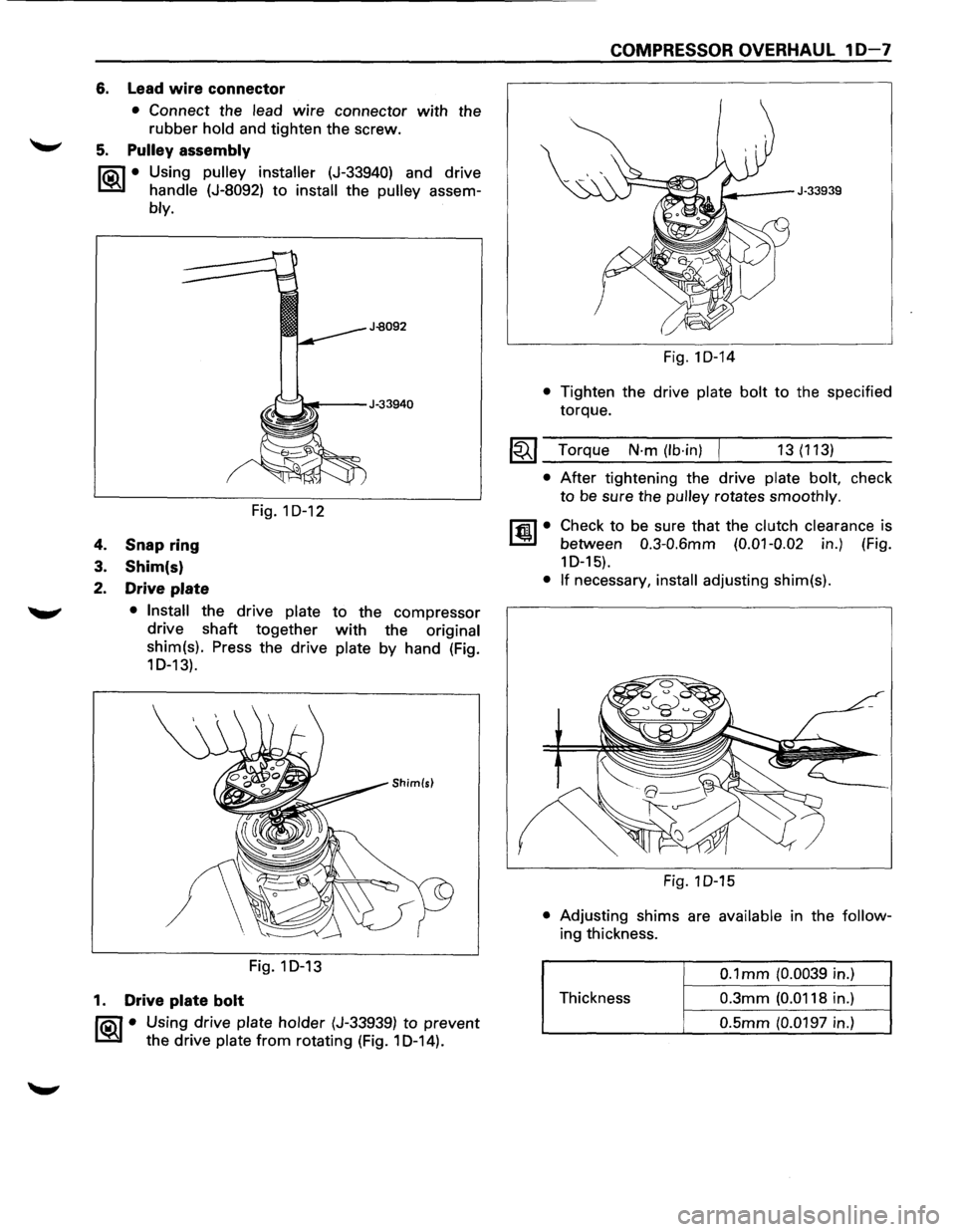
6. Lead wire connector
• Connect the lead wire connector with the
rubber hold and tighten the screw.
5. Pulley assembly
liQ\1 • Using pulley installer (J-33940) and drive
~ handle (J-8092) to install the pulley assem-
bly.
4. Snap ring
3. Shim(s)
2. Drive plate
Fig. 1 D-12
• Install the drive plate to the compressor
drive shaft
together with the original
shim(s). Press the drive
plate by hand (Fig.
10-13).
Fig.1D-13
1. Drive plate bolt
liQ\1 • Using drive plate holder (J-33939) to prevent
~ the drive plate from rotating (Fig. 1 D-14).
COMPRESSOR OVERHAUL 10-7
Fig.1D-14
• Tighten the drive plate bolt to the specified
torque.
~~~ Torque N·m (lb·in) 13(113)
• After tightening the drive plate bolt, check
to be sure the pulley rotates smoothly.
ltm.l• Check to be sure that the clutch clearance is
between
0.3-0.6mm (0.01-0.02 in.) (Fig.
1 D-15).
• If necessary, install adjusting shim(s).
Fig. 1 D-15
• Adjusting shims are available in the follow
ing thickness.
0.1 mm (0.0039 in.)
Thickness
0.3mm (0.0118 in.)
0.5mm (0.0197 in.)
Page 96 of 1928
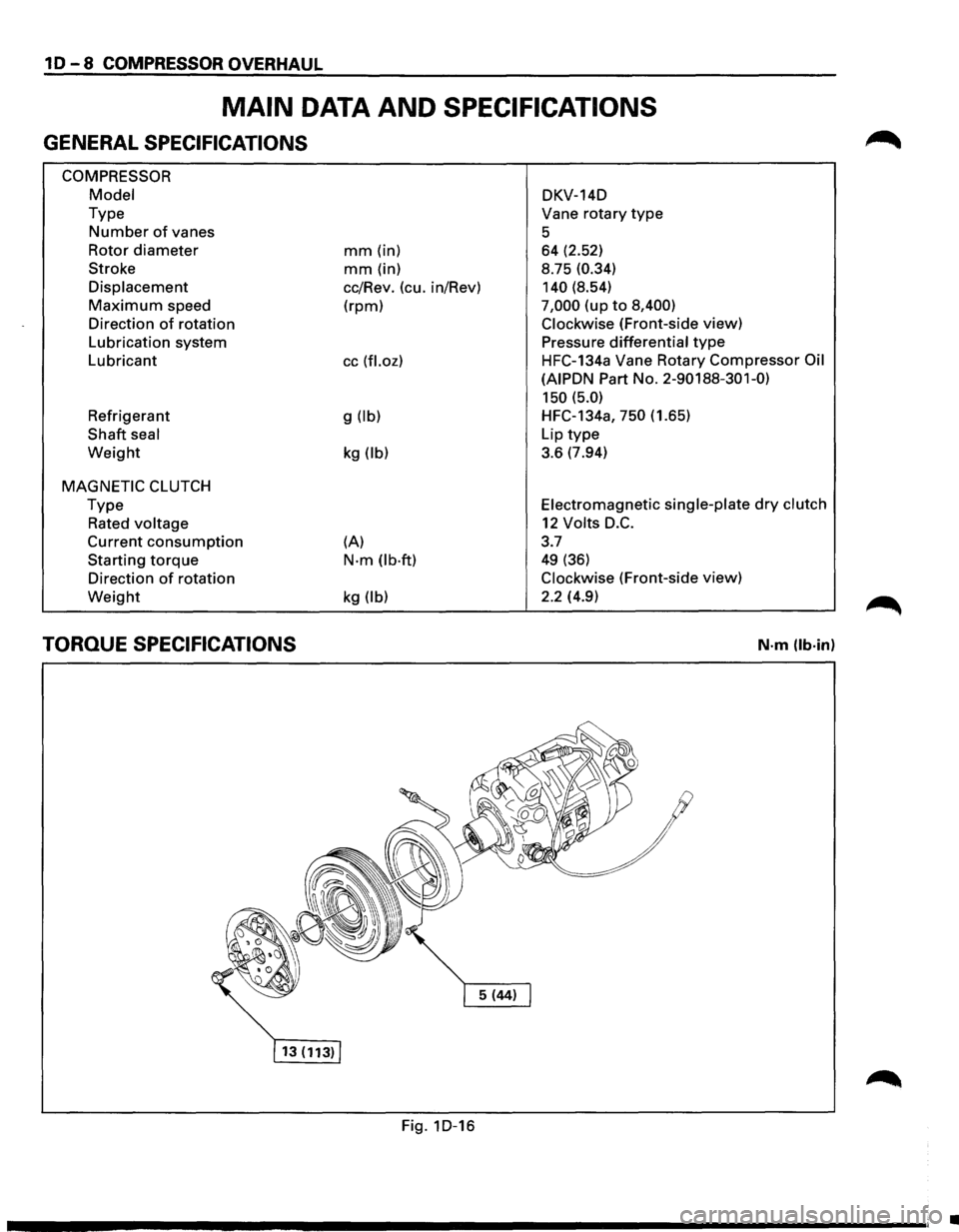
10-8 COMPRESSOR OVERHAUL
MAIN DATA AND SPECIFICATIONS
GENERAL SPECIFICATIONS
COMPRESSOR
Model
Type
Number of vanes
Rotor
diameter
Stroke
Displacement
Maximum speed
Direction
of rotation
Lubrication system
Lubricant
Refrigerant
Shaft seal
Weight
MAGNETIC CLUTCH
Type
Rated voltage
Current consumption
Starting torque
Direction of rotation
Weight
TORQUE SPECIFICATIONS
mm (in)
mm (in)
cc/Rev. (cu. in/Rev)
(rpm)
cc (fl.oz)
g (lb)
kg (lb)
(A)
N·m (lb·ft)
kg (lb)
Fig. 1D-16 DKV-14D
Vane
rotary type
5 64 (2.52)
8.75
(0.34)
140
(8.54)
7,000 (up to 8,400)
Clockwise
(Front-side view)
Pressure
differential type
HFC-134a Vane Rotary Compressor Oil
(AIPDN
Part No. 2-90188-301-0)
150 (5.0)
HFC-134a, 750 (1.65)
Lip
type
3.6 (7.94)
Electromagnetic single-plate dry clutch
12 Volts D.C.
3.7
49 (36)
Clockwise (Front-side view)
2.2 (4.9)
N·m (lb·in)
•
Page 281 of 1928
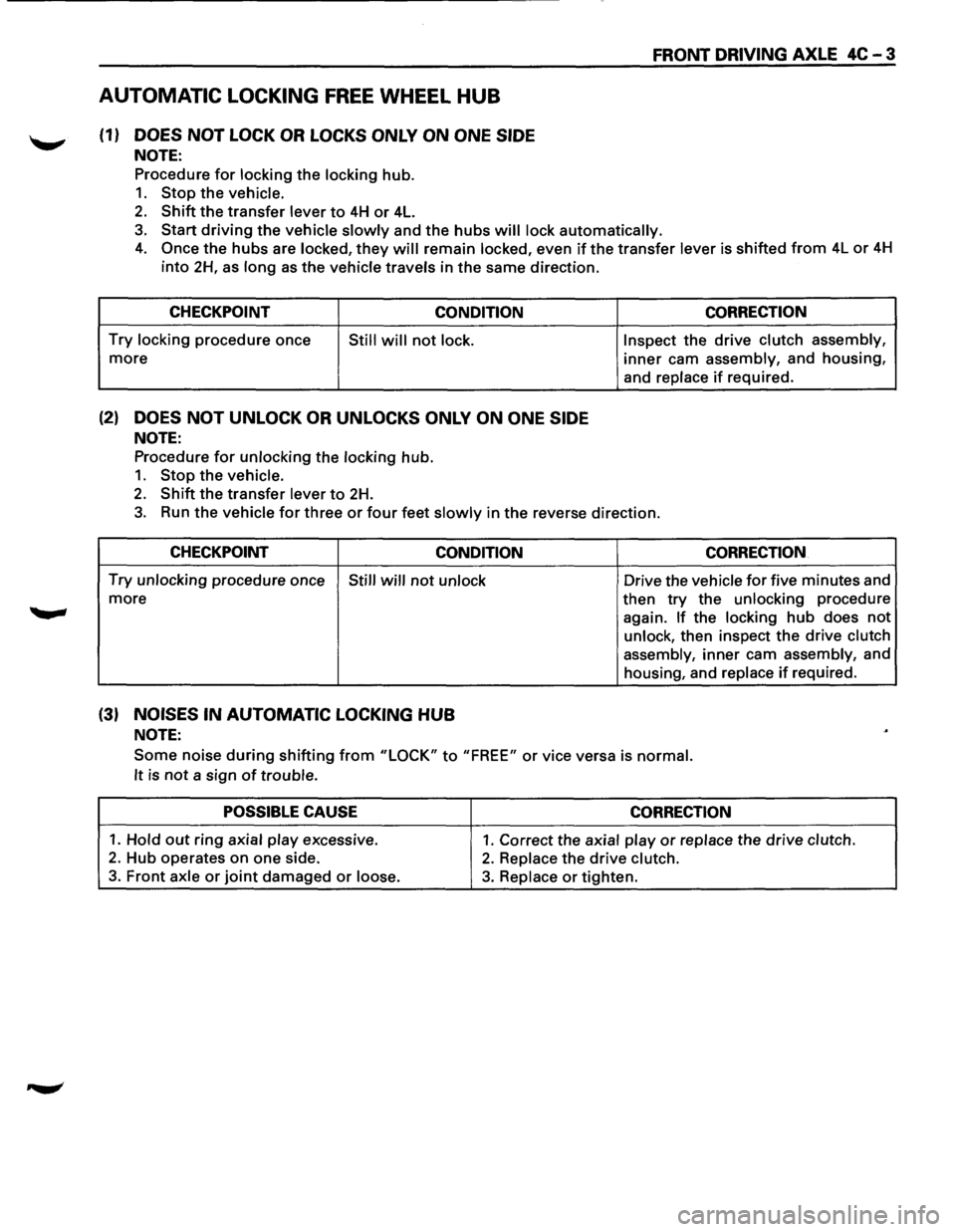
AUTOMATIC LOCKING FREE WHEEL HUB
(1) DOES NOT LOCK OR LOCKS ONLY ON ONE SIDE
NOTE:
Procedure for locking the locking hub.
1. Stop the vehicle.
2. Shift the transfer lever to 4H or 4L.
FRONT DRIVING AXLE 4C-3
3. Start driving the vehicle slowly and the hubs will lock automatically.
4. Once the hubs are locked, they will remain locked, even if the transfer lever is shifted from 4L or 4H
into 2H, as long as the vehicle travels in the same direction.
CHECKPOINT
CONDITION
Try locking procedure once Still will not lock.
more
(2) DOES NOT UNLOCK OR UNLOCKS ONLY ON ONE SIDE
NOTE:
Procedure for unlocking the locking hub.
1. Stop the vehicle.
2. Shift the transfer lever to 2H.
CORRECTION
Inspect the drive clutch assembly,
inner cam assembly, and housing,
and replace
if required.
3. Run the vehicle for three or four feet slowly in the reverse direction.
CHECKPOINT
CONDITION CORRECTION
Try unlocking procedure once Still will not unlock Drive the vehicle for five minutes and
more
(3) NOISES IN AUTOMATIC LOCKING HUB
NOTE:
then try the unlocking procedure
again.
If the locking hub does not
unlock, then inspect the drive clutch
assembly,
inner cam assembly, and
housing, and replace
if required.
Some noise during shifting from "LOCK" to "FREE" or vice versa is normal.
It
is not a sign of trouble.
POSSIBLE CAUSE CORRECTION
1. Hold out ring axial play excessive. 1. Correct the axial play or replace the drive clutch.
2. Hub operates on one side. 2. Replace the drive clutch.
3. Front axle or joint damaged or loose. 3. Replace or tighten.
Page 306 of 1928
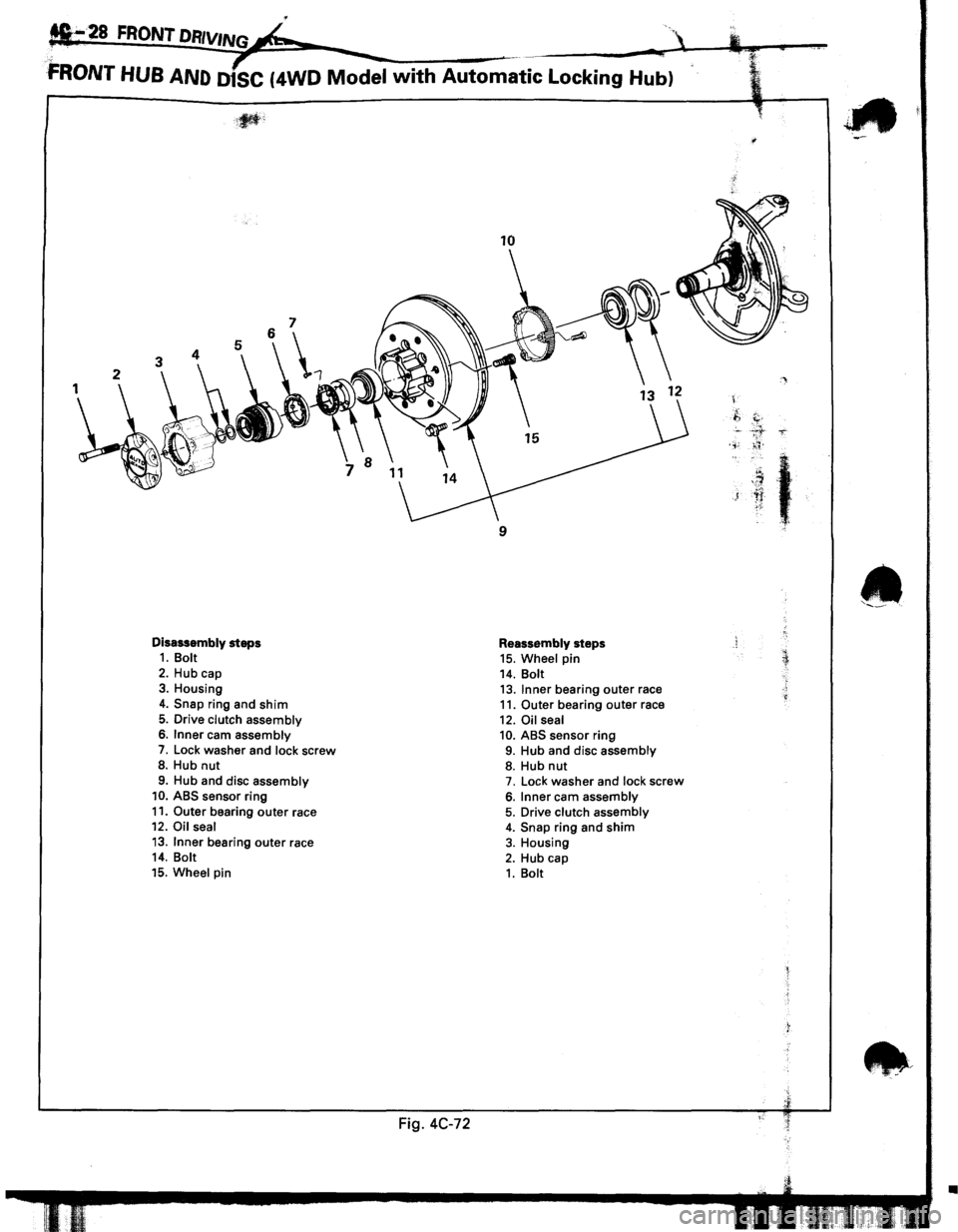
.
fi•28 FRONT DRIVINGk "
;: ~ ·~-¢,,
FRONT HUB AND D1SC (4WD Model with Automatic Locking Hub)
Disassembly steps 1. Bolt
2. Hub cap 3. Housing
4. Snap ring and shim
5. Drive clutch assembly 6. Inner cam assembly
7. Lock washer and lock screw 8. Hub nut
9. Hub and disc assembly 10. ABS sensor ring
11. Outer bearing outer race 12. Oil seal
13. Inner bearing outer race 14. Bolt
15. Wheel pin
Fig. 4C-72
10
9
Reassembly steps 15. Wheel pin 14. Bolt 13. Inner bearing outer race 11. Outer bearing outer race
12. Oil seal 10. ABS sensor ring 9. Hub and disc assembly 8. Hub nut 7. Lock washer and lock screw
6. Inner cam assembly 5. Drive clutch assembly 4. Snap ring and shim 3. Housing
2. Hub cap 1. Bolt
'
.f,
c. ' . .,;
)
t
~::
•
Page 307 of 1928
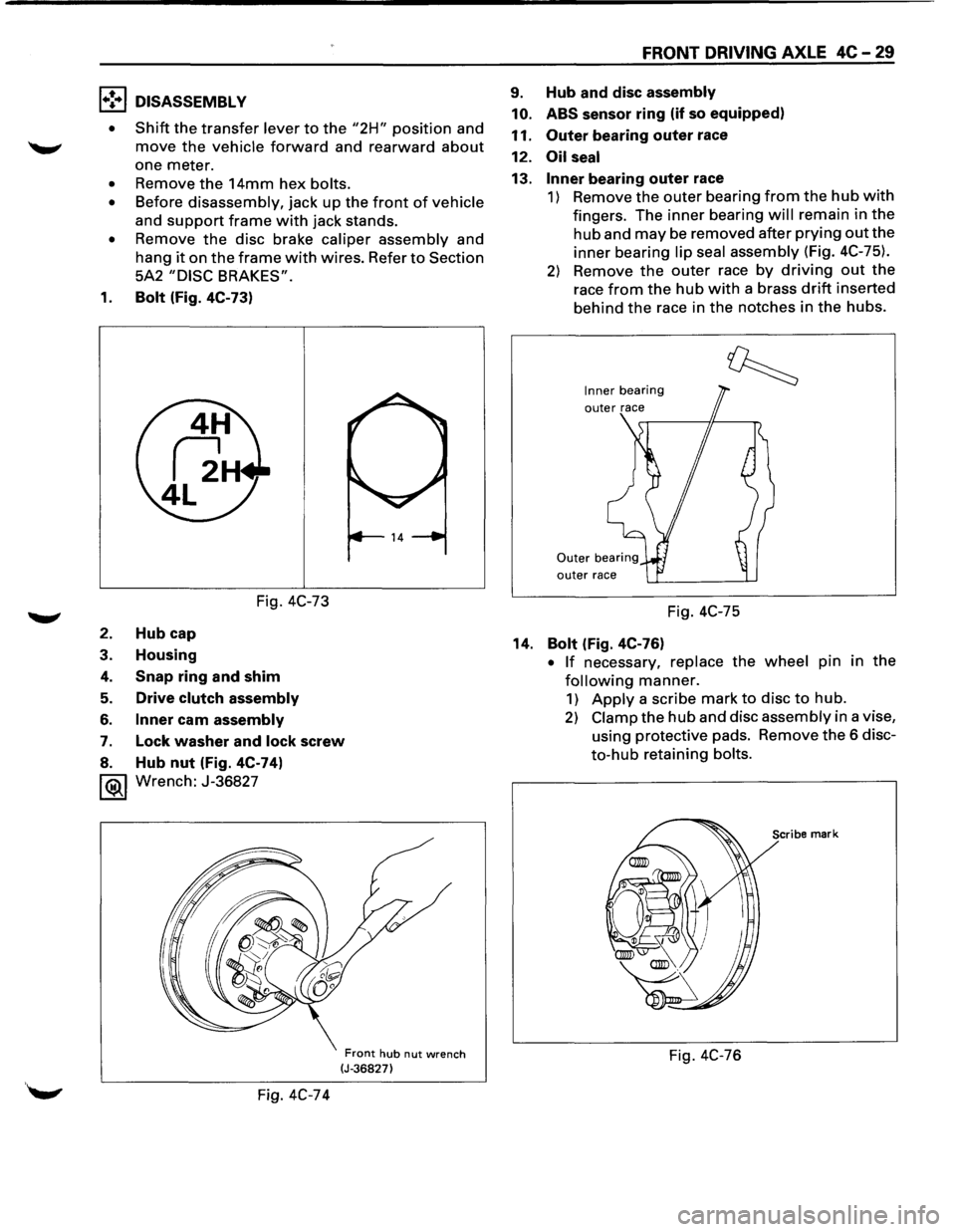
1•! .. 1 DISASSEMBLY
•
Shift the transfer lever to the "2H" position and
move the vehicle forward and rearward about
one meter.
• Remove the 14mm hex bolts.
• Before disassembly, jack up the front of vehicle
and
support frame with jack stands.
• Remove the disc brake caliper assembly and
hang
it on the frame with wires. Refer to Section
5A2
"DISC BRAKES".
1. Bolt (Fig. 4C-73)
Fig. 4C-73
2. Hub cap
3. Housing
4. Snap ring and shim
5. Drive clutch assembly
6. Inner cam assembly
7. Lock washer and lock screw
8. Hub nut (Fig. 4C-74)
1®.1 Wrench: J-36827
Fig. 4C-74
Front hub nut wrench (J-36827)
FRONT DRIVING AXLE 4C-29
9. Hub and disc assembly
10. ABS
sensor ring (if so equipped)
11.
Outer bearing outer race
12.
Oil seal
13. Inner bearing outer race
1) Remove the outer bearing from the hub with
fingers. The inner bearing will remain in the
hub and may be removed after prying out the
inner bearing lip seal assembly (Fig. 4C-75).
2) Remove the outer race by driving out the
race from the hub with a brass drift inserted
behind
the race in the notches in the hubs.
Inner bearing
outer race
Fig. 4C-75
14.
Bolt (Fig. 4C-76)
• If necessary, replace the wheel pin in the
following manner.
1) Apply a scribe mark to disc to hub.
2) Clamp the hub and disc assembly in a vise,
using protective pads. Remove
the 6 disc
to-hub retaining bolts.
Scribe mark
Fig. 4C-76
Page 308 of 1928
4C -30 FRONT DRIVING AXLE
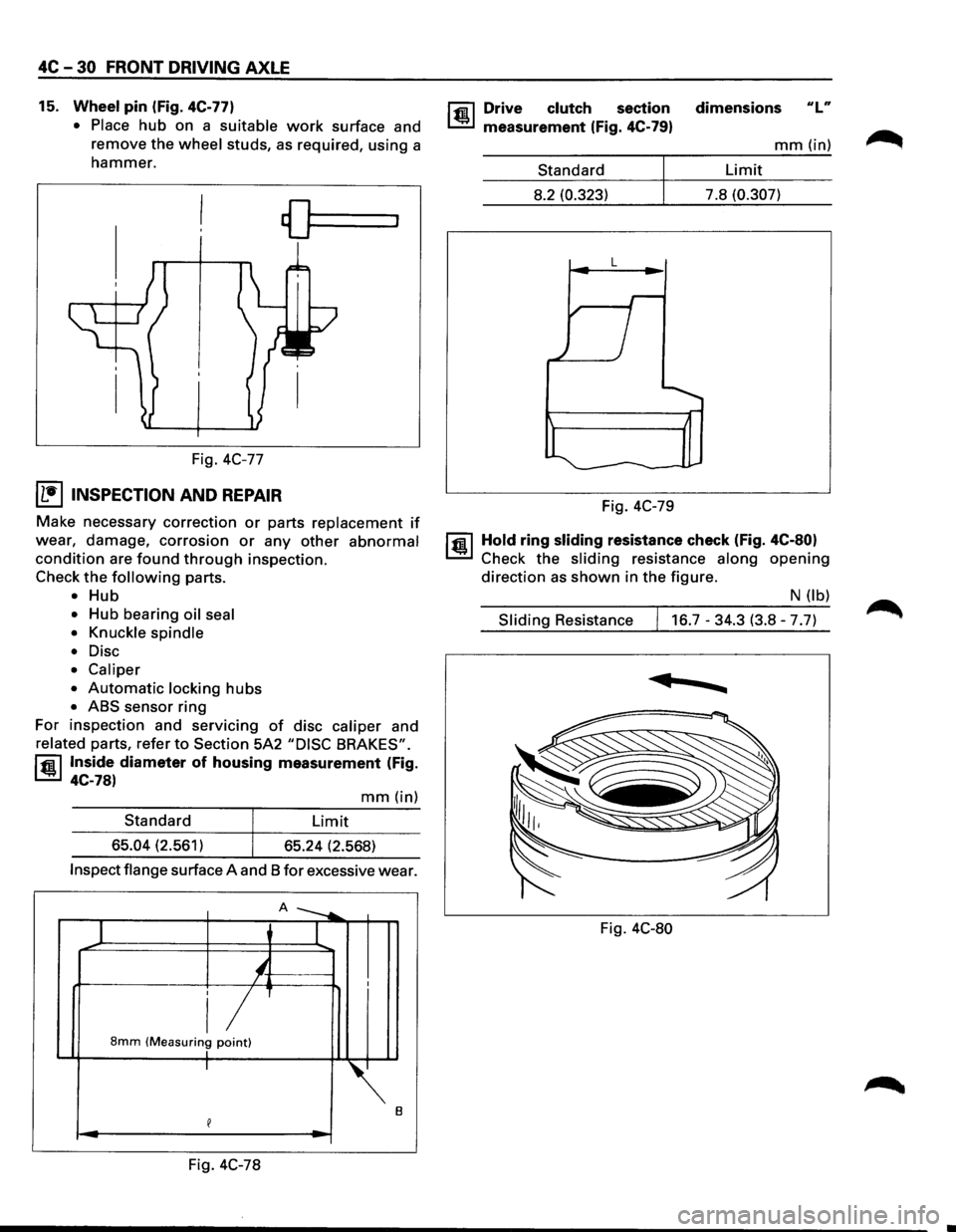
15. Wheel pin (Fig. 4C-77)
• Place
hub on a suitable work surface and
remove the
wheel studs, as required, using a
hammer.
Fig. 4C-77
I L•IINSPECTION AND REPAIR
Make necessary correction or parts replacement if
wear, damage, corrosion or any other abnormal
condition are found through inspection.
Check
the following parts.
• Hub
• Hub bearing oil seal
• Knuckle spindle
•
Disc
• Caliper
•
Automatic locking hubs
• ABS sensor ring
For inspection and servicing
of disc caliper and
related parts, refer to Section 5A2 "DISC BRAKES".
rfil Inside diameter of housing measurement (Fig.
~ 4C-78)
mm(in)
Standard Limit
65.04 (2.561)
65.24 (2.568)
Inspect flange surface A and 8 for excessive wear.
A ---....
1 I
'-/ I
i/ 8mm (Measuring point) I I
~.
e
Fig. 4C-78
rfil Drive clutch section
~ measurement (Fig. 4C-79)
Standard
8.2 (0.323)
L
Fig. 4C-79 dimensions
ulu
mm(in)
Limit
7.8
(0.307)
1@ 1 Hold ring sliding resistance check (Fig. 4C-80)
Check the sliding resistance along opening
direction as shown in the figure.
N (lb)
Sliding Resistance 16.7-34.3 (3.8-7.7)
......
Fig. 4C-80
Page 309 of 1928
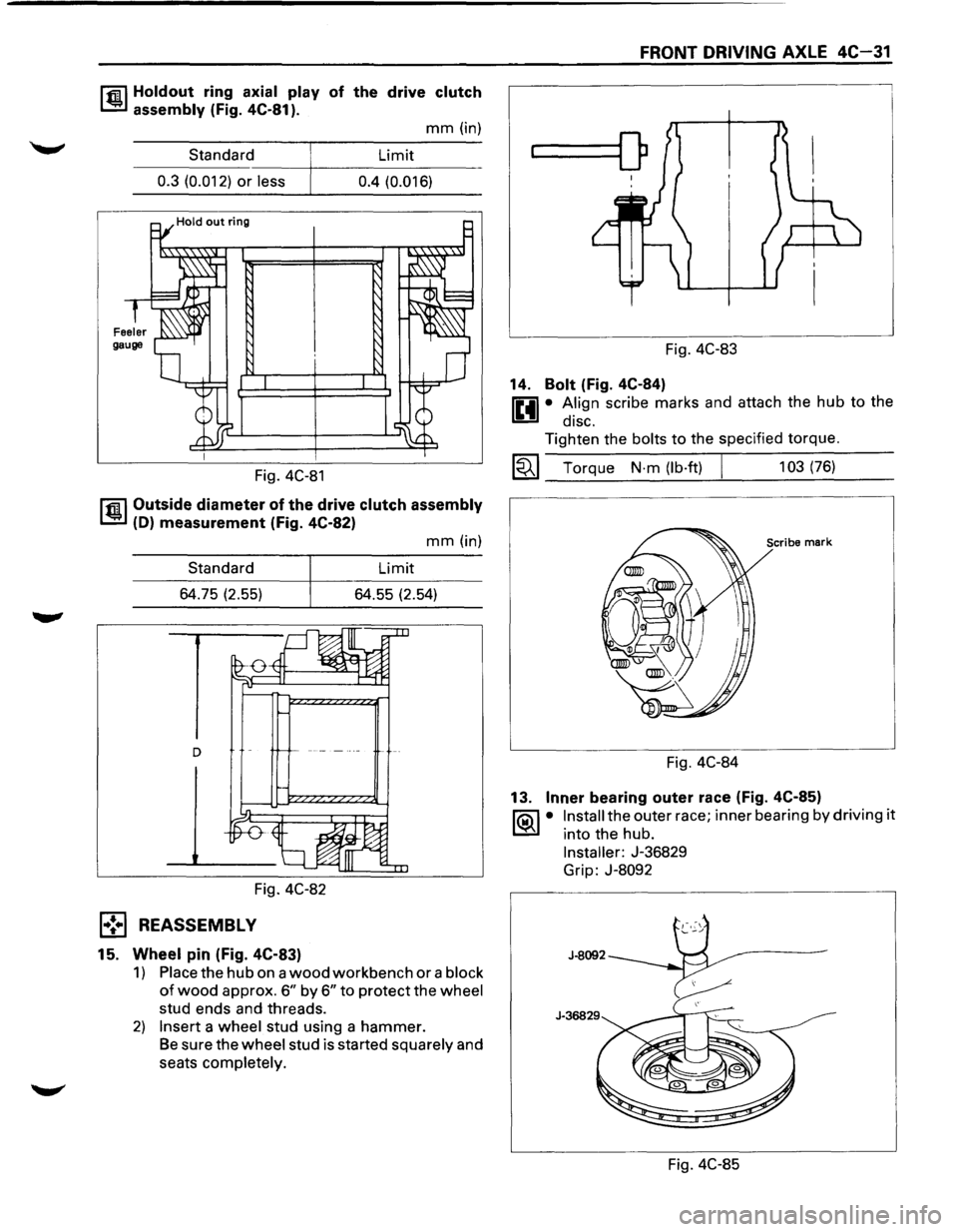
r.r.il Holdout ring axial play of the drive clutch
1..!!:.1 assembly (Fig. 4C-81 ).
mm (in)
Standard Limit
----~----------------0.3 (0.012) or less 0.4 (0.016)
Fig. 4C-81
r.r.il Outside diameter of the drive clutch assembly
1..!!:.1 (D) measurement (Fig. 4C-82)
Standard
64.75 (2.55)
Fig. 4C-82
l•! .. l REASSEMBLY
15. Wheel pin (Fig. 4C-83)
mm (in)
Limit
64.55 (2.54)
1) Place the hub on a wood workbench or a block
of wood approx. 6" by 6" to protect the wheel
stud ends and threads.
2) Insert a wheel stud using a hammer.
Be sure the wheel stud is started squarely and
seats completely.
FRONT DRIVING AXLE 4C-31
...____[)
Fig. 4C-83
14.
Bolt (Fig. 4C-84)
0 • A.lign scribe marks and attach the hub to the
1!!:!1 diSC.
Tighten the bolts to the specified torque.
~~~ Torque N·m (lb·ft) I 103 (76)
Scribe mark
Fig. 4C-84
13.
Inner bearing outer race (Fig. 4C-85)
1'?.:\1 • Install the outer race; inner bearing by driving it
l..::5::il into the hub.
Installer: J-36829
Grip:
J-8092
Fig. 4C-85
Page 313 of 1928
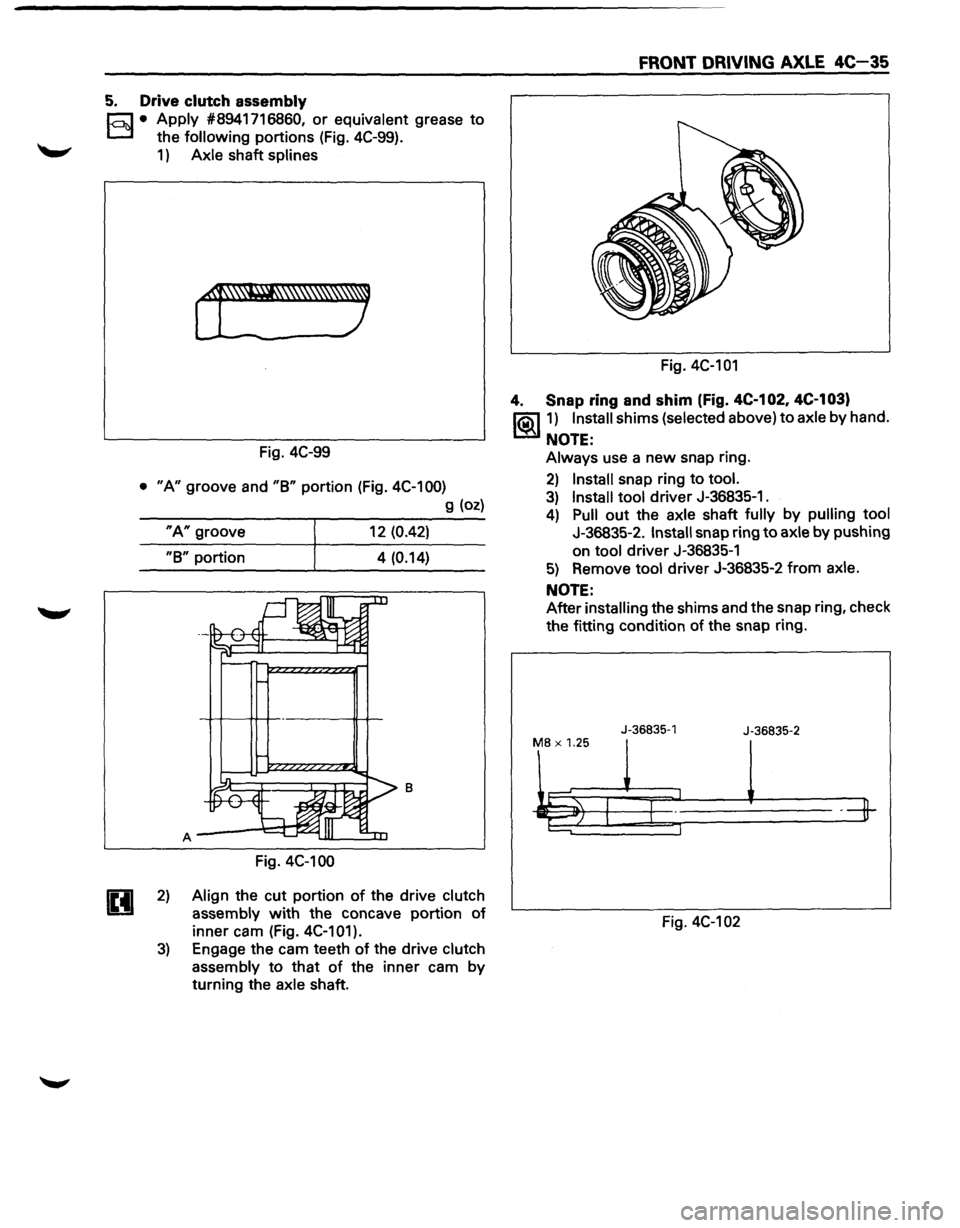
5. Drive clutch assembly
E3 • Apply #8941716860, or equivalent grease to
the following portions (Fig. 4C-99).
1) Axle shaft splines
Fig. 4C-99
• "A" groove and "B" portion (Fig. 4C-100)
g (oz)
"A" groove 12 (0.42)
"B" portion 4 (0.14)
8
Fig. 4C-100
2) Align the cut portion of the drive clutch
assembly with the concave portion of
inner cam (Fig. 4C-101).
3) Engage the cam teeth of the drive clutch
assembly to that of the inner cam by
turning the
axle shaft.
FRONT DRIVING AXLE 4C-35
Fig. 4C-101
4. Snap ring and shim (Fig. 4C-1 02, 4C·1 03)
1®..11) Install shims (selected above) to axle by hand.
NOTE:
Always use a new snap ring.
2) Install snap ring to tool.
3) Install tool driver J-36835-1.
4) Pull out the axle shaft fully by pulling tool
J-36835-2. Install snap ring to axle by pushing
on
tool driver J-36835-1
5) Remove tool driver J-36835-2 from axle.
NOTE:
After installing the shims and the snap ring, check
the fitting condition of the snap ring.
J-36835-1
J-36835-2
MB X 1.25
Fig. 4C-102
Page 455 of 1928
![ISUZU TROOPER 1995 Owners Manual CHART A-5, TA-5 I):Eet<(] I TECH 1 I
5) BRAKING SOUND (FROM HYDRAULIC UNIT) IS HEARD WHILE NOT BRAKING
IS THIS THE FIRST VEHICLE START AFTER ENGINE
START? AND IS VEHICLE SPEED UNDER 10 KM/H](/img/61/57183/w960_57183-454.png "ISUZU TROOPER 1995 Owners Manual CHART A-5, TA-5 I):Eet<(] I TECH 1 I
5) BRAKING SOUND (FROM HYDRAULIC UNIT) IS HEARD WHILE NOT BRAKING
IS THIS THE FIRST VEHICLE START AFTER ENGINE
START? AND IS VEHICLE SPEED UNDER 10 KM/H")
CHART A-5, TA-5 I):Eet<(] I TECH 1 I
5) BRAKING SOUND (FROM HYDRAULIC UNIT) IS HEARD WHILE NOT BRAKING
IS THIS THE FIRST VEHICLE START AFTER ENGINE
START? AND IS VEHICLE SPEED UNDER 10 KM/H
(6MPH)?
WHEN
DID IT OCCUR? 1. AT THE TIME OF SHIFT DOWN OR CLUTCH OPERATION 2. AT THE TIME OF LOW J.l DRIVE (ICE OR SNOW ROAD) OR ROUGH ROAD DRIVE 3. AT THE TIME OF HIGH-SPEED TURN 4. AT THE TIME OF PASSING CURB 5. AT THE TIME OF OPERATING ELECTRICAL
EQUIPMENT SWITCHES
6. AT THE TIME OF RACING THE ENGINE (OVER
5000 RPM)
IS THERE PLAY IN EACH SENSOR/WHEEL
SPEED SENSOR RINGS?
•
CHECK HARNESS/CONNECTOR FOR SUSPECTED
DISCONNECTION
• IF NO DISCONNECTION IS FOUND,
REPLACE EBCM
IT IS SELF-CHECKING SOUND NORMAL
UNDER ANY ONE CONDITION ABOVE, ABS MAY SOMETIME BE ACTUATED EVEN WHEN BRAKE
PEDAL IS NOT APPLIED
11 = Friction Unit