brakes ISUZU TROOPER 1995 Manual PDF
[x] Cancel search | Manufacturer: ISUZU, Model Year: 1995, Model line: TROOPER, Model: ISUZU TROOPER 1995Pages: 1928
Page 492 of 1928
5C-2 PARKING BRAKES
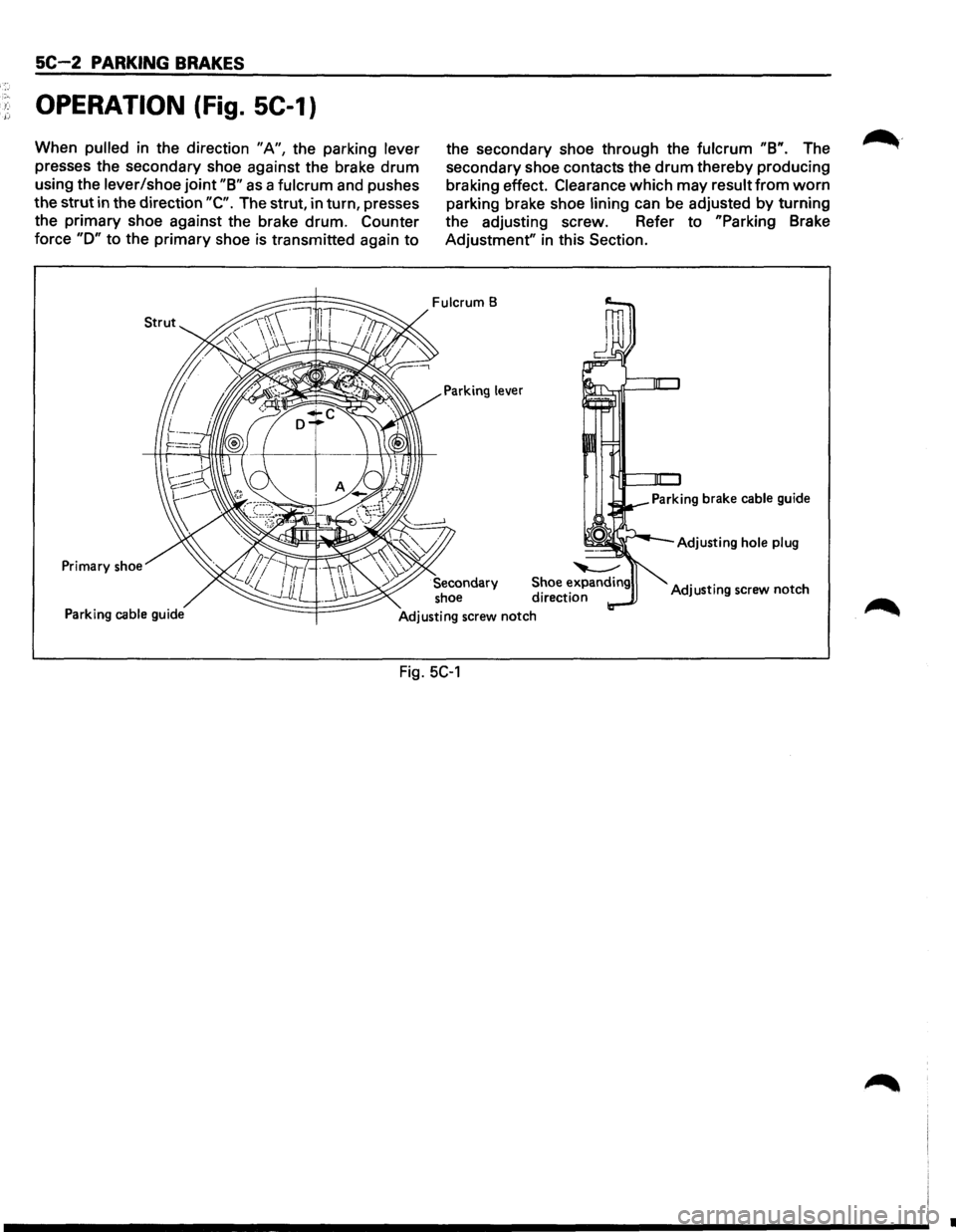
OPERATION (Fig. SC-1)
When pulled in the direction "A", the parking lever
presses the secondary shoe against the brake drum
using the lever/shoe joint "8" as a fulcrum and pushes
the strut in the direction
"C". The strut, in turn, presses
the primary shoe against the brake drum.
Counter
force "D" to the primary shoe is transmitted again to
Primary shoe
Parking cable guide
the secondary shoe through the fulcrum "8". The
secondary shoe contacts the
drum thereby producing
braking effect.
Clearance which may result from worn
parking brake shoe lining can be adjusted by turning
the adjusting screw. Refer to
"Parking Brake
Adjustment"
in this Section.
Fulcrum B
Adjusting hole plug
Adjusting screw notch
Fig. 5C-1
•
Page 493 of 1928
~
PARKING BRAKES SC-3
ON-VEHICLE SERVICE
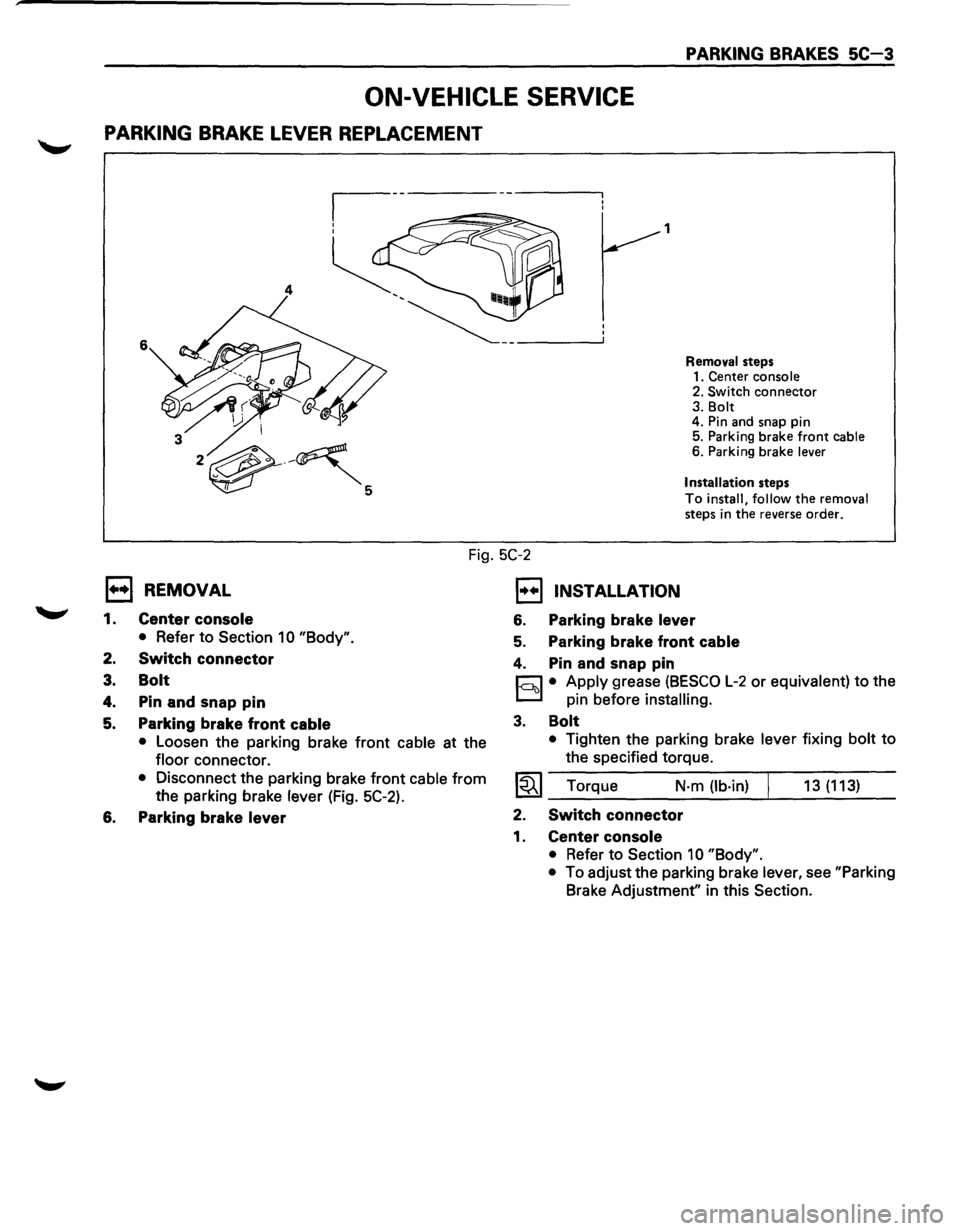
PARKING BRAKE LEVER REPLACEMENT
1
4
6
Removal steps
1. Center console
2. Switch
connector 3. Bolt
4. Pin and snap pin
5. Parking brake
front cable 6. Parking brake lever
Installation
steps
To install, follow the removal
steps in the reverse order.
Fig. 5C-2
l••l REMOVAL
1.
2.
3.
4.
5.
Center console
• Refer to Section 1 0 "Body".
Switch connector
Bolt
Pin and snap pin
Parking brake front
cable
• Loosen the parking brake front cable at the
floor connector.
• Disconnect the parking brake front cable from
the parking brake lever (Fig. 5C-2).
6. Parking brake lever
1••1 INSTALLATION
6. Parking brake lever
5. Parking brake front cable
4. Pin and snap pin
r:::J • Apply grease (BESCO L-2 or equivalent) to the
D pin before installing.
3. Bolt
• Tighten the parking brake lever fixing bolt to
the specified torque.
~~~ Torque N·m (lb·in) 13 (113)
2. Switch connector
1. Center console
• Refer to Section 10 "Body".
•
To adjust the parking brake lever, see "Parking
Brake Adjustment" in this Section.
Page 494 of 1928
5C-4 PARKING BRAKES
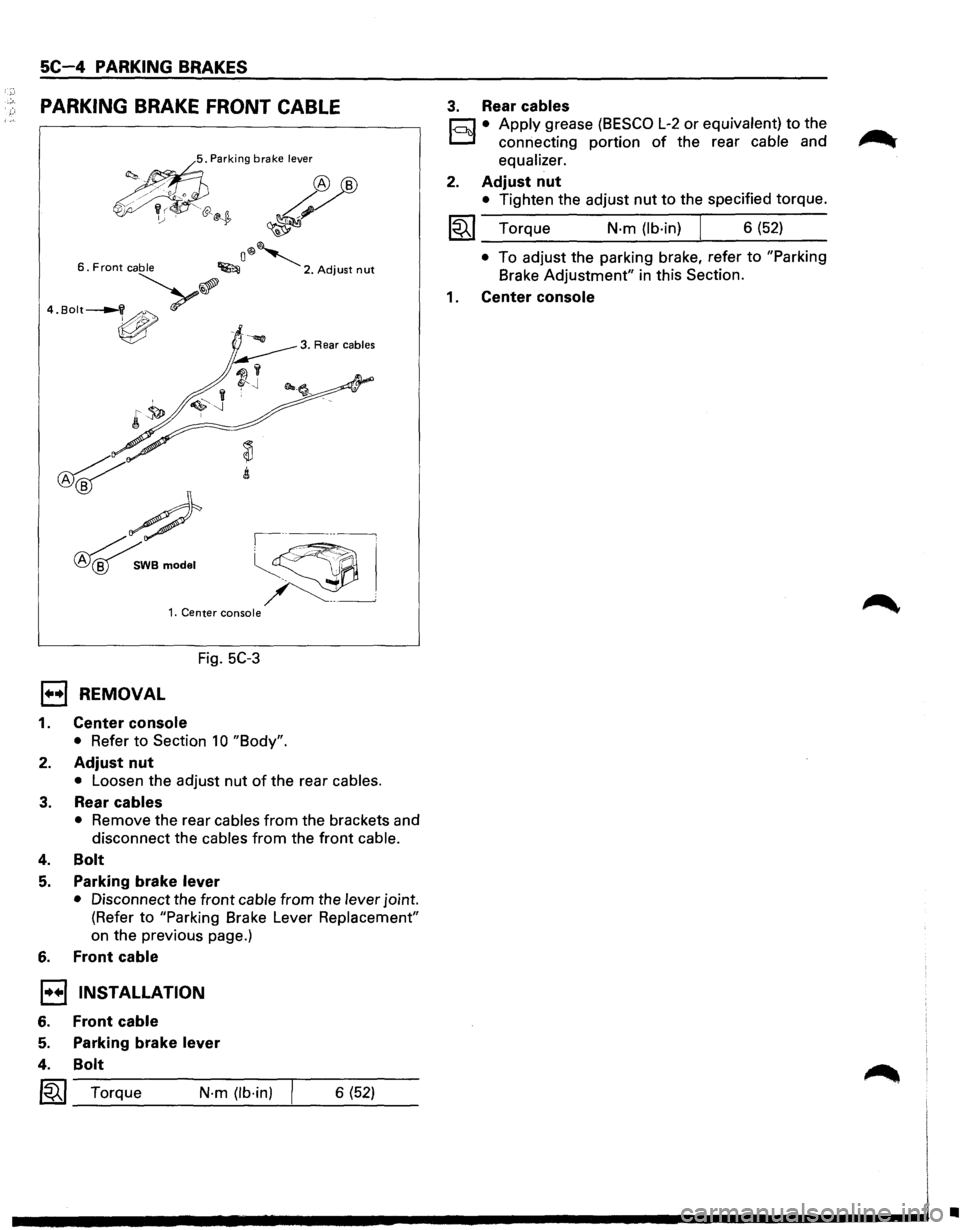
PARKING BRAKE FRONT CABLE
<.~ '"''"' brnke '""" ~
~~~ ~ ~
o®~ 6. Front cable ~ 2. Adjust nut
··"""-v>.?
~
~
#
~WBmodel
,----~
~~
~ ~--___j 1. Center console
Fig. 5C-3
1••1 REMOVAL
1. Center console
• Refer to Section 10 "Body".
2. Adjust nut
• Loosen the adjust nut of the rear cables.
3. Rear cables
• Remove the rear cables from the brackets and
disconnect the cables
from the front cable.
4. Bolt
5. Parking brake lever
• Disconnect the front cable from the lever joint.
(Refer to
"Parking Brake Lever Replacement"
on the previous page.)
6. Front cable
1•+1 INSTALLATION
6. Front cable
5.
4.
Parking brake lever
Bolt
I~I_T_o_rq_u_e ___ N_·_m_(lb_·_in_) --'---6_(_5_2) __
3. Rear cables
r;:::;:] • Apply grease (BESCO L-2 or equivalent) to the
D connecting portion of the rear cable and
equalizer.
2. Adjust nut
• Tighten the adjust nut to the specified torque.
~~~ Torque N-m (lb-in) J 6 (52)
• To adjust the parking brake, refer to "Parking
Brake
Adjustment" in this Section.
1 . Center console
•
Page 495 of 1928
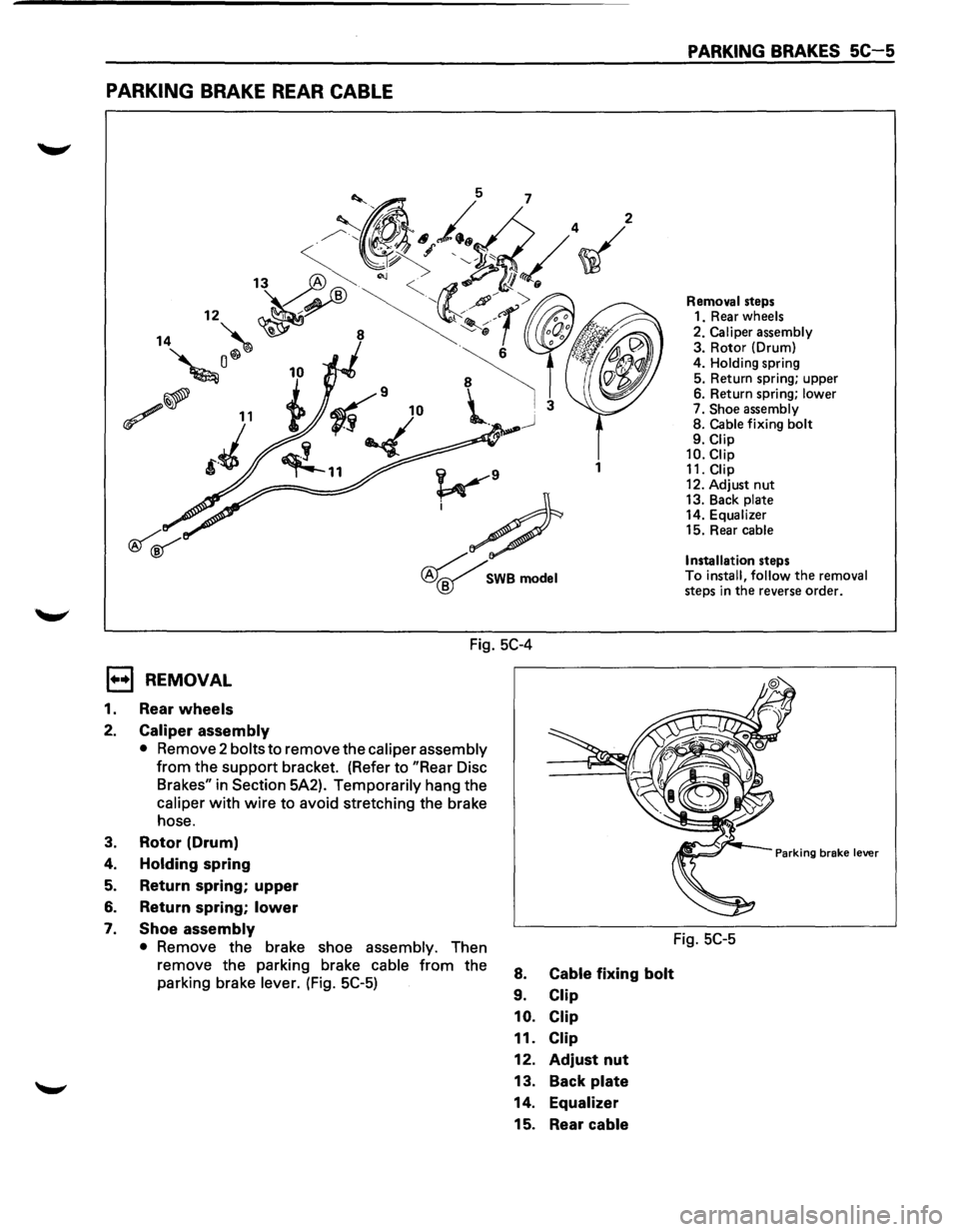
PARKING BRAKE REAR CABLE
1
v9
;#
~SWBmodel
Fig. 5C-4
E) REMOVAL
1. Rear wheels
2. Caliper assembly
• Remove 2 bolts to remove the caliper assembly
from the support bracket. (Refer to "Rear Disc
Brakes" in
Section 5A2). Temporarily hang the
caliper with wire to avoid stretching the brake
hose.
3. Rotor (Drum)
4.
Holding spring
5. Return spring; upper
6. Return spring; lower
7. Shoe assembly
• Remove the brake shoe assembly. Then
remove the parking brake
cable from the
parking brake
lever. (Fig. 5C-5) 8.
9.
10.
11.
12.
13.
14. 15.
Cable fixing bolt
Clip
Clip
Clip
Adjust nut
Back
plate
Equalizer
Rear cable
PARKING BRAKES SC-5
Removal steps
1. Rear wheels
2. Caliper assembly 3. Rotor (Drum)
4. Holding spring 5. Return spring; upper
6. Return spring; lower 7. Shoe assembly 8. Cable fixing bolt 9. Clip 10.Ciip 11. Clip
12. Adjust nut 13. Back plate 14. Equalizer 15. Rear cable
Installation
steps To install, follow the removal steps in the reverse order.
Parking brake lever
Fig. SC-5
Page 496 of 1928
5C-6 PARKING BRAKES
1••1 INSTALLATION
15. Rear cable
hl • Apply grease (BESCO L-2 or equivalent) to the
D connecting portion of the rear cable and
equalizer.
14. Equalizer
13. Back plate
12. Adjust nut
• Tighten the adjust nut to the specified torque.
1~1 Torque N-m (lb-in) I 6 (52)
• To adjust the parking brake, refer to "Parking
Brake Adjustment" in this Section.
11,10, 9. Clip
~~~ Torque N·m (lb·in) I 6 (52)
8. Cable fixing bolt
• Tighten the cable fixing bolt to the specified
torque.
~~~ Torque N·m (lb·in) 6 (52)
7. Shoe assembly
h1 • After installation of the shoe and cable
D assembly, apply special grease (included in the
repair kit)
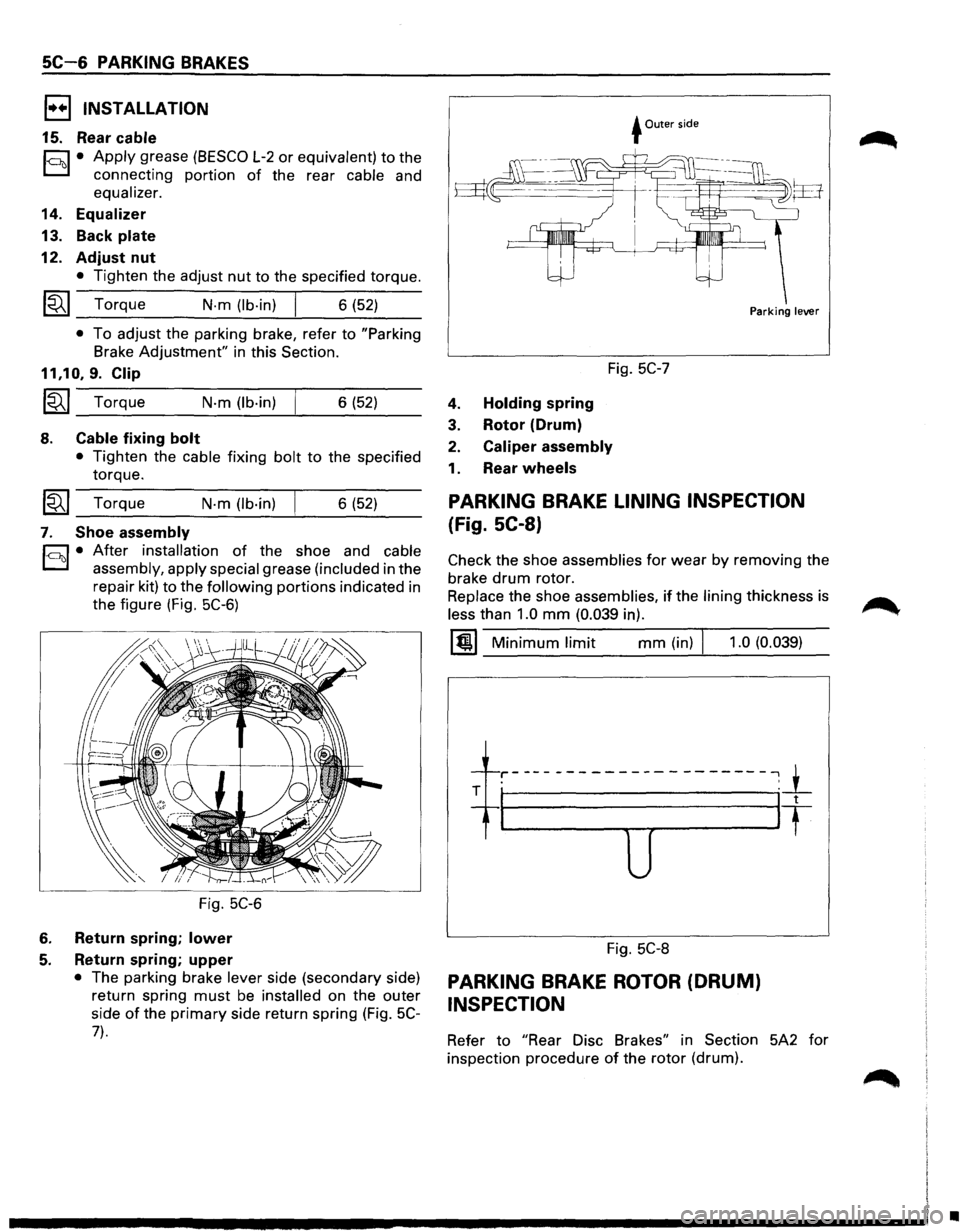
to the following portions indicated in
the figure (Fig.
5C-6)
Fig. 5C-6
6. Return spring; lower
5. Return spring; upper
• The parking brake lever side (secondary side)
return spring
must be installed on the outer
side
of the primary side return spring (Fig. 5C-
7).
+Outer side
Fig. 5C-7
4. Holding spring
3. Rotor (Drum)
2. Caliper assembly
1. Rear wheels
Parking lever
PARKING BRAKE LINING INSPECTION
(Fig. SC-8)
Check the shoe assemblies for wear by removing the
brake
drum rotor.
Replace the shoe assemblies, if the lining thickness is
less than 1.0 mm (0.039 in).
1@1 Minimum limit mm (in) J 1.0 (0.039)
-1---r-----------------------,_1_ . '
T I It
u
Fig. 5C-8
PARKING BRAKE ROTOR (DRUM)
INSPECTION
Refer to "Rear Disc Brakes" in Section 5A2 for
inspection procedure
of the rotor (drum).
•
Page 497 of 1928
PARKING BRAKE ADJUSTMENT
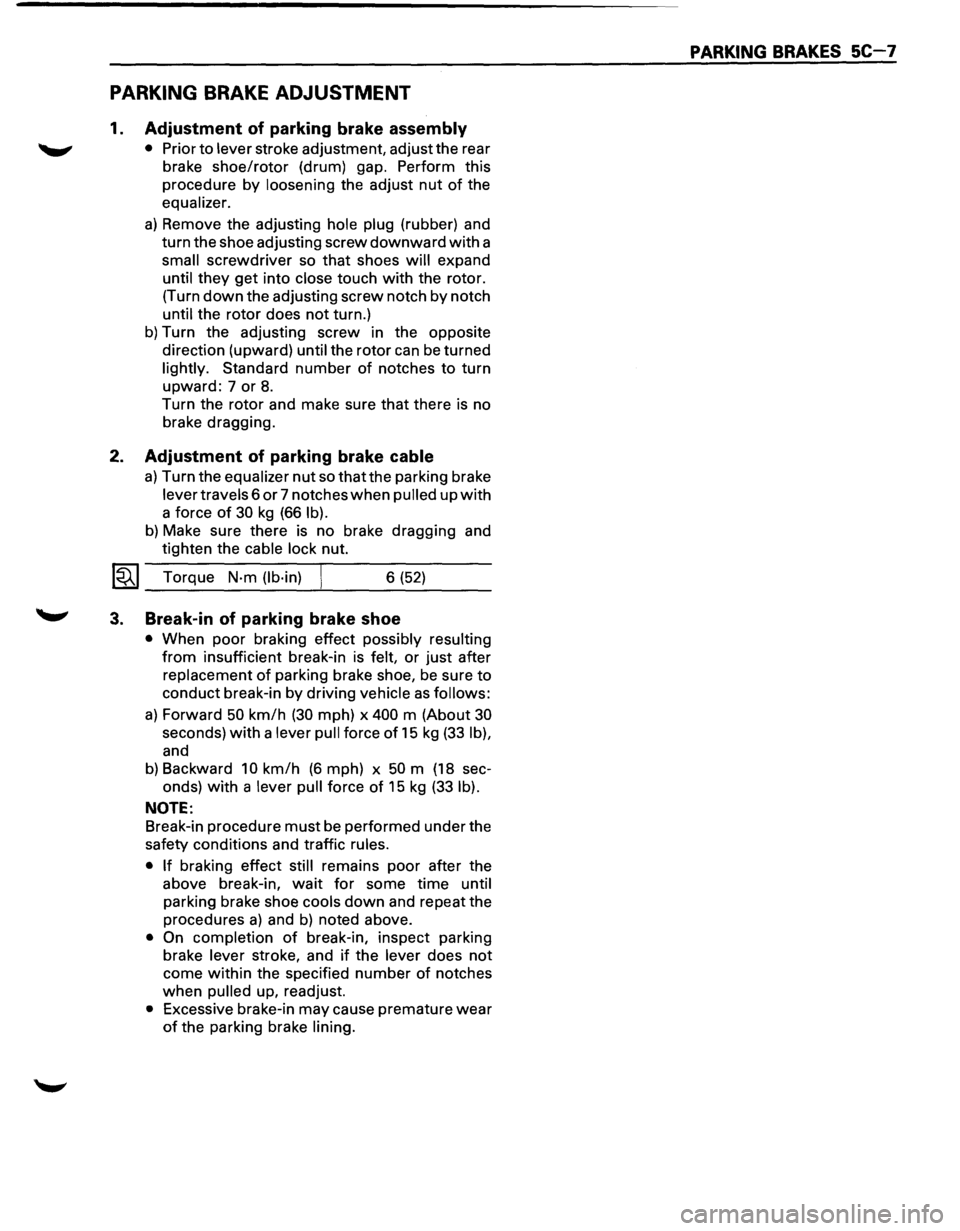
1. Adjustment of parking brake assembly
• Prior to lever stroke adjustment, adjust the rear
brake
shoe/rotor (drum) gap. Perform this
procedure
by loosening the adjust nut of the
equalizer.
a) Remove the adjusting hole plug (rubber) and
turn the shoe adjusting screw
downward with a
small screwdriver so that shoes will expand
until
they get into close touch with the rotor.
(Turn
down the adjusting screw notch by notch
until the rotor does not turn.)
b) Turn the adjusting screw in the opposite
direction (upward) until the rotor can
be turned
lightly. Standard
number of notches to turn
upward: 7 or 8.
Turn the rotor and make sure that there is no
brake dragging.
2. Adjustment of parking brake cable
a) Turn the equalizer nut so that the parking brake
lever travels 6
or 7 notches when pulled up with
a force of 30 kg (66 lb).
b) Make sure there is no brake dragging and
tighten the cable lock nut.
l~l Torque N·m (lb·in) 6 (52)
3. Break-in of parking brake shoe
• When poor braking effect possibly resulting
from insufficient break-in is felt, or just after
replacement
of parking brake shoe, be sure to
conduct break-in by driving vehicle as follows:
a) Forward 50 km/h (30 mph) x 400 m (About 30
seconds) with a lever pull force of 15 kg (33 lb),
and
b) Backward 10 km/h (6 mph) x 50 m (18 sec-
onds)
with a lever pull force of 15 kg (33 lb).
NOTE:
Break-in procedure must be performed under the
safety conditions and traffic rules.
• If braking effect still remains poor after the
above break-in,
wait for some time until
parking brake shoe cools
down and repeat the
procedures
a) and b) noted above.
• On completion of break-in, inspect parking
brake lever stroke, and
if the lever does not
come within the specified number of notches
when pulled up, readjust.
• Excessive brake-in may cause premature wear
of the parking brake lining.
PARKING BRAKES SC-7
Page 498 of 1928
SC-8 PARKING BRAKES
MAIN DATA AND SPECIFICATIONS
GENERAL SPECIFICATIONS
Rear parking brake
Type Lining dimension
Adjusting method
Rotor (drum) inside diameter
Parking brake
lever stroke
mm (in) Duo-servo
121.2
(18.79)
Manual adjusting
210 (8.27)
6 to 7 notches
When pulled
with a force of 30 kg (66 lb)
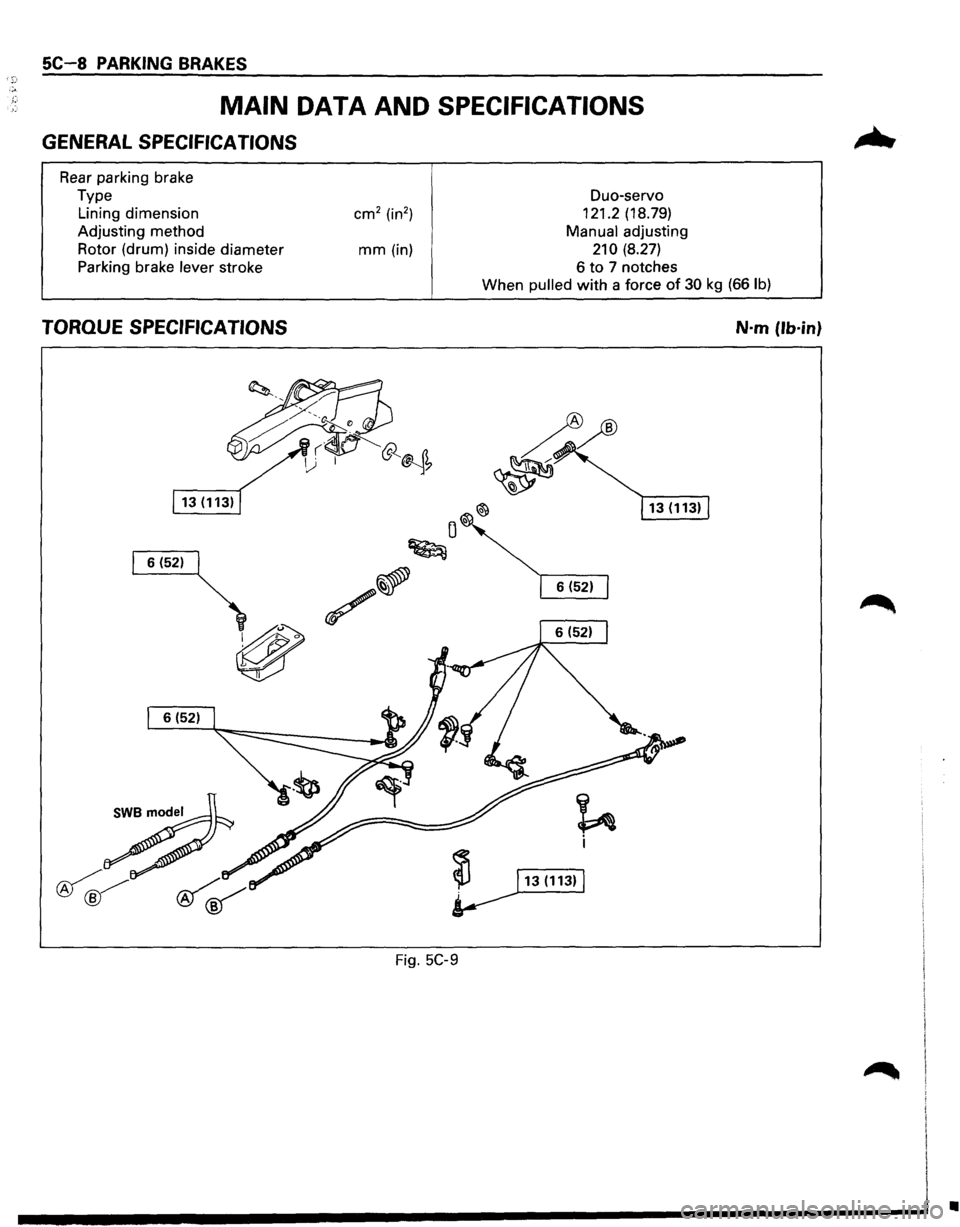
TORQUE SPECIFICATIONS N·m (lb·in}
Fig. 5C-9
•
Page 1000 of 1928
7A-128 AUTOMATIC TRANSMISSION (4L30-E)
DIAGNOSTIC TROUBLE CODE (DTC) 55
BRAKE SWITCH SHORT TO GROUND OR OPEN
This DTC does NOT flash the CHECK TRANS
indicator and does NOT set the BACKUP MODE.
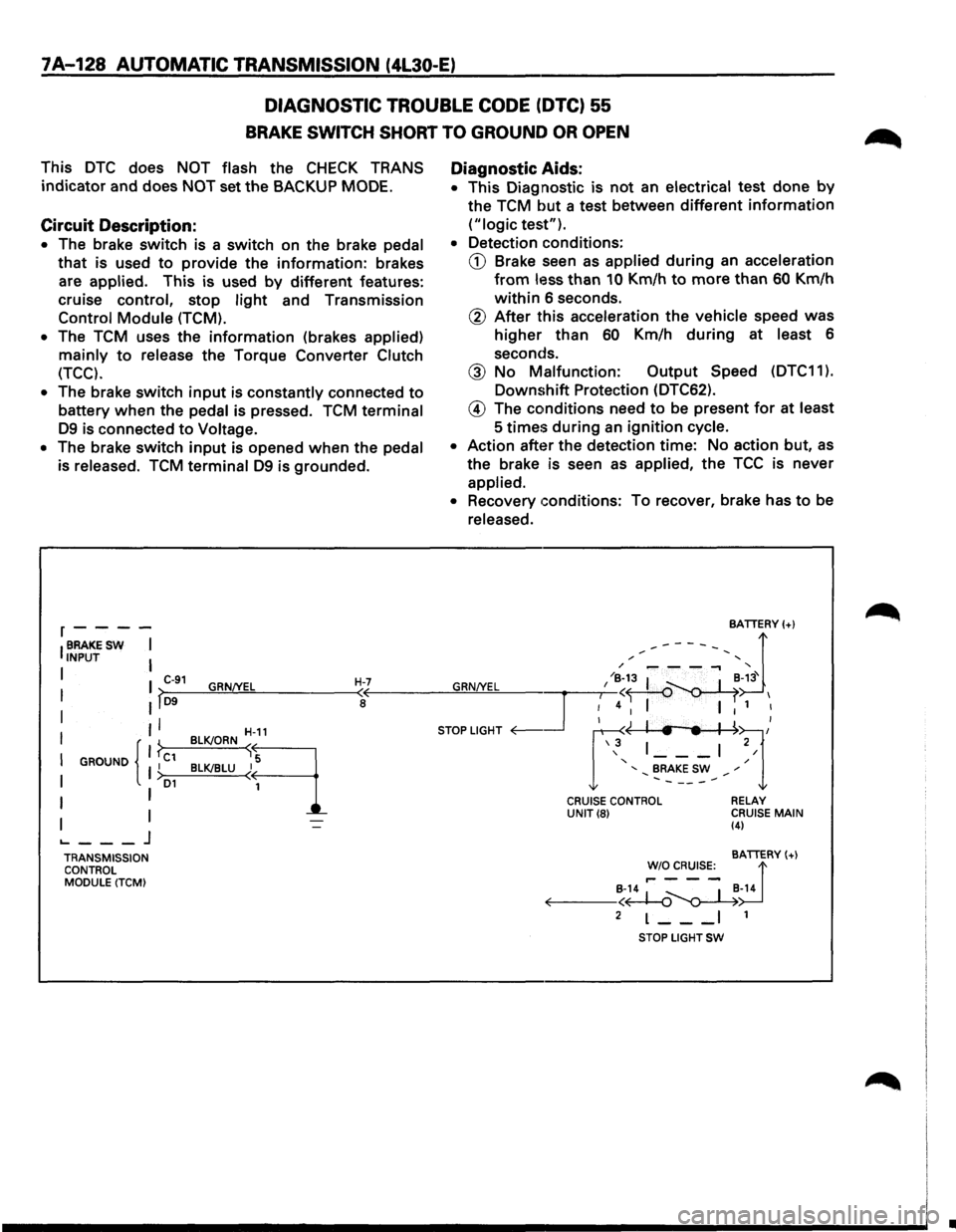
Circuit Description:
• The brake switch is a switch on the brake pedal
that is used to provide the information: brakes
are
applied. This is used by different features:
cruise control, stop
light and Transmission
Control Module (TCM).
•
The TCM uses the information (brakes applied)
mainly to release the Torque Converter Clutch
(TCC).
•
The brake switch input is constantly connected to
battery when the pedal is pressed. TCM terminal
D9 is connected to Voltage.
• The brake switch input is opened when the pedal
is released.
TCM terminal D9 is grounded.
r----
IBRAKESW I INPUT I
I I C-91 GRN/YEL H-7 I >-D9--~~~------~<
I II a
II
I GROUND I C1 I { }
I I >D1
I I
I I ._ ___ j
TRANSMISSION
CONTROL
MODULE (TCM) BLK!ORN
~-11
B~LU~q
Diagnostic
Aids:
• This Diagnostic is not an electrical test done by
the TCM but a test between different information
("logic test").
• Detection conditions:
CD Brake seen as applied during an acceleration
from less than 10 Km/h to more than 60 Km/h
within 6 seconds.
@ After this acceleration the vehicle speed was
higher than 60 Km/h during at least 6
seconds.
@ No Malfunction: Output Speed (DTC11 ).
Downshift Protection (DTC62).
@ The conditions need to be present for at least
5
times during an ignition cycle.
• Action after the detection time: No action but, as
the brake is seen as applied, the TCC is never
applied.
• Recovery conditions: To recover, brake has to be
released.
CRUISE CONTROL UNIT(8) RELAY
CRUISE MAIN (4)
BATTERY(+)
!'~~s:_ d B-14 ~ _ I _B-14 ~--<~~
2 L--_I 1
STOP LIGHT SW
•
Page 1002 of 1928
7A-130 AUTOMATIC TRANSMISSION (4l30-E)
DIAGNOSTIC
TROUBLE CODE (DTC)·56
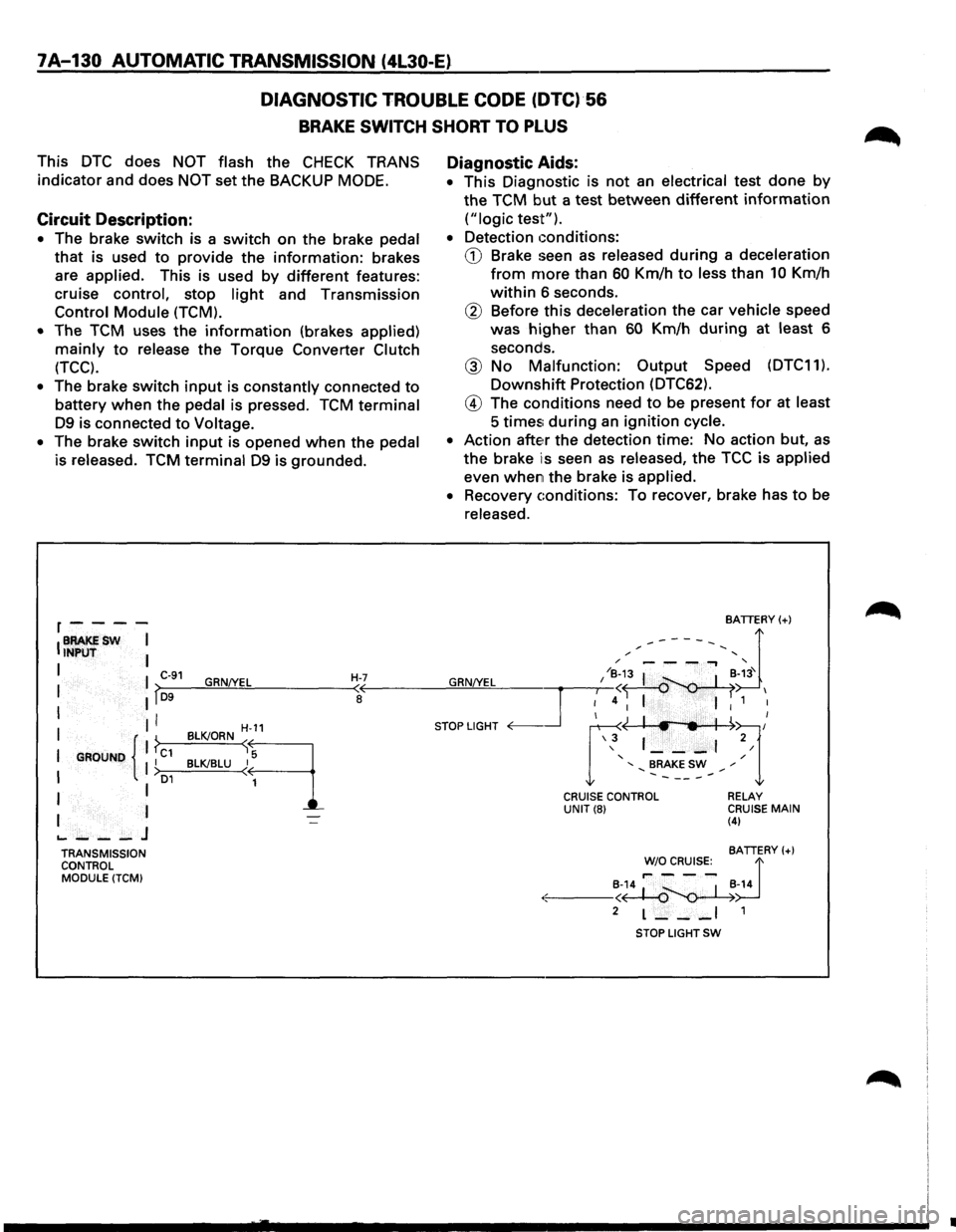
BRAKE SWITCH SHORT TO PLUS
This DTC does NOT flash the CHECK TRANS
indicator and does
NOT set the BACKUP MODE.
Circuit Description:
• The brake switch is a switch on the brake pedal
that is used to provide the information: brakes
are
applied. This is used by different features:
cruise
control, stop light and Transmission
Control Module (TCM).
•
The TCM uses the information (brakes applied)
mainly to release the Torque Converter Clutch
(TCC).
• The brake switch input is constantly connected to
battery when the pedal is pressed. TCM terminal
D9 is connected to Voltage.
•
The brake switch input is opened when the pedal
is released. TCM terminal D9 is grounded.
r----
IBRAKESW I INPUT I
I I C-91 GRN!YEL H-7 I lf~D-9--~~~------~~
I II I
I GROUND { 1 ?c1 II I >o1
I I
I I
.._ ___ J
TRANSMISSION
CONTROL
MODULE (TCM)
H-11
BLK!ORN sq
BLK!BLU ~
1
Diagnostic Aids:
• This Diagnostic is not an electrical test done by
the TCM but a test between different information
("logic test").
•
Detection conditions:
CD Brake seen as released during a deceleration
from more than 60 Km/h to less than 10 Km/h
within 6 seconds.
® Before this deceleration the car vehicle speed
was
higher than 60 Km/h during at least 6
seconds.
@ No Malfunction: Output Speed (DTC11).
Downshift Protection (DTC62).
@ The conditions need to be present for at least
5 times; during an ignition cycle.
•
Action atte~r the detection time: No action but, as
the brake is seen as released, the TCC is applied
even when the brake is applied.
•
Recovery conditions: To recover, brake has to be
released.
BATTERY(+)
,.------, d / '
GRN/YEL I /~;3 I ~-~3' I
~4 I I 1 I
STOP LIGHT <0---.Jr ~~l/ \3 1 ___ , 2/
' / ' BRAKE SW ,. .......... -----.......
CRUISE CONTROL UNIT(8) RELAY CRUISE MAIN (4)
BATTERY(+)
~~~R~s:_ d
·:.:-: ---~~~-14
2 L--_I 1
STOP LIGHT SW
•
Page 1022 of 1928
7A-150 AUTOMATIC TRANSMISSION (4L30-E)
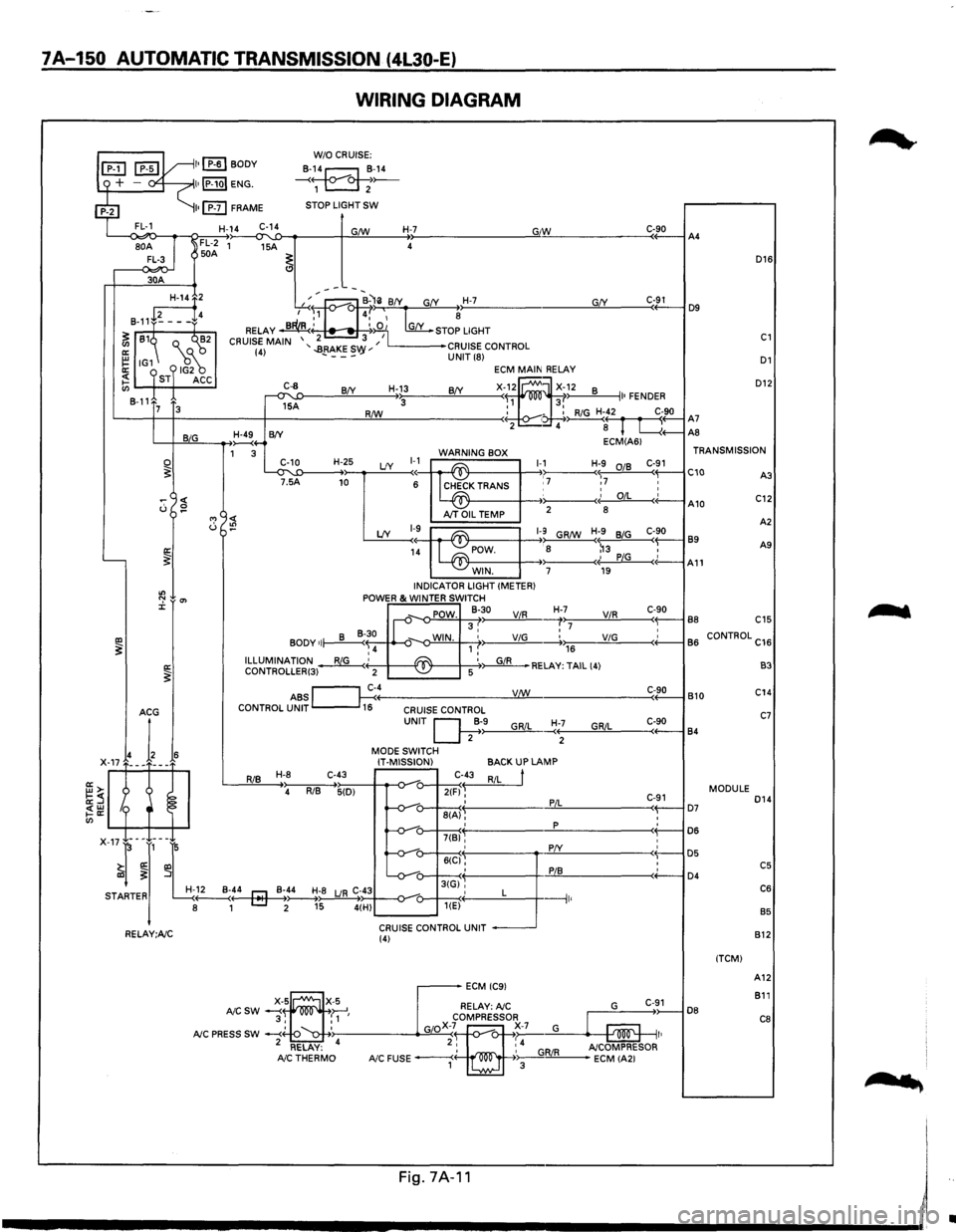
WIRING DIAGRAM
L--<~o-~~~~~~--~~~----~~~----~~--------------~G"IW~------------C«-9_0--iA4
D16
30A
D12
GfY ---~:at--B-'li BfY G(Y H-7 ,...-..~., 4,' ~ ~
RELAY ~' ~:iO 1 [my_ STOP LIGHT
2 3 I CRUISE MAIN '..BRAKES '' L------•CRUISE CONTROL (4) - ---vy UNIT (8) D1
~2
8-11+~---f4
~ 81~ Q._ ("'~2
~ IG1 18~ ~ ST ACC en 8-11
C-91 D9
C1
ECM MAIN RELAY
X-f~ ~X~~2 8 II• FENDER R/W : - : RiG H-42 C-90 '-----t--t------+-------!:!Lll----------< • ~( r fl A7 2 4 8 L....{+--AS
C-8
~A
H-13 BfY BfY 3 7 3
L-+-JB~~I,_IG __ __....,~4-B(Y ECM(A61 1 3 WARNING BOX TRANSMISSION
~T'~5'-'1:D----H-+~2~5 LfY ~~~ ~K TRANS 1-,17 Hr7 :~ C-~1 C10 C::
0 ~
"' <( u :!?
'----~
"' ":' 0'> J:
IXl ~ a: ~
I~ A10 AJT OIL TEMP 2
8
A
2
LfY 1-9~ ~1-9 GR/W H;9 BiG C-90 89 1~ POW. : 8 ~3 , A9
- -~· PiG c(-A11 WIN. 7 19 INDICATOR LIGHT (METER) POWER & WINTER SWITCH
_,. POW. 8-30 ViR H-,>,7:;-----'V"-'iR.!..,_ ___ c<-~9-0-l B8 C15 II-v 3, :7 • BODY of~~ ~-o-WIN. 1 ,' ViG -----.+.,.,176 __ ____;;V.:..;iG=-----<+'-----1 B
6 CONTROL C16 ,4 ILLUMINATION~' ~ '~RELAY: TAIL (4) CONTROLLER(3) 2 -~ 5
ABS ~c~4----------------__yV:J..:!:!._/W ______________ ___:C<-~9:..::0-l B 10 CONTROL UNIT 16 CRUISE CONTROL
RiB H-8 C-43
4 RiB 5(D)
UNIT Q;·>-9------"G,_,Ri_,L_~:+--;-----'G""R""iL::,_ ___ c,-+-9-0----j 84
MODE SWITCH
IT-MISSION)
C-43
2(F) ~ ' 8(A), '
BACKUP LAMP
RiL
t
PiL
p
C-91 ( D7 : D6
B3
C14
C7
MODULE D14
: D5 : C5 ( D4 C6
B5
7(B)'
X-17-l-~J,-~L -v-: 6((:1§': :
r! -v-u-3tGi'', STARTER H-~..._:4---4r::J-Mo~-_B~;~;8 LJR C;~434--o-_,_-o---+---<·' L ---1 8 1 [::::J 2 15 4(H) u---~< 1 '
CRUISE CONTROL UNIT RELAY;A/C (4)
DB
(TCM) 812
A12
811
C8
....
'
Fig.7A·11 I
------------------------~~
•