brakes ISUZU TROOPER 1995 Service Manual
[x] Cancel search | Manufacturer: ISUZU, Model Year: 1995, Model line: TROOPER, Model: ISUZU TROOPER 1995Pages: 1928
Page 352 of 1928
5A2-2 DISC BRAKES
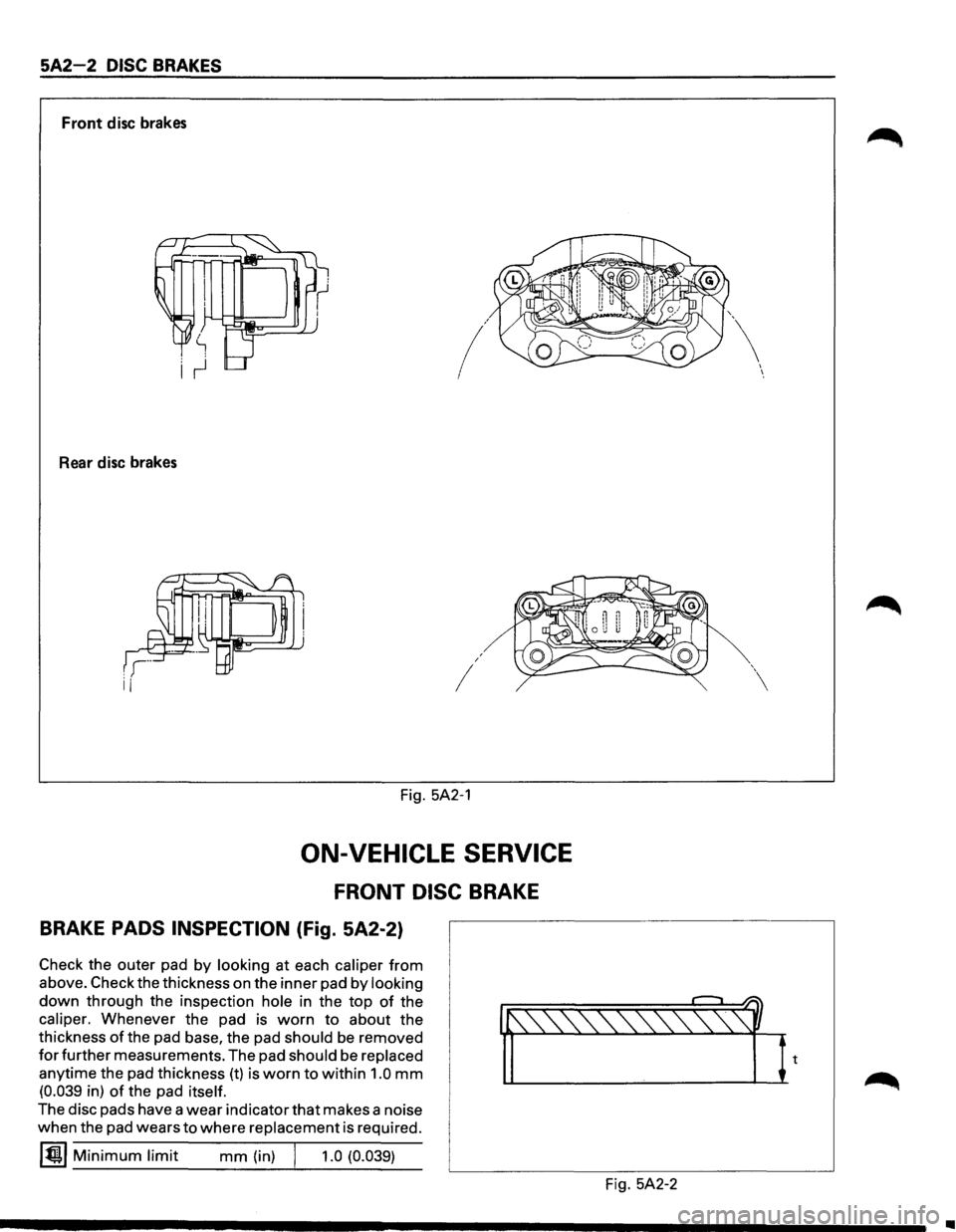
Front disc brakes
/
Rear disc brakes
I
I
Fig. 5A2-1
ON-VEHICLE SERVICE
FRONT DISC BRAKE
BRAKE PADS INSPECTION (Fig. 5A2-2)
Check the outer pad by looking at each caliper from
above. Check the thickness on the inner pad by looking
down through the inspection hole in the top of the
caliper. Whenever the pad is worn to about the
thickness
of the pad base, the pad should be removed
for further measurements. The pad should be replaced
anytime the pad thickness (t) is worn to within 1.0 mm
(0.039 in) of the pad itself.
The disc pads have a wear indicator that makes a noise
when the pad wears
to where replacement is required.
~~~ Minimum limit mm (in) j 1.0 (0.039)
Fig. 5A2-2
I I
•
Page 353 of 1928
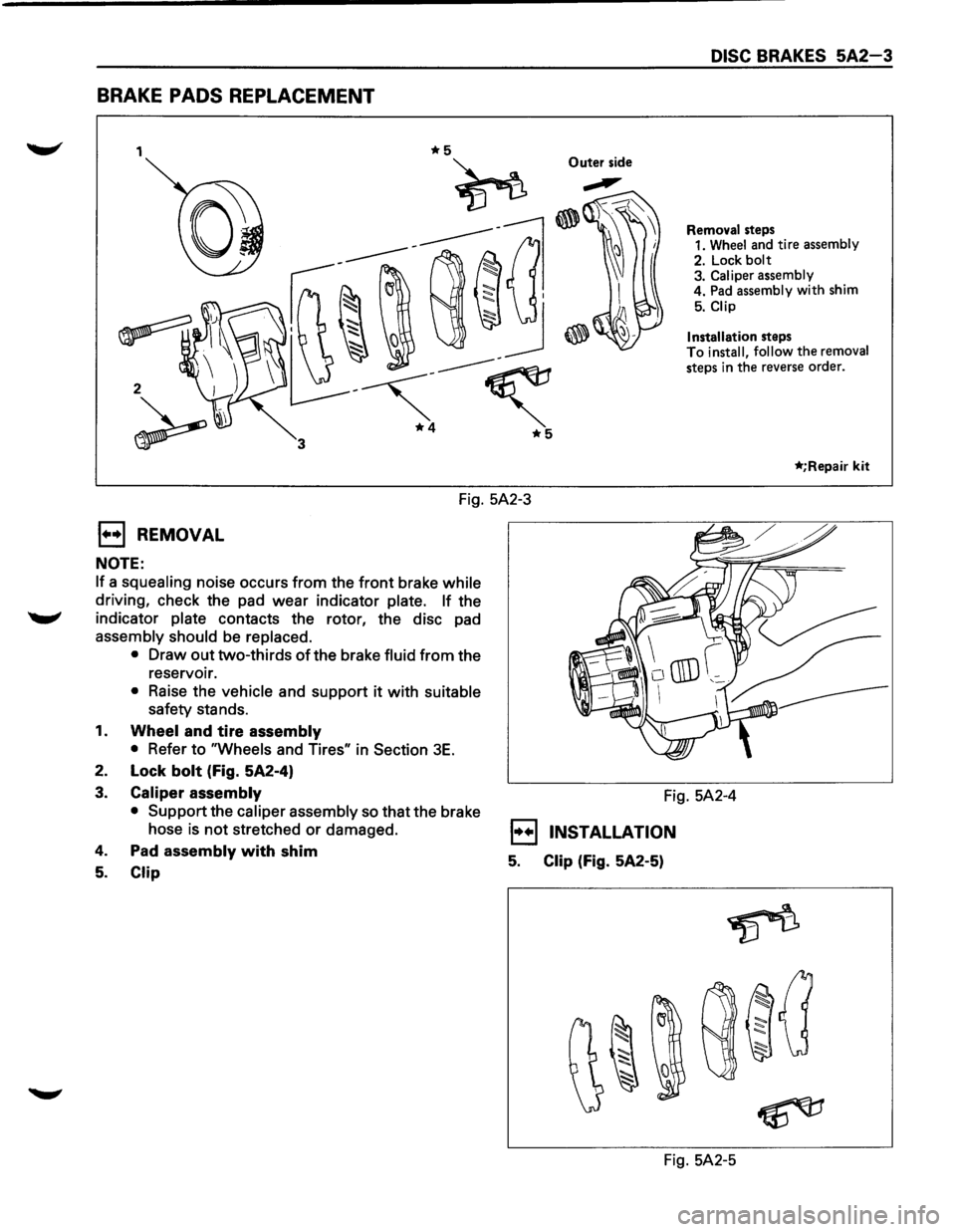
BRAKE PADS REPLACEMENT
1 Outer side
2
DISC BRAKES 5A2-3
Removal steps
1. Wheel and tire assembly
2. Lock
bolt 3. Caliper assembly
4. Pad assembly with shim
5. Clip
Installation
steps To install, follow the removal
steps in the reverse order.
*;Repair kit
Fig. 5A2-3
1••1 REMOVAL
NOTE:
If a squealing noise occurs from the front brake while
driving, check the pad wear indicator plate. If the
........., indicator plate contacts the rotor, the disc pad
assembly should be replaced.
•
Draw out two-thirds of the brake fluid from the
reservoir.
• Raise the vehicle and support it with suitable
safety stands.
1. Wheel and tire assembly
•
Refer to "Wheels and Tires" in Section 3E.
2. Lock bolt (Fig. 5A2-4)
3. Caliper assembly
• Support
the caliper assembly so that the brake
hose
is not stretched or damaged.
4. Pad assembly with shim
5. Clip
Fig. 5A2-4
1••1 INSTALLATION
5. Clip (Fig. 5A2-5)
Fig. 5A2-5
Page 354 of 1928
5A2-4 DISC BRAKES
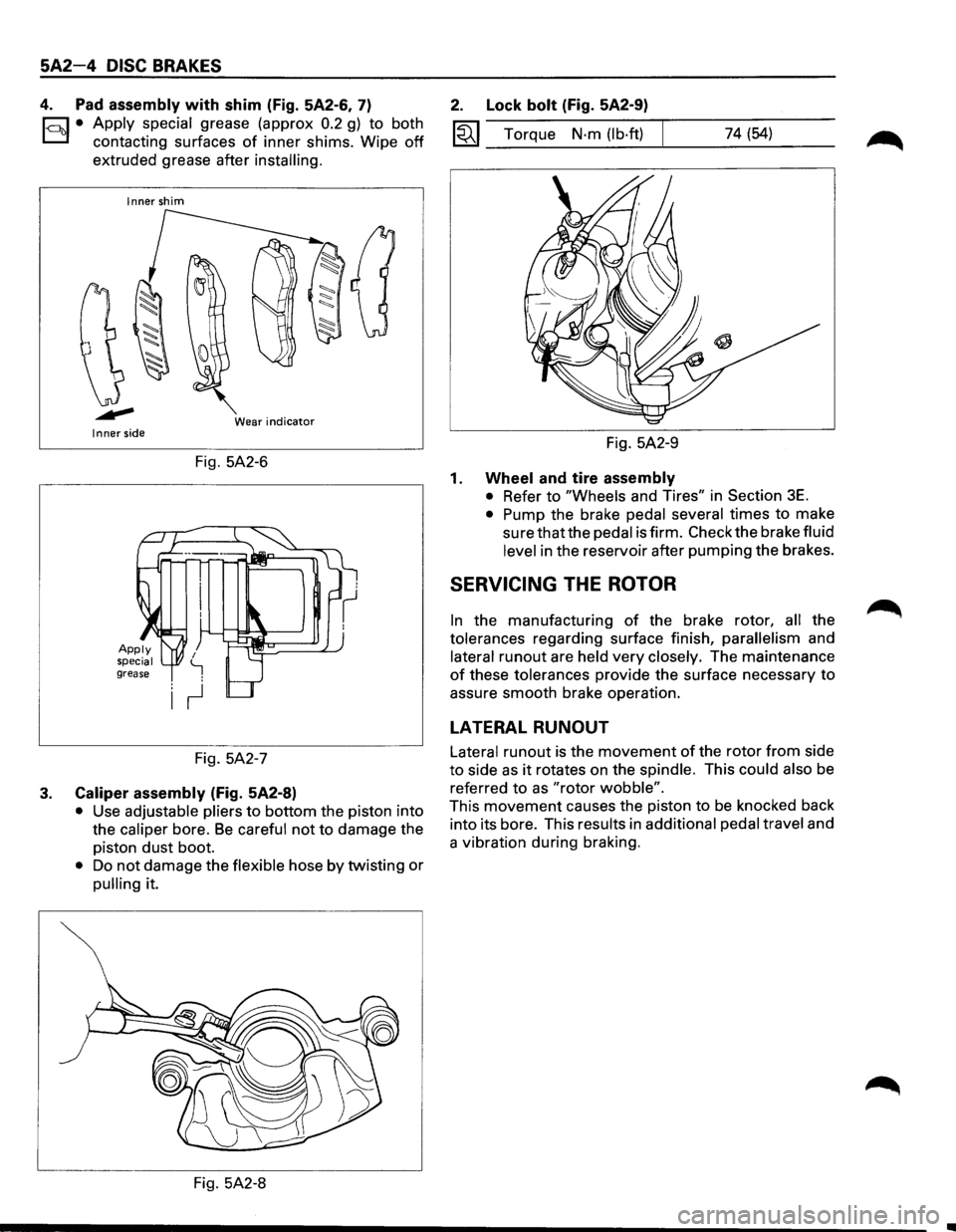
4. Pad assembly with shim (Fig. 5A2-6, 7)
1-c::~t:.l• Apply ~pecial grease (approx 0.2 g) to both
contactmg surfaces
of inner shims. Wipe off
extruded grease after installing.
Inner shim
Wear
indicator Inner side
Fig. 5A2-6
Fig. 5A2-7
3. Caliper assembly (Fig. 5A2-8)
• Use adjustable pliers to bottom the piston into
the
caliper bore. Be careful not to damage the
piston
dust boot.
• Do not damage the flexible hose by twisting or
pulling it.
Fig. 5A2-8
2. Lock bolt (Fig. 5A2-9)
1«1 Torque N·m (lb·ft) 74 (54)
Fig. 5A2-9
1. Wheel and tire assembly
• Refer to "Wheels and Tires" in Section 3E.
• Pump the brake pedal several times to make
sure that the pedal is firm. Check the brake fluid
level in the reservoir after pumping the brakes.
SERVICING THE ROTOR
In the manufacturing of the brake rotor, all the
tolerances regarding surface finish,
parallelism and
lateral
runout are held very closely. The maintenance
of these tolerances provide the surface necessary to
assure smooth brake operation.
LATERAL RUNOUT
Lateral runout is the movement of the rotor from side
to side as it rotates on the spindle. This could also be
referred
to as "rotor wobble".
This movement causes the piston to be knocked back
into its bore. This results in
additional pedal travel and
a vibration during braking.
Page 355 of 1928
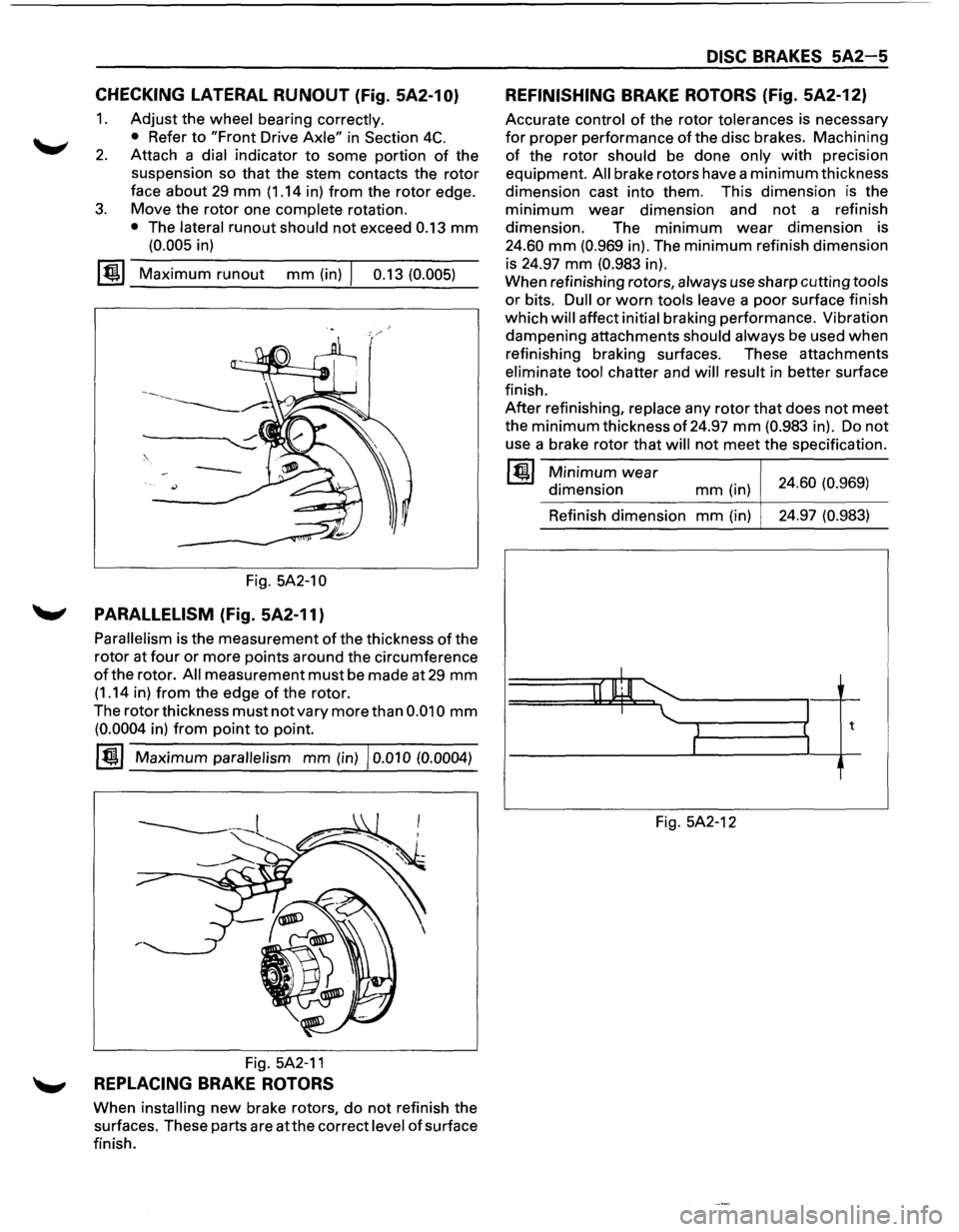
CHECKING LATERAL RUNOUT (Fig. 5A2-10)
1. Adjust the wheel bearing correctly.
•
Refer to "Front Drive Axle" in Section 4C.
2. Attach a dial indicator to some portion of the
suspension so that the stem contacts the
rotor
face about 29 mm (1.14 in) from the rotor edge.
3. Move the rotor one complete rotation.
• The lateral runout should not exceed 0.13 mm
(0.005 in)
~~~ Maximum runout mm (in) I 0.13 (0.005)
Fig. 5A2-1 0
'-' PARALLELISM (Fig. 5A2-11)
Parallelism is the measurement of the thickness of the
rotor at
four or more points around the circumference
of the rotor. All measurement must be made at 29 mm
(1.14 in) from the edge of the rotor.
The
rotor thickness must not vary more than 0.010 mm
(0.0004 in) from point to point.
~~~ Maximum parallelism mm (in) I 0.010 (0.0004)
----------1 '-----...
Fig. 5A2-11
'-' REPLACING BRAKE ROTORS
When installing new brake rotors, do not refinish the
surfaces. These parts are
atthe correct level of surface
finish.
DISC BRAKES 5A2-5
REFINISHING BRAKE ROTORS (Fig. 5A2-12)
Accurate control of the rotor tolerances is necessary
for proper performance ofthe disc brakes. Machining
of the rotor should be done only with precision
equipment.
All brake rotors have a minimum thickness
dimension cast into them. This dimension
is the
minimum wear dimension and not a refinish
dimension. The
minimum wear dimension is
24.60 mm (0.969 in). The minimum refinish dimension
is 24.97
mm (0.983 in).
When refinishing rotors,
always use sharp cutting tools
or bits. Dull or worn tools leave a poor surface finish
which
will affect initial braking performance. Vibration
dampening attachments
should always be used when
refinishing braking surfaces. These attachments
eliminate tool chatter and will result in better surface
finish.
After refinishing, replace any rotor that does not meet
the minimum thickness of 24.97 mm (0.983 in). Do not
use a brake rotor that will not meet the specification.
~~~ Minimum wear
dimension mm (in) 24.60 (0.969)
Refinish dimension
mm (in) 24.97
(0.983)
I
II lllJl I
1 t
I
Fig. 5A2-12
Page 356 of 1928
5A2-8 DISC BRAKES
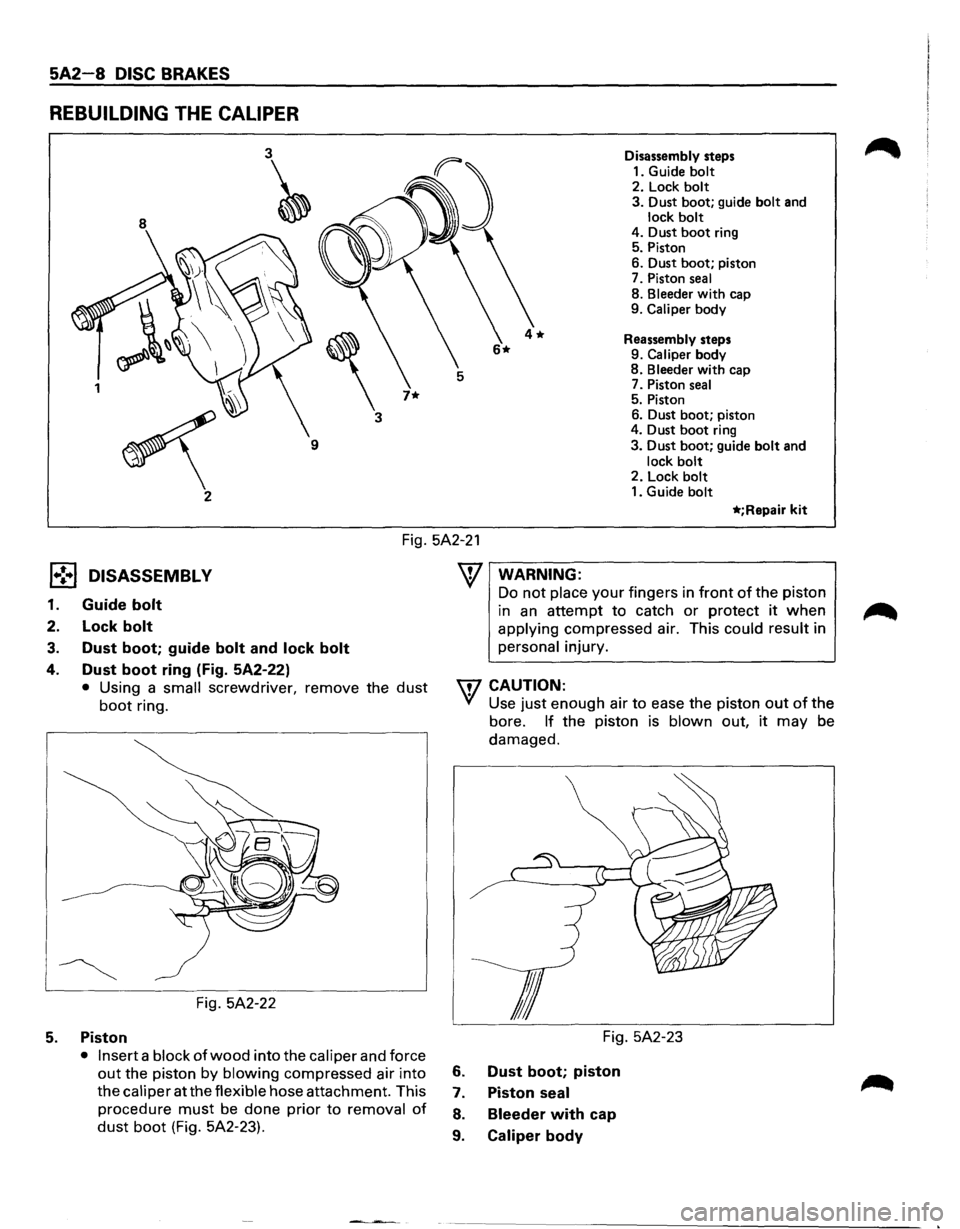
REBUILDING THE CALIPER
8
3~
'
3
7* 1
~
9
2 Disassembly
steps
1. Guide
bolt 2. Lock bolt
3. Dust boot; guide bolt and lock bolt 4. Dust boot ring
5. Piston
6. Dust
boot; piston
7. Piston
seal
8. Bleeder with cap
9. Caliper body
Reassembly steps
9.
Caliper body
8. Bleeder with cap
7. Piston seal 5. Piston
6. Dust boot; piston
4. Dust
boot ring
3. Dust boot; guide bolt and
lock bolt 2. Lock bolt 1. Guide bolt
*;Repair kit
Fig. 5A2-21
l•!•l DISASSEMBL V
1. Guide bolt
2. Lock bolt
3. Dust boot; guide bolt and lock bolt
4. Dust boot ring (Fig. 5A2-22)
• Using a small screwdriver, remove the dust
boot ring.
Fig. 5A2-22
5. Piston
• Insert a block of wood into the caliper and force
out the piston by blowing compressed air into
the
caliper at the flexible hose attachment. This
procedure
must be done prior to removal of
dust boot (Fig. 5A2-23).
WARNING:
Do not place your fingers in front of the piston
in
an attempt to catch or protect it when
applying compressed air. This could result in
personal injury.
W CAUTION:
VI Use just enough air to ease the piston out of the
bore.
If the piston is blown out, it may be
damaged.
Fig. 5A2-23
6. Dust boot; piston
7. Piston seal
8. Bleeder with cap
9. Caliper body
Page 357 of 1928
ll .. •l INSPECTION AND REPAIR
Make necessary parts replacement, if wear, damage,
"'-"' corrosion or any other abnormal conditions are found
through inspection.
Check the following parts;
• Rotor
• Cylinder body
• Cylinder bore
• Piston
•
Guide bolt, Lock bolt
•
Support bracket
NOTE:
The piston seal, boot ring and dust boot are to be
replaced each time the caliper is overhauled. Discard
these used rubber parts and
replace with new ones.
l*!•l REASSEMBLY
9. Caliper body
8. Bleeder with cap
~~~ Torque N·m (lb·in) 8 (69)
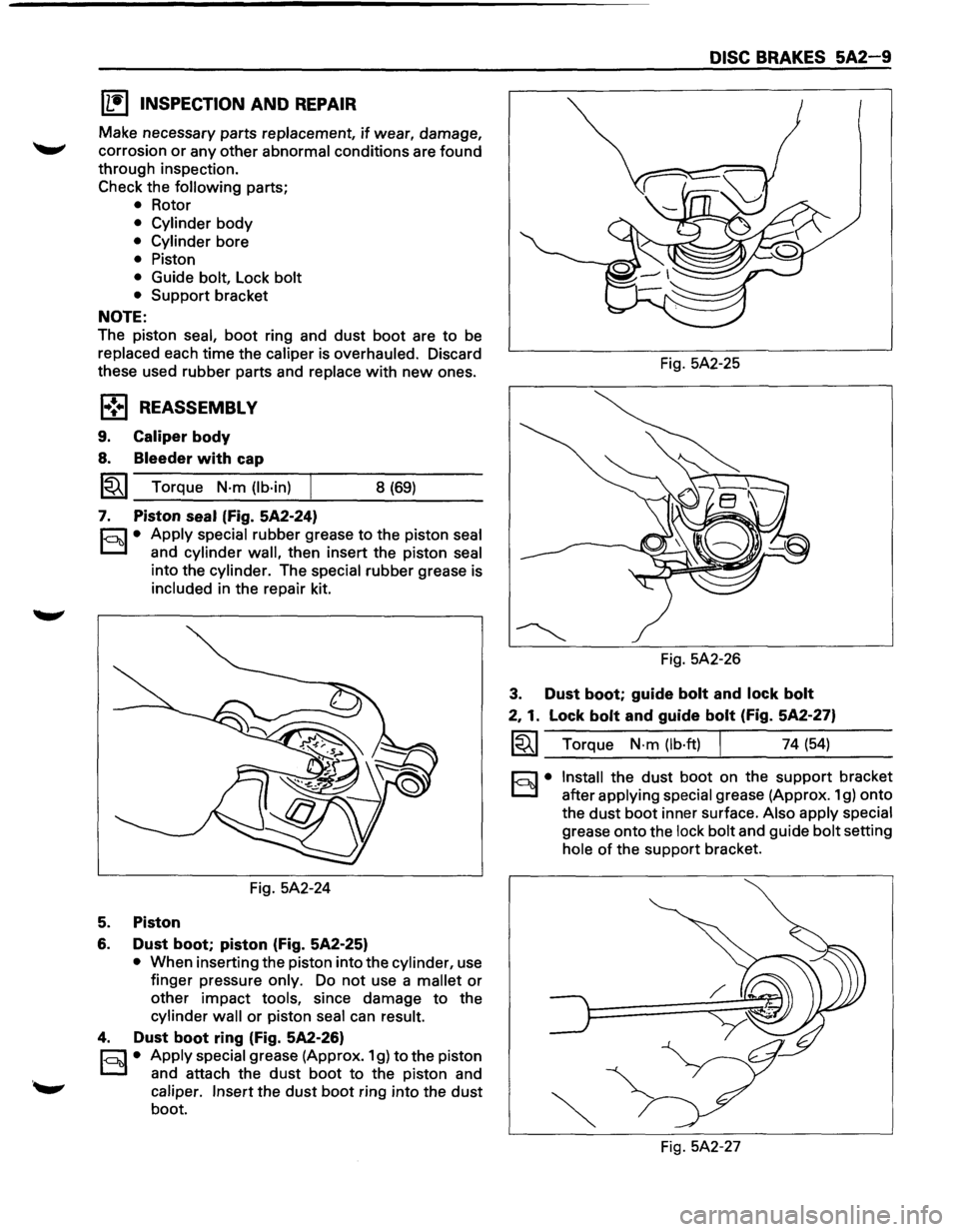
7. Piston seal (Fig. 5A2-24)
r.:;::'1 • Apply special rubber grease to the piston seal
0 and cylinder wall, then insert the piston seal
into the cylinder. The special rubber grease is
included in the repair kit.
Fig. 5A2-24
5. Piston
6. Dust boot; piston (Fig. 5A2-25)
• When inserting the piston into the cylinder, use
finger pressure
only. Do not use a mallet or
other impact tools, since damage to the
cylinder wall or piston seal can result.
4. Dust boot ring (Fig. 5A2-26)
r;::;:] • Apply special grease (Approx. 1 g) to the piston
0 and attach the dust boot to the piston and
caliper. Insert the dust boot ring into the dust
boot.
DISC BRAKES 5A2-9
Fig. 5A2-25
Fig. 5A2-26
3. Dust boot; guide bolt and lock bolt
2, 1. Lock bolt and guide bolt (Fig. 5A2-27)
~~~ Torque N·m (lb·ft) I 74 (54)
§)• Install the dust boot on the support bracket
after
applying special grease (Approx. 1 g) onto
the
dust boot inner surface. Also apply special
grease onto the lock bolt and guide bolt setting
hole of the support bracket.
Fig. 5A2-27
Page 358 of 1928
5A2-1 0 DISC BRAKES
REAR DISC BRAKE
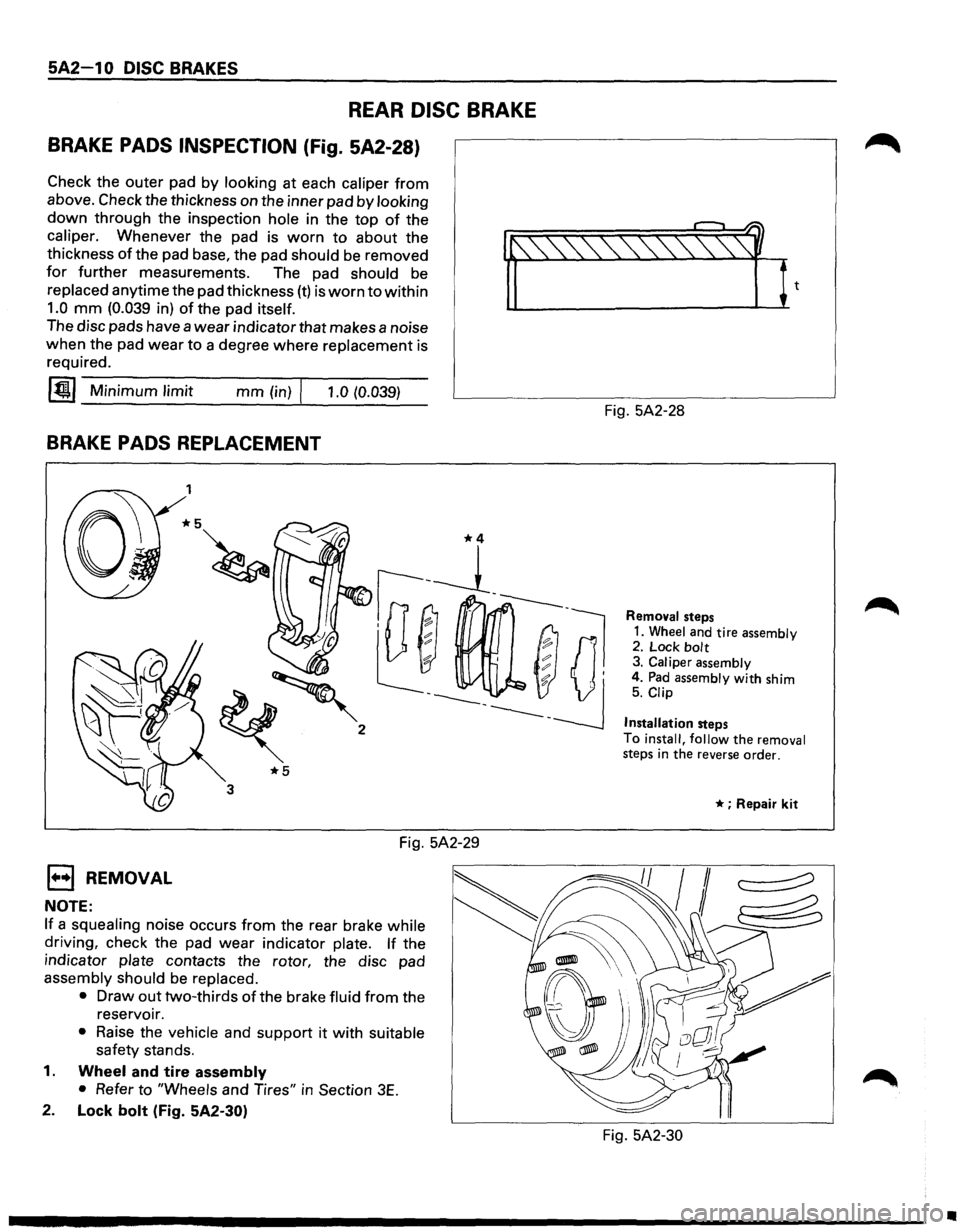
BRAKE PADS INSPECTION (Fig. 5A2-28)
Check the outer pad by looking at each caliper from
above. Check the thickness on the inner pad by looking
down through the inspection hole in the top of the
caliper. Whenever the pad is worn to about the
thickness
of the pad base, the pad should be removed
for further measurements. The pad should be
replaced anytime the pad thickness (t) is worn to within
1.0 mm (0.039 in) of the pad itself. 'f'-~1~
The disc pads have a wear indicator that makes a noise
when the pad wear to a degree where replacement is
required.
~~~-M--in-im __ u_m_l-im--it _____ m_m--(i-n)-rl--,-.-0-(0-.-03_9_) ___
BRAKE PADS REPLACEMENT
EJ REMOVAL
NOTE:
1
*5
3
Fig. 5A2-29
If a squealing noise occurs from the rear brake while
driving, check the pad wear indicator plate. If the
indicator
plate contacts the rotor, the disc pad
assembly should be replaced.
•
Draw out two-thirds of the brake fluid from the
reservoir.
• Raise the vehicle and support it with suitable
safety stands.
1. Wheel and tire assembly
•
Refer to "Wheels and Tires" in Section 3E.
2. Lock bolt (Fig. 5A2-30) Fig.
5A2-28
Removal steps
1. Wheel and tire assembly 2. Lock bolt 3. Caliper assembly
4. Pad assembly with shim 5. Clip
Installation
steps
To
install, follow the removal steps in the reverse order.
* ; Repair kit
Fig. 5A2-30
•
Page 359 of 1928
3. Caliper assembly
• Support the caliper assembly so that the brake
hose is
not stretched or damaged.
4. Pad assembly with shim
5. Clip
l·u·l INSTALLATION
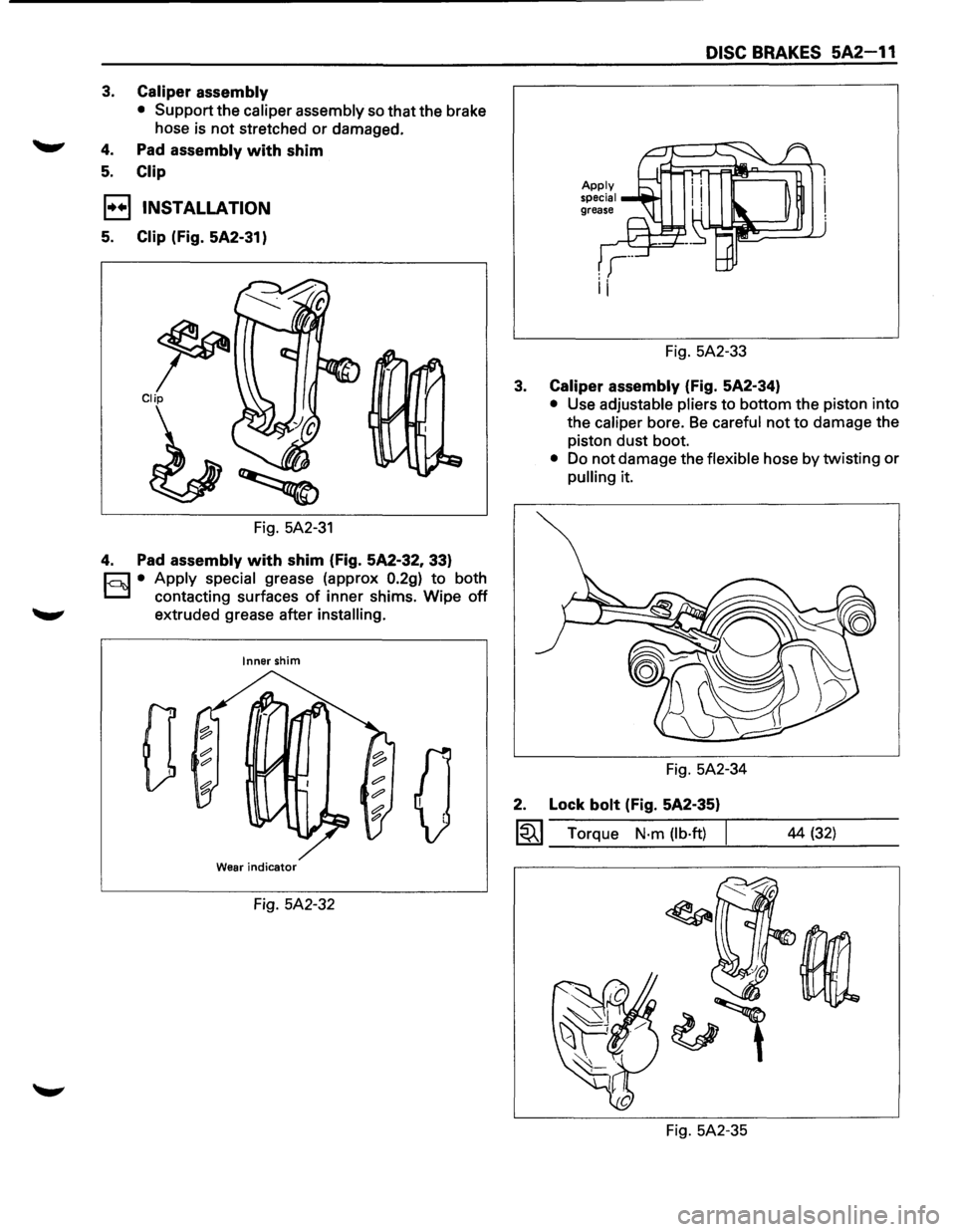
5. Clip (Fig. 5A2-31)
~ Clip
Fig. 5A2-31
4. Pad assembly with shim (Fig. 5A2-32, 33)
c=;:] • Apply special grease (approx 0.2g) to both
D contacting surfaces of inner shims. Wipe off
extruded grease after installing.
Inner shim
0
Wear indicator
Fig. 5A2-32
DISC BRAKES 5A2-11
Fig. 5A2-33
3. Caliper assembly (Fig. 5A2-34)
• Use adjustable pliers to bottom the piston into
the
caliper bore. Be careful not to damage the
piston dust boot.
• Do not damage the flexible hose by twisting or
pulling it.
Fig. 5A2-34
2. Lock bolt (Fig. 5A2-35)
~~~ Torque N·m (lb·ft) I
Fig. 5A2-35 44
(32)
Page 360 of 1928
5A2-12 DISC BRAKES
1. Wheel and tire assembly
• Refer to "Wheels and Tires" in Section 3E.
• Pump the brake pedal several times to
make sure that the pedal
is firm. Check the
brake fluid level in the reservoir after
pumping the brakes.
SERVICING THE ROTOR
In the manufacturing of the brake rotor, all the
tolerances regarding surface finish, parallelism and
lateral runout are held very closely. The maintenance
of these tolerances provide the surface necessary to
assure smooth brake operation.
LATERAL RUNOUT
Lateral runout is the movement of the rotor from side
to side as it rotates on the spindle. This could also be
referred
to as "rotor wobble".
This movement causes the piston to be knocked back
into its bore. This
results in additional pedal travel and
a vibration during braking.
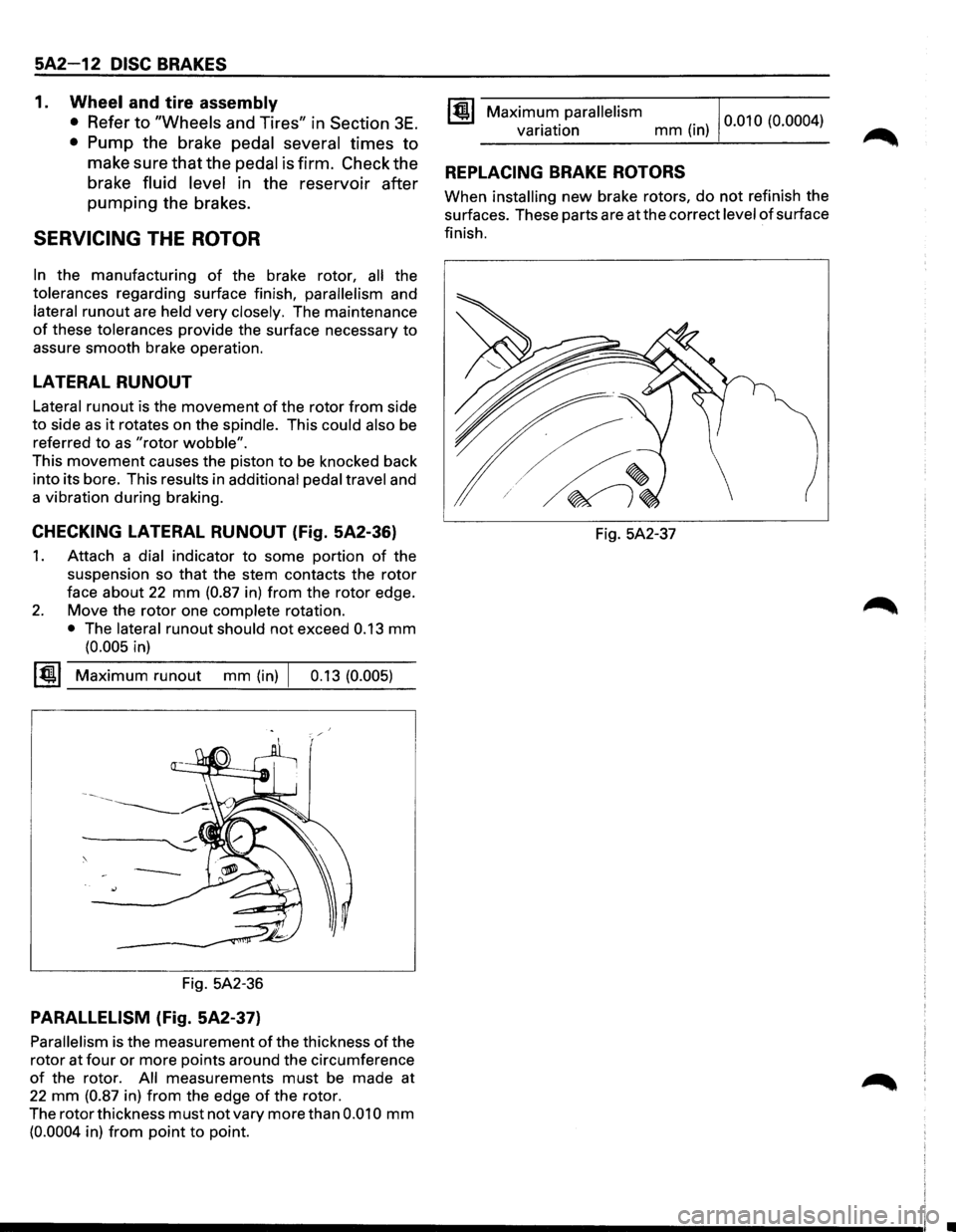
CHECKING LATERAL RUNOUT (Fig. 5A2-36)
1. Attach a dial indicator to some portion of the
suspension so
that the stem contacts the rotor
face about 22 mm (0.87 in) from the rotor edge.
2. Move the rotor one complete rotation.
• The lateral runout should not exceed 0.13 mm
(0.005 in)
~~~ Maximum runout mm (in) I 0.13 (0.005)
Fig. 5A2-36
PARALLELISM (Fig. 5A2-37)
Parallelism is the measurement of the thickness of the
rotor at
four or more points around the circumference
of the rotor. All measurements must be made at
22 mm (0.87 in) from the edge of the rotor.
The rotor thickness
must not vary more than 0.010 mm
(0.0004 in) from point to point.
Maximum parallelism variation mm (in) 0
·01 0 (0.000 4
)
REPLACING BRAKE ROTORS
When installing new brake rotors, do not refinish the
surfaces. These parts are at the correct
level of surface
finish.
Fig. 5A2-37
Page 361 of 1928
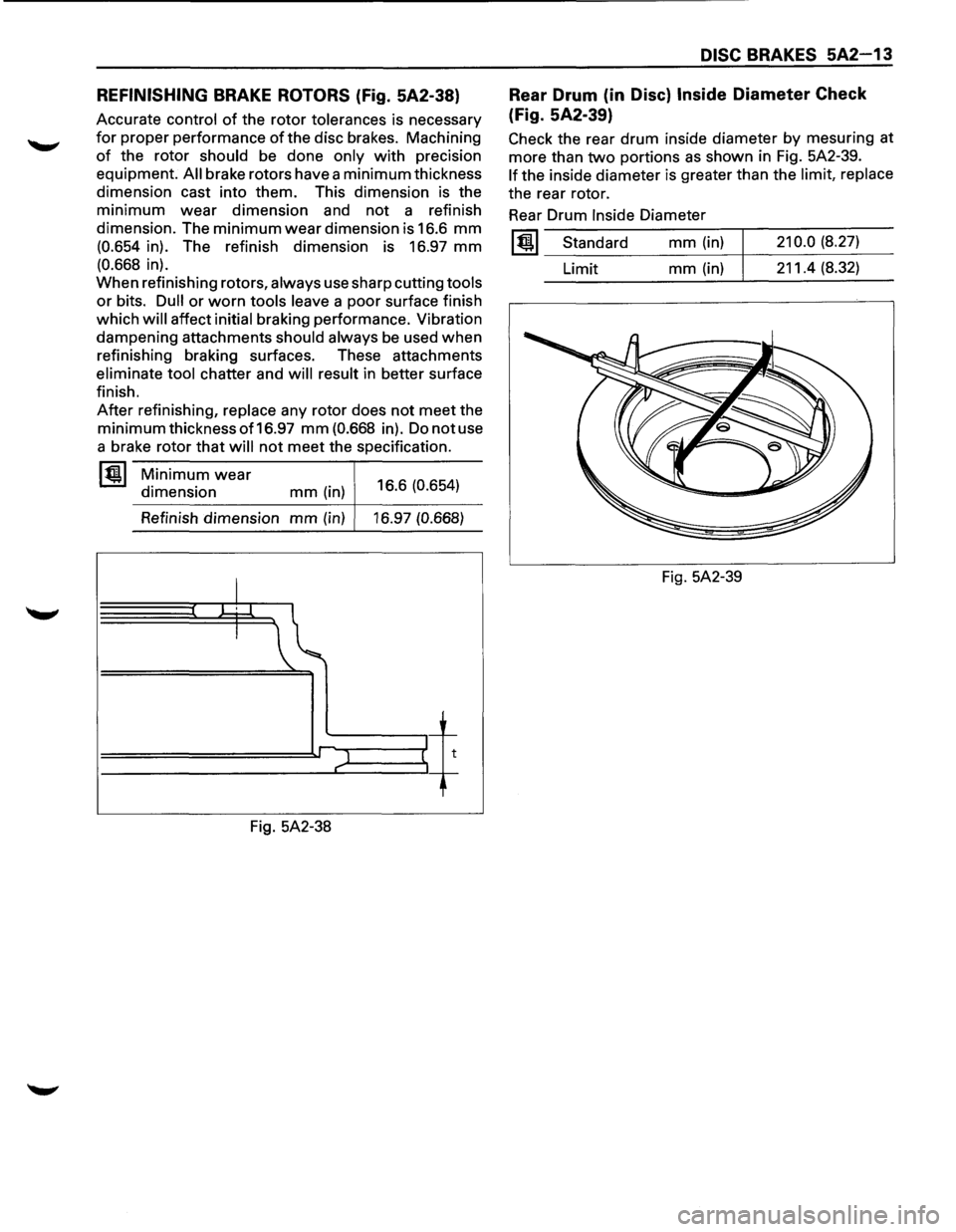
REFINISHING BRAKE ROTORS (Fig. 5A2-38)
Accurate control of the rotor tolerances is necessary
for proper performance of the disc brakes. Machining
of the rotor should be done only with precision
equipment.
All brake rotors have a minimum thickness
dimension cast into them. This dimension is the
minimum wear dimension and not a refinish
dimension. The
minimum wear dimension is 16.6 mm
(0.654 in). The refinish dimension is 16.97 mm
(0.668 in).
When refinishing rotors,
always use sharp cutting tools
or bits. Dull or worn tools leave a poor surface finish
which
will affect initial braking performance. Vibration
dampening attachments
should always be used when
refinishing braking surfaces. These attachments
eliminate tool chatter and will result in better surface
finish.
After refinishing, replace any rotor does not meet the
minimum thickness of 16.97 mm (0.668 in). Do not use
a brake rotor
that will not meet the specification.
~ Minimum wear
dimension mm (in) 16.6 (0.654)
Refinish dimension
mm (in) 16.97 (0.668)
I W.l.
I
~t
l t"
Fig. 5A2-38
DISC BRAKES 5A2-13
Rear Drum (in Disc) Inside Diameter Check
(Fig. 5A2-39)
Check the rear drum inside diameter by mesuring at
more than
two portions as shown in Fig. 5A2-39.
If the inside diameter is greater than the limit, replace
the rear rotor.
Rear Drum
Inside Diameter
lt!l Standard
Limit mm (in)
mm (in)
Fig. 5A2-39
210.0 (8.27)
211.4 (8.32)