Seat JAGUAR X308 1998 2.G Workshop Manual
[x] Cancel search | Manufacturer: JAGUAR, Model Year: 1998, Model line: X308, Model: JAGUAR X308 1998 2.GPages: 2490, PDF Size: 69.81 MB
Page 2238 of 2490

Instrument Panel and Console - Glove Compartment Liner
Removal and Installation
Removal
Installation
1.
Remove glovebox refer to 76.52.03.
2. Remove glovebox lid. Tefer to 76.52.02.
3. Remove glovebox damper. Refer to 76.52.22.
4. Release damper cord guide retaining tangs and remove guide
from bracket.
5. Position liner for access and ca refully remove switch assembly
from housing.
1. Route illumination switch harness into switch housing.
2. Connect switch to harness mult iplugs and fit and fully seat
switch in housing.
3. Secure harness in liner clips.
4. Fit lid damper to liner. Refer to 76.52.22.
5. Fit damper cord guide to bracket.
6. Route damper cord through guide and connect to damper.
7. Fit glovebox lid. refer to 76.52.02.
8. Fit glovebox. Refer to 76.52.03.
Page 2239 of 2490
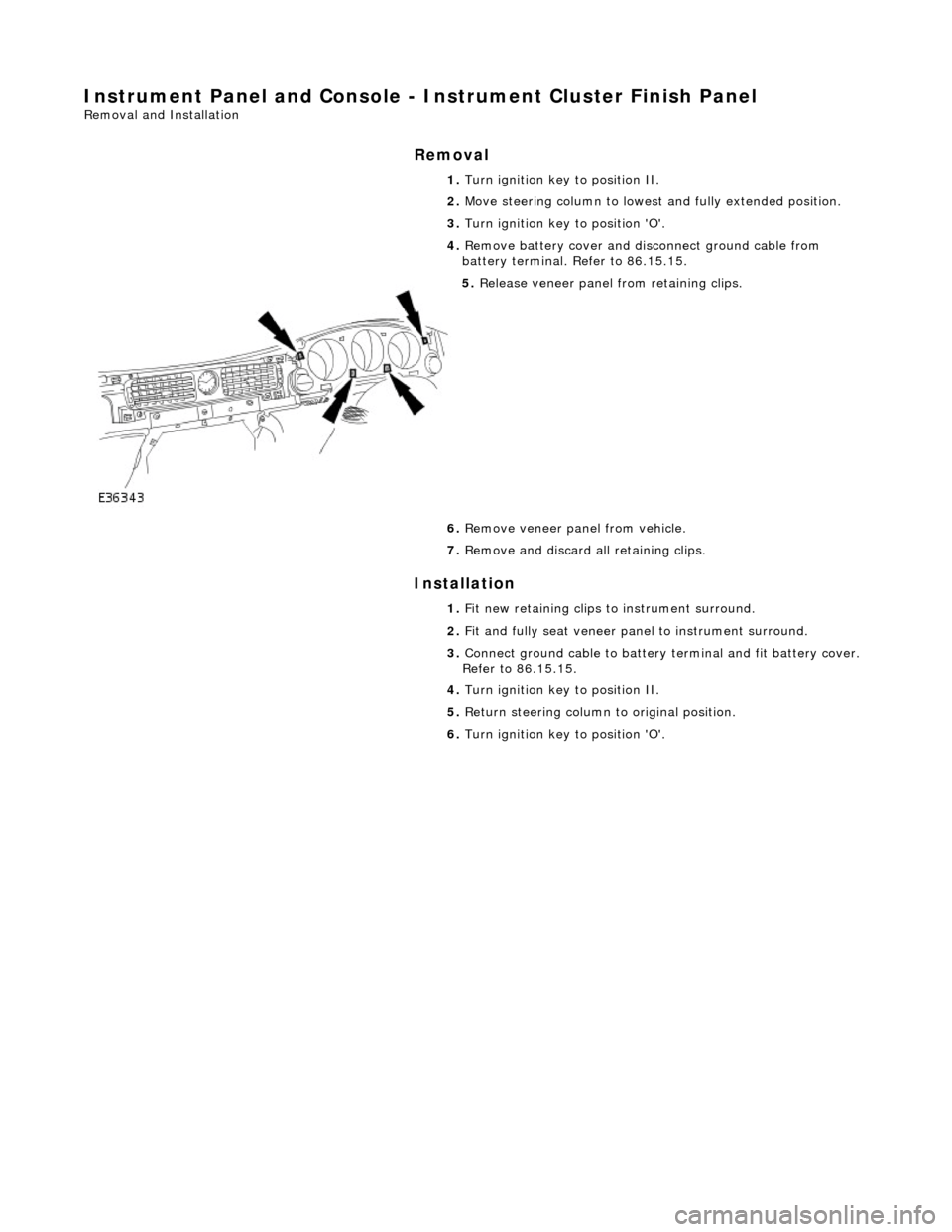
Instrument Panel and Console - Instrument Cluster Finish Panel
Removal and Installation
Removal
Installation
1.
Turn ignition key to position II.
2. Move steering column to lowest and fully extended position.
3. Turn ignition key to position 'O'.
4. Remove battery cover and disc onnect ground cable from
battery terminal. Refer to 86.15.15.
5. Release veneer panel from retaining clips.
6. Remove veneer panel from vehicle.
7. Remove and discard all retaining clips.
1. Fit new retaining clips to instrument surround.
2. Fit and fully seat veneer pa nel to instrument surround.
3. Connect ground cable to battery terminal and fit battery cover.
Refer to 86.15.15.
4. Turn ignition key to position II.
5. Return steering column to original position.
6. Turn ignition key to position 'O'.
Page 2241 of 2490

Installation
8. Slacken and remove four screws securing major gauge
module/surround to fascia and withdraw surround.
1. Position major gauge surround on panel, routing harness
multiplugs through apertures.
2. Fit and tighten screws securing major gauge module/surround
to fascia.
3. Connect harness multiplug to tr ip keyboard and fit and fully
seat keyboard in gauge surround, ensuring correct location of
retaining tangs
4. Connect harness multiplug to fog lamp switch and fit and fully
seat switch in gaug e surround, ensuring correct location of
tangs.
5. Fit veneer panel. Refer to 76.47.24.
6. Connect ground cable to battery terminal and fit battery cover.
Refer to 86.15.15.
7. Return steering column to original position.
Page 2242 of 2490

Instrument Panel and Console - Instrument Panel
Removal and Installation
Removal
1. Turn ignition switch to position II.
2. Motor driver and front passenger seats rearward.
3. Position steering wheel in stra ight ahead position and fully
lower and extend steering column.
4. Turn ignition switch to position O.
5. Remove battery cover and disc onnect ground cable from
battery terminal. Refer to 86.15.19.
6. Remove 'J' gate finish er. Refer to 76.25.24.
7. Remove 'J' gate finisher retain ing panel. Refer to 76.25.26.
8. Remove centre console veneer panel. Refer to 76.47.26.
9. Disconnect and remove radio.
10. Remove centre console switch module. Refer to 86.80.32.
11. Remove centre console. Refer to 76.25.01.
12. Slacken and remove centre cons ole vent duct rear securing
screw and withdraw duct assemb ly from air conditioning unit
manifold.
13. WARNING: BEFORE ANY AIRBAG/SRS SERVICE IS
PERFORMED, AT LEAST ONE MINUTE MUST ELAPSE AFTER
DISCONNECTION OF THE BATTERY CABLE, TO ALLOW
DISSIPATION OF BACK-UP POWER SUPPLY ENERGY.
Remove driver airbag. Refer to 76.73.39.
14. Remove steering wheel. Refer to Section 211-04.
15. Remove steering column lo wer cowl. Refer to 76.46.03.
16. Remove steering column u pper cowl. Refer to 76.46.02.
17. Remove driver side unders cuttle. Refer to 76.46.11.
18. Remove combined windshield wiper/washer switch and
audible warning speaker assembly. Refer to 86.65.42.
19. Remove glovebox. Refer to 76.52.03.
20. Remove 'A' post lower trim pads. refer to 76.13.30.
21. Carefully withdraw driver stowage bin trim, remove bin
securing screw and remove bin from facia.
Page 2255 of 2490

9. Fully seat air distribution bo x and install securing nuts.
10. Install LH and RH air distributi on box/facia side vent ducts
and install securing screws.
11. Install LH and RH top vents on facia.
12. Install all defrost vent retaining clips to facia.
13. Install LH and RH windshield defrost vents to facia
14. Position centre defro st vent/solar sensor assembly, connect
sensor harness multiplug to facia harness, install multiplug on
retaining clip and fully seat assembly in facia.
15. Reposition facia right way up on bench.
16. Position face level air ducts in facia and install securing
screws.
Page 2257 of 2490

23. WARNING: ENSURE THAT THE AIR BAG AND
RETAINING CLIPS ARE FULLY SEATED.
Install deployment door.
Install and fully seat deployment door retaining clips in
facia.
Install and fully seat deployment door in clips.
24. Position trunk release switch/housing at facia and connect in-
car sensor to housing.
25. Connect trunk release switch multiplug to facia harness and
install in-car sensor/trunk release switch assembly to facia.
26. Install new major gauge module retaining screw inserts to
facia.
27. Install major gauge module in facia. Refer to 88.20.24.
28. Install instrument panel veneer panel. Refer to 76.47.24.
29. Reposition facia on bench wi th back facing outwards.
30. Position body processor module in facia and install securing
nuts.
Page 2260 of 2490
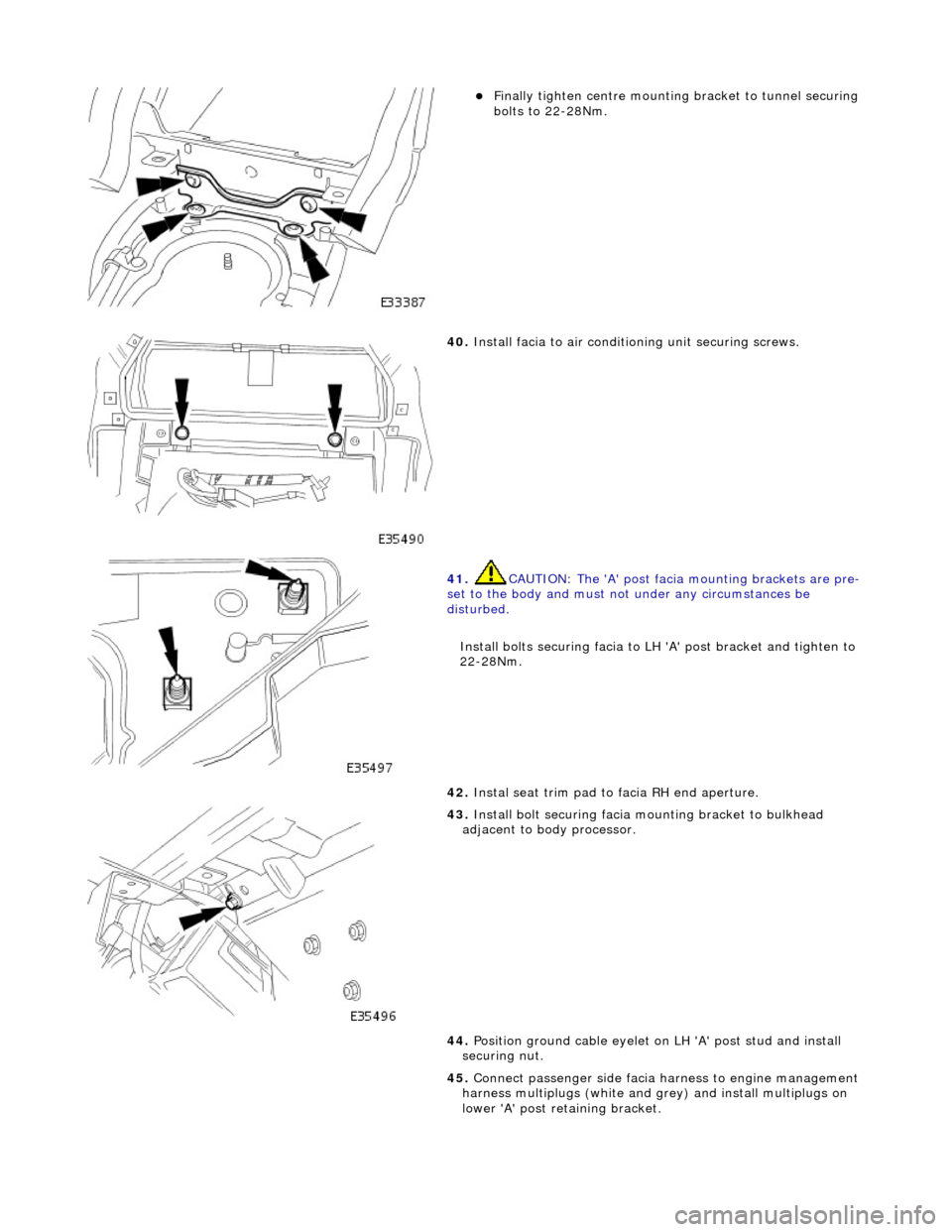
Finally tighten centre mounting bracket to tunnel securing
bolts to 22-28Nm.
40. Install facia to air conditioning unit securing screws.
41. CAUTION: The 'A' post facia mounting brackets are pre-
set to the body and must no t under any circumstances be
disturbed.
Install bolts securing facia to LH 'A' post bracket and tighten to
22-28Nm.
42. Instal seat trim pad to facia RH end aperture.
43. Install bolt securing facia mounting bracket to bulkhead
adjacent to body processor.
44. Position ground cable eyelet on LH 'A' post stud and install
securing nut.
45. Connect passenger side facia harness to engine management
harness multiplugs (white and gr ey) and install multiplugs on
lower 'A' post retaining bracket.
Page 2263 of 2490

64.
Position driver stowage bin in facia, install securing screw and fully seat trim.
65. Install trim pad on driver si de lower 'A' post. Refer to
76.13.30.
66. Install driver side unders cuttle. Refer to 76.46.11.
67. Install combined windshield wi per/washer switch and audible
warning speaker assembly. Refer to 86.65.42.
68. Install steering column upper cowl. Refer to 76.46.02.
69. Install steering column lower cowl. Refer to 76.46.03.
70. Install steering wheel. Refer to 211-04.
71. Install driver side airbag. Refer to 76.73.39.
Page 2265 of 2490
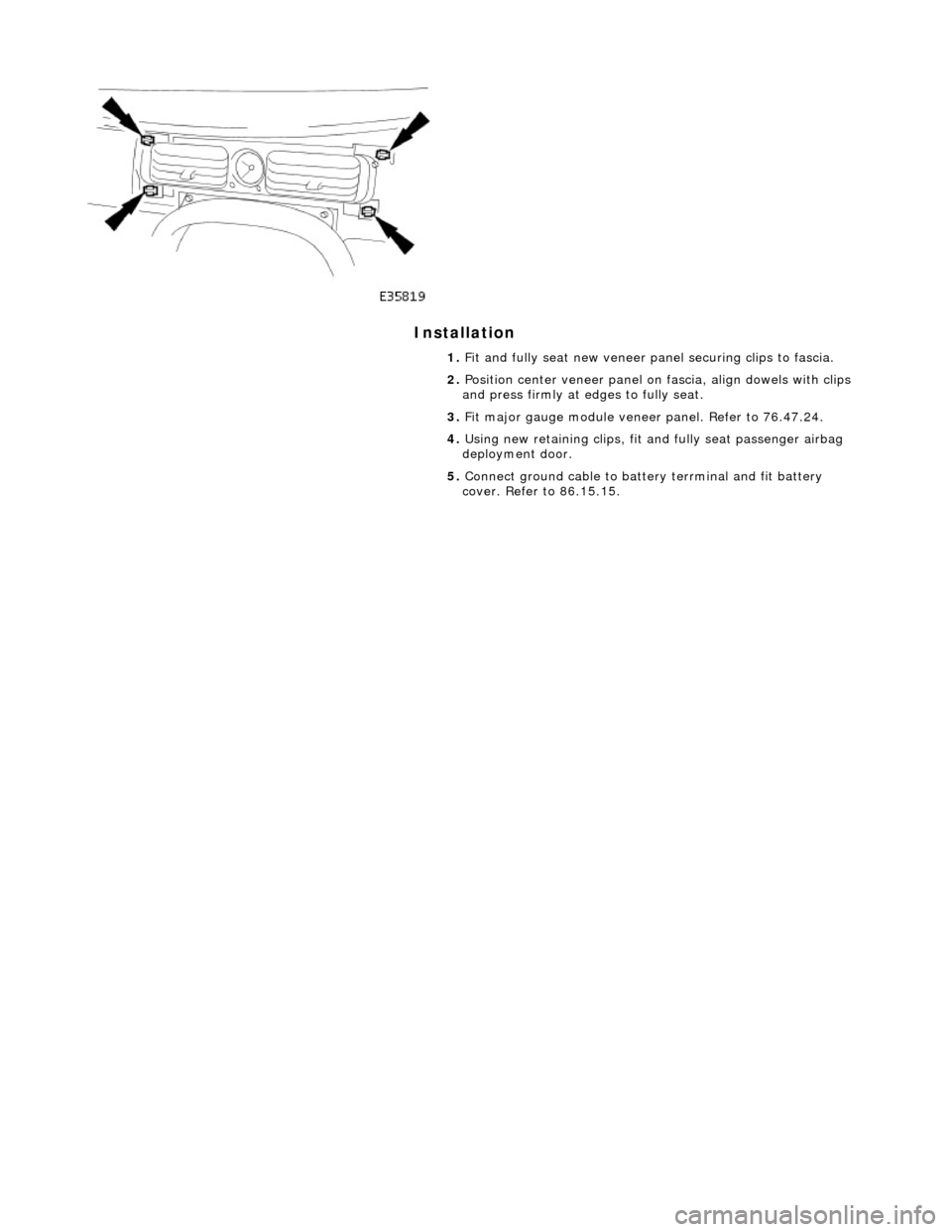
Installation
1. Fit and fully seat new veneer panel securing clips to fascia.
2. Position center veneer panel on fascia, align dowels with clips
and press firmly at edges to fully seat.
3. Fit major gauge module veneer panel. Refer to 76.47.24.
4. Using new retaining clips, fit and fully seat passenger airbag
deployment door.
5. Connect ground cable to batt ery terrminal and fit battery
cover. Refer to 86.15.15.
Page 2266 of 2490

Instrument Panel and Console - Instrument Panel Lower Trim Panel
Removal and Installation
Removal
Installation
1.
Turn ignition switch to position 'II.'
2. Motor driver seat fully rearwards.
3. Turn ignition switch to position 'O.'
4. Slacken and remove the four underscuttle securing screws.
5. Remove and discard securing clips from screw locations.
6. Remove underscuttle from vehicle.
1. Fit new securing clips to screw locations.
2. Position and fully seat underscu ttle below fascia and fit and
tighten securing screws.
3. Return driver seat to original position.