hold JAGUAR XF 2009 1.G User Guide
[x] Cancel search | Manufacturer: JAGUAR, Model Year: 2009, Model line: XF, Model: JAGUAR XF 2009 1.GPages: 391, PDF Size: 19.32 MB
Page 50 of 391
Seat belts
50
Seat belt checks
Note: If the vehicle is parked on an incline, the
seat belt mechanism may lock. This is not a
fault and the belt should be gently eased out
from the upper anchorage.
The seat belts should be inspected regularly to
check for fraying, cuts or wear to the webbing,
and the condition and security of the
mechanism, buckles, adjusters, and mounting
points.
• With the seat belt fastened, give the
webbing near the buckle a quick upward
pull. The buckle must remain securely
locked. •
With the seat belt unfastened, unreel the
seat belt to the limit of its travel. Check that
it unreels smoothly with no snatches or
snags. Allow the belt to fully retract, again
checking for smooth operation.
• Partially unreel the seat belt, then hold the
tongue plate and give a quick forward pull.
The mechanism must lock and prevent any
further unreeling.
If any of the seat belts fail to meet those
criteria, immediately contact your Dealer/
Authorised Repairer.
SEAT BELT REMINDER
If the driver's seat belt is not
fastened when the vehicle is in
motion, a chime will be heard and
the seat belt warning i ndicator will illuminate.
The warning chime and indicator will also be
activated if the front passenger seat is
occupied without the seat belt being fastened.
Note: Objects placed on the front passenger
seat may activate the seat belt reminder
warning chime and i ndicator. It is
recommended that any objects placed on the
front passenger seat are secured using the seat
belt.
If any damage, wear, cuts, defects or
impaired operation are noted with the
seat belts, the vehi
cle should be taken
to a Dealer/Authorised Repairer for immediate
attention. Do not use th e vehicle if the seat
belts cannot be operated correctly.
When using seat belts to restrain
items other than occ upants, take care
to ensure that the belts are not
damaged, or exposed to sharp edges.
Care must be taken to avoid
contaminating the seat belt webbing
and seat belt mechanisms with any
chemicals, liquids, gr it, dirt or cleaning
products. If the seat belts do become
contaminated, they should be replaced
immediately. Contaminat ed seat belts my not
operate correctly in an impact and cannot be
relied upon.
The use of comfort clips, or devices
that would create slackness in the
seat belt system, is not advised.
WARNINGS
Page 51 of 391
51
Seat belts
USING SEAT BELTS DURING
PREGNANCY
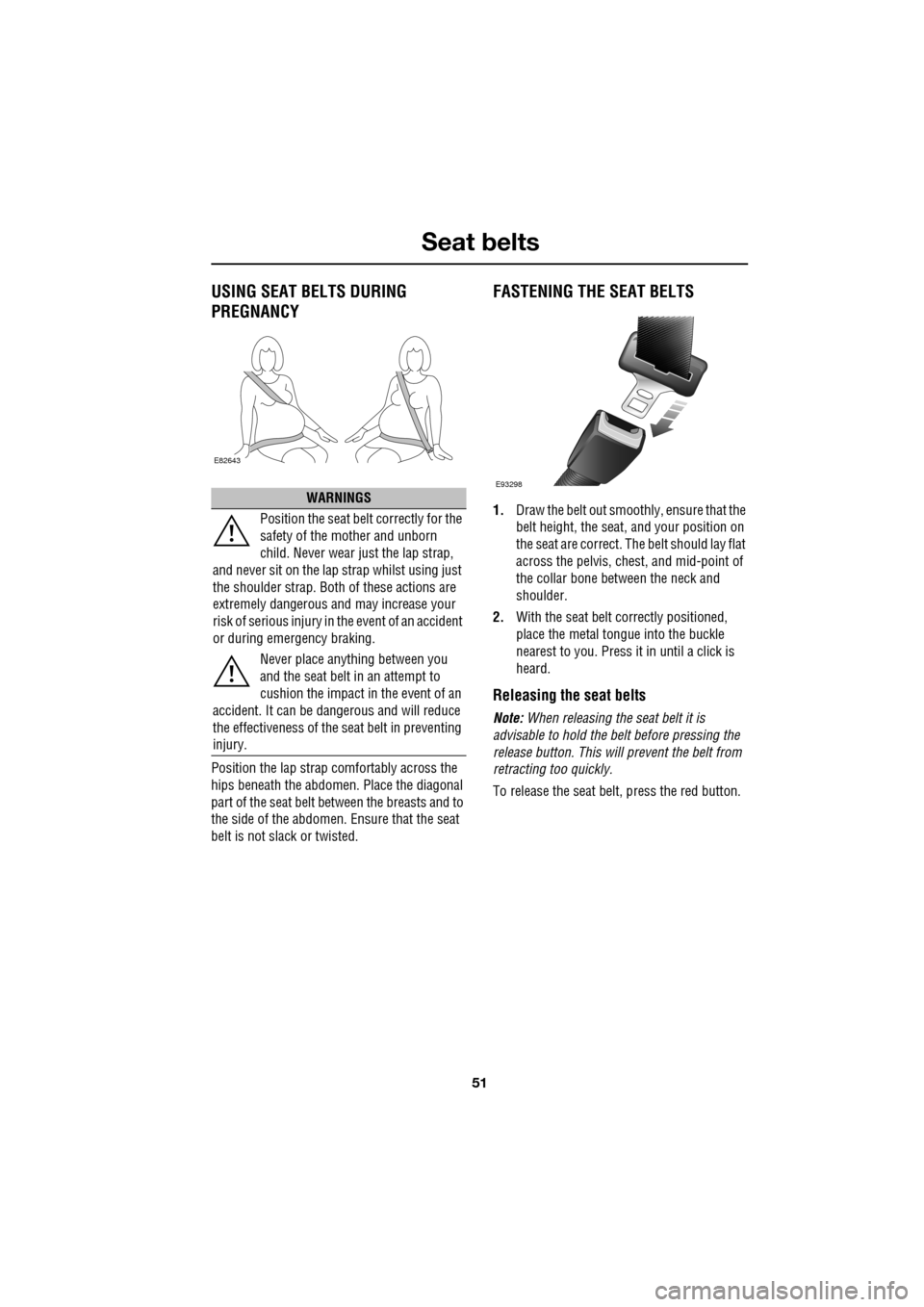
Position the lap strap comfortably across the
hips beneath the abdomen. Place the diagonal
part of the seat belt be tween the breasts and to
the side of the abdomen. Ensure that the seat
belt is not slack or twisted.
FASTENING THE SEAT BELTS
1. Draw the belt out smoothly, ensure that the
belt height, the seat , and your position on
the seat are correct. The belt should lay flat
across the pelvis, ches t, and mid-point of
the collar bone between the neck and
shoulder.
2. With the seat belt correctly positioned,
place the metal tongue into the buckle
nearest to you. Press it in until a click is
heard.
Releasing the seat belts
Note: When releasing the seat belt it is
advisable to hold the belt before pressing the
release button. This will prevent the belt from
retracting too quickly.
To release the seat belt, press the red button.
WARNINGS
Position the seat belt correctly for the
safety of the mother and unborn
child. Never wear just the lap strap,
and never sit on the lap strap whilst using just
the shoulder strap. Both of these actions are
extremely dangerous a nd may increase your
risk of serious injury in the event of an accident
or during emergency braking.
Never place anything between you
and the seat belt in an attempt to
cushion the impact in the event of an
accident. It can be da ngerous and will reduce
the effectiveness of the seat belt in preventing
injury.
E82643
E93298
Page 59 of 391
59
Child safety
CHILD SEATS
The seat belts fitted to your vehicle are
designed for adults and larger children. For
their safety, it is very important for all infants
and children under 12 years of age to be
restrained in a suitable child safety seat
appropriate to their age and size.
Children are always safest when seated in a
rear seating position.
If it is essential that a child travels in the front
passenger seat, Jaguar recommends that the
following preparations are made before fitting
the child restraint.
• Adjust the front passenger seat fully
rearwards.
• Adjust the lumbar support to its minimum
support position.
• Adjust the seat cushion to its highest
position. If cushion front tilt adjustment is
possible, adjust it to its lowest position.
• Adjust the seat back to the fully upright
position.
• Adjust the seat be lt adjustable upper
anchorage to its lowest position.
In some countries, legislation prohibits
children travelling in the front of a vehicle.
Ensure that you are familiar with the legislation
in force where the vehicle is being used and are
in full compliance.
WARNINGS
Do not use a child restraint on a seat
protected by an airbag in front of it.
There is a risk of death or serious
injury when the airbag deploys.
Crash statistics show that children
are safest when properly restrained in
a child or infant restraint system that
is secured in a rear seating position.
For optimum safety , children should
travel in the rear of the vehicle at all
times; front passenge r seat travel is
not recommended. However, if it is
essential that a child travels in the front, set the
vehicle seat fully rearward and seat the child in
an approved forward-facing child seat. Do not
use a rear-facing child seat - an inflating airbag
could impact with the seat and cause serious
injury.
Do not use a forward facing child seat
until the child using it is above the
minimum weight of 9 kg (20 lb.) and
able to sit up unaided. Up to the age of two, a
child's spine and neck are not sufficiently
developed to avoid injury in a frontal impact.
Do not allow a baby or infant to be
held or carried on the lap. The force of
a crash can increase effective body
weight by as much as thirty times, making it
impossible to hold onto the child.
Children typically require the use of a
booster seat appropriate to their age
and size, thereby enabling the seat
belts to be properly fitted, reducing the risk of
injury in a crash. Children could be
endangered in a crash if their child restraints
are not properly secured in the vehicle.Do not use a chil d seat that hooks
over the seat back. This type of seat
cannot be satisfacto rily secured and
is unlikely to be safe for your child.
WARNINGS
Page 62 of 391
Child safety
62
CHILD SEAT ANCHOR POINTS
ISOFIX anchor points (not Australia)
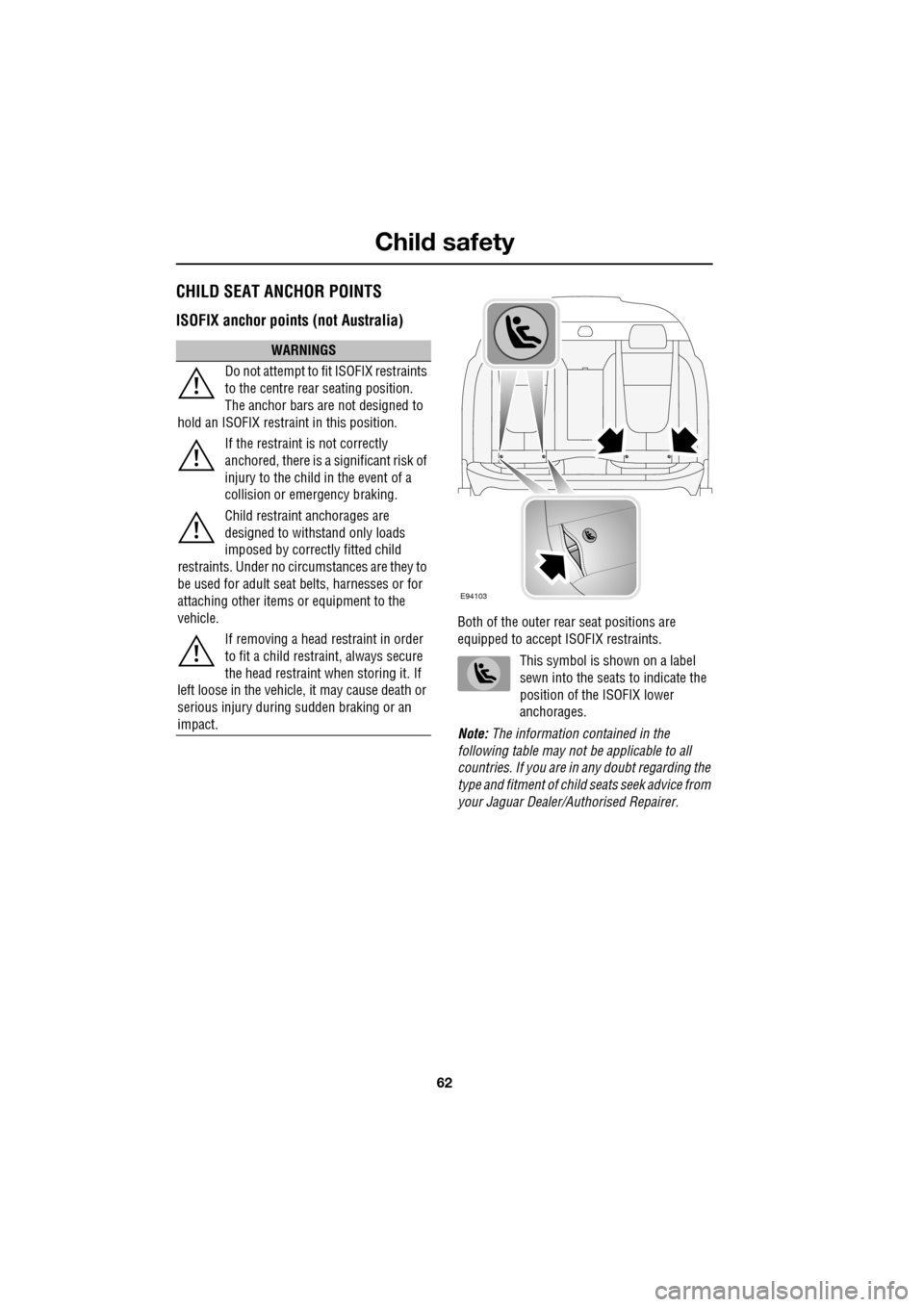
Both of the outer rear seat positions are
equipped to accept ISOFIX restraints.
This symbol is shown on a label
sewn into the seats to indicate the
position of the ISOFIX lower
anchorages.
Note: The information contained in the
following table may not be applicable to all
countries. If you are in any doubt regarding the
type and fitment of child seats seek advice from
your Jaguar Dealer/A uthorised Repairer.
WARNINGS
Do not attempt to fit ISOFIX restraints
to the centre rear seating position.
The anchor bars are not designed to
hold an ISOFIX restraint in this position.
If the restraint is not correctly
anchored, there is a significant risk of
injury to the child in the event of a
collision or emergency braking.
Child restraint anchorages are
designed to withstand only loads
imposed by correctly fitted child
restraints. Under no circumstances are they to
be used for adult seat belts, harnesses or for
attaching other items or equipment to the
vehicle.
If removing a head restraint in order
to fit a child restraint, always secure
the head restraint when storing it. If
left loose in the vehicle, it may cause death or
serious injury during sudden braking or an
impact.
E94103
Page 69 of 391
69
Steering wheel
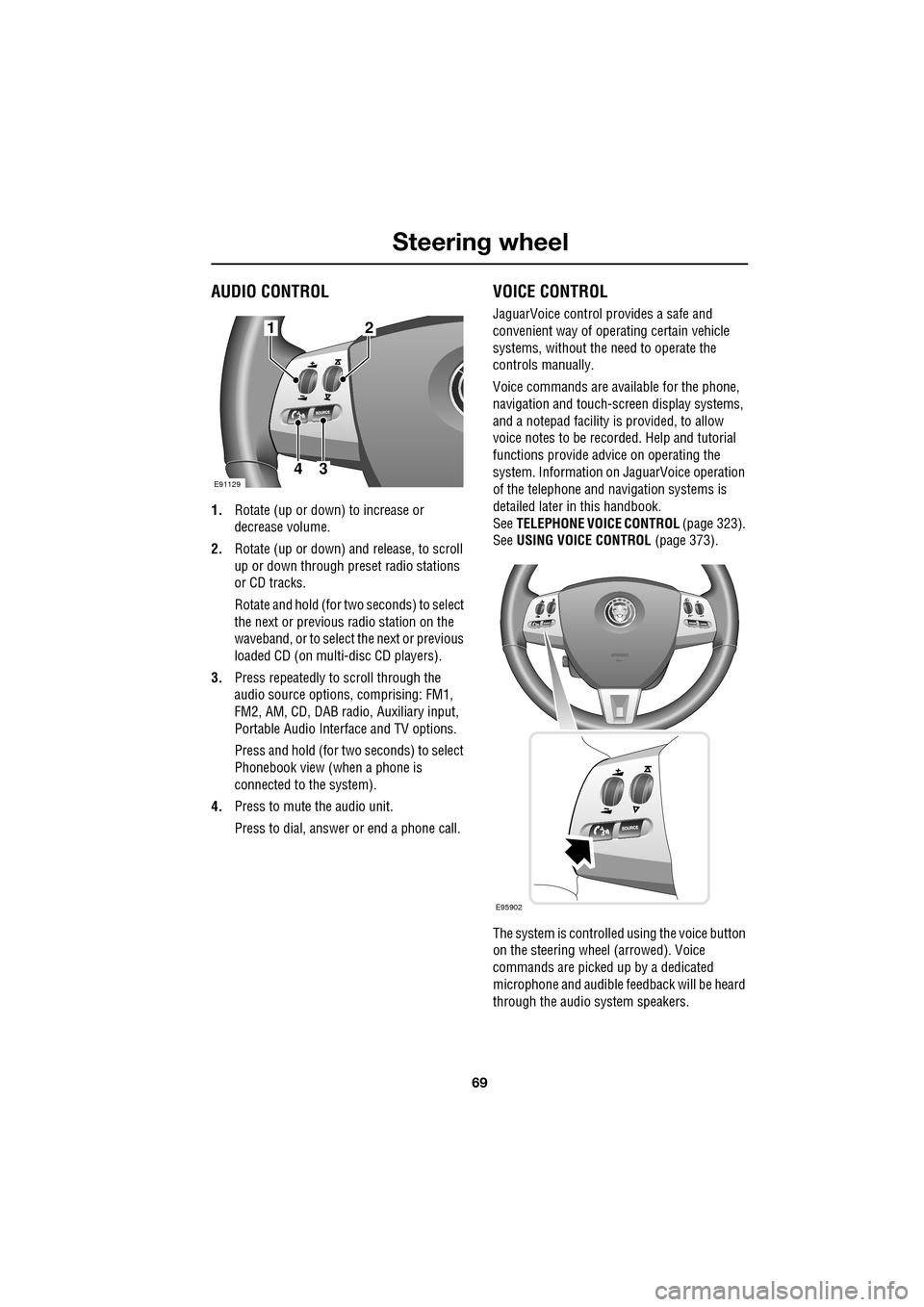
AUDIO CONTROL
1.Rotate (up or down) to increase or
decrease volume.
2. Rotate (up or down) a nd release, to scroll
up or down through preset radio stations
or CD tracks.
Rotate and hold (for two seconds) to select
the next or previous radio station on the
waveband, or to select the next or previous
loaded CD (on multi-disc CD players).
3. Press repeatedly to scroll through the
audio source options, comprising: FM1,
FM2, AM, CD, DAB radi o, Auxiliary input,
Portable Audio Interface and TV options.
Press and hold (for two seconds) to select
Phonebook view (when a phone is
connected to the system).
4. Press to mute the audio unit.
Press to dial, answer or end a phone call.
VOICE CONTROL
JaguarVoice control pr ovides a safe and
convenient way of operating certain vehicle
systems, without the need to operate the
controls manually.
Voice commands are av ailable for the phone,
navigation and touch-scre en display systems,
and a notepad facility is provided, to allow
voice notes to be recorded. Help and tutorial
functions provide advi ce on operating the
system. Information on JaguarVoice operation
of the telephone and navigation systems is
detailed later in this handbook.
See TELEPHONE VOICE CONTROL (page 323).
See USING VOICE CONTROL (page 373).
The system is controlle d using the voice button
on the steering wheel (arrowed). Voice
commands are picked up by a dedicated
microphone and audible fee dback will be heard
through the audio system speakers.12
43E91129
E95902
Page 71 of 391
71
Steering wheel
Cancelling voice control
To cancel a voice command, press and hold the
Voice button on the steering wheel until a
double tone is heard.
Note: If a phone call is received during a voice
session, voice control is cancelled.
Voice system tutorial
To listen to a tutorial on how to use
JaguarVoice, press and release the voice
button and, after the tone, say VOICE
TUTORIAL .
The tutorial is divided into four lessons and has
a total duration of approximately four minutes.
The tutorial can only be undertaken with the
vehicle stationary and parked.
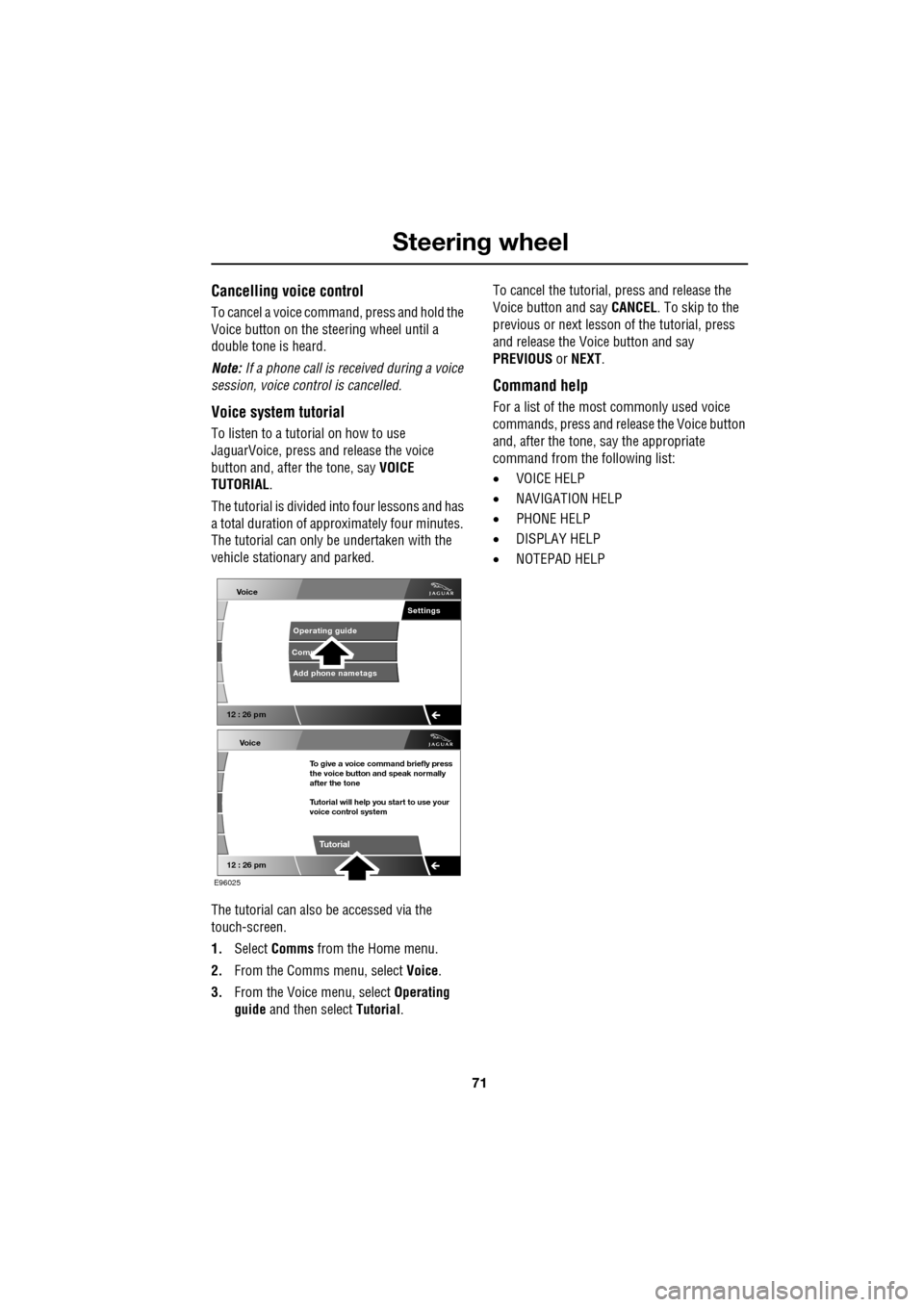
The tutorial can also be accessed via the
touch-screen.
1. Select Comms from the Home menu.
2. From the Comms menu, select Voice.
3. From the Voice menu, select Operating
guide and then select Tutorial. To cancel the tutorial, press and release the
Voice button and say
CANCEL. To skip to the
previous or next lesson of the tutorial, press
and release the Voice button and say
PREVIOUS or NEXT .
Command help
For a list of the most commonly used voice
commands, press and release the Voice button
and, after the tone, say the appropriate
command from the following list:
• VOICE HELP
• NAVIGATION HELP
• PHONE HELP
• DISPLAY HELP
• NOTEPAD HELP
Voice
12 : 26 pm
Add phone nametags
Comm Operating guide
Settings
E96025
Voice
12 : 26 pm
To give a voice command briefly press
the voice button and speak normally
after the tone
Tutorial will help you start to use your
voice control system
Tutorial
Page 73 of 391
73
Steering wheel
Notepad
The notepad facility enables the user to record
a note, up to a maximum of 30 seconds
duration, which can be subsequently recalled.
Note: To hear information on notepad
commands, press the Voice button, wait for the
tone to sound and then say NOTEPAD HELP.
Recording a note
1.Press and release the Voice button, wait
for the tone to sound, then say RECORD
NOTE .
2. Say the words of the note to be recorded,
then press and hold the Voice button to
end and save the note.
Note: The maximum length of a note is 30
seconds, after wh ich time the recording of the
note will be ended automatically.
Playing a note
Press and release the Voice button, wait for the
tone to sound, then say PLAY NOTEPAD. If
multiple notes are stored on the system, press
and release the Voice button during playback
and say NEXT, to skip to the next note.
Deleting notes
To delete an individual note, press and release
the Voice button during playback of the note to
be deleted and say DELETE.
To delete all notes stored on the system, press
and release the Voice button and say CLEAR
NOTEPAD .
Voice volume adjustment
The volume level for voice recognition can be
adjusted independently, either by using the
steering wheel controls or using the
touch-screen:
•Press the voice button on the steering
wheel, to initiate a voice session. Use the
volume control thumbwheel on the
steering wheel to adjust the volume, as
required.
• Select Vehicle from the touch-screen
Home menu, then select Veh. settings.
Find the correct entry from the menu of
infotainment volume settings and adjust as
required.
Voice commands
This is a list and a de scription of the basic
Voice commands used to operate the system.
A list and description of telephone and
Navigation system commands, is detailed later
in this handbook. See TELEPHONE VOICE
CONTROL (page 323). See NAVIGATION
SYSTEM VOICE COMMANDS (page 374).
Command Description
VOICE HELP Plays information on
operating the Voice
system.
VOICE TUTORIAL Initiates a four-part tutorial on use of the
Voice system.
DISPLAY HELP Plays information on touch-screen display
voice commands.
DISPLAY SHOW
PHONE The Phone menu is
displayed on the
touch-screen.
Page 83 of 391
83
Lighting
CHANGING A BULB
General information
Note: In certain markets its a legal requirement
to carry spare bulbs. A replacement bulb kit is
available as an approved accessory from your
Dealer/Authorised Repairer.
Halogen bulbs
Halogen bulbs are used for main beam and
dipped beam headlamps. Take care not to
touch the glass part of the bulb with your
fingers; always use a cl oth to handle the bulb.
If necessary use methylated spirits to remove
finger prints.
Xenon lamps
Seek advice about the correct
disposal of Xenon lamp units from
your Dealer/Authorised Repairer, or
your local authority.
HEADLAMP UNIT BULBS
Halogen dipped beam
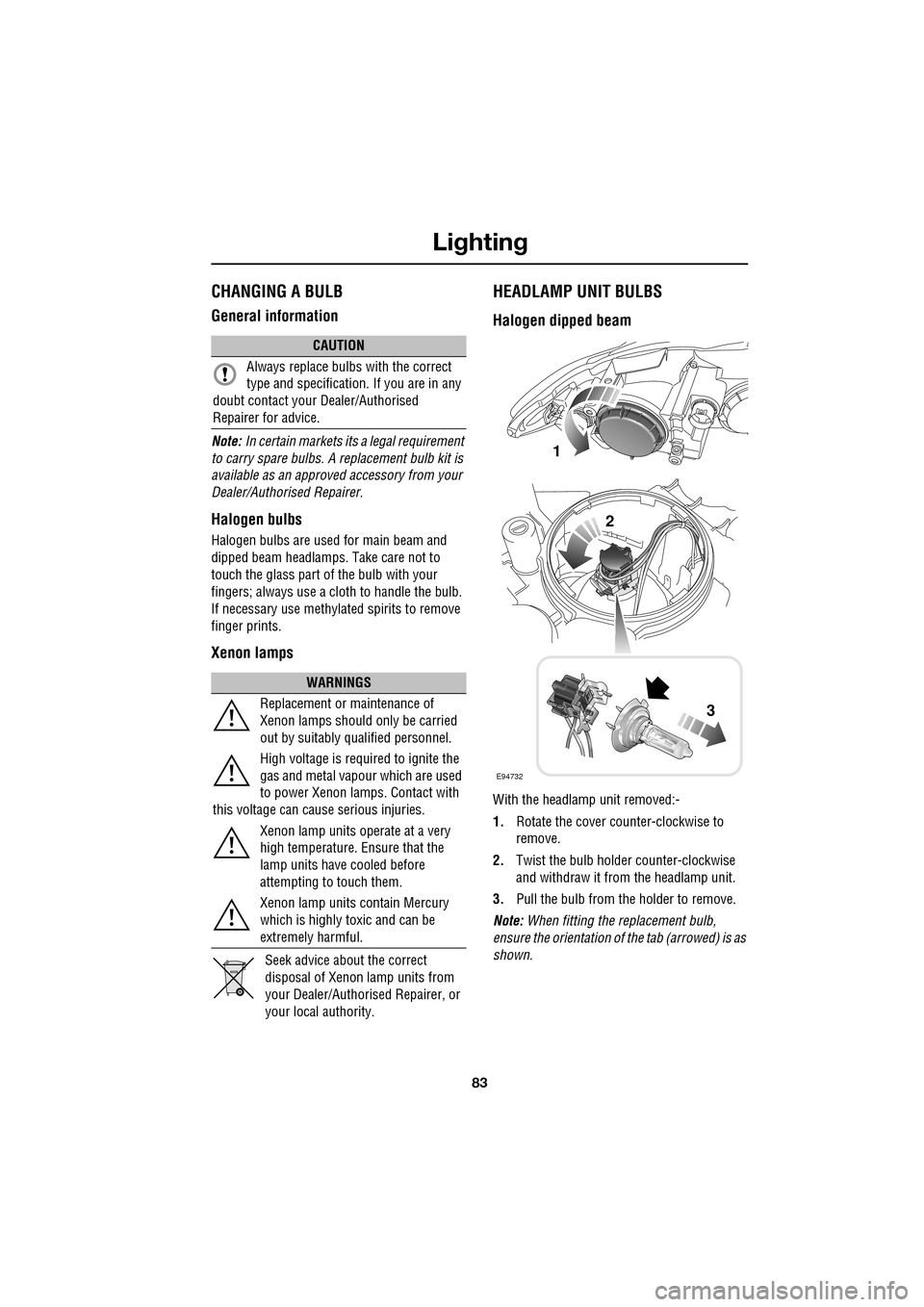
With the headlamp unit removed:-
1. Rotate the cover counter-clockwise to
remove.
2. Twist the bulb holder counter-clockwise
and withdraw it from the headlamp unit.
3. Pull the bulb from the holder to remove.
Note: When fitting the replacement bulb,
ensure the orientation of the tab (arrowed) is as
shown.
CAUTION
Always replace bulbs with the correct
type and specification. If you are in any
doubt contact your Dealer/Authorised
Repairer for advice.
WARNINGS
Replacement or maintenance of
Xenon lamps should only be carried
out by suitably qualified personnel.
High voltage is required to ignite the
gas and metal vapour which are used
to power Xenon lamps. Contact with
this voltage can cause serious injuries.
Xenon lamp units operate at a very
high temperature. Ensure that the
lamp units have cooled before
attempting to touch them.
Xenon lamp units contain Mercury
which is highly toxic and can be
extremely harmful.
E94732
1
2
3
Page 84 of 391
Lighting
84
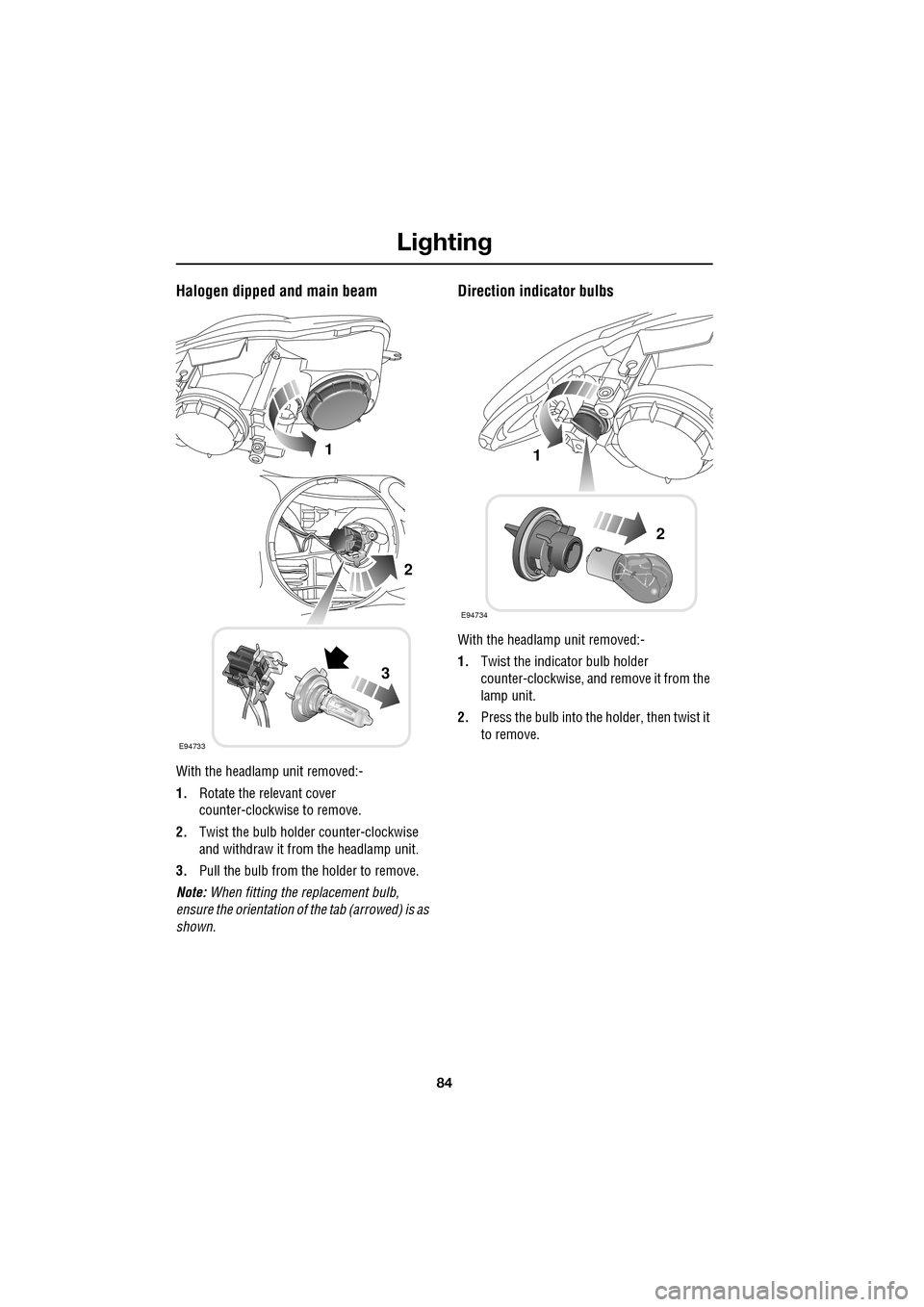
Halogen dipped and main beam
With the headlamp unit removed:-
1.Rotate the relevant cover
counter-clockwise to remove.
2. Twist the bulb holder counter-clockwise
and withdraw it from the headlamp unit.
3. Pull the bulb from the holder to remove.
Note: When fitting the replacement bulb,
ensure the orientation of the tab (arrowed) is as
shown.
Direction indicator bulbs
With the headlamp unit removed:-
1. Twist the indicator bulb holder
counter-clockwise, and remove it from the
lamp unit.
2. Press the bulb into the holder, then twist it
to remove.
E94733
1
2
3
E94734
1
2
Page 85 of 391
85
Lighting
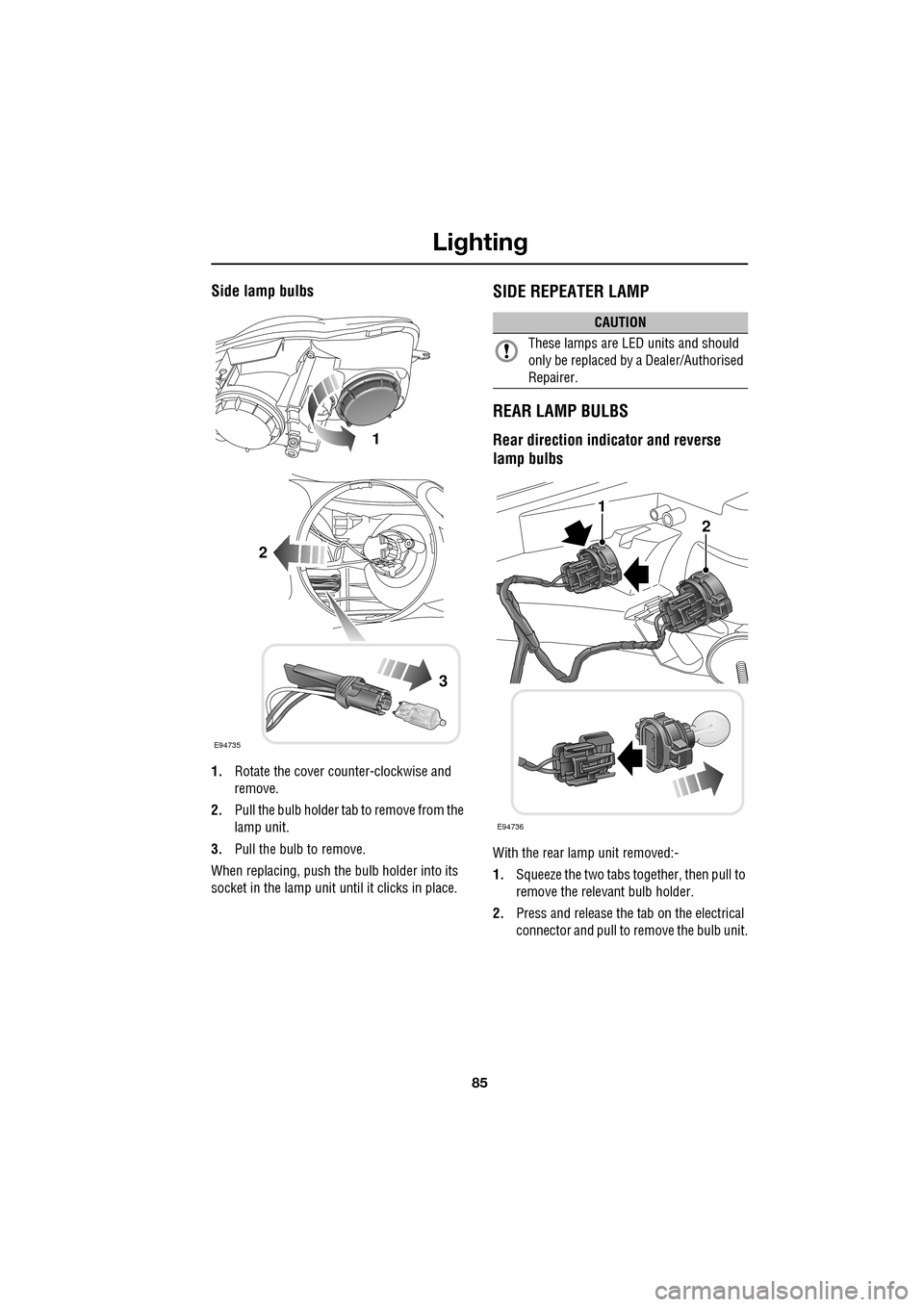
Side lamp bulbs
1.Rotate the cover counter-clockwise and
remove.
2. Pull the bulb holder tab to remove from the
lamp unit.
3. Pull the bulb to remove.
When replacing, push the bulb holder into its
socket in the lamp unit until it clicks in place.
SIDE REPEATER LAMP
REAR LAMP BULBS
Rear direction indicator and reverse
lamp bulbs
With the rear lamp unit removed:-
1.Squeeze the two tabs together, then pull to
remove the relevant bulb holder.
2. Press and release the tab on the electrical
connector and pull to remove the bulb unit.
E94735
1
2
3
CAUTION
These lamps are LED units and should
only be replaced by a Dealer/Authorised
Repairer.
E94736
1
2