phone JAGUAR XF 2009 1.G User Guide
[x] Cancel search | Manufacturer: JAGUAR, Model Year: 2009, Model line: XF, Model: JAGUAR XF 2009 1.GPages: 391, PDF Size: 19.32 MB
Page 69 of 391
69
Steering wheel
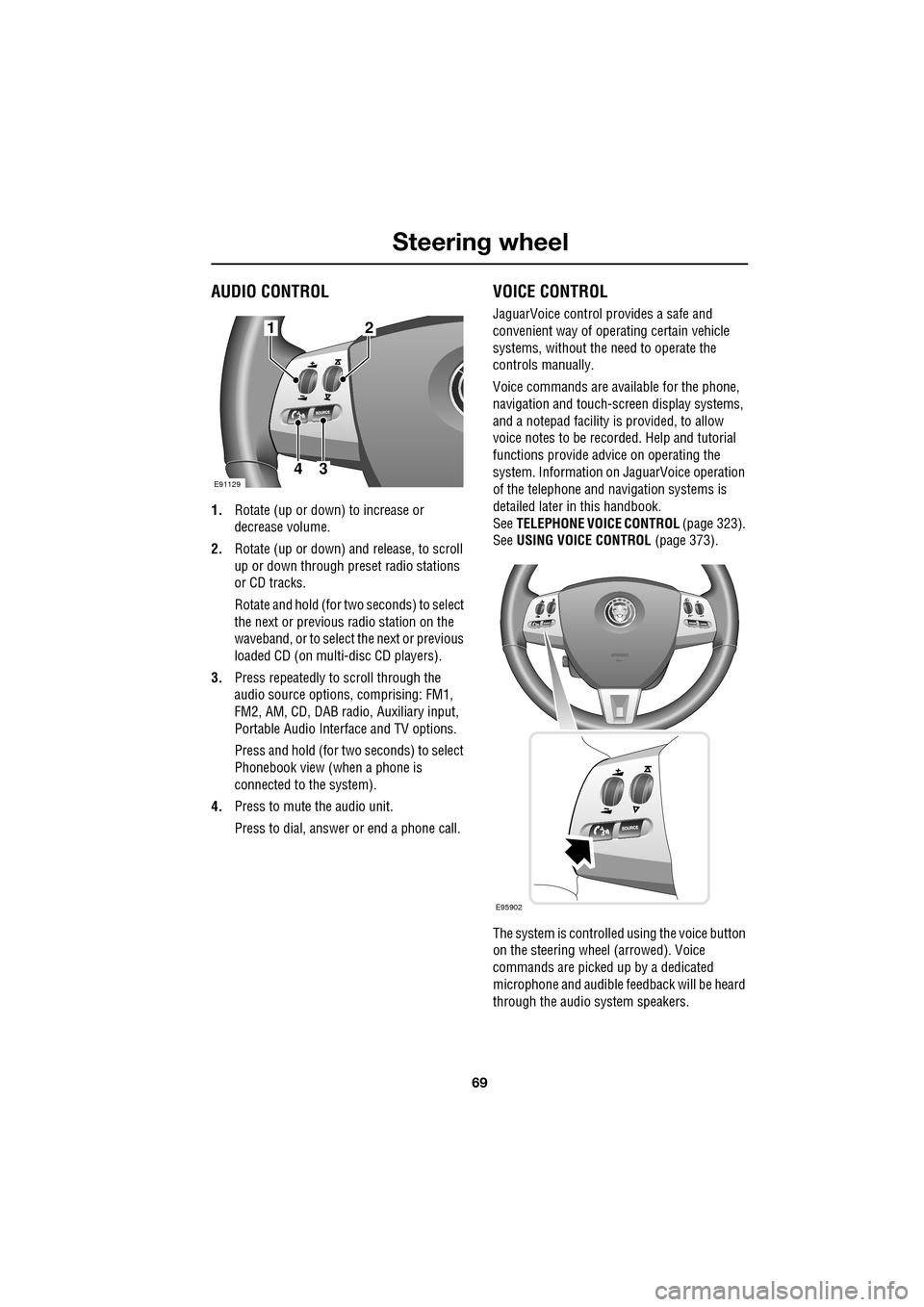
AUDIO CONTROL
1.Rotate (up or down) to increase or
decrease volume.
2. Rotate (up or down) a nd release, to scroll
up or down through preset radio stations
or CD tracks.
Rotate and hold (for two seconds) to select
the next or previous radio station on the
waveband, or to select the next or previous
loaded CD (on multi-disc CD players).
3. Press repeatedly to scroll through the
audio source options, comprising: FM1,
FM2, AM, CD, DAB radi o, Auxiliary input,
Portable Audio Interface and TV options.
Press and hold (for two seconds) to select
Phonebook view (when a phone is
connected to the system).
4. Press to mute the audio unit.
Press to dial, answer or end a phone call.
VOICE CONTROL
JaguarVoice control pr ovides a safe and
convenient way of operating certain vehicle
systems, without the need to operate the
controls manually.
Voice commands are av ailable for the phone,
navigation and touch-scre en display systems,
and a notepad facility is provided, to allow
voice notes to be recorded. Help and tutorial
functions provide advi ce on operating the
system. Information on JaguarVoice operation
of the telephone and navigation systems is
detailed later in this handbook.
See TELEPHONE VOICE CONTROL (page 323).
See USING VOICE CONTROL (page 373).
The system is controlle d using the voice button
on the steering wheel (arrowed). Voice
commands are picked up by a dedicated
microphone and audible fee dback will be heard
through the audio system speakers.12
43E91129
E95902
Page 70 of 391
Steering wheel
70
Activating the system
To activate voice control, press the voice
button on the steering wheel. A tone will be
heard and LISTENING will be displayed in the
message centre, to indicate that the system is
now waiting for a voice command.
Note: It is only necessary to press the voice
button at the beginning of each voice session.
Language and accent
Voice feedback is give n in the same language
as is set for Voice recognition. For example, if
the Voice recognition language is set to UK
English, the system wi ll not recognise other
languages (e.g. US English). The language for
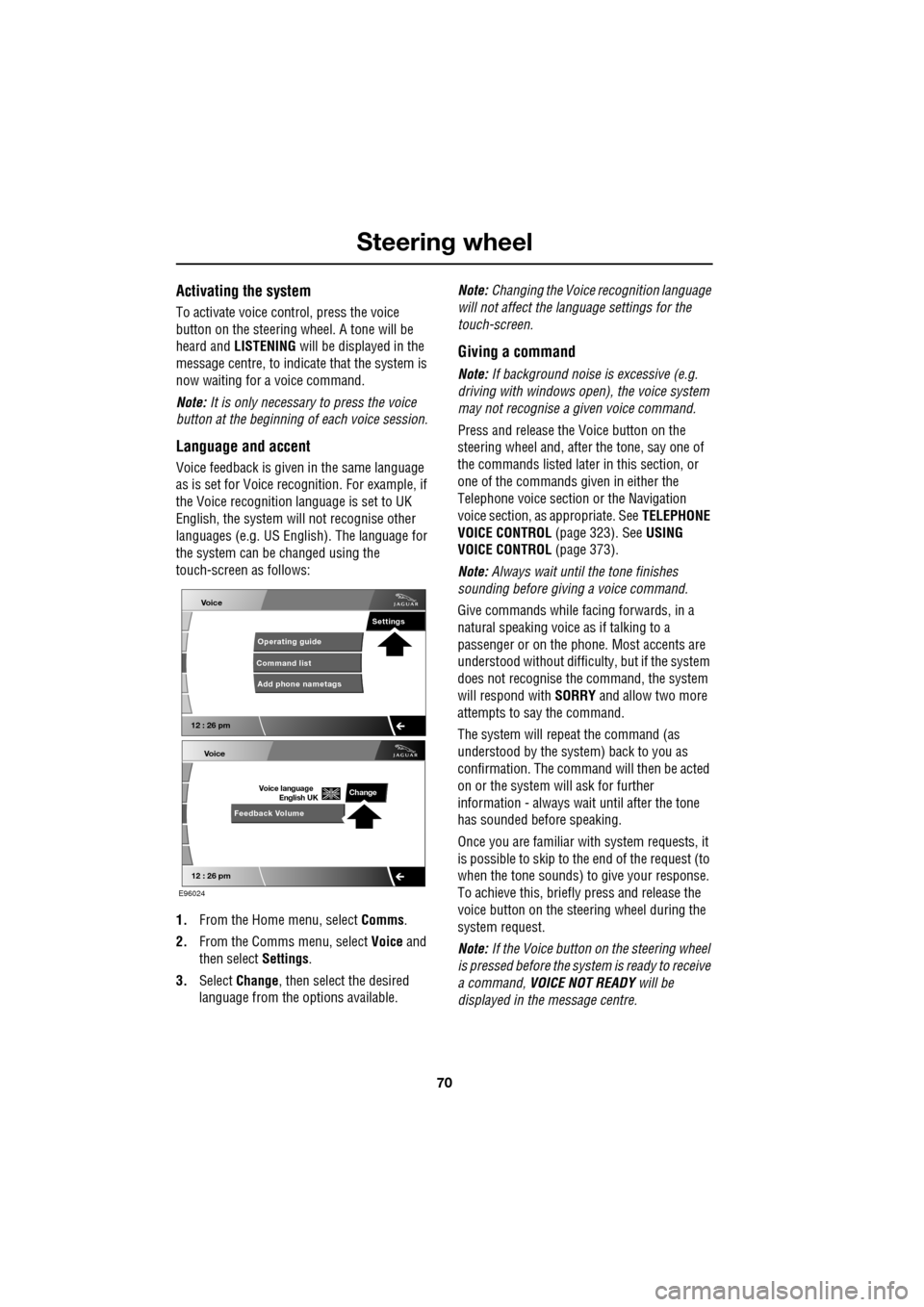
the system can be changed using the
touch-screen as follows:
1. From the Home menu, select Comms.
2. From the Comms menu, select Voice and
then select Settings.
3. Select Change, then select the desired
language from the options available. Note:
Changing the Voice recognition language
will not affect the language settings for the
touch-screen.
Giving a command
Note: If background noise is excessive (e.g.
driving with windows open), the voice system
may not recognise a given voice command.
Press and release the Voice button on the
steering wheel and, after the tone, say one of
the commands listed later in this section, or
one of the commands given in either the
Telephone voice section or the Navigation
voice section, as appropriate. See TELEPHONE
VOICE CONTROL (page 323). SeeUSING
VOICE CONTROL (page 373).
Note: Always wait until the tone finishes
sounding before giving a voice command.
Give commands while facing forwards, in a
natural speaking voice as if talking to a
passenger or on the phon e. Most accents are
understood without difficul ty, but if the system
does not recognise the command, the system
will respond with SORRY and allow two more
attempts to say the command.
The system will repe at the command (as
understood by the system ) back to you as
confirmation. The comma nd will then be acted
on or the system will ask for further
information - always wait until after the tone
has sounded before speaking.
Once you are familiar with system requests, it
is possible to skip to the end of the request (to
when the tone sounds) to give your response.
To achieve this, briefly press and release the
voice button on the steering wheel during the
system request.
Note: If the Voice button on the steering wheel
is pressed before the system is ready to receive
a command, VOICE NOT READY will be
displayed in the message centre.
Voice
12 : 26 pm
Add phone nametags
Command list Operating guide
Settings
E96024
Voice
12 : 26 pm
Feedback Volume
Voice language
English UKChange
Page 71 of 391
71
Steering wheel
Cancelling voice control
To cancel a voice command, press and hold the
Voice button on the steering wheel until a
double tone is heard.
Note: If a phone call is received during a voice
session, voice control is cancelled.
Voice system tutorial
To listen to a tutorial on how to use
JaguarVoice, press and release the voice
button and, after the tone, say VOICE
TUTORIAL .
The tutorial is divided into four lessons and has
a total duration of approximately four minutes.
The tutorial can only be undertaken with the
vehicle stationary and parked.
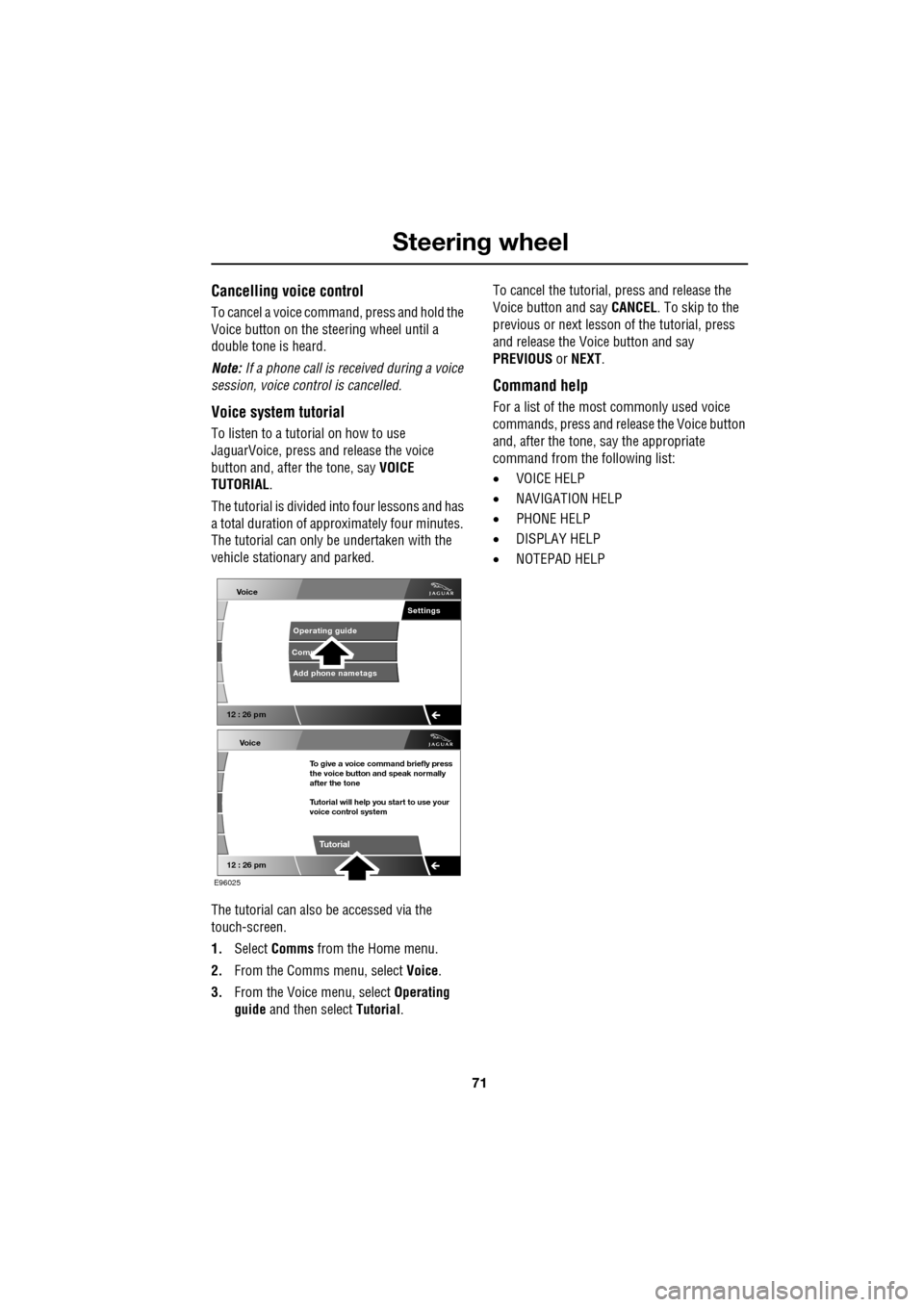
The tutorial can also be accessed via the
touch-screen.
1. Select Comms from the Home menu.
2. From the Comms menu, select Voice.
3. From the Voice menu, select Operating
guide and then select Tutorial. To cancel the tutorial, press and release the
Voice button and say
CANCEL. To skip to the
previous or next lesson of the tutorial, press
and release the Voice button and say
PREVIOUS or NEXT .
Command help
For a list of the most commonly used voice
commands, press and release the Voice button
and, after the tone, say the appropriate
command from the following list:
• VOICE HELP
• NAVIGATION HELP
• PHONE HELP
• DISPLAY HELP
• NOTEPAD HELP
Voice
12 : 26 pm
Add phone nametags
Comm Operating guide
Settings
E96025
Voice
12 : 26 pm
To give a voice command briefly press
the voice button and speak normally
after the tone
Tutorial will help you start to use your
voice control system
Tutorial
Page 72 of 391
Steering wheel
72
Full command list
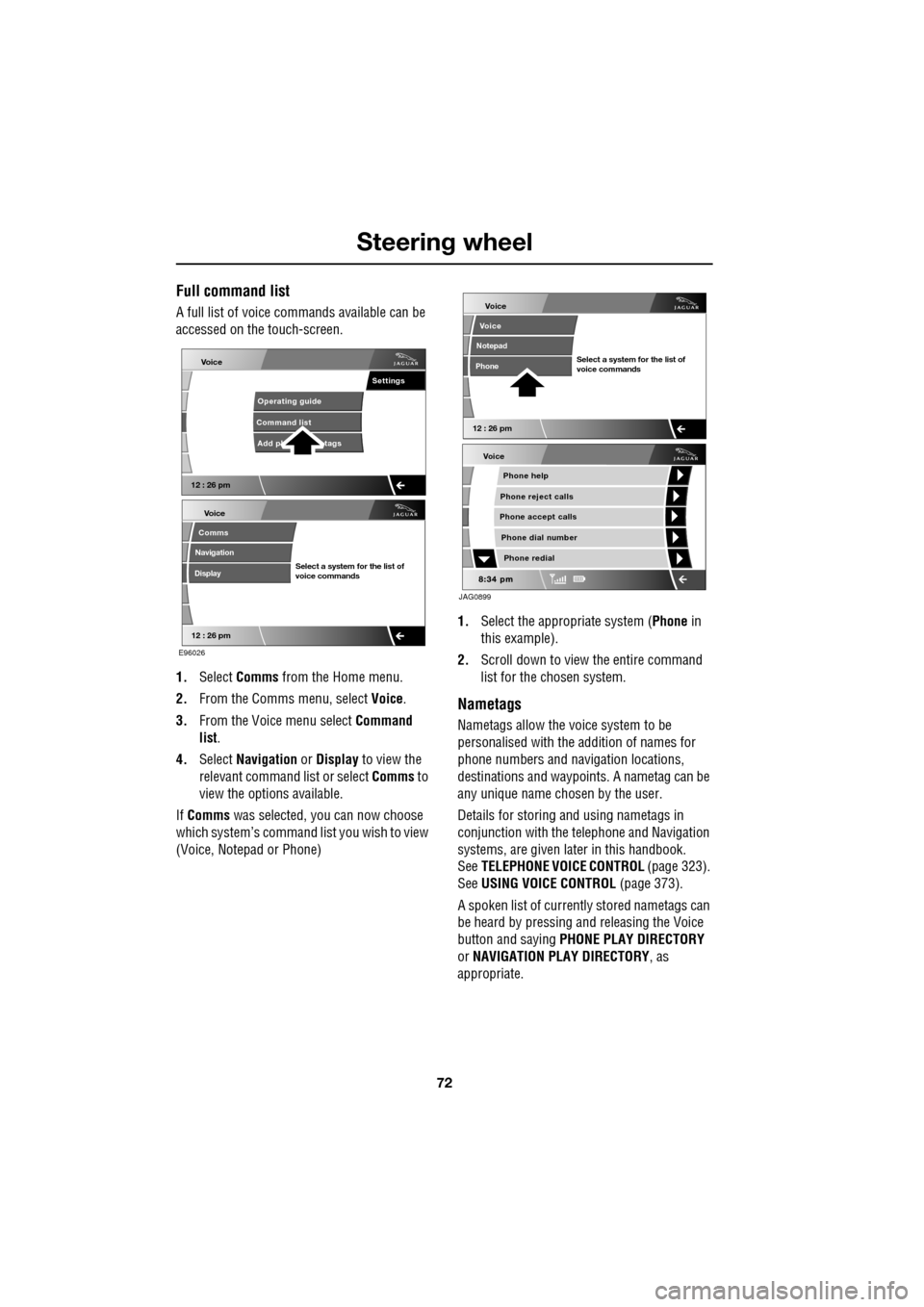
A full list of voice commands available can be
accessed on the touch-screen.
1. Select Comms from the Home menu.
2. From the Comms menu, select Voice.
3. From the Voice menu select Command
list.
4. Select Navigation or Display to view the
relevant command list or select Comms to
view the options available.
If Comms was selected, you can now choose
which system’s command list you wish to view
(Voice, Notepad or Phone) 1.
Select the appropriate system ( Phone in
this example).
2. Scroll down to view the entire command
list for the chosen system.
Nametags
Nametags allow the voice system to be
personalised with the addition of names for
phone numbers and navigation locations,
destinations and waypoi nts. A nametag can be
any unique name chosen by the user.
Details for storing and using nametags in
conjunction with the telephone and Navigation
systems, are given later in this handbook.
See TELEPHONE VOICE CONTROL (page 323).
See USING VOICE CONTROL (page 373).
A spoken list of current ly stored nametags can
be heard by pressing an d releasing the Voice
button and saying PHONE PLAY DIRECTORY
or NAVIGATION PLAY DIRECTORY , as
appropriate.
Voice
12 : 26 pm
Add ph tags
Command list Operating guide
Settings
E96026
Voice
12 : 26 pm
Select a system for the list of
voice commands
Comms
Navigation
Display
Voice
Phone help
Phone reject calls
Phone accept calls
Phone redial
Phone dial number
JAG0899
Voice
12 : 26 pm
Select a system for the list of
voice commands
Voice
Notepad
Phone
Page 73 of 391
73
Steering wheel
Notepad
The notepad facility enables the user to record
a note, up to a maximum of 30 seconds
duration, which can be subsequently recalled.
Note: To hear information on notepad
commands, press the Voice button, wait for the
tone to sound and then say NOTEPAD HELP.
Recording a note
1.Press and release the Voice button, wait
for the tone to sound, then say RECORD
NOTE .
2. Say the words of the note to be recorded,
then press and hold the Voice button to
end and save the note.
Note: The maximum length of a note is 30
seconds, after wh ich time the recording of the
note will be ended automatically.
Playing a note
Press and release the Voice button, wait for the
tone to sound, then say PLAY NOTEPAD. If
multiple notes are stored on the system, press
and release the Voice button during playback
and say NEXT, to skip to the next note.
Deleting notes
To delete an individual note, press and release
the Voice button during playback of the note to
be deleted and say DELETE.
To delete all notes stored on the system, press
and release the Voice button and say CLEAR
NOTEPAD .
Voice volume adjustment
The volume level for voice recognition can be
adjusted independently, either by using the
steering wheel controls or using the
touch-screen:
•Press the voice button on the steering
wheel, to initiate a voice session. Use the
volume control thumbwheel on the
steering wheel to adjust the volume, as
required.
• Select Vehicle from the touch-screen
Home menu, then select Veh. settings.
Find the correct entry from the menu of
infotainment volume settings and adjust as
required.
Voice commands
This is a list and a de scription of the basic
Voice commands used to operate the system.
A list and description of telephone and
Navigation system commands, is detailed later
in this handbook. See TELEPHONE VOICE
CONTROL (page 323). See NAVIGATION
SYSTEM VOICE COMMANDS (page 374).
Command Description
VOICE HELP Plays information on
operating the Voice
system.
VOICE TUTORIAL Initiates a four-part tutorial on use of the
Voice system.
DISPLAY HELP Plays information on touch-screen display
voice commands.
DISPLAY SHOW
PHONE The Phone menu is
displayed on the
touch-screen.
Page 106 of 391
Information displays
106
WARNING AND INFORMATION
MESSAGES
Most displayed warning messages have an
associated warning indicator, which will
illuminate on to indicate the message priority.
Also from time to time information messages
will be displayed.
If more than one message is active, each is
displayed in turn for two seconds in order of
priority.
Messages take priority over the trip computer
data and will be displayed when the ignition is
on.
Note: The message centre information
messages and their meanings, are detailed
where necessary within the appropriate subject
sections.
Clearing messages from the display
It is possible to temporarily clear certain
warning or information messages from the
message centre.
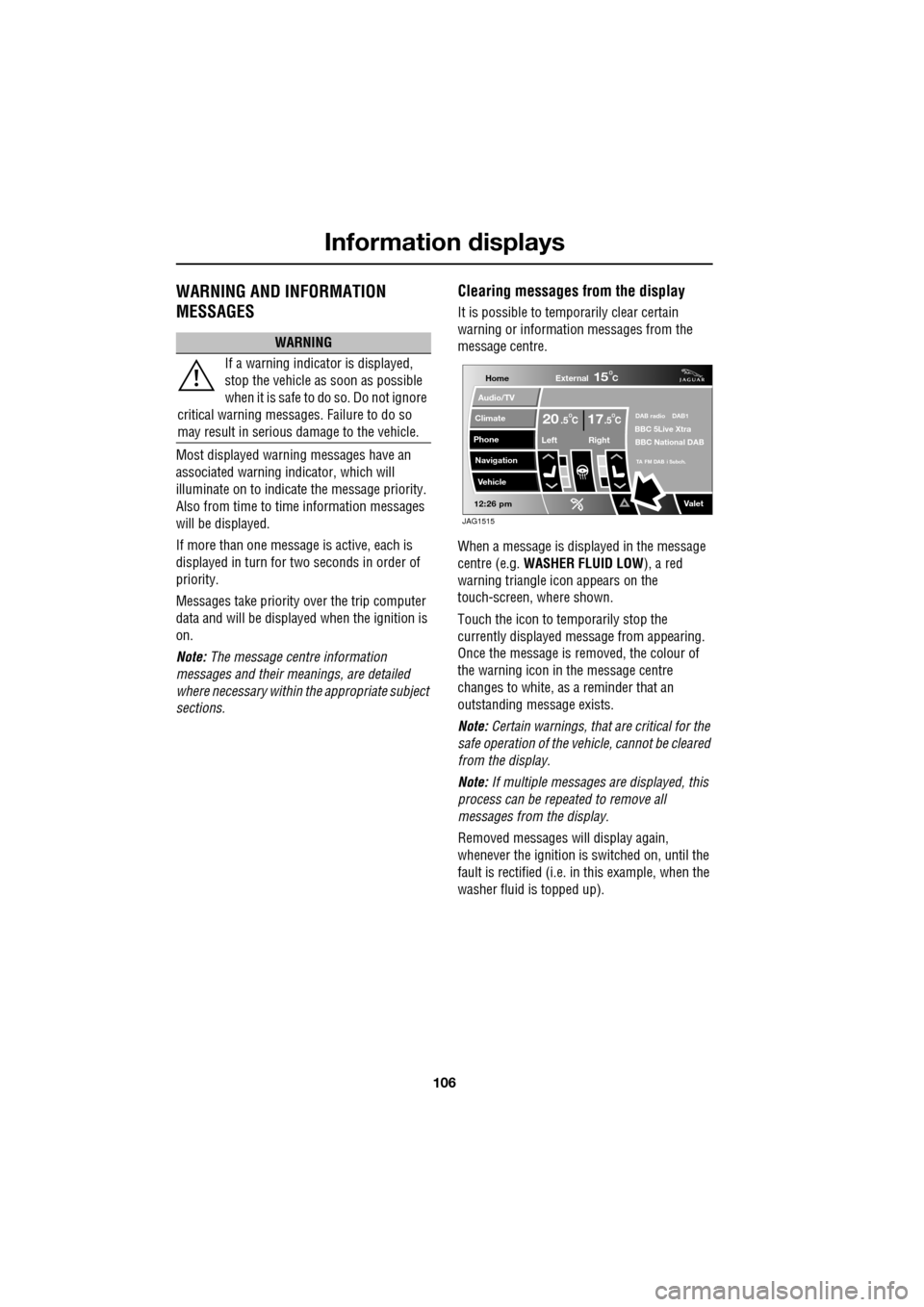
When a message is displayed in the message
centre (e.g. WASHER FLUID LOW ), a red
warning triangle icon appears on the
touch-screen, where shown.
Touch the icon to temporarily stop the
currently displayed message from appearing.
Once the message is removed, the colour of
the warning icon in the message centre
changes to white, as a reminder that an
outstanding message exists.
Note: Certain warnings, that are critical for the
safe operation of the vehi cle, cannot be cleared
from the display.
Note: If multiple messages are displayed, this
process can be repeated to remove all
messages from the display.
Removed messages will display again,
whenever the ignition is switched on, until the
fault is rectified (i.e. in this example, when the
washer fluid is topped up).
WARNING
If a warning indicato r is displayed,
stop the vehicle as soon as possible
when it is safe to do so. Do not ignore
critical warning messages. Failure to do so
may result in serious damage to the vehicle.
Home
Audio/TV
Climate
Phone
Navigation
Vehicle
Valet12:26 pm
External15C
Left Right
20 17CC.5 .5DAB radio DAB1BBC 5Live Xtra
BBC National DAB
TA FM DAB i Subch.
JAG1515
Page 109 of 391
109
Information displays
TOUCH-SCREEN
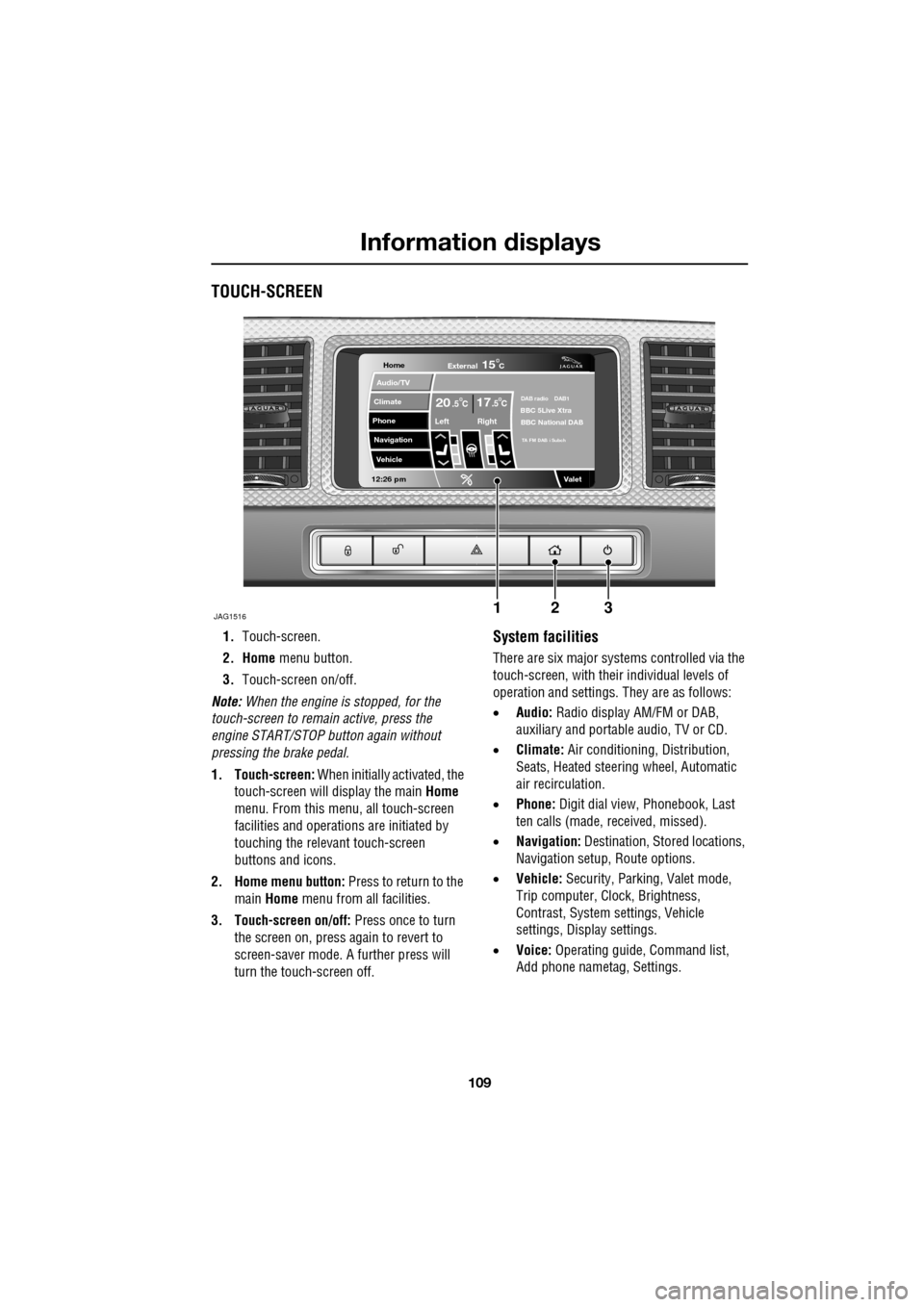
1.Touch-screen.
2. Home menu button.
3. Touch-screen on/off.
Note: When the engine is stopped, for the
touch-screen to remain active, press the
engine START/STOP button again without
pressing the brake pedal.
1. Touch-screen: When initially activated, the
touch-screen will display the main Home
menu. From this menu, all touch-screen
facilities and operati ons are initiated by
touching the relevant touch-screen
buttons and icons.
2. Home menu button: Press to return to the main Home menu from all facilities.
3. Touch-screen on/off: Press once to turn
the screen on, press again to revert to
screen-saver mode. A further press will
turn the touch-screen off.System facilities
There are six major systems controlled via the
touch-screen, with their individual levels of
operation and settings. They are as follows:
• Audio: Radio display AM/FM or DAB,
auxiliary and portable audio, TV or CD.
• Climate: Air conditioning, Distribution,
Seats, Heated steering wheel, Automatic
air recirculation.
• Phone: Digit dial view, Phonebook, Last
ten calls (made, received, missed).
• Navigation: Destination, St ored locations,
Navigation setup, Route options.
• Vehicle: Security, Parking, Valet mode,
Trip computer, Clock, Brightness,
Contrast, System settings, Vehicle
settings, Displa y settings.
• Voice: Operating guide, Command list,
Add phone nametag, Settings.
Home
Audio/TV
Climate
Phone
Navigation
Vehicle
Valet12:26 pm
JAG1516
External15C
Left Right
20 17CC.5 .5DAB radio DAB1BBC 5Live Xtra
BBC National DAB
TA FM DAB i Subch
123
Page 110 of 391
Information displays
110
Touch-screen use
When the engine START/STOP button is
pressed, the touch-screen is activated by the
on/off switch on the centre console.
The buttons on the centre console, below the
touch-screen display, are referred to as hard
buttons and should be pressed firmly. The
touch-screen buttons are soft buttons and only
require short, light pressu re to function. Do not
use excessive pressure.
When operating touch-sc reen buttons, always
extend the tip of one finger, and withhold the
thumb and remaining finge rs from the screen.
Touching the screen with more than one finger
at a time may cause false inputs.
Throughout the handbook, the expression
Select an item (or similar wording) means
touch the on-screen button to select or alter
the required item.
The handbook shows the on-screen menus,
explains how to oper ate the controls and
illustrates how to select or alter settings and
requirements. After becoming familiar with the
controls, follow the on-screen menus and
prompts, to operate th e system as required.
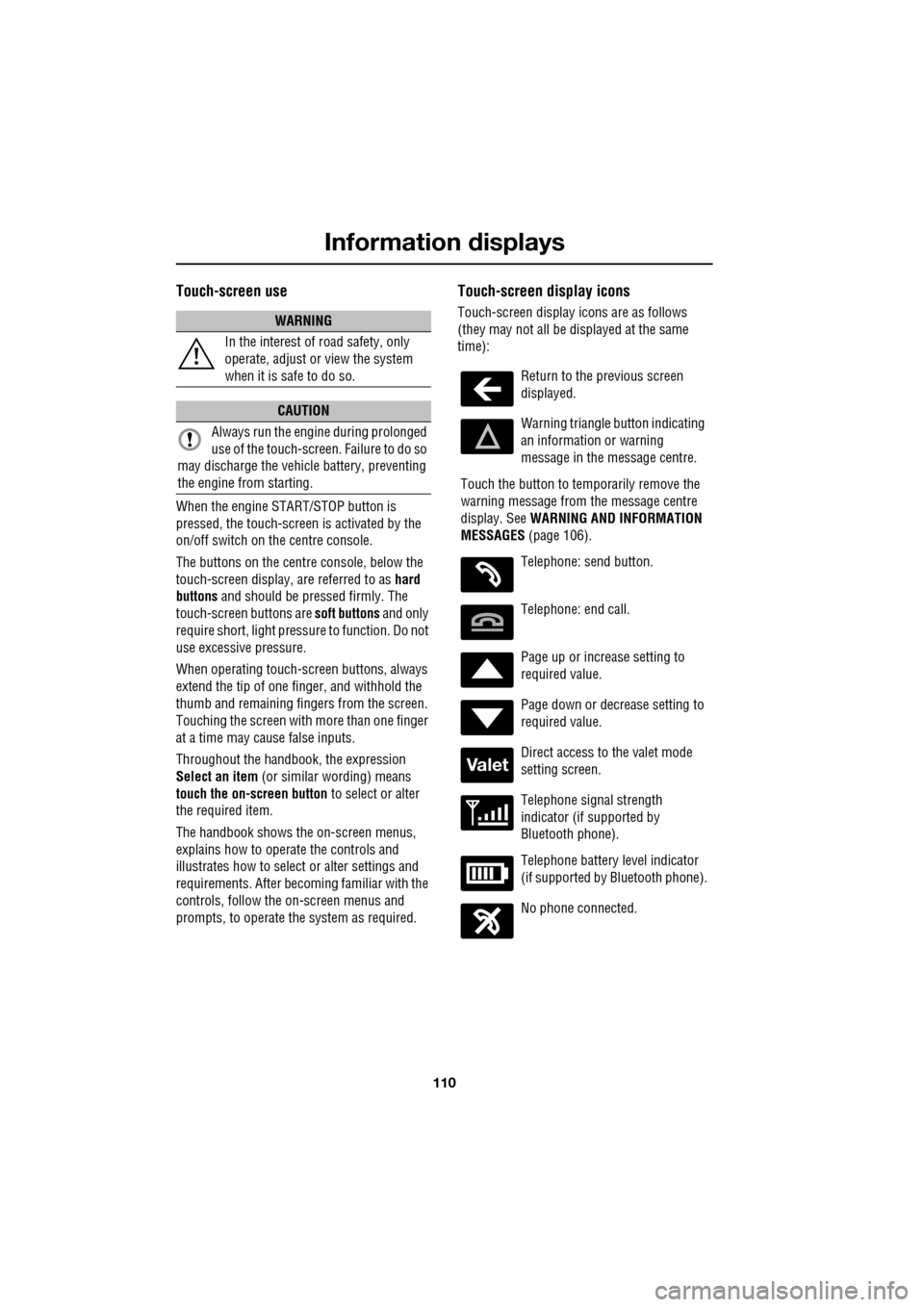
Touch-screen display icons
Touch-screen display icons are as follows
(they may not all be displayed at the same
time):WARNING
In the interest of road safety, only
operate, adjust or view the system
when it is safe to do so.
CAUTION
Always run the engine during prolonged
use of the touch-screen. Failure to do so
may discharge the vehicle battery, preventing
the engine from starting.
Return to the previous screen
displayed.
Warning triangle button indicating
an information or warning
message in the message centre.
Touch the button to temporarily remove the
warning message from the message centre
display. See WARNING AND INFORMATION
MESSAGES (page 106).
Telephone: send button.
Telephone: end call.
Page up or increase setting to
required value.
Page down or decrease setting to
required value.
Direct access to the valet mode
setting screen.
Telephone signal strength
indicator (if supported by
Bluetooth phone).
Telephone battery level indicator
(if supported by Bluetooth phone).
No phone connected.
Valet
Page 111 of 391
111
Information displays
Touch-screen care
Do not use any abrasive cleaners to clean your
touch-screen. For approved screen cleaners,
you should contact your Dealer/Authorised
Repairer.
The touch-screen inner bezel must be kept
clean to maintain optimum performance.
Finger marks and attracted dust should be
regularly removed usi ng a soft cloth and a
Jaguar approved cleaning agent.
Where possible, avoid exposing the
touch-screen to dire ct sunlight for long
periods.
PERSONALISED SETTINGS
General Information
The touch-screen provides touch-control of the
vehicle Audio, Climate, Phone, Navigation and
Vehicle systems, as fitted.
Note: When the engine is stopped, the
touch-screen reverts to the stand-by mode. To
activate the touch-screen press the engine
Start/Stop button again.
Home menu display
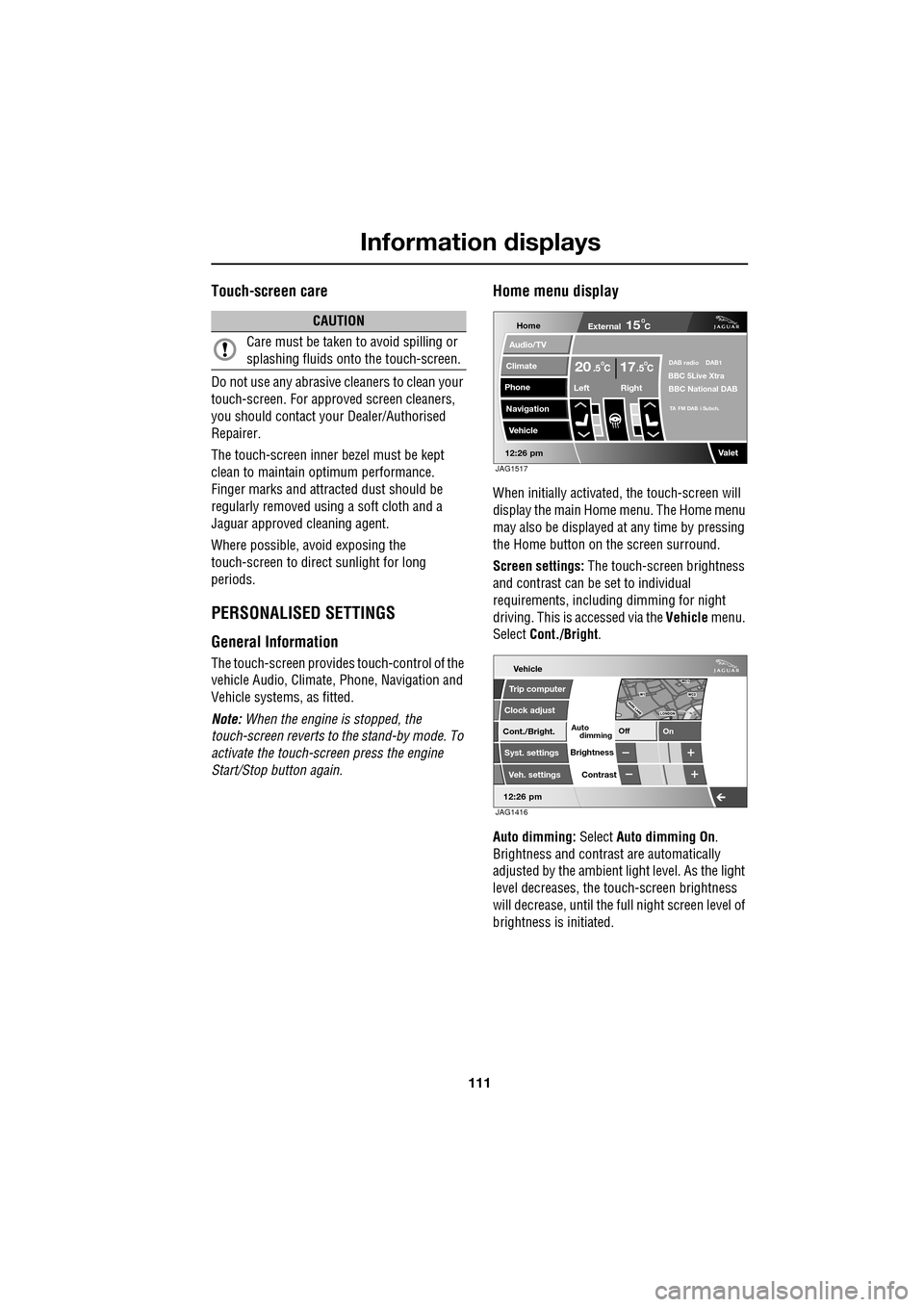
When initially activated, the touch-screen will
display the main Home menu. The Home menu
may also be displayed at any time by pressing
the Home button on the screen surround.
Screen settings: The touch-screen brightness
and contrast can be set to individual
requirements, including dimming for night
driving. This is accessed via the Vehicle menu.
Select Cont./Bright .
Auto dimming: Select Auto dimming On.
Brightness and contra st are automatically
adjusted by the ambient light level. As the light
level decreases, the t ouch-screen brightness
will decrease, until the fu ll night screen level of
brightness is initiated.
CAUTION
Care must be taken to avoid spilling or
splashing fluids onto the touch-screen.Home
Audio/TV
Climate
Phone
Navigation
Vehicle
Valet12:26 pm
External15C
Left Right
20 17CC.5 .5DAB radio DAB1BBC 5Live Xtra
BBC National DAB
TA FM DAB i Subch.
JAG1517
Vehicle
Off On
Auto
Trip computer
Clock adjust
Cont./Bright.
Syst. settings
Veh. settings Contrast
12:26 pm
dimming
Brightness
JAG1416
Page 112 of 391
Information displays
112
Further adjustment of the touch-screen
brightness can be achieved by using the + or -
buttons in the Cont./Bright. screen or by
adjustment of the inst rument panel dimmer
switch. See INSTRUMENT LIGHTING DIMMER
(page 123).
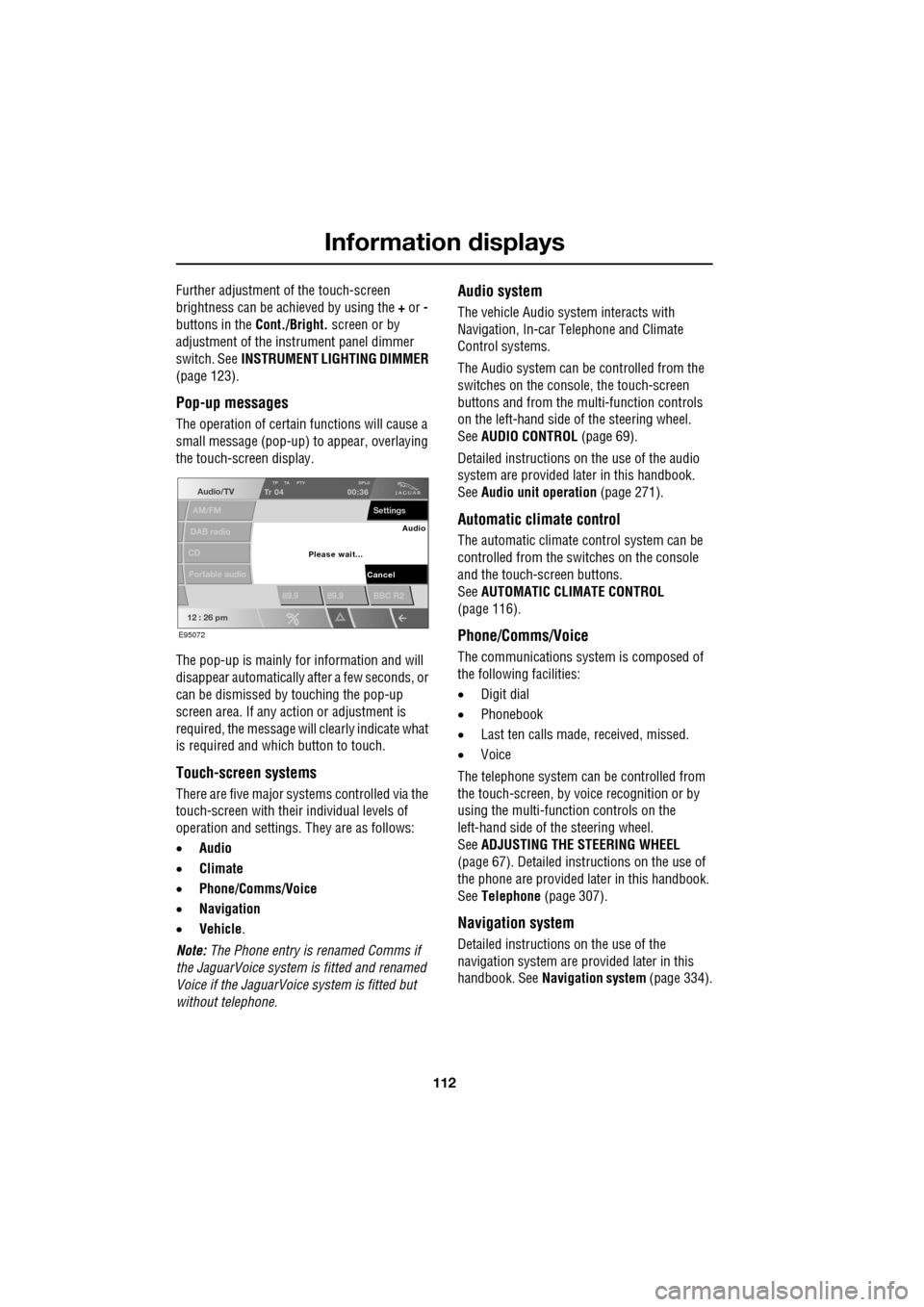
Pop-up messages
The operation of certain functions will cause a
small message (pop-up) to appear, overlaying
the touch-screen display.
The pop-up is mainly for information and will
disappear automatically after a few seconds, or
can be dismissed by touching the pop-up
screen area. If any action or adjustment is
required, the message will clearly indicate what
is required and which button to touch.
Touch-screen systems
There are five major systems controlled via the
touch-screen with thei r individual levels of
operation and settings . They are as follows:
• Audio
• Climate
• Phone/Comms/Voice
• Navigation
• Vehicle .
Note: The Phone entry is renamed Comms if
the JaguarVoice system is fitted and renamed
Voice if the JaguarVoice system is fitted but
without telephone.
Audio system
The vehicle Audio syst em interacts with
Navigation, In-car Telephone and Climate
Control systems.
The Audio system can be controlled from the
switches on the console, the touch-screen
buttons and from the multi-function controls
on the left-hand side of the steering wheel.
See AUDIO CONTROL (page 69).
Detailed instructions on the use of the audio
system are provided later in this handbook.
See Audio unit operation (page 271).
Automatic climate control
The automatic climate control system can be
controlled from the switches on the console
and the touch-screen buttons.
SeeAUTOMATIC CLIMATE CONTROL
(page 116).
Phone/Comms/Voice
The communications system is composed of
the following facilities:
• Digit dial
• Phonebook
• Last ten calls made, received, missed.
• Voice
The telephone system can be controlled from
the touch-screen, by voice recognition or by
using the multi-function controls on the
left-hand side of the steering wheel.
See ADJUSTING THE STEERING WHEEL
(page 67). Detailed instructions on the use of
the phone are provided later in this handbook.
See Telephone (page 307).
Navigation system
Detailed instructions on the use of the
navigation system are pr ovided later in this
handbook. See Navigation system (page 334).
Audio/TV
DAB radio
CD
AM/FM
12 : 26 pm
TP TA PTY DPLIITr 04
Portable audio
00:36
Settings
89.9 89.9 BBC R2
Cancel
Please wait... Audio
E95072