phone JAGUAR XF 2009 1.G Service Manual
[x] Cancel search | Manufacturer: JAGUAR, Model Year: 2009, Model line: XF, Model: JAGUAR XF 2009 1.GPages: 391, PDF Size: 19.32 MB
Page 315 of 391
315
Telephone
PHONEBOOK
The phonebook option (3), allows you to
download your mobile phone's directory
(either automatically or manually) or erase it
from the vehicle’s memory, assuming that the
phone supports this feature.
The system can store a maximum of 750
entries, although this fi gure varies, depending
on the type of mobile phone used. Refer to
Phone capacity.
Note: It may take several minutes to copy the
phonebook to the vehi cle, depending on the
phone and number of entries stored. The
telephone system may not be operational
during this period.
Automatic download
Any phone numbers stored in your mobile
phonebook, can be copi ed to the vehicle’s
phonebook.
If Auto Download is on, the mobile phone
phonebook will be transferred to the vehicle
every time the phone is connected (docked).
This feature will only work on phones that
support AT Phonebook Profile. Refer to your
phone’s operating instructions.
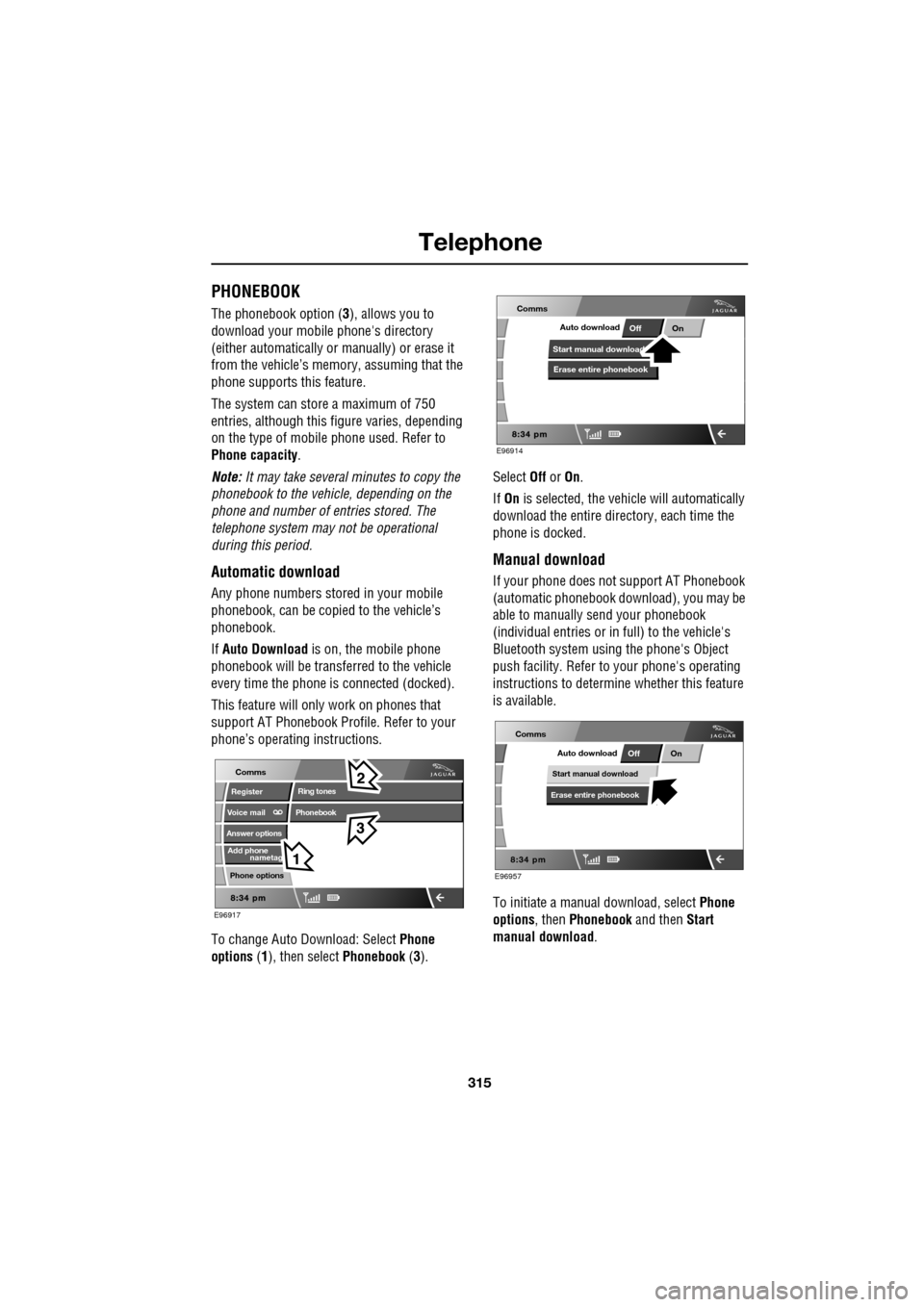
To change Auto Download: Select Phone
options (1), then select Phonebook (3). Select
Off or On.
If On is selected, the vehicle will automatically
download the entire directory, each time the
phone is docked.
Manual download
If your phone does not support AT Phonebook
(automatic phonebook download), you may be
able to manually send your phonebook
(individual entries or in full) to the vehicle's
Bluetooth system usi ng the phone's Object
push facility. Refer to your phone's operating
instructions to determine whether this feature
is available.
To initiate a manual download, select Phone
options , then Phonebook and then Start
manual download .
nametag
Register
Voice mail
Answer options
Phone options
E96917
Comms
Add phone
Ring tones
Phonebook
E96914
Comms
Off OnAuto download
Start manual download
Erase entire phonebook
E96957
Comms
OffOnAuto download
Start manual download
Erase entire phonebook
Page 316 of 391
Telephone
316
The Bluetooth system will disconnect the
currently docked phone and will be able to
receive phonebook data se nt from that phone.
Please refer to y our phone's operating
instructions for details of how to send
phonebook data using Bluetooth.
Once the phonebook data ha s been sent, select
Exit to reconnect the last docked phone.
The vehicle's Bluetoot h system will now
display the manually downloaded phonebook
data. For more information, refer to your
phone's operating instructions.
Note: This feature only allows you to send
phonebook data from the last docked phone.
You cannot download data from the Bluetooth
system to a mobile phone.
Once a paired phone is de leted from the paired
phone list, the phonebook data associated with
this phone is deleted.
Erase entire phonebook
To erase the entire phonebook:
Select Phone options (1), then select
Phonebook (3).
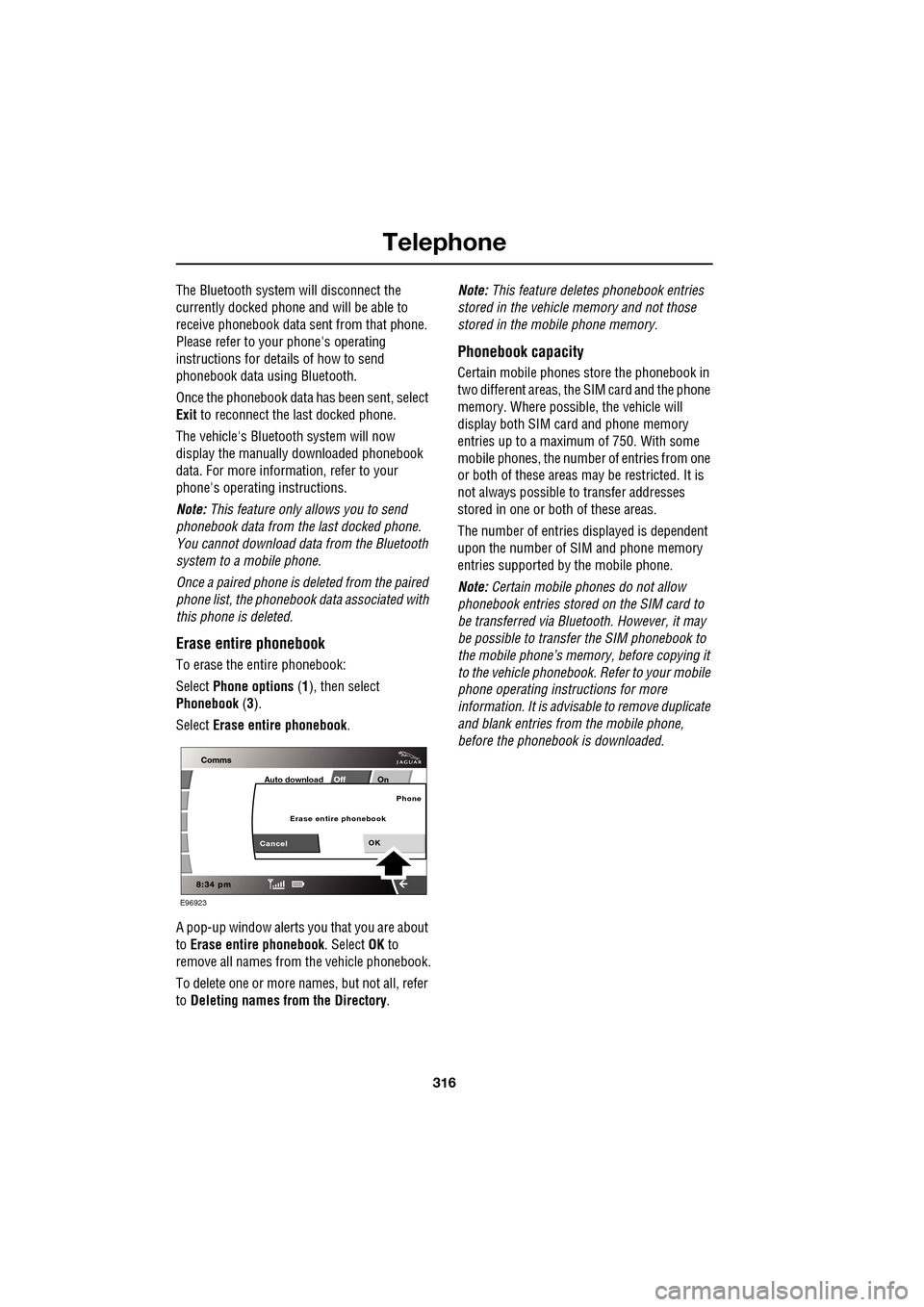
Select Erase entire phonebook .
A pop-up window alerts you that you are about
to Erase entire phonebook . Select OK to
remove all names from the vehicle phonebook.
To delete one or more na mes, but not all, refer
to Deleting names from the Directory. Note:
This feature deletes phonebook entries
stored in the vehicle memory and not those
stored in the mobile phone memory.
Phonebook capacity
Certain mobile phones store the phonebook in
two different areas, the SIM card and the phone
memory. Where possible, the vehicle will
display both SIM card and phone memory
entries up to a maximum of 750. With some
mobile phones, the number of entries from one
or both of these areas may be restricted. It is
not always possible to transfer addresses
stored in one or both of these areas.
The number of entries displayed is dependent
upon the number of SIM and phone memory
entries supported by the mobile phone.
Note: Certain mobile phones do not allow
phonebook entries stored on the SIM card to
be transferred via Bluetooth. However, it may
be possible to transfer the SIM phonebook to
the mobile phone’s memo ry, before copying it
to the vehicle phonebook. Refer to your mobile
phone operating instructions for more
information. It is advisable to remove duplicate
and blank entries from the mobile phone,
before the phonebook is downloaded.
E96923
Off OnAuto download
OK
Phone
CancelErase entire phonebook
Page 317 of 391
317
Telephone
MAKING A CALL
Before you make a call, your mobile phone
must be paired and docked with the vehicle’s
Bluetooth system.
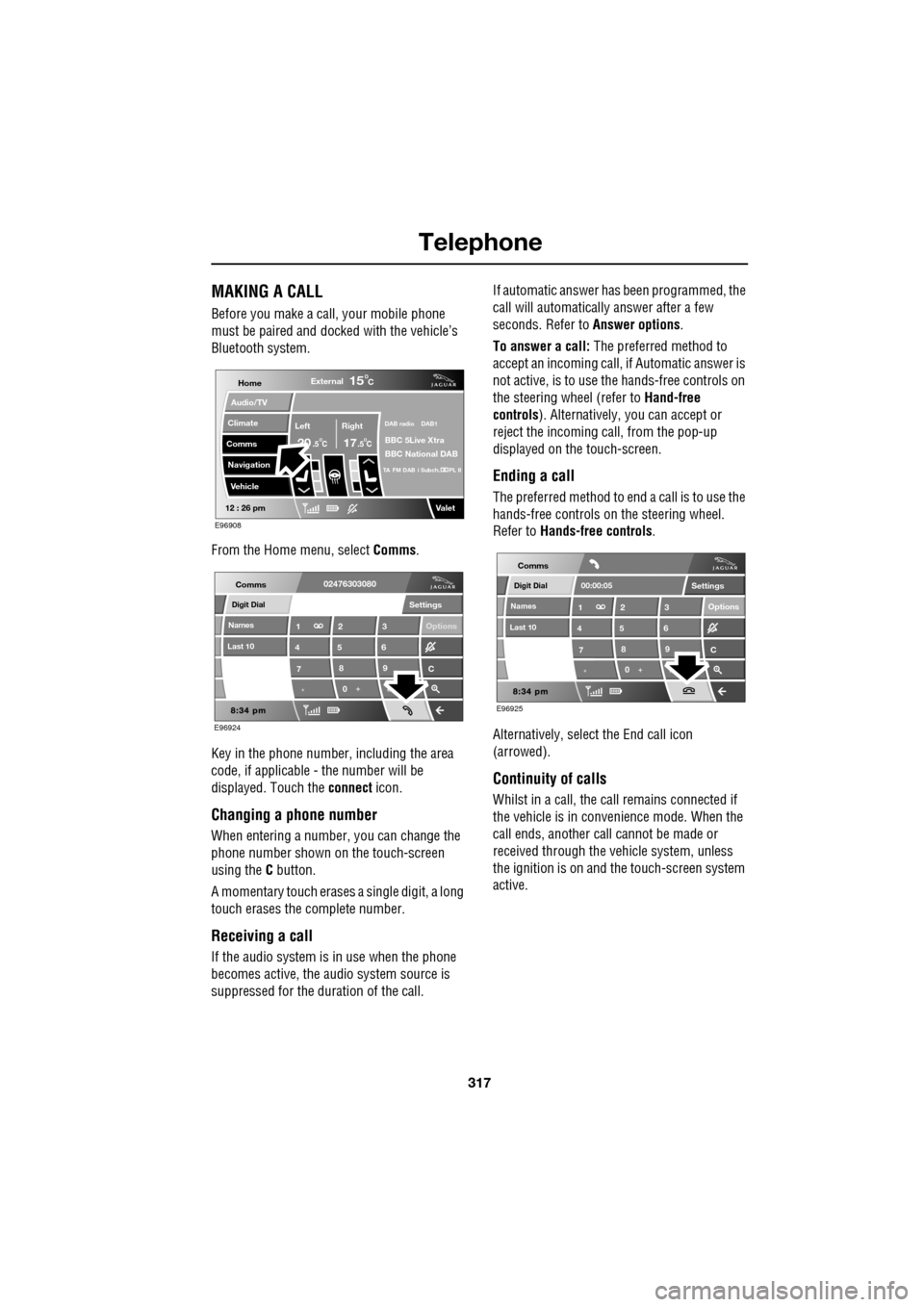
From the Home menu, select Comms.
Key in the phone number, including the area
code, if applicable - the number will be
displayed. Touch the connect icon.
Changing a phone number
When entering a number, you can change the
phone number shown on the touch-screen
using the C button.
A momentary touch erases a single digit, a long
touch erases the complete number.
Receiving a call
If the audio system is in use when the phone
becomes active, the audio system source is
suppressed for the dur ation of the call. If automatic answer has been programmed, the
call will automatically answer after a few
seconds. Refer to
Answer options.
To answer a call: The preferred method to
accept an incoming call, if Automatic answer is
not active, is to use th e hands-free controls on
the steering wheel (refer to Hand-free
controls ). Alternatively, you can accept or
reject the incoming call, from the pop-up
displayed on the touch-screen.
Ending a call
The preferred method to end a call is to use the
hands-free controls on the steering wheel.
Refer to Hands-free controls .
Alternatively, select the End call icon
(arrowed).
Continuity of calls
Whilst in a call, the ca ll remains connected if
the vehicle is in convenience mode. When the
call ends, another call cannot be made or
received through the vehicle system, unless
the ignition is on and the touch-screen system
active.
Home
Audio/TV
Climate
Comms
Navigation
VehicleExternal
Left Right
20 17CC
15C
.5 .5
DAB radio DAB1
BBC 5Live Xtra
BBC National DAB
TA FM DAB i Subch. PL II
Valet12 : 26 pm
E96908
Digit Dial
Names
Last 10
Settings
7
1
4
*8
2
5
0 9
3
6
Options
C
E96924
Comms02476303080Digit Dial
Names
Last 10
Settings
7
1
4
*8
2
5
0 9
3
6
Options
C
E96925
Comms
00:00:05
Page 318 of 391
Telephone
318
NAMES
Directory name search
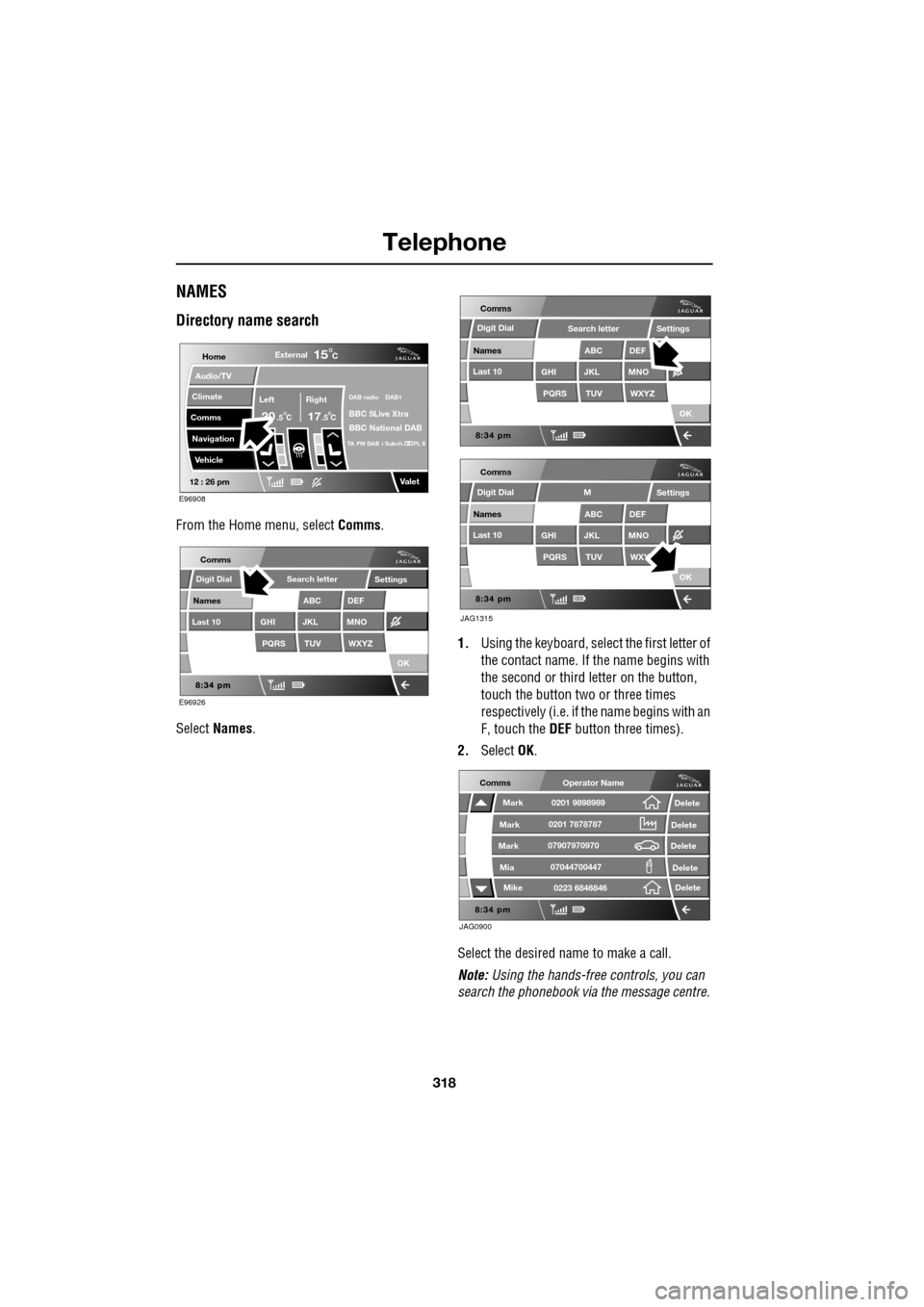
From the Home menu, select Comms.
Select Names . 1.
Using the keyboard, select the first letter of
the contact name. If th e name begins with
the second or third letter on the button,
touch the button two or three times
respectively (i.e. if th e name begins with an
F, touch the DEF button three times).
2. Select OK.
Select the desired name to make a call.
Note: Using the hands-free controls, you can
search the phonebook via the message centre.
Home
Audio/TV
Climate
Comms
Navigation
VehicleExternal
Left Right
20 17CC
15C
.5 .5
DAB radio DAB1
BBC 5Live Xtra
BBC National DAB
TA FM DAB i Subch. PL II
Valet12 : 26 pm
E96908
E96926
Comms
Digit Dial
Names
Last 10
Settings
PQRS
GHITUV
ABC
JKL
WXYZ
DEF
MNO
Search letter
OK
Comms
Comms
Names
Last 10
Settings
PQRS
GHITUV
ABC
JKL
WXYZ
DEF
MNO
Search letter
OK
Names
Last 10
Settings
PQRS
GHITUV
ABC
JKL
WXY
DEF
MNO
M
OK
JAG1315
Digit Dial
Digit Dial
JAG0900
Comms
Delete
Delete
Delete
Delete
Delete
Mark
Mark
Mark
Mike
Mia0201 9898989
0201 7878787
0223 6846846
07907970970
07044700447
Operator Name
Page 319 of 391
319
Telephone
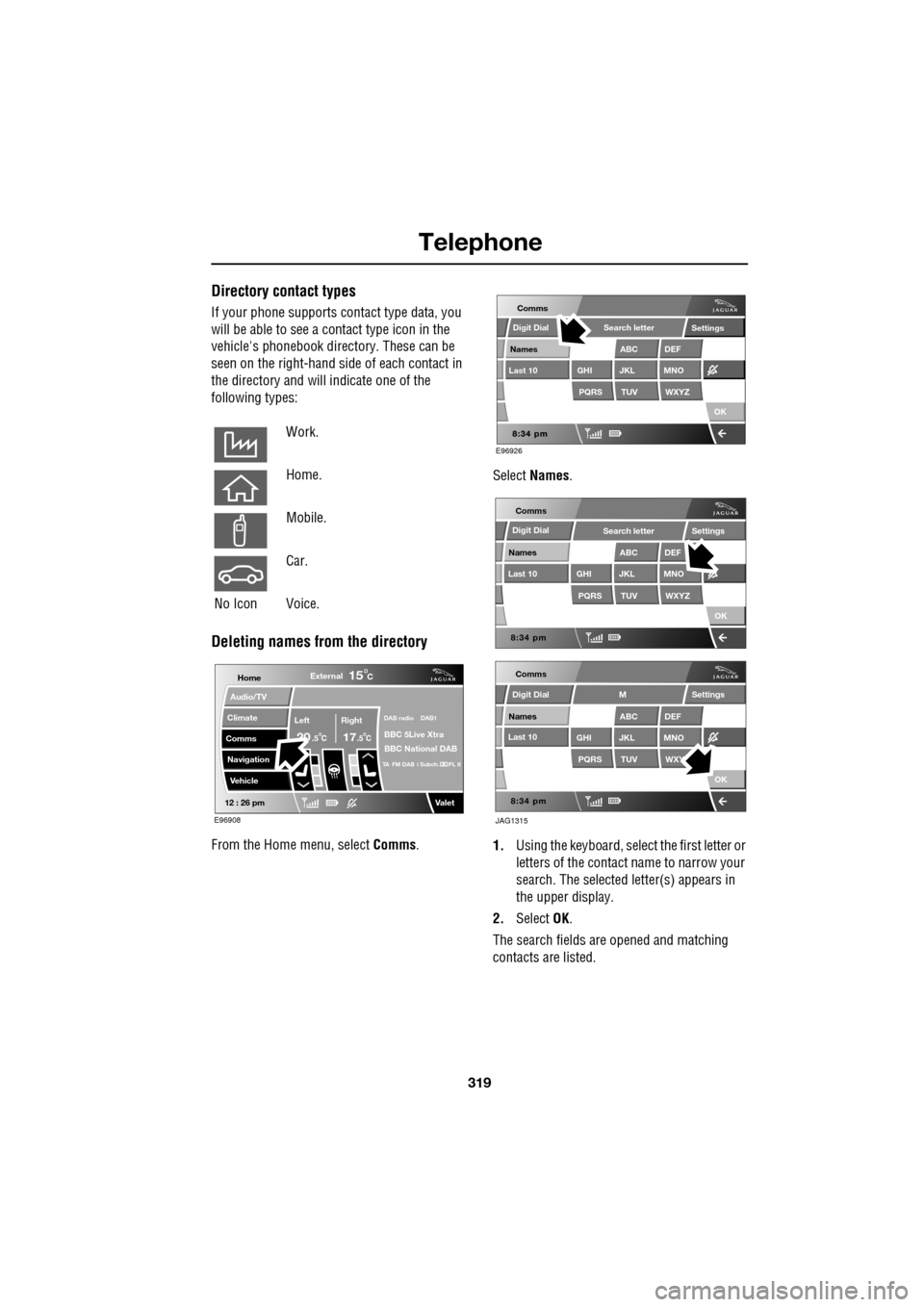
Directory contact types
If your phone supports contact type data, you
will be able to see a contact type icon in the
vehicle's phonebook dire ctory. These can be
seen on the right-hand side of each contact in
the directory and will indicate one of the
following types:
Deleting names from the directory
From the Home menu, select Comms. Select
Names .
1. Using the keyboard, select the first letter or
letters of the contact name to narrow your
search. The selected letter(s) appears in
the upper display.
2. Select OK.
The search fields ar e opened and matching
contacts are listed.
Work.
Home.
Mobile.
Car.
No Icon Voice.
Home
Audio/TV
Climate
Comms
Navigation
VehicleExternal
Left Right
20 17CC
15C
.5 .5
DAB radio DAB1
BBC 5Live Xtra
BBC National DAB
TA FM DAB i Subch. PL II
Valet12 : 26 pm
E96908
E96926
Comms
Digit Dial
Names
Last 10
Settings
PQRS
GHITUV
ABC
JKL
WXYZ
DEF
MNO
Search letter
OK
Comms
Comms
Names
Last 10
Settings
PQRS
GHITUV
ABC
JKL
WXYZ
DEF
MNO
Search letter
OK
Names
Last 10
Settings
PQRS
GHITUV
ABC
JKL
WXY
DEF
MNO
M
OK
JAG1315
Digit Dial
Digit Dial
Page 320 of 391
Telephone
320
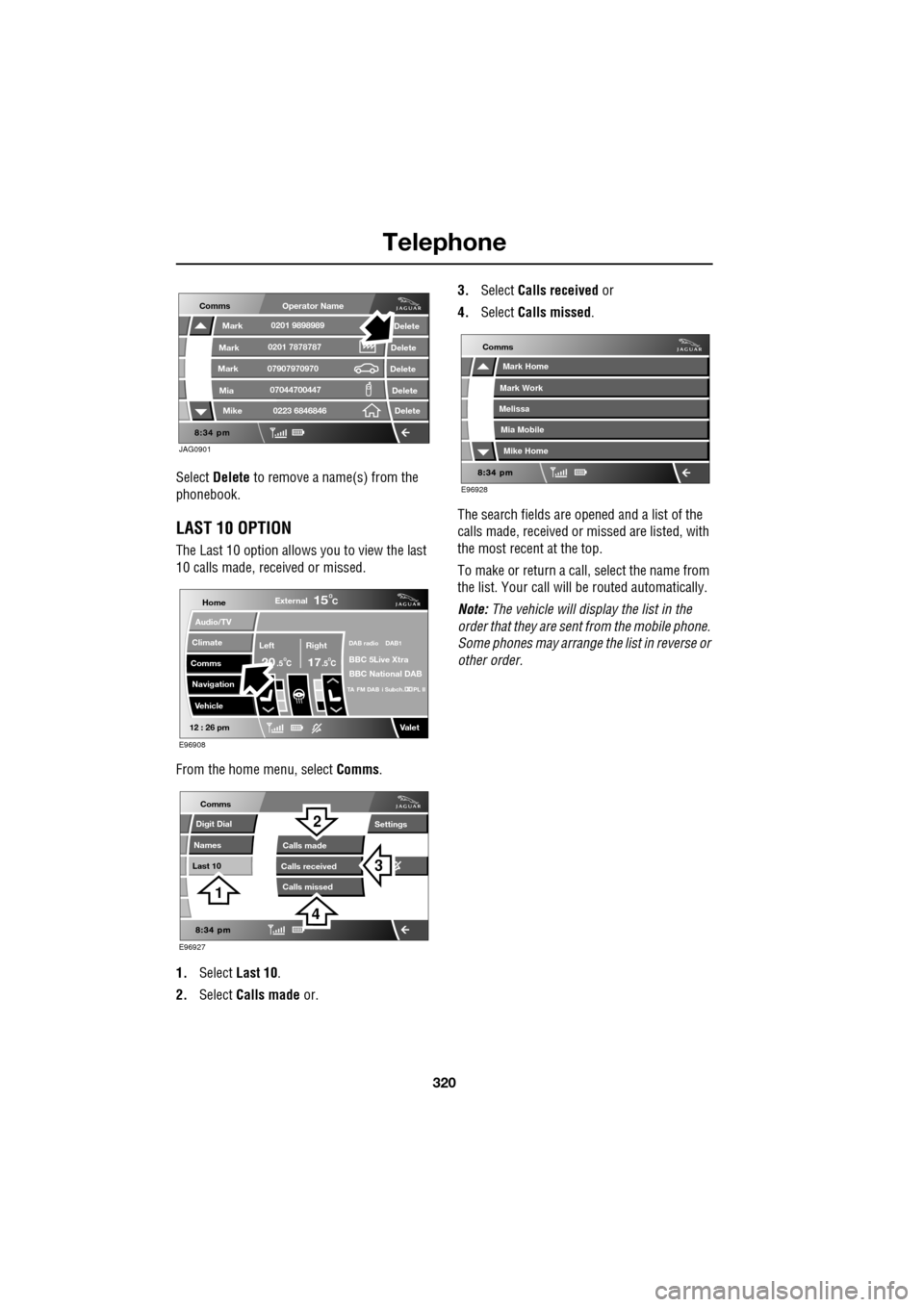
Select Delete to remove a name(s) from the
phonebook.
LAST 10 OPTION
The Last 10 option allows you to view the last
10 calls made, received or missed.
From the home menu, select Comms.
1. Select Last 10 .
2. Select Calls made or. 3.
Select Calls received or
4. Select Calls missed .
The search fields are opened and a list of the
calls made, received or missed are listed, with
the most recent at the top.
To make or return a call, select the name from
the list. Your call will be routed automatically.
Note: The vehicle will display the list in the
order that they are sent from the mobile phone.
Some phones may arrange the list in reverse or
other order.
JAG0901
Comms
Delete
Delete
Delete
Delete
Delete
Mark
Mark
Mark
Mike
Mia0201 9898989
0201 7878787
0223 6846846
07907970970
07044700447
Operator Name
Home
Audio/TV
Climate
Comms
Navigation
VehicleExternal
Left Right
20 17CC
15C
.5 .5
DAB radio DAB1
BBC 5Live Xtra
BBC National DAB
TA FM DAB i Subch. PL II
Valet12 : 26 pm
E96908
E96927
Comms
Digit Dial
Names
Last 10
Settings
Calls missedCalls made
Calls received
3
2
1
4
E96928
Comms
Mark Home
Mark Work
Melissa
Mike Home
Mia Mobile
Page 321 of 391
321
Telephone
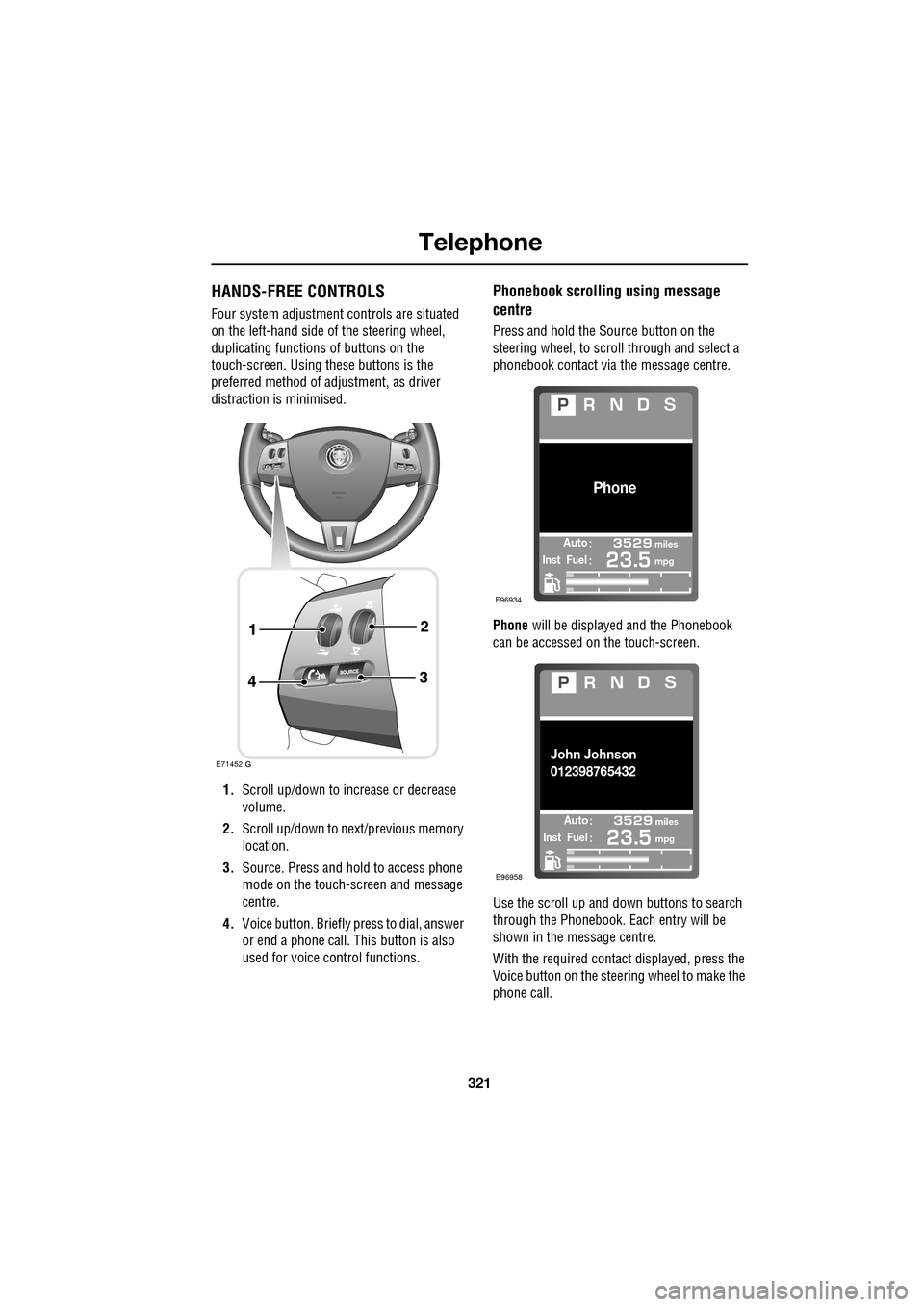
HANDS-FREE CONTROLS
Four system adjustment controls are situated
on the left-hand side of the steering wheel,
duplicating functions of buttons on the
touch-screen. Using these buttons is the
preferred method of adjustment, as driver
distraction is minimised.
1. Scroll up/down to increase or decrease
volume.
2. Scroll up/down to ne xt/previous memory
location.
3. Source. Press and hold to access phone
mode on the touch-screen and message
centre.
4. Voice button. Briefly press to dial, answer
or end a phone call. This button is also
used for voice control functions.
Phonebook scrolling using message
centre
Press and hold the Source button on the
steering wheel, to scroll through and select a
phonebook contact via the message centre.
Phone will be displayed and the Phonebook
can be accessed on the touch-screen.
Use the scroll up and down buttons to search
through the Phonebook. Each entry will be
shown in the message centre.
With the required contact displayed, press the
Voice button on the steering wheel to make the
phone call.
E71452
Automiles
Inst Fuelmpg
Phone
E96934
Automiles
Inst Fuelmpg
John Johnson
012398765432
E96958
Page 322 of 391
Telephone
322
Making/ending a call
To dial:
Key in the phone number, including the area
code. The number will be displayed.
To connect:
To end a call:
OTHER FEATURES
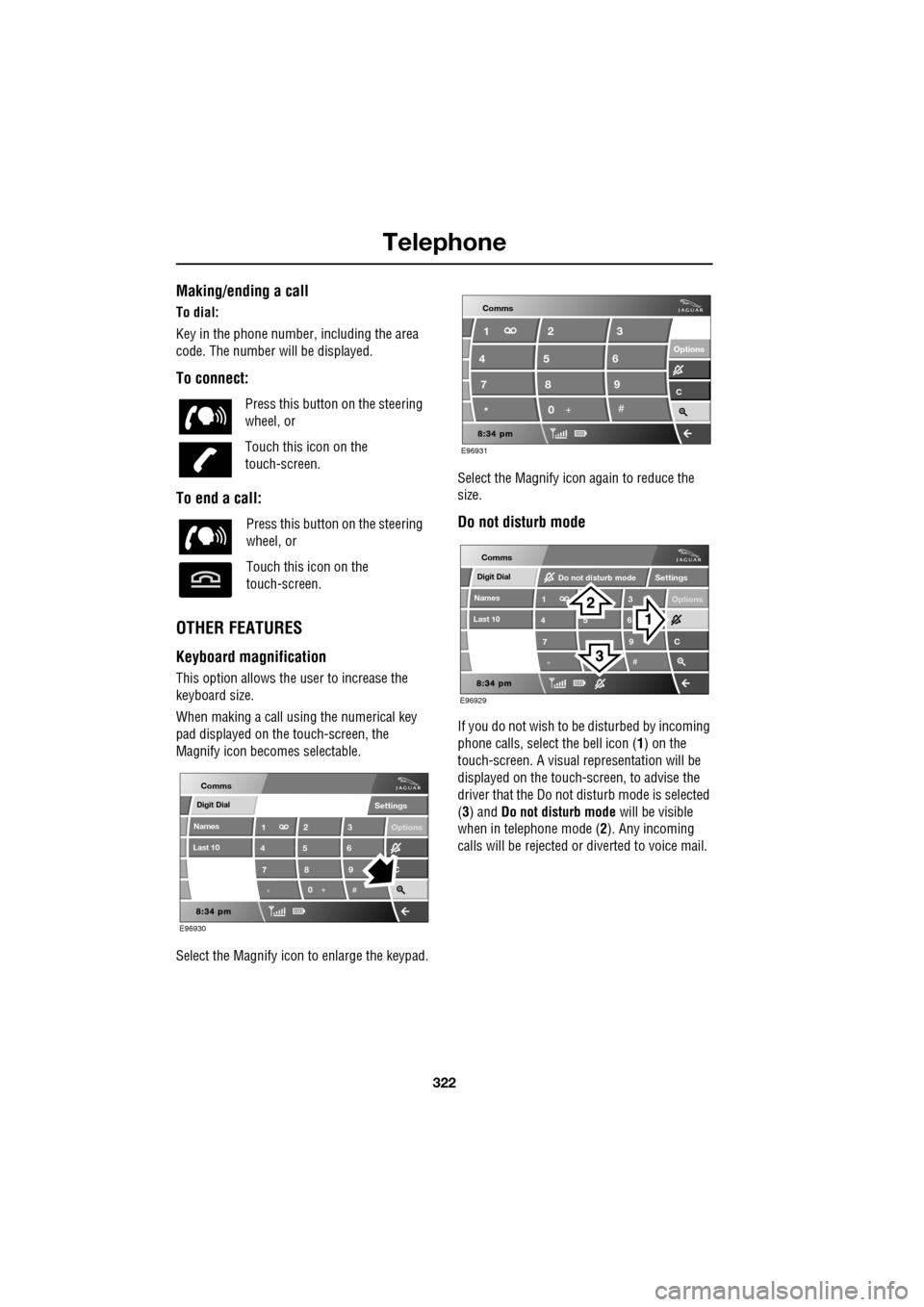
Keyboard magnification
This option allows the user to increase the
keyboard size.
When making a call using the numerical key
pad displayed on the touch-screen, the
Magnify icon becomes selectable.
Select the Magnify icon to enlarge the keypad. Select the Magnify icon
again to reduce the
size.
Do not disturb mode
If you do not wish to be disturbed by incoming
phone calls, select the bell icon (1) on the
touch-screen. A visual representation will be
displayed on the touch-screen, to advise the
driver that the Do not di sturb mode is selected
(3) and Do not disturb mode will be visible
when in telephone mode ( 2). Any incoming
calls will be rejected or diverted to voice mail.
Press this button
on the steering
wheel, or
Touch this icon on the
touch-screen.
Press this button on the steering
wheel, or
Touch this icon on the
touch-screen.
Digit Dial
Names
Last 10
Settings
7
1
4
*8
2
5
0 9
3
6
Options
C
E96930
Comms
E96931
Comms
Options Options
C7 1
4
* 82
5
0 93
6
Digit Dial
Names
Last 10
Settings
7
1
4
*
5 9
3
6
Options
C
E96929
Comms
Do not disturb mode
Page 323 of 391
323
Telephone
TELEPHONE VOICE CONTROL
Voice control allows many of the telephone
features to be activa ted by voice commands.
The system is controlled by the
switch on the left -hand side of the
steering wheel.
Note: The voice control dire ctory is separate
from your phone SIM card address or
phonebook. See VOICE CONTROL (page 69).
The voice control sy stem understands
predefined commands which need to be
spoken word for word. A list of all telephone
voice commands is below.
• PHONE HELP
• PHONE DIAL NUMBER
• PHONE REDIAL
• PHONE STORE NAME
• PHONE DIAL NAME
• PHONE ACCEPT CALLS
• PHONE REJECT CALLS
• PHONE DIAL LAST ANSWERED CALL
• PHONE DIAL LAST MISSED CALL
• PHONE DIAL VOICEMAIL
• PHONE PLAY DIRECTORY
• PHONE DELETE DIRECTORY
• PHONE DIAL HANDSET NAME
Most of the above commands are self
explanatory, those whic h are not, are explained
more fully in the following section.
Operating the system
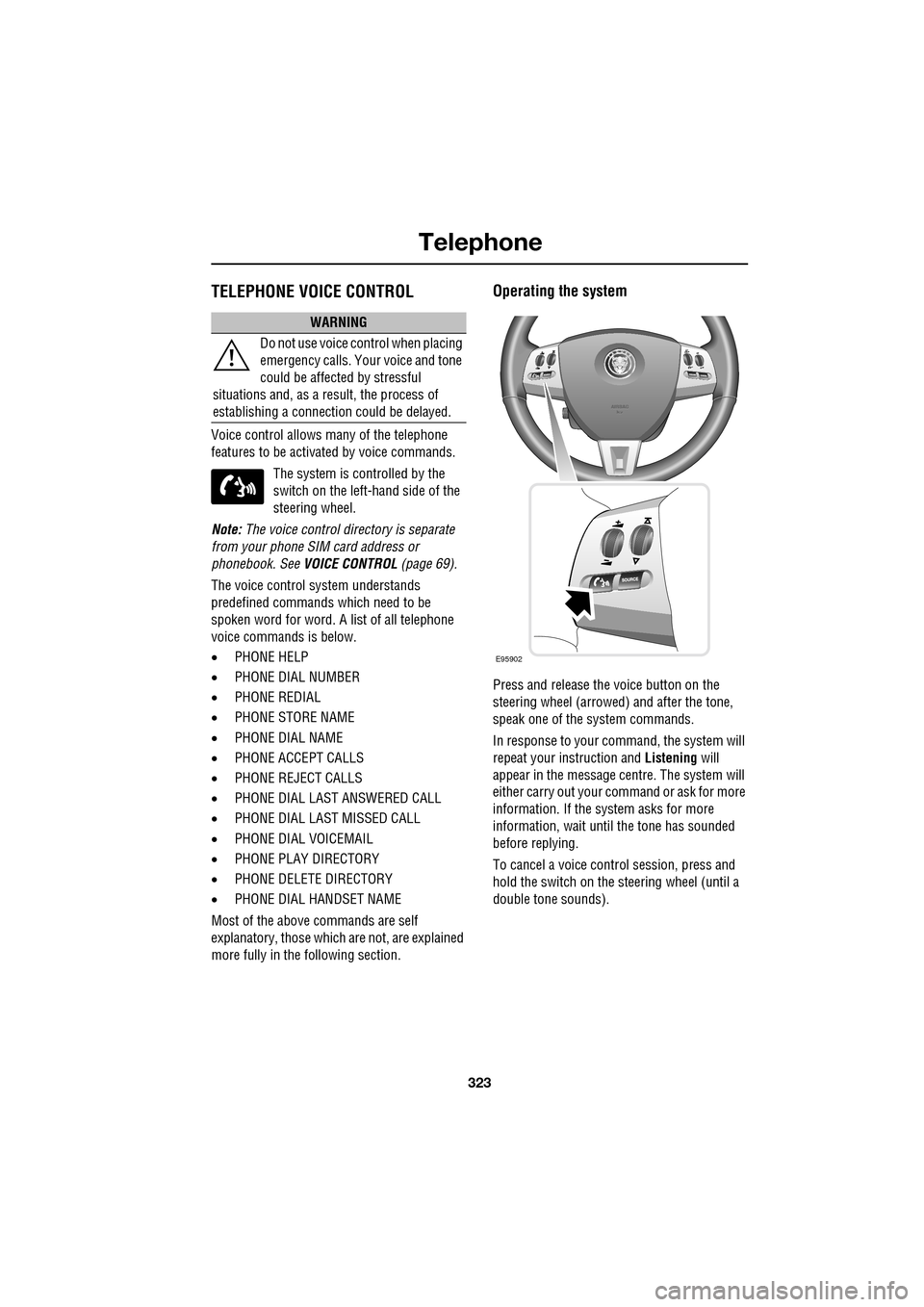
Press and release the voice button on the
steering wheel (arrowed) and after the tone,
speak one of the system commands.
In response to your command, the system will
repeat your instruction and Listening will
appear in the message centre. The system will
either carry out your command or ask for more
information. If the system asks for more
information, wait until the tone has sounded
before replying.
To cancel a voice control session, press and
hold the switch on the steering wheel (until a
double tone sounds).
WARNING
Do not use voice control when placing
emergency calls. Your voice and tone
could be affected by stressful
situations and, as a result, the process of
establishing a connecti on could be delayed.
E95902
Page 324 of 391
Telephone
324
Dialling a phone number
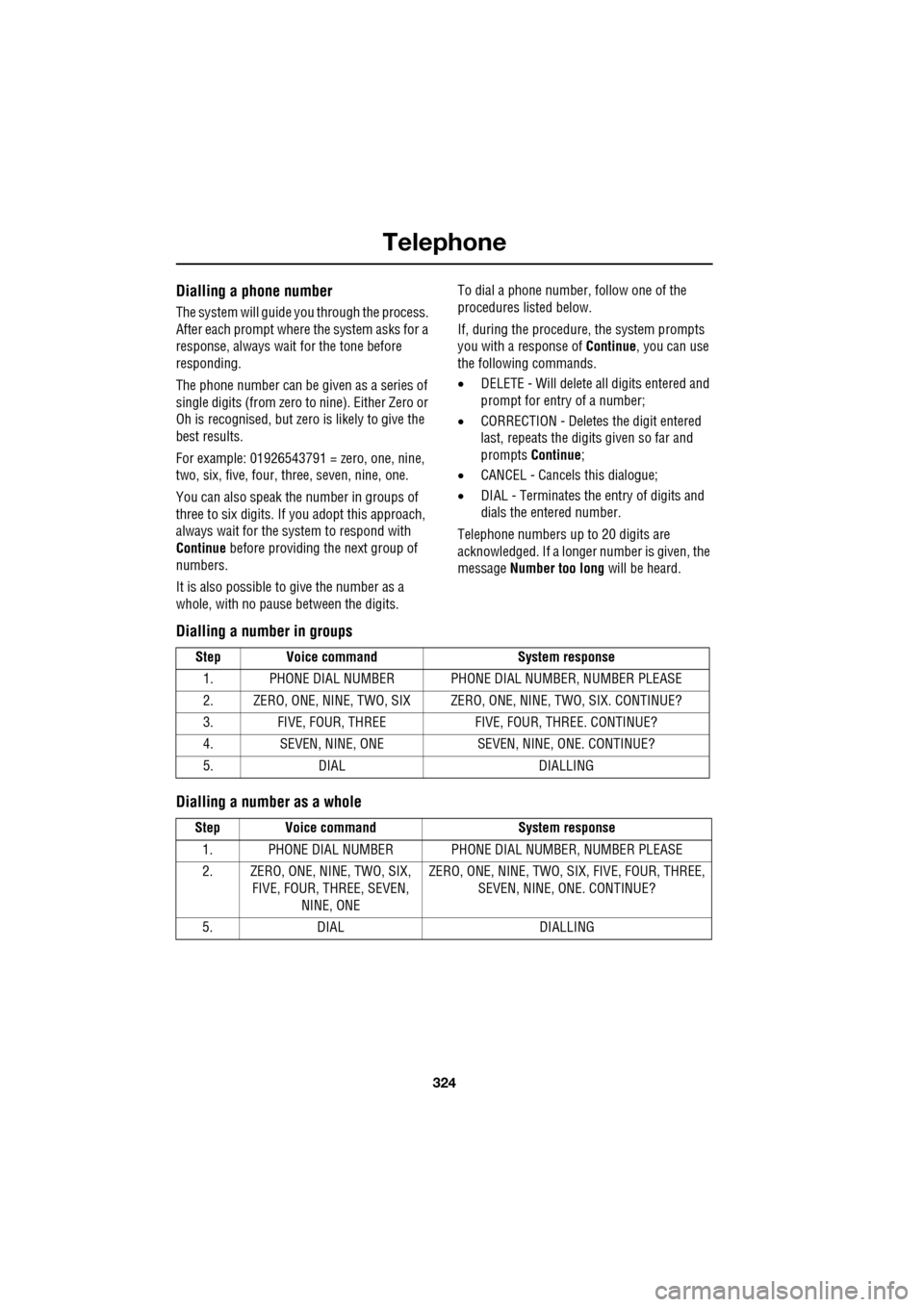
The system will guide you through the process.
After each prompt where the system asks for a
response, always wait for the tone before
responding.
The phone number can be given as a series of
single digits (from zero to nine). Either Zero or
Oh is recognised, but zero is likely to give the
best results.
For example: 01926543791 = zero, one, nine,
two, six, five, four, three, seven, nine, one.
You can also speak the number in groups of
three to six digits. If you adopt this approach,
always wait for the system to respond with
Continue before providing the next group of
numbers.
It is also possible to give the number as a
whole, with no pause between the digits. To dial a phone number, follow one of the
procedures listed below.
If, during the procedure, the system prompts
you with a response of
Continue, you can use
the following commands.
• DELETE - Will delete all digits entered and
prompt for entry of a number;
• CORRECTION - Deletes the digit entered
last, repeats the digits given so far and
prompts Continue ;
• CANCEL - Cancels this dialogue;
• DIAL - Terminates the entry of digits and
dials the entered number.
Telephone numbers up to 20 digits are
acknowledged. If a longer number is given, the
message Number too long will be heard.
Dialling a number in groups
Dialling a number as a whole
Step Voice command System response
1. PHONE DIAL NUMBER PHONE DI AL NUMBER, NUMBER PLEASE
2. ZERO, ONE, NINE, TWO, SIX ZERO, ONE, NINE, TWO, SIX. CONTINUE?
3. FIVE, FOUR, THREE FIVE, FOUR, THREE. CONTINUE?
4. SEVEN, NINE, ONE SEVEN, NINE, ONE. CONTINUE?
5. DIAL DIALLING
Step Voice command System response
1. PHONE DIAL NUMBER PHONE DI AL NUMBER, NUMBER PLEASE
2. ZERO, ONE, NINE, TWO, SIX, FIVE, FOUR, THREE, SEVEN,
NINE, ONE ZERO, ONE, NINE, TWO, SIX, FIVE, FOUR, THREE,
SEVEN, NINE, ONE. CONTINUE?
5. DIAL DIALLING