phone JAGUAR XF 2009 1.G Owner's Manual
[x] Cancel search | Manufacturer: JAGUAR, Model Year: 2009, Model line: XF, Model: JAGUAR XF 2009 1.GPages: 391, PDF Size: 19.32 MB
Page 119 of 391

119
Climate control
Touch-screen operation
Certain functions of the climate control system
are adjusted using the Climate menu on the
touch-screen.
Select Climate from the Home menu.
The climate main menu is displayed, from
which the climate cont rol settings can be
adjusted.
Climate control display icons
The climate control display buttons and icons
are as follows:
Home
Audio/TV
Climate
Phone
Navigation
Vehicle
Valet12:26 pm
External15C
t Right
20 17CC.5 .5DAB radio DAB1BBC 5Live Xtra
BBC National DAB
TA FM DAB i Subch.
JAG1518
Settings
Temp. sync. External
12C
Auto
21 21C.5 C
Auto
A/C
OFF
.5
Climate
12 : 26 pm
Auto
E95094
Auto climate control
on.
Air distribution to
windscreen.
Air distribution to
face.
Air distribution to feet.
Synchronizes the
passenger's climate
control zone to the
driver's settings.
Blower speed control decrease and increase. Access to the Settings
control menu to set
the vent rotation
mode, to adjust
personal climate zone se ttings and also to
access the automatic air recirculation sensor
control setting.Auto
Temp. sync.
Settings
Page 124 of 391
Convenience features
124
CLOCK
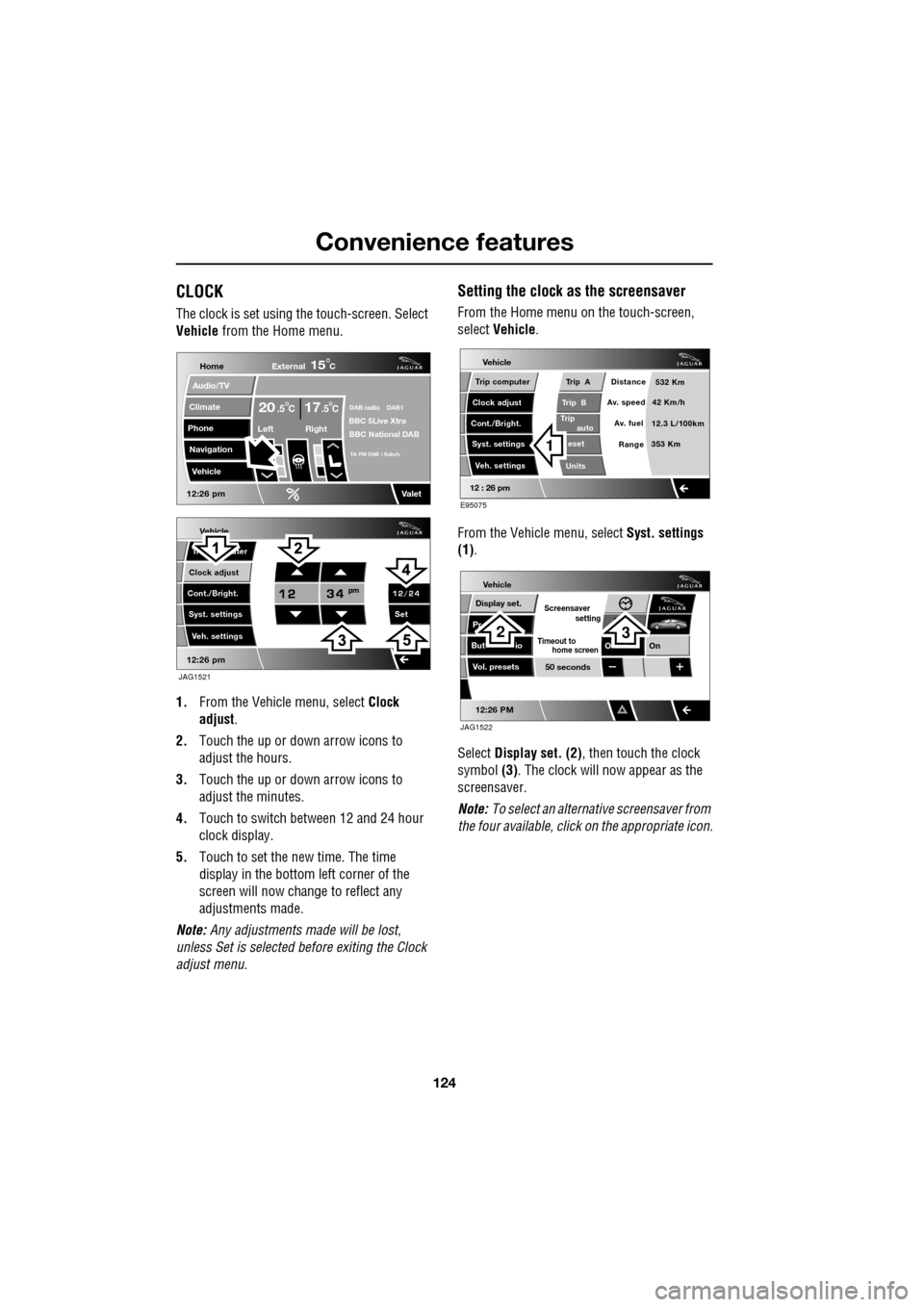
The clock is set using the touch-screen. Select
Vehicle from the Home menu.
1. From the Vehicl e menu, select Clock
adjust .
2. Touch the up or down arrow icons to
adjust the hours.
3. Touch the up or down arrow icons to
adjust the minutes.
4. Touch to switch between 12 and 24 hour
clock display.
5. Touch to set the new time. The time
display in the bottom left corner of the
screen will now change to reflect any
adjustments made.
Note: Any adjustments made will be lost,
unless Set is selected before exiting the Clock
adjust menu.
Setting the clock as the screensaver
From the Home menu on the touch-screen,
select Vehicle.
From the Vehicle menu, select Syst. settings
(1) .
Select Display set. (2) , then touch the clock
symbol (3). The clock will now appear as the
screensaver.
Note: To select an alternative screensaver from
the four available, click on the appropriate icon.
Vehicle
Clock adjust
Cont./Bright. Tr uter
Syst. settings Veh. settings Set
12:26 pm
JAG1521
Home
Audio/TV
Climate
Phone
Navigation
Vehicle
DAB radio DAB1BBC 5Live XtraBBC National DAB
TA FM DAB i Subch.
Va l e t12:26 pm
External15C
Left Right
20 17CC.5 .5
Vehicle
Trip B
Trip
auto eset
Units Distance
Av. speed
Av. fuel 532 Km
42 Km/h
12.3 L/100km
353 Km
RangeClock adjust
Cont./Bright. Trip computer
Syst. settings Veh. settings
Trip A
12 : 26 pm
E95075
1
Vehicle
Display set.
Pr
But io
Vol. presets
12:26 PM
50 seconds
OnO
Screensaver
Timeout to
setting
home screen
JAG1522
23
Page 134 of 391
Starting the engine
134
Engine block heaters
Engines are more difficult to start when the
ambient temperature is very low. In
geographical areas where temperatures below
-10°C (14°F) are experienced frequently, it is
advisable to fit an engine block heater. The
block heater will have an insulated connector at
the front of the vehicle, which is connected to a
mains supply using a suitable extension cable.
The heater can remain in use overnight if
required. Typically, an e ngine block heater will
use between 400W and 1000W per hour.
For further information consult your Jaguar
Dealer/Authorised Repairer.
If the engine fails to start
When pressing the engine START/STOP button
to start the engine, if the security status
indicator lamp on the top surface of the
instrument panel rema ins flashing, a fault
condition is indicate d. Seek qualified
assistance as soon as possible.
Note: If the Jaguar Smart Key is placed in the
door pocket, it may be outside the range of the
sensors when the door is opened.
Note: If the fuel system inertia switch has
tripped, the ignition circuit will be isolated.
See FUEL CUT-OFF (page 177).
Petrol engines
If the engine persistently fails to start, press the
START/STOP button (without applying the
brake pedal) to return the ignition to
convenience mode. Slowly depress the
accelerator pedal fully, hold it in this position
and press the START/STOP button with the
brake pedal applied, the engine will start to
crank. Release the accelerator pedal when the
engine starts.
If the engine still fails to start, consult your
Dealer/Authorised Repairer.
Diesel engines
If the engine persistently fails to start, press
and hold the START/STOP button (with the
brake pedal applied). Keep the START/STOP
button and the brake pedal pressed until the
engine starts, then release.
If the engine still fails to start, consult your
Dealer/Authorised Repairer.
SWITCHING OFF THE ENGINE
With the gear selector in position P, press the
engine START/STOP button. The engine will
stop and the ignition syst em will return to
convenience mode. The audio, telephone and
touch-screen systems will revert to stand-by
mode and the JaguarDrive selector will retract
into the centre console. Pressing the
START/STOP button ag ain (without pressing
the brake pedal) will activate the systems.
CAUTION
The fitting of an engine block heater
does not eliminate the need for
antifreeze.
WARNING
Never switch off the engine when the
vehicle is in motion.
Page 148 of 391

Parking aid
148
PRINCIPLE OF OPERATION
Note: Once the system has been activated by
selecting reverse or using the switch, the front
and rear sensors are active when the gear
selector is in neutral. Therefore, if an obstacle
is detected an audible warning tone will sound.
The parking aid is automatically in standby
when the ignition is on and provides the driver
with information on most obstructions, and
their distance from the vehicle, when
manoeuvring. This is ac hieved by using four
ultrasonic sensors on each bumper.
When objects are detected the Park aid will
emit a warning tone which increases in
frequency and then becomes constant, as the
vehicle gets closer to the object.
USING THE PARKING AID
Touch-screen
To set the volume of the parking aid warning
tones:
• Select Vehicle from the touch-screen
Home menu, then select Veh. settings.
• Select Parking , then select Vol. presets.
Touch the Parking aid + or - button to increase
or decrease the warning tone volume.
Note: This adjusts both front and rear speaker
volume.
WARNINGS
It remains the driver’s responsibility
to be vigilant when reversing. Small
children or animals may not be
detected by the system.
It remains the driver’s responsibility
to detect obstacles and estimate the
vehicle’s distance from them. Some
overhanging objects , barriers, thin
obstructions or painted surfaces which could
possibly cause damage to the vehicle may not
be detected by the system. Always be vigilant
when reversing.
CAUTIONS
Objects moving away from the vehicle
will be reported. Howe ver, whilst driving
away, object warning may be temporarily
reported due to ground reflection.
Systems using the same frequency
band as the front parking sensors, may
cause irregular tones to be emitted.
mirror dip
Vol. presetsOff
On
Vehicle
Security
ParkingReverse
12 : 26 pm
Navigat
Phone
Vehicle
Display set.
Preferences
Button audioParking aid
Vol. presets
AVC Low
MediumHigh
12 : 26 pm
Valet mode
E94137
Page 174 of 391
Fuel and refuelling
174
SAFETY PRECAUTIONSFUEL QUALITY
Water in fuel
Petrol engined vehicles
WARNINGS
Petroleum gasses are highly
flammable, have a low flash point,
and are explosive, especially in
confined spaces. Avoid exposing the gasses to
any potential sources of ignition as the
resulting fire and expl osion may cause serious
injuries and/or death.
Only use containe rs specifically
designed for carrying fuel and always
remove them from the vehicle to fill
them. Failure to do so may result in spillage,
and cause a fire.
Switch off the engine when refuelling,
as it is both a source of extreme
temperatures, and electrical sparks.
The resulting fire a nd explosion may cause
serious injury and death.
Switch off any personal electronic
devices such as mobile phones, or
music players. They have the
potential to cause electrical sparks. The
resulting fire and expl osion may cause serious
injury and death.
Do not smoke, use a naked flame, or
cause sparks. The resulting fire and
explosion may cause serious injury
and death.
Do not overfill the fuel tank.
Overfilling may cause spillage when
the vehicle is driven. Spillage may
also occur if the fuel expands in high ambient
temperatures.
Any modifications to the fuel system
not specifically designed for this
Jaguar are prohibited. Such
modifications in some circumstances, could
result in a fire. All se rvice actions should be
entrusted to a Dealer /Authorised Repairer.The presence of any unusual fumes
(e.g. petrol or exhaust fumes) in the
passenger compartment and/or
luggage compartment, should be corrected
immediately by a Dealer /Authorised Repairer.
If you must drive unde r these conditions, do
so only with all windows fully open.
CAUTIONS
If the warning WATER IN FUEL is
displayed in the message centre, an
excessive amount of wate r has collected in the
fuel filter bowl. Seek assistance from a Jaguar
Dealer/Authorised Repairer to have the filter
drained, as soon as possible.
CAUTIONS
Do not use leaded fuels, lead substitutes
or fuel additives. Doing so can cause
damage to the engine, fuel and emission
control systems.
Only use high quality petrol, as using
lower quality fuels ca n cause damage to
the engine, fuel and emission control systems.
Fuel system cleaning agents should not
be used, unless a pproved by Jaguar.
Unapproved products may be harmful to fuel
system components on your vehicle.
It is the driver’s resp onsibility to fill the
vehicle with the correct fuel. If the
vehicle is filled with the wrong type of fuel, do
not start the engine. Call for Roadside
Assistance.
WARNINGS
Page 248 of 391

Fuses
248
Luggage compartment fuse box
F31 15A Blue Sunroof.
F32 5A Tan Jaguar Smart Key docking station.
F33 5A Tan Diagnostic connector.
F34 5A Tan Instrument pack.
F35 15A Blue Interior lamps.
F36 10A Red Suspension system.
Fuse No Rating
(amps) Fuse
Colour Circuit
Fuse No Rating
(amps) Fuse
Colour Circuit
F1 30A Pink Air blower.
F2 30A Pink Electric parking brake.
F3 - - Not used.
F4 - - Not used.
F5 - - Not used.
F6 - - Not used.
F7 30A Pink Heated rear screen.
F8 30A Pink Audio system (Premium audio only).
F9 50A Red RBD link.
F10 40A Green Rear electronic differential (e-Diff).
F11 - - Not used.
F12 - - Not used.
F13 - - Not used.
F14 5A Tan Telephone.
F15 10A Red TV. DVD. DAB radio.
F16 - - Not used.
F17 - - Not used.
F18 - - Not used.
F19 - - Not used.
F20 - - Not used.
F21 - - Not used.
F22 - - Not used.
Page 270 of 391
Audio unit overview
270
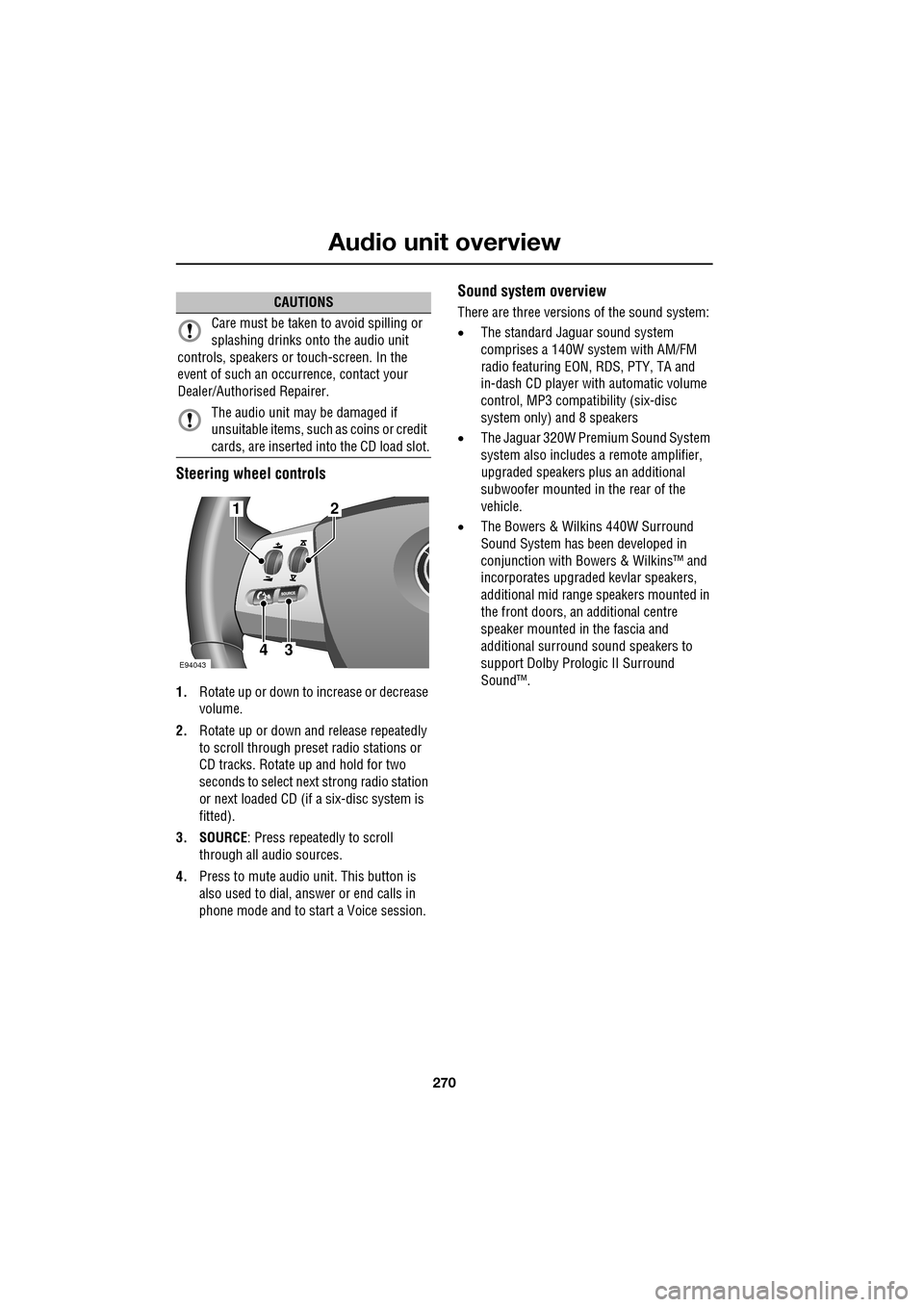
Steering wheel controls
1.Rotate up or down to increase or decrease
volume.
2. Rotate up or down and release repeatedly
to scroll through preset radio stations or
CD tracks. Rotate up and hold for two
seconds to select next strong radio station
or next loaded CD (if a six-disc system is
fitted).
3. SOURCE : Press repeatedly to scroll
through all audio sources.
4. Press to mute audio unit. This button is
also used to dial, answer or end calls in
phone mode and to st art a Voice session.
Sound system overview
There are three versions of the sound system:
• The standard Jaguar sound system
comprises a 140W sy stem with AM/FM
radio featuring EON, RDS, PTY, TA and
in-dash CD player with automatic volume
control, MP3 compatibility (six-disc
system only) and 8 speakers
• The Jaguar 320W Premium Sound System
system also includes a remote amplifier,
upgraded speakers plus an additional
subwoofer mounted in the rear of the
vehicle.
• The Bowers & Wilkins 440W Surround
Sound System has been developed in
conjunction with Bowe rs & Wilkins™ and
incorporates upgraded kevlar speakers,
additional mid range sp eakers mounted in
the front doors, an additional centre
speaker mounted in the fascia and
additional surround sound speakers to
support Dolby Prologic II Surround
Sound™.CAUTIONS
Care must be taken to avoid spilling or
splashing drinks onto the audio unit
controls, speakers or touch-screen. In the
event of such an occurrence, contact your
Dealer/Authorised Repairer.
The audio unit may be damaged if
unsuitable items, such as coins or credit
cards, are inserted into the CD load slot.
E94043
12
43
Page 271 of 391
271
Audio unit operation
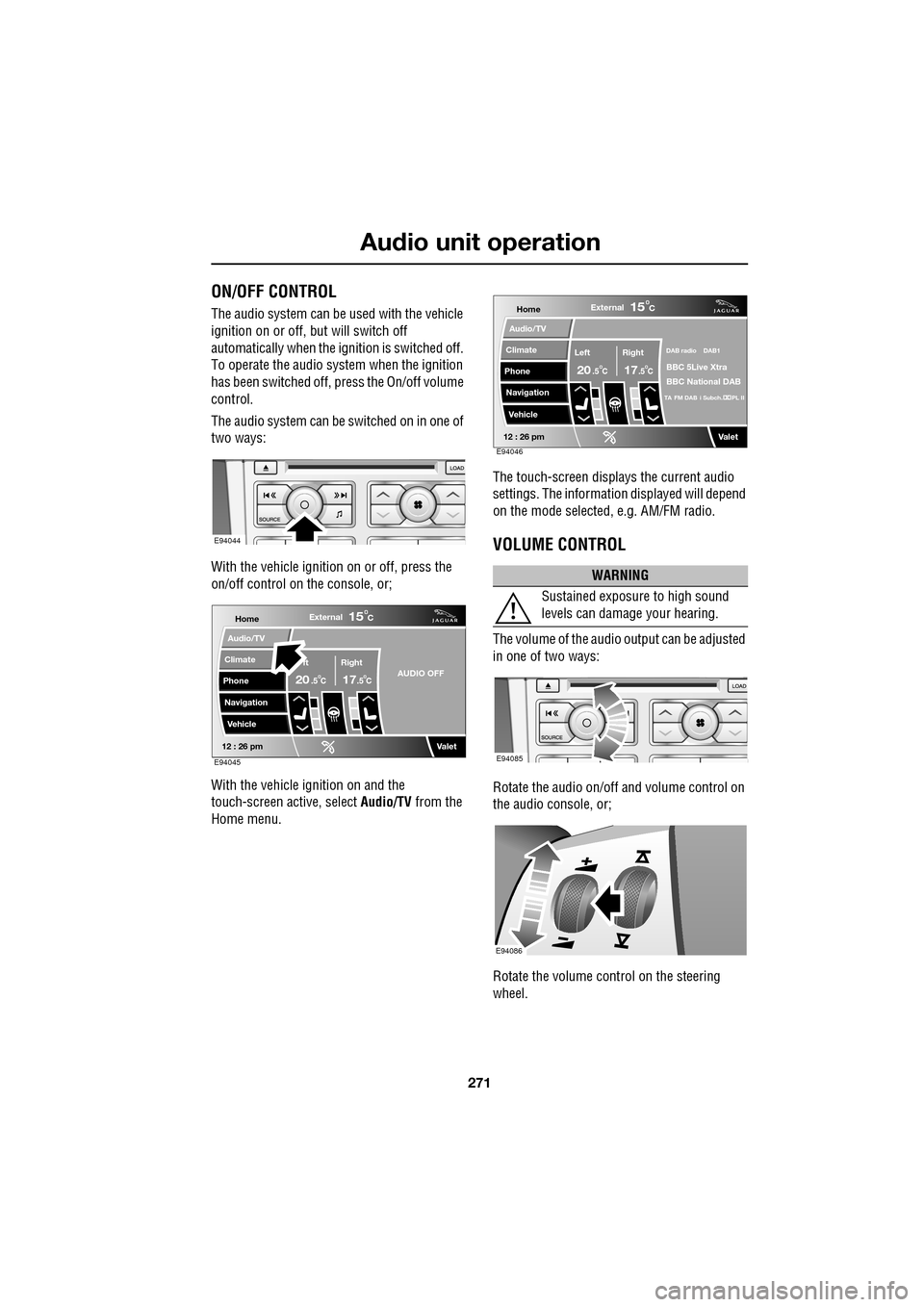
ON/OFF CONTROL
The audio system can be used with the vehicle
ignition on or off, but will switch off
automatically when the ignition is switched off.
To operate the audio system when the ignition
has been switched off, press the On/off volume
control.
The audio system can be switched on in one of
two ways:
With the vehicle ignition on or off, press the
on/off control on the console, or;
With the vehicle ignition on and the
touch-screen active, select Audio/TV from the
Home menu. The touch-screen displays the current audio
settings. The informati
on displayed will depend
on the mode selected , e.g. AM/FM radio.
VOLUME CONTROL
The volume of the audio output can be adjusted
in one of two ways:
Rotate the audio on/off and volume control on
the audio console, or;
Rotate the volume control on the steering
wheel.
E94044
Home
Audio/TV
Climate
Phone
Navigation
VehicleExternal
ft Right
20 17CC
15C
.5 .5AUDIO OFF
Valet12 : 26 pmE94045
WARNING
Sustained exposure to high sound
levels can damage your hearing.
Home
Audio/TV
Climate
Phone
Navigation
VehicleExternal
Left Right
20 17CC
15C
.5 .5
DAB radio DAB1
BBC 5Live Xtra
BBC National DAB
TA FM DAB i Subch. PL II
Valet12 : 26 pmE94046
E94085
E94086
Page 272 of 391
Audio unit operation
272
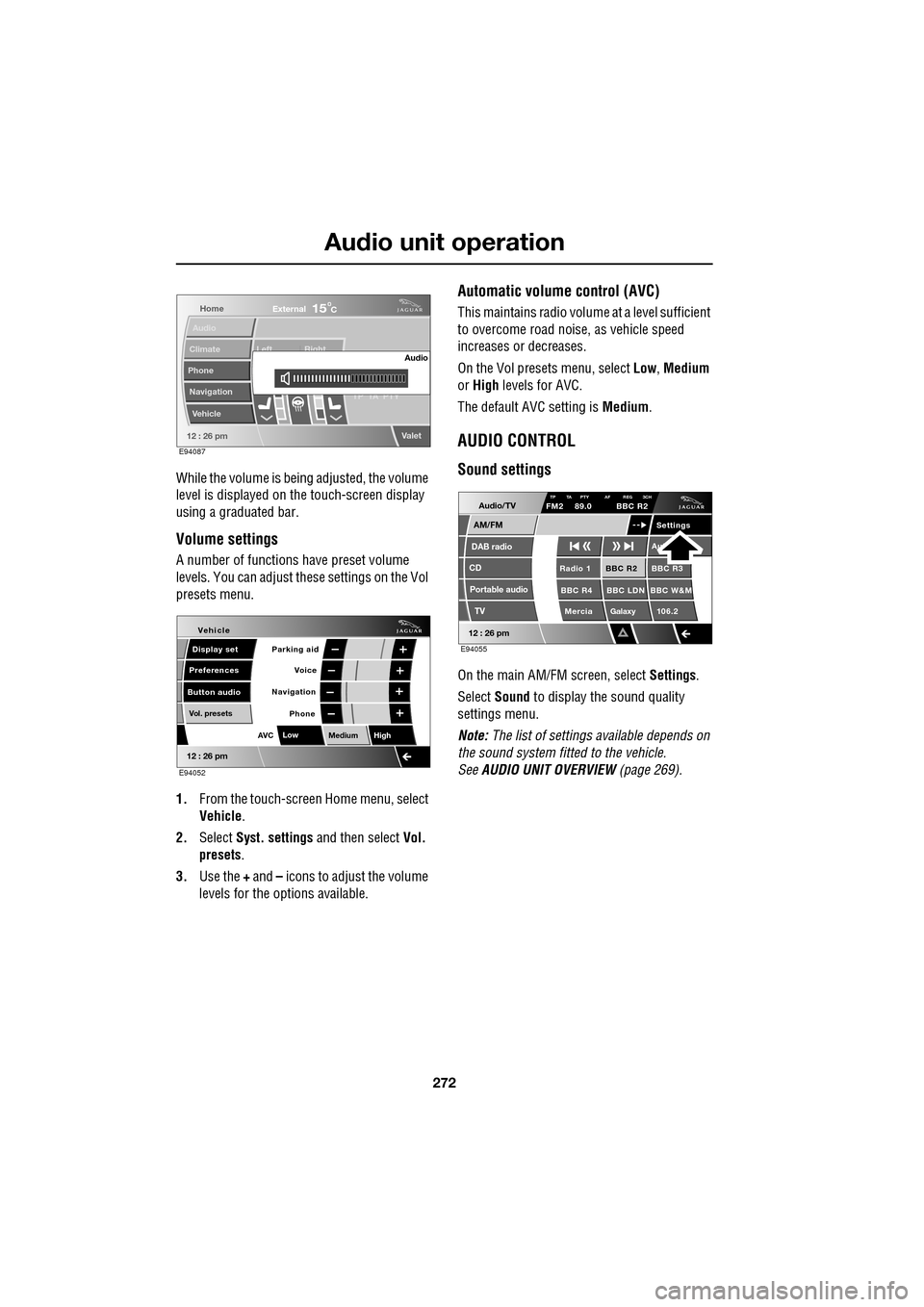
While the volume is being adjusted, the volume
level is displayed on the touch-screen display
using a graduated bar.
Volume settings
A number of functions have preset volume
levels. You can adjust these settings on the Vol
presets menu.
1. From the touch-screen Home menu, select
Vehicle .
2. Select Syst. settings and then select Vol.
presets .
3. Use the + and – icons to adjust the volume
levels for the options available.
Automatic volume control (AVC)
This maintains radio volume at a level sufficient
to overcome road noise, as vehicle speed
increases or decreases.
On the Vol presets menu, select Low, Medium
or High levels for AVC.
The default AVC setting is Medium.
AUDIO CONTROL
Sound settings
On the main AM/FM screen, select Settings.
Select Sound to display the sound quality
settings menu.
Note: The list of settings available depends on
the sound system fitted to the vehicle.
See AUDIO UNIT OVERVIEW (page 269).
Home
Audio
Climate
Phone
Navigation
Vehicle Left Right
TP T
A PTY
Valet12 : 26 pm
Audio
External15C
E94087
Voice
Vehicle
Display set
Preferences
Button audioParking aid
Vol. presets
AVC Low
MediumHigh
12 : 26 pm
Navigation
Phone
E94052
Audio/TV
DAB radio
CD
AM/FM
12 : 26 pm
BBC R2 BBC R3
BBC R4 BBC LDN BBC W&M Mercia Galaxy 106.2Radio 1
Settings
Aut
TP TA PTY AF REG 3CHFM2 89.0 BBC R2
Portable audio TV
E94055
Page 276 of 391
Audio unit operation
276
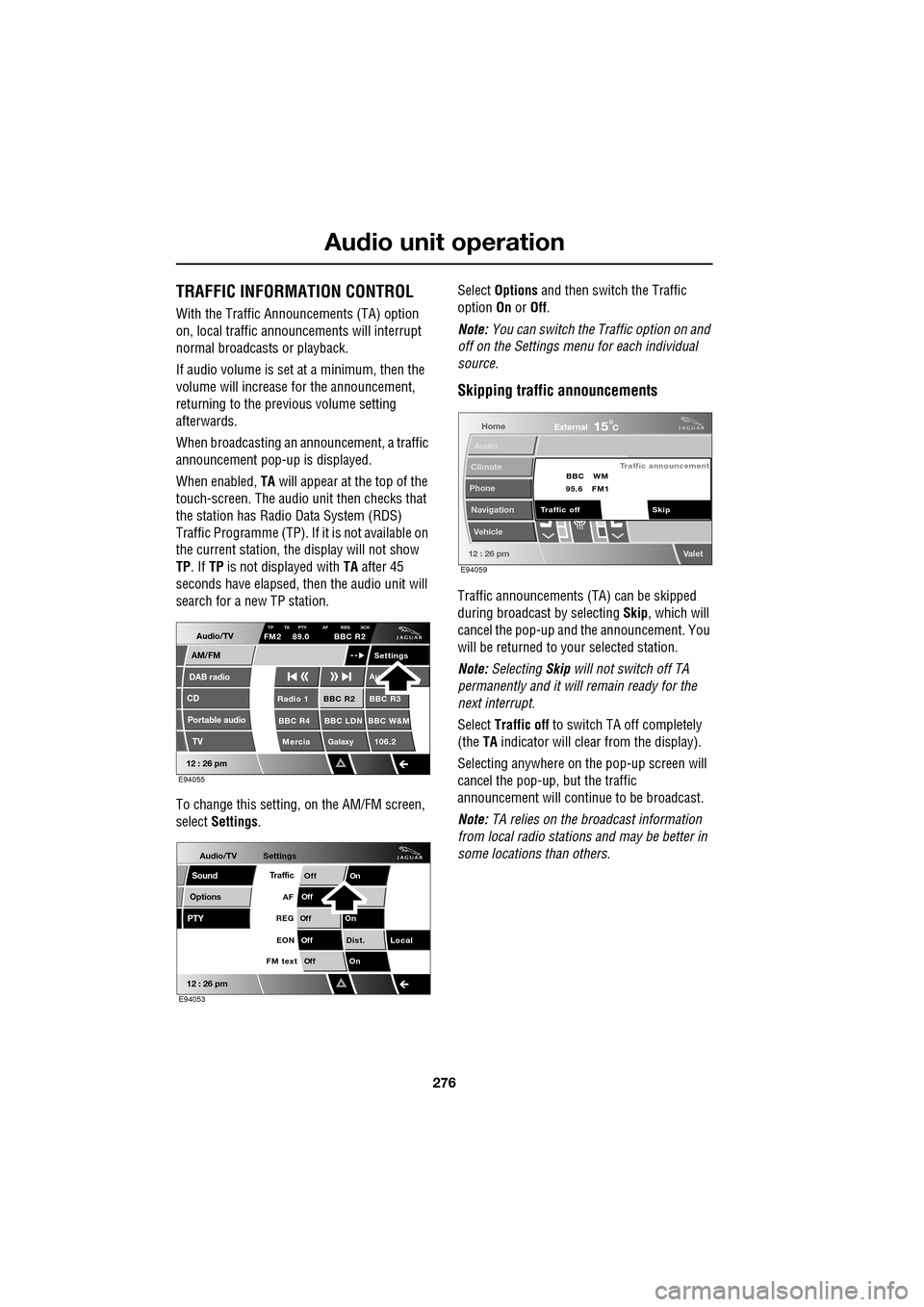
TRAFFIC INFORMATION CONTROL
With the Traffic Announcements (TA) option
on, local traffic announcements will interrupt
normal broadcasts or playback.
If audio volume is set at a minimum, then the
volume will increase for the announcement,
returning to the previous volume setting
afterwards.
When broadcasting an announcement, a traffic
announcement pop-up is displayed.
When enabled, TA will appear at the top of the
touch-screen. The audio un it then checks that
the station has Radio Data System (RDS)
Traffic Programme (TP). If it is not available on
the current station, th e display will not show
TP . If TP is not displayed with TA after 45
seconds have elapsed, th en the audio unit will
search for a new TP station.
To change this setting, on the AM/FM screen,
select Settings . Select
Options and then switch the Traffic
option On or Off.
Note: You can switch the Traffic option on and
off on the Settings menu for each individual
source.
Skipping traffic announcements
Traffic announcements (TA) can be skipped
during broadcast by selecting Skip, which will
cancel the pop-up and the announcement. You
will be returned to your selected station.
Note: Selecting Skip will not switch off TA
permanently and it will remain ready for the
next interrupt.
Select Traffic off to switch TA off completely
(the TA indicator will clear from the display).
Selecting anywhere on the pop-up screen will
cancel the pop-up, but the traffic
announcement will continue to be broadcast.
Note: TA relies on the broadcast information
from local radio stations and may be better in
some locations than others.
Audio/TV
DAB radio
CD
AM/FM
12 : 26 pm
BBC R2 BBC R3
BBC R4 BBC LDN BBC W&M Mercia Galaxy 106.2Radio 1
Settings
Au
TP TA PTY AF REG 3CHFM2 89.0 BBC R2
Portable audio TV
E94055
Audio/TV
Options
PTY
Sound
12 : 26 pm
Settings
TrafficOnOff
Of f
On
Of
f
Dist. Local
Of f
On
Of f
FM text EON
REG
AF
E94053
Home
Audio
Climate
Phone
Navigation
Vehicle
Valet12 : 26 pm
External15C
Traffic announcement
Skip
Traffic off BBC
95.6 WM
FM1
E94059