power JAGUAR XF 2009 1.G User Guide
[x] Cancel search | Manufacturer: JAGUAR, Model Year: 2009, Model line: XF, Model: JAGUAR XF 2009 1.GPages: 391, PDF Size: 19.32 MB
Page 93 of 391
93
Windows and mirrors
ELECTRIC WINDOWS
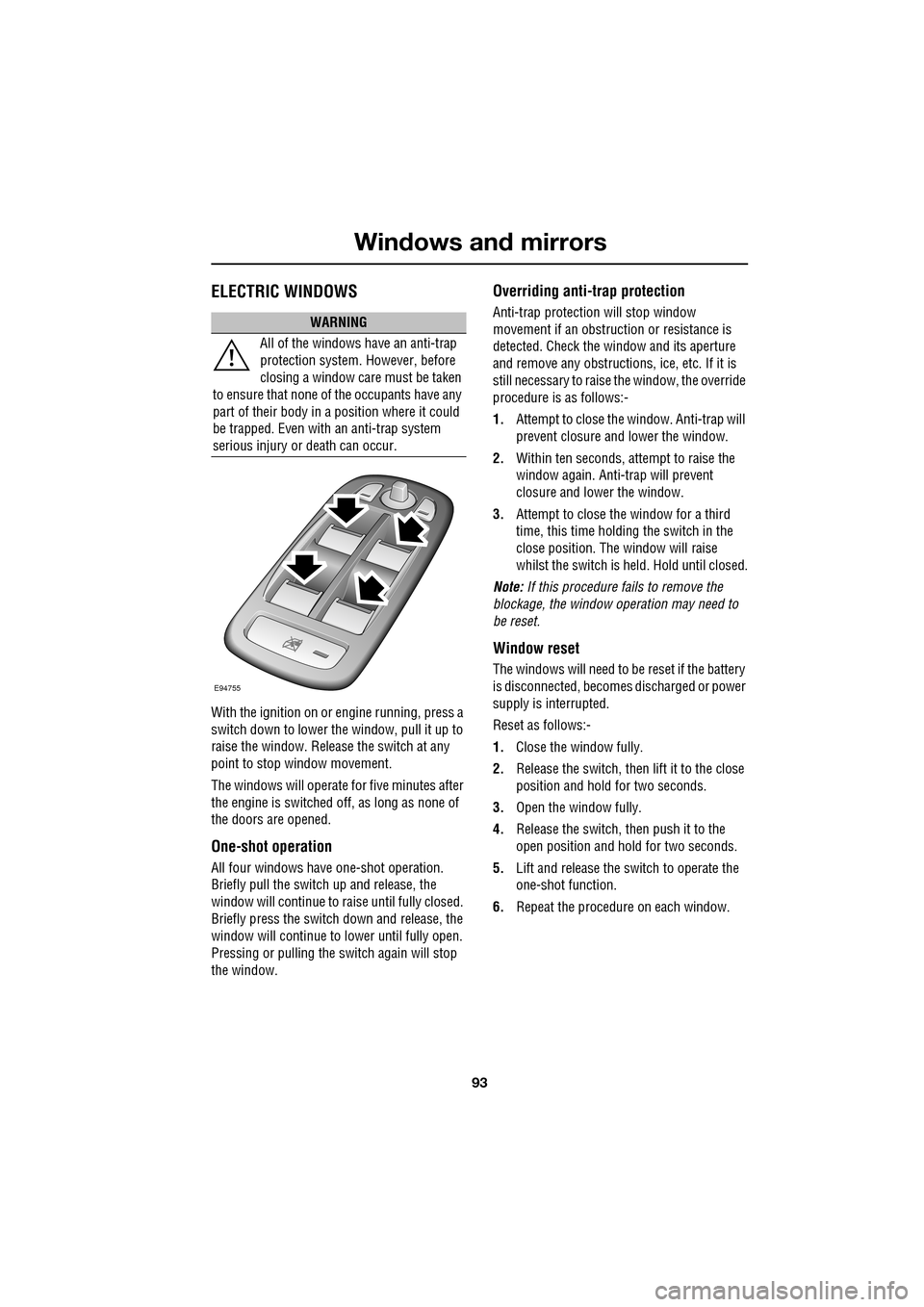
With the ignition on or engine running, press a
switch down to lower the window, pull it up to
raise the window. Release the switch at any
point to stop window movement.
The windows will operate for five minutes after
the engine is switched off, as long as none of
the doors are opened.
One-shot operation
All four windows have one-shot operation.
Briefly pull the switch up and release, the
window will continue to raise until fully closed.
Briefly press the switch down and release, the
window will continue to lower until fully open.
Pressing or pulling the switch again will stop
the window.
Overriding anti-trap protection
Anti-trap protection will stop window
movement if an obstruction or resistance is
detected. Check the window and its aperture
and remove any obstructions, ice, etc. If it is
still necessary to raise the window, the override
procedure is as follows:-
1. Attempt to close the window. Anti-trap will
prevent closure and lower the window.
2. Within ten seconds, attempt to raise the
window again. Anti-t rap will prevent
closure and lower the window.
3. Attempt to close the window for a third
time, this time holding the switch in the
close position. The window will raise
whilst the switch is held. Hold until closed.
Note: If this procedure fails to remove the
blockage, the window operation may need to
be reset.
Window reset
The windows will need to be reset if the battery
is disconnected, becomes discharged or power
supply is interrupted.
Reset as follows:-
1. Close the window fully.
2. Release the switch, then lift it to the close
position and hold for two seconds.
3. Open the window fully.
4. Release the switch, then push it to the
open position and hold for two seconds.
5. Lift and release the switch to operate the
one-shot function.
6. Repeat the procedure on each window.
WARNING
All of the windows have an anti-trap
protection system. However, before
closing a window care must be taken
to ensure that none of the occupants have any
part of their body in a position where it could
be trapped. Even with an anti-trap system
serious injury or death can occur.
E94755
Page 95 of 391
95
Windows and mirrors
EXTERIOR MIRRORS
Adjusting and folding
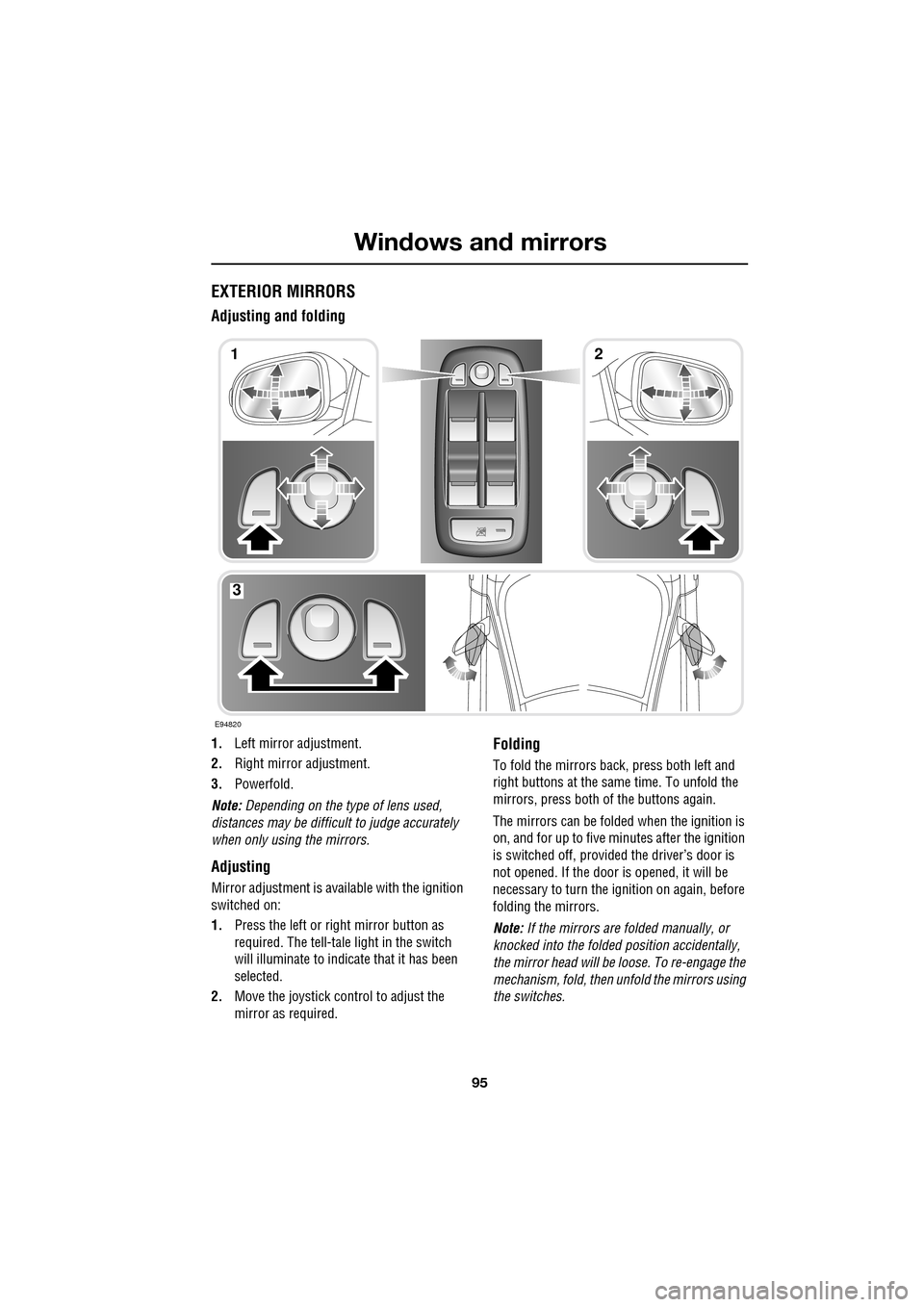
1.Left mirror adjustment.
2. Right mirror adjustment.
3. Powerfold.
Note: Depending on the type of lens used,
distances may be difficult to judge accurately
when only using the mirrors.
Adjusting
Mirror adjustment is avai lable with the ignition
switched on:
1. Press the left or right mirror button as
required. The tell-tale light in the switch
will illuminate to indica te that it has been
selected.
2. Move the joystick control to adjust the
mirror as required.
Folding
To fold the mirrors back, press both left and
right buttons at the sa me time. To unfold the
mirrors, press both of the buttons again.
The mirrors can be folded when the ignition is
on, and for up to five minutes after the ignition
is switched off, provid ed the driver’s door is
not opened. If the door is opened, it will be
necessary to turn the ignition on again, before
folding the mirrors.
Note: If the mirrors are folded manually, or
knocked into the folded position accidentally,
the mirror head will be loose. To re-engage the
mechanism, fold, then unfold the mirrors using
the switches.
E94820
12
3
Page 120 of 391
Climate control
120
Note: If the air vents are programmed to rotate,
they will rotate into th e fascia when climate
control is turned off.
External temperature
The external temperature is displayed at the top
of the Climate menu.
Smog/pollution filter
The smog filter operates in conjunction with
the air recirculation feature, to reduce
pollutants entering the vehicle.
When pollution is detected by the smog
sensor, air recirculation is selected
automatically, to help prevent pollution
entering the vehicle.
The sensitivity of the smog sensor can be
adjusted for personal preference or the sensor
can be switched off entirely, as follows:
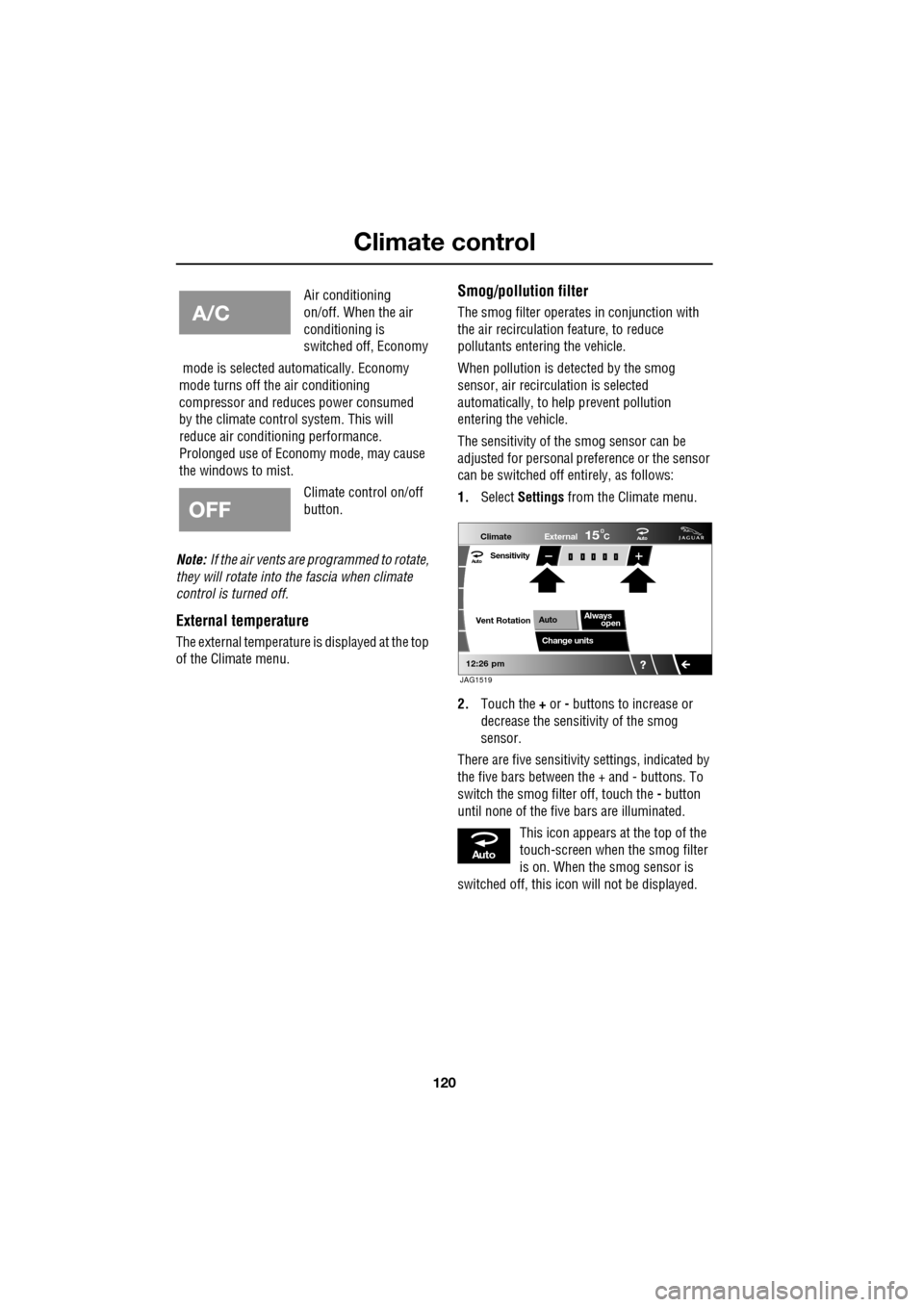
1. Select Settings from the Climate menu.
2. Touch the + or - buttons to increase or
decrease the sensitivity of the smog
sensor.
There are five sensitivit y settings, indicated by
the five bars between the + and - buttons. To
switch the smog filter off, touch the - button
until none of the five bars are illuminated.
This icon appears at the top of the
touch-screen when the smog filter
is on. When the smog sensor is
switched off, this icon will not be displayed.
Air conditioning
on/off. When the air
conditioning is
switched off, Economy
mode is selected automatically. Economy
mode turns off the air conditioning
compressor and redu ces power consumed
by the climate control system. This will
reduce air conditioning performance.
Prolonged use of Econom y mode, may cause
the windows to mist.
Climate control on/off
button.
Aut o
12:26 pm
Aut oClimate
Vent RotationExternal
Sensitivity
Change unitsAlways
open
Auto
15C
JAG1519
Aut o
Page 122 of 391
Climate control
122
Calibration
If the battery is disconnected, or the power
supply is interrupted, whilst the sunroof is
partially open it will need to be recalibrated.
Once the battery is reconnected, or the power
supply is restored, recalibrate the sunroof as
follows:
1. Switch the ignition on.
2. Press the front of the switch, so that the
sunroof is in the tilt position, then release
the switch.
3. Press the front of the sunroof switch, and
hold for thirty seconds.
4. After thirty seconds the sunroof will begin
to move. Keep the front of the switch
pressed until the sunroof has fully opened,
then closed.
5. Once the open/close cycle has completed
and the sunroof ha s stopped moving,
release the switch.
The sunroof can now be operated as normal.
Sunroof blind
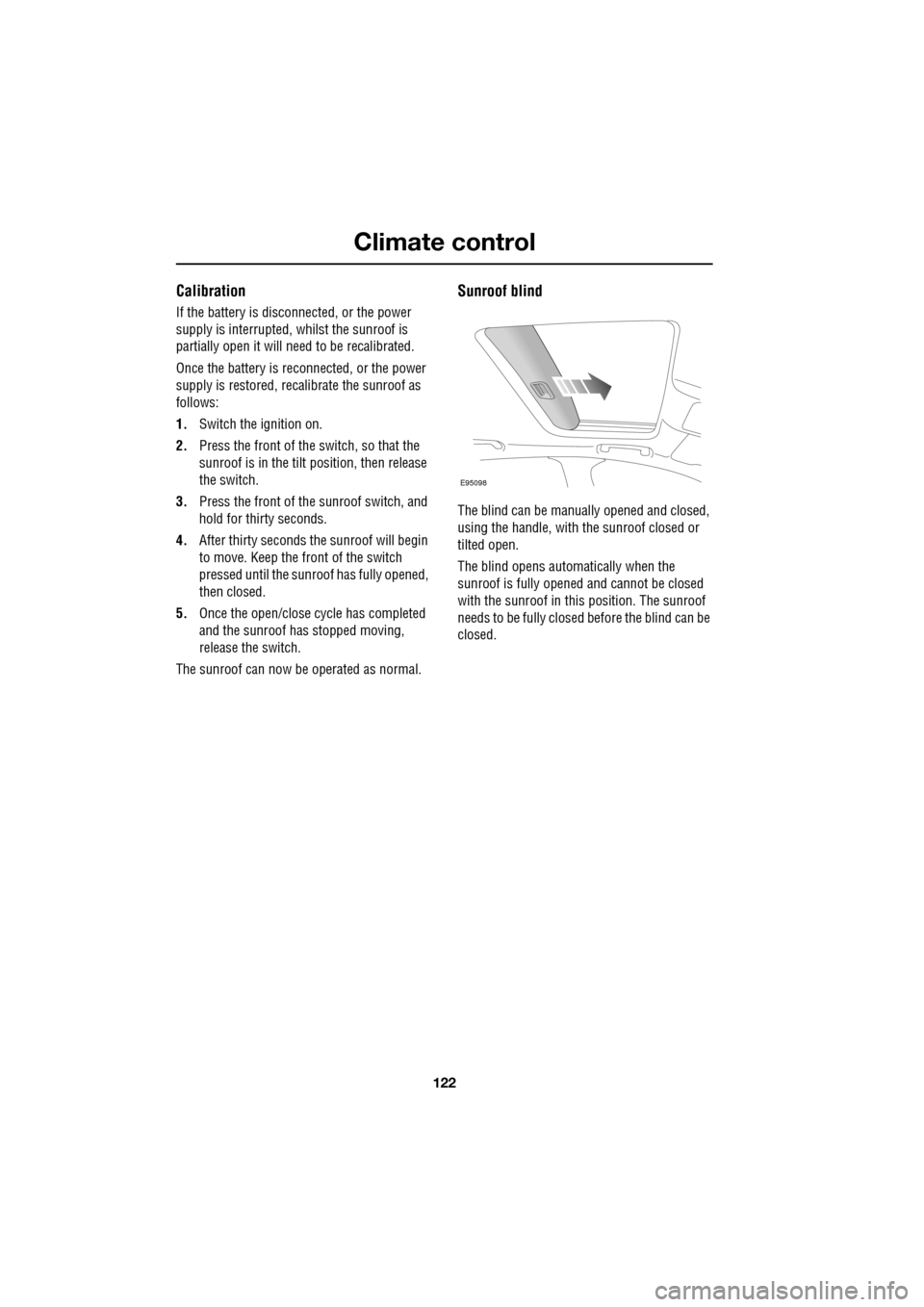
The blind can be manua lly opened and closed,
using the handle, with the sunroof closed or
tilted open.
The blind opens automatically when the
sunroof is fully opened and cannot be closed
with the sunroof in this position. The sunroof
needs to be fully closed before the blind can be
closed.
E95098
Page 125 of 391
125
Convenience features
AUXILIARY POWER SOCKETS
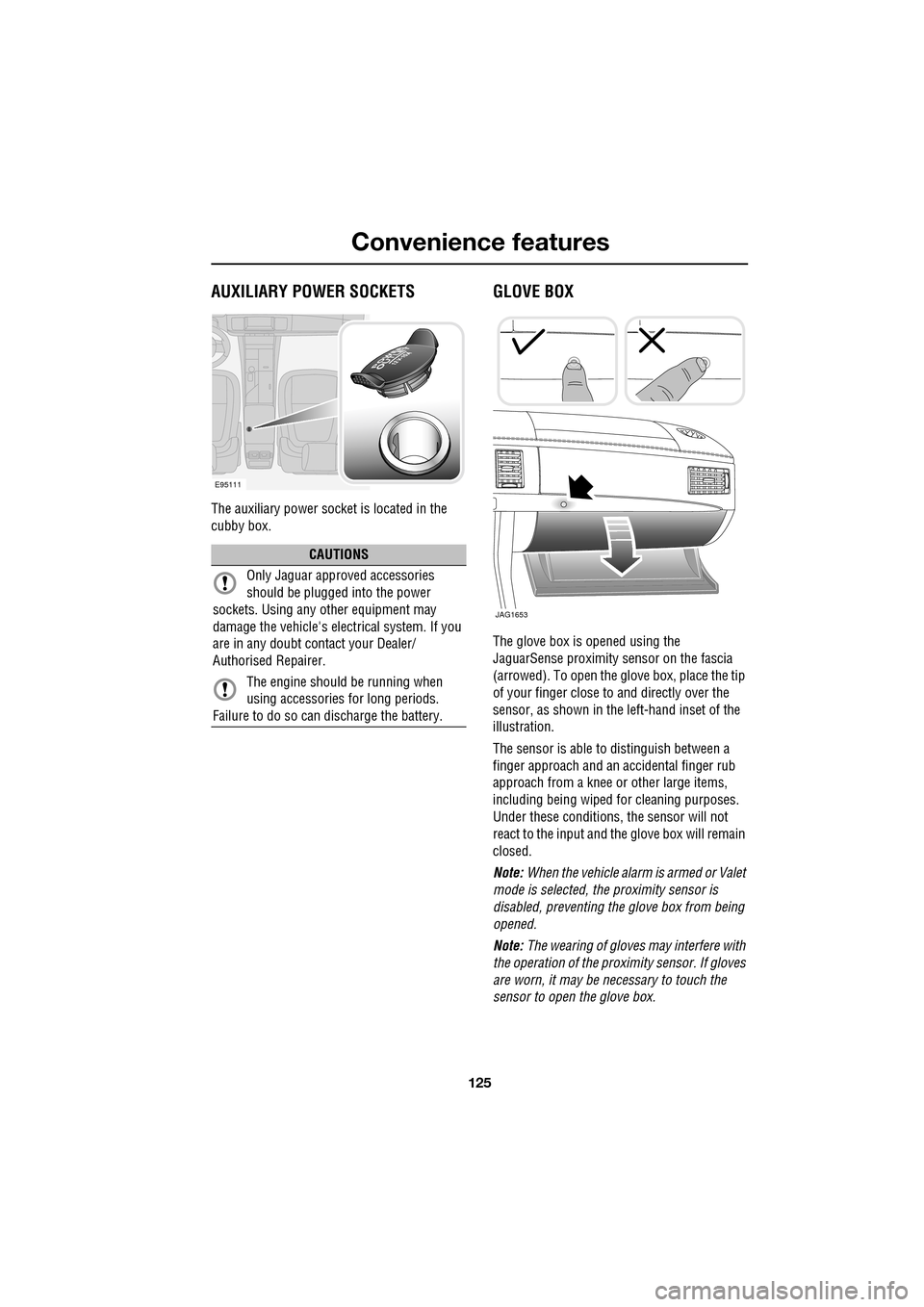
The auxiliary power socket is located in the
cubby box.
GLOVE BOX
The glove box is opened using the
JaguarSense proximity sensor on the fascia
(arrowed). To open the glove box, place the tip
of your finger close to and directly over the
sensor, as shown in the left-hand inset of the
illustration.
The sensor is able to distinguish between a
finger approach and an accidental finger rub
approach from a knee or other large items,
including being wiped for cleaning purposes.
Under these conditions, the sensor will not
react to the input and th e glove box will remain
closed.
Note: When the vehicle alarm is armed or Valet
mode is selected, the proximity sensor is
disabled, preventing the glove box from being
opened.
Note: The wearing of gloves may interfere with
the operation of the prox imity sensor. If gloves
are worn, it may be necessary to touch the
sensor to open the glove box.
CAUTIONS
Only Jaguar approv ed accessories
should be plugged into the power
sockets. Using any other equipment may
damage the vehicle's electrical system. If you
are in any doubt contact your Dealer/
Authorised Repairer.
The engine should be running when
using accessories for long periods.
Failure to do so can discharge the battery.
E95111
JAG1653
Page 140 of 391
Transmission
140
Fast off
Activated when rapidly lifting off the
accelerator pedal and takes account of road
gradient. This feature inhibits up-shifts,
enhancing pe rformance.
Note: If Sport mode is selected, driver type
recognition will vary the activation of this
feature according to driving style.
Shift adapt under braking
Under braking, the transmission will vary the
down-shift point in proportion to braking effort
and road gradient. This feature works in
conjunction with the posit ive torque function,
resulting in a smoother down-shift.
Note: If Sport mode is selected, driver type
recognition will vary the activation of this
feature according to driving style.
Corner recognition
Inhibits up-shifts during cornering, to provide
improved vehicle balance.
Note: If Sport mode is selected, driver type
recognition will vary the activation of this
feature according to driving style.
Road gradient recognition
When the vehicle is being driven on an uphill
gradient, the transmission adapts the shift
pattern to make better use of engine power.
When driving on a long downhill gradient, the
transmission may automatically select a lower
gear, to increase engi ne braking. Selecting
Sport mode (S ) will increase the tendency of
the transmission to select a lower gear in these
conditions, further incr easing engine braking.
Note: It is also possible to manually select a
lower gear to increase e ngine braking via use of
the shift paddles.
Sport mode
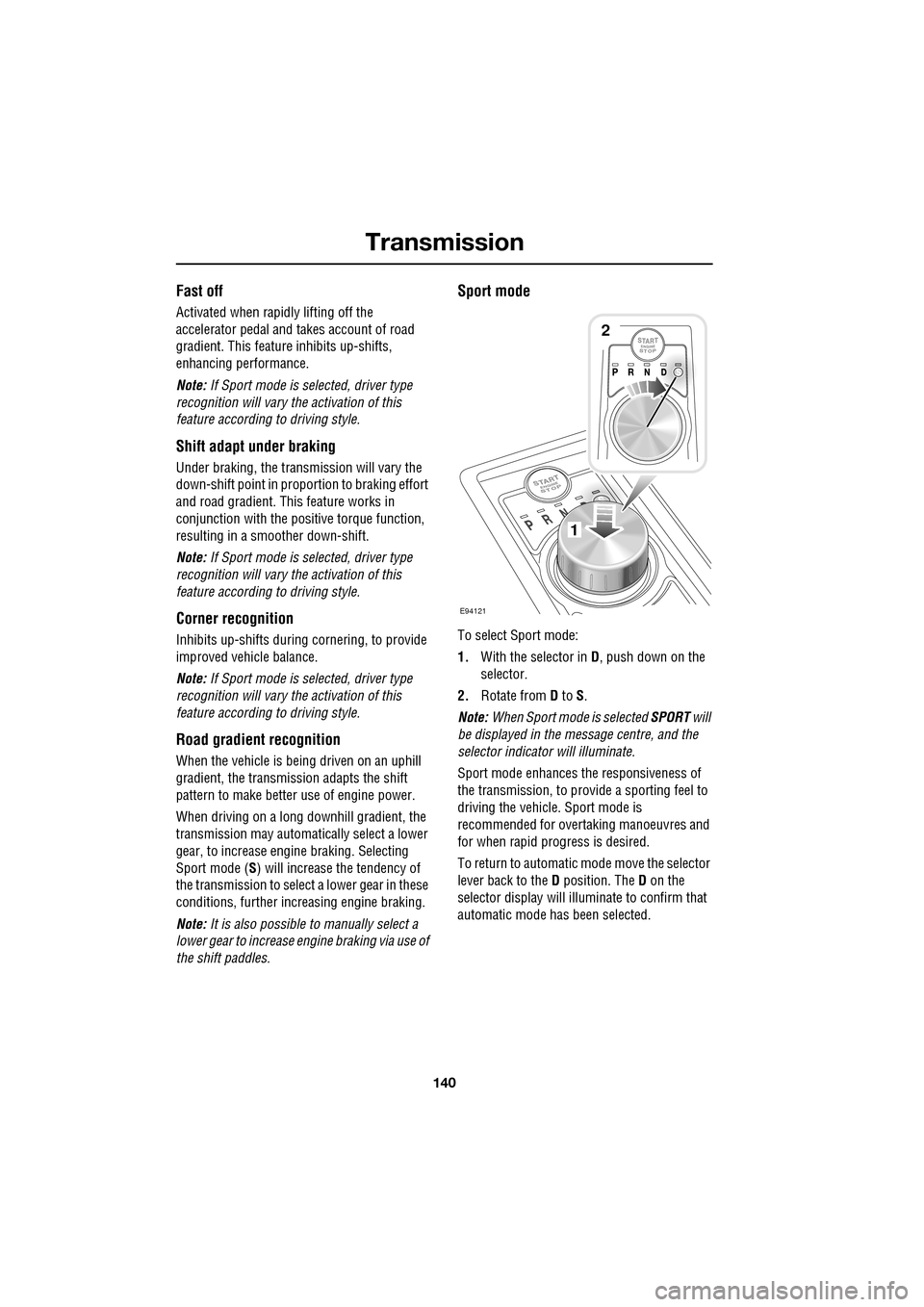
To select Sport mode:
1. With the selector in D, push down on the
selector.
2. Rotate from D to S.
Note: When Sport mode is selected SPORT will
be displayed in the message centre, and the
selector indicator will illuminate.
Sport mode enhances th e responsiveness of
the transmission, to prov ide a sporting feel to
driving the vehicle. Sport mode is
recommended for over taking manoeuvres and
for when rapid progress is desired.
To return to automatic m ode move the selector
lever back to the D position. The D on the
selector display will illuminate to confirm that
automatic mode has been selected.
E94121
1
2
Page 143 of 391
143
Transmission
Limp-home mode
Note: The driver should be aware that the
vehicle’s performance will be reduced and
must take this into account when driving. Also
the use of the Jaguar Sequential Shift paddles
will be disabled. In this event, seek qualified
assistance as soon as possible.
In the unlikely event of an electrical or
mechanical failure, tran smission operation will
be limited. The vehicle gear selector ranges P,
R , N , D and S may still be used to enable the
vehicle to be driven to a safe area.
Some faults will cause the selector to be locked
in position until the igniti on is switched off. If
the selected range flashes, it signifies that the
driver request cannot be engaged. Re-select N
and repeat the attempt.
If the transmission is still unable to select the
requested gear, contact your Dealer/
Authorised Repairer.
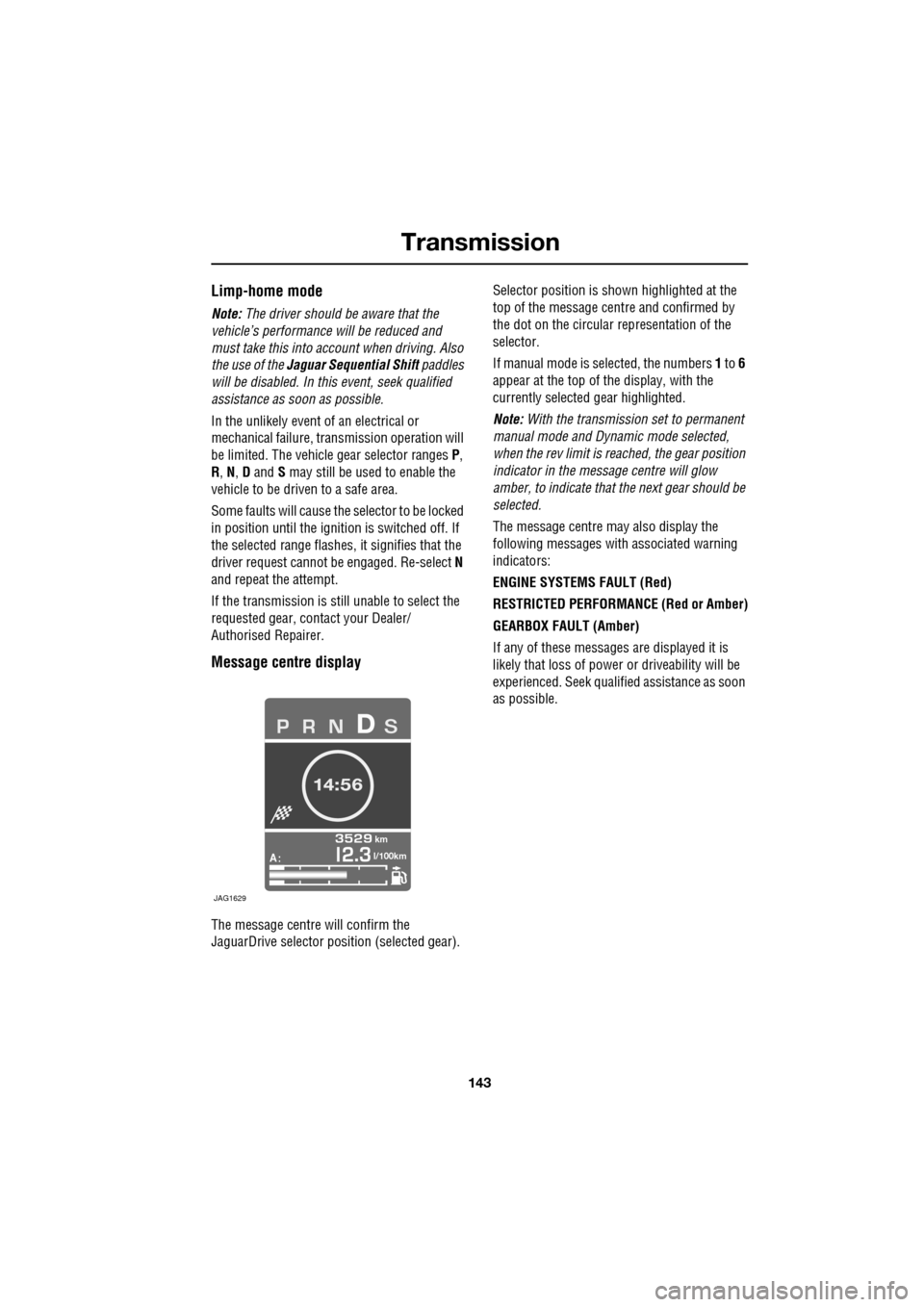
Message centre display
The message centre will confirm the
JaguarDrive selector pos ition (selected gear). Selector position is sh
own highlighted at the
top of the message cent re and confirmed by
the dot on the circular representation of the
selector.
If manual mode is se lected, the numbers 1 to 6
appear at the top of the display, with the
currently selected gear highlighted.
Note: With the transmission set to permanent
manual mode and Dynamic mode selected,
when the rev limit is re ached, the gear position
indicator in the message centre will glow
amber, to indicate that the next gear should be
selected.
The message centre may also display the
following messages with associated warning
indicators:
ENGINE SYSTEMS FAULT (Red)
RESTRICTED PERFORMANCE (Red or Amber)
GEARBOX FAULT (Amber)
If any of these messages are displayed it is
likely that loss of power or driveability will be
experienced. Seek qualified assistance as soon
as possible.
A
km
l/100km
JAG1629
Page 170 of 391
Driving dynamics
170
DYNAMIC MODE
(V8 petrol and diesel vehicles only)
Press to operate. Dynamic mode
co-ordinates the vehicle's control
systems to deliver a high
performance driving experience. This setting
enhances key vehicle systems so that the
vehicle's full potential can be exploited. The
vehicle's responses are aimed at involving the
driver more in focused and purposeful driving,
helping swift progress.
Note: When the transmission is set to
permanent manual mode (i.e. using the
paddles to change gear while in Sport mode)
and Dynamic mode is selected, transmission
upshifts are fully controlled by the driver. This
means that the transmissi on will not change up
a gear automatically, even when the vehicle's
rev limit is reached. When the rev limit is
reached, the gear position indicator in the
message centre will glow amber, to indicate
that the next gear should be selected.
Note: Dynamic mode cannot be active at the
same time as Winter m ode. Dynamic mode will
remain selected for approximately six hours
after the ignition is swit ched off, after which
point it will need to be reselected if required.
STABILITY CONTROL
Dynamic Stability Control (DSC)
Dynamic Stability Contro l (DSC) is operational
whenever the engine is running, unless it has
been manually switched off. When the system
is operating, the warn ing indicator in the
instrument panel will flash.
The DSC system controls the Anti-lock Braking
System (ABS), traction control and yaw control
of the vehicle.
The DSC system assists the driver in retaining
directional control of th e vehicle in situations
where the vehicle is sliding (understeer or
oversteer). It must not encourage the driver to
drive beyond the limit of adhesion or at speeds
higher than those suitable for the prevailing
road and traffic conditions.
DSC applies braking pres sure to individual
wheels if excessive variation is detected. This
ensures that the vehicle follows the driver’s
intended direction of travel as closely as
possible.
Traction control will intervene to control wheel
spin by automatically reducing the power
output from the engine and applying braking to
individual wheels. This improves acceleration,
particularly on surfaces with uneven friction
(e.g. one wheel on ice with another on tarmac).
Note: For recommended DSC mode selection,
refer to the JaguarDri ve Control scenarios
section in this handbook.
WARNING
The fact that the vehicle is fitted with
DSC, must never allow the driver to
be tempted into taking risks which
could affect his or her sa fety or that of other
road users. In all cases, it remains the driver’s
responsibility to drive sa fely according to the
prevailing conditions.
Page 177 of 391
177
Fuel and refuelling
Sulphur content
In some countries diesel may contain higher
levers of Sulphur, wh ich could cause damage
to the vehicle, if in doubt contact a local
Dealer/Authorised Repairer for advice.
RUNNING OUT OF FUEL
Note: If the vehicle does run out of fuel, a
minimum of 4 litres (0.9 gallons) will be
required to restart the engine. The vehicle will
need to be driven 1.6-5 km (1-3 miles) in order
to reset the engine management and
monitoring systems.
Note: If the vehicle does run out of fuel,
seeking qualified assistance is advisable.
Diesel engines
Vehicles with diesel e ngines are equipped with
a system to prevent the fuel tank from
emptying completely. When the fuel reaches a
minimum level, the system will activate a
reduced power mode (i.e . the engine will not
run properly). This will be followed by the
engine stopping in a pproximately 1.6 km
(1 mile). This feature prevents the fuel system from
running dry, which could cause damage to the
vehicle. If the gauge indicates low fuel or the
warning indicator illumi
nates, the fuel tank
should be refuelled as soon as possible at the
next filling stat ion, with at least 4 litres (0.9
gallons) of fuel.
If the system protection function has activated,
the vehicle must firstly be refuelled, then
restarted using the following procedure:
1. With the brake pedal pressed, press and
hold the engine START/STOP button and
crank the engine for five seconds.
2. Release the START/STOP button.
3. With the brake pedal pressed, press and
release the START/STOP button to crank
the engine. The engine should start within
approximately five seconds.
Note: If the engine does not start, pause for ten
seconds with the ignition in convenience
mode, before re peating the procedure from the
beginning.
FUEL CUT-OFF
The fuel system cut-off forms part of the
Supplementary Restraint System (SRS) fitted
to your vehicle. Following an impact, and
depending on the severity , the fuel pump may
be switched off.
CAUTION
Your vehicle is fitted with a Diesel
Particulate Filter (DPF), the maximum
Sulphur content must not exceed 0.005%.
Using an incorrect fuel will cause serious
damage to the DPF. See DIESEL
PARTICULATE FILTER (DPF) (page 135).
CAUTION
Avoid running out of fuel. Doing so can
cause damage to th e vehicle's engine,
fuel and emission control systems.
CAUTION
Do not crank the engine for longer than
30 seconds, or damage to the fuel pump
may occur.
Page 188 of 391
Vehicle care
188
Do not use household soaps or detergents. The
use of Jaguar Vehicle Shampoo is
recommended.
Note: The vehicle's brightwork should be
cleaned using a sponge and generous
quantities of cold or lukewarm water only.
Rinse thoroughly and dry with a chamois
leather or synthetic substitute.
Using an automatic wash
Note: Regular use of automatic car washes
tends to dull the lustre of the paintwork.
1. Drive up to the entry of the car wash and
onto the conveyor.
2. Select N (Neutral) using the JaguarDrive
selector.
3. Press and release the engine START/STOP
button to stop the engine. The JaguarDrive
selector should remain raised and the
selector and message centre should
indicate that N is selected. 4.
The vehicle should rema in in this condition
while it is conveyed through the car wash.
5. At the end of the wash cycle, when directed
to start the engine by the car wash
instructions, press the brake pedal and
press and release the engine START/STOP
button to start the engine.
6. Select D (Drive) using the JaguarDrive
selector and drive away.
Do not start the engine or change the
JaguarDrive selector position during the car
wash.
After leaving the car wash, switch on the
windscreen wiper immediately to remove water
and prevent a build up of wax.
Underbonnet cleaning
CAUTIONS
Commercially operated automatic car
washes, jet washes and power-operated
mops, are not recommen ded. The detergents
used can contain certain chemicals which
may, over time, be detrimental to some
exterior parts of the vehicle. Prolonged usage
of automatic car wash es and power-operated
mops will also cause fine scratches in the paint
surface.
Ensure that Auto wipe is not selected
when entering a car wash, or damage to
the wiper blades and arms can occur if they
operate during the wash cycle.
Ensure that when using an automatic
drive through car wash, N (Neutral) is
selected and that the ignition is left in
convenience mode for the duration of the
wash.
CAUTIONS
Do not use a high pr essure washer or
steam cleaner in the engine
compartment. Damage to components could
occur.
Ensure that the brake fluid reservoir is
kept dry at all times. Only use a clean,
dry cloth to clean the brake fluid cap and
reservoir.