reset JAGUAR XF 2009 1.G User Guide
[x] Cancel search | Manufacturer: JAGUAR, Model Year: 2009, Model line: XF, Model: JAGUAR XF 2009 1.GPages: 391, PDF Size: 19.32 MB
Page 114 of 391
Information displays
114
Timeout to home menu
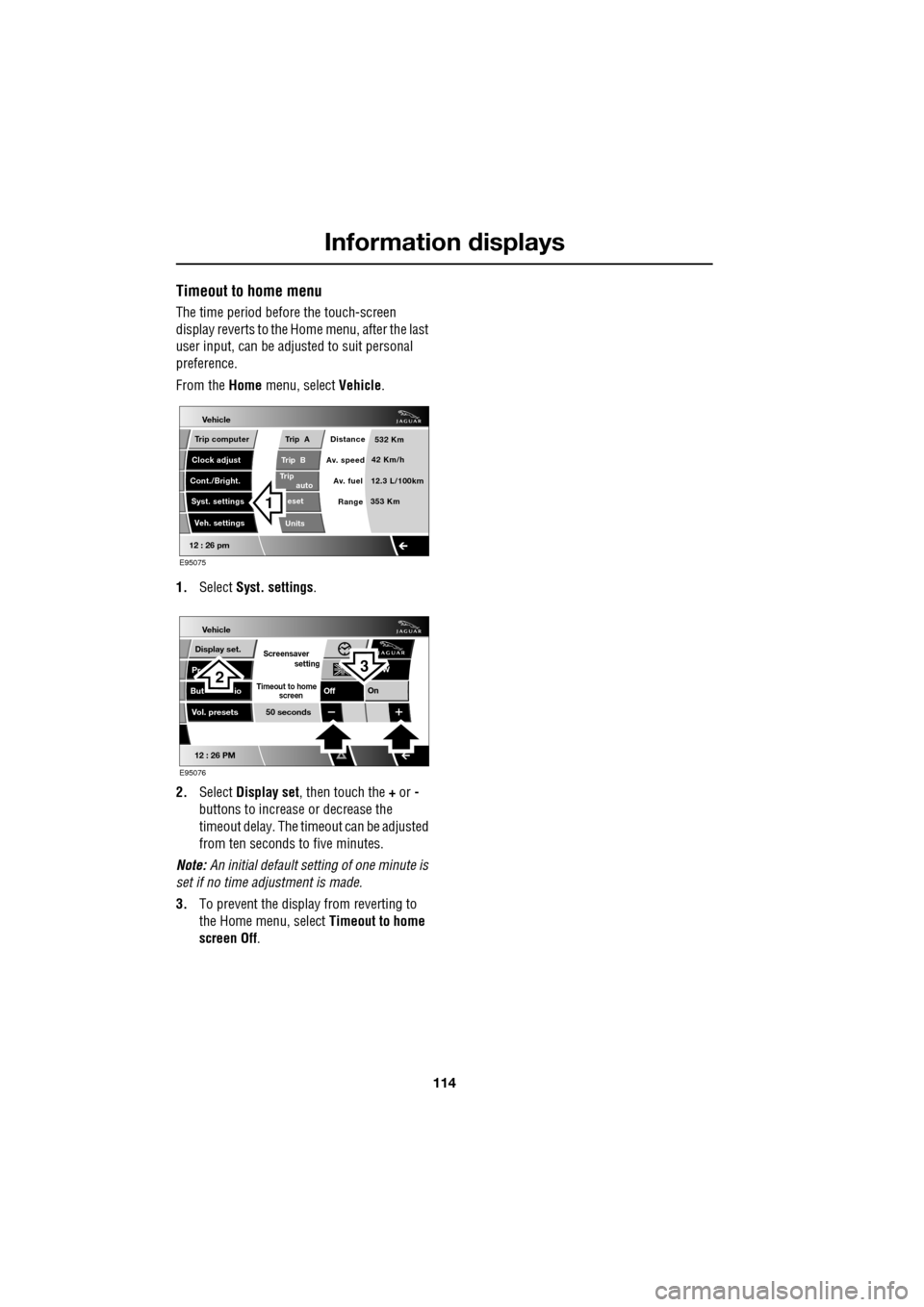
The time period before the touch-screen
display reverts to the Home menu, after the last
user input, can be adjusted to suit personal
preference.
From the Home menu, select Vehicle.
1. Select Syst. settings .
2. Select Display set , then touch the + or -
buttons to increase or decrease the
timeout delay. The time out can be adjusted
from ten seconds to five minutes.
Note: An initial defa ult setting of one minute is
set if no time adjustment is made.
3. To prevent the display from reverting to
the Home menu, select Timeout to home
screen Off .
Vehicle
Trip B
Trip
auto eset
Units Distance
Av. speed
Av. fuel 532 Km
42 Km/h
12.3 L/100km
353 Km
RangeClock adjust
Cont./Bright. Trip computer
Syst. settings Veh. settings
Trip A
12 : 26 pm
E95075
1
Vehicle
Display set.
Pr
But io
Vol. presets
12 : 26 PM
50 seconds
OnOff
Screensaver
Timeout to home
setting
screen
W
E95076
32
Page 124 of 391
Convenience features
124
CLOCK
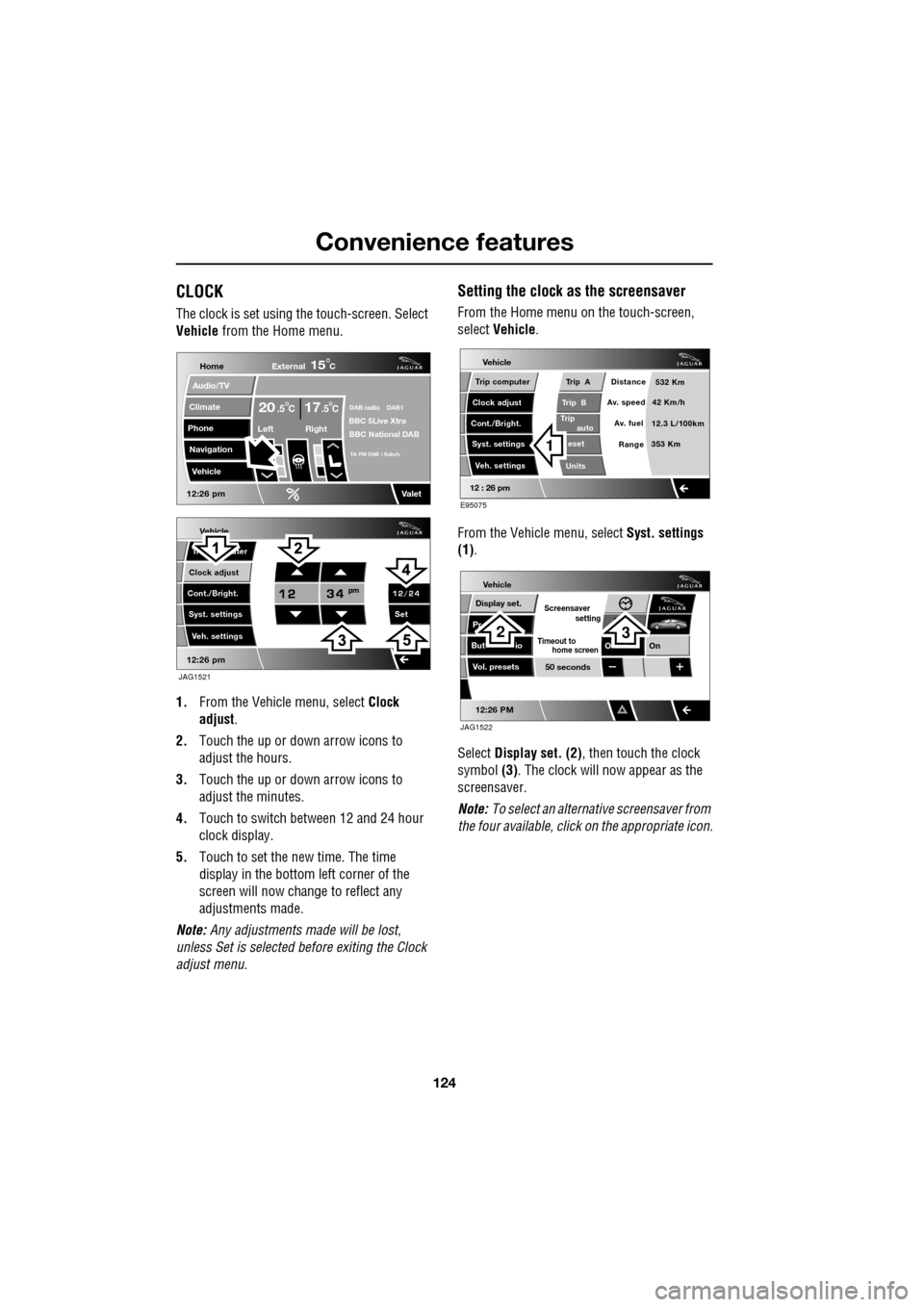
The clock is set using the touch-screen. Select
Vehicle from the Home menu.
1. From the Vehicl e menu, select Clock
adjust .
2. Touch the up or down arrow icons to
adjust the hours.
3. Touch the up or down arrow icons to
adjust the minutes.
4. Touch to switch between 12 and 24 hour
clock display.
5. Touch to set the new time. The time
display in the bottom left corner of the
screen will now change to reflect any
adjustments made.
Note: Any adjustments made will be lost,
unless Set is selected before exiting the Clock
adjust menu.
Setting the clock as the screensaver
From the Home menu on the touch-screen,
select Vehicle.
From the Vehicle menu, select Syst. settings
(1) .
Select Display set. (2) , then touch the clock
symbol (3). The clock will now appear as the
screensaver.
Note: To select an alternative screensaver from
the four available, click on the appropriate icon.
Vehicle
Clock adjust
Cont./Bright. Tr uter
Syst. settings Veh. settings Set
12:26 pm
JAG1521
Home
Audio/TV
Climate
Phone
Navigation
Vehicle
DAB radio DAB1BBC 5Live XtraBBC National DAB
TA FM DAB i Subch.
Va l e t12:26 pm
External15C
Left Right
20 17CC.5 .5
Vehicle
Trip B
Trip
auto eset
Units Distance
Av. speed
Av. fuel 532 Km
42 Km/h
12.3 L/100km
353 Km
RangeClock adjust
Cont./Bright. Trip computer
Syst. settings Veh. settings
Trip A
12 : 26 pm
E95075
1
Vehicle
Display set.
Pr
But io
Vol. presets
12:26 PM
50 seconds
OnO
Screensaver
Timeout to
setting
home screen
JAG1522
23
Page 147 of 391
147
Brakes
If the parking brake is inadvertently applied
when the vehicle is moving at above 3 km/h
(1.8 mph), PARK BRAKE APPLIED is displayed
in the message centre, the warning indicator in
the instrument panel will illuminate and a
warning chime will sound.
If the parking brake is a pplied whilst the vehicle
is moving, releasing the switch will disengage
the parking brake. The parking brake cannot be
applied when the vehicle is moving, if the
accelerator pedal is pressed.
Note: If the vehicle is in motion, the parking
brake should only be used as an emergency
brake.
The warning indicator in the instrument panel
will remain on for a short time, if the parking
brake is applied when the ignition system is
reverted to the convenience mode.
If a fault in the system is detected,
the amber brake warning indicator
will illuminate and PARK BRAKE
FAULT or CANNOT APPLY PARK BRAKE will
be displayed in the message centre. Seek
qualified assistance as soon as possible.
If the battery has been discharged or
disconnected, APPLY FOOT AND PARK BRAKE
will be displayed in the message centre when
the ignition is next switched on. Depress the
foot brake and pull the parking brake switch up
to apply the parking brake. This is required to
reset the parking brake system. The parking
brake will now function correctly.
CAUTION
Always apply the parking brake when
the vehicle is parked.
Page 148 of 391

Parking aid
148
PRINCIPLE OF OPERATION
Note: Once the system has been activated by
selecting reverse or using the switch, the front
and rear sensors are active when the gear
selector is in neutral. Therefore, if an obstacle
is detected an audible warning tone will sound.
The parking aid is automatically in standby
when the ignition is on and provides the driver
with information on most obstructions, and
their distance from the vehicle, when
manoeuvring. This is ac hieved by using four
ultrasonic sensors on each bumper.
When objects are detected the Park aid will
emit a warning tone which increases in
frequency and then becomes constant, as the
vehicle gets closer to the object.
USING THE PARKING AID
Touch-screen
To set the volume of the parking aid warning
tones:
• Select Vehicle from the touch-screen
Home menu, then select Veh. settings.
• Select Parking , then select Vol. presets.
Touch the Parking aid + or - button to increase
or decrease the warning tone volume.
Note: This adjusts both front and rear speaker
volume.
WARNINGS
It remains the driver’s responsibility
to be vigilant when reversing. Small
children or animals may not be
detected by the system.
It remains the driver’s responsibility
to detect obstacles and estimate the
vehicle’s distance from them. Some
overhanging objects , barriers, thin
obstructions or painted surfaces which could
possibly cause damage to the vehicle may not
be detected by the system. Always be vigilant
when reversing.
CAUTIONS
Objects moving away from the vehicle
will be reported. Howe ver, whilst driving
away, object warning may be temporarily
reported due to ground reflection.
Systems using the same frequency
band as the front parking sensors, may
cause irregular tones to be emitted.
mirror dip
Vol. presetsOff
On
Vehicle
Security
ParkingReverse
12 : 26 pm
Navigat
Phone
Vehicle
Display set.
Preferences
Button audioParking aid
Vol. presets
AVC Low
MediumHigh
12 : 26 pm
Valet mode
E94137
Page 177 of 391
177
Fuel and refuelling
Sulphur content
In some countries diesel may contain higher
levers of Sulphur, wh ich could cause damage
to the vehicle, if in doubt contact a local
Dealer/Authorised Repairer for advice.
RUNNING OUT OF FUEL
Note: If the vehicle does run out of fuel, a
minimum of 4 litres (0.9 gallons) will be
required to restart the engine. The vehicle will
need to be driven 1.6-5 km (1-3 miles) in order
to reset the engine management and
monitoring systems.
Note: If the vehicle does run out of fuel,
seeking qualified assistance is advisable.
Diesel engines
Vehicles with diesel e ngines are equipped with
a system to prevent the fuel tank from
emptying completely. When the fuel reaches a
minimum level, the system will activate a
reduced power mode (i.e . the engine will not
run properly). This will be followed by the
engine stopping in a pproximately 1.6 km
(1 mile). This feature prevents the fuel system from
running dry, which could cause damage to the
vehicle. If the gauge indicates low fuel or the
warning indicator illumi
nates, the fuel tank
should be refuelled as soon as possible at the
next filling stat ion, with at least 4 litres (0.9
gallons) of fuel.
If the system protection function has activated,
the vehicle must firstly be refuelled, then
restarted using the following procedure:
1. With the brake pedal pressed, press and
hold the engine START/STOP button and
crank the engine for five seconds.
2. Release the START/STOP button.
3. With the brake pedal pressed, press and
release the START/STOP button to crank
the engine. The engine should start within
approximately five seconds.
Note: If the engine does not start, pause for ten
seconds with the ignition in convenience
mode, before re peating the procedure from the
beginning.
FUEL CUT-OFF
The fuel system cut-off forms part of the
Supplementary Restraint System (SRS) fitted
to your vehicle. Following an impact, and
depending on the severity , the fuel pump may
be switched off.
CAUTION
Your vehicle is fitted with a Diesel
Particulate Filter (DPF), the maximum
Sulphur content must not exceed 0.005%.
Using an incorrect fuel will cause serious
damage to the DPF. See DIESEL
PARTICULATE FILTER (DPF) (page 135).
CAUTION
Avoid running out of fuel. Doing so can
cause damage to th e vehicle's engine,
fuel and emission control systems.
CAUTION
Do not crank the engine for longer than
30 seconds, or damage to the fuel pump
may occur.
Page 178 of 391
Fuel and refuelling
178
Resetting the fuel cut-off
1.Switch the ignition off and wait for one
minute.
2. Turn the ignition on for 30 seconds.
3. Check the vehicle thor oughly for fuel leaks.
If a leak is detected switch the ignition off
immediately.
• Do not start the vehicle if a leak is
present. Seek qualified advice and have
the vehicle recovered.
4. If no leaks are detected, start the vehicle.
FUEL FILLER FLAP
Note: The fuel filler flap cannot be opened
when the alarm system is armed.
The fuel filler flap is located on the right-hand
side of the vehicle, at the rear.
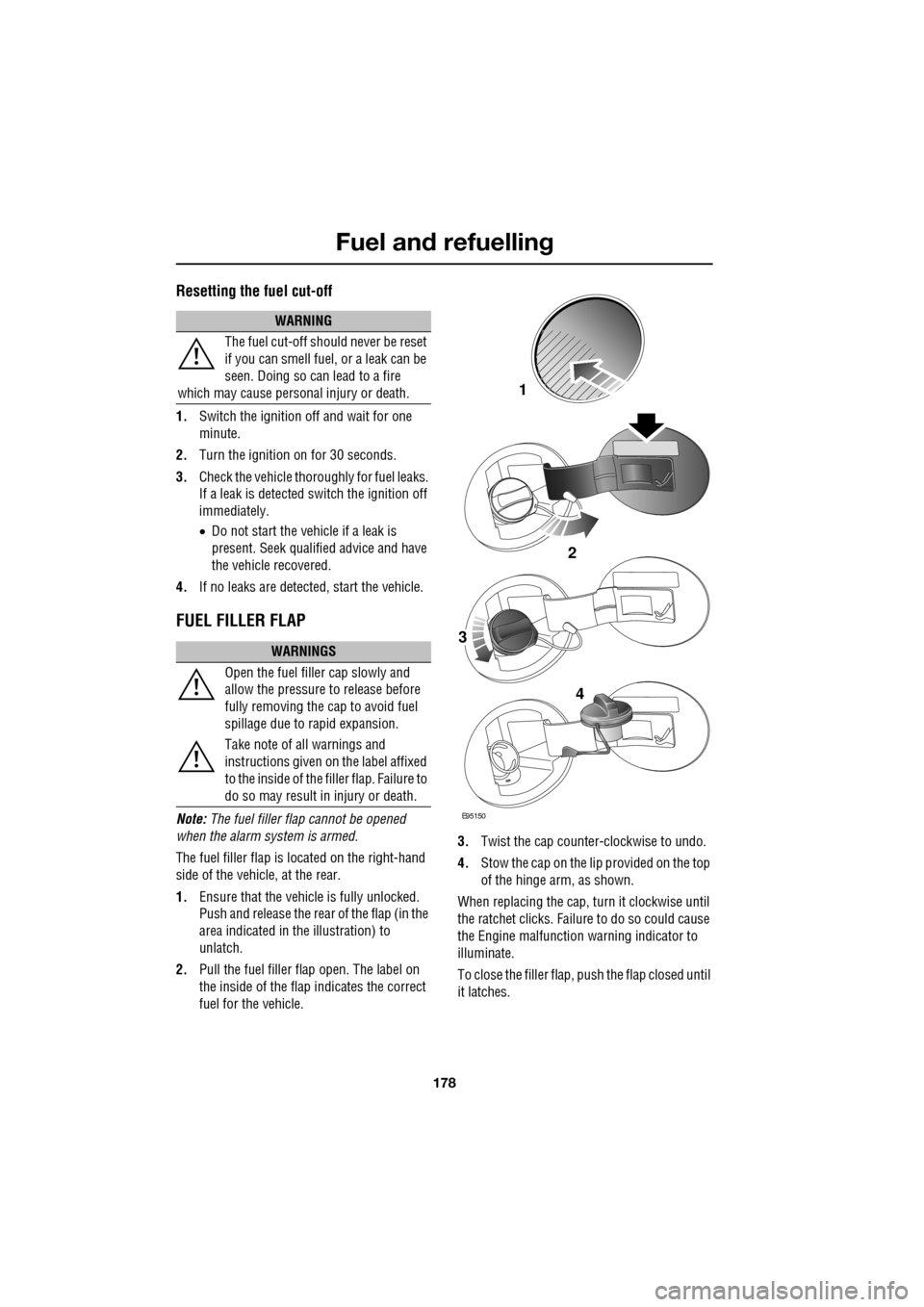
1. Ensure that the vehicle is fully unlocked.
Push and release the rear of the flap (in the
area indicated in the illustration) to
unlatch.
2. Pull the fuel filler flap open. The label on
the inside of the flap indicates the correct
fuel for the vehicle. 3.
Twist the cap counte r-clockwise to undo.
4. Stow the cap on the lip provided on the top
of the hinge arm, as shown.
When replacing the cap, turn it clockwise until
the ratchet clicks. Failur e to do so could cause
the Engine malfunction warning indicator to
illuminate.
To close the filler flap, pus h the flap closed until
it latches.
WARNING
The fuel cut-off should never be reset
if you can smell fuel, or a leak can be
seen. Doing so can lead to a fire
which may cause persona l injury or death.
WARNINGS
Open the fuel filler cap slowly and
allow the pressure to release before
fully removing the cap to avoid fuel
spillage due to rapid expansion.
Take note of all warnings and
instructions given on the label affixed
to the inside of the fi ller flap. Failure to
do so may result in injury or death.
E95150
2
1
3
4
Page 180 of 391
Fuel and refuelling
180
DIESEL MISFUELLING PROTECTION
DEVICE
Diesel engine vehicles in some markets are
equipped with a misfuelling protection device,
incorporated into the fuel filler neck, designed
to alert that the wrong fuel type has been
selected. If the narrow filler nozzle fitted to
pumps delivering unleaded petrol is correctly
inserted (i.e. fully inserted) into the filler neck,
the misfuel protection de vice will activate.
The protection device c ontinually interrupts the
fuel flow from the pump, until the protector
mechanism in the filler neck is reset.
When activated, the yellow protection device
will be visible in the f iller neck. The device will
need to be reset before the tank can be
correctly filled with dies el fuel. This is achieved
using the reset tool, lo cated in the luggage
compartment, clipped onto the battery
restraining bar.
Note: It is the driver’s responsibility to fill the
vehicle with the correct fuel. The diesel
misfuelling protection devi ce only reduces the
risk of filling the vehicle with the incorrect fuel.
Note: When refuelling the vehicle using a
disposable fuel canister, use a canister
designed for diesel fuel where possible. The
spout on petrol canist ers may activate the
protection device. The device may also be
activated by fuel pumps with a smaller nozzle
than those fitted to standard diesel pumps.
Resetting the protection device
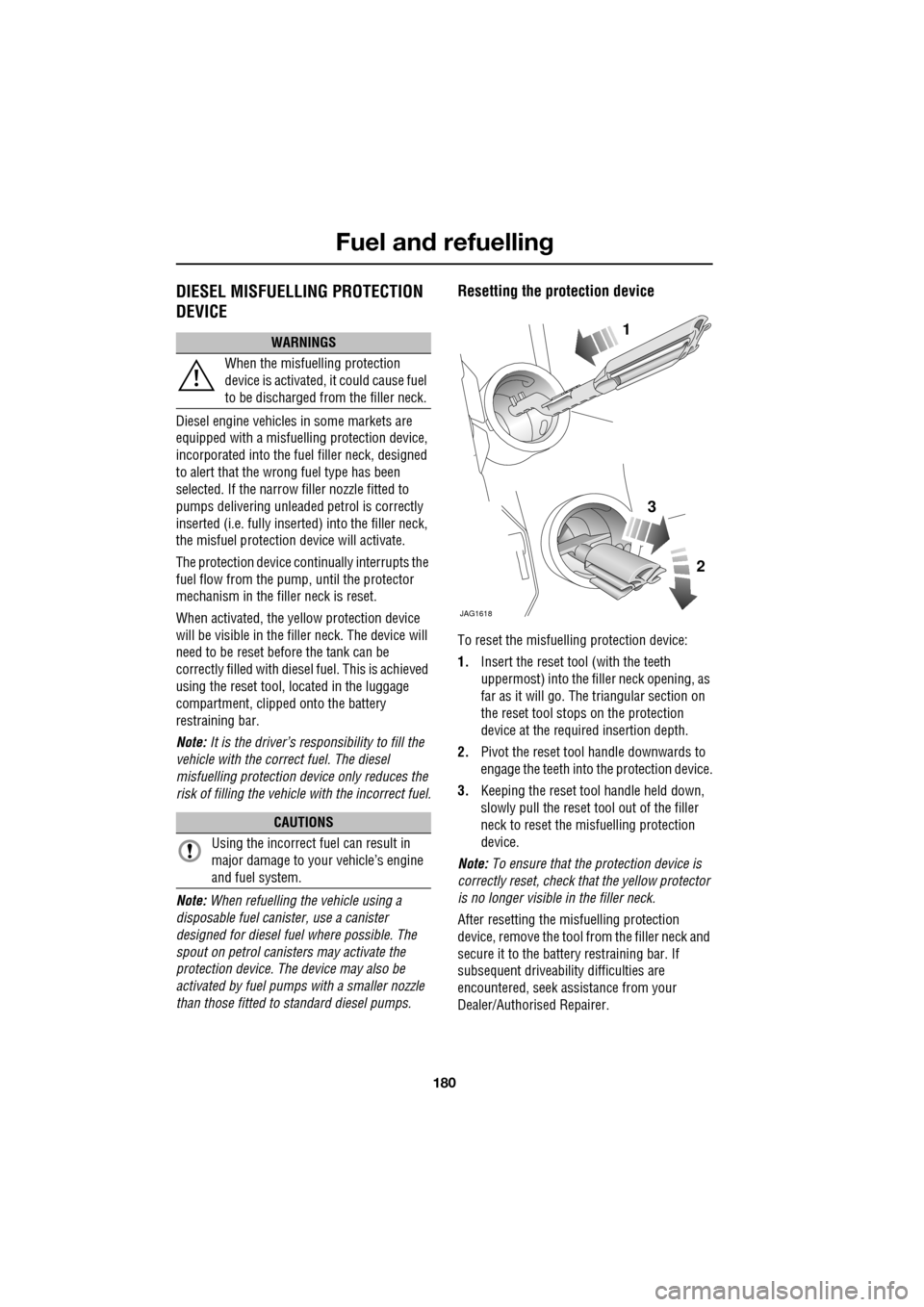
To reset the misfuelling protection device:
1. Insert the reset tool (with the teeth
uppermost) into the fi ller neck opening, as
far as it will go. The triangular section on
the reset tool stop s on the protection
device at the requi red insertion depth.
2. Pivot the reset tool handle downwards to
engage the teeth into the protection device.
3. Keeping the reset tool handle held down,
slowly pull the reset tool out of the filler
neck to reset the misfuelling protection
device.
Note: To ensure that the pr otection device is
correctly reset, check that the yellow protector
is no longer visible in the filler neck.
After resetting the misfuelling protection
device, remove the tool fr om the filler neck and
secure it to the battery restraining bar. If
subsequent driveability difficulties are
encountered, seek assistance from your
Dealer/Authorised Repairer.
WARNINGS
When the misfuelling protection
device is activated, it could cause fuel
to be discharged from the filler neck.
CAUTIONS
Using the incorrect fuel can result in
major damage to your vehicle’s engine
and fuel system.
JAG1618
1
2
3
Page 215 of 391
215
Vehicle battery
CHARGING THE VEHICLE BATTERY
CHANGING THE VEHICLE BATTERY
Battery disposal
Used batteries must be disposed of
correctly as they contain a number of
harmful substances. Seek advice on
disposal from your Dealer/
Authorised Repairer, and/or your local
authority.
WARNING
Ensure that the correct type of battery
charger is used. Using an unsuitable
charger may damage the battery and
could cause the battery to explode.
Always charge the battery in a well
ventilated area, away from any naked
flames, sparks or other ignition
sources. During charging, the battery can
produce a highly explosiv e and flammable gas.
CAUTIONS
Battery disconnecti on, removal and
replacement, should only be carried out
by qualified personne l. Consult your
Dealer/Authorised Repairer.
If the battery has been removed from
the vehicle to be charged, the Battery
Monitoring System will automatically
recalibrate. During this time, Low Battery
warning messages may appear.
Always follow the instructions supplied
with the battery charger. Failure to do so
may result in damage to the battery.
WARNING
Use caution when lifting the battery
our of, or into, the vehicle. It is heavy
and may cause injury when lifting or if
dropped.
Do not tilt the battery more than 45°,
as it may cause damage and may
cause the electrolyte to leak out.
Battery electrolyte is highly corrosive and
toxic.
CAUTIONS
Battery disconnect ion, removal and
replacement, should only be carried out
by qualified personnel. Consult your Dealer/
Authorised Repairer.
If the vehicle battery is replaced by a
new battery, the vehicle electrical
system must be reset to the new battery by
qualified personnel. Fa ilure to reset the
electrical system, may result in Low Battery
warning messages. Consult your Dealer/
Authorised Repairer.
Only a replacement battery of the same
type and specification as the original
should be fitted. Other batteries may vary in
size or have different terminal positions, which
could cause a fire hazard when connected to
the vehicle's electrical system.
Do not rest the battery on any part of the
vehicle, as it may cause damage due to
its weight.
Do not run the engine with the battery
disconnected. Doing so may damage
the charging system.
Page 251 of 391
251
Status after a collision
DRIVING AFTER A COLLISION
Before starting or driving
If the vehicle has been involved in an accident
it should be checked thoroughly before
attempting to start the engine or drive the
vehicle.
Check for:-
• Fuel leaks.
• Fluid leaks.
• Battery damage.
• Damage to wiring.
• Damage to lights.
• Damage to steering, suspension, wheels
or tyres.
• Sharp or protruding bodywork.
• Operation of doors and locks.
• Condition and operation of seat belts and
SRS components.
• Activation of the pe destrian protection
system.
• Condition of chil d seats and their
mounting/attach ment points.
Note: This list is not exhaustive.
Resetting the fuel cut-off
The fuel system cut-off forms part of the Safety
and Restraint System (SRS) fitted to your
vehicle. Following an impact, and depending on
the severity, the fuel pump may be switched
off.
1.Switch the ignition off, and wait for 10
seconds.
2. Without pressing the brake pedal, press
the engine START/STOP button, to switch
the electrical circuits on. Wait for 30
seconds.
3. Check the vehicle thoroughly for fuel leaks.
If a leak is detected switch the ignition off
immediately.
•The vehicle must not be started if a leak
is present. Seek qualified advice, and
have the vehicle recovered.
4. If no leaks are detected, start the engine.
WARNING
If the vehicle is involved in a collision
it should be checked by a Dealer/
Authorised repairer, or suitably
qualified personnel, before starting or driving.
WARNING
The fuel cut-off should never be reset
if you can smell fuel, or a leak can be
seen. Doing so can lead to a fire
which may cause personal injury or death.
Page 269 of 391
269
Audio unit overview
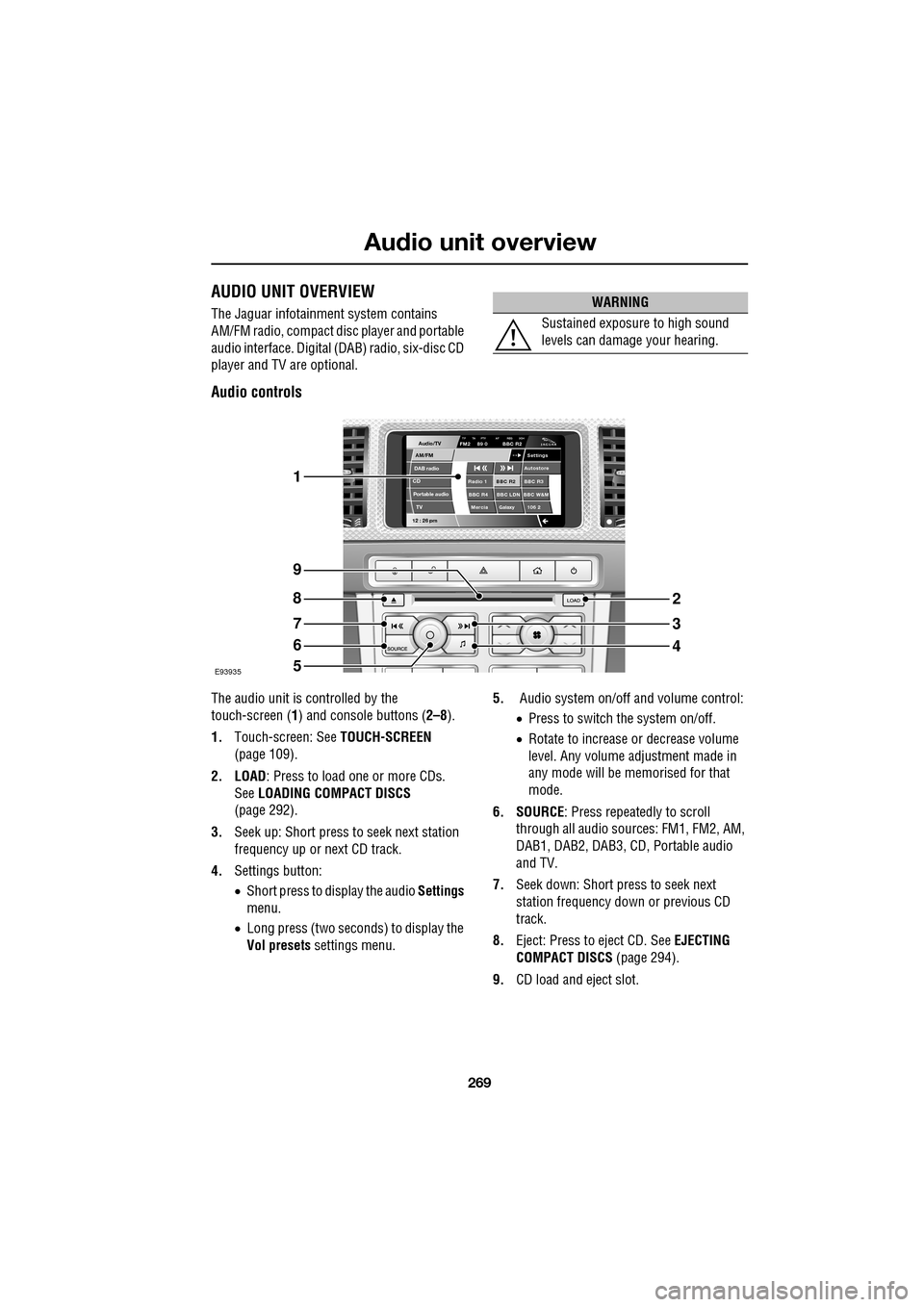
AUDIO UNIT OVERVIEW
The Jaguar infotainment system contains
AM/FM radio, compact disc player and portable
audio interface. Digital (DAB) radio, six-disc CD
player and TV are optional.
Audio controls
The audio unit is c ontrolled by the
touch-screen ( 1) and console buttons ( 2–8).
1. Touch-screen: See TOUCH-SCREEN
(page 109).
2. LOAD : Press to load one or more CDs.
See LOADING COMPACT DISCS
(page 292).
3. Seek up: Short press to seek next station
frequency up or next CD track.
4. Settings button:
•Short press to display the audio Settings
menu.
• Long press (two seconds) to display the
Vol presets settings menu. 5.
Audio system on/off and volume control:
•Press to switch the system on/off.
• Rotate to increase or decrease volume
level. Any volume adjustment made in
any mode will be memorised for that
mode.
6. SOURCE : Press repeatedly to scroll
through all audio sources: FM1, FM2, AM,
DAB1, DAB2, DAB3, CD , Portable audio
and TV.
7. Seek down: Short press to seek next
station frequency down or previous CD
track.
8. Eject: Press to eject CD. See EJECTING
COMPACT DISCS (page 294).
9. CD load and eject slot.
WARNING
Sustained exposure to high sound
levels can damage your hearing.
Audio/TV
DAB radio
CDAM/FM
12 : 26 pm
BBC R2 BBC R3
BBC R4 BBC LDN BBC W&M Mercia Galaxy 106 2Radio 1
Settings
Autostore
TP TA PTY AF REG 3CHFM2 89 0 BBC R2
Portable audio TV
E93935
1
9
8
7
6
5
2
3
4