Audio JAGUAR XF 2009 1.G Owner's Manual
[x] Cancel search | Manufacturer: JAGUAR, Model Year: 2009, Model line: XF, Model: JAGUAR XF 2009 1.GPages: 391, PDF Size: 19.32 MB
Page 190 of 391
Vehicle care
190
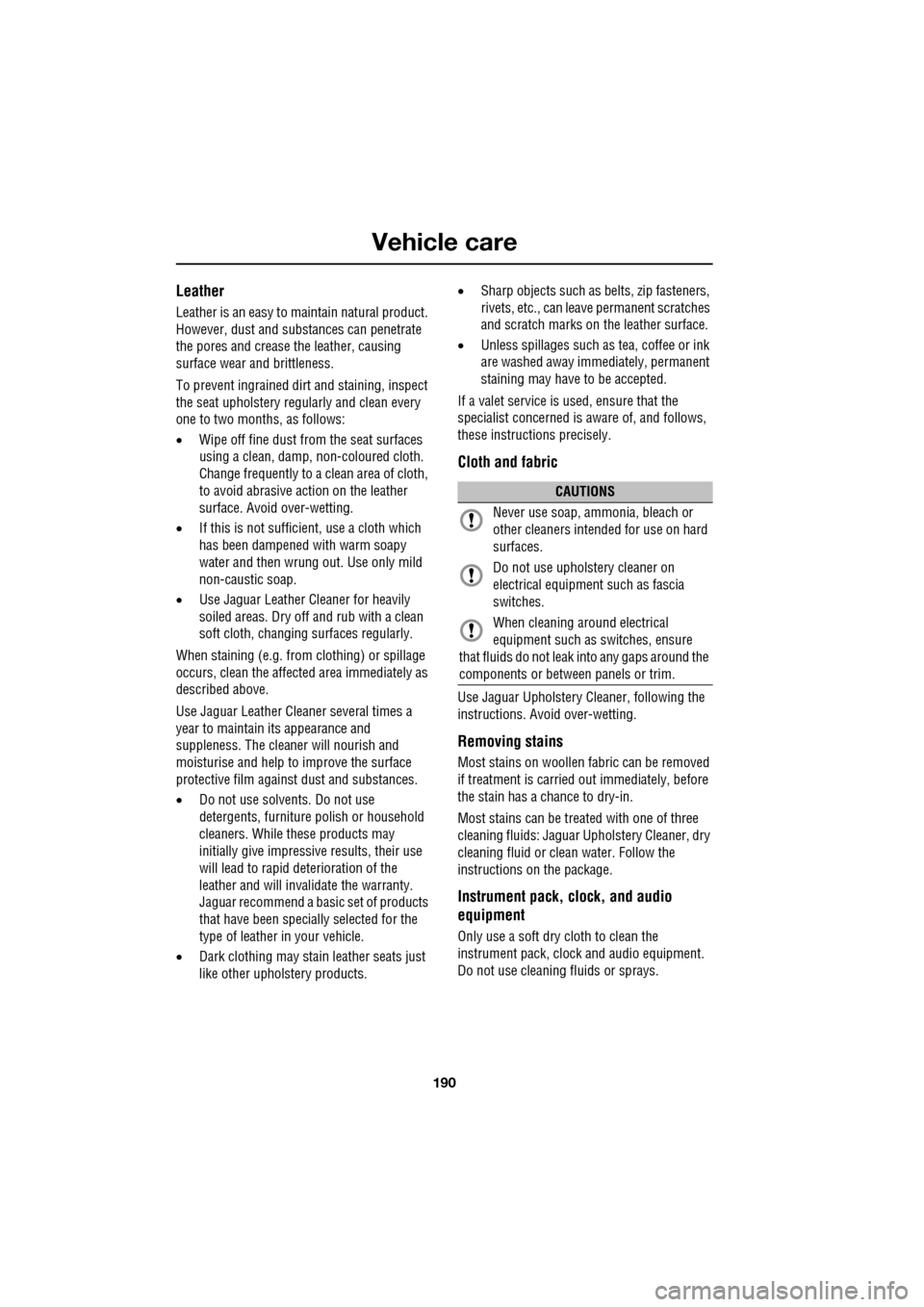
Leather
Leather is an easy to maintain natural product.
However, dust and subs tances can penetrate
the pores and crease the leather, causing
surface wear and brittleness.
To prevent ingrained dirt and staining, inspect
the seat upholstery regularly and clean every
one to two months, as follows:
• Wipe off fine dust from the seat surfaces
using a clean, damp, non-coloured cloth.
Change frequently to a clean area of cloth,
to avoid abrasive action on the leather
surface. Avoid over-wetting.
• If this is not suffic ient, use a cloth which
has been dampened with warm soapy
water and then wrung out. Use only mild
non-caustic soap.
• Use Jaguar Leather Cleaner for heavily
soiled areas. Dry off and rub with a clean
soft cloth, changing surfaces regularly.
When staining (e.g. from clothing) or spillage
occurs, clean the affected area immediately as
described above.
Use Jaguar Leather Cleaner several times a
year to maintain its appearance and
suppleness. The clea ner will nourish and
moisturise and help to improve the surface
protective film agains t dust and substances.
• Do not use solvents. Do not use
detergents, furniture polish or household
cleaners. While these products may
initially give impressi ve results, their use
will lead to rapid deterioration of the
leather and will inva lidate the warranty.
Jaguar recommend a basic set of products
that have been specially selected for the
type of leather in your vehicle.
• Dark clothing may stain leather seats just
like other upholstery products. •
Sharp objects such as belts, zip fasteners,
rivets, etc., can leave permanent scratches
and scratch marks on the leather surface.
• Unless spillages such as tea, coffee or ink
are washed away immediately, permanent
staining may have to be accepted.
If a valet service is used, ensure that the
specialist concerned is aware of, and follows,
these instructions precisely.
Cloth and fabric
Use Jaguar Upholstery Cleaner, following the
instructions. Avoid over-wetting.
Removing stains
Most stains on woollen fabric can be removed
if treatment is carried out immediately, before
the stain has a chance to dry-in.
Most stains can be treated with one of three
cleaning fluids: Jaguar U pholstery Cleaner, dry
cleaning fluid or clean water. Follow the
instructions on the package.
Instrument pack, clock, and audio
equipment
Only use a soft dry cloth to clean the
instrument pack, clock and audio equipment.
Do not use cleaning fluids or sprays.
CAUTIONS
Never use soap, ammonia, bleach or
other cleaners intended for use on hard
surfaces.
Do not use upholst ery cleaner on
electrical equipment such as fascia
switches.
When cleaning around electrical
equipment such as switches, ensure
that fluids do not leak into any gaps around the
components or between panels or trim.
Page 213 of 391
213
Vehicle battery
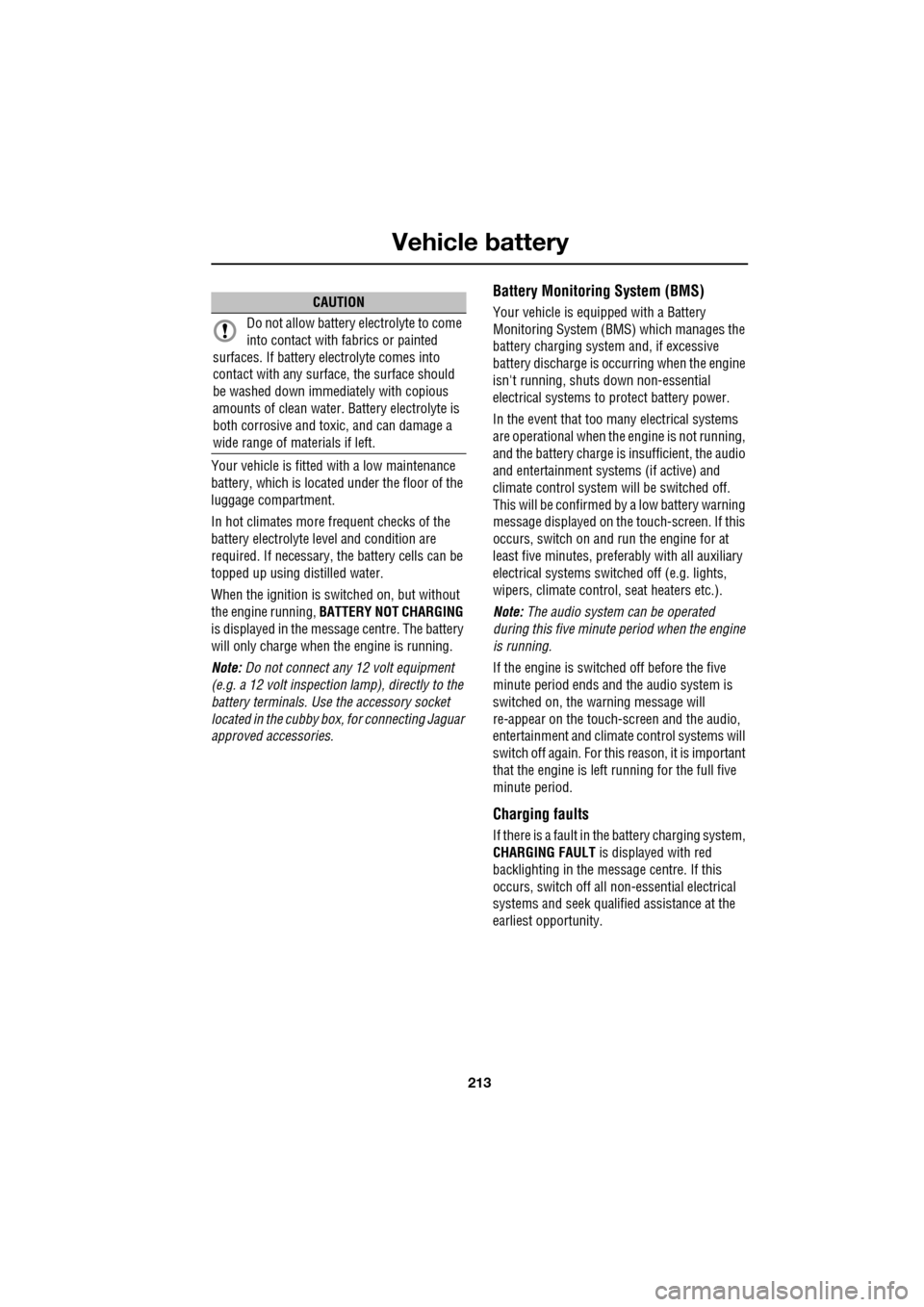
Your vehicle is fitted with a low maintenance
battery, which is located under the floor of the
luggage compartment.
In hot climates more frequent checks of the
battery electrolyte level and condition are
required. If necessary, the battery cells can be
topped up using di stilled water.
When the ignition is switched on, but without
the engine running, BATTERY NOT CHARGING
is displayed in the mess age centre. The battery
will only charge when the engine is running.
Note: Do not connect any 12 volt equipment
(e.g. a 12 volt inspection lamp), directly to the
battery terminals. Use the accessory socket
located in the cubby box, for connecting Jaguar
approved accessories.
Battery Monitoring System (BMS)
Your vehicle is equipped with a Battery
Monitoring System (BMS) which manages the
battery charging system and, if excessive
battery discharge is o ccurring when the engine
isn't running, shuts down non-essential
electrical systems to protect battery power.
In the event that too many electrical systems
are operational when the engine is not running,
and the battery charge is insufficient, the audio
and entertainment systems (if active) and
climate control system will be switched off.
This will be confirmed by a low battery warning
message displayed on the touch-screen. If this
occurs, switch on and run the engine for at
least five minutes, preferably with all auxiliary
electrical systems switched off (e.g. lights,
wipers, climate control, seat heaters etc.).
Note: The audio system can be operated
during this five minute period when the engine
is running.
If the engine is switched off before the five
minute period ends and the audio system is
switched on, the warning message will
re-appear on the touch-sc reen and the audio,
entertainment and climate control systems will
switch off again. For this reason, it is important
that the engine is left running for the full five
minute period.
Charging faults
If there is a fault in the battery charging system,
CHARGING FAULT is displayed with red
backlighting in the mess age centre. If this
occurs, switch off all non-essential electrical
systems and seek qualified assistance at the
earliest opportunity.
CAUTION
Do not allow battery electrolyte to come
into contact with fabrics or painted
surfaces. If battery electrolyte comes into
contact with any surfac e, the surface should
be washed down immedi ately with copious
amounts of clean water. Battery electrolyte is
both corrosive and toxic, and can damage a
wide range of materials if left.
Page 247 of 391
247
Fuses
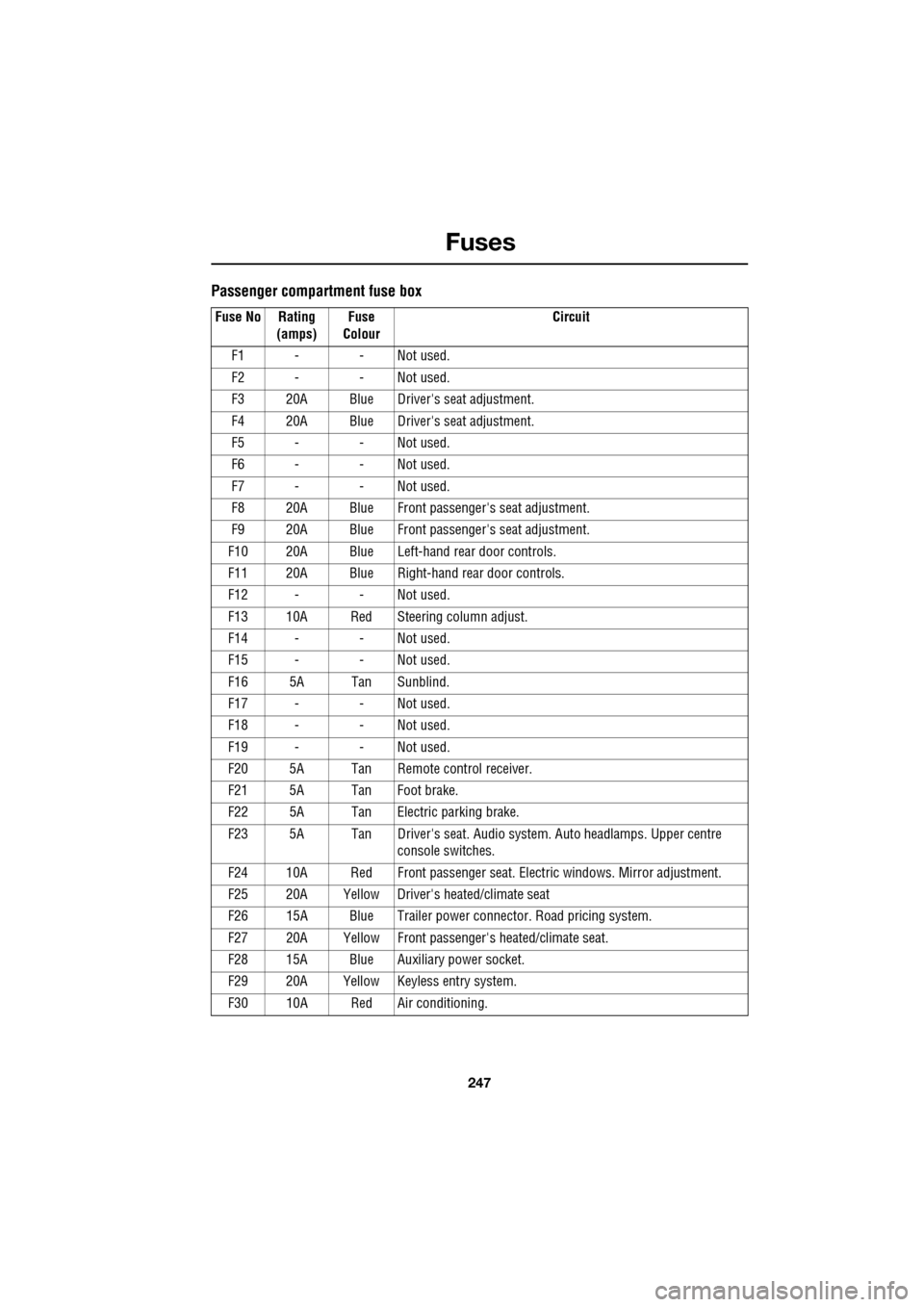
Passenger compartment fuse box
Fuse No Rating (amps) Fuse
Colour Circuit
F1 - - Not used.
F2 - - Not used.
F3 20A Blue Driver's seat adjustment.
F4 20A Blue Driver's seat adjustment.
F5 - - Not used.
F6 - - Not used.
F7 - - Not used.
F8 20A Blue Front passenger's seat adjustment.
F9 20A Blue Front passenger's seat adjustment.
F10 20A Blue Left-hand rear door controls.
F11 20A Blue Right-hand rear door controls.
F12 - - Not used.
F13 10A Red Steering column adjust.
F14 - - Not used.
F15 - - Not used.
F16 5A Tan Sunblind.
F17 - - Not used.
F18 - - Not used.
F19 - - Not used.
F20 5A Tan Remote control receiver.
F21 5A Tan Foot brake.
F22 5A Tan Electric parking brake.
F23 5A Tan Driver's seat. Audio system. Auto headlamps. Upper centre console switches.
F24 10A Red Front passen ger seat. Electric windows. Mirror adjustment.
F25 20A Yellow Driver's heated/climate seat
F26 15A Blue Trailer power connector. Road pricing system.
F27 20A Yellow Front passenger's heated/climate seat.
F28 15A Blue Auxiliary power socket.
F29 20A Yellow Keyless entry system.
F30 10A Red Air conditioning.
Page 248 of 391

Fuses
248
Luggage compartment fuse box
F31 15A Blue Sunroof.
F32 5A Tan Jaguar Smart Key docking station.
F33 5A Tan Diagnostic connector.
F34 5A Tan Instrument pack.
F35 15A Blue Interior lamps.
F36 10A Red Suspension system.
Fuse No Rating
(amps) Fuse
Colour Circuit
Fuse No Rating
(amps) Fuse
Colour Circuit
F1 30A Pink Air blower.
F2 30A Pink Electric parking brake.
F3 - - Not used.
F4 - - Not used.
F5 - - Not used.
F6 - - Not used.
F7 30A Pink Heated rear screen.
F8 30A Pink Audio system (Premium audio only).
F9 50A Red RBD link.
F10 40A Green Rear electronic differential (e-Diff).
F11 - - Not used.
F12 - - Not used.
F13 - - Not used.
F14 5A Tan Telephone.
F15 10A Red TV. DVD. DAB radio.
F16 - - Not used.
F17 - - Not used.
F18 - - Not used.
F19 - - Not used.
F20 - - Not used.
F21 - - Not used.
F22 - - Not used.
Page 249 of 391
249
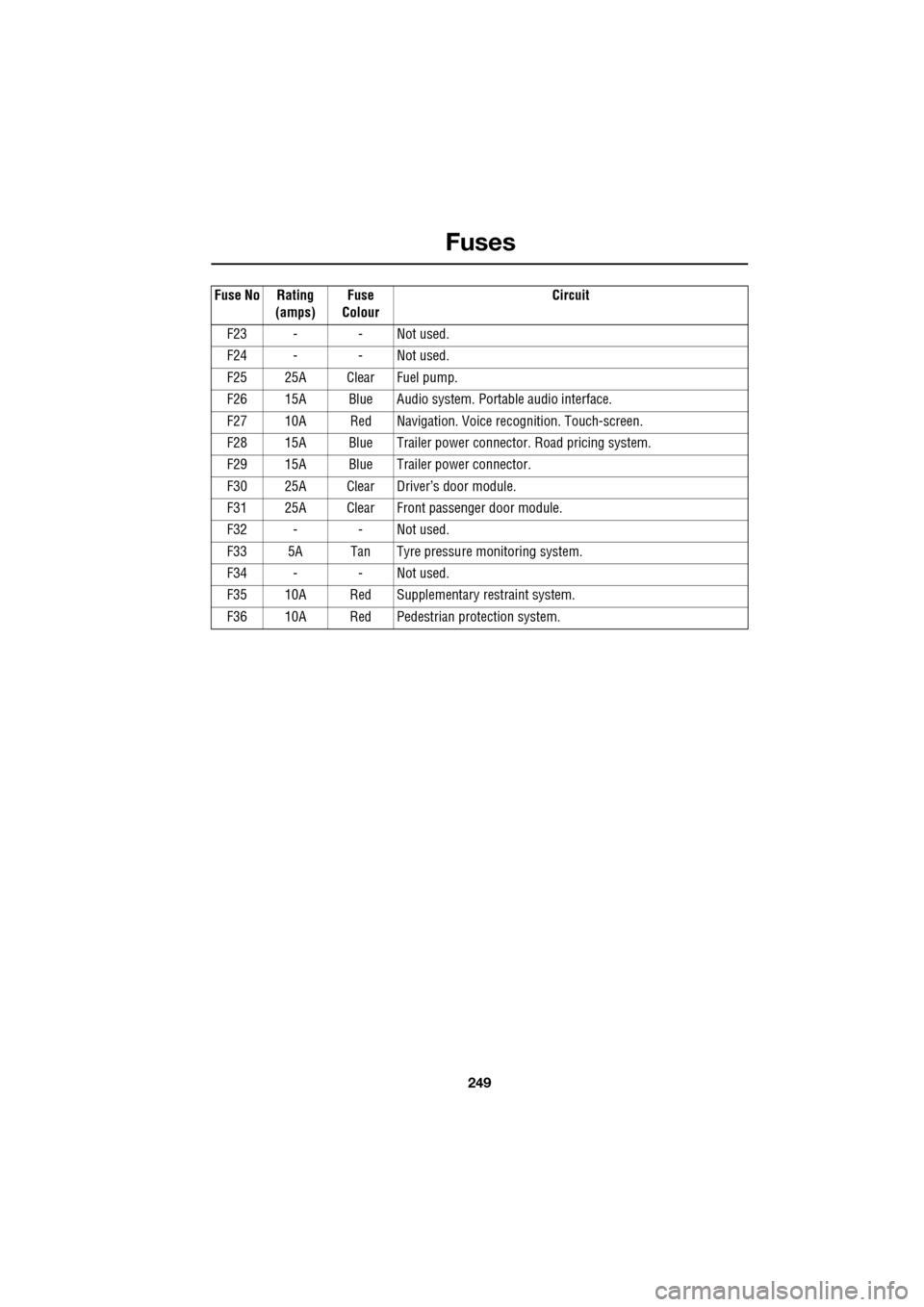
Fuses
F23 - - Not used.
F24 - - Not used.
F25 25A Clear Fuel pump.
F26 15A Blue Audio system. Portable audio interface.
F27 10A Red Navigation. Voic e recognition. Touch-screen.
F28 15A Blue Trailer power conne ctor. Road pricing system.
F29 15A Blue Trailer power connector.
F30 25A Clear Driver’s door module.
F31 25A Clear Front passenger door module.
F32 - - Not used.
F33 5A Tan Tyre pressure monitoring system.
F34 - - Not used.
F35 10A Red Supplementary restraint system.
F36 10A Red Pedestrian protection system.
Fuse No Rating
(amps) Fuse
Colour Circuit
Page 268 of 391
Audio introduction
268
RADIO RECEPTION
Some interference is to be expected from time
to time during a journey. Occasionally, it may
be necessary to retune the audio unit, to offset
the effects of moving from one transmitter area
to another.
While Radio Data System (RDS) automatic
retuning helps to reduce the effects of signal
changes, some manual retuning may still be
required (especially for lo cal stations) in areas
of weak reception.
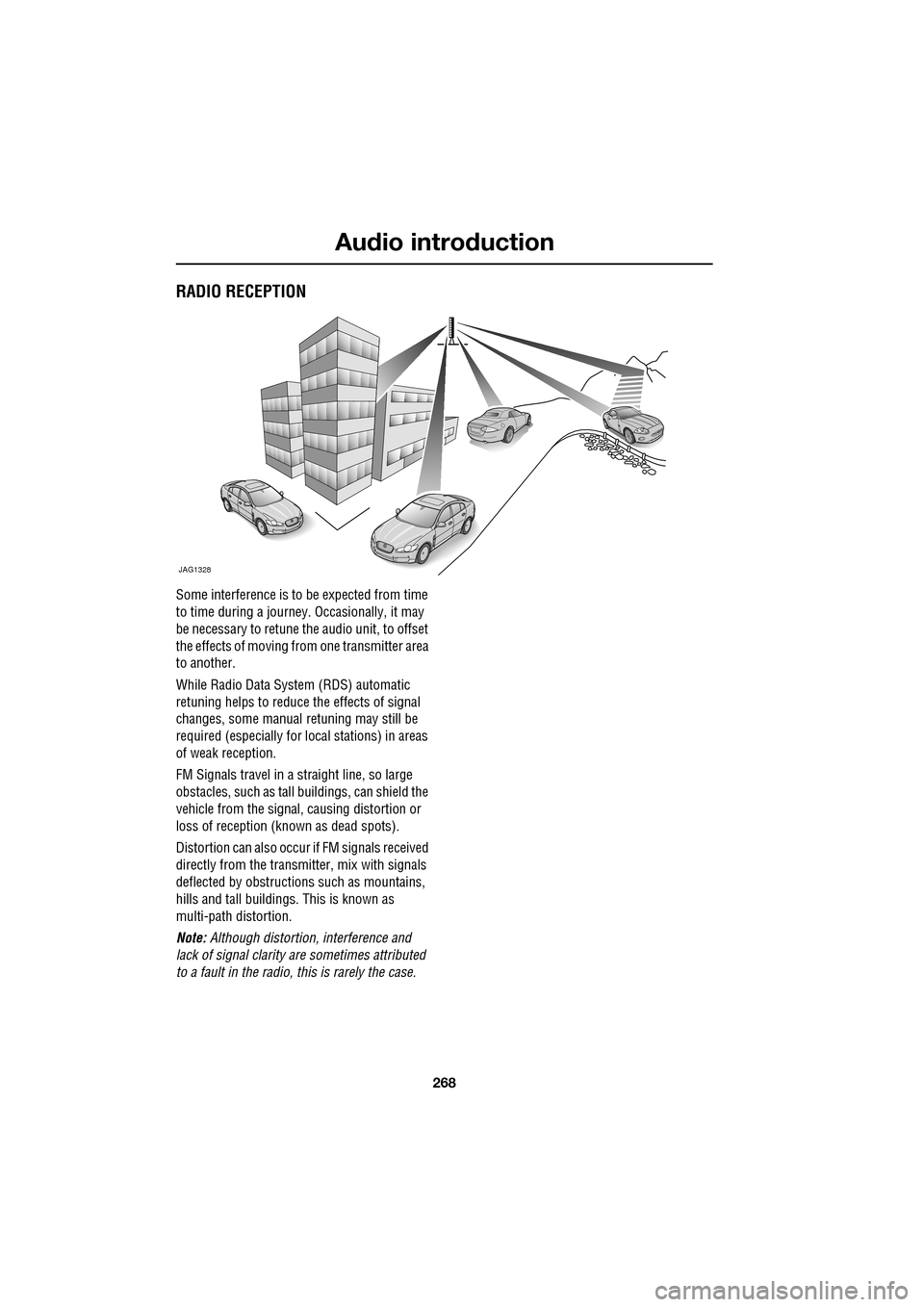
FM Signals travel in a straight line, so large
obstacles, such as tall buildings, can shield the
vehicle from the signal, causing distortion or
loss of reception (known as dead spots).
Distortion can also occur if FM signals received
directly from the transmitter, mix with signals
deflected by obstructions such as mountains,
hills and tall buildin gs. This is known as
multi-path distortion.
Note: Although distortion, interference and
lack of signal clarity are sometimes attributed
to a fault in the radio, this is rarely the case.
JAG1328
Page 269 of 391
269
Audio unit overview
AUDIO UNIT OVERVIEW
The Jaguar infotainment system contains
AM/FM radio, compact disc player and portable
audio interface. Digital (DAB) radio, six-disc CD
player and TV are optional.
Audio controls
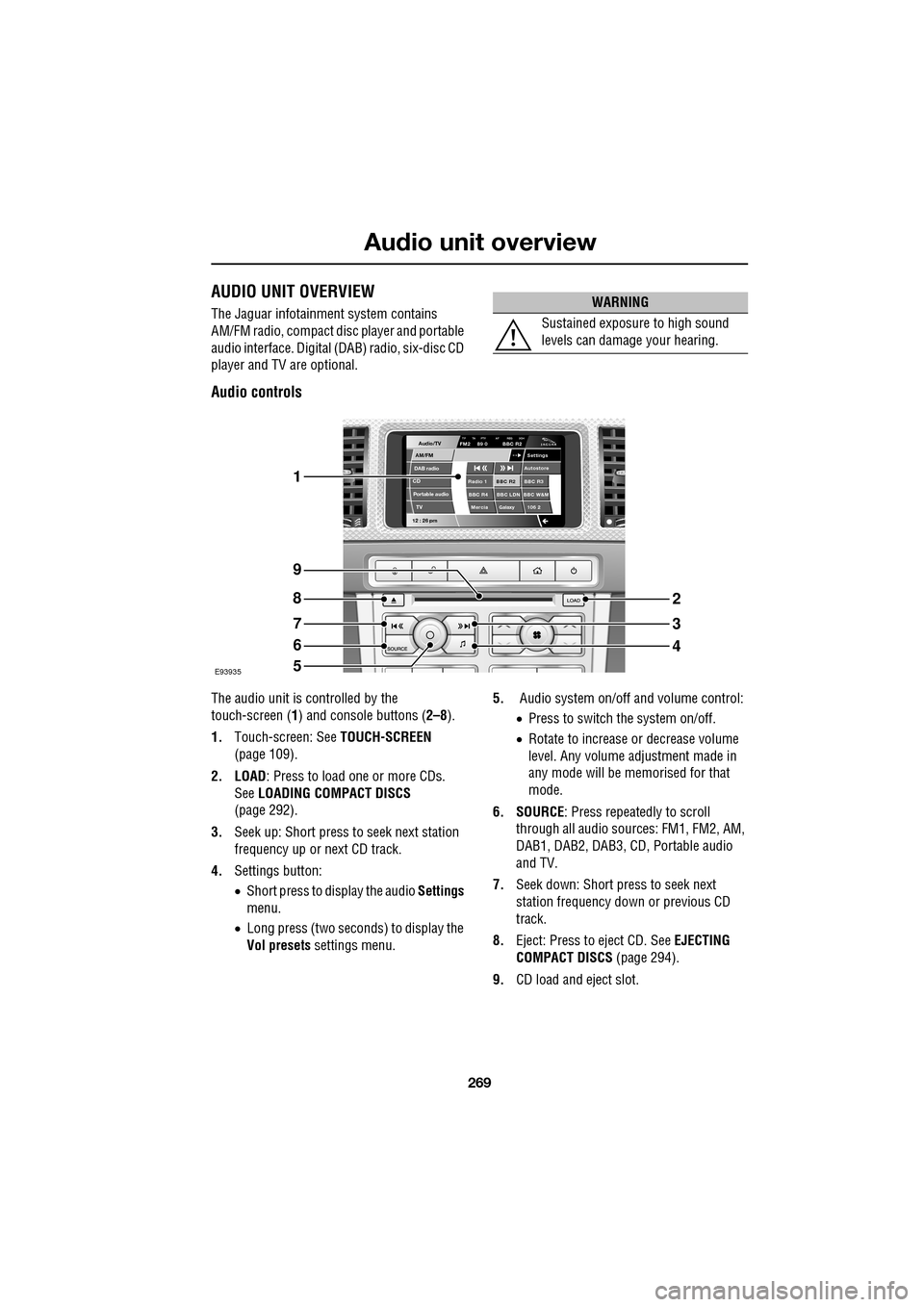
The audio unit is c ontrolled by the
touch-screen ( 1) and console buttons ( 2–8).
1. Touch-screen: See TOUCH-SCREEN
(page 109).
2. LOAD : Press to load one or more CDs.
See LOADING COMPACT DISCS
(page 292).
3. Seek up: Short press to seek next station
frequency up or next CD track.
4. Settings button:
•Short press to display the audio Settings
menu.
• Long press (two seconds) to display the
Vol presets settings menu. 5.
Audio system on/off and volume control:
•Press to switch the system on/off.
• Rotate to increase or decrease volume
level. Any volume adjustment made in
any mode will be memorised for that
mode.
6. SOURCE : Press repeatedly to scroll
through all audio sources: FM1, FM2, AM,
DAB1, DAB2, DAB3, CD , Portable audio
and TV.
7. Seek down: Short press to seek next
station frequency down or previous CD
track.
8. Eject: Press to eject CD. See EJECTING
COMPACT DISCS (page 294).
9. CD load and eject slot.
WARNING
Sustained exposure to high sound
levels can damage your hearing.
Audio/TV
DAB radio
CDAM/FM
12 : 26 pm
BBC R2 BBC R3
BBC R4 BBC LDN BBC W&M Mercia Galaxy 106 2Radio 1
Settings
Autostore
TP TA PTY AF REG 3CHFM2 89 0 BBC R2
Portable audio TV
E93935
1
9
8
7
6
5
2
3
4
Page 270 of 391
Audio unit overview
270
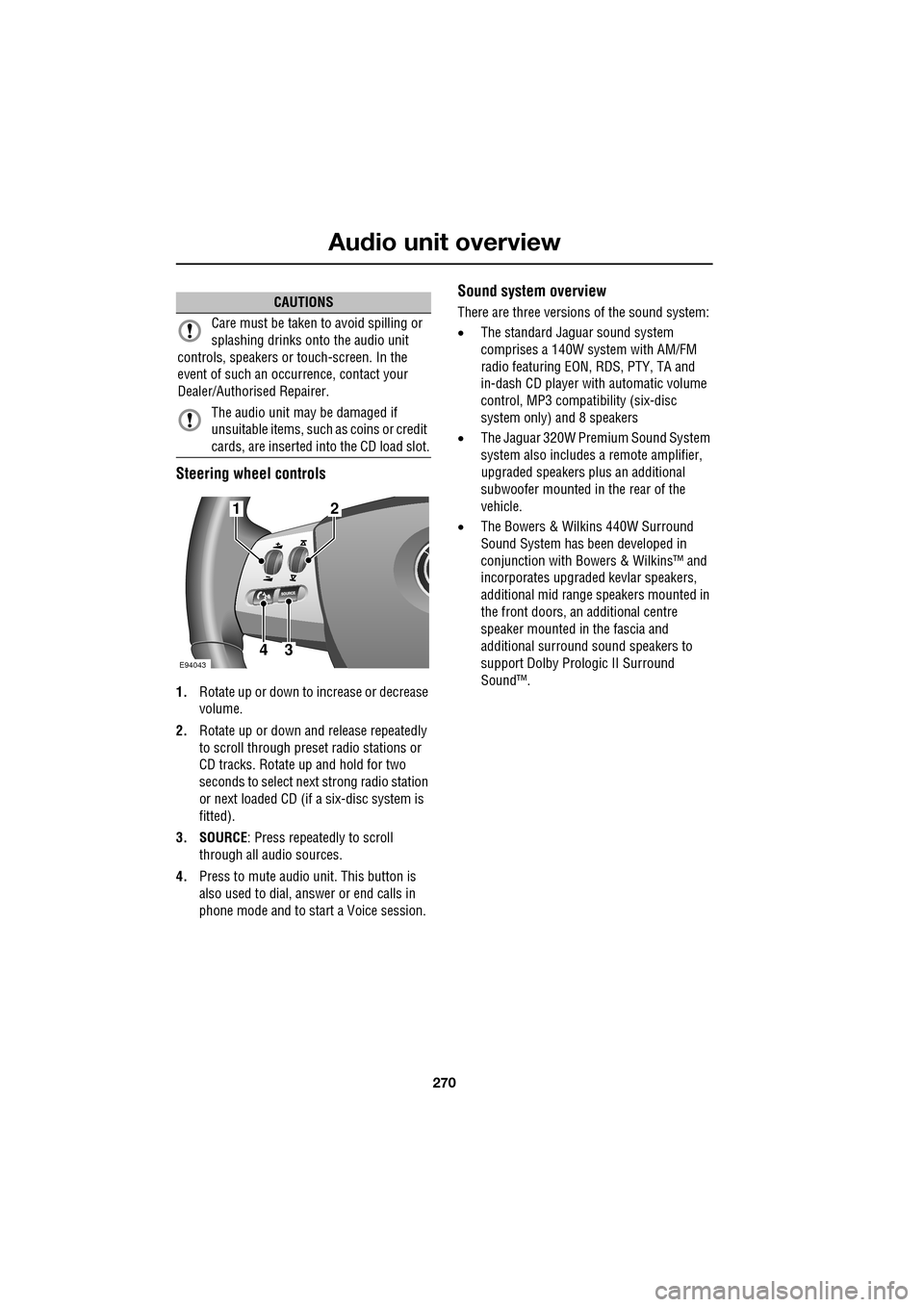
Steering wheel controls
1.Rotate up or down to increase or decrease
volume.
2. Rotate up or down and release repeatedly
to scroll through preset radio stations or
CD tracks. Rotate up and hold for two
seconds to select next strong radio station
or next loaded CD (if a six-disc system is
fitted).
3. SOURCE : Press repeatedly to scroll
through all audio sources.
4. Press to mute audio unit. This button is
also used to dial, answer or end calls in
phone mode and to st art a Voice session.
Sound system overview
There are three versions of the sound system:
• The standard Jaguar sound system
comprises a 140W sy stem with AM/FM
radio featuring EON, RDS, PTY, TA and
in-dash CD player with automatic volume
control, MP3 compatibility (six-disc
system only) and 8 speakers
• The Jaguar 320W Premium Sound System
system also includes a remote amplifier,
upgraded speakers plus an additional
subwoofer mounted in the rear of the
vehicle.
• The Bowers & Wilkins 440W Surround
Sound System has been developed in
conjunction with Bowe rs & Wilkins™ and
incorporates upgraded kevlar speakers,
additional mid range sp eakers mounted in
the front doors, an additional centre
speaker mounted in the fascia and
additional surround sound speakers to
support Dolby Prologic II Surround
Sound™.CAUTIONS
Care must be taken to avoid spilling or
splashing drinks onto the audio unit
controls, speakers or touch-screen. In the
event of such an occurrence, contact your
Dealer/Authorised Repairer.
The audio unit may be damaged if
unsuitable items, such as coins or credit
cards, are inserted into the CD load slot.
E94043
12
43
Page 271 of 391
271
Audio unit operation
ON/OFF CONTROL
The audio system can be used with the vehicle
ignition on or off, but will switch off
automatically when the ignition is switched off.
To operate the audio system when the ignition
has been switched off, press the On/off volume
control.
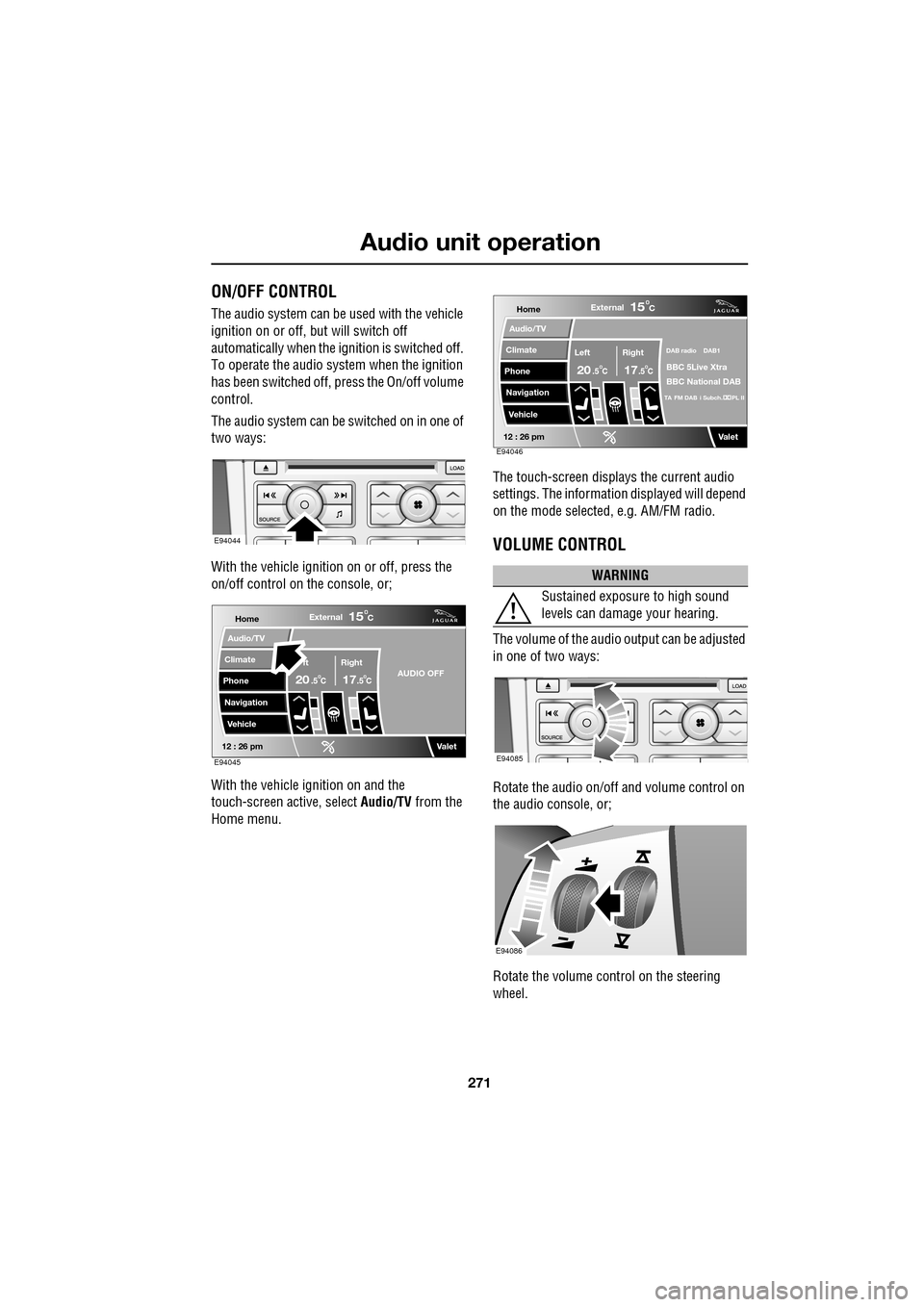
The audio system can be switched on in one of
two ways:
With the vehicle ignition on or off, press the
on/off control on the console, or;
With the vehicle ignition on and the
touch-screen active, select Audio/TV from the
Home menu. The touch-screen displays the current audio
settings. The informati
on displayed will depend
on the mode selected , e.g. AM/FM radio.
VOLUME CONTROL
The volume of the audio output can be adjusted
in one of two ways:
Rotate the audio on/off and volume control on
the audio console, or;
Rotate the volume control on the steering
wheel.
E94044
Home
Audio/TV
Climate
Phone
Navigation
VehicleExternal
ft Right
20 17CC
15C
.5 .5AUDIO OFF
Valet12 : 26 pmE94045
WARNING
Sustained exposure to high sound
levels can damage your hearing.
Home
Audio/TV
Climate
Phone
Navigation
VehicleExternal
Left Right
20 17CC
15C
.5 .5
DAB radio DAB1
BBC 5Live Xtra
BBC National DAB
TA FM DAB i Subch. PL II
Valet12 : 26 pmE94046
E94085
E94086
Page 272 of 391
Audio unit operation
272
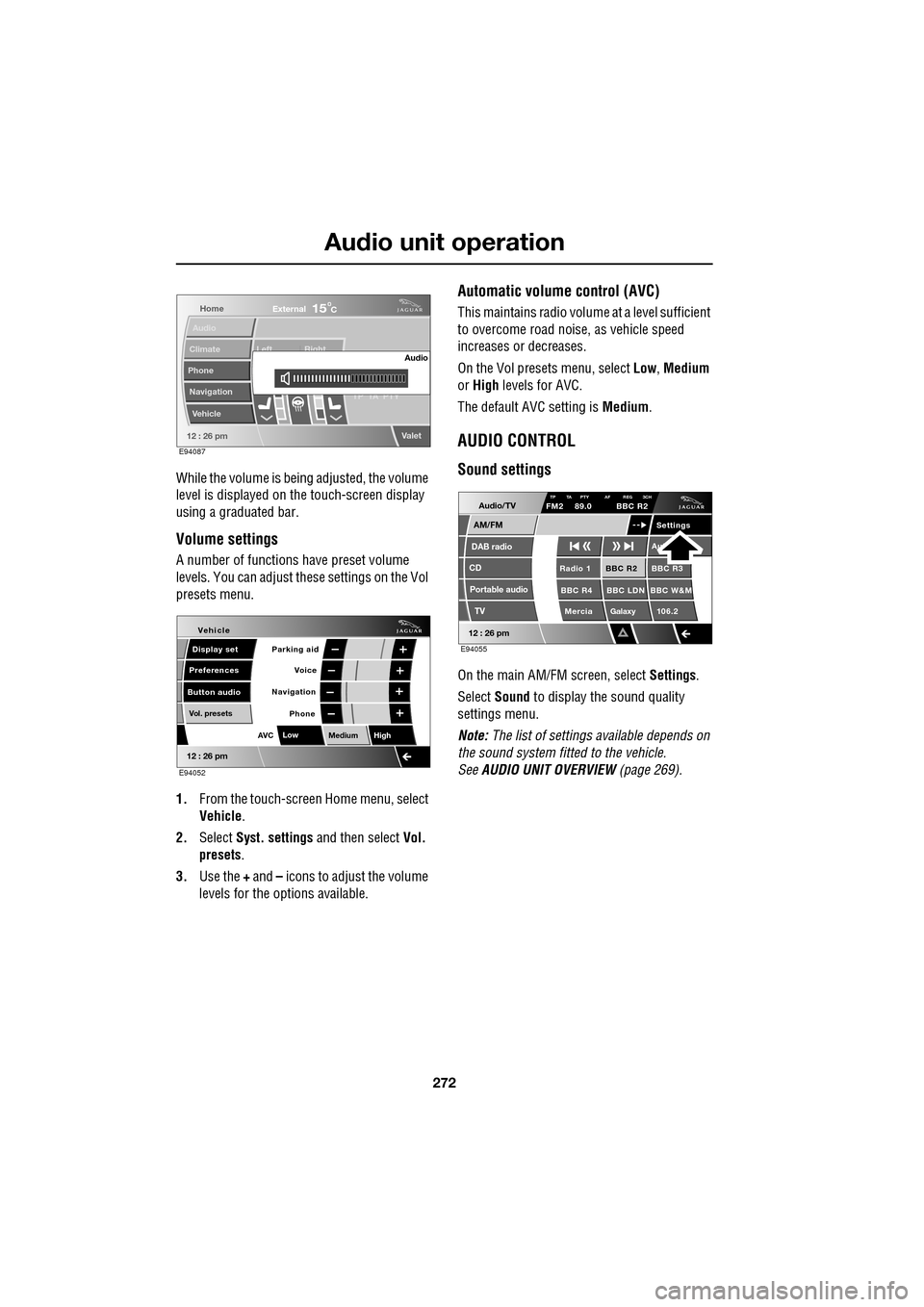
While the volume is being adjusted, the volume
level is displayed on the touch-screen display
using a graduated bar.
Volume settings
A number of functions have preset volume
levels. You can adjust these settings on the Vol
presets menu.
1. From the touch-screen Home menu, select
Vehicle .
2. Select Syst. settings and then select Vol.
presets .
3. Use the + and – icons to adjust the volume
levels for the options available.
Automatic volume control (AVC)
This maintains radio volume at a level sufficient
to overcome road noise, as vehicle speed
increases or decreases.
On the Vol presets menu, select Low, Medium
or High levels for AVC.
The default AVC setting is Medium.
AUDIO CONTROL
Sound settings
On the main AM/FM screen, select Settings.
Select Sound to display the sound quality
settings menu.
Note: The list of settings available depends on
the sound system fitted to the vehicle.
See AUDIO UNIT OVERVIEW (page 269).
Home
Audio
Climate
Phone
Navigation
Vehicle Left Right
TP T
A PTY
Valet12 : 26 pm
Audio
External15C
E94087
Voice
Vehicle
Display set
Preferences
Button audioParking aid
Vol. presets
AVC Low
MediumHigh
12 : 26 pm
Navigation
Phone
E94052
Audio/TV
DAB radio
CD
AM/FM
12 : 26 pm
BBC R2 BBC R3
BBC R4 BBC LDN BBC W&M Mercia Galaxy 106.2Radio 1
Settings
Aut
TP TA PTY AF REG 3CHFM2 89.0 BBC R2
Portable audio TV
E94055