Audio JAGUAR XF 2009 1.G Service Manual
[x] Cancel search | Manufacturer: JAGUAR, Model Year: 2009, Model line: XF, Model: JAGUAR XF 2009 1.GPages: 391, PDF Size: 19.32 MB
Page 283 of 391
283
Digital audio broadcasting
DISPLAY OPTIONS
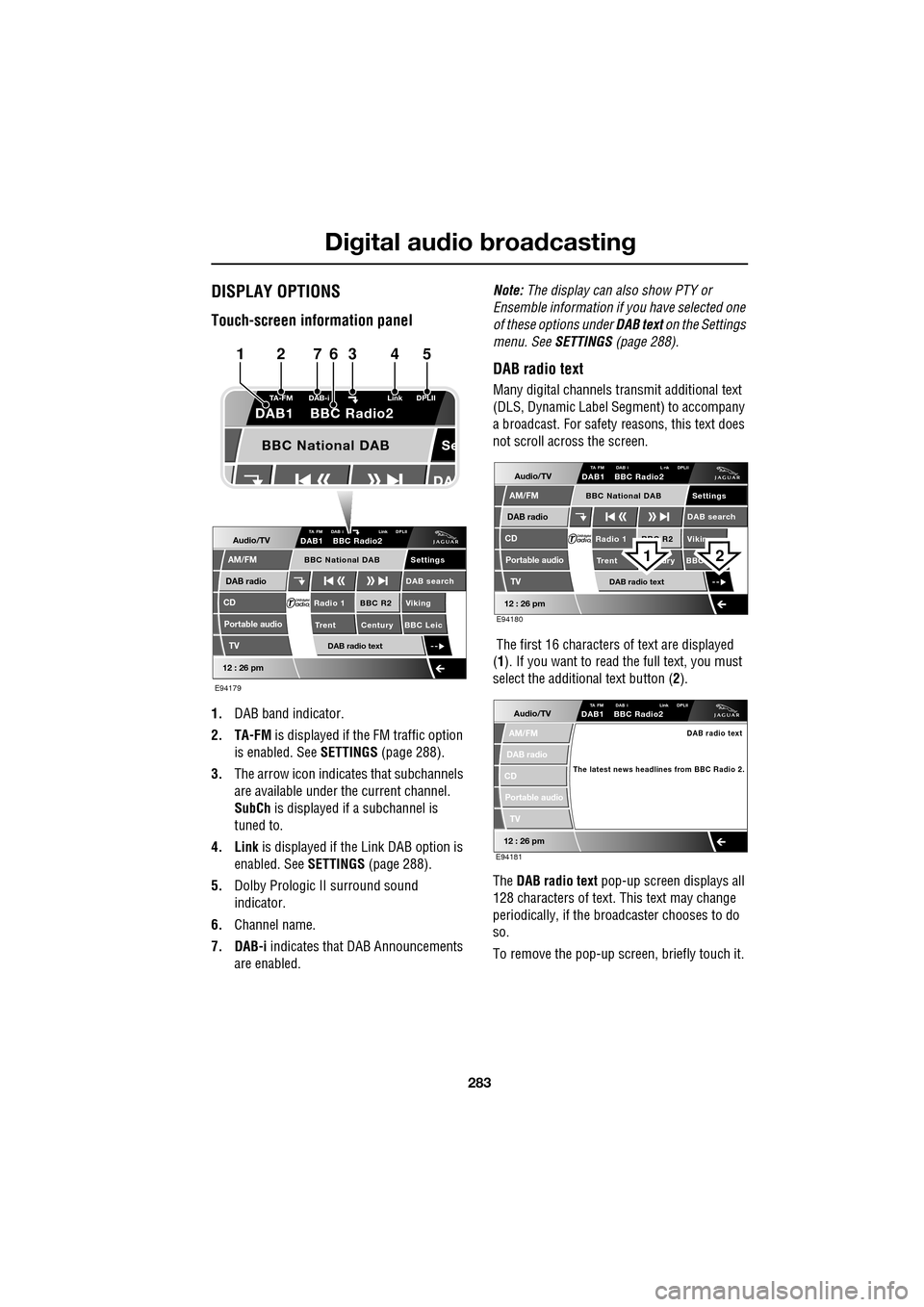
Touch-screen information panel
1.DAB band indicator.
2. TA-FM is displayed if the FM traffic option
is enabled. See SETTINGS (page 288).
3. The arrow icon indicates that subchannels
are available under the current channel.
SubCh is displayed if a subchannel is
tuned to.
4. Link is displayed if th e Link DAB option is
enabled. See SETTINGS (page 288).
5. Dolby Prologic II surround sound
indicator.
6. Channel name.
7. DAB-i indicates that DAB Announcements
are enabled. Note:
The display can also show PTY or
Ensemble information if you have selected one
of these options under DAB text on the Settings
menu. See SETTINGS (page 288).
DAB radio text
Many digital channels tr ansmit additional text
(DLS, Dynamic Label Segment) to accompany
a broadcast. For safety reasons, this text does
not scroll across the screen.
The first 16 characters of text are displayed
(1 ). If you want to read the full text, you must
select the additional text button ( 2).
The DAB radio text pop-up screen displays all
128 characters of text. This text may change
periodically, if the broadcaster chooses to do
so.
To remove the pop-up screen, briefly touch it.
Audio/TV
DAB radio
CD
AM/FM
12 : 26 pm
BBC R2 Viking
Trent Century BBC LeicRadio 1
Settings
DAB search
TA FM DAB i Link DPLIIDAB1 BBC Radio2
Portable audio
TV
DAB radio text
BBC National DAB
Se
TA-FM DAB-i
Link DPLII
DAB1 BBC Radio2
BBC National DAB
E94179
1234567
Audio/TV
DAB radio
CD
AM/FM
12 : 26 pm
BBC R2 Vikin
Trent ury BBC Radio 1
Settings
DAB search
TA FM DAB i L nk DPLIIDAB1 BBC Radio2
Portable audio
TV
DAB radio text
BBC National DAB
E94180
21
Audio/TV
DAB radio
CD
AM/FM
12 : 26 pm
TA FM DAB i Link DPLIIDAB1 BBC Radio2
Portable audio
TV
DAB radio text
The latest news headlines from BBC Radio 2.
E94181
Page 284 of 391
Digital audio broadcasting
284
CHANNEL AUTOMATIC TUNING
Note: When you first use the DAB radio, you
will be unable to listen to any digital broadcasts
until you have comp leted the auto-tune
process.
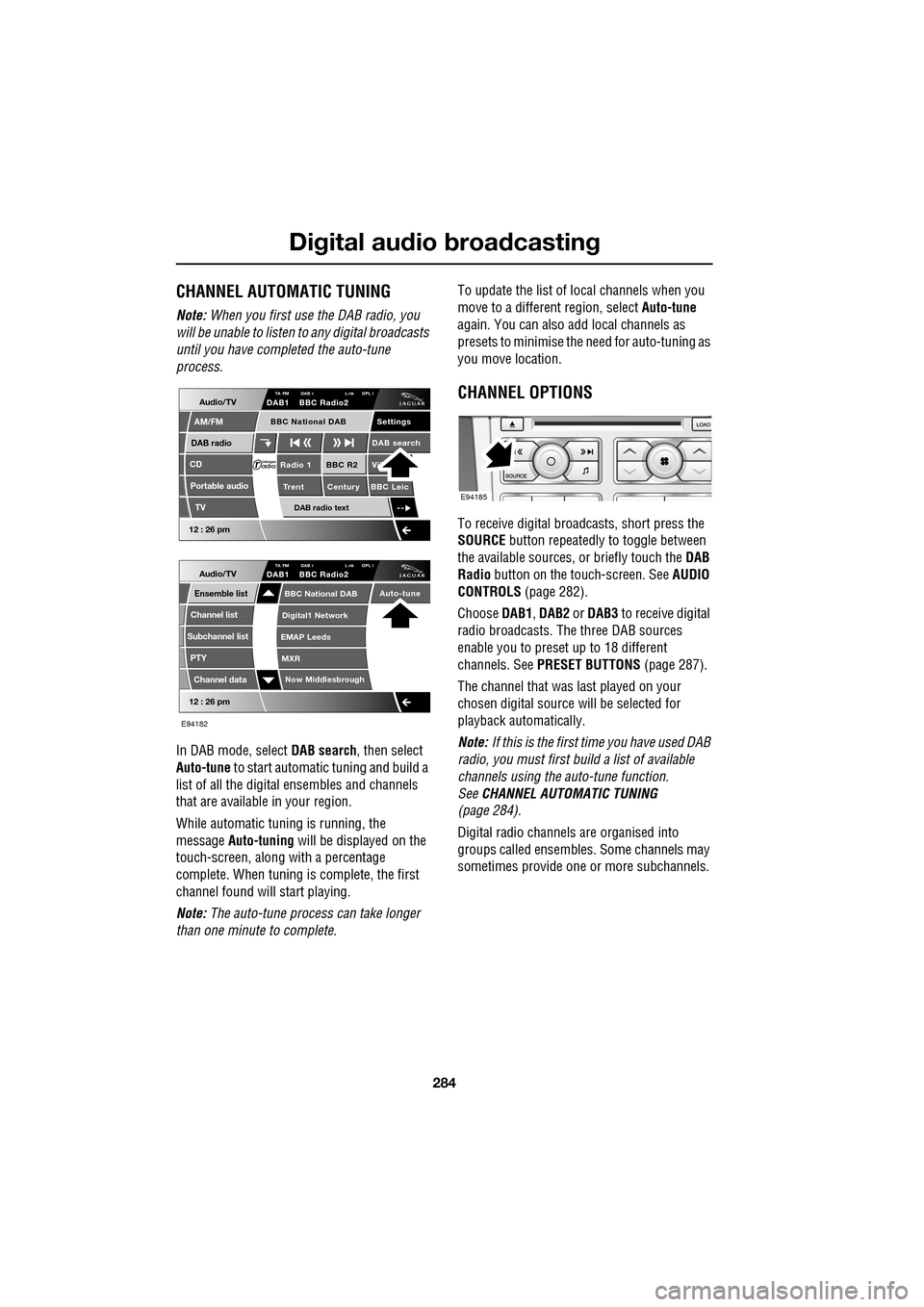
In DAB mode, select DAB search, then select
Auto-tune to start automatic tuning and build a
list of all the digital ensembles and channels
that are available in your region.
While automatic tuning is running, the
message Auto-tuning will be displayed on the
touch-screen, along with a percentage
complete. When tuning is complete, the first
channel found will start playing.
Note: The auto-tune process can take longer
than one minute to complete. To update the list of lo
cal channels when you
move to a different region, select Auto-tune
again. You can also add local channels as
presets to minimise the need for auto-tuning as
you move location.
CHANNEL OPTIONS
To receive digital broadcasts, short press the
SOURCE button repeatedly to toggle between
the available sources, or briefly touch the DAB
Radio button on the touch-screen. See AUDIO
CONTROLS (page 282).
Choose DAB1, DAB2 or DAB3 to receive digital
radio broadcasts. The three DAB sources
enable you to preset up to 18 different
channels. See PRESET BUTTONS (page 287).
The channel that was last played on your
chosen digital source will be selected for
playback automatically.
Note: If this is the first time you have used DAB
radio, you must first build a list of available
channels using the auto-tune function.
See CHANNEL AUTOMATIC TUNING
(page 284).
Digital radio channels are organised into
groups called ensembles. Some channels may
sometimes provide one or more subchannels.
Audio/TV
DAB radio
CD
AM/FM
12 : 26 pm
BBC R2 Vik
Trent Century BBC LeicRadio 1
Settings
DAB search
TA FM DAB i L nk DPL IDAB1 BBC Radio2
Portable audio
TV
DAB radio text
BBC National DAB
12 : 26 pm
Now Middlesbrough
BBC National DAB
Digital1 Network
EMAP Leeds
MXR
Audio/TVTA FM DAB i L nk DPL IDAB1 BBC Radio2
Channel list
Subchannel list
Ensemble list
PTY
Channel data
Auto-tune
E94182
E94185
Page 285 of 391
285
Digital audio broadcasting
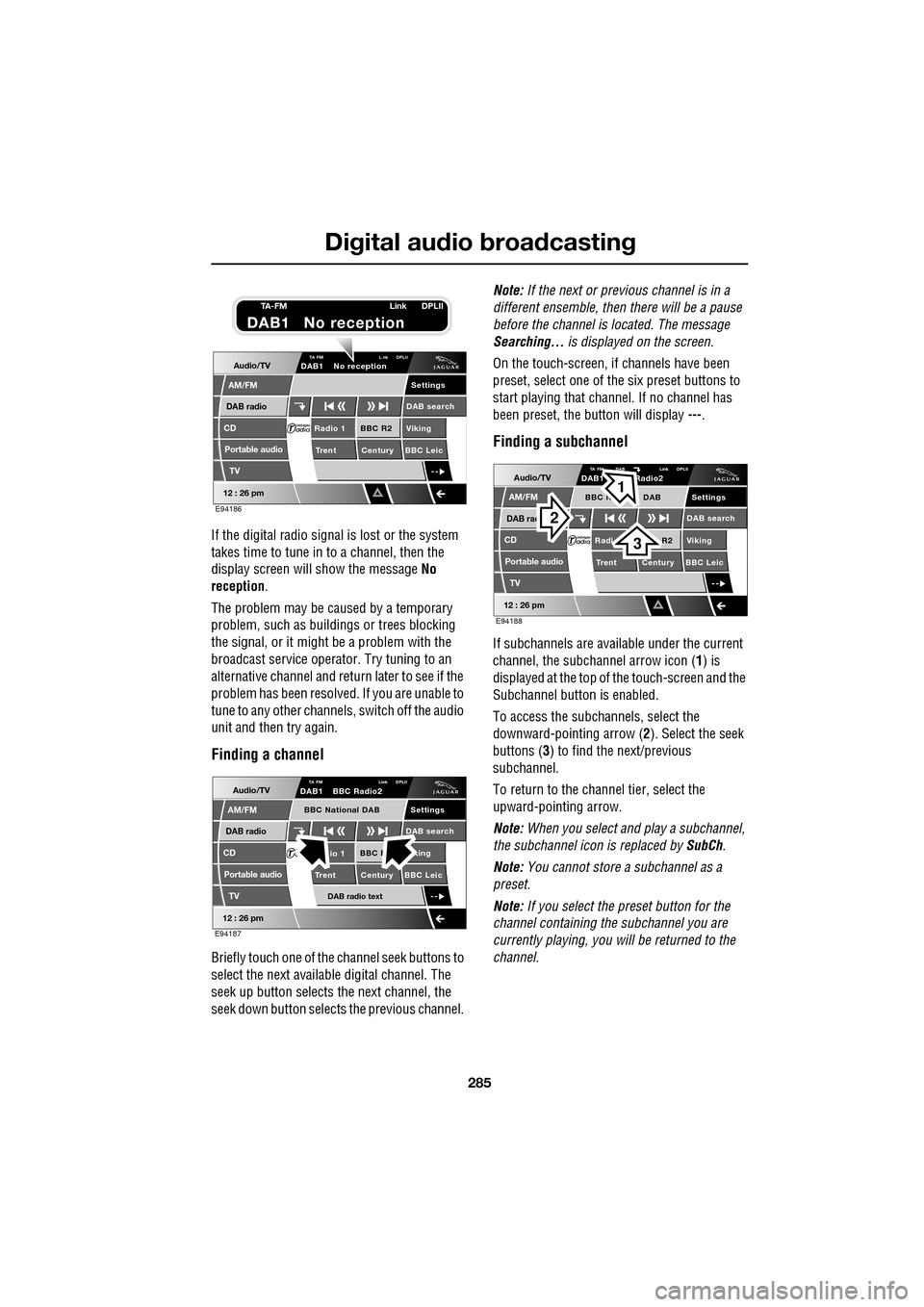
If the digital radio signal is lost or the system
takes time to tune in to a channel, then the
display screen will show the message No
reception.
The problem may be caused by a temporary
problem, such as buildings or trees blocking
the signal, or it might be a problem with the
broadcast servic e operator. Try tuning to an
alternative channel and return later to see if the
problem has been resolved. If you are unable to
tune to any other channe ls, switch off the audio
unit and then try again.
Finding a channel
Briefly touch one of the channel seek buttons to
select the next availabl e digital channel. The
seek up button selects th e next channel, the
seek down button selects the previous channel. Note:
If the next or previous channel is in a
different ensemble, then there will be a pause
before the channel is located. The message
Searching... is displayed on the screen.
On the touch-screen, if channels have been
preset, select one of the six preset buttons to
start playing that channel. If no channel has
been preset, the button will display ---.
Finding a subchannel
If subchannels are available under the current
channel, the subchannel arrow icon ( 1) is
displayed at the top of the touch-screen and the
Subchannel button is enabled.
To access the subchannels, select the
downward-pointing arrow ( 2). Select the seek
buttons ( 3) to find the next/previous
subchannel.
To return to the channel tier, select the
upward-pointing arrow.
Note: When you select and play a subchannel,
the subchannel icon is replaced by SubCh.
Note: You cannot store a subchannel as a
preset.
Note: If you select the preset button for the
channel containing the subchannel you are
currently playing, you will be returned to the
channel.
Audio/TV
DAB radio
CD
AM/FM
12 : 26 pm
BBC R2 Viking
Trent Century BBC LeicRadio 1
Settings
DAB search
TA FM L nk DPLIIDAB1 No reception
Portable audio
TV
E94186
TA-FM Link DPLII
DAB1 No reception
Audio/TV
DAB radio
CD
AM/FM
12 : 26 pm
BBC R king
Trent Century BBC Leicio 1
Settings
DAB search
TA FM Link DPLIIDAB1 BBC Radio2
Portable audio
TV
DAB radio text
BBC National DAB
E94187
Audio/TV
DAB rad
CD
AM/FM
12 : 26 pm
R2 Viking
T
rent Century BBC LeicRadi
Settings
DAB search
TA FM DAB Link DPLIIDAB1 Radio2
Portable audio
TV
BBC N DAB
E94188
2
3
1
Page 286 of 391
Digital audio broadcasting
286
Finding an ensemble
Touch and hold (two seconds) the seek
buttons to find the next or previous ensemble.
SeeAUDIO CONTROLS (page 282).
After a few seconds pause, the first channel in
the ensemble found will start playing.
DAB search
The DAB search menu enables you to view lists
of available ensembles, channels and
subchannels. You can al so perform searches
based on programme type (PTY).
Select DAB search to display the DAB search
menu.
Auto-tune
Select Auto-tune to build a list of available
ensembles and channels for your current
location. See CHANNEL AUTOMATIC TUNING
(page 284).
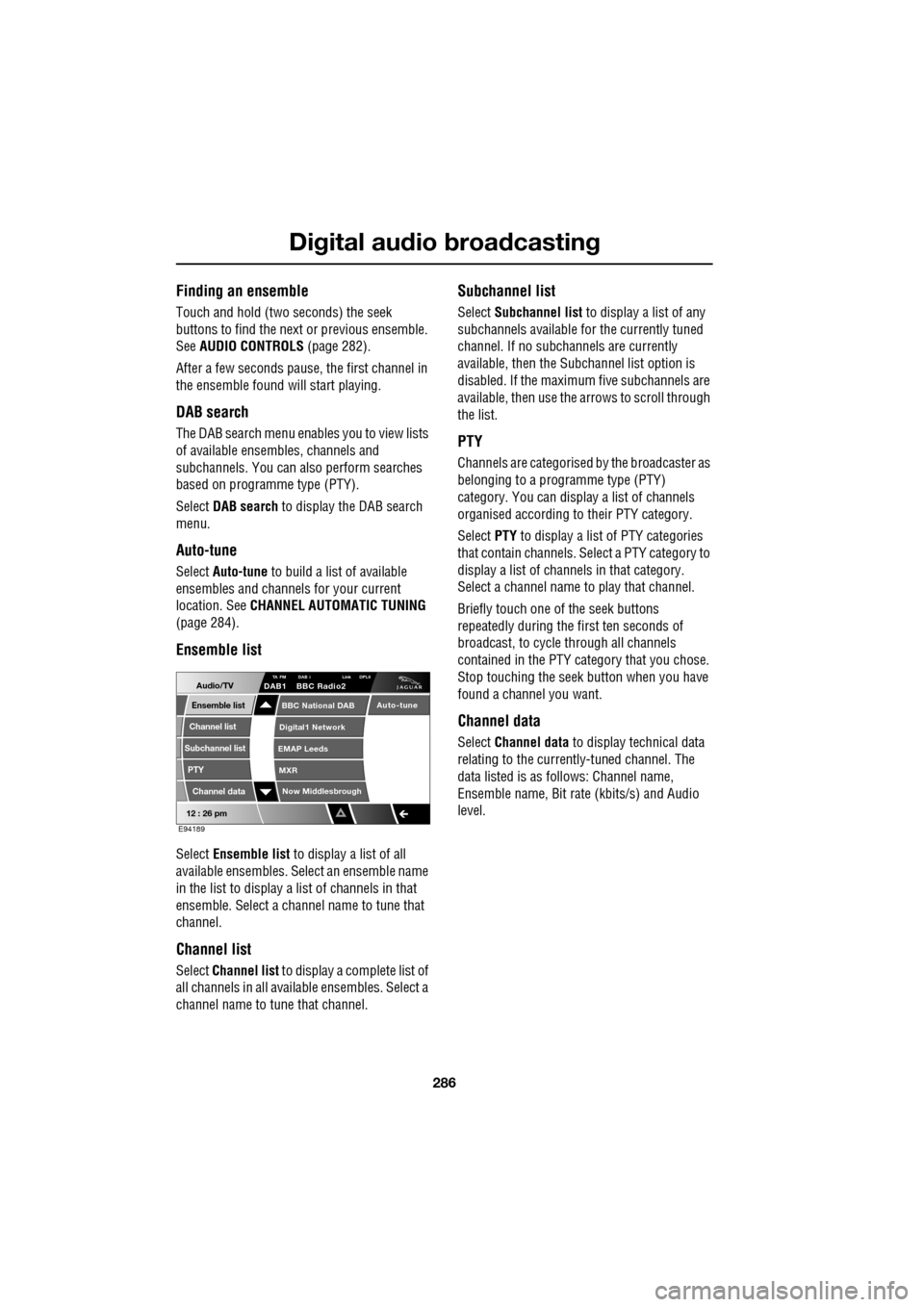
Ensemble list
Select Ensemble list to display a list of all
available ensembles. Select an ensemble name
in the list to display a list of channels in that
ensemble. Select a channe l name to tune that
channel.
Channel list
Select Channel list to display a complete list of
all channels in all availa ble ensembles. Select a
channel name to tune that channel.
Subchannel list
Select Subchannel list to display a list of any
subchannels available for the currently tuned
channel. If no subcha nnels are currently
available, then the Subchannel list option is
disabled. If the maximum five subchannels are
available, then use the arrows to scroll through
the list.
PTY
Channels are categorised by the broadcaster as
belonging to a programme type (PTY)
category. You can display a list of channels
organised according to their PTY category.
Select PTY to display a list of PTY categories
that contain channels. Select a PTY category to
display a list of channels in that category.
Select a channel name to play that channel.
Briefly touch one of the seek buttons
repeatedly during the first ten seconds of
broadcast, to cycle through all channels
contained in the PTY category that you chose.
Stop touching the seek button wh en you have
found a channel you want.
Channel data
Select Channel data to display technical data
relating to the currently-tuned channel. The
data listed is as follows: Channel name,
Ensemble name, Bit rate (kbits/s) and Audio
level.
12 : 26 pm
Now Middlesbrough
BBC National DAB
Digital1 Network
EMAP Leeds
MXR
Audio/TVTA FM DAB i Link DPLIIDAB1 BBC Radio2
Channel list
Subchannel list
Ensemble list
PTY
Channel data
Auto-tune
E94189
Page 287 of 391
287
Digital audio broadcasting
PRESET BUTTONS
Storing channels as presets
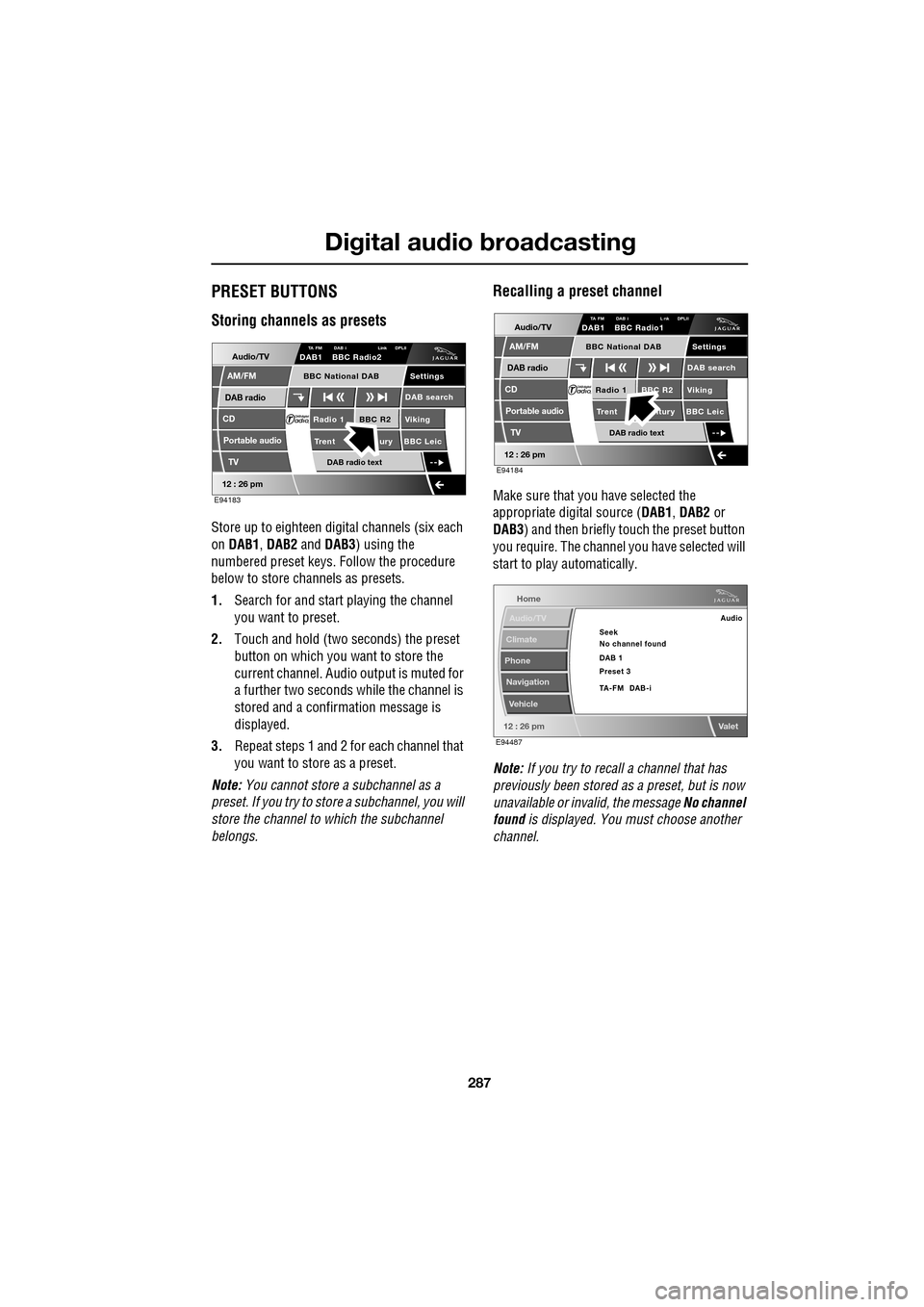
Store up to eighteen digital channels (six each
on DAB1 , DAB2 and DAB3 ) using the
numbered preset keys. Follow the procedure
below to store channels as presets.
1. Search for and start playing the channel
you want to preset.
2. Touch and hold (two seconds) the preset
button on which you want to store the
current channel. Audi o output is muted for
a further two seconds while the channel is
stored and a confirmation message is
displayed.
3. Repeat steps 1 and 2 for each channel that
you want to store as a preset.
Note: You cannot store a subchannel as a
preset. If you try to stor e a subchannel, you will
store the channel to which the subchannel
belongs.
Recalling a preset channel
Make sure that you have selected the
appropriate digital source ( DAB1, DAB2 or
DAB3 ) and then briefly touch the preset button
you require. The channel you have selected will
start to play automatically.
Note: If you try to recall a channel that has
previously been stored as a preset, but is now
unavailable or invalid, the message No channel
found is displayed. You must choose another
channel.
Audio/TV
DAB radio
CD
AM/FM
12 : 26 pm
BBC R2 Viking
Trent ury BBC LeicRadio 1
Settings
DAB search
TA FM DAB i Link DPLIIDAB1 BBC Radio2
Portable audio
TV
DAB radio text
BBC National DAB
E94183
Audio/TV
DAB radio
CD
AM/FM
12 : 26 pm
BBC R2 Viking
Trent ntury BBC LeicRadio 1
Settings
DAB search
TA FM DAB i L nk DPLIIDAB1 BBC Radio1
Portable audio
TV
DAB radio text
BBC National DAB
E94184
Home
Audio/TV
Climate
Phone
Navigation
Vehicle
Valet12 : 26 pm
Audio
Seek
No channel found
Preset 3 DAB 1
TA-FM DAB-i
E94487
Page 288 of 391
Digital audio broadcasting
288
SETTINGS
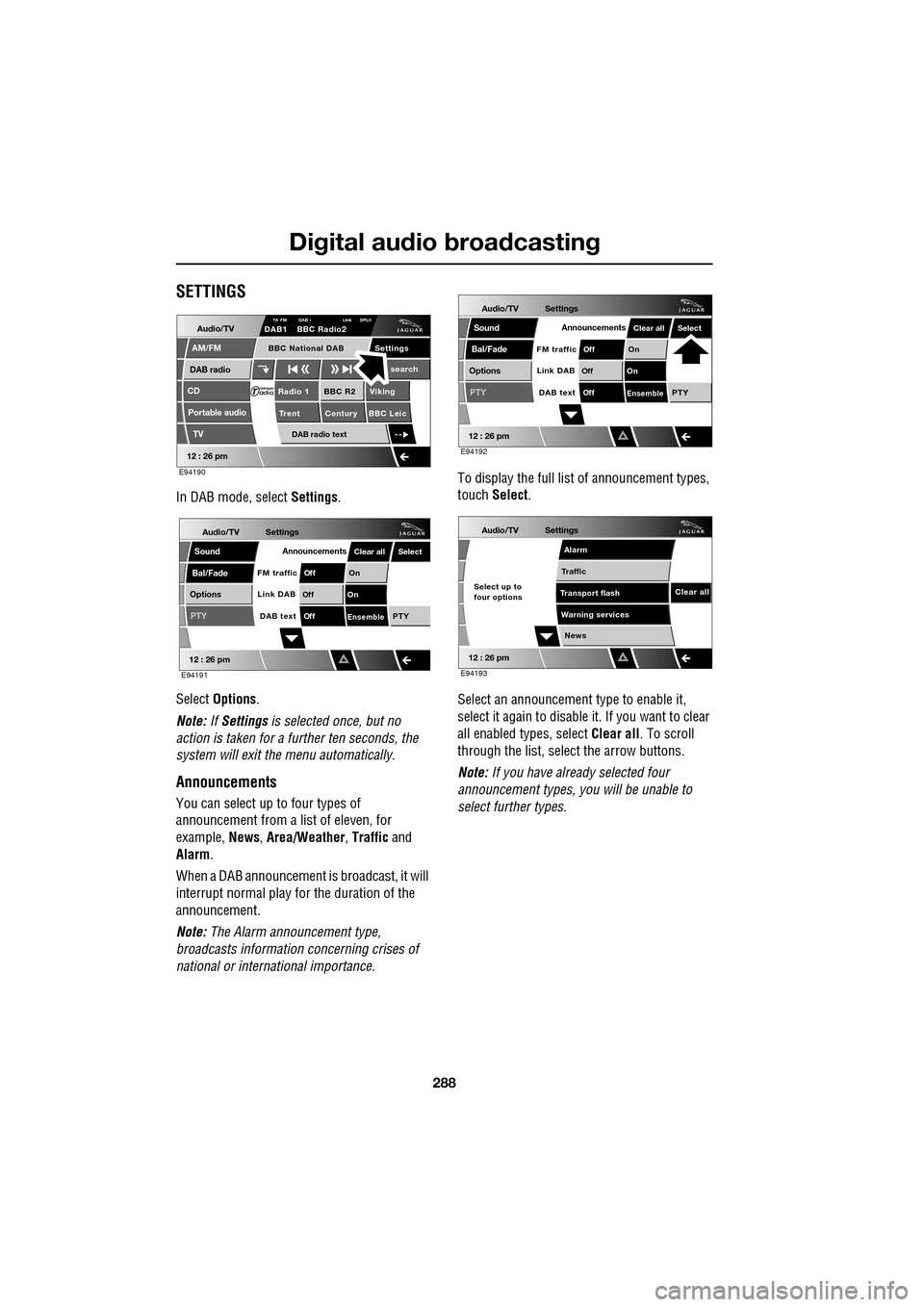
In DAB mode, select Settings.
Select Options .
Note: If Settings is selected once, but no
action is taken for a further ten seconds, the
system will exit the menu automatically.
Announcements
You can select up to four types of
announcement from a list of eleven, for
example, News, Area/Weather , Traffic and
Alarm .
When a DAB announcement is broadcast, it will
interrupt normal play for the duration of the
announcement.
Note: The Alarm announcement type,
broadcasts information concerning crises of
national or international importance. To display the full list
of announcement types,
touch Select .
Select an announcement type to enable it,
select it again to disabl e it. If you want to clear
all enabled types, select Clear all. To scroll
through the list, select the arrow buttons.
Note: If you have already selected four
announcement types, y ou will be unable to
select further types.
Audio/TV
DAB radio
CD
AM/FM
12 : 26 pm
BBC R2 Viking
Trent Century BBC LeicRadio 1
Settings search
TA FM DAB i Link DPLIIDAB1 BBC Radio2
Portable audio
TV
DAB radio text
BBC National DAB
E94190
Audio/TV
Bal/Fade
Options
Sound
12 : 26 pm
Settings
Announcements
On
Of f
On
Of f
EnsemblePTY
Of f
DAB text
Link DAB
FM trafficPTY
Select
Clear all
E94191
Audio/TV
Bal/Fade
Options
Sound
12 : 26 pm
Settings
Announcements
On
Of f
On
Of f
EnsemblePTY
Of f
DAB text
Link DAB
FM trafficPTY
Select
Clear all
E94192
Audio/TV
12 : 26 pm
Settings
News
Alarm
Traffic
T ransport flash
W
arning services
Clear allSelect up to
four options
E94193
Page 289 of 391
289
Digital audio broadcasting
FM traffic
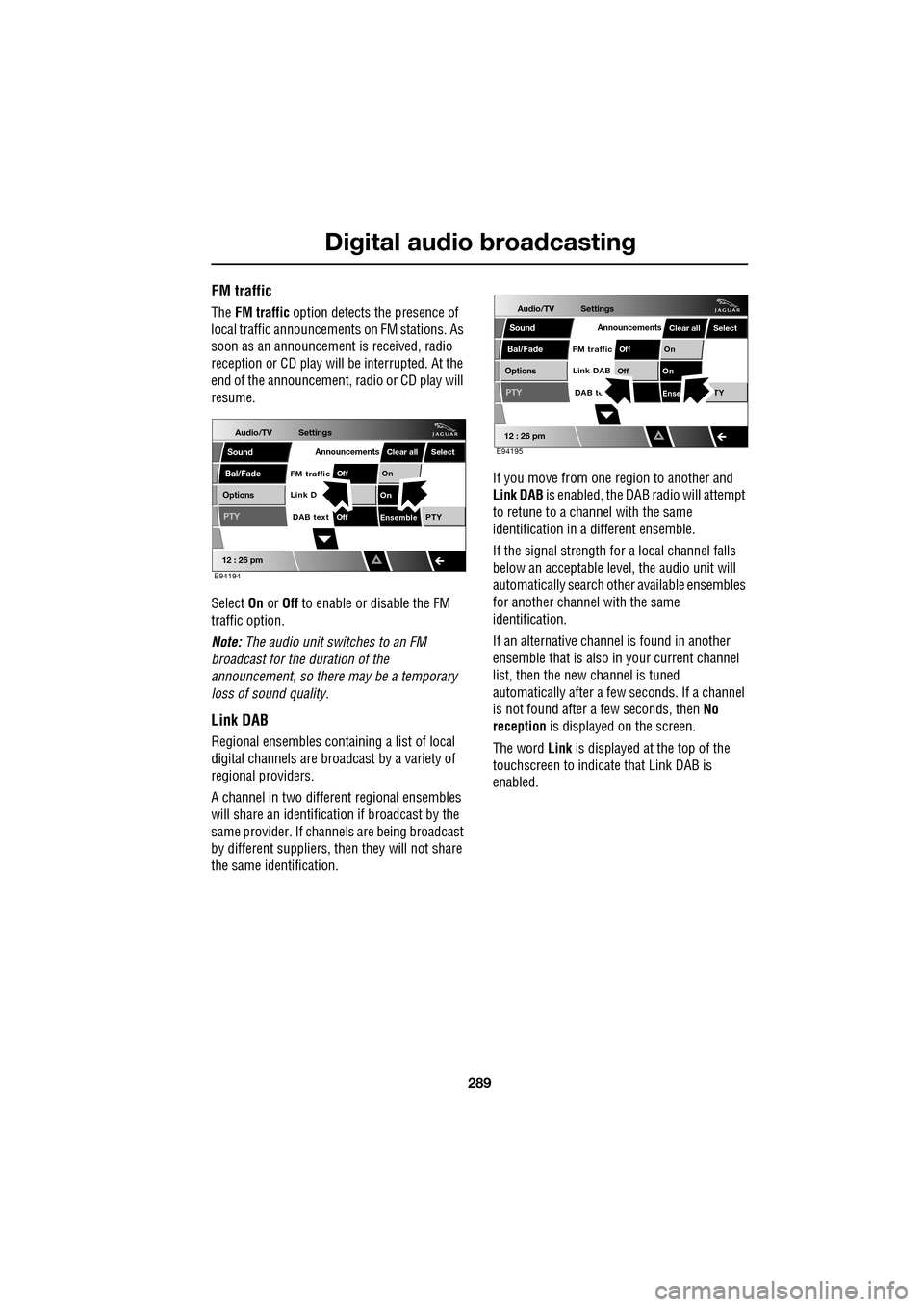
The FM traffic option detects the presence of
local traffic announcements on FM stations. As
soon as an announcement is received, radio
reception or CD play will be interrupted. At the
end of the announcement, radio or CD play will
resume.
Select On or Off to enable or disable the FM
traffic option.
Note: The audio unit switches to an FM
broadcast for the duration of the
announcement, so there may be a temporary
loss of sound quality.
Link DAB
Regional ensembles contai ning a list of local
digital channels are broadcast by a variety of
regional providers.
A channel in two differ ent regional ensembles
will share an identification if broadcast by the
same provider. If channels are being broadcast
by different suppliers, th en they will not share
the same identification. If you move from one region to another and
Link DAB
is enabled, the DAB radio will attempt
to retune to a channel with the same
identification in a different ensemble.
If the signal strength for a local channel falls
below an acceptable level, the audio unit will
automatically search other available ensembles
for another channel with the same
identification.
If an alternative channel is found in another
ensemble that is also in your current channel
list, then the new channel is tuned
automatically after a few seconds. If a channel
is not found after a few seconds, then No
reception is displayed on the screen.
The word Link is displayed at the top of the
touchscreen to indicate that Link DAB is
enabled.
Audio/TV
Bal/Fade
Options
Sound
12 : 26 pm
Settings
Announcements
On
Of f
On
EnsemblePTY
Of f
DAB text
Link D
FM trafficPTY
Select
Clear all
E94194
Audio/TV
Bal/Fade
Options
Sound
12 : 26 pm
Settings
Announcements
On
Of f
On
Of f
EnseTY
DAB te
Link DAB
FM trafficPTY
Select
Clear all
E94195
Page 290 of 391
Digital audio broadcasting
290
DAB text
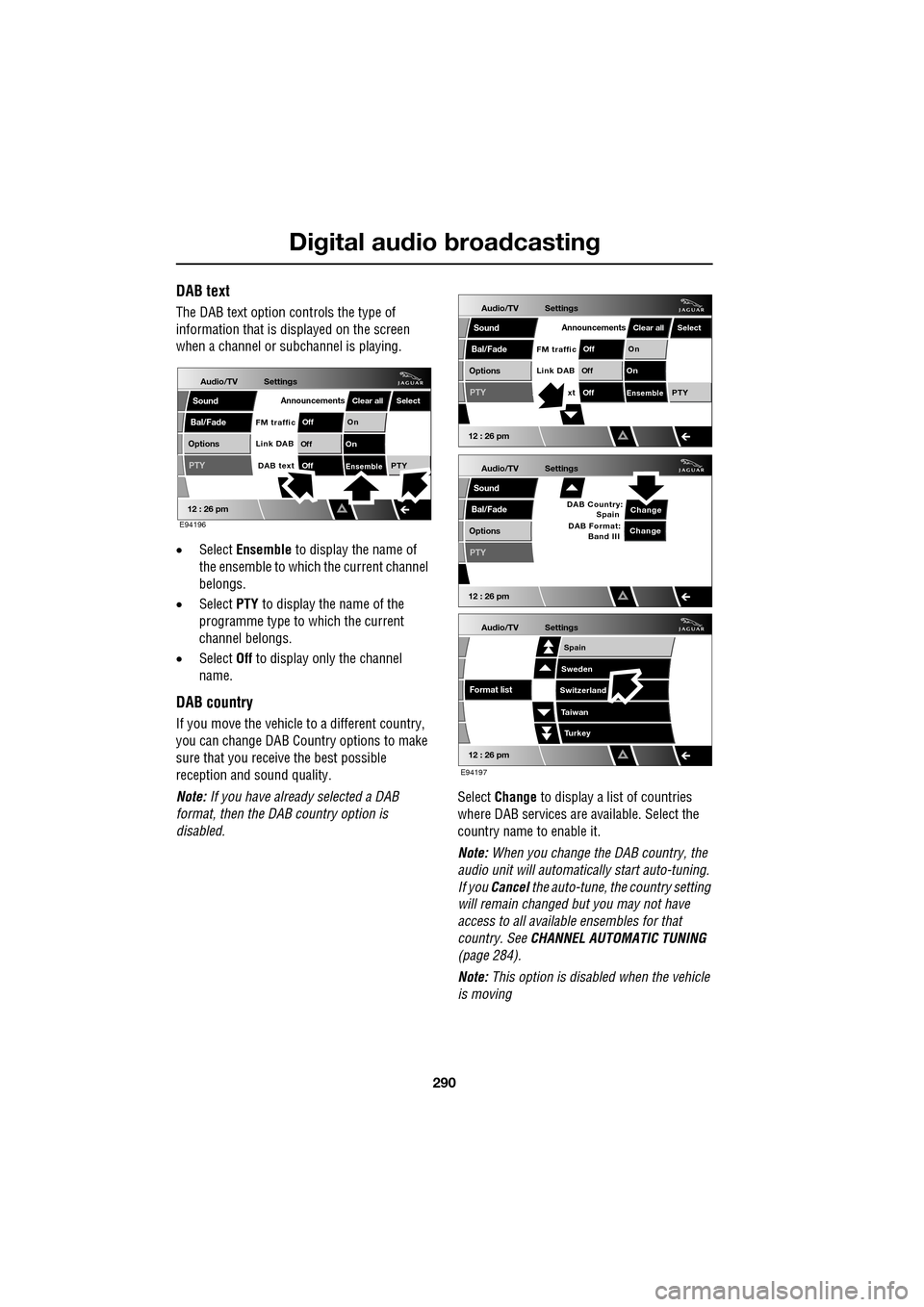
The DAB text option controls the type of
information that is displayed on the screen
when a channel or s ubchannel is playing.
• Select Ensemble to display the name of
the ensemble to which the current channel
belongs.
• Select PTY to display the name of the
programme type to which the current
channel belongs.
• Select Off to display only the channel
name.
DAB country
If you move the vehicle to a different country,
you can change DAB Count ry options to make
sure that you receive the best possible
reception and sound quality.
Note: If you have already selected a DAB
format, then the DAB country option is
disabled. Select
Change to display a list of countries
where DAB services are available. Select the
country name to enable it.
Note: When you change the DAB country, the
audio unit will automati cally start auto-tuning.
If you Cancel the auto-tune, the country setting
will remain changed but you may not have
access to all available ensembles for that
country. See CHANNEL AUTOMATIC TUNING
(page 284).
Note: This option is disabled when the vehicle
is moving
Audio/TV
Bal/Fade
Options
Sound
12 : 26 pm
Settings
Announcements
On
Of f
On
Of f
EnsemblePTY
Of f
DAB text
Link DAB
FM trafficPTY
Select
Clear all
E94196
Audio/TV
Bal/Fade
Options
Sound
12 : 26 pm
Settings
Announcements
On
Of f
On
Of f
EnsemblePTY
Of f
xt
Link DAB
FM trafficPTY
Select
Clear all
Audio/TV
Bal/Fade
Options
Sound
12 : 26 pm
Settings
Change
PTY
Change
DAB Country:
Spain
DAB Format: Band III
Audio/TV
12 : 26 pm
Settings
Turkey
Spain
Sweden
Switzerland
T aiwan
Format list
E94197
Page 291 of 391
291
Digital audio broadcasting
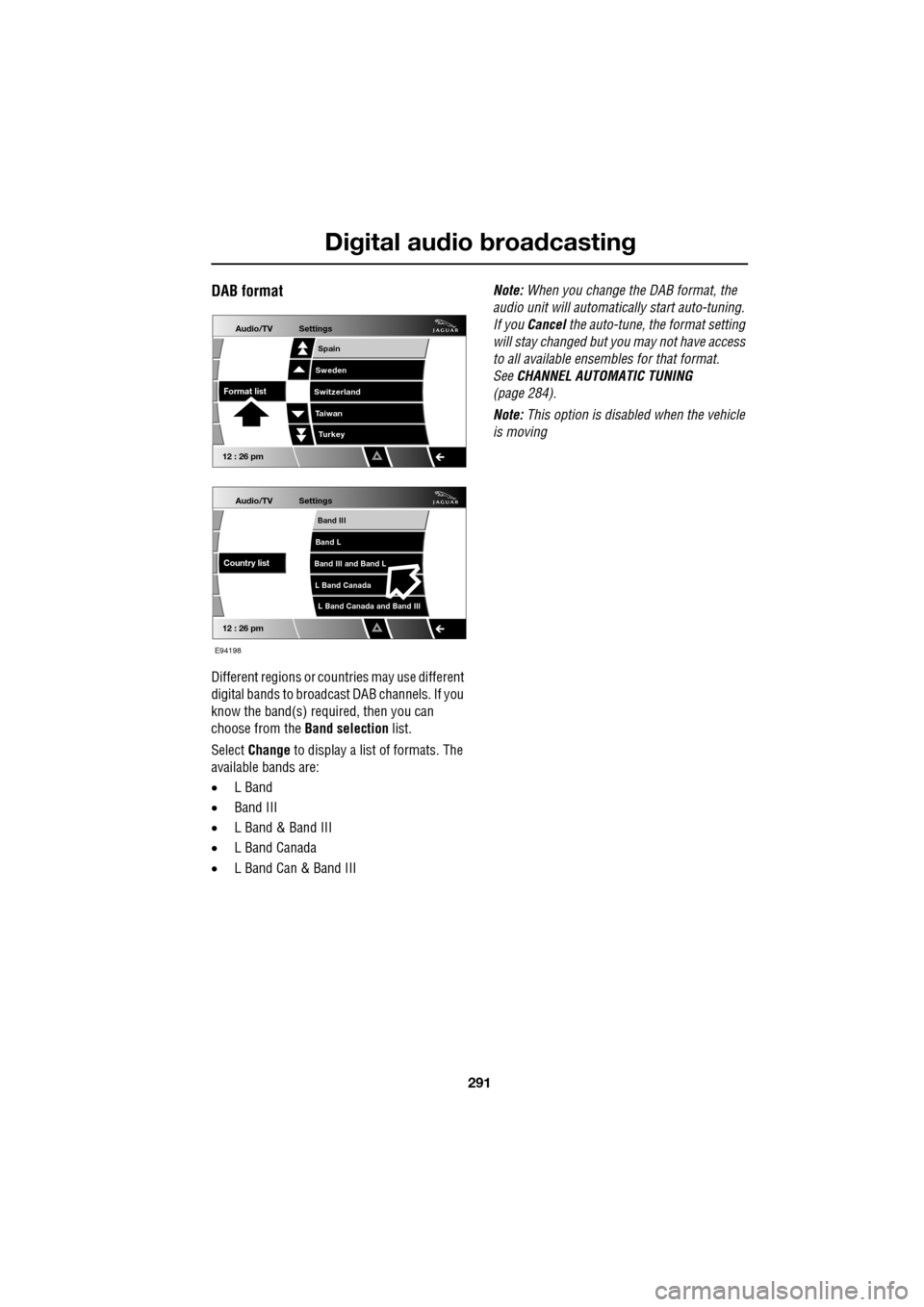
DAB format
Different regions or countries may use different
digital bands to broadcast DAB channels. If you
know the band(s) required, then you can
choose from the Band selection list.
Select Change to display a list of formats. The
available bands are:
• L Band
• Band III
• L Band & Band III
• L Band Canada
• L Band Can & Band III Note:
When you change the DAB format, the
audio unit will automati cally start auto-tuning.
If you Cancel the auto-tune, the format setting
will stay changed but y ou may not have access
to all available ensembles for that format.
See CHANNEL AUTOMATIC TUNING
(page 284).
Note: This option is disabled when the vehicle
is moving
Audio/TV
12 : 26 pm
Settings
L Band Canada and Band III
Band III
Band L
Band III and Band L
L Band Canada
Country list
Audio/TV
12 : 26 pm
Settings
Turkey
Spain
Sweden
Switzerland
T aiwan
Format list
E94198
Page 292 of 391
Compact disc player
292
COMPACT DISC COMPATABILITYThe following CD formats may cause the CD
player to malfunction. It is recommended that
the following types of CD are not used:
• 8 cm (3.1 in.) discs with or without an
adaptor.
• CDs that are not circular.
• CDs with a paper label.
• CDs that are warped, dirty, scratched or
have an abnormal edge.
• Dual format, dual-sided discs (DVD Plus,
CD-DVD format).
• DVDs.
It is recommended that only high quality 12 cm
(4.7 in.) circular discs, that show the Compact
Disc Digital Audio logo, are used.
LOADING COMPACT DISCS
Note: Some privately recorded CD-R discs may
not have been acceptably formatted to be able
to be played on this CD player.
An in-dash compact disc (CD) player is
installed in the audio un it. The CD player will
accommodate one or up to six discs (where
fitted).
The unit will play Comp act Disc Digital Audio
(CDDA) discs (normal discs), MP3 and WMA
files.
CAUTIONS
Irregular shaped CDs and CDs with a
scratch protection film should not be
used.
CDs with labels (or stickers) attached,
should not be used. Labels may become
warped and prevent the CD from being ejected,
causing damage to the CD player. Such
damage is not covere d by the warranty
agreement.
The CD unit will play compact discs that
conform to the international Red Book
standard audio specific ation. Copy-protected
CDs from some manufacturers do not
conform to this standard and playback cannot
be guaranteed.
Due to technical incompatibility,
recordable (CD-R) di scs and re-writable
(CD-RW) discs may no t function correctly.
Dual format, dual- sided discs (DVD
Plus, CD-DVD format) are thicker than
normal CDs and conseq uently playback
cannot be guaranteed in Jaguar audio units,
and jamming could occu r. Warranty claims,
where this type of disc is found to be inside an
audio unit returned fo r repair, will not be
accepted.
CAUTIONS
Do not force the disc into the slot.