Audio JAGUAR XF 2009 1.G Workshop Manual
[x] Cancel search | Manufacturer: JAGUAR, Model Year: 2009, Model line: XF, Model: JAGUAR XF 2009 1.GPages: 391, PDF Size: 19.32 MB
Page 293 of 391
293
Compact disc player
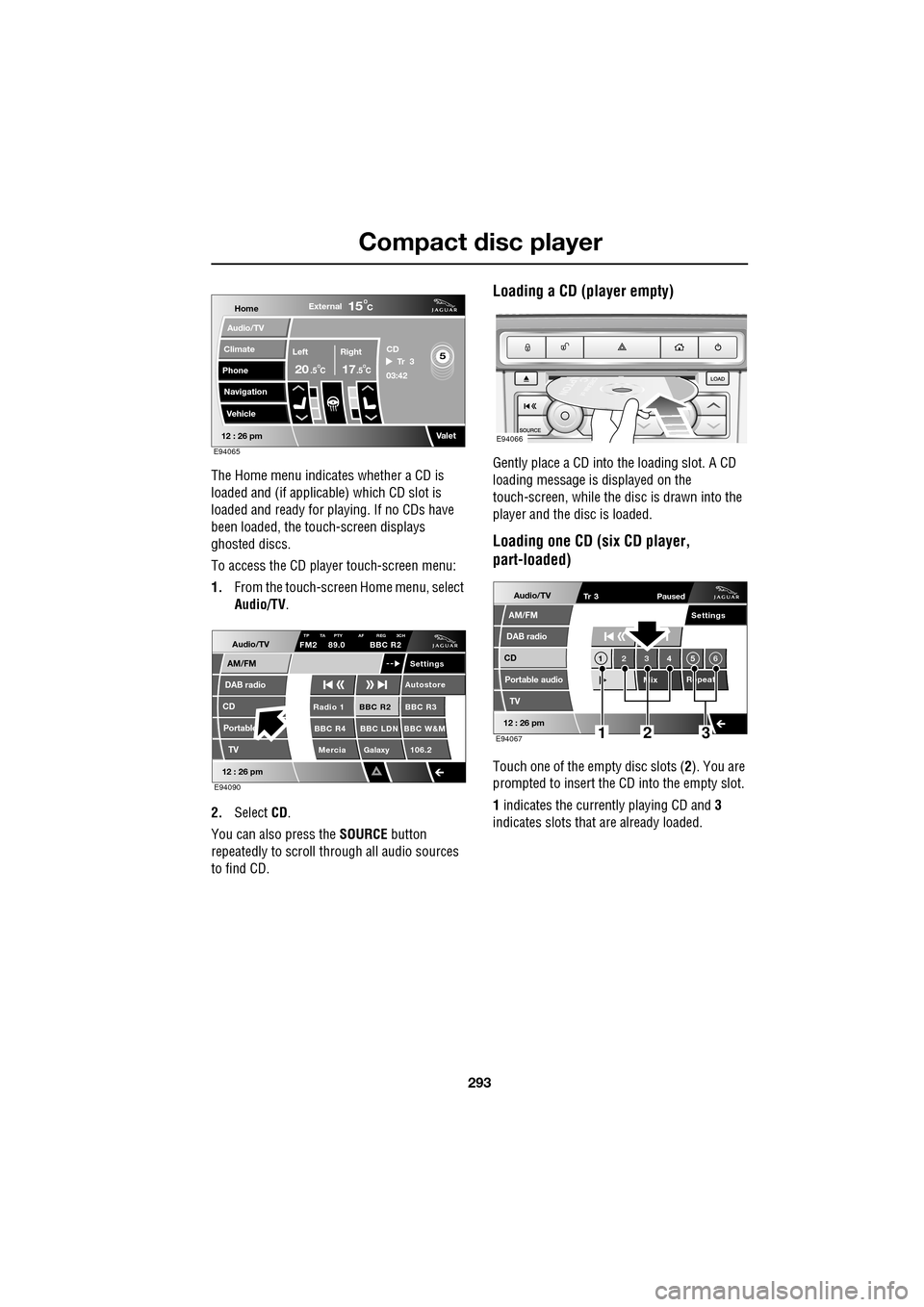
The Home menu indicates whether a CD is
loaded and (if applicable) which CD slot is
loaded and ready for playing. If no CDs have
been loaded, the touch-screen displays
ghosted discs.
To access the CD player touch-screen menu:
1. From the touch-screen Home menu, select
Audio/TV .
2. Select CD.
You can also press the SOURCE button
repeatedly to scroll through all audio sources
to find CD.
Loading a CD (player empty)
Gently place a CD into the loading slot. A CD
loading message is displayed on the
touch-screen, while the di sc is drawn into the
player and the disc is loaded.
Loading one CD (six CD player,
part-loaded)
Touch one of the empty disc slots ( 2). You are
prompted to insert the CD into the empty slot.
1 indicates the currently playing CD and 3
indicates slots that are already loaded.
Home
Audio/TV
Climate
Phone
Navigation
VehicleExternal
Left Right
20 17CC
15C
.5 .5
Valet12 : 26 pm
5Tr 3
CD
03:42
E94065
Audio/TV
DAB radio
CD
AM/FM
12 : 26 pm
BBC R2 BBC R3
BBC R4 BBC LDN BBC W&M Mercia Galaxy 106.2Radio 1
Settings
Autostore
TP TA PTY AF REG 3CHFM2 89.0 BBC R2
Portable TV
E94090
E94066
Audio/TV
DAB radio
CD
AM/FM
12 : 26 pm
Portable audio
TV
Settings
1 23 45 6
MixRepeat
Tr 3
Paused
E94067123
Page 294 of 391
Compact disc player
294
Loading several CDs (six CD player)
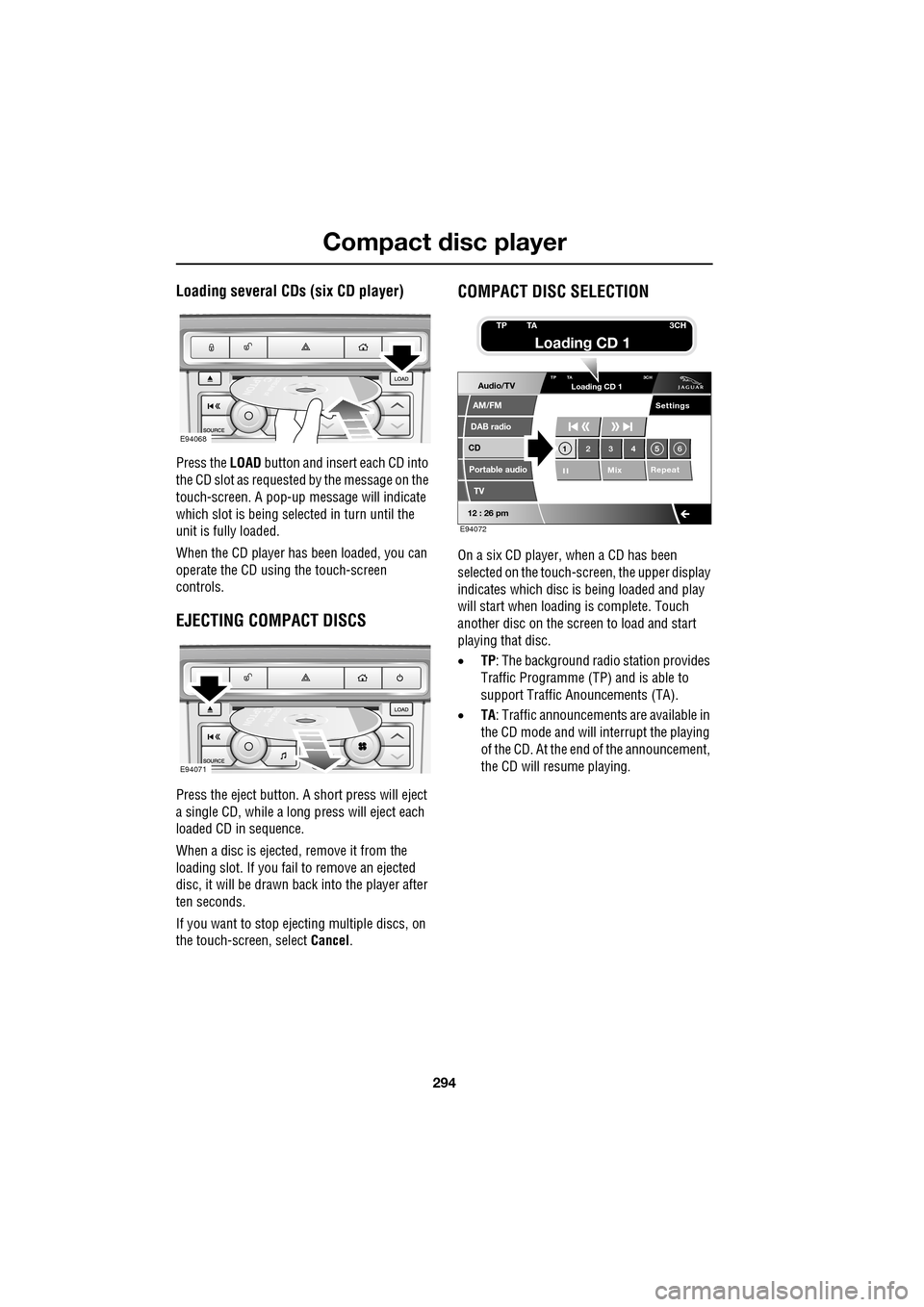
Press the LOAD button and insert each CD into
the CD slot as requested by the message on the
touch-screen. A pop-up me ssage will indicate
which slot is being sele cted in turn until the
unit is fully loaded.
When the CD player has been loaded, you can
operate the CD using the touch-screen
controls.
EJECTING COMPACT DISCS
Press the eject button. A short press will eject
a single CD, while a long press will eject each
loaded CD in sequence.
When a disc is ejected, remove it from the
loading slot. If you fail to remove an ejected
disc, it will be drawn back into the player after
ten seconds.
If you want to stop ejecting multiple discs, on
the touch-screen, select Cancel.
COMPACT DISC SELECTION
On a six CD player, when a CD has been
selected on the touch-screen, the upper display
indicates which disc is being loaded and play
will start when loading is complete. Touch
another disc on the scre en to load and start
playing that disc.
• TP: The background radio station provides
Traffic Programme (TP) and is able to
support Traffic Anouncements (TA).
• TA: Traffic announcements are available in
the CD mode and will interrupt the playing
of the CD. At the end of the announcement,
the CD will resume playing.
E94068
E94071
Audio/TV
DAB radio
CD
AM/FM
12 : 26 pm
Portable audio
TV
Settings
1 23 45 6
MixRepeat
TP TA
3CHLoading CD 1
E94072
TP TA3CH
Loading CD 1
Page 295 of 391
295
Compact disc player
TRACK SELECTION
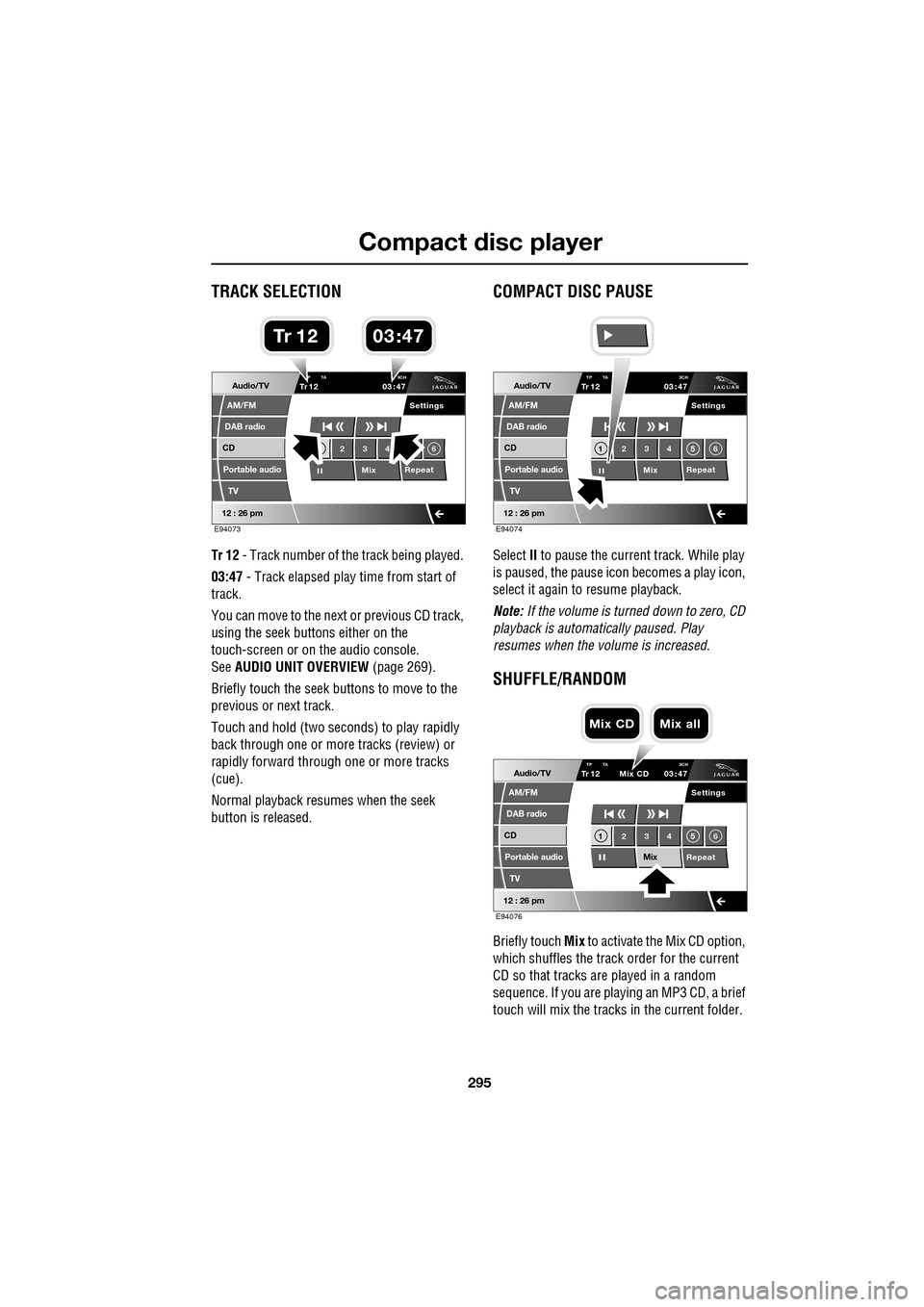
Tr 12 - Track number of th e track being played.
03:47 - Track elapsed play time from start of
track.
You can move to the next or previous CD track,
using the seek buttons either on the
touch-screen or on the audio console.
See AUDIO UNIT OVERVIEW (page 269).
Briefly touch the seek buttons to move to the
previous or next track.
Touch and hold (two seco nds) to play rapidly
back through one or more tracks (review) or
rapidly forward through one or more tracks
(cue).
Normal playback resumes when the seek
button is released.
COMPACT DISC PAUSE
Select II to pause the current track. While play
is paused, the pause ic on becomes a play icon,
select it again to resume playback.
Note: If the volume is turned down to zero, CD
playback is automatically paused. Play
resumes when the volume is increased.
SHUFFLE/RANDOM
Briefly touch Mix to activate the Mix CD option,
which shuffles the track order for the current
CD so that tracks are played in a random
sequence. If you are play ing an MP3 CD, a brief
touch will mix the tracks in the current folder.
Audio/TV
DAB radio
CD
AM/FM
12 : 26 pm
Portable audio
TV
Settings
23 4 6
MixRepeat
TrP TA
3CH1203 47
E94073
03 47Tr 1 2
Audio/TV
DAB radio
CD
AM/FM
12 : 26 pm
Portable audio
TV
Settings
1 23 45 6
MixRepeat
TrTP TA
3CH1203 47
E94074
Audio/TV
DAB radio
CD
AM/FM
12 : 26 pm
Portable audio
TV
Settings
1 23 45 6
MixRepeat
TrTP TA 3CH1203 47
Mix CD
E94076
Mix CD Mix all
Page 296 of 391
Compact disc player
296
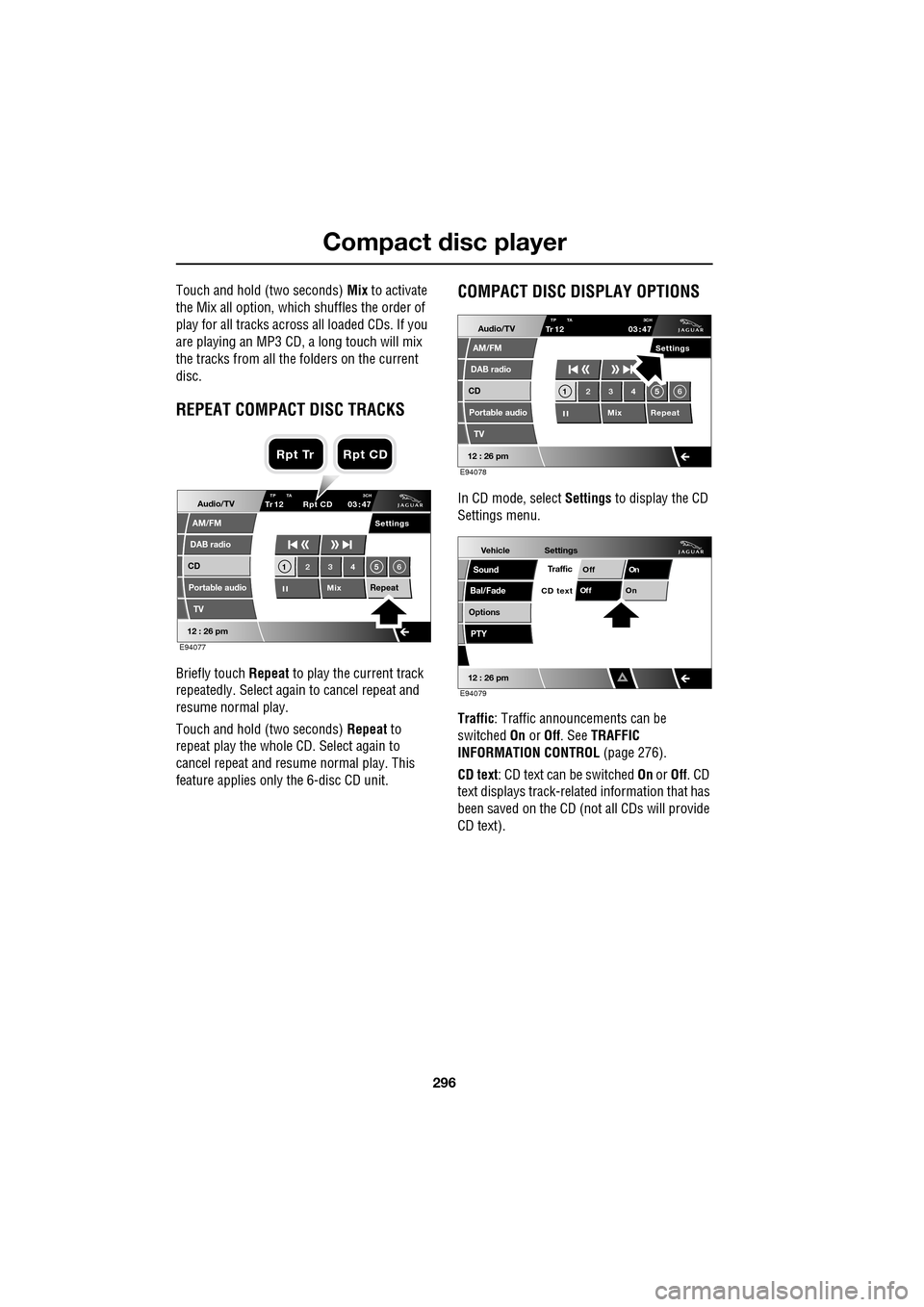
Touch and hold (two seconds) Mix to activate
the Mix all option, which shuffles the order of
play for all tracks across all loaded CDs. If you
are playing an MP3 CD, a long touch will mix
the tracks from all the folders on the current
disc.
REPEAT COMPACT DISC TRACKS
Briefly touch Repeat to play the current track
repeatedly. Select again to cancel repeat and
resume normal play.
Touch and hold (two seconds) Repeat to
repeat play the whole CD. Select again to
cancel repeat and resu me normal play. This
feature applies only the 6-disc CD unit.
COMPACT DISC DISPLAY OPTIONS
In CD mode, select Settings to display the CD
Settings menu.
Traffic : Traffic announcements can be
switched On or Off. See TRAFFIC
INFORMATION CONTROL (page 276).
CD text : CD text can be switched On or Off. CD
text displays track-related information that has
been saved on the CD (not all CDs will provide
CD text).Audio/TV
DAB radio
CD
AM/FM
12 : 26 pm
Portable audio
TV
Settings
1 23 45 6
MixRepeat
TrTP TA 3CH1203 47
Rpt CD
E94077
Rpt Tr Rpt CD
Audio/TV
DAB radio
CD
AM/FM
12 : 26 pm
Portable audio
TV
Settings
1 23 45 6
MixRepeat
TrTP TA
3CH1203 47
E94078
Vehicle
Options
Sound
Bal/Fade
12 : 26 pm
Settings
TrafficOnOff
On
Of f
CD text
PTY
E94079
Page 297 of 391
297
Compact disc player
MP3 FILE PLAYBACK
On audio units fitted with a 6-disc CD player,
you can play CDs co ntaining MP3 files.
MP3 discs have the potential to hold more
music than a conventional CD, because each
track can be compressed to a higher degree
during recording.
If you record your own music, each session
must be properly closed but the whole disc
does not have to be finalised.
Some pre-recorded and personally-recorded
discs, can contain additional information on
the disc, e.g. CD titles, track titles and the
artist's name (this info rmation is contained in
ID3 Tags).
Additional touch-screen controls enable you to
select folders and tracks and display various
items of information about the recordings.
Note: A mixture of CDs and MP3 discs can be
loaded into the 6-disc CD player together.
Note: The audio system will play MP3, WMA,
WAV and AAC files. The highest compression
rate supported, is 320k bits per second (kbps).
If anything less than 128 kbps is used, Digital
Signal Processing (DSP) functionality may be
lost.
Note: The CD player is not guaranteed to play
every disc available because of variation in the
quality of discs.
Using MP3 discs
When an MP3 disc is first played, the first track
in the root folder will play first. If you restart
play after switching to another disc or audio
source, then play will resume from the point
you left it.
Note: The CD player may take a long time (one
minute or more) to load an MP3 disc, owing to
the number of tracks on it. To minimise the
loading on the system, a rigid folder structure
is recommended.
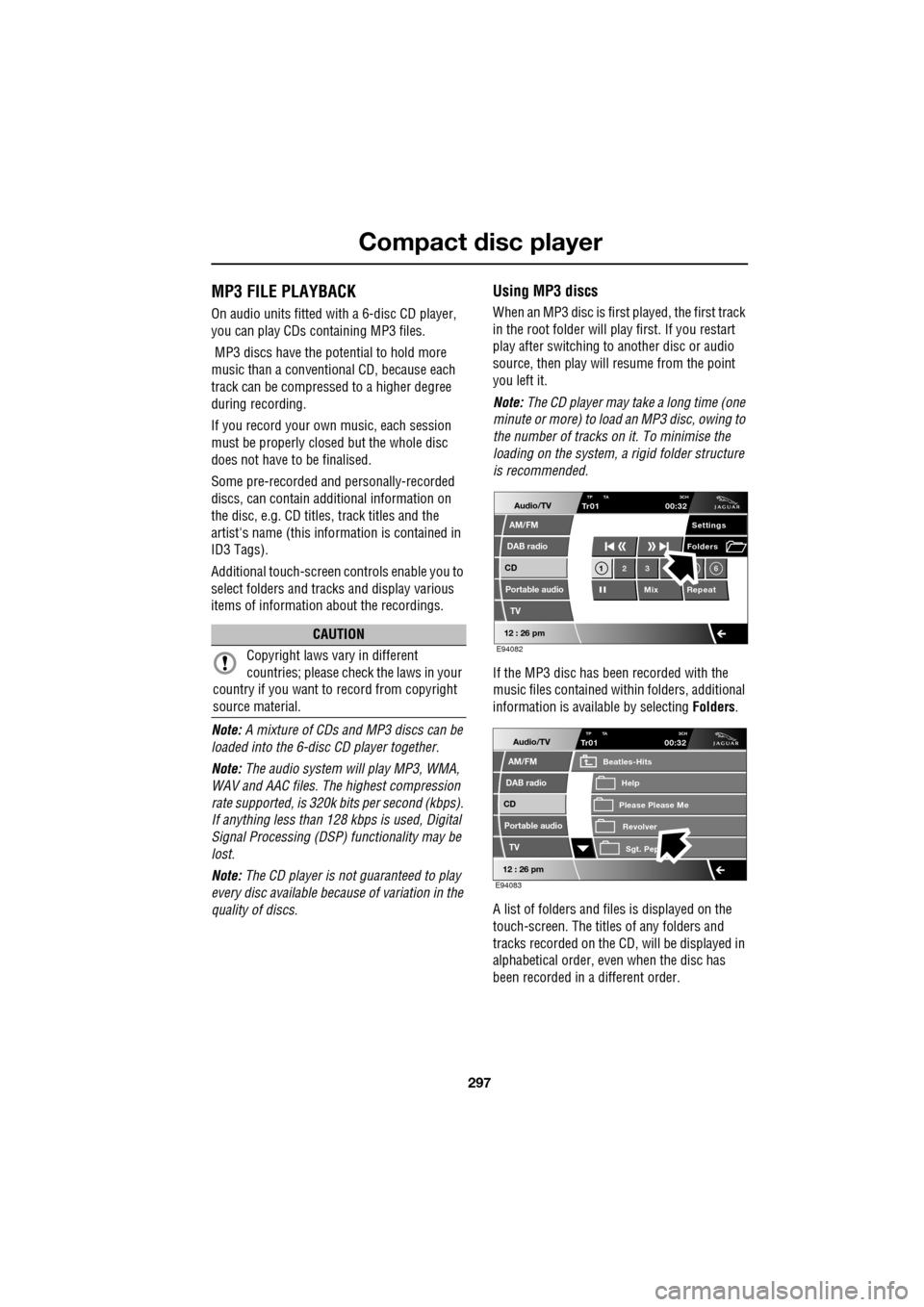
If the MP3 disc has been recorded with the
music files contained with in folders, additional
information is available by selecting Folders.
A list of folders and files is displayed on the
touch-screen. The titles of any folders and
tracks recorded on the CD, will be displayed in
alphabetical order, even when the disc has
been recorded in a different order.
CAUTION
Copyright laws vary in different
countries; please check the laws in your
country if you want to record from copyright
source material.
Audio/TV
DAB radio
CD
AM/FM
12 : 26 pm
Portable audio
TV
Settings
1 23 6
MixRepeat
Folders
TP TA
3CHTr0100:32
E94082
Audio/TV
DAB radio
CD
AM/FM
12 : 26 pm
Portable audio
TV
TP TA 3CHTr0100:32
Please Please Me
Beatles-Hits
RevolverSgt. Pep
Help
E94083
Page 298 of 391
Compact disc player
298
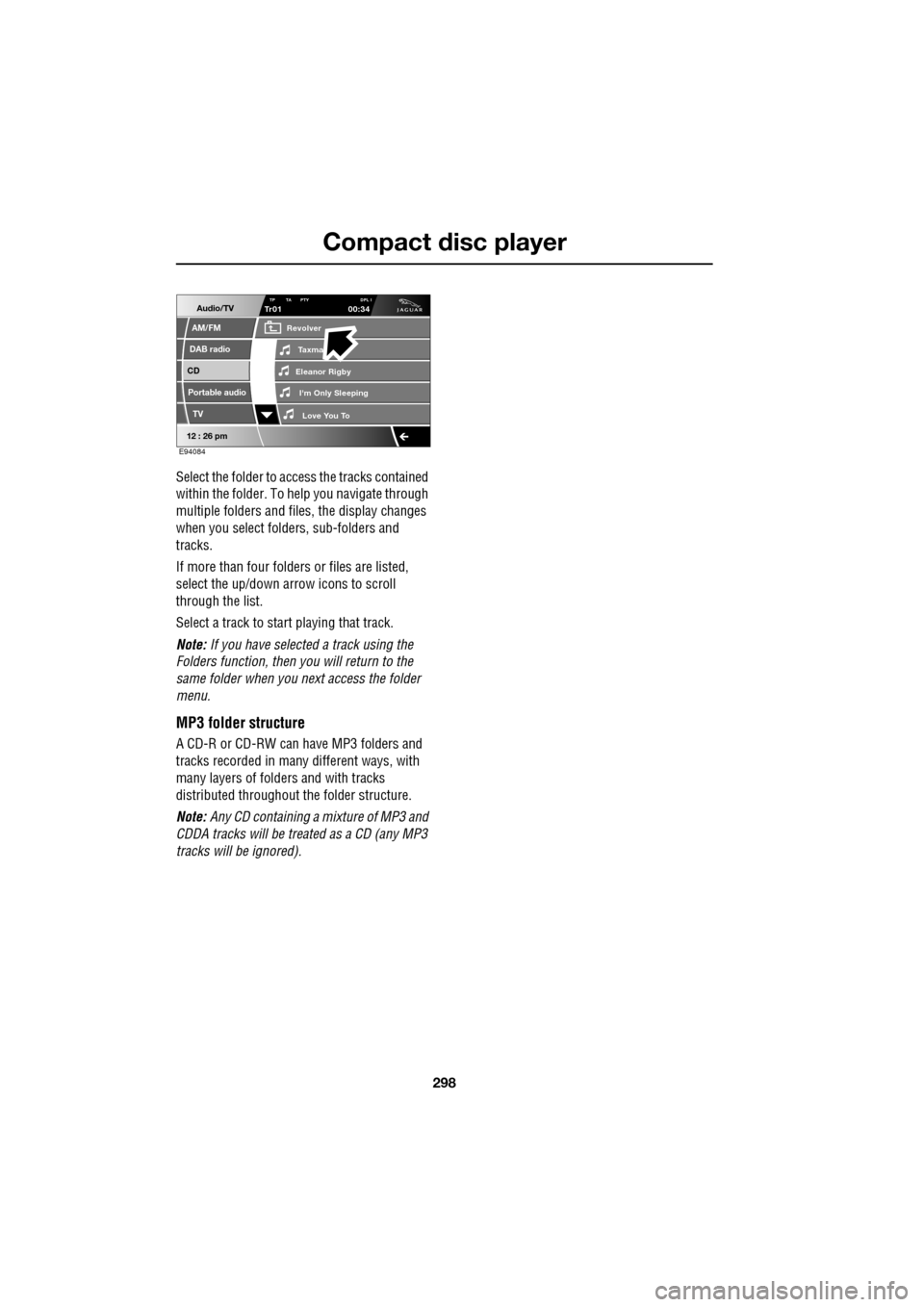
Select the folder to access the tracks contained
within the folder. To help you navigate through
multiple folders and files, the display changes
when you select folders, sub-folders and
tracks.
If more than four folders or files are listed,
select the up/down arrow icons to scroll
through the list.
Select a track to start playing that track.
Note: If you have selected a track using the
Folders function, then you will return to the
same folder when you next access the folder
menu.
MP3 folder structure
A CD-R or CD-RW can have MP3 folders and
tracks recorded in many different ways, with
many layers of folders and with tracks
distributed throughout the folder structure.
Note: Any CD containing a mixture of MP3 and
CDDA tracks will be trea ted as a CD (any MP3
tracks will be ignored).
Audio/TV
DAB radio
CD
AM/FM
12 : 26 pm
Portable audio
TV
TP TA PTY DPL ITr0100:34
Eleanor Rigby
Revolver
I'm Only Sleeping Love You To
Taxma
E94084
Page 299 of 391
299
Portable audio
PORTABLE AUDIO
Portable audio overview
The portable audio system is located in the
centre console cubby box. You can connect a
variety of audio devices, including iPods, via
this interface to the audio system.
If you are connecting an iPod or mass storage
device, you can use the touch-screen to
operate and search the device. Many of the
controls are similar to those available for CD
play.
The devices that you can connect to the
portable audio interface include:
• USB mass storage devices, for example
memory stick.
• iPod.
• Auxiliary device (no to uch-screen control).
Note: The portable audio interface supports
the following iPods:
•iPod (generations 3-5).
•iPod Mini.
•iPod Nano (generations 1-3).
•iPod Photo.
•iPod Classic.
Note: The audio system will play MP3, WMA,
WAV and AAC files. Note:
Some MP3 players ha ve their own file
system that is not suppor ted by this system. To
use your MP3 player, y ou must set it to USB
Removable Device or Mass Storage Device
mode (see manufacturer's information for
further details). Only music that has been
added to the device in this mode can be played
via the vehicle's portable audio system.
Note: The system will suppor t devices with a
storage capacity up to 256 GB (approximately
65 000 tracks).
CAUTION
We recommend that you replace the
rubber cover when a portable device is
not plugged in. This will prevent damage to the
system. The cover is not waterproof.
Please disconnect your iPod when
leaving the vehicle. Failure to do so may
result in the iPod battery discharging.
Page 300 of 391
Portable audio
300
Connecting an iPod
On the audio Home screen, select Audio/TV,
then Portable audio , then iPod.
Note: You can also press the SOURCE button
repeatedly to select Portable audio device .
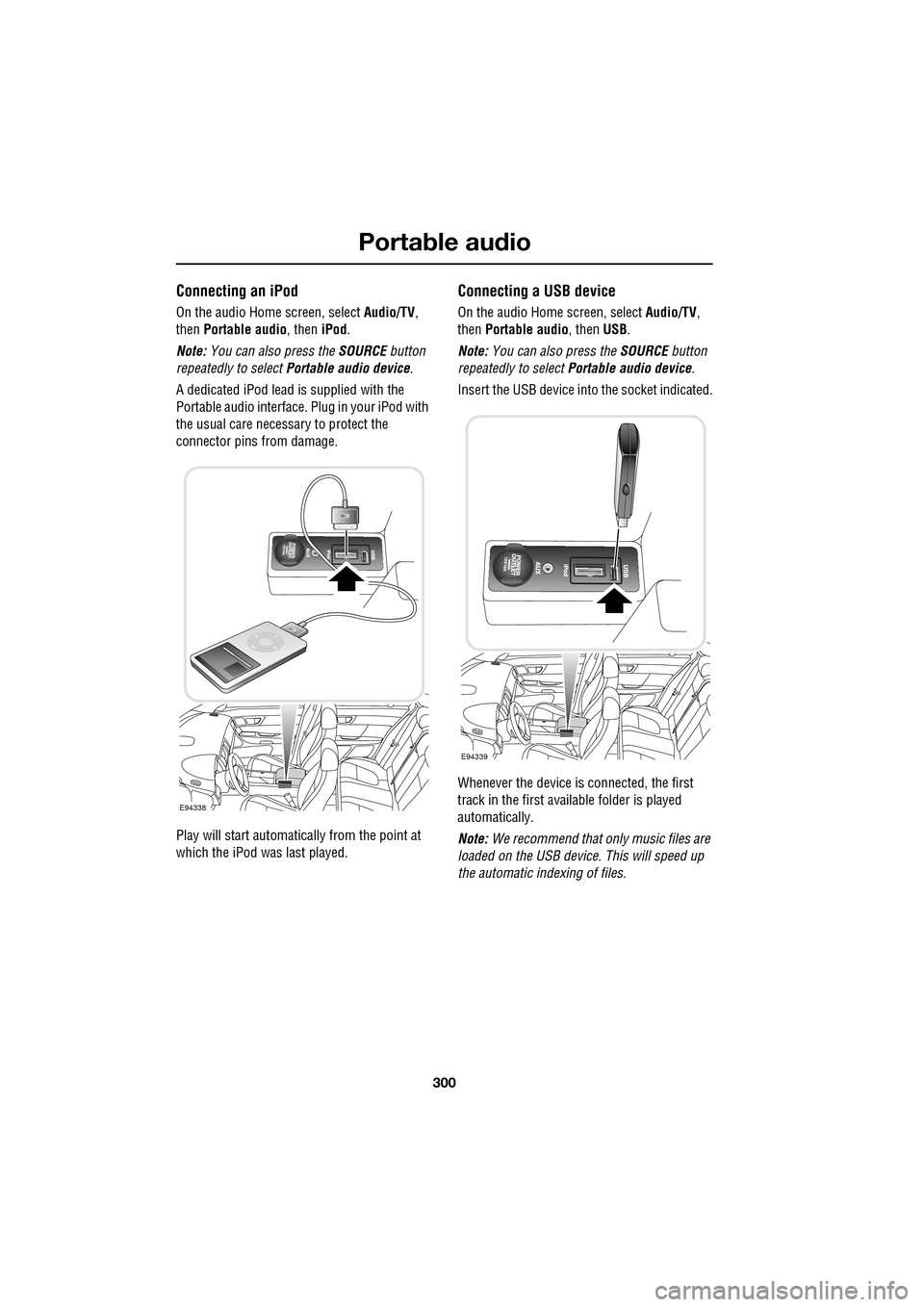
A dedicated iPod lead is supplied with the
Portable audio interface. Plug in your iPod with
the usual care necess ary to protect the
connector pins from damage.
Play will start automatically from the point at
which the iPod was last played.
Connecting a USB device
On the audio Home screen, select Audio/TV,
then Portable audio, then USB.
Note: You can also press the SOURCE button
repeatedly to select Portable audio device .
Insert the USB device into the socket indicated.
Whenever the device is connected, the first
track in the first available folder is played
automatically.
Note: We recommend that only music files are
loaded on the USB devi ce. This will speed up
the automatic i ndexing of files.
E94338
E94339
Page 301 of 391
301
Portable audio
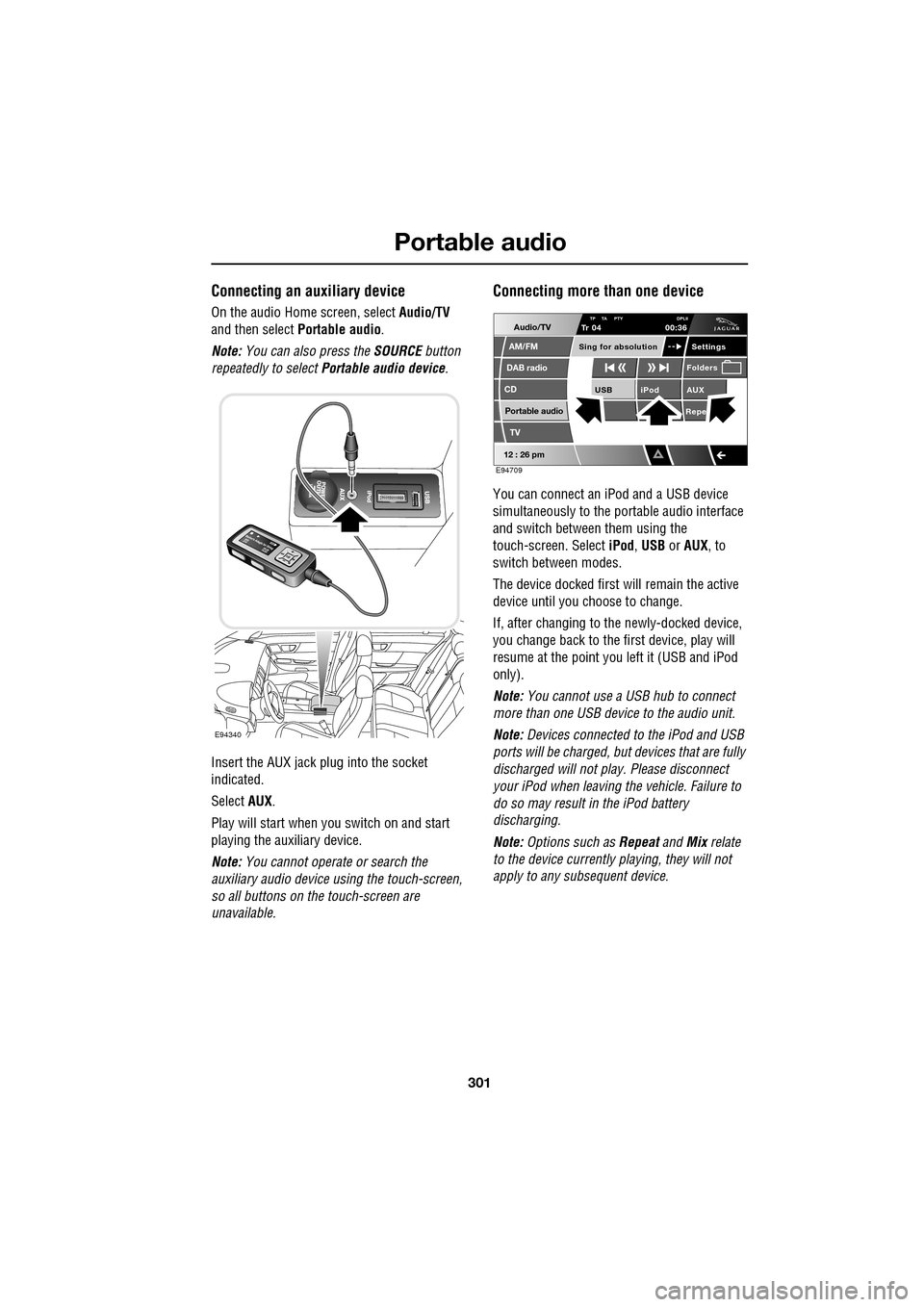
Connecting an auxiliary device
On the audio Home screen, select Audio/TV
and then select Portable audio.
Note: You can also press the SOURCE button
repeatedly to select Portable audio device .
Insert the AUX jack plug into the socket
indicated.
Select AUX.
Play will start when you switch on and start
playing the auxiliary device.
Note: You cannot operate or search the
auxiliary audio device using the touch-screen,
so all buttons on the touch-screen are
unavailable.
Connecting more than one device
You can connect an iPod and a USB device
simultaneously to the portable audio interface
and switch between them using the
touch-screen. Select iPod, USB or AUX , to
switch between modes.
The device docked first will remain the active
device until you choose to change.
If, after changing to the newly-docked device,
you change back to the first device, play will
resume at the point you left it (USB and iPod
only).
Note: You cannot use a USB hub to connect
more than one USB device to the audio unit.
Note: Devices connected to the iPod and USB
ports will be charged, but devices that are fully
discharged will not play. Please disconnect
your iPod when leaving the vehicle. Failure to
do so may result in the iPod battery
discharging.
Note: Options such as Repeat and Mix relate
to the device currently playing, they will not
apply to any subsequent device.
E94340
Audio/TV
DAB radio
CD
AM/FM
12 : 26 pm
iPod AUX
RepeUSB
Settings
Folders
TP TA PTY DPLIITr 04
Portable audio
TV
Sing for absolution
00:36
E94709
Page 302 of 391
Portable audio
302
AUXILIARY INPUT DEVICES
Playing a portable device
If you are using a USB mass storage device or
iPod, you can control playback using the
touch-screen controls.
If you are using any por table audio device via
the AUX socket, then you must control
playback from the device itself.
Autoplay
Whenever a USB device is docked, play will
start automatically at the first track in the first
available folder.
For an iPod, play will always resume from the
current track, whether previously docked or
not.
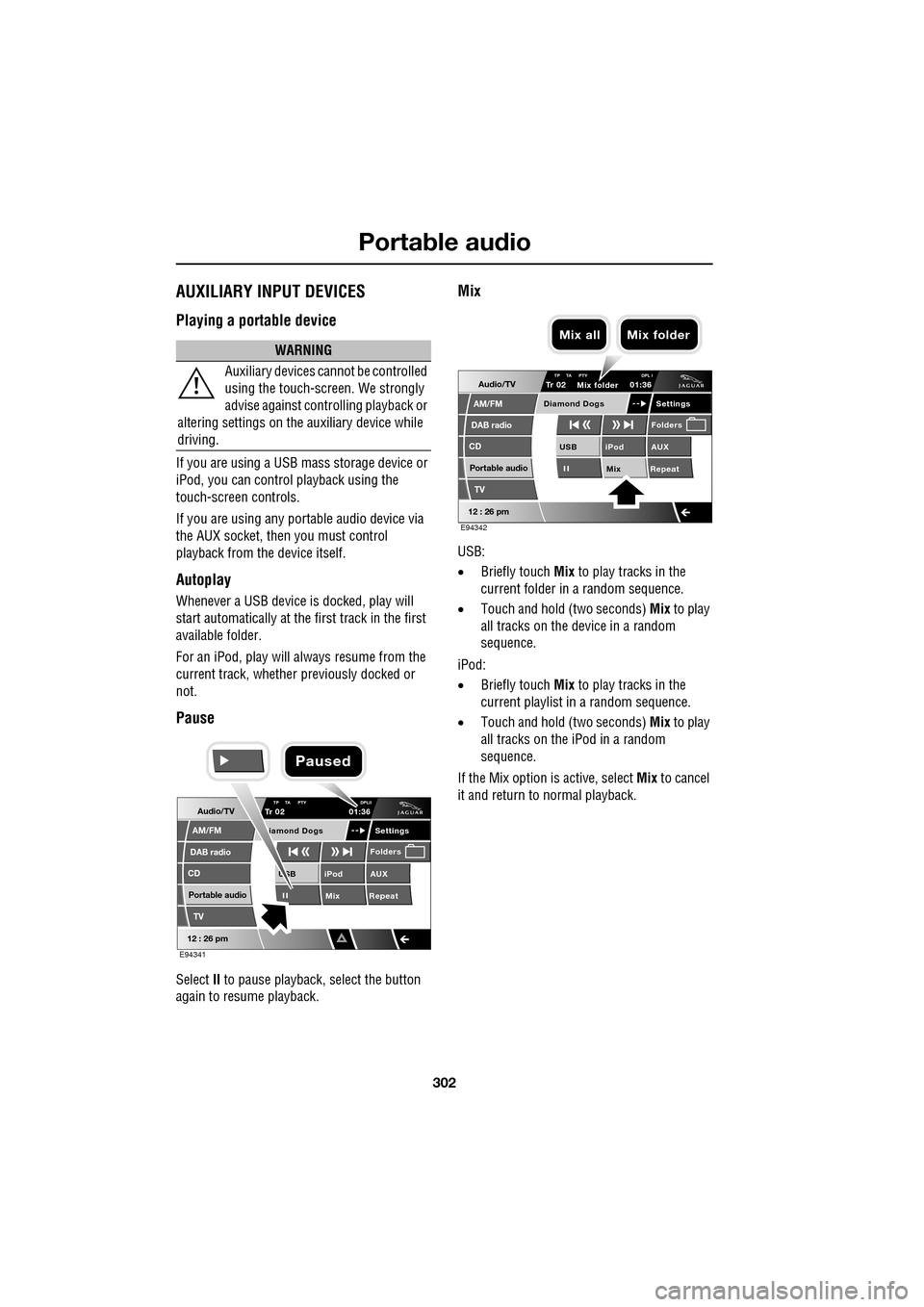
Pause
Select II to pause playback , select the button
again to resume playback.
Mix
USB:
• Briefly touch Mix to play tracks in the
current folder in a random sequence.
• Touch and hold (two seconds) Mix to play
all tracks on the device in a random
sequence.
iPod:
• Briefly touch Mix to play tracks in the
current playlist in a random sequence.
• Touch and hold (two seconds) Mix to play
all tracks on the iPod in a random
sequence.
If the Mix option is active, select Mix to cancel
it and return to normal playback.
WARNING
Auxiliary devices ca nnot be controlled
using the touch-screen. We strongly
advise against controlling playback or
altering settings on the auxiliary device while
driving.
Audio/TV
DAB radio
CD
AM/FM
12 : 26 pm
iPod AUX
Mix RepeatUSB
Settings
Folders
TP TA PTY DPLIITr 02
Portable audio
TV
iamond Dogs
01:36
E94341
Paused
Audio/TV
DAB radio
CD
AM/FM
12 : 26 pm
iPod AUX
Mix RepeatUSB
Settings
Folders
TP TA PTY DPL ITr 02
Portable audio
TV
Diamond Dogs
01:36
E94342
Mix folder
Mix all Mix folder