Rele JAGUAR XF 2009 1.G Repair Manual
[x] Cancel search | Manufacturer: JAGUAR, Model Year: 2009, Model line: XF, Model: JAGUAR XF 2009 1.GPages: 391, PDF Size: 19.32 MB
Page 158 of 391
Cruise control
158
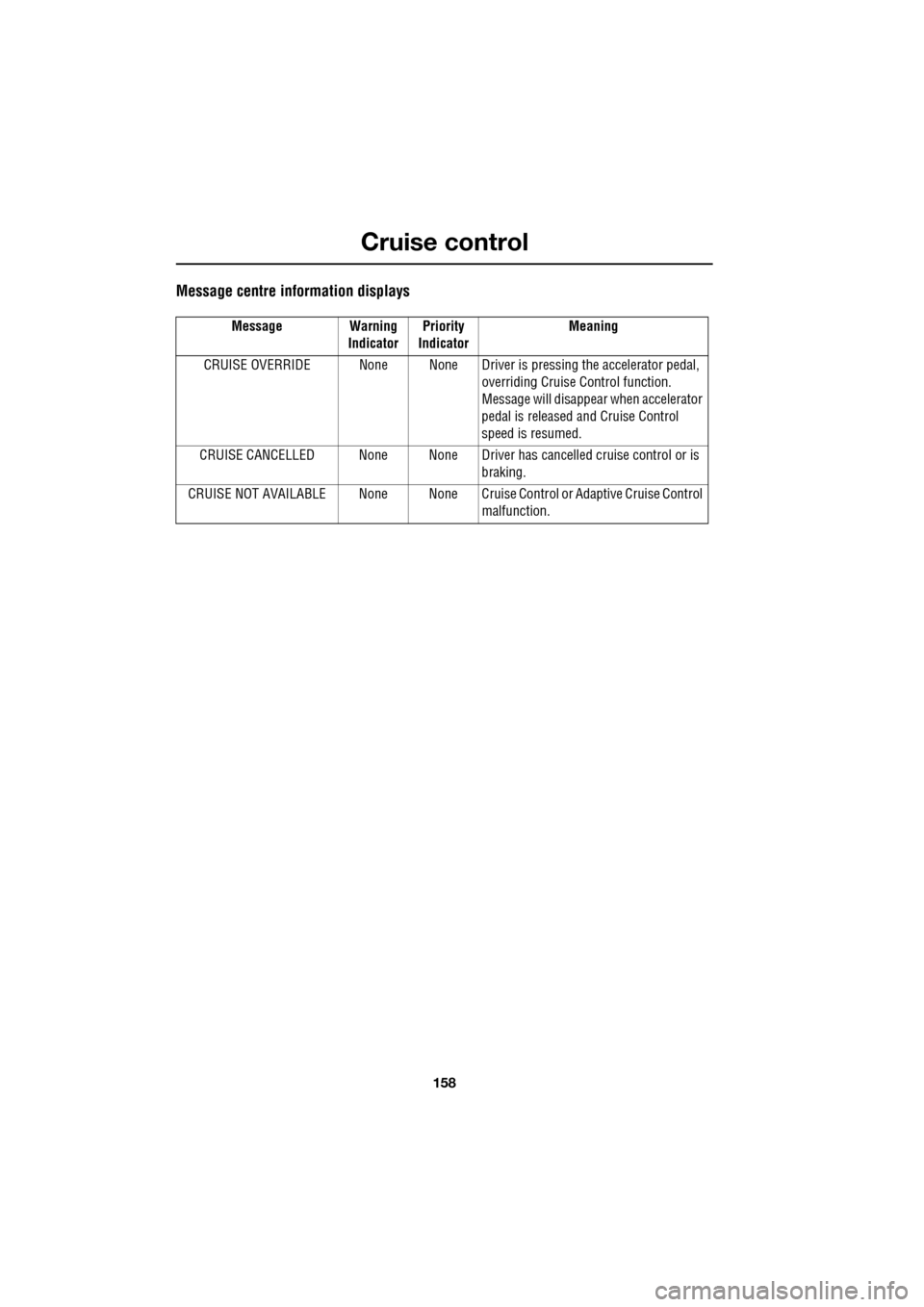
Message centre information displays
Message Warning IndicatorPriority
Indicator Meaning
CRUISE OVERRIDE None None Driver is pressing the accelerator pedal,
overriding Cruise Control function.
Message will disappear when accelerator
pedal is released and Cruise Control
speed is resumed.
CRUISE CANCELLED None None Driver has cancelled cruise control or is
braking.
CRUISE NOT AVAILABLE None None Cruise C ontrol or Adaptive Cruise Control
malfunction.
Page 160 of 391
Adaptive cruise control (ACC)
160
Setting the speed
Accelerate as normal until the required speed is
reached.
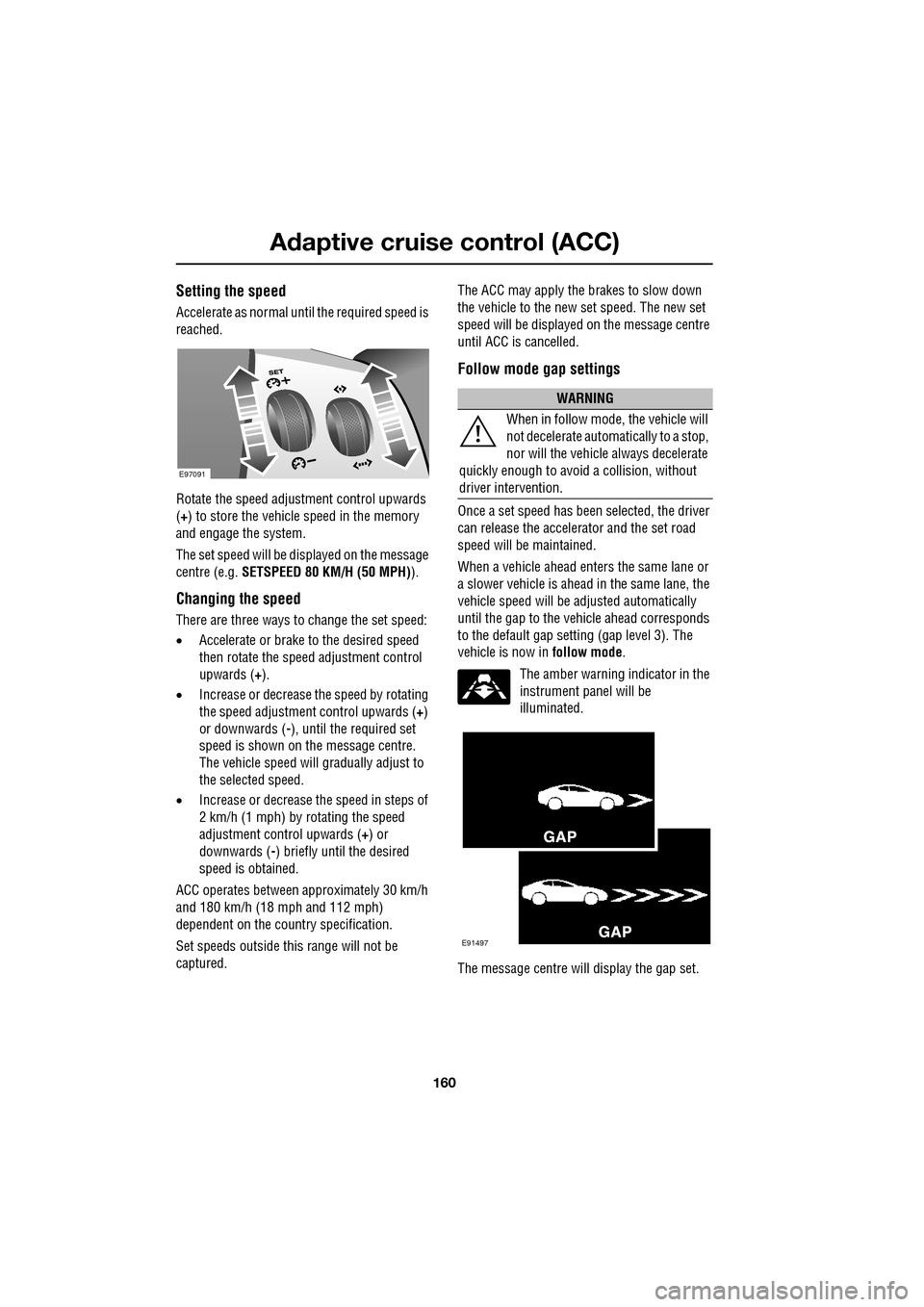
Rotate the speed adjustment control upwards
(+) to store the vehicle speed in the memory
and engage the system.
The set speed will be displayed on the message
centre (e.g. SETSPEED 80 KM/H (50 MPH) ).
Changing the speed
There are three ways to change the set speed:
•Accelerate or brake to the desired speed
then rotate the speed adjustment control
upwards ( +).
• Increase or decrease the speed by rotating
the speed adjustment control upwards ( +)
or downwards ( -), until the required set
speed is shown on the message centre.
The vehicle speed will gradually adjust to
the selected speed.
• Increase or decrease the speed in steps of
2 km/h (1 mph) by rotating the speed
adjustment control upwards (+) or
downwards ( -) briefly until the desired
speed is obtained.
ACC operates between approximately 30 km/h
and 180 km/h (18 mph and 112 mph)
dependent on the c ountry specification.
Set speeds outside th is range will not be
captured. The ACC may apply the brakes to slow down
the vehicle to the new set speed. The new set
speed will be displayed on the message centre
until ACC is cancelled.
Follow mode gap settings
Once a set speed has been selected, the driver
can release the accelerator and the set road
speed will be maintained.
When a vehicle ahead enters the same lane or
a slower vehicle is ahead in the same lane, the
vehicle speed will be adjusted automatically
until the gap to the vehicle ahead corresponds
to the default gap setting (gap level 3). The
vehicle is now in
follow mode.
The amber warning indicator in the
instrument panel will be
illuminated.
The message centre will display the gap set.
E97091
WARNING
When in follow mode, the vehicle will
not decelerate automatically to a stop,
nor will the vehicle always decelerate
quickly enough to avoid a collision, without
driver intervention.
E91497
Page 161 of 391
161
Adaptive cruise control (ACC)
The vehicle will then maintain the constant time
gap to the vehicle ahead until:
•The vehicle ahead accelerates to a speed
above the set speed.
• The vehicle ahead moves out of lane or out
of view.
• A new gap distance is set.
If necessary, the vehicle brakes will be
automatically applied to slow the vehicle to
maintain the gap to the vehicle in front.
The maximum braking which is applied by the
ACC system is limited and can be overridden by
the driver applying the brakes, if required.
Note: Driver braking will cancel ACC.
If the ACC system predicts that its maximum
braking level will not be sufficient, then an
audible warning will sound while the ACC
continues to brake. DRIVER INTERVENE will be
displayed on the message centre. The driver
should take immediate action.
When in follow mode, the vehicle will
automatically return to the set speed when the
road ahead is clear, for instance when:
• The vehicle in front accelerates or changes
lane.
• The driver changes lane to either side or
enters an exit lane.
The driver should intervene if appropriate.
Changing the follow mode set gap
The gap from the vehicle ahead can be
decreased or increased by rolling the
thumbwheel on the stee ring wheel. Four gap
settings are available and the selected gap
setting will be displaye d on the message centre
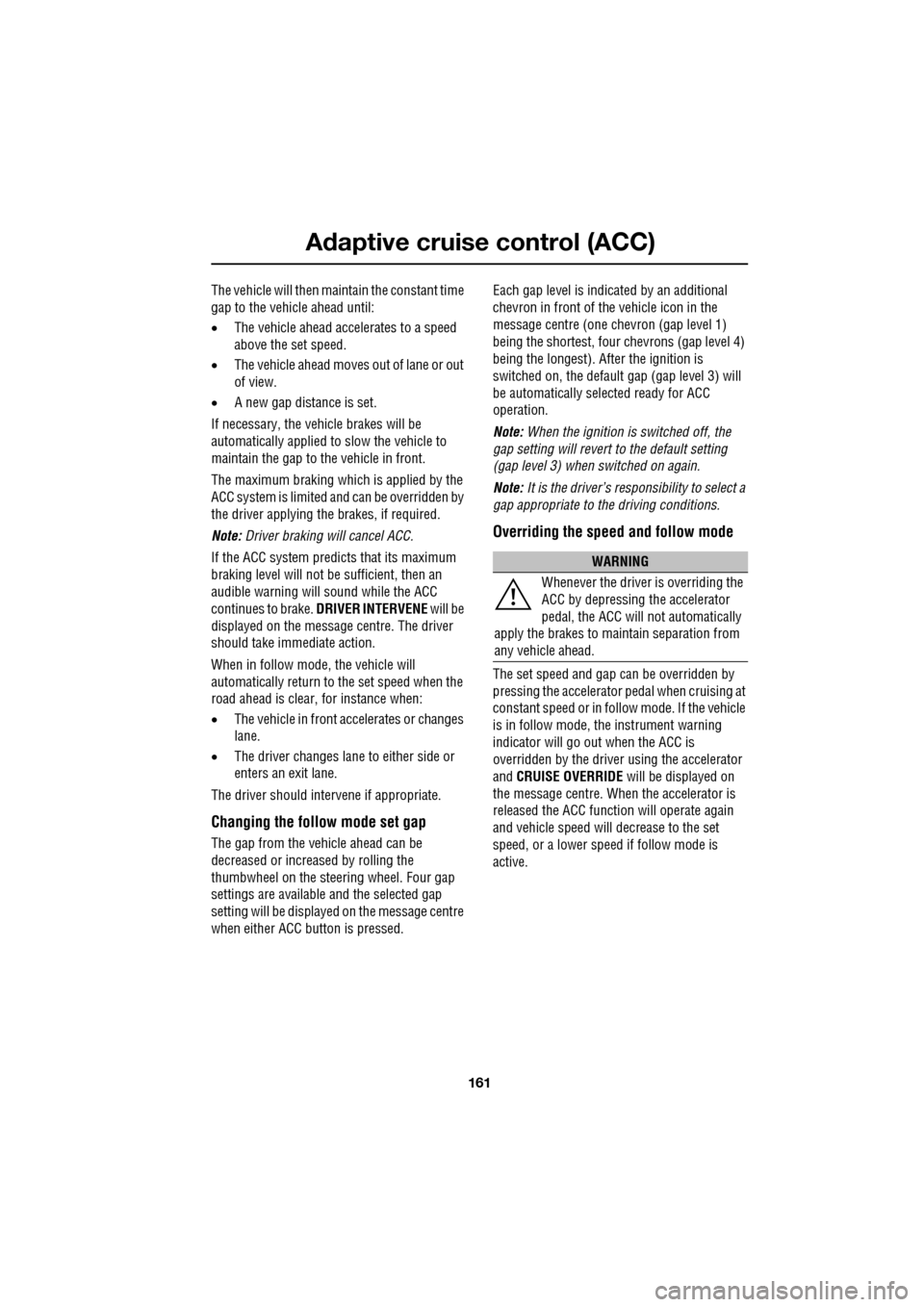
when either ACC button is pressed. Each gap level is indicated by an
additional
chevron in front of th e vehicle icon in the
message centre (one chevron (gap level 1)
being the shortest, four chevrons (gap level 4)
being the longest). A fter the ignition is
switched on, the default gap (gap level 3) will
be automatically selected ready for ACC
operation.
Note: When the ignition is switched off, the
gap setting will revert to the default setting
(gap level 3) when switched on again.
Note: It is the driver’s responsibility to select a
gap appropriate to the driving conditions.
Overriding the speed and follow mode
The set speed and gap ca n be overridden by
pressing the accelerator pedal when cruising at
constant speed or in follow mode. If the vehicle
is in follow mode, the instrument warning
indicator will go out when the ACC is
overridden by the driver using the accelerator
and CRUISE OVERRIDE will be displayed on
the message centre. When the accelerator is
released the ACC functi on will operate again
and vehicle speed will decrease to the set
speed, or a lower spee d if follow mode is
active.
WARNING
Whenever the driver is overriding the
ACC by depressing the accelerator
pedal, the ACC will not automatically
apply the brakes to ma intain separation from
any vehicle ahead.
Page 162 of 391
Adaptive cruise control (ACC)
162
Automatic low speed switch off
If the speed of the vehicle decreases below
30 km/h (18 mph), the ACC system will be
automatically switched off and the instrument
warning indicator will go out.
If the brakes were being applied by the ACC
system, they will be slowly released.
This will be accompanied by an audible
warning, and DRIVER INTERVENE will be
displayed on the message centre. The driver
must take control.
Automatic switch off
ACC will disengage, but not clear the memory
when;
• the CANCEL button ( 3) is pressed
• the brake pedal is pressed
• Neutral ( N), Park ( P) or Reverse ( R) gear
positions are selected
• Dynamic Stability Control activates.
ACC will disengage, and clear the memory
when;
• the ignition system is switched off
• maximum vehicle speed is reached
• a fault occurs in the ACC system.
Resuming the speed and follow mode
By pressing the RESUME button (4) after ACC
has been cancelled, for example, after braking,
the ACC will become active again provided that
the set speed memory has not been erased.
The original set speed will be resumed (unless
a vehicle ahead causes the follow mode to
become active) and the set speed will be
displayed in the message centre for four
seconds.
Hints on driving with ACC
The system acts by regulating the speed of the
vehicle using engine c ontrol and the brakes.
Gear changes may occur in response to
deceleration or acceleration whilst in ACC.
ACC is not a collision avoidance system.
However, during some situations the system
may provide the driver with an indication that
intervention is required.
An audible alarm will sound, accompanied by
the message DRIVER INTERVENE if the ACC
detects:
• A failure has occurred whilst the system is
active
• That using maximum ACC braking only is
not sufficient.
Note: ACC operates when the gear selector
lever is in position S or D.
Note: When engaged, the accelerator pedal
rests in the raised position. Fully release the
pedal to allow normal ACC operation.
Note: When braking is applied by the ACC, the
vehicle brake lamps will be switched on
although the brake pedal will not move.
CAUTION
RESUME should only be used if the
driver is aware of the set speed and
intends to return to it.
Page 166 of 391
Adaptive cruise control (ACC)
166
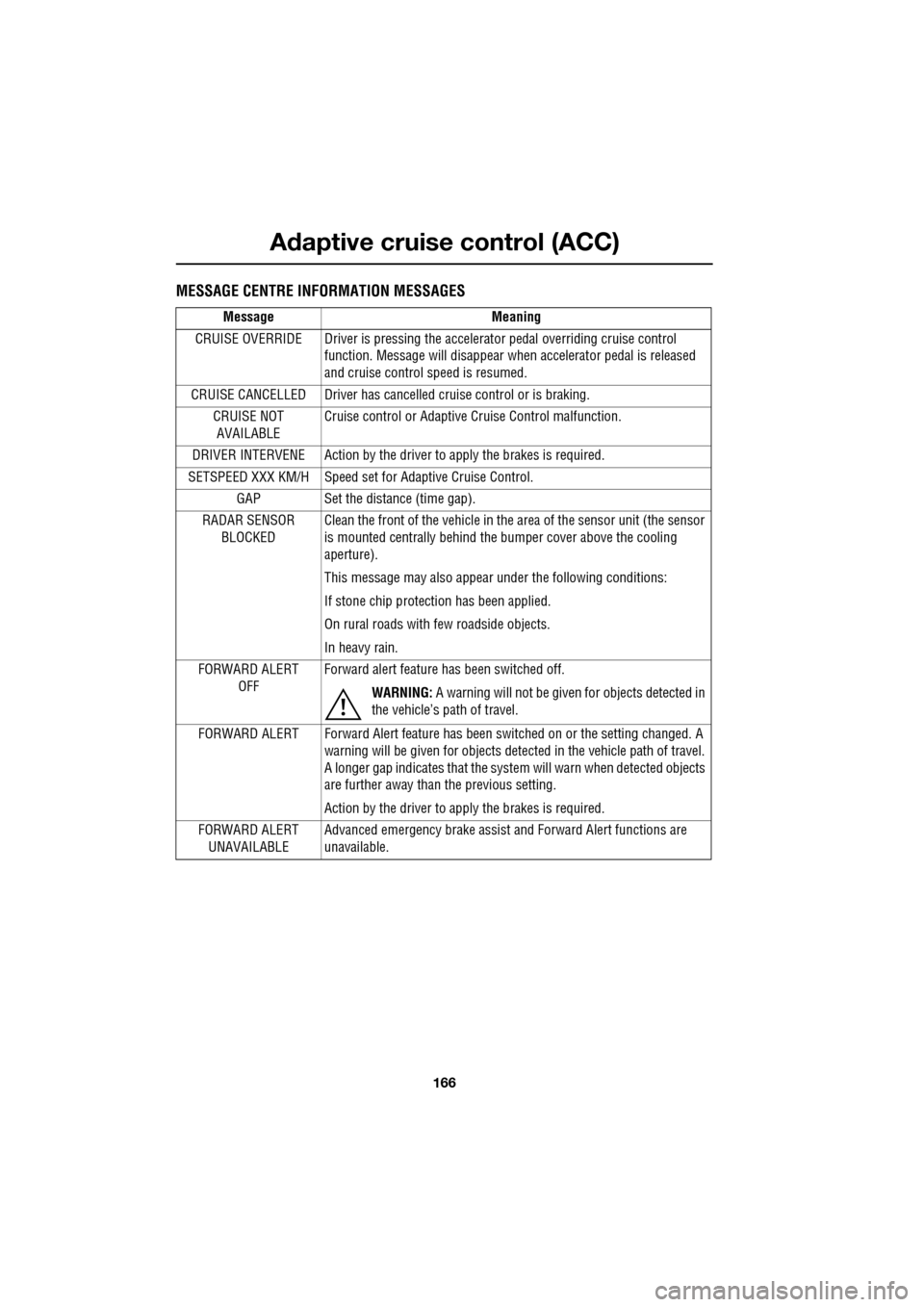
MESSAGE CENTRE INFORMATION MESSAGES
MessageMeaning
CRUISE OVERRIDE Driver is pressing the accelerator pedal overriding cruise control function. Message will disappear when accelerator pedal is released
and cruise control speed is resumed.
CRUISE CANCELLED Driver has cancelle d cruise control or is braking.
CRUISE NOT AVAILABLE Cruise control or Adaptive
Cruise Control malfunction.
DRIVER INTERVENE Action by the driver to apply the brakes is required.
SETSPEED XXX KM/H Speed set fo r Adaptive Cruise Control.
GAP Set the distance (time gap).
RADAR SENSOR BLOCKED Clean the front of the vehicle in the area of the sensor unit (the sensor
is mounted centrally behind the
bumper cover above the cooling
aperture).
This message may also appear under the following conditions:
If stone chip protect ion has been applied.
On rural roads with few roadside objects.
In heavy rain.
FORWARD ALERT OFF Forward alert feature has been switched off.
WARNING: A warning will not be given for objects detected in
the vehicle’s path of travel.
FORWARD ALERT Forward Alert feature has been switched on or the setting changed. A
warning will be given for objects detected in the vehicle path of travel.
A longer gap indicates that the system will warn when detected objects
are further away than the previous setting.
Action by the driver to ap ply the brakes is required.
FORWARD ALERT UNAVAILABLE Advanced emergency brake assist
and Forward Alert functions are
unavailable.
Page 171 of 391
171
Driving dynamics
TracDSC
TracDSC is an alternative setting of DSC with
reduced system interventions. With TracDSC
engaged, traction may be somewhat increased,
although stability may be reduced compared to
normal DSC. TracDSC is intended for use only
on dry tarmac, by suitably experienced drivers
and should not be select ed for other surfaces
or by drivers with insufficient skill and training
to operate the vehicle safely with the TracDSC
function engaged.
The less restrictive TracDSC setting may be
preferred, for example, by expert drivers
engaged in high performance driving on dry
Tarmac surfaces such as tracks and circuits.
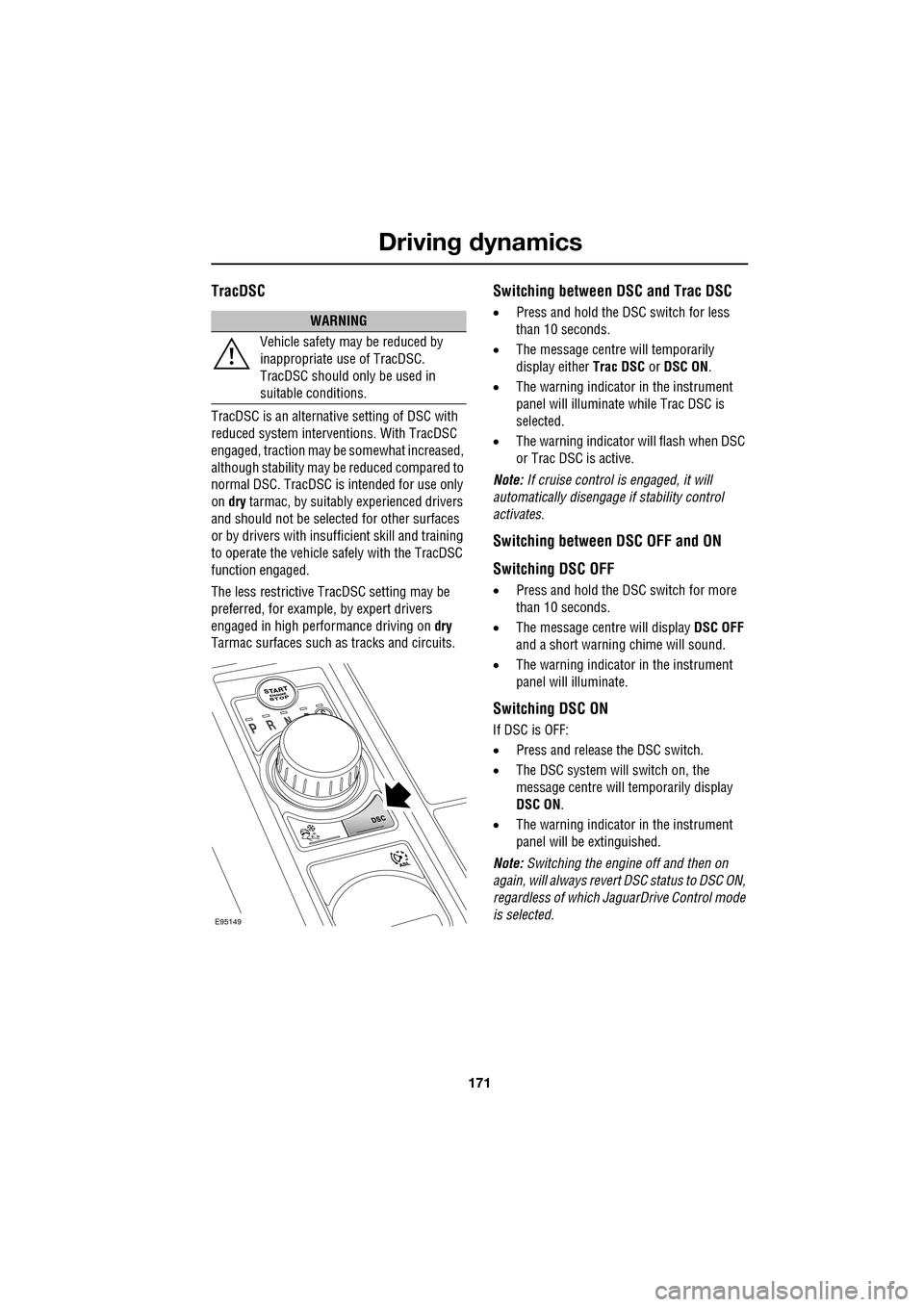
Switching between DSC and Trac DSC
• Press and hold the DSC switch for less
than 10 seconds.
• The message centre will temporarily
display either Trac DSC or DSC ON.
• The warning indicator in the instrument
panel will illuminate while Trac DSC is
selected.
• The warning indicator will flash when DSC
or Trac DSC is active.
Note: If cruise control is engaged, it will
automatically disengage if stability control
activates.
Switching between DSC OFF and ON
Switching DSC OFF
• Press and hold the DSC switch for more
than 10 seconds.
• The message centre will display DSC OFF
and a short warning chime will sound.
• The warning indicator in the instrument
panel will illuminate.
Switching DSC ON
If DSC is OFF:
• Press and release the DSC switch.
• The DSC system will switch on, the
message centre will temporarily display
DSC ON .
• The warning indicator in the instrument
panel will be extinguished.
Note: Switching the engine off and then on
again, will always revert DSC status to DSC ON,
regardless of which Ja guarDrive Control mode
is selected.
WARNING
Vehicle safety may be reduced by
inappropriate use of TracDSC.
TracDSC should only be used in
suitable conditions.
E95149
Page 177 of 391
177
Fuel and refuelling
Sulphur content
In some countries diesel may contain higher
levers of Sulphur, wh ich could cause damage
to the vehicle, if in doubt contact a local
Dealer/Authorised Repairer for advice.
RUNNING OUT OF FUEL
Note: If the vehicle does run out of fuel, a
minimum of 4 litres (0.9 gallons) will be
required to restart the engine. The vehicle will
need to be driven 1.6-5 km (1-3 miles) in order
to reset the engine management and
monitoring systems.
Note: If the vehicle does run out of fuel,
seeking qualified assistance is advisable.
Diesel engines
Vehicles with diesel e ngines are equipped with
a system to prevent the fuel tank from
emptying completely. When the fuel reaches a
minimum level, the system will activate a
reduced power mode (i.e . the engine will not
run properly). This will be followed by the
engine stopping in a pproximately 1.6 km
(1 mile). This feature prevents the fuel system from
running dry, which could cause damage to the
vehicle. If the gauge indicates low fuel or the
warning indicator illumi
nates, the fuel tank
should be refuelled as soon as possible at the
next filling stat ion, with at least 4 litres (0.9
gallons) of fuel.
If the system protection function has activated,
the vehicle must firstly be refuelled, then
restarted using the following procedure:
1. With the brake pedal pressed, press and
hold the engine START/STOP button and
crank the engine for five seconds.
2. Release the START/STOP button.
3. With the brake pedal pressed, press and
release the START/STOP button to crank
the engine. The engine should start within
approximately five seconds.
Note: If the engine does not start, pause for ten
seconds with the ignition in convenience
mode, before re peating the procedure from the
beginning.
FUEL CUT-OFF
The fuel system cut-off forms part of the
Supplementary Restraint System (SRS) fitted
to your vehicle. Following an impact, and
depending on the severity , the fuel pump may
be switched off.
CAUTION
Your vehicle is fitted with a Diesel
Particulate Filter (DPF), the maximum
Sulphur content must not exceed 0.005%.
Using an incorrect fuel will cause serious
damage to the DPF. See DIESEL
PARTICULATE FILTER (DPF) (page 135).
CAUTION
Avoid running out of fuel. Doing so can
cause damage to th e vehicle's engine,
fuel and emission control systems.
CAUTION
Do not crank the engine for longer than
30 seconds, or damage to the fuel pump
may occur.
Page 178 of 391
Fuel and refuelling
178
Resetting the fuel cut-off
1.Switch the ignition off and wait for one
minute.
2. Turn the ignition on for 30 seconds.
3. Check the vehicle thor oughly for fuel leaks.
If a leak is detected switch the ignition off
immediately.
• Do not start the vehicle if a leak is
present. Seek qualified advice and have
the vehicle recovered.
4. If no leaks are detected, start the vehicle.
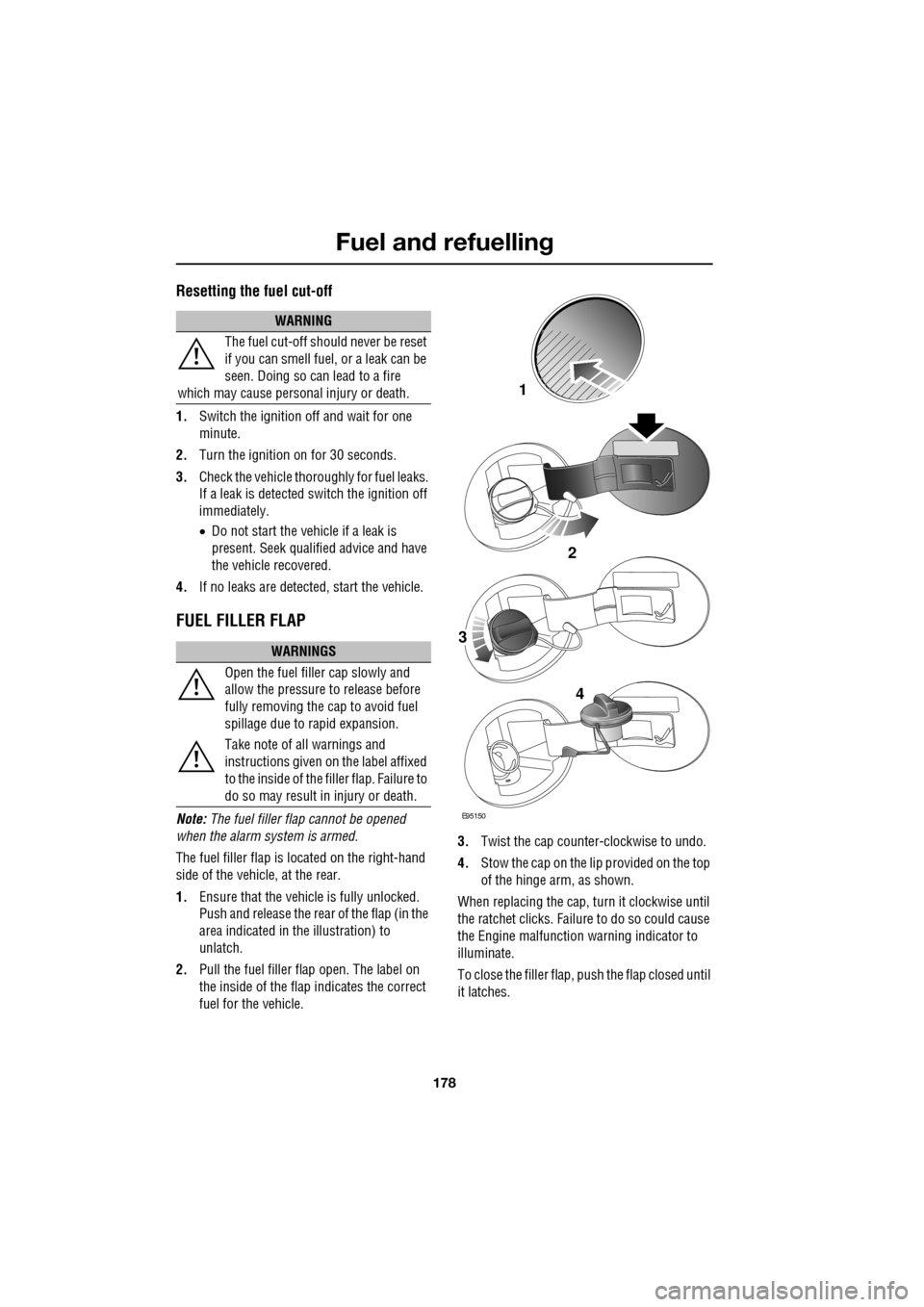
FUEL FILLER FLAP
Note: The fuel filler flap cannot be opened
when the alarm system is armed.
The fuel filler flap is located on the right-hand
side of the vehicle, at the rear.
1. Ensure that the vehicle is fully unlocked.
Push and release the rear of the flap (in the
area indicated in the illustration) to
unlatch.
2. Pull the fuel filler flap open. The label on
the inside of the flap indicates the correct
fuel for the vehicle. 3.
Twist the cap counte r-clockwise to undo.
4. Stow the cap on the lip provided on the top
of the hinge arm, as shown.
When replacing the cap, turn it clockwise until
the ratchet clicks. Failur e to do so could cause
the Engine malfunction warning indicator to
illuminate.
To close the filler flap, pus h the flap closed until
it latches.
WARNING
The fuel cut-off should never be reset
if you can smell fuel, or a leak can be
seen. Doing so can lead to a fire
which may cause persona l injury or death.
WARNINGS
Open the fuel filler cap slowly and
allow the pressure to release before
fully removing the cap to avoid fuel
spillage due to rapid expansion.
Take note of all warnings and
instructions given on the label affixed
to the inside of the fi ller flap. Failure to
do so may result in injury or death.
E95150
2
1
3
4
Page 188 of 391
Vehicle care
188
Do not use household soaps or detergents. The
use of Jaguar Vehicle Shampoo is
recommended.
Note: The vehicle's brightwork should be
cleaned using a sponge and generous
quantities of cold or lukewarm water only.
Rinse thoroughly and dry with a chamois
leather or synthetic substitute.
Using an automatic wash
Note: Regular use of automatic car washes
tends to dull the lustre of the paintwork.
1. Drive up to the entry of the car wash and
onto the conveyor.
2. Select N (Neutral) using the JaguarDrive
selector.
3. Press and release the engine START/STOP
button to stop the engine. The JaguarDrive
selector should remain raised and the
selector and message centre should
indicate that N is selected. 4.
The vehicle should rema in in this condition
while it is conveyed through the car wash.
5. At the end of the wash cycle, when directed
to start the engine by the car wash
instructions, press the brake pedal and
press and release the engine START/STOP
button to start the engine.
6. Select D (Drive) using the JaguarDrive
selector and drive away.
Do not start the engine or change the
JaguarDrive selector position during the car
wash.
After leaving the car wash, switch on the
windscreen wiper immediately to remove water
and prevent a build up of wax.
Underbonnet cleaning
CAUTIONS
Commercially operated automatic car
washes, jet washes and power-operated
mops, are not recommen ded. The detergents
used can contain certain chemicals which
may, over time, be detrimental to some
exterior parts of the vehicle. Prolonged usage
of automatic car wash es and power-operated
mops will also cause fine scratches in the paint
surface.
Ensure that Auto wipe is not selected
when entering a car wash, or damage to
the wiper blades and arms can occur if they
operate during the wash cycle.
Ensure that when using an automatic
drive through car wash, N (Neutral) is
selected and that the ignition is left in
convenience mode for the duration of the
wash.
CAUTIONS
Do not use a high pr essure washer or
steam cleaner in the engine
compartment. Damage to components could
occur.
Ensure that the brake fluid reservoir is
kept dry at all times. Only use a clean,
dry cloth to clean the brake fluid cap and
reservoir.
Page 195 of 391
195
Maintenance
OPENING AND CLOSING THE
BONNET
Opening the bonnet
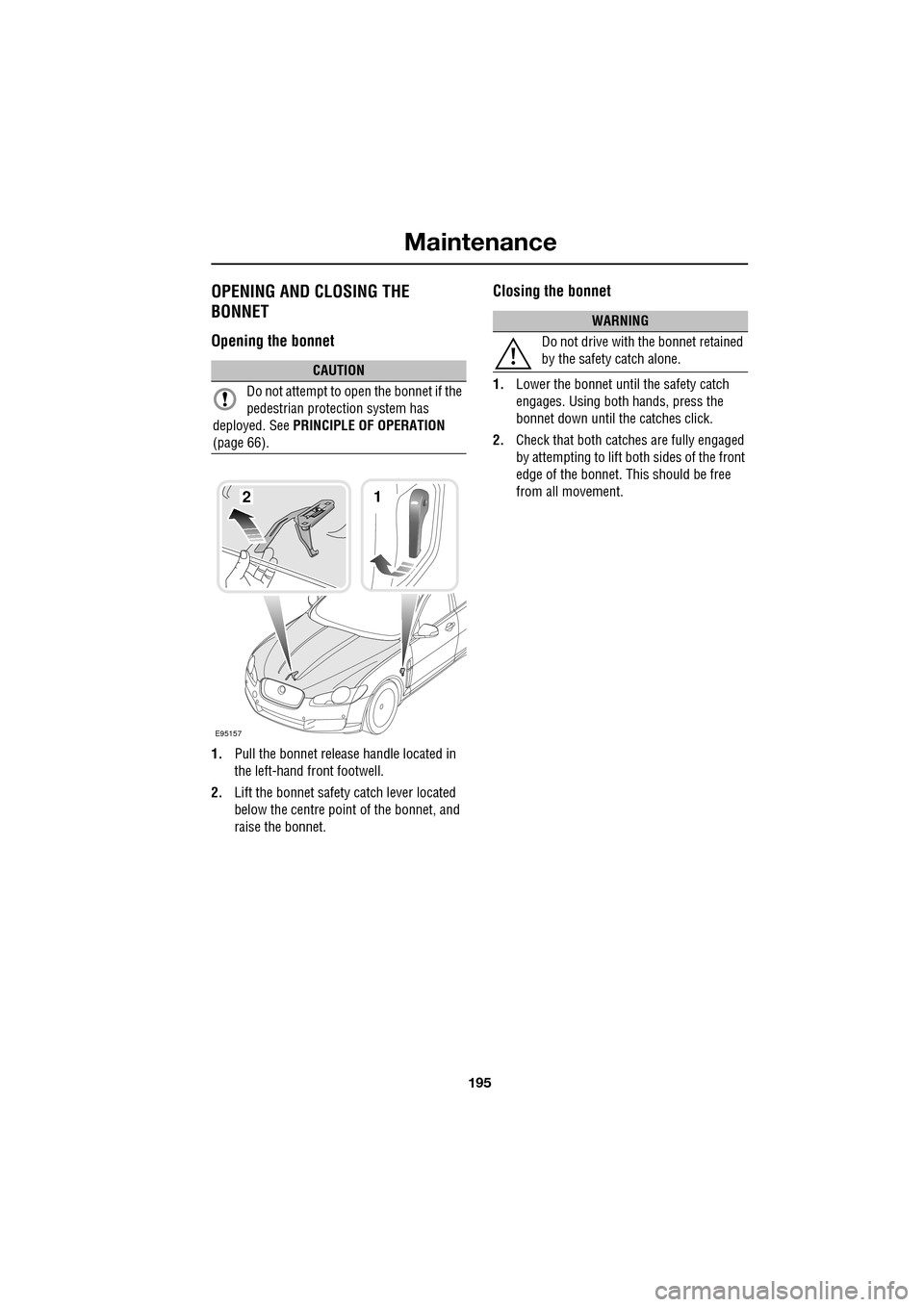
1.Pull the bonnet release handle located in
the left-hand front footwell.
2. Lift the bonnet safety catch lever located
below the centre point of the bonnet, and
raise the bonnet.
Closing the bonnet
1. Lower the bonnet until the safety catch
engages. Using both hands, press the
bonnet down until the catches click.
2. Check that both catches are fully engaged
by attempting to lift both sides of the front
edge of the bonnet. This should be free
from all movement.CAUTION
Do not attempt to open the bonnet if the
pedestrian protec tion system has
deployed. See PRINCIPLE OF OPERATION
(page 66).
E95157
12
WARNING
Do not drive with the bonnet retained
by the safety catch alone.