Rele JAGUAR XF 2009 1.G Manual Online
[x] Cancel search | Manufacturer: JAGUAR, Model Year: 2009, Model line: XF, Model: JAGUAR XF 2009 1.GPages: 391, PDF Size: 19.32 MB
Page 275 of 391
275
Audio unit operation
STATION PRESET BUTTONS
Tuning stations
The seek buttons on the audio console and on
the touch-screen perform the same function.
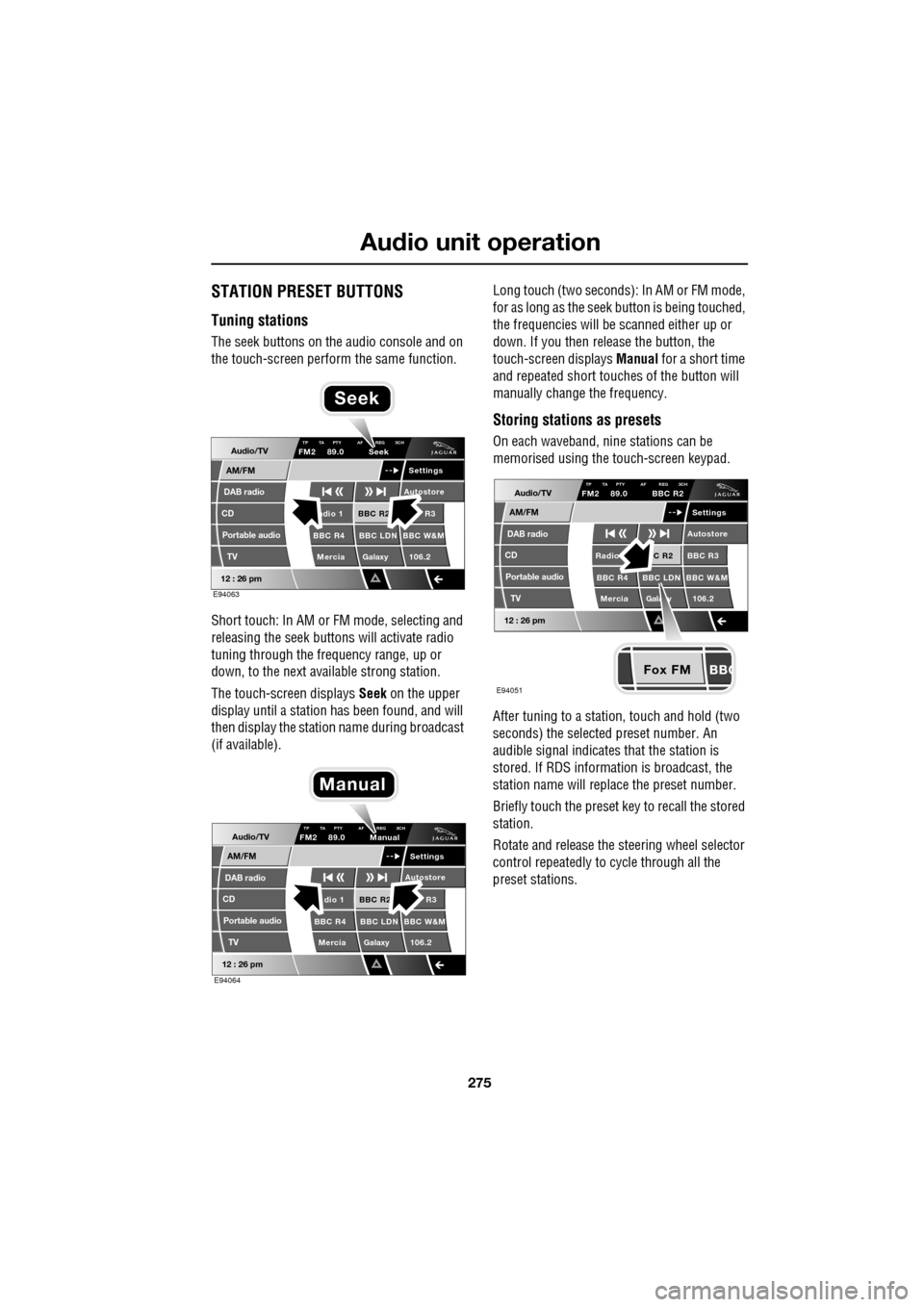
Short touch: In AM or FM mode, selecting and
releasing the seek buttons will activate radio
tuning through the frequency range, up or
down, to the next available strong station.
The touch-screen displays Seek on the upper
display until a station has been found, and will
then display the station name during broadcast
(if available). Long touch (two seconds): In AM or FM mode,
for as long as the seek
button is being touched,
the frequencies will be scanned either up or
down. If you then release the button, the
touch-screen displays Manual for a short time
and repeated short touc hes of the button will
manually change the frequency.
Storing stations as presets
On each waveband, ni ne stations can be
memorised using the touch-screen keypad.
After tuning to a stati on, touch and hold (two
seconds) the selected preset number. An
audible signal indicates that the station is
stored. If RDS informat ion is broadcast, the
station name will replace the preset number.
Briefly touch the preset key to recall the stored
station.
Rotate and release the steering wheel selector
control repeatedly to cycle through all the
preset stations.Audio/TV
DAB radio
CD
AM/FM
12 : 26 pm
BBC R2 R3
BBC R4 BBC LDN BBC W&M Mercia Galaxy 106.2adio 1
Settings
Autostore
TP TA PTY AF REG 3CHFM2 89.0 Seek
Portable audio TV
E94063
Seek
Audio/TV
DAB radio
CD
AM/FM
12 : 26 pm
BBC R2 R3
BBC R4 BBC LDN BBC W&M Mercia Galaxy 106.2dio 1
Settings
Autostore
TP TA PTY AF REG 3CHFM2 89.0 Manual
Portable audio TV
E94064
Manual
Fox FM
Audio/TV
DAB radio
CD
AM/FM
12 : 26 pm
C R2 BBC R3
BBC R4 BBC LDN BBC W&M
Mercia Gala y 106.2Radio
Settings
Autostore
TP TA PTY AF REG 3CHFM2 89.0 BBC R2
Portable audio TV
E94051
Page 282 of 391
Digital audio broadcasting
282
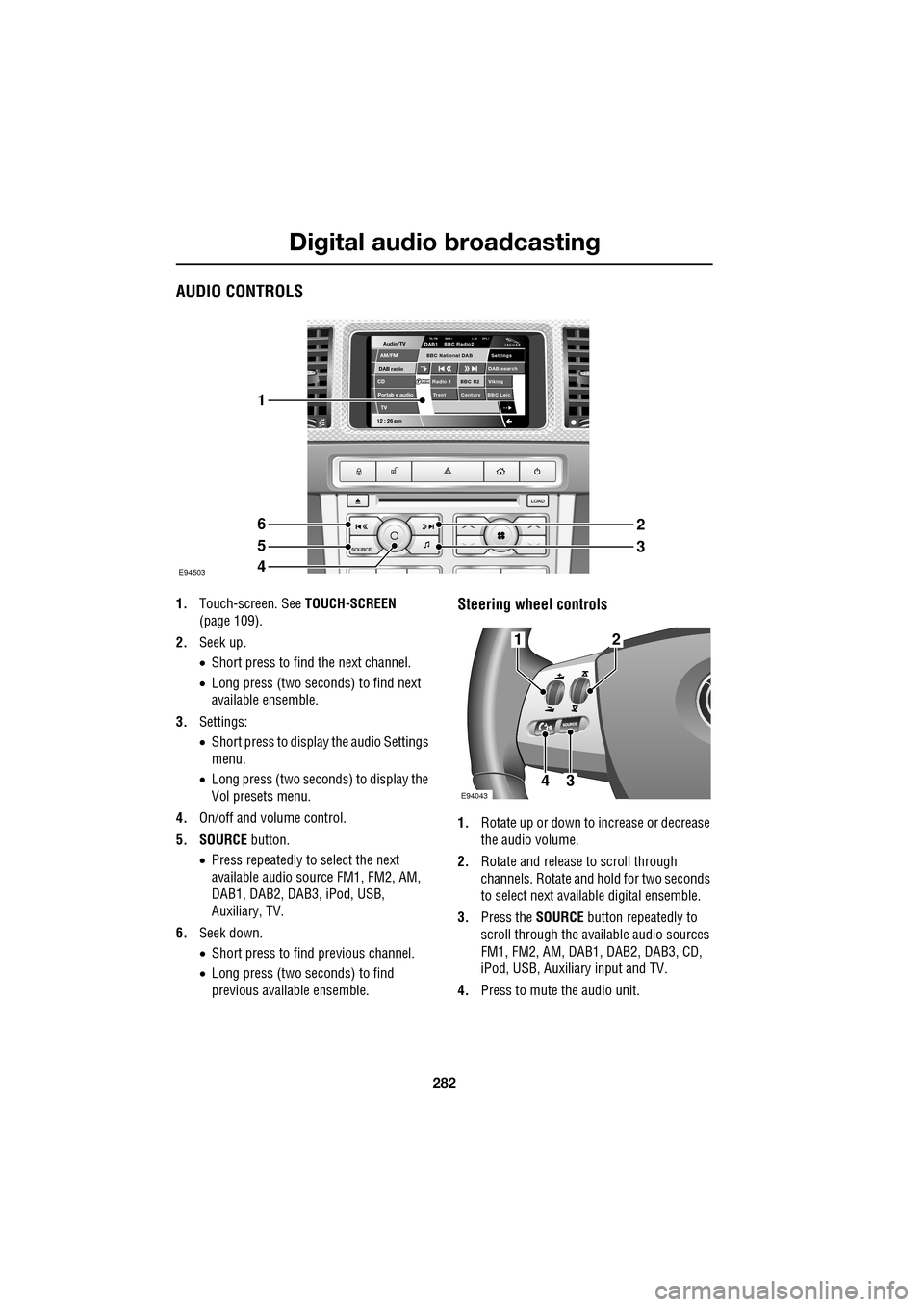
AUDIO CONTROLS
1.Touch-screen. See TOUCH-SCREEN
(page 109).
2. Seek up.
•Short press to find the next channel.
• Long press (two seconds) to find next
available ensemble.
3. Settings:
•Short press to display the audio Settings
menu.
• Long press (two seconds) to display the
Vol presets menu.
4. On/off and volume control.
5. SOURCE button.
• Press repeatedly to select the next
available audio sour ce FM1, FM2, AM,
DAB1, DAB2, DAB3, iPod, USB,
Auxiliary, TV.
6. Seek down.
•Short press to find previous channel.
• Long press (two seconds) to find
previous available ensemble.Steering wheel controls
1. Rotate up or down to increase or decrease
the audio volume.
2. Rotate and release to scroll through
channels. Rotate and hold for two seconds
to select next available digital ensemble.
3. Press the SOURCE button repeatedly to
scroll through the available audio sources
FM1, FM2, AM, DAB1, DAB2, DAB3, CD,
iPod, USB, Auxiliary input and TV.
4. Press to mute the audio unit.
Audio/TV
DAB radio
CDAM/FM
12 : 26 pm
BBC R2 Viking
Trent Century BBC LeicRadio 1
Settings
DAB search
TA-FM DAB-i L nk DPL IDAB1 BBC Radio2
Portab e audio
TV
BBC National DAB
E94503
1
6
5
4
2
3
E94043
12
43
Page 295 of 391
295
Compact disc player
TRACK SELECTION
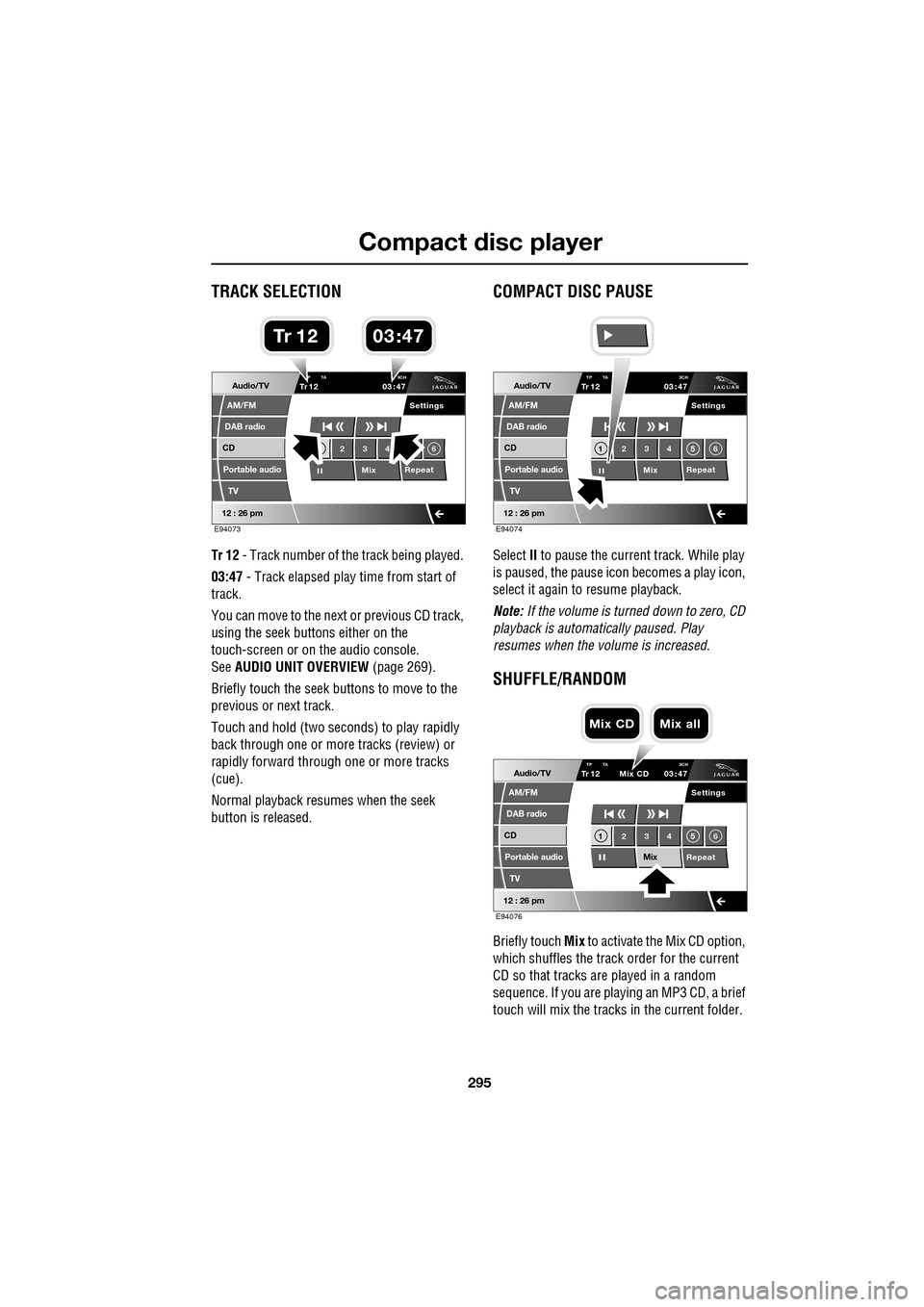
Tr 12 - Track number of th e track being played.
03:47 - Track elapsed play time from start of
track.
You can move to the next or previous CD track,
using the seek buttons either on the
touch-screen or on the audio console.
See AUDIO UNIT OVERVIEW (page 269).
Briefly touch the seek buttons to move to the
previous or next track.
Touch and hold (two seco nds) to play rapidly
back through one or more tracks (review) or
rapidly forward through one or more tracks
(cue).
Normal playback resumes when the seek
button is released.
COMPACT DISC PAUSE
Select II to pause the current track. While play
is paused, the pause ic on becomes a play icon,
select it again to resume playback.
Note: If the volume is turned down to zero, CD
playback is automatically paused. Play
resumes when the volume is increased.
SHUFFLE/RANDOM
Briefly touch Mix to activate the Mix CD option,
which shuffles the track order for the current
CD so that tracks are played in a random
sequence. If you are play ing an MP3 CD, a brief
touch will mix the tracks in the current folder.
Audio/TV
DAB radio
CD
AM/FM
12 : 26 pm
Portable audio
TV
Settings
23 4 6
MixRepeat
TrP TA
3CH1203 47
E94073
03 47Tr 1 2
Audio/TV
DAB radio
CD
AM/FM
12 : 26 pm
Portable audio
TV
Settings
1 23 45 6
MixRepeat
TrTP TA
3CH1203 47
E94074
Audio/TV
DAB radio
CD
AM/FM
12 : 26 pm
Portable audio
TV
Settings
1 23 45 6
MixRepeat
TrTP TA 3CH1203 47
Mix CD
E94076
Mix CD Mix all
Page 304 of 391
Portable audio
304
Searching a portable device
Next/previous track
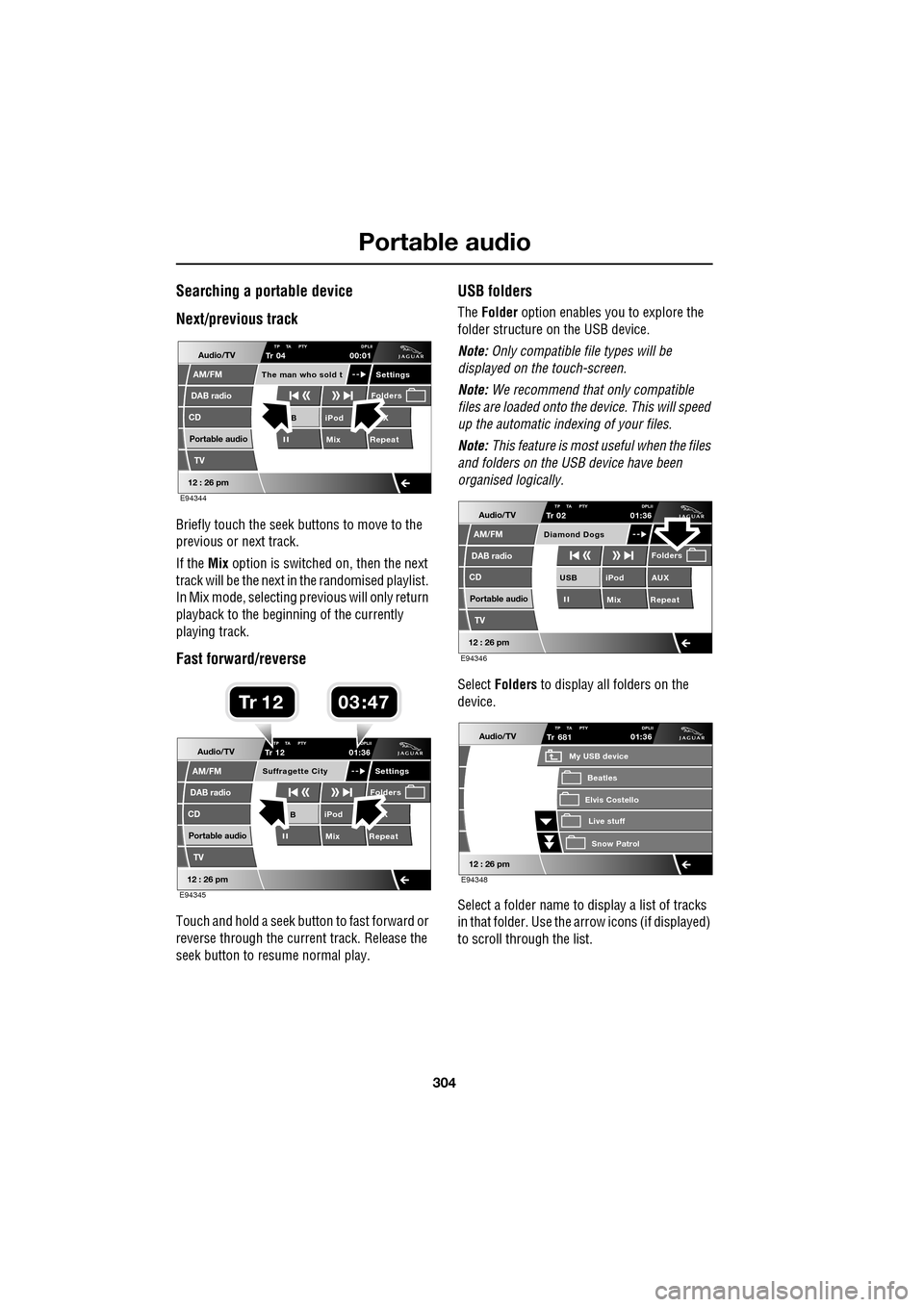
Briefly touch the seek buttons to move to the
previous or next track.
If the Mix option is switched on, then the next
track will be the next in the randomised playlist.
In Mix mode, selecting previous will only return
playback to the beginning of the currently
playing track.
Fast forward/reverse
Touch and hold a seek button to fast forward or
reverse through the current track. Release the
seek button to resume normal play.
USB folders
The Folder option enables you to explore the
folder structure on the USB device.
Note: Only compatible file types will be
displayed on the touch-screen.
Note: We recommend that only compatible
files are loaded onto the device. This will speed
up the automatic indexing of your files.
Note: This feature is most useful when the files
and folders on the USB device have been
organised logically.
Select Folders to display all folders on the
device.
Select a folder name to display a list of tracks
in that folder. Use the arrow icons (if displayed)
to scroll through the list.
Audio/TV
DAB radio
CD
AM/FM
12 : 26 pm
iPod X
Mix RepeatB
Settings
Folders
TP TA PTY DPLIITr 04
Portable audio
TV
The man who sold t
00:01
E94344
Audio/TV
DAB radio
CD
AM/FM
12 : 26 pm
iPod X
Mix RepeatB
Settings
Folders
TP TA PTY DPLIITr 12
Portable audio
TV
Suffragette City
01:36
E94345
03 47Tr 1 2
Audio/TV
DAB radio
CD
AM/FM
12 : 26 pm
iPod AUX
Mix RepeatUSB
Folders
TP TA PTY DPLIITr 02
Portable audio
TV
Diamond Dogs
01:36
E94346
Audio/TV
12 : 26 pm
Tr
Elvis Costello
My USB device
Live stuffSnow Patr ol
Beatles
681TP TA PTY DPLII01:36
E94348
Page 308 of 391
Telephone
308
The Bluetooth in-car telephone system allows
certain mobile phones to be used hands-free in
your vehicle. There is no need to connect the
mobile phone to a cradle or cable.
Bluetooth® is a registered trademark of
Bluetooth SIG, Inc.
Please refer to the Owner section of the Jaguar
website at www.jaguar.com , for a list of
compatible phones. Altern atively, please refer
to your Dealer/Authorised Repairer.
Note: The Bluetooth technology phones listed
on Jaguar.com, have been tested for
compatibility with Jaguar vehicles.
Performance will vary, based on phone
software version, covera ge and your wireless
carrier. Phones are warranted by their
manufacturer, not Jaguar.
If your mobile phone battery charge becomes
low it may switch off its Bluetooth link to the
vehicle. This is normal operation for mobile
phones, to help preserve the remaining battery
charge. In this event, the touch-screen will
display a phone connection message.
The mobile phone must be paired and docked
with the vehicle system before use.
See TELEPHONE PAIRING AND DOCKING
(page 309). Once paired and docked, the
phone can be operated via the steering wheel
switches or the touch-screen. The mobile
phone doesn’t need to be physically connected
to the vehicle, it can be left in a jacket pocket,
for instance. Calls are routed through the
vehicle’s audio speake rs, and a dedicated
microphone is fitted within the overhead
console and is directionally biased towards the
driver.
You can use the system to answer or reject
incoming calls, make outgoing calls or alter the
call volume. The system does not support SMS
text messaging. Note:
The vehicle ignition system must be on
and the touch-screen system must be active, in
order to use the phone.
Call volume
The volume of telephone calls can be adjusted
for hands-free operation. To adjust the volume,
operate the audio system’s volume control
during a phone call.
If the audio system is in use when the phone
becomes active, the audio system source is
suppressed for the duration of the call.
Charging your phone
It is possible to use the in-car 12V/USB socket
to charge your mobile phone. Refer to the
mobile phone operating instructions for
charging information.
Page 309 of 391
309
Telephone
Safety
Driving
Check local regulations covering the use of
in-car telephones in the areas that you intend to
use your telephone, and always obey them.
Observe the following guidelines if you are
using the phone when driving.
• Give full attention to driving - safe driving
is your prime responsibility.
• Always use hands-free operation when
driving.
• When receiving a call, if driving conditions
demand, pull off the road and park.
Electronic devices
Most modern electronic equipment is shielded
from Radio Frequency (R F) signals. However,
certain equipment may not be shielded against
RF signals from your phone.
Pacemakers
The Health Industry Manufacturers'
Association recommends that a minimum
separation of 15 centimetres (six inches) is
maintained between a wireless phone antenna
and a pacemaker, to avoid potential
interference with the pacemaker. These
recommendations are consistent with the
independent research by, and
recommendations of, Wireless Technology
Research.
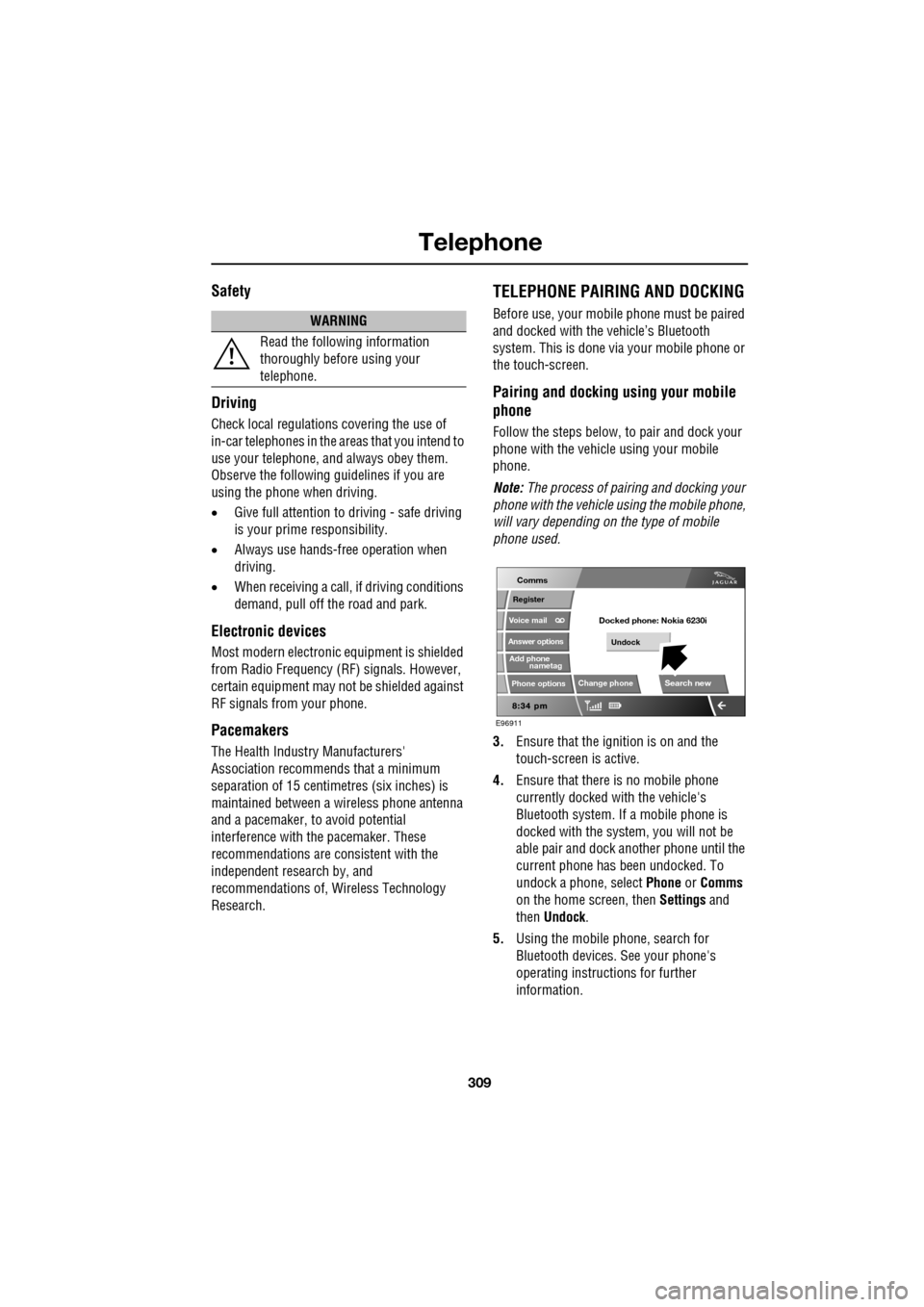
TELEPHONE PAIRING AND DOCKING
Before use, your mobile phone must be paired
and docked with the vehicle’s Bluetooth
system. This is done via your mobile phone or
the touch-screen.
Pairing and docking using your mobile
phone
Follow the steps below, to pair and dock your
phone with the vehicle using your mobile
phone.
Note: The process of pairing and docking your
phone with the vehicle using the mobile phone,
will vary depending on the type of mobile
phone used.
3. Ensure that the ignition is on and the
touch-screen is active.
4. Ensure that there is no mobile phone
currently docked with the vehicle's
Bluetooth system. If a mobile phone is
docked with the system, you will not be
able pair and dock another phone until the
current phone has been undocked. To
undock a phone, select Phone or Comms
on the home screen, then Settings and
then Undock .
5. Using the mobile phone, search for
Bluetooth devices. See your phone's
operating instructions for further
information.
WARNING
Read the following information
thoroughly before using your
telephone.
nametag
Register
Voice mail
Answer options
Phone options
Change phone
E96911
Comms
Add phone
Search new
Docked phone: Nokia 6230i
Undock
Page 323 of 391
323
Telephone
TELEPHONE VOICE CONTROL
Voice control allows many of the telephone
features to be activa ted by voice commands.
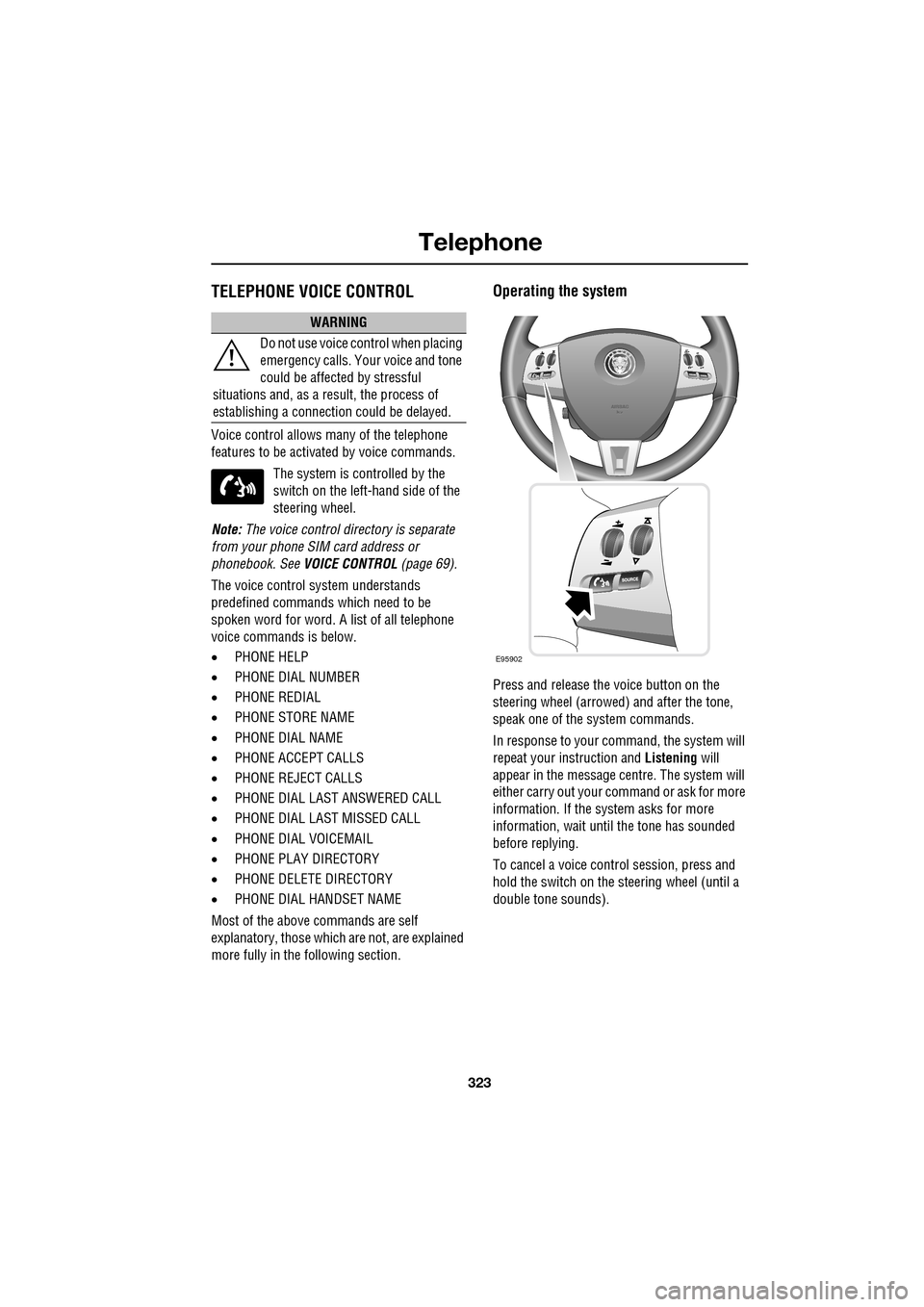
The system is controlled by the
switch on the left -hand side of the
steering wheel.
Note: The voice control dire ctory is separate
from your phone SIM card address or
phonebook. See VOICE CONTROL (page 69).
The voice control sy stem understands
predefined commands which need to be
spoken word for word. A list of all telephone
voice commands is below.
• PHONE HELP
• PHONE DIAL NUMBER
• PHONE REDIAL
• PHONE STORE NAME
• PHONE DIAL NAME
• PHONE ACCEPT CALLS
• PHONE REJECT CALLS
• PHONE DIAL LAST ANSWERED CALL
• PHONE DIAL LAST MISSED CALL
• PHONE DIAL VOICEMAIL
• PHONE PLAY DIRECTORY
• PHONE DELETE DIRECTORY
• PHONE DIAL HANDSET NAME
Most of the above commands are self
explanatory, those whic h are not, are explained
more fully in the following section.
Operating the system
Press and release the voice button on the
steering wheel (arrowed) and after the tone,
speak one of the system commands.
In response to your command, the system will
repeat your instruction and Listening will
appear in the message centre. The system will
either carry out your command or ask for more
information. If the system asks for more
information, wait until the tone has sounded
before replying.
To cancel a voice control session, press and
hold the switch on the steering wheel (until a
double tone sounds).
WARNING
Do not use voice control when placing
emergency calls. Your voice and tone
could be affected by stressful
situations and, as a result, the process of
establishing a connecti on could be delayed.
E95902
Page 326 of 391
Telephone
326
Storing nametags using the
touch-screen
Nametags can also be added to the system by
using the Add Phone nametag feature on the
touch-screen, as described below.
1. From the Home menu, select the Comms
button.
2. From the Comms menu, select the Add
Phone Nametag button.
3. A numerical touch-screen is displayed.
Enter the phone number.
4. When the number is entered, select the
Add button in the top right-hand corner
and, once the tone ha s sounded, speak the
name that you wish the number to be
stored under.
Note: The storage of the nametag itself is
subject to the nameta g not being too short
(less than 0.4 seconds), too long (longer than
4 seconds), not sounding too much like
another stored nametag and relies on the
repetition of the nametag sounding the same
as the first utterance of it. If any of these criteria
are not met, the system will prompt you to give
a new nametag.
Note: The Add button will be greyed out if the
phone number is not valid.
Dialling a nametag
To dial a number stored under a nametag in the
directory, press and release the voice button
and say Phone dial name . The system will
repeat the command and will prompt you for a
stored nametag by saying Name please. After
the tone, speak the name tag of the required
number. The system will replay the stored
nametag and ask for confirmation that it is
correct. Answer with Yes or No, as appropriate.
Dialling voicemail
The number for your voicemail service needs
to be stored in the system, before using this
facility. To store the voicemail number:
• From the Home menu, select Comms.
• From the Comms menu, select Settings.
• The phone Settings me nu has a Voice mail
button, to allow your voicemail number to
be entered.
To dial the voicemail number, press and
release the Voice button on the steering wheel,
wait for the tone to sound, then say Phone dial
voicemail .
Play all stored nametags
To play all the nametags stored in the directory,
press and release the Voice button on the
steering wheel and after the tone, say Phone
play directory . The list can be interrupted at
any time, by pressing and releasing the button
again. Once interrupted, you can then use the
commands, REPLAY , DIAL , DELETE, EDIT or
CANCEL .
Dialling a nametag stored on the
handset
To dial a number associated with a nametag
stored on the phone hand set, press and release
the Voice button on the steering wheel and,
after the tone, say Phone dial handset name .
Page 330 of 391
Television
330
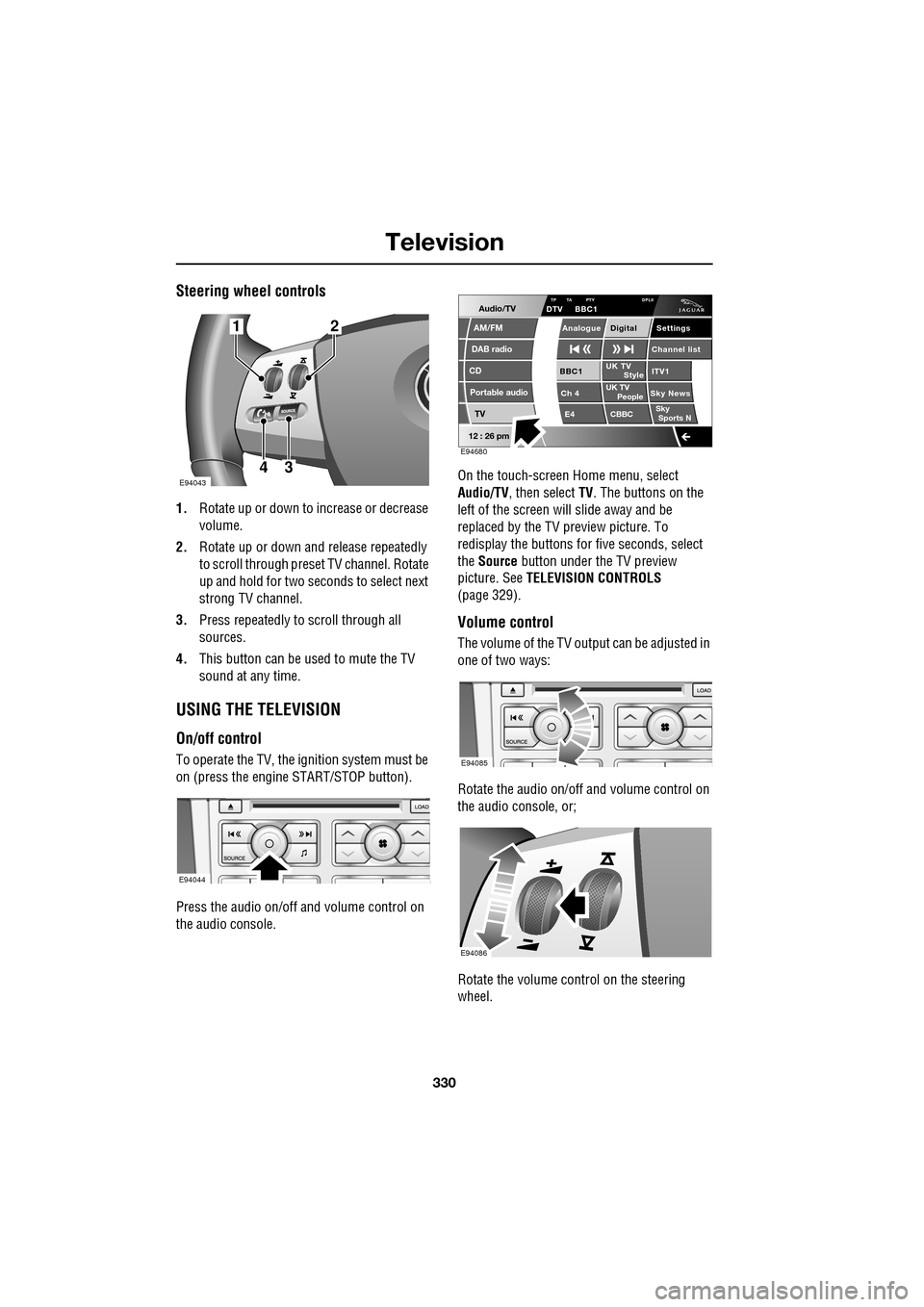
Steering wheel controls
1.Rotate up or down to increase or decrease
volume.
2. Rotate up or down and release repeatedly
to scroll through preset TV channel. Rotate
up and hold for two seconds to select next
strong TV channel.
3. Press repeatedly to scroll through all
sources.
4. This button can be used to mute the TV
sound at any time.
USING THE TELEVISION
On/off control
To operate the TV, the ignition system must be
on (press the engine START/STOP button).
Press the audio on/off and volume control on
the audio console. On the touch-screen
Home menu, select
Audio/TV , then select TV. The buttons on the
left of the screen will slide away and be
replaced by the TV preview picture. To
redisplay the buttons for five sec onds, select
the Source button under the TV preview
picture. See TELEVISION CONTROLS
(page 329).
Volume control
The volume of the TV output can be adjusted in
one of two ways:
Rotate the audio on/off and volume control on
the audio console, or;
Rotate the volume control on the steering
wheel.
E94043
12
43
E94044
Audio/TV
DAB radio
CD
AM/FM
12 : 26 pm
Portable audio
TV
UK TV ITV1
Ch 4 Sky News E4 CBBCBBC1
Settings
Channel list
TA PTY DPLIIDTV BBC1
Style
UK TV People
SkySports NTP
Analogue Digital
E94680
E94085
E94086
Page 332 of 391
Television
332
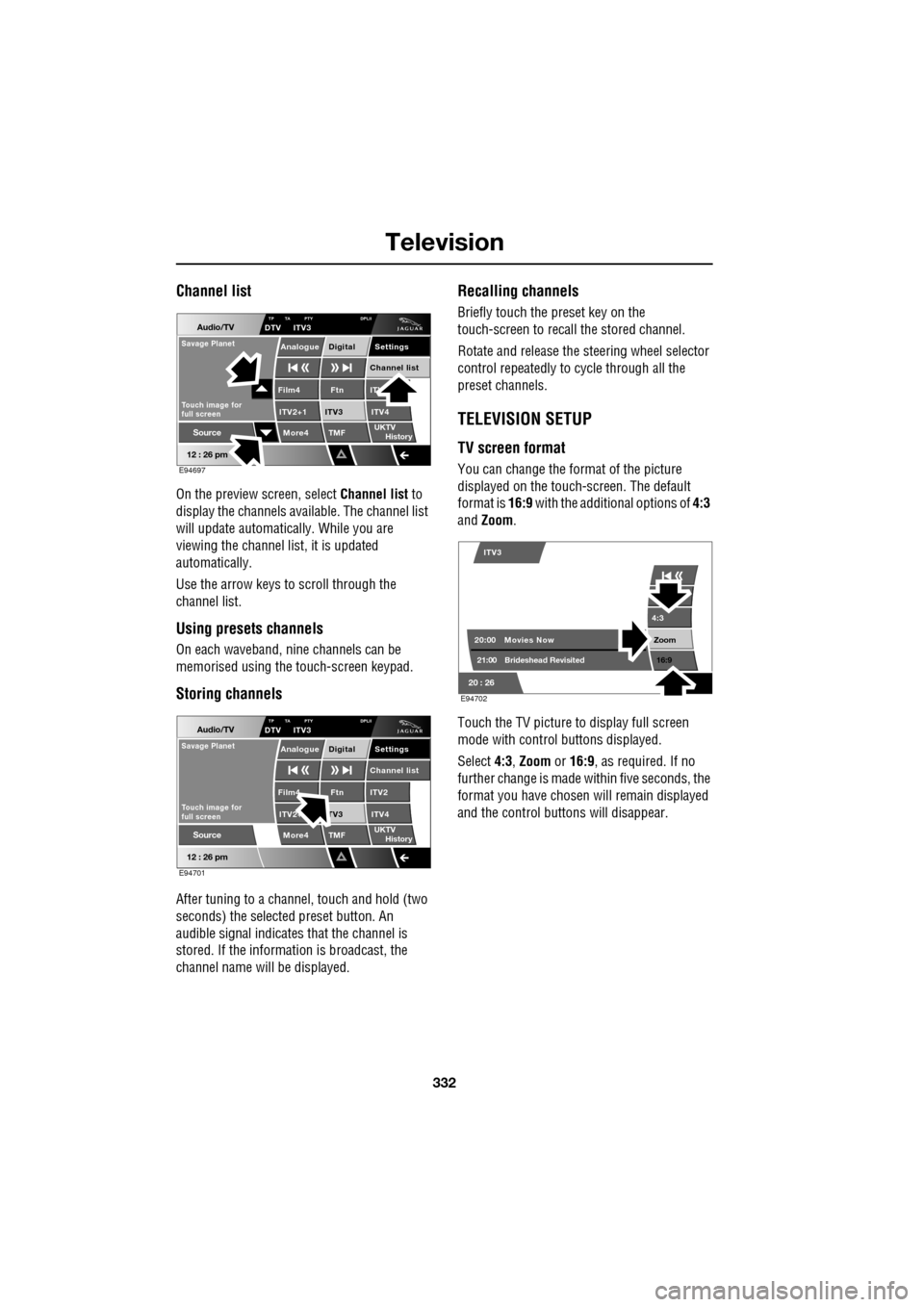
Channel list
On the preview screen, select Channel list to
display the channels available. The channel list
will update automatically. While you are
viewing the channel list, it is updated
automatically.
Use the arrow keys to scroll through the
channel list.
Using presets channels
On each waveband, ni ne channels can be
memorised using the touch-screen keypad.
Storing channels
After tuning to a channe l, touch and hold (two
seconds) the selected preset button. An
audible signal i ndicates that the channel is
stored. If the informat ion is broadcast, the
channel name wi ll be displayed.
Recalling channels
Briefly touch the preset key on the
touch-screen to recall the stored channel.
Rotate and release the steering wheel selector
control repeatedly to cycle through all the
preset channels.
TELEVISION SETUP
TV screen format
You can change the format of the picture
displayed on the touch-screen. The default
format is 16:9 with the additional options of 4:3
and Zoom .
Touch the TV picture to display full screen
mode with control buttons displayed.
Select 4:3, Zoom or 16:9 , as required. If no
further change is made within five seconds, the
format you have chosen will remain displayed
and the control butt ons will disappear.
Audio/TV
12 : 26 pm
More4 TMF
TP TA PTY DPLIIDTV ITV3
UKTV
HistorySource
ITV
ITV2+1 ITV4Film4
Settings
Channel listAnalogue Digital
Ftn
ITV3
Touch image for
full screen
Savage Planet
E94697
Audio/TV
12 : 26 pm
More4 TMF
TP TA PTY DPLIIDTV ITV3
UKTV
HistorySource
ITV2
ITV2+ ITV4Film4
Settings
Channel listAnalogue Digital
Ftn
TV3
Touch image for
full screen
Savage Planet
E94701
4:3
Zoom 16:9
ITV3
20:0021:00 Movies Now
Brideshead Revisited
20 : 26 E94702